

Operar con el Calendario Económico MQL5 (Parte 6): Automatizar la entrada de operaciones con análisis de noticias y temporizadores de cuenta regresiva
 396
396
 3
3

Introducción
En este artículo, damos un paso más en nuestra serie sobre el Calendario Económico MQL5 automatizando las entradas comerciales basadas en el análisis de noticias en tiempo real. Basándonos en nuestras mejoras anteriores del panel de control (Parte 5), ahora integramos una lógica de negociación que analiza las noticias utilizando filtros y desfases temporales definidos por el usuario, compara las previsiones y los valores anteriores, y ejecuta automáticamente órdenes de COMPRA o VENTA en función de las expectativas del mercado. También implementamos temporizadores de cuenta regresiva dinámicos que muestran el tiempo restante hasta la publicación de la noticia y reinician el sistema después de la ejecución, lo que garantiza que nuestra estrategia comercial siga respondiendo a las condiciones cambiantes. Estructuramos el artículo a través de los siguientes temas:
- Comprensión de los requisitos de la lógica comercial
- Implementación de la lógica comercial en MQL5
- Creación y gestión de temporizadores de cuenta regresiva
- Poniendo a prueba la lógica comercial
- Conclusión
Profundicemos y exploremos cómo estos componentes se combinan para automatizar el ingreso comercial con precisión y confiabilidad.
Comprensión de los requisitos de la lógica comercial
Para nuestro sistema de comercio automatizado, el primer paso será identificar qué eventos noticiosos son candidatos adecuados para una operación. Definiremos un evento candidato como aquel que cae dentro de una ventana de tiempo específica (determinada por entradas de compensación definidas por el usuario) en relación con su lanzamiento programado. Luego incluiremos información sobre los modos de negociación, como por ejemplo, el comercio antes del comunicado de prensa. En el modo "negociar antes", por ejemplo, un evento calificará solo si la hora actual está entre la hora de lanzamiento programada del evento menos el desfase (por ejemplo, 5 minutos) y la hora de lanzamiento real del evento. De esta forma, operaremos 5 minutos antes del lanzamiento real.
El filtrado es fundamental para garantizar que sólo tengamos en cuenta las noticias relevantes. Nuestro sistema utilizará varios filtros: un filtro de moneda para centrarse en pares de divisas seleccionados, un filtro de impacto para limitar los eventos a aquellos de un nivel de significancia elegido y un filtro de tiempo que restringe los eventos a aquellos dentro de un rango general predefinido. El usuario selecciona esto desde el panel de control. Este filtrado en capas ayudará a minimizar el ruido y garantizar que solo se procesen los eventos noticiosos más pertinentes.
Una vez que un evento pasa los criterios de filtrado, la lógica comercial comparará los puntos de datos clave del evento noticioso, específicamente, el valor pronosticado versus el valor anterior. Si ambos valores están disponibles y son distintos de cero, y si el pronóstico es mayor que el valor anterior, el sistema abrirá una orden de COMPRA; si el pronóstico es menor, abrirá una orden de VENTA. Si falta alguno de los valores o son iguales, se omitirá el evento. Este proceso de decisión permitirá al EA traducir datos de noticias sin procesar en señales comerciales claras, automatizando la entrada de operaciones con precisión. El proceso de toma de decisiones aquí y la dirección comercial dependen completamente del usuario, pero para el bien del artículo y la demostración, utilizaremos el modelo anterior.
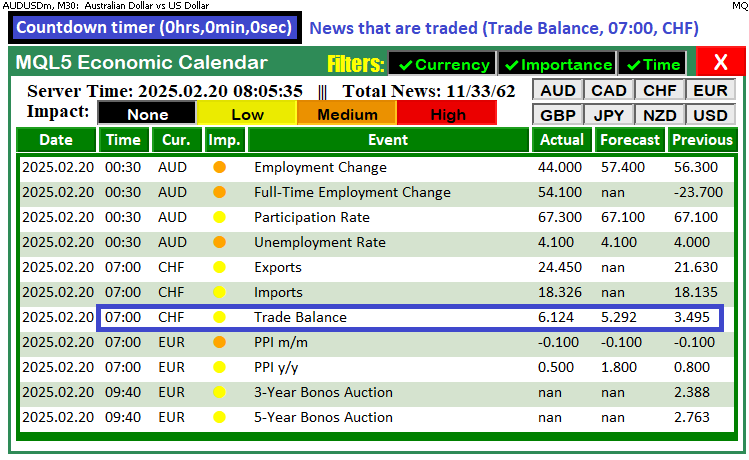
Para visualizar los procesos, utilizaremos impresiones de depuración y también crearemos botones y etiquetas en el gráfico, justo encima del tablero, para mostrar las noticias que se están negociando y el tiempo restante antes de su publicación. Aquí hay un plano completo.
Implementación de la lógica comercial en MQL5
Para implementar la lógica de trading en MQL5, tendremos que incluir los archivos de trading que contienen los métodos de trading y definir algunas entradas que permitirán al usuario controlar el sistema y variables globales que reutilizaremos a lo largo del programa. Para lograrlo, a nivel global, los definimos.
#include <Trade\Trade.mqh> // Trading library for order execution
CTrade trade;             // Global trade object


//================== Trade Settings ==================//
// Trade mode options:
enum ETradeMode {
   TRADE_BEFORE,     // Trade before the news event occurs
   TRADE_AFTER,      // Trade after the news event occurs
   NO_TRADE,         // Do not trade
   PAUSE_TRADING     // Pause trading activity (no trades until resumed)
};
input ETradeMode tradeMode      = TRADE_BEFORE; // Choose the trade mode

// Trade offset inputs:
input int        tradeOffsetHours   = 12;         // Offset hours (e.g., 12 hours)
input int        tradeOffsetMinutes = 5;          // Offset minutes (e.g., 5 minutes before)
input int        tradeOffsetSeconds = 0;          // Offset seconds
input double     tradeLotSize       = 0.01;       // Lot size for the trade

//================== Global Trade Control ==================//
// Once a trade is executed for one news event, no further trades occur.
bool tradeExecuted = false;
// Store the traded event’s scheduled news time for the post–trade countdown.
datetime tradedNewsTime = 0;
// Global array to store event IDs that have already triggered a trade.
int triggeredNewsEvents[];
En el ámbito global, incluimos la biblioteca «Trade\Trade.mqh» utilizando #include para habilitar la ejecución de órdenes y declarar un objeto global «CTrade» denominado «trade» para procesar las operaciones. Definimos un tipo enumerado «ETradeMode» con las opciones «TRADE_BEFORE», «TRADE_AFTER», «NO_TRADE» y «PAUSE_TRADING», y utilizamos la variable de entrada «tradeMode» (por defecto «TRADE_BEFORE», que utilizaremos para el programa) para determinar cuándo deben abrirse las operaciones en relación con las noticias. Además, configuramos las variables de entrada «tradeOffsetHours», «tradeOffsetMinutes», «tradeOffsetSeconds» y «tradeLotSize» para especificar el desfase temporal y el tamaño de la operación, mientras que las variables globales «tradeExecuted» (un booleano), «tradedNewsTime» (un datetime) y la matriz «triggeredNewsEvents» (una matriz int) nos ayudan a gestionar el control de las operaciones y evitar que se vuelva a operar con la misma noticia. A continuación, podemos incorporar la lógica de negociación en una función.
//--- Function to scan for news events and execute trades based on selected criteria
//--- It handles both pre-trade candidate selection and post-trade countdown updates
void CheckForNewsTrade() {
   //--- Log the call to CheckForNewsTrade with the current server time
   Print("CheckForNewsTrade called at: ", TimeToString(TimeTradeServer(), TIME_SECONDS));

   //--- If trading is disabled (either NO_TRADE or PAUSE_TRADING), remove countdown objects and exit
   if(tradeMode == NO_TRADE || tradeMode == PAUSE_TRADING) {
      //--- Check if a countdown object exists on the chart
      if(ObjectFind(0, "NewsCountdown") >= 0) {
         //--- Delete the countdown object from the chart
         ObjectDelete(0, "NewsCountdown");
         //--- Log that the trading is disabled and the countdown has been removed
         Print("Trading disabled. Countdown removed.");
      }
      //--- Exit the function since trading is not allowed
      return;
   }
   //--- Begin pre-trade candidate selection section

   //--- Define the lower bound of the event time range based on the user-defined start time offset
   datetime lowerBound = currentTime - PeriodSeconds(start_time);
   //--- Define the upper bound of the event time range based on the user-defined end time offset
   datetime upperBound = currentTime + PeriodSeconds(end_time);
   //--- Log the overall event time range for debugging purposes
   Print("Event time range: ", TimeToString(lowerBound, TIME_SECONDS), " to ", TimeToString(upperBound, TIME_SECONDS));

   //--- Retrieve historical calendar values (news events) within the defined time range
   MqlCalendarValue values[];
   int totalValues = CalendarValueHistory(values, lowerBound, upperBound, NULL, NULL);
   //--- Log the total number of events found in the specified time range
   Print("Total events found: ", totalValues);
   //--- If no events are found, delete any existing countdown and exit the function
   if(totalValues <= 0) {
      if(ObjectFind(0, "NewsCountdown") >= 0)
         ObjectDelete(0, "NewsCountdown");
      return;
   }
}
Aquí definimos la función «CheckForNewsTrade», que busca noticias y ejecuta operaciones basadas en los criterios seleccionados. Comenzamos registrando su llamada con la función Print, mostrando la hora actual del servidor obtenida a través de la función TimeTradeServer. A continuación, comprobamos si el comercio está desactivado comparando la variable «tradeMode» con los modos «NO_TRADE» o «PAUSE_TRADING»; si es así, utilizamos la función ObjectFind para determinar si existe un objeto de cuenta atrás denominado «NewsCountdown» y, si lo encontramos, lo eliminamos utilizando ObjectDelete antes de salir de la función.
A continuación, la función calcula el intervalo de tiempo total del evento estableciendo «lowerBound» en la hora actual menos el número de segundos de la entrada «start_time» (convertido mediante la función PeriodSeconds) y «upperBound» en la hora actual más los segundos de la entrada «end_time». Este intervalo de tiempo total se registra utilizando Print. Por último, la función llama a CalendarValueHistory para recuperar todos los eventos de noticias dentro del intervalo de tiempo definido; si no se encuentran eventos, limpia cualquier objeto de cuenta atrás existente y sale, preparando así el sistema para la posterior selección de eventos candidatos y la ejecución de operaciones.
//--- Initialize candidate event variables for trade selection
datetime candidateEventTime = 0;
string candidateEventName = "";
string candidateTradeSide = "";
int candidateEventID = -1;

//--- Loop through all retrieved events to evaluate each candidate for trading
for(int i = 0; i < totalValues; i++) {
   //--- Declare an event structure to hold event details
   MqlCalendarEvent event;
   //--- Attempt to populate the event structure by its ID; if it fails, skip to the next event
   if(!CalendarEventById(values[i].event_id, event))
      continue;

   //----- Apply Filters -----

   //--- If currency filtering is enabled, check if the event's currency matches the selected filters
   if(enableCurrencyFilter) {
      //--- Declare a country structure to hold country details
      MqlCalendarCountry country;
      //--- Populate the country structure based on the event's country ID
      CalendarCountryById(event.country_id, country);
      //--- Initialize a flag to determine if there is a matching currency
      bool currencyMatch = false;
      //--- Loop through each selected currency filter
      for(int k = 0; k < ArraySize(curr_filter_selected); k++) {
         //--- Check if the event's country currency matches the current filter selection
         if(country.currency == curr_filter_selected[k]) {
            //--- Set flag to true if a match is found and break out of the loop
            currencyMatch = true;
            break;
         }
      }
      //--- If no matching currency is found, log the skip and continue to the next event
      if(!currencyMatch) {
         Print("Event ", event.name, " skipped due to currency filter.");
         continue;
      }
   }

   //--- If importance filtering is enabled, check if the event's impact matches the selected filters
   if(enableImportanceFilter) {
      //--- Initialize a flag to determine if the event's impact matches any filter selection
      bool impactMatch = false;
      //--- Loop through each selected impact filter option
      for(int k = 0; k < ArraySize(imp_filter_selected); k++) {
         //--- Check if the event's importance matches the current filter selection
         if(event.importance == imp_filter_selected[k]) {
            //--- Set flag to true if a match is found and break out of the loop
            impactMatch = true;
            break;
         }
      }
      //--- If no matching impact is found, log the skip and continue to the next event
      if(!impactMatch) {
         Print("Event ", event.name, " skipped due to impact filter.");
         continue;
      }
   }

   //--- If time filtering is enabled and the event time exceeds the upper bound, skip the event
   if(enableTimeFilter && values[i].time > upperBound) {
      Print("Event ", event.name, " skipped due to time filter.");
      continue;
   }

   //--- Check if the event has already triggered a trade by comparing its ID to recorded events
   bool alreadyTriggered = false;
   //--- Loop through the list of already triggered news events
   for(int j = 0; j < ArraySize(triggeredNewsEvents); j++) {
      //--- If the event ID matches one that has been triggered, mark it and break out of the loop
      if(triggeredNewsEvents[j] == values[i].event_id) {
         alreadyTriggered = true;
         break;
      }
   }
   //--- If the event has already triggered a trade, log the skip and continue to the next event
   if(alreadyTriggered) {
      Print("Event ", event.name, " already triggered a trade. Skipping.");
      continue;
   }
Aquí, inicializamos las variables de eventos candidatos utilizando una variable datetime («candidateEventTime»), dos variables «string» («candidateEventName» y «candidateTradeSide») y una variable «int» («candidateEventID») establecida en -1. A continuación, recorremos cada evento recuperado por la función CalendarValueHistory (almacenado en una matriz de estructuras MqlCalendarValue) y utilizamos la función CalendarEventById para rellenar una estructura MqlCalendarEvent con los detalles del evento.
A continuación, aplicamos nuestros filtros: si el filtrado por divisa está habilitado, recuperamos la estructura MqlCalendarCountry correspondiente al evento a través de CalendarCountryById y comprobamos si su campo «currency» coincide con alguna entrada de la matriz «curr_filter_selected»; si no es así, registramos un mensaje y omitimos el evento. Del mismo modo, si el filtrado por importancia está habilitado, iteramos a través de la matriz «imp_filter_selected» para asegurarnos de que la «importancia» del evento coincide con uno de los niveles seleccionados, registrándolo y omitiéndolo si no es así.
Por último, comprobamos si el evento ya ha desencadenado una operación comparando su ID de evento con los almacenados en la matriz «triggeredNewsEvents»; si es así, lo registramos y lo omitimos. Este bucle garantiza que solo los eventos que cumplan todos los criterios (actualidad, impacto, intervalo de tiempo y singularidad) se consideren candidatos para la ejecución de operaciones. Si todo pasa y tenemos eventos, podemos proceder a filtrar el evento a través del marco temporal según lo permitido por el usuario.
//--- For TRADE_BEFORE mode, check if the current time is within the valid window (event time minus offset to event time)
if(tradeMode == TRADE_BEFORE) {
   if(currentTime >= (values[i].time - offsetSeconds) && currentTime < values[i].time) {
      //--- Retrieve the forecast and previous values for the event
      MqlCalendarValue calValue;
      //--- If unable to retrieve calendar values, log the error and skip this event
      if(!CalendarValueById(values[i].id, calValue)) {
         Print("Error retrieving calendar value for event: ", event.name);
         continue;
      }
      //--- Get the forecast value from the calendar data
      double forecast = calValue.GetForecastValue();
      //--- Get the previous value from the calendar data
      double previous = calValue.GetPreviousValue();
      //--- If either forecast or previous is zero, log the skip and continue to the next event
      if(forecast == 0.0 || previous == 0.0) {
         Print("Skipping event ", event.name, " because forecast or previous value is empty.");
         continue;
      }
      //--- If forecast equals previous, log the skip and continue to the next event
      if(forecast == previous) {
         Print("Skipping event ", event.name, " because forecast equals previous.");
         continue;
      }
      //--- If this candidate event is earlier than any previously found candidate, record its details
      if(candidateEventTime == 0 || values[i].time < candidateEventTime) {
         candidateEventTime = values[i].time;
         candidateEventName = event.name;
         candidateEventID = (int)values[i].event_id;
         candidateTradeSide = (forecast > previous) ? "BUY" : "SELL";
         //--- Log the candidate event details including its time and trade side
         Print("Candidate event: ", event.name, " with event time: ", TimeToString(values[i].time, TIME_SECONDS), " Side: ", candidateTradeSide);
      }
   }
}
Aquí evaluamos los eventos noticiosos candidatos cuando operamos en modo «TRADE_BEFORE». Comprobamos si la hora actual, obtenida mediante la función TimeTradeServer, se encuentra dentro de la ventana de negociación válida, que se extiende desde la hora programada del evento menos el desfase definido por el usuario («offsetSeconds») hasta la hora exacta del evento, tal y como se define a continuación.
//--- Get the current trading server time
datetime currentTime = TimeTradeServer();
//--- Calculate the offset in seconds based on trade offset hours, minutes, and seconds
int offsetSeconds = tradeOffsetHours * 3600 + tradeOffsetMinutes * 60 + tradeOffsetSeconds;
Si se cumple la condición, recuperamos la previsión y los valores anteriores del evento utilizando la función CalendarValueById para rellenar una estructura MqlCalendarValue. Si la recuperación falla, registramos un mensaje de error y omitimos el evento. A continuación, extraemos el valor pronosticado y los valores anteriores utilizando los métodos «GetForecastValue» y «GetPreviousValue», respectivamente. Si cualquiera de los valores es cero, o si son iguales, registramos un mensaje y pasamos al siguiente evento para asegurarnos de que solo procesamos eventos con datos significativos.
Si el evento cumple los requisitos y se produce antes que cualquier candidato identificado previamente, actualizamos nuestras variables de candidato: «candidateEventTime» almacena la hora del evento, «candidateEventName» contiene el nombre del evento, «candidateEventID» registra el ID del evento y «candidateTradeSide» determina si la operación es una «COMPRA» (si la previsión es superior al valor anterior) o una «VENTA» (si la previsión es inferior). Por último, registramos los detalles del evento candidato seleccionado, asegurándonos de realizar un seguimiento del evento válido más temprano para la ejecución de la operación. A continuación, podemos seleccionar el evento para la ejecución de la operación.
//--- If a candidate event has been selected and the trade mode is TRADE_BEFORE, attempt to execute the trade
if(tradeMode == TRADE_BEFORE && candidateEventTime > 0) {
   //--- Calculate the target time to start trading by subtracting the offset from the candidate event time
   datetime targetTime = candidateEventTime - offsetSeconds;
   //--- Log the candidate target time for debugging purposes
   Print("Candidate target time: ", TimeToString(targetTime, TIME_SECONDS));
   //--- Check if the current time falls within the trading window (target time to candidate event time)
   if(currentTime >= targetTime && currentTime < candidateEventTime) {
      //--- Loop through events again to get detailed information for the candidate event
      for(int i = 0; i < totalValues; i++) {
         //--- Identify the candidate event by matching its time
         if(values[i].time == candidateEventTime) {
            //--- Declare an event structure to store event details
            MqlCalendarEvent event;

         }
      }
   }
}
Comprobamos si se ha seleccionado un evento candidato y si el modo de negociación es «TRADE_BEFORE» verificando que «candidateEventTime» sea mayor que cero. A continuación, calculamos el «targetTime» restando el desfase definido por el usuario («offsetSeconds») de la hora programada del evento candidato, y registramos esta hora objetivo para su depuración utilizando la función Print. A continuación, determinamos si la hora actual se encuentra dentro de la ventana de negociación válida, entre la «hora objetivo» y la hora del evento candidato, y, si es así, recorremos la matriz de eventos para identificar el evento candidato haciendo coincidir su hora, de modo que podamos proceder a recuperar más detalles y ejecutar la operación.
//--- Attempt to retrieve the event details; if it fails, skip to the next event
if(!CalendarEventById(values[i].event_id, event))
   continue;
//--- If the current time is past the event time, log the skip and continue
if(currentTime >= values[i].time) {
   Print("Skipping candidate ", event.name, " because current time is past event time.");
   continue;
}
//--- Retrieve detailed calendar values for the candidate event
MqlCalendarValue calValue;
//--- If retrieval fails, log the error and skip the candidate
if(!CalendarValueById(values[i].id, calValue)) {
   Print("Error retrieving calendar value for candidate event: ", event.name);
   continue;
}
//--- Get the forecast value for the candidate event
double forecast = calValue.GetForecastValue();
//--- Get the previous value for the candidate event
double previous = calValue.GetPreviousValue();
//--- If forecast or previous is zero, or if they are equal, log the skip and continue
if(forecast == 0.0 || previous == 0.0 || forecast == previous) {
   Print("Skipping candidate ", event.name, " due to invalid forecast/previous values.");
   continue;
}
//--- Construct a news information string for the candidate event
string newsInfo = "Trading on news: " + event.name +
                  " (Time: " + TimeToString(values[i].time, TIME_SECONDS)+")";
//--- Log the news trading information
Print(newsInfo);
//--- Create a label on the chart to display the news trading information
createLabel1("NewsTradeInfo", 355, 22, newsInfo, clrBlue, 11);
Antes de abrir operaciones, intentamos recuperar información detallada sobre el evento candidato utilizando la función CalendarEventById para rellenar una estructura MqlCalendarEvent; si esta recuperación falla, pasamos inmediatamente al siguiente evento. A continuación, comprobamos si la hora actual (obtenida a través de TimeTradeServer) ya ha superado la hora programada para el evento candidato; si es así, registramos un mensaje y omitimos el procesamiento de ese evento.
A continuación, recuperamos los valores detallados del calendario para el evento utilizando CalendarValueById para rellenar una estructura MqlCalendarValue, y luego extraemos los valores «forecast» y «previous» utilizando los métodos «GetForecastValue» y «GetPreviousValue», respectivamente; si cualquiera de los valores es cero o si ambos son iguales, registramos el motivo y omitimos el evento candidato. Por último, creamos una cadena que contiene información clave de las noticias y la registramos, al tiempo que mostramos esta información en el gráfico utilizando la función «createLabel1». El fragmento de código de la función es el siguiente.
//--- Function to create a label on the chart with specified properties
bool createLabel1(string objName, int x, int y, string text, color txtColor, int fontSize) {
   //--- Attempt to create the label object; if it fails, log the error and return false
   if(!ObjectCreate(0, objName, OBJ_LABEL, 0, 0, 0)) {
      //--- Print error message with the label name and the error code
      Print("Error creating label ", objName, " : ", GetLastError());
      //--- Return false to indicate label creation failure
      return false;
   }
   //--- Set the horizontal distance (X coordinate) for the label
   ObjectSetInteger(0, objName, OBJPROP_XDISTANCE, x);
   //--- Set the vertical distance (Y coordinate) for the label
   ObjectSetInteger(0, objName, OBJPROP_YDISTANCE, y);
   //--- Set the text that will appear on the label
   ObjectSetString(0, objName, OBJPROP_TEXT, text);
   //--- Set the color of the label's text
   ObjectSetInteger(0, objName, OBJPROP_COLOR, txtColor);
   //--- Set the font size for the label text
   ObjectSetInteger(0, objName, OBJPROP_FONTSIZE, fontSize);
   //--- Set the font style to "Arial Bold" for the label text
   ObjectSetString(0, objName, OBJPROP_FONT, "Arial Bold");
   //--- Set the label's anchor corner to the top left of the chart
   ObjectSetInteger(0, objName, OBJPROP_CORNER, CORNER_LEFT_UPPER);
   //--- Redraw the chart to reflect the new label
   ChartRedraw();
   //--- Return true indicating that the label was created successfully
   return true;
}
La lógica de esta función no es nueva y no es necesario explicarla en detalle, ya que ya lo hicimos al crear el panel de control. Así que simplemente pasamos a abrir operaciones basadas en los valores recibidos.
//--- Initialize a flag to store the result of the trade execution
bool tradeResult = false;
//--- If the candidate trade side is BUY, attempt to execute a buy order
if(candidateTradeSide == "BUY") {
   tradeResult = trade.Buy(tradeLotSize, _Symbol, 0, 0, 0, event.name);
}
//--- Otherwise, if the candidate trade side is SELL, attempt to execute a sell order
else if(candidateTradeSide == "SELL") {
   tradeResult = trade.Sell(tradeLotSize, _Symbol, 0, 0, 0, event.name);
}
//--- If the trade was executed successfully, update the triggered events and trade flags
if(tradeResult) {
   Print("Trade executed for candidate event: ", event.name, " Side: ", candidateTradeSide);
   int size = ArraySize(triggeredNewsEvents);
   ArrayResize(triggeredNewsEvents, size + 1);
   triggeredNewsEvents[size] = (int)values[i].event_id;
   tradeExecuted = true;
   tradedNewsTime = values[i].time;
} else {
   //--- If trade execution failed, log the error message with the error code
   Print("Trade execution failed for candidate event: ", event.name, " Error: ", GetLastError());
}
//--- Break out of the loop after processing the candidate event
break;
En primer lugar, inicializamos un indicador booleano «tradeResult» para almacenar el resultado de nuestro intento de operación. A continuación, comprobamos el «candidateTradeSide»: si es «BUY», llamamos a la función «trade. Buy» con el «tradeLotSize» especificado, el símbolo (_Symbol) y utilizamos el nombre del evento como comentario, para garantizar la unicidad y facilitar la identificación; si «candidateTradeSide» es «SELL», llamamos de forma similar a «trade.Sell». Si la operación se ejecuta correctamente (es decir, «tradeResult» es verdadero), registramos los detalles de la ejecución, actualizamos nuestra matriz «triggeredNewsEvents» redimensionándola con la función ArrayResize y añadiendo el ID del evento, establecemos «tradeExecuted» en verdadero y registramos la hora programada del evento en «tradedNewsTime»; de lo contrario, registramos un mensaje de error utilizando «GetLastError» y, a continuación, salimos del bucle para evitar que se procesen más eventos candidatos. Aquí hay un ejemplo de una operación abierta en el rango de eventos.
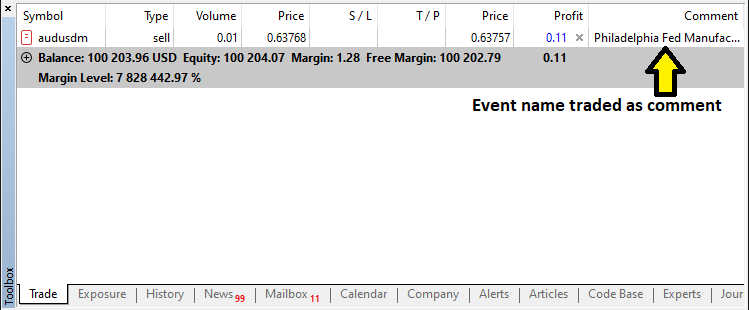
Una vez abierta la operación, solo tenemos que inicializar la lógica de la cuenta atrás del evento, lo cual se trata en la siguiente sección.
Creación y gestión de temporizadores de cuenta regresiva
Para crear y gestionar los temporizadores de cuenta atrás, necesitaremos algunas funciones auxiliares para crear el botón que mantendrá el tiempo, así como actualizar la etiqueta cuando sea necesario.
//--- Function to create a button on the chart with specified properties
bool createButton1(string objName, int x, int y, int width, int height,
                   string text, color txtColor, int fontSize, color bgColor, color borderColor) {
   //--- Attempt to create the button object; if it fails, log the error and return false
   if(!ObjectCreate(0, objName, OBJ_BUTTON, 0, 0, 0)) {
      //--- Print error message with the button name and the error code
      Print("Error creating button ", objName, " : ", GetLastError());
      //--- Return false to indicate button creation failure
      return false;
   }
   //--- Set the horizontal distance (X coordinate) for the button
   ObjectSetInteger(0, objName, OBJPROP_XDISTANCE, x);
   //--- Set the vertical distance (Y coordinate) for the button
   ObjectSetInteger(0, objName, OBJPROP_YDISTANCE, y);
   //--- Set the width of the button
   ObjectSetInteger(0, objName, OBJPROP_XSIZE, width);
   //--- Set the height of the button
   ObjectSetInteger(0, objName, OBJPROP_YSIZE, height);
   //--- Set the text that will appear on the button
   ObjectSetString(0, objName, OBJPROP_TEXT, text);
   //--- Set the color of the button's text
   ObjectSetInteger(0, objName, OBJPROP_COLOR, txtColor);
   //--- Set the font size for the button text
   ObjectSetInteger(0, objName, OBJPROP_FONTSIZE, fontSize);
   //--- Set the font style to "Arial Bold" for the button text
   ObjectSetString(0, objName, OBJPROP_FONT, "Arial Bold");
   //--- Set the background color of the button
   ObjectSetInteger(0, objName, OBJPROP_BGCOLOR, bgColor);
   //--- Set the border color of the button
   ObjectSetInteger(0, objName, OBJPROP_BORDER_COLOR, borderColor);
   //--- Set the button's anchor corner to the top left of the chart
   ObjectSetInteger(0, objName, OBJPROP_CORNER, CORNER_LEFT_UPPER);
   //--- Enable the background display for the button
   ObjectSetInteger(0, objName, OBJPROP_BACK, true);
   //--- Redraw the chart to reflect the new button
   ChartRedraw();
   //--- Return true indicating that the button was created successfully
   return true;
}
//--- Function to update the text of an existing label
bool updateLabel1(string objName, string text) {
   //--- Check if the label exists on the chart; if not, log the error and return false
   if(ObjectFind(0, objName) < 0) {
      //--- Print error message indicating that the label was not found
      Print("updateLabel1: Object ", objName, " not found.");
      //--- Return false because the label does not exist
      return false;
   }
   //--- Update the label's text property with the new text
   ObjectSetString(0, objName, OBJPROP_TEXT, text);
   //--- Redraw the chart to update the label display
   ChartRedraw();
   //--- Return true indicating that the label was updated successfully
   return true;
}

//--- Function to update the text of an existing label
bool updateLabel1(string objName, string text) {
   //--- Check if the label exists on the chart; if not, log the error and return false
   if(ObjectFind(0, objName) < 0) {
      //--- Print error message indicating that the label was not found
      Print("updateLabel1: Object ", objName, " not found.");
      //--- Return false because the label does not exist
      return false;
   }
   //--- Update the label's text property with the new text
   ObjectSetString(0, objName, OBJPROP_TEXT, text);
   //--- Redraw the chart to update the label display
   ChartRedraw();
   //--- Return true indicating that the label was updated successfully
   return true;
}
Aquí, solo creamos las funciones auxiliares que nos permitirán crear el botón del temporizador, así como la función de actualización para actualizar la etiqueta. No es necesario explicar las funciones, ya que ya hemos detallado su lógica en funciones similares en partes anteriores de la serie. Así que vamos directamente a implementarlas.
//--- Begin handling the post-trade countdown scenario
if(tradeExecuted) {
   //--- If the current time is before the traded news time, display the countdown until news release
   if(currentTime < tradedNewsTime) {
      //--- Calculate the remaining seconds until the traded news time
      int remainingSeconds = (int)(tradedNewsTime - currentTime);
      //--- Calculate hours from the remaining seconds
      int hrs = remainingSeconds / 3600;
      //--- Calculate minutes from the remaining seconds
      int mins = (remainingSeconds % 3600) / 60;
      //--- Calculate seconds remainder
      int secs = remainingSeconds % 60;
      //--- Construct the countdown text string
      string countdownText = "News in: " + IntegerToString(hrs) + "h " +
                             IntegerToString(mins) + "m " +
                             IntegerToString(secs) + "s";
      //--- If the countdown object does not exist, create it with a blue background
      if(ObjectFind(0, "NewsCountdown") < 0) {
         createButton1("NewsCountdown", 50, 17, 300, 30, countdownText, clrWhite, 12, clrBlue, clrBlack);
         //--- Log that the post-trade countdown was created
         Print("Post-trade countdown created: ", countdownText);
      } else {
         //--- If the countdown object exists, update its text
         updateLabel1("NewsCountdown", countdownText);
         //--- Log that the post-trade countdown was updated
         Print("Post-trade countdown updated: ", countdownText);
      }
   } else {
      //--- If current time is past the traded news time, calculate elapsed time since trade
      int elapsed = (int)(currentTime - tradedNewsTime);
      //--- If less than 15 seconds have elapsed, show a reset countdown
      if(elapsed < 15) {
         //--- Calculate the remaining delay for reset
         int remainingDelay = 15 - elapsed;
         //--- Construct the reset countdown text
         string countdownText = "News Released, resetting in: " + IntegerToString(remainingDelay) + "s";
         //--- If the countdown object does not exist, create it with a red background
         if(ObjectFind(0, "NewsCountdown") < 0) {
            createButton1("NewsCountdown", 50, 17, 300, 30, countdownText, clrWhite, 12, clrRed, clrBlack);
            //--- Set the background color property explicitly to red
            ObjectSetInteger(0,"NewsCountdown",OBJPROP_BGCOLOR,clrRed);
            //--- Log that the post-trade reset countdown was created
            Print("Post-trade reset countdown created: ", countdownText);
         } else {
            //--- If the countdown object exists, update its text and background color
            updateLabel1("NewsCountdown", countdownText);
            ObjectSetInteger(0,"NewsCountdown",OBJPROP_BGCOLOR,clrRed);
            //--- Log that the post-trade reset countdown was updated
            Print("Post-trade reset countdown updated: ", countdownText);
         }
      } else {
         //--- If 15 seconds have elapsed since traded news time, log the reset action
         Print("News Released. Resetting trade status after 15 seconds.");

         //--- If the countdown object exists, delete it from the chart
         if(ObjectFind(0, "NewsCountdown") >= 0)
            ObjectDelete(0, "NewsCountdown");
         //--- Reset the tradeExecuted flag to allow new trades
         tradeExecuted = false;
      }
   }
   //--- Exit the function as post-trade processing is complete
   return;
}
Aquí tratamos en detalle el escenario de la cuenta atrás posterior a la negociación. Una vez ejecutada una operación, primero utilizamos la función TimeTradeServer para obtener la hora actual del servidor y la comparamos con «tradedNewsTime», que almacena la hora de publicación prevista del evento candidato. Si la hora actual sigue siendo anterior a «tradedNewsTime», calculamos los segundos restantes y los convertimos en horas, minutos y segundos, construyendo una cadena de cuenta atrás con el formato «News in: __h __m __s» utilizando la función IntegerToString.
A continuación, comprobamos la existencia del objeto «NewsCountdown» mediante ObjectFind y lo creamos (utilizando nuestra función personalizada «createButton1») en X=50, Y=17 con una anchura de 300 y una altura de 30 y un fondo azul, o lo actualizamos (utilizando «updateLabel1») si ya existe. Sin embargo, si la hora actual ha superado «tradedNewsTime», calculamos el tiempo transcurrido; si este tiempo transcurrido es inferior a 15 segundos, mostramos un mensaje de reinicio en el objeto de cuenta atrás («News Released, resetting in: XXs») y establecemos explícitamente su color de fondo en rojo con la función ObjectSetInteger.
Una vez finalizado el periodo de reinicio de 15 segundos, eliminamos el objeto «NewsCountdown» y restablecemos el indicador «tradeExecuted» para permitir nuevas operaciones, lo que garantiza que nuestro sistema responda dinámicamente a los cambios en la sincronización de las noticias y mantenga un control sobre la ejecución de las operaciones. Además, debemos mostrar la cuenta atrás si tenemos la operación y aún no se ha publicado. Lo conseguimos mediante la siguiente lógica.
if(currentTime >= targetTime && currentTime < candidateEventTime) {

        //---

}
else {
   //--- If current time is before the candidate event window, show a pre-trade countdown
   int remainingSeconds = (int)(candidateEventTime - currentTime);
   int hrs = remainingSeconds / 3600;
   int mins = (remainingSeconds % 3600) / 60;
   int secs = remainingSeconds % 60;
   //--- Construct the pre-trade countdown text
   string countdownText = "News in: " + IntegerToString(hrs) + "h " +
                          IntegerToString(mins) + "m " +
                          IntegerToString(secs) + "s";
   //--- If the countdown object does not exist, create it with specified dimensions and blue background
   if(ObjectFind(0, "NewsCountdown") < 0) {
      createButton1("NewsCountdown", 50, 17, 300, 30, countdownText, clrWhite, 12, clrBlue, clrBlack);
      //--- Log that the pre-trade countdown was created
      Print("Pre-trade countdown created: ", countdownText);
   } else {
      //--- If the countdown object exists, update its text
      updateLabel1("NewsCountdown", countdownText);
      //--- Log that the pre-trade countdown was updated
      Print("Pre-trade countdown updated: ", countdownText);
   }
}
Si la hora actual no se encuentra dentro de la ventana de negociación del evento candidato, es decir, si la hora actual no es mayor o igual que «targetTime» (calculada como la hora programada del evento candidato menos el desfase) y sigue sin ser menor que la hora programada del evento candidato, asumimos que la hora actual sigue estando antes de la ventana de negociación, por lo que calculamos el tiempo restante hasta el evento candidato restando la hora actual de la hora programada del evento candidato y, a continuación, convertimos esta diferencia en horas, minutos y segundos.
Usando IntegerToString, construimos una cadena de texto de cuenta atrás con el formato «News in: __h __m __s». A continuación, utilizamos la función ObjectFind para comprobar si el objeto «NewsCountdown» ya existe; si no existe, lo creamos utilizando la función «createButton1» con las dimensiones especificadas (X=50, Y=17, anchura=300, altura=30) y un fondo azul, registrando que se ha creado la cuenta atrás previa a la negociación; de lo contrario, actualizamos su texto mediante «updateLabel1» y registramos la actualización. Por último, si no se selecciona ningún evento tras el análisis, simplemente eliminamos nuestros objetos.
//--- If no candidate event is selected, delete any existing countdown and trade info objects
if(ObjectFind(0, "NewsCountdown") >= 0) {
   ObjectDelete(0, "NewsCountdown");
   ObjectDelete(0, "NewsTradeInfo");
   //--- Log that the pre-trade countdown was deleted
   Print("Pre-trade countdown deleted.");
}
Si no se selecciona ningún evento candidato, es decir, si ningún evento cumple los criterios para la ejecución de la operación, comprobamos la existencia del objeto «NewsCountdown» utilizando la función ObjectFind. Si se encuentran, eliminamos los objetos «NewsCountdown» y «NewsTradeInfo» del gráfico llamando a la función ObjectDelete, asegurándonos de que no quede visible ninguna información obsoleta sobre la cuenta atrás o las operaciones.
Sin embargo, el usuario puede cerrar el programa explícitamente, lo que significa que aún así tendremos que limpiar nuestro gráfico en caso de que se dé esa situación. Así que podemos definir una función para gestionar la limpieza fácilmente.
//--- Function to delete trade-related objects from the chart and redraw the chart
void deleteTradeObjects(){
   //--- Delete the countdown object from the chart
   ObjectDelete(0, "NewsCountdown");
   //--- Delete the news trade information label from the chart
   ObjectDelete(0, "NewsTradeInfo");
   //--- Redraw the chart to reflect the deletion of objects
   ChartRedraw();
}
Después de definir la función, simplemente la llamamos en el controlador de eventos OnDeinit, donde también destruimos el panel existente, asegurando una limpieza total, como se destaca en amarillo a continuación.
//+------------------------------------------------------------------+
//| Expert deinitialization function                                 |
//+------------------------------------------------------------------+
void OnDeinit(const int reason){
//---

   destroy_Dashboard();
   deleteTradeObjects();
}
Lo único que queda por hacer es realizar un seguimiento de la información actualizada del filtro cuando el usuario hace clic en el panel de control, para poder disponer de información actualizada. Eso significa que tendremos que realizar un seguimiento de los eventos en el controlador de eventos OnChartEvent. Creamos una función para implementar eso fácilmente.
//--- Function to log active filter selections in the Experts log
void UpdateFilterInfo() {
   //--- Initialize the filter information string with the prefix "Filters: "
   string filterInfo = "Filters: ";
   //--- Check if the currency filter is enabled
   if(enableCurrencyFilter) {
      //--- Append the currency filter label to the string
      filterInfo += "Currency: ";
      //--- Loop through each selected currency filter option
      for(int i = 0; i < ArraySize(curr_filter_selected); i++) {
         //--- Append the current currency filter value
         filterInfo += curr_filter_selected[i];
         //--- If not the last element, add a comma separator
         if(i < ArraySize(curr_filter_selected) - 1)
            filterInfo += ",";
      }
      //--- Append a semicolon to separate this filter's information
      filterInfo += "; ";
   } else {
      //--- Indicate that the currency filter is turned off
      filterInfo += "Currency: Off; ";
   }
   //--- Check if the importance filter is enabled
   if(enableImportanceFilter) {
      //--- Append the impact filter label to the string
      filterInfo += "Impact: ";
      //--- Loop through each selected impact filter option
      for(int i = 0; i < ArraySize(imp_filter_selected); i++) {
         //--- Append the string representation of the current importance filter value
         filterInfo += EnumToString(imp_filter_selected[i]);
         //--- If not the last element, add a comma separator
         if(i < ArraySize(imp_filter_selected) - 1)
            filterInfo += ",";
      }
      //--- Append a semicolon to separate this filter's information
      filterInfo += "; ";
   } else {
      //--- Indicate that the impact filter is turned off
      filterInfo += "Impact: Off; ";
   }
   //--- Check if the time filter is enabled
   if(enableTimeFilter) {
      //--- Append the time filter information with the upper limit
      filterInfo += "Time: Up to " + EnumToString(end_time);
   } else {
      //--- Indicate that the time filter is turned off
      filterInfo += "Time: Off";
   }
   //--- Print the complete filter information to the Experts log
   Print("Filter Info: ", filterInfo);
}
Creamos una función vacía llamada «UpdateFilterInfo». En primer lugar, inicializamos una cadena string con el prefijo «Filters: » y, a continuación, comprobamos si el filtro de divisas está habilitado; si es así, añadimos «Currency: » y recorremos la matriz «curr_filter_selected» utilizando «ArraySize», añadiendo cada divisa (separadas por comas) y terminando con un punto y coma; si está deshabilitado, simplemente anotamos «Currency: Off;». A continuación, realizamos un proceso similar para el filtro de impacto: si está habilitado, añadimos «Impact: » y repetimos «imp_filter_selected», convirtiendo cada nivel de impacto seleccionado en una cadena con EnumToString antes de añadirlos, o indicamos «Impact: Off;» si no está habilitado.
Por último, abordamos el filtro de tiempo añadiendo «Time: Up to » junto con la representación de cadena de la entrada «end_time» (utilizando de nuevo «EnumToString»), o «Time: Off» si está desactivado. Una vez concatenados todos los segmentos, enviamos la información completa del filtro al registro de Experts utilizando la función Print, lo que nos proporciona una instantánea clara y en tiempo real de los filtros activos para la resolución de problemas y la verificación. A continuación, llamamos a las funciones en el controlador de eventos OnChartEvent, así como en OnTick.
//+------------------------------------------------------------------+
//|    OnChartEvent handler function                                 |
//+------------------------------------------------------------------+
void  OnChartEvent(
   const int       id,       // event ID
   const long&     lparam,   // long type event parameter
   const double&   dparam,   // double type event parameter
   const string&   sparam    // string type event parameter
){

   if (id == CHARTEVENT_OBJECT_CLICK){ //--- Check if the event is a click on an object
      UpdateFilterInfo();
      CheckForNewsTrade();
   }
}

//+------------------------------------------------------------------+
//| Expert tick function                                             |
//+------------------------------------------------------------------+
void OnTick(){
//---
UpdateFilterInfo();
CheckForNewsTrade();
   if (isDashboardUpdate){
      update_dashboard_values(curr_filter_selected,imp_filter_selected);
   }

}
Al ejecutar el programa, obtenemos el siguiente resultado.
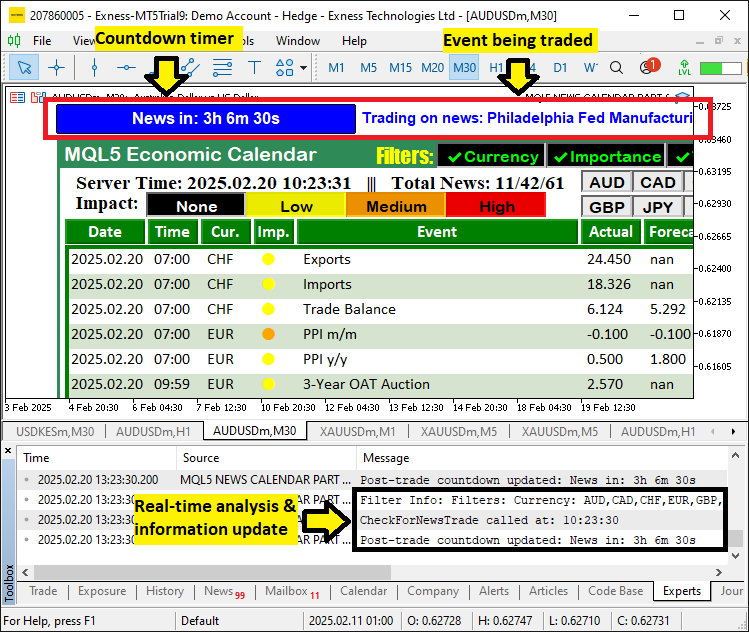
En la imagen podemos ver que podemos abrir operaciones basadas en los ajustes seleccionados por el usuario, y cuando se negocia la noticia, creamos el temporizador de cuenta atrás y la etiqueta para mostrar y actualizar la información, y luego registramos las actualizaciones, logrando así nuestro objetivo. Lo único que queda es probar nuestra lógica, y eso se trata en la siguiente sección.
Poniendo a prueba la lógica comercial
En cuanto a las pruebas retrospectivas, esperamos a que se produjeran acontecimientos de actualidad relacionados con el comercio en tiempo real y, tras las pruebas, el resultado fue el que se muestra en el vídeo a continuación.
Conclusión
En conclusión, hemos integrado con éxito la entrada automática de operaciones en nuestro sistema Calendario Económico MQL5 mediante el uso de filtros definidos por el usuario, compensaciones de tiempo precisas y temporizadores de cuenta atrás dinámicos. Nuestra solución analiza las noticias, compara los valores previstos y los anteriores, y ejecuta automáticamente órdenes de COMPRA o VENTA basándose en señales claras del calendario.
Sin embargo, se necesitan más avances para perfeccionar el sistema y adaptarlo a las condiciones reales del mercado. Recomendamos continuar con el desarrollo y las pruebas, especialmente en lo que respecta a mejorar la gestión de riesgos y ajustar los criterios de filtrado, con el fin de garantizar un rendimiento óptimo. ¡Feliz negociación!
Traducción del inglés realizada por MetaQuotes Ltd.
Artículo original: https://www.mql5.com/en/articles/17271
Advertencia: todos los derechos de estos materiales pertenecen a MetaQuotes Ltd. Queda totalmente prohibido el copiado total o parcial.
Este artículo ha sido escrito por un usuario del sitio web y refleja su punto de vista personal. MetaQuotes Ltd. no se responsabiliza de la exactitud de la información ofrecida, ni de las posibles consecuencias del uso de las soluciones, estrategias o recomendaciones descritas.

 Redes neuronales en el trading: Detección adaptativa de anomalías del mercado (Final)
 Desarrollamos un asesor experto multidivisas (Parte 25): Conectamos una nueva estrategia (II)
 Ondas triangulares y de sierra: herramientas para el tráder
 Introducción a MQL5 (Parte 13): Guía para principiantes sobre cómo crear indicadores personalizados (II)

- Aplicaciones de trading gratuitas
- 8 000+ señales para copiar
- Noticias económicas para analizar los mercados financieros
Usted acepta la política del sitio web y las condiciones de uso
Hola. Gracias por el trabajo realizado.
Tengo problemas con la visualización de la tabla en el monitor 2K.
Hola. Gracias por el trabajo realizado.
Tengo problemas con la visualización de la tabla en el monitor 2K.
Hola. Bienvenido. Eso requerirá que modifiques el tamaño de las fuentes para que todo encaje perfectamente.