

Operando con el Calendario Económico MQL5 (Parte 8): Optimización del backtesting basado en noticias mediante el filtrado inteligente de eventos y el registro selectivo
 316
316
 0
0

Introducción
En este artículo, damos un paso más en la serie Calendario económico MQL5 optimizando nuestro sistema de trading para realizar backtesting ultrarrápido y visualmente intuitivo, integrando a la perfección la visualización de datos tanto en modo en vivo como en modo sin conexión, con el fin de mejorar el desarrollo de estrategias basadas en las noticias. Partiendo de los fundamentos establecidos en la Parte 7, centrada en el análisis de eventos basado en recursos para la compatibilidad con el Probador de estrategias, presentamos ahora el filtrado inteligente de eventos y el registro selectivo para optimizar el rendimiento, lo que garantiza que podamos visualizar y probar estrategias de manera eficiente en entornos tanto en tiempo real como históricos con el mínimo de interferencias. Estructuramos el artículo con los siguientes temas:
- Un cronógrafo visual para un trading fluido basado en noticias, tanto en tiempo real como offline
- Implementación en MQL5
- Pruebas y validación
- Conclusión
¡Exploremos estos avances!
Un cronógrafo visual para un trading fluido basado en noticias, tanto en tiempo real como offline
La capacidad de visualizar y analizar eventos económicos tanto en tiempo real como fuera de línea supone un cambio radical para nosotros, y en esta parte de la serie, presentamos un cronógrafo visual —una metáfora de nuestro sistema optimizado de procesamiento y registro de eventos— que nos permitirá movernos por el marco temporal del trading basado en noticias con precisión y eficiencia.
Mediante la implementación de un filtrado inteligente de eventos, reduciremos drásticamente la carga computacional en el Probador de estrategias, preseleccionando únicamente los eventos noticiosos más relevantes dentro de un intervalo de fechas definido por el usuario, lo que garantiza que el backtesting refleje la velocidad y la claridad del trading en tiempo real. Este mecanismo de filtrado, similar a la precisión de un cronógrafo, nos permitirá centrarnos en los acontecimientos clave sin tener que examinar datos irrelevantes, lo que facilitará transiciones fluidas entre simulaciones históricas y análisis de mercado en tiempo real.
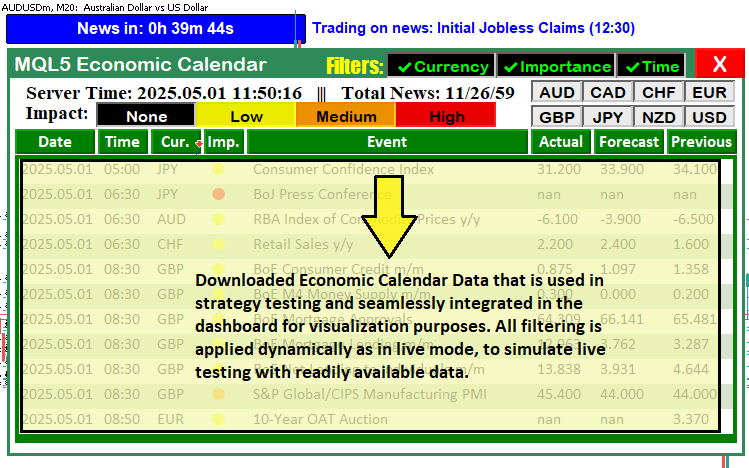
Como complemento, nuestro sistema de registro selectivo actuará como la pantalla del cronógrafo, presentando solo la información esencial, como las ejecuciones de operaciones y las actualizaciones del panel de control, al tiempo que suprime los registros superfluos, manteniendo así una interfaz limpia y libre de distracciones tanto en el modo en vivo como en el modo fuera de línea. Esta capacidad de visualización en modo dual nos permitirá probar estrategias con datos históricos en el Probador de estrategias y aplicar el mismo panel de control intuitivo en las operaciones en vivo, lo que fomenta un flujo de trabajo unificado que mejora la toma de decisiones y el perfeccionamiento de las estrategias en todas las condiciones del mercado. Aquí se muestra una visualización de lo que pretendemos lograr.
Implementación en MQL5
Para realizar las mejoras en MQL5, primero tendremos que declarar algunas variables que utilizaremos para llevar un registro de los eventos descargados, los cuales luego mostraremos de forma fluida en el panel de noticias utilizando un formato similar al que empleamos en los artículos anteriores al realizar operaciones en tiempo real; pero antes debemos incluir el recurso donde almacenamos los datos, tal y como se indica a continuación.
//---- Include trading library
#include <Trade\Trade.mqh>
CTrade trade;

//---- Define resource for CSV
#resource "\\Files\\Database\\EconomicCalendar.csv" as string EconomicCalendarData
Comenzamos integrando una biblioteca de operaciones que permite una ejecución fluida de las operaciones tanto en modo en vivo como en modo sin conexión. Utilizamos la directiva «#include <Trade\Trade.mqh>» para incorporar la biblioteca de operaciones MQL5, que proporciona la clase «CTrade» para gestionar las operaciones. Al declarar un objeto «CTrade» denominado «trade», permitimos que el programa ejecute órdenes de compra y venta de forma programada.
A continuación, utilizamos la directiva «#resource» para definir «\Files\Database\EconomicCalendar.csv» como un recurso de cadena denominado «EconomicCalendarData». Este archivo de valores separados por comas (CSV), cargado mediante la función «LoadEventsFromResource», proporcionará detalles de los eventos, tales como la fecha, la hora, la divisa y la previsión, ofreciendo una presentación unificada de los datos sin depender de fuentes de datos en tiempo real. Ahora podemos definir el resto de las variables de control.
//---- Event name tracking
string current_eventNames_data[];
string previous_eventNames_data[];
string last_dashboard_eventNames[]; // Added: Cache for last dashboard event names in tester mode
datetime last_dashboard_update = 0; // Added: Track last dashboard update time in tester mode

//---- Filter flags
bool enableCurrencyFilter = true;
bool enableImportanceFilter = true;
bool enableTimeFilter = true;
bool isDashboardUpdate = true;
bool filters_changed = true;        // Added: Flag to detect filter changes in tester mode

//---- Event counters
int totalEvents_Considered = 0;
int totalEvents_Filtered = 0;
int totalEvents_Displayable = 0;

//---- Input parameters (PART 6)
sinput group "General Calendar Settings"
input ENUM_TIMEFRAMES start_time = PERIOD_H12;
input ENUM_TIMEFRAMES end_time = PERIOD_H12;
input ENUM_TIMEFRAMES range_time = PERIOD_H8;
input bool updateServerTime = true; // Enable/Disable Server Time Update in Panel
input bool debugLogging = false;    // Added: Enable debug logging in tester mode

//---- Input parameters for tester mode (from PART 7, minimal)
sinput group "Strategy Tester CSV Settings"
input datetime StartDate = D'2025.03.01'; // Download Start Date
input datetime EndDate = D'2025.03.21';   // Download End Date

//---- Structure for CSV events (from PART 7)
struct EconomicEvent {
   string eventDate;       // Date of the event
   string eventTime;       // Time of the event
   string currency;        // Currency affected
   string event;           // Event description
   string importance;      // Importance level
   double actual;          // Actual value
   double forecast;        // Forecast value
   double previous;        // Previous value
   datetime eventDateTime; // Added: Store precomputed datetime for efficiency
};

//---- Global array for tester mode events
EconomicEvent allEvents[];
EconomicEvent filteredEvents[]; // Added: Filtered events for tester mode optimization

//---- Trade settings
enum ETradeMode {
   TRADE_BEFORE,
   TRADE_AFTER,
   NO_TRADE,
   PAUSE_TRADING
};
input ETradeMode tradeMode = TRADE_BEFORE;
input int tradeOffsetHours = 12;
input int tradeOffsetMinutes = 5;
input int tradeOffsetSeconds = 0;
input double tradeLotSize = 0.01;

//---- Trade control
bool tradeExecuted = false;
datetime tradedNewsTime = 0;
int triggeredNewsEvents[];
En este caso, almacenamos los nombres de los eventos en «current_eventNames_data», «previous_eventNames_data» y «last_dashboard_eventNames», utilizando «last_dashboard_eventNames» para almacenar en caché las actualizaciones del panel de control en modo de prueba y «last_dashboard_update» para programar las actualizaciones solo cuando sea necesario, reduciendo así el procesamiento redundante.
Activamos y desactivamos el filtrado de eventos mediante «enableCurrencyFilter», «enableImportanceFilter», «enableTimeFilter» y «filters_changed», restableciendo los filtros cuando «filters_changed» es verdadero para procesar únicamente los eventos relevantes, y utilizamos «debugLogging» en el grupo «Configuración general del calendario» para registrar únicamente las operaciones y las actualizaciones.
Definimos el periodo de backtesting mediante «StartDate» y «EndDate» en el grupo «sinput» de «Configuración CSV del probador de estrategias», estructuramos los eventos en «EconomicEvent» con «eventDateTime» para facilitar el acceso, y filtramos «allEvents» en «filteredEvents» para agilizar el procesamiento, al tiempo que configuramos «tradeMode» y las variables relacionadas para ejecutar las operaciones de forma eficiente. Esto nos permite ahora seleccionar el periodo de prueba del que descargaremos los datos y utilizar ese mismo intervalo de tiempo para las pruebas. Esta es la interfaz de usuario que tenemos.
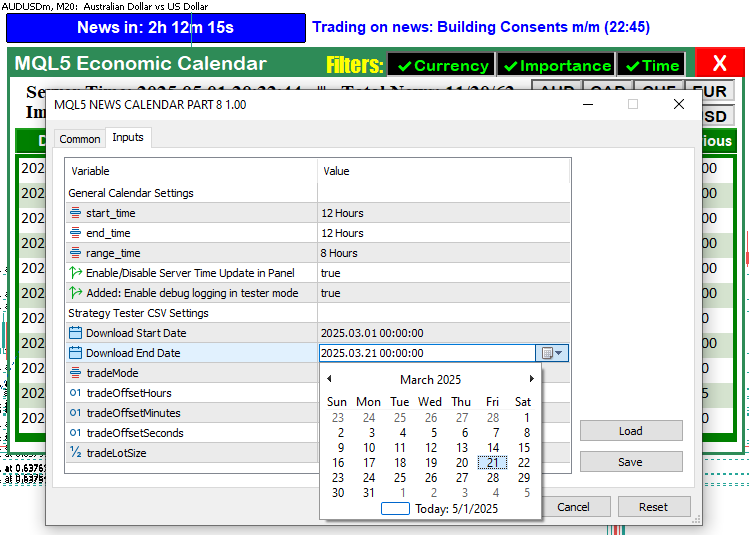
En la imagen podemos ver que tenemos entradas adicionales para controlar la visualización de los eventos en el modo de prueba, así como actualizaciones controladas de la hora en el panel y el registro de eventos. Lo hicimos para evitar el consumo innecesario de recursos durante el backtesting. A continuación, necesitamos definir una función para gestionar el proceso de filtrado de eventos del probador.
//+------------------------------------------------------------------+
//| Filter events for tester mode                                    | // Added: Function to pre-filter events by date range
//+------------------------------------------------------------------+
void FilterEventsForTester() {
   ArrayResize(filteredEvents, 0);
   int eventIndex = 0;
   for (int i = 0; i < ArraySize(allEvents); i++) {
      datetime eventDateTime = allEvents[i].eventDateTime;
      if (eventDateTime < StartDate || eventDateTime > EndDate) {
         if (debugLogging) Print("Event ", allEvents[i].event, " skipped in filter due to date range: ", TimeToString(eventDateTime)); // Modified: Conditional logging
         continue;
      }
      ArrayResize(filteredEvents, eventIndex + 1);
      filteredEvents[eventIndex] = allEvents[i];
      eventIndex++;
   }
   if (debugLogging) Print("Tester mode: Filtered ", eventIndex, " events."); // Modified: Conditional logging
   filters_changed = false;
}
En este caso, aplicamos un filtrado inteligente de eventos para acelerar el backtesting, reduciendo el número de noticias procesadas en el Probador de estrategias. Utilizamos la función «FilterEventsForTester» para borrar la matriz «filteredEvents» con la función ArrayResize y reconstruirla con los eventos pertinentes de «allEvents». Para cada evento, comparamos su «eventDateTime» con «StartDate» y «EndDate», omitiendo aquellos que se encuentran fuera del intervalo y registrando las omisiones únicamente si «debugLogging» es verdadero mediante la función Print, lo que garantiza un registro lo más conciso posible.
Copiamos los eventos que cumplen los requisitos en «filteredEvents» en el índice «eventIndex», incrementándolo con cada nueva entrada, y utilizamos la función «ArrayResize» para asignar espacio de forma dinámica. Registramos el recuento total de «eventIndex» mediante «Print» únicamente si «debugLogging» está habilitado, con el fin de mantener limpia la salida del programa de pruebas, y establecemos «filters_changed» en «false» para indicar que el filtrado ha finalizado. Esta acción de filtrado selectivo reduce el conjunto de eventos, lo que agiliza el procesamiento posterior y permite una visualización eficiente de las noticias en modo sin conexión. A continuación, llamamos a esta función en el controlador de eventos OnInit para prefiltrar los datos de las noticias.
//+------------------------------------------------------------------+
//| Expert initialization function                                   |
//+------------------------------------------------------------------+
int OnInit() {
   //---- Create dashboard UI
   createRecLabel(MAIN_REC,50,50,740,410,clrSeaGreen,1);
   createRecLabel(SUB_REC1,50+3,50+30,740-3-3,410-30-3,clrWhite,1);
   createRecLabel(SUB_REC2,50+3+5,50+30+50+27,740-3-3-5-5,410-30-3-50-27-10,clrGreen,1);
   createLabel(HEADER_LABEL,50+3+5,50+5,"MQL5 Economic Calendar",clrWhite,15);

   //---- Create calendar buttons
   int startX = 59;
   for (int i = 0; i < ArraySize(array_calendar); i++) {
      createButton(ARRAY_CALENDAR+IntegerToString(i),startX,132,buttons[i],25,
                   array_calendar[i],clrWhite,13,clrGreen,clrNONE,"Calibri Bold");
      startX += buttons[i]+3;
   }

   //---- Initialize for live mode (unchanged)
   int totalNews = 0;
   bool isNews = false;
   MqlCalendarValue values[];
   datetime startTime = TimeTradeServer() - PeriodSeconds(start_time);
   datetime endTime = TimeTradeServer() + PeriodSeconds(end_time);
   string country_code = "US";
   string currency_base = SymbolInfoString(_Symbol,SYMBOL_CURRENCY_BASE);
   int allValues = CalendarValueHistory(values,startTime,endTime,NULL,NULL);

   //---- Load CSV events for tester mode
   if (MQLInfoInteger(MQL_TESTER)) {
      if (!LoadEventsFromResource()) {
         Print("Failed to load events from CSV resource.");
         return(INIT_FAILED);
      }
      Print("Tester mode: Loaded ", ArraySize(allEvents), " events from CSV.");
      FilterEventsForTester(); // Added: Pre-filter events for tester mode
   }

   //---- Create UI elements
   createLabel(TIME_LABEL,70,85,"Server Time: "+TimeToString(TimeCurrent(),TIME_DATE|TIME_SECONDS)+
               "   |||   Total News: "+IntegerToString(allValues),clrBlack,14,"Times new roman bold");
   createLabel(IMPACT_LABEL,70,105,"Impact: ",clrBlack,14,"Times new roman bold");
   createLabel(FILTER_LABEL,370,55,"Filters:",clrYellow,16,"Impact");

   //---- Create filter buttons
   string filter_curr_text = enableCurrencyFilter ? ShortToString(0x2714)+"Currency" : ShortToString(0x274C)+"Currency";
   color filter_curr_txt_color = enableCurrencyFilter ? clrLime : clrRed;
   bool filter_curr_state = enableCurrencyFilter;
   createButton(FILTER_CURR_BTN,430,55,110,26,filter_curr_text,filter_curr_txt_color,12,clrBlack);
   ObjectSetInteger(0,FILTER_CURR_BTN,OBJPROP_STATE,filter_curr_state);

   string filter_imp_text = enableImportanceFilter ? ShortToString(0x2714)+"Importance" : ShortToString(0x274C)+"Importance";
   color filter_imp_txt_color = enableImportanceFilter ? clrLime : clrRed;
   bool filter_imp_state = enableImportanceFilter;
   createButton(FILTER_IMP_BTN,430+110,55,120,26,filter_imp_text,filter_imp_txt_color,12,clrBlack);
   ObjectSetInteger(0,FILTER_IMP_BTN,OBJPROP_STATE,filter_imp_state);

   string filter_time_text = enableTimeFilter ? ShortToString(0x2714)+"Time" : ShortToString(0x274C)+"Time";
   color filter_time_txt_color = enableTimeFilter ? clrLime : clrRed;
   bool filter_time_state = enableTimeFilter;
   createButton(FILTER_TIME_BTN,430+110+120,55,70,26,filter_time_text,filter_time_txt_color,12,clrBlack);
   ObjectSetInteger(0,FILTER_TIME_BTN,OBJPROP_STATE,filter_time_state);

   createButton(CANCEL_BTN,430+110+120+79,51,50,30,"X",clrWhite,17,clrRed,clrNONE);

   //---- Create impact buttons
   int impact_size = 100;
   for (int i = 0; i < ArraySize(impact_labels); i++) {
      color impact_color = clrBlack, label_color = clrBlack;
      if (impact_labels[i] == "None") label_color = clrWhite;
      else if (impact_labels[i] == "Low") impact_color = clrYellow;
      else if (impact_labels[i] == "Medium") impact_color = clrOrange;
      else if (impact_labels[i] == "High") impact_color = clrRed;
      createButton(IMPACT_LABEL+string(i),140+impact_size*i,105,impact_size,25,
                   impact_labels[i],label_color,12,impact_color,clrBlack);
   }

   //---- Create currency buttons
   int curr_size = 51, button_height = 22, spacing_x = 0, spacing_y = 3, max_columns = 4;
   for (int i = 0; i < ArraySize(curr_filter); i++) {
      int row = i / max_columns;
      int col = i % max_columns;
      int x_pos = 575 + col * (curr_size + spacing_x);
      int y_pos = 83 + row * (button_height + spacing_y);
      createButton(CURRENCY_BTNS+IntegerToString(i),x_pos,y_pos,curr_size,button_height,curr_filter[i],clrBlack);
   }

   //---- Initialize filters
   if (enableCurrencyFilter) {
      ArrayFree(curr_filter_selected);
      ArrayCopy(curr_filter_selected, curr_filter);
      Print("CURRENCY FILTER ENABLED");
      ArrayPrint(curr_filter_selected);
      for (int i = 0; i < ArraySize(curr_filter_selected); i++) {
         ObjectSetInteger(0, CURRENCY_BTNS+IntegerToString(i), OBJPROP_STATE, true);
      }
   }

   if (enableImportanceFilter) {
      ArrayFree(imp_filter_selected);
      ArrayCopy(imp_filter_selected, allowed_importance_levels);
      ArrayFree(impact_filter_selected);
      ArrayCopy(impact_filter_selected, impact_labels);
      Print("IMPORTANCE FILTER ENABLED");
      ArrayPrint(imp_filter_selected);
      ArrayPrint(impact_filter_selected);
      for (int i = 0; i < ArraySize(imp_filter_selected); i++) {
         string btn_name = IMPACT_LABEL+string(i);
         ObjectSetInteger(0, btn_name, OBJPROP_STATE, true);
         ObjectSetInteger(0, btn_name, OBJPROP_BORDER_COLOR, clrNONE);
      }
   }

   //---- Update dashboard
   update_dashboard_values(curr_filter_selected, imp_filter_selected);
   ChartRedraw(0);
   return(INIT_SUCCEEDED);
}
Utilizamos la función «createRecLabel» para crear los paneles del panel de control «MAIN_REC», «SUB_REC1» y «SUB_REC2» con colores y tamaños distintos, y la función «createLabel» para añadir una etiqueta «HEADER_LABEL» que muestre «Calendario económico MQL5», tal y como hicimos anteriormente. Creamos botones de calendario de forma dinámica a partir de «array_calendar» utilizando las funciones «createButton» y ArraySize, y los posicionamos con «startX» y «buttons» para mostrar los eventos.
Preparamos el modo en vivo recuperando eventos con la función CalendarValueHistory en «values», utilizando «startTime» y «endTime» calculados mediante TimeTradeServer y PeriodSeconds, y para el modo de prueba, utilizamos la función MQLInfoInteger para comprobar MQL_TESTER, cargando «EconomicCalendarData» con la función «LoadEventsFromResource» en «allEvents». Utilizamos la función «FilterEventsForTester», que es la más importante en este caso, para rellenar «filteredEvents», optimizando así el procesamiento de eventos.
Añadimos elementos de la interfaz de usuario como «TIME_LABEL», «IMPACT_LABEL» y «FILTER_LABEL» mediante «createLabel», así como los botones de filtro «FILTER_CURR_BTN», «FILTER_IMP_BTN», «FILTER_TIME_BTN» y «CANCEL_BTN» con «createButton» y ObjectSetInteger, estableciendo estados como «filter_curr_state» en función de «enableCurrencyFilter». Creamos botones de impacto y de moneda a partir de «impact_labels» y «curr_filter» utilizando «createButton», inicializamos los filtros «curr_filter_selected» e «imp_filter_selected» con ArrayFree y ArrayCopy, y actualizamos el panel de control con «update_dashboard_values» y ChartRedraw, devolviendo «INIT_SUCCEEDED» para confirmar la configuración. Al inicializar ahora el programa, obtenemos el siguiente resultado.

Dado que ahora podemos cargar los datos pertinentes tras filtrarlos, en el controlador de eventos OnTick, debemos asegurarnos de obtener los datos pertinentes en un plazo determinado e introducirlos en el panel de control, en lugar de todos los datos, tal y como hacemos en el modo en vivo. Esta es la lógica que seguimos y, antes de que se nos olvide, hemos añadido comentarios en las secciones clave donde realizamos las modificaciones.
//+------------------------------------------------------------------+
//| Expert tick function                                             |
//+------------------------------------------------------------------+
void OnTick() {
   UpdateFilterInfo();
   CheckForNewsTrade();
   if (isDashboardUpdate) {
      if (MQLInfoInteger(MQL_TESTER)) {
         datetime currentTime = TimeTradeServer();
         datetime timeRange = PeriodSeconds(range_time);
         datetime timeAfter = currentTime + timeRange;
         if (filters_changed || last_dashboard_update < timeAfter) { // Modified: Update on filter change or time range shift
            update_dashboard_values(curr_filter_selected, imp_filter_selected);
            ArrayFree(last_dashboard_eventNames);
            ArrayCopy(last_dashboard_eventNames, current_eventNames_data);
            last_dashboard_update = currentTime;
         }
      } else {
         update_dashboard_values(curr_filter_selected, imp_filter_selected);
      }
   }
}
En el controlador de eventos OnTick, utilizamos la función «UpdateFilterInfo» para actualizar la configuración de los filtros y la función «CheckForNewsTrade» para evaluar y ejecutar operaciones en función de las noticias. Cuando «isDashboardUpdate» es verdadero, comprobamos MQL_TESTER con la función MQLInfoInteger para aplicar la lógica específica del entorno de pruebas, calculando «currentTime» con TimeTradeServer, «timeRange» con PeriodSeconds en «range_time», y «timeAfter» como «currentTime» más «timeRange».
En el modo de prueba, utilizamos la condición «filters_changed» o «last_dashboard_update» menor que «timeAfter» para activar la función «update_dashboard_values» con «curr_filter_selected» e «imp_filter_selected», borrando «last_dashboard_eventNames» con la función ArrayFree, copiando «current_eventNames_data» en ella con ArrayCopy y actualizando «last_dashboard_update» a «currentTime», minimizando así las actualizaciones. En el modo en vivo, llamamos directamente a «update_dashboard_values» para realizar actualizaciones continuas, lo que garantiza una visualización optimizada y específica del panel de control en ambos modos. Ahora podemos modificar las funciones que utilizamos de la siguiente manera, asegurándonos de que incorporen las modificaciones pertinentes, concretamente la división temporal.
//+------------------------------------------------------------------+
//| Load events from CSV resource                                    |
//+------------------------------------------------------------------+
bool LoadEventsFromResource() {
   string fileData = EconomicCalendarData;
   Print("Raw resource content (size: ", StringLen(fileData), " bytes):\n", fileData);
   string lines[];
   int lineCount = StringSplit(fileData, '\n', lines);
   if (lineCount <= 1) {
      Print("Error: No data lines found in resource! Raw data: ", fileData);
      return false;
   }
   ArrayResize(allEvents, 0);
   int eventIndex = 0;
   for (int i = 1; i < lineCount; i++) {
      if (StringLen(lines[i]) == 0) {
         if (debugLogging) Print("Skipping empty line ", i); // Modified: Conditional logging
         continue;
      }
      string fields[];
      int fieldCount = StringSplit(lines[i], ',', fields);
      if (debugLogging) Print("Line ", i, ": ", lines[i], " (field count: ", fieldCount, ")"); // Modified: Conditional logging
      if (fieldCount < 8) {
         Print("Malformed line ", i, ": ", lines[i], " (field count: ", fieldCount, ")");
         continue;
      }
      string dateStr = fields[0];
      string timeStr = fields[1];
      string currency = fields[2];
      string event = fields[3];
      for (int j = 4; j < fieldCount - 4; j++) {
         event += "," + fields[j];
      }
      string importance = fields[fieldCount - 4];
      string actualStr = fields[fieldCount - 3];
      string forecastStr = fields[fieldCount - 2];
      string previousStr = fields[fieldCount - 1];
      datetime eventDateTime = StringToTime(dateStr + " " + timeStr);
      if (eventDateTime == 0) {
         Print("Error: Invalid datetime conversion for line ", i, ": ", dateStr, " ", timeStr);
         continue;
      }
      ArrayResize(allEvents, eventIndex + 1);
      allEvents[eventIndex].eventDate = dateStr;
      allEvents[eventIndex].eventTime = timeStr;
      allEvents[eventIndex].currency = currency;
      allEvents[eventIndex].event = event;
      allEvents[eventIndex].importance = importance;
      allEvents[eventIndex].actual = StringToDouble(actualStr);
      allEvents[eventIndex].forecast = StringToDouble(forecastStr);
      allEvents[eventIndex].previous = StringToDouble(previousStr);
      allEvents[eventIndex].eventDateTime = eventDateTime; // Added: Store precomputed datetime
      if (debugLogging) Print("Loaded event ", eventIndex, ": ", dateStr, " ", timeStr, ", ", currency, ", ", event); // Modified: Conditional logging
      eventIndex++;
   }
   Print("Loaded ", eventIndex, " events from resource into array.");
   return eventIndex > 0;
}
En este caso, cargamos datos históricos de eventos de noticias desde un archivo CSV para permitir la simulación de resultados sin conexión, con una gestión optimizada de los eventos y un registro selectivo. Utilizamos la función «LoadEventsFromResource» para leer «EconomicCalendarData» en «fileData», registrando su tamaño con las funciones Print y StringLen. Dividimos «fileData» en «líneas» utilizando la función StringSplit, comprobamos «lineCount» para asegurarnos de que existen datos y borramos «allEvents» con la función ArrayResize.
Recorremos las «líneas», omitiendo las vacías con la función «StringLen» y registrando las omisiones solo si «debugLogging» es verdadero. Utilizamos «StringSplit» para dividir cada línea en «campos», verificar «fieldCount» y extraer «dateStr», «timeStr», «currency», «event», «importance», «actualStr», «forecastStr» y «previousStr», combinando los campos de eventos de forma dinámica.
Convertimos «dateStr» y «timeStr» en «eventDateTime» mediante la función StringToTime, lo almacenamos en «allEvents[eventIndex]. eventDateTime» por motivos de eficiencia, rellenamos «allEvents» utilizando «ArrayResize» y StringToDouble, registramos las cargas correctas de forma condicional y devolvemos «true» si «eventIndex» es positivo, garantizando así un conjunto de datos de eventos robusto para el backtesting. Ahora seguimos actualizando la función encargada de actualizar los valores del panel de control, lo cual es fundamental para visualizar los datos de eventos almacenados, tal y como se muestra a continuación.
//+------------------------------------------------------------------+
//| Update dashboard values                                          |
//+------------------------------------------------------------------+
void update_dashboard_values(string &curr_filter_array[], ENUM_CALENDAR_EVENT_IMPORTANCE &imp_filter_array[]) {
   totalEvents_Considered = 0;
   totalEvents_Filtered = 0;
   totalEvents_Displayable = 0;
   ArrayFree(current_eventNames_data);

   datetime timeRange = PeriodSeconds(range_time);
   datetime timeBefore = TimeTradeServer() - timeRange;
   datetime timeAfter = TimeTradeServer() + timeRange;

   int startY = 162;

   if (MQLInfoInteger(MQL_TESTER)) {
      if (filters_changed) FilterEventsForTester(); // Added: Re-filter events if filters changed
      //---- Tester mode: Process filtered events
      for (int i = 0; i < ArraySize(filteredEvents); i++) {
         totalEvents_Considered++;
         datetime eventDateTime = filteredEvents[i].eventDateTime;
         if (eventDateTime < StartDate || eventDateTime > EndDate) {
            if (debugLogging) Print("Event ", filteredEvents[i].event, " skipped due to date range."); // Modified: Conditional logging
            continue;
         }

         bool timeMatch = !enableTimeFilter;
         if (enableTimeFilter) {
            if (eventDateTime <= TimeTradeServer() && eventDateTime >= timeBefore) timeMatch = true;
            else if (eventDateTime >= TimeTradeServer() && eventDateTime <= timeAfter) timeMatch = true;
         }
         if (!timeMatch) {
            if (debugLogging) Print("Event ", filteredEvents[i].event, " skipped due to time filter."); // Modified: Conditional logging
            continue;
         }

         bool currencyMatch = !enableCurrencyFilter;
         if (enableCurrencyFilter) {
            for (int j = 0; j < ArraySize(curr_filter_array); j++) {
               if (filteredEvents[i].currency == curr_filter_array[j]) {
                  currencyMatch = true;
                  break;
               }
            }
         }
         if (!currencyMatch) {
            if (debugLogging) Print("Event ", filteredEvents[i].event, " skipped due to currency filter."); // Modified: Conditional logging
            continue;
         }

         bool importanceMatch = !enableImportanceFilter;
         if (enableImportanceFilter) {
            string imp_str = filteredEvents[i].importance;
            ENUM_CALENDAR_EVENT_IMPORTANCE event_imp = (imp_str == "None") ? CALENDAR_IMPORTANCE_NONE :
                                                      (imp_str == "Low") ? CALENDAR_IMPORTANCE_LOW :
                                                      (imp_str == "Medium") ? CALENDAR_IMPORTANCE_MODERATE :
                                                      CALENDAR_IMPORTANCE_HIGH;
            for (int k = 0; k < ArraySize(imp_filter_array); k++) {
               if (event_imp == imp_filter_array[k]) {
                  importanceMatch = true;
                  break;
               }
            }
         }
         if (!importanceMatch) {
            if (debugLogging) Print("Event ", filteredEvents[i].event, " skipped due to importance filter."); // Modified: Conditional logging
            continue;
         }

         totalEvents_Filtered++;
         if (totalEvents_Displayable >= 11) continue;
         totalEvents_Displayable++;

         color holder_color = (totalEvents_Displayable % 2 == 0) ? C'213,227,207' : clrWhite;
         createRecLabel(DATA_HOLDERS+string(totalEvents_Displayable),62,startY-1,716,26+1,holder_color,1,clrNONE);

         int startX = 65;
         string news_data[ArraySize(array_calendar)];
         news_data[0] = filteredEvents[i].eventDate;
         news_data[1] = filteredEvents[i].eventTime;
         news_data[2] = filteredEvents[i].currency;
         color importance_color = clrBlack;
         if (filteredEvents[i].importance == "Low") importance_color = clrYellow;
         else if (filteredEvents[i].importance == "Medium") importance_color = clrOrange;
         else if (filteredEvents[i].importance == "High") importance_color = clrRed;
         news_data[3] = ShortToString(0x25CF);
         news_data[4] = filteredEvents[i].event;
         news_data[5] = DoubleToString(filteredEvents[i].actual, 3);
         news_data[6] = DoubleToString(filteredEvents[i].forecast, 3);
         news_data[7] = DoubleToString(filteredEvents[i].previous, 3);

         for (int k = 0; k < ArraySize(array_calendar); k++) {
            if (k == 3) {
               createLabel(ARRAY_NEWS+IntegerToString(i)+" "+array_calendar[k],startX,startY-(22-12),news_data[k],importance_color,22,"Calibri");
            } else {
               createLabel(ARRAY_NEWS+IntegerToString(i)+" "+array_calendar[k],startX,startY,news_data[k],clrBlack,12,"Calibri");
            }
            startX += buttons[k]+3;
         }

         ArrayResize(current_eventNames_data, ArraySize(current_eventNames_data)+1);
         current_eventNames_data[ArraySize(current_eventNames_data)-1] = filteredEvents[i].event;
         startY += 25;
      }
   } else {

      //---- Live mode: Unchanged

   }
}
Para mostrar de forma eficiente las noticias filtradas, utilizamos la función «update_dashboard_values» para restablecer «totalEvents_Considered», «totalEvents_Filtered», «totalEvents_Displayable», y borrar «current_eventNames_data» con la función ArrayFree, estableciendo «timeRange» mediante la función PeriodSeconds en «range_time» y calculando «timeBefore» y «timeAfter» con TimeTradeServer. Comprobamos «MQL_TESTER» con la función MQLInfoInteger y, si «filters_changed» es verdadero, utilizamos la función «FilterEventsForTester» que habíamos definido anteriormente en su totalidad para actualizar «filteredEvents».
Recorremos «filteredEvents» utilizando la función ArraySize, incrementando «totalEvents_Considered» y omitiendo los eventos que se encuentran fuera de «StartDate» o «EndDate», o que no superan las comprobaciones de «enableTimeFilter», «enableCurrencyFilter» o «enableImportanceFilter», registrando las omisiones únicamente si «debugLogging» es verdadero.
Para un máximo de 11 eventos coincidentes, incrementamos «totalEvents_Displayable», utilizamos la función «createRecLabel» para dibujar las filas de «DATA_HOLDERS» y empleamos la función «createLabel» para rellenar «news_data» a partir de los campos de «filteredEvents», como «eventDate» y «event», estilizados con «importance_color» y «array_calendar», redimensionando «current_eventNames_data» con ArrayResize para almacenar los nombres de los eventos, garantizando una visualización rápida y clara del panel de control. Para operar en modo de prueba, modificamos la función encargada de comprobar las operaciones y abrir posiciones como se indica a continuación.
//+------------------------------------------------------------------+
//| Check for news trade (adapted for tester mode trading)           |
//+------------------------------------------------------------------+
void CheckForNewsTrade() {
   if (!MQLInfoInteger(MQL_TESTER) || debugLogging) Print("CheckForNewsTrade called at: ", TimeToString(TimeTradeServer(), TIME_SECONDS)); // Modified: Conditional logging
   if (tradeMode == NO_TRADE || tradeMode == PAUSE_TRADING) {
      if (ObjectFind(0, "NewsCountdown") >= 0) {
         ObjectDelete(0, "NewsCountdown");
         Print("Trading disabled. Countdown removed.");
      }
      return;
   }

   datetime currentTime = TimeTradeServer();
   int offsetSeconds = tradeOffsetHours * 3600 + tradeOffsetMinutes * 60 + tradeOffsetSeconds;

   if (tradeExecuted) {
      if (currentTime < tradedNewsTime) {
         int remainingSeconds = (int)(tradedNewsTime - currentTime);
         int hrs = remainingSeconds / 3600;
         int mins = (remainingSeconds % 3600) / 60;
         int secs = remainingSeconds % 60;
         string countdownText = "News in: " + IntegerToString(hrs) + "h " +
                               IntegerToString(mins) + "m " + IntegerToString(secs) + "s";
         if (ObjectFind(0, "NewsCountdown") < 0) {
            createButton1("NewsCountdown", 50, 17, 300, 30, countdownText, clrWhite, 12, clrBlue, clrBlack);
            Print("Post-trade countdown created: ", countdownText);
         } else {
            updateLabel1("NewsCountdown", countdownText);
            Print("Post-trade countdown updated: ", countdownText);
         }
      } else {
         int elapsed = (int)(currentTime - tradedNewsTime);
         if (elapsed < 15) {
            int remainingDelay = 15 - elapsed;
            string countdownText = "News Released, resetting in: " + IntegerToString(remainingDelay) + "s";
            if (ObjectFind(0, "NewsCountdown") < 0) {
               createButton1("NewsCountdown", 50, 17, 300, 30, countdownText, clrWhite, 12, clrRed, clrBlack);
               ObjectSetInteger(0,"NewsCountdown",OBJPROP_BGCOLOR,clrRed);
               Print("Post-trade reset countdown created: ", countdownText);
            } else {
               updateLabel1("NewsCountdown", countdownText);
               ObjectSetInteger(0,"NewsCountdown",OBJPROP_BGCOLOR,clrRed);
               Print("Post-trade reset countdown updated: ", countdownText);
            }
         } else {
            Print("News Released. Resetting trade status after 15 seconds.");
            if (ObjectFind(0, "NewsCountdown") >= 0) ObjectDelete(0, "NewsCountdown");
            tradeExecuted = false;
         }
      }
      return;
   }

   datetime lowerBound = currentTime - PeriodSeconds(start_time);
   datetime upperBound = currentTime + PeriodSeconds(end_time);
   if (debugLogging) Print("Event time range: ", TimeToString(lowerBound, TIME_SECONDS), " to ", TimeToString(upperBound, TIME_SECONDS)); // Modified: Conditional logging

   datetime candidateEventTime = 0;
   string candidateEventName = "";
   string candidateTradeSide = "";
   int candidateEventID = -1;

   if (MQLInfoInteger(MQL_TESTER)) {
      //---- Tester mode: Process filtered events
      int totalValues = ArraySize(filteredEvents);
      if (debugLogging) Print("Total events found: ", totalValues); // Modified: Conditional logging
      if (totalValues <= 0) {
         if (ObjectFind(0, "NewsCountdown") >= 0) ObjectDelete(0, "NewsCountdown");
         return;
      }

      for (int i = 0; i < totalValues; i++) {
         datetime eventTime = filteredEvents[i].eventDateTime;
         if (eventTime < lowerBound || eventTime > upperBound || eventTime < StartDate || eventTime > EndDate) {
            if (debugLogging) Print("Event ", filteredEvents[i].event, " skipped due to date range."); // Modified: Conditional logging
            continue;
         }

         bool currencyMatch = !enableCurrencyFilter;
         if (enableCurrencyFilter) {
            for (int k = 0; k < ArraySize(curr_filter_selected); k++) {
               if (filteredEvents[i].currency == curr_filter_selected[k]) {
                  currencyMatch = true;
                  break;
               }
            }
            if (!currencyMatch) {
               if (debugLogging) Print("Event ", filteredEvents[i].event, " skipped due to currency filter."); // Modified: Conditional logging
               continue;
            }
         }

         bool impactMatch = !enableImportanceFilter;
         if (enableImportanceFilter) {
            string imp_str = filteredEvents[i].importance;
            ENUM_CALENDAR_EVENT_IMPORTANCE event_imp = (imp_str == "None") ? CALENDAR_IMPORTANCE_NONE :
                                                      (imp_str == "Low") ? CALENDAR_IMPORTANCE_LOW :
                                                      (imp_str == "Medium") ? CALENDAR_IMPORTANCE_MODERATE :
                                                      CALENDAR_IMPORTANCE_HIGH;
            for (int k = 0; k < ArraySize(imp_filter_selected); k++) {
               if (event_imp == imp_filter_selected[k]) {
                  impactMatch = true;
                  break;
               }
            }
            if (!impactMatch) {
               if (debugLogging) Print("Event ", filteredEvents[i].event, " skipped due to impact filter."); // Modified: Conditional logging
               continue;
            }
         }

         bool alreadyTriggered = false;
         for (int j = 0; j < ArraySize(triggeredNewsEvents); j++) {
            if (triggeredNewsEvents[j] == i) {
               alreadyTriggered = true;
               break;
            }
         }
         if (alreadyTriggered) {
            if (debugLogging) Print("Event ", filteredEvents[i].event, " already triggered a trade. Skipping."); // Modified: Conditional logging
            continue;
         }

         if (tradeMode == TRADE_BEFORE) {
            if (currentTime >= (eventTime - offsetSeconds) && currentTime < eventTime) {
               double forecast = filteredEvents[i].forecast;
               double previous = filteredEvents[i].previous;
               if (forecast == 0.0 || previous == 0.0) {
                  if (debugLogging) Print("Skipping event ", filteredEvents[i].event, " because forecast or previous value is empty."); // Modified: Conditional logging
                  continue;
               }
               if (forecast == previous) {
                  if (debugLogging) Print("Skipping event ", filteredEvents[i].event, " because forecast equals previous."); // Modified: Conditional logging
                  continue;
               }
               if (candidateEventTime == 0 || eventTime < candidateEventTime) {
                  candidateEventTime = eventTime;
                  candidateEventName = filteredEvents[i].event;
                  candidateEventID = i;
                  candidateTradeSide = (forecast > previous) ? "BUY" : "SELL";
                  if (debugLogging) Print("Candidate event: ", filteredEvents[i].event, " with event time: ", TimeToString(eventTime, TIME_SECONDS), " Side: ", candidateTradeSide); // Modified: Conditional logging
               }
            }
         }
      }
   } else {

      //---- Live mode: Unchanged

   }
}
Para evaluar y activar operaciones basadas en noticias en modo de prueba, con un filtrado de eventos optimizado y un registro selectivo que permita realizar backtesting de forma eficiente, utilizamos la función «CheckForNewsTrade» para iniciar el proceso, registrando su ejecución únicamente cuando «debugLogging» es verdadero mediante la función Print, TimeToString y «TimeTradeServer» para la marca de tiempo actual, lo que permite mantener limpios los registros de prueba. Salimos si «tradeMode» es «NO_TRADE» o «PAUSE_TRADING», utilizando la función ObjectFind para comprobar si existe «NewsCountdown» y eliminándolo con ObjectDelete, al tiempo que registramos el proceso mediante «Print», y gestionamos los estados posteriores a la operación calculando «currentTime» con TimeTradeServer y «offsetSeconds» a partir de «tradeOffsetHours», «tradeOffsetMinutes» y «tradeOffsetSeconds».
Si «tradeExecuted» es verdadero, gestionamos los temporizadores de cuenta atrás para «tradedNewsTime», formateamos «countdownText» con IntegerToString para mostrar el tiempo restante o restablecer el retraso, y creamos o actualizamos «NewsCountdown» con «createButton1» o «updateLabel1» en función de «ObjectFind», aplicando estilos con ObjectSetInteger y registrando el log mediante «Print», restableciendo «tradeExecuted» tras 15 segundos con «ObjectDelete» y «Print».
En el modo de prueba, confirmado mediante la comprobación de MQLInfoInteger con MQL_TESTER, procesamos «filteredEvents» utilizando ArraySize para obtener «totalValues», registrándolo de forma condicional con «Print», y salimos si está vacío tras borrar «NewsCountdown». Establecemos «lowerBound» y «upperBound» con «TimeTradeServer» y PeriodSeconds en «start_time» y «end_time», registramos el intervalo con «Print» si «debugLogging» es verdadero, e inicializamos «candidateEventTime», «candidateEventName», «candidateEventID», y «candidateTradeSide» para la selección de operaciones.
Recorremos «filteredEvents», omitiendo los eventos que se encuentran fuera de «lowerBound», «upperBound», «StartDate» o «EndDate», o aquellos en los que falle «enableCurrencyFilter» con respecto a «curr_filter_selected» o «enableImportanceFilter» con respecto a «imp_filter_selected» utilizando «ArraySize», registrando los saltos mediante Print únicamente si «debugLogging» está habilitado. Utilizamos ArraySize en «triggeredNewsEvents» para excluir los eventos negociados, registrándolos de forma condicional.
En el modo «TRADE_BEFORE», buscamos eventos que se produzcan dentro de «offsetSeconds» antes de «eventDateTime», validamos «forecast» y «previous», y seleccionamos el evento más temprano para asignarlo a «candidateEventTime», «candidateEventName», «candidateEventID», y «candidateTradeSide» («BUY» si «forecast» supera a «previous», y «SELL» en caso contrario), registrándolo con «Print» si «debugLogging» es verdadero, lo que garantiza decisiones de negociación eficientes con un registro mínimo. El resto de la lógica del modo en directo no sufre cambios. Tras la recopilación, obtenemos la siguiente visualización de la confirmación de la operación.
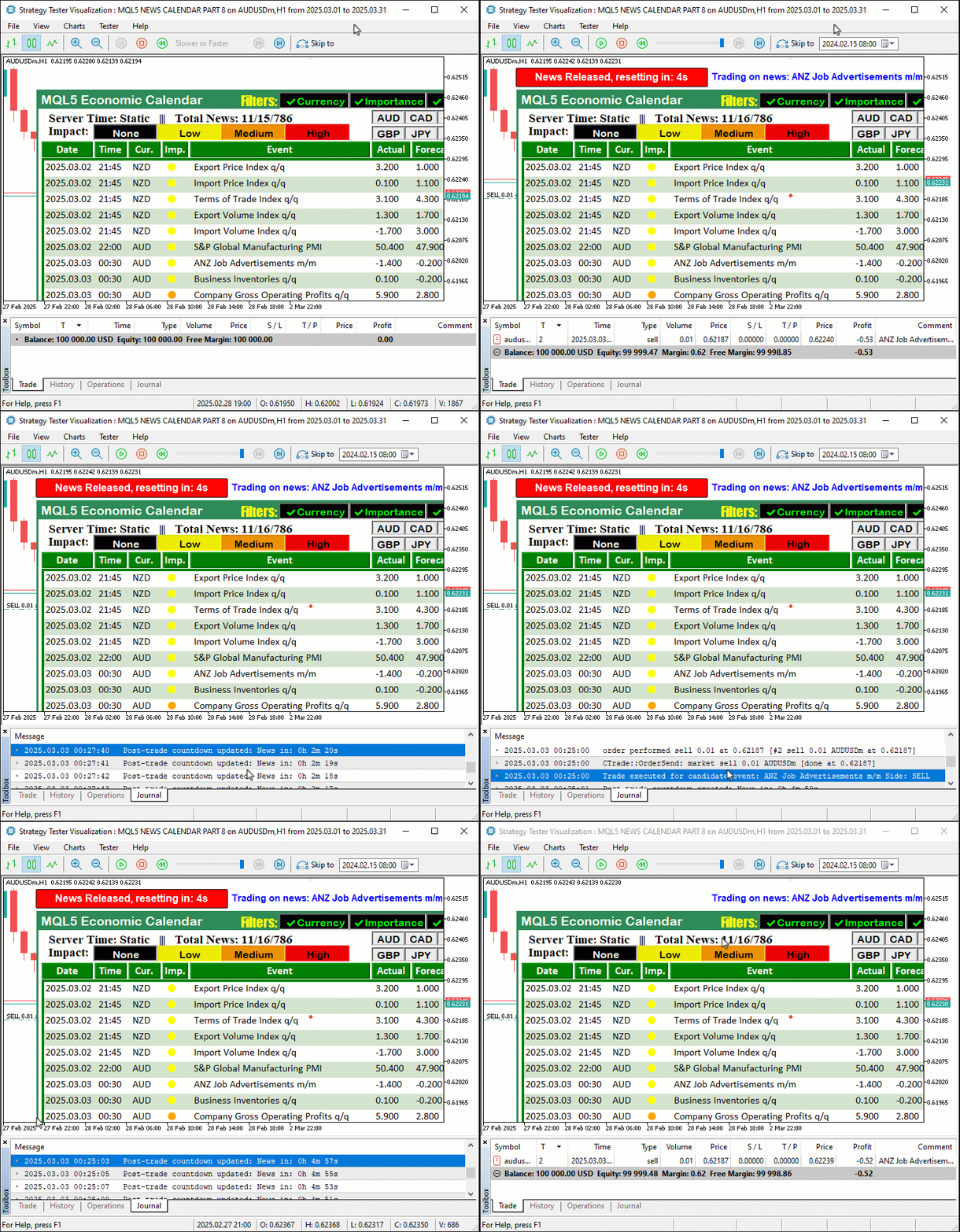
En la imagen podemos observar que podemos obtener los datos, filtrarlos e incorporarlos al panel de control, iniciar las cuentas atrás cuando se alcanza el intervalo de tiempo correspondiente a unos datos concretos y operar en función de las noticias, simulando exactamente lo que ocurre en un entorno de negociación en tiempo real, con lo que logramos nuestro objetivo de integración. Lo que queda ahora es realizar una prueba retrospectiva exhaustiva del sistema, lo cual se aborda en la siguiente sección.
Pruebas y validación
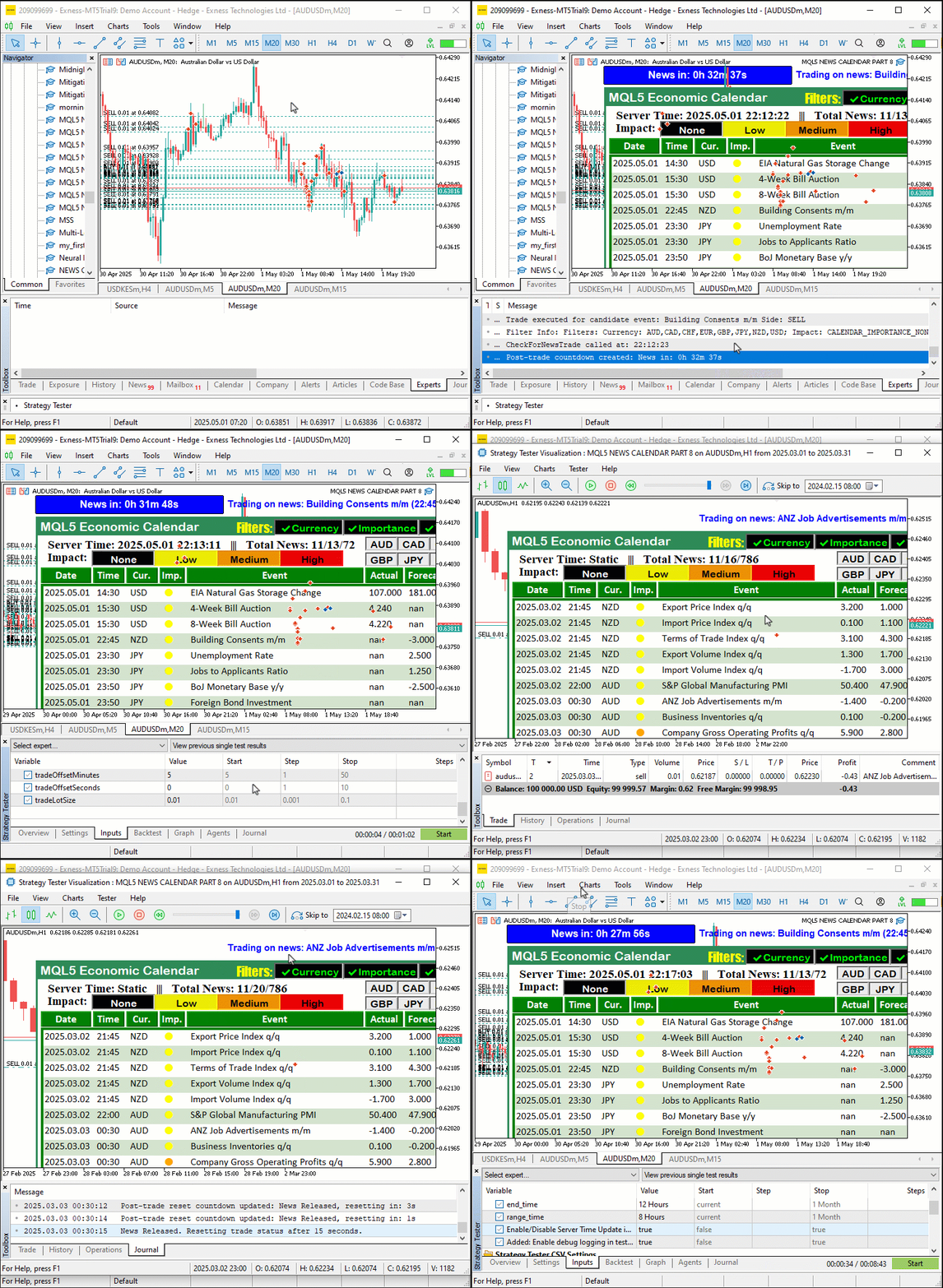
Probamos el programa cargándolo primero en un entorno real, descargando los datos de las noticias deseadas y ejecutándolo en el Probador de estrategias de MetaTrader 5 con «StartDate» establecido en «2025.03.01», «EndDate» en «2025.03.21» y «debugLogging» desactivado, utilizando un archivo de valores separados por comas (CSV) en «EconomicCalendarData» para simular operaciones a través de «CheckForNewsTrade» en «filteredEvents». Un GIF muestra el panel de control, que se actualiza mediante «update_dashboard_values» solo cuando «filters_changed» está activo o cuando corresponde una actualización según «last_dashboard_update», mostrando los eventos filtrados con «createLabel» y registros limpios de operaciones y actualizaciones. Las pruebas en modo real con la función CalendarValueHistory confirman que la visualización es idéntica, lo que corrobora el rendimiento rápido y claro del programa en ambos modos. Aquí está la visualización.
Conclusión
En conclusión, hemos mejorado la serie Calendario económico MQL5 optimizando el backtesting mediante un filtrado inteligente de eventos y un registro selectivo, lo que permite una validación rápida y clara de las estrategias sin dejar de ofrecer unas capacidades de negociación en tiempo real fluidas. Este avance combina las pruebas offline eficaces con el análisis de eventos en tiempo real, lo que nos ofrece una herramienta sólida para perfeccionar las estrategias basadas en las noticias, tal y como se muestra en nuestra visualización de pruebas. Puede usarlo como base y seguir mejorándolo para adaptarlo a sus necesidades específicas de trading.
Traducción del inglés realizada por MetaQuotes Ltd.
Artículo original: https://www.mql5.com/en/articles/17999
Advertencia: todos los derechos de estos materiales pertenecen a MetaQuotes Ltd. Queda totalmente prohibido el copiado total o parcial.
Este artículo ha sido escrito por un usuario del sitio web y refleja su punto de vista personal. MetaQuotes Ltd. no se responsabiliza de la exactitud de la información ofrecida, ni de las posibles consecuencias del uso de las soluciones, estrategias o recomendaciones descritas.

 Simulación de mercado: Position View (III)
 Desarrollo de un kit de herramientas para el análisis de la acción del precio (Parte 22): Panel de correlación
 Del básico al intermedio: FileSave y FileLoad
 Del básico al intermedio: SandBox y MetaTrader

- Aplicaciones de trading gratuitas
- 8 000+ señales para copiar
- Noticias económicas para analizar los mercados financieros
Usted acepta la política del sitio web y las condiciones de uso