Control Panel MT4

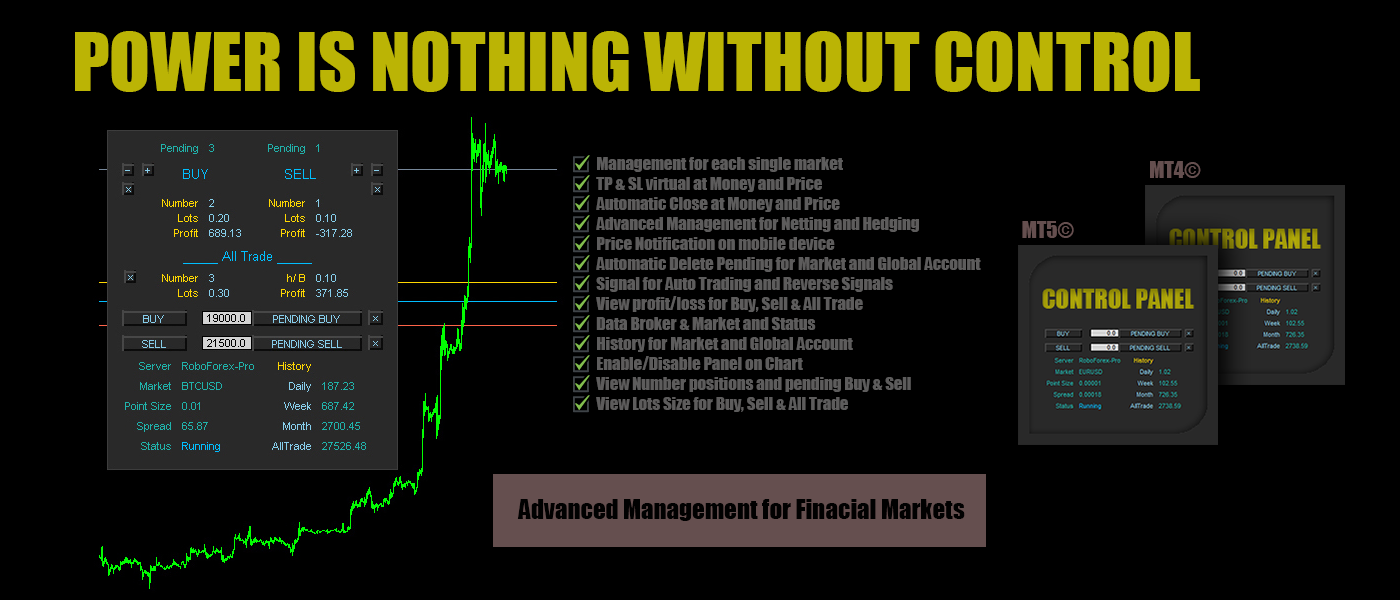
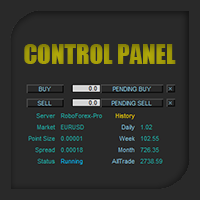
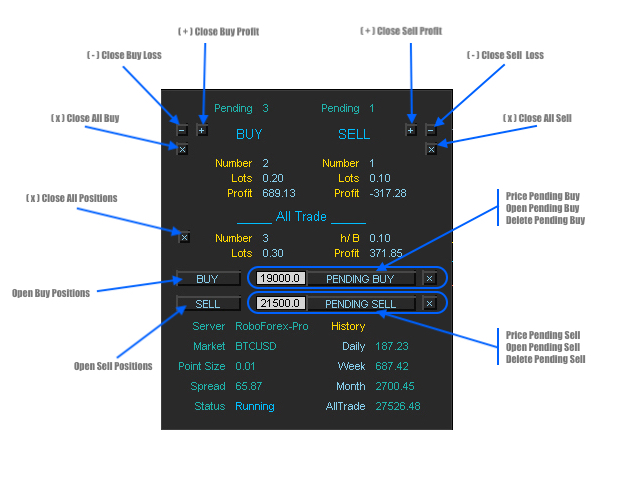
Control Panel mette a disposizione una semplificata ed avanzata gestione dedicata per ogni singolo mercato Forex, CFD, Materie Prime, Indici Azionari, Metalli Preziosi, Prodotti Energetici, Azioni & Crypto Valute, dal trade pad si posso aprire posizioni e ordini pendenti, visualizzare tutti i dati relativi alla quantità delle posizioni Buy, Sell e di tutti i trade oltre alla quantità espressa in lotti anche per i posizionamenti hedge indicando il valore espresso in lotti relativo all’esposizione, se la differenza di posizionamento misurata in lotti sarà di tipo Hedge Buy sul pannello di controllo sarà disponibile il dato h/B: e il valore di lotto, se di tipo Hedge Sell sarà disponibile il dato h/S: con il valore di lotto. Si possono chiudere posizioni in profitto o in perdita oppure passare alla chiusura totale in qualsiasi momento, impostare o cancellare ordini pendenti, tutte le funzioni sono disponibili in modalità manuale e automatica. Control Panel ha integrato un sistema di visualizzazione dei profitti/perdite con report giornaliero, settimanale e mensile ed il totale dei profitti per ogni singolo mercato o dell'intero account. Sul grafico sono disponibili le Open Price delle posizioni Buy ( linea blu ), Sell ( linea rossa ) e se presente del posizionamento Hedge ( linea oro ). Si possono impostare take profit ( linea blu tratteggiata ) e stop loss ( linea rossa tratteggiata ) virtuali basati sul raggiungimento di un determinato prezzo o profitto, impostare la cancellazione degli ordini pendenti al raggiungimento del target impostato ed impostare notifiche sullo smartphone per monitorare il profitto o la perdita ad un valore ed una frequenza impostati. Offre anche la possibilità di aprire una prima singola posizione per mercato basata sulla ricezione del segnale generato dall'indicatore Ichimoku, RSI e Moving Average su cui lavorare successivamente con il trade pad fino al raggiungimento del profitto.


Contro Panel possiede tutti i strumenti necessari per gestire ogni singolo mercato in modalità automatica e manuale nel breve e lungo periodo rendendo semplice e comprensibile la strategia da intraprendere per ottimizzare al massimo i propri investimenti, è uno strumento professionale dal codice pulito e stabile di cui sarà impossibile fare a meno non appena comprese le potenzialità che offre.


Input/impostazioni alle funzioni:

  • Market / inserire il simbolo del mercato come da grafico su cui attivare Control Panel ( esempio: EURUSD )
  • Lots Size / il lotto per il Trade Pad e per l'Auto Trading che attiva la sezione Signal
  • Auto Trading / true attiva, false disattiva la sezione Signal
  • Profit Control / true attiva, false disattiva la notifica mobile del profitto/perdita, è disponibile nella sezione Market per la notifica mobile di profitto/perdita relativa al solo Mercato impostato in Market oppure dell'intero Account
  • Money Move Up / invia una notifica sul mobile device quando il profitto è superiore al valore impostato ( esempio come da valore default impostato 50USD )
  • Money Move Down / invia una notifica sul mobile device quando il profitto è inferiore al valore impostato ( esempio come da valore default impostato -50USD )
  • Notification Mobile / la frequenza della ricezione delle notifiche, se ad esempio il valore è impostato come di default su 1 hour, Control Panel invierà una notifica ogni ora
  • Automatic Close / true attiva, false disattiva la chiusura di tutte le posizioni, è disponibile nella sezione Market per la chiusura automatica di tutte le posizioni relative al solo Mercato impostato e nella sezione Account per la chiusura automatica di tutte le posizioni presenti su ogni mercato
  • Close All Positions Market Move Up / true attiva, false disattiva il successivo input Take Profit: impostare un valore per la chiusura, esempio il valore di default è 500USD o altra valuta, quando il profitto relativo al market è uguale o superiore a 500 avvia il processo di chiusura automatica di tutte le posizioni relative al mercato o dell'intero account se attivo nella sezione Account
  • Close All Positions Market Move Down / true attiva, false disattiva il successivo input Stop Loss: impostare un valore per la chiusura, esempio ( il valore di default è impostato ad un valore alto per evitare chiusure errate prima dell'apprendimento delle funzioni ) -500USD o altra valuta, quando il profitto relativo al market è uguale o inferiore a -500 avvia il processo di chiusura automatica di tutte le posizioni relative al mercato o dell'intero account se attivo nella sezione Account
  • Delete Pending No Position Market / true attiva, false disattiva la cancellazione di tutti gli ordini pendenti quando non ci sono posizioni aperte sul mercato
  • Delete Pending No Position Account / true attiva, false disattiva la cancellazione di tutti gli ordini pendenti quando non ci sono posizioni aperte sull'intero account
  • Comment Order / il commento per le posizioni

Nella sezione (3) (4) (5) troviamo le impostazioni per la ricezione dei segnali Ichimoku, RSI e Moving Average con le relative impostazioni e il Reverse Signal, è possibile attivarle e disattivarle singolarmente ed è attiva solamente se il valore su Auto Trading nella sezione market e su true, se attiva aprirà un sola posizione per mercato alla ricezione del segnale attivo

Take Profit & Stop Loss i valori da inserire sono espressi in Points Digits, esempio: per impostare il Take Profit di 50 pips su EURUSD che ha un Point Size di 0.00001 ( calcolo: 1 pips = 10 points - 50 pips x 10 points = 500 points ) il valore da inserire sarà 500 a partire dall'ultimo decimale, quindi il valore da inserire sarà 0.00500

esempio per BTCUSD  che ha un Point Size di 0.01 ( calcolo: 1 pips = 10 points - 50 pips x 10 points = 500 points ) il valore da inserire sarà 500 a partire dall'ultimo decimale, quindi il valore da inserire sarà 5.00, lo stesso vale per tutti gli altri mercati partendo sempre dal l'ultimo decimale tenendo conto del ( Point Digits ) punto

  • Control Panel / true attiva, false disattiva il pannello dati sul grafico
  • Account Profit Stats / true attiva, false disattiva la cronologia dei profitti dell'intero account visibile sul grafico angolo destro superiore
  • Magic Number / il numero magico ( control panel è progettato per il supporto di tutte le posizioni, manuali o aperte da altri expert, quindi è possibile inserire il numero magico dell'expert su cui vogliamo applicare il supporto )


Control Panel offre funzioni aggiuntive non disponibili sulle comuni piattaforme, funzioni che i studi basati su anni di esperienza hanno rilevato fondamentali alla gestione del proprio portafoglio investiario!


#tag control panel gestione mercati finanziari dati hedge buy sell automatico manuale forex azioni metalli indici crypto valute notifiche mobili close profit control on pair signal reverse account history market stats trade pad pending delete
Recommended products
FCK CurrencyStrength Pro
Patel Hitendrakumar Mahendrabhai
Hi Friends, " FCK Currency Strength Pro " is a auto & semi auto trading expert with direction of pair. Buy-Sell separate or multi currency in one click. The strategy of  FCK Currency Strength Pro  is a combination of custom indicator, Trendlines, Support & Resistance levels ( Price Action ) and most important secretive trading algorithm mentioned above. Download News Ex4 and csv file You need the following SDSnews.ex4 in MQL4/Libraries and the daylightsavings.csv in MQL4/Files. Only 4 of 5 copi
Tipu Trader
Kaleem Haider
3 (2)
Tipu Trader is a part of Tipu Panel ecosystem that was developed out of need for quick and simple trading. Tipu Trader is an easy to use trade panel for commonly used trade functions. Create you own signals with Tipu Panel and trade along with Tipu Trader, a simple and easy to use trade panel. Features An easy to use trade panel for most commonly used trade functions. Create your own personal trade signals with Tipu Panel , and trade with Tipu Trader. Customizable Panel. The panel can be moved
FREE
CleanView
Sergey Batudayev
CleanView — Chart Management Utility for MetaTrader 4 CleanView is a utility designed to simplify the management of chart appearance and graphical objects in MetaTrader 4. It provides a compact button panel located in the upper-left corner of the chart, allowing quick access to functions for visual customization, chart cleaning, and display control. Functions and Buttons Clear Chart — removes all graphical objects from the current chart except the utility buttons. Useful for quick cleanup of lin
FREE
Flash Copy MT4
Trinh Dat
5 (1)
The program is use to copy trading from MT4   to MT4 and MT5  on local PC or copy  over the Internet.   Now you can easy copy trades to any where or share to friends. Only run one Flash Server on VPS, also need allow the apps if you turn on Windows Firewall. Can not add more than 20 account copier to server, include both  MT4 and MT5 Get free Copier EA for MT4 and MT5 (only  receive signal),   download here Instants copy, speed smaller 0.1 seconds, easy to setup How to setup and guide Let read a
Local Account Monitor MT4 is a read-only local monitoring utility for traders who run multiple MetaTrader terminals on the same PC or the same Windows VPS . It combines Agent mode and Dashboard mode so you can monitor local accounts from one place, spot stale terminals quickly, review account health states, and inspect risk details without switching between many terminals. Public channel:   CLICK HERE What it is for Monitoring multiple local MT4 terminals from one dashboard Quickly identifying
FREE
Trade Manager MT4 DaneTrades
Levi Dane Benjamin
4.09 (11)
DaneTrades Trade Manager is a professional trade panel for MetaTrader 4, designed for fast, accurate execution with built‑in risk control. Place market or pending orders directly from the chart while the panel automatically calculates position size from your chosen risk, helping you stay consistent and avoid emotional decision‑making. The Trade Manager is built for manual traders who want structure: clear risk/reward planning, automation for repeatable management, and safeguards that help reduc
Just Copier MT4
Agung Imaduddin
5 (4)
"Just copier" is designed to copy trading without any complicated settings. The copy can be done in one PC. One EA can be set as master (provider) or slave (receiver). The receiver lot can be set to multiple providers lots. Please also check this product at fxina.hostingerapp.com.  Any type of copy is available. MT4 -> MT5 MT4 -> MT4 MT5 -> MT5 MT5 -> MT4 If you want to copy MT4 -> MT5 or MT5 -> MT4, please purchase "Just copier" for MT4 and "Just copier" for MT5 separately. Just Copier can copy
SL and TP Setter
Giacomo Barone
4 (1)
You can manually open a trade (one click), and this EA will take care of setting the SL and TP. SL and TP are set based on the number of pips you specify in the input screen. You can also choose monetary SL and TP. SL and TP are determined based on the weighted average price (WAP), so if you open a new trade, SL and TP will be updated according to the new WAP. The WAP is not unique but differentiated between buy and sell trades (this is useful only if you open opposite trades on the same chart)
FREE
Period Change Button
Rainer Albrecht
3 (1)
Fastest way to change the period. Suitable for traders who use many charts and timeframes. Size, shape and color can be customized. Inputs Parameters Corner — Choose corner placement Standart is "Right lower chart corner" Color — Background color of the button ColorText — Text color of the button ColorOn — Background color of the button for the current period ColorOnText — Text color of the button for the current period Font — Arial, Verdana... FontSize — Size of the font in pixels DistanceX —
FREE
CopierMT4
Dmitry Fedoseev
Copier for the MetaTrader4 terminal. Designed to copy trade from one terminal to another. Compatible with the version for the MetaTrader5 terminal; if available, copying can be performed between different terminals (regardless of the type of accounts: hedging or netting). The number of accounts to which copying is possible is not limited (depends only on the computing power of your computer). Directions for copying the version for MetaTrader 4 together with the version for MetaTrader 5: MT5 Net
The   DrawdownProtector   is a custom MetaTrader 4 (MT4) EA designed to manage floating losses in trading accounts. Let’s break down its key features: Floating Loss Management : The EA monitors the account’s floating profit and loss (P/L). If the floating loss exceeds a user-defined threshold (default: $100), the EA takes action. Order Closure : When the floating loss surpasses the threshold, the EA closes all open orders. It ensures that no further losses accumulate beyond the specified limit.
FREE
TSDeleteAllObject
Salvatore Labriola
Script utility to clean up your template from every object. Convenient and quick to use. Just drag the script onto your template and it will be cleaned of all visible and non-visible objects present. Very useful for objects that cannot be eliminated simply by writing or shapes, etc. We would appreciate your feedback, so we can better ourselves. Happy Trading. 
FREE
Spread Costs refers to the amount of the loss caused by the spread, and Swap Benefits refers to the amount of the income gained by overnight positions. Spread Costs is an important indicator for short-term traders, especially for scalping traders, and Swap Benefits is an important indicator for long-term traders. Since the spreads and swaps on the MetaTrader 4 platform are all expressed in points, we need to convert it into the amount expressed in the account currency. This tool can display the
Lot by Risk
Sergey Vasilev
4.83 (23)
The Lot by Risk trading panel is designed for manual trading. This is an alternative means for sending orders. The first feature of the panel is convenient placing of orders using control lines. The second feature is the calculation of the order volume for a given risk in the presence of a stop loss line.   Control lines are set using hot keys: take profit – T key by default; price – P key by default; stop loss – S key by default; You can configure the keys in the settings of the trading panel.
FREE
EasyAgent Trade Tool
Nattapon Chuekamhod
EasyAgent Trade Tool.This is not an automatic trading robot (EA) and it doesn’t take decisions or opens position, but it helps your work when you trading manual work with Strategy Tester and you can control trade via magic number. The following functions are available: Order opening in one click. Order closing/deleting in one click. Modification of Stop Loss and Take Profit using a mouse. Closing all orders based on their type. Order reversal. Breakeven function. Trailing Stop function.
FREE
OpenOrders
Andrey Chiganaev
The script allows you to quickly and easily open trades (place orders) on the market. Features Buy and sell at a market price; Place pending orders: Buy/Sell Limit and Buy/Sell Stop; Open a trade with a custom volume; Calculate and set TakeProfit; Calculate and set StopLoss; Auto defining the number of decimal places; Auto defining a symbol the script has been applied to. What you get with the script Ability to calculate each trade instantly; Ability not to enter all calculated values manually
The TargetChanger The TargetChanger Script is the easiest way to change the takeprofits of multiple open orders . It automatically changes the takeprofit of both open orders as well as limit orders on the current pair.  To change your target you simply drag the TargetChanger on the current chart, type in the new takeprofit level and click "ok". All the takeprofits get changed within seconds now. If you only trade with one single order each time, this tool might not be super useful for you, bu
Reverse copier is a tool that will open opposite buy/sell orders from your master account. It will help you with low profit EA's that lose consistenly and turn it to wins. Feel free to ask for new functions/features and I will add it. Now it's a simple MT5 to MT4 bridge with straightforward logic of one position open/close.  How to install: https://www.mql5.com/en/market/product/141604
FREE
Arrow indicator to EA
Sofiia Butenko
5 (6)
If you need an advisor on any arrow indicator signals - this utility will definitely help you.  What does the utility do?  It creates a EA file with your indicator signals in a few easy steps: install the indicator with the needed settings on the chart; Select a signal for buy;  Select a signal for sell;  get the clicker file ! Then you install the file of the EA in the folder Experts and update the terminal.  Attention! Set the indicator settings as you need and the same settings will be tak
FREE
Breakeven Manager MT4
Ibrahim Olalekan Ganiu
Hello, trading champs! I trust you are doing well. Have you experienced entering a position where the market initially moves in your favour or approach your takeprofit then suddenly the market reversed opposite your position? Well, it has happened to me numerous times and today I decide to fight back. I present to you a trade manager that help you protect your position(s). This project helps you set your position(s) to breakeven either when a certain amount of pips you specify is reached or a
FREE
Symbol Manager
Taras Slobodyanik
5 (4)
Symbol Manager or Grid Manager, designed to group orders into one position (by Symbol or by Magic Number). This utility will be useful to multi-currency traders (many EAs), who can have multiple orders on several pairs. You will be able to see the total number of lots, the total profit, and set virtual stop loss and virtual take profit. To set a real TP (or SL), you must first set the virtual value, and then enter the command in this cell: "set". If you want to set real TP/SL for all orders at
DG Equity Monitor
David Mugo Gathaga
DG Equity Monitor is a useful tool that keeps track of the daily transactions made on the account. The EA automatically and instantly closes all the trades running based on two conditions: 1. If the daily profit target is hit. 2. If the maximum drawdown is reached. An alert is sent immediately one of the above conditions are met. Parameters: Show Account Info -Choose whether or not to display the Account Info on the chart. Show Pop Up Alert -Show alert on chart when either condition 1 or 2 are
FREE
Program for automatic placement of stop loss and take profit orders. Values are calculated as points distance from open price. BreakEven option is also included. all options could be applied to BUY, SELL separately or together. Enter values ​​in points in the fields on the right side of the menu and press dedicated button to aplly your settings. If in doubt, The instruction is displayed in the tooltip.
FREE
My products: https: // www.mql5.com/ru/users/astra077/seller In the product line: Candlestick Pattern Detector   — a free basic version. Candlestick Patterns Standard   — a paid single-chart version with extended patterns and filters  https://www.mql5.com/ru/market/product/174659 Japanese Candlestick Patterns Pro MT4   — a professional single-chart version with a summary table  https://www.mql5.com/ru/market/product/174681 Multi-Currency Candlestick Pattern Scanner   — the ultimate version: a m
PZ Trade Pad EA
PZ TRADING SLU
4.29 (31)
This simple visual expert advisor allows you to trade easily from the chart. It handles risk management for you and can perform several useful tasks with your existing trades, saving time and making risk-management for each individual trade easier.  [ Installation Guide | Update Guide | Troubleshooting | FAQ | All Products   |  Get Help ] Trade easily from the chart Trade with precise risk management, hassle free Trade pending order with drag and drop price selection Set SL and TP levels with
FREE
Break Even Helper for MT4 – Simple SL to Entry Utility Break Even Helper for MetaTrader 4 is a compact and effective tool that helps traders protect their open trades by automatically moving the Stop Loss (SL) to the entry price when a trade reaches a user-defined profit level (in points). Designed for risk-conscious traders, this utility simplifies SL management without relying on complex trailing systems or custom strategies. Looking for MetaTrader 5 version? I t is available separately in the
Trading panel for manual trading. Has a fairly wide functionality. Allows you to automatically calculate the order size, open both market and pending orders. It has a wide range of options for closing orders, it is possible to partially close orders, close orders after reaching a certain profit or loss, separately close profitable and unprofitable, buy and sell, as well as pending orders. The panel also contains a simple implementation of a grid of pending orders, reverse and lock functions, tr
FREE
Account Export
Ziheng Zhuang
5 (1)
This is a MetaTrader 4 script. It helps to export all trades into a CSV file as per Symbol and selected periods. Input Select Symbol: This is 2-option input. Select current symbol or all symbols to export its orders. Select Period: This is 7-option input. It includes Last Month, This Month, Last Week, This Week, Today, All History, and Date Specified. Specify Starting Date: Enter a date if you selected Date Specified in "Select Period" input. Specify Ending Date: Enter a date if you selected Da
FREE
EA Close All Set TPSL All  Panel MT4 EA Close All Set TPSL All MT4 is a professional utility tool for MetaTrader 4 that helps traders manage orders quickly and efficiently. With a clean on-chart control panel, you can close trades or set Take Profit / Stop Loss levels for all orders with just one click.       [MT5 Version --->  click . ] Key Features On-Chart Control Panel – Light gray background with simple and intuitive design. Close All Orders – Instantly close all active Buy, Sell, and Pe
FREE
4 buttons for managing your trades. Close All : will close all open positions on the current chart Delete All : will delete any pending orders on the current chart SL + 1 : will move the stop loss 1 pip closer to the breakeven point on all open trades on the current chart Delete SL : will remove the stop loss for all open positions on the current chart Useful for everyone who opens multiple positions on the same asset, where fast execution is essential.


FREE
Buyers of this product also purchase
Forex Trade Manager MT4
InvestSoft
4.98 (439)
Welcome to Trade Manager MT4 - the ultimate   risk management tool   designed to make trading more intuitive, precise, and efficient. This is not just an order placement tool; it's a comprehensive solution for seamless trade planning, position management, and enhanced control over risk. Whether you're a beginner taking your first steps, an advanced trader, or a scalper needing rapid executions, Trade Manager MT4 adapts to your needs, offering flexibility across all markets, from forex and indice
Trade Assistant MT4
Evgeniy Kravchenko
4.43 (196)
It helps to calculate the risk per trade, the easy installation of a new order, order management with partial closing functions, trailing stop of 7 types and other useful functions. Additional materials and instructions Installation instructions   -   Application instructions   -   Trial version of the application for a demo account Line function -   shows on the chart the Opening line, Stop Loss, Take Profit. With this function it is easy to set a new order and see its additional characteris
Local Trade Copier EA MT4
Juvenille Emperor Limited
4.96 (110)
Experience exceptionally  fast trade copying with the Local Trade Copier EA MT4 . With its easy 1-minute setup, this trade copier allows you to copy trades between multiple MetaTrader terminals on the same Windows computer or Windows VPS with lightning-fast copying speeds of under 0.5 seconds. Whether you're a beginner or a professional trader, the Local Trade Copier EA MT4 offers a wide range of options to customize it to your specific needs. It's the ultimate solution for anyone looking to inc
Telegram to MT4 Coppy
Sergey Batudayev
4 (10)
Telegram to MT4: The Ultimate Signal Copying Solution Streamline your trading with Telegram to MT4 , the cutting-edge utility designed to copy trading signals directly from Telegram channels and chats to your MetaTrader 4 platform—without the need for DLLs. This robust solution ensures seamless execution of signals with unparalleled precision and customization options, saving you time and boosting your efficiency. [ Instructions and DEMO ] [ FAQ ] [ How atach logs properly ] [Settings descrition
VirtualTradePad PRO SE MT4 — advanced trading panel and chart workspace for MetaTrader 4 VirtualTradePad PRO SE is a professional trading panel and trade-management workspace for MetaTrader 4 . It helps traders open, manage, protect, close and analyze trades faster from one chart-based interface. The product was created for active manual traders who need more than a simple set of buttons. PRO SE combines one-click execution, pending orders, position control, partial close, basket profit/loss log
Exp COPYLOT CLIENT for MT4
Vladislav Andruschenko
4.69 (65)
Professional Trade Copier for MetaTrader 4 Fast, professional, and reliable trade copier for MetaTrader 4 . COPYLOT helps you copy Forex trades between MetaTrader 4 and MetaTrader 5 terminals with flexible synchronization for different account setups. COPYLOT MT4 version supports: MetaTrader 4 to MetaTrader 4 MetaTrader 5 Hedge to MetaTrader 4 MetaTrader 5 Netting to MetaTrader 4   MT5 version Full Description + DEMO + PDF How To Buy How To Install How to get Log Files How To Test and Optimize A
Custom Alerts AIO: All-in-One Market Scanner – No Setup Required Overview Custom Alerts AIO is the fastest and easiest way to monitor multiple markets for real-time trading signals—without any setup or extra licenses. It comes with all required Stein Investments indicators already embedded, making it the perfect plug-and-play solution for traders who value simplicity and performance. Just load it to any chart and start receiving alerts across Forex, Metals, Crypto, and Indices. Shares can be a
TradePanel MT4
Alfiya Fazylova
4.84 (95)
Trade Panel is a multi-functional trading assistant. The app contains over 50 trading functions for manual trading and allows you to automate most trading tasks. Before making a purchase, you can test the demo version on a demo account. Download the trial version of the application for a demonstration account: https://www.mql5.com/en/blogs/post/750865 . Full instructions here . Trade. Allows you to perform trading operations in one click: Open pending orders and positions with automatic risk cal
ManHedger MT4
Peter Mueller
5 (2)
THIS EA IS A SEMI-AUTO EA, IT NEEDS USER INPUT. Manual & Test Version Please TEST this product before   BUYING  and watch my video about it. Contact me for user support or bug reports, or if you want the MT5 version! MT5 Version I do not guarantee any profits or financial success using this EA. With this Expert Advisor, you can: Implement your own   Zone Recovery   strategy to capitalize on trending markets. Create   Grid   trading strategies, to profit from ranging markets. Place orders easil
The product will copy all telegram signal to MT4   ( which you are member  ) , also it can work as remote copier.  Easy to set up, copy order instant, can work with almost signal formats, image signal, s upport to translate other language to English Work with all type of channel or group, even channel have "Restrict Saving Content", work with  multi channel, multi MT5 Work as remote copier: with signal have ticket number, it will copy exactly via ticket number. Support to backtest signal. How to
Copy Cat More Trade Copier MT4 is not just a simple local trade copier; it is a complete risk management and execution framework designed for today’s trading challenges. From prop firm challenges to personal portfolio management, it adapts to every situation with its blend of robust execution, capital protection, flexible configuration, and advanced trade handling. The copier works in both   Master (sender) and Slave (receiver)   modes, with real-time synchronization of market and pending orders

RS Trade Copier
Boris Sedov
5 (1)
RS Trade Copier - the ultra-fast local trade copier with a real graphical interface. Stop typing account numbers manually. No more 200+ cryptic inputs. A reliable and flexible tool for copying trading operations between multiple MT4 and MT5 terminals. It suits experienced traders, signal providers, and individual investors. It enables trade synchronization from one or multiple Providers to one or multiple Clients with high precision and minimal latency. It supports simple automatic configuration
LAUNCH OFFER 30% OFF! $49 instead of $69! The Risk/Reward Tool is a professional-grade Expert Advisor designed to revolutionise the way you plan, visualise, and execute trades in MetaTrader 4. Whether you're a discretionary trader who values precise risk management or a strategy developer who needs to test trade setups visually, this tool provides everything you need in one elegant, intuitive interface. Unlike basic position calculators, the Risk/Reward Tool combines visual trade planning with
Unlimited Trade Copier Pro is a tool to copy trade remotely to multiple MT4, MT5 and cTrader accounts at different computers/locations over internet. This is an ideal solution for you if you are a signal provider and want to copy your trades to other receivers globally on your own rules. One provider can copy trades to multiple receivers and one receiver can get trade from multiple providers as well. The provider can even set the subscription expiry for each receiver, so that receiver will not b
The Expert Advisor will help you forward all pop-up alert with screenshot from  MetaTrader 4 to Telegram channel/ group, also forward all notifications to Telegram. Parameters  -  Telegram Bot Token - create bot on Telegram and get token.  -  Telegram Chat ID  - input your Telegram user ID,  group / channel ID  -  Forward Alert - default true, to forward alert.  -  Send message as caption of Screenshot - default false, set true to send message below Screenshot  How to setup and guide  - Telegram
AW Grids Maker
AW Trading Software Limited
4.33 (3)
AW Grids Maker is used to build grids from pending orders. The utility is universal, has flexible settings and an intuitive panel interface. The program builds networks from STOP and LIMIT orders with the necessary step, uses the position volume multiplier. MT5 version ->  HERE  / Problem solving ->  HERE Advantages: Uses pending orders of all types. Simple and flexible configuration. A well-designed and multifunctional utility panel. A well-thought-out information module Features of work: Suit
CloseIfProfitorLoss with Trailing
Vladislav Andruschenko
4.87 (31)
Close If Profit or Loss with Trailing for MetaTrader 4 — automatic closing by total profit or loss A reliable trade-management utility for MetaTrader 4 that automatically closes positions when the total profit or total loss reaches the level you set. The Expert Advisor monitors open trades, calculates floating profit and loss, can trail profit, and helps close positions faster than manual reaction. MetaTrader 4 is still used by many manual traders, grid traders, scalpers, and Expert Advisor use
Trade copier MT4
Alfiya Fazylova
4.58 (33)
Trade Copier is a professional utility designed to copy and synchronize trades between trading accounts. Copying occurs from the account / terminal of the supplier to the account / terminal of the recipient, which are installed on the same computer or VPS . PROMOTION - If you have already purchased the "Trade Copier MT5," you can receive the "Trade Copier MT4" for free (for copying MT4 > MT5 and MT4 < MT5). For more detailed information about the conditions, please contact us via private message
The MT4 to Discord Signal Provider is a user-friendly, fully customizable utility designed for sending trading signals directly to Discord. This tool transforms your trading account into an efficient signal provider. Customize message formats to suit your style! For ease of use, select from pre-designed templates and choose which message elements to include or exclude. [ Demo ] [ Manual ] [ MT5 Version ] [ Telegram Version ]  New: [ Telegram To MT5 ] Setup Follow our detailed user guide for eas
The News Filter
Leolouiski Gan
5 (25)
This product filters all expert advisors and manual charts during news time. It is able to remove any of your EA during news and automatically reattach them after news ends. This product also comes with a complete  order management system that can handle your open positions and pending orders before the release of any news. Once you purchase The News Filter , you will no longer need to rely on built-in news filters for future expert advisors, as this product can filter them all from here onwards

Smart Channel M4
Vahidreza Heidar Gholami
The trend in the market can be predicted using trend lines but the problem is you don’t know where exactly the price is going to touch the trend line where you can put your pending orders on. Smart Channel Expert Advisor makes it possible to put an advanced channel around the price data, which can be configured to handle placing orders, opening and closing positions, managing risk per trade, spread, slippage, and trailing stop-loss and take-profit automatically. Features Money Management (Calcul
Ultimate Trailing Stop EA

BLAKE STEVEN RODGER
4.33 (15)
This EA Utility allows you to manage (with advanced filtering) unlimited open orders (manual or EA) with 16 trailing stop methods: fixed, percent, ATR Exit, Chandelier Exit, Moving Average, Candle High Low Exit, Bollinger Bands, Parabolic, Envelope, Fractal, Ichimoku Kijun-Sen, Alligator, Exit After X Minutes or Bars, RSI and Stochastic. The trailing stop can be either real or virtual, and you can exit fully or with a partial close percent on touch or bar close.  Moreover, you can add (overrid

Telegram to MT4 Multi-Channel Copier automatically copies trading signals from your Telegram channels directly into MetaTrader 4. No bots, no browser extensions, no manual copying. You receive a signal on Telegram and the EA opens the trade on your terminal in a few seconds. The product includes two components: a Windows application that listens to your Telegram channels, and this Expert Advisor that executes the signals on your MT4 terminal. An MT5 version is also available. Setup guide and app
Trading History MT4
Siarhei Vashchylka
5 (9)
Trading History - A program for trading and money management on the history of quotes in stratagy tester. It can work with pending and immediate orders, and is equipped with trailing stop, breakeven and take profit functions. Very good for training and testing different strategies. Manual (Be sure to read before purchasing) Advantages 1. Allows you to test any trading strategy in the shortest possible time 2. An excellent simulator for trading training. You can gain months of trading experience
Seconds Chart is a unique tool for creating second-based charts in MetaTrader 4 . With Seconds Chart , you can construct charts with timeframes set in seconds, providing unparalleled flexibility and precision in analysis that is unavailable with standard minute or hourly charts. For example, the S15 timeframe indicates a chart with candles lasting 15 seconds. You can use any indicators, Expert Advisors (EAs), and scripts, operating as conveniently as with standard charts. Unlike standard tools,
Trade Dashboard MT4
Fatemeh Ameri
4.96 (53)
Trade Dashboard simplifies how you open, manage, and control your trades, with built-in lot size calculation. It allows you to execute trades, manage risk, and control positions directly on the chart, with tools such as partial close, breakeven, and trailing stop. Designed to reduce manual work and help you stay focused on your trading decisions. A demo version is available for testing. Detailed explanations of features are provided within the MQL5 platform. Installation instructions are include
News Filter EA MT4
Rashed Samir
5 (9)
News Filter EA: Advanced Algo Trading Assistant News Filter EA is an advanced algo trading assistant designed to enhance your trading experience. By using the   News Filter EA , you can integrate a Forex economic news filter into your existing expert advisor, even if you do not have access to its source code. In addition to the news filter, you can also specify   trading days   and   hours   for your expert. The News Filter EA also includes   risk management   and   equity protection   features
Coppy Master MT4
Sergey Batudayev
4 (3)
Coppy Master MT4   is a trade copier tool for MetaTrader 4 and MetaTrader 5 terminals. It supports copying in both directions: from MT4 to MT5, from MT5 to MT4, as well as between accounts of the same type MT4 to MT4. To work correctly, all terminals must be running on the same PC or VPS. [ Instruction  and Demo ]  For copying to MetaTrader 4, a separate version —   Coppy Master MT5   — is required. Main Features: Copying Modes Supports both Master and Receiver roles. Flexible setup for sending
Exp SafetyLock PRO
Vladislav Andruschenko
4.57 (28)
SAFETYLOCK for MetaTrader 4 is a premium trade-protection utility built to defend open positions against sharp market reversals by placing an opposite safety order automatically. As soon as a trader or an Expert Advisor (EA) opens a position, SAFETYLOCK for MT4 creates a corresponding pending order (Buy Stop or Sell Stop) in the opposite direction. If the market moves against the original trade, the pending order is triggered and forms a protective lock, helping the trader control drawdown and o
MT4 to Telegram Signal Provider   turns your trading account into a signal provider. Every trade action, whether manual, by EA or from your phone, is instantly sent as a message to Telegram. You can fully customize the format or use a ready-made template for quick setup. [ Demo ] [ Manual ] [ MT5 Version ] [ Discord Version ]  New: [ Telegram To MT5 ] Setup A step by step user guide is available. Key Features Ability to customize order details sent to subscribers You can create a tiered subs
More from author
Hedge Pro MT4
Alessandro Grossi
Hedge Pro sfrutta la tecnica dell'hedging gestendo simultaneamente posizioni Buy e Sell e grazie al sistema di Recovery Integrato assegna alle posizioni successive un Size Lots proporzionale ai punti da recuperare sulla controtendenza affinché i Take Profit del Both Side siano sempre vicini al prezzo attuale di mercato. Hedge Pro è un expert dal codice stabile, professionale e pulito che crea dei profitti costanti nel tempo con un processo completamente automatico ed è  immune da falsi e ritard
Flat MT4
Alessandro Grossi
Flat è una utility pensata per chi ama operare con take profit e stop loss virtuali ed ordini di copertura come sistema di protezione del capitale, ma a volte ad esempio la notte non è possibile operare quindi si è costretti ad intervenire nel momento e nel modo sbagliato Facciamo un esempio, dopo aver ricevuto un segnale ti posizioni sul mercato con una posizione Long ma il mercato a bassi volumi e comprendi che il tuo posizionamento è valido ma bisogna attendere più di quanto pensavi fosse ne
Profit X MT4
Alessandro Grossi
Profit X invia notifiche sul tuo dispositivo mobile mantenendoti aggiornato sul profitto dei tuoi investimenti anche nei momenti in cui non puoi fisicamente controllare i mercati, ad esempio quando sei alla guida, sul posto di lavoro, in una riunione o con amici, con parenti e non puoi distrarti Può essere disattivata e attivata ed è possibile scegliere la frequenza del aggiornamenti in minuti, ore, giorni, settimanale o mensile La configurazione e personalizzazione è molto semplice, di default
Equity X MT4
Alessandro Grossi
Equity X è una utility che chiude tutte le posizioni ed eventuali ordini pendenti ad un importo prestabilito, è possibile fissare il bilancio del tuo conto quando il netto e uguale o superiore oppure uguale inferiore all'importo desiderato Ha integrato un sistema per la notifica mobile instantanea che genera il messaggio ad operazione avvenuta Uno strumento che permette di ottimizzare al massimo il rendimento del tuo investimento, è possibile utilizzarlo anche come gestore virtuale di take prof
Hedge Edit MT4
Alessandro Grossi
Hedge Edit sfrutta la tecnica dell’hedging gestendo simultaneamente posizioni Buy e Sell, grazie alla elaborazione del lotto impostato nell’input Lots multiplier applica una strategia di recupero alle successive posizioni che verranno aperte in base al valore impostato nell’input Step Grid Points e mantiene il take profit impostato nell’input Take Profit Points di entrambi sempre raggiungibili dal prezzo prezzo attuale di mercato. La ricezione del segnale di entrata è elaborata dalla chiusura d
Steel MT4
Alessandro Grossi
Steel è un potente expert advisor dal codice stabile e pulito che apre un singolo trade per mercato impostando  Take Profit  e  Stop Loss  e sfrutta il  Trailing Stop Loss  per ottenere il migliore profitto. Può essere utilizzato e configurato su qualsiasi mercato in quanto il segnale di acquisto o vendita viene elaborato dalla sola lettura delle candele rendendolo immune da falsi e ritardatari segnali generati dagli indicatori. Si può impostare la lettura di una singola candela o di un gruppo,
Gobbo MT4
Alessandro Grossi
Gobbo è un indicatore professionale che evidenzia il trend del mercato con un aspetto grafico chiaro e comprensibile, è basato sulla Moving Average e può essere impostato su qualsiasi periodo di intervallo, di default impostato sul periodo 14, scegliendo un periodo più alto evidenzierà meno cambi di tendenza per un approccio sul medio o lungo periodo, con un periodo più basso più cambi di tendenza per un approccio sul breve termine L'aggiornamento e l'adattamento al time frame scelto avviene in
Vision MT4
Alessandro Grossi
Vision è un indicatore professionale che legge i dati storici del periodo impostato e in base a tali elabora una previsione scrivendo l'andamento sul grafico, l'impatto visivo eccellente rende chiaro l'andamento del prossimo trend e mette a fuoco il prezzo d'ingresso il posizionamento di ordini e la distanza per SL e TP, di default è impostato con un rapporto bilanciato 24 a 24 ciò significa che in base alle ultime 24 candele prevederà scrivendo sul grafico l'andamento delle 24 candele successiv
Disuman MT4
Alessandro Grossi
Sai intercettare i prezzi di ingresso di un mercato e prevedere se saliranno o scenderanno nelle prossime ore? Sai stabilire quanto tempo tenere aperta una posizione e riconoscere se corretta o sbagliata? Se corretta sai decidere se incrementarla e incassarla entro i giusti termini? Nel caso la tua posizione si rilevi errata sei in grado di pianificare un recupero nelle giusta direzione con la giusta misura? Sei in grado di prendere una decisione in qualsiasi situazione che protegga il tuo capi
Combat MT4
Alessandro Grossi
Sei pronto a Combattere? Stop Loss fisico a protezione del capitale e take profit invisibile, virtuale a percentuale, elaborazione dei dati inclusi tra due time frame o in single mode Possibilità di regolare la frequenza dei segnai generati per impostare una strategia estrema di primo grado, moderata o placata Può essere attivato su qualsiasi time frame in quanto opera esclusivamente sui periodi selezionati negli input CombatFrom e CombatTo rendendo libera la navigazione per la consultazione e
Flat MT5
Alessandro Grossi
Flat è una utility pensata per chi ama operare con take profit e stop loss virtuali ed ordini di copertura come sistema di protezione del capitale, ma a volte ad esempio la notte non è possibile operare quindi si è costretti ad intervenire nel momento e nel modo sbagliato Facciamo un esempio, dopo aver ricevuto un segnale ti posizioni sul mercato con una posizione Long ma il mercato a bassi volumi e comprendi che il tuo posizionamento è valido ma bisogna attendere più di quanto pensavi fosse ne
Equity X MT5
Alessandro Grossi
Equity X è una utility che chiude tutte le posizioni ed eventuali ordini pendenti ad un importo prestabilito, è possibile fissare il bilancio del tuo conto quando il netto e uguale o superiore oppure uguale inferiore all'importo desiderato Ha integrato un sistema per la notifica mobile instantanea che genera il messaggio ad operazione avvenuta Uno strumento che permette di ottimizzare al massimo il rendimento del tuo investimento, è possibile utilizzarlo anche come gestore virtuale di take prof
Hedge Pro MT5
Alessandro Grossi
Hedge Pro sfrutta la tecnica dell'hedging gestendo simultaneamente posizioni Buy e Sell e grazie al sistema di Recovery Integrato assegna alle posizioni successive un Size Lots proporzionale ai punti da recuperare sulla controtendenza affinché i Take Profit del Both Side siano sempre vicini al prezzo attuale di mercato. Hedge Pro è un expert dal codice stabile, professionale e pulito che crea dei profitti costanti nel tempo con un processo completamente automatico ed è  immune da falsi e ritard
Profit X MT5
Alessandro Grossi
Profit X invia notifiche sul tuo dispositivo mobile mantenendoti aggiornato sul profitto dei tuoi investimenti anche nei momenti in cui non puoi fisicamente controllare i mercati, ad esempio quando sei alla guida, sul posto di lavoro, in una riunione o con amici, con parenti e non puoi distrarti Può essere disattivata e attivata ed è possibile scegliere la frequenza del aggiornamenti in minuti, ore, giorni, settimanale o mensile La configurazione e personalizzazione è molto semplice, di default
Hedge Edit MT5
Alessandro Grossi
Hedge Edit sfrutta la tecnica dell’hedging gestendo simultaneamente posizioni Buy e Sell, grazie alla elaborazione del lotto impostato nell’input Lots multiplier applica una strategia di recupero alle successive posizioni che verranno aperte in base al valore impostato nell’input Step Grid Points e mantiene il take profit impostato nell’input Take Profit Points di entrambi sempre raggiungibili dal prezzo prezzo attuale di mercato. La ricezione del segnale di entrata è elaborata dalla chiusura d
Steel MT5
Alessandro Grossi
Steel è un potente expert advisor dal codice stabile e pulito che apre un singolo trade per mercato impostando Take Profit e Stop Loss e sfrutta il Trailing Stop Loss per ottenere il migliore profitto. Può essere utilizzato e configurato su qualsiasi mercato in quanto il segnale di acquisto o vendita viene elaborato dalla sola lettura delle candele rendendolo immune da falsi e ritardatari segnali generati dagli indicatori. Si può impostare la lettura di una singola candela o di un gruppo, quand
Control Panel MT5
Alessandro Grossi
Control Panel mette a disposizione una semplificata ed avanzata gestione dedicata per ogni singolo mercato Forex, CFD, Materie Prime, Indici Azionari, Metalli Preziosi, Prodotti Energetici, Azioni & Crypto Valute, dal trade pad si posso aprire posizioni e ordini pendenti, visualizzare tutti i dati relativi alla quantità delle posizioni Buy, Sell e di tutti i trade oltre alla quantità espressa in lotti anche per i posizionamenti hedge indicando il valore espresso in lotti relativo all’esposizion
Gobbo MT5
Alessandro Grossi
Gobbo è un indicatore professionale che evidenzia il trend del mercato con un aspetto grafico chiaro e comprensibile, è basato sulla Moving Average e può essere impostato su qualsiasi periodo di intervallo, di default impostato sul periodo 14, scegliendo un periodo più alto evidenzierà meno cambi di tendenza per un approccio sul medio o lungo periodo, con un periodo più basso più cambi di tendenza per un approccio sul breve termine L'aggiornamento e l'adattamento al time frame scelto avviene in
Vision MT5
Alessandro Grossi
Vision è un indicatore professionale che legge i dati storici del periodo impostato e in base a tali elabora una previsione scrivendo l'andamento sul grafico, l'impatto visivo eccellente rende chiaro l'andamento del prossimo trend e mette a fuoco il prezzo d'ingresso il posizionamento di ordini e la distanza per SL e TP, di default è impostato con un rapporto bilanciato 24 a 24 ciò significa che in base alle ultime 24 candele prevederà scrivendo sul grafico l'andamento delle 24 candele successi
Disuman MT5
Alessandro Grossi
Sai intercettare i prezzi di ingresso di un mercato e prevedere se saliranno o scenderanno nelle prossime ore? Sai stabilire quanto tempo tenere aperta una posizione e riconoscere se corretta o sbagliata? Se corretta sai decidere se incrementarla e incassarla entro i giusti termini? Nel caso la tua posizione si rilevi errata sei in grado di pianificare un recupero nelle giusta direzione con la giusta misura? Sei in grado di prendere una decisione in qualsiasi situazione che protegga il tuo capi
Combat MT5
Alessandro Grossi
Sei pronto a Combattere? Stop Loss fisico a protezione del capitale e take profit invisibile, virtuale a percentuale, elaborazione dei dati inclusi tra due time frame o in single mode Possibilità di regolare la frequenza dei segnai generati per impostare una strategia estrema di primo grado, moderata o placata Può essere attivato su qualsiasi time frame in quanto opera esclusivamente sui periodi selezionati negli input CombatFrom e CombatTo rendendo libera la navigazione per la consultazione e
Filter:
No reviews
Reply to review