
VR Locker MT5
- Experts
-
Vladimir Pastushak
 Trading is not just a job for me. It is more than 20 years of searching, experimenting, and creating my own trading algorithms.
My name is Vladimir. I develop professional trading tools, create Expert Advisors, and constantly test new ideas in the financial markets. - Version: 26.91
- Updated: 1 September 2026
- Activations: 20
VR Locker is a unique trading advisor for MetaTrader 4 and MetaTrader 5 that turns classic hedging into a true art of profit management. Instead of fighting the market, VR Locker uses the unique author's logic of positive locks: the robot opens two opposite positions of equal volume and "spreads" them with a grid of orders following the price movement, accumulating unrealized profit into a "safety cushion". This reduces the deposit drawdown, often brings it down to zero, and removes the psychological burden from the trader. Nine lot calculation methods, thirteen distance types, four averaging modes with real TakeProfit, smart work with several locks at the same time, and a unified notification system in Telegram, Push, Email and Alert make VR Locker the most thoughtful "locker" on the market — the ideal choice for both beginners and professionals.
Settings files (set files), demo versions of the product, instructions and bonuses are available in the [blog]
Why VR Locker is the best choice for lock management
Imagine a trading robot that does not guess where the price will go but uses the very nature of the market to its advantage. VR Locker does not predict the future — it builds a safety grid in which any strong price movement turns into unrealized profit. While a typical advisor panics and closes losing trades or waits for a reversal, VR Locker calmly accumulates a "safety cushion" that protects the deposit even in the most turbulent periods. This is a fundamentally different approach to automated trading, one that has been used by major market players for decades and is now available to everyone. The advisor was written by a human and verified by artificial intelligence: the years of experience of a professional trader are embedded in every algorithm, while modern AI has checked the code and trading logic, guaranteeing reliability and stability of the robot's operation.
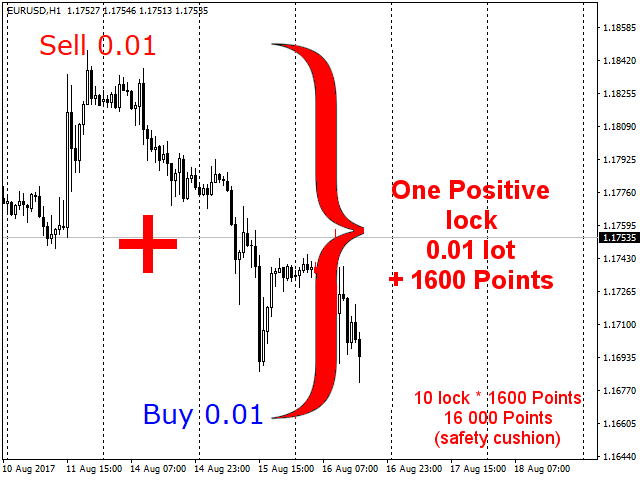
The main advantage of VR Locker over ordinary grid advisors is its work with positive locks. A lock in the classic sense is holding opposite positions. But VR Locker uses not just a hedge but a lock with accumulated unrealized profit: when Sell is above Buy, a positive balance forms between the positions, which serves as a shock absorber for losses. An ordinary hedge "freezes" the deposit, while a positive lock, on the contrary, unloads it and reduces the drawdown percentage, making trading psychologically comfortable.
What artificial intelligence says about VR Locker
When artificial intelligence analyzes VR Locker, the first thing it notes is the rare combination of thoughtfulness, transparency and security. Unlike most grid advisors that simply average an existing loss hoping for a market reversal, VR Locker builds a protective structure of positive locks: every price move brings unrealized profit instead of growing debt. In the AI's assessment, this is one of the few robots where risk and profitability are calculated in advance rather than left to chance.
What exactly sets VR Locker apart from other trading robots?
- Positive locks instead of "devouring" the deposit. Classic grid advisors open positions as long as funds last, and often lose the entire deposit. VR Locker turns market movement into a "safety cushion": the drawdown decreases and is often reduced to zero.
- Nine lot calculation methods. From a safe starting lot to soft progressions, the trader chooses the risk level himself and fully controls the load on the deposit.
- Thirteen distance calculation types. AI analysis shows this flexibility allows the robot to adapt to any market — from calm forex to volatile cryptocurrencies.
- Averaging with a real TakeProfit. The exit level is calculated taking into account the round-trip commission and swap, not approximately, which is a sign of professional engineering culture.
- Spread control and new-bar trading. The robot does not open positions in poor market conditions, which sharply reduces the number of accidental losing trades.
- Transparency and controllability. The information panel, simultaneous work with dozens of locks and notifications in Telegram, Push, Email and Alert allow the trader to see everything that is happening and intervene at any moment.
The AI verdict is unambiguous: VR Locker is not a "casino robot", but an engineering-verified risk management system whose trading logic can be checked, configured and understood. That is why it suits both a beginner who wants to protect his deposit and a professional looking for a reliable tool to implement their own strategy.
Detailed review of the product's unique features
Positive locks — a "safety cushion" of unrealized profit
The heart of the VR Locker strategy is the positive lock algorithm. The advisor opens two market orders of equal volume: Buy and Sell. Depending on where the price moves, the robot "spreads" the positions with a grid of orders in the direction of the movement: if the price goes up, the grid adds buys and pushes sells away, and vice versa. When the distance between orders reaches the size set in the settings, a new positive lock is formed. Sell ends up above Buy — and a positive balance appears between the positions, that is, the amount of unrealized profit that grows with each new lock.
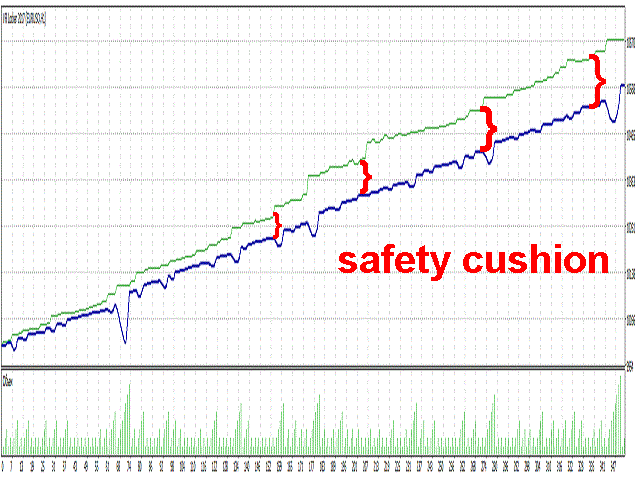
This accumulated profit is the trader's "safety cushion". It can be used in three ways: move the orders to breakeven, attach a trailing stop, or unlock the locks according to your own trading tactics. The author's recommendation is simple: accumulate 30–50 locks, then move all positions to breakeven or enable trailing — and let the profit grow.
Working with several locks at the same time
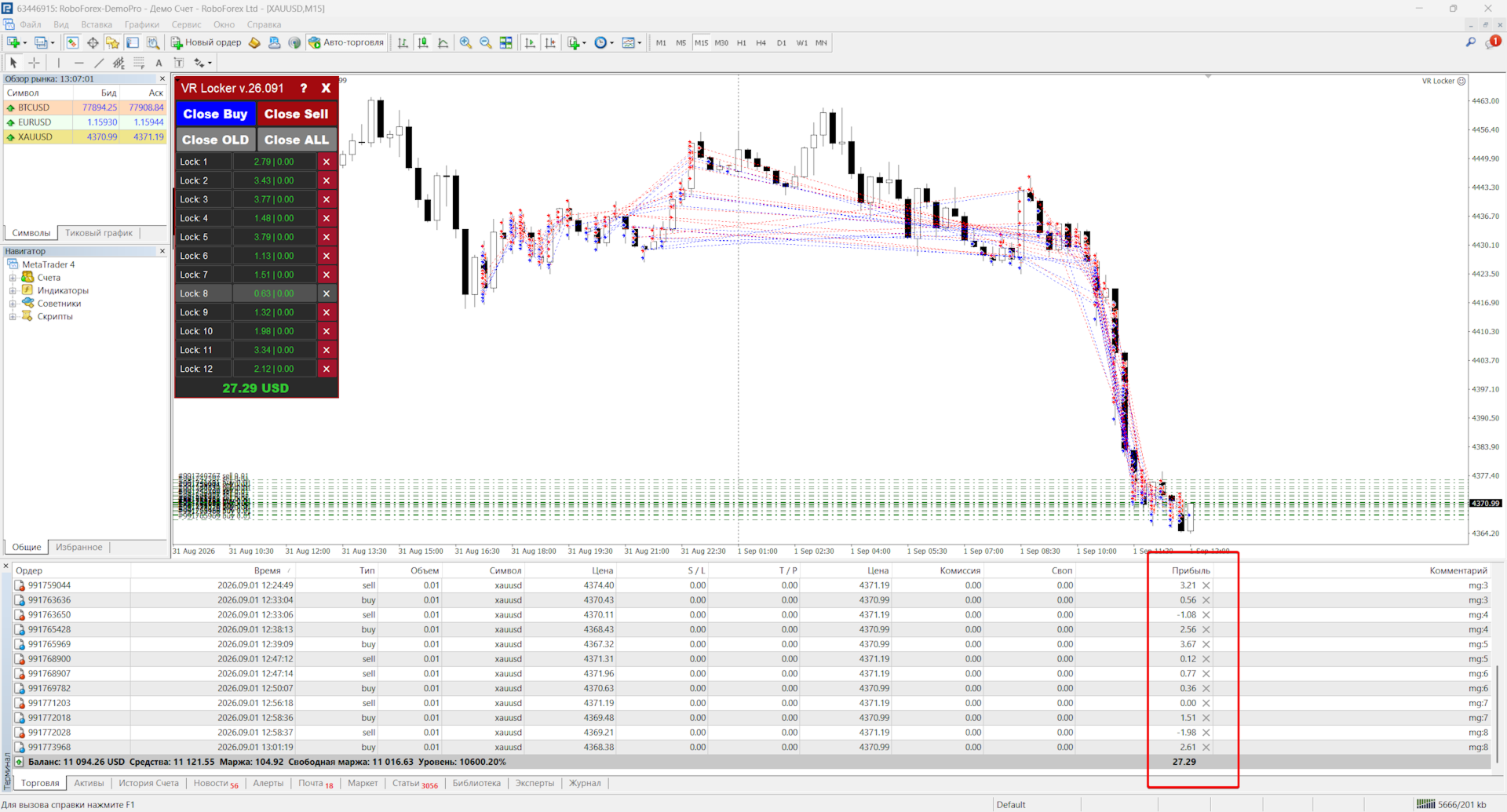
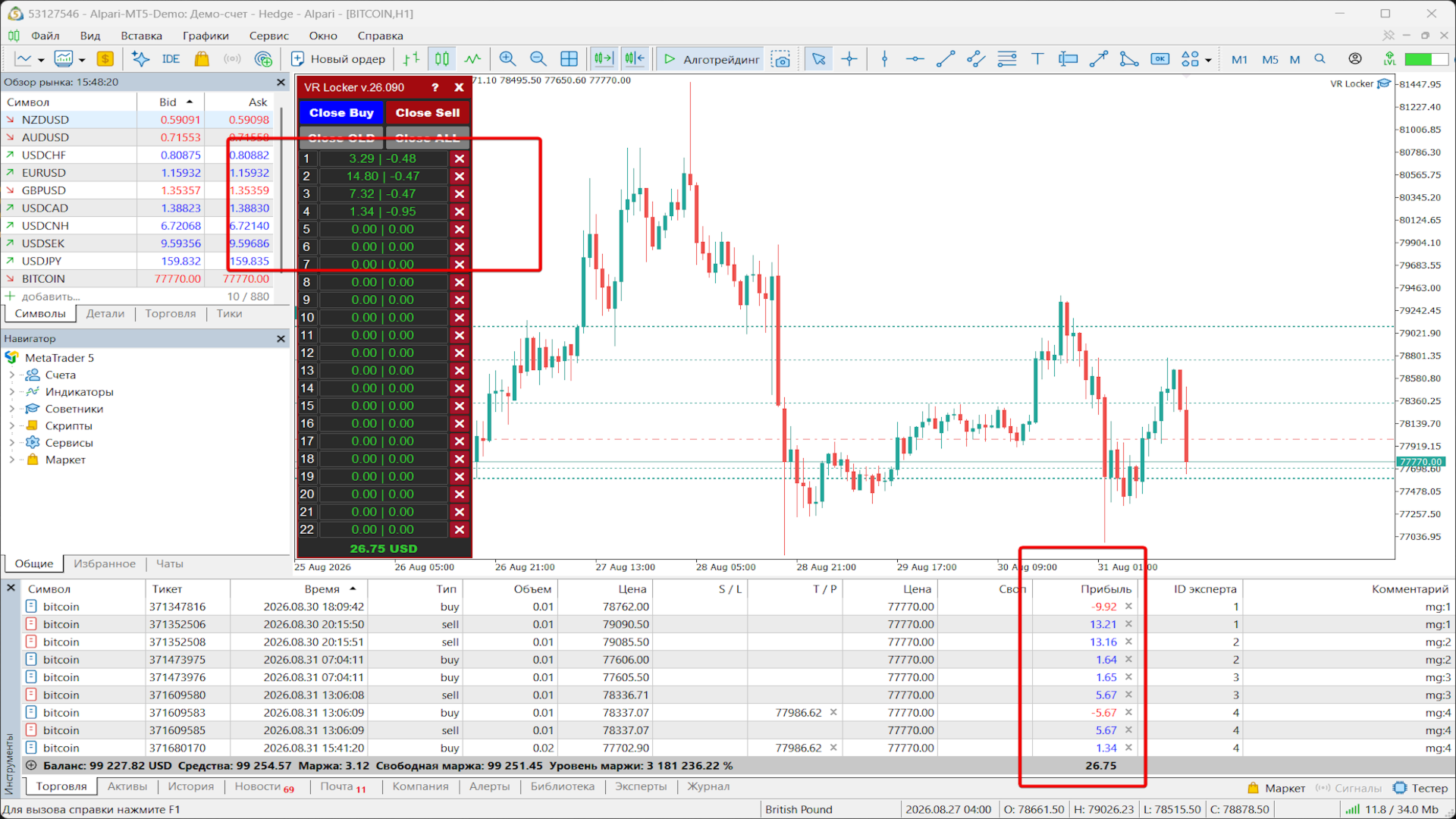
VR Locker can work with several locks on one instrument. The robot independently determines the current lock by positions: it finds it by MagicNumber, tracks the total profit, swap and commission for each lock, and distinguishes a full lock (equal volumes of buys and sells with a sufficient distance between prices), a partial lock and its absence. The lock number (mg:<number>) is added to the comment of each position, making it easy to tell locks apart in the terminal. This mechanism allows you to accumulate dozens of locks and manage each of them separately — through the panel or manually.
Nine lot calculation methods
VR Locker offers nine methods of automatic lot calculation — from the most conservative to the most aggressive. All examples are given for a starting lot of 0.01 (sequences for positions 1 through 5):
- Starting lot (0.01, 0.01, 0.01, 0.01, 0.01) — all positions are opened with the same volume. The safest method, ideal for beginners.
- Martingale (0.01, 0.02, 0.04, 0.08, 0.16) — each lot is twice the previous one. Aggressive, quickly recovers the loss.
- Fibonacci (0.01, 0.01, 0.02, 0.03, 0.05, 0.08) — classic progression, each new lot equals the sum of the two previous ones. Moderate and balanced.
- Sum (0.01, 0.02, 0.03, 0.04, 0.05) — linear growth, the starting lot is added to each lot.
- Up/Down (0.03, 0.04, 0.07, 0.10) — the sum of the lots of the extreme positions, perfect for mirrored lock grids.
- Soft Martingale (0.01, 0.015, 0.0225, 0.0338, 0.0506) — each next position is 1.5 times larger than the previous one. Softer than the classic martingale.
- Step (0.01, 0.015, 0.02, 0.025, 0.03) — half of the starting lot is added to each lot. Simple and predictable.
- Root (0.01, 0.014, 0.017, 0.02, 0.022) — growth by square root, smooth and gentle on the deposit.
- Logarithmic (0.01, 0.017, 0.021, 0.024, 0.026) — the smoothest, growth "saturates", minimal load on the deposit.
Additionally available: fixed lot, percentage lot (percentage of the deposit), lot from balance (the balance is divided by the specified amount and multiplied by the broker's minimum lot), a fully manual sequence of lots separated by semicolons (for example: 0.01; 0.02; 0.04; 0.08), an additional lot multiplier (increases or decreases the calculated volume) and maximum buy and sell lot limits to protect the deposit. If the calculated lot is smaller than the minimum or larger than the maximum for the instrument, the advisor will bring it to an acceptable value and warn in the journal.
Thirteen distance types between positions
The distance between grid orders is one of the most important parameters of any grid strategy. VR Locker offers thirteen distance calculation types:
- Points — a fixed distance in points. A stable step without market reference.
- Modified ATR — the average movement of bars up and down over the period; the sell distance may differ from the buy distance.
- Percentages — the distance as a percentage of the price of the last position against the trend.
- Bollinger difference — the difference between the upper and lower Bollinger Bands.
- Donchian difference — the difference between the maximum and minimum of the Donchian channel over the period.
- Average value of bars — the average bar size over the period.
- ATR classic — the value of the classic ATR indicator.
- Smoothed ATR — EMA of ATR values, a step without jerks.
- Median bar range — the median bar range, ignores outliers, the calmest step.
- EMA of bar range — a smoothed average of bar sizes with an emphasis on recent bars.
- ATR multiplied by coefficient — the distance equals ATR multiplied by the specified coefficient.
- Smooth step growth — the distance grows smoothly with the grid depth and slows down.
- Fixed distance + ATR hybrid — a combination of a fixed distance and ATR, the best adaptability.
The robot can gradually increase the distance between positions with the grid depth (the Increase the step between positions setting) and allows a fully custom distance sequence separated by semicolons (for example: 50; 100; 80; 30). Each next position is opened only after a full step from the last position — without the "duplicate" openings typical of many grid advisors.
Averaging with real TakeProfit
VR Locker includes four averaging modes with a real TakeProfit set on positions:
- [ ALL ] All positions — all buy positions or all sell positions are included in the average price calculation.
- [ Max Min ] Two extreme positions — the two extreme positions of the grid are included.
- [ Max Max ] The last two positions — the last two positions with larger lots are included.
- [ SMART ] Smart choice — the advisor analyzes all average price calculation options and automatically selects the best one for the current market.
Buys and sells are averaged fully mirrored — the sell block is rewritten one-to-one following the buy structure, so the take profit is always set correctly. The breakeven point is calculated taking into account the round-trip commission and accumulated swap: for buys it is above the entry price, for sells it is below, exactly by the amount of costs. Positions close "at zero" without hidden losses, and the calculation is correct on any instrument (in points, not ticks). The take profit is modified only when the level really changes — minimal load on the terminal and server.
New bar trading and spread control
VR Locker protects the trader from bad market conditions. The New Bar trading setting allows opening new positions only when a new bar of the selected timeframe appears — from M1 to MN1, which eliminates "duplicate" openings on one bar. The Maximum spread setting stops opening new positions when the spread is abnormally wide, while the advisor continues to control and modify previously opened positions. Both mechanisms work as gate filters: a position is opened only when all conditions are met.
Information panel with lock management
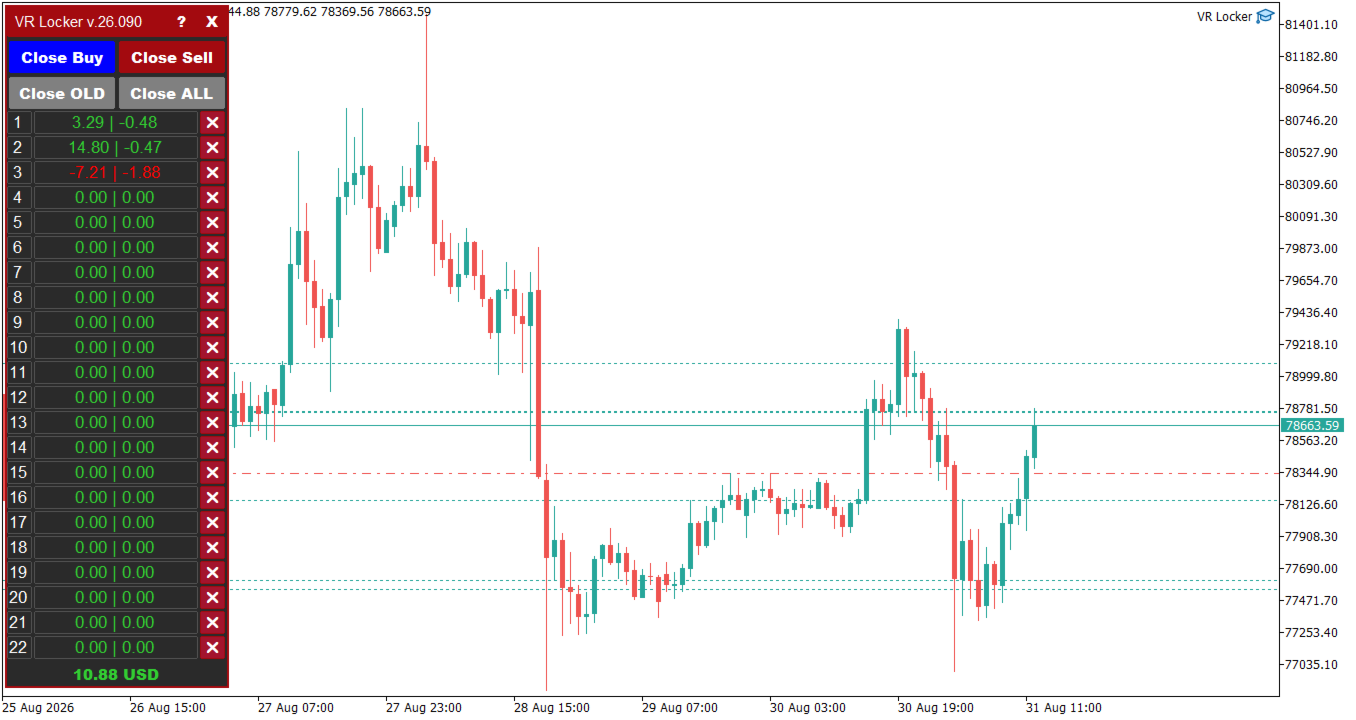
VR Locker is equipped with a fully redesigned graphical panel that displays the state of all locks right on the terminal chart. The panel includes: a header with the program version, a "?" button (information and protection), an "X" button to hide the panel, lock management buttons Close Buy (close all buys), Close Sell (close all sells), Close OLD (close the oldest lock), Close ALL (close everything), and information rows for each lock up to the specified limit. The panel automatically adapts to the screen resolution (taking into account pixel density and monitor height), and when the advisor is unloaded it is removed safely without affecting other objects on the chart.
Unified notification system
All notification channels — Alert (terminal window), Mail (email), Push (smartphone) and Telegram (bot) — work through a single module and are enabled separately. Notifications are sent only for real events: "New position", "Position closed" (with the result by profit, commission and swap), "Volume / Stop Loss / Take Profit changed". The first pass serves as a baseline — no spam at startup. Events are decorated with emoji: 📈 and 📉 for buys and sells, 🎯 for a new position, 💸 for closing, 💰 for the result. The advisor can send chart screenshots to Telegram: the snapshot is saved to a separate folder and sent with the message; if the screenshot fails (for example, in the tester), the message is still sent as plain text. Each channel has its own "quiet" throttling: 6 seconds for Alert/Mail/Push and 30 seconds for Telegram — no annoying repeats. Notification texts are localized in the terminal language.
Safety, stability and performance
VR Locker implements modern protection and optimization technologies. Validation of manual lot and distance sequences: typos (for example 0.01.5), empty elements and extra separators no longer produce zero volume or step — the advisor will report an error and will not open a position with an incorrect value. Automatic volume protection brings the lot to the acceptable range of the instrument with a warning in the journal. Protection against division by zero and invalid parameters uses fallback values. Data caching: prices, point size and commission/swap compensation are calculated once per tick and reused in all blocks. Smart panel redraw happens only when the number of positions changes. The load per tick is reduced many times — the advisor works stably on weak computers and in the strategy tester.
How the product works
The trading logic of VR Locker is built around accumulating positive locks. Let's look at the algorithm step by step:
Step 1. Opening starting positions
The advisor opens two market orders of equal volume: Buy and Sell. The starting lot is calculated by the selected method: fixed, percentage, from balance or from a manual sequence.
Step 2. Spreading the order grid
Depending on the direction of the price movement, the advisor "spreads" the orders with a grid: if the price rises, the grid adds buys as the distance is passed; if it falls, it adds sells. The step between positions is calculated by the selected type (points, ATR, percentages and others), and the lot grows by the selected method. Positions are opened only on a new bar and with an acceptable spread.
Step 3. Forming a positive lock
When the distance between positions becomes equal to or greater than the lock size set in the settings, a new positive lock is formed: Sell ends up above Buy with a positive balance. The amount of unrealized profit between the positions accumulates and serves as a "safety cushion".
Step 4. Lock control and management
The robot tracks the current lock by MagicNumber, calculates its profit, swap and commission. When the lock limit (Limit Lock) is reached, the advisor acts according to the configured rule: close nothing, close the oldest lock, or close all locks and continue trading. Locks can also be managed manually through the panel buttons — Close Buy, Close Sell, Close OLD, Close ALL.
Step 5. Unlocking locks
After accumulating a sufficient number of locks (30–50 is recommended), the trader can move all buy/sell orders to breakeven, attach a trailing stop, or unlock the locks according to their own trading strategy. The accumulated unrealized profit becomes a reserve that reduces the account drawdown and makes trading psychologically comfortable.
Program settings description
All VR Locker settings are grouped into logical blocks. Below are the parameter names in English (as in the program) with descriptions in English. Settings marked with [ * ] depend on the number of decimal places in the instrument price. The description and default values are made for brokers with 3–5 digits; for brokers with 2–4 digits, the [ * ] values should be specified 10 times less.
Trading settings
- * Maximum spread (0 - Disabled) — the maximum acceptable spread at which the advisor opens new positions. If the spread is larger, new positions are not opened, but control and modification of previously opened positions continue.
Lot calculation settings
- The type of lot calculation — the lot calculation type: Fixed lot (Example: 0.01) — a standard fixed lot; Percentage lot (Example: 3) — the new lot is calculated as a percentage of the deposit; The balance for the minimum lot (Example: 300) — the lot is calculated from the deposit amount for the minimum lot. Example: deposit 2000, trader specified 500: 2000 / 500 = 4, 4 × 0.01 = 0.04 — the starting lot is 0.04.
- Value (Lot, Percentage, Balance) — the value for the specified lot calculation type.
- Manual sequence of lots, through ( ; ) — a manual sequence of lots separated by semicolons. Has the highest priority and disables automatic calculation. Example: 0.01; 0.02; 0.04; 0.08.
- Type of automatic lot calculation — the automatic lot calculation method: starting lot, martingale, Fibonacci, sum of the maximum and starting lot, sum of the lots of extreme positions, soft martingale, step, root, logarithmic.
- Additional lot multiplier (0 - Disabled) — an additional lot multiplier. Example: Fibonacci calculation 1, 1, 2, 3, 5, 8 with a multiplier of 2 gives 2, 3, 6, 9, 15, 24; a multiplier of 0.5 gives 0.5, 0.75, 1.125 and so on. It can both aggressively increase lots and decrease them.
- Maximum Buy lot — the maximum lot for buys. If the calculated lot is larger, the position will be opened with a volume no higher than the specified value.
- Maximum Sell lot — the maximum lot for sells.
Position step settings
- Distance calculation type — the distance calculation type to the next position: Points, Modified ATR, Percentages, Bollinger band difference, Donchian band difference, The average value of the bars, ATR classic, Smoothed ATR, Median bar range, EMA of bar range, ATR multiplied by coefficient, Smooth step growth, Fixed distance + ATR hybrid.
- * Value (Points, Percentage, Indicator Period) — the value for the specified distance calculation type.
- * Increase the step between positions (0 - Disabled) — increasing the step between positions depending on the grid depth.
- Manual sequence of distance, through ( ; ) — a manual distance sequence. Has the highest priority. Example: 50; 100; 80; 30.
Averaging settings
- Averaging type — the average price calculation type: [ ALL ] All positions, Real TakeProfit (all positions), [ Max Min ] Two extreme positions, Real TakeProfit (two extreme positions), [ Max Max ] The last two positions, Real TakeProfit (the last two positions with larger lots), [ SMART ] Smart choice, Real TakeProfit (smart selection of the best level).
- * Minimum profit for closing positions (Example: 25) — the number of points of additional profit when closing a series of positions.
- Manual sequence of profit, via ( ; ) — a manual sequence of profit levels. Has the highest priority. Example: 25; 20; 30; 38.
Lock settings
- * Lock Size — the size of the created locks in points. When the distance between positions reaches this value, a new positive lock is formed.
- Limit Lock — the maximum number of created locks (no more than 50).
- Type of lock closure — the lock closure type: Don't close anything (do not close locks — the trader decides what to do with them), Close the oldest lock (close the oldest lock by time), Close all locks (close all locks and continue trading).
Uptime settings
- New Bar trading — trading on a new bar of the selected timeframe (from M1 to MN1). Positions are opened only when a new bar of the specified period appears. The setting does not affect indicator calculations.
Other settings
- Info panel Size (0 - Disabled) — the size of the information panel on the chart. 0 — disabled.
- Smartphone notifications — notifications to a smartphone via the MetaTrader app (Push).
- Notifications in the terminal — notifications in the terminal (Alert).
- Email notifications — notifications to an email address.
- Notifications in telegram — notifications to a Telegram channel via a bot.
- Telegram channel name — the Telegram channel name.
- Secret telegram bot token — the secret Telegram bot token.
- Serial number of items (MagicNumber) — the unique position number. Numbers 1–50 are reserved for the internal operation of the program.
- Slippage — slippage in points.
- Comments on positions — the position comment. A manual comment or a comment mask.
Usage recommendations
- When working with the program, try to use timeframes from H1 or higher.
- The advisor is tested and developed for currency pairs, but can also work on derivative financial instruments (Forex, CFD, Crypto, Metals, Futures).
- Configure the advisor on demo accounts in conditions as close to real as possible: the same broker, account type, spread, deposit and lot size.
- Accumulate a large number of locks: after making 30–50 locks, move all buy/sell orders to breakeven or attach a trailing stop.
- Let the profit grow — this will reduce the psychological burden.
- You can unlock the locks according to your trading strategy.
- Follow the rules of money management and remember the risks of trading on financial markets.
Who VR Locker is for
- For beginners who want to start automated trading without spending hours in front of the screen and making emotional decisions.
- For traders who are tired of the psychological pressure of losing positions and want a "safety cushion" in the form of unrealized profit.
- For busy people who cannot constantly watch the market — the advisor works regardless of the schedule.
- For professionals who want to use the time-tested lock technique in automatic mode and unlock locks manually according to their own trading tactics.
- For traders trading different assets: currencies, cryptocurrencies, CFDs, futures, metals — one robot for any instruments and timeframes.
Frequently asked questions
What is a positive lock?
A positive lock is the simultaneous holding of opposite positions (Buy and Sell) on one instrument when unrealized profit has accumulated between them. VR Locker creates such locks automatically, turning them into a "safety cushion" for the deposit.
How is VR Locker different from ordinary hedging?
Classic hedging "freezes" the deposit and brings no benefit. VR Locker brings the lock to a positive balance: Sell opens above Buy, and the price difference turns into accumulated unrealized profit that reduces the account drawdown.
What instruments does the advisor work on?
VR Locker is developed and tested for currency pairs, but works correctly on any financial instruments: Forex, CFD, Crypto, Metals, Futures. Recommended timeframes are H1 and higher.
How many locks can be created?
The number of locks is limited by the Limit Lock setting (maximum 50). After accumulating 30–50 locks, it is recommended to move all orders to breakeven or attach a trailing stop.
About the author
The author of the VR Locker advisor is Vladimir Pastushak (nickname VOLDEMAR), a professional trader-programmer who has been creating trading tools for MetaTrader for more than 20 years. All the author's solutions are based exclusively on his own ideas and developments. Each program undergoes thorough testing on training and demo accounts, since simulators cannot convey the full complexity of real conditions. On the MQL5.com platform, the author is known for a high rating, thousands of products sold and free technical support. Updates and support for VR Locker are provided free of charge. The author's contacts are available on the seller's page in the Market.
Risk warning
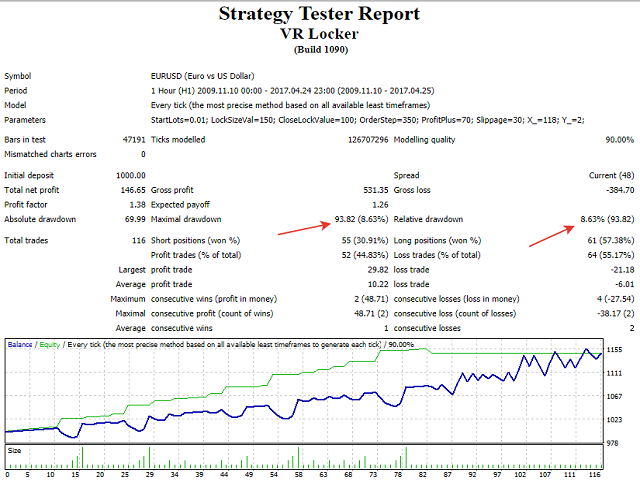
Trading on financial markets involves a high level of risk and is not suitable for all investors. Grid strategies with averaging and lot growth can lead to significant drawdowns during prolonged trend movements. Before using the advisor on a real account, be sure to test it in the strategy tester and on a demo account in conditions as close to real as possible. The built-in MetaTrader strategy tester does not take into account the dynamic spread, commissions, delays (pings), requotes, the real speed of tick arrival and the quality of tick data, so the results obtained in the tester cannot be considered reliable and taken as a basis for trading decisions. Never risk funds whose loss is unacceptable to you. The author gives no promises or guarantees of profit. Past results are not a guarantee of future returns.
VR Locker, positive locks, locker, hedging, safety cushion, grid strategy, MetaTrader advisor, position averaging, risk management, automated trading



















































VR Locker — это зрелый, надёжный и настраиваемый сеточный советник для MT5. Он не обещает «волшебных» прибылей, но даёт инструмент для систематической торговли с чётким контролем рисков. Если вы ищете «рабочую лошадку» для сеточной стратегии, это один из лучших вариантов на рынке.