Vr Trade Panel

4.75

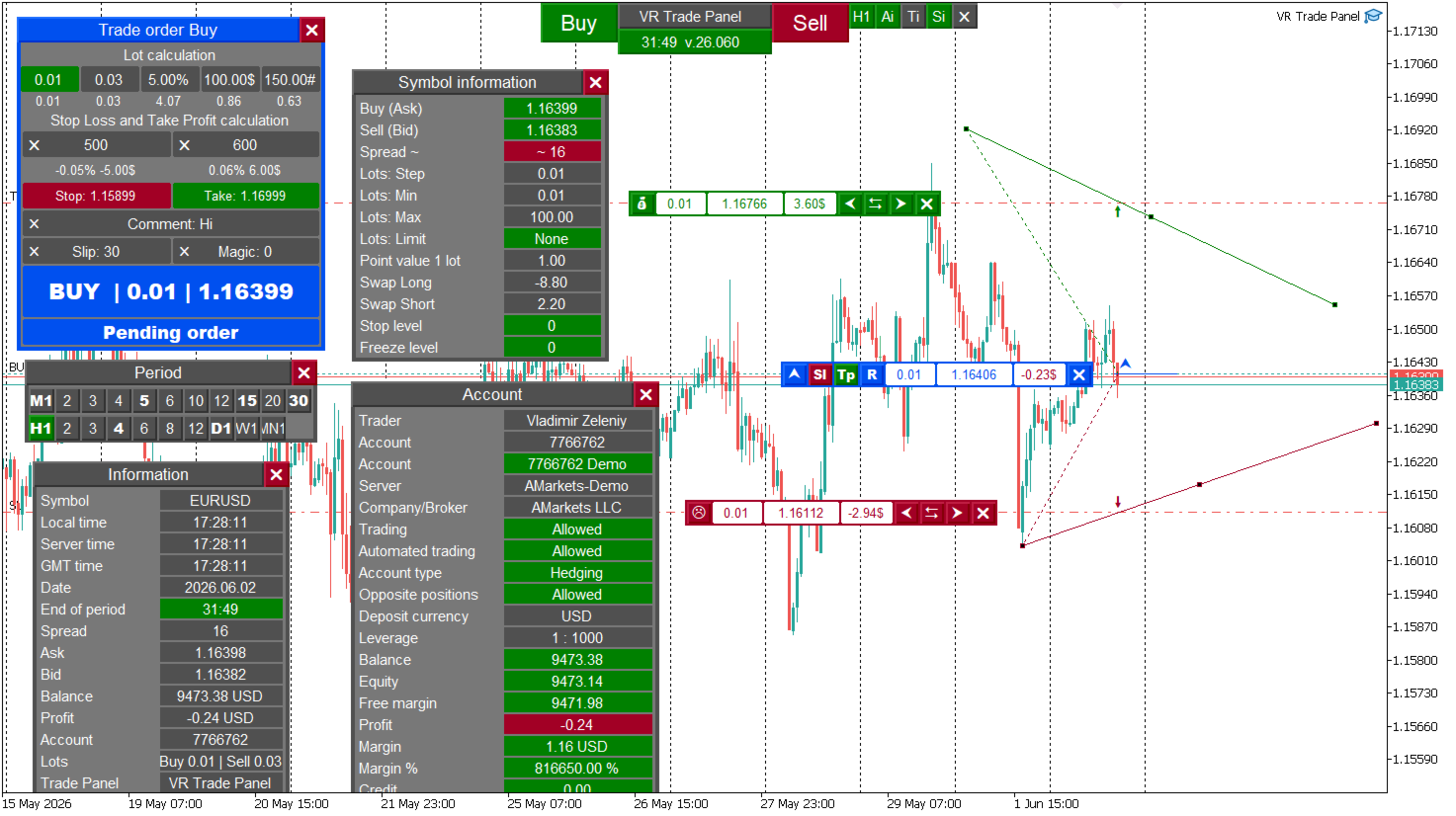
VR Trade Panel is a professional solution for trading, which allows you to effectively manage positions using trend lines. Unique functionality allows you to install Stop Loss and Take Profit both at dynamic levels (inclined lines) and fixed values. This provides maximum flexibility and convenience in trade. Thanks to the simplicity of the interface and the detailed [management], it will be easier for beginners to master the basics of trade and begin to practice. The ability to automate many processes and expanded functionality allow experienced users to reduce time on routine operations and focus on market analysis.

The program is distributed absolutely free while the special offer is valid. Take the opportunity to download it yourself and share the news with your friends.

Instructions in [blog]. Version for [MetaTrader 5]

Users get the following advantages:

  • Using real and virtual Stop Loss and Take Profit
  • The possibility of automatic movement Stop Loss and Take Profit along trend lines
  • Task of the exact time of moving Stop Loss and Take Profit
  • Management of delayed orders with automatic movement along trend lines
  • Partial closure of positions
  • Fast setting of five different lot sizes for accelerated trade
  • Convenience of lots of lots: balance, interest and deposit amount
  • Additional useful tools to increase trading efficiency
  • Unique risk management

New update:

This is the first version of the update over the past eight years, and now the program has become available to Metatrader 4 and Metatrader 5. We took into account the wishes of users and gradually introduce a number of new functions, including:

  • Indicator [VR ATR Pro], built directly in the panel.
  • System of notifications on a smartphone for price and time.
  • Alerts on smartphones and email.
  • Expanding opportunities thanks to new effective tools.
  • Multifunctional trailing of the feet and without loss.

Features of the panel:

  • Minimalism and convenience of perception - the panel is designed in such a way as to occupy the minimum space on the desktop and not overlap important analytical information. The user can freely place the panel elements in any convenient screen point.
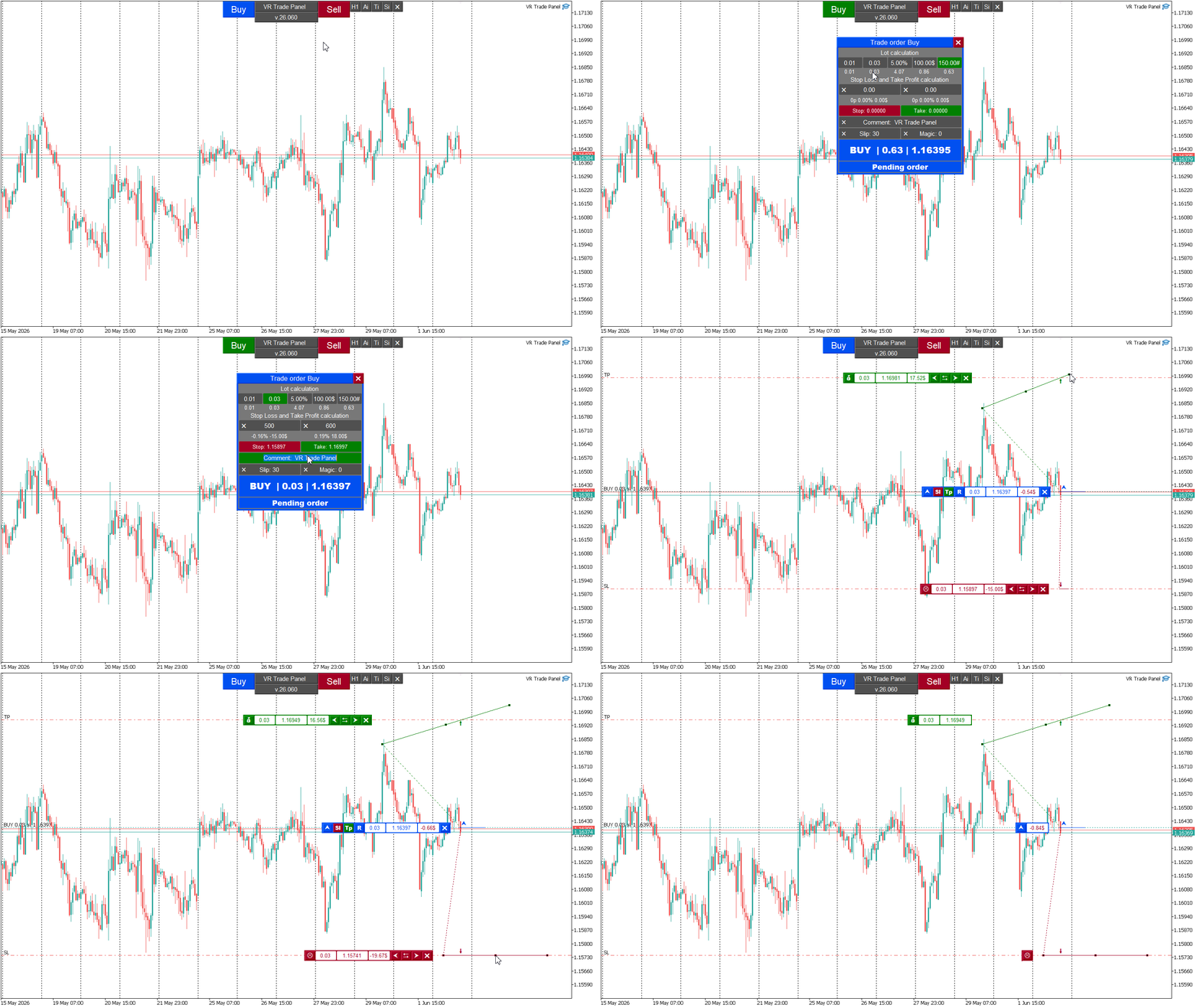
  • Simplicity and comfort in trade - a convenient setup of five pre -set trading volumes (lots) has been introduced. After the initial setup, the trader will be able to instantly open positions with a simple click of the mouse to the selected volume.
  • The flexibility of trading methods - two approaches to the opening of transactions are provided:
    • The fast trade method - the trader selects the desired volume and opens the deal with literally one click.
    • The configurated trade method is additionally available the possibility of detailed individual setting up each order - the choice of Stop Loss and Take Profit levels, setting permissible price deviations (slipping), adding comments and unique identifiers (Magic Numbers) for each specific transaction.
  • The maximum number of Stop Loss and Take Profit levels is limited to ten for each order or open position.
  • The interface supports multi -language, users can independently add translations to the preferred language.
  • VR Trade Panel is not compatible with the currency screening and shares [VR Watch List and Linker]

It is important to take into account the following:

  • Testing: VR Trade Panel cannot be checked in a standard strategic tester. To evaluate the work of the panel on the demo account, load a free demo version from our [blog].
  • Magic Number: The panel interacts only with the only Magic Number installed in the settings. If an open position or order has another Magic Number, the panel will continue to track and control them according to the set value in the settings.
  • Partial closure: when several Stop Loss and Take Profit levels are used, real values ​​apply exclusively to extreme levels.
  • Injected trend lines: when using trend levels with an angle of inclination, make sure that you manually control the levels when crossing between trading intervals.
  • You can make a proposal to improve or add a new function in [blog].

VR Trade Panel is a powerful tool for traders of any level of training. Its use will greatly simplify the trade process, increase the efficiency of capital management and reduce risks. Remember that success in the financial market requires constant development and adaptation to new conditions.

Tags: Manual Trade, Trade Panel, Trade Utility, Tool Management, Management Tool, Forex Helper, Trader Assistant, Smart Training Stop, Stealth Pro, Dash Board, Manager Trad, Manager Trade, Manager Trade, Manager Trade, Manager Trad, Trade Manager, Trading Panel, Virtual Stop Loss, Virtual Take Profit, Virtual Order, Virtual Position, Risk Manager, Risk Management.

Reviews 22
Michap
44
Michap 2025.07.18 11:37 
 

Из всех панелей которыми пользовался эта наиболее удобная, гибкая в настройках и использовании. Чувствуется что человек знает что на самом деле необходимо трейдеру. Большое спасибо!

mardh
19
mardh 2025.07.18 08:19 
 

Я давний поклонник творчества Владимира и этот продукт на такой же высоте, как и остальные работы автора. Так держать!!!

CMD студия
29
CMD студия 2025.07.03 15:04 
 

Прямо не вериться, что так повезло! Раньше эта панель была платная, сейчас, Спасибо автору, она в свободном доступе. Функционал, то что надо. Всё скромно, лаконично, толково сделано. Было пару вопросов по функционалу - автор моментально ответил на сообщение, помог разобраться с хитрыми фишками.

Recommended products
Lot Calculate
Maksim Neimerik
This simple but useful script calculates the lot in % of the deposit. It is indispensable for risk management. There is only one customizable parameter: MaxRisk - risk in % for lot calculation. The product works as a standard script. Launch it once on an appropriate chart and start trading using the calculated lot value. Genious is simplicity! Happy trading!
FREE
DF Fib Trader Pro DF Fib Trader Pro is an automated trading system designed for MetaTrader 4. It uses Fibonacci-based price levels combined with trend and structure analysis to define entry and exit points. The EA supports both long and short positions and includes built-in risk management parameters. Core Features: Uses Fibonacci retracement and extension logic to plot entry, SL and TP points. Configurable lot size and stop loss/take profit levels Choice of 1 or 2 entry points Supports fixed o
FREE
Buffer Finder Tool
Afsal Meerankutty
4.75 (4)
CyberZingFx Buffer Finder Tool Developed for Finding Buffers of Indicator to use in Universal Indicator EA . This is Not an Indicator or EA CyberZingFx Buffer Finder Tool is utility tool designed specifically for MetaTrader 4 (MT4) users. It is a standalone application that helps you easily find the buffers of any MT4 indicator, allowing you to use them in your Universal Indicator EA. With the Buffer Finder Tool, you no longer have to search through the data window to find the buffers you need.
FREE
Double HMA lines MTF
Pavel Zamoshnikov
5 (1)
This is a multi-timeframe version of the popular Hull Moving Average (HMA). The Double HMA MTF Light indicator combines two timeframes on a single chart. The HMA of the higher timeframe defines the trend, and the HMA of the current timeframe defines short-term price movements. The indicator is freely distributed and hasn't audio signals or messages. Its main function is the visualization of price movements. If you need advanced functionality of the HMA multi-timeframe indicator (information ab
FREE
VR Color Levels MT4
Vladimir Pastushak
5 (1)
VR Color Levels is a handy tool for those who apply technical analysis using elements such as trendline, rectangle and text. It is possible to add text directly to the chart and take screenshots. You can find settings, set files, demo versions, instructions, problem solving, at [blog] You can read or write reviews at [link] Version for [MetaTrader 5] Working with the indicator is carried out in one click . To do this, click on the button with the line, after which a trend line will appear unde
FREE
SL and TP Setter
Giacomo Barone
4 (1)
You can manually open a trade (one click), and this EA will take care of setting the SL and TP. SL and TP are set based on the number of pips you specify in the input screen. You can also choose monetary SL and TP. SL and TP are determined based on the weighted average price (WAP), so if you open a new trade, SL and TP will be updated according to the new WAP. The WAP is not unique but differentiated between buy and sell trades (this is useful only if you open opposite trades on the same chart)
FREE
This MQL4 indicator creates a customizable grid of horizontal lines on your trading chart. Here's what it does: **Main Functions:** - Draws equally spaced horizontal lines across the visible price range - Supports two line types: horizontal lines or trend lines with forward projection - Automatically adjusts to price scale changes **Key Features:** 1. **Customizable Spacing**: Set grid distance in pips (20 pips by default) 2. **Flexible Starting Point**: Auto-calculates starting price or lets
FREE
Trade Panel Pro by RunwiseFX
Runwise Limited
4.85 (34)
Fully functional manual trade panel with risk/reward, auto SL, lot size calculation, one-click trading, hidden (virtual) stop loss/take profit and pending orders, scale in and out of trades (partial close), news events and more. Works with all symbols not just currency pairs. Brings an incredible amount of functionality to MetaTrader for free and for both demo and live accounts. Features Lot size calculation - based on % of account to risk, fixed amount or dynamic lots Automatic take profit base
FREE
Account Info EA It is a tool that presents on the graph all the positions of the account, and specific information concerning the positions, but also the account. It enables the user to have an image of his account at a glance. Use like any expert advisor. You can't attach it in the same chart with other expert advisor. It does not have the ability to open or manage positions. You can attach it on any chart and any timeframe.
FREE
Profitstat free
Tonny Obare
4 (2)
Profitstat is a free indicator that scans your history and displays it on the chart. The free version shows the number of trades and profit made on the current and previous day. The data is updated instantly as soon as a trade closes. Simply attach it to any chart and it gives the account data irrespective of the chart currency nor timeframe.
FREE
NAS100 Auto Sl And TP
Moustapha Boulouz
5 (2)
Introducing NAS100 Auto SL and TP Maker for MT4: Never miss setting StopLoss and TakeProfit again with our NAS100 Auto SL and TP Maker, an indispensable assistant for traders navigating the Nasdaq 100 market on MetaTrader 4. This tool is designed for those who seek a seamless solution to automate the management of StopLoss and TakeProfit levels. Key Features: Effortless Automation: Automatically monitors Nasdaq 100 trades without StopLoss and/or TakeProfit. Dynamically adjusts levels based on us
FREE
Lot by Risk
Sergey Vasilev
4.83 (23)
The Lot by Risk trading panel is designed for manual trading. This is an alternative means for sending orders. The first feature of the panel is convenient placing of orders using control lines. The second feature is the calculation of the order volume for a given risk in the presence of a stop loss line.   Control lines are set using hot keys: take profit – T key by default; price – P key by default; stop loss – S key by default; You can configure the keys in the settings of the trading panel.
FREE
Safety
Sergey Ermolov
5 (2)
I think everyone knows such a rule of money management as "Safe". For those who are not aware, the safe assumes closing half of the position after the profit on the transaction has equaled the size of the stop. Thus, even if the price reverses and catches the stop, you will not lose money, because exactly the same amount of profit was received when closing part of the position earlier. The Safety Expert Advisor has only one setting – the closing lot. Leaving it at position 0, the adviser will
FREE
Countdown Bar Timer
Makarii Gubaydullin
Countdown timer till the bar closure, + % Progress status:  #1 multifunctional utility :   66+ features, including this tool  |   Contact me  if you have any questions   |    MT5 version In the settings of the indicator, you can configure: Timeframe for Calulculation; true / false: Higher TimeFrame option (next from the currently used: M15->M30, H4->D1...) Position: 1 = Bottom Left corner; 2 = Bottom Right corner; 3 = Top Left corner; 4 = Top Right corner; Font Size; Color; Font Style;
FREE
Real-time spread tracking and monitoring software Displays spread values in form of histograms on current timeframe of chart Convenient for analyzing spread changes, as well as for comparing trading conditions of different brokers By placing on desired chart, the spread changes at different trading times are displayed Additionally Fully customizable Works on any instrument Works with any broker
FREE
Orders Manager  is a simple and indispensable assistant for managing all your orders.   Inputs: Magic = 999;                          // Magic  TakeProfit = 1000;                 // Take Profit. If = 0 the level is not setts. StopLoss = 0;                         // Stop Loss. If = 0 the level is not setts. Slippage = 10;                       // Slippage GeneralProfit = false;            // Closing all orders based on total profit. If false the function is disabled and works according to TakePr
FREE
This indicator alerts you when/before new 1 or 5 minute bar candle formed. In other words,this indicator alerts you every 1/5 minutes. This indicator is especially useful for traders who trade when new bars formed. *This indicator don't work propery in strategy tester.Use this in live trading to check functionality. There is more powerful Pro version .In Pro version,you can choose more timeframe and so on. Input Parameters Alert_Or_Sound =Sound ----- Choose alert or sound or both to notify y
FREE
Scalping Day Trading Support Utility Scalping One MT4 free One position is displayed with one button. View P & L, Lot, and Point in real time. It is possible to switch the display of positions of only chart currencies and all currency pairs.  (The free version has only 3 positions) Supports automatic identification in Japanese and English   Account currency notation corresponds to dollar, euro, pound, yen (automatic identification) The timeline drawing function can be linked with the clock disp
FREE
Market Order Management Utility and strategy Tester in one solution. The software is equipped with a simple and intuitive interface, with risk management in lots, but also in money or percentage. Management of the market position trough BE and split of the profit and monitoring of the profits in money and percentage. Also usable for MT4 BactTest system with 4 different speed.
FREE
Trendline indicator
David Muriithi
2 (1)
Are you tired of drawing trendlines every time you're analyzing charts? Or perhaps you would like more consistency in your technical analysis. Then this is for you. This indicator will draw trend lines automatically when dropped on a chart. How it works Works similar to standard deviation channel found on mt4 and mt5. It has 2 parameters: 1. Starting Bar 2. Number of bars for calculation The   starting bar   is the bar which drawing of the trend lines will begin, while the   number of bars for c
FREE
Market Profile 3
Hussien Abdeltwab Hussien Ryad
3 (2)
Market Profile 3 MetaTrader 4 indicator  — is a classic Market Profile implementation that can show the price density over time, outlining the most important price levels, value area, and control value of a given trading session. This indicator can be attached to timeframes between M1 and D1 and will show the Market Profile for daily, weekly, monthly, or even intraday sessions. Lower timeframes offer higher precision. Higher timeframes are recommended for better visibility. It is also possible t
FREE
一键平仓小工具,可以针对买单、卖单和挂单进行批量操作,可以操作当前图表订单和所有订单,简单高效。 第一行第一个按钮是关闭当前图表 品种 所有买单,第二个按钮是关闭当前图表品种的所有卖单,第三个按钮是关闭当前图表 品种 的所有订单; 第二行 第一个按钮是删除当前图表 品种 所有买单挂单,第二个按钮是 删除 当前图表品种的所有卖单 挂单 ,第三个按钮是 删除 当前图表 品种 的所有 挂单 ; 第三行第一个按钮是关闭所有 品种的全部买单,第二个按钮是关闭所有 品种的全 卖单,第三个按钮是关闭所有 品种的全部订单; 第四行第一个按钮是删除所有 品种全部买单挂单 ,第二个按钮是 删除 全部品种 的全部卖单挂单 ,第三个按钮是删除 全部品种 的全部挂单 。 希望此程序能对您有用
FREE
PZ Trade Pad EA
PZ TRADING SLU
4.27 (30)
This simple visual expert advisor allows you to trade easily from the chart. It handles risk management for you and can perform several useful tasks with your existing trades, saving time and making risk-management for each individual trade easier.  [ Installation Guide | Update Guide | Troubleshooting | FAQ | All Products ] Trade easily from the chart Trade with precise risk management, hassle free Trade pending order with drag and drop price selection Set SL and TP levels with drag and drop pr
FREE
Grid Assistant Pro
Alessandro De Cristofaro
Grid Assistant Pro – Utility for Managing Grid Strategies on MetaTrader 4 Grid Assistant Pro is a professional utility that helps traders manage and monitor unidirectional grid strategies directly from the MT4 chart. It provides a visual dashboard , clear controls, and automated risk protection features for precise and efficient grid operation. Key Features Visual Dashboard Real-time metrics: Balance, Equity, Floating P/L, Drawdown %, Free Margin Grid status: active and pending or
FREE
Rainbow MT4
Jamal El Alama
Rainbow MT4 is a technical indicator based on Moving average with period 34 and very easy to use. When price crosses above MA and MA changes color to green, it’s a signal to buy. When price crosses below MA and MA changes color to red, it’s a signal to sell. The Expert advisor ( Rainbow EA MT4) based on Rainbow MT4 indicator, as you can see in the short video below is now available here .
FREE
Universal TradingView to MT4 Webhook Connector Automatically execute your TradingView alerts inside MetaTrader 4 — fast, reliable, and hands-free. This connector bridges TradingView and MT4, allowing BUY, SELL, and CLOSE alerts from any TradingView indicator or strategy to be converted into real MT4 trades with advanced risk management . Stop fighting with complex python scripts or unreliable copiers. This tool pulls signals directly from any webhook server you choose and executes them with lig
FREE
IceFX TradeInfo
Norbert Mereg
4.77 (44)
IceFX’s TradeInfo is an utility indicator which displays the most important information of the current account and position. Displayed information: Information about the current account (Balance, Equity, Free Margin). Current spread, current drawdown (DD), planned profit, expected losses, etc. Number of open position(s), volume (LOT), profit. Today’s and yesterday’s range. Remaining time to the next candle. Last day profit information (with integrated IceFX ProfitInfo indicator). Risk-based LOT
FREE
This utility keeps a watchful eye on your trading terminals and ensures that you are notified if any of them are disconnected. Simply attach the utility to a chart and connect to a monitoring service who can notify you. We use UptimeRobot for both VPS and terminal monitoring; however, any service supporting heartbeat monitoring can be employed. Many such services offer free plans and various notification methods, such as Cronitor.io
FREE
Update:ver1.53 (2023/08/16) ・概要と必要環境 手動発注もしくは他ツール等からの発注に対し、指値発注予約の複製を生成します。こちらは「発注操作の簡易化」に特化したものになります。発注判断となる分析は、資料を漁る、経験則を導く、他の分析ツールやEAを併用する等、利用者ご自身で頑張ってください。なお、ver1.28より、「決済後、自動で再発注する」機能が実装されました。(有償版でのみ有効化できます) ・導入と導入後の操作 導入そのものは簡単です。「自動売買可能なEA」として、適当なチャートにて動作させるだけです。(チャートの対象相場は問いません。このEAは、チャートを見ていません)。あとは、「このEAでのローカルコピー以外の発注」があれば、それに応じて「損失が出た場合に備えての追加取引の予約」という形で、指値発注が自動生成されます。 導入操作上の注意として、「本EAを、複数のチャートで動作」はできません。EAがチャート自体を見ておらず、注文状況だけを見ているため、複数のチャートで動かす意味もありません。また、ターミナルとEAの設定として「自動売買」を許可しない
FREE
OTRX Fimathe Backtest is a tool for the Trader or Enthusiast who uses the Fimathe technique created by Trader Marcelo Ferreira to carry out his training and validate if he can obtain profitability. In this tool you will be able to: 1. Define whether you are looking for a buy or sell entry. (Trend). 2. Define by clicking twice on the horizontal lines where your Reference Zone and your Neutral Zone will be. 3. Monitor the entry, subcycle and exit of the trade. 4. Trading Summary, Daily, Week
FREE
Buyers of this product also purchase
Trade Assistant MT4
Evgeniy Kravchenko
4.42 (193)
It helps to calculate the risk per trade, the easy installation of a new order, order management with partial closing functions, trailing stop of 7 types and other useful functions. Additional materials and instructions Installation instructions   -   Application instructions   -   Trial version of the application for a demo account Line function -   shows on the chart the Opening line, Stop Loss, Take Profit. With this function it is easy to set a new order and see its additional characteris
Local Trade Copier EA MT4
Juvenille Emperor Limited
4.96 (109)
Experience exceptionally  fast trade copying with the Local Trade Copier EA MT4 . With its easy 1-minute setup, this trade copier allows you to copy trades between multiple MetaTrader terminals on the same Windows computer or Windows VPS with lightning-fast copying speeds of under 0.5 seconds. Whether you're a beginner or a professional trader, the Local Trade Copier EA MT4 offers a wide range of options to customize it to your specific needs. It's the ultimate solution for anyone looking to inc
Forex Trade Manager MT4
InvestSoft
4.98 (433)
Welcome to Trade Manager MT4 - the ultimate   risk management tool   designed to make trading more intuitive, precise, and efficient. This is not just an order placement tool; it's a comprehensive solution for seamless trade planning, position management, and enhanced control over risk. Whether you're a beginner taking your first steps, an advanced trader, or a scalper needing rapid executions, Trade Manager MT4 adapts to your needs, offering flexibility across all markets, from forex and indice
Exp COPYLOT CLIENT for MT4
Vladislav Andruschenko
4.65 (66)
Trade copier for MetaTrader 4.   It copies forex trades, positions, and orders from any accounts. It is one of the best trade copiers   MT4-MT4, MT5 - MT4   for the   COPYLOT MT4   version (or   MT4 - MT5 MT5 - MT5   for the   COPYLOT MT5   version).        MT5 version Full Description +DEMO +PDF   How To Buy    How To Install     How to get Log Files    How To Test and Optimize    All products from Expforex Copier  version for      MetaTrader 5  terminal ( МТ5 - МТ5, МТ4 - МТ5 )-  Copylot Cli
Trade copier MT4
Alfiya Fazylova
4.58 (33)
Trade Copier is a professional utility designed to copy and synchronize trades between trading accounts. Copying occurs from the account / terminal of the supplier to the account / terminal of the recipient, which are installed on the same computer or VPS . Before buying, you can test the demo version on a demo account. Demo version here . Full instruction here . Main functionality and benefits: Supports copying MT4> MT4, MT4> MT5, MT5> MT4, including MT5 netting accounts. * Supports copying Dem
Copy Cat More Trade Copier MT4 is not just a simple local trade copier; it is a complete risk management and execution framework designed for today’s trading challenges. From prop firm challenges to personal portfolio management, it adapts to every situation with its blend of robust execution, capital protection, flexible configuration, and advanced trade handling. The copier works in both   Master (sender) and Slave (receiver)   modes, with real-time synchronization of market and pending orders
VirtualTradePad mt4 Extra
Vladislav Andruschenko
4.87 (60)
Trading Panel for trading in 1 click.  Working with positions and orders!  Trading from the chart or the keyboard. Using our trading panel, you can trade in one click from the chart and perform trading operations 30 times faster than the standard MetaTrader control. Automatic calculations of parameters and functions that make life easier for a trader and help a trader conduct their trading activities much faster and more conveniently. Graphic tips and full information on trade deals on the chart
The product will copy all telegram signal to MT4   ( which you are member  ) , also it can work as remote copier.  Easy to set up, copy order instant, can work with almost signal formats, image signal, s upport to translate other language to English Work with all type of channel or group, even channel have "Restrict Saving Content", work with  multi channel, multi MT5 Work as remote copier: with signal have ticket number, it will copy exactly via ticket number. Support to backtest signal. How to
Trade Dashboard MT4
Fatemeh Ameri
4.96 (52)
Tired of complex order placement and manual calculations? Trade Dashboard is your solution. With its user-friendly interface, placing orders becomes effortless, by a single click, you can open trades, set stop loss and take profit levels, manage trade lot size, and calculate risk to reward ratios, allowing you to only focus on your strategy. Say goodbye to manual calculations and streamline your trading experience with Trade Dashboard. Download  Demo Version  right now. You can find  Details of
TradePanel MT4
Alfiya Fazylova
4.85 (93)
Trade Panel is a multi-functional trading assistant. The app contains over 50 trading functions for manual trading and allows you to automate most trading tasks. Before making a purchase, you can test the demo version on a demo account. Download the trial version of the application for a demonstration account: https://www.mql5.com/en/blogs/post/750865 . Full instructions here . Trade. Allows you to perform trading operations in one click: Open pending orders and positions with automatic risk cal
TradeMirror is a trade copier EA for MT4/MT5 platform. Why TradeMirror We understand the importance of security, stability and privacy for financial software, so we've gone the extra mile to harden these three elements in detail: Provides a user-friendly graphical interface that is easy to operate Focus on privacy and security, suitable for various financial scenarios with privacy requirements for order distribution Precise replication of orders, millisecond distribution Support full platform, M
The MT4 to Discord Signal Provider is a user-friendly, fully customizable utility designed for sending trading signals directly to Discord. This tool transforms your trading account into an efficient signal provider. Customize message formats to suit your style! For ease of use, select from pre-designed templates and choose which message elements to include or exclude. [ Demo ] [ Manual ] [ MT5 Version ] [ Telegram Version ]  New: [ Telegram To MT5 ] Setup Follow our detailed user guide for eas
EchoTrade Telegram to MT4 Copier
Perpetual Chinemerem Vincent
5 (2)
EchoTrade Telegram to MT5 Copier Seamless, Instant, and Reliable Signal Copying - Direct from Telegram to MetaTrader 4! The product does not run in the strategy tester but you can get free trial version   here  for testing before purchase. Tired of manually executing trades from Telegram signals? EchoTrade automates the process, instantly copying trades from any Telegram channel or group directly into your MT5 account—accurately, efficiently, and without delay. Key Features: Universal Compatib
Telegram to MT4 Coppy
Sergey Batudayev
3.75 (8)
Telegram to MT4: The Ultimate Signal Copying Solution Streamline your trading with Telegram to MT4 , the cutting-edge utility designed to copy trading signals directly from Telegram channels and chats to your MetaTrader 4 platform—without the need for DLLs. This robust solution ensures seamless execution of signals with unparalleled precision and customization options, saving you time and boosting your efficiency. [ Instructions and DEMO ] [ FAQ ] Key Features Direct Telegram API Integration Aut
Risk Manager for MT4
Sergey Batudayev
4.6 (10)
Expert Advisor Risk Manager for MT4 is a very important and in my opinion necessary program for every trader. With this Expert Advisor, you will be able to control the risk in your trading account. Risk and profit control can be carried out both in monetary terms and in percentage terms. For the Expert Advisor to work, simply attach it to the currency pair chart and set the acceptable risk values ​​in the deposit currency or in % of the current balance. Version for MT5 -  https://www.mql5.com
Trading History MT4
Siarhei Vashchylka
5 (9)
Trading History - A program for trading and money management on the history of quotes in stratagy tester. It can work with pending and immediate orders, and is equipped with trailing stop, breakeven and take profit functions. Very good for training and testing different strategies. Manual (Be sure to read before purchasing) Advantages 1. Allows you to test any trading strategy in the shortest possible time 2. An excellent simulator for trading training. You can gain months of trading experience
CloseIfProfitorLoss with Trailing
Vladislav Andruschenko
4.87 (31)
Closing positions in MetaTrader 4 upon reaching the total profit/loss with the profit trailing function. You can enable the Virtual stops (Separate Order) , Calculating and closing for BUY and SELL positions separately (Separate BUY SELL) , Closing and calculating all symbols or the current symbol only (All Symbols) , Enable trailing for profit ( Trailing Profit) Close on total profit and loss in deposit currency, points, or % of the balance. The application is designed for use on any account t
Equity Protect Pro: Your Comprehensive Account Protection Expert for Worry-Free Trading If you're looking for features like account protection, equity protection, portfolio protection, multi-strategy protection, profit protection, profit harvesting, trading security, risk control programs, automatic risk control, automatic liquidation, conditional liquidation, scheduled liquidation, dynamic liquidation, trailing stop loss, one-click close, one-click liquidation, and one-click restore, Equity P
Seconds Chart is a unique tool for creating second-based charts in MetaTrader 4 . With Seconds Chart , you can construct charts with timeframes set in seconds, providing unparalleled flexibility and precision in analysis that is unavailable with standard minute or hourly charts. For example, the S15 timeframe indicates a chart with candles lasting 15 seconds. You can use any indicators, Expert Advisors (EAs), and scripts, operating as conveniently as with standard charts. Unlike standard tools,
Becktester Telegram Signals — Turn Telegram Signals into Real Backtests Automatically read signals from real Telegram channels , parse them (Buy/Sell/Entry/SL/TP), and backtest in MetaTrader 4 Strategy Tester . Verify parsing first with Live Parsing Test Mode . Important Information After purchasing the product, please leave a comment on the product page, and I will send you the Telegram Signal History Parser file. This file is not publicly available at the moment and is provided only to verifi
Eezeorder 2
Tawanda Tinarwo
5 (2)
NEW VERSION!  NB: IF YOU ARE USING A VERY HIGH RESOLUTION MACHINE AND THE EA DISPLAY LOOKS TOO SMALL, CONTACT ME SO I CAN HELP YOU. Open Multiple Trades on MT4 in 1 click at one price. Enter the Lot size Specify the number of trades you want to open Choose whether you want TP SL or Trailing Stop Once you are done, click Buy or Sell Open Multiple Pending Orders on MT4 in 1 click at one price. Enter the Lot size Specify the gap from the current price, where you want to place the pending order Spe
KT Equity Protector MT4
KEENBASE SOFTWARE SOLUTIONS
3.4 (5)
Safeguard Your Trading Capital Effortlessly Protecting your trading capital is just as important as growing it. The KT Equity Protector is your personal risk manager, continuously watching your account equity and automatically stepping in to prevent losses or lock in profits by closing all active and pending orders when predefined profit targets or stop-loss levels are reached. No more emotional decisions, no guesswork—just reliable equity protection working tirelessly on your behalf. KT Equity
Crystal Trade Manager PRO – Advanced MT4 Risk & Trade Control System Overview Free :- https://www.mql5.com/en/market/product/150632 Crystal Trade Manager PRO (CTM) is a fully–featured trade execution and risk management utility for MetaTrader 4. It is built for traders who require disciplined execution, strong risk protection, and intelligent automation on MT4. The system manages risk, protects equity, enforces daily limits, automates SL/TP logic, and provides a fast one-click trade panel with p
AW Workpad
AW Trading Software Limited
3.67 (3)
AW Workpad is a multifunctional trading control panel designed for manual and semi-automatic trading. It allows you to manage pending orders, market positions, provides a wide range of statistical data, as well as a multi-period analysis of a group of classic indicators. The utility is represented by five tabs: POSITIONS, PENDING, CLOSE, INDICATORS, INFO. Each tab has its own group of functions for processing orders or information about the current market situation. MT5 version ->  HERE  / Prob
Auto TP and SL MT4
Volodymyr Hrybachov
Utility for automatic setting of stop loss and take profit levels. Created by a professional trader for traders.   The utility   works with any market orders opened by a trader manually or using advisors. Can filter trades by magic number. The utility can work with any number of orders simultaneously. MT5 version  https://www.mql5.com/ru/market/product/56486 WHAT THE UTILITY CAN DO: set virtual stop loss and take profit from 1 pip real   stop loss and take profit work with each order separately
The product will copy all  Discord  signal   to MT4   ( which you are member  ) , also it can work as remote copier.  Easy to set up. Work with almost signal formats, support to translate other language to English Work with multi channel, multi MT4. Work with Image signal. Copy order instant, auto detect symbol. Work as remote copier: with signal have ticket number, it will copy exactly via ticket number. How to setup and guide: Let read all details about setup and download Discord To MetaTrader
Virtual SL TP Trailing Pro for MT4 – Client-Side Stop Loss / Take Profit and Trade Management Looking for MetaTrader 5 version?  I t is available separately in the Market:   Virtual SL TP Trailing Pro MT5 Public channel:   CLICK HERE Virtual SL TP Trailing Pro for MT4 is a trade management utility that keeps Stop Loss (SL) and Take Profit (TP) levels on the client side instead of sending them to the trading server. It is designed to help you manage exits in a structured way using a clear on-cha
ManHedger MT4
Peter Mueller
5 (2)
THIS EA IS A SEMI-AUTO EA, IT NEEDS USER INPUT. Manual & Test Version Please TEST this product before   BUYING  and watch my video about it. Contact me for user support or bug reports, or if you want the MT5 version! MT5 Version I do not guarantee any profits or financial success using this EA. With this Expert Advisor, you can: Implement your own   Zone Recovery   strategy to capitalize on trending markets. Create   Grid   trading strategies, to profit from ranging markets. Place orders easil
Drawdown Manager MT4 is an essential utility for traders using MetaTrader 4, designed to protect your trading equity by actively managing drawdowns and safeguarding your investments. Ideal for both individual traders and proprietary trading firms, this tool provides a robust solution for maintaining your trading strategy's integrity and capital security. With advanced features like real-time alerts and customizable risk parameters, Drawdown Manager MT4 ensures that you can effectively monitor an
Timezone Converter
Alexander Martinez
5 (1)
Timezone Converter automatically converts the time on a chart to your local time and displays it for you . Choose between your mouse cursor or a vertical line to convert your broker's time and date to your local time. Instructions for Auto-loading A Preset File: This feature is useful if you don't want to keep the indicator running at all times, but you would still like to customize it and have those customizations apply when you add the indicator. Load up the indicator, go into the indicator pr
More from author
VR Smart Grid
Vladimir Pastushak
4.29 (168)
VR Smart Grid is a full-featured Expert Advisor for MetaTrader 4 and MetaTrader 5, built on the classical grid trading strategy. The robot independently opens positions, manages them and closes them in parts, creating an efficient order grid that adapts to changing market conditions. Over 15 years of development, the EA has gone through thousands of variations and tests — it is the result of systematic refinement on real and demo accounts. Set files, demo versions of the product, instructions an
VR Smart Grid MT5
Vladimir Pastushak
4.24 (29)
VR Smart Grid is a full-featured Expert Advisor for MetaTrader 4 and MetaTrader 5, built on the classical grid trading strategy. The robot independently opens positions, manages them and closes them in parts, creating an efficient order grid that adapts to changing market conditions. Over 15 years of development, the EA has gone through thousands of variations and tests — it is the result of systematic refinement on real and demo accounts. Set files, demo versions of the product, instructions an
VR Lollipop MT5
Vladimir Pastushak
2.33 (6)
VR Lollipop is a unique automated trading strategy for trading the current market trend. The uniqueness of this robot lies in the use of a complex algorithm that allows you to gradually increase positions in accordance with the direction of the market trend. In this case, all open positions are automatically transferred to safe mode thanks to the breakeven function. A position is considered safe when the stop loss level is moved to the breakeven area. These complex operations are carried out usi
VR Lollipop
Vladimir Pastushak
5 (11)
VR Lollipop is a unique automated trading strategy for trading the current market trend. The uniqueness of this robot lies in the use of a complex algorithm that allows you to gradually increase positions in accordance with the direction of the market trend. In this case, all open positions are automatically transferred to safe mode thanks to the breakeven function. A position is considered safe when the stop loss level is moved to the breakeven area. These complex operations are carried out usi
VR Sync Charts MT5
Vladimir Pastushak
5 (3)
VR Sync Charts is a tool for synchronizing layout between windows. INDICATOR DOES NOT WORK IN STRATEGY TESTER!!! How to get a trial version with a test period, instructions, training, read the blog https://www.mql5.com/ru/blogs/post/726504 . VR Sync Charts allow you to synchronize trend levels, horizontal levels and Fibonacci layout with all charts. With this you can synchronize all standard graphic objects in the MetaTrader terminal. All your trends, Gann lines and other objects are exactly cop
VR Trade Panel MT5
Vladimir Pastushak
4.67 (6)
VR Trade Panel is a professional solution for trading, which allows you to effectively manage positions using trend lines. Unique functionality allows you to install Stop Loss and Take Profit both at dynamic levels (inclined lines) and fixed values. This provides maximum flexibility and convenience in trade. Thanks to the simplicity of the interface and the detailed [ management ], it will be easier for beginners to master the basics of trade and begin to practice. The ability to automate many p
FREE
VR Stealth Pro MT 5
Vladimir Pastushak
5 (1)
VR Stealth Pro is a specialized free trading panel designed to increase the convenience and efficiency of trade. The main purpose of the tool is to hide the levels of Stop Loss and Take Profit, allowing you to minimize the risks of leakage of your information about the trading levels of Stop Loss and Take Profit. Set files, demo versions of the product, instructions and bonuses are available on the [blog] Version for [MetaTrader 4] VR Stealth Pro is a free trading panel and is supplied on the p
FREE
VR Alert MT5
Vladimir Pastushak
3.5 (2)
The VR Alert indicator utility is designed to monitor the price or other indicators and to inform the trader when the price or indicator reaches the given level. The signal levels can be set not only horizontally but also inclined. Thus, the trader gets the opportunity to receive notifications from the inclined trend levels. Thanks to the VR Alert utility, you will no longer need to sit near the monitor for a long time. You can calmly do about your household chores, perform your work duties and
VR Alert
Vladimir Pastushak
5 (1)
The VR Alert indicator utility is designed to inform the trader when the price reaches the given level. The signal levels can be set not only horizontally but also inclined. Thus, the trader gets the opportunity to receive notifications from the inclined trend levels. Thanks to the VR Alert utility, you will no longer need to sit near the monitor for a long time. You can calmly do about your household chores, perform your work duties and spend time with your family. Your task is simply to set th
VR Calculate Martingale MT5
Vladimir Pastushak
5 (1)
The VR Calculate Martingale indicator is a powerful tool for pre-calculating any trading strategy without risks. Due to the fact that the indicator uses virtual orders, a trader can calculate in advance any development of events on a trading account. You no longer need EXCEL tables and calculators, you do not need to know the formulas for averaging multidirectional positions with different trading lots. VR Calculate Martingale will help you calculate everything. You can find settings, set files,
VR Donchian MT5
Vladimir Pastushak
4.82 (17)
The VR Donchian indicator is an improved version of the Donchian channel. Improvements affected almost all functions of the channel, but the main operating algorithm and channel construction were preserved. A change in the color of levels has been added to the ball indicator depending on the current trend - this clearly shows the trader a change in trend or flat. The ability to inform the trader about the breakout of one of two channel levels on a smartphone, email, or in the MetaTrader terminal
FREE
VR Watch list and Linker MT5
Vladimir Pastushak
4.88 (8)
VR Watch list and Linker is a screener application for the MetaTrader terminal. Makes it easier to find the most interesting and technical financial instruments. This screener is used by traders for trading on such exchanges as bybit, Moscow Exchange, American Exchange, foreign exchange and cryptocurrencies market, metal market, and is used for trading in prop companies. The selection of financial instruments is carried out manually. The screener connects open charts in the MetaTrader terminal a
VR Donchian
Vladimir Pastushak
4.87 (15)
The VR Donchian indicator is an improved version of the Donchian channel. Improvements affected almost all functions of the channel, but the main operating algorithm and channel construction were preserved. A change in the color of levels has been added to the ball indicator depending on the current trend - this clearly shows the trader a change in trend or flat. The ability to inform the trader about the breakout of one of two channel levels on a smartphone, email, or in the MetaTrader terminal
FREE
VR Ticks MT5
Vladimir Pastushak
4.33 (3)
VR Ticks   is a special indicator for scalping-based strategies. Thanks to this indicator, the trader can see the tick chart directly on the main chart of the financial instrument. A tick chart allows you to enter a position into the market or close a position in the market as accurately as possible. VR Ticks plots tick data in the form of lines that change color depending on the direction - this allows you to visually understand and assess the situation on ticks. The advantage of tick charts i
FREE
VR Color Levels MT5
Vladimir Pastushak
VR Color Levels is a handy tool for those who apply technical analysis using elements such as trendline, rectangle and text. It is possible to add text directly to the chart and take screenshots. You can find settings, set files, demo versions, instructions, problem solving, at [blog] You can read or write reviews at [link] Version for [MetaTrader 4] Working with the indicator is carried out in one click . To do this, click on the button with the line, after which a trend line will appear unde
FREE
Vr Stealth pro
Vladimir Pastushak
4.9 (52)
VR Stealth Pro is a specialized free trading panel designed to increase the convenience and efficiency of trade. The main purpose of the tool is to hide the levels of Stop Loss and Take Profit, allowing you to minimize the risks of leakage of your information about the trading levels of Stop Loss and Take Profit. Set files, demo versions of the product, instructions and bonuses are available on the [blog] Version for [MetaTrader 5] VR Stealth Pro is a free trading panel and is supplied on the p
FREE
VR Grid Mt5
Vladimir Pastushak
3.25 (8)
The VR Grid indicator is designed to create a graphical grid with user-defined settings. Unlike the standard grid , VR Grid is used to build circular levels . Depending on the user's choice, the step between the round levels can be arbitrary. In addition, unlike other indicators and utilities, VR Grid maintains the position of the grid even when the time period changes or the terminal is rebooted. You can find settings, set files, demo versions, instructions, problem solving, at [blog] You can
FREE
VR Locker MT5
Vladimir Pastushak
3.8 (5)
The VR Locker trading robot is an automated trading strategy based on trading using positive locks. The principle of positive locks in VR Locker is based on creating a "safety cushion" of unrealized profit through opposing positions. The expert advisor opens initial market Buy and Sell orders of equal volume, then "spreads" them with a grid of orders in the direction of price movement, forming a lock when Sell is above Buy with a positive balance. Configuration files (set files), demo versions o
VR Black Box MT5
Vladimir Pastushak
1 (1)
VR Black Box is a modern automatic trading expert developed by an experienced trader programmer. A powerful trading tool built on a proven trend-following market movement strategy. This robot has gone through a long path of development and improvement, regularly updating and adapting to changing market conditions. Over years of operation on real trading accounts, it has proven itself as a reliable assistant for both beginners and experienced traders. Set files, demo versions of the product, inst
VR Ticks
Vladimir Pastushak
VR Ticks is a special indicator for scalping-based strategies. Thanks to this indicator, the trader can see the tick chart directly on the main chart of the financial instrument. A tick chart allows you to enter a position into the market or close a position in the market as accurately as possible. VR Ticks plots tick data in the form of lines that change color depending on the direction - this allows you to visually understand and assess the situation on ticks. The advantage of tick charts is t
FREE
VR Grid
Vladimir Pastushak
5 (3)
The VR Grid indicator is designed to create a graphical grid with user-defined settings. Unlike the standard grid , VR Grid is used to build circular levels . Depending on the user's choice, the step between the round levels can be arbitrary. In addition, unlike other indicators and utilities, VR Grid maintains the position of the grid even when the time period changes or the terminal is rebooted. You can find settings, set files, demo versions, instructions, problem solving, at [blog] You can
FREE
VR Close Orders MT5
Vladimir Pastushak
1 (1)
The VR Close orders script is designed to close positions in the terminal at a profit or loss mark set by the trader. The program is written as a script and can work together on the same chart with any other indicators and expert advisors. The program has a simple visual panel and is easy to configure with the mouse. With this program's help, the trader can automatically close positions and delete orders depending on the conditions set.  There is often a situation when you need to close position

FREE
VR Close Orders
Vladimir Pastushak
3.5 (4)
The VR Close orders script is designed to close positions in the terminal at a profit or loss mark set by the trader. The program is written as a script and can work together on the same chart with any other indicators and expert advisors. The program has a simple visual panel and is easy to configure with the mouse. With this program's help, the trader can automatically close positions and delete orders depending on the conditions set.  There is often a situation when you need to close position
FREE
VR Color Levels MT4
Vladimir Pastushak
5 (1)
VR Color Levels is a handy tool for those who apply technical analysis using elements such as trendline, rectangle and text. It is possible to add text directly to the chart and take screenshots. You can find settings, set files, demo versions, instructions, problem solving, at [blog] You can read or write reviews at [link] Version for [MetaTrader 5] Working with the indicator is carried out in one click . To do this, click on the button with the line, after which a trend line will appear unde
FREE
VR Orders History
Vladimir Pastushak
5 (3)
The VR Orders History script is designed to upload a trade report to a csv file. This format is intended for additional analysis of trading history in programs such as EXCEL, Openoffice, and Libreoffice. Thanks to the script, it is now much easier for a trader to analyze their trading history. The program facilitates the analysis of the trading history for the MetaTrader 5 terminal. The trader sees structured trading. The entire report is based on the following principle: Position > Order on the
FREE
VR Object Delete All
Vladimir Pastushak
5 (1)
The VR Object Delete All script solves the problem of garbage on the chart. it is often necessary to completely clear the chart of everything that is put on it, comments, lines, objects. The script completely deletes everything, even those objects that are not visible. When working, VR Object Delete All writes everything it does in the terminal log, as well as the names of objects to delete. Displays the number of deleted objects as a separate line. in case of any errors, it will display an erro
FREE
VR Object Delete All MT5
Vladimir Pastushak
5 (1)
The VR Object Delete All script solves the problem of garbage on the chart. it is often necessary to completely clear the chart of everything that is put on it, comments, lines, objects. The script completely deletes everything, even those objects that are not visible. When working, VR Object Delete All writes everything it does in the terminal log, as well as the names of objects to delete. Displays the number of deleted objects as a separate line. in case of any errors, it will display an erro
FREE
VR Orders History MT5
Vladimir Pastushak
3 (2)
The VR Orders History script is designed to upload a trade report to a csv file. This format is intended for additional analysis of trading history in programs such as EXCEL, Openoffice, and Libreoffice. Thanks to the script, it is now much easier for a trader to analyze their trading history. The program facilitates the analysis of the trading history for the MetaTrader 5 terminal. The trader sees structured trading. The entire report is based on the following principle: Position > Order on the
FREE
VR ATR Pro
Vladimir Pastushak
4.33 (6)
VR ATR Pro is a technical indicator designed to determine target levels based on the statistical analysis of previous trading periods. It is based on the mathematical calculation of the average price movement over a selected period of time. Operating Principle of the Indicator, Based on Statistics The indicator's operation is based on observing the daily behavior of the price: each trading period is characterized by a certain movement amplitude — the price travels a certain distance in points bo
VR MultiPrice Analysis is an indicator that determines the strength of a currency in a currency pair. Let's take the EUR / USD pair as an example. How can we determine which currency is currently weak and which is strong? The easiest and most reliable way is to compare the EUR against other currencies, excluding the USD. The variants of power distribution: The EUR is rising against other currencies - this is a sign that the currency has become more attractive to traders and investors, or good ne
Filter:
Michap
44
Michap 2025.07.18 11:37 
 

Из всех панелей которыми пользовался эта наиболее удобная, гибкая в настройках и использовании. Чувствуется что человек знает что на самом деле необходимо трейдеру. Большое спасибо!

Vladimir Pastushak
109918
Reply from developer Vladimir Pastushak 2025.07.18 13:03
Я благодарен Вам за отзыв! Рад что Вы в числе тех кто будет пользоваться панелью всегда бесплатно!
mardh
19
mardh 2025.07.18 08:19 
 

Я давний поклонник творчества Владимира и этот продукт на такой же высоте, как и остальные работы автора. Так держать!!!

Vladimir Pastushak
109918
Reply from developer Vladimir Pastushak 2025.07.18 13:02
Большое Вам спасибо! Рад что Вы успели получить торговую панель бесплатно и будете пользоваться ею всегда бесплатно!
CMD студия
29
CMD студия 2025.07.03 15:04 
 

Прямо не вериться, что так повезло! Раньше эта панель была платная, сейчас, Спасибо автору, она в свободном доступе. Функционал, то что надо. Всё скромно, лаконично, толково сделано. Было пару вопросов по функционалу - автор моментально ответил на сообщение, помог разобраться с хитрыми фишками.

Vladimir Pastushak
109918
Reply from developer Vladimir Pastushak 2025.07.03 15:05
Спасибо! Ваша поддержка важна для нас!
Carsten Specht
195
Carsten Specht 2021.03.21 16:20 
 

Super Programm für Anfänger. Leider hatte ich jetzt mehrfach das Problem das sich das VR Trade Panel aufhängt und ich Probleme hatte Trades zuschließen. Leider gibt es keine Updates mehr. Bin jetzt auf en anderes Trade Panel umgestiegen.

Vladimir Pastushak
109918
Reply from developer Vladimir Pastushak 2021.03.21 17:43
Thanks for your feedback, the update is already planned!
AltosT
90
AltosT 2021.03.09 04:08 
 

A really excellent and convenient addition to MT4. Simple to use, unobtrusive on the screen and fills evry need for me. Thanks Vladimir.

gres11
56
gres11 2021.01.14 16:09 
 

Хорошая панелька . Вполне удобная . Я ей уже давно пользуюсь . За эти деньги лучше я не видел . Вполне могу порекомендовать .

zefir555
32
zefir555 2021.01.08 12:24 
 

Спасибо.Купил аренду на 6 мес. очень доволен, теперь куплю на пожизнено)))

Vladimir Pastushak
109918
Reply from developer Vladimir Pastushak 2021.01.08 13:33
Спасибо! Ваша поддержка важна для нас!
eagle7777777
19
eagle7777777 2020.11.01 17:47 
 

Thank you Vladimir for coding this trade panel. May God bless you abundantly with riches. Your Trading EA is simply BRILLIANT. It reduces my Trading stress. It is a perfect tool for my Day trading.

Vladimir Pastushak
109918
Reply from developer Vladimir Pastushak 2020.11.01 19:35
Thanks!
77tv
115
77tv 2020.04.13 12:47 
 

Спасибо Владимир,Удобная панель супер

Vladimir Pastushak
109918
Reply from developer Vladimir Pastushak 2020.11.01 19:36
Спасибо!
Max
1624
Max 2020.04.13 06:53 
 

Nice, simple and useful tool, really helpful for trading, giving quick access to some options on screen that not available immediately in metrader.

One important thing lacking is option to get lots size for open new order automatically defined by risk % risk percentage function. Also the grid function is not as I expected but could be useful for R:R ratios if you use them.

Vladimir Pastushak
109918
Reply from developer Vladimir Pastushak 2020.11.01 19:35
Thanks!
Aussie Trader
1055
Aussie Trader 2019.02.22 09:25 
 

I looked at many order management utilities before I bought this. Excellent product and a MUST HAVE for manual trading. The virtual SL & TP have saved me from the brokers many times already. Works flawlessly, simple and intuitive to use

Crunch007
47
Crunch007 2018.11.15 21:33 
 

It contains everything I need. Clean and carefully considered.

Great product. Great price.

Thanks for your work.

Vladimir Pastushak
109918
Reply from developer Vladimir Pastushak 2020.11.01 19:35
Thanks!
Svyatoslav Kuznetsov
225
Svyatoslav Kuznetsov 2018.07.31 10:42 
 

Удобная панель. Упрощает торговлю.

Vladimir Pastushak
109918
Reply from developer Vladimir Pastushak 2020.11.01 19:36
Спасибо!
Eduard Bartashevich
856
Eduard Bartashevich 2017.09.24 12:00 
 

User didn't leave any comment to the rating

Vladimir Pastushak
109918
Reply from developer Vladimir Pastushak 2020.11.01 19:36
Спасибо!
Yuriy Taskin
669
Yuriy Taskin 2017.08.06 18:15 
 

Удобно, но использую только в качестве тестера стратегий.

На реале, при запуске или изменении любых настроек, все тейки и стопы сбрасывает.

При большом количестве сделок, особенно при использовании усреднения, данная утилита может принести много проблем.

Да простит меня автор, но больше тройки поставить не могу.

В качестве тестера стратегий, это пожалуй лучший инструмент.

Vladimir Pastushak
109918
Reply from developer Vladimir Pastushak 2020.11.01 19:36
Спасибо!
Ilya Krasheninnikov
373
Ilya Krasheninnikov 2017.07.19 23:05 
 

User didn't leave any comment to the rating

Vladimir_Elliott Vladimir Goloubov
37
 

Владимир, добрый день.

Вчера купил советник.У меня также есть IceFx.TraderAgent,который я использую около 3 лет и я с уверенностью могу сказать, что Ваш по многим показателям намного удобнее!!!Я очень доволен и покупкой и ,что в России есть такого высокого уровня программисты!!!!

Здоровья и удачи Вам!!!

Благодарю Вас за отличную работу!!!

Просьба: в параметры советника добавить цвет и параметры для линии отложенных ордеров.

С уважением, Владимир Голубов.

Vladimir Pastushak
109918
Reply from developer Vladimir Pastushak 2020.11.01 19:36
Спасибо!
Алекс
50
Алекс 2017.04.29 19:03 
 

Моё мнение о : ​​«VR --- TRADE-панели" - это действительно блестящий продукт, предлагаемый по очень разумной цене.

Настолько прост в использовании и в то же время очень эффективный в моей ручной торговли. Не получалось с установкой, Владимир откликнулся через 20 минут я открыл ему доступ к компу и он всё настроил. PS- читайте ИНСТРУКЦИЮ :)

Спасибо еще раз , это очень полезный инструмент.

С уважением Александр Н.

Xiao Wei Lu
220
Xiao Wei Lu 2016.11.25 14:28 
 

This is a excellent EA and the best program for one click trading I've ever use. it's really worth to have it.

Vladimir Pastushak
109918
Reply from developer Vladimir Pastushak 2020.11.01 19:36
Thanks!
eboarder
78
eboarder 2016.02.17 15:51 
 

Very usefull for my trading style. I can set my limit orders and don't have to worry. Automatic Breakeven. Saves me a lot of time.

Vladimir Pastushak
109918
Reply from developer Vladimir Pastushak 2020.11.01 19:36
Thanks!
12
Reply to review