

Implementing Session Volume Profile in MQL5
 196
196
 0
0

Introduction
A session volume profile is the aggregation of volume by price level within a specific trading session chosen by the user. Traders use it to spot regions of high-volume activity, gauge support and resistance, judge whether a price range is fair, and find the Point of Control (POC).
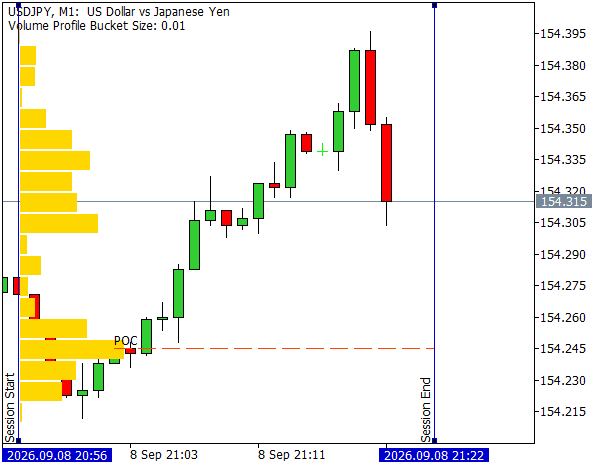
Session Volume Profile
Unlike market profile (TPO) charts, which rely on OHLC bars to measure time at price, a volume profile is built from tick-level data. It therefore requires an efficient architecture to remain responsive and avoid unnecessary overhead. In this article we will develop a session volume profile indicator for tick-volume data with the following core features:
- Flexible Display Anchoring: Dual display modes for anchoring the profile to the session start or the leftmost visible bar.
- Multi-Instance Support: Unique indicator instance IDs to run multiple volume profiles concurrently on the same chart.
- Historical and Live Trading: Support for historical tick datasets as well as dynamic updates with live incoming ticks.
- Interactive Session Bounds: Draggable vertical lines to define the start and end of the session, with automatic recalculation when adjusted on the chart.
- Point Of Control (POC) Highlighting: Dynamic line representing the session's highest-volume price level.
- Timer-Driven Efficiency Loop: Timer-driven rendering at a user-defined refresh rate.
- Automatic and Custom Bucket Sizing: Automatic volatility-driven selection of price bucket size with manual bucket sizing support.
- Pixel-Space Rendering: Volume profile bars directly anchored to screen coordinates, scaling relative to the maximum session volume at a user-defined screen width.
In the following sections, we will walk through the underlying data structures, inputs, event handlers, and rendering and updating functions required to build this indicator in MQL5. Let us begin with an overview of the indicator architecture.
Timer-Driven Architecture
A naive implementation would be recalculating the volume profile from historical tick data and rendering it on every incoming tick inside OnCalculate. This implementation has the advantage of being stateless; however, in active trading environments, the high frequency of incoming ticks will inevitably introduce severe chart latency due to the computations. We can improve this by maintaining the historical state of the volume profile and incrementally updating only the changes in OnCalculate. To optimize rendering performance, we will implement a timer-driven visual rendering system in OnTimer at a user-defined refresh interval. This decouples the rendering and update logic and keeps OnCalculate lightweight.
The OnTimer loop categorizes the tasks into three distinct update states:
- Full Recalculation: Triggered when session bounds are dragged or adjusted. The entire historical tick data between the bounds is re-fetched, rebuilding the volume profile from scratch.
- Full Redraw: Triggered when the chart is moved or when an incoming volume peak exceeds the previous maximum. All existing visual objects are redrawn to maintain accurate pixel-space proportions.
- Partial Update: Executed during normal live trading conditions. Only the specific updated price buckets are rerendered, leaving the rest of the visual objects untouched.
Efficient O(1) constant-time access to the volume profile can be obtained using the CHashMap and CHashSet standard MQL5 generic library classes. By pairing hash-based state tracking with a conditional OnTimer execution loop, the indicator minimizes chart glitches and delivers high performance even during periods of heavy market volatility.
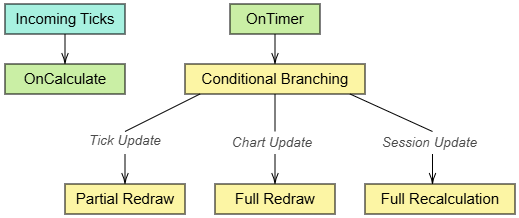
Session Volume Profile Architecture
Input Definition
With the indicator design defined, we can begin development. In the preprocessor section we include the necessary header files for working with CHashMap and CHashSet objects and set the buffers and plots of the indicator properties to 0 as we are defining custom rendering functions.
#property copyright "Copyright 2026, Daily Ranger EAs."
#property link      "https://www.mql5.com"
#property version   "1.00"

#property indicator_chart_window
#property indicator_buffers   0
#property indicator_plots     0

#include <Generic\HashMap.mqh>
#include <Generic\HashSet.mqh>
The core input to the indicator is a unique instance ID that allows multiple instances of the volume profile to run on the same chart as shown below.
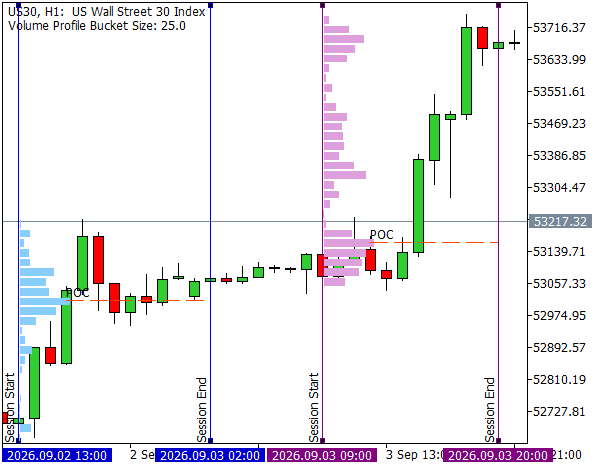
Multiple Volume Profile Instances
By incorporating this ID in the names of the objects, we can uniquely identify and differentiate them from those of other instances. The input is defined as follows.
input group             "Indicator Identification"
input uint              InpIndicatorId             = 1;                    //Unique ID
The next set of inputs corresponds to the session bounds, with InpDefaultBars representing the number of bars forming the initial default session.
input group             "Session Bounds Settings (draggable)"
input int               InpDefaultBars             = 5;                    //Default Bars For Initial Session Bounds
input color             InpBoundsColor             = clrMediumBlue;        //Session Bounds Color
To configure the bucket size settings, we define an enum BucketSizeType for custom and automatic size calculation choices. The input InpBucketChoice will represent the choice and InpCustomBucketSize provides the field for custom size input.
enum BucketSizeType
  {
   bucket_size_auto,            //Auto
   bucket_size_custom           //Custom
  };

input group             "Bucket Size Settings"
input BucketSizeType    InpBucketChoice            = bucket_size_auto;     //Bucket Size
input double            InpCustomBucketSize        = 0.0;                  //Custom Size (if chosen)
Next, we set the screen width that the price bucket with the most volume will occupy. EnumBarWidthType provides a set of predefined values for the screen width whose equivalent double value is obtained through the GetMaxBarWidth function. Input InpMaxBarWidth represents the predefined list and InpCustomMaxBarWidth provides the field for a custom user-defined max width between 0 and 1, toggled by InpIsCustomMaxBarWidth.
enum BarWidthType
  {
   width_1,          //0.1
   width_2,          //0.2
   width_3,          //0.3
   width_4,          //0.4
   width_5,          //0.5 (Half screen width)
   width_6,          //0.6
   width_7,          //0.7
   width_8,          //0.8
   width_9,          //0.9
   width_10          //1 (Full screen width)
  };

//+------------------------------------------------------------------+
//| Returns the double value of the BarWidthType                     |
//+------------------------------------------------------------------+
double GetMaxBarWidth(BarWidthType width)
  {
   switch(width)
     {
      case width_1:
         return 0.1;
      case width_2:
         return 0.2;
      case width_3:
         return 0.3;
      case width_4:
      default:
         return 0.4;
      case width_5:
         return 0.5;
      case width_6:
         return 0.6;
      case width_7:
         return 0.7;
      case width_8:
         return 0.8;
      case width_9:
         return 0.9;
      case width_10:
         return 1;
     }
  }

input group             "Max Width Settings"
input BarWidthType      InpMaxBarWidth             = width_1;              //Max Width
input bool              InpIsCustomMaxBarWidth     = false;                //Custom Width
input double            InpCustomMaxBarWidth       = 0.0;                  //Custom Width (if chosen)
Configuration options for the volume profile allow anchoring the profile to the leftmost bar or the start of the session as shown below.
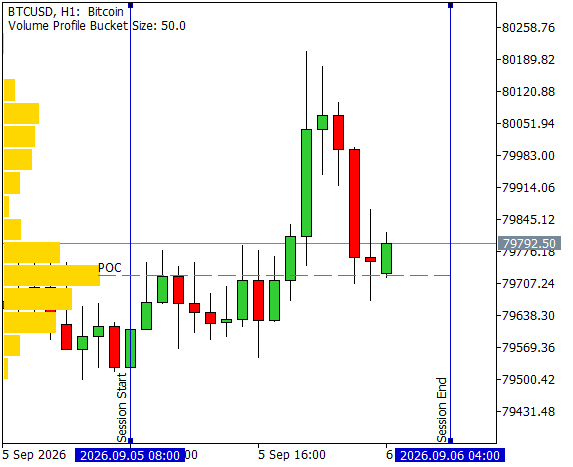
Volume Profile Anchored to the Leftmost Bar
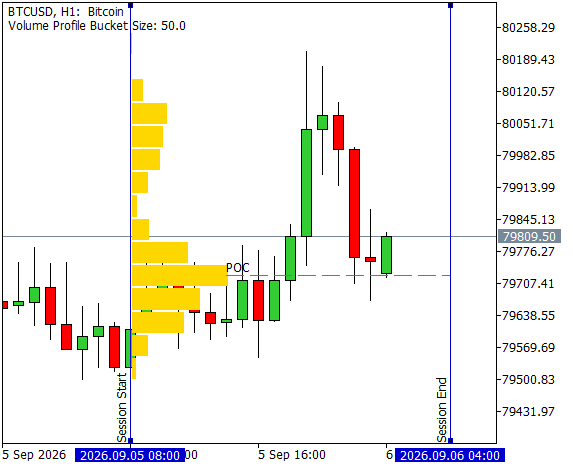
Volume Profile Anchored to Session Start
These options are represented by the enumLineDisplayType in the input InpLineDisplay along with visual display inputs.
enum LineDisplayType
  {
   display_line_start,        //Session start
   display_line_left_bar      //Leftmost bar
  };

input group             "Volume Profile Settings"
input LineDisplayType   InpLineDisplay             = display_line_start;   //Profile Display Location
input color             InpBarColor                = clrGold;              //Volume Profile Color
input color             InpBorderColor             = clrNONE;              //Border Color
The display of the POC is toggled through InpShowPoc with visual configurations.
input group             "POC Settings"
input bool              InpShowPoc                 = true;                 //Show POC
input ENUM_LINE_STYLE   InpPocLineStyle            = STYLE_DASH;           //POC Line Style
input color             InpPocColor                = clrOrangeRed;         //POC Color
The refresh rate for the volume profile rendering is set in milliseconds in the InpMillisRefresh field.
input group             "Refresh Rate Settings"
input int               InpMillisRefresh           = 1000;                 //Refresh Rate (in milliseconds)
The complete input list is as follows.
input group             "Indicator Identification"
input uint              InpIndicatorId             = 1;                    //Unique ID
input group             "Session Bounds Settings (draggable)"
input int               InpDefaultBars             = 5;                    //Default Bars For Initial Session Bounds
input color             InpBoundsColor             = clrMediumBlue;        //Session Bounds Color
input group             "Bucket Size Settings"
input BucketSizeType    InpBucketChoice            = bucket_size_auto;     //Bucket Size
input double            InpCustomBucketSize        = 0.0;                  //Custom Size (if chosen)
input group             "Max Width Settings"
input BarWidthType      InpMaxBarWidth             = width_1;              //Max Width
input bool              InpIsCustomMaxBarWidth     = false;                //Custom Width
input double            InpCustomMaxBarWidth       = 0.0;                  //Custom Width (if chosen)
input group             "Volume Profile Settings"
input LineDisplayType   InpLineDisplay             = display_line_start;   //Profile Display Location
input color             InpBarColor                = clrGold;              //Volume Profile Color
input color             InpBorderColor             = clrNONE;              //Border Color
input group             "POC Settings"
input bool              InpShowPoc                 = true;                 //Show POC
input ENUM_LINE_STYLE   InpPocLineStyle            = STYLE_DASH;           //POC Line Style
input color             InpPocColor                = clrOrangeRed;         //POC Color
input group             "Refresh Rate Settings"
input int               InpMillisRefresh           = 1000;                 //Refresh Rate (in milliseconds)
Data Structures
In this section, we will define the structures to hold the volume profile data. The VolumeProfile struct is the core data type that holds the state of the profile. The bucket size is set in the bucketSize field. The CHashMap buckets maps the price bucket index of long type to the long volume data. The CHashSet updateList tracks the indices of the price buckets updated with incoming ticks, and the isNewMaxCountbool flags if there is a new maximum volume during the update. The maximum and minimum prices in the volume profile are stored in the max and min fields, respectively. The prevailing maximum volume value is tracked in maxVolumeCount, with pocIdx storing the index of the POC. Finally, the Reset method clears all fields except the bucket size, and the ClearUpdates method clears all the fields affected during the updates.
struct VolumeProfile
  {
   CHashMap<long, long>  buckets;
   CHashSet<long>        updateList;
   long                  pocIdx;
   double                max;
   double                min;
   long                  maxVolumeCount;
   bool                  isNewMaxCount;
   double                bucketSize;

   VolumeProfile(double BucketSize=0, double Min=DBL_MAX, double Max=0, long MaxVolumeCount=0, bool IsNewMaxCount=false, long PocIdx=0):
      bucketSize(BucketSize),
      min(Min),
      max(Max),
      maxVolumeCount(MaxVolumeCount),
      pocIdx(PocIdx),
      isNewMaxCount(IsNewMaxCount)
     {
      buckets.Clear();
      updateList.Clear();
     }

   void Reset()
     {
      min = DBL_MAX;
      max = 0;
      maxVolumeCount = 0;
      isNewMaxCount = false;
      pocIdx = 0;
      buckets.Clear();
      updateList.Clear();
     }

   void ClearUpdates()
     {
      isNewMaxCount = false;
      updateList.Clear();
     }
  };
The XYCoord struct holds the x and y pixel coordinates of a given point on the chart. The PriceTimeCoord struct, likewise, holds the time and price coordinates of a given point on the chart; we overload the != operator to facilitate inequality comparisons between two price-time coordinates.
struct XYCoord
  {
   int x;
   int y;

   XYCoord(int X=0, int Y=0):
      x(X),
      y(Y) {}
  };

struct PriceTimeCoord
  {
   datetime time;
   double   price;

   PriceTimeCoord(datetime Time=0, double Price=0):
      time(Time),
      price(Price) {}

   bool operator!=(const PriceTimeCoord &other) const
     {
      return (time != other.time) || (price != other.price);
     }
  };
Bucket Size
In this section, we will implement the automatic bucket size calculation. We can base the bucket size calculation on the average true range (ATR), which is a volatility-driven range expectation of the price move over one period of the chart timeframe. The number of buckets per ATR move, NumBucketsPerAtr can then be set based on the granularity of the price buckets required. For the auto-size calculation, we will set NumBucketsPerAtr = 4, which offers a good initial analysis point. Since we query the ATR only once, we can write a simple function, GetAverageTrueRange, to avoid the overhead of obtaining indicator handles. Finally, the GetAutoBucketSize function returns the bucket size from the ATR and buckets per ATR move.
int      AtrPeriod = 14;
double   NumBucketsPerAtr = 4;

//+------------------------------------------------------------------+
//| Returns the auto-calculated bucket size                          |
//+------------------------------------------------------------------+
double GetAutoBucketSize(string sym, ENUM_TIMEFRAMES timeFrame, int period, double bucketsPerAverageRange)
  {
   return (bucketsPerAverageRange == 0)? 0 : Normalize(GetAverageTrueRange(sym, timeFrame, period)/bucketsPerAverageRange);
  }

//+------------------------------------------------------------------+
//| Returns the average true range                                   |
//+------------------------------------------------------------------+
double GetAverageTrueRange(string sym, ENUM_TIMEFRAMES timeFrame, int period)
  {
   double sumTrueRange = 0;
   for(int i = 0; i < period; i++)
     {
      double trueRange  = 0;
      double close      = iClose(sym,timeFrame,i);
      double prevClose  = iClose(sym,timeFrame,i+1);
      double high       = iHigh(sym, timeFrame, i);
      double low        = iLow(sym, timeFrame, i);
      trueRange = MathMax(MathAbs(high - low), MathAbs(high - prevClose));
      trueRange = MathMax(trueRange, MathAbs(low - prevClose));
      sumTrueRange += trueRange;
     }
   return (period <= 0)? 0 : sumTrueRange/period;
  }

//+------------------------------------------------------------------+
//| Normalizes double values to the digits of the chart              |
//+------------------------------------------------------------------+
double Normalize(double val)
  {
   return NormalizeDouble(val, Digits());
  }
Session Bounds
In this section, we will define the rendering and event handling functions to track and update the session bounds.
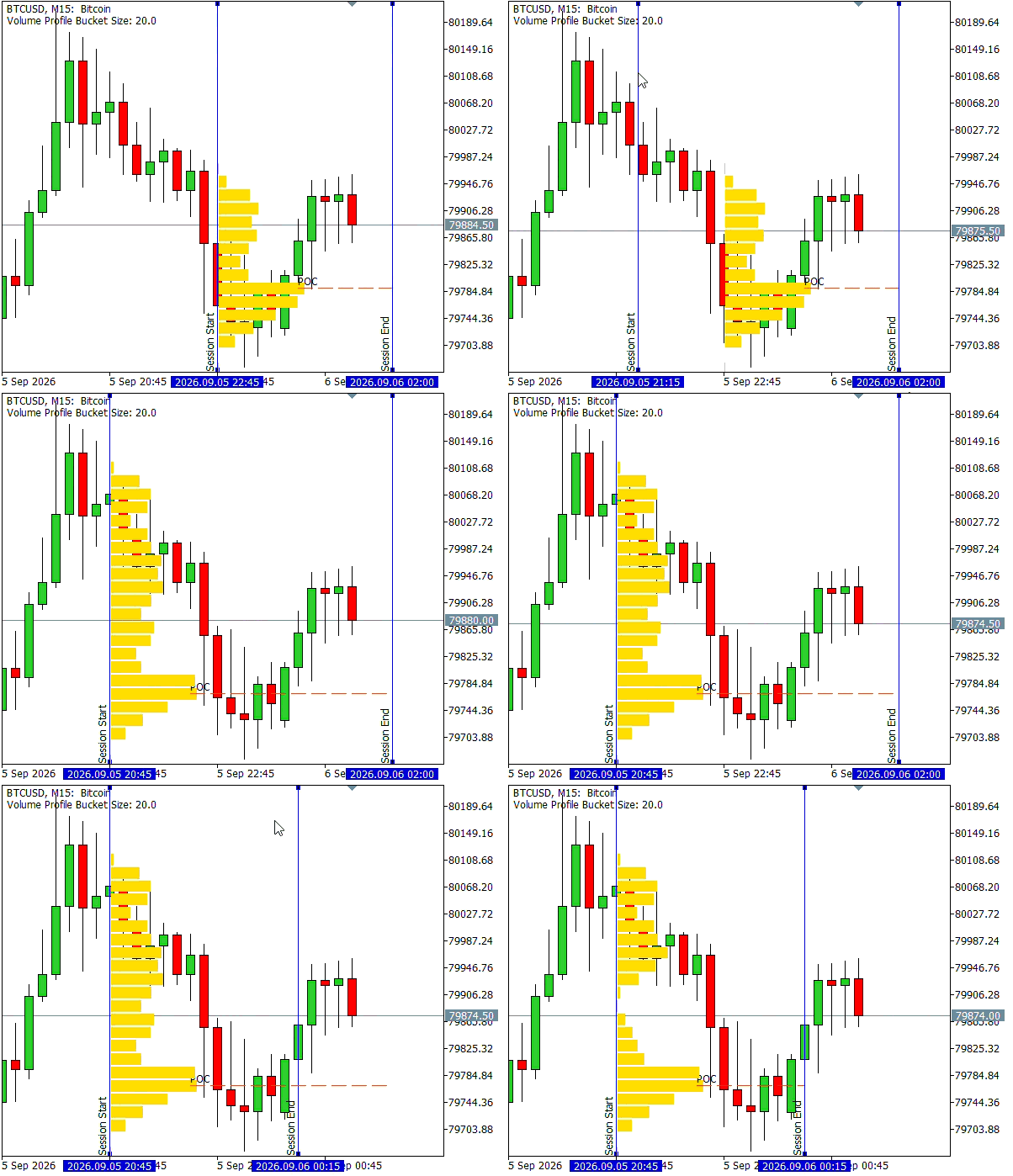
Interactive Session Bounds
We define the DrawLine function to create session bounds of the OBJ_VLINE type and set the visual object properties. To make the lines draggable, we set the OBJPROP_SELECTABLE and OBJPROP_SELECTED properties. We also define the global variables for the object suffix and labels. The common object prefix, ObjPrefix, StartLineName, and EndLineName will be derived in the Initialization section from the InpIndicatorId instance ID.
string StartLineSuffix     = "_start";
string EndLineSuffix       = "_end";
string StartLineLabel      = "Session Start";
string EndLineLabel        = "Session End";

string ObjPrefix;
string StartLineName;
string EndLineName;

//+------------------------------------------------------------------+
//| Draws draggable vertical lines                                   |
//+------------------------------------------------------------------+
void DrawLine(string name, string label, color clr, datetime time)
  {
   long chartId   = ChartID();
   int  subWindow = 0;

   ObjectCreate(chartId, name, OBJ_VLINE, subWindow, time, 0);
   ObjectSetString(chartId, name, OBJPROP_TEXT, label);
   ObjectSetInteger(chartId, name, OBJPROP_COLOR, clr);
   ObjectSetInteger(chartId, name, OBJPROP_SELECTABLE, true);
   ObjectSetInteger(chartId, name, OBJPROP_SELECTED, true);
  }
The datetime global variables, gblStart and gblEnd, track the state of the session which extends from the iTime value represented by gblStart up to but not including the iTime value represented by gblEnd. We set the initial session bounds to span InpDefaultBars bars. The session end is set using EndShift relative to the current bar. We initially set EndShift = 0 to include the ticks up to the start of the current bar. These bounds, however, are draggable and can then be configured by the user.
Changes to the session bound lines are processed in the OnChartEvent event handler under the id, CHARTEVENT_OBJECT_DRAG. We compare sparam to StartLineName and EndLineName to identify the object dragged and obtain the new time value through its OBJPROP_TIME property. We only update gblStart and gblEnd if the new bounds represent a valid session state; if not, we reset the OBJPROP_TIME property of the dragged line to its last known valid state. Finally, we set a global flag gblShouldRecalc to signal a full recalculation due to the session update.
datetime gblStart;
datetime gblEnd;

int EndShift = 0;

bool gblShouldRecalc = false;

//+------------------------------------------------------------------+
//| ChartEvent function                                              |
//+------------------------------------------------------------------+
void OnChartEvent(const int32_t id,
                  const long &lparam,
                  const double &dparam,
                  const string &sparam)
  {

   if(id != CHARTEVENT_OBJECT_DRAG)
      return;

   if(sparam == StartLineName)
     {
      datetime start = (datetime) ObjectGetInteger(ChartID(), StartLineName, OBJPROP_TIME);
      if(start >= gblEnd)
        {
         ObjectSetInteger(ChartID(), StartLineName, OBJPROP_TIME, gblStart);
        }
      else
        {
         gblStart = start;
         gblShouldRecalc = true;
        }
      return;
     }

   if(sparam == EndLineName)
     {
      datetime end = (datetime) ObjectGetInteger(ChartID(), EndLineName, OBJPROP_TIME);
      if(end <= gblStart)
        {
         ObjectSetInteger(ChartID(), EndLineName, OBJPROP_TIME, gblEnd);
        }
      else
        {
         gblEnd   = end;
         gblShouldRecalc = true;
        }
      return;
     }
  }
Volume Profile
In this section, we define the functions to populate the volume profile from historical tick data. The global variable, gblVolumeProfile tracks the state of the volume profile. As forex and CFD charts are bid-driven, we round each tick's bid price down to the nearest integer multiple of the bucket size. The multiplier serves as the index to uniquely identify the bucket in the hashmap and hashset. As tick volume is the aggregation of the number of ticks, we increment the volume value by one each time a price falls in its respective bucket. We start by defining helpers to obtain the index from the price and vice versa.
VolumeProfile gblVolumeProfile;

//+------------------------------------------------------------------+
//| Returns the bucket index for a given price and bucket size       |
//+------------------------------------------------------------------+
long GetBucketIdx(double price, double bucketSize)
  {
   return (long) MathFloor(price / bucketSize);
  }

//+------------------------------------------------------------------+
//| Returns the bucket price from the index and bucket size          |
//+------------------------------------------------------------------+
double GetBucket(long idx, double bucketSize)
  {
   return Normalize(idx * bucketSize);
  }
Next, we define the UpdateBucket function to update the profile and the bucket corresponding to the price of a single tick. We first update the min and max fields. Then we obtain the bucket index using the GetBucketIdx helper. If the buckets hashmap contains the index, we increment its tick volume count by one; else, we add the index to buckets at an initial tick volume of one. If incrementing the volume produces a new max volume, we update the maxVolumeCount field, set pocIdx to the current bucket index, and flag isNewMaxCount = true. Finally, we add the bucket index to updateList to mark the index as updated.
//+--------------------------------------------------------------------+
//| Updates the tick volume in the bucket corresponding to input price |
//+--------------------------------------------------------------------+
void UpdateBucket(VolumeProfile &vProfile, double price)
  {
   vProfile.min = MathMin(vProfile.min, price);
   vProfile.max = MathMax(vProfile.max, price);

//--- Increment or add the bucket index to the volume map
   long bucketIdx = GetBucketIdx(price, vProfile.bucketSize);
   long newCount;
   if(vProfile.buckets.ContainsKey(bucketIdx))
     {
      long val;
      vProfile.buckets.TryGetValue(bucketIdx, val);
      vProfile.buckets.TrySetValue(bucketIdx, val+1);
      newCount = val+1;
     }
   else
     {
      vProfile.buckets.Add(bucketIdx, 1);
      newCount = 1;
     }

//--- Check for a new maximum volume
   if(vProfile.maxVolumeCount < newCount)
     {
      vProfile.maxVolumeCount = newCount;
      vProfile.isNewMaxCount  = true;
      vProfile.pocIdx         = bucketIdx;
     }

//--- Mark the index as updated
   if(!vProfile.updateList.Contains(bucketIdx))
     {
      vProfile.updateList.Add(bucketIdx);
     }
  }
The BuildVolumeProfile function builds the volume profile from the historical ticks between its datetime parameters, start and end. We first call the Reset method to reset the existing volume profile state. The historical ticks between the start and end date range are obtained through the CopyTicksRange function in the dynamic ticks array of MqlTick type. The tick volume count in forex and CFD markets comprises of the ticks with the COPY_TICKS_INFO flag which tracks changes to the bid and/or ask price. As CopyTicksRange expects the date range in ulong milliseconds, we multiply start and end by 1000. After bounds checking, we initialize the min and max fields, and loop through the received ticks and update them individually by calling UpdateBucket on each tick's bid price.
//+---------------------------------------------------------------------------+
//| Builds a fresh volume profile from historical ticks between start and end |
//+---------------------------------------------------------------------------+
void BuildVolumeProfile(VolumeProfile &vProfile, datetime start, datetime end)
  {
//--- Reset the volume profile
   vProfile.Reset();

//--- Fetch historical ticks from start to end
   ulong startMillis = start * 1000;
   ulong endMillis   = end * 1000;
   MqlTick ticks[];
   if(CopyTicksRange(Symbol(), ticks, COPY_TICKS_INFO, startMillis, endMillis) == -1)
      return;
   int numTicks = ArraySize(ticks);
   if(numTicks <= 0)
      return;

   vProfile.min = ticks[0].bid;
   vProfile.max = ticks[0].bid;

//--- Loop through the ticks array and update individual ticks
   for(int i = 0; i < numTicks; i++)
     {
      if(ticks[i].time >= end)
         continue;

      UpdateBucket(vProfile, ticks[i].bid);
     }
  }
Rendering
In this section, we will define all the functions related to rendering the volume profile. We start with the GetBarStart function that returns the datetime value to anchor the volume profile based on InpLineDisplay.
//+------------------------------------------------------------------+
//| Returns the time value of the volume profile anchor position     |
//+------------------------------------------------------------------+
datetime GetBarStart()
  {
   if(InpLineDisplay == display_line_left_bar)
     {
      int curLeftBar = (int) ChartGetInteger(ChartID(), CHART_FIRST_VISIBLE_BAR);
      return iTime(Symbol(), Period(), curLeftBar);
     }
   else
     {
      return gblStart;
     }
  }
The parameterless GetMaxBarWidth function returns the width occupied by the highest volume bucket as a fraction of the chart width. If InpIsCustomMaxBarWidth = true, we return InpCustomMaxBarWidth; else, we return the double value associated with the InpMaxBarWidth, BarWidthType.
//+--------------------------------------------------------------------+
//| Returns width of the maximum volume bar as fraction of chart width |
//+--------------------------------------------------------------------+
double GetMaxBarWidth()
  {
   if(InpIsCustomMaxBarWidth)
      return InpCustomMaxBarWidth;
   return GetMaxBarWidth(InpMaxBarWidth);
  }
The functions GetPriceTimeCoord and GetXYCoord help convert between the price-time and pixel coordinate space using ChartXYToTimePrice and ChartTimePriceToXY, respectively.
//+------------------------------------------------------------------+
//| Returns the price-time coordinates from the XY pixel coordinates |
//+-------------------------------------------------------------------
PriceTimeCoord GetPriceTimeCoord(int x, int y)
  {
   datetime time;
   double   price;
   int subWindow = 0;
   if(!ChartXYToTimePrice(ChartID(), x, y, subWindow, time, price))
      return PriceTimeCoord();
   return PriceTimeCoord(time, price);
  }

//+------------------------------------------------------------------+
//| Returns the XY pixel coordinates from the price-time coordinates |
//+------------------------------------------------------------------+
XYCoord GetXYCoord(double price, datetime time)
  {
   long chartId   = ChartID();
   int  subWindow = 0;
   int x, y;
   if(!ChartTimePriceToXY(chartId, subWindow, time, price, x, y))
     {
      return XYCoord();
     }
   return XYCoord(x, y);
  }
The IsInScreen function indicates if an XYCoord point is within chart bounds by comparing it with the height and width of the chart in pixels obtained using ChartGetInteger. For PriceTimeCoord points, we overload the function to call IsInScreen on its equivalent pixel coordinates obtained using GetXYCoord.
//+------------------------------------------------------------------+
//| Returns if a price on the volume profile is within chart bounds  |
//+------------------------------------------------------------------+
bool IsInScreen(const PriceTimeCoord& point)
  {
   return IsInScreen(GetXYCoord(point.price, point.time));
  }

//+------------------------------------------------------------------+
//| Returns if an XY pixel coordinate is within chart bounds         |
//+------------------------------------------------------------------+
bool IsInScreen(const XYCoord& point)
  {
   long chartWidth, chartHeight;
   if(!ChartGetInteger(ChartID(), CHART_WIDTH_IN_PIXELS, 0, chartWidth))
      return false;
   if(!ChartGetInteger(ChartID(), CHART_HEIGHT_IN_PIXELS, 0, chartHeight))
      return false;
   return (point.x >= 0) && (point.x <= chartWidth) && (point.y >= 0) && (point.y <= chartHeight);
  }
The POC is rendered in the price-time space as an OBJ_TREND object stretching from the x coordinate of the maximum volume bar, xOrd to the session close.
//+------------------------------------------------------------------+
//| Renders the POC for the bar with maximum volume                 |
//+------------------------------------------------------------------+
void DrawPOC(long xOrd, double bucket, double size, string name, datetime end, string label)
  {
   long chartId   = ChartID();
   int  subWindow = 0;
   datetime time  = 0;
   double poc     = Normalize(bucket + size/2); // POC drawn halfway through the bucket with maximum volume
   double price;

   if(!ChartXYToTimePrice(chartId, (int) xOrd, 0, subWindow, time, price)) // xOrd is the x coordinate of the bar with maximum volume
      return;
   ObjectCreate(chartId, name, OBJ_TREND, subWindow, time, poc, end, poc);
   ObjectSetInteger(chartId, name, OBJPROP_STYLE, InpPocLineStyle);
   ObjectSetInteger(chartId, name, OBJPROP_COLOR, InpPocColor);
   ObjectSetString(chartId, name, OBJPROP_TEXT, label);
  }
The DrawVolumeProfileBar is the core rendering function of the volume profile and renders a single bar corresponding to a price bucket as an OBJ_RECTANGLE_LABEL object in the pixel coordinate space. The pixel positioning offers greater precision than the standard OBJ_RECTANGLE object, which is required for accurately placing the bars proportionally. We start with the global identifiers and labels for the objects.
string ProfilePrefix       = "volume_profile_";
string BarPrefix           = "_bar_";
string PocLineSuffix       = "_poc";
string PocLabel            = "POC";
In the function, we first obtain the bucket value, which is the lower price bound of the bucket, by calling GetBucket on the idx and size parameters. Adding size to bucket gives bucketTop, the upper price bound. The starting time coordinate of all volume profile bars is the profile anchor, retrieved through the GetBarStart function and stored in barStart.
double bucket     = GetBucket(idx, size);
double bucketTop  = Normalize(bucket + size);
datetime barStart = GetBarStart();
Next, we check if the PriceTimeCoord represented by barStart and bucketTop is within chart bounds by calling IsInScreen. As OBJ_RECTANGLE_LABEL objects are anchored to the top-left by default, we can skip the rendering if the point is not in screen.
if(!IsInScreen(PriceTimeCoord(barStart, bucketTop)))
   return;
The string representations of bucket and idx are used to uniquely name the object along with the common ObjPrefix and BarPrefix.
string barName = ObjPrefix + BarPrefix + DoubleToString(bucket, Digits()) + " " + IntegerToString(idx);
We obtain the pixel coordinates of the lower and upper bucket bounds along barStart by passing bucket and bucketTop to ChartTimePriceToXY and store the values in xLow, yLow, xHigh, and yHigh, respectively.
long chartId      = ChartID();
int  subWindow    = 0;

int xLow, yLow;
int xHigh, yHigh;

if(!ChartTimePriceToXY(chartId, subWindow, barStart, bucket, xLow, yLow))
   return;
if(!ChartTimePriceToXY(chartId, subWindow, barStart, bucketTop, xHigh, yHigh))
   return;
To calculate the bar width in pixels, we retrieve the CHART_WIDTH_IN_PIXELS chart property and multiply it with the parameter, maxBarWidth fraction to get the width of the maximum volume bucket in pixels. We scale this width linearly by dividing the bucket volume, vol by the maximum volume parameter, maxVolumeCount and multiplying the result.
if(maxVolumeCount <= 0)
   return;
long chartWidth;
if(!ChartGetInteger(ChartID(), CHART_WIDTH_IN_PIXELS, 0, chartWidth))
   return;
long barWidth = (long)(maxBarWidth * chartWidth * vol / maxVolumeCount);
We create the OBJ_RECTANGLE_LABEL object using ObjectCreate and set its properties using ObjectSetInteger. Then, we set OBJPROP_XDISTANCE and OBJPROP_YDISTANCE to the upper bucket bound, xHigh and yHigh, as pixel distances are measured from the top-left corner. From this point, we set OBJPROP_XSIZE to barWidth with a minimum value of one pixel. Similarly, we set OBJPROP_YSIZE to, yLow - yHigh with a minimum value of one pixel, noting that the lower bucket bound will have a higher y coordinate. Finally, we set the visual properties.
ObjectCreate(chartId, barName, OBJ_RECTANGLE_LABEL, subWindow, 0, 0);
ObjectSetInteger(chartId, barName, OBJPROP_XDISTANCE, xHigh);
ObjectSetInteger(chartId, barName, OBJPROP_YDISTANCE, yHigh);
ObjectSetInteger(chartId, barName, OBJPROP_XSIZE, MathMax(barWidth,1));
ObjectSetInteger(chartId, barName, OBJPROP_YSIZE, MathMax(yLow-yHigh,1)); // Top left corner is (0, 0)
ObjectSetInteger(chartId, barName, OBJPROP_BORDER_TYPE, BORDER_FLAT);
ObjectSetInteger(chartId, barName, OBJPROP_BGCOLOR, InpBarColor);
ObjectSetInteger(chartId, barName, OBJPROP_COLOR, InpBorderColor);
In the end, we call DrawPOC if InpShowPoc = true and idx matches the pocIdx parameter. The x coordinate for the POC is obtained by adding barWidth to xLow.
if(InpShowPoc && (idx == pocIdx))
  {
   DrawPOC(xLow+barWidth, bucket, size, ObjPrefix+BarPrefix+PocLineSuffix, end, PocLabel);
  }
This gives us the complete DrawVolumeProfileBar function.
//+------------------------------------------------------------------+
//| Renders a single bar of the volume profile bucket                |
//+------------------------------------------------------------------+
void DrawVolumeProfileBar(long idx, double vol, long maxVolumeCount, double size, double maxBarWidth, long pocIdx, datetime end)
  {
//--- Obtain the price time coordinates
   double bucket     = GetBucket(idx, size);
   double bucketTop  = Normalize(bucket + size);
   datetime barStart = GetBarStart();

//--- Skip the rendering if the bucket top is out of chart bounds
   if(!IsInScreen(PriceTimeCoord(barStart, bucketTop)))
      return;

//--- Derive the unique bar name
   string barName    = ObjPrefix + BarPrefix + DoubleToString(bucket, Digits()) + " " + IntegerToString(idx);

//--- Obtain the pixel coordinates
   long chartId      = ChartID();
   int  subWindow    = 0;

   int xLow, yLow;
   int xHigh, yHigh;

   if(!ChartTimePriceToXY(chartId, subWindow, barStart, bucket, xLow, yLow))
      return;
   if(!ChartTimePriceToXY(chartId, subWindow, barStart, bucketTop, xHigh, yHigh))
      return;

//--- Obtain the width of the bar proportional to the maximum bar width
   if(maxVolumeCount <= 0)
      return;
   long chartWidth;
   if(!ChartGetInteger(ChartID(), CHART_WIDTH_IN_PIXELS, 0, chartWidth))
      return;
   long barWidth = (long)(maxBarWidth * chartWidth * vol / maxVolumeCount);

//--- Create the volume profile bar
   ObjectCreate(chartId, barName, OBJ_RECTANGLE_LABEL, subWindow, 0, 0);
   ObjectSetInteger(chartId, barName, OBJPROP_XDISTANCE, xHigh);
   ObjectSetInteger(chartId, barName, OBJPROP_YDISTANCE, yHigh);
   ObjectSetInteger(chartId, barName, OBJPROP_XSIZE, MathMax(barWidth,1));
   ObjectSetInteger(chartId, barName, OBJPROP_YSIZE, MathMax(yLow-yHigh,1)); // Top left corner is (0, 0)
   ObjectSetInteger(chartId, barName, OBJPROP_BORDER_TYPE, BORDER_FLAT);
   ObjectSetInteger(chartId, barName, OBJPROP_BGCOLOR, InpBarColor);
   ObjectSetInteger(chartId, barName, OBJPROP_COLOR, InpBorderColor);

//--- Draw the POC
   if(InpShowPoc && (idx == pocIdx))
     {
      DrawPOC(xLow+barWidth, bucket, size, ObjPrefix+BarPrefix+PocLineSuffix, end, PocLabel);
     }
  }
The remaining functions concern the conditional rendering of the volume profile. The DrawAllBuckets function loops through all the buckets in the hashmap obtained using the CopyTo method and calls DrawVolumeProfileBar on each index-volume pair.
//+------------------------------------------------------------------+
//| Renders bars for all the buckets in the volume profile           |
//+------------------------------------------------------------------+
void DrawAllBuckets(VolumeProfile &vProfile)
  {
   long  keys[];
   long  vals[];

   int num = vProfile.buckets.CopyTo(keys, vals);

   if(num <= 0)
      return;

   for(int i = 0; i < num; i++)
     {
      DrawVolumeProfileBar(keys[i], vals[i], vProfile.maxVolumeCount, vProfile.bucketSize, GetMaxBarWidth(), vProfile.pocIdx, gblEnd);
     }
  }
The DrawUpdateListBuckets function calls DrawVolumeProfileBar for all the indices in updateList obtained using the CopyTo method, with the corresponding volume value from the buckets hashmap.
//+------------------------------------------------------------------+
//| Renders bars for the bucket indices in the update set            |
//+------------------------------------------------------------------+
void DrawUpdateListBuckets(VolumeProfile &vProfile)
  {
   long keys[];

   int num = vProfile.updateList.CopyTo(keys);

   if(num <= 0)
      return;

   for(int i = 0; i < num; i++)
     {
      if(!vProfile.buckets.ContainsKey(keys[i]))
         continue;
      long val;
      vProfile.buckets.TryGetValue(keys[i], val);
      DrawVolumeProfileBar(keys[i], val, vProfile.maxVolumeCount, vProfile.bucketSize, GetMaxBarWidth(), vProfile.pocIdx, gblEnd);
     }
  }
The DeleteVolumeProfile function deletes all the volume profile objects by identifying them with the common ObjPrefix + BarPrefix prefix. This function is useful to clear the objects when we need to render a freshly built volume profile or do a full redraw.
//+------------------------------------------------------------------+
//| Deletes all objects of the volume profile                        |
//+------------------------------------------------------------------+
void DeleteVolumeProfile()
  {
   ObjectsDeleteAll(ChartID(), ObjPrefix + BarPrefix);
  }
The DrawFullVolumeProfile function clears all the volume profile objects by calling DeleteVolumeProfile. It then calls DrawAllBuckets to freshly render all the buckets, and invokes the ClearUpdates method of the volume profile.
//+------------------------------------------------------------------+
//| Renders the full volume profile                                  |
//+------------------------------------------------------------------+
void DrawFullVolumeProfile(VolumeProfile &vProfile)
  {
   DeleteVolumeProfile();
   DrawAllBuckets(vProfile);
   vProfile.ClearUpdates();
  }
The DrawUpdatedVolumeProfile function handles the rendering of the live updated ticks. It calls DrawFullVolumeProfile if isNewMaxCount = true to reproportion all the bars; else, it calls DrawUpdateListBuckets. In the end, it invokes the ClearUpdates method of the volume profile.
//+------------------------------------------------------------------+
//| Renders the updated volume profile                               |
//+------------------------------------------------------------------+
void DrawUpdatedVolumeProfile(VolumeProfile &vProfile)
  {
   if(vProfile.isNewMaxCount)
     {
      DrawFullVolumeProfile(vProfile);
     }
   else
     {
      DrawUpdateListBuckets(vProfile);
     }
   vProfile.ClearUpdates();
  }
The InitVolumeProfile function builds a new profile from historical ticks with BuildVolumeProfile and calls DrawFullVolumeProfile to initialize the profile.
//+--------------------------------------------------------------------+
//| Initializes and renders a new volume profile from historical ticks |
//+--------------------------------------------------------------------+
void InitVolumeProfile(VolumeProfile &vProfile, datetime start, datetime end)
  {
   BuildVolumeProfile(vProfile, start, end);
   DrawFullVolumeProfile(vProfile);
  }
Finally, we track chart changes because pixel-space objects do not move during pan/scroll/zoom. We can do that by storing the price-time coordinates of the pixel-space origin in gblOrigin. The IsChartMoved function will then indicate chart movement by comparing the current coordinates with the last recorded coordinates of the origin.
PriceTimeCoord gblOrigin;

//+------------------------------------------------------------------+
//| Returns if chart has moved from the last recorded origin         |
//+------------------------------------------------------------------+
bool IsChartMoved(const PriceTimeCoord &origin)
  {
   PriceTimeCoord curOrigin = GetPriceTimeCoord(0,0);
   if(curOrigin != origin)
      return true;
   else
      return false;
  }
Initialization
In this section, we carry out the initializing operations in the OnInit event handler. We start by deriving the common object prefix, ObjPrefix by incorporating the string representation of InpIndicatorId obtained using IntegerToString. Next, we check for object collisions with existing instances of the same ID using StartLineName and EndLineName and the ObjectFind function. We prompt the user to supply a different ID if collisions are found and return early.
ObjPrefix      = ProfilePrefix + IntegerToString(InpIndicatorId);
StartLineName  = ObjPrefix + StartLineSuffix;
EndLineName    = ObjPrefix + EndLineSuffix;

if((ObjectFind(ChartID(), StartLineName) >= 0) ||
   (ObjectFind(ChartID(), EndLineName)   >= 0))
  {
   Print("Indicator with the same id already exists, supply a new id to avoid object collision");
   return INIT_PARAMETERS_INCORRECT;
  }
Input validation is carried out for user-entered fields, notably checking if, 0 < InpCustomMaxBarWidth <= 1. InpDefaultBars, InpCustomBucketSize and InpMillisRefresh are checked for valid values.
if(InpDefaultBars <= 0)
  {
   Print("Please enter default bars above 0");
   return INIT_PARAMETERS_INCORRECT;
  }

if(InpIsCustomMaxBarWidth && (InpCustomMaxBarWidth <= 0 || InpCustomMaxBarWidth > 1))
  {
   Print("Please enter custom max width between 0 (exclusive) and 1 (inclusive)");
   return INIT_PARAMETERS_INCORRECT;
  }

if((InpBucketChoice == bucket_size_custom) && (InpCustomBucketSize <= 0))
  {
   Print("Please enter bucket size greater than 0");
   return INIT_PARAMETERS_INCORRECT;
  }

if(InpMillisRefresh <= 0)
  {
   Print("Please enter a refresh rate greater than 0");
   return INIT_PARAMETERS_INCORRECT;
  }
The bucket size is calculated based on InpBucketChoice. We default the minimum bucket size to SYMBOL_TRADE_TICK_SIZEsymbol property, which is the minimal price change obtained using SymbolInfoDouble. For a custom bucket size, we warn the user of potential performance issues if the number of buckets per ATR exceeds 25. We assign the calculated bucket size to gblVolumeProfile and inform the user of the assigned value through the Print function. This serves as a good starting point for users to gauge the bucket size precision and customize it to their needs.
double bucketSize;
if(InpBucketChoice == bucket_size_custom)
  {
   bucketSize = MathMax(Normalize(InpCustomBucketSize), SymbolInfoDouble(Symbol(), SYMBOL_TRADE_TICK_SIZE));
   double atr = GetAverageTrueRange(Symbol(), Period(), AtrPeriod);
   int calcBucketsPerAtr = (int) MathFloor(atr/bucketSize);
   if(calcBucketsPerAtr >= 25)
     {
      Print("Warning! The approx number of buckets per ATR move is "+IntegerToString(calcBucketsPerAtr)+". Performance may be affected");
     }
  }
else
  {
   bucketSize = MathMax(GetAutoBucketSize(Symbol(), Period(), AtrPeriod, NumBucketsPerAtr), SymbolInfoDouble(Symbol(), SYMBOL_TRADE_TICK_SIZE));
  }

gblVolumeProfile.bucketSize = bucketSize;
Print("Bucket size: ", gblVolumeProfile.bucketSize);
We set the CHART_SHOW_OBJECT_DESCRchart property to enable object label display. As it is a global property, we save its last state in a global variable LastChartDescProp to be restored at deinitialization. A shortname for the indicator is set with the INDICATOR_SHORTNAMEindicator property.
bool LastChartDescProp; // Global variable

LastChartDescProp = ChartGetInteger(ChartID(), CHART_SHOW_OBJECT_DESCR);
ChartSetInteger(ChartID(), CHART_SHOW_OBJECT_DESCR, true);
IndicatorSetString(INDICATOR_SHORTNAME, "Bucket Size="+DoubleToString(gblVolumeProfile.bucketSize,Digits()));
We initialize the session bounds, gblStart and gblEnd, from the values of InpDefaultBars and EndShift, and render them as draggable lines by calling DrawLine.
gblStart = iTime(Symbol(), Period(), InpDefaultBars);
gblEnd   = iTime(Symbol(), Period(), EndShift);
DrawLine(StartLineName, StartLineLabel, InpBoundsColor, gblStart);
DrawLine(EndLineName, EndLineLabel, InpBoundsColor, gblEnd);
We set up the Timer event every InpMillisRefresh milliseconds through the EventSetMillisecondTimer function.
if(!EventSetMillisecondTimer(InpMillisRefresh)){
   Print("Failed to set timer: ", GetLastError());
   return INIT_FAILED;
}
Finally, we set gblShouldRecalc = true to signal full recalculation and rendering of the volume profile on the first OnTimer call.
gblShouldRecalc = true; This completes the initialization. Putting it all together, we get the OnInit function.
//+------------------------------------------------------------------+
//| Custom indicator initialization function                         |
//+------------------------------------------------------------------+
int OnInit()
  {
//--- Check for object collisions due to existing indicator instances
   ObjPrefix      = ProfilePrefix + IntegerToString(InpIndicatorId);
   StartLineName  = ObjPrefix + StartLineSuffix;
   EndLineName    = ObjPrefix + EndLineSuffix;

   if((ObjectFind(ChartID(), StartLineName) >= 0) ||
      (ObjectFind(ChartID(), EndLineName)   >= 0))
     {
      Print("Indicator with the same id already exists, supply a new id to avoid object collision");
      return INIT_PARAMETERS_INCORRECT;
     }

//--- Input validation
   if(InpDefaultBars <= 0)
     {
      Print("Please enter default bars above 0");
      return INIT_PARAMETERS_INCORRECT;
     }

   if(InpIsCustomMaxBarWidth && (InpCustomMaxBarWidth <= 0 || InpCustomMaxBarWidth > 1))
     {
      Print("Please enter custom max width between 0 (exclusive) and 1 (inclusive)");
      return INIT_PARAMETERS_INCORRECT;
     }

   if((InpBucketChoice == bucket_size_custom) && (InpCustomBucketSize <= 0))
     {
      Print("Please enter bucket size greater than 0");
      return INIT_PARAMETERS_INCORRECT;
     }

   if(InpMillisRefresh <= 0)
     {
      Print("Please enter a refresh rate greater than 0");
      return INIT_PARAMETERS_INCORRECT;
     }


//--- Bucket size calculation
   double bucketSize;
   if(InpBucketChoice == bucket_size_custom)
     {
      bucketSize = MathMax(Normalize(InpCustomBucketSize), SymbolInfoDouble(Symbol(), SYMBOL_TRADE_TICK_SIZE));
      double atr = GetAverageTrueRange(Symbol(), Period(), AtrPeriod);
      int calcBucketsPerAtr = (int) MathFloor(atr/bucketSize);
      if(calcBucketsPerAtr >= 25)
        {
         Print("Warning! The approx number of buckets per ATR move is "+IntegerToString(calcBucketsPerAtr)+". Performance may be affected");
        }
     }
   else
     {
      bucketSize = MathMax(GetAutoBucketSize(Symbol(), Period(), AtrPeriod, NumBucketsPerAtr), SymbolInfoDouble(Symbol(), SYMBOL_TRADE_TICK_SIZE));
     }

   gblVolumeProfile.bucketSize = bucketSize;
   Print("Bucket size: ", gblVolumeProfile.bucketSize);

//--- Set chart and indicator properties
   LastChartDescProp = ChartGetInteger(ChartID(), CHART_SHOW_OBJECT_DESCR);
   ChartSetInteger(ChartID(), CHART_SHOW_OBJECT_DESCR, true);
   IndicatorSetString(INDICATOR_SHORTNAME, "Bucket Size="+DoubleToString(gblVolumeProfile.bucketSize,Digits()));

//--- Initialize and draw session bounds
   gblStart = iTime(Symbol(), Period(), InpDefaultBars);
   gblEnd   = iTime(Symbol(), Period(), EndShift);
   DrawLine(StartLineName, StartLineLabel, InpBoundsColor, gblStart);
   DrawLine(EndLineName, EndLineLabel, InpBoundsColor, gblEnd);

//--- Initialize timer
   if(!EventSetMillisecondTimer(InpMillisRefresh)){
      Print("Failed to set timer: ", GetLastError());
      return INIT_FAILED;
   }

//--- Set the initial state to full recalculation
   gblShouldRecalc = true;
   return INIT_SUCCEEDED;
  }
Deinitialization
On deinitialization, we delete all the indicator instance objects by identifying them with ObjPrefix, which is common to all objects, in the ObjectsDeleteAll function. We reset the chart property from LastChartDescProp and kill the timer event with EventKillTimer.
//+------------------------------------------------------------------+
//| Custom indicator deinitialization function                       |
//+------------------------------------------------------------------+
void  OnDeinit(const int  reason)
  {
//--- Cleanup indicator instance chart objects
   ObjectsDeleteAll(ChartID(), ObjPrefix);

//--- Reset chart property
   ChartSetInteger(ChartID(), CHART_SHOW_OBJECT_DESCR, LastChartDescProp);

//--- Deinitialize timer
   EventKillTimer();
  }
OnCalculate
The OnCalculate event handler handles live updates to the volume profile.
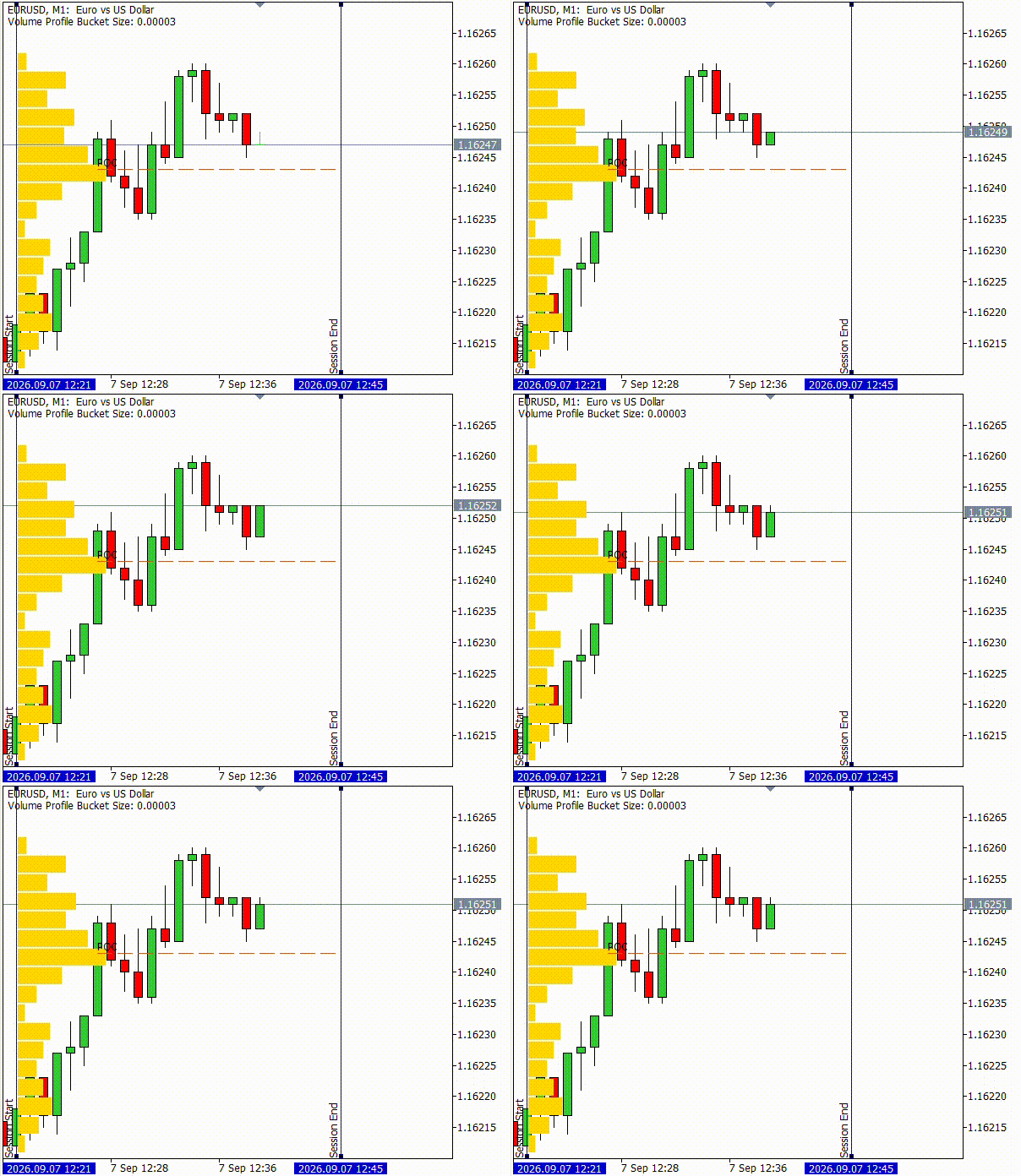
Volume Profile Live Updates
We store the millisecond timestamp of the last processed tick in the global variable gblLastTick to avoid tick collisions. If gblShouldRecalc = true, we return early as the ticks will be fetched from historical data. The values of the current tick are populated in the MqlTick structure, curTick through the SymbolInfoTick function. If the time_msc field of curTick matches gblLastTick, we return early to avoid reprocessing the tick. If the time field of curTick is within the session bounds defined by gblStart and gblEnd, we update the profile by calling UpdateBucket. Finally, we update gblLastTick with the time_msc field of curTick and return.
long gblLastTick;

//+------------------------------------------------------------------+
//| Custom indicator iteration function                              |
//+------------------------------------------------------------------+
int OnCalculate(const int32_t rates_total,
                const int32_t prev_calculated,
                const datetime &time[],
                const double &open[],
                const double &high[],
                const double &low[],
                const double &close[],
                const long &tick_volume[],
                const long &volume[],
                const int32_t &spread[])
  {
   if(gblShouldRecalc)
      return rates_total;

   MqlTick curTick;
   if(!SymbolInfoTick(Symbol(), curTick))
      return rates_total;

   if(gblLastTick == curTick.time_msc)
      return rates_total;

   if(curTick.time >= gblStart && curTick.time < gblEnd)
     {
      UpdateBucket(gblVolumeProfile, curTick.bid);
     }

   gblLastTick = curTick.time_msc;
   return rates_total;
  }
OnTimer
The OnTimer event handler is the core execution function of the volume profile and contains the if-else ladder for the volume profile rendering, ordered by computational effort. The gblShouldRecalc flag assumes the highest priority, calling InitVolumeProfile to build a new volume profile from historical ticks between gblStart and gblEnd, and render it to the chart. Following the recalculation, we set gblShouldRecalc = false.
if(gblShouldRecalc)
  {
   InitVolumeProfile(gblVolumeProfile, gblStart, gblEnd);
   gblShouldRecalc = false;
  }
Next, we check for chart movement by comparing the last recorded price-time coordinates of gblOrigin in the IsChartMoved function. If the chart is moved, we redraw the full volume profile at the new coordinates by calling DrawFullVolumeProfile.
else if(IsChartMoved(gblOrigin))
  {
   DrawFullVolumeProfile(gblVolumeProfile);
  }
In the final leg of the ladder, we check for elements in updateList with its Count method. These are the indices updated with live incoming ticks since the last OnTimer call. We call DrawUpdatedVolumeProfile to render these buckets.
else if(gblVolumeProfile.updateList.Count() != 0)
  {
   DrawUpdatedVolumeProfile(gblVolumeProfile);
  }
Finally, at the end of each OnTimer call, we record the price-time coordinates of the pixel-space origin in gblOrigin by calling GetPriceTimeCoord.
gblOrigin = GetPriceTimeCoord(0,0);
The complete OnTimer function is provided below.
//+------------------------------------------------------------------+
//| Timer function                                                   |
//+------------------------------------------------------------------+
void OnTimer()
  {
//--- Full recalculation and rendering
   if(gblShouldRecalc)
     {
      InitVolumeProfile(gblVolumeProfile, gblStart, gblEnd);
      gblShouldRecalc = false;
     }

//--- Full rendering due to chart update
   else if(IsChartMoved(gblOrigin))
     {
      DrawFullVolumeProfile(gblVolumeProfile);
     }

//--- Partial rendering of updated buckets
   else if(gblVolumeProfile.updateList.Count() != 0)
     {
      DrawUpdatedVolumeProfile(gblVolumeProfile);
     }

//--- Tracking the price-time coordinates of pixel-space origin
   gblOrigin = GetPriceTimeCoord(0,0);
  }
This completes our implementation of the volume profile. The .mq5 source code file is attached with the article below.
Conclusion
We reframed the session volume profile as an architectural pipeline: tick ingestion updates bucketed state, and a separate timer-driven renderer updates pixel-space objects at a controlled frequency. The resulting .mq5 implementation provides a practical, production-ready baseline that meets the success criteria defined above — real-time responsiveness with minimal chart lag, multi-instance safety via instance IDs, interactive draggable session bounds, and an accurate, dynamically-updated POC.
Concretely, the delivered design and code demonstrate:
- Tick-level aggregation into price buckets with hash-based O(1) access (CHashMap/CHashSet).
- Automatic, ATR-driven bucket sizing (with a custom option) and input validation.
- A timer-driven rendering loop (OnTimer) that supports three update modes: full recalculation (when bounds change), full redraw (when chart moves or max volume changes), and partial updates (incremental bucket rerendering).
- Event handlers: OnInit (setup + validations), OnCalculate (lightweight tick ingestion), OnChartEvent (draggable bounds), OnTimer (rendering logic), and OnDeinit (cleanup).
- Pixel-space rectangle-label rendering for proportional bars and a trend object for the POC, plus safeguards for chart movement and object name collisions to allow multiple instances.
This base can be extended safely — for example, adding value-area highlighting, statistical volume regions, or multi-timeframe aggregation — without compromising performance, because the core separation of concerns (state updates vs. rendering) and efficient data structures are already in place.
Warning: All rights to these materials are reserved by MetaQuotes Ltd. Copying or reprinting of these materials in whole or in part is prohibited.
This article was written by a user of the site and reflects their personal views. MetaQuotes Ltd is not responsible for the accuracy of the information presented, nor for any consequences resulting from the use of the solutions, strategies or recommendations described.

 Numerical Fidelity Under Fire: Benchmarking Native MQL5, ONNX Runtime, and ALGLIB
 Creating a Cairo-Inspired Graphics Library for MetaTrader 5 (Part 6): Curves and Adaptive Flattening
 How to Implement Metaprompting for Trading Signals in an MQL5 Expert Advisor
 Neural Networks in Trading: Iterative Forecast Refinement Models (RAFT)

- Free trading apps
- Over 8,000 signals for copying
- Economic news for exploring financial markets
You agree to website policy and terms of use