

Automatic Session Volume Profile Builder in MQL5: Rendering POC and Value Area Without Third-Party Tools
 2 486
2 486
 0
0

Introduction
MetaTrader 5 does not ship with a native volume profile indicator. This creates a practical gap for traders and quantitative developers who require session-based price-at-volume analysis — the identification of price levels where the market has spent the most transactional effort, expressed through accumulated tick volume per price tier.
The gap is bridgeable entirely from within the MQL5 Standard Library. CopyTicksRange() provides tick-level trade data bounded by explicit time windows. Standard object-drawing functions provide the rendering canvas. No DLLs, no third-party libraries, and no external dependencies are necessary.
This article presents the engineering design and implementation of a session-based volume profile indicator in MQL5. It collects tick data for a user-defined session, aggregates it into price bins, calculates POC and the 70% Value Area, and renders the results as native chart objects.
Why Volume Profiles and Why Now
Every bar chart compresses a time period into four prices. It tells you where price opened, where it went, and where it closed. It tells you nothing about where price spent the most time transacting. Two sessions can produce identical OHLC values but completely different volume distributions — one consolidated in a narrow band for hours before breaking out, the other sweeping the full range uniformly. The OHLC chart cannot distinguish them; the volume profile can.
A volume profile organizes market activity into a histogram rotated ninety degrees. Price occupies the vertical axis. Accumulated tick volume occupies the horizontal axis. Each row of the histogram corresponds to a price bin — a discrete price range — and its width encodes the volume accumulated within that bin during the session. The distribution reveals where the market accepted price (high-volume levels) and where it rejected price (thin-volume levels).
Three quantities are derived from this distribution and used as reference levels in the following session:
- Point of Control (POC) — the price level carrying the greatest accumulated volume. Conceptually it represents the price at which the market found the most agreement between buyers and sellers during the session.
- Value Area High (VAH) — the upper boundary of the contiguous price range containing 70% of total session volume, centered on the POC.
- Value Area Low (VAL) — the lower boundary of the same range.
Tick Volume on CFD Instruments
A critical distinction must be understood before examining the implementation. Exchange volume represents the actual quantity of contracts transacted, sourced from a centralized clearing mechanism. Tick volume counts the number of price-change events within a measurement window, treating each distinct tick as a unit regardless of the transaction size behind it.
In the foreign exchange and CFD markets, no central exchange exists. Brokers publish their own data streams. True exchange volume is unavailable to retail participants. Tick volume serves as a proxy: where price moves frequently, activity is presumed high.
On most retail CFD brokers, the MqlTick structure fields are populated as follows:
| Field | Populated | Notes |
|---|---|---|
| bid | Always | Primary price field on OTC instruments |
| ask | Always | Secondary price field |
| last | Zero | No central exchange last price |
| volume | Zero | No exchange lot count |
| volume_real | Zero | No real volume data |
This means any implementation that filters ticks on volume > 0 or volume_real > 0 will discard every tick on these brokers. The correct filter for CFD tick data is the presence of a non-zero bid or ask price. The volume weight assigned to each tick defaults to 1, making the histogram a tick-density map rather than a true volume-at-price map. This is the standard interpretation on OTC instruments and produces analytically useful profiles.
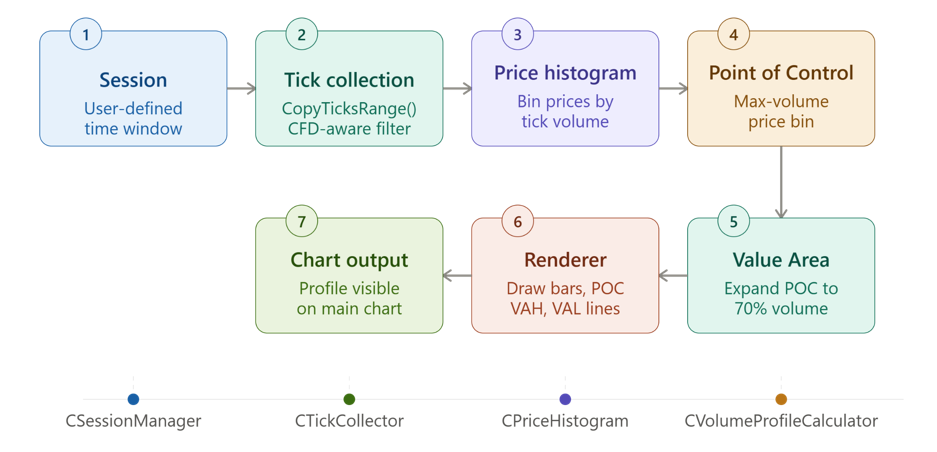
End-to-end pipeline of the Session Volume Profile indicator — from session boundary detection and tick collection through price binning, POC identification, Value Area expansion, rendering, and final chart output. Each stage maps to a dedicated module in the implementation.
Mathematical Foundation
Price Bin Construction
Raw ticks are continuous price observations. The profile requires a discrete representation. Each tick price is mapped to a bin index using:
Bin Index = floor( (Pᵢ - session_low) / BinSize )
Where Pᵢ is the tick price, session_low is the lowest price traded during the session, and BinSize is the user-defined bin size in price units. Subtracting session_low first shifts the price range to zero, so the lowest traded price always maps to bin index 0. Floor division produces an integer address. All prices within a bin's range map to the same index.
The total number of bins is:
bin_count = ceil( (session_high - session_low) / BinSize ) + 1
The +1 ensures the session high price has its own bin rather than falling at the boundary of the last bin.
Point of Control
POC = argmax_bin { BinVolume(bin) }
The bin index that maximizes accumulated volume. The POC price is the lower edge of that bin.
Value Area — The 70% Rule
The Value Area algorithm expands outward from the POC, greedily absorbing bins on whichever side adds more volume at each step:
- Compute the volume target: va_threshold = total_volume × 0.70
- Initialize the accumulator with the POC bin's volume
- Compare the volume in the next bin above against the volume in the next bin below
- Absorb whichever is greater, advancing the corresponding boundary pointer
- Repeat until va_volume ≥ va_threshold or both boundaries reach the histogram edges
The VAH is the lower edge of the uppermost absorbed bin. The VAL is the lower edge of the lowermost absorbed bin.
Core Variables
| Symbol | Meaning |
|---|---|
| Pᵢ | Price of the i-th tick |
| Vᵢ | Volume weight of the i-th tick |
| BinSize | Price row size in absolute price units |
| POC | Point of Control price |
| VAH | Value Area High price |
| VAL | Value Area Low price |
Computational Complexity
| Component | Complexity |
|---|---|
| Tick collection | O(N) |
| Histogram accumulation | O(N) |
| POC search | O(M) |
| Value Area expansion | O(M) |
| Rendering | O(M) |
N is the number of ticks collected during the session. M is the numbe
r of price bins. In practice M ≪ N because many ticks fall within the same price bin.
Program Architecture
The implementation is divided across seven source files. Each module has a single clearly defined responsibility.
| # | Name | Type | Description |
|---|---|---|---|
| 1 | SessionManager.mqh | Class header | Session boundary calculation and rollover detection |
| 2 | TickCollector.mqh | Class header | CopyTicksRange acquisition and CFD-aware filtering |
| 3 | PriceHistogram.mqh | Class header | Price-volume accumulation into discrete bins |
| 4 | VolumeProfileCalculator.mqh | Class header | POC and Value Area computation |
| 5 | ProfileRenderer.mqh | Class header | Chart object creation, fixed-width scaling, and cleanup |
| 6 | ProfileStatistics.mqh | Class header | Diagnostic output to the Experts tab |
| 7 | SessionVolumeProfile.mq5 | Indicator | Main event handlers and component orchestration |
Module 1 — CSessionManager
CSessionManager translates the user's session type selection into concrete datetime boundaries keyed to the current calendar date. It detects when a new session begins and provides those boundaries to the tick collector and renderer.
Class Declaration
//+------------------------------------------------------------------+
//|                                           SessionManager.mqh     |
//|                      Session Volume Profile Engine               |
//+------------------------------------------------------------------+
#ifndef SESSION_MANAGER_MQH
#define SESSION_MANAGER_MQH

//--- Session type enumeration
enum ENUM_SESSION_TYPE
  {
   SESSION_LONDON    = 0, // London 08:00 - 17:00 UTC
   SESSION_NEW_YORK  = 1, // New York 13:00 - 22:00 UTC
   SESSION_CUSTOM    = 2  // User-defined hours
  };

//+------------------------------------------------------------------+
//| Session Manager Class                                            |
//+------------------------------------------------------------------+
class CSessionManager
  {
private:
   ENUM_SESSION_TYPE  m_session_type;
   int                m_start_hour;
   int                m_start_minute;
   int                m_end_hour;
   int                m_end_minute;
   datetime           m_session_start;
   datetime           m_session_end;
   datetime           m_last_session_date;

public:
                     CSessionManager(void);
                    ~CSessionManager(void);
   void               Configure(ENUM_SESSION_TYPE type,
                                int start_hour, int start_minute,
                                int end_hour, int end_minute);
   bool               Update(datetime current_time);
   bool               IsNewSession(void) const;
   datetime           GetSessionStart(void) const;
   datetime           GetSessionEnd(void)   const;

private:
   void               ResolveSessionHours(void);
  };
The class declaration introduces the ENUM_SESSION_TYPE enumeration, which gives the user a named choice between the London session, the New York session, and a fully custom time window. The seven private fields cover the session type, the configured boundary hours, the computed datetime boundaries for the active session, and m_last_session_date — a cursor that advances once per calendar day and serves as the rollover detection mechanism. The public interface exposes Configure() for one-time setup, Update() for per-bar evaluation, and two accessors that downstream modules call to retrieve the active boundaries.
Constructor and Destructor
//+------------------------------------------------------------------+
//| Constructor                                                      |
//+------------------------------------------------------------------+
CSessionManager::CSessionManager(void)
   : m_session_type(SESSION_LONDON),
     m_start_hour(8),
     m_start_minute(0),
     m_end_hour(17),
     m_end_minute(0),
     m_session_start(0),
     m_session_end(0),
     m_last_session_date(0)
  {
  }

//+------------------------------------------------------------------+
//| Destructor                                                       |
//+------------------------------------------------------------------+
CSessionManager::~CSessionManager(void)
  {
  }
The CSessionManager constructor initializes all fields to their London session defaults using the member initializer list. Setting m_last_session_date to zero is deliberate — zero is earlier than any valid trading timestamp, so the very first call to Update() will always detect a mismatch and fire the new-session signal. The destructor body is empty because the class allocates no heap memory and owns no external resources.
Configure
//+------------------------------------------------------------------+
//| Configure session parameters                                     |
//+------------------------------------------------------------------+
void CSessionManager::Configure(ENUM_SESSION_TYPE type,
                                int start_hour, int start_minute,
                                int end_hour, int end_minute)
  {
   m_session_type   = type;
   m_start_hour     = start_hour;
   m_start_minute   = start_minute;
   m_end_hour       = end_hour;
   m_end_minute     = end_minute;
   ResolveSessionHours();
  }
Configure() stores all five caller-supplied parameters and immediately calls ResolveSessionHours(). The call to ResolveSessionHours() is necessary because for the two built-in session types, the caller-supplied hour values are irrelevant — the canonical UTC hours must be enforced regardless of what the input parameters contain. For SESSION_CUSTOM, ResolveSessionHours() leaves the stored values untouched.
ResolveSessionHours
//+------------------------------------------------------------------+
//| Resolve hard-coded session hours for built-in types              |
//+------------------------------------------------------------------+
void CSessionManager::ResolveSessionHours(void)
  {
   if(m_session_type == SESSION_LONDON)
     {
      m_start_hour   = 8;
      m_start_minute = 0;
      m_end_hour     = 17;
      m_end_minute   = 0;
     }
   else
      if(m_session_type == SESSION_NEW_YORK)
        {
         m_start_hour   = 13;
         m_start_minute = 0;
         m_end_hour     = 22;
         m_end_minute   = 0;
        }
//--- SESSION_CUSTOM retains caller-supplied values
  }
ResolveSessionHours() enforces the canonical UTC boundaries for the two built-in session types. The London session runs 08:00–17:00 UTC and the New York session runs 13:00–22:00 UTC. The SESSION_CUSTOM branch is intentionally absent — if neither condition matches, the method returns without modifying any fields, preserving whatever hours the caller supplied through Configure().
Update
//+------------------------------------------------------------------+
//| Update session boundaries and detect rollover                    |
//+------------------------------------------------------------------+
bool CSessionManager::Update(datetime current_time)
  {
//--- Extract the calendar date component from current_time
   MqlDateTime dt;
   TimeToStruct(current_time, dt);

//--- Build session start and end for today
   dt.hour   = m_start_hour;
   dt.min    = m_start_minute;
   dt.sec    = 0;
   datetime today_start = StructToTime(dt);

   dt.hour   = m_end_hour;
   dt.min    = m_end_minute;
   dt.sec    = 0;
   datetime today_end = StructToTime(dt);

//--- Detect new session by comparing today's date to the last recorded date
   bool is_new = (today_start != m_last_session_date);

   if(is_new)
     {
      m_session_start      = today_start;
      m_session_end        = today_end;
      m_last_session_date  = today_start;
     }

   return(is_new);
  }
Update() is called once per bar from OnCalculate(). It decomposes current_time into a MqlDateTime structure using TimeToStruct(), then substitutes the session start hours into that structure and reconstructs a datetime value using StructToTime(). This produces today_start — the session start timestamp for the calendar date of the current bar. The critical comparison today_start != m_last_session_date detects whether the calendar date has advanced since the last trigger. On every bar of the same trading day, today_start is identical, so the comparison returns false and the method exits immediately with negligible cost. On the first bar of a new day, today_start changes and is_new becomes true, causing both boundary fields and the cursor to update. The method then returns true to signal the main pipeline that a profile rebuild is required.
GetSessionStart and GetSessionEnd
//+------------------------------------------------------------------+
//| Return session start timestamp                                   |
//+------------------------------------------------------------------+
datetime CSessionManager::GetSessionStart(void) const
  {
   return(m_session_start);
  }

//+------------------------------------------------------------------+
//| Return session end timestamp                                     |
//+------------------------------------------------------------------+
datetime CSessionManager::GetSessionEnd(void) const
  {
   return(m_session_end);
  }

#endif // SESSION_MANAGER_MQH
GetSessionStart() and GetSessionEnd() are simple const accessors that expose the active session boundaries to CTickCollector and CProfileRenderer. These values are only meaningful after at least one call to Update() has returned true.
Module 2 — CTickCollector
CTickCollector wraps CopyTicksRange() and applies a CFD-aware filter that accepts any tick carrying a non-zero bid or ask price, regardless of the volume fields.
Class Declaration
//+------------------------------------------------------------------+
//|                                              TickCollector.mqh   |
//|                     Session Volume Profile Engine                |
//+------------------------------------------------------------------+
#ifndef TICK_COLLECTOR_MQH
#define TICK_COLLECTOR_MQH

//+------------------------------------------------------------------+
//| Tick Collector Class                                             |
//+------------------------------------------------------------------+
class CTickCollector
  {
private:
   MqlTick            m_ticks[];
   int                m_count;
   int                m_total_raw;

public:
                     CTickCollector(void);
                    ~CTickCollector(void);
   bool               Collect(const string symbol,
                              datetime session_start,
                              datetime session_end);
   int                GetCount(void)          const;
   double             GetPrice(int index)     const;
   long               GetVolume(int index)    const;
  };
The class owns three private members: the raw tick array m_ticks[] populated by CopyTicksRange(), the count of ticks that passed the price-based filter (m_count), and the raw total returned before filtering (m_total_raw). Separating these two counts is important for diagnostics — when m_total_raw is positive but m_count is zero, the problem is in the filter logic rather than in the data retrieval call itself. The public interface exposes Collect() for data acquisition and two indexed accessors that CPriceHistogram calls during the histogram build.
Constructor and Destructor
//+------------------------------------------------------------------+
//| Constructor                                                      |
//+------------------------------------------------------------------+
CTickCollector::CTickCollector(void)
   : m_count(0),
     m_total_raw(0)
  {
  }

//+------------------------------------------------------------------+
//| Destructor                                                       |
//+------------------------------------------------------------------+
CTickCollector::~CTickCollector(void)
  {
   ArrayFree(m_ticks);
  }
The CTickCollector constructor zero-initializes both counters. The destructor calls ArrayFree() to release the heap memory occupied by m_ticks[]. ArrayFree() is safe to call on an array that has never been resized, so no guard condition is required.
Collect
//+------------------------------------------------------------------+
//| Collect and filter session ticks using CopyTicksRange            |
//+------------------------------------------------------------------+
bool CTickCollector::Collect(const string symbol,
                             datetime session_start,
                             datetime session_end)
  {
   m_count     = 0;
   m_total_raw = 0;
   ArrayFree(m_ticks);

//--- Convert datetime boundaries to millisecond timestamps
   ulong from_ms = (ulong)session_start * 1000;
   ulong to_ms   = (ulong)session_end   * 1000;

//--- Request all ticks within the session range
   int total = CopyTicksRange(symbol, m_ticks, COPY_TICKS_ALL, from_ms, to_ms);

   if(total <= 0)
     {
      PrintFormat("CopyTicksRange returned %d for %s [%s - %s]",
                  total,
                  symbol,
                  TimeToString(session_start),
                  TimeToString(session_end));
      return(false);
     }

   m_total_raw = total;

//--- Diagnostic: inspect first tick to understand broker volume fields
   if(total > 0)
     {
      PrintFormat("First tick — bid=%.5f  ask=%.5f  last=%.5f  volume=%d  volume_real=%.2f  flags=%d",
                  m_ticks[0].bid,
                  m_ticks[0].ask,
                  m_ticks[0].last,
                  m_ticks[0].volume,
                  m_ticks[0].volume_real,
                  m_ticks[0].flags);
     }

//--- Count valid ticks: any tick with a non-zero bid OR ask price
//--- This handles CFD brokers that report zero in volume and volume_real
   for(int i = 0; i < total; i++)
     {
      bool has_price = (m_ticks[i].bid > 0.0 || m_ticks[i].ask > 0.0);
      bool in_window = (m_ticks[i].time >= session_start &&
                        m_ticks[i].time <= session_end);

      if(has_price && in_window)
         m_count++;
     }

   if(m_count <= 0)
     {
      PrintFormat("No valid price ticks found — raw=%d  symbol=%s", total, symbol);
      return(false);
     }

   PrintFormat("CopyTicksRange: raw=%d  valid=%d  symbol=%s",
               m_total_raw, m_count, symbol);

   return(true);
  }
Collect() begins by resetting both counters and freeing any previously allocated tick array, ensuring a clean state before each session rebuild. The datetime boundaries are multiplied by 1000 to convert them from seconds to milliseconds — the unit that CopyTicksRange() requires for its timestamp parameters. This is the key distinction between CopyTicksRange() and CopyTicks(): the former accepts an explicit end timestamp, bounding the retrieval to the session window precisely. The latter accepts a tick count, which has no guaranteed relationship to the session boundary.
The first-tick diagnostic block prints all six volume-related fields of the first returned tick to the Experts tab. This single line of output allows the developer to identify immediately which fields the broker populates, removing all guesswork about whether to filter on volume, volume_real, or price fields alone.
The filter loop applies a CFD-aware rule: a tick is valid if it has a non-zero bid or ask price and falls within the session window. A secondary timestamp check handles edge cases where returned ticks slightly exceed the requested range due to internal rounding.
GetPrice
//+------------------------------------------------------------------+
//| Return the most meaningful price for a specific tick             |
//+------------------------------------------------------------------+
double CTickCollector::GetPrice(int index) const
  {
   if(index < 0 || index >= ArraySize(m_ticks))
      return(0.0);

//--- Priority: last traded price → mid price (bid+ask)/2 → bid alone
   if(m_ticks[index].last > 0.0)
      return(m_ticks[index].last);

   if(m_ticks[index].bid > 0.0 && m_ticks[index].ask > 0.0)
      return((m_ticks[index].bid + m_ticks[index].ask) * 0.5);

   return(m_ticks[index].bid);
  }
GetPrice() applies a three-tier price selection strategy. The last field is preferred because it represents an actual transacted price on exchange instruments. When last is zero — as it is on all CFD brokers — the mid-price (bid + ask) * 0.5 is used. The mid-price is more accurate than bid alone because it represents the fair value between the two quoted prices rather than taking a directional side. When only bid is available, it is returned as a final fallback. The bounds check at the entry of the method prevents array overruns on any degenerate calls from the histogram builder.
GetVolume
//+------------------------------------------------------------------+
//| Return the best available volume weight for a specific tick      |
//+------------------------------------------------------------------+
long CTickCollector::GetVolume(int index) const
  {
   if(index < 0 || index >= ArraySize(m_ticks))
      return(0);

//--- Priority: integer volume → volume_real cast → count the tick as 1
   if(m_ticks[index].volume > 0)
      return(m_ticks[index].volume);

   if(m_ticks[index].volume_real > 0.0)
      return((long)MathRound(m_ticks[index].volume_real));

//--- Broker reports no volume at all: treat each tick as unit weight
   return(1);
  }

#endif // TICK_COLLECTOR_MQH
GetVolume() mirrors the three-tier pattern used in GetPrice(). On exchange instruments, the integer volume field carries lot counts and is returned directly. On instruments that report fractional real volume, volume_real is rounded to a long value. On CFD brokers where both fields are zero, the method returns 1. This final fallback transforms the profile into a tick-density map where each tick contributes one unit of volume to its price bin. While this is not equivalent to true exchange volume, it produces analytically meaningful profiles on OTC instruments where no better data exists.
Module 3 — CPriceHistogram
CPriceHistogram converts the raw tick array into a vector of per-bin accumulated volumes. This is the core data structure from which the POC and Value Area are derived.
Class Declaration
//+------------------------------------------------------------------+
//|                                           PriceHistogram.mqh     |
//|                      Session Volume Profile Engine               |
//+------------------------------------------------------------------+
#ifndef PRICE_HISTOGRAM_MQH
#define PRICE_HISTOGRAM_MQH

#include "TickCollector.mqh"

//+------------------------------------------------------------------+
//| Price Histogram Class                                            |
//+------------------------------------------------------------------+
class CPriceHistogram
  {
private:
   double             m_bin_volumes[];
   double             m_session_low;
   double             m_session_high;
   double             m_bin_size;
   int                m_bin_count;
   double             m_total_volume;
   string             m_symbol;

public:
                     CPriceHistogram(void);
                    ~CPriceHistogram(void);
   bool               Build(const string symbol,
                            double bin_size_points,
                            const CTickCollector &collector);
   int                GetBinCount(void)              const;
   double             GetBinVolume(int bin)          const;
   double             GetBinPrice(int bin)           const;
   double             GetSessionLow(void)            const;
   double             GetSessionHigh(void)           const;
   double             GetTotalVolume(void)           const;
   void               Reset(void);

private:
   int                PriceToBin(double price)       const;
  };
The class owns the bin volume array m_bin_volumes[], the session price range defined by m_session_low and m_session_high, the resolved bin size in absolute price units (m_bin_size), the computed bin count (m_bin_count), and the total accumulated volume across all bins. The private method PriceToBin() encapsulates the floor discretization formula, keeping the bin-mapping arithmetic in one place. The public accessors are the interface through which CVolumeProfileCalculator and CProfileRenderer consume the completed distribution.
Constructor, Destructor, and Reset
//+------------------------------------------------------------------+
//| Constructor                                                      |
//+------------------------------------------------------------------+
CPriceHistogram::CPriceHistogram(void)
   : m_session_low(0.0),
     m_session_high(0.0),
     m_bin_size(0.0),
     m_bin_count(0),
     m_total_volume(0.0)
  {
  }

//+------------------------------------------------------------------+
//| Destructor                                                       |
//+------------------------------------------------------------------+
CPriceHistogram::~CPriceHistogram(void)
  {
   ArrayFree(m_bin_volumes);
  }

//+------------------------------------------------------------------+
//| Reset histogram state                                            |
//+------------------------------------------------------------------+
void CPriceHistogram::Reset(void)
  {
   ArrayFree(m_bin_volumes);
   m_session_low   = 0.0;
   m_session_high  = 0.0;
   m_bin_size      = 0.0;
   m_bin_count     = 0;
   m_total_volume  = 0.0;
  }
The CPriceHistogram constructor zero-initializes all scalar fields. The destructor releases the bin volume array. Reset() is called explicitly at the start of each session rebuild from the main indicator file — it mirrors the destructor's cleanup and zeroes all scalar fields, preparing the object for a fresh Build() call without destroying and recreating the instance. This avoids the overhead of object construction on every session rollover.
Build
//+------------------------------------------------------------------+
//| Build histogram from collected ticks                             |
//+------------------------------------------------------------------+
bool CPriceHistogram::Build(const string symbol,
                            double bin_size_points,
                            const CTickCollector &collector)
  {
   int tick_count = collector.GetCount();
   if(tick_count <= 0)
      return(false);

//--- Resolve bin size in price units
   double point     = SymbolInfoDouble(symbol, SYMBOL_POINT);
   m_bin_size       = bin_size_points * point;
   m_symbol         = symbol;

//--- First pass: find session high and low
   m_session_low    = collector.GetPrice(0);
   m_session_high   = collector.GetPrice(0);

   for(int i = 1; i < tick_count; i++)
     {
      double p = collector.GetPrice(i);
      if(p < m_session_low)
         m_session_low  = p;
      if(p > m_session_high)
         m_session_high = p;
     }

//--- Calculate number of price bins
   m_bin_count = (int)MathCeil((m_session_high - m_session_low) / m_bin_size) + 1;

   if(m_bin_count <= 0 || m_bin_count > 10000)
      return(false);

//--- Allocate and zero the bin volume array
   ArrayResize(m_bin_volumes, m_bin_count);
   ArrayInitialize(m_bin_volumes, 0.0);

//--- Second pass: accumulate volume into bins
   m_total_volume = 0.0;

   for(int i = 0; i < tick_count; i++)
     {
      double price  = collector.GetPrice(i);
      long   vol    = collector.GetVolume(i);
      int    bin    = PriceToBin(price);

      if(bin >= 0 && bin < m_bin_count)
        {
         m_bin_volumes[bin] += (double)vol;
         m_total_volume     += (double)vol;
        }
     }

   return(true);
  }
Build() executes in two sequential passes over the tick data. The first pass determines the session's traded price range by scanning all tick prices for the minimum and maximum values. Before this scan, the user-supplied bin size in points is multiplied by SYMBOL_POINT to convert it to an absolute price difference. This normalization is essential for cross-instrument compatibility — EURUSD has a point size of 0.00001 while XAUUSD has a point size of 0.01, and without normalization the same input value would produce completely different bin granularity on different instruments.
The bin count is computed from the observed price range and guarded against both zero and the degenerate upper limit of 10,000 bins, which would indicate an unreasonably small bin size relative to the session's price range. The guard prevents both memory exhaustion and nonsensical profiles.
The second pass maps each tick's mid-price to a bin index using PriceToBin() and accumulates the tick's volume weight. The bounds check on bin inside the loop provides a final safety layer against the rare case where floating-point arithmetic in PriceToBin() produces an index at or beyond the array boundary.
PriceToBin
//+------------------------------------------------------------------+
//| Map price to bin index                                           |
//+------------------------------------------------------------------+
int CPriceHistogram::PriceToBin(double price) const
  {
   return((int)MathFloor((price - m_session_low) / m_bin_size));
  }
PriceToBin() implements the floor discretization formula directly. Subtracting m_session_low shifts the price range to zero so the lowest traded price always maps to index 0. Dividing by m_bin_size produces a fractional position within the bin array. MathFloor() truncates to the integer bin address, ensuring all prices within a bin's half-open interval [lower_edge, lower_edge + bin_size) produce the same index.
Accessor Methods
//+------------------------------------------------------------------+
//| Return accumulated volume for a specific bin                     |
//+------------------------------------------------------------------+
double CPriceHistogram::GetBinVolume(int bin) const
  {
   if(bin < 0 || bin >= m_bin_count)
      return(0.0);
   return(m_bin_volumes[bin]);
  }

//+------------------------------------------------------------------+
//| Return the reference price (lower edge) of a specific bin        |
//+------------------------------------------------------------------+
double CPriceHistogram::GetBinPrice(int bin) const
  {
   return(m_session_low + bin * m_bin_size);
  }

//+------------------------------------------------------------------+
//| Accessor methods                                                 |
//+------------------------------------------------------------------+
int CPriceHistogram::GetBinCount(void) const
  {
   return(m_bin_count);
  }

//+------------------------------------------------------------------+
//|                                                                  |
//+------------------------------------------------------------------+
double CPriceHistogram::GetSessionLow(void) const
  {
   return(m_session_low);
  }

//+------------------------------------------------------------------+
//|                                                                  |
//+------------------------------------------------------------------+
double CPriceHistogram::GetSessionHigh(void) const
  {
   return(m_session_high);
  }

//+------------------------------------------------------------------+
//|                                                                  |
//+------------------------------------------------------------------+
double CPriceHistogram::GetTotalVolume(void) const
  {
   return(m_total_volume);
  }

#endif // PRICE_HISTOGRAM_MQH
GetBinVolume() includes a bounds check that returns zero for out-of-range indices rather than causing an array overrun — this is important because the Value Area expansion algorithm in CVolumeProfileCalculator calls this method at boundary indices as part of its termination logic. GetBinPrice() reconstructs the lower edge of a bin from the session low and the bin index, which is the inverse of the PriceToBin() formula and is the price coordinate used when drawing each histogram bar on the chart.
Module 4 — CVolumeProfileCalculator
CVolumeProfileCalculator operates entirely on the completed histogram. It locates the POC and expands outward from it to find the Value Area boundaries using the standard 70% greedy expansion algorithm.
Class Declaration
//+------------------------------------------------------------------+
//|                                      VolumeProfileCalculator.mqh |
//|                      Session Volume Profile Engine               |
//+------------------------------------------------------------------+
#ifndef VOLUME_PROFILE_CALCULATOR_MQH
#define VOLUME_PROFILE_CALCULATOR_MQH

#include "PriceHistogram.mqh"

//+------------------------------------------------------------------+
//| Volume Profile Calculator Class                                  |
//+------------------------------------------------------------------+
class CVolumeProfileCalculator
  {
private:
   int                m_poc_bin;
   double             m_poc_price;
   double             m_vah_price;
   double             m_val_price;

public:
                     CVolumeProfileCalculator(void);
                    ~CVolumeProfileCalculator(void);
   bool               Calculate(const CPriceHistogram &histogram,
                                double value_area_percent);
   double             GetPOC(void) const;
   double             GetVAH(void) const;
   double             GetVAL(void) const;
  };
The class stores four private scalar fields: the POC bin index, its corresponding price, and the VAH and VAL prices. The single computational method Calculate() receives the histogram by const reference and the target Value Area percentage, which is typically 70.0 but is exposed as a parameter to allow experimentation. All domain logic is contained within Calculate() — the three accessors simply return the results it stores.
Constructor and Destructor
//+------------------------------------------------------------------+
//| Constructor                                                      |
//+------------------------------------------------------------------+
CVolumeProfileCalculator::CVolumeProfileCalculator(void)
   : m_poc_bin(0),
     m_poc_price(0.0),
     m_vah_price(0.0),
     m_val_price(0.0)
  {
  }

//+------------------------------------------------------------------+
//| Destructor                                                       |
//+------------------------------------------------------------------+
CVolumeProfileCalculator::~CVolumeProfileCalculator(void)
  {
  }
The CVolumeProfileCalculator constructor zero-initializes all four result fields. The destructor is empty because the class allocates no heap memory — all data is consumed from the histogram reference passed to Calculate(), and the results are four scalars stored by value.
Calculate
//+------------------------------------------------------------------+
//| Calculate POC and Value Area                                     |
//+------------------------------------------------------------------+
bool CVolumeProfileCalculator::Calculate(const CPriceHistogram &histogram,
      double value_area_percent)
  {
   int    bin_count    = histogram.GetBinCount();
   double total_volume = histogram.GetTotalVolume();

   if(bin_count <= 0 || total_volume <= 0.0)
      return(false);

//--- Locate the Point of Control
   m_poc_bin = 0;
   double max_volume = histogram.GetBinVolume(0);

   for(int i = 1; i < bin_count; i++)
     {
      double v = histogram.GetBinVolume(i);
      if(v > max_volume)
        {
         max_volume = v;
         m_poc_bin  = i;
        }
     }

   m_poc_price = histogram.GetBinPrice(m_poc_bin);

//--- Compute the volume threshold for the Value Area
   double va_threshold = total_volume * (value_area_percent / 100.0);
   double va_volume    = histogram.GetBinVolume(m_poc_bin);

   int upper_bin = m_poc_bin;
   int lower_bin = m_poc_bin;

//--- Expand the Value Area outward from the POC
   while(va_volume < va_threshold)
     {
      double vol_above = (upper_bin + 1 < bin_count)
                         ? histogram.GetBinVolume(upper_bin + 1)
                         : -1.0;
      double vol_below = (lower_bin - 1 >= 0)
                         ? histogram.GetBinVolume(lower_bin - 1)
                         : -1.0;

      if(vol_above < 0.0 && vol_below < 0.0)
         break;

      //--- Add the side with greater volume
      if(vol_above >= vol_below)
        {
         upper_bin++;
         va_volume += vol_above;
        }
      else
        {
         lower_bin--;
         va_volume += vol_below;
        }
     }

   m_vah_price = histogram.GetBinPrice(upper_bin);
   m_val_price = histogram.GetBinPrice(lower_bin);

   return(true);
  }
Calculate() operates in two logical stages. The first stage is a linear scan across all M bins to identify the maximum-volume bin. The scan initializes with bin 0 as the candidate and updates the candidate whenever a higher volume is found. After the scan, GetBinPrice() converts the winning bin index into a price coordinate stored in m_poc_price.
The second stage implements the greedy Value Area expansion. The volume target is computed as total_volume × (value_area_percent / 100.0). The accumulator va_volume is initialized with the POC bin's volume, and both boundary pointers upper_bin and lower_bin start at the POC. Each iteration computes the volume available one step above the current upper boundary and one step below the current lower boundary. A sentinel value of -1.0 is assigned when a boundary has reached the histogram edge, ensuring it always loses the comparison against a real volume on the other side. When both boundaries are exhausted simultaneously, the break statement terminates the loop cleanly. The greedy rule always absorbs the higher-volume neighboring bin. This keeps the Value Area as compact as possible around the POC and matches the standard convention for this calculation.
Accessors
//+------------------------------------------------------------------+
//| Accessor: Point of Control price                                 |
//+------------------------------------------------------------------+
double CVolumeProfileCalculator::GetPOC(void) const
  {
   return(m_poc_price);
  }

//+------------------------------------------------------------------+
//| Accessor: Value Area High price                                  |
//+------------------------------------------------------------------+
double CVolumeProfileCalculator::GetVAH(void) const
  {
   return(m_vah_price);
  }

//+------------------------------------------------------------------+
//| Accessor: Value Area Low price                                   |
//+------------------------------------------------------------------+
double CVolumeProfileCalculator::GetVAL(void) const
  {
   return(m_val_price);
  }

#endif // VOLUME_PROFILE_CALCULATOR_MQH
GetPOC(), GetVAH(), and GetVAL() expose the three computed price levels to CProfileRenderer for chart object placement and to CProfileStatistics for diagnostic output. These values are only valid after Calculate() has returned true.
Module 5 — CProfileRenderer
CProfileRenderer translates the histogram and key price levels into visible chart objects. It supports two rendering modes: a fixed-width mode where the POC bar always spans a user-defined number of chart bars, and a proportional mode where bar widths scale to the session's actual time duration. The fixed-width mode is the default because it produces readable profiles at any timeframe.
Class Declaration
//+------------------------------------------------------------------+
//|                                          ProfileRenderer.mqh     |
//|                      Session Volume Profile Engine               |
//+------------------------------------------------------------------+
#ifndef PROFILE_RENDERER_MQH
#define PROFILE_RENDERER_MQH

#include "PriceHistogram.mqh"

//+------------------------------------------------------------------+
//| Profile Renderer Class                                           |
//+------------------------------------------------------------------+
class CProfileRenderer
  {
private:
   string             m_prefix;
   color              m_bar_color;
   color              m_poc_color;
   color              m_vah_color;
   color              m_val_color;
   int                m_bar_width;
   int                m_fixed_bar_count;
   bool               m_use_fixed_width;

public:
                     CProfileRenderer(void);
                    ~CProfileRenderer(void);
   void               Configure(string prefix,
                                color bar_color,
                                color poc_color,
                                color vah_color,
                                color val_color,
                                int bar_width,
                                int fixed_bar_count,
                                bool use_fixed_width);
   void               RemoveSessionObjects(void);
   void               Render(const CPriceHistogram &histogram,
                             double poc_price,
                             double vah_price,
                             double val_price,
                             datetime session_start,
                             datetime session_end);

private:
   void               DrawBar(int bin,
                              double bin_price,
                              double volume,
                              double max_volume,
                              datetime session_end,
                              long bar_span_seconds);
   void               DrawHLine(string name,
                                double price,
                                datetime session_start,
                                datetime session_end,
                                color line_color,
                                int line_style);
   long               ResolveBarSpan(datetime session_start,
                                     datetime session_end);
  };
The class owns eight private fields covering visual configuration and rendering mode. m_prefix is the string prepended to every chart object name this renderer creates — it enables deterministic cleanup by allowing RemoveSessionObjects() to identify all owned objects without maintaining a separate registry. The two mode fields m_fixed_bar_count and m_use_fixed_width govern ResolveBarSpan(), which is the key method that makes the profile timeframe-agnostic. The three private methods handle the three distinct rendering operations: bar span computation, individual histogram bar drawing, and key level line drawing.
Constructor and Destructor
//+------------------------------------------------------------------+
//| Constructor                                                      |
//+------------------------------------------------------------------+
CProfileRenderer::CProfileRenderer(void)
   : m_prefix("SVP_"),
     m_bar_color(clrSteelBlue),
     m_poc_color(clrYellow),
     m_vah_color(clrLimeGreen),
     m_val_color(clrRed),
     m_bar_width(2),
     m_fixed_bar_count(20),
     m_use_fixed_width(true)
  {
  }

//+------------------------------------------------------------------+
//| Destructor                                                       |
//+------------------------------------------------------------------+
CProfileRenderer::~CProfileRenderer(void)
  {
  }
The CProfileRenderer constructor sets sensible defaults for all visual parameters and enables fixed-width mode by default, so the indicator produces a readable histogram immediately on any timeframe without requiring the user to tune parameters first. The destructor is empty because chart objects are owned and managed by the MetaTrader terminal, not by this class — cleanup is handled explicitly through RemoveSessionObjects() rather than through destruction.
Configure
//+------------------------------------------------------------------+
//| Configure renderer parameters                                    |
//+------------------------------------------------------------------+
void CProfileRenderer::Configure(string prefix,
                                 color bar_color,
                                 color poc_color,
                                 color vah_color,
                                 color val_color,
                                 int bar_width,
                                 int fixed_bar_count,
                                 bool use_fixed_width)
  {
   m_prefix          = prefix;
   m_bar_color       = bar_color;
   m_poc_color       = poc_color;
   m_vah_color       = vah_color;
   m_val_color       = val_color;
   m_bar_width       = bar_width;
   m_fixed_bar_count = fixed_bar_count;
   m_use_fixed_width = use_fixed_width;
  }
Configure() transfers all user-supplied input parameters from the main indicator file into the renderer's private fields in a single call from OnInit(). Separating configuration from construction allows the same renderer instance to be reconfigured without recreation, and keeps the constructor free of dependency on the indicator's input system.
RemoveSessionObjects
//+------------------------------------------------------------------+
//| Remove all chart objects belonging to this session               |
//+------------------------------------------------------------------+
void CProfileRenderer::RemoveSessionObjects(void)
  {
   long chart_id = ChartID();
   int  total    = ObjectsTotal(chart_id, 0, -1);

//--- Iterate in reverse to safely delete during traversal
   for(int i = total - 1; i >= 0; i--)
     {
      string name = ObjectName(chart_id, i, 0, -1);
      if(StringFind(name, m_prefix) == 0)
         ObjectDelete(chart_id, name);
     }
  }
RemoveSessionObjects() scans all chart objects in reverse index order and deletes any whose name begins with m_prefix. Reverse iteration is not optional — ObjectDelete() reduces the value returned by ObjectsTotal() immediately, so forward iteration would skip every second object after the first deletion. Reverse iteration avoids this by always working from the current end of the list. The prefix convention ensures only objects owned by this indicator instance are affected, leaving any objects created by other indicators or manually placed objects completely untouched.
ResolveBarSpan
//+------------------------------------------------------------------+
//| Resolve the time span in seconds for the maximum histogram bar   |
//+------------------------------------------------------------------+
long CProfileRenderer::ResolveBarSpan(datetime session_start,
                                      datetime session_end)
  {
   if(m_use_fixed_width)
     {
      //--- Fixed mode: POC bar spans exactly m_fixed_bar_count chart bars
      long period_seconds = (long)PeriodSeconds();
      return(period_seconds * m_fixed_bar_count);
     }

//--- Proportional mode: POC bar spans the full session duration
   return((long)(session_end - session_start));
  }
ResolveBarSpan() is the method that makes the profile timeframe-aware. In fixed mode, PeriodSeconds() returns the current chart period in seconds — 60 for M1, 3600 for H1, 14400 for H4. Multiplying by m_fixed_bar_count produces a time span that always equals that many visible bars on the current chart, regardless of which timeframe is active. A London session viewed on H1 with m_fixed_bar_count = 15 produces a POC bar 15 hours wide — clearly readable. The same session viewed on H4 with m_fixed_bar_count = 6 produces a POC bar 24 hours wide — also readable, and visually proportionate to the H4 candle spacing. In proportional mode, the full session duration is returned, which causes the POC bar to span the entire session window. This mode is most useful on the timeframe closest to the session length.
Render
//+------------------------------------------------------------------+
//| Render full volume profile                                       |
//+------------------------------------------------------------------+
void CProfileRenderer::Render(const CPriceHistogram &histogram,
                              double poc_price,
                              double vah_price,
                              double val_price,
                              datetime session_start,
                              datetime session_end)
  {
   int    bin_count  = histogram.GetBinCount();
   double max_volume = 0.0;

//--- Find maximum bin volume for bar scaling
   for(int i = 0; i < bin_count; i++)
     {
      double v = histogram.GetBinVolume(i);
      if(v > max_volume)
         max_volume = v;
     }

   if(max_volume <= 0.0)
      return;

//--- Resolve the time span for the longest bar
   long bar_span_seconds = ResolveBarSpan(session_start, session_end);

//--- Draw histogram bars
   for(int i = 0; i < bin_count; i++)
     {
      double bin_price  = histogram.GetBinPrice(i);
      double bin_volume = histogram.GetBinVolume(i);

      if(bin_volume > 0.0)
         DrawBar(i, bin_price, bin_volume, max_volume,
                 session_end, bar_span_seconds);
     }

//--- Draw POC line
   DrawHLine(m_prefix + "POC",
             poc_price,
             session_start,
             session_end,
             m_poc_color,
             STYLE_SOLID);

//--- Draw VAH line
   DrawHLine(m_prefix + "VAH",
             vah_price,
             session_start,
             session_end,
             m_vah_color,
             STYLE_DASH);

//--- Draw VAL line
   DrawHLine(m_prefix + "VAL",
             val_price,
             session_start,
             session_end,
             m_val_color,
             STYLE_DASH);

   ChartRedraw();
  }
Render() is the public entry point that sequences all drawing operations. It begins by scanning the histogram a final time to find the maximum bin volume — this value is needed to normalize all bar widths relative to the POC bar. ResolveBarSpan() is then called once to determine the POC bar's time span, which is passed through to every DrawBar() call. Bins with zero volume are skipped entirely to avoid creating zero-width objects. After the histogram bars are placed, DrawHLine() is called three times for the POC, VAH, and VAL levels. The final ChartRedraw() flushes all pending object changes to the display in a single repaint operation rather than updating the screen after each individual object creation.
DrawBar
//+------------------------------------------------------------------+
//| Draw a single histogram bar anchored to session end              |
//+------------------------------------------------------------------+
void CProfileRenderer::DrawBar(int bin,
                               double bin_price,
                               double volume,
                               double max_volume,
                               datetime session_end,
                               long bar_span_seconds)
  {
//--- Scale bar length proportionally to the maximum bin volume
   double   ratio     = volume / max_volume;
   long     secs      = (long)MathRound((double)bar_span_seconds * ratio);
   datetime bar_start = session_end - (datetime)secs;
   datetime bar_end   = session_end;

   string name = m_prefix + "BAR_" + IntegerToString(bin);

   if(ObjectFind(ChartID(), name) < 0)
      ObjectCreate(ChartID(), name, OBJ_TREND, 0,
                   bar_start, bin_price,
                   bar_end,   bin_price);
   else
     {
      //--- Update anchor times if object already exists
      ObjectSetInteger(ChartID(), name, OBJPROP_TIME,  0, bar_start);
      ObjectSetInteger(ChartID(), name, OBJPROP_TIME,  1, bar_end);
      ObjectSetDouble(ChartID(),  name, OBJPROP_PRICE, 0, bin_price);
      ObjectSetDouble(ChartID(),  name, OBJPROP_PRICE, 1, bin_price);
     }

   ObjectSetInteger(ChartID(), name, OBJPROP_COLOR,      m_bar_color);
   ObjectSetInteger(ChartID(), name, OBJPROP_WIDTH,      m_bar_width);
   ObjectSetInteger(ChartID(), name, OBJPROP_STYLE,      STYLE_SOLID);
   ObjectSetInteger(ChartID(), name, OBJPROP_RAY,        false);
   ObjectSetInteger(ChartID(), name, OBJPROP_SELECTABLE, false);
  }
DrawBar() renders a single price bin as a horizontal OBJ_TREND line. The normalization ratio volume / max_volume maps each bin's volume to the interval [0, 1], and multiplying by bar_span_seconds converts that ratio into a time-domain length. The right anchor of every bar is fixed at session_end, so all bars are right-aligned to the session boundary and their left anchors fan out proportionally to the left. Setting both anchor points to the same price bin_price makes the trend line horizontal. The else branch updates an already-existing object's anchor coordinates rather than recreating it, which is more efficient when the profile is refreshed during intra-session updates. OBJPROP_RAY = false prevents the line from extending beyond its anchor points into adjacent sessions.
DrawHLine
//+------------------------------------------------------------------+
//| Draw a horizontal key level line extending rightward             |
//+------------------------------------------------------------------+
void CProfileRenderer::DrawHLine(string name,
                                 double price,
                                 datetime session_start,
                                 datetime session_end,
                                 color line_color,
                                 int line_style)
  {
   if(ObjectFind(ChartID(), name) < 0)
      ObjectCreate(ChartID(), name, OBJ_TREND, 0,
                   session_start, price,
                   session_end,   price);

   ObjectSetInteger(ChartID(), name, OBJPROP_COLOR,      line_color);
   ObjectSetInteger(ChartID(), name, OBJPROP_WIDTH,      2);
   ObjectSetInteger(ChartID(), name, OBJPROP_STYLE,      line_style);
   ObjectSetInteger(ChartID(), name, OBJPROP_RAY_RIGHT,  true);
   ObjectSetInteger(ChartID(), name, OBJPROP_RAY_LEFT,   false);
   ObjectSetInteger(ChartID(), name, OBJPROP_SELECTABLE, false);
  }

#endif // PROFILE_RENDERER_MQH
DrawHLine() creates a horizontal trend line spanning the full session from session_start to session_end at the specified price. The key property that distinguishes key level lines from histogram bars is OBJPROP_RAY_RIGHT = true, which extends the line indefinitely to the right of session_end. This keeps the POC, VAH, and VAL levels visible regardless of how far the chart is scrolled forward in time — a critical usability property, since these levels are referenced in the following session. OBJPROP_RAY_LEFT = false prevents the line from extending into prior sessions to the left, ensuring clean visual separation between consecutive session profiles.
Module 6 — CProfileStatistics
CProfileStatistics prints a structured diagnostic report to the MetaTrader Experts tab after each successful profile build, providing a complete summary of the pipeline execution.
Class Declaration, Constructor, Destructor, and Print
//+------------------------------------------------------------------+
//|                                            ProfileStatistics.mqh |
//|                      Session Volume Profile Engine               |
//+------------------------------------------------------------------+
#ifndef PROFILE_STATISTICS_MQH
#define PROFILE_STATISTICS_MQH

//+------------------------------------------------------------------+
//| Profile Statistics Class                                         |
//+------------------------------------------------------------------+
class CProfileStatistics
  {
public:
                     CProfileStatistics(void);
                    ~CProfileStatistics(void);
   void               Print(int tick_count,
                            int bin_count,
                            double poc_price,
                            double vah_price,
                            double val_price,
                            int object_count);
  };

//+------------------------------------------------------------------+
//| Constructor                                                      |
//+------------------------------------------------------------------+
CProfileStatistics::CProfileStatistics(void)
  {
  }

//+------------------------------------------------------------------+
//| Destructor                                                       |
//+------------------------------------------------------------------+
CProfileStatistics::~CProfileStatistics(void)
  {
  }

//+------------------------------------------------------------------+
//| Print session diagnostic report                                  |
//+------------------------------------------------------------------+
void CProfileStatistics::Print(int tick_count,
                               int bin_count,
                               double poc_price,
                               double vah_price,
                               double val_price,
                               int object_count)
  {
   PrintFormat("Session Build Started");
   PrintFormat("Ticks Collected = %d", tick_count);
   PrintFormat("Price Bins      = %d", bin_count);
   PrintFormat("POC             = %.5f", poc_price);
   PrintFormat("VAH             = %.5f", vah_price);
   PrintFormat("VAL             = %.5f", val_price);
   PrintFormat("Objects Rendered = %d", object_count);
  }

#endif // PROFILE_STATISTICS_MQH
//+------------------------------------------------------------------+
CProfileStatistics has no private fields and no heap allocations, so its constructor and destructor are both empty. The entire class exists to isolate the PrintFormat() calls from the main indicator file, making it possible to redirect, suppress, or extend the diagnostic output without touching any other module.
Print() writes seven lines to the Experts tab covering every stage of the pipeline. The tick count confirms that CTickCollector successfully retrieved data. The bin count confirms that CPriceHistogram built a non-degenerate distribution. The three price levels confirm that CVolumeProfileCalculator produced plausible results. The object count provides a final arithmetic check — for a profile with B bins, the expected object count is B + 3 (one object per bin plus POC, VAH, and VAL). A mismatch between bin count and object count indicates that some objects failed to create, which typically means the chart's object limit was reached.
Expected Experts tab output after a successful build:
Session Build Started
Ticks Collected  = 3611
Price Bins       = 87
POC              = 1733.88500
VAH              = 1735.38500
VAL              = 1731.98500
Objects Rendered = 91
Module 7 — SessionVolumeProfile.mq5
The main indicator file declares all inputs, instantiates the six module objects as global variables, and orchestrates the complete pipeline through three event handlers.
Declarations and Inputs
//+------------------------------------------------------------------+
//|                                     SessionVolumeProfile.mq5     |
//+------------------------------------------------------------------+
#property indicator_chart_window
#property indicator_buffers 0
#property indicator_plots   0

#include <Session_Volume_Profile_Builder\SessionManager.mqh>
#include <Session_Volume_Profile_Builder\TickCollector.mqh>
#include <Session_Volume_Profile_Builder\PriceHistogram.mqh>
#include <Session_Volume_Profile_Builder\VolumeProfileCalculator.mqh>
#include <Session_Volume_Profile_Builder\ProfileRenderer.mqh>
#include <Session_Volume_Profile_Builder\ProfileStatistics.mqh>

//--- Inputs
input ENUM_SESSION_TYPE InpSessionType      = SESSION_LONDON; // Session type
input int               InpStartHour        = 8;              // Custom start hour
input int               InpStartMinute      = 0;              // Custom start minute
input int               InpEndHour          = 17;             // Custom end hour
input int               InpEndMinute        = 0;              // Custom end minute
input int               InpBinSizePoints    = 10;             // Bin size (points)
input double            InpValueAreaPercent = 70.0;           // Value Area percentage
input color             InpBarColor         = clrSteelBlue;   // Histogram bar color
input color             InpPOCColor         = clrYellow;      // POC line color
input color             InpVAHColor         = clrLimeGreen;   // VAH line color
input color             InpVALColor         = clrRed;         // VAL line color
input int               InpBarWidth         = 2;              // Bar line width
input string            InpPrefix           = "SVP_";         // Object name prefix
input bool              InpFixedWidth       = true;           // Use fixed bar width mode
input int               InpFixedBarCount    = 20;             // POC bar width (chart bars)

//--- Global instances
CSessionManager          g_session_mgr;
CTickCollector           g_tick_collector;
CPriceHistogram          g_histogram;
CVolumeProfileCalculator g_calculator;
CProfileRenderer         g_renderer;
CProfileStatistics       g_statistics;
The directives indicator buffers 0 and indicator plots 0 declare that the indicator uses no data buffers and no plot rendering. All visuals are drawn using chart objects. The #include chain lists the six headers in strict dependency order: PriceHistogram.mqh depends on TickCollector.mqh, VolumeProfileCalculator.mqh depends on PriceHistogram.mqh, and ProfileRenderer.mqh also depends on PriceHistogram.mqh. The fifteen input parameters expose every user-configurable aspect of the system to the indicator's property dialog. The six global module instances are declared at file scope so they persist for the full lifetime of the indicator.
OnInit
//+------------------------------------------------------------------+
//| Indicator Initialization                                         |
//+------------------------------------------------------------------+
int OnInit(void)
  {
   g_session_mgr.Configure(InpSessionType,
                           InpStartHour, InpStartMinute,
                           InpEndHour,   InpEndMinute);

   g_renderer.Configure(InpPrefix,
                        InpBarColor,
                        InpPOCColor,
                        InpVAHColor,
                        InpVALColor,
                        InpBarWidth,
                        InpFixedBarCount,
                        InpFixedWidth);

   return(INIT_SUCCEEDED);
  }
OnInit() configures only the two modules that carry user-supplied parameters. g_session_mgr needs the session type and hour boundaries. g_renderer needs all visual and rendering mode settings. The four remaining module instances — g_tick_collector, g_histogram, g_calculator, and g_statistics — require no configuration because they are driven entirely by the data they receive at runtime through their method parameters.
OnDeinit
//+------------------------------------------------------------------+
//| Indicator Deinitialization                                       |
//+------------------------------------------------------------------+
void OnDeinit(const int reason)
  {
   g_renderer.RemoveSessionObjects();
  }
OnDeinit() delegates entirely to g_renderer.RemoveSessionObjects(). Without this call, all histogram bars and key level lines would remain on the chart indefinitely after the indicator is removed, creating persistent orphaned objects that no running code manages. The reason parameter is accepted but not used — cleanup is unconditional regardless of whether the indicator was removed by the user, replaced by a new compilation, or cleared by a terminal restart.
OnCalculate
//+------------------------------------------------------------------+
//| Indicator Calculation                                            |
//+------------------------------------------------------------------+
int OnCalculate(const int rates_total,
                const int prev_calculated,
                const datetime &time[],
                const double   &open[],
                const double   &high[],
                const double   &low[],
                const double   &close[],
                const long     &tick_volume[],
                const long     &volume[],
                const int      &spread[])
  {
   if(rates_total < 1)
      return(0);

//--- Suppress tick-driven recalculation; only process on new bar
   if(prev_calculated == rates_total)
      return(rates_total);

   datetime current_time = time[rates_total - 1];

   bool is_new = g_session_mgr.Update(current_time);

   if(!is_new)
      return(rates_total);

//--- Remove previous session objects
   g_renderer.RemoveSessionObjects();

//--- Collect ticks for the new session
   datetime session_start = g_session_mgr.GetSessionStart();
   datetime session_end   = g_session_mgr.GetSessionEnd();

   bool collected = g_tick_collector.Collect(_Symbol,
                    session_start,
                    session_end);
   if(!collected)
      return(rates_total);

//--- Build the price histogram
   g_histogram.Reset();
   bool built = g_histogram.Build(_Symbol,
                                  InpBinSizePoints,
                                  g_tick_collector);
   if(!built)
      return(rates_total);

//--- Calculate POC and Value Area
   bool calculated = g_calculator.Calculate(g_histogram,
                     InpValueAreaPercent);
   if(!calculated)
      return(rates_total);

//--- Render the profile
   g_renderer.Render(g_histogram,
                     g_calculator.GetPOC(),
                     g_calculator.GetVAH(),
                     g_calculator.GetVAL(),
                     session_start,
                     session_end);

//--- Print diagnostics
   int object_count = ObjectsTotal(ChartID(), 0, -1);
   g_statistics.Print(g_tick_collector.GetCount(),
                      g_histogram.GetBinCount(),
                      g_calculator.GetPOC(),
                      g_calculator.GetVAH(),
                      g_calculator.GetVAL(),
                      object_count);

   return(rates_total);
  }
OnCalculate() is the pipeline sequencer. It imposes no domain logic of its own — every decision is delegated to the appropriate module, and the function itself is responsible only for ordering those calls correctly and propagating failure signals upward.
The first guard if(prev_calculated == rates_total) suppresses tick-driven recalculation. On an M1 chart, OnCalculate() fires on every incoming price tick — potentially many times per minute. When prev_calculated equals rates_total, no new bar has formed since the last call, and the function returns immediately with O(1) cost. This converts the indicator from tick-driven to bar-driven for the session detection check, ensuring the pipeline rebuild is triggered at most once per new bar.
The second guard if(!is_new) handles the common case where a new bar has formed but the session boundary has not changed. The vast majority of bar events follow this path with near-zero cost.
When a new session is detected, the pipeline executes in strict dependency order. Old chart objects are removed before new ones are created, preventing visual overlap between consecutive sessions. Each stage checks its return value and aborts the pipeline on failure — if CTickCollector::Collect() returns false because tick history is unavailable, neither the histogram builder nor the renderer is called. The diagnostic output from CProfileStatistics::Print() then provides the trail needed to identify which stage failed and why.
Rendering Objects Summary
| Object Name Pattern | Type | Purpose |
|---|---|---|
| SVP_BAR_N | OBJ_TREND (horizontal) | One histogram bar per non-empty price bin |
| SVP_POC | OBJ_TREND (ray right) | Point of Control level |
| SVP_VAH | OBJ_TREND (ray right) | Value Area High level |
| SVP_VAL | OBJ_TREND (ray right) | Value Area Low level |
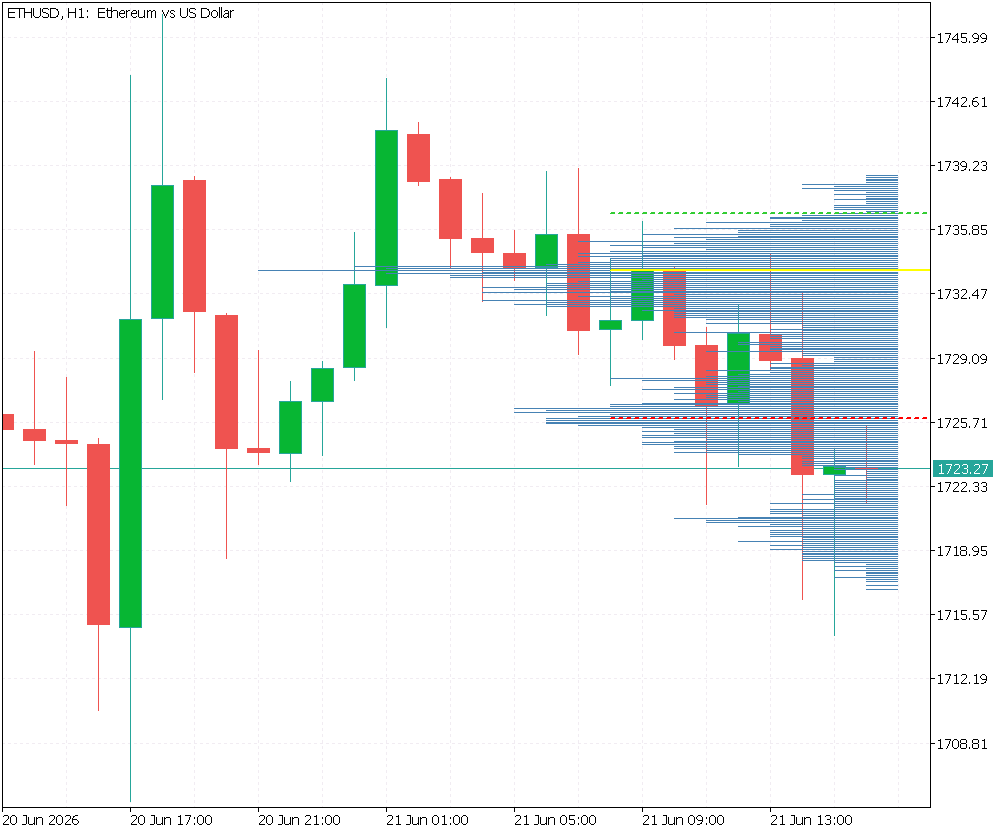
Session volume profile rendered on ETHUSD H1 showing histogram bars (blue), Point of Control (yellow), Value Area High (green dashed), and Value Area Low (red dashed).
Recommended Fixed Bar Count by Timeframe
The InpFixedBarCount parameter controls the width of the POC bar expressed in chart bars. All other bins scale proportionally within this maximum. The following values produce readable profiles across the most commonly used timeframes:
| Timeframe | Recommended InpFixedBarCount | POC bar spans |
|---|---|---|
| M1 | 30 | 30 minutes |
| M5 | 20 | 100 minutes |
| H1 | 15 | 15 hours |
| H4 | 6 | 24 hours (with H4 and InpFixedBarCount = 6: 6×4h = 24h) |
| D1 | 5 | 5 days |
Setting InpFixedWidth = false in the inputs dialog reverts to proportional mode, where the POC bar spans the full session duration. This mode produces the most geometrically faithful representation of the session's time structure but becomes visually compressed on timeframes much longer than the session itself.
Limitations
- Tick volume as a proxy: The indicator measures tick density, not true transacted volume. In thin liquidity environments — pre-session hours, public holidays, around scheduled news releases — the correlation between tick count and actual order flow degrades. Profiles built during these windows carry less analytical weight.
- Tick history availability: CopyTicksRange() reads from the terminal's locally cached tick database. On a fresh installation or a demo account that has not previously downloaded tick history for the target instrument and time period, the function returns zero ticks. Scrolling the Ticks tab in Market Watch for the relevant symbol forces the terminal to download and cache the required history.
- CFD volume fields: On retail CFD brokers, volume and volume_real are typically zero for all ticks. The indicator treats each tick as contributing one unit of volume, producing a tick-density profile. This is the only approach available on such instruments and yields analytically useful results, but it is not equivalent to a true volume-at-price profile derived from exchange data.
- Session gaps: On instruments with overnight price gaps, the first bar of the new session may be far from the last bar of the previous one. The indicator does not interpolate across gaps. Each session profile is built strictly from ticks falling within the defined session window.
- Object count at scale: Each non-empty price bin requires one chart object. Running multiple simultaneous instances of the indicator on the same chart requires each instance to use a distinct InpPrefix value, otherwise the RemoveSessionObjects() calls from one instance will delete objects created by another.
- Non-predictive interpretation: Volume profiles describe where transactional activity has occurred within a completed session. The POC, VAH, and VAL are retrospective reference levels. They do not predict where price will move in the following session.
Conclusion
MetaTrader 5 provides every primitive required to construct a complete, session-aware volume profile from first principles. CopyTicksRange() bounds tick retrieval to an explicit time window and handles CFD data correctly when filtered on price presence rather than volume fields. A two-pass histogram build converts the tick stream into a discrete price-at-volume distribution. The greedy 70% expansion from the Point of Control produces the standard Value Area boundaries. A fixed-width rendering mode anchored to PeriodSeconds() keeps the profile geometrically consistent across all timeframes without code changes — only the InpFixedBarCount parameter requires adjustment per chart.
The seven-module architecture separates each concern cleanly. CSessionManager handles time. CTickCollector handles data acquisition. CPriceHistogram handles discretization. CVolumeProfileCalculator handles statistics. CProfileRenderer handles visualization. CProfileStatistics handles observability. SessionVolumeProfile.mq5 sequences them. No module knows about any other module's internal state, and each can be understood, tested, and modified in isolation.
Programs used in the article:
| # | Name | Type | Description |
|---|---|---|---|
| 1 | SessionManager.mqh | Include File | Manages session boundary detection by translating the user's session type selection into concrete start and end timestamps keyed to the current calendar date, firing a rollover signal whenever a new trading day begins. |
| 2 | TickCollector.mqh | Include File | Retrieves all raw ticks within the active session window using CopyTicksRange() and applies a CFD-aware filter that accepts any tick carrying a non-zero bid or ask price, assigning a unit volume weight when the broker reports zero in all volume fields. |
| 3 | PriceHistogram.mqh | Include File | Converts the raw tick stream into a discrete price-at-volume distribution by mapping each tick's mid-price to an integer bin index using the floor discretization formula, then accumulating the tick's volume weight into that bin across two sequential passes. |
| 4 | VolumeProfileCalculator.mqh | Include File | Computes the Point of Control by scanning all price bins for the maximum accumulated volume, then determines the Value Area High and Value Area Low by expanding outward from the POC using the standard greedy 70% rule. |
| 5 | ProfileRenderer.mqh | Include File | Translates the completed histogram and three key price levels into native chart objects, drawing each bin as a right-aligned horizontal trend line whose width is proportional to its volume, with the POC bar width governed by a fixed chart-bar count that keeps the profile readable at any timeframe. |
| 6 | ProfileStatistics.mqh | Include File | Prints a structured diagnostic report to the MetaTrader Experts tab after each successful session build, reporting tick count, bin count, POC, VAH, VAL, and total rendered object count so that each pipeline stage can be verified without a debugger. |
| 7 | SessionVolumeProfile.mq5 | Custom Indicator | Serves as the main orchestration layer, instantiating all six module objects, configuring them from user-supplied input parameters in OnInit(), and sequencing the full pipeline in OnCalculate() whenever a new session boundary is detected on the current bar. |
| 8 | Session_Volume_Profile.zip | Zip Archive | Zip archive containing all the attached files and their paths relative to the terminal's root folder. |
Warning: All rights to these materials are reserved by MetaQuotes Ltd. Copying or reprinting of these materials in whole or in part is prohibited.
This article was written by a user of the site and reflects their personal views. MetaQuotes Ltd is not responsible for the accuracy of the information presented, nor for any consequences resulting from the use of the solutions, strategies or recommendations described.

 MQL5 Wizard Techniques you should know (Part 100): Sliding Window Median and Bidirectional LSTM for a Custom Trailing Stop
 Duelist Algorithm
 Creating an EMA Crossover Forward Simulation (Culmination): Interactive Synthetic Candles
 Code, Tears, and Algo Forge

- Free trading apps
- Over 8,000 signals for copying
- Economic news for exploring financial markets
You agree to website policy and terms of use