

Numerical Fidelity Under Fire: Benchmarking Native MQL5, ONNX Runtime, and ALGLIB
 144
144
 0
0

Introduction
Most of us treat math libraries as interchangeable. A dot product is a dot product, so it shouldn't matter whether it runs through MQL5's matrix types, the bundled ALGLIB port, or ONNX Runtime. This article tests that assumption with one small network and shows where it holds and where it breaks: two of the three engines agree with a float64 reference to machine precision, and the third shows measurable degradation in both accuracy and time.
I kept the setup narrow. I take a trained multilayer perceptron (8 inputs, hidden layers of 16 and 8 units with ReLU, one linear output) and run the identical forward pass through native matrix<double> and vector<double> code, through ALGLIB's CMatrixDouble, and through ONNX Runtime via OnnxRun(). Same weights, same inputs, three execution paths. Then I measure the two things that matter inside a live EA: how far each engine drifts from a float64 ground truth computed in Python, and how many microseconds each one burns per call.
Nine files make up the project: a Python export script, three shared includes, three engine includes, the benchmark EA and an on-chart monitor indicator. Below, I describe each file: what it does, how it works, and why it is structured that way. You can then reuse the harness in your own project with a different model.
Scope note: this is a computation benchmark, not a trading strategy. There is no entry or exit logic anywhere in the project. The Expert Advisor is a diagnostic harness that runs the same inference three ways and logs the results, so the article makes no performance claim about any strategy. The lessons apply to anything you'd normally compute inline: recursive indicators, regime filters, ML inference, risk sizing formulas.
Why Numerical Fidelity Is a Trading Problem, Not a Math Problem
A one-shot inference error of 1e-6 is usually harmless. However, near a decision threshold, the same error can flip the outcome. The Results section returns to this case. A recursive filter, a running variance estimate or an EMA-style calculation is a different case: it feeds its own output back in, and the same small error gets reapplied every bar. Depending on the filter's own stability, that can compound into a visibly different indicator line, settle into a fixed offset, or get damped out. That isn't something you can assume away without checking, and if two engines disagree on that line they can end up disagreeing on a trade.
There's a second, more immediate reason: engine substitution. It's common to prototype a model in Python, export it to ONNX, and drop it into an EA that previously used a native or ALGLIB implementation of the same math. If you never measured the gap between the two paths, you're assuming they're equivalent. ONNX Runtime's default float32 tensor path makes that assumption expensive, and this benchmark puts a number on it.
Latency is the other half. The question isn't only which engine is fastest but which one is fastest reliably. A mean hides tail behavior, and the tail decides whether your EA stays responsive during a high tick-rate period around a news release. That's why the harness stores every raw latency sample and reports p95 and p99 next to the mean.
System Architecture and File Map
The harness holds everything constant. The only intentional differences are the execution path and each engine's internal precision - ONNX Runtime's float32 tensors are part of what makes it a different engine, not a separate variable layered on top of it, so this benchmark compares three engines as they're actually used, each with the numeric behavior that comes built in. If the three engines evaluated different models or different inputs by design, the comparison would mean nothing. So everything else is pinned down:
Fixed across all three engines:
1. The same trained weights (8-16-8-1 MLP, ReLU/ReLU/linear), trained once in float64 NumPy; the ONNX graph holds float32 copies of them
2. Identical input batch (200 synthetic test vectors, fixed random seed)
3. Identical reference output (the float64 NumPy forward pass, treated as ground truth)
4. Identical iteration count and warmup policy (200 warmup passes, then 5,000 timed passes over the 200 vectors)
What is allowed to differ is exactly what we're measuring: the precision each engine uses internally and the code path it takes from input to output.
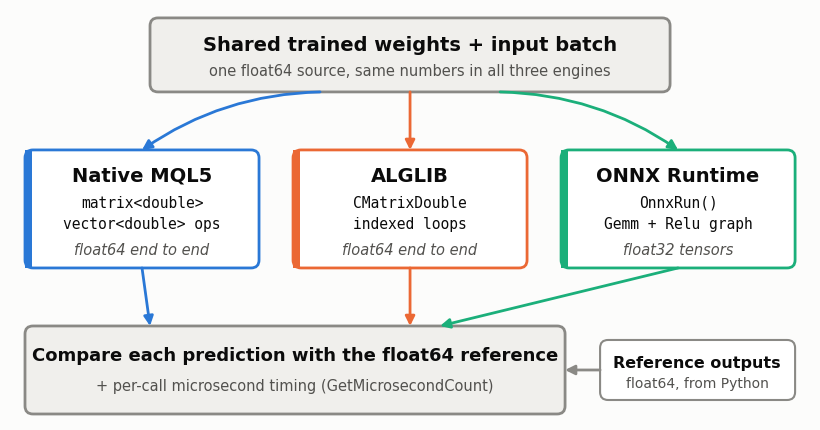
Fig. 1. Benchmark architecture: one set of trained weights feeds three independent computation engines, and every prediction is checked against a float64 reference and timed with microsecond precision.
Data flows through the nine files in one direction. The next sections follow that same order, so you can read the article top to bottom with the source open beside it:
1. train_export_model.py trains the network and writes model_weights.csv, test_vectors.csv and model.onnx.
2. BenchmarkConfig.mqh holds the dimensions, file names and iteration counts every MQL5 file shares.
3. WeightLoader.mqh reads and dimension-checks the weight CSV.
4. MathEngineNative.mqh, MathEngineAlglib.mqh and MathEngineOnnx.mqh are the three engines, each with an Init() and a Predict() method.
5. BenchmarkStats.mqh collects latency samples and error statistics.
6. MathFidelityBenchmark_EA.mq5 loads everything, runs the timed passes and writes benchmark_results.csv.
7. FidelityMonitor.mq5 reads that CSV and draws a summary panel on the chart.
A few details keep the comparison clean. The engines never share data with each other: each one builds its own weight containers from the loader's arrays, so a bug in one engine's copy can't contaminate another. The reference output comes from Python and is only ever read, never recomputed inside MQL5. And the EA touches no chart, symbol or price data, so nothing outside the arithmetic can influence a fidelity result. Latency is sensitive to the OS scheduler, CPU frequency scaling, background load, and the terminal itself. Therefore, latency results are machine- and run-specific. Fidelity results are expected to reproduce more closely across machines.
Shared Constants: BenchmarkConfig.mqh
Every MQL5 file in the project includes this one, and it has no logic at all. It exists to hold a single copy of the facts that all the other pieces must agree on: the layer sizes, the file names under MQL5\Files, and the iteration counts.
BenchmarkConfig.mqh
//+------------------------------------------------------------------+
//| Network dimensions                                               |
//| Must match the Python export, the weight CSV headers and the     |
//| ONNX input/output shape. Every engine checks them at load time.  |
//+------------------------------------------------------------------+
#define BENCH_INPUT_DIM     8
#define BENCH_HIDDEN1_DIM   16
#define BENCH_HIDDEN2_DIM   8
#define BENCH_OUTPUT_DIM    1

//+------------------------------------------------------------------+
//| File names, relative to MQL5\Files                               |
//+------------------------------------------------------------------+
#define BENCH_PROJECT_NAME  "MathFidelityBenchmark"
#define BENCH_WEIGHTS_FILE  "MathFidelityBenchmark\\model_weights.csv"
#define BENCH_VECTORS_FILE  "MathFidelityBenchmark\\test_vectors.csv"
#define BENCH_ONNX_FILE     "MathFidelityBenchmark\\model.onnx"
#define BENCH_RESULTS_FILE  "MathFidelityBenchmark\\benchmark_results.csv"
#define BENCH_ERRORS_FILE   "MathFidelityBenchmark\\error_detail.csv"

//+------------------------------------------------------------------+
//| Iteration counts                                                 |
//+------------------------------------------------------------------+
#define BENCH_WARMUP_ITERS  200
#define BENCH_TIMED_ITERS   5000
The four dimension constants describe the 8-16-8-1 network. The Python script, the weight file headers, the matrix sizes in the native engine, the ALGLIB loops and the ONNX tensor shapes are all validated against these numbers, not against each other. If you change the architecture, you change it here and in the Python script, and any file that disagrees fails at load time instead of producing a plausible wrong answer.
The file names live here for a similar reason. The EA, the loader and the indicator all need the same path to benchmark_results.csv, and a typo in one of three copies would leave the monitor panel permanently empty. The iteration counts (200 warmup passes, 5,000 timed passes) are only defaults for the EA's inputs, so you can change them from the Inputs tab without recompiling.
The Feature Contract and WeightLoader.mqh
The biggest risk in a three-engine benchmark isn't precision drift. It's a silent shape mismatch that makes one engine compute something subtly different from the other two while still returning a believable number. A truncated weight row, an ONNX graph exported with the wrong input shape, a dimension constant that drifted out of sync with the training script - each of them produces output that looks like a fidelity result and is actually a bug.
The cure is to check the contract explicitly and fail loudly at load time. Three checks run before the first benchmark iteration:
1. Weight file dimensions: every section of model_weights.csv declares its own row and column count, and CWeightLoader rejects the file if any section disagrees with the #define constants.
2. ONNX tensor shape: OnnxSetInputShape() and OnnxSetOutputShape() are called with those same constants right after OnnxCreate(), and the engine refuses to start if either call fails.
3. Test vector width: the first line of test_vectors.csv declares the input width, and the EA compares it with BENCH_INPUT_DIM before reading a single row.
The weight loader is where the first check lives. The file format is a plain tagged-section CSV, which I chose because MQL5's FileReadNumber() handles it natively and there's no parser to write: a line with a tag, a row count and a column count, followed by a line with the values in row-major order.
//+------------------------------------------------------------------+
//| CWeightLoader                                                    |
//| Reads the tagged-section CSV written by train_export_model.py:   |
//|   #W1,8,16                                                       |
//|   v0,v1,...,v127                                                 |
//|   #b1,1,16                                                       |
//|   v0,...,v15                                                     |
//| and so on for W2/b2 and W3/b3. Each section header is checked    |
//| against the BENCH_* constants before any value is accepted, so a |
//| truncated or reshaped export fails here and not three layers on. |
//+------------------------------------------------------------------+
class CWeightLoader
  {
public:
   double            W1[]; double b1[];   // 8x16, 16
   double            W2[]; double b2[];   // 16x8, 8
   double            W3[]; double b3[];   // 8x1,  1
   bool              m_loaded;

                     CWeightLoader(void) : m_loaded(false) {}
The class exposes the six arrays as public members so each engine can copy from them directly. Load() opens the file once and reads six sections in a fixed order with a chain of &&, which gives short-circuit behavior for free: the first section that fails stops the chain, prints why, and leaves m_loaded false. Every engine's Init() starts by checking that flag, so a half-loaded weight set can never reach a benchmark run.
//+------------------------------------------------------------------+
//| CWeightLoader::Load                                              |
//+------------------------------------------------------------------+
   bool              Load(const string filename)
     {
      int fh = FileOpen(filename, FILE_READ | FILE_CSV | FILE_ANSI, ',');
      if(fh == INVALID_HANDLE)
        {
         PrintFormat("[WeightLoader] failed to open %s, error %d", filename, GetLastError());
         return false;
        }

      bool ok = ReadSection(fh, "#W1", BENCH_INPUT_DIM,   BENCH_HIDDEN1_DIM, W1) &&
                ReadSection(fh, "#b1", 1,                 BENCH_HIDDEN1_DIM, b1) &&
                ReadSection(fh, "#W2", BENCH_HIDDEN1_DIM, BENCH_HIDDEN2_DIM, W2) &&
                ReadSection(fh, "#b2", 1,                 BENCH_HIDDEN2_DIM, b2) &&
                ReadSection(fh, "#W3", BENCH_HIDDEN2_DIM, BENCH_OUTPUT_DIM,  W3) &&
                ReadSection(fh, "#b3", 1,                 BENCH_OUTPUT_DIM,  b3);

      FileClose(fh);
      m_loaded = ok;
      if(ok)
         Print("[WeightLoader] all sections loaded and dimension-checked OK");
      return ok;
     }

private:
ReadSection() does the heavy lifting. It reads the tag and the two declared dimensions first and compares all three against what the caller expects. Only then does it read the values, and it checks FileIsEnding() on every element so a truncated file reports exactly which element ran out. Notice that it never trusts the file's own idea of its shape: the expected rows and columns come from BenchmarkConfig.mqh.
//+------------------------------------------------------------------+
//| CWeightLoader::ReadSection                                       |
//+------------------------------------------------------------------+
   bool              ReadSection(int fh, const string tag, const int rows, const int cols, double &dest[])
     {
      string header_tag = FileReadString(fh);
      int    header_rows = (int)FileReadNumber(fh);
      int    header_cols = (int)FileReadNumber(fh);

      if(header_tag != tag)
        {
         PrintFormat("[WeightLoader] expected tag %s, got %s", tag, header_tag);
         return false;
        }
      if(header_rows != rows || header_cols != cols)
        {
         PrintFormat("[WeightLoader] %s dimension mismatch: file says %dx%d, config expects %dx%d",
                     tag, header_rows, header_cols, rows, cols);
         return false;
        }

      int total = rows * cols;
      ArrayResize(dest, total);
      for(int i = 0; i < total; i++)
        {
         if(FileIsEnding(fh))
           {
            PrintFormat("[WeightLoader] %s truncated at element %d/%d", tag, i, total);
            return false;
           }
         dest[i] = FileReadNumber(fh);
        }
      return true;
     }
  };
Building and Exporting the Shared Model: train_export_model.py
All three engines must run the same trained weights, so training happens exactly once, in Python, entirely in float64 NumPy. There's no PyTorch and no framework-specific weight layout to reconcile. The network is trained with plain full-batch gradient descent on a synthetic regression target (a tanh of a linear combination of the eight inputs, plus a small nonlinear term and noise). The target is irrelevant to the benchmark. What matters is that the weights are realistic, non-trivial floats, and that the forward pass has three layers with ReLU in between:
forward()
def forward(x, W1, b1, W2, b2, W3, b3):
    h1_pre = x @ W1 + b1
    h1 = relu(h1_pre)
    h2_pre = h1 @ W2 + b2
    h2 = relu(h2_pre)
    out = h2 @ W3 + b3
    return h1_pre, h1, h2_pre, h2, out
Weights are stored as (in × out) matrices everywhere: in the CSV, in the native engine, in ALGLIB and in the ONNX Gemm nodes. That single orientation is what keeps a common porting bug from appearing, and the pitfalls section returns to it.
The export has three outputs. First, the weights go into the tagged CSV that CWeightLoader reads. Values are written with 17 significant digits, which is enough to round-trip any float64 exactly. It also decides what you can measure: if the export rounds the weights or the reference outputs to ten decimals, the benchmark can't resolve anything below roughly 1e-10, and the native and ALGLIB engines would appear to have an error floor that comes from the file and not from the engines.
write_section()
def write_section(f, tag, arr, rows, cols):
    f.write(f"{tag},{rows},{cols}\n")
    f.write(",".join(f"{v:.17g}" for v in arr.flatten()) + "\n")

with open("model_weights.csv", "w") as f:
    write_section(f, "#W1", W1, INPUT_DIM, H1)
    write_section(f, "#b1", b1, 1, H1)
    write_section(f, "#W2", W2, H1, H2)
    write_section(f, "#b2", b2, 1, H2)
    write_section(f, "#W3", W3, H2, OUTPUT_DIM)
    write_section(f, "#b3", b3, 1, OUTPUT_DIM)
Second, the script draws 200 fresh random input vectors, runs them through the float64 forward pass and writes each vector together with its reference output. The first two lines of the file declare the input width and the row count, which is the third contract check from the previous section.
test vectors
X_test = rng.normal(0.0, 1.0, size=(N_TEST, INPUT_DIM))
_, _, _, _, y_test = forward(X_test, W1, b1, W2, b2, W3, b3)

with open("test_vectors.csv", "w") as f:
    f.write(f"{INPUT_DIM}\n{N_TEST}\n")
    for row, ref in zip(X_test, y_test):
        f.write(",".join(f"{v:.17g}" for v in row) + f",{ref[0]:.17g}\n")
Third, the same weights go into an ONNX graph built by hand from Gemm and Relu nodes, with every initializer cast to float32. I build it manually instead of exporting from a framework so that no exporter adds its own fusions or layout changes between the weights and the graph. The float32 cast in const_tensor() is the deliberate source of the fidelity gap we're going to measure. The script also pins the model's IR version and opset, because a model saved with the newest onnx defaults may carry an IR version that older runtimes refuse to load.
ONNX export
def const_tensor(name, arr):
    return helper.make_tensor(name, TensorProto.FLOAT, arr.shape, arr.astype(np.float32).flatten())

nodes = [
    helper.make_node("Gemm", ["input", "W1", "b1"], ["h1_pre"], alpha=1.0, beta=1.0),
    helper.make_node("Relu", ["h1_pre"], ["h1"]),
    helper.make_node("Gemm", ["h1", "W2", "b2"], ["h2_pre"], alpha=1.0, beta=1.0),
    helper.make_node("Relu", ["h2_pre"], ["h2"]),
    helper.make_node("Gemm", ["h2", "W3", "b3"], ["output"], alpha=1.0, beta=1.0),
]
initializers = [
    const_tensor("W1", W1), const_tensor("b1", b1),
    const_tensor("W2", W2), const_tensor("b2", b2),
    const_tensor("W3", W3), const_tensor("b3", b3),
]
graph = helper.make_graph(
    nodes, "MathFidelityBenchmarkNet",
    [helper.make_tensor_value_info("input", TensorProto.FLOAT, [1, INPUT_DIM])],
    [helper.make_tensor_value_info("output", TensorProto.FLOAT, [1, OUTPUT_DIM])],
    initializers,
)
model = helper.make_model(graph, producer_name="MathFidelityBenchmark",
                          opset_imports=[helper.make_opsetid("", 13)])
model.ir_version = 8   # newer onnx releases default to an IR version older runtimes may not support
save(model, "model.onnx")
train_export_model.py is attached as a standalone file alongside the archive. Run it with python train_export_model.py (it needs numpy and onnx installed, nothing else). It takes no arguments and writes model_weights.csv, test_vectors.csv and model.onnx straight into the folder you run it from, using a fixed random seed so every run is reproducible. Copy those three files into your terminal's MQL5\Files\MathFidelityBenchmark\ folder, and the EA will load them exactly the same way it loads mine.
Engine 1: MathEngineNative.mqh
The native engine is the baseline the other two get judged against. The weights live in matrix<double> members and the biases in vector<double> members, all float64 from the moment the loader hands them over to the moment a prediction leaves Predict(). My first version of this engine leaned on the * operator to multiply a row vector by a weight matrix directly, on the assumption that MQL5 overloads it the way it overloads vector-vector arithmetic. It doesn't: MetaEditor's real compiler rejected both vector * matrix and a MatMul() call I tried next, since neither exists on the vector type in this build. The version below is what actually compiles: an explicit loop over the matrix and vector containers, the same shape of loop the ALGLIB engine already uses, just against the built-in types instead of ALGLIB's own.
//+------------------------------------------------------------------+
//| CMathEngineNative                                                |
//| Engine 1: built-in matrix/vector types, float64 end to end.      |
//| The other two engines are judged against this one for speed.     |
//+------------------------------------------------------------------+
class CMathEngineNative
  {
private:
   matrix<double>    m_W1, m_W2, m_W3;
   vector<double>    m_b1, m_b2, m_b3;
   bool              m_ready;

//+------------------------------------------------------------------+
//| CMathEngineNative::LoadMatrix                                    |
//+------------------------------------------------------------------+
   // matrix::Assign(array) does not keep the shape set by Init() -- it
   // silently collapses the matrix to one row of rows*cols columns, so
   // every W[i][o] lookup past row 0 goes out of range. Filling each
   // element directly is the only reshape-proof way to load these.
   void              LoadMatrix(matrix<double> &dst, double &flat[], const int rows, const int cols)
     {
      dst.Init(rows, cols);
      for(int r = 0; r < rows; r++)
         for(int c = 0; c < cols; c++)
            dst[r][c] = flat[r * cols + c];
     }

public:
                     CMathEngineNative(void) : m_ready(false) {}

//+------------------------------------------------------------------+
//| CMathEngineNative::Init                                          |
//+------------------------------------------------------------------+
   bool              Init(CWeightLoader &loader)
     {
      if(!loader.m_loaded)
         return false;

      LoadMatrix(m_W1, loader.W1, BENCH_INPUT_DIM,   BENCH_HIDDEN1_DIM);
      LoadMatrix(m_W2, loader.W2, BENCH_HIDDEN1_DIM, BENCH_HIDDEN2_DIM);
      LoadMatrix(m_W3, loader.W3, BENCH_HIDDEN2_DIM, BENCH_OUTPUT_DIM);

      // vectors have no 2D shape to lose, so Assign() is safe here
      m_b1.Init(BENCH_HIDDEN1_DIM); m_b1.Assign(loader.b1);
      m_b2.Init(BENCH_HIDDEN2_DIM); m_b2.Assign(loader.b2);
      m_b3.Init(BENCH_OUTPUT_DIM);  m_b3.Assign(loader.b3);

      m_ready = true;
      return true;
     }

//+------------------------------------------------------------------+
//| CMathEngineNative::Layer                                         |
//+------------------------------------------------------------------+
   // one dense layer: out = relu(in * W + b), read straight off the
   // matrix/vector containers -- vector*matrix has no operator here
   void              Layer(const vector<double> &in, const matrix<double> &W,
                            const vector<double> &b, const bool relu, vector<double> &out)
     {
      ulong out_dim = b.Size();
      ulong in_dim  = in.Size();
      out.Init(out_dim);
      for(ulong o = 0; o < out_dim; o++)
        {
         double acc = b[o];
         for(ulong i = 0; i < in_dim; i++)
            acc += in[i] * W[i][o];
         out[o] = (relu && acc < 0.0) ? 0.0 : acc;
        }
     }

//+------------------------------------------------------------------+
//| CMathEngineNative::Predict                                       |
//+------------------------------------------------------------------+
   double            Predict(const vector<double> &in_vec)
     {
      vector<double> h1, h2, out;
      Layer(in_vec, m_W1, m_b1, true,  h1);
      Layer(h1,    m_W2, m_b2, true,  h2);
      Layer(h2,    m_W3, m_b3, false, out);
      return out[0];
     }

   bool              IsReady(void) const { return m_ready; }
  };
Init() sizes each matrix from the config constants and then assigns the flat array from the loader, so the loader's row-major layout maps straight onto the matrix. Layer() computes one dense layer: for each output unit it starts from the bias, accumulates in[i] * W[i][o] over the inputs by reading straight off the vector and matrix containers, and clamps to zero when relu is set. Predict() chains three calls to it, with ReLU off on the last one, and returns element zero of the final vector.
Nothing in this path changes precision. There is no intermediate cast, no container conversion and no float32 anywhere, which is why this engine is both the fastest and the closest to the Python reference. One detail I left alone on purpose: each Predict() call allocates three temporary vectors. A version with preallocated buffers would be faster still, but this is the code most people would write first, and it's the fair comparison against the other two engines, which also allocate per call.
Engine 2: MathEngineAlglib.mqh
The ALGLIB engine keeps the same float64 arithmetic and changes the container. Weights sit in CMatrixDouble objects, and the multiply-accumulate is written as explicit indexed loops instead of a GEMM call. I chose that on purpose rather than reaching for ALGLIB's own matrix-multiply routine, because it isolates a clean question: what does the container and indexing overhead cost when the precision is identical? A GEMM call would answer a different question - how fast is ALGLIB's own optimized path - not the one this benchmark is asking.
//+------------------------------------------------------------------+
//| CMathEngineAlglib                                                |
//| Engine 2: CMatrixDouble as the weight container, float64.        |
//| The multiply-accumulate is written as plain loops over the       |
//| container indexers, not a GEMM call. That is how most EAs use    |
//| ALGLIB for a small forward pass, and it isolates one question:   |
//| what does the container and indexing cost at equal precision?    |
//+------------------------------------------------------------------+
class CMathEngineAlglib
  {
private:
   CMatrixDouble     m_W1, m_W2, m_W3;
   double            m_b1[], m_b2[], m_b3[];
   bool              m_ready;

//+------------------------------------------------------------------+
//| CMathEngineAlglib::LoadMatrix                                    |
//+------------------------------------------------------------------+
   void              LoadMatrix(CMatrixDouble &dst, double &flat[], const int rows, const int cols)
     {
      dst.Resize(rows, cols);
      for(int r = 0; r < rows; r++)
         for(int c = 0; c < cols; c++)
            dst.Set(r, c, flat[r * cols + c]);
     }

//+------------------------------------------------------------------+
//| CMathEngineAlglib::ForwardLayer                                  |
//+------------------------------------------------------------------+
   void              ForwardLayer(const double &in[], const int in_dim,
                                   CMatrixDouble &W, const double &b[], const int out_dim,
                                   double &out[], const bool relu)
     {
      ArrayResize(out, out_dim);
      for(int o = 0; o < out_dim; o++)
        {
         double acc = b[o];
         for(int i = 0; i < in_dim; i++)
            acc += in[i] * W[i][o];
         out[o] = (relu && acc < 0.0) ? 0.0 : acc;
        }
     }

public:
                     CMathEngineAlglib(void) : m_ready(false) {}

//+------------------------------------------------------------------+
//| CMathEngineAlglib::Init                                          |
//+------------------------------------------------------------------+
   bool              Init(CWeightLoader &loader)
     {
      if(!loader.m_loaded)
         return false;

      LoadMatrix(m_W1, loader.W1, BENCH_INPUT_DIM,   BENCH_HIDDEN1_DIM);
      LoadMatrix(m_W2, loader.W2, BENCH_HIDDEN1_DIM, BENCH_HIDDEN2_DIM);
      LoadMatrix(m_W3, loader.W3, BENCH_HIDDEN2_DIM, BENCH_OUTPUT_DIM);

      ArrayCopy(m_b1, loader.b1);
      ArrayCopy(m_b2, loader.b2);
      ArrayCopy(m_b3, loader.b3);

      m_ready = true;
      return true;
     }

//+------------------------------------------------------------------+
//| CMathEngineAlglib::Predict                                       |
//+------------------------------------------------------------------+
   double            Predict(const double &in_vec[])
     {
      double h1[], h2[], out[];
      ForwardLayer(in_vec, BENCH_INPUT_DIM,   m_W1, m_b1, BENCH_HIDDEN1_DIM, h1, true);
      ForwardLayer(h1,    BENCH_HIDDEN1_DIM, m_W2, m_b2, BENCH_HIDDEN2_DIM, h2, true);
      ForwardLayer(h2,    BENCH_HIDDEN2_DIM, m_W3, m_b3, BENCH_OUTPUT_DIM,  out, false);
      return out[0];
     }

   bool              IsReady(void) const { return m_ready; }
  };
LoadMatrix() resizes the ALGLIB matrix and copies the loader's flat array into it element by element with CMatrixDouble::Set(row, col, value), the matrix's own direct setter. The index r * cols + c is the inverse of the row-major flattening done in Python. Reading a single element back out, as ForwardLayer() does below, works through the W[i][o] indexing operator, but writing one has to go through Set() on the matrix itself rather than on a row taken out of it. ForwardLayer() then computes one dense layer: for each output unit it starts from the bias, accumulates in[i] * W[i][o] over the inputs, and applies ReLU only when the caller asks for it. Predict() chains three of those calls, with the final layer's ReLU switched off.
Numerically this should land on top of the native engine, and the fidelity results confirm it. For this engine the number to watch is latency, because every W[i][o] goes through indexer calls on the container instead of touching an array directly. Note that Predict() also declares three local dynamic arrays per call, which is the same per-call allocation the native engine pays.
Engine 3: MathEngineOnnx.mqh
The ONNX engine is where the article's central tension shows up in code. Everything upstream (training, weight export, reference outputs) is float64, but ONNX Runtime's tensors are float32 here, and the moment we cross that boundary we've committed to a lower-precision execution path.
//+------------------------------------------------------------------+
//| CMathEngineOnnx                                                  |
//| Engine 3: ONNX Runtime through OnnxRun.                          |
//| Same trained weights as the other two, but the tensors are       |
//| float32. Any fidelity gap here comes from that round trip.       |
//+------------------------------------------------------------------+
class CMathEngineOnnx
  {
private:
   long              m_handle;
   bool              m_ready;

public:
                     CMathEngineOnnx(void) : m_handle(INVALID_HANDLE), m_ready(false) {}

//+------------------------------------------------------------------+
//| CMathEngineOnnx::~CMathEngineOnnx                                |
//+------------------------------------------------------------------+
                    ~CMathEngineOnnx(void)
     {
      if(m_handle != INVALID_HANDLE)
         OnnxRelease(m_handle);
     }

//+------------------------------------------------------------------+
//| CMathEngineOnnx::Init                                            |
//+------------------------------------------------------------------+
   bool              Init(const string onnx_filename)
     {
      m_handle = OnnxCreate(onnx_filename, ONNX_DEFAULT);
      if(m_handle == INVALID_HANDLE)
        {
         PrintFormat("[MathEngineOnnx] OnnxCreate failed, error %d", GetLastError());
         return false;
        }

      ulong input_shape[]  = {1, BENCH_INPUT_DIM};
      ulong output_shape[] = {1, BENCH_OUTPUT_DIM};

      if(!OnnxSetInputShape(m_handle, 0, input_shape))
        {
         PrintFormat("[MathEngineOnnx] OnnxSetInputShape failed, error %d", GetLastError());
         return false;
        }
      if(!OnnxSetOutputShape(m_handle, 0, output_shape))
        {
         PrintFormat("[MathEngineOnnx] OnnxSetOutputShape failed, error %d", GetLastError());
         return false;
        }

      // same idea as the WeightLoader checks: fail at load time
      if(input_shape[1] != BENCH_INPUT_DIM || output_shape[1] != BENCH_OUTPUT_DIM)
        {
         Print("[MathEngineOnnx] declared ONNX shape does not match BenchmarkConfig.mqh");
         return false;
        }

      m_ready = true;
      return true;
     }

//+------------------------------------------------------------------+
//| CMathEngineOnnx::Predict                                         |
//+------------------------------------------------------------------+
   double            Predict(const double &in_vec[])
     {
      float in_data[BENCH_INPUT_DIM];
      for(int i = 0; i < BENCH_INPUT_DIM; i++)
         in_data[i] = (float)in_vec[i];

      float out_data[BENCH_OUTPUT_DIM];
      if(!OnnxRun(m_handle, ONNX_DEFAULT, in_data, out_data))
        {
         PrintFormat("[MathEngineOnnx] OnnxRun failed, error %d", GetLastError());
         return 0.0;
        }
      return (double)out_data[0];
     }

   bool              IsReady(void) const { return m_ready; }
  };
Init() creates the runtime session from the .onnx file, then sets the input and output shapes to 1 x 8 and 1 x 1 using the config constants, and bails out with the error code if any call fails. That's the second contract check. The final comparison of the shape arrays against the constants is a guard against someone editing one array by hand; the enforcement I'm relying on is that OnnxSetInputShape() and OnnxSetOutputShape() return false when the runtime rejects the shape. The destructor releases the session handle, so the engine cleans up after itself even if the EA exits early.
Predict() is short. The input array is cast element by element to float, which rounds each value to a 24-bit mantissa before the graph ever sees it. The weights already sit in the graph as float32 copies, every activation runs in float32, and the output is widened back to double on the way out, which recovers nothing that was already lost. On failure the method prints the error and returns 0.0, so a broken call shows up in the Journal rather than crashing the run - but it also means a failed call and a genuinely wrong prediction of 0.0 would look identical in the fidelity statistics. Across the reported runs OnnxRun() never failed, so this didn't affect any of the numbers below, but it's worth checking the Journal for errors before trusting a fidelity result on a different model or machine.
Measuring Latency and Error: BenchmarkStats.mqh
The stats file has two small classes, one per question the benchmark asks. CLatencyStats answers "how long did each call take" and CFidelityStats answers "how far off was each answer".
CLatencyStats keeps every raw sample in a long array instead of a running mean. That costs memory (one million samples per engine is about 8 MB, assuming an 8-byte long) and buys you the tail, which a mean throws away. Reset() preallocates the array for the full run so Add() normally just writes a slot; the growth branch is only a safety net. Mean() sums into a 64-bit integer, which is sufficient for the current sample sizes, and divides once at the end.
//+------------------------------------------------------------------+
//| CLatencyStats                                                    |
//| Keeps every raw sample instead of a running mean. A mean throws  |
//| away the tail, and the tail (p95/p99) is what hurts on a busy    |
//| tick.                                                            |
//+------------------------------------------------------------------+
class CLatencyStats
  {
private:
   long              m_samples[];
   int               m_count;

public:
                     CLatencyStats(void) : m_count(0) {}

//+------------------------------------------------------------------+
//| CLatencyStats::Reset                                             |
//+------------------------------------------------------------------+
   void              Reset(const int capacity)
     {
      ArrayResize(m_samples, capacity);
      m_count = 0;
     }

//+------------------------------------------------------------------+
//| CLatencyStats::Add                                               |
//+------------------------------------------------------------------+
   void              Add(const long microseconds)
     {
      if(m_count >= ArraySize(m_samples))
         ArrayResize(m_samples, ArraySize(m_samples) + 1024);
      m_samples[m_count] = microseconds;
      m_count++;
     }

   int               Count(void) const { return m_count; }

//+------------------------------------------------------------------+
//| CLatencyStats::Mean                                              |
//+------------------------------------------------------------------+
   double            Mean(void) const
     {
      if(m_count == 0)
         return 0.0;
      long sum = 0;
      for(int i = 0; i < m_count; i++)
         sum += m_samples[i];
      return (double)sum / (double)m_count;
     }
Percentile() copies the samples, sorts the copy so the raw order survives, and interpolates linearly between the two neighboring ranks. With p * (m_count - 1) as the rank, p = 0.5 lands on the median and p = 0.99 near the top of the sorted list, and the fractional part blends the two neighbors so the result doesn't jump between calls. Median() is just a wrapper around it. Sorting a copy on every call is wasteful, but the EA calls it a handful of times per engine after the timing loop, never inside it.
//+------------------------------------------------------------------+
//| CLatencyStats::Percentile                                        |
//+------------------------------------------------------------------+
   double            Percentile(const double p) const
     {
      if(m_count == 0)
         return 0.0;
      long sorted[];
      ArrayResize(sorted, m_count);
      ArrayCopy(sorted, m_samples, 0, 0, m_count);
      ArraySort(sorted);
      double rank = p * (m_count - 1);
      int    lo   = (int)MathFloor(rank);
      int    hi   = (int)MathCeil(rank);
      if(lo == hi)
         return (double)sorted[lo];
      double frac = rank - lo;
      return sorted[lo] * (1.0 - frac) + sorted[hi] * frac;
     }

   double            Median(void) const { return Percentile(0.50); }
  };
CFidelityStats accumulates four things per prediction: the absolute error, the relative error, and the running sum and maximum of each. Add() takes the predicted value and the float64 reference. The relative error divides by MathMax(MathAbs(reference), 1e-8), a floor on the denominator. Without it, the few test vectors whose reference output sits close to zero would produce enormous relative errors that swamp the mean, even though the absolute error there is tiny.
//+------------------------------------------------------------------+
//| CFidelityStats                                                   |
//| Accumulates absolute and relative error against the float64      |
//| reference output.                                                |
//+------------------------------------------------------------------+
class CFidelityStats
  {
private:
   double            m_abs_sum;
   double            m_abs_max;
   double            m_rel_sum;
   double            m_rel_max;
   int               m_count;

public:
                     CFidelityStats(void)
     {
      m_abs_sum = 0.0; m_abs_max = 0.0;
      m_rel_sum = 0.0; m_rel_max = 0.0;
      m_count   = 0;
     }

//+------------------------------------------------------------------+
//| CFidelityStats::Add                                              |
//+------------------------------------------------------------------+
   void              Add(const double predicted, const double reference)
     {
      double abs_err = MathAbs(predicted - reference);
      double denom   = MathMax(MathAbs(reference), 1e-8);
      double rel_err = abs_err / denom;

      m_abs_sum += abs_err;
      m_rel_sum += rel_err;
      if(abs_err > m_abs_max) m_abs_max = abs_err;
      if(rel_err > m_rel_max) m_rel_max = rel_err;
      m_count++;
     }

   int               Count(void)   const { return m_count; }
   double            AbsMean(void) const { return (m_count == 0) ? 0.0 : m_abs_sum / m_count; }
   double            AbsMax(void)  const { return m_abs_max; }
   double            RelMean(void) const { return (m_count == 0) ? 0.0 : m_rel_sum / m_count; }
   double            RelMax(void)  const { return m_rel_max; }
  };
The Harness: MathFidelityBenchmark_EA.mq5
The EA ties everything together, and it does so with almost no trading-EA machinery. It includes the six headers, exposes three inputs (warmup passes, timed passes and a switch that lets you attach it without running the benchmark), and declares one loader, three engines and the arrays that hold the test data.
//+------------------------------------------------------------------+
//| Includes                                                         |
//+------------------------------------------------------------------+
#include <MathFidelityBenchmark\BenchmarkConfig.mqh>
#include <MathFidelityBenchmark\BenchmarkStats.mqh>
#include <MathFidelityBenchmark\WeightLoader.mqh>
#include <MathFidelityBenchmark\MathEngineNative.mqh>
#include <MathFidelityBenchmark\MathEngineAlglib.mqh>
#include <MathFidelityBenchmark\MathEngineOnnx.mqh>

//+------------------------------------------------------------------+
//| Inputs                                                           |
//+------------------------------------------------------------------+
input int  InpWarmupIters = BENCH_WARMUP_ITERS;
input int  InpTimedIters  = BENCH_TIMED_ITERS;
input bool InpRunOnInit   = true;

//+------------------------------------------------------------------+
//| Global objects and state                                         |
//+------------------------------------------------------------------+
CWeightLoader     g_loader;
CMathEngineNative g_native;
CMathEngineAlglib g_alglib;
CMathEngineOnnx   g_onnx;

double            g_test_inputs[][BENCH_INPUT_DIM];
double            g_test_refs[];
int               g_vector_count = 0;

bool              g_benchmark_done = false;
OnInit() is the whole program. It loads the inputs, initializes the three engines and runs the benchmark once, and any failure returns INIT_FAILED so the EA never sits on a chart in a half-working state. Both OnDeinit() and OnTick() are empty on purpose. Running once in OnInit() means nothing else on the terminal competes with the timing loops.
//+------------------------------------------------------------------+
//| OnInit                                                           |
//+------------------------------------------------------------------+
int OnInit(void)
  {
   if(!InpRunOnInit)
      return(INIT_SUCCEEDED);

   if(!LoadAllInputs())
     {
      Print("[EA] failed to load weights/test vectors -- aborting");
      return(INIT_FAILED);
     }

   if(!g_native.Init(g_loader) || !g_alglib.Init(g_loader) || !g_onnx.Init(BENCH_ONNX_FILE))
     {
      Print("[EA] one or more engines failed to initialize -- aborting");
      return(INIT_FAILED);
     }

   RunBenchmark();
   g_benchmark_done = true;
   return(INIT_SUCCEEDED);
  }

//+------------------------------------------------------------------+
//| OnDeinit                                                         |
//+------------------------------------------------------------------+
void OnDeinit(const int reason)
  {
  }

//+------------------------------------------------------------------+
//| OnTick                                                           |
//+------------------------------------------------------------------+
void OnTick(void)
  {
   // no trading logic here, the whole run happens once in OnInit
  }
LoadAllInputs() is the loading half. It asks the loader for the weights, then opens the test vector file, checks the declared width against the constant (contract check three), reads the row count, resizes the arrays and fills them. Each row is eight inputs followed by the reference output, so the loop reads nine numbers per row.
//+------------------------------------------------------------------+
//| LoadAllInputs                                                    |
//| Loads the weights and test vectors, validates shapes and rows.   |
//+------------------------------------------------------------------+
bool LoadAllInputs(void)
  {
   if(!g_loader.Load(BENCH_WEIGHTS_FILE))
      return false;

   int fh = FileOpen(BENCH_VECTORS_FILE, FILE_READ | FILE_CSV | FILE_ANSI, ',');
   if(fh == INVALID_HANDLE)
     {
      PrintFormat("[EA] failed to open %s, error %d", BENCH_VECTORS_FILE, GetLastError());
      return false;
     }

   int header_dim = (int)FileReadNumber(fh);
   if(header_dim != BENCH_INPUT_DIM)
     {
      PrintFormat("[EA] test vector file declares dim=%d, expected %d", header_dim, BENCH_INPUT_DIM);
      FileClose(fh);
      return false;
     }

   int row_count = (int)FileReadNumber(fh);
   ArrayResize(g_test_inputs, row_count);
   ArrayResize(g_test_refs, row_count);

   for(int r = 0; r < row_count; r++)
     {
      for(int c = 0; c < BENCH_INPUT_DIM; c++)
         g_test_inputs[r][c] = FileReadNumber(fh);
      g_test_refs[r] = FileReadNumber(fh);
     }

   FileClose(fh);
   g_vector_count = row_count;
   PrintFormat("[EA] loaded %d test vectors", g_vector_count);
   return (g_vector_count > 0);
  }
One more helper sits between the loader and the timing loops. g_test_inputs is a 2D array, and MQL5 won't let a single row of it stand in for a 1D array parameter or feed straight into vector::Assign(). CopyRow() copies row r into a flat buffer, and every engine call below goes through it.
//+------------------------------------------------------------------+
//| CopyRow                                                          |
//| Copies row r of g_test_inputs into a flat dynamic array. A       |
//| row of a 2D array can't be passed directly to a function         |
//| expecting a 1D array parameter, or into vector::Assign(), so     |
//| every engine call goes through this copy first.                  |
//+------------------------------------------------------------------+
void CopyRow(const int r, double &buf[])
  {
   ArrayResize(buf, BENCH_INPUT_DIM);
   for(int c = 0; c < BENCH_INPUT_DIM; c++)
      buf[c] = g_test_inputs[r][c];
  }
RunBenchmark() is the measuring half, and its structure is the important part. First, one warmup phase of 200 passes over the 200 vectors calls all three engines and records nothing; this soaks up first-call setup and cold caches. Then come three separate timed loops, one per engine. Each timed call is bracketed by GetMicrosecondCount(), the elapsed microseconds go into the engine's CLatencyStats, and the returned prediction goes into its CFidelityStats together with the reference. On the very first timed pass (t == 0) each engine's prediction is also stored per vector, which feeds the error file described below.
//+------------------------------------------------------------------+
//| RunBenchmark                                                     |
//| Warmup, then one timed pass per engine, then Journal summary     |
//| and results CSV.                                                 |
//+------------------------------------------------------------------+
void RunBenchmark(void)
  {
   CLatencyStats  lat_native, lat_alglib, lat_onnx;
   CFidelityStats fid_native, fid_alglib, fid_onnx;

   lat_native.Reset(InpTimedIters * g_vector_count);
   lat_alglib.Reset(InpTimedIters * g_vector_count);
   lat_onnx.Reset(InpTimedIters * g_vector_count);

   double first_native[], first_alglib[], first_onnx[];
   ArrayResize(first_native, g_vector_count);
   ArrayResize(first_alglib, g_vector_count);
   ArrayResize(first_onnx,   g_vector_count);

   // warmup, not timed: first-call setup and cold caches stay out of the numbers
   for(int w = 0; w < InpWarmupIters; w++)
      for(int r = 0; r < g_vector_count; r++)
        {
         double buf[];
         CopyRow(r, buf);
         vector<double> vin;
         vin.Assign(buf);
         g_native.Predict(vin);
         g_alglib.Predict(buf);
         g_onnx.Predict(buf);
        }

   // timed passes run one engine at a time so one engine's cache
   // footprint can't leak into the next engine's numbers
   for(int t = 0; t < InpTimedIters; t++)
      for(int r = 0; r < g_vector_count; r++)
        {
         double buf[];
         CopyRow(r, buf);
         vector<double> vin;
         vin.Assign(buf);

         ulong t0 = GetMicrosecondCount();
         double pred = g_native.Predict(vin);
         lat_native.Add(GetMicrosecondCount() - t0);
         fid_native.Add(pred, g_test_refs[r]);
         if(t == 0)
            first_native[r] = pred;
        }

   for(int t = 0; t < InpTimedIters; t++)
      for(int r = 0; r < g_vector_count; r++)
        {
         double buf[];
         CopyRow(r, buf);

         ulong t0 = GetMicrosecondCount();
         double pred = g_alglib.Predict(buf);
         lat_alglib.Add(GetMicrosecondCount() - t0);
         fid_alglib.Add(pred, g_test_refs[r]);
         if(t == 0)
            first_alglib[r] = pred;
        }

   for(int t = 0; t < InpTimedIters; t++)
      for(int r = 0; r < g_vector_count; r++)
        {
         double buf[];
         CopyRow(r, buf);

         ulong t0 = GetMicrosecondCount();
         double pred = g_onnx.Predict(buf);
         lat_onnx.Add(GetMicrosecondCount() - t0);
         fid_onnx.Add(pred, g_test_refs[r]);
         if(t == 0)
            first_onnx[r] = pred;
        }

   PrintSummary("Native MQL5", lat_native, fid_native);
   PrintSummary("ALGLIB",      lat_alglib, fid_alglib);
   PrintSummary("ONNX Runtime", lat_onnx,  fid_onnx);

   WriteResultsCsv(lat_native, fid_native, lat_alglib, fid_alglib, lat_onnx, fid_onnx);
   WriteErrorDetail(first_native, first_alglib, first_onnx);
  }
The buffer is rebuilt once per row inside each loop and reused across the calls that need it. In the timed loops, the copy happens before the clock starts, so the measured time covers only the engine's own Predict() call - for Native and ALGLIB that's a pure forward pass, but for ONNX, Predict() itself does a double-to-float cast on the input first. That cast is deliberately left inside the timed call rather than hoisted out alongside the other two engines' buffer prep, because it's a cost the ONNX path can't avoid in real use: any EA feeding it float64 data pays it on every call, so excluding it would understate what ONNX Runtime actually costs end to end.
Timing the engines sequentially (rather than interleaving calls) is deliberate, but it introduces its own bias. Interleaving can bias results via cache interference: one engine can evict another engine's working set, which distorts the comparison. Running sequentially instead trades that risk for a different one: whichever engine runs last inherits whatever the CPU, OS scheduler and terminal happened to be doing by that point in the run, which this harness doesn't control for. The warmup phase does interleave the engines before any engine's timed block starts, which is some protection against one specific ordering effect, but it doesn't rule out drift over the full run. Treat the latency ranking as run- and machine-specific. Fidelity should reproduce more closely.
The last four functions report the outcome. PrintSummary() writes the latency and fidelity figures for one engine to the Journal. WriteResultsCsv() opens the results file, writes a header row and one row per engine, and WriteRow() formats a single engine's statistics into that row. The CSV is what the indicator reads later, so the column order here and the read order in the indicator have to stay in step. WriteErrorDetail() writes a second file, one row per test vector, with the reference and each engine's raw prediction in scientific notation with 17 digits. Predictions are deterministic, so the 5,000 timed passes only repeat the same 200 values, and one pass is all the error histogram needs.
//+------------------------------------------------------------------+
//| PrintSummary                                                     |
//+------------------------------------------------------------------+
void PrintSummary(const string name, CLatencyStats &lat, CFidelityStats &fid)
  {
   PrintFormat("--- %s ---", name);
   PrintFormat("  latency (us)  mean=%.2f  median=%.2f  p95=%.2f  p99=%.2f  n=%d",
               lat.Mean(), lat.Median(), lat.Percentile(0.95), lat.Percentile(0.99), lat.Count());
   PrintFormat("  fidelity      abs_mean=%.8f  abs_max=%.8f  rel_mean=%.6f%%  rel_max=%.6f%%",
               fid.AbsMean(), fid.AbsMax(), fid.RelMean() * 100.0, fid.RelMax() * 100.0);
  }

//+------------------------------------------------------------------+
//| WriteResultsCsv                                                  |
//+------------------------------------------------------------------+
void WriteResultsCsv(CLatencyStats &ln, CFidelityStats &fn,
                      CLatencyStats &la, CFidelityStats &fa,
                      CLatencyStats &lo, CFidelityStats &fo)
  {
   int fh = FileOpen(BENCH_RESULTS_FILE, FILE_WRITE | FILE_CSV | FILE_ANSI, ',');
   if(fh == INVALID_HANDLE)
     {
      PrintFormat("[EA] failed to open results file for writing, error %d", GetLastError());
      return;
     }

   FileWrite(fh, "engine", "mean_us", "median_us", "p95_us", "p99_us",
             "abs_err_mean", "abs_err_max", "rel_err_mean_pct");

   WriteRow(fh, "Native", ln, fn);
   WriteRow(fh, "ALGLIB", la, fa);
   WriteRow(fh, "ONNX",   lo, fo);

   FileClose(fh);
   Print("[EA] results written to ", BENCH_RESULTS_FILE);
  }

//+------------------------------------------------------------------+
//| WriteRow                                                         |
//+------------------------------------------------------------------+
void WriteRow(int fh, const string name, CLatencyStats &lat, CFidelityStats &fid)
  {
   FileWrite(fh, name,
             DoubleToString(lat.Mean(), 2),
             DoubleToString(lat.Median(), 2),
             DoubleToString(lat.Percentile(0.95), 2),
             DoubleToString(lat.Percentile(0.99), 2),
             DoubleToString(fid.AbsMean(), 8),
             DoubleToString(fid.AbsMax(), 8),
             DoubleToString(fid.RelMean() * 100.0, 6));
  }

//+------------------------------------------------------------------+
//| WriteErrorDetail                                                 |
//| One row per test vector: the reference and each engine's         |
//| prediction from the first timed pass. Predictions are            |
//| deterministic, so later passes repeat the same values.           |
//+------------------------------------------------------------------+
void WriteErrorDetail(const double &pn[], const double &pa[], const double &po[])
  {
   int fh = FileOpen(BENCH_ERRORS_FILE, FILE_WRITE | FILE_CSV | FILE_ANSI, ',');
   if(fh == INVALID_HANDLE)
     {
      PrintFormat("[EA] failed to open error file for writing, error %d", GetLastError());
      return;
     }

   FileWrite(fh, "vector", "reference", "native", "alglib", "onnx");
   for(int r = 0; r < g_vector_count; r++)
      FileWrite(fh, r,
                StringFormat("%.17e", g_test_refs[r]),
                StringFormat("%.17e", pn[r]),
                StringFormat("%.17e", pa[r]),
                StringFormat("%.17e", po[r]));

   FileClose(fh);
   Print("[EA] per-vector predictions written to ", BENCH_ERRORS_FILE);
  }
After a run, the Journal shows one block per engine: a header line, a latency line with the mean, median, p95, p99 and sample count, and a fidelity line with the mean and maximum of both the absolute and the relative error. The sample count is the quickest sanity check you have. With the default inputs it should read 1000000 for every engine, and if it doesn't, the loop bounds or the vector count are wrong. The results CSV carries the same figures, minus the maximum relative error, at fewer decimal places: eight for absolute error and six for percent relative error, against the Journal's full double precision. That rounding is coarse enough to matter for Native and ALGLIB, whose absolute error sits around 1e-16 - small enough that DoubleToString(fid.AbsMean(), 8) prints it as 0.00000000.
The CSV and the monitor are fine for comparing engines against each other at ONNX Runtime's error scale, but if you want the exact figure for Native or ALGLIB, read it from the Journal, not the CSV. The row format is one line per engine under a header row with the columns engine, mean_us, median_us, p95_us, p99_us, abs_err_mean, abs_err_max and rel_err_mean_pct, which is also why the monitor can show them without any parsing. A second file, error_detail.csv, holds the per-vector predictions that the error histogram is drawn from, at the full 17 significant digits.
Benchmark Results: Fidelity
The EA runs 1,000,000 predictions per engine (5,000 timed passes over 200 test vectors), but every engine here is deterministic, so that's 200 unique input/output pairs computed 5,000 times over, not a million independent samples. The repetition is there for the latency measurement, which needs enough calls to get a stable percentile; the fidelity numbers below are statistics over the 200 unique vectors, and they repeat exactly on every run:
| Engine | Mean Absolute Error | Max Absolute Error | Mean Relative Error |
|---|---|---|---|
| Native MQL5 | 1.47e-16 | 8.88e-16 | <1e-13% (below display precision) |
| ALGLIB | 1.47e-16 | 8.88e-16 | <1e-13% (below display precision) |
| ONNX Runtime | 7.28e-08 | 3.69e-07 | 0.0000337% |
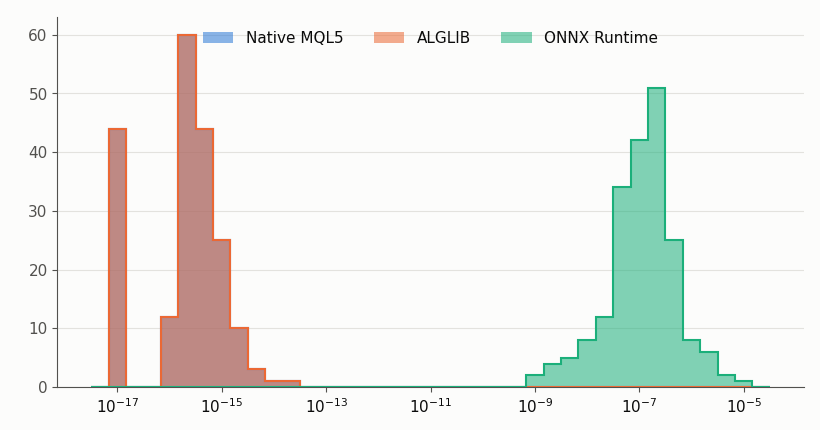
Fig. 2. Relative error of the 200 test vectors against the float64 reference, on a log scale. Native MQL5 and ALGLIB cluster near machine epsilon; ONNX Runtime's float32 tensor path sits many orders of magnitude to the right. Vectors with an exactly zero error are drawn at the left edge.
Native and ALGLIB are bit-identical across all 200 test vectors - not just close, exactly equal, down to the last digit of the 17-significant-figure output. That falls out of the fix in the pitfalls section below: once both engines compute the same accumulate loop in the same order, there's no operation left that could make them diverge. The tiny residual against the Python reference (1.47e-16 mean, under a single machine-epsilon step) is float64 summation order, not a bug: NumPy's reference sum and MQL5's loop don't have to visit the same terms in the same order to both be correct. ONNX Runtime is roughly eight orders of magnitude worse in relative error, and six orders of magnitude worse in absolute error - the size and direction you'd expect from a float32 mantissa of roughly seven decimal digits compounding across three sequential layers.
That's the dominant factor this harness can point to, but it isn't the only one in play: the Gemm kernel's own summation order and any internal optimization ONNX Runtime applies could each nudge the result slightly, and this benchmark doesn't isolate their individual contributions from the precision drop itself. What it does show cleanly is the combined effect of running this graph through ONNX Runtime's default float32 path versus running the same weights in float64 - which is the comparison that actually matters when you're deciding whether to drop an ONNX model into a live EA.
Whether that gap matters depends on what sits downstream. For a one-shot signal threshold it's very likely irrelevant. For a recursive filter that re-feeds its own output as the next input, the same relative error is applied again on every bar, and the divergence from a float64 reference grows instead of staying flat, which is the accumulation risk from the introduction.
A practical way to judge the gap is to compare the engine's error with the smallest difference that changes your decision. If the output feeds a threshold that only fires when the score moves by 0.05, an absolute error around 1e-4 will flip a decision for a vanishing share of inputs. If it feeds a comparison between two nearly equal scores, or gets subtracted from a large number, the same error can decide the outcome. So run the harness with your own model, look at the maximum absolute error and not just the mean, and ask how often your reference output lands within that distance of a decision boundary.
Benchmark Results: Latency
Latency tells a different story, and the ranking isn't the one you'd guess from "more abstraction, more overhead" alone:
| Engine | Mean (µs) | Median (µs) | p95 (µs) | p99 (µs) |
|---|---|---|---|---|
| Native MQL5 | 0.57 | 1.00 | 1.00 | 1.00 |
| ALGLIB | 13.02 | 11.00 | 24.00 | 30.00 |
| ONNX Runtime | 29.25 | 31.00 | 48.00 | 59.00 |
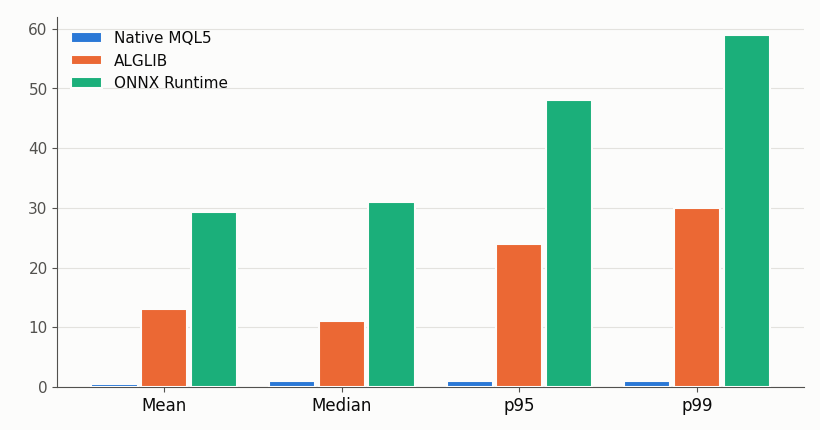
Fig. 3. Latency in microseconds per call (mean, median, p95 and p99) for each engine across 1,000,000 timed predictions, from one representative run. Native MQL5 is fastest by a wide margin at every percentile; ALGLIB and ONNX Runtime both cost meaningfully more, and which of the two costs more swapped between runs during testing (see the note below the table).
Native MQL5 is fastest at every percentile, and by a wide margin: a mean of 0.57µs against 13.02µs for ALGLIB and 29.25µs for ONNX Runtime. That 0.57µs mean sitting below the 1.00µs median is the timer-resolution callout below showing up directly in the data - a large share of native calls round down to zero whole microseconds, so the mean sits under the median rather than the more typical mean >= median pattern. ALGLIB and ONNX Runtime both cost real, multi-microsecond overhead against native, which is the "more abstraction, more overhead" story you'd expect going in. What isn't stable is which of the two costs more.
In this run ONNX Runtime is the slowest end to end; in earlier test runs during development, on the same machine and the same build, ALGLIB was the slower one instead, by a comparable margin. Native's lead held in every one of those informal runs, though I didn't log them as a formal series, so treat that specific claim as a repeated observation rather than a statistically established result - the table above is the one run with numbers behind it.
Two different costs are competing here, and neither dominates consistently enough to call a winner between them. ALGLIB pays for every W[i][o] read through an operator call on the CMatrixDouble container instead of a direct array access. Per forward pass that's 8x16 = 128 reads in the first layer, 16x8 = 128 in the second, and 8x1 = 8 in the third - 264 reads total, not a uniform count per layer - times 200 vectors and 5,200 passes (warmup plus timed), a fixed cost that shouldn't vary much run to run.
ONNX Runtime pays a different kind of cost: crossing into its tensor format and back on every call, through a runtime dispatch path the harness doesn't control and can't see inside of. That second cost looks more sensitive to whatever else the terminal and OS are doing at the time, which is a reasonable guess at why it's the one that moved between runs while ALGLIB's stayed roughly in the same range. I can't prove that from this harness - it doesn't split a call into stages - so treat it as a hypothesis, not a finding. Neither the graph nor the container is likely the true bottleneck at this size; a 289-parameter MLP is trivial work either way.
What the numbers do show, reliably, is that "more abstraction costs more" isn't a reliable predictor of which abstraction costs more, or by how much: measure your own engine choice on your own machine rather than assuming a ranking from first principles. For something this small, native MQL5 is the clear winner on latency regardless of which of the other two you'd reach for.
Edge Cases and Pitfalls
A handful of implementation details each produce output that looks plausible while being subtly wrong, which is the kind of bug that's expensive to track down afterward.
Gemm weight orientation. ONNX's Gemm operator computes input @ W + b when transB=0 (the default), which expects W stored as (in × out), the same orientation used by the CSV, the native engine and the ALGLIB loops. The trap: weights ported from a framework that stores linear layers as out x in and fed into a default Gemm node give a shape-compatible graph that runs without error and returns a wrong number. Nothing in MQL5 or ONNX Runtime can detect that, because the shapes line up. Either transpose the weight before export or set transB=1 on the node, and check against a known input/output pair whenever weights cross a framework boundary.
CSV precision. The weight and test vector files are written with 17 significant digits. With fewer (ten decimals, say), the rounding in the file becomes an error floor of roughly 1e-10 that every engine inherits, and the native and ALGLIB rows of the fidelity table would measure the export format instead of the engines.
Warmup exclusion. The first calls to any engine, ONNX Runtime especially, are slower than steady-state calls because of lazy internal setup. Excluding a fixed warmup window (200 passes here) keeps the latency numbers representative of sustained load. Skipping it makes ONNX Runtime look worse than it is.
Relative error near zero. Relative error is undefined when the reference is exactly zero and unstable close to it. CFidelityStats::Add() floors the denominator at 1e-8 instead of dividing by the raw reference, so a few near-zero outputs can't dominate the mean.
Row-proxy writes. The ALGLIB engine's LoadMatrix() first tried dst[r].Set(c, value) - index out a row, then set a column on it. That compiles, but CMatrixDouble's [] operator returns a temporary row object, and MQL5 won't let a temporary be passed as a non-const reference, so the write never reaches the matrix (the compiler's own words: "constant variable cannot be passed as reference"). Reading through the same W[i][o] indexer is fine, since a read doesn't need a reference back into the container - only a write does. The fix is calling Set(row, col, value) on the matrix itself, as the code above does, and never through a row pulled out of it first.
Reserved parameter names. All three Predict() methods originally named their parameter input. That compiles as a declaration, but input is a reserved MQL5 keyword (the one behind input int parameter declarations), and every place the code went on to use that parameter - input[i], passing it into another function - failed to parse. MetaEditor's error list pointed at the usage sites, not the declaration, which made the real cause easy to miss at first. The fix was a rename, from input to in_vec, in all three engines.
Matrix reshape on assign. The native engine originally loaded each weight matrix with Init(rows, cols) followed by Assign(flat_array). Assign() does not keep the shape Init() set - it silently collapses the matrix to one row holding all rows*cols values, so every W[i][o] lookup past row 0 reads out of range. It is the same family of bug as the ALGLIB row-proxy issue above: a container convenience method that looks like it preserves structure and does not. The fix is a LoadMatrix() helper that fills the matrix element by element through dst[r][c] = flat[r * cols + c] instead of trusting Assign() - the same approach already used for the ALGLIB engine, just with native indexing instead of Set(). Biases stay on Assign() since a vector has no 2D shape to lose.
Timer resolution.GetMicrosecondCount() returns whole microseconds, so a call that takes under two microseconds is measured in coarse steps, and the timer call itself is included in every sample for all three engines. Read the native and ALGLIB percentiles as ranks more than as precise values, and compare engines against each other rather than against an absolute figure from another machine.
Sequential engine timing. Each engine's full timed pass runs to completion before the next engine starts. Interleaving calls inside one loop risks one engine's memory access pattern polluting the cache state the next engine sees, which would bias the latency comparison for reasons unrelated to computation cost.
Running the Harness and Reading the Results: FidelityMonitor.mq5
To run it, copy the three CSV and ONNX files from the Python script into MQL5\Files\MathFidelityBenchmark, compile the EA and drop it on any chart. The benchmark doesn't use price data, so the symbol and timeframe are irrelevant. I'd run it from a chart rather than the Strategy Tester: the tester works against its own sandboxed copy of the Files folder, so the data files would need to be declared for it separately, and a chart gives you the terminal's own timer behavior.
| Setting | Value |
|---|---|
| Symbol/Timeframe | Any (the harness uses synthetic vectors, not price data) |
| InpWarmupIters | 200 |
| InpTimedIters | 5000 |
| Test vectors | 200 (fixed seed, generated by train_export_model.py) |
| Total predictions per engine | 1,000,000 |
The fidelity numbers should reproduce closely on other machines, since they depend on the arithmetic and not on clock speed, although vectorized instructions can move the last digits. The latency numbers are yours to measure: they'll shift with CPU, clock speed and terminal build, and that's the reason the harness exists in this form.
The FidelityMonitor indicator is a pure viewer, and it never runs a benchmark itself. It has no buffers and no plots. OnInit() starts a timer at the refresh interval and draws once, OnTimer() redraws, and OnDeinit() kills the timer and clears the comment. OnCalculate() exists because the terminal requires it, and it does nothing but return the bar count.
//+------------------------------------------------------------------+
//| Includes                                                         |
//+------------------------------------------------------------------+
#include <MathFidelityBenchmark\BenchmarkConfig.mqh>

//+------------------------------------------------------------------+
//| Inputs and globals                                               |
//+------------------------------------------------------------------+
input int InpRefreshSeconds = 5;

//+------------------------------------------------------------------+
//| OnInit                                                           |
//+------------------------------------------------------------------+
int OnInit(void)
  {
   EventSetTimer(InpRefreshSeconds);
   RefreshPanel();
   return(INIT_SUCCEEDED);
  }

//+------------------------------------------------------------------+
//| OnDeinit                                                         |
//+------------------------------------------------------------------+
void OnDeinit(const int reason)
  {
   EventKillTimer();
   Comment("");
  }

//+------------------------------------------------------------------+
//| OnTimer                                                          |
//+------------------------------------------------------------------+
void OnTimer(void)
  {
   RefreshPanel();
  }

//+------------------------------------------------------------------+
//| OnCalculate                                                      |
//+------------------------------------------------------------------+
int OnCalculate(const int rates_total, const int prev_calculated, const int begin,
                 const double &price[])
  {
   return(rates_total);
  }
All the actual work happens in RefreshPanel(). It opens the results CSV and, if the file isn't there yet, prints why to the Journal and draws a message telling you to run the EA first. Otherwise it consumes the eight header fields, then reads one engine per loop iteration (eight fields each, in the order the EA wrote them) and appends one formatted line per engine with the mean latency, the p95 latency and the mean relative error. DrawPanel() hands that text straight to Comment(), the terminal's own always-on-top text area, rather than drawing a chart object as a label.
A chart object such as OBJ_LABEL does not treat \n as a line break - it draws the whole string as a single row and clips it at the chart's edge, which makes it a poor fit for text that spans several lines. Comment() is built for exactly this: it wraps multi-line text correctly and already follows the chart's foreground color across every color scheme, so it is the only overlay this panel needs.
//+------------------------------------------------------------------+
//| RefreshPanel                                                     |
//| Reads benchmark_results.csv written by the EA and rebuilds the   |
//| panel. Viewer only, it never runs the benchmark itself.          |
//+------------------------------------------------------------------+
void RefreshPanel(void)
  {
   int fh = FileOpen(BENCH_RESULTS_FILE, FILE_READ | FILE_CSV | FILE_ANSI, ',');
   if(fh == INVALID_HANDLE)
     {
      PrintFormat("[FidelityMonitor] no results file yet at %s (error %d) -- run the EA first",
                  BENCH_RESULTS_FILE, GetLastError());
      DrawPanel("MathFidelityBenchmark: no results file yet -- run the EA first.");
      return;
     }

   string text = "Numerical Fidelity & Latency Benchmark\n";
   FileReadString(fh); FileReadString(fh); FileReadString(fh); FileReadString(fh);
   FileReadString(fh); FileReadString(fh); FileReadString(fh); FileReadString(fh); // header row

   int rows = 0;
   while(!FileIsEnding(fh))
     {
      string engine   = FileReadString(fh);
      if(engine == "")
         break;
      string mean_us  = FileReadString(fh);
      string median_us= FileReadString(fh);
      string p95_us   = FileReadString(fh);
      string p99_us   = FileReadString(fh);
      string abs_mean = FileReadString(fh);
      string abs_max  = FileReadString(fh);
      string rel_mean = FileReadString(fh);

      text += StringFormat("%-8s  lat(us) mean=%s p95=%s  |  rel_err=%s%%\n",
                            engine, mean_us, p95_us, rel_mean);
      rows++;
     }
   FileClose(fh);

   PrintFormat("[FidelityMonitor] panel refreshed, %d engine rows read", rows);
   DrawPanel(text);
  }

//+------------------------------------------------------------------+
//| DrawPanel                                                        |
//| Comment() renders multi-line text correctly and already follows |
//| the chart's own foreground color across every scheme, so it's   |
//| the only overlay this panel needs.                              |
//+------------------------------------------------------------------+
void DrawPanel(const string text)
  {
   Comment(text);
   ChartRedraw(0);
  }
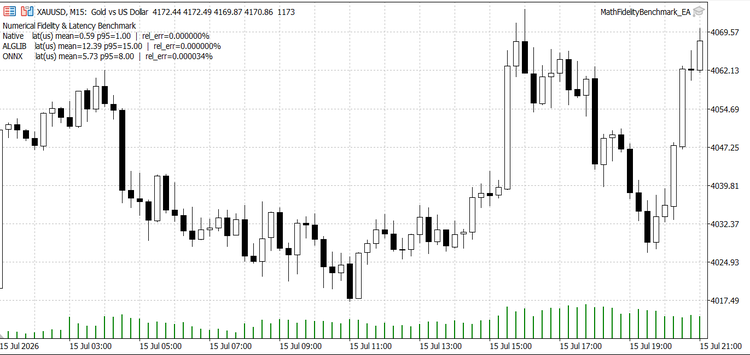
Fig. 4. FidelityMonitor indicator panel, showing per-engine latency and relative error read live from the results CSV after a benchmark pass.
Adapting the Harness to Your Own Model
The harness is small enough to point at a different network in four steps. First, change the dimension constants in BenchmarkConfig.mqh and the layer sizes in the Python script together, since those are the two places that define the architecture. Second, export your own weights in the same tagged format, keeping the (in × out) orientation. If your network has more or fewer layers, add sections to CWeightLoader::Load(), one more ForwardLayer() call in the ALGLIB engine and one more line pair in the native one. The ONNX engine needs no code change, because the graph itself carries the structure.
Third, swap the activation functions with care. ReLU is a clamp and can't amplify rounding error, but tanh and sigmoid go through exponentials, and different runtimes implement those differently, so the gap between engines can be wider than what's measured here. Fourth, regenerate the test vectors from your own input distribution instead of random normals. Fidelity depends on the range of the values flowing through the network, and a benchmark run on inputs that never occur in production tells you very little about production.
Conclusion
The headline result splits in two. On fidelity, Native MQL5 and ALGLIB agree with the float64 reference to machine epsilon and are bit-identical with each other; ONNX Runtime's float32 tensor path costs roughly eight orders of magnitude in relative error, and that ranking held on every run - it's a property of the arithmetic, not the machine. On latency, native MQL5 is fastest by a wide margin on every run too, but which of ALGLIB or ONNX Runtime is the slower of the two moved between runs during testing, sometimes by a wide margin either way. Fidelity is a property of the math and reproduces; latency is a property of the machine and doesn't, and the two shouldn't be trusted with the same confidence.
This does not make ONNX Runtime incorrect or ALGLIB inferior. It quantifies the trade-offs, although the latency cost varies between runs. If your model is small and latency is what you're optimizing, native MQL5 is the better fit on this benchmark; don't reach for ALGLIB expecting a latency win over ONNX Runtime, or the reverse, since this harness couldn't reproduce a stable ranking between the two of them on one machine. Reach for ALGLIB when you specifically need its wider algorithm library, and reach for ONNX Runtime when your model is the kind it's built for - larger, more complex architectures where hand-writing the forward pass isn't practical - and in that case the fidelity gap and the call overhead are a reasonable trade, as long as you've checked that the resulting error is small next to the decision the output feeds.
The benchmark has limits, and they narrow what the numbers above can tell you. It covers one 289-parameter network with ReLU activations, one machine, ONNX Runtime with default flags, and a single set of latency measurements (fidelity repeats exactly, latency shifts from run to run). The 200 test vectors are drawn from a normal distribution with no attempt to hit real feature ranges, outliers, or inputs that sit near an activation's saturation point, so the fidelity numbers describe this input distribution and may not describe yours. Single-call inference on a model this small is also close to the worst case for ONNX Runtime's relative overhead - a model with more parameters per call, or a batched call pattern, would likely narrow the latency gap rather than widen it. Larger models, other activation functions, different input distributions and other execution settings can all rank the engines differently, which is the main reason to run the harness on your own model and your own data rather than reusing these figures.
What I'd carry over to other projects is the harness itself. Any time you swap one computation path for another - a new library, a new model format, a refactor of hand-rolled math - run the old and new paths side by side against a known reference before you trust the new one in production. The whole project is nine short files, and it turns "I think these are equivalent" into a number you can check.
| File | Type | Description |
|---|---|---|
| MathFidelityBenchmark_EA.mq5 | Expert Advisor | Loads weights and test vectors, runs the warmup and timed passes across all three engines, writes the Journal summary, benchmark_results.csv and error_detail.csv. |
| FidelityMonitor.mq5 | Indicator | On-chart panel that reads benchmark_results.csv on a timer and shows per-engine latency and relative error. |
| BenchmarkConfig.mqh | Include | Network dimensions, file names and iteration counts shared by every MQL5 file. |
| BenchmarkStats.mqh | Include | CLatencyStats (raw samples, mean, median, interpolated percentiles) and CFidelityStats (absolute and relative error against the reference). |
| WeightLoader.mqh | Include | Reads the tagged-section weight CSV and checks every section's dimensions before any engine initializes. |
| MathEngineNative.mqh | Include | Native matrix/vector forward pass, float64 throughout, built from an explicit per-layer loop. |
| MathEngineAlglib.mqh | Include | CMatrixDouble forward pass with explicit indexed loops, float64. |
| MathEngineOnnx.mqh | Include | ONNX Runtime forward pass through OnnxRun(), float32 tensors. |
| train_export_model.py | Python script | Trains the shared MLP in float64 NumPy and exports model_weights.csv, test_vectors.csv and model.onnx. |
Warning: All rights to these materials are reserved by MetaQuotes Ltd. Copying or reprinting of these materials in whole or in part is prohibited.
This article was written by a user of the site and reflects their personal views. MetaQuotes Ltd is not responsible for the accuracy of the information presented, nor for any consequences resulting from the use of the solutions, strategies or recommendations described.

 How to Implement Metaprompting for Trading Signals in an MQL5 Expert Advisor
 Implementing Session Volume Profile in MQL5
 Features of Experts Advisors
 Creating a Cairo-Inspired Graphics Library for MetaTrader 5 (Part 6): Curves and Adaptive Flattening

- Free trading apps
- Over 8,000 signals for copying
- Economic news for exploring financial markets
You agree to website policy and terms of use