

Building a Viewport SnR Volume Profile Indicator in MQL5
 19 809
 0
0

Introduction
Support and Resistance (SnR) detection is often one of the first practical challenges traders face when moving from discretionary chart analysis to algorithmic development in MQL5—and it was no different for me. After experimenting with several approaches, I was able to successfully detect and plot SnR levels using both close-price and wick-based approaches. At the time, this felt like a major milestone: the market structure was finally being translated into code.
However, that success quickly revealed a deeper and often overlooked problem—abundance. The chart became crowded with SnR levels, all technically valid, yet offering no clear guidance on which ones truly mattered. MetaTrader 5 provides no native mechanism to differentiate strong, well-defended SnR levels from weak or incidental ones. This results in visual noise: too many levels, with little or no insight.
What’s actually missing is not just another SnR detector, but a way to quantitatively express the strength of each SnR level within the current viewport.
In this article, we bridge that gap by building a viewport-based SnR volume profile indicator in MQL5. It is context-aware and fully adaptive. The indicator responds dynamically to chart interactions. It recalculates on scroll, uses fewer bins when you zoom in, and uses more bins when you zoom out to capture broader structure.By tying the profile resolution to the visible chart range, the indicator reflects the trader's current focus. It presents SnR strength in a visually intuitive and quantitatively meaningful way.By the end of this article, you will understand how to:
- Implement viewport awareness using MQL5.
- Programmatically detect dynamic SnR levels in MQL5.
- Construct a volume profile within those levels using tick or real volume.
- Identify high-probability reaction levels inside SnR levels.
- Plot and update these levels efficiently in real time on MetaTrader 5.
Program Overview
This project presents the design and implementation of an adaptive, viewport-aware Support and Resistance (SnR) Volume Profile indicator for MetaTrader 5 using MQL5. Rather than treating all detected SnR levels as equally important, the project introduces a quantitative framework for evaluating SnR strength based on volume participation within the visible chart range.
The indicator continuously analyzes the current viewport, dynamically detecting SnR zones and constructing localized volume profiles whose resolution automatically adjusts to chart zoom and scroll events. By compressing or expanding profile bins in response to chart context, the system maintains clarity, relevance, and performance—regardless of whether the trader is analyzing micro price action or broader market structure.
At its core, the project transforms raw structural levels into probability-weighted reaction zones. This helps distinguish incidental levels from well-defended areas backed by meaningful volume. The result is a context-sensitive SnR visualization that bridges structural price analysis with volume-based insight, offering a practical and extensible foundation for advanced algorithmic trading tools in MQL5.Below is a visual model of the indicator described in this project:
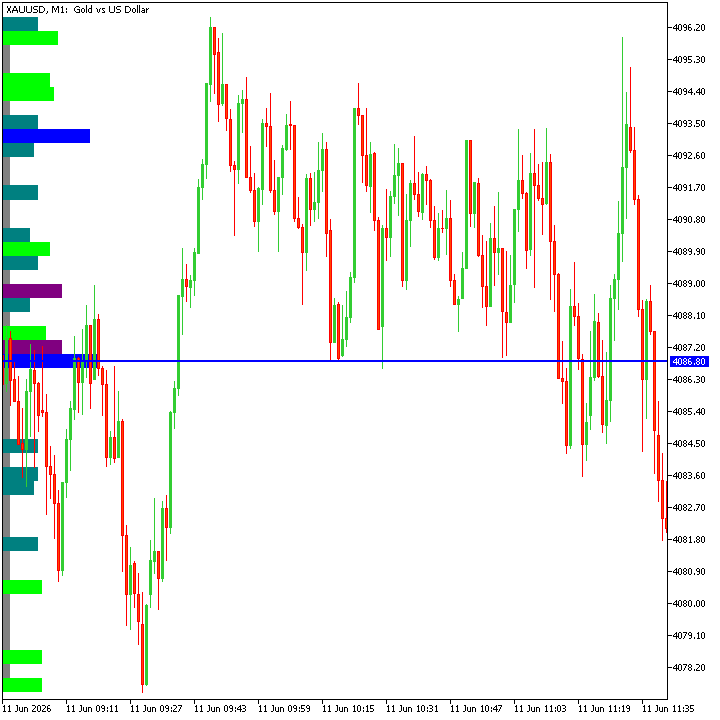
Fig. 1. Project Overview
Design Workflow
This section outlines the end-to-end system workflow. We break down the process into its core stages: viewport detection, support and resistance identification, adaptive bin construction, volume accumulation within SnR zones, and efficient rendering of the resulting volume profile (boxes) on the chart.
Viewport Detection
The indicator continuously monitors the visible chart range to determine the active time and price boundaries. All subsequent computations are constrained strictly to this viewport, ensuring that analysis remains context-aware and responsive to chart scroll and zoom events.
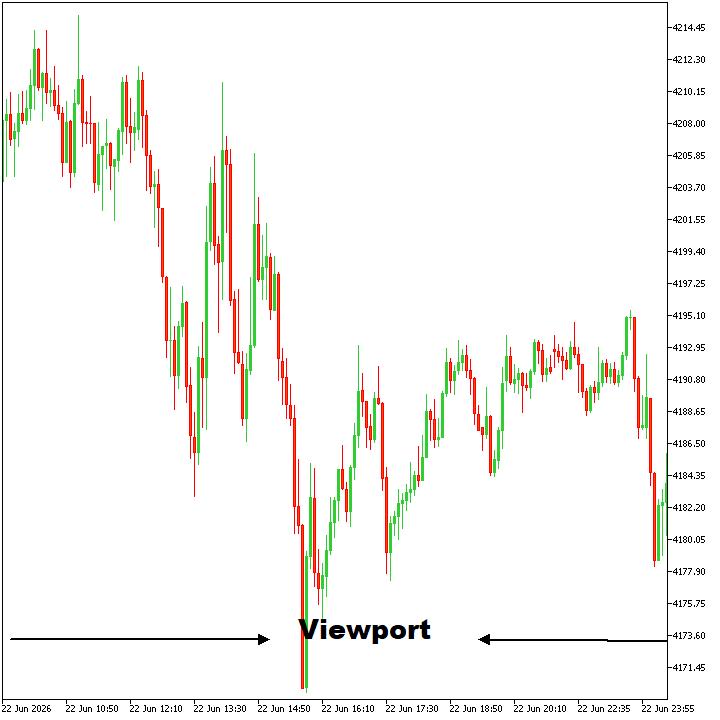
Fig. 2. Viewport Detection
Support and Resistance (SnR) Identification
Within the detected viewport, support and resistance zones are derived using price-based rules (wick or body logic). These zones are recalculated dynamically as the viewport changes, allowing SnR structures to adapt in real time to the trader’s current focus.
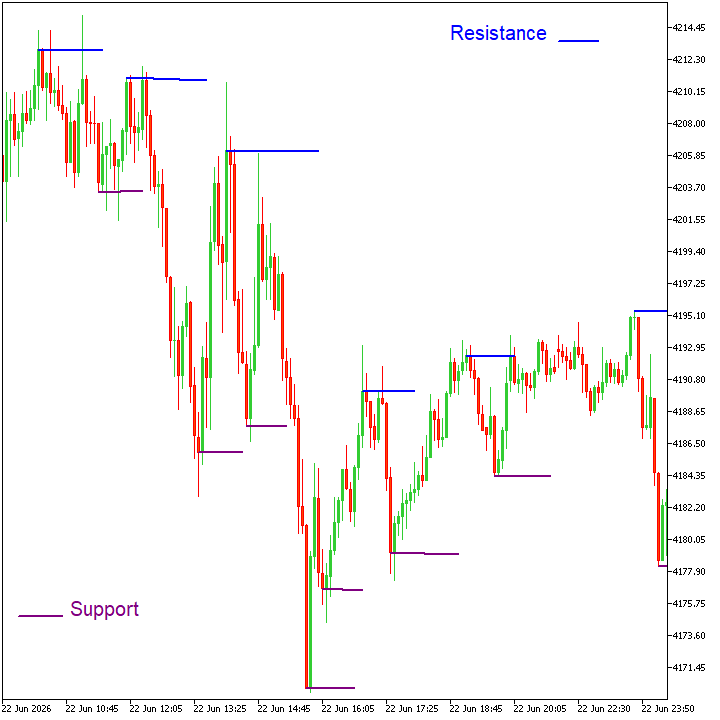
Fig. 3. SnR Identification
Adaptive Bin Construction
The vertical price range—defined by the highest and lowest price levels within the detected viewport—is subdivided into a variable number of price bins (or buckets). The number of bins is adjusted dynamically based on chart zoom level, compressing into fewer bins for narrow views and expanding into more bins for broader views, ensuring consistent analytical resolution and visual clarity across all chart contexts.
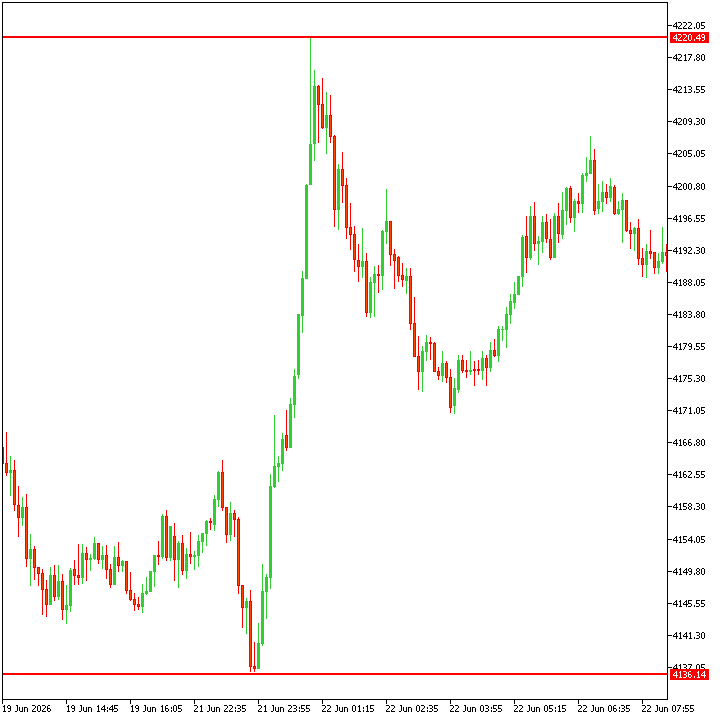
Fig. 4. Bin Construction
Volume Accumulation Within SnR Zones
Tick or real volume is aggregated into the corresponding price bins as price traverses the identified support and resistance zones. These SnR levels are highlighted in Figure 3. This accumulation process quantifies market participation at each level, transforming raw structural zones into measurable, volume-weighted strength profiles.
Volume Profiles Rendering
Finally, the accumulated volume data is mapped to horizontal profile bars and rendered directly on the chart. Profile widths remain uniform across all levels, while the horizontal extent to the right represents the relative strength of each SnR level within its corresponding price range. Rendering is optimized to update only when necessary, preserving performance while ensuring the displayed profiles always reflect the current viewport state.
MQL5 Implementation
This section focuses on the practical implementation of the system workflow in MQL5. Each component is translated into concrete implementation details, covering chart event handling, data structures, computational logic, and rendering routines used to build the adaptive viewport-based SnR volume profile indicator.
Before diving into the individual workflow components, we first establish the structural foundation of the indicator. The core code layout is presented, including preprocessor directives, custom enumerations, data structures, input parameters, global state variables, and the standard MQL5 event handlers (OnInit, OnDeinit, OnCalculate, and OnChartEvent).Together, these elements define the indicator’s configuration, runtime state, and execution flow.
//+------------------------------------------------------------------+
//|                                  Viewport SnR Volume Profile.mq5 |
//|                                             © 2026, ChukwuBuikem |
//|                             https://www.mql5.com/en/users/bikeen |
//+------------------------------------------------------------------+
#property copyright "© 2026, ChukwuBuikem"
#property link      "https://www.mql5.com/en/users/bikeen"

#define _PROG_NAME "Viewport SnR Volume Profile"

#property version   "1.00"
#property description _PROG_NAME
#property indicator_chart_window
#property indicator_plots 0

#define _SNR_PROFILE _PROG_NAME + "Profile"
#define _SNR_POC _PROG_NAME + "PoC"

#include <ChartObjects\ChartObjectsShapes.mqh>
#include <ChartObjects\ChartObjectsLines.mqh>

//--- CUSTOM ENUMERATION
enum ENUM_SNR_MODE
  {
   SNR_MODE_WICK, //WICK DETECTION
   SNR_MODE_BODY  //BODY DETECTION
  };
//--- DATA STRUCTURE
struct st_priceVolume
  {
   //---
   double            price;
   long              volume;
   //--- CONSTRUCTOR
                     st_priceVolume(): price(EMPTY_VALUE), volume(0) {}
  };
//--- INDICATOR SETTINGS
input group "+== SnR Settings ==+"
input ENUM_SNR_MODE modeSNR = SNR_MODE_WICK;//SnR Detection Mode
input int rightLeftBars = 4;                //Pivot Strength (bars on each side)

//--- GLOBAL STATE VARIABLES
CChartObjectRectangle rect;
CChartObjectHLine hLine;

//+------------------------------------------------------------------+
//|               Initialization Function                            |
//+------------------------------------------------------------------+
int OnInit()
  {
//---
   return(INIT_SUCCEEDED);
  }
//+------------------------------------------------------------------+
//|                Deinitialization Function                         |
//+------------------------------------------------------------------+
void OnDeinit(const int32_t reason)
  {
//---

  }
//+------------------------------------------------------------------+
//|                Indicator iteration function                      |
//+------------------------------------------------------------------+
int OnCalculate(const int32_t rates_total,
                const int32_t prev_calculated,
                const datetime &time[],
                const double &open[],
                const double &high[],
                const double &low[],
                const double &close[],
                const long &tick_volume[],
                const long &volume[],
                const int32_t &spread[])
  {
//---

   return(rates_total);
  }
//+------------------------------------------------------------------+
//|                     OnChartEvent Function                        |
//+------------------------------------------------------------------+
void OnChartEvent(const int32_t id, const long& lparam, const double& dparam, const string& sparam)
  {
//---

  }
Explanation:
- Preprocessor Directives
The indicator begins with a set of preprocessor directives that define its compile-time configuration and dependencies. - #property directives specify indicator metadata and runtime behavior, informing MetaTrader 5 how the indicator should be initialized and displayed on the chart.
- #define macros declare compile-time constants used to centralize fixed parameters and improve code readability.
- #include statements import required MQL5 headers and libraries, enabling access to external classes, utilities, and shared functionality.
Together, these directives establish the foundational context in which the indicator operates.
- Custom Enumeration
This custom enumeration defines the SnR detection mode, allowing the indicator to switch between wick-based and body-based price analysis to aid accurate identification of support and resistance levels.
- Data Structure
The st_priceVolume structure encapsulates a price–volume pair, providing a lightweight container for associating aggregated volume with specific price levels during SnR volume profile construction.
- Input Settings
The following input settings define the user-configurable parameters for support and resistance detection, allowing selection of the SnR detection mode (wick- or body-based) and control over pivot strength via the number of bars evaluated on each side.
- Global State Variables
At runtime, these global state variables maintain references to chart objects used for rendering graphical elements, such as rectangles and horizontal lines, directly on the price chart.
- Standard Event Handlers
The execution flow of the indicator is managed through the standard MQL5 event functions, namely OnInit(), OnDeinit(), OnCalculate(), and OnChartEvent(). These handlers enable real-time responsiveness, with OnChartEvent() specifically capturing CHARTEVENT_CHART_CHANGE, allowing the system to react dynamically to chart interactions such as zooming, scrolling, and viewport updates.
This section introduces a set of helper functions that encapsulate the indicator’s core responsibilities. These utilities handle viewport detection, support and resistance identification, volume normalization, chart object rendering, and the central orchestration function where the full system workflow is assembled.
- Viewport Detection
We begin by defining helper functions that extract the current chart viewport properties. The first function determines the visible time range by calculating the start and end timestamps of the active viewport while also returning the number of candlesticks currently in view. Building on this information, a second function derives the number of price bins from the chart’s zoom level by mapping visible bars to bin count, with a minimum fallback applied to maintain analytical stability at extreme zoom levels.
//+------------------------------------------------------------------+
//|                    Viewport Detection                            |
//+------------------------------------------------------------------+
int getViewportValues(datetime &start, datetime &end)
  {
//---
   int first = (int) ChartGetInteger(0, CHART_FIRST_VISIBLE_BAR);
   int visibleBars = (int) ChartGetInteger(0, CHART_VISIBLE_BARS);

   int last = first - visibleBars + 2;
   if(last < 0)
      last = 0;

   visibleBars = visibleBars - 2;
   start = iTime(_Symbol, PERIOD_CURRENT, last);
   end = iTime(_Symbol, PERIOD_CURRENT, first);

   return visibleBars;
  }
//+------------------------------------------------------------------+
//|               ADAPTIVE BIN CONSTRUCTION FROM ZOOM                |
//+------------------------------------------------------------------+
int getBinsFromZoom()
  {
//---
   int visibleBars = (int)ChartGetInteger(0, CHART_VISIBLE_BARS);
   int bins = (int)(visibleBars / 4);

   return MathMax(30, bins);
  }
- Support and Resistance (SnR) Identification
At this stage, the indicator implements a price-action–driven support and resistance detection mechanism using either candle bodies or wicks, as selected by the user. Helper functions abstract the price source for support and resistance evaluation, enabling a consistent detection logic across both modes. Pivot-based validation is then applied by comparing each candidate bar against a configurable number of surrounding bars to confirm structural significance. Detection is performed strictly within the active viewport, where validated support and resistance levels are captured alongside their corresponding tick or real volume, forming the foundational input for subsequent volume profiling.
//+------------------------------------------------------------------+
//|          Body / Wick based Detection For Support                 |
//+------------------------------------------------------------------+
double sPrice(const int barIndex, const MqlRates &rates[])
  {
   return(modeSNR == SNR_MODE_BODY) ? rates[barIndex].close
         : rates[barIndex].low;
  }
//+------------------------------------------------------------------+
//|       Body / Wick based Detection For Resistance                 |
//+------------------------------------------------------------------+
double rPrice(const int barIndex, const MqlRates &rates[])
  {
   return(modeSNR == SNR_MODE_BODY) ? rates[barIndex].close
         : rates[barIndex].high;
  }
//+------------------------------------------------------------------+
//|                 Support Identification                           |
//+------------------------------------------------------------------+
bool isSupport(const int barIndex, const MqlRates &rates[])
  {
//---
   int totalBars = ArraySize(rates);
//--- Index boundary validation
   if(barIndex < rightLeftBars)
      return false;
   if(barIndex >= totalBars - rightLeftBars)
      return false;

   for(int w = 1; w <= rightLeftBars && (barIndex - w) >= 1; w++)
     {
      if(barIndex - w < 1)
         return false;
      //--- Look right
      if(sPrice(barIndex, rates) > sPrice(barIndex - w, rates))
         return false;
      //--- Look left
      if(sPrice(barIndex, rates) > sPrice(barIndex + w, rates))
         return false;
     }
   return true;
  }
//+------------------------------------------------------------------+
//|                  Resistance Identification                       |
//+------------------------------------------------------------------+
bool isResistance(const int barIndex, const MqlRates &rates[])
  {
//---
   int totalBars = ArraySize(rates);
//--- Index boundary validation
   if(barIndex < rightLeftBars)
      return false;
   if(barIndex >= totalBars - rightLeftBars)
      return false;

   for(int w = 1; w <= rightLeftBars && (barIndex - w) >= 1; w++)
     {
      //--- Look right
      if(rPrice(barIndex, rates) < rPrice(barIndex - w, rates))
         return false;
      //--- Look left
      if(rPrice(barIndex, rates) < rPrice(barIndex + w, rates))
         return false;
     }
   return true;
  }
//+------------------------------------------------------------------+
//|                 Viewport Support Detection                       |
//+------------------------------------------------------------------+
void getSupportLevels(st_priceVolume &supp[])
  {
//--- OBTAIN VIEWPORT VALUES
   datetime start, end;
   MqlRates rates[];
   ArraySetAsSeries(rates, true);
   getViewportValues(start, end);
//--- COPY VIEWPORT BARS DATA
   if(CopyRates(_Symbol, PERIOD_CURRENT, start, end, rates) > 0)
     {
      bool useRealVol = (rates[0].real_volume > 0);
      //--- DETECT SNR WITHIN VIEWPORT
      for(int w = rightLeftBars; w < ArraySize(rates) - rightLeftBars; w++)
        {
         if(isSupport(w, rates))
           {
            if(ArrayResize(supp, ArraySize(supp) + 1))
              {
               supp[ArraySize(supp) - 1].price = sPrice(w, rates);
               supp[ArraySize(supp) - 1].volume = (useRealVol) ? rates[w].real_volume : rates[w].tick_volume;
              }
           }
        }
     }
  }
//+------------------------------------------------------------------+
//|                 VIEWPORT RESISTANCE DETECTION                    |
//+------------------------------------------------------------------+
void getResistanceLevels(st_priceVolume &res[])
  {
//--- OBTAIN VIEWPORT VALUES
   datetime start, end;
   MqlRates rates[];
   ArraySetAsSeries(rates, true);
   getViewportValues(start, end);
//--- COPY VIEWPORT BARS DATA
   if(CopyRates(_Symbol, PERIOD_CURRENT, start, end, rates) > 0)
     {
      bool useRealVol = (rates[0].real_volume > 0);
      //--- DETECT SNR WITHIN VIEWPORT
      for(int w = rightLeftBars; w < ArraySize(rates) - rightLeftBars; w++)
        {
         if(isResistance(w, rates))
           {
            if(ArrayResize(res, ArraySize(res) + 1))
              {
               res[ArraySize(res) - 1].price = rPrice(w, rates);
               res[ArraySize(res) - 1].volume = (useRealVol) ? rates[w].real_volume : rates[w].tick_volume;
              }
           }
        }
     }
  }
- Volume Normalization
To ensure consistent visual scaling, a min–max normalization function is defined for the aggregated volume values. By mapping raw volume into a bounded range between 0 and 1 relative to the minimum and maximum observed volumes, this step enables proportional comparison of SnR strength and drives uniform profile rendering across varying market conditions.
//+------------------------------------------------------------------+
//|                   VOLUME NORMALIZATION                           |
//+------------------------------------------------------------------+
double normalizeMinMax(const long value, const long maxVol, const long minVol)
  {
//---
   if(maxVol <= minVol)
      return 0;

   return (double)(value - minVol) / (maxVol - minVol);
  }
- Chart Object Rendering
For graphical output, dedicated helper functions are used to create and manage chart objects through the globally instantiated CChartObjectRectangle and CChartObjectHLine classes. These routines leverage the shared object instances to efficiently render volume profile blocks and key horizontal levels on the chart, while enforcing consistent styling, non-interactive behavior, and hidden state to ensure clean visualization and minimal user interference.
//+------------------------------------------------------------------+
//|                   RECTANGLE CREATION                             |
//+------------------------------------------------------------------+
void createRectangle(const string objName, const datetime time1, const double price1,
                     const datetime time2, const double price2, const color clr)
  {
//---
   if(rect.Create(0, objName, 0, time1, price1, time2, price2))
     {
      rect.Color(clr);
      rect.Tooltip("\n");
      rect.Background(true);
      rect.Selectable(false);
      rect.SetInteger(OBJPROP_HIDDEN, true);
      rect.Fill(true);
      return;
     }
  }
//+------------------------------------------------------------------+
//|                 HORIZONTAL (POC) LINE CREATION                   |
//+------------------------------------------------------------------+
void createHLine(const string objName, const double price,
                 const color clr, const string tooltip = "SnR POC")
  {
//---
   if(hLine.Create(0, objName, 0, price))
     {
      hLine.Color(clr);
      hLine.Width(2);
      hLine.Tooltip(tooltip);
      hLine.Selectable(false);
      hLine.SetInteger(OBJPROP_HIDDEN, true);
      return;
     }
  }
- Central Orchestration
The calcSnRVolumeProfile() function serves as the execution core of the indicator, coordinating all subsystems into a single, coherent workflow. Each stage transforms raw chart data into a fully rendered, adaptive SnR volume profile.
//+------------------------------------------------------------------+
//|                    PUTTING IT ALL TOGETHER                       |
//+------------------------------------------------------------------+
void calcSnRVolumeProfile()
  {
//--- CLEAR CHART
   ObjectsDeleteAll(0, _PROG_NAME);
   ChartRedraw();
//--- VIEWPORT CONTEXT INITIALIZATION
   datetime start, end;
   int count = getViewportValues(start, end);
//--- SNR DETECTION WITHIN VIEWPORT
   st_priceVolume support[], resistance[];
   ArraySetAsSeries(support, true);
   ArraySetAsSeries(resistance, true);
   getSupportLevels(support);
   getResistanceLevels(resistance);
//--- PRICE RANGE EXTRACTION
   int firstBar = iBarShift(_Symbol, PERIOD_CURRENT, start);
   int highestIndex = iHighest(_Symbol, PERIOD_CURRENT, (modeSNR == SNR_MODE_BODY)
                               ? MODE_CLOSE : MODE_HIGH, count, firstBar);
   int lowestIndex = iLowest(_Symbol, PERIOD_CURRENT, (modeSNR == SNR_MODE_BODY)
                             ? MODE_CLOSE : MODE_LOW, count, firstBar);

   double rangeHigh = iHigh(_Symbol, PERIOD_CURRENT, highestIndex);
   double rangeLow = iLow(_Symbol, PERIOD_CURRENT, lowestIndex);
//--- ADAPTIVE BIN CONSTRUCTION
   int numberOfBins = getBinsFromZoom();
   double step = (rangeHigh - rangeLow) / numberOfBins;
   st_priceVolume bins[];
   ArrayResize(bins, numberOfBins);
   double binHigh = EMPTY_VALUE,  binLow = EMPTY_VALUE;
//--- SNR VOLUME ACCUMULATION
   for(int w = 0; w < numberOfBins; w++)
     {
      binLow = rangeLow + step * w;
      binHigh = binLow + step;
      //--- SUPPORT
      for(int s = 0; s < ArraySize(support); s++)
        {
         if(support[s].price >= binLow && support[s].price <= binHigh)
           {
            bins[w].volume += support[s].volume;
            bins[w].price = support[s].price;
           }
        }
      //--- RESISTANCE
      for(int r = 0; r < ArraySize(resistance); r++)
        {
         if(resistance[r].price >= binLow && resistance[r].price <= binHigh)
           {
            bins[w].volume += resistance[r].volume;
            bins[w].price = resistance[r].price;
           }
        }
      //--- VOLUME FALLBACK
      if(bins[w].volume < 1)
         bins[w].volume = 0;
     }
//--- VOLUME EXTREMES
   long maxVol = 0, minVol = LONG_MAX;
   for(int b = 0; b < ArraySize(bins); b++)
     {
      if(bins[b].volume > maxVol)
         maxVol = bins[b].volume;

      if(bins[b].volume < minVol)
         minVol = bins[b].volume;
     }
//--- PROFILE SCALING
   int extendBars = 0;
   int maxProfileLength = (getBinsFromZoom() / 2);
   int minProfileLength = (int)MathRound(maxProfileLength * 0.1);
   minProfileLength = MathMax(2, minProfileLength);// CLAMP
   color clr = clrNONE;
   double dominance = EMPTY_VALUE;
//--- PROFILE RENDERING AND POC IDENTIFICATION (LAST RECORDED)
   bool pocDrawn = false;
   for(int p = 0; p < ArraySize(bins); p++)
     {
      binLow = rangeLow + step * p;
      binHigh = binLow + step;

      extendBars = minProfileLength + (int)MathRound(normalizeMinMax(bins[p].volume, maxVol, minVol)
                   * (maxProfileLength - minProfileLength));
      dominance = (double)extendBars / maxProfileLength;
      clr = (dominance >= 0.8) ? clrBlue :
            (dominance >= 0.6) ? clrPurple :
            (dominance >= 0.4) ? clrLime :
            (dominance >= 0.2) ? clrTeal :
            (dominance >= 0.15) ? clrBlueViolet :
            clrGray;

      createRectangle(_SNR_PROFILE + (string)p, end, binHigh, end + (PeriodSeconds()*extendBars), binLow, clr);
      if(bins[p].volume == maxVol && !pocDrawn)
        {
         //--- DRAW MAXIMUM VOLUME'S POC : ONCE
         createHLine(_SNR_POC + (string)p, bins[p].price, clr);
         pocDrawn = true;
        }
     }
     //--- CHART UPDATE
   ChartRedraw();
  }
Explanation:
The following breakdown clarifies each stage of this function in detail, outlining how the individual workflows interact to produce the final SnR volume profile.
- Viewport Context Initialization
The process begins by clearing previously rendered chart objects associated with the indicator and forcing a redraw to ensure a clean state. The active viewport is then detected, yielding the visible time range and the number of bars currently in view, which defines the analytical context for all subsequent computations.
- Viewport-Based SnR Detection
Support and resistance levels are identified strictly within the detected viewport. Using the previously defined wick- or body-based logic, validated SnR price points are collected along with their corresponding tick or real volume, forming the raw structural inputs for the volume profile.
- Price Range Extraction
The highest and lowest price levels within the viewport are determined based on the selected SnR mode. These bounds establish the vertical price range that will later be discretized into bins for volume aggregation.
- Adaptive Bin Construction
The detected price range is subdivided into a dynamically determined number of bins derived from the current chart zoom level. Each bin represents a discrete price bucket used to aggregate volume, allowing the profile resolution to scale naturally with viewport depth.
- SnR Volume Accumulation
Support and resistance volumes are iteratively assigned to their corresponding price bins based on price inclusion. This step consolidates structural SnR information into volume-weighted bins, with fallback handling applied to empty or insignificant bins.
- Volume Extremes and Profile Scaling
Minimum and maximum bin volumes are identified to establish normalization bounds. These values are used to compute adaptive profile lengths, ensuring that stronger SnR levels visually extend further while weaker levels remain proportionally constrained.
- Profile Rendering and POC Identification
Each bin is rendered as a horizontal profile rectangle with uniform width and variable length, where the horizontal extent reflects relative SnR strength within the price range. Color encoding is applied based on dominance thresholds, and the Point of Control (POC)—the bin with the highest volume—is highlighted once using a horizontal line.
The function concludes with a chart redraw, ensuring that all rendered elements accurately reflect the current viewport, zoom level, and underlying volume distribution. This orchestration layer effectively binds viewport awareness, structural analysis, volume profiling, and graphical rendering into a single adaptive execution pipeline.
Updating Standard Event Handlers
With the helper functions fully defined, only minimal updates are required in the standard MQL5 event handlers. These handlers act as lightweight triggers, delegating execution to the central orchestration function rather than containing core logic themselves. The OnDeinit function handles cleanup by removing all indicator-related chart objects, ensuring a clean chart state on removal. The OnCalculate function invokes the volume profile recalculation only when a new candle arrives, avoiding unnecessary computation and preserving performance. The OnChartEvent handler listens for CHARTEVENT_CHART_CHANGE and triggers a recalculation whenever the chart state changes, such as during zooming, scrolling, or initial indicator loading.
//+------------------------------------------------------------------+
//|                Deinitialization Function                         |
//+------------------------------------------------------------------+
void OnDeinit(const int32_t reason)
  {
//---
   ObjectsDeleteAll(0, _PROG_NAME);
   ChartRedraw();
  }
//+------------------------------------------------------------------+
//|                Indicator iteration function                      |
//+------------------------------------------------------------------+
int OnCalculate(const int32_t rates_total,
                const int32_t prev_calculated,
                const datetime &time[],
                const double &open[],
                const double &high[],
                const double &low[],
                const double &close[],
                const long &tick_volume[],
                const long &volume[],
                const int32_t &spread[])
  {
//---
   if(prev_calculated > 0 && prev_calculated != rates_total)
     {
      calcSnRVolumeProfile();
     }
   return(rates_total);
  }
//+------------------------------------------------------------------+
//|                     OnChartEvent Function                        |
//+------------------------------------------------------------------+
void OnChartEvent(const int32_t id, const long& lparam, const double& dparam, const string& sparam)
  {
//---
   if(id == CHARTEVENT_CHART_CHANGE)
     {
      calcSnRVolumeProfile();
     }
  }
Note: Profile rendering is not explicitly stated in OnInit because CHARTEVENT_CHART_CHANGE is fired automatically when the indicator is launched on a chart, causing the volume profiles to be drawn immediately without duplicating logic.
Indicator Testing
Once the indicator compiles successfully without errors, the GIF below demonstrates how it renders and updates the volume profiles correctly within the viewport under normal chart interactions such as scrolling and zooming.
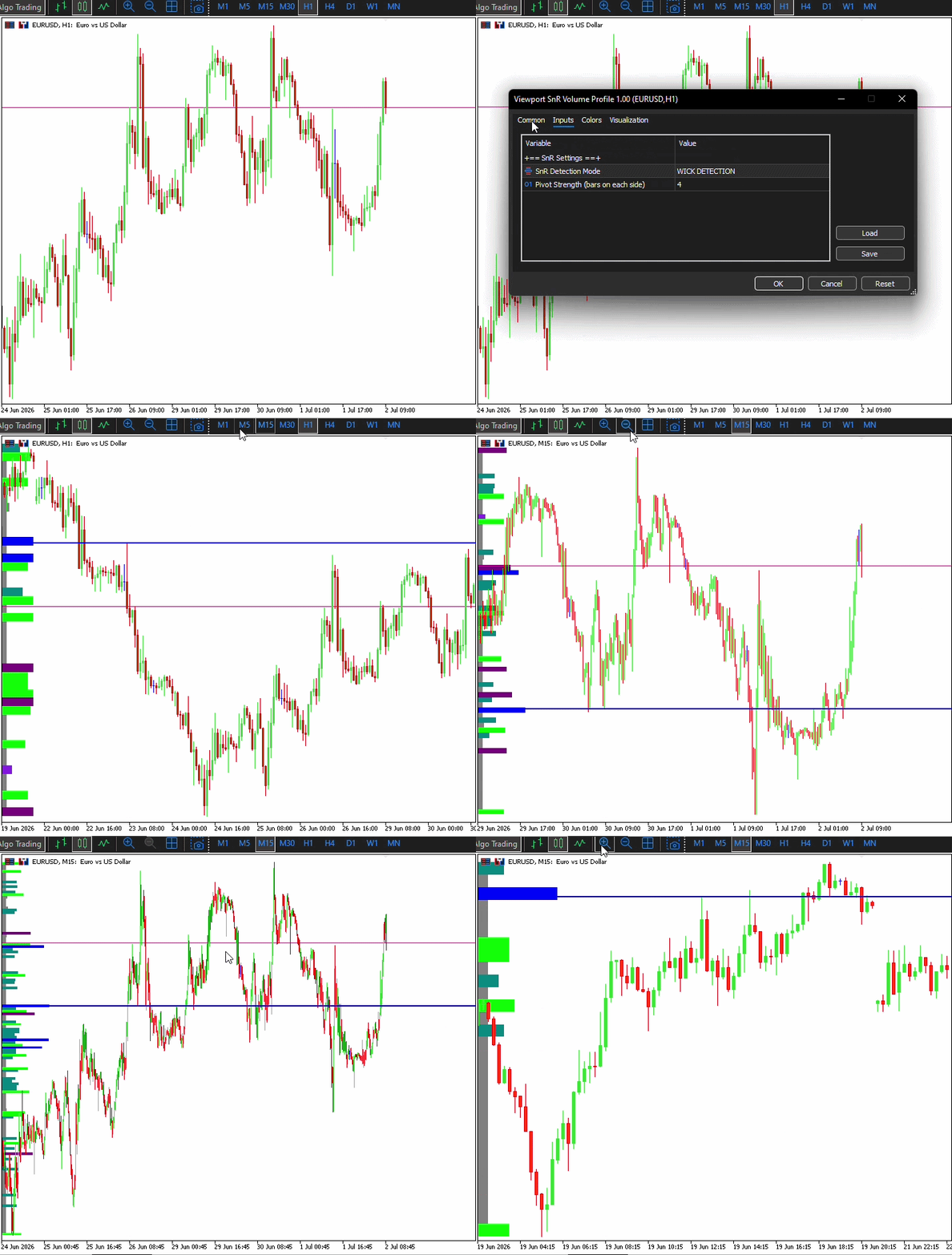
Conclusion
We implemented a practical, viewport-centered SnR Volume Profile in MQL5 that converts raw structural levels into quantitatively ranked reaction zones. Key deliverables and behaviors are:
- Flexible SnR Detection—configurable wick-based or body-based level detection with adjustable pivot strength for precise control over structural sensitivity.
- Efficient Bin Construction—adaptive bin counts tied to visible bars.
- Normalized volume profiling—horizontal profile rectangles (uniform height, variable horizontal extent), a single POC horizontal line, and underlying per-bin dominance scores (normalized volume).
- Efficient Update—volume profile updates on CHARTEVENT CHART CHANGE (scroll,zoom) and on new-bar arrival (OnCalculate), ensuring the analysis always reflects the visible context.
By anchoring level strength to viewport volume participation (dominance and the POC) and making the pipeline event-driven and adaptive, this framework turns an overloaded SnR field into a focused, actionable layer—ready to be extended into alerts, EA filters, or analytics pipelines.
Warning: All rights to these materials are reserved by MetaQuotes Ltd. Copying or reprinting of these materials in whole or in part is prohibited.
This article was written by a user of the site and reflects their personal views. MetaQuotes Ltd is not responsible for the accuracy of the information presented, nor for any consequences resulting from the use of the solutions, strategies or recommendations described.

 Training a nonlinear U-Transformer on the residuals of a linear autoregressive model
 Feature Engineering for ML (Part 9): Structural Break Tests in Python
 Feature Engineering for ML (Part 10): Structural Break Tests in MQL5
 Neural Networks in Trading: Time Series Forecasting Using Adaptive Modal Decomposition (ACEFormer)

- Free trading apps
- Over 8,000 signals for copying
- Economic news for exploring financial markets
You agree to website policy and terms of use