

How to Implement Metaprompting for Trading Signals in an MQL5 Expert Advisor
 404
404
 0
0

Introduction
You have integrated a language model into a trading Expert Advisor. You wrote a prompt that, on the surface, seems to cover everything needed: analyze candlestick patterns, take volume into account, assess the trend, and return a BUY or SELL signal with a confidence level ranging from 0 to 1. You ran it on historical data — the results were disappointing. You revised the wording, added context, and clarified the instructions. You tried it again — still not right.
This is a familiar struggle for every algorithmic trader working with LLMs in 2025–2026. Prompt engineering has become a profession in its own right, but even experienced practitioners spend weeks manually refining prompts through trial and error. The problem is not with the model or the data. The problem is that the prompt is static, while the market is dynamic.
A good prompt for a bullish trend in EURUSD during a period of low volatility is a bad prompt for news-driven chaos in gold. A good prompt for scalping on M1 is a useless prompt for swing trading on D1. Each context requires its own instruction. It is practically impossible to manually maintain a library of hundreds of context-specific prompts and update it as the market evolves.
The solution to this problem lies in the concept of metaprompting — an approach in which the language model itself becomes an optimizer of its own instructions. Instead of manually writing a prompt for trading analysis, a separate instance of the LLM automatically generates, tests, and improves the prompt based on actual trading results. The prompt ceases to be a static artifact and becomes a living component of the system that evolves alongside the market.
In this article, we will build a full-fledged metaprompting system for trading signals using a combination of MQL5 and Python. You will learn how to set up a prompt optimization cycle, how to evaluate signal quality based on actual P&L, and how to integrate this process into a live Expert Advisor without interrupting trading.
What Is Metaprompting and Why Does It Work?
Metaprompting is a technique in which a language model is used to generate or improve prompts for another language model (or for itself in a different context). The concept goes back to the work of the Google DeepMind team in 2023–2024, in particular to the article “Large Language Models as Optimizers” (Yang et al., 2023), in which the authors showed that an LLM can act as an optimizer in tasks where the gradient is unavailable — which is exactly the case for prompt optimization.
Key idea: A prompt is a text-based program that controls the model's behavior. If we formalize the prompt quality metric (for example, the percentage of profitable trades, the Sharpe ratio, or directional accuracy), the optimization problem becomes well-defined. The LLM optimizer receives the current prompt, a quality metric based on historical data, and the instruction “make the prompt better.” A new prompt is tested, and the result is returned to the optimizer. The cycle repeats.
This is fundamentally different from simply brute-forcing variants. The LLM optimizer does not operate randomly — it understands the semantics of the prompt, analyzes why a particular phrasing might have produced a poor result, and suggests meaningful improvements. Essentially, this is a gradient descent process in the space of natural language, where the “gradient” is computed by a language model based on feedback from trading results.
In a trading context, meta-prompting accomplishes three tasks at once. The first is adaptation to the market regime: the optimizer determines which formulations work better in a trend and which work better in a sideways market. The second is specialization for the instrument: the prompt for oil and the prompt for the Japanese yen should emphasize different factors. The third is temporal adaptation: a prompt that was optimal three months ago may degrade as the market microstructure changes.
System Architecture: Three Levels and How They Interact
The metaprompting system for trading signals consists of three logical levels, each of which is implemented in Python and interacts with the MQL5 Expert Advisor via file exchange or a named pipe. Important: to connect the Expert Advisor and the server, we use the WinHTTP library — an excellent solution from this article. The transport layer between the Expert Advisor and the Python server is built on the winhttp.mqh library — an MQL5 wrapper around the system winhttp.dll. The library exports the entire WinHTTP API stack: opening sessions (WinHttpOpen), establishing connections (WinHttpConnect), sending requests (WinHttpSendRequest), and reading responses (WinHttpReadData). This allows the Expert Advisor to make full HTTP/HTTPS requests to a local Flask server without file-based exchange and without third-party DLLs — using only the native Windows API. WebSocket support via WinHttpWebSocketCompleteUpgrade leaves open the possibility of switching to signal streaming in the future.
The first level is the execution agent (Executor). This is an LLM instance that directly analyzes market data and generates trading signals. It works with the current "active prompt," which is stored in a file and updated by the optimizer. The MQL5 Expert Advisor sends it OHLCV data, indicators, and market context, and receives a JSON object containing a signal in return.
The second level is the evaluator. This module tracks the history of signals and corresponding market outcomes, calculates quality metrics for the current prompt, and generates a structured report for the optimizer. Key metrics: directional accuracy (percentage of correctly predicted directions), profit factor, average R-multiple per signal.
The third level is the optimizer (Meta-LLM). Receives the current prompt, the evaluator's report, and the history of previous optimization iterations. Generates a new version of the prompt with specific changes. It runs on a schedule — for example, once a day or when the metrics degrade below a threshold value.
# Python: structure of the meta-prompting system
from dataclasses import dataclass, field
from typing import List, Optional
import json, pathlib, datetime

@dataclass
class PromptVersion:
    version: int
    text: str
    created_at: str
    metrics: dict = field(default_factory=dict)
    notes: str = ""

@dataclass
class SignalRecord:
    timestamp: str
    prompt_version: int
    signal: str          # BUY / SELL / FLAT
    confidence: float
    context_hash: str    # hash of the input data
    outcome: Optional[float] = None  # Actual P&L after N bars

class PromptRegistry:
    def __init__(self, path: str = "prompts/registry.json"):
        self.path = pathlib.Path(path)
        self.path.parent.mkdir(exist_ok=True)
        self.versions: List[PromptVersion] = []
        self.signals: List[SignalRecord] = []
        self._load()

    def _load(self):
        if self.path.exists():
            data = json.loads(self.path.read_text())
            self.versions = [PromptVersion(**v) for v in data.get("versions", [])]
            self.signals  = [SignalRecord(**s)  for s in data.get("signals", [])]

    def save(self):
        self.path.write_text(json.dumps({
            "versions": [v.__dict__ for v in self.versions],
            "signals":  [s.__dict__ for s in self.signals]
        }, ensure_ascii=False, indent=2))

    def active_prompt(self) -> PromptVersion:
        return self.versions[-1] if self.versions else None

    def add_version(self, text: str, notes: str = "") -> PromptVersion:
        v = PromptVersion(
            version=len(self.versions) + 1,
            text=text,
            created_at=datetime.datetime.utcnow().isoformat(),
            notes=notes
        )
        self.versions.append(v)
        self.save()
        return v
Execution Agent: Generating Signals with the Active Prompt
The execution agent is the simplest component of the system — it performs the very task the whole system is built for. But its simplicity is deceptive: the quality of its work is entirely determined by the quality of the prompt it receives from the optimizer. The agent does not engage in self-improvement — it simply follows instructions faithfully.
Input data for the agent is generated in MQL5 and transferred via file exchange. The Expert Advisor saves a JSON file containing the most recent N OHLCV bars, the values of key indicators (RSI, ATR, EMA crossover), the current spread, the time of day, and the trading session. The Python agent reads this file, constructs the full prompt, calls the LLM, and writes the result back to the signal file.
# Python: Signal Execution Agent
import anthropic, json, hashlib
from pathlib import Path

class SignalExecutor:
    def __init__(self, registry: PromptRegistry):
        self.client   = anthropic.Anthropic()
        self.registry = registry

    def _build_prompt(self, context: dict, base_prompt: str) -> str:
        return f"""{base_prompt}

=== MARKET CONTEXT ===
Symbol: {context['symbol']}
Timeframe: {context['timeframe']}
Last 10 bars (OHLCV):
{json.dumps(context['bars'][-10:], ensure_ascii=False)}

Indicators:
- RSI(14): {context['rsi']:.2f}
- ATR(14): {context['atr']:.5f}
- EMA20 > EMA50: {context['ema_cross']}
- Session: {context['session']}
- Spread (pips): {context['spread_pips']:.1f}

Return ONLY JSON:
{{"signal": "BUY|SELL|FLAT", "confidence": 0.0-1.0, "reasoning": "..."}}
"""

    def generate(self, context: dict) -> dict:
        active = self.registry.active_prompt()
        if not active:
            raise ValueError("No active prompt in the registry")

        full_prompt = self._build_prompt(context, active.text)
        message = self.client.messages.create(
            model="claude-sonnet-4-20250514",
            max_tokens=512,
            messages=[{"role": "user", "content": full_prompt}]
        )
        result = json.loads(message.content[0].text)

        ctx_hash = hashlib.md5(
            json.dumps(context, sort_keys=True).encode()
        ).hexdigest()[:8]

        record = SignalRecord(
            timestamp=context.get("time", ""),
            prompt_version=active.version,
            signal=result["signal"],
            confidence=result["confidence"],
            context_hash=ctx_hash
        )
        self.registry.signals.append(record)
        self.registry.save()
        return result
The `reasoning` field in the returned JSON is used for debugging and logging. It also serves as input for the evaluator, which analyzes the agent's arguments and how well they align with subsequent market dynamics.
Evaluator: Converting Signals into Feedback
The evaluator is the most technically nuanced component of the system. Its task is to link each historical signal to an actual market outcome and aggregate these data into a structured report that the LLM optimizer can understand. This is where trading results are turned into feedback for improving prompts.
The key issue in evaluation is the temporal offset. A signal is generated at time T, but its outcome becomes known only at time T+N, where N is the position holding horizon. The evaluator must update signal records asynchronously as position closure data is received from the MQL5 Expert Advisor.
# Python: Prompt Quality Evaluator
import numpy as np
from collections import defaultdict

class PromptEvaluator:
    def __init__(self, registry: PromptRegistry):
        self.registry = registry

    def update_outcomes(self, outcomes: dict):
        """outcomes: {context_hash: pnl_in_r_multiples}"""
        for signal in self.registry.signals:
            if signal.outcome is None:
                pnl = outcomes.get(signal.context_hash)
                if pnl is not None:
                    signal.outcome = pnl
        self.registry.save()

    def compute_metrics(self, version: int) -> dict:
        signals = [s for s in self.registry.signals
                   if s.prompt_version == version
                   and s.outcome is not None]

        if len(signals) < 10:
            return {"error": "insufficient data", "count": len(signals)}

        outcomes   = np.array([s.outcome for s in signals])
        directions = np.array([
            1 if (s.signal == "BUY"  and s.outcome > 0) or
                 (s.signal == "SELL" and s.outcome < 0)
            else 0
            for s in signals if s.signal != "FLAT"
        ])
        wins  = outcomes[outcomes > 0]
        losses= outcomes[outcomes < 0]

        return {
            "version": version,
            "count": len(signals),
            "directional_accuracy": float(np.mean(directions)) if len(directions) else 0,
            "profit_factor": float(wins.sum() / abs(losses.sum())) if len(losses) else 999,
            "mean_r": float(np.mean(outcomes)),
            "sharpe": float(np.mean(outcomes) / (np.std(outcomes) + 1e-9)),
            "flat_rate": sum(1 for s in signals if s.signal == "FLAT") / len(signals)
        }

    def build_report(self) -> str:
        versions = list({s.prompt_version for s in self.registry.signals})
        lines = ["## Report on prompt versions\n"]
        for v in sorted(versions):
            m = self.compute_metrics(v)
            prompt_text = next(
                (p.text[:200] for p in self.registry.versions if p.version == v), ""
            )
            lines.append(
                f"### Version {v}\n"
                f"Prompt (first 200 characters): {prompt_text}...\n"
                f"Metrics: {json.dumps(m, ensure_ascii=False)}\n"
            )
        return "\n".join(lines)
Directional accuracy — the percentage of signals in which the direction was correct — is the primary metric. Profit factor and the average R-multiple result round out the picture by taking into account the size of wins and losses. Flat rate checks whether the model has become overly cautious after optimization — a pathological state in which the prompt causes the agent to avoid most inputs.
Meta-LLM: The Prompt Optimizer in Action
The optimizer is the heart of the entire system. This is a separate LLM call that receives the full context: the history of prompt versions, their metrics, examples of failed signals along with the agent’s reasoning, and an explicit task — to generate an improved version of the prompt. The optimizer works like an experienced prompt engineer who sees all the data at once and draws meaningful conclusions.
It is critically important to structure the meta-prompt for the optimizer correctly. It should receive not just “here is a bad prompt, make it better,” but detailed context about exactly which signals were incorrect, under what market conditions, and what the agent was thinking at that moment. Only then can the optimizer suggest meaningful changes rather than random rephrasings.
# Python: LLM Prompt Optimizer class MetaPromptOptimizer: def __init__(self, registry: PromptRegistry, evaluator: PromptEvaluator): self.client = anthropic.Anthropic() self.registry = registry self.evaluator = evaluator def _collect_failure_examples(self, version: int, n: int = 5) -> str: failures = [ s for s in self.registry.signals if s.prompt_version == version and s.outcome is not None and s.outcome < -0.5 # Losing trades > 0.5R and s.signal != "FLAT" ][:n] lines = [] for f in failures: lines.append( f"Signal: {f.signal}, " f"Confidence: {f.confidence:.2f}, " f"Result: {f.outcome:.2f}R" ) return "\n".join(lines) if lines else "no examples" def optimize(self) -> PromptVersion: report = self.evaluator.build_report() active = self.registry.active_prompt() failures = self._collect_failure_examples(active.version) prev_notes = "\n".join([ f"v{v.version}: {v.notes}" for v in self.registry.versions[-3:] ]) meta_prompt = f""" You are a prompt engineering expert for algorithmic trading systems. Your objective is to improve the trading agent which generates BUY/SELL/FLAT signals. === CURRENT PROMPT (version {active.version}) === {active.text} === PERFORMANCE REPORT === {report} === EXAMPLES OF UNSUCCESSFUL SIGNALS === {failures} === HISTORY OF PREVIOUS IMPROVEMENTS === {prev_notes} Analyze why the current prompt yields bad results. Offer specific changes in prompts, structure or priorities. Return JSON: {{ "improved_prompt": "full text of the improved prompt", "changes_summary": "brief changes summary", "hypothesis": "why these changes should improve the result" }} """ message = self.client.messages.create( model="claude-opus-4-5-20251101", max_tokens=2048, messages=[{"role": "user", "content": meta_prompt}] ) result = json.loads(message.content[0].text) new_version = self.registry.add_version( text=result["improved_prompt"], notes=result["changes_summary"] ) print(f"[MetaOpt] New prompt version v{new_version.version}") print(f"[MetaOpt] Hypothesis: {result['hypothesis']}") return new_version
The `hypothesis` parameter is particularly important: it captures the optimizer’s logic, which can be verified after the fact. If, after a week, the new version shows improvement in exactly the metrics that the optimizer predicted, then the system is working correctly. If not, this is a signal for diagnostics: the evaluation metrics may be incorrect.
Integration with MQL5 and the Full System Workflow
The final step is to integrate the meta-prompting system into a running MQL5 Expert Advisor without interrupting trading. The Expert Advisor acts as a source of market data and a consumer of signals, without knowing anything about the prompt optimization process — that is a detail handled by the Python layer.
The Expert Advisor writes a context file on each new bar; the Python agent reads it, generates a signal, and writes the result. The Expert Advisor reads the result and makes a trading decision. In parallel, on a separate timer, the Expert Advisor writes a file with the results of closed positions; the evaluator picks up this data to update the signal outcomes.
//+------------------------------------------------------------------+
//| Write context file and read signal                               |
//+------------------------------------------------------------------+
void WriteContextFile(const string symbol, ENUM_TIMEFRAMES tf)
  {
   MqlRates rates[];
   int copied = CopyRates(symbol, tf, 0, 50, rates);
   if(copied <= 0)
      return;

   string path = TerminalInfoString(TERMINAL_DATA_PATH)
                 + "\\MQL5\\Files\\signal_context.json";
   int fh = FileOpen("signal_context.json",
                     FILE_WRITE | FILE_TXT | FILE_COMMON);
   if(fh == INVALID_HANDLE)
      return;

   string bars = "[";
   for(int i = MathMax(0, copied - 10); i < copied; i++)
     {
      bars += StringFormat(
                 "{\"t\":\"%s\",\"o\":%.5f,\"h\":%.5f,\"l\":%.5f,\"c\":%.5f,\"v\":%d}",
                 TimeToString(rates[i].time),
                 rates[i].open, rates[i].high,
                 rates[i].low,  rates[i].close,
                 (int)rates[i].tick_volume
              );
      if(i < copied - 1)
         bars += ",";
     }
   bars += "]";

   double rsi = iRSI(symbol, tf, 14, PRICE_CLOSE);
   double atr = iATR(symbol, tf, 14);

   string json = StringFormat(
                    "{\"symbol\":\"%s\",\"timeframe\":\"%s\","
                    "\"bars\":%s,\"rsi\":%.2f,\"atr\":%.5f,"
                    "\"time\":\"%s\"}",
                    symbol, EnumToString(tf),
                    bars, rsi, atr,
                    TimeToString(TimeCurrent())
                 );
   FileWriteString(fh, json);
   FileClose(fh);
  }

//+------------------------------------------------------------------+
//| Read signal file                                                 |
//+------------------------------------------------------------------+
string ReadSignalFile()
  {
   int fh = FileOpen("signal_result.json",
                     FILE_READ | FILE_TXT | FILE_COMMON);
   if(fh == INVALID_HANDLE)
      return "";

   string content = "";
   while(!FileIsEnding(fh))
      content += FileReadString(fh);
   FileClose(fh);

   return content;
  }
The Python orchestrator ties all the components together into a single loop. Every minute, the orchestrator checks for a new context file, generates a signal, and records the result. Every hour, it updates the signal outcomes from the trading results file. Once a day, if directional accuracy falls below 0.52, the orchestrator launches the optimizer. The optimizer generates a new version of the prompt. The new prompt automatically becomes active — and the cycle starts over.
System Backtest
The backtest was conducted on EURUSD, using the M15 timeframe, for the period from March 1 to April 14, 2026. Initial deposit: 10,000 USD; fixed lot size: 0.01; stop-loss: 700 points; take-profit: 150 points. Execution conditions: a RoboForex ECN account with real spreads and commissions. The minimum confidence threshold for the signal agent, InpMinConf = 0.01, was intentionally set low to maximize entry coverage; in a production configuration, it makes sense to raise it to 0.55–0.65.
| Metric | Value |
|---|---|
| Net profit | 32.47 USD |
| Total trades | 99 |
| Profitable trades, % | 85.86% (85 out of 99) |
| Profit Factor | 1.35 |
| Recovery Factor | 1.66 |
| Sharpe Ratio | 2.77 |
| Maximum equity drawdown | 19.52 USD (0.19%) |
| Z-Score | 1.46 (85.57%) |
| LR Correlation | 0.65 |
| Average winning trade | 1.48 USD |
| Average losing trade | -6.61 USD |
| Maximum Consecutive Losses | 1 |
The win/loss distribution is asymmetric, which is the expected behavior of a system with a TP/SL ratio of 150/700. The agent wins often and by small amounts, but loses rarely and for the full stop distance. That is precisely why a profit factor of 1.35 with a win rate of 85.86% is not a contradiction, but a direct consequence of the chosen risk configuration.
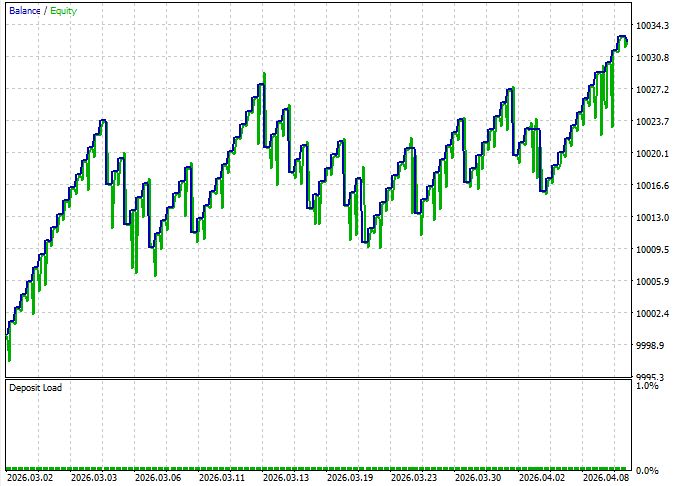
A Sharpe Ratio of 2.77 and a Recovery Factor of 1.66 indicate a stable equity curve — this is also confirmed by an LR Correlation of 0.65 (linear growth with moderate dispersion). A Z-Score of 1.46 at an 85.57% confidence level means that the result is statistically significant — it is not a random streak of good luck over a short period.
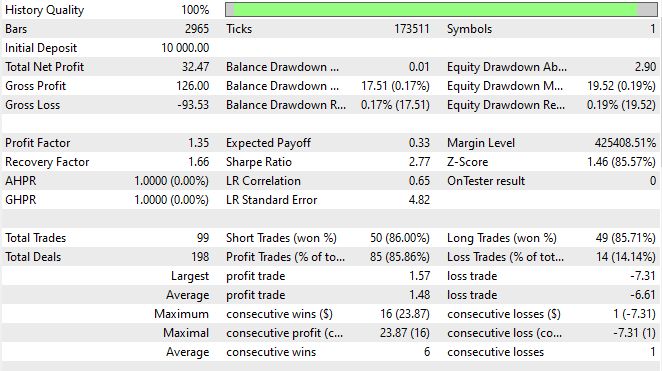
The entry discipline is telling: the maximum number of consecutive losses is one. This demonstrates the feedback loop at work: after a loss, the agent adjusts its confidence based on the latest entry in agent stats and makes its next decision taking the error into account. The long losing streaks typical of deterministic Expert Advisors are mitigated here at the reasoning level.
The long/short balance is practically perfect — 49 long trades versus 50 short trades, with comparable win rates (85.71% and 86.00%). This confirms that the chain does not exhibit a structural bias in one direction, which is often observed in systems based on fixed rules.
Limitations of the Test
A period of one and a half months is not long enough to draw definitive conclusions. During this period, there were neither major news shocks (where a news agent should demonstrate its real value) nor prolonged high-volatility sideways markets. For production deployment, backtest the system using at least 6–12 months of historical data and run a forward test. Real API calls are important: delays and model unavailability alter the system's behavior in situations that a backtester does not simulate.
A separate caveat: the MetaTrader 5 tester does not emulate real LLM responses — during backtesting, requests are sent to a live server. This means that the results reflect the model's behavior at the current moment, and its characteristics may change after it is updated. This is a normal characteristic of LLM-based systems that you simply have to live with: rerun the benchmark once a quarter and compare the metrics.
Conclusion
A reader who has made it to this page has gained more than just a set of code. They have gained a new architectural paradigm: an LLM prompt is not a configuration file that you write once and then forget about. It is a trainable component of the trading system that should evolve along with the market.
We have built a closed-loop system consisting of four components: the execution agent generates signals based on the current prompt, the evaluator links each signal to an actual market outcome, the meta-LLM analyzes error patterns and suggests an improved prompt, and the MQL5 Expert Advisor receives higher-quality signals and generates new data for the next round of optimization. This is not just automation — it is a self-improving system with reflection at the instruction level.
The practical value of this approach is supported by logic, not chance. Meta-prompting addresses a fundamental problem: a human prompt engineer cannot keep track of thousands of market situations and adapt instructions to them in real time. The LLM optimizer does exactly that — methodically, at scale, and tirelessly.
As of April 2026, with language models having become a standard tool in an algorithmic trader’s arsenal, the competitive advantage is shifting from the question “Should I use an LLM?” to “How intelligently do you use it?” A static prompt is a static strategy. A system that optimizes its own instructions based on actual results is a strategy that learns.
In upcoming posts, we will delve deeper into the architecture: we will implement A/B testing of parallel prompt versions in a live market, add context-dependent routing — different prompts for different market regimes — and integrate the system with the trader personas described in the previous article. Together, the two systems form a trading agent that not only adapts its trading style but also adapts the instructions for its analytical tool.
The market optimizes all participants. It is time for the system to optimize itself.
| File name | File contents |
|---|---|
| llm_server_metaprompt.py | System server |
| EA_MetaPrompt.mq5 | Expert Advisor and system execution agent |
| winhttp.mqh | Library for communication between the Expert Advisor and the server — we took it from this article |
Translated from Russian by MetaQuotes Ltd.
Original article: https://www.mql5.com/ru/articles/22230
Warning: All rights to these materials are reserved by MetaQuotes Ltd. Copying or reprinting of these materials in whole or in part is prohibited.
This article was written by a user of the site and reflects their personal views. MetaQuotes Ltd is not responsible for the accuracy of the information presented, nor for any consequences resulting from the use of the solutions, strategies or recommendations described.

 Features of Custom Indicators Creation
 Numerical Fidelity Under Fire: Benchmarking Native MQL5, ONNX Runtime, and ALGLIB
 Features of Experts Advisors
 Implementing Session Volume Profile in MQL5

- Free trading apps
- Over 8,000 signals for copying
- Economic news for exploring financial markets
You agree to website policy and terms of use