

Building a Liquidity Spectrum Volume Profile Indicator in MQL5
 5 141
5 141
 2
2

Table of Contents
- Introduction
- Project Overview and Implementation Plan
- Creating the Liquidity Spectrum Volume Profile Indicator in MQL5
- Conclusion
Introduction
Standard per-bar volumes under candles do not show how volume is distributed across price, so it is difficult to tell which exact price levels actually “hold” liquidity within a chosen lookback. This article reframes that problem with explicit assumptions and engineering constraints: the profile will assign volume to price bins using candle close prices, prefer tick volume with a fallback to real volume, and operate on a stable, explicitly copied dataset (Copy* functions). In practice, three implementation hurdles must be solved to produce a reliable tool in MQL5:
- obtaining a consistent lookback dataset via CopyHigh/CopyLow/CopyClose/CopyTickVolume (with fallbacks);
- mapping volume into equal price bins inside the high/low range based on closes and normalizing those bins;
- managing chart objects and time placement by creating, updating, deleting with a prefix, and converting bar offsets into datetime positions.
The goal is a working, reproducible Liquidity Spectrum Volume Profile indicator for MT5 that removes ambiguity about where real market activity is concentrated.
Project Overview and Implementation Plan
Understanding what we are doing and how we will implement it is crucial before moving forward. This chapter will describe the general layout of the liquidity spectrum visualizer and the methodical process we will use to create the indicator.
What We Are Building
In this project, we are building a Liquidity Spectrum Volume Profile Indicator in MQL5. The main purpose of this indicator is to visualize how trading volume is distributed across different price levels within a specified lookback period. Instead of only showing price movement or a single volume value, the indicator breaks the market into multiple price ranges (bins). It then calculates how much volume occurred within each bin and represents that information visually on the chart. Each bin reflects a specific price zone, and its volume determines how wide and prominent it appears. Strong volume areas become wider and more visible, while weaker areas remain smaller. In addition, the indicator identifies high-volume zones known as the Point of Control (POC), which represent the most active price levels where the highest trading activity occurred.
These POC levels are drawn as horizontal lines to highlight key liquidity areas where the market is most likely to react.
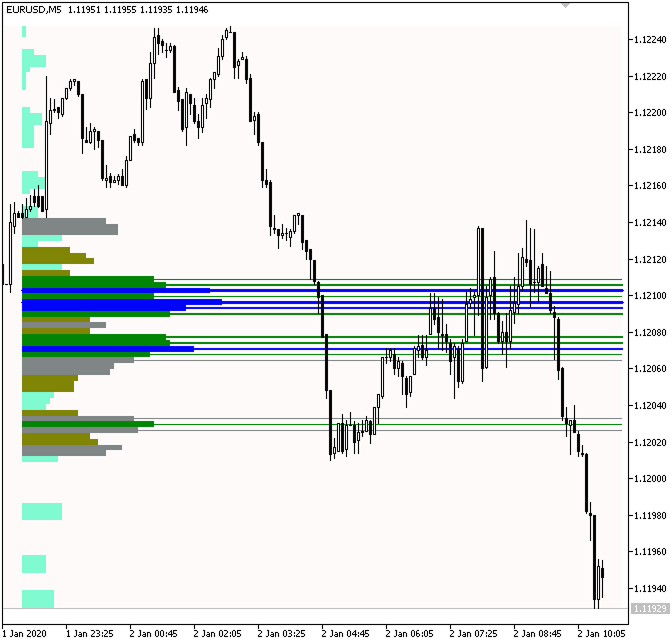
In other words, we are building a tool that transforms raw market data into a volume profile-based liquidity spectrum, allowing traders to clearly see where market participation is strongest and where important liquidity zones exist within a defined lookback range.
Implementation Plan
In this section, we outline the implementation steps: retrieve lookback data, split the price range into bins, aggregate volume per bin, normalize the values, and draw chart objects (volume boxes and POC lines).
Retrieving Candle Data Using Copy Functions
This is the first step in implementing the liquidity spectrum volume profile. Before we can calculate volume distribution or build any visual representation, we need access to historical market data within our specified lookback period. Instead of relying on the default data provided in the OnCalculate event handler, we use copy functions to retrieve the required price and volume data ourselves. This ensures we always work with a complete and consistent dataset, regardless of how or when the indicator is triggered.
To keep the code neat and avoid repetition, all of this data retrieval will be handled by a single, dedicated function. We call this function from OnInit and OnCalculate to avoid duplicating logic. This methodical approach of using copy functions offers us complete control over the data flow, guarantees correct initialization, and ensures that each recalculation is based on the same trustworthy market dataset.
Determining the Price Range within the Lookback Period
After retrieving the data, we determine the lookback price range. This stage establishes the parameters that will be used for all subsequent computations. We identify the highest high and the lowest low by scanning the candles that fall within the designated lookback. To put it another way, among all the bars in that range, we are searching for the highest and lowest prices reached.
For instance, if the lookback is set to 18, we will examine the chart's last 18 candles. We identify the highest high price and lowest low price among these candles. The price range for our analysis is 1.1950 to 1.2050 if the highest price is 1.2050 and the lowest is 1.1950.
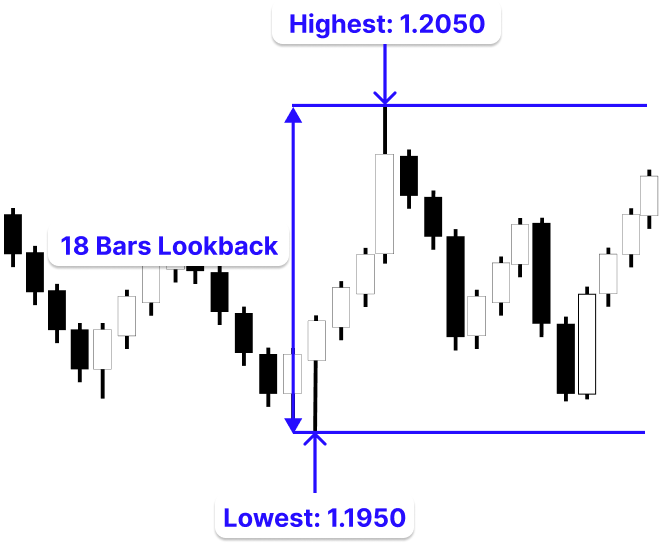
This means that every calculation we perform afterward will be based strictly on the price movement that occurred within these 18 bars. Put differently, this step defines the full extent of the market movement within the lookback period, using the highest and lowest prices reached by those bars.
Dividing the Price Range into Bins and Calculating Volume Distribution
The next step after determining the price range is to break it up into smaller pieces and assess the distribution of volume within each. A bin is a narrow price range (interval). To assess where activity is focused, we divide the price range into several smaller ranges rather than considering it as a single block. Let’s assume we divide the price range from 1.1950 to 1.2050 into nine bins. Each bin will represent an equal portion of the total range, giving us nine smaller price intervals instead of one large range.
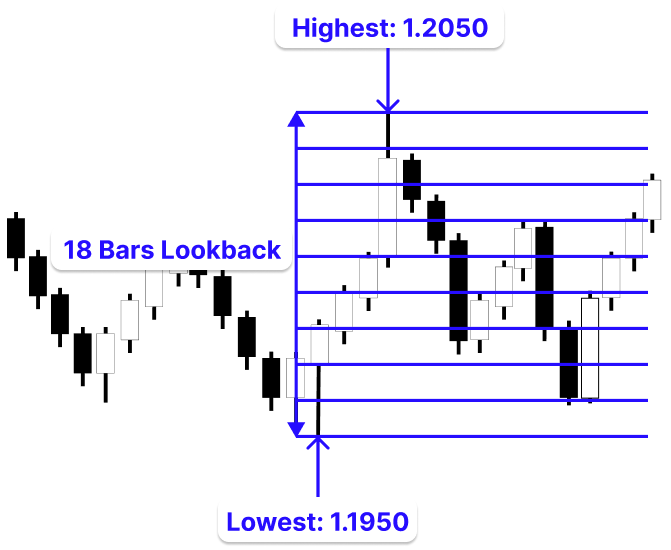
Next, we go through each candle within the lookback period and check which bin its close price falls into.
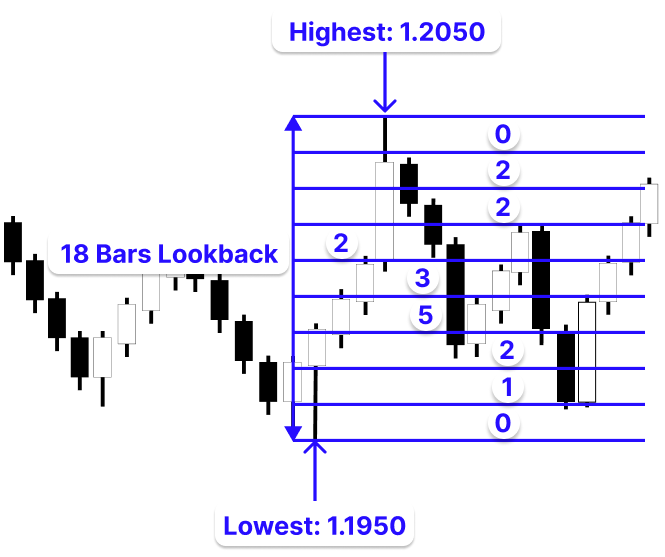
We add a candle's volume to a bin if its close price falls inside that bin. It is crucial to note that the volume is what accumulates, and the close price is merely used to define which bin the candle belongs to. To avoid missing edge cases, we allow a one-step overlap between adjacent bins. By repeating this process for all candles, each bin ends up containing the total volume of all candles whose close prices fall within its range. This gives us a clear picture of how trading activity is distributed across different price levels.
Drawing the Volume Profile and POC Lines
The next stage is to turn this data into a visual representation on the chart after determining the volume distribution across all bins. To compare all bins on the same scale, we start by normalizing the volume values. To ensure that stronger areas seem larger while weaker ones remain smaller, each bin is scaled relative to the bin with the highest volume.
At the same time, we introduce a fixed width limit to control how wide the largest bin can appear. This keeps the visualization balanced and also creates space between the volume profile and the candles, preventing the drawings from overlapping with the price bars. Next, we determine the position of each box using a bar-offset approach. The profile is placed at a defined distance from the current price, and each box extends to the right based on its normalized size, creating a clear and structured view of volume distribution across price levels.
With this in place, we begin drawing the volume profile. For each bin, we will:
- calculate its upper and lower price boundaries
- determine its width based on normalized volume
- draw a rectangle representing that price range
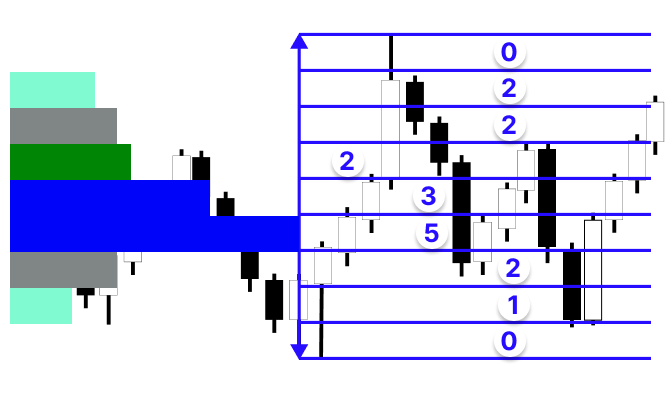
It is important to note that having many candle close prices within a particular price range does not necessarily mean that the level has high trading activity. What truly matters is the volume of those candles, not just how many of them fall into that range. A bin may contain only a few candles, but if those candles have high volume, that level will be more significant than a bin with many low-volume candles. This is why we accumulate volume based on where the close price falls, ensuring that the final result reflects actual market participation rather than just price frequency.
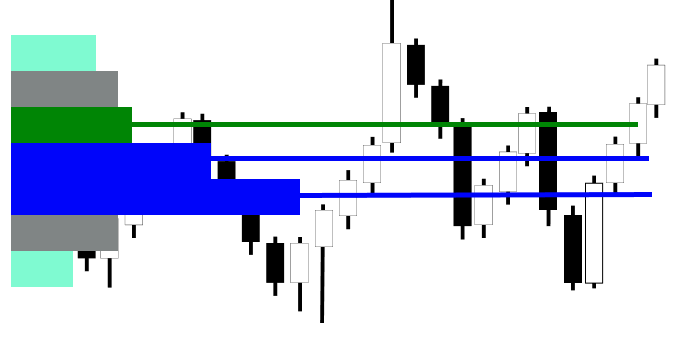
After that, we identify high-volume bins, also known as Point of Control (POC) levels. These are bins whose volume exceeds a defined threshold. For each of these bins, we:
- calculate the midpoint of the price range
- draw a horizontal line to highlight that level
Creating the Liquidity Spectrum Volume Profile Indicator in MQL5
Now that we clearly understand the concept and the steps involved, we will begin implementing the liquidity spectrum volume profile programmatically in MQL5. In this section, we will translate each part of the logic into code, starting from data retrieval, through processing and calculation, and finally to visual representation on the chart.
Retrieving Candle Data Using Copy Functions
As discussed during the implementation plan, the first step is to retrieve historical candle data for the specified lookback period to provide a consistent dataset for all further calculations, and now we will implement this step programmatically in MQL5.
Example:#property indicator_chart_window #property indicator_plots 0 //--- INPUT PARAMETERS input int InpLookback = 100; // Number of bars used for calculation input bool InpVolumeProfile = true; // Display volume profile boxes input bool InpLiqLevels = true; // Display POC (liquidity) lines //+------------------------------------------------------------------+ //| Core calculation function | //| Builds and draws the volume profile | //+------------------------------------------------------------------+ void RecalcVolumeProfile() { //--- Exit early if both features are disabled if(!InpVolumeProfile && !InpLiqLevels) return; int totalBars = Bars(_Symbol, _Period); int lookback = MathMin(InpLookback, totalBars - 1); if(lookback < 2) return; //--- Prepare arrays for market data double hi[], lo[], cl[]; long vol[]; datetime tm[]; ArraySetAsSeries(hi,true); ArraySetAsSeries(lo,true); ArraySetAsSeries(cl,true); ArraySetAsSeries(vol,true); ArraySetAsSeries(tm,true); //--- Copy required data from terminal if(CopyHigh(_Symbol,_Period,0,lookback,hi) < lookback) return; if(CopyLow(_Symbol,_Period,0,lookback,lo) < lookback) return; if(CopyClose(_Symbol,_Period,0,lookback,cl) < lookback) return; if(CopyTime(_Symbol,_Period,0,lookback,tm) < lookback) return; //--- Prefer tick volume, fallback to real volume if(CopyTickVolume(_Symbol,_Period,0,lookback,vol) < lookback) if(CopyRealVolume(_Symbol,_Period,0,lookback,vol) < lookback) return; }
Explanation:
This part illustrates the indicator's behavior and gets it ready for the primary computation. All visual components, such as volume boxes and POC lines, will display on the price chart itself since the indicator is configured at the top to draw directly on the main chart window. Additionally, it states that as all drawings would be made by hand using chart objects, no built-in indication plots will be used. Next, we define the input parameters. The lookback value controls how many candles the indicator will analyze. The two boolean inputs allow the user to decide whether to display the volume profile boxes and whether to display the Point of Control (POC) liquidity lines. These inputs give flexibility to turn parts of the visualization on or off without changing the code.
The main function then begins the calculation process. Before doing anything, it first checks whether both visualization options are disabled. If they are, there is nothing to draw, so the function ends instantly. The code then calculates the number of bars that are accessible on the chart and makes sure that the lookback does not go beyond the available history. This keeps errors from attempting to access nonexistent data. The function quits if the lookback is too small because there isn't enough information to do useful computations. The code initializes price/time/volume arrays as series and copies the required lookback data. It uses tick volume first and falls back to real volume. If data is insufficient, the function exits.
Determining the Price Range within the Lookback Period
The next step is to determine the price range within the lookback period.
Example:
#define OBJ_PREFIX "VP_" // Prefix for all chart objects
//--- INPUT PARAMETERS
input int   InpLookback      = 100;   // Number of bars used for calculation
input bool  InpVolumeProfile = true;  // Display volume profile boxes
input bool  InpLiqLevels     = true;  // Display POC (liquidity) lines

//--- CONSTANTS
#define N_BINS          100    // Number of price levels (bins)

//+------------------------------------------------------------------+
//| Delete all indicator objects                                     |
//+------------------------------------------------------------------+
void DeleteAllObjects()
  {
   for(int i = ObjectsTotal(0, 0, -1) - 1; i >= 0; i--)
     {
      string n = ObjectName(0, i, 0, -1);
      if(StringFind(n, OBJ_PREFIX) == 0)
         ObjectDelete(0, n);
     }
  }
//+------------------------------------------------------------------+
//| Core calculation function                                        |
//| Builds and draws the volume profile                              |
//+------------------------------------------------------------------+
void RecalcVolumeProfile()
  {

//--- Exit early if both features are disabled
   if(!InpVolumeProfile && !InpLiqLevels)
      return;
   int totalBars = Bars(_Symbol, _Period);
   int lookback  = MathMin(InpLookback, totalBars - 1);
   if(lookback < 2)
      return;

//--- Prepare arrays for market data
   double   hi[], lo[], cl[];
   long     vol[];
   datetime tm[];
   ArraySetAsSeries(hi,true);
   ArraySetAsSeries(lo,true);
   ArraySetAsSeries(cl,true);
   ArraySetAsSeries(vol,true);
   ArraySetAsSeries(tm,true);

//--- Copy required data from terminal
   if(CopyHigh(_Symbol,_Period,0,lookback,hi)  < lookback)
      return;
   if(CopyLow(_Symbol,_Period,0,lookback,lo)  < lookback)
      return;
   if(CopyClose(_Symbol,_Period,0,lookback,cl)  < lookback)
      return;
   if(CopyTime(_Symbol,_Period,0,lookback,tm)  < lookback)
      return;
//--- Prefer tick volume, fallback to real volume
   if(CopyTickVolume(_Symbol,_Period,0,lookback,vol) < lookback)
      if(CopyRealVolume(_Symbol,_Period,0,lookback,vol) < lookback)
         return;

//--- Determine price range
   double priceMax = hi[ArrayMaximum(hi, 0, lookback)];
   double priceMin = lo[ArrayMinimum(lo, 0, lookback)];
   if(priceMax <= priceMin)
      return;

   int idxHigh = ArrayMaximum(hi, 0, lookback);
   int idxLow  = ArrayMinimum(lo, 0, lookback);

   string lookback_line = OBJ_PREFIX + "_LL";
   string high_range = OBJ_PREFIX + "_HR";
   string low_range = OBJ_PREFIX + "_LR";
   ObjectCreate(0,lookback_line,OBJ_VLINE,0,tm[lookback - 1],0);
   ObjectCreate(0,high_range,OBJ_TREND,0,tm[lookback - 1],priceMax,tm[0],priceMax);
   ObjectCreate(0,low_range,OBJ_TREND,0,tm[lookback - 1],priceMin,tm[0],priceMin);
  }

//+------------------------------------------------------------------+
//| Custom indicator initialization function                         |
//+------------------------------------------------------------------+
int OnInit()
  {
//--- indicator buffers mapping
   RecalcVolumeProfile();
//---
   return(INIT_SUCCEEDED);
  }
//+------------------------------------------------------------------+
//| Deinitialization                                                 |
//+------------------------------------------------------------------+
void OnDeinit(const int reason)
  {
   DeleteAllObjects();
  }
//+------------------------------------------------------------------+
Output:
Explanation:
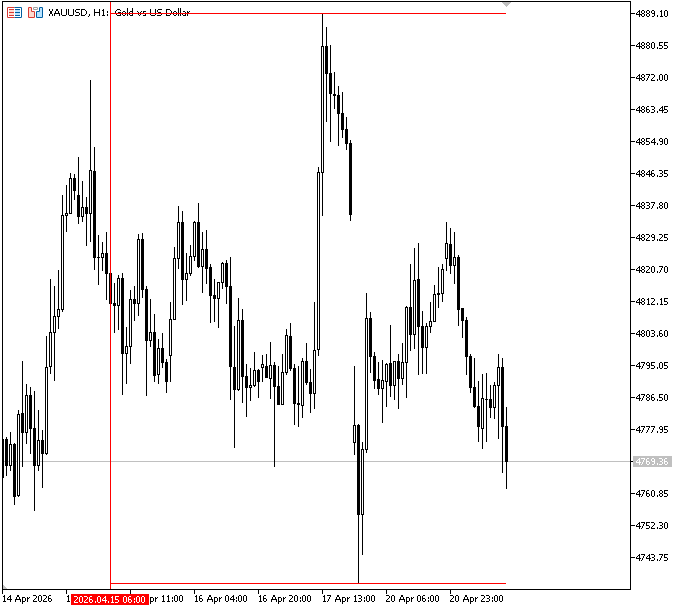
In this step, we determine the price range within the lookback period as discussed in the implementation plan. To determine the highest high and lowest low, we must go through the gathered candle data. The upper and lower bounds of the market movement are represented by the highest and lowest values, respectively. To prevent erroneous computations, a safety check is also incorporated to guarantee that the maximum price is higher than the minimum price. For visual reference, we also record the precise candle indices at which these extreme values occurred.
To make this process easier to understand, temporary chart objects were created for you to visualize the implementation process. A vertical line is drawn at the start of the lookback period to mark the beginning of the analysis range. In addition, two horizontal lines are drawn at the highest and lowest price levels. These objects are not part of the final indicator; they are only used to help visually confirm the price range being used during development. The indicator calls the primary calculation function that creates the volume profile right away during initialization. This ensures that the indicator is displayed on the chart immediately upon loading, without the need to wait for fresh price updates.
When the indicator is removed from the chart, all created objects are deleted using the DeleteAllObjects() function. This removes all chart objects with the "VP_" prefix.
Dividing the Price Range into Bins and Calculating Volume Distribution
In this step, we divide the price range within the lookback period into equal bins and calculate the total volume of candles whose close prices fall within each bin.
Example:
//+------------------------------------------------------------------+
//| Core calculation function                                        |
//| Builds and draws the volume profile                              |
//+------------------------------------------------------------------+
void RecalcVolumeProfile()
  {
//--- Exit early if both features are disabled
   if(!InpVolumeProfile && !InpLiqLevels)
      return;

   int totalBars = Bars(_Symbol, _Period);
   int lookback  = MathMin(InpLookback, totalBars - 1);
   if(lookback < 2)
      return;

//--- Prepare arrays for market data
   double   hi[], lo[], cl[];
   long     vol[];
   datetime tm[];
   ArraySetAsSeries(hi,true);
   ArraySetAsSeries(lo,true);
   ArraySetAsSeries(cl,true);
   ArraySetAsSeries(vol,true);
   ArraySetAsSeries(tm,true);

//--- Copy required data from terminal
   if(CopyHigh(_Symbol,_Period,0,lookback,hi)  < lookback)
      return;
   if(CopyLow(_Symbol,_Period,0,lookback,lo)  < lookback)
      return;
   if(CopyClose(_Symbol,_Period,0,lookback,cl)  < lookback)
      return;
   if(CopyTime(_Symbol,_Period,0,lookback,tm)  < lookback)
      return;
//--- Prefer tick volume, fallback to real volume
   if(CopyTickVolume(_Symbol,_Period,0,lookback,vol) < lookback)
      if(CopyRealVolume(_Symbol,_Period,0,lookback,vol) < lookback)
         return;

//--- Determine price range
   double priceMax = hi[ArrayMaximum(hi, 0, lookback)];
   double priceMin = lo[ArrayMinimum(lo, 0, lookback)];
   if(priceMax <= priceMin)
      return;

   int idxHigh = ArrayMaximum(hi, 0, lookback);
   int idxLow  = ArrayMinimum(lo, 0, lookback);

   string lookback_line = OBJ_PREFIX + "_LL";
   string high_range = OBJ_PREFIX + "_HR";
   string low_range = OBJ_PREFIX + "_LR";
   ObjectCreate(0,lookback_line,OBJ_VLINE,0,tm[lookback - 1],0);
   ObjectCreate(0,high_range,OBJ_TREND,0,tm[lookback - 1],priceMax,tm[0],priceMax);
   ObjectCreate(0,low_range,OBJ_TREND,0,tm[lookback - 1],priceMin,tm[0],priceMin);

//--- Divide price range into bins
   double step = (priceMax - priceMin) / N_BINS;

//--- build bins
   double bins[];
   ArrayResize(bins, N_BINS);
   ArrayInitialize(bins, 0.0);

//--- Assign volume to bins
   for(int i = 0; i < N_BINS; i++)
     {
      double lower = priceMin + step * i;
      double upper = lower + step;
      string bin_box = OBJ_PREFIX + "BIN_" + IntegerToString(i);
      ObjectCreate(0,bin_box,OBJ_RECTANGLE,0,tm[0],lower,tm[lookback - 1],upper);
      ObjectSetInteger(0,bin_box,OBJPROP_COLOR,clrBlue);
      for(int j = 0; j < lookback; j++)
        {
         double c = cl[j];
         if(c >= lower - step && c <= upper + step)
           {
            bins[i] += (double)vol[j];
            string bin_volume = OBJ_PREFIX + "VOL_" + IntegerToString(i);
            ObjectCreate(0,bin_volume,OBJ_TEXT,0,tm[0],lower);
            ObjectSetString(0,bin_volume,OBJPROP_TEXT,DoubleToString(bins[i]));
           }
        }
     }
  }

//+------------------------------------------------------------------+
//| Custom indicator initialization function                         |
//+------------------------------------------------------------------+
int OnInit()
  {
//--- indicator buffers mapping
   RecalcVolumeProfile();
//---
   return(INIT_SUCCEEDED);
  }
Output:
Explanation:
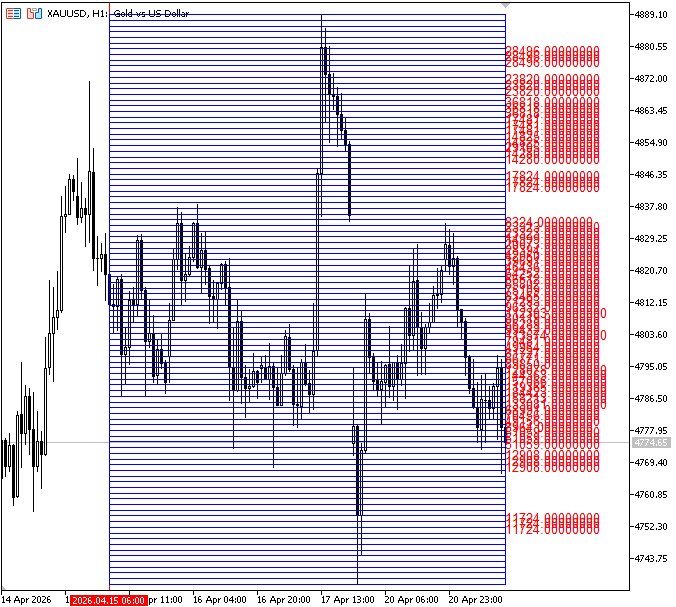
The price range is then separated into equal pieces called bins based on the highest and lowest values. A matching array is created and initialized to zero to hold volume numbers for each bin. We loop through each bin and calculate its price range using the minimum price, bin index, and step size to make sure each bin covers an equal portion of the whole price range. To make this process easier to see, we create a temporary rectangle for each bin on the chart. Each rectangle spans the whole lookback time horizontally, from the oldest candle to the most recent candle, and the bin's price range between its lower and higher boundaries vertically. This facilitates our observation of the segmentation of the price range.
Next, by looking over every candle in the lookback period, we explore deeper into each bin and determine the volume distribution. We start by going through each candle one by one. We take the close price of each candle and store it in a variable named c. Furthermore, we determine which bin the candle belongs to based on this close price.
The key condition here is the check:c >= lower - step && c <= upper + step
This condition establishes whether the close price of the candle is within the price range of the current bin. A bin should typically only be examined between its precise lower and upper bounds. Here, however, we add and subtract one step size to somewhat increase the range. This ensures that candles close to the margins are not overlooked because of little price fluctuations or rounding errors by creating an overlap between adjacent bins. To put it simply, it increases the flexibility of the bin borders such that no pertinent volume is excluded.
If the candle passes this condition, its volume is added to the current bin’s total. This means we are accumulating the total trading activity for all candles whose close prices fall within that bin’s effective range. To help visualize this process, a temporary text object is created on the chart. This object displays the current total volume of that bin in real time, updating as more candles are included. These visual elements are only for demonstration and are not part of the final indicator.
Drawing the Volume Profile and POC Lines
In this stage, we use POC lines to emphasize important liquidity levels and build the volume profile to graphically depict the computed volume distribution on the chart. To compare all bins on the same scale, we must first normalize the volume in each bin. Because calculations depend on the current symbol and timeframe, changing either requires recalculation so the drawn objects reflect the updated data.
Example:
//--- CONSTANTS
#define N_BINS          100    // Number of price levels (bins)
#define MAX_BAR_WIDTH   50     // Maximum horizontal width of profile
//+------------------------------------------------------------------+
//| Core calculation function                                        |
//| Builds and draws the volume profile                              |
//+------------------------------------------------------------------+
void RecalcVolumeProfile()
  {
//--- Exit early if both features are disabled
   if(!InpVolumeProfile && !InpLiqLevels)
      return;

   int totalBars = Bars(_Symbol, _Period);
   int lookback  = MathMin(InpLookback, totalBars - 1);

   if(lookback < 2)
      return;

//--- Prepare arrays for market data
   double   hi[], lo[], cl[];
   long     vol[];
   datetime tm[];

   ArraySetAsSeries(hi,true);
   ArraySetAsSeries(lo,true);
   ArraySetAsSeries(cl,true);
   ArraySetAsSeries(vol,true);
   ArraySetAsSeries(tm,true);

//--- Copy required data from terminal
   if(CopyHigh(_Symbol,_Period,0,lookback,hi)  < lookback)
      return;
   if(CopyLow(_Symbol,_Period,0,lookback,lo)  < lookback)
      return;
   if(CopyClose(_Symbol,_Period,0,lookback,cl)  < lookback)
      return;
   if(CopyTime(_Symbol,_Period,0,lookback,tm)  < lookback)
      return;
//--- Prefer tick volume, fallback to real volume
   if(CopyTickVolume(_Symbol,_Period,0,lookback,vol) < lookback)
      if(CopyRealVolume(_Symbol,_Period,0,lookback,vol) < lookback)
         return;

//--- Determine price range
   double priceMax = hi[ArrayMaximum(hi, 0, lookback)];
   double priceMin = lo[ArrayMinimum(lo, 0, lookback)];
   if(priceMax <= priceMin)
      return;

   int idxHigh = ArrayMaximum(hi, 0, lookback);
   int idxLow  = ArrayMinimum(lo, 0, lookback);

//--- Divide price range into bins
   double step = (priceMax - priceMin) / N_BINS;

//--- build bins
   double bins[];
   ArrayResize(bins, N_BINS);
   ArrayInitialize(bins, 0.0);

//--- Assign volume to bins
   for(int i = 0; i < N_BINS; i++)
     {
      double lower = priceMin + step * i;
      double upper = lower + step;
      for(int j = 0; j < lookback; j++)
        {
         double c = cl[j];
         if(c >= lower - step && c <= upper + step)
           {
            bins[i] += (double)vol[j];
           }
        }
     }

//--- Find maximum volume bin
   double maxBin = 0;
   for(int i = 0; i < N_BINS; i++)
      if(bins[i] > maxBin)
         maxBin = bins[i];
   if(maxBin == 0)
      return;

//--- Loop through bins and draw
   for(int i = 0; i < N_BINS; i++)
     {
      double lower = priceMin + step * i;
      double upper = lower + step;
      double mid   = (lower + upper) * 0.5;

      //--- Normalize bin width
      int val = (int)(bins[i] / maxBin * (double)MAX_BAR_WIDTH);
      if(val < 1)
         continue;
     }
Explanation:
To scale all other bins in relation to it, we must first identify the bin with the largest volume. First, we create a variable named maxBin and set it to zero. The largest volume value we discover across all bins will be stored here. We then go through each bin in turn. We compare the volume of each bin with the existing maxBin. Furthermore, we update maxBin with the value if the volume of the bin is greater. MaxBin has the highest volume value among all bins after this loop. Next, we verify if maxBin remains zero. If it is, we terminate the function to prevent needless computations because there is no volume data available.
We loop through all the bins again to prepare them for visualization on the chart. For each bin, we first calculate its price boundaries. The lower value is obtained by taking the minimum price and moving upward based on the bin index and step size. The upper value is simply one step above the lower boundary, defining the full price range of that bin. We also calculate the midpoint (mid) of the bin by averaging the lower and upper values. This midpoint will later be useful when placing POC (liquidity) lines at the center of strong volume areas.
After defining the price range, we move to normalizing the volume of each bin. This is done using the formula:
bins[i] / maxBin * MAX_BAR_WIDTH
Here, we compare the volume of each bin to the highest volume previously discovered. This guarantees that every bin is scaled relative to the strongest one. Next, a predetermined maximum width value is multiplied by the outcome. MAX BAR WIDTH serves two purposes: to prevent the largest volume bin from exceeding this limit, it first establishes the maximum visible width that a bin may have on the chart. Second, all other bins are rendered proportionately smaller or larger based on their volume, using it as a scaling guide.
This width limit is used not only for normalization but also for the volume profile's placement on the chart. To ensure that the entire drawing starts and ends at a distance from the candles under analysis, it is included as an offset to the lookback area. By preventing the volume profile from overlapping or interfering with the price bars, the chart is kept clear and readable while maintaining the accurate data range.
Example:
//+------------------------------------------------------------------+ //| Convert "bars ago" into actual chart time | //| This allows drawing objects into the past or future | //+------------------------------------------------------------------+ datetime BarsAgoToTime(const datetime ×[], int copiedBars, int barsAgo, long barDur) { //--- Case 1: within available history if(barsAgo >= 0 && barsAgo < copiedBars) return times[barsAgo]; //--- Case 2: future projection (negative index) if(barsAgo < 0) return (datetime)((long)times[0] - (long)barsAgo * barDur); // barsAgo is negative //--- Case 3: beyond copied range return (datetime)((long)times[copiedBars-1] - (long)(barsAgo - copiedBars + 1) * barDur); } //+------------------------------------------------------------------+ //| Create or update a rectangle (volume profile bar) | //| Returns true if a new object was created | //+------------------------------------------------------------------+ bool DrawBox(const string name, datetime x1, double yTop, datetime x2, double yBot, color fillCol) { bool created = false; //--- Create object only if it does not exist if(ObjectFind(0, name) < 0) { ObjectCreate(0, name, OBJ_RECTANGLE, 0, x1, yTop, x2, yBot); created = true; } //--- Update object properties ObjectSetInteger(0, name, OBJPROP_COLOR, fillCol); ObjectSetInteger(0, name, OBJPROP_BGCOLOR, fillCol); ObjectSetInteger(0, name, OBJPROP_FILL, true); ObjectSetInteger(0, name, OBJPROP_BACK, true); ObjectSetInteger(0, name, OBJPROP_SELECTABLE, false); ObjectSetInteger(0, name, OBJPROP_HIDDEN, true); //--- Update position ObjectMove(0, name, 0, x1, yTop); ObjectMove(0, name, 1, x2, yBot); return created; } //+------------------------------------------------------------------+ //| Delete all indicator objects | //+------------------------------------------------------------------+ void DeleteAllObjects() { for(int i = ObjectsTotal(0, 0, -1) - 1; i >= 0; i--) { string n = ObjectName(0, i, 0, -1); if(StringFind(n, OBJ_PREFIX) == 0) ObjectDelete(0, n); } } //+------------------------------------------------------------------+ //| Core calculation function | //| Builds and draws the volume profile | //+------------------------------------------------------------------+ void RecalcVolumeProfile(bool &need_redraw) { DeleteAllObjects(); //--- Exit early if both features are disabled if(!InpVolumeProfile && !InpLiqLevels) return; int totalBars = Bars(_Symbol, _Period); int lookback = MathMin(InpLookback, totalBars - 1); if(lookback < 2) return; //--- Prepare arrays for market data double hi[], lo[], cl[]; long vol[]; datetime tm[]; ArraySetAsSeries(hi,true); ArraySetAsSeries(lo,true); ArraySetAsSeries(cl,true); ArraySetAsSeries(vol,true); ArraySetAsSeries(tm,true); //--- Copy required data from terminal if(CopyHigh(_Symbol,_Period,0,lookback,hi) < lookback) return; if(CopyLow(_Symbol,_Period,0,lookback,lo) < lookback) return; if(CopyClose(_Symbol,_Period,0,lookback,cl) < lookback) return; if(CopyTime(_Symbol,_Period,0,lookback,tm) < lookback) return; //--- Prefer tick volume, fallback to real volume if(CopyTickVolume(_Symbol,_Period,0,lookback,vol) < lookback) if(CopyRealVolume(_Symbol,_Period,0,lookback,vol) < lookback) return; //--- Determine price range double priceMax = hi[ArrayMaximum(hi, 0, lookback)]; double priceMin = lo[ArrayMinimum(lo, 0, lookback)]; if(priceMax <= priceMin) return; int idxHigh = ArrayMaximum(hi, 0, lookback); int idxLow = ArrayMinimum(lo, 0, lookback); //--- Divide price range into bins double step = (priceMax - priceMin) / N_BINS; //--- build bins double bins[]; ArrayResize(bins, N_BINS); ArrayInitialize(bins, 0.0); //--- Assign volume to bins for(int i = 0; i < N_BINS; i++) { double lower = priceMin + step * i; double upper = lower + step; for(int j = 0; j < lookback; j++) { double c = cl[j]; if(c >= lower - step && c <= upper + step) { bins[i] += (double)vol[j]; } } } //--- Find maximum volume bin double maxBin = 0; for(int i = 0; i < N_BINS; i++) if(bins[i] > maxBin) maxBin = bins[i]; if(maxBin == 0) return; //--- Define drawing boundaries int profileLeftBarsAgo = lookback + MAX_BAR_WIDTH; long barDur = (long)PeriodSeconds(_Period); datetime profileLeftTime = BarsAgoToTime(tm, lookback, profileLeftBarsAgo, barDur); //--- Loop through bins and draw for(int i = 0; i < N_BINS; i++) { double lower = priceMin + step * i; double upper = lower + step; double mid = (lower + upper) * 0.5; //--- Normalize bin width int val = (int)(bins[i] / maxBin * (double)MAX_BAR_WIDTH); if(val < 1) continue; int profileRightBarsAgo = profileLeftBarsAgo - val; datetime profileRightTime = BarsAgoToTime(tm, lookback, profileRightBarsAgo, barDur); color box_line_clr = (val >= 40) ? clrBlue : (val > 30) ? clrGreen : (val > 20) ? clrGray : (val > 10) ? clrOlive : clrAquamarine; //--- Draw volume box if(InpVolumeProfile) { string boxName = OBJ_PREFIX + "BOX_" + IntegerToString(i); if(DrawBox(boxName, profileRightTime, upper, profileLeftTime, lower, box_line_clr)) need_redraw = true; } } } //+------------------------------------------------------------------+ //| Custom indicator initialization function | //+------------------------------------------------------------------+ int OnInit() { bool redraw = false; //--- Initial calculation so indicator appears immediately RecalcVolumeProfile(redraw); if(redraw) ChartRedraw(0); //--- return(INIT_SUCCEEDED); } //+------------------------------------------------------------------+ //| Deinitialization | //+------------------------------------------------------------------+ void OnDeinit(const int reason) { DeleteAllObjects(); } //+------------------------------------------------------------------+ //| Custom indicator iteration function | //+------------------------------------------------------------------+ int OnCalculate(const int32_t rates_total, const int32_t prev_calculated, const datetime &time[], const double &open[], const double &high[], const double &low[], const double &close[], const long &tick_volume[], const long &volume[], const int32_t &spread[]) { //--- bool need_redraw = false; //--- Recalculate only when new data arrives if(prev_calculated == 0 || rates_total != prev_calculated) RecalcVolumeProfile(need_redraw); //--- Redraw only if something changed if(need_redraw) ChartRedraw(0); //--- return value of prev_calculated for next call return(rates_total); } //+------------------------------------------------------------------+
Output:
Explanation:
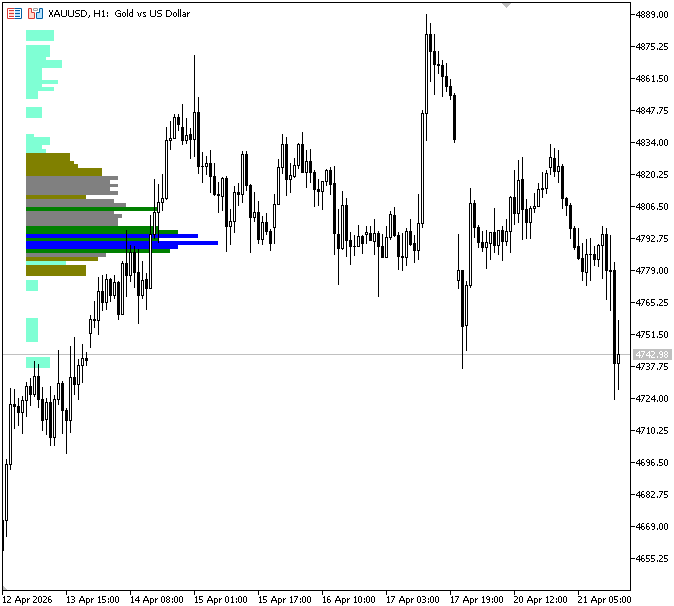
A number of bars can be represented by a value, which the BarsAgoToTime function translates into actual chart time. For instance, the function will take that bar offset and transform it into the precise time location on the chart where those five bars ahead or backward would occur if we specify five bars after the lookback. It works by using the available candle times when possible, but when we go beyond the available data, it uses the duration of each bar to estimate the correct time. This enables us to draw outside the current visible candle range while still precisely positioning things.
To create and update volume profile rectangles, DrawBox first determines whether an object already exists, creates one if it doesn't, and then continuously modifies the object's visibility and styling settings to make sure it stays correctly displayed on the chart. Finally, it returns whether a new object was created and updates the rectangle using the latest time and price coordinates.
The profileRightBarsAgo variable determines how far the right side of the box should be placed relative to the left side. It subtracts the normalized width (val) from the starting position (profileLeftBarsAgo), effectively controlling how wide each volume box will appear. The larger the volume, the bigger the value of val, and therefore the wider the box becomes. Then, profileRightTime uses the BarsAgoToTime function to translate this bar offset into an actual chart time. This makes it possible to accurately place the rectangle on the time axis even if it goes beyond the candle data that is shown. The box's strength (volume size) is then used to define its color. Stronger hues, such as blue or green, are given to higher-volume bins, whereas lighter hues are given to lower-volume bins.
If volume profile drawing is enabled, the code creates a unique name for each box and calls the drawing function. The rectangle is then drawn using the calculated time and price boundaries, and a flag is set to indicate that the chart needs to be updated. To determine whether a redraw is required, OnCalculate first sets a flag. The volume profile is then recalculated after determining if this is the first run or if additional price data has been received. Lastly, if any modifications were made, the chart is forced to refresh so that the revised drawings show up right away.
Next, we move on to drawing the POC lines, which highlight the key liquidity levels within the volume profile.
Example://--- CONSTANTS #define N_BINS 100 // Number of price levels (bins) #define MAX_BAR_WIDTH 50 // Maximum horizontal width of profile #define OBJ_PREFIX "VP_" // Prefix for all chart objects #define POC_THRESHOLD 25 // Threshold for drawing POC lines
//+------------------------------------------------------------------+
//| Create or update a horizontal POC (liquidity) line               |
//| Returns true if a new object was created                         |
//+------------------------------------------------------------------+
bool DrawTrend(const string name,
               datetime x1, double y,
               datetime x2,
               color col, int w)
  {
   bool created = false;
//--- Create only if missing
   if(ObjectFind(0, name) < 0)
     {
      ObjectCreate(0, name, OBJ_TREND, 0, x1, y, x2, y);
      created = true;
     }

//--- Update properties
   ObjectSetInteger(0, name, OBJPROP_COLOR, col);
   ObjectSetInteger(0, name, OBJPROP_WIDTH, w);
   ObjectSetInteger(0, name, OBJPROP_RAY_RIGHT, false);
   ObjectSetInteger(0, name, OBJPROP_BACK, true);
   ObjectSetInteger(0, name, OBJPROP_SELECTABLE, false);
   ObjectSetInteger(0, name, OBJPROP_HIDDEN, true);

//--- Update position
   ObjectMove(0, name, 0, x1, y);
   ObjectMove(0, name, 1, x2, y);

   return created;
  }
//--- Define drawing boundaries
int profileLeftBarsAgo = lookback + MAX_BAR_WIDTH;
long barDur = (long)PeriodSeconds(_Period);
datetime profileLeftTime = BarsAgoToTime(tm, lookback, profileLeftBarsAgo, barDur);

// POC right end = bar_index + 5 (5 bars into the future)
datetime pocRightTime = BarsAgoToTime(tm, lookback, -5, barDur);

//--- Loop through bins and draw
for(int i = 0; i < N_BINS; i++)
  {
   double lower = priceMin + step * i;
   double upper = lower + step;
   double mid   = (lower + upper) * 0.5;

//--- Normalize bin width
   int val = (int)(bins[i] / maxBin * (double)MAX_BAR_WIDTH);
   if(val < 1)
      continue;

   int profileRightBarsAgo = profileLeftBarsAgo - val;
   datetime profileRightTime  = BarsAgoToTime(tm, lookback, profileRightBarsAgo, barDur);
   color    box_line_clr   = (val >= 40) ? clrBlue : (val > 30) ? clrGreen : (val > 20) ? clrGray : (val > 10) ? clrOlive : clrAquamarine;

//--- Draw volume box
   if(InpVolumeProfile)
     {
      string boxName = OBJ_PREFIX + "BOX_" + IntegerToString(i);
      if(DrawBox(boxName, profileRightTime, upper, profileLeftTime, lower, box_line_clr))
         need_redraw = true;
     }

//--- Draw POC line for strong bins
// POC lines for high-volume bins
   if(val > POC_THRESHOLD && InpLiqLevels)
     {
      string lineName = OBJ_PREFIX + "POC_" + IntegerToString(i);
      int    lineW   = (val > 45) ? 3 : (val > 35) ? 2 : 1;
      if(DrawTrend(lineName, pocRightTime, mid, profileLeftTime, box_line_clr, lineW))
         need_redraw = true;
     }
  }

//--Border right = bar_index + 5 (same as POC)
datetime borderRightTime = pocRightTime;
datetime borderLeftTime = BarsAgoToTime(tm, lookback,
                                        profileLeftBarsAgo + MAX_BAR_WIDTH, barDur);
//--- outer border box
if(DrawBox(OBJ_PREFIX+"BORDER", borderRightTime, priceMax, borderLeftTime, priceMin, clrSnow))
   need_redraw = true;
Output:
Explanation:
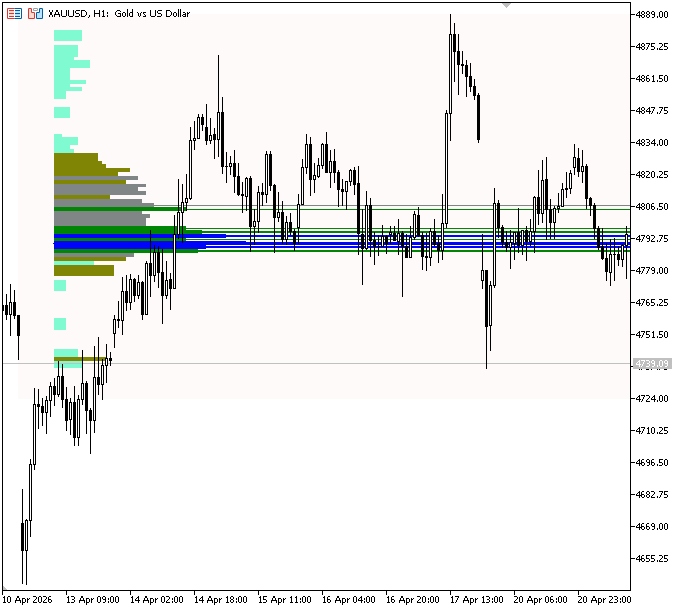
The POC_THRESHOLD is a fixed value used to decide which volume bins are strong enough to be considered significant liquidity levels. Only bins whose normalized volume exceeds this threshold will have POC lines drawn, helping to highlight areas of high trading activity while filtering out weaker zones. The DrawTrend function is used to draw the POC as a horizontal line, creating it if it doesn't already exist and updating its width, color, and position to match the most recent liquidity level while keeping it in the background. By projecting five bars into the future, the line datetime pocRightTime = BarsAgoToTime(tm, lookback, -5, barDur); establishes the right endpoint of the POC lines. The function uses bar duration to convert the negative value, which indicates that we are moving past the current candles, into a valid future tense.
POC lines are then only drawn when liquidity levels are enabled and for bins that surpass the POC_THRESHOLD. High-volume areas are more noticeable because each line has a distinct name, and its width is determined by volume strength. Key liquidity zones are highlighted by drawing a line from the future time point to the midpoint of the bin. Finally, the border box aligns using the same future offset as the POC lines. A rectangle is created around the highest and lowest prices to frame the whole volume distribution, and the left side is extended beyond the lookback to completely cover the profile region.
Conclusion
Following the described design and engineering fixes, you get a complete, practical Liquidity Spectrum Volume Profile for MetaTrader 5 that is testable and configurable. The indicator:
- divides the lookback high/low range into configurable bins and assigns volume by candle close (tick volume preferred, real volume fallback);
- normalizes bin volumes and scales rectangles to a configurable maximum width to highlight relative strength;
- draws the profile as filled rectangles and highlights significant bins with Point-of-Control (POC) horizontal lines using a configurable threshold and width;
- uses barsAgo→datetime conversion to place drawings correctly in time (including a small projection into the future for visibility);
- manages chart objects safely using a unique prefix (so it does not delete other users' objects) and updates only when new data arrives;
- exposes parameters (lookback, number of bins, max width, POC threshold, toggles for profile/POC) so you can adapt behavior without rewriting logic.
Acceptance criteria for the implementation are straightforward: the profile and POC lines appear adjacent to the lookback zone, objects carry the indicator prefix, the indicator recalculates on new bars only, and removing the indicator cleans up only its own objects. The article provides a reproducible code structure (data retrieval → bins and accumulation → normalization → drawing utilities) and highlights practical improvements (prefix cleanup, explicit assumptions, and time-offset handling) that make the indicator reliable in real trading charts.
The project is supported on Algo Forge.
Warning: All rights to these materials are reserved by MetaQuotes Ltd. Copying or reprinting of these materials in whole or in part is prohibited.
This article was written by a user of the site and reflects their personal views. MetaQuotes Ltd is not responsible for the accuracy of the information presented, nor for any consequences resulting from the use of the solutions, strategies or recommendations described.

 Recurrence Quantification Analysis (RQA) in MQL5: Building a Complete Analysis Library
 Mining Central Bank Balance Sheet Data to Get a Picture of Global Liquidity
 CFTC Data Mining in Python and Building an AI Model
 MQL5 Wizard Techniques you should know (Part 87): Volatility-Scaled Money Management with Monotonic Queue in MQL5

- Free trading apps
- Over 8,000 signals for copying
- Economic news for exploring financial markets
You agree to website policy and terms of use
🥰🥰🥰