Rotation Manager Console

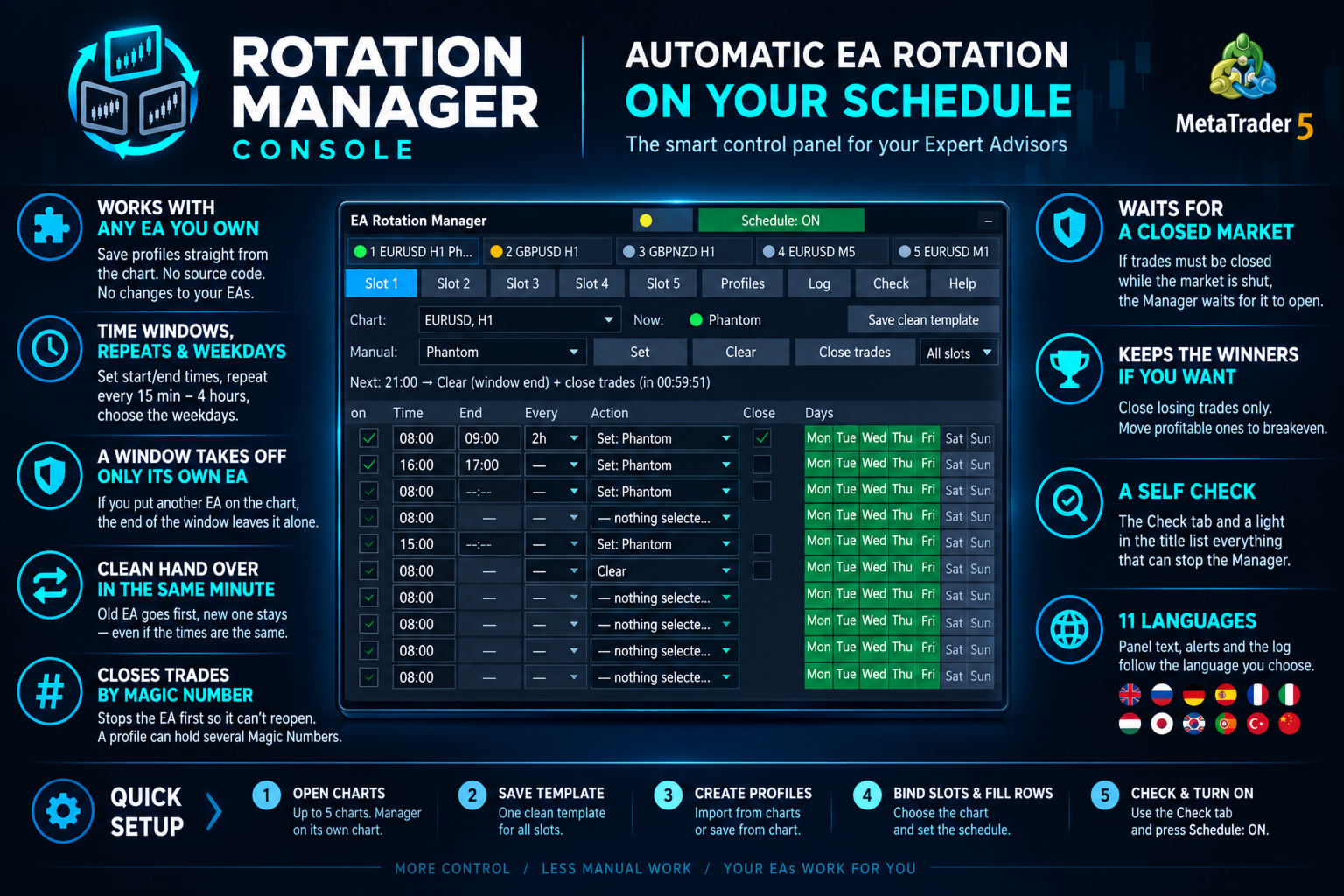
Put the right Expert Advisor on the right chart at the right hour, take it off when its session ends, and close its trades by Magic Number in the same step, without touching a chart. Rotation Manager Console works with the EAs you already own, with no source code and no changes to them: you save each one as a profile straight from its chart, write a schedule with time windows, repeats and weekdays, and the panel rotates them for you, in English, Russian, German, Spanish, French, Italian, Japanese, Korean, Portuguese, Turkish or Chinese.

Need customization? Write to me in a private message or in the comments.

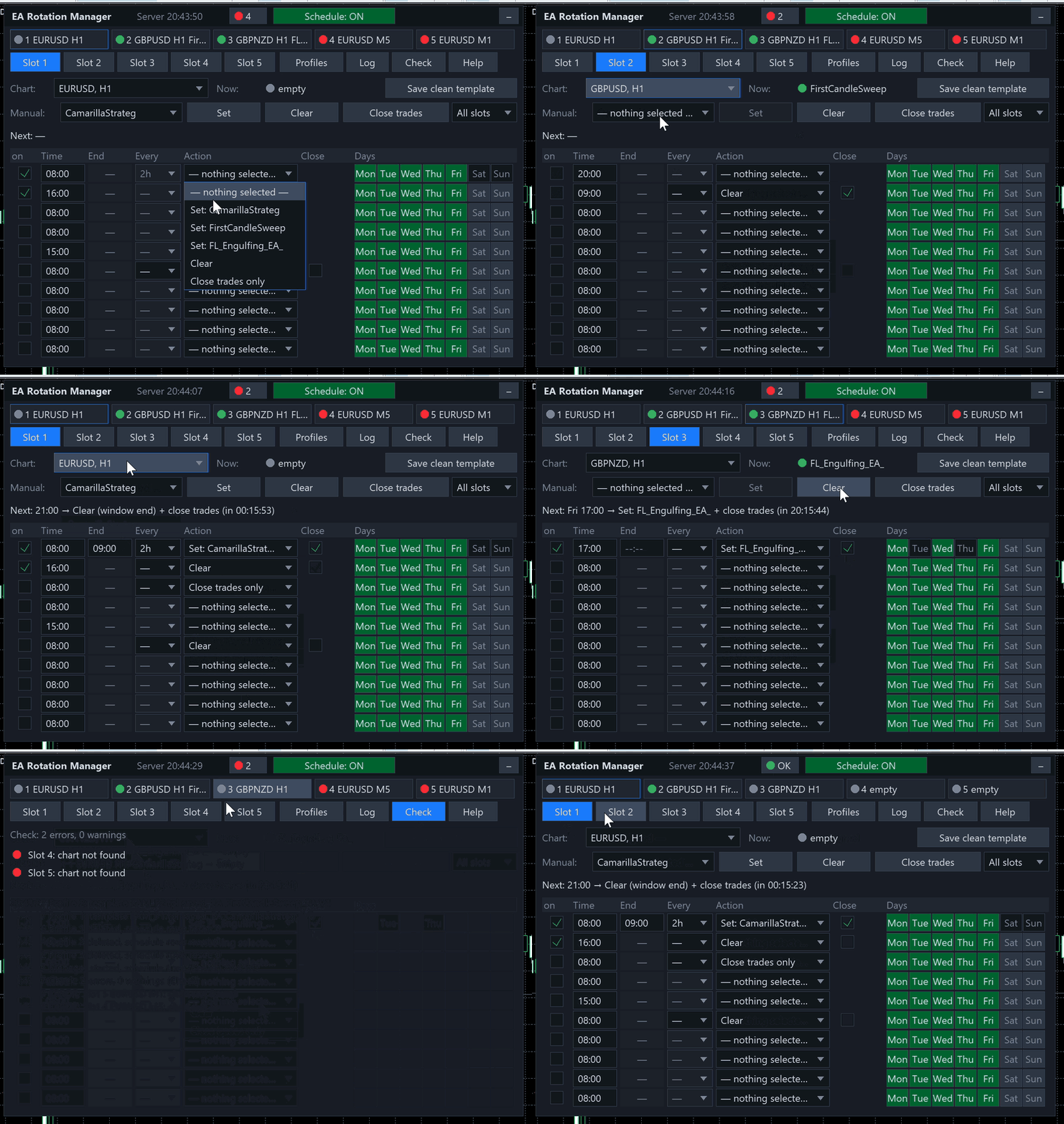
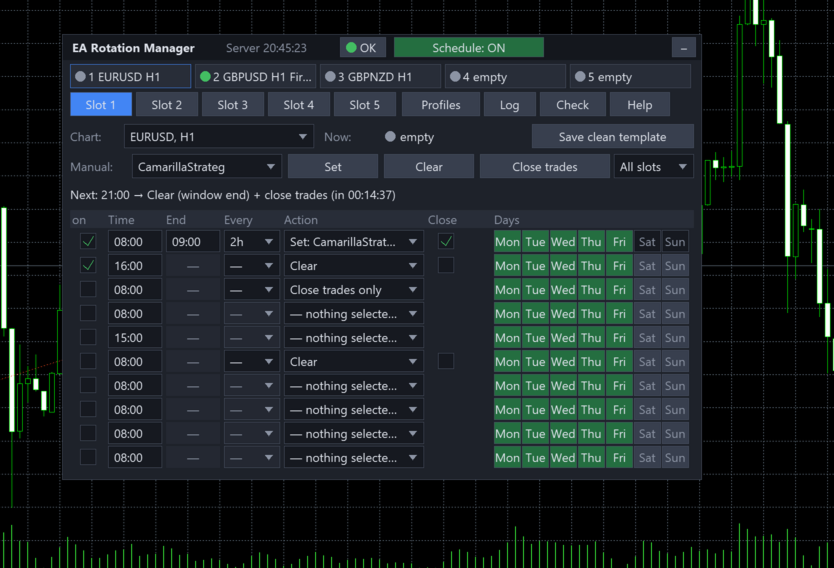
Rotation Manager Console is a control panel on a chart of its own. You bind up to five slots to charts that are already open, save up to ten EAs as profiles and give every slot ten schedule rows. A row can put a profile on for a window, for example from 08:00 to 12:30, repeat during the day, run only on the weekdays you pick, or clear the chart and close the trades. The panel does the swapping while you do something else.

It does not trade by itself and has no strategy of its own. It never opens or closes charts, and it never touches a trade whose Magic Number does not belong to the profile it is closing.

What sets it apart

Feature Why it matters
Works with any EA you own profiles are saved from the chart itself, so no source code and no changes to the EA are needed
Time windows, repeats and weekdays a row puts a profile on at its start, takes it off at its end, can repeat every 15 minutes up to every 4 hours and can be limited to chosen weekdays
A window takes off only its own EA if you or another row put a different EA on the chart during the window, the end of the window leaves it alone
Clean hand over in the same minute when one window ends at 12:00 and the next EA starts at 12:00, the old one goes first and the new one stays
Closes trades by Magic Number the EA is taken off first so it cannot reopen what you are closing; a profile can hold several Magic Numbers
Waits for a closed market if trades must be closed while the market is shut, the Manager waits for it to open instead of giving up
Keeps the winners if you want one input switches closing to losing trades only, with the profitable ones moved to breakeven
A self check the Check tab and a light in the title list everything that can stop the Manager from working
11 languages panel text, alerts and the log follow the language you choose in the inputs

Setting it up

  • Open your charts. Open the charts you want to control, up to five. The Manager sits on a chart of its own.
  • Save the clean template once. Press Save clean template. It stores a chart without an EA, and the same template serves every slot.
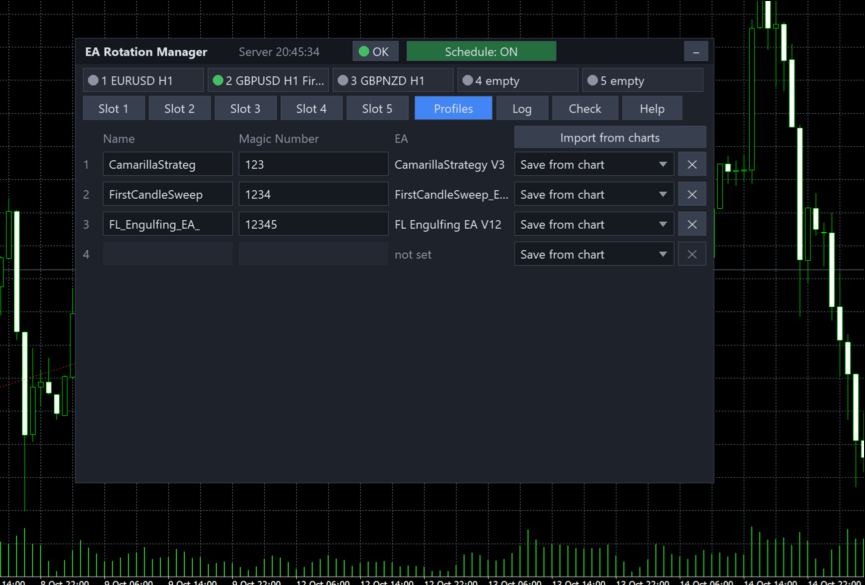
  • Create the profiles. On the Profiles tab press Import from charts to pick up every running EA at once, or Save from chart for a single EA. A chart without an EA gives an indicators only profile.
  • Type the Magic Numbers. Enter the Magic Number of each EA, several separated by commas if the EA uses more than one. They must not repeat between profiles.
  • Bind the slots and fill the rows. On a slot tab choose the chart from the list, then fill the schedule rows.
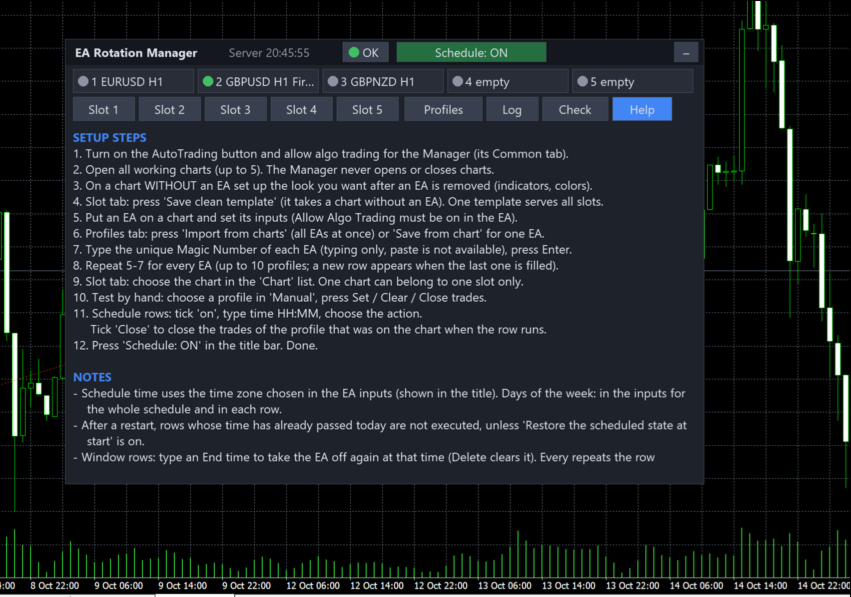
  • Check and switch on. Look at the Check tab, then press Schedule: ON in the title bar. The Help tab repeats these steps inside the panel.

The schedule

Every slot has ten rows. Slots work independently of each other, and the rows of one slot run in time order.

Column What it does
on the row is active
Time start time, HH:MM in the time zone chosen in the inputs
End for a Set row only: when the profile is taken off again; empty means no end
Every repeat the row every 15 or 30 minutes, every hour, every 2 or 4 hours
Action set a profile, clear the chart, or close trades only
Close close trades as well: at the start and at the end, or, after a second click on a window row (blue mark), only at the end
Days weekdays of this row, on top of the days allowed in the inputs
Action What happens
Set the EA of that profile is attached and replaces whatever stood on the chart; with an end time it is taken off again at the end, but only if it is still on the chart
Clear the EA is taken off with the clean template and the chart stays empty
Close trades only the EA stays on the chart and only the trades that were open at that moment are closed

A window longer than its repeat interval is merged into one window, and the Check tab says so. The manual row does the same by hand: Clear and Close trades ask for a confirmation, and All slots applies an action to every slot at once.

How a switch runs

  • Take off. The clean template removes the old EA, so nothing new is opened while trades are being closed.
  • Close. Positions and pending orders with the Magic Numbers of the old profile are closed, with a pause between attempts, until none is left.
  • Attach. The template of the new profile is applied to the chart.
  • Verify. The panel checks the EA name, the symbol and the timeframe, and restores the symbol and timeframe if a template changed them.

Every step has its own timeout and a number of retries, and a failure is shown in red with the reason in the log. If trades cannot be closed during a switch, the new profile is still attached and you get an error alert, so the chart does not stay empty by accident.

Closing trades safely

  • Only positions and pending orders that carry the profile's Magic Numbers are touched. Other EAs and your manual trades stay as they are.
  • When the EA stays on the chart, as with Close trades only, just the trades that were open at the moment of the command are closed, so a running EA cannot keep the closing busy.
  • If the market is closed, the Manager asks the broker again every 30 seconds until it opens, up to the limit set in the inputs, 96 hours by default.
  • Hedging and netting accounts are handled the same way, and the filling mode is chosen for each symbol.
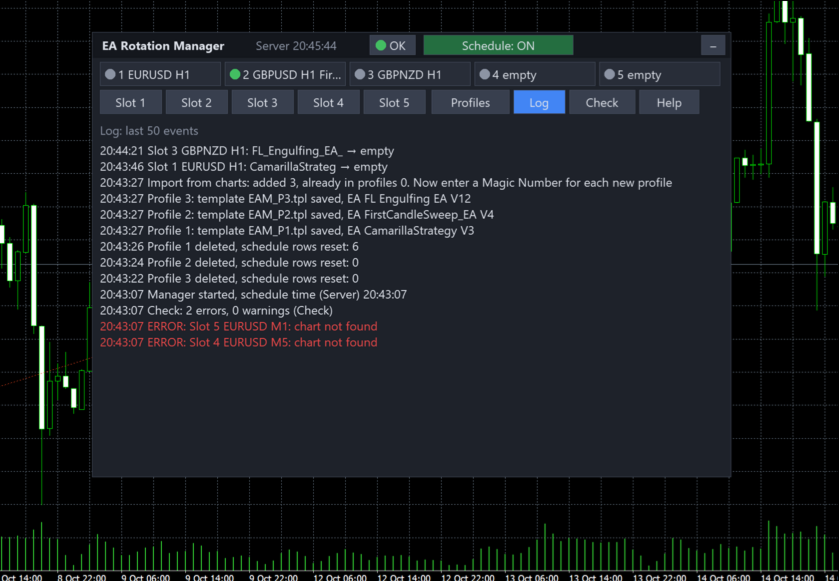
  • The log records how many positions were closed, how many orders were deleted, how many trades were kept at breakeven and their result including swap and commission.

The input What closing trades does chooses what closing means:

Value What happens
Close all trades of the profile every position and pending order with the profile's Magic Numbers is closed; this is the default
Close losing trades, move profitable ones to breakeven losing positions are closed, profitable ones keep running with the stop moved to the entry price plus the offset from the inputs; a stop the broker refuses is reported in the log

After a restart

By default nothing missed is replayed: a row whose time passed while the terminal was closed does not run. With the input Restore the scheduled state at start every slot gets the state its schedule says it should be in now, the EA of the current window or an empty chart, and no trades are closed while doing so.

The panel

Tab What it holds
Slot 1 … Slot 5 the chart of the slot, what runs on it now, manual buttons, the next event with a countdown and the ten schedule rows
Profiles up to ten profiles with names, Magic Numbers and the EA; a new row appears when the last one is filled
Log the last 50 events with time, slot and result, errors in red
Check everything that can stop the Manager from working, errors in red and warnings in yellow
Help setup steps and notes in your language

The strip at the top shows all five slots at a glance. The panel can be dragged by its title, collapsed to one line, and it remembers its place. It follows the screen DPI, the zoom input adds 50 to 200 percent, and on a small chart it shrinks to fit, down to 60 percent.

Dot Meaning
green the profile is on the chart and running
grey no EA on the chart
yellow a switch is running, the slot is waiting for the market, or the EA's profile has no Magic Number yet
red chart not found, duplicate chart or an error
blue an EA that is not in your profiles stands on the chart

Settings

Group What you choose
Language the language of the panel, alerts and log, English by default
Time zone broker server time, local computer time or a custom UTC offset in hours
Schedule restore the scheduled state at start, off by default
Days of the week Monday to Sunday, Monday to Friday by default
Alerts popup, push and e-mail channels, with separate switches for successful switches, closed trades and errors; the same error at most once a minute; repeating rows send no switch alerts
Closing trades slippage, 10 points; what closing does; breakeven offset, 0 points; how long to wait for a closed market, 96 hours
Retries the number of retries, 3, and the timeout of one step, 15 seconds
Interface zoom and the starting corner of the panel
Misc the prefix of the file and template names

Languages

English, Русский, Deutsch, Español, Français, Italiano, 日本語, 한국어, Português, Türkçe and 中文. Changing the language restarts the EA; profiles and schedule are kept in a file and come back as they were.

What it does not do

  • It does not trade and has no strategy. It does not open or close charts: every slot is bound to a chart you opened yourself.
  • It needs the terminal to be running. Missed actions are not replayed afterwards; the restore option brings back only the current state.
  • A template replaces the look of the chart as a whole, and an EA starts from scratch each time it is attached, so grids and counters inside the EA are reset.
  • Each EA needs its own Magic Number. Two profiles must not hold the same EA file, because the Manager recognises the EA on a chart by its name; the panel marks such a pair.
  • Magic Numbers are typed with the keyboard. Pasting from the clipboard is not available.
  • AutoTrading must be on in the terminal, and algo trading must be allowed for the Manager and in the saved EA templates, otherwise trades cannot be closed and the EAs will not trade.
  • It does not work in the Strategy Tester, which cannot apply templates: there it starts and stays idle. Try it on a demo account in real time.
  • An indicators only profile has no EA and no Magic Number: it changes the look of the chart and closes nothing.
  • A breakeven stop is set only where the broker accepts it, and a commission charged on exit is known only after the trade is closed.
  • If the clean template is deleted from the terminal's template folder, removing an EA fails with an error in the log until you save it again.
Recommended products
TiltGuard Enforcer
Muhammad Naveed Hassan
Set your daily loss, drawdown and over-trading limits once. TiltGuard Enforcer measures live equity against them second by second and locks the account the moment a limit is reached. Built for funded accounts, evaluations and any written rule set where one number ends the account. It does not trade, does not give signals, and never stops you from closing a position you already hold. Developed and proven on live charts with real positions. Every screenshot on this page is from a live run. Key Fea
EaInfoMaster
Dustin Ricardo Pierenz
EA Info Display Master Stop clicking through charts to find your EA configurations! Get a complete overview of all running Expert Advisors with their symbols and magic numbers in seconds. Managing multiple EAs across different symbols? Monitoring performance on FX Blue or other platforms? This tool instantly displays: All running EA names Their symbols and magic numbers Account details (number, broker, currency) Direct FX Blue statistics links (other provider will follow! Tell me what you need)

Bober Real MT5
Arnold Bobrinskii
4.88 (16)
Bober Real MT5 is a fully automatic Forex trading Expert Advisor. This robot was made in 2014 year and did a lot of profitbale trades during this period. So far over 7000% growth on my personal account. There was many updates but 2019 update is the best one. The robot can run on any instrument, but the results are better with EURGBP, GBPUSD, on the M5 timeframe. Robot doesn't show good results in tester or live account if you run incorrect sets. Set files for Live accounts availible only for cu
Multi Account Trade Desk MT5 ## Short description Account-wide MASTER-to-SLAVE trade copier for MetaTrader 5 with per-account risk sizing, automatic broker symbol matching, live readiness monitoring and parallel execution. ## Product description Multi Account Trade Desk MT5 is built for traders who manage several MT5 accounts and want one central place to control risk, account readiness and trade replication. Attach the same EA as MASTER on the source terminal and as SLAVE on every target
Introducing Neural Bitcoin Impulse - an innovative trading bot created using neural network training technology on voluminous market data sets. The built-in mathematical model of artificial intelligence searches for the potential impulse of each next market bar and uses the resulting patterns of divergence and convergence between the predictive indicators and the price to form high-precision reversal points for opening trading positions. The trading robot is based on the Neural Bar Impulse ind
Trade Plan Desk MT5 is a trade planning and control dashboard designed to structure every decision before execution. Define your direction, Entry, Stop Loss, Take Profit and risk. The tool calculates the appropriate volume, planned risk-to-reward ratio and performs a complete broker-aware preflight before execution. Main features: • Entry / Stop Loss / Take Profit planning • Risk by percentage or amount • Automatic broker-aware position sizing • PASS / WARNING / FAIL pre-trade checks • Spread
BulkOp Trade Manager
Ahmed Jumaa Saif Ali Almheiri
BulkOp Trade Manager Trade faster. Manage smarter. Close with confidence. BulkOp Trade Manager is a powerful MT5 utility EA built for traders who need speed, control, and clean execution directly from the chart. It is designed for active manual traders, scalpers, gold traders, and anyone who wants to manage multiple positions with less delay and fewer clicks. Why BulkOp? Ultra-fast Buy and Sell execution One-click Bulk Close Profit One-click Bulk Close Loss Keyboard trading control Bulk order e
ATRStopLoss
Maksim Zakharov
The ATRStopLoss Expert Advisor determines where best to put a stop relative to the current price. How it works ATRStopLoss gets the size of ATR for the selected period ATRStopLoss draws Stop-Loss levels from the current price with the size of the ATR. As the price and the timeframe change, ATRStopLoss also adjusts the Stop-Loss levels. Settings MA_Period - period of the ATR MA_Timeframe - ATR timeframe
AutoCloseTPSL
Calvin Andrew Jenkins
Expert advisor that automatically closes all open positions when a specific profit amount or loss amount is reached. The profit and loss amounts are configurable inputs and can be set when attaching the EA to a chart. This EA has proven to be useful in high quantity trading strategies to control and minimize risk. The EA works for all account currencies and is designed to close out all trades once the desired profit or loss is hit.
EA Risk Inspector is a professional MetaTrader 5 dashboard for reviewing the live risk created by Expert Advisors and open positions. It groups exposure by Magic Number and strategy context, highlights missing protection and presents account-level concentration in a transparent operational view. MAIN FEATURES • Position and EA grouping by Magic Number • Stop Loss validity and uncovered-exposure checks • Strategy-level risk and position summaries • Symbol and directional concentration analysis •
Global Stop Loss and Take Profit Manager Drag Lines Auto Apply Already using my free Global Stop Loss and Take Profit Setter? This is the always on version. Instead of setting levels once, you drag two lines on the chart and every manual position on that symbol — plus every new one you open — instantly inherits the Stop Loss and Take Profit. No clicking into each order. No forgetting a stop. Global Stop Loss and Target Manager is a drag-and-drop risk tool for manual traders on MetaTrader 5. Pu
Keys Close
Zakaria El Findali
The E.A listens for keyboard events and performs specific actions based on the keys that are pressed. When the "C" key is pressed, the script iterates through all open positions and closes them. When the "D" key is pressed, the script iterates through all pending orders and deletes them. This E.A could be useful for traders who want to quickly close all open positions or delete all pending orders with a single keystroke. and specially in times of strong news.  if you are SCALPER facing many Prof
Trade Manager Simple
Juan Andres Montoya Robledo
Trade Manager Simple NQ and XAUUSD — Manual Trading Panel and Local Replicator Open the trade once. Your other MT5 terminals open it on their own, each with the lot size that fits that account. TMS is two tools in one: a panel for trading by hand with your risk under control, and a replicator that copies your entries to every other MetaTrader 5 terminal running on the same computer. No VPS, no signal service, no connection between brokers. The terminals talk through MetaTrader's shared folder,
Aurum Intraday EA
Rodrigo Leonardo Favreau Giuliodoro
Aurum Intraday EA – Advanced Gold Trading Algorithm The Aurum Intraday EA is a powerful automated trading system designed specifically for Gold (XAUUSD) traders who want to capture strong intraday movements while maintaining full control over risk and strategy configuration. Built with a robust algorithm and optimized for H1 and H4 timeframes (H4 recommended) , this Expert Advisor is capable of identifying high-probability opportunities in the gold market and executing trades with precision and
Basic working principles of EA will have 2 main systems. 1. Timed order opening means that at the specified time the EA will open 1 Buy order and 1 Sell order. 2. When the graph is strong, the EA will remember the speed of the graph. is the number of points per second which can be determined You can set the number of orders in the function ( Loop Order ). The order closing system uses the trailling moneym Loss system, but I set it as a percentage to make it easier to calculate when the capital
Grid10 Gold Scalper Short description Gold (XAUUSD) scalper that buys pullbacks in the direction of the long-term trend, adds a small averaging grid and closes the whole basket at a fixed profit from its average price. Description Grid10 Gold Scalper is an Expert Advisor made only for GOLD / XAUUSD. It runs two independent units inside one EA — an M5 unit and an M15 unit — and works the same on any chart timeframe. Attach it to one GOLD chart and it is ready to trade. How it t
Apexy Engine
Salatiel Pereira Da Silva
Apex Engine HFT is a high-performance execution and data-processing layer engineered for MetaTrader 5 algotraders and institutional developers who require deterministic processing speed during high-volatility market events (such as CPI, FOMC, and Payroll). The architecture is built with ultra-optimized, sequential data structures, eliminating overhead and ensuring maximum execution safety through an active embedded checksum loop. Official Bare-Metal Benchmark Results (Validated on dual-core har
Neopips Engine EA
Md Billal Hossain
NeoPips Engine EA – The Ultimate Trading Revolution Has Arrived! “The real power of trading lies in seeing what others miss. NeoPips Engine doesn’t follow the market — it masters it.” About NeoPips Engine EA: Your Intelligent Trading Ally NeoPips Engine EA is not your average trading robot. It’s a multi-dimensional, AI-optimized expert advisor crafted for traders who demand precision, adaptability, and long-term performance. Unlike outdated bots with rigid rules, NeoPips Engine is a livin
Auto Screenshot Utility MT5
AL MOOSAWI ABDULLAH JAFFER BAQER
The trading limiter that stops you from breaking your own daily loss and trade limits. • Please test the product in the Strategy Tester before purchasing to understand how it works. • If you face any issues, contact me via private message—I’m always available to help. • After purchase, send me a screenshot of your order to receive a   FREE EA   as a gift. Auto Screenshot Utility - The Ultimate Trading Session Tracker & Screenshot Tool Revolutionize Your Trading Documentation with Precision Tim
Equity Target and Basket Closer closes a group of positions and pending orders when a profit target or a loss limit is reached. Choose what to watch — the whole account, the chart symbol or selected magic numbers — and set the target in money or percent. Key features Scope: whole account, chart symbol, or a comma-separated list of magic numbers. Metrics: floating profit, realized daily profit, equity change, or absolute account equity. Targets in deposit currency or percent of the selected start
Black Viper GOLD
Ignacio Agustin Mene Franco
Black Viper GOLD v2.0 — Expert Advisor MT5 Pair: XAU/USD | Timeframe: M1 (Scalping) | Minimum Capital: $1,000 USD Overview Black Viper GOLD is a professional Expert Advisor for MetaTrader 5, specifically designed to trade the XAU/USD pair on the M1 timeframe using a high-precision scalping strategy. It combines four advanced technical analysis systems with dynamic risk management, session filters, and an aggressive turbo mode, all within a robust framework focused on capital preservation. In
The Automatic Order Management Panel for MetaTrader 5 is an advanced tool designed for professional traders, offering convenient and efficient management of all types of orders on the MT5 platform. The panel is inspired by professional order management systems used in institutional trading terminals, offering a seamless and fast trading experience. Key Features: Supports all types of orders: The panel handles market orders (buy/sell), as well as all types of pending orders such as: Buy Limit Se
EA Hedger MT5
Sergej Chukhista
3 (2)
Have you bought a trading advisor, subscribed to a signal, or are you trading manually ?! Don't forget about risk management. EA Hedger   is a professional trading utility with many settings that allows you to manage risks using hedging. Hedging is a trading technique that involves opening opposite positions to those already open positions. With the help of hedging, the position can be completely or partially blocked (locked). For example, you have three open positions on your account: EURUSD b
SolarTrade Suite Financial Robot: LaunchPad Market Expert - designed to open trades! This is a trading robot that uses special innovative and advanced algorithms to calculate its values, Your Assistant in the World of Financial Markets. Use our set of indicators from the SolarTrade Suite series to better choose the moment to launch this robot. Check out our other products from the SolarTrade Suite series at the bottom of the description. Do you want to confidently navigate the world of inves
Sniper FVG
Ignacio Agustin Mene Franco
Sniper FVG XAU – Professional Trading Expert Sniper FVG is a high-precision trading system developed for trading the Gold (XAUUSD) market on the M1 timeframe. Combining three powerful pillars of modern price action: Price Action Patterns (3 White Soldiers, 3 Black Crows, and filtered Spinning Tops) Fair Value Gaps (FVG) with intelligent detection of unfilled gaps High-quality Supply & Demand Zones The EA identifies high-probability opportunities with a very controlled risk structure, seeking
Breakeven Quick SL
Makarii Gubaydullin
Breakeven levels: move SL in just 1 click. Avoid  losing  existing  profit Using   this   utility ,   you   can   quickly  protect your profit  in just 1 click. Especially   important  for a  short -term   trading.  Offset option is also available. Multifunctional utility : 66+ features, including this tool  |   Contact me  if you have any questions  |   MT4 version How to move SL levels: 1. Specify a specific   [Symbol] , or select   [ALL]   Symbols. 2. Select the   trade type   for which you
GPA_Smart_Risk_Manager Complete User Guide   PRODUCT OVERVIEW GPA_Smart_Risk_Manager is a professional-grade, all-in-one trading panel and autonomous risk management Expert Advisor for MetaTrader 5. It combines rapid one-click execution, intelligent position sizing, autonomous risk compounding, ATR-based protection, dynamic volatility adjustment, and multi-layered safety controls into a single, modern, on-chart control centre. Designed for discretionary traders, scalpers, day traders, and swing
HedgeSafe Trade Assistant A risk-first manual trading panel for MetaTrader 5. HedgeSafe helps you prepare, validate and manage a trade directly on the chart before you press BUY or SELL. HedgeSafe is not a signal service, market predictor, AI bot or automatic strategy. It does not choose trade direction and does not promise profit. You remain in control of every trading decision. Main capabilities Lot calculation from a percentage of account balance or a fixed amount in account currency. Stop Lo
Instructions for Using Reverse Copier EA Attach EA to Charts Open MetaTrader and attach the EA to any chart on both accounts (master & slave). Make sure AutoTrading is enabled. Master Account (Signal Sender) Set Mode = Master in EA settings. This account will send trade signals. Slave Account (Signal Receiver) Set Mode = Slave in EA settings. This account will receive trades in reverse (opposite direction). Lot Multiplier In Slave EA settings, set Multiplier to control lot size. Example: 1.0
Gold Impulse Engine
Maricel Villanueva
Built for traders who refuse to give up — a disciplined impulse‑breakout engine for XAUUSD with real SL/TP, full protection, and a mission to help traders succeed in this career. Gold trading is one of the most unforgiving paths a trader can choose — but also one of the most rewarding. Gold Impulse Engine was created with a simple motivation: to give traders a structured, disciplined tool that supports their journey toward becoming consistently profitable in this chosen career. Gold moves in bur
Buyers of this product also purchase
Trade Assistant MT5
Evgeniy Kravchenko
4.43 (216)
It helps to calculate the risk per trade, the easy installation of a new order, order management with partial closing functions, trailing stop of 7 types and other useful functions. Additional materials and instructions Installation instructions - Application instructions - Trial version of the application for a demo account Line function -   shows on the chart the Opening line, Stop Loss, Take Profit. With this function it is easy to set a new order and see its additional characteristics bef
Forex Trade Manager MT5
InvestSoft
4.98 (687)
Trade Manager MT5 is an advanced position size calculator and trade management tool for MetaTrader 5, designed to help traders plan trades faster, control risk more precisely, and manage open positions directly from the chart. It combines order placement, risk based lot calculation, Stop Loss and Take Profit management, Break Even, Trailing Stop, Partial Close, Equity Protection, and external trade management in one panel. Whether you trade forex, indices, metals, commodities, crypto, or future
Local Trade Copier EA MT5
Juvenille Emperor Limited
4.94 (149)
Local Trade Copier EA MT5 is a fast and flexible trade copier for copying and managing trades between multiple MetaTrader 5 accounts on the same Windows computer or Windows VPS. It combines local trade synchronization with Receiver-side controls for lot sizing, risk management, trade filtering, symbol mapping, trade management and account protection. Set up your Transmitter and Receiver terminals in about 1 minute and copy manual or EA trades between accounts at the same or different brokers. U
================================================================================ POC BREAKOUT - V20.72. Full Professional Grade Toolkit ================================================================================ POC Breakout is a full MetaTrader 5 trading dashboard for discretionary traders who want breakout signals, Point of Control (POC) context, volume profiles, order flow, market structure, news, alerts, and advanced trade planning in one professional workspace. Attached directly to you
Telegram to MT5 MultiChannel Copier
Sergio Marquez Uroz
4.65 (20)
Telegram to MT5 Multi-Channel Copier   automatically copies trading signals from your Telegram and Discord channels straight to MetaTrader 5. No bots, no browser extensions, no manual copying. A signal arrives in Telegram or Discord and the EA opens the trade in your terminal within seconds. And before you copy a channel, the built-in backtester shows you what that channel would have done in your account. The product has two components: a Windows application that listens to your Telegram channel
Copy Telegram signals with your own trading rules Telegram to MT5 Signal Trader automatically copies text-based trading signals from public and private Telegram channels and groups into MetaTrader 5. Manage multiple providers and MT5 accounts from one desktop app, with individual risk and trade settings for each provider . No Telegram bot or API setup needed for copying. Simply sign in with your own Telegram account by phone or QR code and select the channels or groups you have already joined. Y
TradePanel MT5
Alfiya Fazylova
4.88 (170)
Trade Panel is a multi-functional trading assistant. The app contains over 50 trading functions for manual trading and allows you to automate most trading tasks. Application instructions: https://www.mql5.com/en/blogs/post/756482 Trial version of the application for a demo account: https://www.mql5.com/en/blogs/post/750865 How to install the application: https://www.mql5.com/en/blogs/post/756239 How to test the application in visual mode: https://www.mql5.com/en/blogs/post/770277 How to install
FarmedHedge Pair Trading Dashboard
Tanapisit Tepawarapruek
5 (6)
Farmed Hedge Yield Farming | All Markets (Manual - Hybrid - Semi/Automated EA) VERIFIED TRADING RESULTS - Farmed Hedge Yield Axi Copy:  https://www.mql5.com/en/signals/2356376 - Farmed Hedge Yield Exn Copy:   https://www.mql5.com/en/signals/2356404 - Farmed Hedge Yield V Copy:  https://www.mql5.com/en/signals/2357156 IMPORTANT NOTICE: FarmedHedge is a MANUAL-FOCUSED TRADING UTILITY ,not a fully automated EA. Results shown on this Signal include manual trades and overall strategic management.
Power Candles Strategy Scanner - Self-Optimizing Multi-Symbol Setup Finder Self-optimizing settings work one chart at a time, and finding where they pay off right now means opening chart after chart. Power Candles Strategy Scanner runs the same self-optimizing engine as the Power Candles indicator on every symbol in your Market Watch, side by side. One panel ranks where it pays off: the winning strategy per symbol, its optimized Stop Loss and Take Profit. An alert fires the moment a fresh signal
Master Your Trading Discipline   Stop losing your hard-earned gains to overtrading and emotional decisions. The Discipline Tool is your ultimate trading assistant, ensuring strict risk management in real-time. Key Protection Features: Advanced Drawdown Defense : Automatically halts trading if your daily drawdown exceeds a preset threshold (percentage or dollar amount). Real-Time Equity Lock : Safeguard profits by referencing peak equity, ensuring drawdown stays within control. Hard Profit Target
Entry In The Zone with SMC Multi Timeframe is a real-time market analysis tool based on Smart Money Concepts (SMC), designed to analyze market structure, price direction, and key trading zones. It supports both Single-Timeframe and Multi-Timeframe Analysis, providing a clearer view of overall market structure across multiple timeframes, with real-time BUY / SELL signals designed with a strict focus on No-Repaint principles.   The signals are designed to help filter unclear setups and evaluate tr
The product will copy all telegram signal to MT5 ( which you are member) , also it can work as remote copier.  Easy to set up, copy order instant, can work with almost signal formats, image signal,  s upport to translate other language to English Work with all type of channel or group, even channel have "Restrict Saving Content", work with  multi channel, multi MT5 Work as remote copier: with signal have ticket number, it will copy exactly via ticket number. Support to backtest signal. How to s
Quant AI Agents
Ho Tuan Thang
5 (1)
Quant AI Agents are independent trading Expert Advisors. Instead of trading using a fixed strategy like other conventional EAs, Quant AI Agents   is a   multi-agent AI trading framework   that turns natural-language strategy prompts into live.  WANT THE SAME RESULTS AS MY LIVE SIGNAL?   Use the exact same brokers I do:   IC MARKETS , IC TRADING   .  Unlike the centralized stock market, Forex has no single, unified price feed.  Every broker sources liquidity from different providers, creating un
Exp COPYLOT CLIENT for MT5
Vladislav Andruschenko
3.97 (35)
Professional Trade Copier for MetaTrader 5 Fast, professional, and reliable trade copier for MetaTrader . COPYLOT allows you to copy Forex trades between MT4 and MT5 terminals with support for Hedge and Netting accounts. COPYLOT MT5 version supports: - MT5 Hedge to MT5 Hedge - MT5 Hedge to MT5 Netting - MT5 Netting to MT5 Hedge - MT5 Netting to MT5 Netting - MT4 to MT5 Hedge - MT4 to MT5 Netting MT4 version Full Description +DEMO +PDF How To Buy How To Install How to get Log Files H
Grid Manual MT5
Alfiya Fazylova
4.73 (22)
Grid Manual is a trading panel for working with grid strategies. The utility is universal, has flexible settings and an intuitive interface. It works with a grid of orders not only in the direction of averaging losses, but also in the direction of increasing profits. The trader does not need to create and maintain a grid of orders, the utility will do it. It is enough to open an order and the "Grid manual" will automatically create a grid of orders for it and will accompany it until the close. F
Trade Indicator Assistant   is a powerful MT5 utility designed to turn indicators into automated trading systems. Its main feature is the ability to automatically detect an indicator’s   BUY and SELL signal buffers , without requiring you to know the buffer numbers, search through indicator settings, or modify the indicator source code. Bonus Indicator:   After purchasing Trade Indicator Assistant, contact me to receive   Trade Signal Pro   completely free as a bonus indicator. [Download Demo V
Signal Trading View to MT5 Pro
Mirel Daniel Gheonu
4.5 (2)
Signal TradingView to MT5 Pro  Instant professional execution between TradingView and MetaTrader 5 Automate your trading strategy with the most robust communication bridge between TradingView alerts and real execution in MT5. Designed for traders who demand speed, flexibility, and impeccable risk management, this Expert Advisor transforms any alert message into a precise market or limit order.   Install and TEST the TRIAL version HERE STRENGTHS AND ADVANTAGES Universal Parsing Engine (Propriet
The Patch
Mian Rameez Ali
The Patch It never opens a trade. It walks behind the ones that did. Every open position, every pending order — checked twice a second for the one thing that's easy to forget: a stop, a target. Found bare, it doesn't ask. It writes the missing number in, measured in points from wherever the position began, and moves on to the next. No strategy, no opinion on direction. Just the quiet assumption that nothing should ever sit on the market unprotected — not because someone decided it shouldn't,
EA Overfitter
Stephen J Martret
5 (1)
That backtest looks great. But will it still be making money tomorrow, next week, next month? EA Overfitter re-runs your EA on 100 price histories it has never seen. One score tells you if the edge is real. A backtest tells you what an EA did on one price history — the one that happened to occur. What you cannot tell from it is how much of that result was the strategy and how much was the particular path. EA Overfitter answers that. It builds up to 100 synthetic price histories your EA has n
Anchor Trade Manager
Kalinskie Gilliam
5 (9)
Your EAs cannot see each other, but Anchor can. Anchor gives you one place to coordinate your EAs, manage risk, and decide when trading is allowed. It works alongside the trading bots you already use without any changes to them. The Problem One EA opens a trade. Then another starts trading. The next thing you know, you wake up to multiple grids built across your account. Each EA may be doing exactly what it was designed to do, but together they can place far more risk on your account than you in
VirtualTradePad One Click Trading Panel
Vladislav Andruschenko
4.59 (74)
Trading Panel for MetaTrader 5 — professional one-click trading from chart and keyboard A powerful trading panel for active manual trading, designed to open, manage, and close trades far faster and more efficiently than the standard MetaTrader interface. This panel is built for traders who want full control over positions, pending orders, profit management, and trading execution inside one professional workspace. This is not just another utility. It is a complete trading cockpit for MetaTrader
Trade Dashboard MT5
Fatemeh Ameri
4.94 (135)
Trade Dashboard simplifies how you open, manage, and control your trades, with built-in lot size calculation. It allows you to execute trades, manage risk, and control positions directly on the chart, with tools such as partial close, breakeven, and trailing stop. Designed to reduce manual work and help you stay focused on your trading decisions. A demo version is available for testing. Detailed explanations of features are provided within the MQL5 platform. Installation instructions are include
The News Filter MT5
Leolouiski Gan
4.79 (24)
This product filters   all expert advisors and manual charts   during news time.  It is able to remove any of your EA during news and automatically reattach them after news ends. This product also comes with a complete  order management system   that can handle your open positions and pending orders before the release of any news. Once you purchase   The News Filter , you will no longer need to rely on built-in news filters for future expert advisors, as this product can filter them all from her
Floor Watch
Syed Tauqeer Hussain Shah
Floor Watch One number, watched every thirty seconds: how far equity has fallen since the day began — or since its highest point, if it's told to trail the peak instead of the open. Cross the line and it doesn't argue. Every open position closes, every pending order vanishes, and anything that slips through afterward gets shut the moment it appears. Not asked. Removed. The floor holds until the clock turns 5 AM Pakistan time — then, and only then, does the day start over. One rule. No except
MT5 to Telegram Signal Provider turns your trading account into a signal provider. Every trade action, whether manual, by EA or from your phone, is instantly sent as a message to Telegram. You can fully customize the format or use a ready-made template for quick setup. [ Demo ] [ Manual ] [ MT4 Version ] [ Discord Version ]     New: [ Telegram To MT5 ] Setup A step by step user guide is available. Key Features Ability to customize order details sent to subscribers You can create a tiered subs
RETAILBERG FOOTPRINT CHART PRO — Order-Flow Workspace for MetaTrader 5 Version 7.00  |  Professional System  |  31 tools  |  One chart A full 150-page illustrated User Manual is included. Please read the full manual to understand this feature packed footprint chart elements and ui. https://www.mql5.com/en/blogs/post/777982 DEMO / STRATEGY TESTER — PLEASE READ FIRST
Ultimate Extractor
Clifton Creath
5 (7)
Ultimate Extractor - Professional Trading Analytics for MT5 *****this is the local HTML version of Ultimate Extractor. !!!!!it is not compatible with Cloud!!!! For the online version please reach out to me directly****** Ultimate EA manager also now available when you use cloud pro and above for free!! Ultimate Extractor transforms your MetaTrader 5 trading history into actionable insights with comprehensive analytics, interactive charts, and real-time performance tracking. What It Does Automa
Seconds Chart MT5
Boris Sedov
4.61 (18)
Seconds Chart is a unique tool for creating second-based charts in MetaTrader 5 . With Seconds Chart , you can construct charts with timeframes set in seconds, providing unparalleled flexibility and precision in analysis that is unavailable with standard minute or hourly charts. For example, the S15 timeframe indicates a chart with candles lasting 15 seconds. You can use any indicators and Expert Advisors that support custom symbols. Working with them is just as convenient as on standard charts.
Advanced Daily Trading Limiter PRO
AL MOOSAWI ABDULLAH JAFFER BAQER
Advanced Daily Trading Limiter PRO Professional Risk Management. Uncompromising Trading Discipline. One undisciplined trading session can erase weeks of consistent profits. Whether it's overtrading, revenge trading, or exceeding a prop firm's daily risk limits, emotional decisions often become a trader's biggest obstacle—not the market itself. Advanced Daily Trading Limiter PRO is a comprehensive risk management and discipline enforcement utility for MetaTrader 5, designed to help traders stay
The MT5 to Discord Signal Provider is a user-friendly, fully customizable utility designed for sending trading signals directly to Discord. This tool transforms your trading account into an efficient signal provider. Customize message formats to suit your style! For ease of use, select from pre-designed templates and choose which message elements to include or exclude. [ Demo ] [ Manual ] [ MT4 Version ] [ Telegram Version ]  New: [ Telegram To MT5 ] Setup Follow our detailed user guide for eas
More from author
Which of your symbols are trading above the average price of everyone who bought the last swing, and which have just lost it. Anchored VWAP Scanner runs the anchored VWAP across up to twenty eight symbols on four timeframes, publishes a scale free distance in deviations so that symbols can honestly be compared with one another, and keeps the chart under the board for the entry. The price increases by $10 every 10 purchases. Anchored VWAP Scanner is two products in one file. The first is Anchored
Currency Strength Pro ranks the eight major currencies by relative strength, read from up to 28 pairs, on a multi-timeframe composite, then ranks the basket's own pairs into a graded scanner. Closed bars only, never on a tick. The idea is simple: trade a strong currency against a weak one, instead of the chart that happens to look nice today. The strength table answers "which currency". The scanner and its A/B/C grade answer "which pair, and how clean is the setup". What it does The panel ranks
Half Trend MTF draws a stepped trend line that holds its level until the market takes it out, and flips to the other side when it does. Around it sits an ATR channel. The decision it supports is a simple one, and it is stated plainly: the line says which side the trend is currently held on, the flip says the moment that changed, and the channel says how much room the current volatility gives price before the flip is likely to matter. Because the line only moves when the extremes of the last N ba
FREE
Alpha Trend MTF
Evgenii Sutulov
3 (1)
A trailing stop line that asks where the money is going before it decides which side to hold. Alpha Trend MTF builds its trail from ATR and lets money flow choose the side, then takes its signals from the line crossing its own copy two bars back, which is what keeps it quiet in a chop that shakes ordinary trailing stops out. Signals from a higher timeframe can be drawn on any chart, and only closed senior bars are read. It is free: no trial, no locked features, no upgrade page. Two trail levels
FREE
A trend line that refuses to wander. Half Trend MTF holds its level while the market pushes at it and flips only when the extremes of the last N bars actually take it out, so it sits still through the chop that makes a moving average look like a signal generator. Around it an ATR channel shows how much room today's volatility gives price before that flip is likely to matter. Free, no trial, no locked features. The decision it supports is a simple one, and it is stated plainly: the line says whic
FREE
Nadaraya Watson Envelope MTF draws a smooth centre line through price and an envelope around it, then marks the bars where price came back inside that envelope after having traded outside it. The question it answers is narrow and it is the only one it claims to answer: price has stretched away from its own recent centre, and it has just stopped stretching. Whether you treat that as a mean-reversion entry, as a place to take profit on a trend position, or as nothing at all is your decision. The i
FREE
The average price everyone who entered after the last swing is holding, drawn without you having to click an anchor. Anchored VWAP MTF finds the last confirmed swing itself, runs the volume weighted average from there, and puts deviation bands around it so a retest can be told from a breakaway. There is no calendar in it anywhere, so it behaves the same on any symbol and any broker session. It is free: no trial, no locked features, no upgrade page. The volume weighted average price is accumulate
FREE
A trailing stop that never gives ground, and the exact bar it turns. UT Bot MTF draws the ATR stop on your chart, marks every BUY and SELL flip, and then does the part almost no version of it does: it tells you how many signals its filters threw away and which filter threw them, and it warns you, in colour, while the arrow on the current bar can still disappear. Free, no trial, no locked features. The engine is deliberately simple. The stop follows price at a chosen multiple of ATR, ratchets in
FREE
Two range estimates instead of one, so the filter is not fooled by a single burst of volatility. Twin Range Filter MTF averages a fast and a slow smoothed range, steps its line only when price clears that combined distance, and latches each turn so you get one signal per reversal rather than a stream of them. Any higher timeframe on any chart, closed senior bars only. It is free: no trial, no locked features, no upgrade page. Two smoothed ranges are built from the size of the bar to bar move, on
FREE
UT Bot MTF
Evgenii Sutulov
UT Bot MTF is an ATR trailing stop and the flip signals it produces. The stop follows price at a distance of a chosen multiple of ATR, ratchets in the direction of the move and never gives ground back. When price closes through it, the stop flips to the other side and the indicator marks a BUY or a SELL. That is the whole engine, and it is deliberately simple. What this product adds around it is the part that decides whether you can actually use it: four independent filters, an honest account of
FREE
Momentum you can read at a glance, and a product that tells you when it is not sure. QQE Mod MTF runs two independent QQE blocks over RSI and prints one histogram: bright when both blocks agree on a direction, grey when they do not. That grey is the point. Most oscillators give you a colour on every bar and leave you to guess how much it is worth; this one says out loud when there is no confirmation. Free, no trial, no locked features. QQE, which stands for Qualitative Quantitative Estimation, s
FREE
Currency Strength Pro ranks the eight major currencies by relative strength, read from up to 28 pairs, on a multi-timeframe composite, then ranks the basket's own pairs into a graded scanner. Closed bars only, never on a tick. The idea is simple: trade a strong currency against a weak one, instead of the chart that happens to look nice today. The strength table answers "which currency". The scanner and its A/B/C grade answer "which pair, and how clean is the setup". What it does The panel ranks
Know before you take the trade how much of today's move is already gone. ADR Levels MTF prints the two prices a normal day can still reach, marks the bar where the range was fully spent, and puts the per cent already used on the panel, so a late entry stops looking like a fresh one. It builds its days from the bars of the chart you are on, which means the same numbers on M5 and on H4 and no second data feed to wait for. It is free: no trial, no locked features, no upgrade page. The average daily
FREE
Currency Strength Flux ranks the eight major currencies by relative strength, read from up to 28 pairs, on a four-timeframe composite that only ever uses closed bars. The idea is simple: trade a strong currency against a weak one, instead of the chart that happens to look nice today. Everything on the panel serves that one decision. What it does The panel ranks EUR, GBP, AUD, NZD, USD, CAD, CHF and JPY from strongest to weakest. Every reading is built from the pairs your broker actually quotes.
FREE
Wave Trend Oscillator MTF is a two-line momentum oscillator in its own sub-window. The fast line measures how far the typical price has run from its own smoothed centre, relative to its recent average deviation, and a slower average of that fast line is drawn beside it. The event is a cross between the two lines inside a zone the market has actually reached. Crosses in the middle of the range are not signals, and that single rule is what separates this product from a plain oscillator. Three thin
FREE
Currency Strength Flux
Evgenii Sutulov
2 (1)
Currency Strength Flux ranks the eight major currencies by relative strength, read from up to 28 pairs, on a four-timeframe composite that only ever uses closed bars. The idea is simple: trade a strong currency against a weak one, instead of the chart that happens to look nice today. Everything on the panel serves that one decision. What it does The panel ranks EUR, GBP, AUD, NZD, USD, CAD, CHF and JPY from strongest to weakest. Every reading is built from the pairs your broker actually quotes.
FREE
A kernel regression that does not repaint, which is the whole point. Nadaraya Watson Envelope MTF draws a smooth centre line through price and an error envelope around it, marks the bars where price came back inside after stretching out, and computes every bar from the bars behind it only, so a closed bar never moves. The usual charting-site version of this line is fitted two-sided and rewrites itself under your feet; this one is causal by construction. Free, no trial, no locked functions. The q
FREE
Squeeze Momentum MTF answers two questions at once, in one sub-window. The first is whether the market is compressed. Bollinger Bands are compared with a Keltner Channel: when the Bollinger Bands sit entirely inside the Keltner Channel, volatility has contracted and the market is in a squeeze. When they push back outside it, the squeeze has released. The second is which way the compressed energy is pointing. A detrended price series is fitted by linear regression and the endpoint of that fit is
FREE
QQE Mod MTF
Evgenii Sutulov
QQE Mod MTF is a momentum oscillator in its own sub-window. It runs two independent QQE blocks over RSI and turns them into one readable histogram. QQE, which stands for Qualitative Quantitative Estimation, smooths RSI and then builds a trailing band around it from the smoothed average of the RSI's own absolute changes. The band does not move against the trend, which is what makes a QQE cross slower and less noisy than an RSI cross. This product runs two of those blocks at once and publishes wha
FREE
The market goes quiet before it moves, and this window shows both halves of that sentence. Squeeze Momentum MTF marks the bars where Bollinger Bands sit entirely inside the Keltner Channel, prints the exact bar where that compression releases, and colours a momentum histogram so you see which side the stored energy was on when it let go, on this timeframe or a higher one drawn right here. Free, no trial, no locked functions. The first question it answers is whether the market is compressed. Boll
FREE
One line, six weighted averages deep, that changes direction instead of crossing something. Cascade WMA Trend MTF chains six weighted moving averages whose periods grow the way a Fibonacci sequence does, which smooths the result far past what a single average of the same length would do, and takes its signal from the finished line turning. Any higher timeframe can be drawn on any chart, closed senior bars only. It is free: no trial, no locked features, no upgrade page. Six weighted moving averag
FREE
An oscillator that ignores every cross in the middle of the range. Wave Trend Oscillator MTF publishes a cross only when it happens inside a zone the market has actually reached, grades it by how deep that zone was, finds divergences on the fast line and can draw them on the price chart where you trade, and it can compute all of this on a higher timeframe while you watch your own. Free, no trial, no locked functions. The fast line measures how far the typical price has run from its own smoothed
FREE
QQE Mod Scanner is two products in one file. The first is the QQE Mod oscillator itself, in this chart's own sub-window: two independent QQE blocks over RSI, reduced to one histogram, a trailing line drawn around zero and a Bollinger filter on that line. The state it publishes is the combination of the two, bright when both blocks agree on a direction and grey when they do not. The second is a board that runs the same calculation across a list of symbols on several timeframes at once. The board
Squeeze Momentum Scanner is two products in one file. The first is Squeeze Momentum MTF itself, in this chart's own sub-window: the momentum histogram coloured by expansion and fading, and the row of squeeze dots that says whether the Bollinger Bands are inside the Keltner Channel, outside it, or have just come out. The second is a board that runs the same calculation across a list of symbols on several timeframes at once. A squeeze release is a short-lived event and it happens on different inst
Exhaustion Count MTF counts. It does not predict direction and it does not tell you which way to trade. It answers one question: has this move been going on long enough that it is running out of participants. Two independent phases run on the chart, a setup and a countdown, each with its own rules, its own cancellation conditions and its own place in the buffers an Expert Advisor can read. The setup Nine consecutive closes on one side of the close four bars back, started by a price flip. A bar t
FREE
Nine closes, thirteen counts, and the discipline most implementations quietly drop. Exhaustion Count MTF runs the classic setup and countdown pair with the full cancellation and recycling rules, marks the perfected nines, leaves the Setup Barrier levels on the chart, and never prints a number on a bar that has not closed, so nothing here repaints, ever. Free, no trial, no locked functions. It counts. It does not predict direction and it does not tell you which way to trade. It answers one questi
FREE
An arrow tells you to buy. Obsidian Scalper Pro tells you where to buy, where the stop goes, where the three targets are, how big the position should be for your risk, and how good the setup is out of 100. Every signal arrives as a finished trade plan drawn on the chart, and a built in statistics window shows the honest result of the last hundred of them, win rate with a confidence interval and all. Every decision is made on a closed bar, so the history you are looking at is the history you woul
A nine or a thirteen is rare on any one chart, and that is precisely why a watch list beats chart-hopping. Exhaustion Count Scanner runs the full setup and countdown method, cancellation and recycling rules included, across your symbol list on up to eight timeframes at once, prints every running count with the count it is heading for, and marks the rows where the timeframes agree. Out of the box it scans fifteen pairs; one setting raises that to twenty-eight. The counts also draw on the chart in
Twenty-eight symbols, four timeframes, one screen, and the trade already on the chart under it. Half Trend Scanner runs the stepped trend line across your whole watchlist, sorts the board by what flipped most recently, and tells you in one column how many timeframes agree on each symbol. Every cell it could not measure explains itself in words instead of going blank, so an empty board is never a mystery. The price increases by $10 every 10 purchases. It is two products in one file. The first is
Mean reversion is a numbers game, and the numbers live on more charts than you can watch. Nadaraya Watson Envelope Scanner runs a causal, non-repainting kernel regression envelope across your symbol list on up to four timeframes at once, prints every re-entry with its age, and marks the rows where the timeframes agree. Out of the box it scans fifteen pairs; one setting raises that to twenty-eight. The envelope itself draws on the chart in front of you, so you act on what the table found without
Filter:
No reviews
Reply to review