Currency Strength PRO MT5
- Indicators
-
Evgenii Sutulov
 I build trading indicators, strategies, and dashboards that don't repaint.
Seven years doing this. MetaTrader 4, MetaTrader 5, TradingView.
Closed bars only. What you see is what happened.
The bar being formed never changes a published value. - Version: 2.0
- Updated: 22 September 2026
- Activations: 20
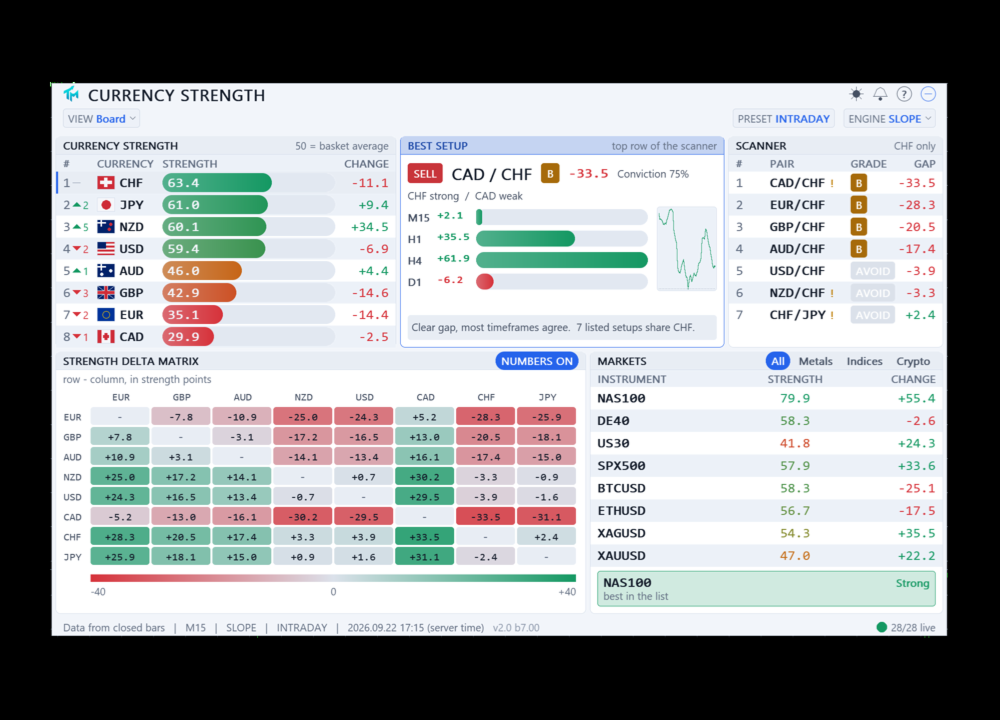
Currency Strength Pro ranks the eight major currencies by relative strength, read from up to 28 pairs, on a multi-timeframe composite, then ranks the basket's own pairs into a graded scanner. Closed bars only, never on a tick.
The idea is simple: trade a strong currency against a weak one, instead of the chart that happens to look nice today. The strength table answers "which currency". The scanner and its A/B/C grade answer "which pair, and how clean is the setup".
What it does
The panel ranks EUR, GBP, AUD, NZD, USD, CAD, CHF and JPY from strongest to weakest. Every reading is built from the pairs your broker actually quotes. Each pair adds to one side and subtracts from the other, so the eight scores always centre on 50 and the basket is zero-sum by construction. 50 is the basket average, not a fixed level: a score of 70 means a currency is strong relative to the other seven right now, not strong in absolute terms.
Below the table, a scanner grades every pair the basket can form: A for a wide, timeframe-agreed gap, B for a clear one, C for a marginal one. A best-setup card spells out the top row in words, and hovering any scanner row explains exactly why it earned its grade - the per-timeframe gaps, the basket breadth behind each side, the spread cost.
Closed bars only
A number printed on the panel cannot change afterwards. Rates are read from position 1, so the bar being formed is never part of a published value, and the buffer slot for the current bar is left empty. The panel recomputes when the fastest weighted timeframe closes a bar, plus a slow safety interval. Never on a tick. The footer names the exact bar the numbers came from, in server time, so any reading can be checked against your own chart at any moment.
Ten engines, one ranking
Strength can be measured ten different ways, grouped into four families. Momentum: LOG_ATR (the default, move per unit of current ATR), Z-Score, ROC and Flow. Trend: Slope, EMA Trend and Efficiency. Oscillator: RSI and Stochastic. Blend: Hybrid, which combines LOG_ATR, RSI and basket breadth by weight. Each one is a different answer to "how far did it move", and switching between them recomputes the whole board on the next closed bar - nothing here is a cosmetic filter on the same underlying number.
The multi-timeframe composite
Four timeframes are averaged with configurable weights. Three presets are built in - Scalping (M5/M15/H1/H4), Intraday (M15/H1/H4/D1, the default) and Swing (H1/H4/D1/W1) - and a Custom preset opens all four timeframes and weights to your own values. A currency strong on one timeframe and weak on three does not reach the top of the table.
The history behind the panel is anchored to time, not to bar number: each point ties to a closed bar of the fastest timeframe, and every other timeframe contributes the last bar that had closed by that moment. This is why the lines and the score history stop moving once drawn - nothing here repaints.
The pair scanner and grades
Every pair the basket can form is ranked by its strength gap, discounted by how much the weighted timeframes disagree about it - a pair every timeframe agrees on keeps most of its gap; one the timeframes argue about loses much of it. Grade A needs a wide gap, timeframe agreement and clean breadth on both sides. Grade B is a clear setup with less agreement. Grade C is marginal. A wide broker spread, measured in ATR, never hides a pair - it can only keep it out of grade A.
A marker flags divergence: price still extending while the strength gap behind it is already closing. Click a currency to drill into every one of its pairs, strongest gap first. Click a pair to open that symbol on the chart.
The delta matrix
An eight by eight grid of every currency against every other, in strength-gap points, colour-coded and switchable to plain numbers. A small marker flags a pair your broker does not quote directly - those are priced through their USD legs and shown anyway, so the matrix is never missing a cell the basket can answer.
Other markets
Metals, indices and crypto sit in their own block, scored on the same closed-bar formula but on their own 0 to 100 scale - 50 is flat, not the basket average, since gold has no counter-currency to centre against. The instrument list is yours to edit; a best-market card explains the top reading the same way the scanner card explains a pair.
Alerts
Twelve events behind the bell icon on the panel. Eight read the strength meter itself: a currency entering or leaving the strong or weak band, a currency crossing the basket midline, a new strongest or weakest currency, both ends flipping at once, momentum turning, the chart symbol's own side flipping, the basket spreading out or collapsing, and coverage breaking or coming back. Four more read the scanner and the markets block: a pair reaching or losing grade A or B, price extending while the gap behind it closes, every weighted timeframe agreeing on one pair, and an instrument in the markets block crossing the same strong/weak bands.
Popup, sound, push and email, any combination. A cooldown is kept per event, so one currency crossing a band does not silence an unrelated setup alert for the same five minutes. Scope narrows which currencies may raise an alert - every currency in the basket, only the two the chart symbol is made of, or a hand-picked set - independently of which currencies feed the calculation. The first pass after attaching only records what it sees; it never greets a chart opened mid-session with an alert about a setup that has been sitting there for hours.
Settings live on their own screen behind the bell icon, with a SAVE button and a file that outlives the chart, so the same alerts follow you from one chart to the next.
Export and EA buffers
CSV and JSON snapshots can be written to file on every closed-bar update, for anything that reads outside the terminal. Inside it, the eight strength values and the best-setup ranking - the pair, the grade, the conviction, the direction - are published as indicator buffers, so an Expert Advisor can read them through iCustom without duplicating the calculation.
The basket is yours
Any of the eight currencies can be switched off. The basket shrinks to N*(N-1)/2 pairs and every count on the panel is measured against that number, not against a fixed 28. Four currencies enabled means six pairs, and the header says six.
Broker symbols
Suffixes and prefixes are detected from the chart symbol, and a broker suffix input overrides the detection when needed. Candidate symbols are checked against the base and profit currency the broker declares, so a decorated look-alike is never mistaken for the real pair. If your broker does not quote a cross at all, it is priced through its USD legs and the row is marked accordingly. Only the symbols the chosen basket actually reads are switched on in Market Watch.
Interface
Four layouts: the full board, the board without the delta matrix, the strength table on its own, or a chart view that plots the score history directly on the panel. Drag the panel from anywhere, including the rows that are themselves clickable: what decides is whether the hand moved, not what sat under it. Dark and light themes. English and Russian, following the terminal language, with a click-through help screen built in.
Clicking a scanner row or a matrix cell switches the chart symbol, and the panel comes back exactly as you left it - position, theme, layout, engine and preset all survive the switch, per chart.
What it is not
This is an instrument and direction filter. It is not an entry signal and it is not a forecast. It tells you which currency is being bought and which is being sold, and which pair currently makes the cleanest case for it, and leaves the entry, the stop and the target to your own method.
Requirements
Works on any broker that quotes the majors, on any chart symbol and any chart timeframe. Every published number - the strength table, the scanner, the buffers an EA reads through iCustom - comes from closed bars only.