EA Hedger MT5

3

Have you bought a trading advisor, subscribed to a signal, or are you trading manually ?! Don't forget about risk management.
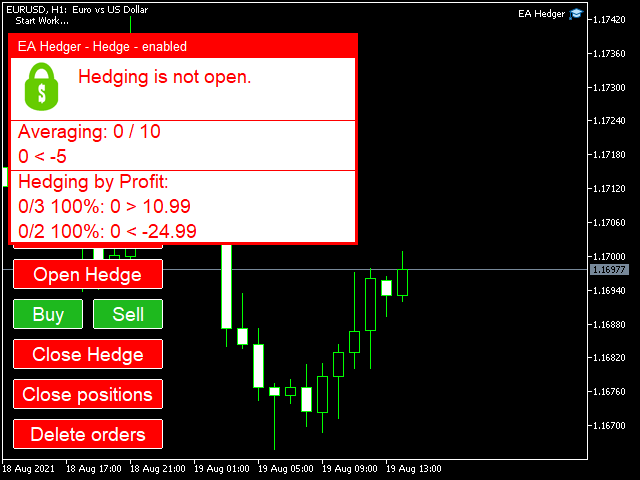
EA Hedger is a professional trading utility with many settings that allows you to manage risks using hedging.
Hedging is a trading technique that involves opening opposite positions to those already open positions. With the help of hedging, the position can be completely or partially blocked (locked).
For example, you have three open positions on your account:

EURUSD buy 0.10
EURUSD buy 0.20
GBPUSD buy 0.20
If you want to cut the risk in half (50%), when you activate the hedge, the following positions will be opened:

EURUSD sell 0.15 Hedge
GBPUSD sell 0.10 Hedge

When EA Hedger comes in handy
I. Do you want to reduce the drawdown, protect the deposit from losses ?! Hedge a position by determining the amount of allowable drawdown or minimum values ​​of profit or equity. 
II. Is your position open in the right direction and making a profit ?! Protect profits from price reversals, hedge the position when the profit target is reached. Step-by-step hedging will help to reduce the lead position as profit targets are met.
III. The market froze in one place and is trading in the corridor ?! Take advantage of this! Hedge a position when the price moves against your position and close the hedge on profit or if the price continues to move in favor of your main position.

The advantage of hedging is non-interference in the main trade – hedging is performed in parallel and orders of other trading robots are not affected.

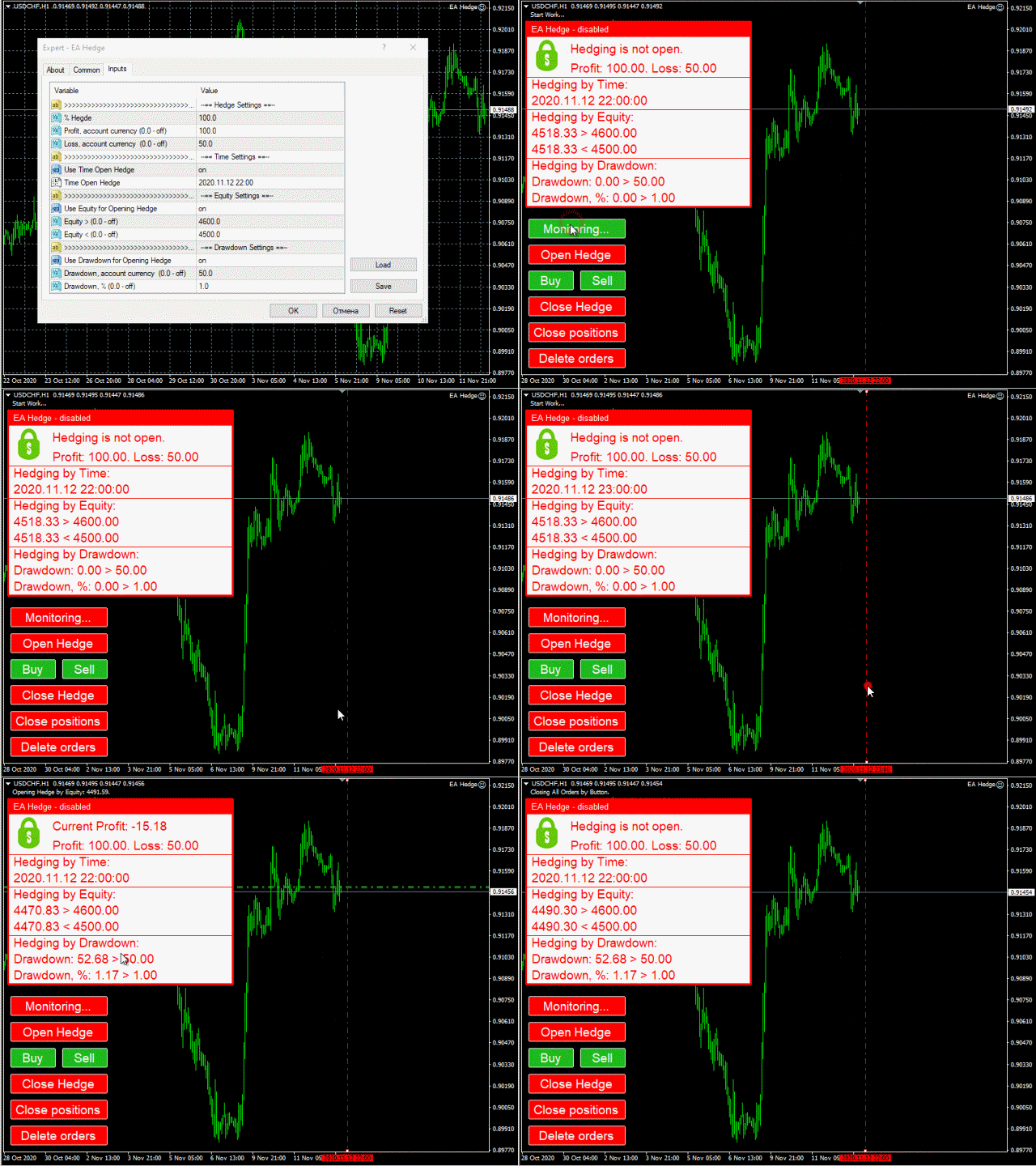
EA Hedger allows you to hedge when one of the following custom events occurs:

Clicked the "Open Hedge" button
The specified time has come, for example, the time before the news release or the time before the market closes (gap protection)
The amount of profit increased or decreased to the specified value
Equity has increased or decreased to the specified value
The size of the Equity drawdown amounted to the specified value, the value can be specified in% or in the deposit currency
Equity has increased or decreased by a specified percentage
The specified amount of the main lots has been reached
The specified drawdown on the balance has been reached
Hedging of each order immediately or at a certain distance from the order opening price
The hedging process can be split into several steps for this hedging condition " > " and " < " can be specified using a semicolon-separated list of values. Download the demo version and run tests at a low speed to see how it works.

Hedge orders can be closed using the "Close Hedge" button or pre-set closing conditions:

    • Profit - the total profit of hedge orders has reached the specified value
    • Loss - total loss of hedge orders (be sure to indicate a minus)
    • Trailing - allows you to move the stop after profit at a specified distance
    • BreakEven - allows you to move the stop by a specified value when a specified profit size is reached
    The Averaging function allows you to average Hedge orders with specified steps and a specified number of times (I recommend limiting the number of steps).
    “Auto Restart” mode - this mode automatically updates the conditions for opening hedge orders after the previous hedge orders are closed and, if necessary, a repeated hedge will be performed.
    The "Hedging Balance" function allows you to maintain a hedging balance and in case of opening or closing positions, hedging will increase or decrease.

    Using the "Only Include" and "Exclude" parameters and the "Buy" / "Sell" buttons, you can define a basket of orders to watch. If you leave the parameters empty, then all open trades will be included in the basket, except for trades with hedge order magic.
    You can include or exclude orders from observation by the following criteria: symbol, magic or a comment.

    Why is it profitable to buy this product:
    • Reliability - the advisor is thoroughly checked and tested
    • Availability - the cost of the advisor is only $ 2.75 per month or $ 0.09 per day - this is less than the spread.
    • Support – in the discussion you will be able to ask questions to the seller and get advice
    • Development - you can write your wishes for the product and, if possible, they will be added
    • Updates - upcoming updates will be available to you

      Reviews 3
      JeanMarc2222
      1508
      JeanMarc2222 2023.03.03 22:23 
       

      It's a fantastic tool, where we can avoid losses in many cases- Stop losses are past - now we lock and avoid losses. Sergey is very friendly and helpful

      Recommended products
      OCN Position Manager
      Franck Henri Maglott
      OCN Trade Manager — Advanced Trade Manager for MT5 The only MT5 trade manager with built-in daily risk control — profit target, drawdown protection, and automatic daily reset. Trading requires precision. A missed Break Even, an unmanaged trailing stop, or a single bad day without drawdown control can quickly erase weeks of consistent gains. OCN Trade Manage  was built to solve this — combining professional trade management with a daily risk engine that most trade managers simply do not offer.
      TradingCoPilot
      Viktor Mitrofanov
      Trading Co-Pilot for MetaTrader 5 Advanced Position Management for Manual Traders Trading Co-Pilot is a professional trade management assistant designed for traders who open positions manually and want precise, automated control over risk and profit handling. It does not open trades. It manages them intelligently. You focus on entries. The Co-Pilot protects and optimizes the exit. How It Works Once you open a manual position, Trading Co-Pilot automatically: • Applies Stop Loss • Sets Take Profit
      FREE
      Auto Breakeven MT5
      Volodymyr Hrybachov
      A utility for automatically setting breakeven levels, transfers trades to breakeven   when passing a given distance   . Allows you to minimize risks. Created by a professional trader for traders.       Utility       works with any market orders opened manually by a trader or using advisors. Can filter trades by magic number. The utility can work with any number of orders simultaneously. MT4 version https://www.mql5.com/ru/market/product/57076 WHAT THE UTILITY CAN DO: install virtulnoe levels   b
      Talents ATR Scalper Utility (MT5) The Talents ATR Scalper Utility is a professional-grade trade execution and management tool built for MetaTrader 5. Inspired by the Biblical Parable of the Talents , this utility is designed to help traders multiply their potential with precision risk control, one-click simplicity, and advanced automation. Whether you’re scalping forex, gold, or indices, this tool delivers speed, consistency, and confidence. Key Features One-Click Trade Preview Click below price
      SmartTrail PRO MT5 — All-in-One Trade Management Panel Your all-in-one trade management companion for MetaTrader 5. SmartTrail PRO takes the stress out of position management. Whether you trade manually or use Expert Advisors, it protects your capital with intelligent, volatility-adaptive stop management — across all symbols, all account types, automatically. Why SmartTrail PRO? Most traders lose not because of bad entries, but because of poor exits. SmartTrail PRO solves this by providing a com
      Auto SLTP Maker MT5
      Oleg Remizov
      5 (1)
      Auto SLTP Maker MT5  is an assistant for all those who forget to set StopLoss and/or TakeProfit in deal parameters, or trade on a very fast market and fail to place them in time. This tool automatically tracks trades without StopLoss and/or TakeProfit and checks what level should be set in accordance with the settings. The tool works both with market and pending orders. The type of orders to work with can be set in the parameters. It can track either trades for the instrument it runs on, or all
      SL TP Panel
      Mikhail Ostashov
      SL TP Panel — Visual Trading Panel for MT5 A convenient trading panel that lets you place pending orders by simply dragging lines on the chart. Stop Loss, Take Profit, order type, and lot size — everything is controlled with your mouse in seconds. Who is this for This panel is designed for manual traders who value speed of execution. Instead of opening the order window, filling in fields, and calculating levels — just drag a line to the desired price and click one button. Key Features Visua
      Breakevan Utility
      Jose Luis Thenier Villa
      BreakEvan Utility  Is a simple tool in a panel with this utilities: This utility will draw a Golden Line in the chart applied showing the breakeven price, considering all the positions opened for that specific symbol. Also the information panel shows: Balance Breakeven Price for that chart Force Breakeven (for that symbol) as ON/OFF Force Breakeven Global (takes into account all trades opened) as ON/OFF Total Lots opened for Symbol Total Lots opened Global And two buttons: Force Breakeven: Whe
      Prop Protector 2
      Georgii Poletaev
      !!!The first 10 users are free!!!  Prop Protector — Trading Panel and Risk Management Utility Prop Protector is a utility designed for position sizing and risk management in the MetaTrader 5 terminal. The tool assists in calculating lot sizes based on defined risk parameters and monitoring daily drawdown limits. Key Features: Trading Panel:   Provides an interface for executing market Buy and Sell orders directly from the chart. Lot Size Calculation:   Automatically calculates the required lot s
      FREE
      Expert TP SL v04
      Mikhail Ostashov
      Expert TP SL v04 - Professional Trading Assistant with AI Motivation System Advanced manual trading tool with automatic risk management, overtrading protection, and intelligent psychological support for disciplined trading. PRODUCT OVERVIEW Expert TP SL v04 is a comprehensive trading assistant designed for manual traders who want to maintain emotional discipline while automating risk calculations. This isn't just another order placement tool - it's a complete trading psychology system that pr
      VirtualStopsMT5
      Viktor Shpakovskiy
      A utility for managing open positions using virtual (invisible to the broker) stops. Virtual stop loss and virtual take profit can be freely moved around the chart. If the price touches the virtual stop line (TP, SL, TS), the EA will close all orders of the same direction on the current chart. Closing orders by virtual take profit is possible only if there is a profit. With the help of the built-in trading simulator, you can, in the strategy tester, see how the adviser works. Parameters Block
      Margin Call Shield – Defend Your Margin on Your Terms Margin Call Shield is a tool for MetaTrader 5 traders who want to decide for themselves which open positions are closed during margin call situations before the platform does so automatically based on its internal rules. By default, the broker or platform decides which positions to close, often using undisclosed algorithms. Margin Call Shield lets you set this order according to your own strategy. Why Was Margin Call Shield Created? In a mar
      Demo version T Position Size Calculator   doesn't work in the strategy tester. The Strategy Tester does not support the processing of ChartEvent. It does not support most of the panel's functionality. Contact me for any questions or ideas for improvement or in case of a bug found. Control and manage your trading like a professional trader with T Position Size Calculator. T Position Size Calculator – an MT5 Expert Adviser, is a user-friendly custom tools (Dialog Panel and Three Lines, Order Line
      Total Trade Manager SL BE TP
      Izzet Deniz Erpolat
      3 (2)
      Total trade manager allows you to manage your trade to maximise your profits and minimise your losses. This is an essential for traders that are looking for consistency within their trading.  The features: Partial Stop Loss: This feature allows you to close a partial percentage of your trade once it goes into negative. So if your stop loss is 20 pips, you could close 75% of your trade at 10 pips and let the remainder of the position to continue running. Auto Stop Loss: This means that once you p
      RiskCopilot
      Carlos Adrian Feged Zapata
      RiskCopilot Utility - Your Intelligent Trading Assistant "See Your Risk. Master Your Trade." RiskCopilot Utility is the ultimate risk management and position sizing solution for MetaTrader 5. This comprehensive trading assistant provides real-time calculations, advanced risk assessment tools, and professional trade analytics without taking control of your trading decisions. Perfect for both novice and professional traders seeking precise risk management across all asset classes. You focus on yo
      Trade Studio MT5   is a trading panel that combines four modules for manual trading in one window. Switching between modules (Trade, Lines, Closure, Trailing) is done using buttons on the main panel. The top part of the interface contains a symbol selector and a Magic Number input field to filter positions and orders created through the panel. Module 1: TRADE (Market Orders) Module for opening market positions with preliminary parameter calculation. Fields and Controls: «%» Button   — switches l
      Trailing Stop Manager PRO — Professional Trailing Stop Management (MT5) Trailing Stop Manager PRO is an Expert Advisor for MetaTrader 5 that automates trailing stop management on your open positions. It can manage all positions on the account or only those filtered by symbol and/or MagicNumber. The EA includes several features: fixed pip trailing stop, ATR-based trailing, automatic break-even, partial close and a visual dashboard. Purpose of the tool Standardize trailing stop management across a
      SL TP Manager Utility MT5
      AL MOOSAWI ABDULLAH JAFFER BAQER
      SL-TP Manager Utility for MT5 - Professional Risk Management Tool Advanced Position Protection & Profit Management SL-TP Manager Utility is a powerful, intuitive tool designed for traders who want precise control over their risk management. This utility provides a sleek interface for setting, modifying, and managing your Stop Loss, Take Profit, and Trailing Stop levels with just a few clicks. Key Features: Dual Mode Operation: Set values in pips or absolute price with a simple toggle Independent
      Trade Mate
      Sotirios Apostolos Adaloglou
      Trade Mate is the trading tool for manual traders who want to take their trading to the next level. Packed with advanced features like automatic trailing stop loss, lot size calculation, pending orders, partial close, open trade management, and daily drawdown protection(makes it easier to stick to your daily equity risk).  Trade Mate offers everything you need to trade with precision and confidence. Don't settle for less - try Trade Mate today and see the difference for yourself! Check it on You
      Automatic TP and SL
      Dushshantha Rajkumar Jayaraman
      TradeGuard    by Chart Walker TradeGuard is a MT5 Expert Advisor (EA) designed to enhance your trading experience by automating key aspects of trade management. This EA excels in efficiently managing Take Profit (TP) and Stop Loss (SL) levels, offering a seamless and intelligent approach to trailing stops. One of TradeGuard's standout features is its Smart Trailing Stop, which dynamically adjusts the trailing distance based on market conditions. This adaptive approach helps maximize profits dur
      Virgilio is a multifunction control panel consisting of several panels, each of which performs one of the most useful functions used by traders. Its aesthetic is unique, designed to blend into any working environment and offer a user experience that makes work even more enjoyable. Its operativity is simple and intuitive, developed with attention to details to be as userfriendly as possible. Its main panel displays all the basic account and chart data. The first panel offers the user the possib
      Prop Calculator Assistant Stop blowing Prop Firm accounts due to bad math. Let the Assistant handle the risk. Prop Calculator Assistant   is the ultimate trade management panel designed specifically for traders attempting to pass funding challenges (FTMO, etc.) or managing funded capital. It replaces mental math and manual order dragging with a precision visual interface that keeps you strictly within your rules. This is   not   an auto-trading bot that guesses the market. It is a professional  
      Tool Auto Modify SLTP – Protect Your Trades, Optimize Your Strategy In trading, risk is always present. Just one forgotten SL/TP can turn a promising trade into a loss. Even experienced traders occasionally make mistakes. That’s why Tool Auto Modify SLTP was created – to keep you protected and let you focus on your strategy. Key Features: Manage Orders for All Symbols: Monitor and adjust SL/TP for all your trading pairs. Three Flexible Risk Modes: Point-Based: Set fixed SL/TP distances. Account
      Turbo Close All
      Phami Thanh Hoang
      Turbo Close All is a powerful and versatile script designed to help traders quickly and efficiently manage their trading positions and pending orders on MetaTrader 5. With its advanced features and customizable settings, this script is an essential tool for traders who want to streamline their trading process and maintain control over their positions and orders. Key Features: Comprehensive Closing Options: Turbo Close All allows you to close all market positions and/or delete pending orders bas
      Bober Real MT5
      Arnold Bobrinskii
      4.76 (17)
      Bober Real MT5 is a fully automatic Forex trading Expert Advisor. This robot was made in 2014 year and did a lot of profitbale trades during this period. So far over 7000% growth on my personal account. There was many updates but 2019 update is the best one. The robot can run on any instrument, but the results are better with EURGBP, GBPUSD, on the M5 timeframe. Robot doesn't show good results in tester or live account if you run incorrect sets. Set files for Live accounts availible only for cu
      Trailing Stop Utility MT5 for automatic closing of deals by trailing stop levels.  Allows you to take the maximum from the profit. Created by a professional trader for traders.   Utility   works with any market orders opened manually by a trader or using advisors. Can filter trades by magic number. The utility can work with any number of orders simultaneously. WHAT THE UTILITY CAN DO: Set virtual   trailing stop   levels from 1 pip Set real   trailing stop   levels W ork with each order separat
      Grid Builder 5
      Oleg Remizov
      5 (1)
      The   Grid Builder MT5   utility is designed for placing a grid of pending orders of any complexity and will be an excellent tool in the hands of a trader who trades grid trading strategies. The tool has numerous settings that allow you to quickly and easily build a grid of orders with the specified parameters. All types of pending orders are supported: Buy Stop; Buy Limit; Sell Stop; Sell Limit. The script also allows you to delete a previously placed grid of orders in one click. If the "Delete
      This EA is there to take your trade closing stress away. Quickly close as many trades as you have opened at the click of a button, INCLUDING PENDING ORDERS. This works on the MT5 platform whether it be currencies, Indices, stocks or Deriv synthetic indices. I have saved it under utilities as it is a utility, however, to install this, you have to save the file in you "EA" folder. That is; Go to "File", then "Open Data Folder", "MQL5" and then "Experts". Paste this file there. Restart MT5 and you'
      The utility works with horizontal lines: Prof1, Prof2, Loss1, Loss2. These lines, which have strictly fixed names, are drawn by the trader on any chart in his terminal. There are options to create all the lines at once or select any of the four. The purpose of the lines becomes obvious when looking at their names. The Prof1 and Prof2 lines indicate the Take Profit levels for the transaction, but are presented in a visual form, which makes it easier for the trader to perceive the information. Th
      Trading panel for manual trading. Has a fairly wide functionality. Allows you to automatically calculate the order size, open both market and pending orders. It has a wide range of options for closing orders, it is possible to partially close orders, close orders after reaching a certain profit or loss, separately close profitable and unprofitable, buy and sell, as well as pending orders. The panel also contains a simple implementation of a grid of pending orders, reverse and lock functions, tr
      Buyers of this product also purchase
      Trade Assistant MT5
      Evgeniy Kravchenko
      4.42 (208)
      It helps to calculate the risk per trade, the easy installation of a new order, order management with partial closing functions, trailing stop of 7 types and other useful functions. Additional materials and instructions Installation instructions - Application instructions - Trial version of the application for a demo account Line function -   shows on the chart the Opening line, Stop Loss, Take Profit. With this function it is easy to set a new order and see its additional characteristics bef
      Forex Trade Manager MT5
      InvestSoft
      4.97 (631)
      Welcome to Trade Manager MT5 - the ultimate risk management tool designed to make trading more intuitive, precise, and efficient. This is not just an order placement tool; it's a comprehensive solution for seamless trade planning, position management, and enhanced control over risk. Whether you're a beginner taking your first steps, an advanced trader, or a scalper needing rapid executions, Trade Manager MT5 adapts to your needs, offering flexibility across all markets, from forex and indices t
      TradePanel MT5
      Alfiya Fazylova
      4.87 (149)
      Trade Panel is a multi-functional trading assistant. The app contains over 50 trading functions for manual trading and allows you to automate most trading tasks. Before making a purchase, you can test the demo version on a demo account. Download the trial version of the application for a demonstration account: https://www.mql5.com/en/blogs/post/750865 . Full instructions here . Trade. Allows you to perform trading operations in one click: Open pending orders and positions with automatic risk cal
      Beta Release The Telegram to MT5 Signal Trader is nearly at the official alpha release. Some features are still under development and you may encounter minor bugs. If you experience issues, please report them, your feedback helps improve the software for everyone. Telegram to MT5 Signal Trader is a powerful tool that automatically copies trading signals from Telegram channels or groups directly to your MetaTrader 5 account. It supports both public and private Telegram channels, and you can conn
      FarmedHedge Pair Trading Dashboard
      Tanapisit Tepawarapruek
      5 (2)
      VERIFIED TRADING RESULTS - Farmed Hedge Yield Axi Copy:  https://www.mql5.com/en/signals/2356376 - Farmed Hedge Yield Exn Copy:   https://www.mql5.com/en/signals/2356404 - Farmed Hedge Yield V Copy:  https://www.mql5.com/en/signals/2357156 Contact me via private message to receive the User Manual and Setup. * Thai Lauguage Support Available Farmed Hedge Yield Farming - Professional Pair Trading Dashboard (Manual - Hybrid - Semi/Automated EA) VERSION 3 - WILD HARVEST UPDATE Trading Approac
      Trade Dashboard MT5
      Fatemeh Ameri
      4.94 (119)
      Tired of complex order placement and manual calculations? Trade Dashboard is your solution. With its user-friendly interface, placing orders becomes effortless, by a single click, you can open trades, set stop loss and take profit levels, manage trade lot size, and calculate risk to reward ratios, allowing you to only focus on your strategy. Say goodbye to manual calculations and streamline your trading experience with Trade Dashboard. Download  Demo Version  right now. You can find  Details of
      Copy Cat More Trade Copier MT5 is a local trade copier and a complete risk management and execution framework designed for today’s trading challenges. From prop firm challenges to personal portfolio management, it adapts to every situation with a blend of robust execution, capital protection, flexible configuration, and advanced trade handling. The copier works in both Master (sender) and Slave (receiver) modes, with real-time synchronization of market and pending orders, trade modifications, pa
      Smart Stop Manager MT5
      Daniel Stein
      4.33 (3)
      Smart Stop Manager – Automated Stop-Loss Execution with Professional Precision Overview The Smart Stop Manager is the execution layer of the Smart Stop lineup, built for traders who require structured, reliable, and fully automated stop-loss management across multiple open positions. It continuously monitors active trades, calculates the optimal stop level using Smart Stop market-structure logic, and updates stops automatically with clean, transparent rules. Whether managing a single asset or
      The News Filter MT5
      Leolouiski Gan
      4.74 (19)
      This product filters   all expert advisors and manual charts   during news time.  It is able to remove any of your EA during news and automatically reattach them after news ends. This product also comes with a complete  order management system   that can handle your open positions and pending orders before the release of any news. Once you purchase   The News Filter , you will no longer need to rely on built-in news filters for future expert advisors, as this product can filter them all from her
      Ultimate Extractor
      Clifton Creath
      5 (9)
      Ultimate Extractor - Professional Trading Analytics for MT5 *****this is the local HTML version of Ultimate Extractor. For the online version please reach out to me directly****** Ultimate Extractor transforms your MetaTrader 5 trading history into actionable insights with comprehensive analytics, interactive charts, and real-time performance tracking. What It Does Automatically analyzes your MT5 trading history across all Expert Advisors and generates detailed HTML reports with interactive vi
      Telegram To MT5 Receiver
      Levi Dane Benjamin
      4.53 (15)
      Copy trade signals from Telegram channels you already belong to (including private and restricted channels) directly into MetaTrader 5. Set your risk rules once, monitor execution, and manage positions with built-in protections designed to reduce mistakes and overtrading. Fast setup : configure your channels, select what to copy, and start within minutes using a clean on-chart interface. User Guide + Demo | MT4 Version | Discord Version Who this is for Traders who follow one or more signal provi
      Smart Stop Scanner – Multi-Asset Stop-Loss Intelligence for Modern Traders Overview The Smart Stop Scanner brings professional stop-loss monitoring to every chart. It analyzes market structure, detects meaningful breakouts, and identifies the most relevant protective levels across Forex, Gold, Indices, Metals, Crypto, and more. All results appear inside one clean, DPI-aware dashboard designed for clarity, speed, and instant decision-making. How Stop-Loss Levels Are Identified Instead of rely
      Exp COPYLOT CLIENT for MT5
      Vladislav Andruschenko
      3.82 (34)
      Trade copier for MT5 is a trade copier for the МetaТrader 5 platform. It copies forex trades  between any accounts   MT5 - MT5, MT4 - MT5 for the COPYLOT MT5 version (or MT4 - MT4 MT5 - MT4 for the COPYLOT MT4 version)    Reliable copier!         MT4 version Full Description +DEMO +PDF   How To Buy    How To Install     How to get Log Files    How To Test and Optimize    All products from Expforex You can also copy trades in the МТ4 terminal (МТ4 - МТ4, МТ5 - МТ4):     COPYLOT CLIENT for MT4
      Trade Manager DashPlus
      Henry Lyubomir Wallace
      5 (13)
      DashPlus is an advanced trade management tool designed to enhance your trading efficiency and effectiveness on the MetaTrader 5 platform. It offers a comprehensive suite of features, including risk calculation, order management, advanced grid systems, chart-based tools, and performance analytics. Key Features 1. Recovery Grid Implements an averaging and flexible grid system to manage trades during adverse market conditions. Allows for strategic entry and exit points to optimize trade recovery
      MT5 to Telegram Signal Provider turns your trading account into a signal provider. Every trade action, whether manual, by EA or from your phone, is instantly sent as a message to Telegram. You can fully customize the format or use a ready-made template for quick setup. [ Demo ] [ Manual ] [ MT4 Version ] [ Discord Version ]     New: [ Telegram To MT5 ] Setup A step by step user guide is available. Key Features Ability to customize order details sent to subscribers You can create a tiered subs
      Pulsar Terminal MT5
      Astralys LLC
      5 (3)
      Pulsar Terminal is a product of Pulsar Technologies, a trademark of Astralys LLC . Pulsar Terminal is a utility add-on for MetaTrader 5. It's a visual interface combined with execution tools in a companion application connected to your MetaTrader 5 account via an Expert Advisor . We use a companion application to maximize the tool's capabilities and provide a more advanced visual interface and workflow than standard MT5 panels. Pulsar Terminal is not a standalone application and requires MetaTr
      YuClusters
      Yury Kulikov
      4.93 (43)
      Attention: You can view the program operation in the free version  YuClusters DEMO .  YuClusters is a professional market analysis system. The trader has unique opportunities to analyze the flow of orders, trade volumes, price movements using various charts, profiles, indicators, and graphical objects. YuClusters operates on data based on Time&Sales or ticks information, depending on what is available in the quotes of a financial instrument. YuClusters allows you to build graphs by combining da
      The product will copy all telegram signal to MT5 ( which you are member) , also it can work as remote copier.  Easy to set up, copy order instant, can work with almost signal formats, image signal,  s upport to translate other language to English Work with all type of channel or group, even channel have "Restrict Saving Content", work with  multi channel, multi MT5 Work as remote copier: with signal have ticket number, it will copy exactly via ticket number. Support to backtest signal. How to s
      Take a Break MT5
      Eric Emmrich
      4.75 (24)
      News filter, equity guard & session control for all your EAs — one tool, full protection Take a Break has evolved from a basic news filter into a comprehensive account protection solution . It pauses your other Expert Advisors during news events or based on custom filters. When trading resumes, it automatically restores your entire chart setup , including all EA settings. Why traders choose Take a Break One news filter for all your EAs — no more relying on individual built-in filters that may o
      DrawDown Limiter
      Haidar Lionel Haj Ali
      5 (20)
      Drawdown Limiter EA You are in the right place if you were searching for Drawdown control, Drawdown limiter, Balance protection, Equity Protection or Daily Drawdown Limit related to Prop Firm, FTMO, or Funded account trading, or if you want to protect your trading account. Have you suffered from controlling your drawdown when trading funded accounts? This EA is meant for you. Prop firms usually set a rule called “Trader Daily Drawdown”, and if it is not respected, you are disqualified.  I am an
      Entry In The Zone with SMC Multi Timeframe is a real-time market analysis tool developed based on Smart Money Concepts (SMC). It is designed to analyze market structure, price direction, reversal points, and key zones across multiple timeframes in a systematic way. The system displays Points of Interest (POI) and real-time No Repaint signals, with instant alerts when price reaches key zones or when signals occur within those zones. It functions as both an Indicator and a Signal System (2-in-1),
      Telegram to MT5 Coppy
      Sergey Batudayev
      5 (8)
      Telegram to MT5: The Ultimate Signal Copying Solution Simplify your trading with Telegram to MT5, the modern tool that copies trading signals directly from Telegram channels and chats to your MetaTrader 5 platform, without the need for DLLs. This powerful solution ensures precise signal execution, extensive customization options, saves time, and boosts your efficiency. [ Instructions and DEMO ] [ FAQ ] Key Features Direct Telegram API Integration Authenticate via phone number and secure code. E
      Trade Manager DaneTrades
      Levi Dane Benjamin
      4.36 (28)
      DaneTrades Trade Manager is a professional trade panel for MetaTrader 5, designed for fast, accurate execution with built‑in risk control. Place market or pending orders directly from the chart while the panel automatically calculates position size from your chosen risk, helping you stay consistent and avoid emotional decision‑making. The Trade Manager is built for manual traders who want structure: clear risk/reward planning, automation for repeatable management, and safeguards that help reduc
      Don’t test an EA only against the single market path that actually happened. Test it against many plausible markets and find out whether its logic is truly robust. Traditional backtesting has a fundamental limitation: it only shows how a system would have performed in one single real past . That is the problem. The market could have followed many different paths. And an expert advisor that works well on the real historical record will not necessarily perform the same way if conditions had been
      VirtualTradePad One Click Trading Panel
      Vladislav Andruschenko
      4.59 (73)
      Trading Panel for trading in One click.  Working with positions and orders!  Trading from the  chart  or the  keyboard . With our trading panel, you can execute trades with a single click directly from the chart and perform trading operations 30 times faster than with the standard MetaTrader control. Automatic calculations of parameters and functions make trading faster and more convenient for traders. Graphic tips, info labels, and full information on trade deals are on the chart MetaTrader.  
      Custom Alerts AIO: All-in-One Market Scanner – No Setup Required Overview Custom Alerts AIO is the fastest and easiest way to monitor multiple markets for real-time trading signals—without any setup or extra licenses. It comes with all required Stein Investments indicators already embedded, making it the perfect plug-and-play solution for traders who value simplicity and performance. Just load it to any chart and start receiving alerts across Forex, Metals, Crypto, and Indices. Shares can be a
      Anchor: The EA Manager A coordination system for traders running multiple EAs. Anchor ensures only one EA can trade at a time, preventing conflicting positions and keeping your portfolio safer. Attach Anchor to any chart. Configure your EAs and their magic numbers. Anchor handles the rest. Built for portfolios. Built for discipline. Built for prop firms. The Problem Running multiple EAs on the same account creates risk. Two gold EAs can open opposite positions on the same candle. Three EA
      EasyTrade MT5
      Alain Verleyen
      5 (3)
      Easy Trade – Smart, Simple, Powerful Trade Management Easy Trade is the all-in-one trade management solution for MetaTrader users who want to keep risk under control and execution ultra-smooth. Designed from scratch with trader feedback in mind, Easy Trade makes it easy to execute, monitor, and manage trades across multiple symbols – without overcomplicating your workflow. Whether you're scalping manually or managing a small portfolio of setups, Easy Trade keeps your focus where it belongs: on
      HINN Lazy Trader
      ALGOFLOW OÜ
      5 (2)
      The core idea: using the user interface, you configure the parameters the chart must meet before entering a position (or positions), choose which entry models to use, and set the rules for when trading and planning should end. Lazy Trader takes over all the routine chart watching and execution.  Lazy Trader  handles the rest. full description  :: 3 key videos [1] ->  [2]   ->  [3] What can it do? - Understands Larry Williams market structure - Understands swing market structure by Michael Hu
      TradeMirror is a local order replication tool designed for MT4/MT5 platforms, supporting real-time trading synchronization. Product Advantages Aligned with the high standards of security, stability, and privacy protection for financial software, we have optimized three core dimensions: Intuitive graphical interface for user-friendly operation Enhanced privacy protection to meet sensitive data isolation requirements in financial scenarios Millisecond-level order synchronization ensures zero-delay
      More from author
      EA Hedger
      Sergej Chukhista
      4 (4)
      Have you bought a trading advisor, subscribed to a signal, or are you trading manually ?! Don't forget about risk management. EA Hedger is a professional trading utility with many settings that allows you to manage risks using hedging. Hedging is a trading technique that involves opening opposite positions to those already open positions. With the help of hedging, the position can be completely or partially blocked (locked). Why is it profitable to buy this product: Reliability   - the advisor
      EA Action
      Sergej Chukhista
      EA Action is a non-mechanical trading robot based on the algorithm of continuous adaptation to the current market situation. EA Action is the result of many years of research in the Forex market. The EA uses mathematical methods, probability theory methods and technical analysis to analyze the market. EA Action is quite simple and easy to use. The EA is not overloaded with settings. EA Action trading robot can work on any Deposit. For effective work it is enough to Deposit from $ 100, which al
      EA SpreadBack
      Sergej Chukhista
      Have you ever thought about how much money you pay to the broker in the form of a spread? If you calculate the size of the paid spread for all the transactions opened on your account, then the amount can be impressive. With active trading, the size of the paid environment may exceed the size of the deposit. You give your deposit to a broker. The spread can negate all the results of the trading system, as it eats up a significant part of the profit. Have you noticed that when you open a position,
      Compare Symbols Specifications is a utility indicator that is a summary interactive table of the analyzed parameters. Trading conditions in the market are constantly changing and tracking these changes is a time-consuming task. This tool allows you to compare the trading conditions of all symbols in a matter of seconds, and choose for trading those symbols that meet the requirements of the trading system. This tool will be useful to all traders and will help them to have up-to-date information
      Filter:
      Bruce Raymond Cameron Lyon
      258
      Bruce Raymond Cameron Lyon 2024.04.11 07:42 
       

      User didn't leave any comment to the rating

      Vahram Manukyan
      362
      Vahram Manukyan 2023.06.05 13:57 
       

      No documentation. I was hoping to get this tool to open a hedging position once I am down x% of my equity and start protecting the account from that point. But it keeps opening a position every time I open one. so when it moves to my favor i loose with the tools open position. So you just don't lose but you don't win either! Maybe I am not using it the way I should but that is again because of the luck of documentation. Nothing is intuitive. every single parameter is confusing.

      Sergej Chukhista
      41106
      Reply from developer Sergej Chukhista 2023.06.05 15:28
      The product description contains a brief guide. Have you read it? No other documentation is promised anywhere. Why didn't you consult me before buying? 2023.06.04 I offered you my consultation. Why didn't you consult me? I provide consultations as quickly as possible, on the same day. My help is individual and better than any guide. You yourself refused my help, and without having studied and tested the product to a sufficient extent, you began to use it. The utility performs its functions correctly. Your review and rating is related to your actions, not to the product.
      JeanMarc2222
      1508
      JeanMarc2222 2023.03.03 22:23 
       

      It's a fantastic tool, where we can avoid losses in many cases- Stop losses are past - now we lock and avoid losses. Sergey is very friendly and helpful

      Reply to review