GPA Smart Risk Manager

GPA_Smart_Risk_Manager Complete User Guide


PRODUCT OVERVIEW

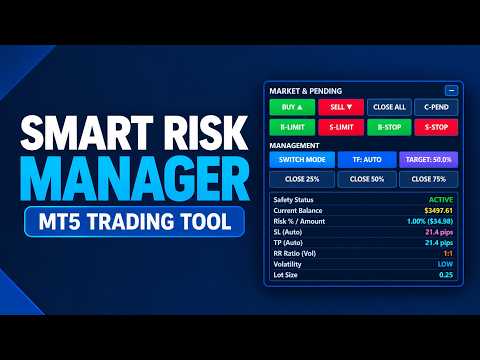
GPA_Smart_Risk_Manager is a professional-grade, all-in-one trading panel and autonomous risk management Expert Advisor for MetaTrader 5. It combines rapid one-click execution, intelligent position sizing, autonomous risk compounding, ATR-based protection, dynamic volatility adjustment, and multi-layered safety controls into a single, modern, on-chart control centre.

Designed for discretionary traders, scalpers, day traders, and swing traders who demand precision, speed, and disciplined risk management without the complexity of traditional EAs.


WHO IS THIS FOR

Trader Type

Why It Fits

Discretionary traders

Fast, precise one-click execution

Scalpers

Instant entries with ATR-based tight risk control

Day traders

Daily compounding targets and safety guards

Swing traders

Volatility-adaptive stops and targets

Prop firm traders

Daily, weekly, and drawdown limits enforced

Compounding-focused traders

Risk scales automatically with account growth

Multi-symbol traders

Works on forex, metals, indices, Crypto 


KEY FEATURES AT A GLANCE

Feature

Benefit

One-Click Trading

Market & pending orders with a single button

Autonomous Risk Compounding

Position size grows automatically with balance

Dual System Modes

Excel Compounding or Monthly ATR

Dynamic ATR-Based SL/TP

Stops adapt to real market volatility

Auto Timeframe Adjustment

Switches ATR timeframe per volatility regime

Multi-Entry Engine

Split entries into 2–10 positions

Advanced Safety Suite

6 independent safety layers

Risk Manager (RM)

Auto SL/TP, breakeven, step trailing

Partial Close Tools

Close 25% / 50% / 75% instantly

Offline Resilience

Panel remains functional when disconnected

Modern UI

Dark theme, bold typography, collapsible

State Persistence

Remembers settings across restarts


Button Reference

Row 1 — Market Execution

Button

Action

BUY ▲

Opens a market BUY with calculated SL/TP/lot

SELL ▼

Opens a market SELL with calculated SL/TP/lot

CLOSE ALL

Closes all positions on the current symbol

C-PEND

Cancels all pending orders on the current symbol


Row 2 — Pending Orders

Button

Action

B-LIMIT

Places a Buy Limit at offset points below Ask

S-LIMIT

Places a Sell Limit at offset points above Bid

B-STOP

Places a Buy Stop at offset points above Ask

S-STOP

Places a Sell Stop at offset points below Bid


Row 3 — System Controls

Button

Action

SWITCH MODE

Toggles between Excel Compounding and Monthly ATR

TF: AUTO / MANUAL

Toggles auto timeframe adjustment

TARGET: 50.0% / $X

Toggles between % target and fixed $ target


Row 4 — Partial Close

Button

Action

CLOSE 25%

Closes 25% of each position on the symbol

CLOSE 50%

Closes 50% of each position on the symbol

CLOSE 75%

Closes 75% of each position on the symbol


KEYBOARD SHORTCUTS

Key

Action

N

Toggle panel collapsed / expanded

M

Toggle multi-entry mode on/off

D

Dump full diagnostic to Experts log

<  

Decrease multi-entry count

>  

Increase multi-entry count


THE TWO TRADING SYSTEMS

System 1 — Monthly ATR (Target-Based)

Purpose: Achieve a specific monthly target.

How it works:

  1. Set a monthly target either % (e.g., 50%) or fixed $ (e.g., $500)
  2. EA computes the required daily compounding rate
  3. Lot size is adjusted each trade to hit the target
  4. SL/TP calculated from ATR on closed candles (no repainting)

Example — Monthly 50% target:

  • Required weekly rate: ~10.7%
  • Required daily rate: ~2.05%
  • On a $3,918 balance → ~$80.45 risk per trade

Best for: Traders who want to hit specific ROI goals.


System 2 — Excel Compounding (Autonomous)

Purpose: Compound risk as your account grows.

How it works:

  1. Start with InpStartRiskPct risk per trade (e.g., 1.0%)
  2. Every time balance doubles, multiply risk by InpRiskMultiplier (e.g., 1.5×)
  3. Cap the risk at InpMaxRiskPct (e.g., 3.0%)
  4. SL is calculated from real market range (avg high-low) + spread buffer
  5. TP is calculated using Dynamic RR:
    • Low volatility → 1:1
    • Normal volatility → 1:2
    • High volatility → 1:3
  6. If drawdown exceeds threshold, risk is automatically halved


Example progression:

Balance

Risk %

Position on $1000 base

$1,000 (start)

1.00%

$10 risk

$2,000 (2×)

1.50%

$30 risk

$4,000 (4×)

2.25%

$90 risk

$8,000 (8×)

3.00% (capped)

$240 risk

Best for: Traders focused on compounding a growing account.


STEP-BY-STEP USAGE

Scenario 1 — Simple One-Click Trade

  1. Attach the EA to your chart

  2. The panel shows the calculated Lot Size and SL/TP for the current setup

  3. Decide your direction based on your own analysis

  4. Click BUY ▲ or SELL ▼

  5. The EA opens the trade with:

    • Correct lot size for your risk

    • ATR-based stop loss

    • ATR-based take profit

    • Correct magic number for tracking


Scenario 2 — Trading with a Monthly Target

  1. Go to Inputs → MONTH INPUT SETTINGS

  2. Set InpMonthlyTargetPct = 50.0 (or your target)

  3. Set weeks and days per month to match your trading schedule

  4. In SYSTEM SWITCH SETTINGS , set InpSystemMode = SYSTEM_MONTHLY_ATR

  5. Click OK

  6. The panel now shows:

    • Monthly Target = 50.0%

    • Risk = (computed daily % and $)

    • Lot = calculated to hit the target

  7. Trade with BUY / SELL buttons


Scenario 3 — Switching Between Systems

On the fly, without restarting:

  1. Click SWITCH MODE

  2. Button label confirms the active mode

  3. Panel updates all metrics instantly

  4. The system remembers your last choice across restarts


Scenario 4 — Using Multi-Entry

  1. Set InpEnableMultiEntries = true and InpNumEntries = 5

  2. Set InpEntrySpacingPts = 0 for pending orders

  3. Press M to activate Multi

  4. Click B-LIMIT — 5 pending orders are placed, 0 pts apart

  5. Panel shows Lot Size = 0.20 x5


Scenario 5 — Partial Profit Taking

You have 1.00 lot open and want to lock in profits:

  1. Click CLOSE 50% → 0.50 lot closes, 0.50 remains

  2. Continue managing the remainder

  3. Click CLOSE 75% on the remainder → 0.375 closes

If InpConfirmPartialClose = true , a dialog appears first with a preview.


Scenario 6 — Protecting Profits with Breakeven

Automatic — no action needed:

  1. EA constantly monitors open positions

  2. When price moves 1× ATR in your favor, SL moves to entry + 0.10× ATR

  3. Position is now risk-free (breakeven + a small buffer)

  4. If trailing is enabled, SL continues to follow
Video GPA Smart Risk Manager
Recommended products
Order manage
Evgenii Kozhin
Order Manage MT5 is an Expert Advisor for pending order management and open position management in MetaTrader 5. It monitors specified levels, cancels pending orders when their conditions are met, and can partially close positions while moving Stop Loss to the entry price. The EA performs the following actions: Cancels Buy Limit and Sell Limit orders if price reaches Take Profit before execution starts. Cancels Buy Stop and Sell Stop orders if price reaches Stop Loss before execution starts. Clo
EA Risk Inspector is a professional MetaTrader 5 dashboard for reviewing the live risk created by Expert Advisors and open positions. It groups exposure by Magic Number and strategy context, highlights missing protection and presents account-level concentration in a transparent operational view. MAIN FEATURES • Position and EA grouping by Magic Number • Stop Loss validity and uncovered-exposure checks • Strategy-level risk and position summaries • Symbol and directional concentration analysis •
Equity Tracker MT5 Equity Tracker MT5 is a monitoring Expert Advisor for MetaTrader 5 that reports trading activity, account status and technical conditions through notification messages. The Expert Advisor operates independently from trading logic and does not influence order execution or trade management. The product does not open, modify or close trades. It performs observation and notification tasks only. Purpose Equity Tracker MT5 is intended for traders who want to stay informed about thei
Multi Account Trade Desk MT5 ## Short description Account-wide MASTER-to-SLAVE trade copier for MetaTrader 5 with per-account risk sizing, automatic broker symbol matching, live readiness monitoring and parallel execution. ## Product description Multi Account Trade Desk MT5 is built for traders who manage several MT5 accounts and want one central place to control risk, account readiness and trade replication. Attach the same EA as MASTER on the source terminal and as SLAVE on every target
Black Volume By ZeeAM Khan a Multi-Engine EA Professional Multi-Timeframe Volume & Breakout Trading System Black Volume Multi-Engine EA is an advanced automated trading system that combines volume analysis, spread analysis, liquidity sweeps, support/resistance breakouts, and multi-basket trade management into one powerful Expert Advisor. The EA continuously scans higher-timeframe candles to identify significant market activity, automatically draws key support and resistance zones, and executes
FREE
Trade Plan Desk MT5 is a trade planning and control dashboard designed to structure every decision before execution. Define your direction, Entry, Stop Loss, Take Profit and risk. The tool calculates the appropriate volume, planned risk-to-reward ratio and performs a complete broker-aware preflight before execution. Main features: • Entry / Stop Loss / Take Profit planning • Risk by percentage or amount • Automatic broker-aware position sizing • PASS / WARNING / FAIL pre-trade checks • Spread
Crystal Trade Manager
Muhammad Jawad Shabir
4.25 (4)
Crystal Trade Manager FREE (MT5) What this tool is Crystal Trade Manager FREE is a chart-side trade utility for MT5 that helps discretionary traders manage risk, position size, and exits with one-click controls and on-chart automation. The FREE version is fully functional on demo accounts for testing; on real accounts it enables essential manual tools while advanced automation remains locked. Demo accounts: All features enabled for testing and evaluation. Real accounts: Core manual tools enabled
FREE
Mpx Smc6 Order Block Sniper
Punyakorn Prathueangsaenyakorn
MPX-SMC6 — Order Block Sniper EA Gold (XAUUSD) | H1 | MetaTrader 5 Overview MPX-SMC6 is a Smart Money Concepts Expert Advisor for Gold (XAUUSD) on the H1 timeframe. It identifies institutional trading patterns by detecting Liquidity Sweeps followed by a Break of Structure (BOS), then enters at the Order Block — the last opposing candle before the impulsive move. Entries are placed as BuyLimit or SellLimit pending orders, allowing precise execution at the institutional price zone. The EA opens a
Gold Legacy EA
Suvashish Halder
LIVE SIGNAL (VANTAGE) - https://www.mql5.com/en/signals/2379064/ Gold Legacy EA is a professional, rule-based Expert Advisor built for disciplined and consistent trading on Gold. It operates on a pure price-action approach grounded in well-defined market structure — no indicators, no guesswork, just clean execution. Unlike many EAs that rely on dangerous money management techniques, Gold Legacy is built on transparency and integrity: No Grid. No Martingale. No Overtrading. No Recovery. Where m
Risk Manager for MT5
Sergey Batudayev
4.31 (16)
Expert Advisor Risk Manager for MT5 is a very important and in my opinion necessary program for every trader. With this Expert Advisor, you will be able to control the risk in your trading account. Risk and profit control can be carried out both in monetary terms and in percentage terms. For the Expert Advisor to work, simply attach it to the currency pair chart and set the acceptable risk values ​​in the deposit currency or in % of the current balance. [Instruction for Risk Manager parameter
SmartRisk MA Pro
Oleg Polyanchuk
SmartRisk MA Pro Strategy Overview: SmartRisk MA Pro is an optimized, risk-oriented automated trading strategy (Expert Advisor) developed for the MetaTrader 5 platform. It is designed to identify trading opportunities based on price deviations from moving averages and incorporates a comprehensive capital management system. The Expert Advisor operates on a "new bar" logic, ensuring stability and predictability in trade signal execution. Operating Principles and Trading Logic: At its core, the st
For more details, performance records, and strategy breakdown, please visit:   [ https://eruo-grid-sniper.vercel.app ] --- ### Overview EuroGridSniper is a fully automated Expert Advisor designed for the MetaTrader 5 platform. This EA uses a dynamic grid-based trading strategy optimized for trending and ranging market conditions. It combines technical price levels with volatility filters to increase the probability of successful trades. --- ### ️ Key Features - Smart grid algo
FREE
CV Guardian Dashboard – Professional Monitoring & Control Dashboard for MetaTrader 5 CV Guardian Dashboard is the graphical user interface of the CV Guardian Suite for MetaTrader 5. It visualizes system, broker, execution, and operational data provided by the Guardian Service in a modern and interactive dashboard. The dashboard provides a structured overview of the current MT5 environment and direct access to multiple monitoring, diagnostics, and maintenance functions. Features Modern interactiv
T Manager for Price action Traders
Haidar Lionel Haj Ali
4.5 (10)
T Manager, the ultimate trade management solution designed by traders for traders. If you are searching for a simple and efficient trade panel, trade manager, or trade assistant, you are at the right place.   The market contains a diverse number of those tools , but this one is designed by traders for traders . I designed this tool, and I am using it daily. Take my advice and stop buying tools blended with un-useful features that you will never use,   T Manager provides you with the essential y
Basic working principles of EA will have 2 main systems. 1. Timed order opening means that at the specified time the EA will open 1 Buy order and 1 Sell order. 2. When the graph is strong, the EA will remember the speed of the graph. is the number of points per second which can be determined You can set the number of orders in the function ( Loop Order ). The order closing system uses the trailling moneym Loss system, but I set it as a percentage to make it easier to calculate when the capital
LT Protect My Trades
Thiago Duarte
5 (3)
Protect My Trades is an EA (expert advisor bot) that automatically put stop loss and take profit on market trades and pending orders. You can specify if want it to do this only on actual symbol trades or in all others. Its configuration is very simple. Functions: Take profit: distance to TP (0 = disabled, no TP will be created). Stop loss: distance to SL (0 = disabled, no SL will be created). Price type: price type in pips or pipets/points (pips is common in Forex). Actual symbol only: manage th
FREE
RealCost Auditor MT5 is an execution-cost monitor for MetaTrader 5. It does not open, close, or modify trades. It watches the chart symbol, samples live spread, records executed deals, estimates signed slippage when the terminal exposes the requested price, and saves a local CSV audit file. Many backtests use spread, slippage, commission, and swap assumptions that are cleaner than real trading conditions. This utility gives you broker and account data from your own terminal before you trust a s
TradeByTime Manager is a tool to trade based on time. It is semi auto trading. Trader define entry and exit time and EA will manage the rest. Helpful for trader who is usually trading with time range such as trading signal with entry and exit based on time or trading with news event time. Or trader who is familiar with trading binary option, this is another 'sense' of it. Only this is for trading on regular chart. 1. TakeProfit and Stoploss 2. Double time based :  Local and Server 3. Time counte
BlockGuard MT5 - Manual Risk & Execution Manager Keep the trade decision. Automate the risk, sizing and protection. BlockGuard is a semi-manual risk and execution manager for MetaTrader 5. You choose the market, direction, setup and trade idea. BlockGuard handles the repetitive work around that decision: Risk-based position sizing Configured stop-loss placement Break-even and partial take-profit management Account-wide risk and drawdown protection Trade limits, cooldowns and session/news contr
EaInfoMaster
Dustin Ricardo Pierenz
EA Info Display Master Stop clicking through charts to find your EA configurations! Get a complete overview of all running Expert Advisors with their symbols and magic numbers in seconds. Managing multiple EAs across different symbols? Monitoring performance on FX Blue or other platforms? This tool instantly displays: All running EA names Their symbols and magic numbers Account details (number, broker, currency) Direct FX Blue statistics links (other provider will follow! Tell me what you need)
Forget about enabling templates when you launch the window. Auto Template Master Service  is a professional utility tool that runs as a system service in MetaTrader 5, and it will do it for you. Unlike traditional indicators or expert advisors (EAs), the program runs in the background of the entire terminal and doesn't require you to add it to each window individually. As soon as you open a new chart of any instrument (Forex, Stocks, Crypto), the service immediately detects the new window and a
CloseAtTime EA Scheduled Position Closer for MetaTrader 5 MQL5  |  Version 1.00  |  Magic Number Independent  |  Any Broker  |  Any Symbol Set the time. Walk away. CloseAtTime does the rest. Overview CloseAtTime EA is a precision trade management utility for MetaTrader 5. It monitors the broker server clock on every tick and closes your open positions at the exact second you define - no manual intervention required. The EA is intentionally focused. It does not open trades, does not apply ma
Cross MA TrendX
Arkadii Zagorulko
5 (1)
Cross MA TrendX is a MetaTrader 5 Expert Advisor built around a clear Moving Average trading structure, with additional filters, basket control and practical safety settings. The idea is simple for the user: choose the market, choose the risk, choose how strict the entries should be, and let the EA manage signals and recovery according to the selected limits. Version 6.0 keeps the classic CMTX character, but gives the system a cleaner control panel: selective entries, volatility awareness, sprea
One click to close all (OCCA) provides you posibility to close all open position with one click. Here is no any settings, just run the script and all your open positions will be closed and it will happen very fast ! Works with all types of accounts, with all currency pairs and any broker. The number of open positions is not limited. The script will be useful for trading strategies, in which you need to manage a large number of positions.
SetSizer
Jonathan Lao
SetSizer is a visual Risk & Position Manager for MetaTrader 5. Choose how much you want to risk, place Entry, Stop Loss and Take Profit directly on the chart, and SetSizer calculates the broker-valid lot size, Actual Risk, Risk-to-Reward ratio and potential TP reward before you place the trade. Three simple sizing modes: Risk % — risk a percentage of current Equity Risk Amount — risk a specific amount of account currency Lot Size — use an exact trade volume Set Your Risk. Size Your Trade. Quick
SuperScalping Gold — Multi-Timeframe Supertrend EA with Full Trade Management RECOMMENDED SET FILE Download the recommended set files here :   [ Click here ] SuperScalping Gold is an automated trading EA built around the Supertrend indicator, enhanced with a multi-timeframe confluence filter (H4 down to M1). The EA only opens a trade when every timeframe you select agrees on the same trend direction — filtering out most noise and counter-trend signals before they ever reach your account. ️ I
Trade Manager Simple
Juan Andres Montoya Robledo
Trade Manager Simple NQ and XAUUSD — Manual Trading Panel and Local Replicator Open the trade once. Your other MT5 terminals open it on their own, each with the lot size that fits that account. TMS is two tools in one: a panel for trading by hand with your risk under control, and a replicator that copies your entries to every other MetaTrader 5 terminal running on the same computer. No VPS, no signal service, no connection between brokers. The terminals talk through MetaTrader's shared folder,
Pip Melody
Nguyen Thanh Cong
Introducing Pip Melody , the Forex expert advisor that captures the rhythmic ebb and flow of the market with the finesse of a seasoned trader. Just as a composer crafts melodies, Pip Melody identifies and seizes market waves, transforming them into profitable trading opportunities. This expert advisor analyzes market trends and patterns, recognizing the harmonic cycles that others miss, and executes trades with precision and grace. OPENING SALE! Only 5 copy left at 66$, price will be increased b
Safe Gold Trend Pro
Patrick Deslauriers
Gold Trend Strength Pro Gold Trend Strength Pro is a MetaTrader 5 Expert Advisor designed specifically for XAUUSD (Gold) trading on the M15 timeframe . The EA combines trend analysis, market strength detection, volatility filters, and dynamic risk management to identify high-probability trading opportunities while avoiding unnecessary market exposure. Main Features Designed exclusively for XAUUSD / Gold Recommended timeframe: M15 Trend-following strategy with market strength analysis Vol
Favorit
Evgeniy Grebenuik
This trading utility is designed for intraday traders who open a large number of transactions. It implements trading via hot keys, with automatic stop-loss setting for the minimum or maximum of the previous candle and take-profit at certain levels. Certain levels are the maximum and minimum of yesterday and their range measured from the maximum up and from the minimum down. The main elements that are necessary when working within a day are displayed at the top of the chart. This is a timer that
Buyers of this product also purchase
Trade Assistant MT5
Evgeniy Kravchenko
4.43 (216)
It helps to calculate the risk per trade, the easy installation of a new order, order management with partial closing functions, trailing stop of 7 types and other useful functions. Additional materials and instructions Installation instructions - Application instructions - Trial version of the application for a demo account Line function -   shows on the chart the Opening line, Stop Loss, Take Profit. With this function it is easy to set a new order and see its additional characteristics bef
Telegram to MT5 MultiChannel Copier
Sergio Marquez Uroz
4.63 (19)
Telegram to MT5 Multi-Channel Copier   automatically copies trading signals from your Telegram and Discord channels straight to MetaTrader 5. No bots, no browser extensions, no manual copying. A signal arrives in Telegram or Discord and the EA opens the trade in your terminal within seconds. And before you copy a channel, the built-in backtester shows you what that channel would have done in your account. The product has two components: a Windows application that listens to your Telegram channel
================================================================================ POC BREAKOUT - V20.72. Full Professional Grade Toolkit ================================================================================ POC Breakout is a full MetaTrader 5 trading dashboard for discretionary traders who want breakout signals, Point of Control (POC) context, volume profiles, order flow, market structure, news, alerts, and advanced trade planning in one professional workspace. Attached directly to you
The Patch
Mian Rameez Ali
The Patch It never opens a trade. It walks behind the ones that did. Every open position, every pending order — checked twice a second for the one thing that's easy to forget: a stop, a target. Found bare, it doesn't ask. It writes the missing number in, measured in points from wherever the position began, and moves on to the next. No strategy, no opinion on direction. Just the quiet assumption that nothing should ever sit on the market unprotected — not because someone decided it shouldn't,
Floor Watch
Syed Tauqeer Hussain Shah
Floor Watch One number, watched every thirty seconds: how far equity has fallen since the day began — or since its highest point, if it's told to trail the peak instead of the open. Cross the line and it doesn't argue. Every open position closes, every pending order vanishes, and anything that slips through afterward gets shut the moment it appears. Not asked. Removed. The floor holds until the clock turns 5 AM Pakistan time — then, and only then, does the day start over. One rule. No except
Power Candles Strategy Scanner - Self-Optimizing Multi-Symbol Setup Finder Self-optimizing settings work one chart at a time, and finding where they pay off right now means opening chart after chart. Power Candles Strategy Scanner runs the same self-optimizing engine as the Power Candles indicator on every symbol in your Market Watch, side by side. One panel ranks where it pays off: the winning strategy per symbol, its optimized Stop Loss and Take Profit. An alert fires the moment a fresh signal

Buy once. Get all my MT4 and MT5 indicators - available now and released in the future - at no extra cost. Contact me after purchase for instructions to receive them. The price is planned to rise by 50$ after every 10 purchases, up to 999$. The Market price at checkout applies. Keep the indicator you trust. Automate the work around it. Your signal. Your rules. Your execution. Already have an MT5 indicator you rely on, but still need to watch the chart, wait for a signal, calculate the lot, plac
Daily Trading Limiter
AL MOOSAWI ABDULLAH JAFFER BAQER
5 (8)
• Please test the product in the Strategy Tester before purchasing to understand how it works. • If you face any issues, contact me via private message—I’m always available to help. • After purchase, send me a screenshot of your order to receive a FREE EA as a gift. Daily Trading Limiter — the rule you cannot break Every trader knows the number. Three trades. Two percent. One bad day and stop. And every trader has watched themselves take the fourth trade anyway. The problem was never knowing th
Welcome to ENTRY IN THE ZONE with SMC MULTI TIMEFRAME SPECIAL BENEFIT / FOR OUR MQL5 CUSTOMERS FREE ACCESS TO THE NEW TOOL  — COMING SOON — Learn more on our official website  : https://www.fableedge.net Entry In The Zone with SMC Multi Timeframe is a real-time market analysis tool based on Smart Money Concepts (SMC), designed to analyze market structure, price direction, and key trading zones. It supports both Single-Timeframe and Multi-Timeframe Analysis, providing a clearer view of overall ma
VirtualTradePad PRO SE MT5 — professional trading control center for MetaTrader 5 VirtualTradePad PRO SE is a premium chart-based trading panel and trade-management workspace for MetaTrader 5 . It is designed for traders who want faster execution, clearer position control, structured trade management, visual level planning and a professional workflow directly from the chart. This is not only a BUY / SELL panel. PRO SE combines manual trading, pending orders, position management, partial exits, b
FUTURES ORDERFLOW FOOTPRINT CHART Professional OrderFlow EA for MetaTrader 5 Version 1.01| Professional tool for real traders | Institutional-Grade Visualization STRATEGY TESTER USERS - PLEASE SELECT EVERY REAL TICK WHEN TESTING AND YOU HAVE DOWNLOADED HISTORICAL DATA. IF YOU SEE A WAITING SCREEN AND IT IS NOT DOWNLOADING, IT MEANS YOU HAVE LOW HISTORICAL DATA. TRY 1 MIN AND 5 MIN FIRST ON 1 DAY DATA. ONE DAY DATA SHOULD BE THE NEWEST AND MOST CURRENT DATE. PLEASE WAIT UNTIL THE MARKET HAS ROL
Trading Chaos Expert
Hennadii Stanilevych
5 (11)
This software has no equals in the world and represents a universal trade "console" covering trading signals, automated market entry, setting of Stop Loss and Take Profit, as well as Trailing Profit for multiple trades at the same time in a single open window. Intuitive control of the Expert Advisor in "three clicks" ensures a comprehensive use of all its functions on different computers, including tablets PCs. Interacting with additional signal indicators that mark the chart to give a real mark
The product will copy all telegram signal to MT5 ( which you are member) , also it can work as remote copier.  Easy to set up, copy order instant, can work with almost signal formats, image signal,  s upport to translate other language to English Work with all type of channel or group, even channel have "Restrict Saving Content", work with  multi channel, multi MT5 Work as remote copier: with signal have ticket number, it will copy exactly via ticket number. Support to backtest signal. How to s
Footprint Chart Pro — Professional OrderFlow EA for MetaTrader 5 Version 6.34 | Professional tool for real traders | Institutional-Grade Visualization DEMO USERS - PLEASE SELECT EVERY TICK / REAL TICK WHEN TESTING AND YOU HAVE DOWNLOADED HISTORICAL DATA. IF YOU SEE A WAITING SCREEN AND IT IS NOT DOWNLOADING, IT MEANS YOU HAVE LOW HISTORICAL DATA. TRY 1 MIN AND 5 MIN FIRST ON 1 DAY DATA. ONE DAY DATA SHOULD BE THE NEWEST AND MOST CURRENT DATE. PLEASE WAIT UNTIL THE MARKET HAS ROLLED OVER PERIOD.
Trade Indicator Assistant   is a powerful MT5 utility designed to turn indicators into automated trading systems. Its main feature is the ability to automatically detect an indicator’s   BUY and SELL signal buffers , without requiring you to know the buffer numbers, search through indicator settings, or modify the indicator source code. Bonus Indicator:   After purchasing Trade Indicator Assistant, contact me to receive   Trade Signal Pro   completely free as a bonus indicator. [Download Demo V
Premium Trade Manager - The Trade Panel With a Coach Built In Premium Trade Manager puts a trading coach inside your chart, with a full execution engine underneath it. Set the trade up the way you always do, then let Max, your AI trading coach, read that exact setup against your live account and give you a straight verdict before you commit: is the stop disciplined, is the risk sane, is a high-impact release minutes away, are you near a prop-firm limit. Below sits the engine that runs everything
YuClusters
Yury Kulikov
4.93 (43)
Attention: You can view the program operation in the free version  YuClusters DEMO .  YuClusters is a professional market analysis system. The trader has unique opportunities to analyze the flow of orders, trade volumes, price movements using various charts, profiles, indicators, and graphical objects. YuClusters operates on data based on Time&Sales or ticks information, depending on what is available in the quotes of a financial instrument. YuClusters allows you to build graphs by combining da
FarmedHedge Pair Trading Dashboard
Tanapisit Tepawarapruek
5 (5)
Farmed Hedge Yield Farming | All Markets (Manual - Hybrid - Semi/Automated EA) VERIFIED TRADING RESULTS - Farmed Hedge Yield Axi Copy:  https://www.mql5.com/en/signals/2356376 - Farmed Hedge Yield Exn Copy:   https://www.mql5.com/en/signals/2356404 - Farmed Hedge Yield V Copy:  https://www.mql5.com/en/signals/2357156 IMPORTANT NOTICE: FarmedHedge is a MANUAL-FOCUSED TRADING UTILITY ,not a fully automated EA. Results shown on this Signal include manual trades and overall strategic management.
AI Arbitron — an MT5 Spot vs Future Gold Arbitrage Bot designed to capture price discrepancies between correlated Spot and Future instruments through hedged, non-directional trading. Platform: MT5 Asset: Mainly Gold (XAUUSD) using Spot + Future/CFD price feeds. Core strategy: It monitors the price gap between Spot and Future. When the gap reaches your defined threshold, it opens hedged positions—typically Buy Spot + Sell Future (or the reverse depending on the gap). Exit: Positions are closed
EasyInsight AIO MT5
Alain Verleyen
4.92 (12)
EASY Insight AIO – All-In-One Power for AI-Driven Trading Want to skip the setup and start scanning the entire market – Forex, Gold, Crypto, Indices, and even Stocks – in seconds? EASY Insight AIO is the complete plug-and-play solution for AI-powered trade analysis. It includes all core Stein Investments indicators built-in and automatically exports clean, structured CSV files – perfect for backtesting, AI prompts, and live market decision-making. No need to install or configure indicators manu
Timeless Charts
Samuel Manoel De Souza
5 (8)
Timeless Charts is an all-in-one trading utility for professional traders. It combines custom chart types such as Seconds Charts and Renko with advanced order flow analysis using Footprints , Clusters , Volume Profiles , VWAP studies, and anchored analysis tools for deeper market insight. Trading and position management are handled directly from the chart through an integrated trade management panel , while Market Replay and Virtual Accounts provide environments for practicing trading skills and
MT5 Trading Deck
Manuel Michiels
5 (2)
One button. One trade. MT5 Trading Deck is a hotkey trading panel for MetaTrader 5 that turns the platform into a keyboard-driven execution cockpit. Stop loss, take profit and lot size are pre-calculated for every key; the moment you press, a market order is live on the broker. A complete technical user manual is attached in the product Comments section. It documents every input parameter, the full hotkey map, the recommended Stream Deck XL layout, and the advanced workflows for Pre-Limit orders
Custom Timeframe Manager Pro: Unlimited Timeframes in MetaTrader 5 Standard terminal settings often hide important price movement details. By limiting analysis to classic periods only, a trader risks missing trend inception points and true volatility levels. Custom Timeframe Manager Pro is a professional utility that expands the boundaries of MetaTrader 5. Create any custom periods, including fractional and exotic ones, and work with them exactly like standard terminal charts. Available period
EA Slipstream
Stephen J Martret
5 (1)
Your backtest filled every order at the price it asked for. Your account does not. EA Slipstream measures what execution costs your EA, using your own fills, slippages and spreads to show you the true performance of your EA. A backtest prices every trade at the level the EA named. In live trading a pending order fills at whatever price is available when it triggers, a stop closes wherever the market is when it is hit, and the spread at that moment is whatever the account was quoting. The differ
EA Overfitter
Stephen J Martret
5 (1)
That backtest looks great. But will it still be making money tomorrow, next week, next month? EA Overfitter re-runs your EA on 100 price histories it has never seen. One score tells you if the edge is real. A backtest tells you what an EA did on one price history — the one that happened to occur. What you cannot tell from it is how much of that result was the strategy and how much was the particular path. EA Overfitter answers that. It builds up to 100 synthetic price histories your EA has n
Copy your MT5 trades to Interactive Brokers You keep using MT5. Every order you open or close is sent to your IB account. In real time. No coding. No changes to your strategy or EA. Try it first Rent 1 month: $30. Test on a live or paper account. What it does Real-time copying: same direction, reverse, or one side only. Map any MT5 symbol to any IB symbol. Set a lot ratio for each. Forex, Futures, Stocks, CFDs, Metals and Crypto. Position sync: both accounts checked, any difference fixed. Optio
Dynamic Fibonacci Grid
Tsvetan Tsvetanov
5 (1)
Introducing the latest version of the Dynamic Fibonacci Grid Dashboard for MT5. Now packed with many new features, this new dashboard transforms your trading experience and allows you to see the market and the price action from a completely different perspective. Discover new possibilities with simultaneous analysis of multiple timeframes covering multiple symbols. User-friendly interface for manual trading and management of positions and an expanded ability to apply predefined automated strate
Quant Panel
Kevin Craig E Gittins
Quant Panel is a strategy analysis utility for MetaTrader 5. It helps traders review several Expert Advisors or trading strategies running on the same account. The panel groups closed positions by Expert Advisor comment or magic number and calculates each strategy's results separately. You can compare strategy performance, review individual drawdowns and export detailed reports from one dashboard. Independent strategy analysis Each strategy has its own virtual starting balance and closed-trade b
Mentfx Mmanage mt5
Anton Jere Calmes
4.25 (8)
The added video will showcase all functionality, effectiveness, and uses of the trade manager. Drag and Drop Trade Manager. Draw your entry and have the tool calculate the rest. Advanced targeting and close portions of a trade directly available in tool (manage trades while you sleep). Market order or limit order on either side with factored spread. Just draw the entry, the tool does the rest. Hotkey setup to make it simple. Draw where you want to enter, and the stop loss, the tool calculates al
VERON LINK MASTER MT5 — Real-time Multi-Account Dashboard & Sync Controller Veron Link Master is a high-performance, centralized monitoring and synchronization control center designed for MetaTrader 5. Built specifically for traders managing multiple accounts, prop firm portfolios, grid/martingale EAs, or client networks, Veron Link Master provides a seamless, ultra-modern dark-themed GUI dashboard directly on your MT5 terminal. Pricing Structure: Take advantage of our early-bird pricing before
Filter:
No reviews
Reply to review