Falcon Ridge
- Indicators
-
Evgeniy Zhdan
 🚀 Products for MT4 & MT5. Only the best and truly useful tools for traders: https://www.mql5.com/en/users/trendhunter/seller
➖➖➖➖➖➖➖➖➖➖➖➖➖➖➖➖➖➖➖➖➖➖ - Version: 1.0
- Activations: 20
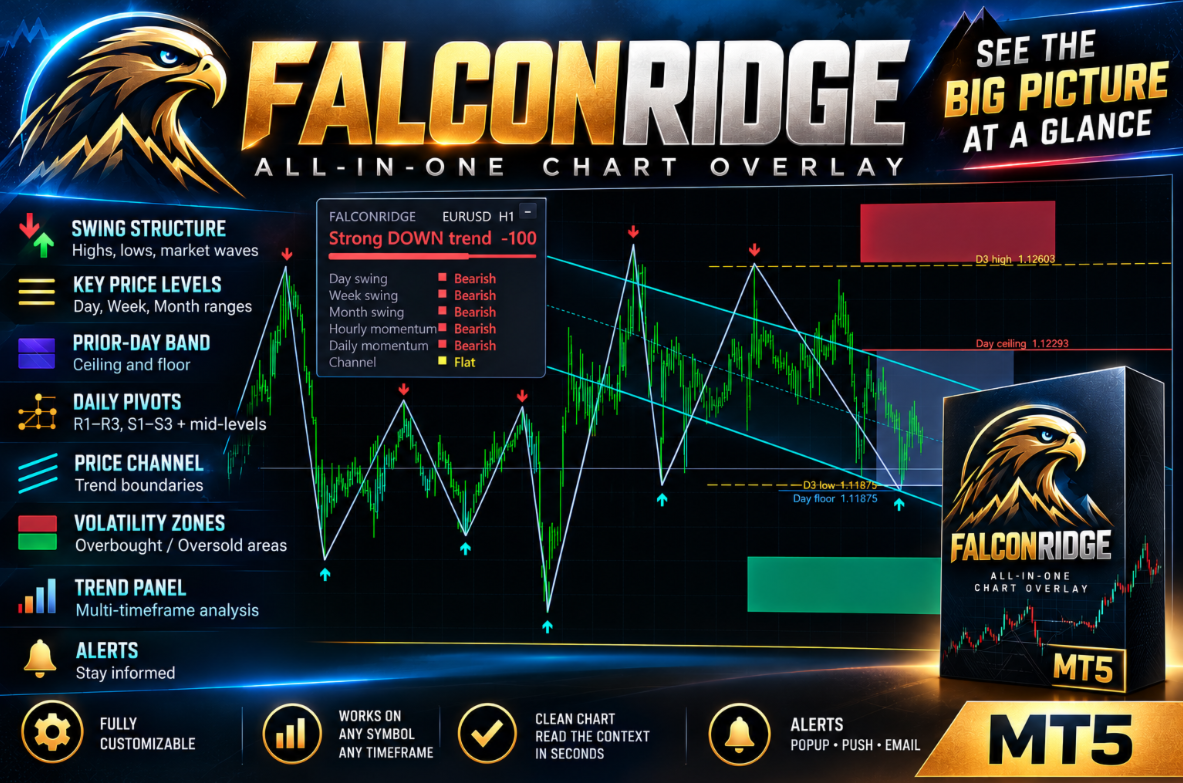
FalconRidge is an all-in-one chart overlay for MetaTrader 4. It brings swing structure, key price levels, volatility zones, a price channel and a trend scoreboard onto a single chart, so you can read the market context at a glance instead of juggling many separate tools.
MT4-version: https://www.mql5.com/en/market/product/203421
WHAT YOU SEE ON THE CHART
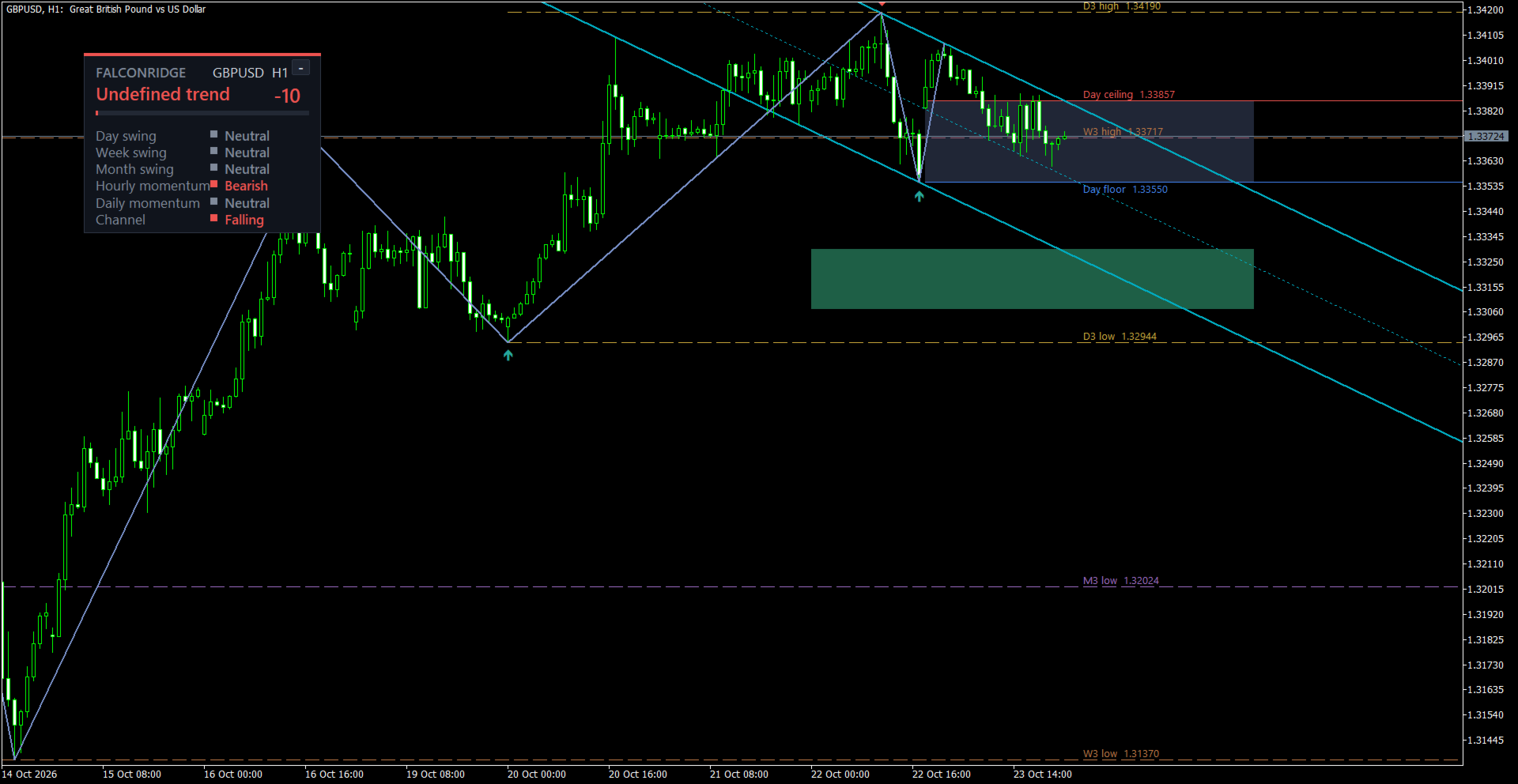
- Swings: arrows mark confirmed swing highs (red, pointing down) and swing lows (green, pointing up). A line connects consecutive swings and shows the current market wave. Confirmed arrows do not repaint; only the last segment of the line follows live price.
- Range levels: the highest high and lowest low of the last several days, weeks and months, drawn as labelled horizontal lines (D, W, M).
- Prior-day band: a shaded zone built from the previous day's key prices, with ceiling and floor lines.
- Daily pivots (optional): central pivot, three resistance and three support levels, plus mid-levels.
- Price channel: a sloping channel with a dotted centre line. It shows trend boundaries and whether the channel is rising, falling or flat.
- Volatility zones: upper and lower shaded zones far from the average price, marking stretched areas of the move. Optional inner bands can be added.
- Trend panel.
TREND PANEL — WHAT THE DATA MEANS
- Header with the product name and the current symbol / timeframe.
- Verdict: "No clear trend", "Undefined trend", "Weak UP/DOWN trend", "UP/DOWN trend", "Strong UP/DOWN trend". The colour shows direction: green — up, red — down, grey — neutral.
- The number on the right (for example -100 or +75): the sign is the direction, the size shows how strongly the factors agree. The closer to 100, the more factors point the same way.
- Strength bar under the verdict: the longer it is, the stronger the one-sided advantage.
- Rows (Full style). Each has a coloured marker and a reading — Bullish / Bearish / Neutral:
- Day swing — direction of the move over the last few days.
- Week swing — direction of the move over the last few weeks.
- Month swing — direction of the move over the last few months.
- Hourly momentum — short-term momentum on the hourly chart.
- Daily momentum — where the current price stands relative to the daily trend.
- Channel — slope of the price channel: Rising, Falling, Flat or n/a (no data).
What it is for: the panel works as a multi-timeframe filter. When all rows point the same way, the trend is clean and consistent. When they disagree, the market is ranging or in transition, and entries deserve extra care.
HOW TO USE IT
- Direction filter: trade in the direction of the panel verdict and look for entries on a lower timeframe.
- Swings: confirmed highs and lows are ready-made references for entries, stop placement and reading market structure.
- Range levels, pivots and the prior-day band: support / resistance areas, profit targets and places where price tends to react.
- Volatility zones: when price enters a zone, the move is stretched. That is a reason to take profit or wait for a pullback rather than chase.
- Channel: trade from the boundaries, watch for breakouts, and spot sideways markets (flat channel).
- Alerts let you work without staring at the screen.
Works on any symbol and any timeframe.
SETTINGS (names exactly as shown in the terminal)
Swing points
- Swing depth (bars to the left) — how many bars to the left are considered when looking for a swing. Larger = fewer but more significant swings.
- Confirmation (bars to the right) — how many bars after the point are needed to confirm it. Larger = later but more reliable.
- Minimum swing size (points, 0 = off) — ignore swings smaller than this size in points.
- Bars to analyse — history depth.
- Show swing markers / Show swing line — show or hide arrows / the line.
- Swing high marker color / Swing low marker color / Swing line color / Swing line width — marker colours, line colour and thickness.
Range levels
- Show range levels (day / week / month) — enable the levels.
- Days in range / Weeks in range / Months in range — how many completed days, weeks and months are used.
- Day range color / Week range color / Month range color — level colours.
- Label font size — label text size.
Prior-day band
- Show prior-day band — enable the band.
- Ceiling color / Floor color — colours of the upper and lower lines.
- Band fill color — fill colour.
Daily pivots
- Show daily pivots — enable the pivots.
- Show pivot mid-levels — show the intermediate levels.
- Central pivot color / Resistance color / Support color / Mid-level color — colours.
Trend panel
- Show trend panel — show the panel.
- Panel style — Compact (verdict and bar) or Full (adds all rows).
- Panel corner — chart corner the panel is attached to.
- Panel X offset / Panel Y offset — distance from the corner in pixels.
- Auto-scale by screen DPI — scale the panel automatically to the screen resolution.
- Panel scale (%) — manual panel scale in percent.
Price channel
- Show price channel — enable the channel.
- Channel timeframe — timeframe used to build the channel (current or any other).
- Channel length (bars) — channel length in bars.
- Fractal half-width (bars, 0 = auto) — sensitivity of the channel anchor points; 0 chooses automatically for the timeframe.
- Channel line color — line colour.
- Fill channel / Channel fill color — channel fill and its colour.
Volatility zones
- Show volatility zones — enable the zones.
- ATR period — volatility measurement period.
- Average period — period of the average line the zones are built around.
- Zone start (ATR multiplier) / Zone end (ATR multiplier) — distance of the near and far edges of the zone, in volatility units.
- Show inner trend bands — show the inner bands.
- Inner band start (ATR multiplier) — where the inner band begins.
- Zone width (bars) — zone width in bars.
- Extend zones to the right (bars) — how many bars to extend the zones to the right.
- Upper zone color / Lower zone color / Inner band color (above average) / Inner band color (below average) — colours.
Alerts
- Alert on new swing point — alert when a new swing is confirmed.
- Alert on volatility zone touch — alert when price enters a zone.
- Popup alert / Push notification / Send email — delivery methods.
Chart
- Draw price bars above fills — draw candles on top of the fills if fills cover the bars.
PANEL CONTROLS
Drag the panel by its header with the mouse and collapse it with the "−" / "+" button in the top-right corner. Position and state are remembered for each chart.