
SomaGold
- Experts
-
Andrii Soma
 If you bought my EA, contact me to join the Telegram group.
Also, there is a group on this website if you don't have Telegram: - Version: 3.6
- Updated: 7 October 2026
- Activations: 10
SomaGold is a multi-strategy breakout Expert Advisor for MetaTrader 5, built exclusively for Gold (XAUUSD). One chart, one EA, 32 independent strategies running together as a single diversified portfolio.
This is my first published EA on MQL5. To make it accessible at launch, I am using a transparent ramping-price model:
- Launch price: 100 USD
- The price increases by 100 USD for every 10 copies sold
Early buyers lock in the lowest price for the lifetime of the product.
Concept
Instead of running a single setup that tends to overfit a narrow market regime, SomaGold ships with a curated set of 32 pre-tuned strategies that all run in parallel under a single EA on a single Gold chart.
Each strategy has its own magic number, comment, timeframe, swing-detection parameters, exits, news distances and lot-step. They share the same execution engine but trade independently, so you get genuine diversification across timeframes and breakout breadth without managing dozens of charts.
Portfolio creation
I ran 48 completelly different optimizations:
- First of all, I ran optimizations on 2 time ranges:
- 2018–2023
- 2020–2025
- There were 4 groups of timeframes: D1, H12, H8, H4
- There were three breakout breadth variants:
- V1 Broad: wider swings, fewer but stronger setups;
- V2 Medium: balanced setup frequency;
- V3 Narrow: tighter swings, more frequent setups.
- All of them were optimized by the return/dd:
- First by Return / Balance DD
- Then by Return / Equity DD
As the result, I had 2 * 4 * 3 * 2 = 48 strategies.
This combination of timeframe x breadth x family is what produces the diversification. Different strategies trigger in different volatility regimes, so the equity curve does not depend on a single market behaviour.
Each optimization gave me a new result.
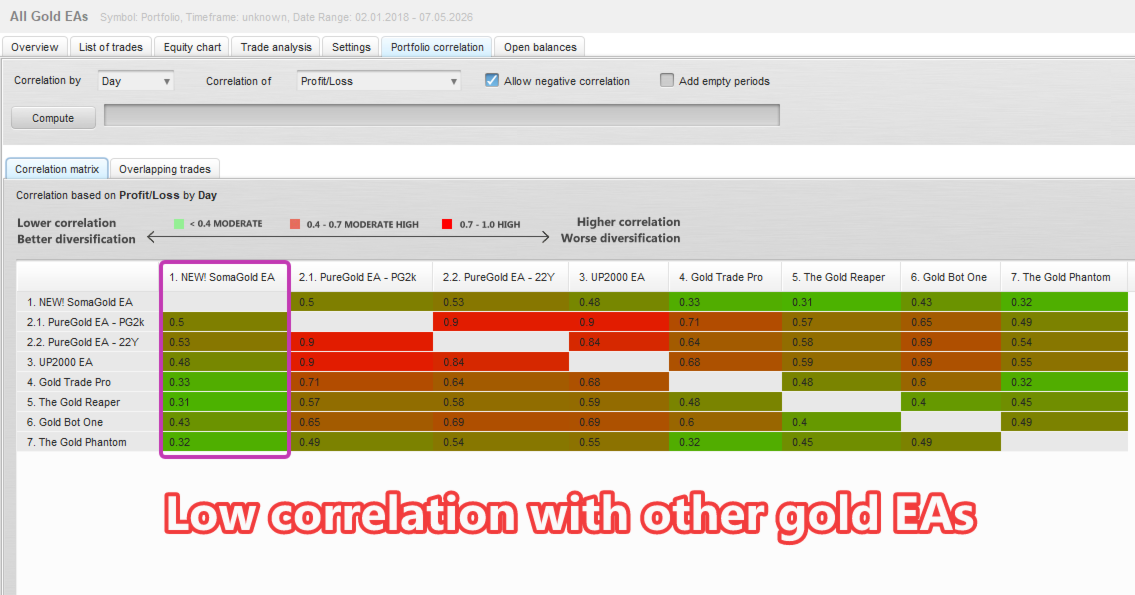
- If some strategies correlated, I removed them.
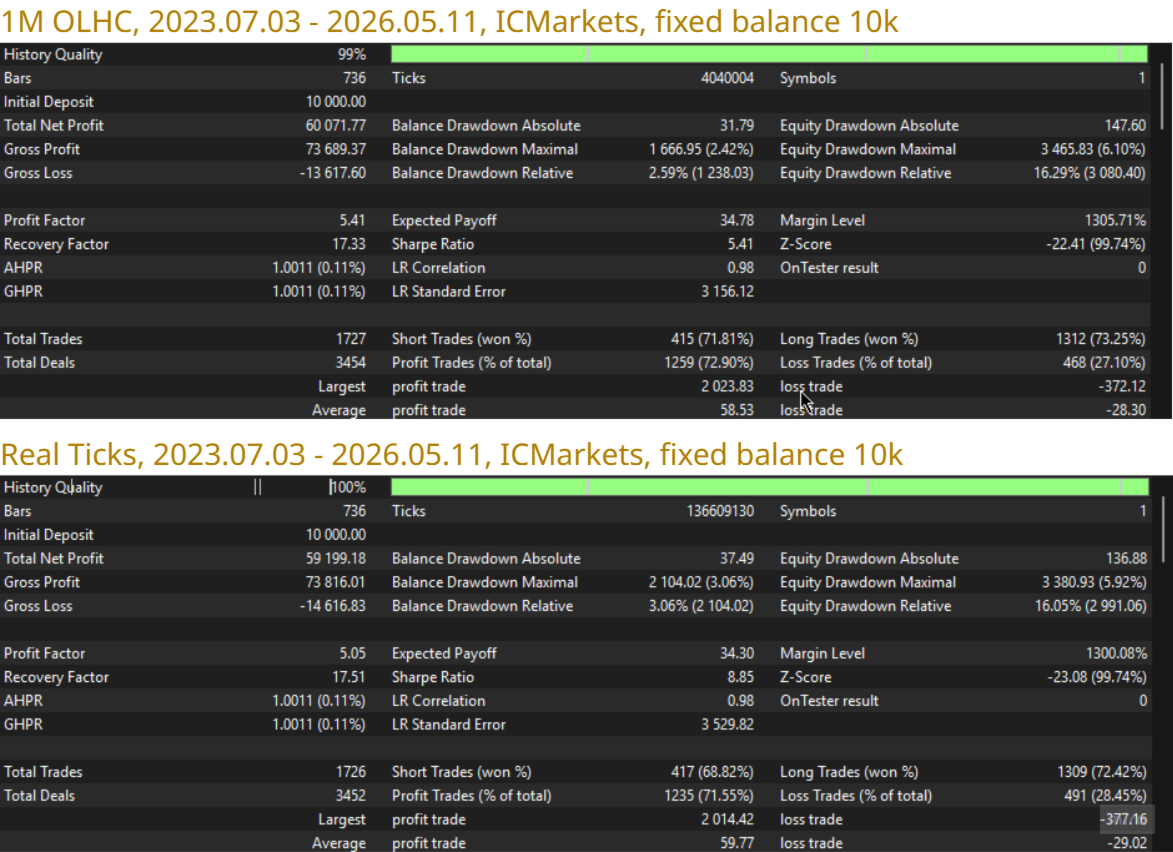
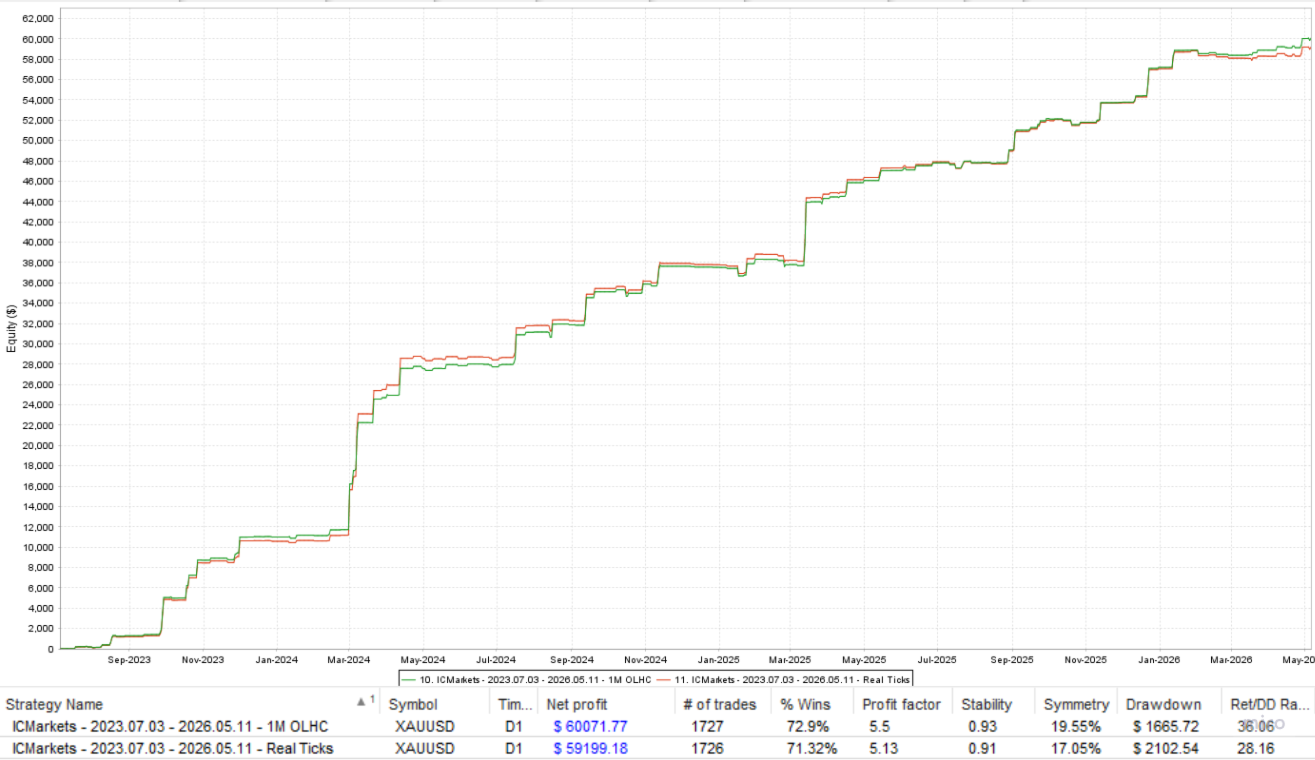
- If some strategies did not match real ticks, I removed them.
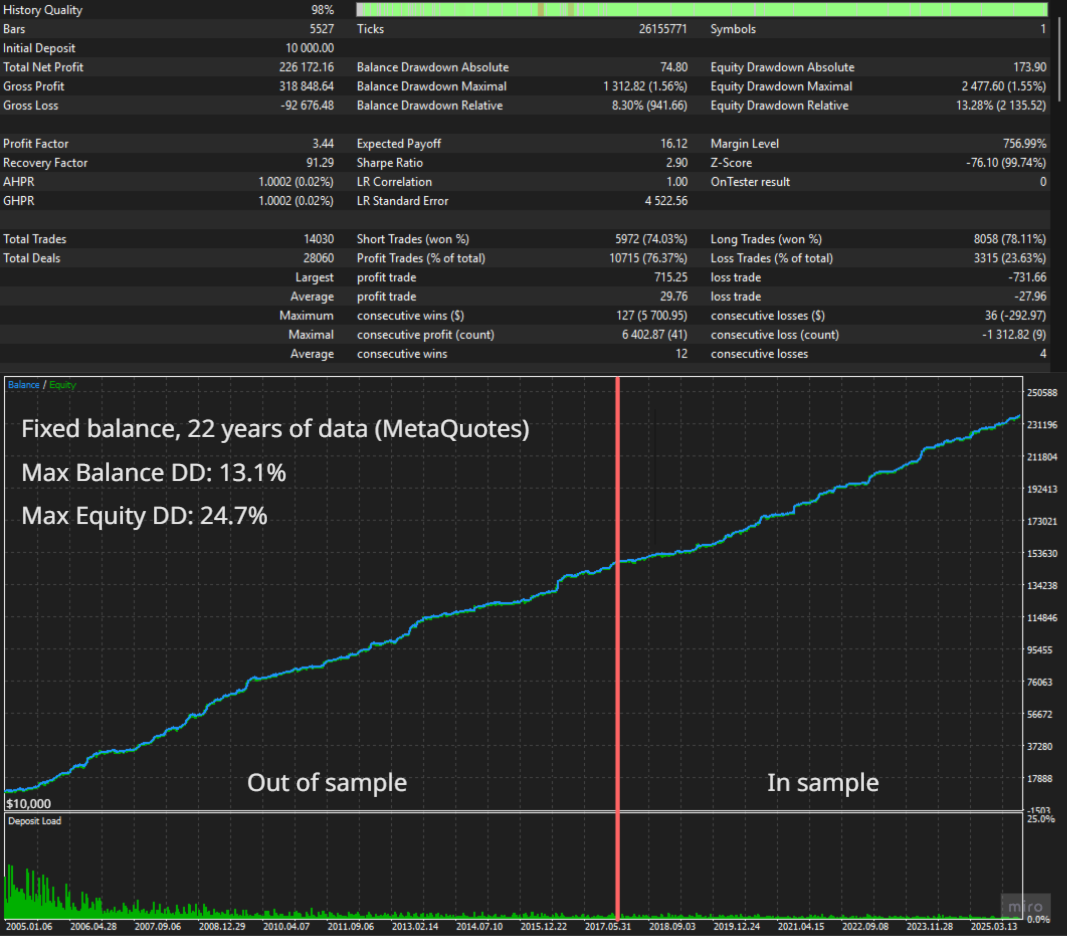
- If some strategies did not trade well out of sample (2007-2018), I removed them.
The OOS period is more than a decade long and includes very different market regimes — the 2008 financial crisis, the 2011–2013 gold bull/bear cycle, the long 2014–2018 consolidation, and several news-driven shocks.
The portfolio remains profitable and stable across this entire window without any re-tuning, which is the main reason I felt comfortable releasing it.
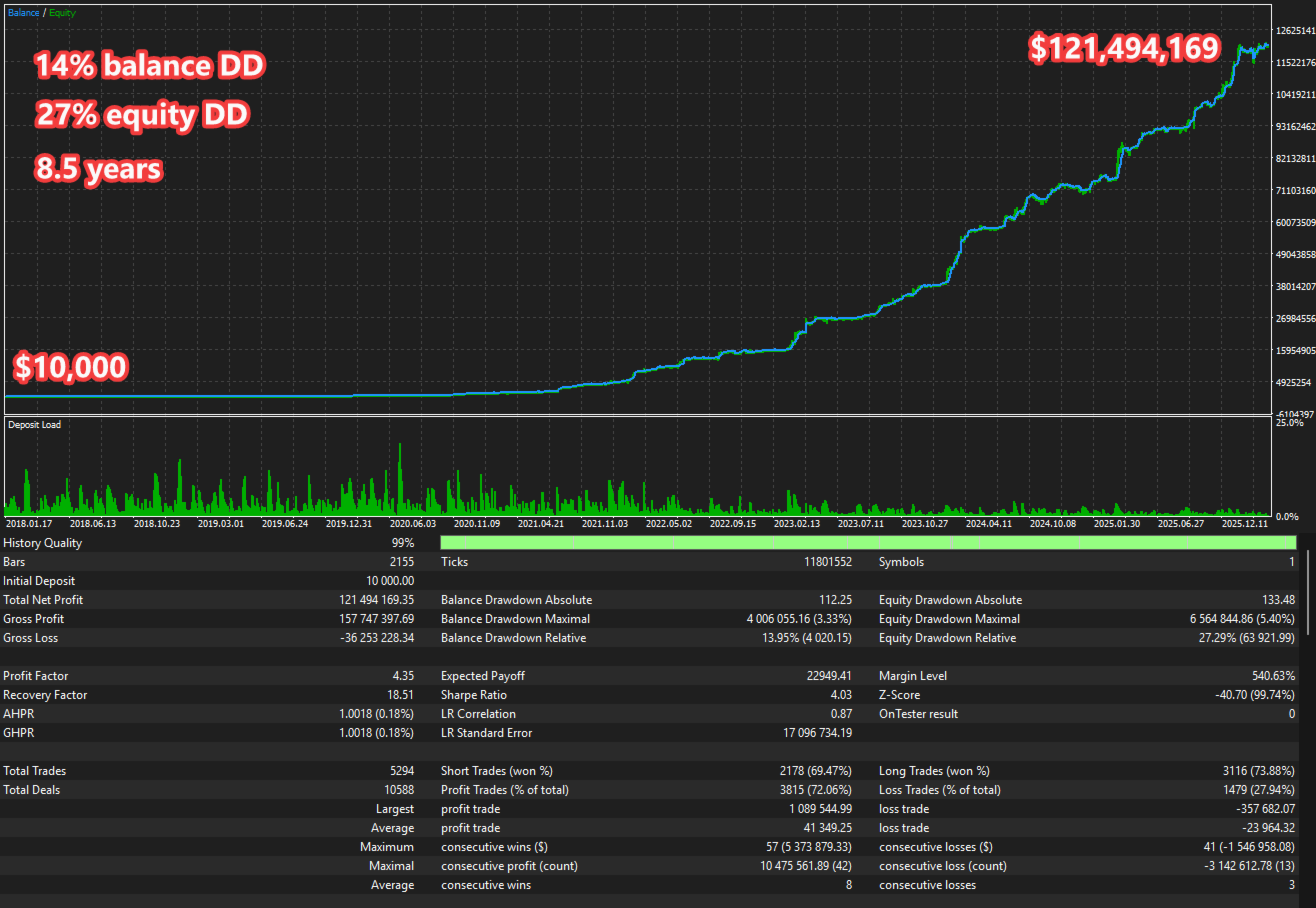
All optimizations were made with enabled Friday trading closure, which eliminated optimization based on risky weekend gaps, and it's a default option that will keep your account safe from these unpredictable gaps.
So, after that, only 32 strategies survived.
And as the last step, every strategy lot size was set by a special python script that found the best combination ofreturn/balance DD. Strategies that correlate more in DD, have less allocations, and strategies that bring more value have more lot size allocation.
Risk and lot sizing
Two sizing modes are available:
- Manual lot size — fixed lots per trade
- Lot per balance step — automatic sizing based on account capital, scaled per strategy
Additional controls let you fine-tune the risk profile:
- Global risk multiplier on top of the calculated lot
- Optional EA lot cap via MaxLots ( 0 default = unlimited by EA; broker spec only); set > 0 for a hard maximum
- Choose balance or equity as the sizing base
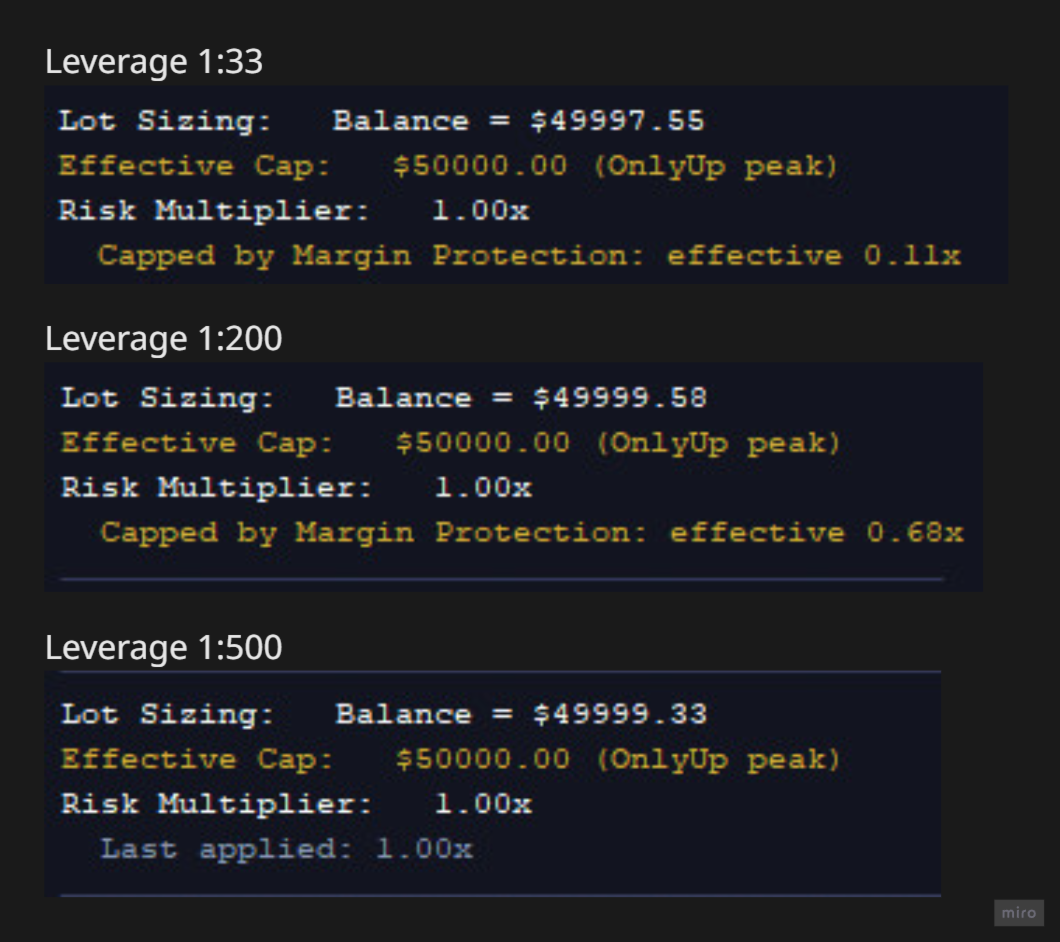
- OnlyUp mode — lots ratchet up with peak capital but never down. On startup the EA seeds the historical peak from recent closed-trade history (configurable lookback), so the OnlyUp baseline is meaningful from the first tick instead of being reset on every restart
- Base-currency selector (USD, EUR, GBP, HKD, SGD or a custom pair) for correct sizing on non-USD accounts
- Margin call protection (default on) — before placing orders the EA treats existing same-side pending stops/limits as if they already need their market-order margin, so free margin is not over-committed when the broker reserves little on pendings; it can also trim calculated lot size so worst-case concurrent same-side orders stay within a margin budget tied to your sizing base. Turn off only if you fully control leverage and headroom.
- MCP Risk Multiplier - scales risk from the margin call protection lot size (1.0 = MCP default)
News filter
SomaGold includes a built-in US news calendar covering three high-impact event types:
- NFP — Non-Farm Payrolls
- CPI — Consumer Price Index
- IR / FOMC — central-bank rate decisions
Around each event the EA can independently block new entries, cancel existing pending orders, and close open positions. Each strategy has its own minutes-before and minutes-after windows, so news protection is tuned per strategy rather than applied globally.
Broker GMT can be set manually or detected automatically, so news windows always align with broker time, including across daylight-saving changes. The classifier is tightened to exclude common false positives such as ADP Nonfarm Employment and FOMC speeches/minutes.
Trading window
An optional Monday-open / Friday-close window lets you avoid weekend gaps. You can choose whether to also kill pending orders or open positions outside the trading window.
Optimization was perfomed with Friday-close on, which is a default setting, so there is no overoptimization on the market risky conditions.
Prop Firm Compliance
An optional per-trade random pip offset can be applied to entries and exits via MaxRandomizationPips. This gives your account slightly different levels than other traders running the same EA — useful on prop-firm and funded accounts where identical copy-trading patterns may be flagged. Set the value to zero to disable.
On-chart dashboard
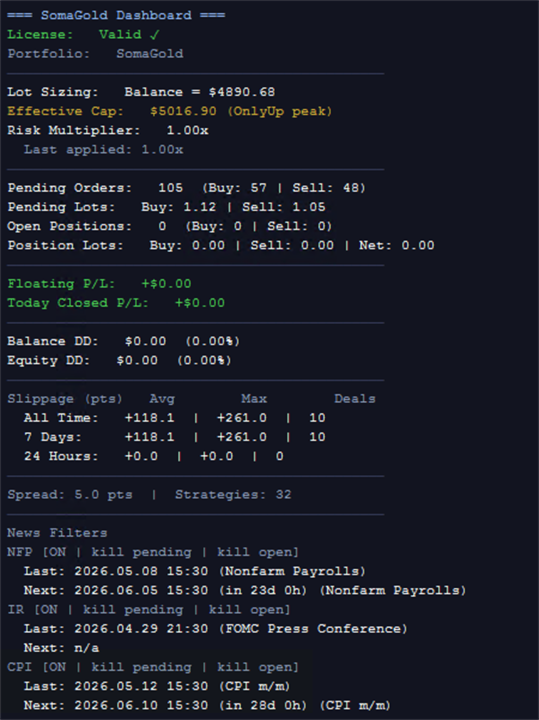
SomaGold renders a live dashboard on the chart showing:
- Lot sizing base and effective capital
- Pending orders and open positions split by Buy/Sell
- Floating P/L and today's closed P/L
- Balance and equity drawdown, absolute and percentage
- Trading Cost table: slippage, swap and commission for 1d / 7d / 30d / 90d / all
- All-time closed Profit/Loss
- Pending order usage and broker limitations
- Current spread and active strategy count
- Next and last NFP, CPI and IR/FOMC events
The dashboard can be disabled in the Strategy Tester (DisableDashboardInTesting, default on) or on live / demo charts (DisableDashboardInLive, default off).
Parameters
Portfolio Settings
- StrategiesToRun -> comma-separated 1-based strategy numbers to enable (default 1–32); useful for isolating a subset or trialling without specific strategies. Numbers match the #N in each trade comment. Disabled strategies stop placing and managing trades; close any open positions for them before changing this input.
Overrides
- EnableMagicOverride -> use OverrideMagicBase + strategy index for magic numbers
- OverrideMagicBase -> base magic when magic override is on
- EnableCommentOverride -> use one comment for all strategies
- OverrideComment -> order/position comment when comment override is on
Trade direction
- AllowBuyTrades -> allow buy / long trades and buy-side pendings
- AllowSellTrades -> allow sell / short trades and sell-side pendings
Lot sizing
- LotsAdjustMinChangePercent -> minimum % change before the active lot size is updated
- Risk -> ManualLotSize (fixed StartLots) or LotSizeStep (auto from capital)
- AdjustLotsizeToVariableValues -> recalculate lots as balance or equity changes
- StartLots -> fixed lot in manual mode, or floor reference in step mode
- MaxLots -> optional EA lot cap; 0 = broker spec only
- UseEquity -> size from equity instead of balance
- OnlyUp -> lots ratchet up with peak capital and never down
- RestorePeakFromHistory -> seed OnlyUp peak from recent closed-trade history on start
- RestorePeakLookbackDays -> lookback days for peak restore (0 = all history)
- ManualBalanceForLotSizing -> fixed capital for sizing when > 0
- RiskMultiplier -> global multiplier on calculated lot
- MarginCallProtection -> reserve margin for same-side pendings and cap lot size to margin budget
- McpRiskMultiplier -> scales risk from the margin call protection lot size (1.0 = MCP default)
- BaseCurrency -> USD, EUR, GBP, HKD, SGD, or custom for non-USD accounts
- CustomBaseCurrencyPair -> broker symbol for conversion when BaseCurrency is custom
GMT
- Broker_GMT_OFFSET_Summer -> manual broker GMT offset in summer (hours)
- Broker_GMT_OFFSET_Winter -> manual broker GMT offset in winter (hours)
- AutoGMT -> auto-detect broker GMT (ignores manual offsets)
News filters
- EnableNFP_Filter -> enable NFP protection window
- NFP_CloseOpenTrades -> close open positions before NFP
- NFP_ClosePendingOrders -> cancel pending orders before NFP
- EnableIR_Filter -> enable IR / FOMC protection window
- IR_CloseOpenTrades -> close open positions before IR
- IR_ClosePendingOrders -> cancel pending orders before IR
- EnableCPI_Filter -> enable CPI protection window
- CPI_CloseOpenTrades -> close open positions before CPI
- CPI_ClosePendingOrders -> cancel pending orders before CPI
Per-strategy minutes before/after each event are built into the portfolio, not separate parameters.
Trading hours
- UseTradingTimeZones -> enforce the weekly Monday–Friday window
- KillPending -> cancel pending orders outside the window
- KillOpen -> close open positions outside the window
- MondayOpenHour -> window opens Monday at this hour (broker time)
- MondayOpenMinute -> window opens Monday at this minute
- FridayCloseHour -> window closes Friday at this hour
- FridayCloseMinute -> window closes Friday at this minute
Dashboard
- DisableDashboardInTesting -> hide the on-chart dashboard in Strategy Tester
- DisableDashboardInLive -> hide the on-chart dashboard on live / demo charts (default off)
- DashboardUpdateSeconds -> dashboard refresh interval in seconds
Prop Firm Compliance
All inputs default to off / zero — zero performance impact when disabled. Enable to enforce common funded-account rules.
- MaxRandomizationPips -> prop-firm entry/exit offset; unique vs other EA users (0 = off)
- EnablePropFirmCompliance -> master switch; must be true for any rule below to take effect
- PF_MaxDailyDrawdownPercent -> max daily equity loss as % of daily baseline (0 = off)
- PF_MaxDailyDrawdownMoney -> max daily equity loss in account currency (0 = off)
- PF_DailyResetHour -> broker/server hour (0–23) when the daily window resets
- PF_DailyLossBufferPercent -> safety cushion: trip at (limit × (1 − buffer/100)); default 10% = trip at 90% of the limit
- PF_DisallowHedging -> blocks opposite-direction entries while this EA holds an open position; sweeps opposite pendings automatically
- PF_MaxTotalPendingOrders -> cap on total EA pending orders; keeps the closest-to-price N orders (0 = off)
When the daily DD limit is breached (accounting for the buffer), all EA positions are closed and pending orders deleted. New entries are blocked until the daily window resets. Suitable for FTMO, FundedNext, The5ers, E8, and similar programs.
Recommended setup
- Symbol: XAUUSD
- Timeframe: any (the EA reads its own timeframes internally)
- Account type: ECN / RAW-spread account is recommended for tight spreads
- Minimum recommended balance: 1000 USD for default risk; smaller accounts should reduce the risk multiplier
- VPS: recommended for stable 24/5 execution
- For AUTO_GMT to work, you must add the URL "https : // www . worldtimeserver.com/" to the allowed URLs in your MT5 terminal (Tools → Options → Expert Advisors)
Summary
- 32 pre-tuned breakout strategies on a single Gold chart
- Different strategy families across D1, H12, H8 and H4 timeframes
- Optimised on 2018–2023 and 2020–2025, validated out-of-sample on 2007–2018
- Layered exits with stop-loss, take-profit, break-even and trailing
- Integrated US news protection
- Optional entry/exit randomisation for prop-firm uniqueness (MaxRandomizationPips)
- Optional prop firm compliance mode: max daily DD lockout, no-hedge rule, pending cap (off by default)
- Full live on-chart dashboard
- Transparent ramping-price launch: 100 USD start, +100 USD per 10 copies, max once per day






























I've been using Soma Gold since its release, and it's probably one of the best Gold EAs available on MQL5. I use it on several accounts, and so far I can say that it is not only reliable and robust, but also very well designed. You can really see that Soma has thought of everything 😅 I particularly like his methodology for testing and validating each strategy used in the EA. The amount of work and thought behind the system is impressive, and I think he has done an excellent job! I'm also using Soma's other EAs, and I can tell you that he is a very competent and reliable developer. I'll be reviewing his other systems very soon as well, but I always wait for at least 3 months of real-life use before leaving a review on any system. Slava Soma! 🇺🇦