
Dual Striker
- Experts
-
Sergey Ermolov
 Hi,
Hi,
I’m Sergey Yermolov — I’ve been developing trading systems and algorithms for over 15 years.
My approach to trading is not about chasing a “holy grail” or promising quick profits.
I don’t sell “money-making robots.” - Version: 3.8
- Activations: 15
Dual Striker uses a momentum-based strategy for trading Gold (XAUUSD).
The strategy is designed to trade in the direction of an already established market move WITHOUT using martingale, averaging, grid systems, or other aggressive money management techniques.
Live account monitoring: https://www.mql5.com/en/signals/2385210 (6 weeks -> More than +150%)
Recommended broker: Vantage Markets
- Leverage: 1:500
- Minimum deposit: $50
- XAUUSD spread up to 30 cents
- Account type: RAW or ECN
After purchasing, send me a private message and I will add you to the users' channel.
In the channel, I regularly share trading recommendations and updates.
Momentum Strategy
The core idea behind Dual Striker is not to predict the market, but to identify moments when price is already showing signs of strength and is likely to continue moving in the chosen direction.
Unlike many popular systems, the strategy does not rely on martingale, position averaging, grid trading, or any other high-risk loss recovery techniques. Every trade is treated as an independent trading opportunity with a predefined and known level of risk.
This approach keeps the EA's operation transparent and easy to understand, while ensuring that performance does not depend on continuously increasing position sizes after a series of losses.
Learn more about the strategy >>
The Importance of Trading Hours
For momentum-based strategies, trading time is just as important as the entry logic itself.
The strongest and most reliable market moves typically occur during periods of high market participation. During quiet trading hours, momentum moves are often weak or false, which can negatively affect performance.
For this reason, Dual Striker operates only within a carefully selected trading window:
- 08:00 UTC
- 15:00 UTC
The EA can automatically adapt these trading hours to your broker's server time.
Important: To obtain accurate backtesting results in the Strategy Tester, you must correctly configure the GMT parameter according to your broker's server time.
Intelligent Trade Management
For a momentum strategy, locking in profits at the right time is just as important as finding good entries, since every strong move eventually comes to an end.
Dual Striker combines several position management mechanisms:
- High-performance trailing stop
- Momentum exhaustion scanner
- Position holding time control
- Reverse momentum scanner
Each module serves a specific purpose and helps protect accumulated profits.
If momentum begins to weaken, the market reverses, or a trade fails to deliver the expected result within a reasonable period, the EA can automatically close the position.
Risk Management
One of the key principles of Dual Striker is strict risk control on every trade. The EA automatically calculates position size so that even if the protective stop loss is triggered, losses do not exceed the user-defined risk level. The trader simply specifies the acceptable risk percentage, and all calculations are performed automatically.
Main advantages of this approach:
- Risk is known in advance
- No uncontrolled increase in position size
- No hidden loss recovery mechanisms
- Automatic lot size calculation
Using Dual Striker with Prop Firms
Thanks to its controlled risk model, Dual Striker can be used on proprietary trading firm accounts.
Special drawdown control settings are included, allowing the strategy to be adapted to the requirements of most popular prop firms. The EA can operate within predefined risk limits and comply with firm-specific trading rules.
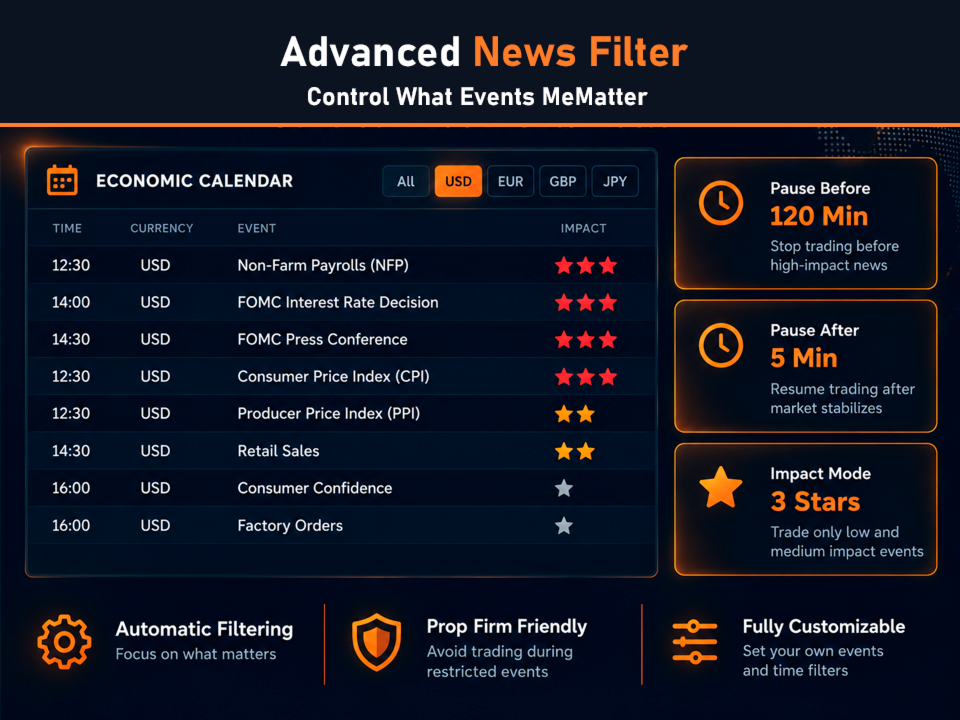
News Filter
During major economic news releases, markets often experience sharp increases in volatility and slippage. This is particularly important for momentum strategies because execution quality directly affects trading performance.
The news filter serves two important purposes:
- Stops trading before major news releases, when the probability of significant slippage increases substantially.
- Helps comply with prop firm rules, many of which prohibit trading during high-impact macroeconomic announcements.
For compliance with most prop firm requirements, the following setting is recommended:
- Impact Mode = 3 stars
Important: The news filter does not work in the MetaTrader Strategy Tester.
As a result, you may see trades during backtesting that would have been skipped in live trading due to the news filter.
Slippage Control and Broker Selection
Order execution quality has a significant impact on the performance of any momentum-based strategy. Even with identical settings, two different brokers can produce completely different results due to differences in execution speed and slippage. Slippage occurs when the actual execution price differs from the price at which the Expert Advisor intended to open a position. In practice, it represents an additional hidden trading cost that directly reduces profitability.
Evaluating a broker's execution quality on your own can be difficult. However, Dual Striker is capable of analyzing its own trades using internal order parameters and execution history to calculate the actual amount of slippage.
To achieve this, the Expert Advisor includes a dedicated execution quality indicator that helps objectively assess your broker's trading conditions. More information about broker selection and acceptable slippage levels can be found in the following article:
Why Slippage Matters More Than Spread Size >>
Expert Advisor Parameters
Money Management
- Lot Mode — selects the position sizing method. You can use either a fixed lot size or automatic risk-based volume calculation.
- Fixed lot — fixed lot size used to open trades.
- Risk per One Position (%) — percentage of account risk allocated to a single trade. The Expert Advisor automatically calculates the position size according to the specified risk level.
Trade Session
- GMT — broker trading server time zone. Used for the correct operation of time filters and trading sessions.
- Start Hour — trading session start hour.
- Stop Hour — trading session end hour.
- Monday — enable or disable trading on Monday.
- Tuesday — enable or disable trading on Tuesday.
- Wednesday — enable or disable trading on Wednesday.
- Thursday — enable or disable trading on Thursday.
- Friday — enable or disable trading on Friday.
- Friday Delete Orders Hour — hour at which pending orders are removed on Friday.
- Friday Close Positions Hour — hour at which all open positions are force-closed on Friday.
News Filter
- News Filter — enables or disables the built-in economic news filter.
- Pause Before (min) — number of minutes before a news release during which trading will be suspended.
- Pause After (min) — number of minutes after a news release during which trading remains suspended.
- Impact Mode — selects the importance level of news events monitored by the filter.
- Currencies — list of currencies for which economic events should be monitored. Multiple currencies should be separated by semicolons.
- Event codes — list of keywords used to filter news events. Examples: Nonfarm, CPI, PCE.
Trade Period
- OrderPeriod — working timeframe used by the Expert Advisor for market analysis and trade opportunity detection.
- Trading Mode — selects the strategy operating mode. This parameter affects trading activity and determines the balance between conservative and more aggressive trading styles without changing lot size or risk percentage.
Stop Loss & Take Profit
- Stop Loss Mode — selects the stop-loss calculation method.
- Fixed Stop Loss (points) — fixed stop-loss distance in points.
- Stop Loss as % of current price — calculates the stop-loss level as a percentage of the current market price.
- Fixed TakeProfit (points) — fixed take-profit distance in points.
Classical Trailing Stop
- Trailing Stop — enables or disables the classic trailing stop.
- Trailing Distance (points) — distance between the current market price and the trailing stop level.
- Trailing Start (points) — minimum profit in points required before the trailing stop becomes active.
Time-Based Exit
- Time-Based Exit — enables or disables time-based position closing.
- Exit Check After (minutes) — number of minutes after opening a trade before exit conditions begin to be evaluated.
- Minimum Profit Required To Exit (points) — minimum profit level required before a position can be closed by the time-based exit logic.
Impulse & Reversal Control
- Strong Impulse Exit — enables the impulse exhaustion scanner. Allows positions to be closed when signs of a completed momentum move are detected.
- Impulse Multiplier — sensitivity coefficient of the impulse scanner. Higher values require stronger momentum before activation.
- Correction Multiplier — allowable correction coefficient after an impulse, used to determine position exit timing.
- Reverse Impulse Protection — enables protection against strong movements against the current position.
- Impulse Multiplier — strength coefficient of the reverse impulse required to activate the protection mechanism.
- Impulse Time Limit (minutes) — maximum analysis time for a reverse impulse after it occurs.
Prop Drawdown
- Use Prop Drawdown — enables drawdown control to comply with prop firm rules.
- Daily Drawdown — maximum allowable daily account drawdown in percentage terms.
- Max. Drawdown — maximum allowable overall account drawdown in percentage terms.
Other Parameters
- Max. slippage (if broker allowed) — maximum allowable slippage for order opening and closing. Actual functionality depends on the broker's execution capabilities.
- Magic Number — unique identifier assigned to the Expert Advisor's orders. Used to separate trades from different EAs and strategies on the same trading account.
- Comment Orders — comment text that will be automatically attached to orders opened by the Expert Advisor.















































User didn't leave any comment to the rating