Trade Assistant Risk Calculator MT4

Trade Assistant Risk Calculator is an all-in-one floating trading panel (Expert Advisor) designed for professional manual traders on MetaTrader 5. It combines Visual Chart Trading, Automatic Risk Calculation, and Advanced Position Management into a single, compact interface.

Stop calculating lot sizes manually. Stop guessing your Risk:Reward ratio. Simply drag lines on the chart, and the EA calculates the exact lot size to match your risk percentage, equity, or money target.

Important Notes

  • This is an Expert Advisor (EA), not an indicator. Attach it to any chart to activate the floating panel.
  • Algo Trading must be enabled in MetaTrader 5 (Options → Expert Advisors → Allow Algo Trading) for the EA to place and manage orders.
  • The panel is draggable (click and hold the title bar) and minimizable (click the "–" button on the title bar).
  • Works on live accounts and demo accounts. The Strategy Tester does not support chart-event-based EAs — please use a demo account for testing.
  • Supports Hedging and Netting account types.

Key Features

1. Visual Order Placement & Interactive Chart Overlay

  • Drag & Drop Trading: Three interactive trend lines (Entry, Stop Loss, Take Profit) appear on your chart spanning 40% of chart width. Simply drag them to your desired levels.
  • Instant Calculation: As you move the Stop Loss line, the panel automatically recalculates the Lot Size to keep your risk constant (e.g., 1% of Balance).
  • Live R:R Display: See your Risk-to-Reward ratio in real-time as you adjust your Take Profit line.
  • Market & Pending Orders: Supports both instant execution and pending orders (Buy/Sell Limit & Stop) with a single click. Toggle between Market (M) and Pending (S) mode directly from the chart overlay. Pending orders support a configurable expiry timer.
  • Interactive Chart Drag Bars: Each line (Entry, TP, SL, and all partial levels) has a floating overlay bar that displays the current price, pips distance, and dollar profit/loss in real-time. Drag any bar to move its corresponding line — no need to click the tiny line itself.
  • Entry Bar Quick Actions: The Entry drag bar includes B/S (flip direction), Cmd (execute order), M/S (market/pending toggle), R (cycle risk mode), and X (remove all lines) buttons — all accessible directly on the chart.
  • Color-Shaded Profit/Loss Zones: Semi-transparent green (profit) and red (loss) fill zones between Entry, TP, and SL lines provide instant visual feedback of your trade setup.
  • Color-Coded Order Overlays: Each on-chart order card uses a distinct background tint and bullet marker so you can tell its state at a glance — green-tinted “●” for filled positions, purple-tinted “○” for broker pending orders, and blue-grey for virtual pending orders. Filled positions that originated from a virtual pending also carry a [VP] tag in the entry row.
  • Live Unrealised P/L Badge: Every filled position shows its current floating P/L on its entry overlay in both money and pips, color-coded green when in profit and red when in loss. The badge sits on its own row inside the entry card so it never overlaps the order info, and it updates every tick with swap and commission included.
  • Lock Buttons: Lock the TP or SL to a specific price level using the "L" button on each drag bar, preventing accidental movement.
  • Order Options Quick Access: The OCO (One-Cancels-Other), Hide SL/TP, and Virtual Pending toggles are available directly in the Trade tab as a compact three-button row — no need to navigate to another tab for these frequently used options.
  • Per-Order Action Menu: Every on-chart entry card includes a context menu for ticket-level actions. Filled positions can close, close-and-reverse, partial-close 25% / 50% / 75%, edit broker or virtual SL/TP, open Edit Parts, and configure per-ticket Breakeven or per-ticket fixed-pip trailing. Broker pending and virtual pending orders can also edit SL/TP and run Parts: Sync from Panel or Parts: Clear All.
  • Timeframe Persistence: Entry, Stop Loss, and Take Profit lines retain their exact positions when you switch chart timeframes — no recalculation, no reset. Your trade setup survives timeframe changes intact.

2. Buy/Sell Direction Flip with Smart Mirror

  • One-Click Flip: The B/S button on the Entry drag bar instantly flips the entire trade setup between Buy and Sell.
  • Automatic Mirror: SL and TP lines mirror symmetrically around the entry price, preserving your risk-to-reward geometry.
  • Partial Lines Follow: All active partial TP/SL levels (TP1–TP10, SL1–SL10) automatically reposition to the correct side when the direction flips — whether triggered by the B/S button or by dragging SL past the entry price.
  • Auto-Flip on Drag: Dragging the TP line below entry (Buy) or above entry (Sell) automatically flips the direction and mirrors the SL to match. Same for dragging SL past entry.

3. Professional Risk Management

  • 4 Risk Modes with Memory:
    • % Balance: Risk a specific percentage of your account balance (e.g., 1.0%).
    • % Equity: Risk a specific percentage of your current equity — ideal for accounts with open positions.
    • $ Money: Risk a fixed dollar amount per trade (e.g., $50).
    • Fixed Lots: Trade with a manual fixed lot size.
    Each mode remembers its last value, so switching between modes instantly restores your previous setting.
  • Pips vs. Price Input Mode: Toggle between entering absolute price levels or pip distances from entry. In Pips mode, SL and TP are automatically calculated relative to entry.
  • Spread Limit: Set a maximum allowed spread (in pips). The EA blocks any new trade when the current spread exceeds your threshold, protecting you from high-spread slippage.
  • Real-Time Spread Display: Current bid-ask spread is shown on the TRADE tab and updates every tick.
  • Order Confirmation Dialog: Before execution, review order type, lot size, account balance, risk amount, margin required, and entry/SL/TP prices. Includes a "Disable confirmation" option for experienced traders who want faster execution.
  • Custom Order Comment: Enter a custom comment for each order directly from the TRADE tab, making it easy to tag and track your trades.
  • Daily Loss Lock: Protect your capital with daily loss limits. If your daily loss exceeds a set amount or percentage, the EA can automatically close trades and lock the panel to prevent "revenge trading." Supports locking by current symbol or all symbols. Lock resets automatically at daily rollover.

4. PARTS Tab — Multi-Level Partial Close System

  • Up to 10 Take Profit Levels (TP1–TP10) and 10 Stop Loss Levels (SL1–SL10), each independently configurable.
  • Per-Level Controls: Each level has an activation toggle, lot percentage (% of position to close), and pips trigger (distance from entry). A level can stay disabled even when a pips value is stored, letting you prepare values first and decide exactly which levels go live on Apply.
  • Chart Visualization: Activated partial levels draw dashed lines on the chart with interactive drag bars showing the level's price, pips, USD value, and close percentage in real-time.
  • Drag to Adjust: Drag any partial level bar directly on the chart. The panel fields update automatically in both directions — drag a line to update the panel, or edit the panel to move the line.
  • Drag Priority: When partial level bars overlap with the main Entry/TP/SL bars, partial levels always take drag priority, preventing accidental movement of main lines.
  • Smart Clamping: Partial TP lines cannot be dragged past entry into loss territory, and partial SL lines cannot be dragged past entry into profit territory. Lines snap to entry at the boundary. Additionally, each partial TP level is enforced to stay at least 1 pip below the full TP price, and each partial SL level stays at least 1 pip above the full SL price — ensuring proper execution order for both planning lines and placed-order overlay bars.
  • Per-Order Independent Levels: Every placed position, pending order, and virtual pending order maintains its own independent TP1–10 and SL1–10 pip distances. Dragging a partial level bar on one order does not affect any other order — each order can have a completely different partial close structure.
  • Overlay Bars on Placed & Pending Orders: TP1–10 and SL1–10 overlay bars are rendered directly on the chart for all filled positions, pending orders, and virtual pending orders. Each bar shows the trigger price, pip distance, USD value, and close percentage. Bars are fully draggable with the same 1-pip boundary clamping.
  • Per-Ticket Edit Parts: Every filled position, broker pending order, and virtual pending order can open its own Edit Parts sub-panel from the order-card menu. That panel has its own Apply / Back workflow, ticket-scoped validation, and independent TP1–TP10 / SL1–SL10 values that do not affect any other order.
  • Ticket-Level Sync or Clear: From the same order menu you can copy the current PARTS panel into one ticket with Parts: Sync from Panel or wipe only that ticket's partial structure with Parts: Clear All.
  • Input Validation with Preserved Typing: When entering pips values in the PARTS panel or a ticket's Edit Parts panel, the EA validates that the value leaves at least a 1 pip gap from the full TP or SL distance. If the value is too large, the field turns red and an inline error is shown, but your typed value is kept for correction. Invalid values are not applied until you fix them.
  • Lines OFF Auto-Reset: Clicking the LINES: OFF button automatically resets the PARTS panel planning values (TP1–10 and SL1–10 fields reset to 0) and deactivates both the "TP in parts" and "SL in parts" master toggles — giving you a clean slate for the next new order. Already-placed positions, pending orders, and virtual pending orders retain their individual TP1–10 / SL1–10 settings unaffected.
  • Proportional USD Display: Each partial level's drag bar shows the USD profit/loss based on that level's lot percentage — not the full position size. For example, a TP2 set to close 20% of 1.0 lots displays the USD value for 0.2 lots, giving you an accurate per-level P&L view.
  • Timeframe Persistence: All partial TP and SL levels are preserved when you switch chart timeframes or change chart parameters — no need to reconfigure your partial levels after changing to a different timeframe.
  • Dynamic Spacing: Auto-calculate evenly spaced levels with configurable starting intervals. Separate toggles for TP and SL dynamic spacing.
  • RESET & APPLY Workflow: The main PARTS tab uses a draft/apply workflow. Editing values prepares the next setup without immediately changing the live planner state; Apply commits the current draft to the planner and future new orders, while Reset clears the PARTS planning fields and master toggles back to a clean starting state. Already-placed positions, pending orders, and virtual pending orders keep their own independent snapshots.

5. BE Tab — Breakeven & Pending Order Management

  • Auto Breakeven: Automatically moves Stop Loss to breakeven after a configurable profit trigger (in pips), with an adjustable offset.
  • Auto-Offset: Calculates the optimal breakeven offset by analyzing the current spread + estimated commission from your 30-day deal history. Ensures breakeven truly breaks even after costs.
  • Per-Ticket Breakeven Overrides: From each filled position's order menu you can enable a dedicated breakeven profile with its own trigger and offset. These ticket-level settings override the global BE engine for that one order only, and the sub-panel supports Apply / Back so temporary edits can be discarded cleanly.
  • Pending Limit Trail: Automatically trail BUY_LIMIT / SELL_LIMIT orders closer to market price as price moves favorably. Configurable in pips with +/- adjustment buttons.
  • Pending Stop Trail: Separately trail BUY_STOP / SELL_STOP orders, keeping them at an optimal distance from market.
  • OCO (One-Cancels-Other): Automatically cancels other pending orders on the same symbol when one is triggered.
  • Hide SL/TP: Send market orders without SL/TP to the broker. The EA manages stops virtually — useful for accounts with SL/TP restrictions.
  • Virtual Pending Orders: EA-managed pending order queue. Orders are not sent to the broker until triggered, then automatically converted to market orders. Supports expiry timers.
  • Per-Order Stealth Isolation: The Hide SL/TP and Virtual Pending toggles only affect new orders you place from now on — they never disturb orders that are already live. Each ticket carries its own independent virtual SL/TP state, so you can freely flip the panel toggles at any time without losing the TP/SL on any existing position or pending order, and orders placed under different toggle settings happily coexist on the same chart.
  • Persistence Model: Hidden SL/TP, PARTS panel settings, per-ticket TP1–TP10 / SL1–SL10 snapshots, and per-ticket BE / Trail overrides are restored across EA recompile, version upgrade, and remove + re-attach. Untriggered virtual pending orders are intentionally restored from hidden chart mementos on the same chart window only, so re-attaching keeps your setup intact while a brand-new chart starts clean.

6. TRAIL Tab — 8-Mode Trailing Stop Engine

  • 8 Trailing Stop Modes:
    • NONE: Trailing disabled.
    • PIPS: Classic fixed-distance trailing stop.
    • HI/LO: Trail to previous bar's high (sell) or low (buy) — follows price structure.
    • MA: Trail to a Moving Average (EMA/SMA/WMA with configurable period).
    • SAR: Trail to Parabolic SAR (adjustable step and max).
    • ATR: Volatility-based trailing using ATR multiplier × ATR value.
    • PARTIAL: Combination trail + auto-close partial position at profit triggers.
    • FRACTALS: Trail to fractal support/resistance levels for swing-based traders.
  • Universal Settings: Start (minimum profit in pips before activation), Distance, and Step (minimum update increment to prevent jitter) apply across all modes.
  • Per-Ticket Fixed-Pip Trail Overrides: Filled positions can also open a Per-Ticket Trail sub-panel from the order menu, with independent on/off state, trail distance, and trail step. When enabled, that ticket uses its own fixed-pip trail instead of the global trailing engine.

7. CLOSE Tab — Bulk Position Management

  • Close All: Close all open positions and delete all pending orders across all symbols.
  • Close Symbol: Close all positions on the current chart symbol.
  • Close Pending: Cancel all pending orders.
  • Close All Buy: Close all buy positions across all managed symbols.
  • Close All Sell: Close all sell positions across all managed symbols.
  • Close Profitable: Close only positions currently in profit.
  • Close Losing: Close only positions currently at a loss.
  • Partial Close: Close a configurable percentage (10–99%) of each open position with one click.
  • Auto-Close Targets: Set profit or loss targets (in $ or %) for the entire account or individual symbols. Positions close automatically when the target is reached.
  • Lock All / Lock Symbol: Instantly block all new trading or block trading on the current symbol only — prevents impulsive entries.

8. INFO Tab — Account Dashboard

  • Live Account Data: Balance, Equity, Floating P/L, Free Margin, and Margin % — all updating in real-time.
  • Open Positions Summary: Total position count, total Buy lots, total Sell lots, and current-symbol P/L — giving you a quick snapshot of exposure.
  • Daily Statistics: Day-start equity, today's P/L (color-coded green/red), and current lock status. Resets automatically at daily rollover.
  • Symbol Switcher: Up to 6 configurable symbol buttons (via the InpSwitcherSymbols input parameter) to quickly switch the chart to frequently traded instruments.
  • Hotkey Reference: All keyboard shortcuts are displayed for quick reference.

9. Tools

  • Screenshot: Capture a full chart screenshot with one click. Saved automatically with symbol name and timestamp.
  • Price Alert Line: Draw an alert line on the chart. When price crosses it, the EA triggers an audio and visual alert. The alert resets automatically so it can fire again on the next crossing.
  • Cancel-at-Level: Draw a cancel level on the chart. When price reaches it, the EA automatically cancels all pending orders on the current symbol — perfect for invalidating setups at key price levels.

10. Entry Line Proportional Drag

  • Dragging the Entry line moves SL, TP, and all active partial levels by the same amount — your entire trade geometry shifts together while preserving all distances and risk/reward ratios.

Hotkeys (Keyboard Shortcuts)

Speed up your execution with built-in hotkeys:

  • B / S: Buy / Sell Market
  • U / D: Buy / Sell Pending (Up/Down)
  • C: Close All Positions
  • X: Close All on Current Symbol
  • P: Close All Pending Orders
  • L: Lock Symbol Trading
  • A: Lock All Trading
  • T: Toggle Trailing Stop
  • E: Toggle Breakeven

Input Parameters

  • Risk Settings: Default Risk %, Fixed Risk $, Default R:R Ratio, Max Spread Limit.
  • Stealth Settings: Enable Virtual Pending or Virtual SL/TP.
  • Management: Breakeven Trigger/Offset, Trailing Stop Mode/Distance/Step, Magic Number, Manage All Symbols.
  • Auto-Close Rules: Profit/Loss targets in money or % to auto-close positions.
  • Time Filters: Configure trading hours and days (including crypto weekends).
  • Visuals: Customize line colors and panel position.
  • Symbol Switcher: Configure up to 6 symbols for the one-click symbol switcher (comma-separated list).

Why Choose Trade Assistant Risk Calculator?

Whether you are a scalper needing speed or a swing trader needing precision, this tool handles the math so you can focus on the price action. With up to 10 partial take-profit and 10 partial stop-loss levels, interactive chart overlays, 8 trailing stop modes, and smart direction-flip mirroring, it enforces discipline with risk limits and simplifies complex order management.

Take control of your trading today with Trade Assistant Risk Calculator.


Recommended products
The Best One Scalping Trade Panel functional manual trade panel with risk reward, auto SL by candle ( original solution), lot size calculation, one-click trading, scale in and out of trades (partial close),  Works with all symbols not just currency pairs, perfect works on DAX, NASDAQ, GOLD, ...... I earn every day during live stream on ZakopiecFX - join Me Risk by lot Risk by percent SL by points SL by Candle, Renko, RangeBar ( original solution) TP by point TP by Risk/Reward Auto Trailing by P
Auto Fibo Pro m
DMITRII GRIDASOV
"Auto FIBO Pro"   Crypto_Forex  indicator  - is great auxiliary tool in trading! Indicator automatically calculate and place on chart Fibo levels and local trend lines (red color). Fibonacci levels indicate key areas where price can reverse. Most important levels are 23.6%, 38.2%, 50% and 61.8%. You can use it   for reversal scalping  or for zone grid trading. There are plenty of opportunities to  improve your current system using Auto FIBO Pro indicator as well. It has Info Spread Swap Displa
VR Cub
Vladimir Pastushak
VR Cub is an indicator for getting high-quality entry points. The indicator was developed to facilitate mathematical calculations and simplify the search for entry points into a position. The trading strategy for which the indicator was written has been proving its effectiveness for many years. The simplicity of the trading strategy is its great advantage, which allows even novice traders to successfully trade with it. VR Cub calculates position opening points and Take Profit and Stop Loss targe
Noize Absorption Index MT4
Ekaterina Saltykova
5 (1)
Noize Absorption Index - is the manual trading system that measures the difference of pressure between bears forces and bulls forces. Green line - is a noize free index that showing curent situation. Zero value of index shows totally choppy/flat market.Values above zero level shows how powerfull bullish wave is and values below zero measures bearish forces.Up arrow appears on bearish market when it's ready to reverse, dn arrow appears on weak bullish market, as a result of reverse expectation. S
VN Trade Panel II
Vyacheslav Nekipelov
4 (1)
The new version of the trading panel, which now has the ability to separately close Buy and Sell orders, display targets for all orders on the chart, as well as the ability to use the panel to trade with brokers working on the FIFO rule. Also, the new version adds option buttons for separate management of open orders. It has a convenient visualized interface and intuitive control without a lot of additional tabs to which traders have to be distracted and switch their attention. Thanks to this,
The indicator displays the data of the Stochastic oscillator from a higher timeframe on the chart. The main and signal lines are displayed in a separate window. The stepped response is not smoothed. The indicator is useful for practicing "manual" forex trading strategies, which use the data from several screens with different timeframes of a single symbol. The indicator uses the settings that are identical to the standard ones, and a drop-down list for selecting the timeframe. Indicator Paramet
Daily Candle Predictor is an indicator that predicts the closing price of a candle. The indicator is primarily intended for use on D1 charts. This indicator is suitable for both traditional forex trading and binary options trading. The indicator can be used as a standalone trading system, or it can act as an addition to your existing trading system. This indicator analyzes the current candle, calculating certain strength factors inside the body of the candle itself, as well as the parameters of
Price Magnet — Price Density and Attraction Levels Indicator Price Magnet is a professional analytical tool designed to identify key support and resistance levels based on statistical Price Density. The indicator analyzes a specified historical period and detects price levels where the market spent the most time. These zones act as “magnets,” attracting price action or forming a structural base for potential reversals. Unlike traditional Volume Profile tools, Price Magnet focuses on price-time d
CoPilot dashboard MT4
Frederic Jacques Collomb
CoPilot — Daily Trading Dashboard Know your numbers. Trade with clarity. MT5 version What is CoPilot? CoPilot is a professional-grade trading assistant that displays in real time all your daily performance statistics directly on the chart — with a live equity curve that updates trade by trade. Designed for active traders who need instant visibility into their session without leaving the chart, CoPilot aggregates every closed trade of the day across all symbols and presents them in a clean, color
One of the number sequences is called "Forest Fire Sequence". It has been recognized as one of the most beautiful new sequences. Its main feature is that this sequence avoids linear trends, even the shortest ones. It is this property that formed the basis of this indicator. When analyzing a financial time series, this indicator tries to reject all possible trend options. And only if he fails, then he recognizes the presence of a trend and gives the appropriate signal. This approach allows one t

TradePilot
Hossein Khalil Alishir
TradePilot Expert Advisor (EA) for MetaTrader 4 TradePilot is a professional and user-friendly Expert Advisor (EA) for MetaTrader 4 (MT4) . It simplifies automated trading , risk management , and trade execution using a smart trading panel . Perfect for beginners and experienced traders looking for a reliable trade manager EA with automated lot size calculation . Key Advantages User-Friendly Trading Panel: Customizable panel with buttons and hotkeys. Smart Risk Management: Supports percen
Smartility
Syed Oarasul Islam
This utility is designed to help you with your Manual Trading. It allows different ways of closing trades. It can display total number of BUY and SELL orders individually and also their individual profits. It can enter trades without stopl loss and take profits. However upon selecting UseStopLossTakeProfit from the settings it can use best possible stop loss and take profits based on the market conditions. Upon selecting the CloseOppositeTrades  from the settings it can close opposite trades. Fo
Risk Commander
Adisorn Soodkanueng
Product Name: Risk Commander: Trade Assistant & Strategy Simulator Risk Commander is more than just a trade panel—it is a complete Manual Trading Ecosystem . It serves two powerful purposes: Live Assistant: Helps you execute trades with speed, precision, and perfect risk management in real-time markets. Training Simulator: Fully compatible with the Strategy Tester (Visual Mode) , allowing you to practice manual trading on historical data without risking a cent. NEW! Built-in Simulator Mode Stop
Trendiness Index
Libertas LLC
5 (3)
"The trend is your friend" is one of the best known sayings in investing, because capturing large trendy price movements can be extremely profitable. However, trading with the trend is often easier said than done, because many indicators are based on price reversals not trends. These aren't very effective at identifying trendy periods, or predicting whether trends will continue. We developed the Trendiness Index to help address this problem by indicating the strength and direction of price trend
Trade with Gann on your side!! MASTER CIRCLE 360 CIRCLE CHART, originally created by Gann admitted that this is “The Mother of all charts”. It is one of the last studies that this great trader left for us. The numeric tab le is apparently quite simple like all the tables and is based on square numbers, the SQUARE OF 12 and is by evolution, one of the most important square numbers. Here we can find CYCLE, PRICE AND TIME thanks to angles and grades, to show past and future support and resistance.
Panel "panel_kjutaMultiTerminal" for trading. Opens, modifies, closes and deletes trading and pending orders from the chart using virtual lines, buttons and the active information terminal. Automatically opens an order by indicator levels. Hints in Russian, English or disabled. It has a number of functions for trailing virtual Take Profit lines and limit orders. Displays information on the active information terminal.  Hides and includes virtual lines S/L , T / P, buttons "<>","M","X", as well a
Super Reversal Pattern
Parfait Mujinga Ndalika
Super Reversal Pattern Indicator Unlock the power of advanced pattern recognition with our Super Reversal Pattern Indicator. Designed for traders seeking precision and reliability, this indicator identifies one of the most effective reversal patterns in technical analysis, offering a significant edge in your trading strategy. Key Features: Non-Repainting Accuracy: Enjoy the confidence of non-repainting technology. Once a Super Reversal Pattern is detected, it remains static, providing consiste
Candlestick Pattern Scanner is a multi-timeframe and multi-symbol dashboard and alert system that checks all timeframes and currency pairs for different candlestick patterns that are formed in them. Scanner is integrated with support and resistance zones so you can check the candlestick patterns in the most important areas of the chart to find breakout and reversal patterns in the price chart. Download demo version   (works on M30,D1,W1 timeframes and 20 symbols of Market Watch window) Read the
Trend Ray
Andriy Sydoruk
The indicator shows the potential trend direction by cyclical-wave dependence. Thus, all the rays of the intersection will be optimal rays, in the direction of which the price is expected to move, taking into account the indicator period. Rays can be used as a direction for potential market movement. But we must not forget that the approach must be comprehensive, the indicator signals require additional information to enter the market.
Trend Oscillator - is an advanced custom  Crypto_Forex indicator, efficient trading tool! Advanced new calculation method is used - 20 options for parameter "Price for calculation". Smoothest oscillator ever developed. Green color for upward trends,  Red color for downward trends. Oversold values: below 5, O verbought values: over 95. There are plenty of opportunities to upgrade even standard strategies with this indicator. With PC and Mobile alerts. Click here to see high quality Trading Robot

TWO PAIRS SQUARE HEDGE METER INDICATOR Try this brilliant 2 pairs square indicator It draws a square wave of the relation between your two inputs symbols when square wave indicates -1 then it is very great opportunity to SELL pair1 and BUY Pair2 when square wave indicates +1 then it is very great opportunity to BUY pair1 and SELL Pair2 the inputs are : 2 pairs of symbols         then index value : i use 20 for M30 charts ( you can try other values : 40/50 for M15 , : 30 for M30 , : 10 for H1 ,
Signalator Lot Size Evaluator MT4 is a free local MetaTrader 4 utility for manual traders. It helps calculate an estimated lot size before opening a trade manually. The calculation is based on account size, trade direction, entry price, stop loss, risk percentage or fixed money risk, and broker symbol settings. The main purpose is simple: Enter your setup → define your risk → get the suggested lot size. The panel also shows useful pre-trade information such as spread, risk amount, SL/TP distance
FREE
DF Fib Trader Pro DF Fib Trader Pro is an automated trading system designed for MetaTrader 4. It uses Fibonacci-based price levels combined with trend and structure analysis to define entry and exit points. The EA supports both long and short positions and includes built-in risk management parameters. Core Features: Uses Fibonacci retracement and extension logic to plot entry, SL and TP points. Configurable lot size and stop loss/take profit levels Choice of 1 or 2 entry points Supports fixed o
FREE
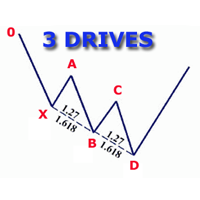
The indicator detects and displays 3 Drives harmonic pattern (see the screenshot). The pattern is plotted by the extreme values of the ZigZag indicator (included in the resources, no need to install). After detecting the pattern, the indicator notifies of that by a pop-up window, a mobile notification and an email. The indicator highlights the process of the pattern formation and not just the complete pattern. In the former case, it is displayed in the contour triangles. After the pattern is com
The analyzer panel allows traders to add the pending order grid (Buy Limit, Sell Limit, Buy Stop, Sell Stop) quickly and efficiently.   Parameters stop mode - select stop setting mode every order - stop levels are set for each order separately position as - common stop levels for all orders order type - select pending order type Buy Limit Sell Limit Buy Stop Sell Stop magic - set a magic number for open orders if necessary. If position as mode is enabled, stop levels are corrected for all orders
PyramidExpert
Joel Protusada
P Y R A M I D   E X P E R T    This Forex utility is a complex exit strategy and order management tool that executes four trading methods; scalping, pyramid style, hedging, and scaling method to close trades with a profit.           V E R Y  I M P O R T A N T     This is not a stand alone expert advisor. Use it with your own volatility-based strategy. Once you found the currency pair to trade, you can just attach this tool to the chart of the chosen pair and it will do the

Double HMA lines MTF
Pavel Zamoshnikov
5 (2)
This is a multi-timeframe version of the popular Hull Moving Average (HMA). The Double HMA MTF Light indicator combines two timeframes on a single chart. The HMA of the higher timeframe defines the trend, and the HMA of the current timeframe defines short-term price movements. The indicator is freely distributed and hasn't audio signals or messages. Its main function is the visualization of price movements. If you need advanced functionality of the HMA multi-timeframe indicator (information ab
FREE
Rainbow Price Visualizer v1.21 See where the market really breathes. Turns your MT4 chart into an ultra-precise heatmap that highlights price zones favored by big players. Why it matters 300 price levels at 0.2‑pip resolution — microscopic detail. 8 visual themes (Rainbow, Fire, Ocean…) for instant readibility. Smart opacity: low noise fades, real zones pop. Lightweight rendering with automatic cleanup. Fully customizable: saturation, opacity, resolution, history depth. Bands project into the f
Money Flow Profile MT5 HERE   Here   our more valuable tools SMC Trend Trading   ,  Easy SMC Trading  ,  Institutional SMC Architect Volume Analysis Tools  ,  Volume flow Profile  ,  Market volume profile  , FVG with Volume  , Liquidity Heatmap Profile  ,  Volume Spread Analysis This Master Edition is engineered for clarity and speed, featuring a unique Auto-Theme Sync system that instantly beautifies your chart layout upon loading. Key Features: True Money Flow Calculation: Goes beyond stand
Daily FIBO Pro
Mark Thimoty Evangelista
Unlock Your Trading Potential with BERG Daily FIBO Pro BERG Daily FIBO Pro   is a powerful and customizable Fibonacci retracement indicator designed exclusively for the MetaTrader 4 (MT4) platform. Whether you're a seasoned trader or just starting, this indicator is your go-to tool for identifying key support and resistance levels, enhancing your market analysis, and optimizing your trading strategy. New Telegram Channel for updates:  https://t.me/berg_traders Why Choose BERG Daily FIBO Pro?
Buyers of this product also purchase
Local Trade Copier EA MT4
Juvenille Emperor Limited
4.96 (111)
Local Trade Copier EA MT4 is a fast and flexible trade copier for copying and managing trades between multiple MetaTrader 4 accounts on the same Windows computer or Windows VPS. It combines local trade synchronization with Receiver-side controls for lot sizing, risk management, trade filtering, symbol mapping, trade management and account protection. Set up your Transmitter and Receiver terminals in about 1 minute and copy manual or EA trades between accounts at the same or different brokers. U
Forex Trade Manager MT4
InvestSoft
4.98 (446)
Trade Manager MT4 is an advanced position size calculator and trade management tool for MetaTrader 4, designed to help traders plan trades faster, control risk more precisely, and manage open positions directly from the chart. It combines order placement, risk based lot calculation, Stop Loss and Take Profit management, Break Even, Trailing Stop, Partial Close, Equity Protection, and external trade management in one panel. Whether you trade forex, indices, metals, commodities, or crypto, Trade M
Trade Assistant MT4
Evgeniy Kravchenko
4.43 (197)
It helps to calculate the risk per trade, the easy installation of a new order, order management with partial closing functions, trailing stop of 7 types and other useful functions. Additional materials and instructions Installation instructions   -   Application instructions   -   Trial version of the application for a demo account Line function -   shows on the chart the Opening line, Stop Loss, Take Profit. With this function it is easy to set a new order and see its additional characteris
Exp COPYLOT CLIENT for MT4
Vladislav Andruschenko
4.69 (65)
Professional Trade Copier for MetaTrader 4 Fast, professional, and reliable trade copier for MetaTrader 4 . COPYLOT helps you copy Forex trades between MetaTrader 4 and MetaTrader 5 terminals with flexible synchronization for different account setups. COPYLOT MT4 version supports: MetaTrader 4 to MetaTrader 4 MetaTrader 5 Hedge to MetaTrader 4 MetaTrader 5 Netting to MetaTrader 4   MT5 version Full Description + DEMO + PDF How To Buy How To Install How to get Log Files How To Test and Optimize A
Telegram to MT4 Multi-Channel Copier   automatically copies trading signals from your Telegram and Discord channels straight to MetaTrader 4. No bots, no browser extensions, no manual copying. A signal arrives in Telegram or Discord and the EA opens the trade in your terminal within seconds. And before you copy a channel, the built-in backtester shows you what that channel would have done in your account. The product has two components: a Windows application that listens to your Telegram channel
TradePanel MT4
Alfiya Fazylova
4.84 (95)
Trade Panel is a multi-functional trading assistant. The app contains over 50 trading functions for manual trading and allows you to automate most trading tasks. Application instructions: https://www.mql5.com/en/blogs/post/756482 Trial version of the application for a demo account: https://www.mql5.com/en/blogs/post/750865 How to install the application: https://www.mql5.com/en/blogs/post/756239 How to test the application in visual mode: https://www.mql5.com/en/blogs/post/770277 How to install
Trade copier MT4
Alfiya Fazylova
4.62 (37)
Trade Copier is a professional utility designed to copy and synchronize trades between trading accounts. Copying occurs from the account / terminal of the supplier to the account / terminal of the recipient, which are installed on the same computer or VPS . Before buying, you can test the demo version on a demo account. Demo version here . Full instruction here . Main functionality and benefits: Supports copying MT4> MT4, MT4> MT5, MT5> MT4, including MT5 netting accounts. * Supports copying Dem
Telegram to MT4 Coppy
Sergey Batudayev
4.09 (11)
Telegram to MT4: The Ultimate Signal Copying Solution Streamline your trading with Telegram to MT4 , the cutting-edge utility designed to copy trading signals directly from Telegram channels and chats to your MetaTrader 4 platform—without the need for DLLs. This robust solution ensures seamless execution of signals with unparalleled precision and customization options, saving you time and boosting your efficiency. [ Instructions and DEMO ] [ FAQ ] [ How atach logs properly ] [Settings descrition
Trade Indicator Assistant is a powerful MT4 utility designed to turn indicators into automated trading systems. Its main feature is the ability to automatically detect an indicator’s   BUY and SELL signal buffers , without requiring you to know the buffer numbers, search through indicator settings, or modify the indicator source code. Bonus Indicator: After purchasing Trade Indicator Assistant, contact me to receive Trade Signal Pro completely free as a bonus indicator. [Download Demo Version]
Copy Cat More Trade Copier MT4 is not just a simple local trade copier; it is a complete risk management and execution framework designed for today’s trading challenges. From prop firm challenges to personal portfolio management, it adapts to every situation with its blend of robust execution, capital protection, flexible configuration, and advanced trade handling. Need Support? How to setup? Has question? Ask here: https://www.mql5.com/en/market/product/139089/comments The copier works in bo
Trade Dashboard MT4
Fatemeh Ameri
4.96 (55)
Trade Dashboard simplifies how you open, manage, and control your trades, with built-in lot size calculation. It allows you to execute trades, manage risk, and control positions directly on the chart, with tools such as partial close, breakeven, and trailing stop. Designed to reduce manual work and help you stay focused on your trading decisions. A demo version is available for testing. Detailed explanations of features are provided within the MQL5 platform. Installation instructions are include
Take a Break
Eric Emmrich
5 (31)
Take a Break pauses your Expert Advisors when trading is a bad idea: before news, after a daily loss, outside your trading hours, or when a rule you wrote yourself says so. When the pause is over, your EAs simply continue. Account protection for all your EAs in one tool: news filter, drawdown and equity protection, time filter and custom rules. One EA on one chart protects the whole account, the free indicator gives every chart its own rules on top. Free demo | What is new in 26.09 | Support Ass
EchoTrade Telegram Signal Backtester VALIDATE TELEGRAM SIGNALS IN MINUTES - STOP GUESSING, START BACKTESTING Stop blowing accounts on "VIP" signals that don't deliver. The EchoTrade Telegram Signal Backtester is the professional solution to audit, verify, and optimize any Telegram signal provider's performance on historical data. Most signal providers show you their wins but hide their losses. This tool reveals the naked truth. By combining a powerful Data Manager (included) with an advanced MT4
The Multicharts Crosshair draws a cross hair in any linked chart. The indicator can be used for comparison of symbol price levels in different time frame or to compare candles of different instruments in the same time frame How it works: It can works from every linked charts where the indicator is installed towards the others or from the chart where is istalled towards the following linked charts . It can be shown just pressing a the key of keyboard. After installing the indicators in the char
MT4 to Telegram Signal Provider   turns your trading account into a signal provider. Every trade action, whether manual, by EA or from your phone, is instantly sent as a message to Telegram. You can fully customize the format or use a ready-made template for quick setup. [ Demo ] [ Manual ] [ MT5 Version ] [ Discord Version ]  New: [ Telegram To MT5 ] Setup A step by step user guide is available. Key Features Ability to customize order details sent to subscribers You can create a tiered subs
Trend Support Resistance Tool
ISO Financial Services
4.73 (11)
Smart Trend Line Alert is a unique professional Trend Line, Support Line and Resistance Line Touch and Break out Alert with awesome Alert History feature, designed to help traders easily manage many charts and symbols without staring at the monitor. Features Candle Break Out Alert, Price Touch Alert and Time Line Alert; 1 click for converting any drawn line into an alert line (Trend line and Horizontal line or Trend Line By Angle); Alerts History able to re-open closed charts or re-draw deleted
Copier->Convenient and fast interface interaction, users can use it right away   ->>>> Recommended to use on Windows computers or VPS Windows Features: Diversified and personalized copy trading settings: 1. Different lot modes can be set for different signal sources 2. Different signal sources can be set for forward and reverse copy trading 3. Signals can be set with comments 4. Whether to calibrate the lot according to the contract lot Diversified and personalized copy order settings 2: 1. Dif
Trade Manager MT4 DaneTrades
Levi Dane Benjamin
4.09 (11)
DaneTrades Trade Manager is a professional trade panel for MetaTrader 4, designed for fast, accurate execution with built‑in risk control. Place market or pending orders directly from the chart while the panel automatically calculates position size from your chosen risk, helping you stay consistent and avoid emotional decision‑making. The Trade Manager is built for manual traders who want structure: clear risk/reward planning, automation for repeatable management, and safeguards that help reduc
The product will copy all telegram signal to MT4   ( which you are member  ) , also it can work as remote copier.  Easy to set up, copy order instant, can work with almost signal formats, image signal, s upport to translate other language to English Work with all type of channel or group, even channel have "Restrict Saving Content", work with  multi channel, multi MT5 Work as remote copier: with signal have ticket number, it will copy exactly via ticket number. Support to backtest signal. How to
VirtualTradePad mt4 Extra
Vladislav Andruschenko
4.85 (61)
Trading Panel for trading in 1 click.  Working with positions and orders!  Trading from the chart or the keyboard. Using our trading panel, you can trade in one click from the chart and perform trading operations 30 times faster than the standard MetaTrader control. Automatic calculations of parameters and functions that make life easier for a trader and help a trader conduct their trading activities much faster and more conveniently. Graphic tips and full information on trade deals on the chart
News Filter EA MT4
Rashed Samir
5 (10)
News Filter EA: Advanced Algo Trading Assistant News Filter EA is an advanced algo trading assistant designed to enhance your trading experience. By using the   News Filter EA , you can integrate a Forex economic news filter into your existing expert advisor, even if you do not have access to its source code. In addition to the news filter, you can also specify   trading days   and   hours   for your expert. The News Filter EA also includes   risk management   and   equity protection   features
FCK CurrencyStrength Pro
Patel Hitendrakumar Mahendrabhai
Hi Friends, " FCK Currency Strength Pro " is a auto & semi auto trading expert with direction of pair. Buy-Sell separate or multi currency in one click. The strategy of  FCK Currency Strength Pro  is a combination of custom indicator, Trendlines, Support & Resistance levels ( Price Action ) and most important secretive trading algorithm mentioned above. Download News Ex4 and csv file You need the following SDSnews.ex4 in MQL4/Libraries and the daylightsavings.csv in MQL4/Files. Only 4 of 5 copi
CloseIfProfitorLoss with Trailing
Vladislav Andruschenko
4.88 (32)
Close If Profit or Loss with Trailing for MetaTrader 4 — automatic closing by total profit or loss A reliable trade-management utility for MetaTrader 4 that automatically closes positions when the total profit or total loss reaches the level you set. The Expert Advisor monitors open trades, calculates floating profit and loss, can trail profit, and helps close positions faster than manual reaction. MetaTrader 4 is still used by many manual traders, grid traders, scalpers, and Expert Advisor use
Partial Closure EA MT4
Juvenille Emperor Limited
5 (3)
Partial Closure EA MT4   allows you to partially close any trade on your account, manually by a chosen percentage of the lot size and/or by trade ticket, or automatically at specified percentages of the TP/SL level, closing a percentage of the initial lot size across up to 10 take profit and 10 stop loss levels.  It can manage all or selected trades in your account by specifying or excluding certain magic numbers, comments, or symbols. Tip: Download the free demo version of the Partial Closure E
RS Trade Copier
Boris Sedov
5 (1)
RS Trade Copier - the ultra-fast local trade copier with a real graphical interface. Stop typing account numbers manually. No more 200+ cryptic inputs. A reliable and flexible tool for copying trading operations between multiple MT4 and MT5 terminals. It suits experienced traders, signal providers, and individual investors. It enables trade synchronization from one or multiple Providers to one or multiple Clients with high precision and minimal latency. It supports simple automatic configuration
Smart Copy Local MT4
Kyra Nickaline Watson-gordon
5 (7)
Smart Copy is an Easy-to-Use EA that supports Multi Copying Metatrader4 and Metatrader5 and Local/Remote Copying. (Remote Version is coming soon) Free version is available on Smart Copy Local Free MT4 Specifications :     Real Time, Multi Terminal - Multi Account - MT4/MT5 trade copying     Copy from netting to hedge and hedge to netting is supported.     Fast and instant copy     All settings are input visually.     Easy modifying symbol names, prefix, suffix     Enable/Disable copying s
Fibo Heart Expert Advisor
Mohd Khairol Amin Ramli
Want automatically to put the pending order, take profit and stop loss? This EA will do it on your behalf! The Fibo Heart EA strategy will place limit order after the ‘check point’ breakout. The position will be triggered when the price make a successful retest. If not, the pending order will automatically deleted after price hit certain level. You also have option to enable market order (instant execution) and custom take profit in the inputs setting. This EA must be attached with Fibo Heart In
Trade Copier Global
Laszlo Tormasi
5 (15)
Trade Copier Global: The name speaks for itself. This copier allows you to copy orders between MT4 terminals even if they are not installed on the same computer. Features Copying trades between MT4 terminals around the world with a short delay. Automatically recognizes symbol prefixes. Can connect many Slaves to the same Master. Supports pending and market orders. Supports partial order close (with limitations, see below) Can send messages and notifications to the Slaves from the Master Several
Unlimited Trade Copier Pro is a tool to copy trade remotely to multiple MT4, MT5 and cTrader accounts at different computers/locations over internet. This is an ideal solution for you if you are a signal provider and want to copy your trades to other receivers globally on your own rules. One provider can copy trades to multiple receivers and one receiver can get trade from multiple providers as well. The provider can even set the subscription expiry for each receiver, so that receiver will not b
King Trade Copier MT4
Mohammed Maher Al-sayed Mohammed Ahmed Saleh
5 (1)
King Trade Copier connects MetaTrader terminals that run on the same computer or VPS. Trades opened on one account appear on the others. The file carries both roles, so the same download becomes the sender or a receiver depending on what you set Mode to. On every chart the panel states whether this terminal is sending or receiving, names the account on the other side, counts the receivers that answered, and gives the age of the last signal. An order that was not copied leaves its reason on the
More from author
Professional account protection for prop-firm challenges and funded accounts. It monitors drawdown, open risk, news windows, trading sessions, manual trades, profit targets, and challenge progress in real time, then warns, locks, de-risks, deletes orders, or closes managed exposure according to your rules. Two draggable on-chart panels — Economic Calendar and Performance Stats — keep news planning and account analytics on the chart without leaving MT5. Built for Prop-Firm Traders This EA does no
SMC Price Action Patterns - MT5 Indicator Product Description MetaTrader 5 custom indicator SMC Price Action Patterns A chart overlay indicator for traders who want a structured view of Smart Money Concepts, market structure shifts, order block patterns, fair value gaps, equal highs and lows, and key multi-timeframe price levels directly inside MetaTrader 5. BOS and CHoCH Internal and Swing Structure Order Block Finder Input-Controlled FVG Colors EQH and EQL Premium and Discount Zones Product Ov
FREE
ICT Market Structure Pro ICT Market Structure Pro is a Smart Money Concepts / ICT trading tool designed to automatically draw the most important structural and liquidity elements directly on the chart. The indicator helps traders read price action through an institutional lens by mapping market structure shifts, liquidity pools, order blocks, imbalances, premium/discount zones, and key ICT session windows in one place. It supports both single-timeframe and multi-timeframe analysis modes, with a
VoidFlow IFVG Trade Assistant Pro VoidFlow IFVG Trade Assistant Pro VoidFlow IFVG Trade Assistant Pro is a manual-first MetaTrader 5 trading assistant built for traders who want a cleaner Inverse Fair Value Gap (IFVG) workflow with structured trade planning, chart context, and optional automatic execution only when it is explicitly enabled by the user. It scans the selected signal timeframe for raw Fair Value Gaps, confirms true inversions, filters weak setups, draws the full trade plan on the c
Trade Assistant Risk Calculator is an all-in-one floating trading panel Expert Advisor for MetaTrader 5, built for professional manual traders. It combines visual chart trading , automatic risk calculation , and advanced position management in one compact interface. Stop calculating lot sizes manually. Stop guessing your Risk:Reward ratio. Drag the planning lines on the chart and the EA calculates the exact lot size for your selected risk percentage, equity, fixed-money risk, or fixed-lot workfl
Overview SR Confluence Pro is a professional MetaTrader 5 indicator for support & resistance and chart pattern analysis. It combines dual S&R engines (high-volume box engine + multi-timeframe pivot engine), automatic detection of 16+ classic chart patterns , and a confluence scoring system that rates how closely price structure and S&R levels align. Key levels, pattern structures, break/retest events, and high-quality setups are displayed directly on the chart. A draggable dashboard, multi-symbo
MACD Divergence Radar Pro Multi-Symbol Divergence Scanner & Visual Dashboard for MetaTrader 5 Regular & Hidden Divergence 20+ Pairs Simultaneous Scan One-Click Chart Opening Auto MACD Sub-Window Overview MACD Divergence Radar Pro is a professional-grade divergence detection indicator that continuously scans multiple currency pairs and timeframes in real time. It identifies both regular and hidden MACD divergences — bullish and bearish — and presents all findings in a sleek, draggable on-chart d
Momentum Pulse MT5 – Strength-Based Candle Coloring Indicator with Fibonacci Zone TP/SL Momentum Pulse MT5 MT5 Indicator All Markets Non-Repainting Fibonacci TP/SL Momentum Pulse is a professional-grade multi-dimensional momentum strength indicator that colors each candle based on real market power rather than price alone. It classifies every bar into one of nine clearly defined strength states , provides built-in Fibonacci zone-based TP/SL levels , and includes a comprehensive set of signal qua
TrendGuard Pro – Product Description (English) TrendGuard Pro Supertrend core · 11 confirmation guards · ATR-calculated SL/TP · 5,000-bar performance simulation · P&L pip labels · Symbol watermark · Draggable stats panel TrendGuard Pro is a professional-grade MT5 scalping indicator that fortifies every entry signal with up to 11 independent confirmation filters . False breakouts are systematically eliminated before an arrow ever appears on the chart, letting you trade only the highest-probabilit
ICT Market Structure EA ICT Market Structure EA trades fair value gaps in the direction of market structure, only inside the ICT Silver Bullet hours, and only when the H4 and D1 structure agree. One EA on one chart trades a whole portfolio — by default EURUSD, XAUUSD, USTEC and US500 . Its higher-timeframe context uses the same detection code as the indicator ICT Market Structure Pro (swings, BOS / CHoCH, order blocks, FVGs, premium / discount). The default portfolio and settings were checked wi
Price Action 10 Setups EA Price Action 10 Setups EA automates ten classic bar-by-bar price-action setups — the patterns that discretionary price-action traders consider the most reliable: major trend reversals, final flags, breakouts, High 2 / Low 2 pullbacks, wedges, channels, measured moves, trading-range reversals, opening reversals and magnet (breakout) tests. Every setup is a fully coded rule set with a precise entry, stop and target, so the EA trades the patterns the same way every time. O
Filter:
No reviews
Reply to review