Momentum Pulse MT5
- Indicators
- Version: 1.1
- Updated: 23 October 2026
- Activations: 5

MT5 Indicator · All Markets · Non-Repainting Signals · Entry / SL / TP1-TP3 · MTF + Scanner
Momentum Pulse colors every candle by the real momentum behind it, not by price alone. Each bar is scored on five dimensions and placed in one of nine strength states. On top of that you get buy/sell signals with Entry, Stop Loss and three Take Profit levels, a multi-timeframe bias dashboard, a multi-symbol scanner, a forward test of every past signal with win rate and profit factor, and a risk-based lot size. Everything is shown in one compact, tabbed panel that you can drag, collapse and theme.
Momentum Engine
Every candle receives a composite momentum score built from five independent dimensions:
| Dimension | Weight | Meaning |
|---|---|---|
| Efficiency Ratio | 32 % | Net displacement / total path length – directional efficiency |
| Body Pressure | 22 % | Bullish vs bearish body dominance – buyer/seller control |
| Location Factor | 18 % | Close position within the lookback high-low range |
| Trend Bias | 18 % | Fast/Slow EMA differential normalized by ATR |
| Impulse | 10 % | Net displacement / average true range – breakout strength |
The lookback window is set in hours (default 8 hours), so the reading means the same thing on every timeframe. The symbol type is detected automatically: Delta mode (range ±100) for Forex, Gold and Silver, Strength mode (range ±50) for indices, crypto, stocks and other CFDs. Both modes can also be forced manually.
Nine Strength States
| Index | State |
|---|---|
| 0 | Extreme Bearish |
| 1 | Strong Bearish |
| 2 | Medium Bearish |
| 3 | Light Bearish |
| 4 | Neutral |
| 5 | Light Bullish |
| 6 | Medium Bullish |
| 7 | Strong Bullish |
| 8 | Extreme Bullish |
The default palette gets brighter and more saturated as momentum grows in either direction, so strong bullish and strong bearish candles stand out equally on dark charts. All nine colors can be changed in the Colors tab, and the panel follows your choice.
Signals
- Activation – momentum leaves the neutral zone
- Acceleration – same direction, higher strength rank
- Flip – direct change from bearish to bullish or back
- Return to neutral – momentum fades (grey dot)
Signals are evaluated on the bar's close. Once a bar has closed, its arrow never moves or disappears. Every signal type can be switched on or off.
Signal filters
| Filter | Default | Effect |
|---|---|---|
| Cooldown bars | 5 | Minimum bars between same-direction signals |
| Volume filter | On, 1.0 × MA(20) | Signal bar volume must reach the average |
| Minimum R:R | 1.0 | Skip signals whose structure target is too close |
| Max SL | 2 × ATR | Cap the stop distance on wide swings |
| TP extension | 0.5 × ATR | Extend the target in a strong trend |
| Recommended only | Off | Show only signals aligned with structure and Fibonacci zone |
| Higher-timeframe filter | Off | Block signals against the higher timeframe, or allow only signals in its direction (uses the last closed higher-timeframe bar, no look-ahead) |
Entry, Stop Loss and Three Take Profits
Each signal comes with a complete trade plan, drawn on the chart for the latest signal and stored in buffers for Expert Advisors:
- Entry – close of the signal bar
- Stop Loss – from market structure: beyond the latest swing (or the Fibonacci 50 % level) plus one ATR, capped by Max SL. Without a valid swing range it falls back to N × ATR.
- TP1 – 1R (configurable)
- TP2 – the structure target (swing high/low or the Fibonacci 50 % level), or 2R when that target is closer than TP1
- TP3 – 1.618 × the TP2 distance (configurable)
Labels show the price and the R multiple of every level and mark each level as hit when price reaches it. Past signals get a result box (green target zone, red risk zone) that ends where the trade closed, with its result in R.
Fibonacci Structure and Recommended Signals
Swing points (HH/HL/LH/LL) classify the market as Uptrend, Downtrend or Ranging. The Fibonacci 50 % level between the latest swing high and low splits the range into Discount and Premium zones. A signal is flagged REC (recommended) when its direction fits the structure and zone – for example a buy in the Discount zone of an uptrend. In a range, buys are only shown in the lower half and sells only in the upper half.
The Panel
A modern, tabbed panel that stays compact. It scales with your screen DPI, can be dragged by its header, collapsed to a single line that still shows the current state, and switched between Dark, Navy and Light themes with one click (or use your own colors). Position, tab, theme and collapsed state are remembered per chart.
Pulse tab
- Current state and value, change from the previous bar
- Strength gauge with the nine state zones and a live marker
- State duration, window, structure, Fibonacci zone, swing high/low, Fib 50 %
- MTF bias with one colored dot per timeframe
- Last signal card: BUY/SELL, reason, REC badge, Entry, SL, TP1-TP3 with R multiples and hit marks, lot size for your risk %, trade status (running, closed at TP2, stopped, expired)
- A notice when a signal is forming on the current bar
MTF tab
The momentum state, value, a centered momentum bar and the slope for up to 8 timeframes (default M5, M15, H1, H4, D1). The bias reads BUY ONLY when no timeframe is bearish and at least 60 % are bullish, SELL ONLY for the mirror case, otherwise WAIT.
Scanner tab
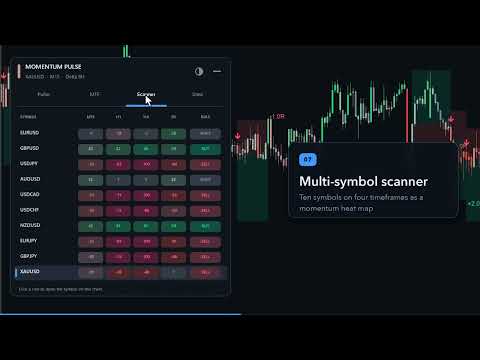
A heat map of up to 20 symbols on up to 6 timeframes, each cell colored by its state, plus a BUY / SELL / WAIT bias per symbol. Your broker's symbol suffix is added automatically. Click a row to open that symbol on the chart.
Stats tab
Every signal on the loaded history is forward tested on closed bars: entry at the signal close, exit at TP2 or SL, and a bar that touches both counts as a loss. The tab shows closed trades, win rate, TP1 and TP3 reach rates, stop-out rate, net result in R, profit factor, average target, maximum losing streak, expired trades and the long/short split – for all signals and for recommended signals side by side. Use it to compare symbols, timeframes and settings on your own broker's data. Past results do not guarantee future results.
Alerts
- Popup, push notification and email
- Signal alerts with Entry, SL, TP1-TP3 and the REC flag in the message
- Alert on the closed bar (default) or on the forming bar
- Optional early alert while the signal bar is still forming
- Optional alerts when the latest signal hits TP1, TP2, TP3 or SL
- Optional alert when the MTF bias turns BUY ONLY or SELL ONLY
For Expert Advisors
| Buffer | Content |
|---|---|
| 0-3 | Candle open, high, low, close |
| 4 | Color / state index (0-8) |
| 5, 6 | Bull arrow, bear arrow |
| 7 | Return-to-neutral marker |
| 8 | Momentum value (Delta or Strength) |
| 9 | State index |
| 10 | Signal: +1 buy, -1 sell, ±2 recommended |
| 11-14 | Signal SL, TP1, TP2, TP3 |
How to Use It
- Check the MTF bias: trade in the direction of BUY ONLY / SELL ONLY, stay out on WAIT.
- Wait for an arrow in that direction, ideally with the REC badge.
- Use the drawn Entry, SL and TP levels and the lot size from the panel.
- Take partial profit at TP1, aim for TP2, and leave a runner for TP3 if you like.
- Use the Stats tab to pick the symbols and timeframes where the signals perform best on your broker.
Main Inputs
| Group | Inputs |
|---|---|
| Calculation | Mode (Auto/Delta/Strength), window in hours, ATR period, fast/slow EMA, max bars |
| Thresholds | Neutral / Light / Medium / Strong bounds for each mode |
| Signals and alerts | Signal types, arrows, popup/push/email, closed-bar alerts |
| Fibonacci structure | On/off, swing strength, structure lookback |
| Signal filters | Recommended only, cooldown, volume filter, TP extension, max SL, min R:R |
| Panel | Show, draggable, corner, position, size, theme, font, first tab, start collapsed, custom colors |
| Trade levels | Levels on/off, TP1 R, TP3 extension, fallback SL/TP2, line length, result boxes, risk % |
| Statistics | Bars after which an open test trade expires |
| Multi-timeframe | Dashboard timeframes, higher-timeframe filter mode and timeframe, bias alert |
| Scanner | On/off, symbols, timeframes, refresh interval |
| More alerts | Early alert, TP/SL hit alerts |
Compatibility
- MetaTrader 5, any broker, any symbol and timeframe
- Forex, metals, indices, crypto, stocks and CFDs
- Incremental calculation: light on CPU, even with the scanner running
- Works in the Strategy Tester (the scanner tab is hidden there)