Trade Assistant Risk Calculator MT5

Trade Assistant Risk Calculator is an all-in-one floating trading panel Expert Advisor for MetaTrader 5, built for professional manual traders. It combines visual chart trading, automatic risk calculation, and advanced position management in one compact interface.

Stop calculating lot sizes manually. Stop guessing your Risk:Reward ratio. Drag the planning lines on the chart and the EA calculates the exact lot size for your selected risk percentage, equity, fixed-money risk, or fixed-lot workflow.

Try before you buy: A free Demo build is available at https://www.mql5.com/en/blogs/post/769841. The Demo runs on demo accounts or in the Strategy Tester for 30 days from first run on each terminal; live accounts are blocked. The full product has no time limit and works on both live and demo accounts.

User Guide

Important Notes

  • This product is an Expert Advisor (EA), not an indicator. Attach it to any chart to activate the floating panel.
  • Algo Trading must be enabled in MetaTrader 5 for the EA to place orders and manage positions.
  • The panel is draggable from its title bar and can be minimized with the title-bar minus button to a one-line status bar (lots or risk, floating P/L, Algo Trading).
  • The full product works on live and demo accounts. Because this EA relies on chart mouse/object events for its floating panel, Strategy Tester support is limited on the full build; use a demo account for day-to-day evaluation, or the Demo build (which explicitly allows Strategy Tester).
  • Supports both Hedging and Netting accounts.

Core Features

1. Visual Order Placement & Interactive Chart Overlays

  • Drag-to-Trade Planning: Entry, Stop Loss, and Take Profit planning lines appear directly on the chart. Move the lines to define your setup visually.
  • Instant Risk Calculation: As you move the Stop Loss line, the EA recalculates lot size to keep your selected risk constant.
  • Live R:R Display: Adjust the Take Profit line and see the Risk:Reward ratio update in real time.
  • Market & Pending Orders: Place market orders or pending orders (Buy/Sell Limit and Buy/Sell Stop) from the chart overlay. To reduce accidental market entries, the Entry card defaults to Pending mode. If VPend is enabled, the Pending command creates a virtual pending order instead of a broker pending order. Pending orders support configurable expiry timers.
  • Order Confirmation: Optional Confirm Trade dialog shows order type, lots, risk, margin, entry, SL, and TP before execution. Use Submit to send the order.
  • Clear Order Feedback: If an order cannot be placed (lines on the wrong side, Algo Trading off, spread, trading hours, symbol restriction), a message explains why.
  • Interactive Drag Bars: Entry, TP, SL, and active partial levels have floating bars showing price, pips distance, and money value. Drag the bar instead of the thin chart line.
  • Entry Bar Quick Actions: B/S flips direction, Cmd executes, M/S switches market or pending mode, R cycles risk mode, and X removes the planning lines.
  • Color-Shaded Profit/Loss Zones: Semi-transparent green and red zones between Entry, TP, and SL make the reward and risk areas easy to see at a glance.
  • Order State Colors: Filled positions, broker pending orders, and virtual pending orders use different chart-card colors and markers. Positions filled from virtual pending orders are marked with [VP].
  • Live Floating P/L Badges: Filled positions show real-time floating P/L in both money and pips, including swap and commission.
  • Apply-to-Positions Buttons: The "L" buttons on the main TP / SL bars apply the current planned TP / SL price to all open positions on the current symbol as broker-side TP / SL.
  • Order Ticket: the Trade tab shows risk, stop loss, take profit and target R:R with live lots, R:R and spread, a Market / Pending switch and large Buy and Sell buttons. OCO, Hide SL/TP and Virtual pending are switches; less-used sections fold into rows that show their state. Hide SL/TP and VPend affect new orders only and never change already-existing tickets.
  • Execution Mode: Three modes are available on the Trade tab. Single places one order at the planned entry. Multi splits the total lot size across multiple entry levels. Grid auto-places a sequence of orders separated by a configurable step in pips, with lot sizes distributed using an ASC, DESC, or EQUAL curve. The grid plan is previewed live on the chart before execution; filled positions appear green, broker pending orders appear purple, and virtual pending orders appear cyan.
  • Per-Ticket Action Menu: Every position, broker pending order, and virtual pending order has a chart-card menu. Depending on ticket type, you can close, reverse, partial-close, edit broker or virtual SL/TP, open Edit Parts, configure per-ticket BE / Trail, run Parts: Copy Applied Panel, or use Parts: Disable This Ticket.
  • Trade Presets: Save and recall up to 32 named panel snapshots covering risk mode, risk value, R:R, Lot Calc on/off, lot size (when Lot Calc is off), BE/Trail, OCO/VPend/vSLTP, execution mode (Single/Multi/Grid), grid parameters, and Entry/SL/TP line positions. Use < / > in the Trade tab Presets row to switch and apply instantly; New / Save / Delete manage individual slots. With Lot Calc off, switching presets restores each saved manual lot size; with Lot Calc on, lots are recalculated from that preset's risk settings and SL distance.
  • Panel & Planning Line Persistence: Entry, SL and TP lines and BE / Trail settings survive timeframe switches, parameter changes, upgrades, re-attach and even a terminal crash; every change is saved immediately.

2. Buy/Sell Direction Flip & Smart Mirroring

  • One-Click Direction Flip: The B/S button flips the entire setup between Buy and Sell.
  • Automatic Mirror: SL and TP mirror around the entry price, preserving the geometry of your setup.
  • Partial Lines Follow: Active TP1–TP10 and SL1–SL10 levels move to the correct side when the direction flips.
  • Auto-Flip on Drag: Dragging TP or SL across entry flips the trade direction and mirrors the opposite line.

3. Professional Risk Management

  • 9 Risk Modes: % Balance, % Equity, Fixed Money, Fixed Lots, % Free Margin, % Custom Reference (anchored to a user-defined base amount via InpRiskCustomBase ), % Previous Day Balance (locked to the server-day close), % Previous Week Balance (locked to the last completed Mon–Sun week close), and % Previous Month Balance. Each mode remembers its previous value independently.
  • Commission-Inclusive Lot Sizing: When enabled ( InpRiskLotsIncludeComm ), the EA estimates round-turn commission per lot from account history and deducts it from the risk budget, so the actual net loss including commission equals the configured risk amount.
  • Pips or Price Input: Work with absolute price levels or pip distances from entry.
  • Spread Filter: Block new trades when spread exceeds your configured maximum.
  • Custom Comments: Add an order comment from the Trade tab.
  • Daily Loss Lock: Stop new trading, and optionally close positions, when daily loss limits are reached. Lock can apply to the current symbol or all symbols and resets on daily rollover. For comprehensive over-trading controls — per-minute, per-hour, per-week, per-month limits, cooldowns, and multi-period loss locks — see the RISK Tab (section 9).

4. PARTS Tab — Multi-Level Partial Close System

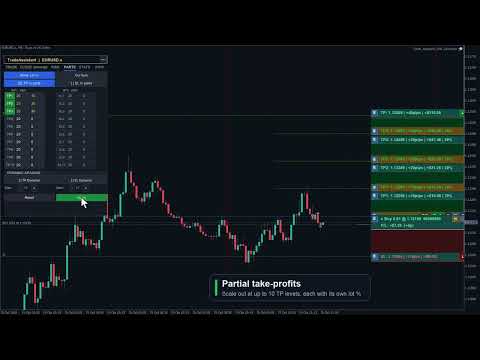
  • Up to 10 TP Levels and 10 SL Levels: Configure TP1–TP10 and SL1–SL10 with independent active state, pips distance, and close percentage.
  • Draft / Apply Workflow: Editing PARTS values or toggling active buttons creates a draft first. The live planning state changes only when you click Apply. If there are unsaved edits, the panel shows APPLY * and a pending-changes prompt.
  • Active Buttons Are Draft Controls: Turning TP1–TP10 or SL1–SL10 active on/off does not immediately draw or remove lines. Click Apply to commit the change.
  • Safe Symbol Scope: PARTS defaults to Cur Sym (blue) and applies only to the current chart symbol. Switching to All Sym requires a second confirmation click (Confirm All uses the warning color, All Sym uses red) and is session-only. Because pip scales differ widely between instruments such as EURUSD, XAUUSD, and indices, All Sym never applies the current chart's global fixed-pip levels directly to other symbols; non-current symbols act only when that ticket has an explicit per-ticket PARTS setup.
  • Chart Visualization: Applied active partial levels draw dotted lines with drag bars showing price, pips, money value, and close percentage.
  • Drag Applied Levels: Dragging an already-applied partial bar updates that live planning value while preserving smart clamps.
  • Smart Clamping: Partial TP levels stay on the profit side, partial SL levels stay on the loss side, and each partial level keeps at least a 1 pip gap from the full TP or SL distance.
  • Input Validation: Invalid pips values turn red and are kept for correction. Invalid draft values are not applied until fixed.
  • Per-Ticket Inheritance / Override Model: Existing positions, broker pending orders, and virtual pending orders inherit the applied panel settings until you explicitly configure that ticket. Explicit disabled state is also an override and blocks later panel changes from re-enabling that ticket.
  • Per-Ticket Edit Parts: Each ticket can open its own Edit Parts sub-panel with Apply / Back semantics, ticket-level validation, and independent TP1–TP10 / SL1–SL10 values. Closing or Back discards temporary edits; Apply saves the ticket override.
  • Copy or Disable One Ticket:Parts: Copy Applied Panel copies the current applied PARTS panel to one ticket. Parts: Disable This Ticket disables that ticket's partial structure without touching other tickets.
  • Placed Ticket Snapshots: Filled positions, broker pending orders, and virtual pending orders can keep independent TP/SL partial structures, and pending-ticket settings migrate to the filled position when triggered.
  • Lines OFF Reset: Turning Lines off resets the PARTS panel planning fields and master toggles for the next setup; already-placed tickets keep their own snapshots.
  • Proportional Money Display: Each partial level shows money value based on that level's close percentage, not the full position size.
  • Dynamic Spacing: Auto-calculate evenly spaced TP and SL partial levels with independent dynamic-spacing controls.

5. BE Tab — Breakeven & Pending Management

  • Auto Breakeven: Move SL to breakeven after a configurable profit trigger with adjustable offset. The trigger supports four units: Pips (favorable pip move from entry), R (a multiple of the initial SL distance, e.g. 1.0 R), % Price (percentage of entry price as a favorable move), and % TP (percentage of the entry-to-TP distance traveled).
  • Auto Offset: Estimate spread and commission costs from history to calculate a practical breakeven offset.
  • Per-Ticket BE Overrides: Positions, broker pending orders, and virtual pending orders can have dedicated BE settings. Pending-ticket settings migrate to the filled position. Explicit ON or OFF blocks the global BE panel from overriding that ticket.
  • Broker Pending Limit Trail: Trail BUY_LIMIT / SELL_LIMIT broker pending orders closer to market as price moves favorably, while preserving pending expiry.
  • Broker Pending Stop Trail: Trail BUY_STOP / SELL_STOP broker pending orders. Virtual pending orders are not moved by this broker pending trail module.
  • OCO: When one pending order on the same symbol triggers, other broker pending orders and virtual pending orders on that symbol are canceled.
  • Hide SL/TP: New market orders or broker pending orders can be sent without broker-side SL/TP while the EA manages virtual SL/TP locally. Existing tickets are not changed by the panel toggle.
  • Virtual Pending Orders: VPend keeps pending entries local until triggered. When triggered, the EA converts the setup to a stealth market position with virtual SL/TP and migrates ticket-specific PARTS / BE / Trail settings. The filled position keeps its [VP] marker and can be rebuilt on a newly opened chart for the same symbol.
  • Persistence Model: Planning lines (Entry / SL / TP), virtual SL/TP, BE / Trail panel settings, PARTS panel settings, ticket partial snapshots, and ticket BE / Trail overrides are restored across EA version upgrade, remove + reattach, and even a MetaTrader client abnormal termination; however, the PARTS All Sym scope is not auto-persisted and returns to the safer Cur Sym scope after reload. Existing stealth positions, broker pending orders with virtual SL/TP, and VP-filled positions can also be rebuilt on a newly opened chart for the same symbol. Only untriggered virtual pending orders remain chart-scoped and are restored from hidden chart mementos on the same chart window only.

6. TRAIL Tab — 8-Mode Trailing Stop Engine

  • 8 Trail Modes: NONE, PIPS, HI/LO, MA, SAR, ATR, FRACTALS, and PARTIAL. The ATR mode has an additional option ( InpTrailATRUseBarHL ): anchor the stop to the previous bar's Low/High offset by ATR × multiplier instead of maintaining a fixed ATR-sized gap from live Bid/Ask.
  • Universal Settings: Start, Distance, and Step control when trailing activates and how often it updates.
  • Per-Ticket Fixed-Pip Trail: Positions, broker pending orders, and virtual pending orders can define ticket-level trail settings. Pending-ticket settings migrate to the filled position. Explicit disabled state blocks global trailing for that ticket.
  • Hidden SL/TP Safe: Breakeven and trailing updates preserve the other hidden SL/TP leg when modifying virtual protection.

7. CLOSE Tab — Bulk Position & Pending Management

  • Close/Cancel All: Close all positions and cancel all broker pending orders and virtual pending orders across all symbols.
  • Close + Pending Symbol: Close current-symbol positions and cancel that symbol's broker pending orders and virtual pending orders.
  • Cancel Pending: Cancel all broker pending orders and virtual pending orders.
  • Close Buy / Sell / Profit / Loss: Close buy positions, sell positions, profitable positions, or losing positions according to the selected rule.
  • Partial Close: Close a configurable percentage of each open position with one click.
  • Auto-Close Targets: Set profit or loss targets in money or percent for the account or current symbol.
  • Trading Locks: Lock all trading or lock only the current symbol to prevent impulsive entries.

8. INFO Tab — Account Dashboard

  • Live Account Data: Balance, Equity, Floating P/L, Free Margin, and Margin % update in real time.
  • Position Summary: See total positions, buy lots, sell lots, and current-symbol P/L.
  • Daily Statistics: Day-start equity, today's P/L, and lock status reset automatically at daily rollover.
  • Symbol Switcher: Configure up to 6 symbols for one-click chart switching through InpSwitcherSymbols .
  • Hotkey Reference: The panel shows quick keyboard shortcuts such as Close/Cancel All, Close/Cancel Symbol, Cancel Pending, Trail, and BE.

9. RISK Tab — Over-Trading & Loss Lock Rules

  • Trade Count Limits: Set maximum trades per minute, hour, day, week, and month. Live counters show used / allowed on the tab. The counting scope can be set to the chart symbol or all symbols, to this EA's magic number or all magic numbers, and to Buy, Sell, or both trade directions.
  • Maximum Open Trades: Block new entries when the number of simultaneously open positions reaches a configured cap.
  • Cooldown After Open: Enforce a minimum wait in minutes before the next entry is allowed after the most recent trade was opened.
  • Cooldown After Close: Enforce a minimum wait in minutes before re-entering after any position closes.
  • Daily Loss $ and %: Stop new trading when today's cumulative realized loss exceeds a fixed dollar amount or a percentage of starting equity.
  • Daily Profit % Lock: Stop new trading once today's profit reaches a configured percentage target, preventing overtrading on a winning day.
  • Advanced Locks (ADV mode): Per-symbol loss lock in $ and %, weekly equity loss lock in $, and monthly equity loss lock in $.
  • Close On Lock: Optionally close all open positions automatically when any loss lock triggers.
  • Unlock Next Day: All risk locks reset automatically at the next server-day rollover.
  • Live Summary: The RISK tab always shows today's closed trade count, today's net P/L, and the current restriction status.
  • Last 10 Blocked Opens: A history list shows the last 10 trade attempts that were blocked, with timestamp and reason, for post-session review.
  • Apply / Reset: RISK tab changes take effect immediately. Click APPLY to persist them to the chart so they survive EA remove + reattach. Click RESET to restore input defaults.

10. STATS Tab — Trading History & CSV Export

  • Period Selector: Toggle between TODAY, 7D, 30D, and ALL to scope the statistics to the chosen history window.
  • Symbol & Magic Filter: Filter statistics to the current chart symbol or all account symbols, and to this EA's magic number or all magic numbers.
  • Performance Metrics: Closed-trade count, win/loss/flat breakdown, win rate, net P/L, profit factor, gross profit, gross loss, average win, and average loss — computed from MetaTrader 5 account history deals.
  • CSV Export: Click EXPORT CSV to save the filtered deal rows to a CSV file in MQL5/Files/ . The full path is logged to the Experts tab.
  • Refresh: Click REFRESH to re-run the statistics scan after new trades close.
  • Floating analytics panel: Tools › Statistics on the TRADE tab opens the wide Performance Analytics panel (see 11f) for chart-rich analysis; it complements this embedded tab's compact report.

11. Tools

  • Screenshot: Capture a full chart screenshot with one click. The file is saved automatically with the symbol name and timestamp.

11a. Alert Tool

  • Place up to 48 price-crossing alert lines (horizontal or angled trend line) directly on the chart. Choose Bid or Ask and an up or down crossing direction from 8 preset combinations.
  • When price crosses the line, the EA plays a sound and shows a visual notification. The alert auto-resets and re-fires on the next qualifying crossing — no recreation needed.
  • Delete individual lines on the chart or use Clear to remove all at once. All alert lines are saved per symbol/timeframe and survive EA reload and MT5 restarts.

11b. Cancel Lines Tool

  • Same 8-option model as the Alert tool, but triggers order cancellation instead of a notification: when price crosses the level, all broker and virtual pending orders on the current symbol are cancelled.
  • Up to 48 cancel levels per chart, each with its own Bid/Ask and direction setting. Saved per symbol/timeframe; survive EA reload and MT5 restarts.

11c. Economic Calendar

  • Open from Tools › Calendar on the Trade tab. Browse Mon–Fri economic events from the MT5 built-in database. Filter by impact level (Low / Med / High) and by currency. Events within 30 minutes are highlighted. Opening Calendar, STATS, or SCHED closes the other floating overlays to reduce clutter.
  • Block Trading: Select events and set a minute window. The EA rejects new orders that many minutes before and after each selected event. Optional Pnd (default ON) also cancels broker and virtual pending orders in scope when Block is active. Choose All Pairs to block all symbols or restrict to symbols matching the event currency.
  • Auto-close on news: Enable Close Pos together with Block Trading to automatically close affected positions when a news block window opens. Close Pos alone does not block new entries — it closes and cancels when the window starts.
  • Block/close rules stay active after the panel is closed. Notification delivery (popup, sound, push, email) is configured via input parameters.
  • Optional chart news markers and block-zone shading (per impact level via inputs) show event times on the chart with hover tooltips, independent of the panel block rules.

11d. Task Scheduler

  • Queue up to 10 tasks that execute automatically. All date and time values use local PC time. Actions span 18 types: Buy, Sell, Buy/Sell Stop, Buy/Sell Limit, Close Buy, Close Sell, Close Profit, Close Loss, Close All, and order deletion (Del Buy/Sell Stop, Del Buy/Sell Limit, Del Stop, Del Limit, Del All Orders).
  • Trigger modes: Time trigger fires at the first tick on or after the scheduled date and local time. Price trigger fires when market price touches a specified level — set manually or linked to the ENTRY, SL, TP drag line, or any named chart object. Both modes can coexist on one task.
  • Task dependencies: A task can be set to fire only after another task in the list has already executed, enabling chained sequences (e.g. close all at 17:00, then place a fresh pending only after the close task completes).
  • Repeat: Check any combination of day-of-week boxes (Su Mo Tu We Th Fr Sa) for a recurring task. Leave all unchecked for a one-shot task that removes itself after firing.
  • Task status tracking: Each task carries a live status — Pending, Wait Trigger (waiting for price touch), Wait Dependency (parent not yet fired), Disabled (paused by user), Success, or Failed — with a last-result and reason field for post-session review.
  • Enable / Disable: Any task can be paused (disabled) and re-enabled without deleting it, so you can build a library of recurring setups and selectively activate them.
  • Execution history: The SCHED panel has a History view tab showing up to 180 recent execution log entries (Symbol, Time, Task#, Event, Status, Lots, Entry, TP, SL, Result / Reason). Filter by the current chart symbol or view all symbols. Paginate with Prev / Next buttons.
  • All tasks are saved to file and restored across EA reload and MT5 restarts. One-shot tasks are removed automatically after execution.

11e. Session Boxes

  • Turn on Session boxes on the TRADE tab to draw dashed-border session rectangles directly on the chart. Four independent slots are configurable — defaults are Sydney (22:00–07:00), Tokyo (00:00–09:00), London (08:00–17:00), and New York (13:00–22:00), each with its own label, color, and enable switch.
  • Time reference modes:UTC (default) — industry standard GMT session hours shifted onto the broker chart using the server-UTC offset; Server — broker chart clock; Local — PC OS timezone. The UTC offset can be set manually (minutes) or derived automatically each refresh for accurate DST handling.
  • Opacity ( InpSessionFillAlpha ) and pastel-mix level ( InpSessionColorPastel ) are configurable via input parameters. Boxes have a dashed border outline with a label; there is no solid fill so the chart price action underneath remains fully visible.

11f. Stats Analysis Panel (STATS button)

  • Click Tools › Statistics on the TRADE tab (separate from the top STATS tab) to open the wide floating Performance Analytics panel. It visualizes your MT5 account history. The panel is draggable and independent of the main panel; opening it closes other floating overlays (Calendar, Scheduler, etc.).
  • Four views:Overview (KPI cards, radar chart, cumulative/daily P&L charts, P&L calendar, recent closed trades / open positions table), Reports (monthly stats and charts), Compare (period comparison), and Symbols (per-symbol P&L ranking, win rate, cross-month matrix).
  • Calendar drill-down: Click a day on the Overview P&L calendar to open a day-detail panel with per-trade rows, an intraday equity curve, and an optional trade chart snapshot (multi-timeframe bars around entry/exit).
  • Data window: Scans roughly the last 100 trading days of account history by default; refreshes every 5 seconds while the panel is open.
  • vs. the STATS tab: The embedded STATS tab is a compact report (TODAY / 7D / 30D / ALL, symbol and magic filters, win rate / profit factor / net P&L, EXPORT CSV). The floating Stats Panel is the chart-rich analytics view. Both read broker deal history — not an EA event log.

12. Entry Line Proportional Drag

  • Dragging the Entry line moves SL, TP, and active partial levels by the same amount, preserving distances and Risk:Reward geometry.

Hotkeys

  • B / S: Buy / Sell Market
  • U / D: Buy / Sell Pending
  • C: Close positions and cancel all pending orders
  • X: Close current-symbol positions and cancel its pending orders
  • P: Cancel all broker and virtual pending orders
  • L: Lock current-symbol trading
  • A: Lock all trading
  • T: Toggle trailing stop
  • E: Toggle breakeven

Input Parameters

  • Risk Settings: default risk, fixed money risk, R:R, and max spread.
  • Stealth Settings: virtual pending and virtual SL/TP.
  • Management: BE, trailing, OCO, pending expiry, Magic Number, and symbol scope.
  • Auto-Close Rules: profit/loss targets in money or percent.
  • Time Filters: trading sessions, trading days, and crypto-weekend support.
  • Visual Settings: Six built-in color themes — Dark, Darker, Slate, Classic, Light, and Light Modern — selectable via InpColorTheme . Chart line and session colors have their own Inp*Color inputs. Panel position, line widths, and label sizes are also configurable. All panels scale with Windows display scaling (150%, 200%, 4K); InpUiScalePercent can force a size.
  • Risk Guards: Commission-inclusive lot sizing ( InpRiskLotsIncludeComm ), virtual order trigger source (Ask / Bid / Mid / Bar Close), and block-alert delivery (popup, sound, push, email).
  • Symbol Switcher & Favorites: Up to 6 quick-jump symbols via InpSwitcherSymbols . A separate favorite-symbols list ( InpFavoriteSymbols ) is merged into the INFO tab's quick-jump panel.
Önerilen ürünler
Heiken_Ashi_Bars - MT5 için Gelişmiş Trend Görselleştirici Genel Bakış Heiken_Ashi_Bars , piyasa gürültüsünü filtrelemek ve temel trendi vurgulamak için tasarlanmış güçlü, görsel olarak sezgisel bir özel göstergedir (indicator). Geleneksel mum grafikler genellikle düzensiz olabilir. Bu gösterge fiyat verilerinin ortalamasını alarak fiyat hareketini pürüzsüzleştirir, böylece trend devamlılıklarını, geri dönüşleri ve karlı giriş bölgelerini tespit etmeyi çok daha kolay hale getirir. Temel Özellikl
CosmiCLab SMC FIBO CosmiCLab SMC FIBO is a professional trading indicator designed for traders who use Smart Money Concepts (SMC), market structure analysis and Fibonacci retracement levels. The indicator automatically detects market swings and builds Fibonacci levels based on the latest impulse movement. It also identifies market structure changes such as BOS (Break of Structure) and CHOCH (Change of Character), helping traders understand the current market direction. CosmiCLab SMC FIBO also pr
Introduction Welcome to the world of Forex trading, where every tick of the market can be influenced by news events. Introducing our expert advisor for MetaTrader, your ultimate tool for navigating the complexities of news trading. This innovative advisor is specifically designed to automate your trading strategy during key macroeconomic releases, ensuring you never miss an opportunity.  When important indicators are announced, volatility often spikes, creating potential for profit. Our expert
FREE
Follow The Line MT5
Oliver Gideon Amofa Appiah
4.6 (35)
This indicator obeys the popular maxim that: "THE TREND IS YOUR FRIEND" It paints a GREEN line for BUY and also paints a RED line for SELL. (you can change the colors). It gives alarms and alerts of all kinds. IT DOES NOT REPAINT and can be used for all currency pairs and timeframes. Yes, as easy and simple as that. Even a newbie can use it to make great and reliable trades. NB: For best results, get my other premium indicators for more powerful and reliable signals. Get them here: https://www.m
FREE
Order Book, known also as Market Book, market depth, Level 2, - is a dynamically updated table with current volumes of orders to buy and to sell specific financial instument at price levels near Bid and Ask. MetaTrader 5 provides the means for receiving market book from your broker, but in real time only, without access to its history. The indicator OrderBook Cumulative Indicator accumulates market book data online and visualizes them on the chart. In addition, the indicator can show the market
Genel Bakış Candle Timer Countdown Pro, mevcut mumun kapanışına kadar olan süreyi pürüzsüz ve doğru bir şekilde geri sayım olarak gösterir ve dairesel ilerleme yayı ile görsel destek sağlar. Özellikler Kesintisiz geri sayım Dairesel ilerleme halkası 6 konum seçeneği 3 renk modu Son geri sayım vurgusu Bağlantı durumu algılama Yeni mum uyarıları Düşük CPU kullanımı Kurulum MQL5 Market’ten indirin Grafiğe ekleyin Ayarları yapılandırın Uyumluluk MetaTrader 5 Build 2500+ Tüm semboller Tüm zaman dilim
Fabii Half Trend Baseline
Fabien Georges Andre Guillemaud
Üst zaman diliminin trendine karşı işlem yapmayı bırakın. İki baseline, tek grafik. Repaint yok. Her parite, her zaman dilimi. 2 dakikada grafiğinizde. Strategy Tester içinde ücretsiz demo. Get more indicators here Baselines, volatility filters and oscillators. No repaint. Neden ihtiyacınız var Grafiğinizde bir çizgi yeşile döndüğü için işleme girersiniz. Sonra üst zaman dilimini açarsınız ve daha büyük trendin ters yönde olduğunu görürsünüz. Sinyal gerçekti. Ama arkasındaki trend sizin taraf
Donchian Breakout And Rsi
Mattia Impicciatore
4.5 (2)
Genel Açıklama Bu gösterge, klasik Donchian Kanalı ’nın geliştirilmiş bir versiyonudur ve gerçek işlem için pratik işlevlerle zenginleştirilmiştir. Standart üç çizgiye (üst, alt ve orta çizgi) ek olarak sistem breakout (fiyat kırılımı) noktalarını tespit eder ve bunları grafikte oklarla görsel olarak gösterir. Ayrıca grafiği sadeleştirmek için mevcut trend yönünün tersindeki çizgi yalnızca görüntülenir. Gösterge şunları içerir: Görsel sinyaller : Kırılım sırasında renkli oklar Otomatik bildiriml
FREE
Fiyat Eylemi Ticaret Paneli MT5 , belirtilen (varsayılan olarak) geçmiş mumların saf fiyat eylemi verilerine dayalı olarak herhangi bir simgenin/enstrümanın alım/satım gücü seviyesi dengesini hesaplar. Bu, gösterge panelinde bulunan 32 sembol/aletin fiyat hareketini izleyerek size mümkün olan en yakın piyasa duyarlılığını verecektir. %60'ın üzerinde bir alım/satım gücü seviyesi, belirli bir sembolü satın almak/satmak için (varsayılan ayarları kullanarak) oldukça sağlam bir seviye sağlar.   Fiya
Price Magnet — Price Density and Attraction Levels Indicator Price Magnet is a professional analytical tool designed to identify key support and resistance levels based on statistical Price Density. The indicator analyzes a specified historical period and detects price levels where the market spent the most time. These zones act as “magnets,” attracting price action or forming a structural base for potential reversals. Unlike traditional Volume Profile tools, Price Magnet focuses on price-time d
The indicator detects and displays М. Gartley's Butterfly pattern. The pattern is plotted by the extreme values of the ZigZag indicator (included in the resources, no need to install). After detecting the pattern, the indicator notifies of that by the pop-up window, a mobile notification and an email. The pattern and wave parameters are displayed on the screenshots. The default parameters are used for demonstration purposes only in order to increase the amount of detected patterns. Parameters z


Important Lines
Terence Gronowski
4.88 (24)
This indicator displays Pivot-Lines, preday high and low, preday close and the minimum and maximum of the previous hour. You just have to put this single indicator to the chart to have all these important lines, no need to setup many single indicators. Why certain lines are important Preday high and low : These are watched by traders who trade in a daily chart. Very often, if price climbs over or falls under a preday low/high there is an acceleration in buying/selling. It is a breakout out of a
FREE
Easy GOLD MT5
Franck Martin
3.87 (45)
Easy Gold is the latest addition to the BotGPT family. It is surprising and very powerful. It is ideal for beginners due to its simplicity.  There is absolutely nothing to do, it's 100% automated, simply indicate the percentage of risk you want to take per trade and the EA is ready. Whatever your capital, the EA takes care of everything. Optimized on (XAUUSD).  Unleash all the power with the professional version (AGI Gold) and its connection to the neural network, available in my store. My othe
FREE
MT5 için "2 Hareketli Ortalamalı WPR" Kripto Forex Göstergesi, Yeniden Boyama Yok. - WPR, scalping için en iyi osilatörlerden biridir. - "WPR ve 2 Hareketli Ortalama" Göstergesi, WPR osilatörünün Hızlı ve Yavaş Hareketli Ortalamalarını görmenizi sağlar. - Gösterge, fiyat düzeltmelerini çok erken görme fırsatı sunar. - Bu göstergeyi parametreler aracılığıyla kurmak çok kolaydır, herhangi bir zaman diliminde kullanılabilir. - Resimlerde Alış ve Satış giriş koşullarını görebilirsiniz. - WPR MA'la
ROMAN5 Time Breakout Indicator automatically draws the boxes for daily support and resistance breakouts. It helps the user identifying whether to buy or sell. It comes with an alert that will sound whenever a new signal appears. It also features an email facility. Your email address and SMTP Server settings should be specified in the settings window of the "Mailbox" tab in your MetaTrader 5. Blue arrow up = Buy. Red arrow down = Sell. You can use one of my Trailing Stop products that automatical
FREE
Trendline Rebounce M5
Abd Rahman Bin Muhammad
Trendline Rebounce M5, M5 zaman diliminde trend çizgisi yeniden testlerini ve ret mumlarını arayan bir MetaTrader 5 Uzman Danışmanıdır. İlk pozisyonu açmadan önce daha yüksek zaman dilimlerindeki piyasa yönünü ve yapısını kontrol eder. Giriş değerlendirmesi beş koşulu birleştirir: EMA trendi, doğrulanmış salınım yapısı, trend çizgisi yeniden testi, ret mumu ve RSI momentumu. Varsayılan asgari giriş puanı dörttür. Varsayılan ayarlarda EMA trendi ve ret mumu zorunludur. İlk girişler için EA; H1 tr
FREE
Caicai L&S Yield Histogram Important Notice: This indicator is an integral tool of the automated EA Caicai Long and Short Pair Trading . This indicator visually displays the percentage deviation (Yield %) of a pair's current spread relative to its own historical mean. It is an excellent tool for quickly visualizing the gross financial potential of a market distortion in Long & Short operations. Main Features: Percentage Visualization: Understand the size of the distortion in palpable percentage
FibRetrace Zones Son Salınımın Fibonacci Düzeltme Bölgeleri FibRetrace Zones, FibRetrace Uzman Danışmanının ücretsiz görsel yardımcısıdır. Fibonacci düzeltme seviyelerini çizer ve son salınımdaki geri çekilme bölgesini vurgular; böylece işlem yapmadan önce giriş noktalarının nerede olduğunu görürsünüz. Bölge yöne göre renklendirilir: yükseliş kurulumları için yeşil, düşüş kurulumları için kırmızı. Her sembolde ve her zaman diliminde çalışır. TEMEL ÖZELLİKLER Ayarlanabilir geriye bakış ile otomat
FREE
RBreaker
Zhong Long Wu
RBreaker Gold Indicators is a short-term intraday trading strategy for gold futures that combines trend following and intraday reversal approaches. It not only captures profits during trending markets but also enables timely profit-taking and counter-trend trading during market reversals. This strategy has been ranked among the top ten most profitable trading strategies by the American magazine   Futures Truth   for 15 consecutive years. It boasts a long lifecycle and remains widely used and st
MA Flow No.2 See the Flow of Bulls & Bears at a Glance, and Keep the Rhythm of the Market in Your Hands Tired of staring at dozens of moving averages until your eyes blur? Unsure when to enter, or where to place your stop? MA Flow No.2 upgrades the humble moving average into a complete trend-trading system. No more scattered lines on your chart — instead, a living "river of bulls and bears". Up to 100 moving averages roll together in real time. On every single bar, you can see at a glance w
The   Trendlines Oscillator   helps traders identify trends and momentum based on the normalized distances between the current price and the most recently detected bullish and bearish trend lines. The indicator features bullish and bearish momentum, a signal line with crossings, and multiple smoothing options. USAGE The   Trendlines Oscillator   works by systematically: Identifying pivot highs and lows. Connecting pivots to form bullish (support) and bearish (resistance) trendlines. Measuring
Reversal Composite Candles
MetaQuotes Ltd.
3.69 (16)
The idea of the system is to indentify the reversal patterns using the calculation of the composite candle. The reversal patterns is similar to the "Hammer" and "Hanging Man" patterns in Japanese candlestick analysis. But it uses the composite candle instead the single candle and doesn't need the small body of the composite candle to confirm the reversal. Input parameters: Range - maximal number of bars, used in the calculation of the composite candle. Minimum - minimal size of the composite can
FREE
Sayı dizilerinden birine "Orman Yangını Dizisi" denir. En güzel yeni dizilerden biri olarak kabul edildi. Başlıca özelliği, bu dizinin lineer trendlerden, hatta en kısa olanlardan kaçınmasıdır. Bu göstergenin temelini oluşturan bu özelliktir. Bir finansal zaman serisini analiz ederken, bu gösterge tüm olası trend seçeneklerini reddetmeye çalışır. Ve ancak başarısız olursa, bir trendin varlığını tanır ve uygun sinyali verir. Bu yaklaşım, yeni trendlerin başladığı anların doğru bir şekilde belirl
IMPORTANT NOTE: This is a professional Trade Management Utility and on-chart assistant. It is NOT an automated trading robot. It does not open trades on its own. The UltraFast Trade Manager MT5 is the ultimate execution and risk-management suite designed to give you absolute control over your manual and algorithmic trades. When managing multiple positions, calculating complex net break-even points, or constantly monitoring the economic calendar, hesitation can lead to costly mistakes. This utili
FREE
JAC Trend Color Candle
Eduardo Da Costa Custodio Santos
The indicator "JAC Trend Color Candle" for Meta Trader 5, was created to visually facilitate the trend for the trader. It is based on three parameters, which identifies the uptrend, downtrend and non-trending market. The colors are trader-configurable, and the average trader-configurable as well. trend parameters cannot be configured as they are the indicator's differential.
Noize Absorption Index - is the manual trading system that measures the difference of pressure between bears forces and bulls forces. Green line - is a noize free index that showing curent situation. Zero value of index shows totally choppy/flat market.Values above zero level shows how powerfull bullish wave is and values below zero measures bearish forces.Up arrow appears on bearish market when it's ready to reverse, dn arrow appears on weak bullish market, as a result of reverse expectation.
Open Risk Budget Cap enforces a total open stop-loss risk budget across your account. It does not choose direction and does not open discretionary trades on a live chart. Attach it to one chart; the symbol and timeframe do not matter. What it measures Every open position and every pending order is priced to its stop-loss in account currency using OrderCalcProfit. Positions or orders without a stop-loss are counted and shown on the panel as "without stop-loss". They are excluded from the budget
HAS RSI Signal — Otomatik SL/TP Hesaplamalı Profesyonel Trend Göstergesi HAS RSI Signal , kanıtlanmış klasik yöntemleri modern gürültü filtreleme algoritmalarıyla birleştiren güçlü bir ticaret aracıdır. Gösterge, piyasayı Heiken Ashi Smoothed (HAS) mumları ve RSI osilatörü merceğinden analiz ederek, trend dönüşlerinde veya aşırı alım/satım bölgelerinden çıkışlarda yatırımcıya net giriş sinyalleri sağlar. Temel Avantajlar: Çift Filtreleme: Heiken Ashi Smoothed kullanımı piyasadaki "gürültüyü" ort
Bu ürünün alıcıları ayrıca şunları da satın alıyor
Trade Assistant MT5
Evgeniy Kravchenko
4.43 (216)
It helps to calculate the risk per trade, the easy installation of a new order, order management with partial closing functions, trailing stop of 7 types and other useful functions. Additional materials and instructions Installation instructions - Application instructions Line function -   shows on the chart the Opening line, Stop Loss, Take Profit. With this function it is easy to set a new order and see its additional characteristics before opening.   Risk management  - The risk calculation
Trade Manager EA’ye hoş geldiniz! Ticaretin daha sezgisel, hassas ve verimli hale gelmesi için tasarlanmış nihai risk yönetim aracı ile tanışın. Bu sadece bir emir verme aracı değil; ticaret planlaması, pozisyon yönetimi ve risk kontrolü için kapsamlı bir çözüm. İster yeni başlayan bir yatırımcı olun, ister deneyimli bir trader ya da hızlı emir gerektiren bir scalper, Trade Manager EA ihtiyaçlarınıza uyum sağlar ve forex, endeksler, emtialar ve kripto paralar dahil tüm piyasalarda esneklik sunar
Local Trade Copier EA MT5
Juvenille Emperor Limited
4.94 (149)
Local Trade Copier EA MT5, aynı Windows bilgisayarı veya Windows VPS üzerinde çalışan birden fazla MetaTrader 5 hesabı arasında işlemleri kopyalamak ve yönetmek için hızlı ve esnek bir işlem kopyalayıcıdır. Yerel işlem senkronizasyonunu, Receiver tarafında lot büyüklüğü, risk yönetimi, işlem filtreleme, sembol eşleştirme, işlem yönetimi ve hesap koruması kontrolleriyle birleştirir. Transmitter ve Receiver terminallerinizi yaklaşık 1 dakika içinde ayarlayın ve aynı veya farklı brokerlardaki hesa
Telegram to MT5 Multi-Channel Copier   , Telegram ve Discord kanallarınızdaki alım-satım sinyallerini doğrudan MetaTrader 5'e otomatik kopyalar. Bot yok, tarayıcı uzantısı yok, elle kopyalama yok. Sinyal Telegram'a veya Discord'a düşer ve EA birkaç saniye içinde terminalinizde işlemi açar. Ve bir kanalı kopyalamadan önce, yerleşik backtester o kanalın hesabınızda ne yapmış olacağını gösterir. Ürün iki bileşenden oluşur: Telegram kanallarınızı dinleyen bir Windows uygulaması ve sinyalleri MT5 ter
Farmed Hedge Yield Farming | All Markets (Manual - Hybrid - Semi/Automated EA) VERIFIED TRADING RESULTS - Farmed Hedge Yield Axi Copy:  https://www.mql5.com/en/signals/2356376 - Farmed Hedge Yield Exn Copy:   https://www.mql5.com/en/signals/2356404 - Farmed Hedge Yield V Copy:  https://www.mql5.com/en/signals/2357156 IMPORTANT NOTICE: FarmedHedge is a MANUAL-FOCUSED TRADING UTILITY ,not a fully automated EA. Results shown on this Signal include manual trades and overall strategic management.
Telegram sinyallerini kendi işlem kurallarınızla kopyalayın Telegram to MT5 Signal Trader , herkese açık ve özel Telegram kanallarındaki ve gruplarındaki metin tabanlı işlem sinyallerini otomatik olarak MetaTrader 5'e kopyalar. Tek bir masaüstü uygulamasından birden fazla sinyal sağlayıcısını ve MT5 hesabını yönetin; her sağlayıcı için ayrı risk ve işlem ayarları belirleyin. Sinyal kopyalamak için Telegram botu veya API kurulumu gerekmez. Kendi Telegram hesabınızla telefon numarası veya QR kod k
TradePanel MT5
Alfiya Fazylova
4.88 (170)
Trade Panel, çok işlevli bir ticaret asistanıdır. Uygulama, manuel ticaret için 50'den fazla ticaret fonksiyonu içerir ve çoğu ticaret görevini otomatikleştirmeyi mümkün kılar. Uygulama talimatları: https://www.mql5.com/en/blogs/post/756482 Demo hesabı için uygulamanın deneme sürümü: https://www.mql5.com/en/blogs/post/750865 Uygulamayı nasıl kurulur: https://www.mql5.com/en/blogs/post/756239 Uygulamayı görsel modda nasıl test edilir: https://www.mql5.com/en/blogs/post/770277 Uygulamayı VPS MetaT
Strategy Ledger Pro
Abdullah Uygar Tuna
5 (11)
Şimdi Türkçe dil desteği ile. Strategy Ledger Pro , MetaTrader 5 için salt okunur bir hesap analiz panelidir. Hesap sonuçlarını Uzman Danışman (EA), strateji, sembol ve magic numaraya göre ayırır; böylece her birinin gerçekte ne kattığını görürsünüz. Panel 11 dilde kullanılabilir: English, Français, Deutsch, Español, Italiano, Português, Русский, Türkçe, 中文, 日本語 ve 한국어. Demoyu indirmeden önce. Market, her ücretli ürünün demosunu yalnızca Strateji Test Cihazında çalıştırır. Bu panel kendi hesabı
================================================================================ POC BREAKOUT - V20.72. Full Professional Grade Toolkit ================================================================================ POC Breakout is a full MetaTrader 5 trading dashboard for discretionary traders who want breakout signals, Point of Control (POC) context, volume profiles, order flow, market structure, news, alerts, and advanced trade planning in one professional workspace. Attached directly to you
News Trade EA MT5
Konstantin Kulikov
4.55 (11)
Birkaç yıldır kullandığım çok yararlı bir robotu tanıtıyorum. Hem yarı otomatik hem de tam otomatik modlarda kullanılabilir. >>> Chat <<< Program, ekonomik takvim haberlerinde esnek ticaret ayarlarını içeriyor. Stratejiler test cihazında kontrol edilemez. Sadece gerçek bir iş. Terminal ayarlarında, haberler sitesini izin verilen URL'ler listesine eklemeniz gerekir. Servisler > Araçlar > Danışmanlar'a tıklayın. "Aşağıdaki URL'ler için WebRequest'e İzin Ver:" kutucuğunu işaretle. Aşağıdakini ekl
Master Your Trading Discipline   Stop losing your hard-earned gains to overtrading and emotional decisions. The Discipline Tool is your ultimate trading assistant, ensuring strict risk management in real-time. Key Protection Features: Advanced Drawdown Defense : Automatically halts trading if your daily drawdown exceeds a preset threshold (percentage or dollar amount). Real-Time Equity Lock : Safeguard profits by referencing peak equity, ensuring drawdown stays within control. Hard Profit Target
Dealer's Panel No signal decides anything here — a hand does. One click, and the panel calculates what's underneath: lot size from risk, target from a 30-step balance ladder that remembers exactly how far an account has climbed. Toggle between market and pending without touching an input field. Set a stop, and the take-profit can write itself — a fixed share of the balance, translated into price with no arithmetic left for the trader to get wrong. One trade live at a time; it won't let a seco
Exp COPYLOT CLIENT for MT5
Vladislav Andruschenko
3.97 (35)
MetaTrader 5 için profesyonel işlem kopyalayıcı MetaTrader için hızlı, profesyonel ve güvenilir bir işlem kopyalayıcı . COPYLOT , MT4 ve MT5 terminalleri arasında Forex işlemlerini kopyalamanıza olanak tanır ve Hedge ile Netting hesaplarını destekler. COPYLOT MT5 sürümü şunları destekler: - MT5 Hedge → MT5 Hedge - MT5 Hedge → MT5 Netting - MT5 Netting → MT5 Hedge - MT5 Netting → MT5 Netting - MT4 → MT5 Hedge - MT4 → MT5 Netting MT4 sürümü Tam açıklama + DEMO + PDF Nasıl satın alınır Nasıl kurul
Coming Soon! Get Ready for 2 Major New Features in Our Upcoming Update Introducing TRADE OVERVIEW DASHBOARD and CONFLUENCE AT ZONE 1. TRADE OVERVIEW DASHBOARD — Market Overview Dashboard A dashboard that helps you see the overall market picture more easily, with key information from multiple timeframes and trading guidance to support your trading decisions, helping you analyze the market and plan your trades systematically, all in one screen. 2. CONFLUENCE AT ZONE — Confluence of Factors at Key
The product will copy all telegram signal to MT5 ( which you are member) , also it can work as remote copier.  Easy to set up, copy order instant, can work with almost signal formats, image signal,  s upport to translate other language to English Work with all type of channel or group, even channel have "Restrict Saving Content", work with  multi channel, multi MT5 Work as remote copier: with signal have ticket number, it will copy exactly via ticket number. Support to backtest signal. How to s
EASY Insight AIO – Akıllı ve zahmetsiz yatırım için hepsi bir arada çözüm Genel Bakış Tüm piyasayı — Forex, Altın, Kripto, Endeksler ve hatta Hisseler — saniyeler içinde, manuel grafik incelemesi, gösterge kurulumu ya da karmaşık ayarlar olmadan analiz edebildiğinizi hayal edin. EASY Insight AIO , yapay zekâ destekli yatırım için nihai, kullanıma hazır dışa aktarma aracınızdır. Tüm piyasanın kapsamlı bir anlık görüntüsünü tek bir temiz CSV dosyasında sunar; bu dosya ChatGPT, Claude, Gemini, Pe
Telegram To MT5 — Sinyal Kopyalayıcı Telegram kanallarınızdaki işlem çağrılarını gerçek MT5 emirlerine dönüştürün — otomatik olarak, istediğiniz kadar hesapta ve risk ile kurallar tamamen sizin kontrolünüzde. Telegram To MT5, Telegram'da zaten takip ettiğiniz VIP / sinyal kanallarını MetaTrader 5 terminalinize bağlar. Ücretsiz bir eşlik eden masaüstü uygulaması mesajları okur (botlara izin vermeyen kanallardan bile), ve bu Expert Advisor bunları hesabınızda yürütür — kendi risk ayarlarınızı, sem
MT5 to Telegram Signal Provider , hesabınızı bir sinyal sağlayıcı haline getirerek belirtilen sinyalleri Telegram'ın sohbetine, kanalına veya grubuna göndermeyi sağlayan kullanımı kolay, tamamen özelleştirilebilir bir araçtır. Rakip ürünlerin çoğunun aksine, DLL içe aktarması yapmaz. [ Demo ] [ Kılavuz ] [ MT4 Versiyonu ] [ Discord Versiyonu ] [ Telegram Kanalı ]  New: [ Telegram To MT5 ] Kurulum Adım adım bir kullanıcı kılavuzu mevcuttur. Telegram API'si hakkında bilgi gerekmemektedir; ihtiyac
Power Candles Strateji Tarayıcısı - Kendi Kendini Optimize Eden Çoklu Sembol Kurulum Bulucu Power Candles Strateji Tarayıcısı , Power Candles göstergesini çalıştıran aynı kendinden optimize edici motoru, Piyasa İzleyicinizdeki her sembol üzerinde yan yana çalıştırır. Tek bir panel, şu anda istatistiksel olarak hangi sembollerin işlem yapılabilir olduğunu, her birinde hangi stratejinin kazandığını, en uygun Stop Loss / Take Profit çiftini gösterir ve yeni bir sinyal geldiği anda size bildirim gön
The Patch It never opens a trade. It walks behind the ones that did. Every open position, every pending order — checked twice a second for the one thing that's easy to forget: a stop, a target. Found bare, it doesn't ask. It writes the missing number in, measured in points from wherever the position began, and moves on to the next. No strategy, no opinion on direction. Just the quiet assumption that nothing should ever sit on the market unprotected — not because someone decided it shouldn't,
Grid Manual MT5
Alfiya Fazylova
4.73 (22)
Grid Manual, sipariş ızgarasıyla çalışmak için kullanılan bir ticaret yardımcı programıdır. Yardımcı program evrenseldir, esnek ayarlara ve sezgisel bir arayüze sahiptir. Sadece kayıpların ortalaması yönünde değil, aynı zamanda kazanç artışı yönünde de bir emir ızgarası ile çalışır. Tüccarın bir emir ızgarası oluşturmasına ve eşlik etmesine gerek yoktur, bu yardımcı programı yapacaktır. Emri açmanız yeterlidir ve Grid manual otomatik olarak ona bir emir ızgarası oluşturacak ve kapanana kadar ona
Signal TradingView to MT5 Pro Automator TradingView ve MetaTrader 5 arasında anında profesyonel uygulama TradingView alarmları ile MT5'teki gerçek uygulama arasındaki en güçlü iletişim köprüsüyle ticaret stratejinizi otomatikleştirin. Hız, esneklik ve kusursuz risk yönetimi talep eden yatırımcılar için tasarlanan bu Uzman Danışman (Expert Advisor), herhangi bir alarm mesajını hassas bir piyasa (market) veya limit emrine dönüştürür. GÜÇLÜ YÖNLER VE AVANTAJLAR Evrensel Ayrıştırma Motoru (Tescilli)
Desteğe mi ihtiyacınız var? Nasıl kurulur? Sorunuz mu var? Buradan kendi dilinizde sorun, hızlı yanıt: https://www.mql5.com/en/market/product/139088/comments Çalışan Demo İndir Copy Cat More (Taklitçi Kedi) — İşlem Kopyalayıcı (Trade Copier) MT5 , yerel bir işlem kopyalayıcı ve bugünün ticaret zorlukları için tasarlanmış eksiksiz bir risk yönetimi ve yürütme çerçevesidir. Prop firm challenge'larından kişisel portföy yönetimine kadar, sağlam yürütme, sermaye koruması, esnek yapılandırma ve geli
Your EAs cannot see each other, but Anchor can. Anchor gives you one place to coordinate your EAs, manage risk, and decide when trading is allowed. It works alongside the trading bots you already use without any changes to them. The Problem One EA opens a trade. Then another starts trading. The next thing you know, you wake up to multiple grids built across your account. Each EA may be doing exactly what it was designed to do, but together they can place far more risk on your account than you in
Trade copier MT5
Alfiya Fazylova
4.61 (57)
Trade Copier, ticaret hesapları arasındaki işlemleri kopyalamak ve senkronize etmek için tasarlanmış profesyonel bir yardımcı programdır. Kopyalama, tedarikçinin hesabından/terminalinden alıcının aynı bilgisayarda veya vps'de kurulu olan hesabına/terminaline gerçekleşir. Satın almadan önce demo sürümünü bir demo hesabında test edebilirsiniz. Demo versiyonu burada . Tüm talimatlar burada . Ana işlevler ve avantajlar: Emirlerin kopyalanmasını destekler: МТ5> МТ5, МТ4> МТ5, МТ5> МТ4. Emirlerin kopy
Telegram'dan MT5'e:   Nihai Sinyal Kopyalama Çözümü Telegram'dan MT5'e işlemlerinizi basitleştirin, DLL'lere ihtiyaç duymadan işlem sinyallerini doğrudan Telegram kanallarından ve sohbetlerinden MetaTrader 5 platformunuza kopyalayan modern araç. Bu güçlü çözüm hassas sinyal yürütme, kapsamlı özelleştirme seçenekleri sağlar, zamandan tasarruf sağlar ve verimliliğinizi artırır. [ Instructions and DEMO ] Temel Özellikler Doğrudan Telegram API Entegrasyonu Telefon numarası ve güvenli kod ile kimlik
Bu ürün, haber saatlerinde tüm uzman danışmanları ve manüel grafikleri filtreler, böylece manüel ticaret kurulumlarınızı veya diğer uzman danışmanlar tarafından girilen işlemleri yok edebilecek ani fiyat dalgalanmaları konusunda endişelenmenize gerek kalmaz. Bu ürün, herhangi bir haber yayınlanmadan önce açık pozisyonlarınızı ve bekleyen emirlerinizi yönetebilen tam bir sipariş yönetim sistemi ile birlikte gelir.   The News Filter'ı   satın aldığınızda, gelecekteki uzman danışmanlar için yerleşi
MetaTrader 5 için Trading Panel — grafik ve klavyeden profesyonel tek tıkla işlem kontrolü Aktif traderlar için geliştirilmiş güçlü bir Trading Panel; işlemleri standart MetaTrader arayüzüne göre çok daha hızlı açmanıza, yönetmenize ve kapatmanıza yardımcı olur. Bu çözüm; pozisyonları, bekleyen emirleri, toplam kârı ve işlem yürütmesini tek bir profesyonel çalışma alanında kontrol etmek isteyen kullanıcılar için tasarlanmıştır. Bu sadece sıradan bir yardımcı araç değildir. MetaTrader 5 için ger
Floor Watch
Syed Tauqeer Hussain Shah
Floor Watch One number, watched every thirty seconds: how far equity has fallen since the day began — or since its highest point, if it's told to trail the peak instead of the open. Cross the line and it doesn't argue. Every open position closes, every pending order vanishes, and anything that slips through afterward gets shut the moment it appears. Not asked. Removed. The floor holds until the clock turns 5 AM Pakistan time — then, and only then, does the day start over. One rule. No except
RETAILBERG FOOTPRINT CHART PRO — Order-Flow Workspace for MetaTrader 5 Version 7.00  |  Professional System  |  31 tools  |  One chart A full 150-page illustrated User Manual is included. Please read the full manual to understand this feature packed footprint chart elements and ui. https://www.mql5.com/en/blogs/post/777982 DEMO / STRATEGY TESTER — PLEASE READ FIRST
Yazarın diğer ürünleri
MACD Divergence Radar Pro Multi-Symbol Divergence Scanner & Visual Dashboard for MetaTrader 5 Regular & Hidden Divergence 20+ Pairs Simultaneous Scan Entry / SL / TP Levels History Statistics One-Click Chart Opening Auto Oscillator Sub-Window Overview MACD Divergence Radar Pro is a professional-grade divergence detection indicator that continuously scans multiple currency pairs and timeframes in real time. It identifies both regular and hidden MACD divergences — bullish and bearish — and presen
Professional account protection for prop-firm challenges and funded accounts. It monitors drawdown, open risk, news windows, trading sessions, manual trades, profit targets, and challenge progress in real time, then warns, locks, de-risks, deletes orders, or closes managed exposure according to your rules. Two draggable on-chart panels — Economic Calendar and Performance Stats — keep news planning and account analytics on the chart without leaving MT5. Built for Prop-Firm Traders This EA does no
Overview SR Confluence Pro is a professional MetaTrader 5 indicator for support & resistance and chart pattern analysis. It combines dual S&R engines (high-volume box engine + multi-timeframe pivot engine), automatic detection of 16+ classic chart patterns , and a confluence scoring system that rates how closely price structure and S&R levels align. Every zone is back-tested on the chart history — touches, bounces, breaks, false breaks and bounce rate are combined into a 0–100 strength score — a
ICT Market Structure Pro ICT Market Structure Pro is a Smart Money Concepts / ICT trading tool designed to automatically draw the most important structural and liquidity elements directly on the chart. The indicator helps traders read price action through an institutional lens by mapping market structure shifts, liquidity pools, order blocks, imbalances, premium/discount zones, and key ICT session windows in one place. It supports both single-timeframe and multi-timeframe analysis modes, with a
A chart overlay indicator for traders who want a structured view of Smart Money Concepts, market structure shifts, order block patterns, fair value gaps, equal highs and lows, and key multi-timeframe price levels directly inside MetaTrader 5. BOS and CHoCH · Internal and Swing Structure · Order Block Finder · Input-Controlled FVG Colors · EQH and EQL · Premium and Discount Zones Product Overview SMC Price Action Patterns is designed to convert raw price action into a clear, visual market map. T
FREE
VoidFlow IFVG Trade Assistant Pro VoidFlow IFVG Trade Assistant Pro VoidFlow IFVG Trade Assistant Pro is a manual-first MetaTrader 5 trading assistant built for traders who want a cleaner Inverse Fair Value Gap (IFVG) workflow with structured trade planning, chart context, and optional automatic execution only when it is explicitly enabled by the user. It scans the selected signal timeframe for raw Fair Value Gaps, confirms true inversions, filters weak setups, draws the full trade plan on the c
Trade Assistant Risk Calculator is an all-in-one floating trading panel (Expert Advisor) designed for professional manual traders on MetaTrader 5. It combines Visual Chart Trading , Automatic Risk Calculation , and Advanced Position Management into a single, compact interface. Stop calculating lot sizes manually. Stop guessing your Risk:Reward ratio. Simply drag lines on the chart, and the EA calculates the exact lot size to match your risk percentage, equity, or money target. Important Notes Th
MT5 Indicator · All Markets · Non-Repainting Signals · Entry / SL / TP1-TP3 · MTF + Scanner Momentum Pulse colors every candle by the real momentum behind it, not by price alone. Each bar is scored on five dimensions and placed in one of nine strength states . On top of that you get buy/sell signals with Entry, Stop Loss and three Take Profit levels , a multi-timeframe bias dashboard , a multi-symbol scanner , a forward test of every past signal with win rate and profit factor, and a risk-based
Supertrend core · 11 click-to-toggle confirmation filters · Multi-timeframe trend dashboard · Entry / SL / TP1-TP3 levels · Higher-timeframe filter · Trend cloud · 5,000-bar performance simulation with profit factor & drawdown TrendGuard Pro is a professional-grade MT5 scalping indicator that fortifies every entry signal with up to 11 independent confirmation filters . False breakouts are systematically eliminated before an arrow ever appears on the chart, letting you trade only the highest-pro
ICT Market Structure EA ICT Market Structure EA trades fair value gaps in the direction of market structure, only inside the ICT Silver Bullet hours, and only when the H4 and D1 structure agree. One EA on one chart trades a whole portfolio — by default EURUSD, XAUUSD, USTEC and US500 . Its higher-timeframe context uses the same detection code as the indicator ICT Market Structure Pro (swings, BOS / CHoCH, order blocks, FVGs, premium / discount). The default portfolio and settings were checked wi
Price Action 10 Setups EA Price Action 10 Setups EA automates ten classic bar-by-bar price-action setups — the patterns that discretionary price-action traders consider the most reliable: major trend reversals, final flags, breakouts, High 2 / Low 2 pullbacks, wedges, channels, measured moves, trading-range reversals, opening reversals and magnet (breakout) tests. Every setup is a fully coded rule set with a precise entry, stop and target, so the EA trades the patterns the same way every time. O
MACD Divergence Radar EA MACD Divergence Radar EA trades MACD divergences automatically. It uses the same signal engine as the indicator MACD Divergence Radar Pro — price pivots compared with the MACD histogram (OsMA) or the MACD main line, regular and hidden divergences, bullish and bearish — and turns every freshly confirmed divergence into a trade with a stop beyond the divergence pivot and a fixed reward-to-risk target. One EA on one chart can trade a whole portfolio; by default EURUSD, GBPU
TrendGuard Pro Auto EA is a fully automated trend-following Expert Advisor built on the TrendGuard Pro signal engine. It enters when the Supertrend flips and the confirmation filters agree, protects every trade with an ATR stop loss, can bank profits in steps at TP1 / TP2 / TP3, lets winners run with an ATR trailing stop, and exits on the opposite signal. It trades the chart symbol, or a whole portfolio of symbols from one chart, and is controlled from an interactive on-chart dashboard. Signal e
Price Action 10 Setups Indicator Price Action 10 Setups Indicator finds ten classic bar-by-bar price-action setups on your chart and turns every one of them into a complete trade plan: entry, stop loss and target , drawn on the chart, tracked bar by bar and summarised in a modern dashboard with per-setup statistics, a multi-symbol scanner and alerts. The detection is the same code as in Price Action 10 Setups EA (the automated version on the MQL5 Market): the indicator shows a signal exactly whe
Momentum Pulse EA trades the signals of the Momentum Pulse indicator automatically. The complete Momentum Pulse signal engine is built into the EA: every closed bar is coloured in one of nine momentum states, and a change of state becomes a buy or sell signal with its own Entry, Stop Loss and three take-profit levels. The EA takes those trades with risk-based position sizing, banks profit in steps at TP1 / TP2 / TP3 and manages the rest with breakeven and an ATR trailing stop. One chart can trad
Harmonic patterns with an honest track record. The indicator finds Gartley, Bat, Alt Bat, Butterfly, Crab, Deep Crab, Shark, Cypher, 5-0 and AB=CD patterns on your chart and on dozens of symbols and timeframes at once, draws the XABCD shape with its Potential Reversal Zone (PRZ) and Fibonacci ratios, gives entry, stop loss and three targets, and shows how often each pattern actually worked on each symbol: PRZ hold rate, TP1 and TP2 hit rate and average result in R , measured with exactly the sam
Filtrele:
Değerlendirme yok
Değerlendirmeye yanıt