Trade Assistant Risk Calculator MT5

Trade Assistant Risk Calculator is an all-in-one floating trading panel Expert Advisor for MetaTrader 5, built for professional manual traders. It combines visual chart trading, automatic risk calculation, and advanced position management in one compact interface.

Stop calculating lot sizes manually. Stop guessing your Risk:Reward ratio. Drag the planning lines on the chart and the EA calculates the exact lot size for your selected risk percentage, equity, fixed-money risk, or fixed-lot workflow.

Try before you buy: A free demo version is available for download at https://www.mql5.com/en/blogs/post/769841. The demo is fully functional on a demo account so you can explore all features before purchasing.

User Guide

Important Notes

  • This product is an Expert Advisor (EA), not an indicator. Attach it to any chart to activate the floating panel.
  • Algo Trading must be enabled in MetaTrader 5 for the EA to place orders and manage positions.
  • The panel is draggable from its title bar and can be minimized with the title-bar minus button.
  • Works on live and demo accounts. Because this EA relies on chart events, test it on a demo account rather than the Strategy Tester.
  • Supports both Hedging and Netting accounts.

Core Features

1. Visual Order Placement & Interactive Chart Overlays

  • Drag-to-Trade Planning: Entry, Stop Loss, and Take Profit planning lines appear directly on the chart. Move the lines to define your setup visually.
  • Instant Risk Calculation: As you move the Stop Loss line, the EA recalculates lot size to keep your selected risk constant.
  • Live R:R Display: Adjust the Take Profit line and see the Risk:Reward ratio update in real time.
  • Market & Pending Orders: Place market orders or pending orders (Buy/Sell Limit and Buy/Sell Stop) from the chart overlay. To reduce accidental market entries, the Entry card now defaults to Pending mode. If VPend is enabled, the Pending command creates a virtual pending order instead of a broker pending order. Pending orders support configurable expiry timers.
  • Order Confirmation: Optional Confirm Trade dialog shows order type, lots, risk, margin, entry, SL, and TP before execution. Use Submit to send the order.
  • Interactive Drag Bars: Entry, TP, SL, and active partial levels have floating bars showing price, pips distance, and money value. Drag the bar instead of the thin chart line.
  • Entry Bar Quick Actions: B/S flips direction, Cmd executes, M/S switches market or pending mode, R cycles risk mode, and X removes the planning lines.
  • Color-Shaded Profit/Loss Zones: Semi-transparent green and red zones between Entry, TP, and SL make the reward and risk areas easy to see at a glance.
  • Order State Colors: Filled positions, broker pending orders, and virtual pending orders use different chart-card colors and markers. Positions filled from virtual pending orders are marked with [VP].
  • Live Floating P/L Badges: Filled positions show real-time floating P/L in both money and pips, including swap and commission.
  • Apply-to-Positions Buttons: The "L" buttons on the main TP / SL bars apply the current planned TP / SL price to all open positions on the current symbol as broker-side TP / SL.
  • Quick Trade Options: OCO, Hide SL/TP, and VPend toggles are available directly on the Trade tab. Hide SL/TP and VPend affect new orders only and never change already-existing tickets.
  • Execution Mode: Three modes are available on the Trade tab. Single places one order at the planned entry. Multi splits the total lot size across multiple entry levels. Grid auto-places a sequence of orders separated by a configurable step in pips, with lot sizes distributed using an ASC, DESC, or EQUAL curve. The grid plan is previewed live on the chart before execution; filled positions appear green, broker pending orders appear purple, and virtual pending orders appear cyan.
  • Per-Ticket Action Menu: Every position, broker pending order, and virtual pending order has a chart-card menu. Depending on ticket type, you can close, reverse, partial-close, edit broker or virtual SL/TP, open Edit Parts, configure per-ticket BE / Trail, run Parts: Copy Applied Panel, or use Parts: Disable This Ticket.
  • Trade Presets: Save and recall up to 32 named panel snapshots covering risk mode, risk value, entry type, and pending configuration. Navigate presets with prev/next buttons and save, update, or delete them individually from the Trade tab.
  • Panel & Planning Line Persistence: Entry, Stop Loss, and Take Profit planning lines, as well as global BE / Trail panel settings (toggles, Trigger, Offset, Mode, Start, Distance, Step, etc.), remain in place across timeframe switches, chart parameter changes, EA version upgrade, remove + reattach, and even a MetaTrader client abnormal termination. Every SL / TP drag drop or BE / Trail panel adjustment writes the latest value to a hidden chart object immediately, so restore does not depend on a clean shutdown.

2. Buy/Sell Direction Flip & Smart Mirroring

  • One-Click Direction Flip: The B/S button flips the entire setup between Buy and Sell.
  • Automatic Mirror: SL and TP mirror around the entry price, preserving the geometry of your setup.
  • Partial Lines Follow: Active TP1–TP10 and SL1–SL10 levels move to the correct side when the direction flips.
  • Auto-Flip on Drag: Dragging TP or SL across entry flips the trade direction and mirrors the opposite line.

3. Professional Risk Management

  • 9 Risk Modes: % Balance, % Equity, Fixed Money, Fixed Lots, % Free Margin, % Custom Reference (anchored to a user-defined base amount via InpRiskCustomBase ), % Previous Day Balance (locked to the server-day close), % Previous Week Balance (locked to the last completed Mon–Sun week close), and % Previous Month Balance. Each mode remembers its previous value independently.
  • Commission-Inclusive Lot Sizing: When enabled ( InpRiskLotsIncludeComm ), the EA estimates round-turn commission per lot from account history and deducts it from the risk budget, so the actual net loss including commission equals the configured risk amount.
  • Pips or Price Input: Work with absolute price levels or pip distances from entry.
  • Spread Filter: Block new trades when spread exceeds your configured maximum.
  • Custom Comments: Add an order comment from the Trade tab.
  • Daily Loss Lock: Stop new trading, and optionally close positions, when daily loss limits are reached. Lock can apply to the current symbol or all symbols and resets on daily rollover. For comprehensive over-trading controls — per-minute, per-hour, per-week, per-month limits, cooldowns, and multi-period loss locks — see the RISK Tab (section 9).

4. PARTS Tab — Multi-Level Partial Close System

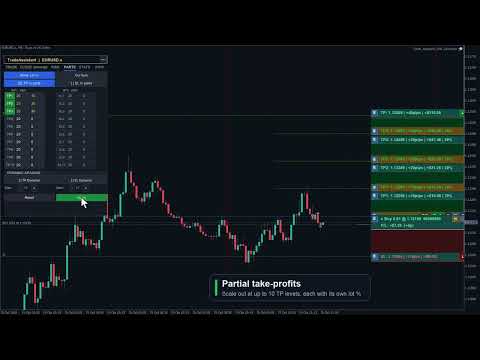
  • Up to 10 TP Levels and 10 SL Levels: Configure TP1–TP10 and SL1–SL10 with independent active state, pips distance, and close percentage.
  • Draft / Apply Workflow: Editing PARTS values or toggling active buttons creates a draft first. The live planning state changes only when you click Apply. If there are unsaved edits, the panel shows APPLY * and a pending-changes prompt.
  • Active Buttons Are Draft Controls: Turning TP1–TP10 or SL1–SL10 active on/off does not immediately draw or remove lines. Click Apply to commit the change.
  • Safe Symbol Scope: PARTS defaults to Cur Sym (blue) and applies only to the current chart symbol. Switching to All Sym requires a second confirmation click (Confirm All uses the warning color, All Sym uses red) and is session-only. Because pip scales differ widely between instruments such as EURUSD, XAUUSD, and indices, All Sym never applies the current chart's global fixed-pip levels directly to other symbols; non-current symbols act only when that ticket has an explicit per-ticket PARTS setup.
  • Chart Visualization: Applied active partial levels draw dotted lines with drag bars showing price, pips, money value, and close percentage.
  • Drag Applied Levels: Dragging an already-applied partial bar updates that live planning value while preserving smart clamps.
  • Smart Clamping: Partial TP levels stay on the profit side, partial SL levels stay on the loss side, and each partial level keeps at least a 1 pip gap from the full TP or SL distance.
  • Input Validation: Invalid pips values turn red and are kept for correction. Invalid draft values are not applied until fixed.
  • Per-Ticket Inheritance / Override Model: Existing positions, broker pending orders, and virtual pending orders inherit the applied panel settings until you explicitly configure that ticket. Explicit disabled state is also an override and blocks later panel changes from re-enabling that ticket.
  • Per-Ticket Edit Parts: Each ticket can open its own Edit Parts sub-panel with Apply / Back semantics, ticket-level validation, and independent TP1–TP10 / SL1–SL10 values. Closing or Back discards temporary edits; Apply saves the ticket override.
  • Copy or Disable One Ticket: Parts: Copy Applied Panel copies the current applied PARTS panel to one ticket. Parts: Disable This Ticket disables that ticket's partial structure without touching other tickets.
  • Placed Ticket Snapshots: Filled positions, broker pending orders, and virtual pending orders can keep independent TP/SL partial structures, and pending-ticket settings migrate to the filled position when triggered.
  • Lines OFF Reset: Turning Lines off resets the PARTS panel planning fields and master toggles for the next setup; already-placed tickets keep their own snapshots.
  • Proportional Money Display: Each partial level shows money value based on that level's close percentage, not the full position size.
  • Dynamic Spacing: Auto-calculate evenly spaced TP and SL partial levels with independent dynamic-spacing controls.

5. BE Tab — Breakeven & Pending Management

  • Auto Breakeven: Move SL to breakeven after a configurable profit trigger with adjustable offset. The trigger supports four units: Pips (favorable pip move from entry), R (a multiple of the initial SL distance, e.g. 1.0 R), % Price (percentage of entry price as a favorable move), and % TP (percentage of the entry-to-TP distance traveled).
  • Auto Offset: Estimate spread and commission costs from history to calculate a practical breakeven offset.
  • Per-Ticket BE Overrides: Positions, broker pending orders, and virtual pending orders can have dedicated BE settings. Pending-ticket settings migrate to the filled position. Explicit ON or OFF blocks the global BE panel from overriding that ticket.
  • Broker Pending Limit Trail: Trail BUY_LIMIT / SELL_LIMIT broker pending orders closer to market as price moves favorably, while preserving pending expiry.
  • Broker Pending Stop Trail: Trail BUY_STOP / SELL_STOP broker pending orders. Virtual pending orders are not moved by this broker pending trail module.
  • OCO: When one pending order on the same symbol triggers, other broker pending orders and virtual pending orders on that symbol are canceled.
  • Hide SL/TP: New market orders or broker pending orders can be sent without broker-side SL/TP while the EA manages virtual SL/TP locally. Existing tickets are not changed by the panel toggle.
  • Virtual Pending Orders: VPend keeps pending entries local until triggered. When triggered, the EA converts the setup to a stealth market position with virtual SL/TP and migrates ticket-specific PARTS / BE / Trail settings. The filled position keeps its [VP] marker and can be rebuilt on a newly opened chart for the same symbol.
  • Persistence Model: Planning lines (Entry / SL / TP), virtual SL/TP, BE / Trail panel settings, PARTS panel settings, ticket partial snapshots, and ticket BE / Trail overrides are restored across EA version upgrade, remove + reattach, and even a MetaTrader client abnormal termination; however, the PARTS All Sym scope is not auto-persisted and returns to the safer Cur Sym scope after reload. Existing stealth positions, broker pending orders with virtual SL/TP, and VP-filled positions can also be rebuilt on a newly opened chart for the same symbol. Only untriggered virtual pending orders remain chart-scoped and are restored from hidden chart mementos on the same chart window only.

6. TRAIL Tab — 8-Mode Trailing Stop Engine

  • 8 Trail Modes: NONE, PIPS, HI/LO, MA, SAR, ATR, FRACTALS, and PARTIAL. The ATR mode has an additional option ( InpTrailATRUseBarHL ): anchor the stop to the previous bar's Low/High offset by ATR × multiplier instead of maintaining a fixed ATR-sized gap from live Bid/Ask.
  • Universal Settings: Start, Distance, and Step control when trailing activates and how often it updates.
  • Per-Ticket Fixed-Pip Trail: Positions, broker pending orders, and virtual pending orders can define ticket-level trail settings. Pending-ticket settings migrate to the filled position. Explicit disabled state blocks global trailing for that ticket.
  • Hidden SL/TP Safe: Breakeven and trailing updates preserve the other hidden SL/TP leg when modifying virtual protection.

7. CLOSE Tab — Bulk Position & Pending Management

  • Close/Cancel All: Close all positions and cancel all broker pending orders and virtual pending orders across all symbols.
  • Close + Pending Symbol: Close current-symbol positions and cancel that symbol's broker pending orders and virtual pending orders.
  • Cancel Pending: Cancel all broker pending orders and virtual pending orders.
  • Close Buy / Sell / Profit / Loss: Close buy positions, sell positions, profitable positions, or losing positions according to the selected rule.
  • Partial Close: Close a configurable percentage of each open position with one click.
  • Auto-Close Targets: Set profit or loss targets in money or percent for the account or current symbol.
  • Trading Locks: Lock all trading or lock only the current symbol to prevent impulsive entries.

8. INFO Tab — Account Dashboard

  • Live Account Data: Balance, Equity, Floating P/L, Free Margin, and Margin % update in real time.
  • Position Summary: See total positions, buy lots, sell lots, and current-symbol P/L.
  • Daily Statistics: Day-start equity, today's P/L, and lock status reset automatically at daily rollover.
  • Symbol Switcher: Configure up to 6 symbols for one-click chart switching through InpSwitcherSymbols .
  • Hotkey Reference: The panel shows quick keyboard shortcuts such as Close/Cancel All, Close/Cancel Symbol, Cancel Pending, Trail, and BE.

9. RISK Tab — Over-Trading & Loss Lock Rules

  • Trade Count Limits: Set maximum trades per minute, hour, day, week, and month. Live counters show used / allowed on the tab. The counting scope can be set to the chart symbol or all symbols, to this EA's magic number or all magic numbers, and to Buy, Sell, or both trade directions.
  • Maximum Open Trades: Block new entries when the number of simultaneously open positions reaches a configured cap.
  • Cooldown After Open: Enforce a minimum wait in minutes before the next entry is allowed after the most recent trade was opened.
  • Cooldown After Close: Enforce a minimum wait in minutes before re-entering after any position closes.
  • Daily Loss $ and %: Stop new trading when today's cumulative realized loss exceeds a fixed dollar amount or a percentage of starting equity.
  • Daily Profit % Lock: Stop new trading once today's profit reaches a configured percentage target, preventing overtrading on a winning day.
  • Advanced Locks (ADV mode): Per-symbol loss lock in $ and %, weekly equity loss lock in $, and monthly equity loss lock in $.
  • Close On Lock: Optionally close all open positions automatically when any loss lock triggers.
  • Unlock Next Day: All risk locks reset automatically at the next server-day rollover.
  • Live Summary: The RISK tab always shows today's closed trade count, today's net P/L, and the current restriction status.
  • Last 10 Blocked Opens: A history list shows the last 10 trade attempts that were blocked, with timestamp and reason, for post-session review.
  • Apply / Reset: RISK tab changes take effect immediately. Click APPLY to persist them to the chart so they survive EA remove + reattach. Click RESET to restore input defaults.

10. STATS Tab — Trading History & CSV Export

  • Period Selector: Toggle between TODAY, 7D, 30D, and ALL to scope the statistics to the chosen history window.
  • Symbol & Magic Filter: Filter statistics to the current chart symbol or all account symbols, and to this EA's magic number or all magic numbers.
  • Performance Metrics: Closed-trade count, win/loss/flat breakdown, win rate, net P/L, profit factor, gross profit, gross loss, average win, and average loss — computed from MetaTrader 5 account history deals.
  • CSV Export: Click EXPORT CSV to save the filtered deal rows to a CSV file in MQL5/Files/ . The full path is logged to the Experts tab.
  • Refresh: Click REFRESH to re-run the statistics scan after new trades close.

11. Tools

  • Screenshot: Capture a full chart screenshot with one click. The file is saved automatically with the symbol name and timestamp.

11a. Alert Tool

  • Place up to 48 price-crossing alert lines (horizontal or angled trend line) directly on the chart. Choose Bid or Ask and an up or down crossing direction from 8 preset combinations.
  • When price crosses the line, the EA plays a sound and shows a visual notification. The alert auto-resets and re-fires on the next qualifying crossing — no recreation needed.
  • Delete individual lines on the chart or use Clear to remove all at once. All alert lines are saved per symbol/timeframe and survive EA reload and MT5 restarts.

11b. Cancel Level (CNCL) Tool

  • Same 8-option model as the Alert tool, but triggers order cancellation instead of a notification: when price crosses the level, all broker and virtual pending orders on the current symbol are cancelled.
  • Up to 48 cancel levels per chart, each with its own Bid/Ask and direction setting. Saved per symbol/timeframe; survive EA reload and MT5 restarts.

11c. Economic Calendar

  • Browse Mon–Fri economic events from the MT5 built-in database. Filter by impact level (Low / Med / High) and by currency. Events within 30 minutes are highlighted.
  • Block Trading: Select events and set a minute window. The EA rejects new orders that many minutes before and after each selected event. Choose All Pairs to block all symbols or restrict to symbols matching the event currency.
  • Auto-close on news: Enable Close Pos together with Block Trading to automatically close affected positions when a news block window opens.
  • Block/close rules stay active after the panel is closed. Notification delivery (popup, sound, push, email) is configured via input parameters.

11d. Task Scheduler

  • Queue up to 10 tasks that execute automatically. All date and time values use local PC time. Actions span 18 types: Buy, Sell, Buy/Sell Stop, Buy/Sell Limit, Close Buy, Close Sell, Close Profit, Close Loss, Close All, and order deletion (Del Buy/Sell Stop, Del Buy/Sell Limit, Del Stop, Del Limit, Del All Orders).
  • Trigger modes: Time trigger fires at the first tick on or after the scheduled date and local time. Price trigger fires when market price touches a specified level — set manually or linked to the ENTRY, SL, TP drag line, or any named chart object. Both modes can coexist on one task.
  • Task dependencies: A task can be set to fire only after another task in the list has already executed, enabling chained sequences (e.g. close all at 17:00, then place a fresh pending only after the close task completes).
  • Repeat: Check any combination of day-of-week boxes (Su Mo Tu We Th Fr Sa) for a recurring task. Leave all unchecked for a one-shot task that removes itself after firing.
  • Task status tracking: Each task carries a live status — Pending, Wait Trigger (waiting for price touch), Wait Dependency (parent not yet fired), Disabled (paused by user), Success, or Failed — with a last-result and reason field for post-session review.
  • Enable / Disable: Any task can be paused (disabled) and re-enabled without deleting it, so you can build a library of recurring setups and selectively activate them.
  • Execution history: The SCHED panel has a History view tab showing up to 180 recent execution log entries (Symbol, Time, Task#, Event, Status, Lots, Entry, TP, SL, Result / Reason). Filter by the current chart symbol or view all symbols. Paginate with Prev / Next buttons.
  • All tasks are saved to file and restored across EA reload and MT5 restarts. One-shot tasks are removed automatically after execution.

11e. Session Boxes

  • Toggle SESSIONS on the TRADE tab to draw dashed-border session rectangles directly on the chart. Four independent slots are configurable — defaults are Sydney (22:00–07:00), Tokyo (00:00–09:00), London (08:00–17:00), and New York (13:00–22:00), each with its own label, color, and enable switch.
  • Time reference modes: UTC (default) — industry standard GMT session hours shifted onto the broker chart using the server-UTC offset; Server — broker chart clock; Local — PC OS timezone. The UTC offset can be set manually (minutes) or derived automatically each refresh for accurate DST handling.
  • Opacity ( InpSessionFillAlpha ) and pastel-mix level ( InpSessionColorPastel ) are configurable via input parameters. Boxes have a dashed border outline with a label; there is no solid fill so the chart price action underneath remains fully visible.

11f. Trade History Panel (HIST)

  • Click the HIST button on the TRADE tab to open a floating trade-event log panel. Every trade action performed by the EA is logged: market order placement (success / failure), pending order placement, virtual pending trigger, virtual pending block, virtual SL hit, and virtual TP hit.
  • Each log row shows: Symbol, Time, Task # (if triggered by the scheduler), Event type, Status (Open / Profit / Loss / Failed / Blocked / Pending), Lots, Entry, TP, SL, and a Result / Reason field with retcode or block reason.
  • Filter by the current chart symbol or view all symbols. Paginate with Prev / Next. The panel is draggable from its title bar and stays open independently of the main panel.

12. Entry Line Proportional Drag

  • Dragging the Entry line moves SL, TP, and active partial levels by the same amount, preserving distances and Risk:Reward geometry.

Hotkeys

  • B / S: Buy / Sell Market
  • U / D: Buy / Sell Pending
  • C: Close positions and cancel all pending orders
  • X: Close current-symbol positions and cancel its pending orders
  • P: Cancel all broker and virtual pending orders
  • L: Lock current-symbol trading
  • A: Lock all trading
  • T: Toggle trailing stop
  • E: Toggle breakeven

Input Parameters

  • Risk Settings: default risk, fixed money risk, R:R, and max spread.
  • Stealth Settings: virtual pending and virtual SL/TP.
  • Management: BE, trailing, OCO, pending expiry, Magic Number, and symbol scope.
  • Auto-Close Rules: profit/loss targets in money or percent.
  • Time Filters: trading sessions, trading days, and crypto-weekend support.
  • Visual Settings: Six built-in color themes — Dark, Darker, Slate, Classic, Light, and Light Modern — selectable via InpColorTheme . Choose CUSTOM to use individual Inp*Color inputs for full manual color control. Panel position, line widths, and label sizes are also configurable.
  • Risk Guards: Commission-inclusive lot sizing ( InpRiskLotsIncludeComm ), virtual order trigger source (Ask / Bid / Mid / Bar Close), and block-alert delivery (popup, sound, push, email).
  • Symbol Switcher & Favorites: Up to 6 quick-jump symbols via InpSwitcherSymbols . A separate favorite-symbols list ( InpFavoriteSymbols ) is merged into the INFO tab's quick-jump panel.
Why Choose Trade Assistant Risk Calculator?

Whether you need fast scalping execution or precise swing-trade management, this EA handles the calculations and ticket management so you can focus on price action. With nine risk modes, commission-inclusive lot sizing, visual chart planning, session-box overlays, virtual protection, virtual pending orders, grid trading, trade presets, per-ticket overrides, 10-level TP and SL partials, an 8-mode trailing engine, comprehensive over-trading rules (RISK Tab), trading history analytics with CSV export (STATS Tab), a full trade event log (HIST), an economic calendar with block-trading rules, and a task scheduler with time and price triggers, task dependencies, and execution history, it helps enforce disciplined trade management at every session.

Take control of your trading with Trade Assistant Risk Calculator.


추천 제품
CosmiCLab FIBO
Kirils Subins
CosmiCLab SMC FIBO CosmiCLab SMC FIBO is a professional trading indicator designed for traders who use Smart Money Concepts (SMC), market structure analysis and Fibonacci retracement levels. The indicator automatically detects market swings and builds Fibonacci levels based on the latest impulse movement. It also identifies market structure changes such as BOS (Break of Structure) and CHOCH (Change of Character), helping traders understand the current market direction. CosmiCLab SMC FIBO also pr
Introduction Welcome to the world of Forex trading, where every tick of the market can be influenced by news events. Introducing our expert advisor for MetaTrader, your ultimate tool for navigating the complexities of news trading. This innovative advisor is specifically designed to automate your trading strategy during key macroeconomic releases, ensuring you never miss an opportunity.  When important indicators are announced, volatility often spikes, creating potential for profit. Our expert
FREE
Follow The Line MT5
Oliver Gideon Amofa Appiah
4.6 (35)
This indicator obeys the popular maxim that: "THE TREND IS YOUR FRIEND" It paints a GREEN line for BUY and also paints a RED line for SELL. (you can change the colors). It gives alarms and alerts of all kinds. IT DOES NOT REPAINT and can be used for all currency pairs and timeframes. Yes, as easy and simple as that. Even a newbie can use it to make great and reliable trades. NB: For best results, get my other premium indicators for more powerful and reliable signals. Get them here: https://www.m
FREE
You already have positions open. The question is whether the episode is still under control. Floating P/L tells you the result. It does not tell you the condition. A position group can still show a small gain while inventory load, hold time, adverse drift, weakening recovery, and spread expansion are already building pressure in the background. By the time the P/L number turns negative, the episode is already stressed. Episode Health Monitor was built to surface those conditions before they beco


Order Book, known also as Market Book, market depth, Level 2, - is a dynamically updated table with current volumes of orders to buy and to sell specific financial instument at price levels near Bid and Ask. MetaTrader 5 provides the means for receiving market book from your broker, but in real time only, without access to its history. The indicator OrderBook Cumulative Indicator accumulates market book data online and visualizes them on the chart. In addition, the indicator can show the market
개요 Candle Timer Countdown Pro는 현재 캔들의 마감까지 남은 시간을 부드럽고 정확하게 카운트다운으로 표시하며, 원형 진행 아크를 통해 남은 시간을 직관적으로 보여줍니다. 서버 시간 보간(Server Time Interpolation) 기술을 사용하여 틱이 없는 구간에서도 멈춤 없이 부드럽게 작동합니다. M1부터 MN까지 모든 타임프레임을 지원합니다. 스캘핑(1분 차트)부터 스윙 트레이딩(H4 이상)까지, 캔들 마감 시간을 정확히 파악하면 진입 타이밍을 개선하고 성급한 결정을 방지할 수 있습니다. 주요 특징 틱 간 멈춤 없는 정확한 카운트다운 원형 진행 표시 (Ring 또는 Filled Pie) 6가지 표시 위치 선택 가능 3가지 색상 모드 (Manual / Candle Outline / Candle Body) 마감 직전 하이라이트 기능 연결 상태 감지 (Active / Inactive / Disconnected) 새 캔들 알림 (팝업, 이메일, 푸시) 모든 타임
Donchian Breakout And Rsi
Mattia Impicciatore
4.5 (2)
개요 이 지표는 클래식 돈치안 채널(Donchian Channel) 의 향상된 버전으로, 실전 트레이딩을 위한 다양한 기능이 추가되었습니다. 표준 세 개의 선(상단, 하단, 중앙선) 외에도 브레이크아웃 을 감지하여 차트에 화살표로 시각적으로 표시하며, 차트를 깔끔하게 보기 위해 현재 추세 방향의 반대 라인만 표시 합니다. 지표 기능: 시각적 신호 : 브레이크아웃 시 컬러 화살표 표시 자동 알림 : 팝업, 푸시 알림, 이메일 RSI 필터 : 시장의 상대 강도를 기반으로 신호 검증 사용자 맞춤 설정 : 색상, 선 두께, 화살표 코드, RSI 임계값 등 동작 원리 돈치안 채널은 다음을 계산합니다: 상단선 : 최근 N개의 종가 완료 캔들에서 가장 높은 고가 하단선 : 최근 N개의 종가 완료 캔들에서 가장 낮은 저가 중앙선 : 고가와 저가의 평균값 상방 브레이크아웃 은 종가가 상단선을 돌파할 때 발생하며, 하방 브레이크아웃 은 종가가 하단선 아래로 내려갈 때 발생합니다. 이 지표는: 세 개의
FREE
Price Action Trade Panel EA MT5
Juvenille Emperor Limited
5 (4)
Price Action Trade Panel MT5 는 지정된(기본적으로 8개) 과거 양초의 순수한 가격 조치 데이터를 기반으로 모든 기호/상품의 구매/판매력 수준 균형을 계산합니다. 이는 지표 패널에서 사용할 수 있는 32개 기호/상품의 가격 움직임을 모니터링하여 가장 가까운 시장 심리를 제공합니다. 60% 이상의 매수/매도 수준은 특정 기호(기본 설정 사용)를 매수/매도할 수 있는 매우 견고한 수준을 제공합니다.   Price Action Trade Panel MT5 에는 가격 행동에 대한 표준, 빠르거나 느린 근접에 대해 사용할 수 있는 3가지 계산 모드가 있으며 실시간 움직임에 더 날카롭거나 부드러운 적응을 위해 조정 가능한 가격 행동 캔들을 제공합니다. Price Action Trade Panel MT5 는 또한 MT5에서 찾을 수 있는 가장 간단하고 사용하기 쉬운 거래 패널입니다. 추가 창이나 패널을 열 필요 없이 한 표면에 모든 옵션과 기능이 있습니다. 그것은 인터페
Price Magnet — Price Density and Attraction Levels Indicator Price Magnet is a professional analytical tool designed to identify key support and resistance levels based on statistical Price Density. The indicator analyzes a specified historical period and detects price levels where the market spent the most time. These zones act as “magnets,” attracting price action or forming a structural base for potential reversals. Unlike traditional Volume Profile tools, Price Magnet focuses on price-time d
The indicator detects and displays М. Gartley's Butterfly pattern. The pattern is plotted by the extreme values of the ZigZag indicator (included in the resources, no need to install). After detecting the pattern, the indicator notifies of that by the pop-up window, a mobile notification and an email. The pattern and wave parameters are displayed on the screenshots. The default parameters are used for demonstration purposes only in order to increase the amount of detected patterns. Parameters z
Important Lines
Terence Gronowski
4.88 (24)
This indicator displays Pivot-Lines, preday high and low, preday close and the minimum and maximum of the previous hour. You just have to put this single indicator to the chart to have all these important lines, no need to setup many single indicators. Why certain lines are important Preday high and low : These are watched by traders who trade in a daily chart. Very often, if price climbs over or falls under a preday low/high there is an acceleration in buying/selling. It is a breakout out of a
FREE
Easy GOLD MT5
Franck Martin
3.91 (43)
Easy Gold is the latest addition to the BotGPT family. It is surprising and very powerful. It is ideal for beginners due to its simplicity.  There is absolutely nothing to do, it's 100% automated, simply indicate the percentage of risk you want to take per trade and the EA is ready. Whatever your capital, the EA takes care of everything. Optimized on (XAUUSD).  Unleash all the power with the professional version (AGI Gold) and its connection to the neural network, available in my store. My othe
FREE
MT5용 암호화폐 외환 지표 "WPR with 2 Moving Averages" (리페인트 없음) - WPR 자체는 스캘핑에 가장 적합한 오실레이터 중 하나입니다. - "WPR and 2 Moving Averages" 지표는 WPR 오실레이터의 빠른 이동평균과 느린 이동평균을 함께 보여줍니다. - 이 지표는 가격 조정을 매우 빠르게 감지할 수 있도록 도와줍니다. - 매개변수를 통해 간편하게 설정할 수 있으며, 모든 시간대에 사용 가능합니다. - 매수 및 매도 진입 조건은 그림에서 확인할 수 있습니다. - WPR MA 교차 시 PC 및 모바일 알림 기능 제공. 매수 신호 조건 예시: (1) 빠른 이동평균이 느린 이동평균을 상향 돌파하고 WPR 값이 -50 미만이면 매수 진입. (2) WPR 값이 -20 이상으로 과매수 영역에 진입하면 매수 포지션 청산. 매도 신호 조건 예시: (1) 빠른 이동평균이 느린 이동평균을 하향 돌파하고 WPR 값이 -50 이상이면 매도 진입. (2) -
ROMAN5 Time Breakout Indicator automatically draws the boxes for daily support and resistance breakouts. It helps the user identifying whether to buy or sell. It comes with an alert that will sound whenever a new signal appears. It also features an email facility. Your email address and SMTP Server settings should be specified in the settings window of the "Mailbox" tab in your MetaTrader 5. Blue arrow up = Buy. Red arrow down = Sell. You can use one of my Trailing Stop products that automatical
FREE
Trading Room Indcator
Meshari F M Alkhawaled
Trading Room Indicator is a professional market-structure tool built to give traders a clear, complete trading framework — combining CPR levels, dynamic targets, and trend direction in one clean view. Instead of guessing direction or overloading the chart with indicators, Trading Room Indicator focuses on what actually matters : levels, direction, and potential price expansion. What This Indicator Provides CPR Structure BUY level SELL level Pivot Point (PP) Designed to highlight equilibrium
Caicai L&S Yield Histogram Important Notice: This indicator is an integral tool of the automated EA Caicai Long and Short Pair Trading . This indicator visually displays the percentage deviation (Yield %) of a pair's current spread relative to its own historical mean. It is an excellent tool for quickly visualizing the gross financial potential of a market distortion in Long & Short operations. Main Features: Percentage Visualization: Understand the size of the distortion in palpable percentage
RBreaker
Zhong Long Wu
RBreaker Gold Indicators는 금 선물을 위한 단기 데이 트레이딩 전략으로, 추세 추종과 데이 내 반전의 두 가지 거래 방식을 결합합니다. 추세 장에서 수익을 포착할 수 있을 뿐만 아니라, 시장이 반전될 때 적시에 이익을 확정하고 추세에 맞춰 반대 포지션을 잡을 수 있습니다. 이 전략은 미국 잡지 Futures Truth에서 15년 연속으로 가장 수익성 높은 트레이딩 전략 상위 10위 안에 선정되었습니다. 긴 라이프사이클을 자랑하며, 현재까지 국내외에서 널리 사용되고 연구되고 있습니다. 본 지표는 2026년 금 선물의 움직임을 반영하여 14일 ATR 지표를 기반으로 돌파 계수 A, 관찰 계수 B, 반전 계수 R을 보다 합리적인 값으로 정의했습니다. 매우 훌륭한 지표이며, 안정적인 연간 수익성을 달성했습니다. 강력히 추천합니다~ 위 지표는 변동성이 높은 상품에 적합하며, 매개변수는 금 선물, 주가 지수 선물 등에 적합합니다. 다른 상품이 필요한 경우 돌파 계수 A
Visual Dolphin Indicator
AL MOOSAWI ABDULLAH JAFFER BAQER
Visual Dolphin Indicator Unlock the rhythm of the market with the Visual Dolphin Indicator, your ultimate tool for identifying and capitalizing on market trends with clarity and confidence. Designed for both novice and experienced traders, this indicator eliminates the noise and guesswork, providing crystal-clear buy and sell signals directly on your chart. The Logic Behind the Waves The core of the Visual Dolphin Indicator is a sophisticated yet intuitive dual-wave system based on moving avera
The   Trendlines Oscillator   helps traders identify trends and momentum based on the normalized distances between the current price and the most recently detected bullish and bearish trend lines. The indicator features bullish and bearish momentum, a signal line with crossings, and multiple smoothing options. USAGE The   Trendlines Oscillator   works by systematically: Identifying pivot highs and lows. Connecting pivots to form bullish (support) and bearish (resistance) trendlines. Measuring
Reversal Composite Candles
MetaQuotes Ltd.
3.69 (16)
The idea of the system is to indentify the reversal patterns using the calculation of the composite candle. The reversal patterns is similar to the "Hammer" and "Hanging Man" patterns in Japanese candlestick analysis. But it uses the composite candle instead the single candle and doesn't need the small body of the composite candle to confirm the reversal. Input parameters: Range - maximal number of bars, used in the calculation of the composite candle. Minimum - minimal size of the composite can
FREE
숫자 시퀀스 중 하나를 "산불 시퀀스"라고 합니다. 가장 아름다운 새로운 시퀀스 중 하나로 인식되었습니다. 주요 특징은 이 시퀀스가 ​​가장 짧은 경우에도 선형 추세를 피한다는 것입니다. 이 지표의 기초를 형성한 것은 이 속성입니다. 금융 시계열을 분석할 때 이 지표는 가능한 모든 추세 옵션을 거부하려고 합니다. 그리고 그가 실패하는 경우에만 그는 추세의 존재를 인식하고 적절한 신호를 제공합니다. 이 접근 방식을 통해 새로운 트렌드가 시작되는 순간을 정확하게 결정할 수 있습니다. 그러나 거짓 긍정도 가능합니다. 숫자를 줄이기 위해 이 표시기에 추가 필터가 추가되었습니다. 새 막대가 열리면 신호가 생성됩니다. 어떤 경우에도 다시 그리기가 발생하지 않습니다. 표시 매개변수: Applied Price   - 적용된 가격 상수. Period Main   - 표시기의 기본 기간, 유효한 값은 5 - 60 이내입니다. Period Additional   - 추가 기간, 이 매개변수의 유효한
IMPORTANT NOTE: This is a professional Trade Management Utility and on-chart assistant. It is NOT an automated trading robot. It does not open trades on its own. The UltraFast Trade Manager MT5 is the ultimate execution and risk-management suite designed to give you absolute control over your manual and algorithmic trades. When managing multiple positions, calculating complex net break-even points, or constantly monitoring the economic calendar, hesitation can lead to costly mistakes. This utili
FREE
JAC Trend Color Candle
Eduardo Da Costa Custodio Santos
The indicator "JAC Trend Color Candle" for Meta Trader 5, was created to visually facilitate the trend for the trader. It is based on three parameters, which identifies the uptrend, downtrend and non-trending market. The colors are trader-configurable, and the average trader-configurable as well. trend parameters cannot be configured as they are the indicator's differential.
Noize Absorption Index
Ekaterina Saltykova
Noize Absorption Index - is the manual trading system that measures the difference of pressure between bears forces and bulls forces. Green line - is a noize free index that showing curent situation. Zero value of index shows totally choppy/flat market.Values above zero level shows how powerfull bullish wave is and values below zero measures bearish forces.Up arrow appears on bearish market when it's ready to reverse, dn arrow appears on weak bullish market, as a result of reverse expectation.
Has rsi signal
Evgenii Savinov
HAS RSI Signal — SL/TP 자동 계산 기능이 포함된 전문 트렌드 지표 HAS RSI Signal 은 검증된 클래식 지표와 현대적인 노이즈 필터링 알고리즘을 결합한 강력한 트레이딩 도구입니다. 이 지표는 Heiken Ashi Smoothed (HAS) 캔들과 RSI 오실레이터를 통해 시장을 분석하며, 추세 반전이나 과매수/과매도 구간 이탈 시 트레이더에게 명확한 진입 신호를 제공합니다. 주요 장점: 이중 필터링: Heiken Ashi Smoothed를 사용하여 시장의 '노이즈'를 제거하고, RSI를 통해 모멘텀의 강도를 확인합니다. 자동 레벨 계산: 단순히 신호만 주는 것이 아니라, 변동성( ATR )을 기반으로 최적의 손절매(Stop Loss) 및 이익 실현(Take Profit) 레벨을 자동으로 계산합니다. 시각적 편의성: 신호가 차트 위에 컬러 캔들 형태로 직접 표시되어 복잡하지 않고 직관적으로 추세를 파악할 수 있습니다. 알림 시스템: 터미널 알람, 사운드, 스마
Trade assistant pro v8
Ahmed Mohammed Bakr Bakr
FREE FREE FREE Trade Assistant MT5 – Professional Trading & Risk Management Panel Trade Assistant MT5 is an advanced trading panel designed to help traders execute orders faster, safer, and more professionally . It simplifies manual trading by combining smart order management , precise risk control , and one-click execution , making it ideal for both beginners and advanced traders. This tool does not trade automatically . Instead, it empowers you with full control while applying professional-gra
FREE
LT Rainbow Trend
Thiago Duarte
5 (1)
== LT RAINBOW TREND - 36개의 이동평균선을 탑재한 추세 지표 == 개요 LT Rainbow Trend는 스마트 컬러 시스템(Rainbow)을 적용하여 36개의 이동평균선(Moving Averages)을 동시에 처리하는 고급 기술적 추세 분석 지표입니다. 최고의 시각적 명확성을 바탕으로 주 추세 방향으로 거래하고자 하는 트레이더를 위해 개발되었으며, 멀티 타임프레임 분석의 복잡함을 심플하고 다채로우며 매우 직관적인 시각 효과로 전환해 줍니다. "추세는 당신의 친구(The trend is your friend)"라는 격언을 이해하는 트레이더에게 가장 이상적인 도구이며, 추세의 강도, 방향 및 잠재적 반전 신호를 미리 확인할 수 있도록 도와줍니다. 작동 원리 본 지표는 4개의 추세 구역에 분산된 36개의 이동평균선을 모니터링합니다: 빨간색 (추세 전환 구역) 31~20번째 이동평균선 추세가 반전될 수 있음을 나타내는 강한 신호 주황색 (추세 약화 구역)
Key Features: 200+ Fully Implemented Patterns   across all categories Advanced Market Structure Analysis Smart Money Integration   (Wyckoff, Order Blocks, Liquidity) Professional Risk Management Multi-Timeframe Analysis AI-Powered Confidence Scoring Advanced Visualization Real-time Alerts Pattern Categories: Single Candle Patterns (Hammer, Doji, Marubozu, etc.) Multi-Candle Patterns (Engulfing, Stars, Harami, etc.) Chart Patterns (Head & Shoulders, Cup & Handle, Triangles, etc.) Harmonic Pattern
FREE
Free automatic Fibonacci is an indicator that automatically plots a Fibonacci retracement based on the number of bars you select on the BarsToScan setting in the indicator. The Fibonacci is automatically updated in real time as new highest and lowest values appears amongst the selected bars. You can select which level values to be displayed in the indicator settings. You can also select the color of the levels thus enabling the trader to be able to attach the indicator several times with differe
FREE
TradingCoPilot
Viktor Mitrofanov
Trading Co-Pilot for MetaTrader 5 Advanced Position Management for Manual Traders Trading Co-Pilot is a professional trade management assistant designed for traders who open positions manually and want precise, automated control over risk and profit handling. It does not open trades. It manages them intelligently. You focus on entries. The Co-Pilot protects and optimizes the exit. How It Works Once you open a manual position, Trading Co-Pilot automatically: • Applies Stop Loss • Sets Take Profit
FREE
이 제품의 구매자들이 또한 구매함
Trade Assistant MT5
Evgeniy Kravchenko
4.43 (211)
거래당 위험 계산, 라인을 사용한 손쉬운 신규 주문, 부분 청산 기능을 통한 주문 관리, 7가지 유형의 트레일링 스탑 및 기타 유용한 기능을 제공합니다. 추가 자료 및 지침 설치 지침   -   애플리케이션 지침   -   데모 계정용 애플리케이션 평가판 라인 기능       - 차트에 개시선, 손절매, 차익실현을 표시합니다. 이 기능을 사용하면 새로운 주문을 쉽게 하고 개봉 전에 추가 특성을 볼 수 있습니다. 위기 관리       -       위험 계산 기능은 설정된 위험과 손절매 주문의 크기를 고려하여 새 주문의 볼륨을 계산합니다. 이를 통해 손절매 크기를 설정하고 동시에 설정된 위험을 존중할 수 있습니다. 로트 계산 버튼 - 위험 계산을 활성화/비활성화합니다. 필요한 위험 값은 위험 필드에 0에서 100 사이의 백분율 또는 예금 통화로 설정됩니다. 설정 탭에서 위험 계산 옵션을 선택합니다. $ 통화, % 잔액, % 지분, % 자유 마진, % 사용자 정의, % AB 이전
Trade Manager EA에 오신 것을 환영합니다. 이 도구는 거래를 보다 직관적이고 정확하며 효율적으로 만들기 위해 설계된 궁극적인 리스크 관리 도구 입니다. 단순한 주문 실행 도구가 아닌, 원활한 거래 계획, 포지션 관리 및 리스크 제어를 위한 종합 솔루션입니다. 초보자부터 고급 트레이더, 빠른 실행이 필요한 스캘퍼에 이르기까지 Trade Manager EA는 외환, 지수, 상품, 암호화폐 등 다양한 시장에서 유연성을 제공합니다. Trade Manager EA를 사용하면 복잡한 계산은 이제 과거의 일이 됩니다. 시장을 분석하고 진입, 손절 및 익절 수준을 차트의 수평선으로 표시한 후 리스크를 설정하면, Trade Manager가 이상적인 포지션 크기를 즉시 계산하고 SL 및 TP 값을 실시간으로 표시합니다. 모든 거래가 간편하게 관리됩니다. 주요 기능: 포지션 크기 계산기 : 정의된 리스크에 따라 거래 크기를 즉시 결정합니다. 간단한 거래 계획 : 진입, 손절, 익절을 위한
Local Trade Copier EA MT5
Juvenille Emperor Limited
4.96 (139)
Local Trade Copier EA MT5 를 사용하여 매우 빠른 거래 복사 경험을 해보세요. 1분 안에 간편하게 설정할 수 있으며, 이 거래 복사기를 사용하면 Windows 컴퓨터 또는 Windows VPS에서 여러 개의 MetaTrader 터미널 간에 거래를 0.5초 미만의 초고속 복사 속도로 복사할 수 있습니다. 초보자든 전문가든   Local Trade Copier EA MT5 는 다양한 옵션을 제공하여 사용자의 특정 요구에 맞게 맞춤 설정할 수 있습니다. 이는 수익 잠재력을 높이려는 모든 사람을 위한 최고의 솔루션입니다. 지금 사용해보시고 이것이 왜 시장에서 가장 빠르고 쉬운 무역용 복사기인지 알아보세요! 팁: 여기 에서 데모 계정에서 Local Trade Copier EA MT5 데모 버전을 다운로드하여 사용해 볼 수 있습니다. 다운로드한 무료 데모 파일을 MT5 >> File >> Open Data Folder >> MQL5 >> Experts 폴더에 붙여넣고 터
TradePanel MT5
Alfiya Fazylova
4.87 (156)
Trade Panel은 다기능 거래 도우미입니다. 이 애플리케이션에는 50개 이상의 수동 거래 기능이 포함되어 있으며 대부분의 거래 작업을 자동화할 수 있습니다. 구매하기 전에 데모 계정에서 데모 버전을 테스트할 수 있습니다. 데모 계정용 애플리케이션 체험판 다운로드: https://www.mql5.com/en/blogs/post/750865 . 전체 지침 여기 . 거래. 한 번의 클릭으로 거래를 수행할 수 있습니다: 리스크 자동 계산과 함께 예약 주문 및 포지션 열기. 한 번의 클릭으로 여러 주문 및 포지션 열기. 주문 그리드 열기. 예약 주문 및 포지션을 그룹별로 닫기. 포지션 방향 전환 (Buy 닫기 > Sell 열기, Sell 닫기 > Buy 열기). 포지션 잠금 (부족한 포지션을 열어 Buy와 Sell 포지션의 수량을 동일하게 만들기). 모든 포지션 한 번의 클릭으로 부분적으로 닫기. 모든 포지션의 테이크 프로핏과 스톱로스를 같은 가격 수준에 설정. 모든 포지션의 스톱로스를
베타 출시 Telegram to MT5 Signal Trader 는 곧 공식 알파 버전을 출시할 예정입니다. 일부 기능은 아직 개발 중이며, 작은 버그가 발생할 수 있습니다. 문제가 있으면 꼭 보고해 주세요. 여러분의 피드백은 소프트웨어 개선에 도움이 됩니다. Telegram to MT5 Signal Trader 는 Telegram 채널 또는 그룹의 거래 신호를 자동으로 MetaTrader 5 계정으로 복사하는 강력한 도구입니다. 공개 및 비공개 채널을 모두 지원하며, 여러 신호 제공자를 여러 MT5 계정에 연결할 수 있습니다. 소프트웨어는 빠르고 안정적으로 동작하며, 복사된 거래를 완벽히 제어할 수 있습니다. 인터페이스는 깔끔하며 대시보드와 차트가 시각적으로 구성되어 있고, 직관적인 네비게이션이 가능합니다. 여러 Signal Account를 관리하고, 공급자별 설정을 세밀하게 조정하며, 모든 동작을 실시간으로 모니터링할 수 있습니다. 필수 조건 MQL의 제한으로 인해 EA는 Te
AI Agent Supervisor is NOT an Expert Advisor. AI Agent Supervisor   is a   multi-agent AI risk & portfolio supervisor   that watches every EA on your account and intervenes in real time.  WANT AN AI PORTFOLIO MANAGER WATCHING YOUR FLEET 24/7?   Run your fleet on the same brokers I do:   IC MARKETS , IC TRADING   .  Unlike the centralized stock market, Forex has no single, unified price feed.  Every broker sources liquidity from different providers, creating unique data streams. The Supervisor r
Quant AI Agents
Ho Tuan Thang
5 (1)
Quant AI Agents are independent trading Expert Advisors. Instead of trading using a fixed strategy like other conventional EAs, Quant AI Agents   is a   multi-agent AI trading framework   that turns natural-language strategy prompts into live.  WANT THE SAME RESULTS AS MY LIVE SIGNAL?   Use the exact same brokers I do:   IC MARKETS , IC TRADING   .  Unlike the centralized stock market, Forex has no single, unified price feed.  Every broker sources liquidity from different providers, creating un
Trade Dashboard MT5
Fatemeh Ameri
4.94 (126)
Trade Dashboard simplifies how you open, manage, and control your trades, with built-in lot size calculation. It allows you to execute trades, manage risk, and control positions directly on the chart, with tools such as partial close, breakeven, and trailing stop. Designed to reduce manual work and help you stay focused on your trading decisions. A demo version is available for testing. Detailed explanations of features are provided within the MQL5 platform. Installation instructions are include
Exp COPYLOT CLIENT for MT5
Vladislav Andruschenko
3.91 (33)
MetaTrader 5용 전문 트레이드 복사기 MetaTrader 용 빠르고 전문적이며 신뢰할 수 있는 트레이드 복사기 입니다. COPYLOT 은 MT4와 MT5 터미널 간의 Forex 거래 복사를 지원하며, Hedge 및 Netting 계좌를 모두 지원합니다. COPYLOT MT5 버전 지원 구성: - MT5 Hedge → MT5 Hedge - MT5 Hedge → MT5 Netting - MT5 Netting → MT5 Hedge - MT5 Netting → MT5 Netting - MT4 → MT5 Hedge - MT4 → MT5 Netting MT4 버전 전체 설명 + DEMO + PDF 구매 방법 설치 방법 로그 파일 확인 방법 테스트 및 최적화 방법 Expforex의 모든 제품 MT4 터미널로도 거래를 복사할 수 있습니다(MT4 → MT4, MT5 → MT4): COPYLOT CLIENT for MT4 COPYLOT은 2개, 3개, 심지어 10개의 터미널과 동시에 작동할
Farmed Hedge Yield Farming | All Markets (Manual - Hybrid - Semi/Automated EA) MULTI-ASSET SUPPORT Trade any asset available on your broker - Forex: Major, Minor, Exotic pairs - Crypto: BTC, ETH, XRP, SOL, BNB - Stocks: Apple, Tesla, Amazon, Google, etc. - Commodities: Gold, Silver, Oil, Gas - Indices: US30, NAS100, SPX500, DAX40 - Any CFD your broker offers VERIFIED TRADING RESULTS - Farmed Hedge Yield Axi Copy:  https://www.mql5.com/en/signals/2356376 - Farmed Hedge Yield Exn Copy:   https:/
The News Filter MT5
Leolouiski Gan
4.78 (23)
이 제품은 뉴스 시간 동안 모든 전문가 어드바이저 및 수동 차트를 필터링하여 수동 거래 설정이나 다른 전문가 어드바이저가 입력한 거래가 파괴될 수 있는 급격한 가격 상승으로부터 걱정하지 않아도 됩니다. 이 제품은 또한 뉴스 발표 전에 열린 포지션과 대기 주문을 처리할 수 있는 완전한 주문 관리 시스템이 함께 제공됩니다.   The News Filter  를 구매하면 더 이상 내장 뉴스 필터에 의존할 필요가 없으며 이제부터 모든 전문가 어드바이저를 여기서 필터링할 수 있습니다. 뉴스 선택 뉴스 소스는 Forex Factory의 경제 캘린더에서 얻어집니다. USD, EUR, GBP, JPY, AUD, CAD, CHF, NZD 및 CNY와 같은 어떤 통화 기준으로 선택할 수 있습니다. Non-Farm (NFP), FOMC, CPI 등과 같은 키워드 식별을 기준으로 선택할 수도 있습니다. 저, 중, 고 영향을 가지는 뉴스를 필터링할 수 있도록 선택할 수 있습니다. 차트와 관련된 뉴스만 선
Footprint Chart Pro — Professional OrderFlow EA for MetaTrader 5 Version 6.34 | Professional tool for real traders | Institutional-Grade Visualization DEMO USERS - PLEASE SELECT EVERY TICK / REAL TICK WHEN TESTING AND YOU HAVE DOWNLOADED HISTORICAL DATA. IF YOU SEE A WAITING SCREEN AND IT IS NOT DOWNLOADING, IT MEANS YOU HAVE LOW HISTORICAL DATA. TRY 1 MIN AND 5 MIN FIRST ON 1 DAY DATA. ONE DAY DATA SHOULD BE THE NEWEST AND MOST CURRENT DATE. PLEASE WAIT UNTIL THE MARKET HAS ROLLED OVER PERIOD.
Premium Trade Manager - MetaTrader 5를 위한 빠르고 규율 있는 거래 관리 도구 Premium Trade Manager 는 결정에만 집중하고 나머지 루틴은 패널이 처리하길 원하는 트레이더를 위한 도구입니다. 크기 계산, 주문 배치, 분할 청산, 트레일링, 뉴스 대응, 프롭 펌 한도 관리까지, 모든 거래에서 동일하게 규율 있는 방식으로 실행됩니다. MetaTrader 5용 빠른 온차트 패널로, 모든 거래에서 기계적인 작업을 완전히 없애줍니다. 방향, 종목, 타이밍은 당신이 결정합니다. 패널이 리스크에 맞춰 포지션 크기를 계산하고, 스톱과 타겟이 설정된 주문을 배치하고, 분할 청산으로 스케일아웃하고, 나머지를 트레일합니다. 펀디드 트레이더에게는 한 걸음 더 나아갑니다. 8개 주요 외환 프롭 펌의 실제 규칙을 내장하고, 각 한도까지 남은 거리를 실시간으로 표시하며, 하드 한도를 위반할 주문은 차단합니다. 구매 전에 직접 체험해 보세요. 인터랙티브 walkthro
Prop Firm Os
Gayathiri Gopalakrishnan
5 (1)
PROP FIRM OS Structured Trading Assistant for MetaTrader 5 PROP FIRM OS is a structured trading assistant designed for MetaTrader 5 users who prefer rule-based market analysis and organized trading workflows. The Expert Advisor combines market analysis tools, scanner functions, dashboard monitoring, alerts, risk-control settings, and trade management features inside one system. PROP FIRM OS is designed to help traders follow selected rules, filters, and monitoring conditions during trading activ
파워 캔들 전략 스캐너 - 자체 최적화 다중 종목 설정 찾기 도구 파워 캔들 전략 스캐너는 마켓 워치에 등록된 모든 종목에 대해 파워 캔들 지표와 동일한 자체 최적화 엔진을 동시에 실행합니다. 하나의 패널에서 현재 통계적으로 거래 가능한 종목, 각 종목별 최적의 전략, 최적의 손절매/익절 조합을 알려주며, 새로운 신호가 발생하면 즉시 알림을 전송합니다. 이 도구는 Stein Investments 에코시스템의 일부입니다. 18개 이상의 도구와 함께 당신의 1대1 AI 트레이딩 멘토 Max.  항상 대기 중, 모든 인디케이터를 깊이 있게 이해, 무언가를 차근차근 생각해보고 싶은 순간에 도움을 줍니다.  https://stein.investments 에서 만나보세요 완벽한 시장 모니터링. 종목당 3,000건 이상의 자동 최적화. 2가지 알림 유형. 한 번의 클릭으로 차트를 전환하고 바로 거래하세요. 이 도구가 필요한 이유 대부분의 다중 종목 스캐너는 가격 변동만 보여줍니다. 티커별
The product will copy all telegram signal to MT5 ( which you are member) , also it can work as remote copier.  Easy to set up, copy order instant, can work with almost signal formats, image signal,  s upport to translate other language to English Work with all type of channel or group, even channel have "Restrict Saving Content", work with  multi channel, multi MT5 Work as remote copier: with signal have ticket number, it will copy exactly via ticket number. Support to backtest signal. How to s
Trade copier MT5
Alfiya Fazylova
4.55 (44)
Trade Copier는 거래 계정 간의 거래를 복사하고 동기화하도록 설계된 전문 유틸리티입니다. 복사는 공급자의 계정/단말기에서 동일한 컴퓨터 또는 vps에 설치된 수신자의 계정/단말기로 발생합니다. 프로모션 - 이미 "Trade copier MT5"를 구매하셨다면, "Trade copier MT4"를 무료로 받으실 수 있습니다 (MT4 → MT5 및 MT4 ← MT5 복사용). 조건에 대한 자세한 정보를 원하시면, 개인 메시지를 통해 저희에게 문의해 주시기 바랍니다! 구매하기 전에 데모 계정에서 데모 버전을 테스트할 수 있습니다. 데모 버전 여기 . 전체 지침 여기 . 주요 기능 및 이점: 복사기는 "МТ5> МТ5", "МТ4> МТ5", "МТ5> МТ4" 복사를 지원합니다. 복사기는 데모 계정 > 실 계정, 실 계정 > 데모 계정, 데모 계정 > 데모 계정 및 실제 계정 > 실 계정 복사를 지원합니다. 복사기는 읽기 전용 암호가 적용된 투자자 계정에서 복사를 지원합니다. 하
SMC Trade Pilot MT5 Smart Money Concepts 트레이더를 위한 반자동 트레이딩 어시스턴트. 차트 스크린샷이 포함된 신호를 Telegram에서 받고, 한 번의 탭으로 트레이드를 실행하세요. 컴퓨터에서 떨어져 있어도 휴대폰에서 포지션을 관리할 수 있습니다. 해결하는 문제 Smart Money 셋업은 당신을 기다리지 않습니다. Order Blocks와 Liquidity Sweeps는 런던 개장, 뉴욕 개장 또는 아시아 세션 중에 형성되며, 이때 당신은 업무 중이거나 회의 중이거나 화면에서 떨어져 있을 때가 많습니다. 차트를 확인할 즈음이면 셋업은 이미 지나갔습니다. SMC Trade Pilot은 당신의 휴대폰을 실시간 트레이딩 콕핏으로 바꿔줍니다. 어시스턴트는 SMC 신호를 찾기 위해 차트를 24시간 스캔합니다. 셋업이 형성되면 완전한 트레이드 티켓을 Telegram 채팅에 전송합니다: 차트 스크린샷, 방향, 진입 가격, 권장 손절, 권장 익절, 품질 점수. 결
Custom Alerts AIO: 다중 시장을 동시에 모니터링 – 설정 없이 즉시 사용 가능 개요 Custom Alerts AIO 는 복잡한 설정 없이 즉시 사용할 수 있는 통합 시장 모니터링 도구입니다. FX Power, FX Volume, FX Dynamic, FX Levels, IX Power 등 필요한 모든 지표가 내장되어 있어 별도의 설치나 구성 없이 알림 기능을 바로 사용할 수 있습니다. 차트 그래픽 없이 작동하며, Forex, 금속, 지수, 암호화폐 등 주요 자산군을 모두 지원합니다. 주식(Symbols)은 별도로 입력하여 추가할 수 있으나, MetaTrader에서는 일반적으로 제한적으로만 사용됩니다. 1. 왜 Custom Alerts AIO를 선택해야 하나요? 추가 라이선스가 필요 없습니다 • 모든 Stein Investments 지표가 내장되어 있어 별도 구매가 필요 없습니다. • 즉시 알림 기능을 시작할 수 있어 빠르고 간편합니다. 모든 시장을 하나의 도구로
AntiOverfit PRO MT5
Enrique Enguix
5 (6)
EA를 구매하기 전에, 이 시스템이 정말 버티는지 아니면 백테스트에서 운 좋게 좋아 보였던 것뿐인지 먼저 확인하세요. 대부분의 로봇은 보기 좋은 백테스트와 함께 판매됩니다. 우상향 곡선. 좋은 Profit Factor. 의심할 이유가 거의 없어 보입니다. 그런데도 그런 EA들 중 많은 수가 시장이 그 과거 구간처럼 움직이지 않기 시작하는 순간 무너지기 시작합니다. 왜 그럴까요? 백테스트가 증명하는 것은 딱 한 가지뿐이기 때문입니다. 그 전략이 특정한 하나의 가격 경로에서는 작동했다는 것. 다른 경로에서도 버틴다는 뜻은 아닙니다. 견고하다는 뜻도 아닙니다. 당연히 당신의 돈을 쓸 가치가 있다는 뜻도 아닙니다. 당신이 EA를 사는 이유는 과거의 예쁜 곡선을 감상하기 위해서가 아닙니다. 계속 변하는 시장에서 실제로 쓰기 위해서입니다. AntiOverfit PRO가 하는 일 AntiOverfit PRO는 MetaTrader 5용 Expert Advisor가 정말 탄탄한지, 아니면 특정한
MT5 to Telegram Signal Provider 는 사용하기 쉽고 완전히 커스터마이즈 가능한 유틸리티로, 특정 신호를 Telegram의 채팅, 채널 또는 그룹으로 전송하고, 귀하의 계정을 신호 제공자 로 만듭니다. 경쟁 제품과 달리 DLL 임포트를 사용하지 않습니다. [ 데모 ] [ 매뉴얼 ] [ MT4 버전 ] [ 디스코드 버전 ] [ 텔레그램 채널 ]  New: [ Telegram To MT5 ] 설정 단계별 사용자 가이드 가 제공됩니다. 텔레그램 API에 대한 지식은 필요하지 않습니다; 개발자가 제공하는 모든 것이 필요합니다. 주요 특징 구독자에게 보낸 주문 상세 정보를 커스터마이즈할 수 있습니다. 예를 들어, 브론즈, 실버, 골드와 같은 계층 구독 모델을 만들 수 있습니다. 골드 구독에서는 모든 신호를 받습니다. id, 심볼, 또는 코멘트로 주문을 필터링할 수 있습니다. 주문이 실행된 차트의 스크린샷이 포함됩니다 보낸 스크린샷에 닫힌 주문을 그려 추가 검증을 합니다
YuClusters
Yury Kulikov
4.93 (42)
Attention: You can view the program operation in the free version  YuClusters DEMO .  YuClusters is a professional market analysis system. The trader has unique opportunities to analyze the flow of orders, trade volumes, price movements using various charts, profiles, indicators, and graphical objects. YuClusters operates on data based on Time&Sales or ticks information, depending on what is available in the quotes of a financial instrument. YuClusters allows you to build graphs by combining da
Trade Manager DaneTrades
Levi Dane Benjamin
4.28 (29)
거래 관리자는 위험을 자동으로 계산하는 동시에 거래를 빠르게 시작하고 종료하는 데 도움을 줍니다. 과잉 거래, 복수 거래 및 감정 거래를 방지하는 데 도움이 되는 기능이 포함되어 있습니다. 거래를 자동으로 관리할 수 있으며 계정 성과 지표를 그래프로 시각화할 수 있습니다. 이러한 기능은 이 패널을 모든 수동 거래자에게 이상적으로 만들고 MetaTrader 5 플랫폼을 향상시키는 데 도움이 됩니다. 다중 언어 지원. MT4 버전  |  사용자 가이드 + 데모 트레이드 매니저는 전략 테스터에서 작동하지 않습니다. 데모를 보려면 사용자 가이드로 이동하세요. 위기 관리 % 또는 $를 기준으로 위험 자동 조정 고정 로트 크기 또는 거래량과 핍을 기반으로 한 자동 로트 크기 계산을 사용하는 옵션 RR, Pips 또는 Price를 사용한 손익분기점 손실 설정 추적 중지 손실 설정 목표 달성 시 모든 거래를 자동으로 마감하는 최대 일일 손실률(%)입니다. 과도한 손실로부터 계정을 보호하고 과도한
Copy Cat More Trade Copier MT5 (복사 고양이 MT5) 는 오늘날의 거래 과제를 위해 설계된 로컬 거래 복사기이자 완전한 위험 관리 및 실행 프레임워크입니다. 프롭펌 챌린지부터 개인 포트폴리오 관리까지, 견고한 실행, 자본 보호, 유연한 구성 및 고급 거래 처리의 조합으로 모든 상황에 적응합니다. 복사기는 마스터(송신자)와 슬레이브(수신자) 모드 모두에서 작동하며, 시장 주문과 예약 주문, 거래 수정, 부분 청산 및 헷지 청산 작업의 실시간 동기화를 제공합니다. 데모 및 실계좌, 거래 또는 투자자 로그인과 호환되며, EA, 터미널 또는 VPS가 재시작되어도 지속적인 거래 메모리 시스템을 통해 복구를 보장합니다. 고유 ID로 여러 마스터와 슬레이브를 동시에 관리할 수 있으며, 브로커 간 차이는 접두사/접미사 조정 또는 사용자 정의 심볼 매핑을 통해 자동으로 처리됩니다. 매뉴얼/설정  | Copy Cat More MT4 | 채널  특별 기능: 설정이 간편함 —
HINN MagicEntry Extra
ALGOFLOW OÜ
4.73 (15)
HINN MAGIC ENTRY – the ultimate tool for entry and position management! Place orders by selecting a level directly on the chart! full description   ::  demo-version  :: 60-sec-video-description Key features: - Market, limit, and pending orders - Automatic lot size calculation - Automatic spread and commission accounting - Unlimited partitial take-profits  - Breakeven and trailing stop-loss and take-profit  functions - Invalidation leves - Intuitive, adaptive, and customizable interface - Works
Signal TradingView to MT5 Pro Automator TradingView와 MetaTrader 5 간의 즉각적인 전문 실행 TradingView 알림과 MT5의 실제 실행을 연결하는 가장 강력한 커뮤니케이션 브리지로 거래 전략을 자동화하세요. 속도, 유연성 및 완벽한 위험 관리를 요구하는 트레이더를 위해 설계된 이 Expert Advisor는 모든 알림 메시지를 정확한 시장가 또는 지정가 주문으로 변환합니다. 강점 및 이점 범용 파싱 엔진(독점 기술): 모든 알림 형식에서 데이터를 자동으로 인식하고 추출할 수 있는 고급 기술입니다. 단일하고 엄격한 형식에 얽매일 필요가 없습니다. 시스템은 심볼, 액션, 가격, SL 및 TP를 자동으로 이해합니다. 실시간 실행: 지연 시간을 최소화하도록 최적화된 1초 미만의 초고속 폴링 기술. 신호 수신 후 몇 밀리초 내에 주문 실행이 이루어집니다. 기관 수준의 위험 관리: 다음 기준에 따른 자동적이고 정확한 로트(Lot) 크기 계
Telegram to MT5 Multi-Channel Copier 는 Telegram 채널의 트레이딩 시그널을 MetaTrader 5로 자동으로 직접 복사합니다. 봇도, 브라우저 확장 프로그램도, 수동 복사도 필요 없습니다. Telegram에서 시그널을 받으면 EA가 몇 초 안에 터미널에서 거래를 엽니다. 제품은 두 가지 구성 요소를 포함합니다: Telegram 채널을 듣는 Windows 애플리케이션과 MT5 터미널에서 시그널을 실행하는 이 Expert Advisor입니다. MT4 버전도 사용할 수 있습니다. 설치 가이드 및 애플리케이션 다운로드: https://www.mql5.com/en/blogs/post/768988 작동 방식 Windows 애플리케이션은 봇이 아닌 사용자 본인의 API 자격 증명을 사용하여 Telegram에 연결합니다. 즉, 비공개 및 VIP 채널을 포함하여 가입한 모든 채널, 그룹 또는 포럼 토픽을 읽을 수 있습니다. 시그널을 감지하면 이를 파싱하여 EA로
The Ultimate TradingView to MT5 Bridge Automation 수동 매매와 지연 시간(Latency) 문제에서 벗어나세요. TradingView to MT5 Copier PRO 는 트레이딩뷰(TradingView) 알람을 메타트레이더 5(MT5)에서 직접 실행할 수 있는 가장 빠르고 안정적인 브릿지입니다. 사용자 지정 지표, 전략 테스터 스크립트, 수동 작도 등 무엇을 사용하든, 이 EA는 초고속 웹소켓(WebSocket) 기술 을 사용하여 매매를 즉시 실행합니다. 단순한 복사기와 달리, 이 PRO 버전에는 Arena Statistics 가 포함되어 있습니다. 이는 차트에서 직접 매매 성과, 드로다운(Drawdown), 샤프 지수(Sharpe ratio)를 분석할 수 있는 전문적인 내장 대시보드입니다. 주요 기능 트레이드 복사기 (Trade Copier) 초고속 실행: 표준 WebRequest보다 빠른 WebSocket 연결을 사용하여 슬리피지(Slippa
Telegram To MT5 Receiver
Levi Dane Benjamin
4.31 (16)
가입한 모든 채널에서 (개인 및 제한된 채널 포함) 시그널을 바로 MT5로 복사합니다.   이 도구는 사용자를 고려하여 설계되었으며 거래를 관리하고 모니터하는 데 필요한 많은 기능을 제공합니다. 이 제품은 사용하기 쉽고 시각적으로 매력적인 그래픽 인터페이스로 제공됩니다. 설정을 사용자 정의하고 제품을 몇 분 안에 사용할 수 있습니다! 사용자 가이드 + 데모  | MT4 버전 | 디스코드 버전 데모를 시도하려면 사용자 가이드로 이동하십시오. Telegram To MT5 수신기는 전략 테스터에서 작동하지 않습니다! Telegram To MT5 특징 여러 채널에서 동시에 신호를 복사합니다. 개인 및 제한된 채널에서 신호를 복사합니다. Bot 토큰이나 채팅 ID가 필요하지 않습니다.   (원하는 경우에는 사용할 수 있습니다) 위험 % 또는 고정된 로트로 거래합니다. 특정 심볼을 제외합니다. 모든 신호를 복사할지 또는 복사할 신호를 사용자 정의할지 선택할 수 있습니다. 모든 신호를 인
Seconds Chart MT5
Boris Sedov
4.59 (17)
Seconds Chart - MetaTrader 5에서 초 단위 차트를 생성하는 독특한 도구입니다. Seconds Chart 를 사용하면 초 단위로 설정된 타임프레임으로 차트를 작성할 수 있어, 표준 분 또는 시간 단위 차트에서는 불가능한 유연성과 정밀한 분석이 가능합니다. 예를 들어, S15 타임프레임은 15초 동안의 캔들로 구성된 차트를 의미합니다. 사용자 정의 심볼을 지원하는 모든 인디케이터와 전문가 어드바이저를 사용할 수 있습니다. 이를 사용하는 것은 표준 차트에서 거래하는 것만큼 편리합니다. 표준 도구와 달리, Seconds Chart 는 초고속 타임프레임에서도 높은 정확도와 지연 없이 작업할 수 있도록 지원합니다. 무료 데모: Seconds Chart v2.29 Demo.ex5 무료 데모를 다운로드하고 직접 확인하십시오: 완전한 기능 - 모든 기능을 제한 없이 사용 가능 24시간 테스트 - 정확성과 편리성을 평가하기에 충분한 시간 데모 계정만 - 대부분의 브로커에서 쉽게
제작자의 제품 더 보기
SMC Price Action Patterns - MT5 Indicator Product Description MetaTrader 5 custom indicator SMC Price Action Patterns A chart overlay indicator for traders who want a structured view of Smart Money Concepts, market structure shifts, order block patterns, fair value gaps, equal highs and lows, and key multi-timeframe price levels directly inside MetaTrader 5. BOS and CHoCH Internal and Swing Structure Order Block Finder Input-Controlled FVG Colors EQH and EQL Premium and Discount Zones Product Ov
FREE
ICT Market Structure Pro ICT Market Structure Pro is a Smart Money Concepts / ICT trading tool designed to automatically draw the most important structural and liquidity elements directly on the chart. The indicator helps traders read price action through an institutional lens by mapping market structure shifts, liquidity pools, order blocks, imbalances, premium/discount zones, and key ICT session windows in one place. It supports both single-timeframe and multi-timeframe analysis modes, with a
Trade Assistant Risk Calculator is an all-in-one floating trading panel (Expert Advisor) designed for professional manual traders on MetaTrader 5. It combines Visual Chart Trading , Automatic Risk Calculation , and Advanced Position Management into a single, compact interface. Stop calculating lot sizes manually. Stop guessing your Risk:Reward ratio. Simply drag lines on the chart, and the EA calculates the exact lot size to match your risk percentage, equity, or money target. Important Notes Th
MACD Divergence Radar Pro Multi-Symbol Divergence Scanner & Visual Dashboard for MetaTrader 5 Regular & Hidden Divergence 20+ Pairs Simultaneous Scan One-Click Chart Opening Auto MACD Sub-Window Overview MACD Divergence Radar Pro is a professional-grade divergence detection indicator that continuously scans multiple currency pairs and timeframes in real time. It identifies both regular and hidden MACD divergences — bullish and bearish — and presents all findings in a sleek, draggable on-chart d
Momentum Pulse MT5 – Strength-Based Candle Coloring Indicator with Fibonacci Zone TP/SL Momentum Pulse MT5 MT5 Indicator All Markets Non-Repainting Fibonacci TP/SL Momentum Pulse is a professional-grade multi-dimensional momentum strength indicator that colors each candle based on real market power rather than price alone. It classifies every bar into one of nine clearly defined strength states , provides built-in Fibonacci zone-based TP/SL levels , and includes a comprehensive set of signal qua
TrendGuard Pro – Product Description (English) TrendGuard Pro Supertrend core · 11 confirmation guards · ATR-calculated SL/TP · 5,000-bar performance simulation · P&L pip labels · Symbol watermark · Draggable stats panel TrendGuard Pro is a professional-grade MT5 scalping indicator that fortifies every entry signal with up to 11 independent confirmation filters . False breakouts are systematically eliminated before an arrow ever appears on the chart, letting you trade only the highest-probabilit
Prop Firm Risk Manager PRO EA Professional account protection for prop-firm challenges and funded accounts. It monitors drawdown, open risk, news windows, trading sessions, manual trades, profit targets, and challenge progress in real time, then warns, locks, de-risks, deletes orders, or closes managed exposure according to your rules. MT5 Expert Advisor Risk Manager, Not a Signal Robot FTMO • FundingPips • The5ers • FundedNext • E8 Daily & Total DD MT5 Economic Calendar Smart De-Risk Manual Tr
VoidFlow IFVG Trade Assistant Pro VoidFlow IFVG Trade Assistant Pro VoidFlow IFVG Trade Assistant Pro is a manual-first MetaTrader 5 trading assistant built for traders who want a cleaner Inverse Fair Value Gap (IFVG) workflow with structured trade planning, chart context, and optional automatic execution only when it is explicitly enabled by the user. It scans the selected signal timeframe for raw Fair Value Gaps, confirms true inversions, filters weak setups, draws the full trade plan on the c
필터:
리뷰 없음
리뷰 답변