Command Center
- Utilities
-
Agus Santoso
 DISCLAIMER ON : The author of EA will not be held responsible for your losses or problems of any kind if the EA is directly or indirectly responsible for any losses.
Our software is provided “as is”, without any warranty or condition of any kind, express, implied or statutory. - Version: 1.2
- Updated: 3 April 2026
- Activations: 5
How EA Works : https://youtu.be/EV3Rilud3BQ
MQL5 Blogs : https://www.mql5.com/en/blogs/post/768117
MT4 Version : https://www.mql5.com/en/market/product/167977
MT5 Version : https://www.mql5.com/en/market/product/167978
Command Center [tambangEA]
Professional Multi Pair Trading Terminal Dashboard
Problem
Most traders lose speed and clarity because their workflow is fragmented.
They scan one chart for signals.
They open another chart for confirmation.
They check news on a website.
They monitor exposure somewhere else.
They switch between panels just to manage positions.
This creates delay.
Delay creates hesitation.
Hesitation creates mistakes.
A good trading workflow needs one thing above all: control.
You need to see the market, understand the current state, measure strength, monitor risk, and execute from one place without losing context.
That is where most basic trading panels fail.
They can place orders, but they do not function as a real operational dashboard.
Solution
Command Center [tambangEA] is built as a true trading terminal dashboard.
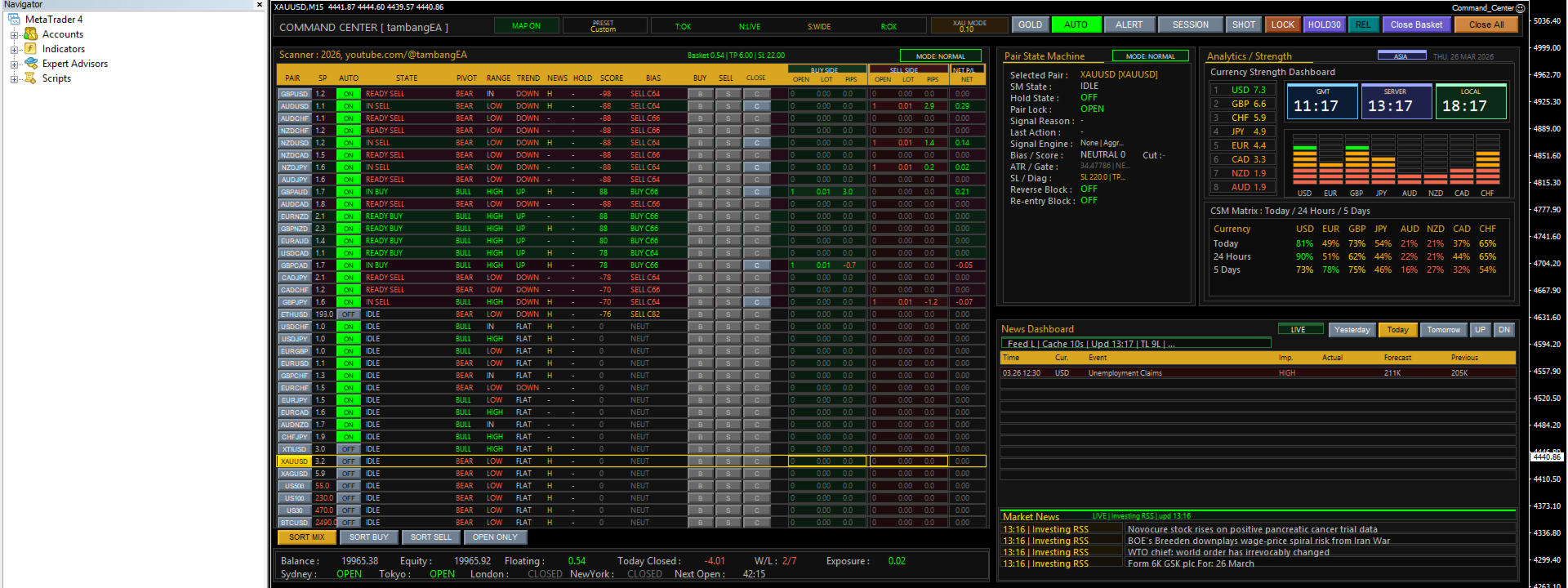
It transforms one chart into a complete market control station where you can:
scan multiple symbols in real time
inspect the state of the selected pair
confirm directional context with strength analytics
monitor economic news and market headlines
control execution from one unified interface
track account condition, floating result, exposure, and session status
Instead of working with disconnected tools, you work from one structured environment.
The dashboard is designed around a professional flow:
Scan → Validate → Confirm → Execute → Manage
This helps you trade with more discipline, more visibility, and less friction.
Benefits
Faster market reading
The multi-pair scanner lets you evaluate many instruments at once without changing charts.
Better decision structure
You are not forced to guess blindly.
The dashboard organizes state, bias, trend, range, strength, and news in one place.
Cleaner execution workflow
Action controls are available directly inside the terminal, so you can react without losing your market view.
Stronger situational awareness
You see not only price context, but also session timing, economic news, market headlines, and account condition.
Better operational discipline
When information is grouped clearly, you are less likely to overtrade, chase random movement, or miss important context.
More professional trading environment
This is not just a button panel.
It is a structured command interface built for traders who want a more serious workspace.
Features
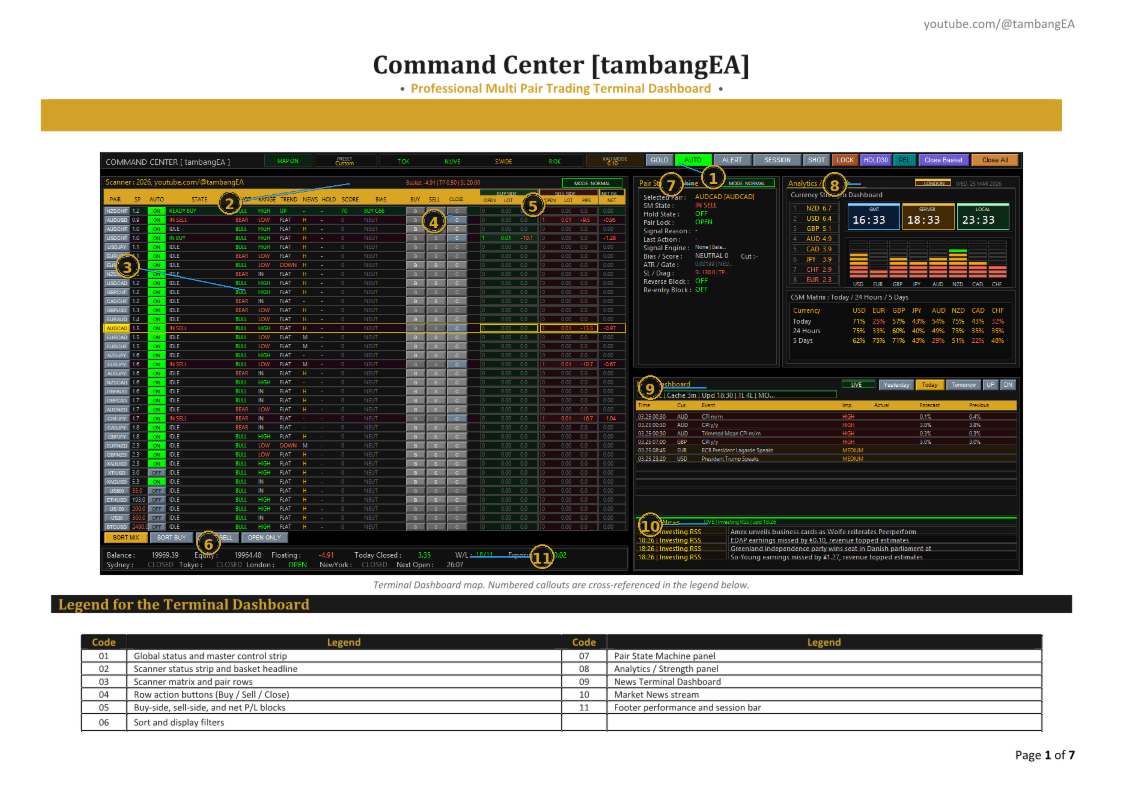
1. Multi Pair Scanner
2. Pair State Machine
3. Analytics / Strength
4. Economic News Dashboard
5. Market News Feed
6. Execution Controls
7. Account and Exposure Monitoring
8. Session Awareness
9. Professional Layout
Why This Product
There are many tools that can place trades.
Very few tools can help you operate the market like a command center.
Command Center [tambangEA] stands out because it is designed as a complete operational workspace, not a simple execution panel.
It gives you:
one-chart workflow
multi-symbol visibility
structured pair analysis
integrated strength context
economic news awareness
market headline awareness
action controls
live account monitoring
This product is especially valuable for traders who:
monitor many instruments
prefer dashboard-based operation
want more structure in live trading
need speed without losing market context
want a professional terminal-style environment inside MetaTrader
If your goal is to trade with a cleaner process, stronger visibility, and a more serious command interface, Command Center [tambangEA] is built for that purpose.
Disclaimer
Command Center [tambangEA] is a trading terminal dashboard and market workflow tool. It is not a guaranteed profit system.
Trading Forex, Gold, Indices, Crypto, and other leveraged markets involves significant risk. Market conditions can change rapidly, and losses are possible.
This product is designed to improve:
workflow
visibility
execution efficiency
situational awareness
operational control
All trading decisions remain the full responsibility of the user.
Always test on a demo account first, verify broker conditions, and apply proper risk management before using on a live account.