ABCD Harmonic Dashboard MT4
- Indicators
-
Kestutis Balciunas
 With over 16 years of active experience in financial markets, I specialize in developing high-performance forex trading strategies, technical indicators, and automated Expert Advisors for MT4/MT5. My work spans precision-engineered trading systems designed for accuracy, consistency, and real-world
 - Version: 1.0
- Activations: 10
I built the ABCD Harmonic Dashboard because I got tired of spending hours every morning manually scanning charts for harmonic setups — only to miss half of them anyway.
This is a professional multi-symbol, multi-timeframe scanner that automatically detects AB=CD harmonic patterns across your entire watchlist using strict Fibonacci ratio validation. It runs continuously in the background and displays every confirmed pattern in one clean, organised dashboard. No more switching between charts. No more missed setups.
Every signal I show you is confirmed on a closed bar. Once a pattern appears on the dashboard, it will never disappear or change. What you see is exactly what was there in real-time.
See more MT5 version at: ABCD Harmonic Dashboard For MT5
See more products at: All Products
For live examples and new tools, visit my profile and send a Friend request so you don’t miss updates!
What Is the AB=CD Pattern?
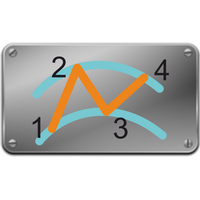
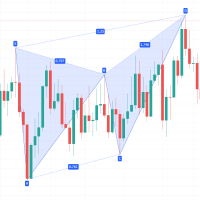
The AB=CD is one of the most reliable harmonic patterns in technical analysis. It consists of four price pivots — A, B, C, and D — where Point D marks the high-probability reversal zone. I find it particularly powerful because it combines structure with precise Fibonacci mathematics, giving you a clear, objective reason for every trade.
Bullish AB=CD — Pattern: High → Low → High → Low. At Point D, price may reverse upward.
Bearish AB=CD — Pattern: Low → High → Low → High. At Point D, price may reverse downward.
What separates my indicator from other harmonic tools is how strictly I validate each pattern before showing it to you:
-
The BC retracement must fall between 38.2% and 88.6% of the AB leg
-
The CD extension must fall between 113% and 261.8% of the BC leg
If a pattern doesn't pass both conditions, I don't show it. Simple as that. This is why the signals you receive are genuinely high-quality — not just anything that vaguely looks like a pattern.
How It Works
Step 1 — Add to any chart
Drop the indicator on any chart, enter the symbols you want to monitor, and enable your preferred timeframes. My default settings work straight out of the box — you don't need to configure anything to get started.
Step 2 — I scan automatically
From that point on, I continuously scan all your selected symbols across every enabled timeframe using swing pivot detection and Fibonacci ratio validation. You don't need to do anything manually.
Step 3 — Signal confirmed
The moment an AB=CD pattern completes at Point D on a confirmed, closed candle, I add it to the dashboard and fire an alert to your chosen device. You'll know instantly — even if you're away from your screen.
Step 4 — Navigate and analyse
Click any row in the dashboard to instantly open that symbol at the correct timeframe. I draw the complete AB=CD pattern on the chart for you — yellow-filled triangles connecting all four pivots with clear A, B, C, D labels — so you can analyse the setup at a glance.
What the Dashboard Shows You
For every active signal, I display the following in real-time:
-
Symbol — the instrument where the pattern was detected
-
Timeframe — exactly which timeframe the pattern fired on
-
Direction — Bullish or Bearish at Point D
-
Pattern Age — how many bars ago the signal confirmed
-
Chart — a one-click button that takes you straight to the signal
Special offer: ALL TOOLS, just $30 each!
New tools will be $30 for the first week or the first 3 purchases!
Trading Tools Channel on MQL5: Join my MQL5 channel to update the latest news from me
What I Built Into This Indicator
Multi-symbol scanning — I scan up to 20 symbols simultaneously from a single dashboard. Forex pairs, gold, silver, indices, crypto — anything available in your terminal.
Multi-timeframe coverage — I scan M1, M5, M15, M30, H1, H4, D1, W1, and Monthly all at once. You can enable or disable individual timeframes to focus on what suits your style.
Non-repainting signals — I only confirm signals on closed bars. Once I show you a signal, it stays there permanently. You can backtest with complete confidence that what you see is what you would have seen live.
Strict Fibonacci validation — Every pattern I display has passed both the BC retracement and CD extension criteria automatically. No guesswork. No subjective interpretation.
Chart pattern visualisation — I draw the full AB=CD structure on your chart with yellow-filled triangles and labelled A, B, C, D pivots so the pattern is always clearly visible.
Real-time alerts — I notify you via popup, sound, email, and mobile push the moment a new pattern confirms. You can trade from anywhere and never miss a setup.
One-click chart navigation — I take you directly to the chart, symbol, and timeframe of any signal with a single click. No manual searching required.
Filter mode — I can display only active signals, sorted by the most recent, so you can review your watchlist in seconds.
Fully customisable — I let you adjust Fibonacci ratio ranges, pivot sensitivity, colours, arrow sizes, and more. Everything can be tailored to your exact preferences.
Input Parameters
-
Symbols List — Comma-separated list of symbols to monitor. Supports up to 20 symbols including forex pairs, metals, indices, and crypto
-
Timeframes — Enable or disable individual timeframes from M1 through Monthly
-
BC Retracement Min/Max — Define the valid Fibonacci retracement range for Point C relative to the AB leg. Default: 38.2% – 88.6%
-
CD Extension Min/Max — Define the valid Fibonacci extension range for Point D relative to the BC leg. Default: 113% – 261.8%
-
Pivot Sensitivity — Swing point lookback period used for A, B, C, D pivot detection. Default: 5
-
Alert on Current Bar — When set to false (default), signals only appear on confirmed closed bars and never repaint. When set to true, signals can appear on unclosed bars and may update
-
Popup Alerts — Enable or disable on-screen popup notifications
-
Sound Alerts — Enable or disable sound notifications
-
Email Alerts — Enable or disable email notifications
-
Push Alerts — Enable or disable mobile push notifications via MetaQuotes ID
-
Triangle Colour — Colour of the pattern fill triangles drawn on the chart
-
Label Colour — Colour of the A, B, C, D pivot labels
-
Dashboard Position — Corner position of the dashboard panel on the chart
Who I Built This For
Traders monitoring multiple symbols — If you're tired of switching between charts looking for setups, I handle all of that for you. Everything is in one place.
Part-time traders — You don't need to sit in front of your screen all day. I alert you on your phone the moment a pattern confirms, so you can check it during a break and decide whether to act.
Harmonic pattern traders — If you already trade harmonics manually, I take the detection and validation work off your plate entirely and let you focus purely on execution.
Systematic traders — Because my signals are non-repainting and confirmed on closed bars, you can build a consistent, repeatable trading process around them with confidence.
Beginners learning harmonics — I show you exactly what a valid AB=CD pattern looks like in real market conditions, labelled clearly on your chart. It's one of the fastest ways to develop a real understanding of harmonic structure.
Frequently Asked Questions
Does your indicator repaint?
No. With the default setting (Alert on Current Bar = false), I only show signals after Point D confirms on a fully closed candle. Once a signal appears, it never changes, moves, or disappears. If you enable Alert on Current Bar, signals can appear on unclosed bars and may update before the bar closes — I disclose this clearly in the settings so you always know exactly what you're working with.
Which symbols can I monitor?
Any symbol available in your MetaTrader terminal — forex pairs, XAUUSD, silver, stock indices such as US30 and NAS100, cryptocurrencies, and more. Just enter the symbol names in the Symbols List input field.
Why do I see fewer signals than with standard indicators?
Because I only show you patterns that pass strict Fibonacci validation across four specific price pivots. This naturally produces fewer signals than oscillator-based indicators — but every signal I show you has a clear, mathematical basis. I believe quality matters more than quantity.
Can I adjust the Fibonacci parameters?
Yes, everything is adjustable. The BC retracement range, CD extension range, and pivot sensitivity can all be changed in the settings. My defaults follow classical harmonic ratios and work well across most instruments and timeframes.
How do I set up mobile alerts?
Enable Push Alerts in my settings, then add your MetaQuotes ID in the MetaTrader options under the Notifications tab. I include step-by-step instructions in the user guide to make this straightforward.
Are future updates included?
Yes. Every future update I release is delivered to you at no additional cost.
Is support available?
Yes. A detailed installation and configuration guide with screenshots is included. If you need further help, reach out and I'll personally assist you.
A Note on Signal Frequency
AB=CD patterns require specific Fibonacci relationships across four pivot points — which means they appear less frequently than simple moving average crossovers or oscillator signals. Signal frequency depends on which symbols you monitor, which timeframes you enable, and what the market is doing. Higher timeframes like H4 and D1 produce fewer but structurally larger patterns. Lower timeframes like M15 and H1 produce signals more often. Enabling more symbols and more timeframes naturally increases the total number of signals displayed across your dashboard.
Complete User Guide & Trading Manual