
NotifyMe for MT5

5

Overview

The Expert Advisor sends notifications to a mobile phone, via e-mail or activates an audio alarm in case any changes are detected on the trading account: opening/closing positions, changing order and position parameters, balance or leverage. Also, the Expert Advisor can inform that Equity on the trading account has dropped below a specified value or Free Margin is small compared to Margin. The Expert Advisor does not trade, it only monitors your account and orders.


Launching the Expert Advisor

You should allow automated trading in your MetaTrader 5 terminal to let the operation of the Expert Advisor. To do this, enter Tools - Options - Expert Advisors tab and enable "Allow automated trading" parameter. To launch the Expert Advisor, right-click its name in the Navigator window and select "Attach to chart" or drag and drop it on the chart by mouse. The windows of the Expert Advisor's parameters will appear. Set the desired parameters and click OK.

The Expert Advisor can be attached to the chart of any financial instrument. Analysis of order and position parameters is performed after any trading operation, while checks for reaching critical Equity or Free Margin levels is performed after a new quote arrives. Therefore, it is recommended to launch the Expert Advisor on the symbol with frequently arriving quotes (for example, on one of the basic symbols: EURUSD, GBPUSD, USDCHF or USDJPY) in order to decrease notification delays. Chart's time frame does not matter.


Expert Advisor's Input Parameters

  • Push Notification Events - select what events you want to be notified of via your mobile terminal (No notifications - disabled, Only Open/Close position notifications - notifying only of opening/closing positions, All notifications - notifying of all events);
  • Push Notification Critical Equity Level - minimum Equity on a trading account in the deposit currency. When this value is reached, the notification is sent to the mobile terminal;
  • Push Notification Critical Margin Level - minimum Free Margin level compared to Margin in percentage values. When the level is reached, the notification is sent to the mobile terminal;
  • Critical Event Push Notify Interval - minimum time interval (in seconds) between adding information about Equity or Free Margin reaching a critical level to push messages.
  • Push Notification Interval - minimum time interval (in seconds) between messages sent to the mobile terminal;
  • Push Message Maximum Length - maximum length of a message sent to the mobile terminal;
  • Mail Notification Events - select what events you want to be notified of via e-mail (No notifications - disabled, Only Open/Close position notifications - notifying only of opening/closing positions, All notifications - notifying of all events);
  • Mail Notification Critical Equity Level - minimum Equity on a trading account in the deposit currency. When this value is reached, the notification is sent via e-mail;
  • Mail Notification Critical Margin Level - minimum Free Margin level compared to Margin in percentage values. When the level is reached the notification is sent via e-mail;
  • Critical Event Mail Notify Interval - minimum time interval (in seconds) between adding information about Equity or Free Margin reaching a critical level to an email;
  • Mail Notification Interval - minimum time interval (in seconds) between notifications sent via e-mail;
  • Sound Notification Events - select what events you want to be notified of by a sound alarm (No notifications - disabled, Only Open/Close position notifications - notifying only of opening/closing positions, All notifications - notifying of all events);
  • Sound Notification Critical Equity Level - minimum Equity on a trading account in the deposit currency. When this value is reached, a sound alarm is activated;
  • Sound Notification Critical Margin Level - minimum Free Margin level compared to Margin in percentage values. When the level is reached, a sound alarm is activated;
  • Critical Event Sound Notify Interval - minimum time interval (in seconds) between sound alarms indicating Equity or Free Margin reaching a critical level;
  • Sound Notification Interval - minimum time interval (in seconds) between sound alarms;
  • Sound File Name - sound alarm file name;
  • Use time in messages - time specified in messages sent to the mobile terminal or via e-mail (Server Time - trade server time, Local Time - time of the PC the Expert Advisor is running at);
  • Screen Information - display server and local time, as well as notification settings (Show, Hide).


Calculating Free Margin Level

As mentioned earlier, the Expert Advisor can notify of decreasing Free Margin compared to Margin. Let's examine calculation of Free Margin level in more details. In most cases (including MetaTrader 5 trading terminal), Margin value is defined considering Leverage provided by a broker. But the broker can change the leverage value at any time, and the Margin value also changes subsequently. Most often, the leverage value is not so critical for trading (unless trading is conducted in a risky manner using the maximum possible position volume). Therefore, this Expert Advisor calculates the Margin value without regard to the leverage. Free Margin level is defined as a ratio of Free Margin to Margin in percentage value.

Let's consider the following example. Suppose that 1 lot equals to 100 000 units of the base currency. Position at EURUSD is opened having the volume of 0.10 lots at the price of 1.3 USD per 1 EUR. For buying or selling 0.10 * 100 000 = 10 000 EUR, we will need 13 000 USD. This value is considered to be the Margin for the present Expert Advisor (though in most cases, a leverage is applied to that value, for example, if leverage is 1:100, then we will have 130 USD of Margin). If the deposit is equal to 1000 USD, Free Margin will be equal to 1000 - 130 = 870 USD after opening a position, while the Margin level will be calculated as 870 / 13 000 = 0.0669 or 6.69 %. If we set the Margin limit, at which notification is delivered, to 5%, the notification will be sent in case of Free Margin being equal to 0.05 * 13 000 = 650 USD or Equity comprising 650 + 130 = 780 USD.

Despite the apparent complexity of defining the Free Margin level, this method provided the most informative results in actual practice.


Sending Notifications to the Mobile Terminal

First of all, you should have mobile version of MetaTrader 4 or MetaTrader 5 terminal installed on your Android or iOS powered device to receive notifications. You can download MetaTrader 4 or MetaTrader 5 mobile terminal for Android, as well as MetaTrader 4 or MetaTrader 5 mobile terminal for iOS for free.

You should allow sending push notifications in MetaTrader 5 trading terminal, on which the Expert Advisor is to be launched. To do this, enter Tools – Options – Notifications tab and turn "Enable Push Notifications" parameter on. You should also specify your MetaQuotes_ID on this tab. It can be found on Messages tab of the mobile terminal.

"Push Notification Events" input parameter allows you to define types of events that are followed by sending notifications to your mobile terminal. When set to "All notifications", messages are sent if any of the following events occur: position opening or closing, changing open position's Stop Loss and Take Profit parameters, changing pending order parameters - Open price, Stop Loss and Take Profit, changing the account's balance or leverage. When it is set to "Only Open/Close position notifications", notifications are sent only when opening and closing positions. If "No notifications" is selected, notifications are not sent to the mobile terminal. This parameter does not affect sending notifications indicating Equity or Free Margin reaching a critical level.

"Push Notification Critical Equity Level" input parameter allows you to define a critical (minimum) equity (in deposit currency) followed by sending notifications to your mobile terminal. If set to 0, notifications of equity decrease are not sent to your mobile terminal.

"Push Notification Critical Margin Level" input parameter allows you to define a critical (minimum) free margin level (in percentage value) followed by sending notifications to your mobile terminal. If set to 0, notifications of free margin level are not sent to your mobile terminal.

Information about events on a trading account, as well as about reaching critical Equity or Free Margin levels is added to the message sent to the mobile terminal under certain conditions.

"Critical Event Push Notify Interval" parameter allows you to set the time interval (in seconds), after which information about reaching critical Equity or Free Margin level is added to the push message prepared for delivery.

"Push Notification Interval" input parameter allows you to set the minimum time interval (in seconds) between push notifications sent to the mobile terminal. The Expert Advisor will not send a new notification if less than specified time has passed since sending the previous one. It will save that notification instead. When the time specified in "Push Notification Interval" parameter passes since sending the previous notification, the Expert Advisor will send a message containing descriptions of all events accumulated by that time. There is a limitation (of push notifications service developed by MetaQuotes) on the number of sent messages per unit time: no more than two messages per second and no more than 10 messages per minute (if this limitation is violated, sending push notifications can be blocked by MetaQuotes). Therefore, it is not recommended to set very small values of "Push Notification Interval" parameter (especially in case of the events' high frequency on a trading account).

"Push Message Maximum Length" parameter allows you to set the maximum number of symbols in a message sent to the mobile terminal. If a message is longer, it is truncated down to the length specified in the parameter. The maximum permissible length of a push message is 255 characters. A message consists of two parts: account number with account owner's name (generated automatically) and a text description of an event generated by an Expert Advisor (its length is limited by "Push Message Maximum Length" parameter). In some cases, a message may become invisible in the mobile terminal if its length exceeds 255 characters. "Push Message Maximum Length" parameter value should be selected based on the length of the automatically added part of the message (account number and owner's name).


Sending Notifications Via E-Mail

To receive notifications via e-mail, you should allow sending emails in the settings of MetaTrader 5 trading terminal, at which the Expert Advisor is launched. To do this, enter Tools – Options – Email tab, turn Enable parameter on and specify your e-mail account and SMTP e-mail server parameters. E-mail account and SMTP mail server parameters should be specified on this tab.

Messages sent by the Expert Advisor via e-mail have subject "Account account_number notification". 

"Mail Notification Events" parameter allows you to define types of events followed by notifications via emails (similar to "Push Notification Events" parameter for notifications sent to the mobile terminal). This parameter does not affect sending notifications indicating Equity or Free Margin reaching a critical level.

"Mail Notification Critical Equity Level" input parameter allows you to define a critical (minimum) equity (in deposit currency) followed by sending notifications via e-mail. If set to 0, notifications of equity decrease are not sent via e-mail.

"Mail Notification Critical Margin" input parameter allows you to define a critical (minimum) free margin level (in percentage value) followed by sending notifications via e-mail. If set to 0, notifications of margin decrease are not sent via e-mail.

Information about events on a trading account, as well as about reaching critical Equity or Free Margin levels is added to the message sent via e-mail under certain conditions.

"Critical Event Mail Notify Interval" parameter allows you to set the time interval (in seconds), after which information about reaching critical Equity or Free Margin level is added to the email prepared for delivery.

"Mail Notification Interval" input parameter allows you to set the minimum time interval (in seconds) between notifications sent via e-mail. The Expert Advisor will not send a new notification if less than specified time has passed since sending the previous one. It will save that notification instead. When the time specified in "Mail Notification Interval" parameter passes since sending the previous notification, the Expert Advisor will send a message containing descriptions of all events accumulated by that time. Some e-mail servers perceive frequent emails as harmful actions. Therefore, it is not recommended to set too small values for "Mail Notification Interval" parameter.


Audio Alarm Notifications

"Sound Notification Events" parameter allows you to define types of events followed by sound alarm notifications (similar to "Push Notification Events" parameter for notification sent to the mobile terminal and "Mail Notification Events" for notifications sent via e-mail). This parameter does not affect sending notifications indicating Equity or Free Margin reaching a critical level.

"Sound Notification Critical Equity Level" input parameter allows you to define a critical (minimum) equity (in deposit currency) followed by sending sound alarm notifications. If set to 0, notifications of critical free margin level are not activated.

"Sound Notification Critical Margin Level" input parameter allows you to define a critical (minimum) equity (in percentage value) followed by sending sound alarm notifications. If set to 0, notifications of critical free margin level are not activated.

"Critical Event Sound Notify Interval" parameter allows you to set the time interval (in seconds), after which a sound alarm notifying of reaching critical Equity or Free Margin level is activated.

"Sound Notification Interval" input parameter allows you to set the minimum time interval (in seconds) between audio alarms.

"Sound File Name" input parameter allows you to set a sound alarm file name. A file in .wav format should be located in terminal_folder/sounds or its subdirectory.


Displaying the Data on Screen

If "Screen Information" input parameter is set to Show, information on server and local time, as well as conditions for each notification type are displayed in the upper left corner of the chart. If it is set to Hide, the data is not displayed. 

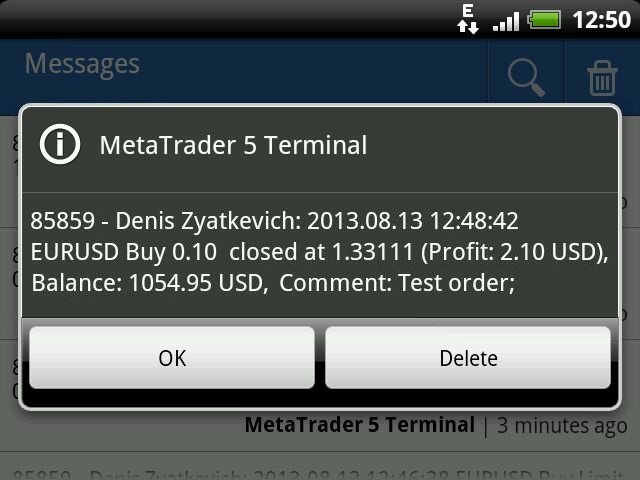
Examples of messages sent by the program:

  • Placing a pending order: 2013.08.13 12:43:29 EURUSD Buy Limit 0.10 Placed, Op: 1.33090, SL: 1.32980, TP: 1.33240, Comment: Test order;
  • Changing pending order parameters: 2013.08.13 12:44:37 EURUSD Sell Limit 0.10, Op: 1.33121 -> 1.33112, SL: 0.00000 -> 1.33000, TP: 0.00000 -> 1.33200, Comment: Test order;
  • Deleting a pending order: 2013.08.13 12:54:19 EURUSD Buy Limit 0.10 at 1.33092 deleted;
  • Opening position : 2013.08.13 12:45:32 EURUSD Buy 0.10 open at 1.33090, SL: 1.33000, TP: 1.33200;
  • Closing position: 2013.08.13 12:48:42 EURUSD Buy 0.10 closed at 1.33111, (Profit: 2.10 USD), Balance: 1054.95 USD, Comment: Test order;
  • Reversing position: 2013.08.13 01:53:36 EURUSD Buy 0.10 -> Sell 0.10, Op:1.32918, SL: 0.00000, TP: 0.00000.
  • Reaching critical equity or free margin level: 2013.08.13 13.35.08 Equity: 1047.95 USD, Free Margin: 782.00 USD.


Free Version and Version for MetaTrader 4

There is a free version of the program - NotifyMe Free for MT5. Unlike the full version, it allows only sending notifications of position opening or closing. Also, full and free versions of the application with similar features are available for MetaTrader 4 trading terminal.


Warning

The developer of NotifyMe for MT5 is not responsible for possible modification or termination of the program's operation due to changes in MQL5 language implemented by the trading terminal and language developer - MetaQuotes company. The developer of NotifyMe for MT5 is not responsible for any loss, damage or missed profits caused by the use of the program, its work or malfunction.


Contact Information

If you have any questions about the application, comments on its operation or suggestions for future improvements, please send them by email or leave your personal messages via this web site. Let me know what products (Expert Advisors, indicators, scripts) you would like to see.

Reviews 4
Johan Julien Aubry
919
Johan Julien Aubry 2021.06.06 09:50 
 

Works correctly. Please don't write directly to me about my review, I'll not answer.

PETER LUISI
1981
PETER LUISI 2021.01.23 09:16 
 

Just what I was looking for. Works well.

Wan Ping Fei
1690
Wan Ping Fei 2019.02.09 04:25 
 

Author's professional and fast technical support, enough to give 5 stars evaluation

Recommended products
Core function Intelligent transaction management one-click opening and closing operation, which supports user-defined lots to set multiple closing modes: all closing, closing by direction and closing by profit and loss status. Professional risk control, real-time risk monitoring and spread control to avoid high-cost trading environment. Visual control panel has an intuitive graphical interface, and all functions can be operated with one button to display position information, profit and loss sta
FREE
Donchian Breakout And Rsi
Mattia Impicciatore
5 (1)
General Description This indicator is an enhanced version of the classic Donchian Channel , upgraded with practical trading functions. In addition to the standard three lines (high, low, and middle), the system detects breakouts and displays them visually with arrows on the chart, showing only the line opposite to the current trend direction for a cleaner view. The indicator includes: Visual signals : colored arrows on breakout Automatic notifications : popup, push, and email RSI filter : to val
FREE
Mirror Chart MT5
Andrej Hermann
5 (1)
The Mirror Chart MT5 is a overlay indicator specifically designed to project a second financial instrument directly onto the main chart window. This tool is invaluable for traders who rely on correlation analysis, as it visualizes the price movements of two different instruments in real time. Unlike traditional overlays, this indicator utilizes intelligent, dynamic centering and scaling logic. It continuously analyzes the visible price range in the current window for both symbols and calculates

FREE
This EA is primarily used for scalping XAUUSD. Purpose Removes emotion from trade management   - automatically protects positions and takes profits so you don't have to make difficult decisions under pressure. What It Does ️   Auto Stop Loss Sets SL based on recent highs/lows + buffer No more manual placement stress   Auto Partial Profits Two modes: Fixed Movement : Close 50% after X price movement R-Ratio : Close 50% at 1.2R profit target Locks in gains while letting winners run. ️   One
Trading Room Indcator
Meshari F M Alkhawaled
Trading Room Indicator is a professional market-structure tool built to give traders a clear, complete trading framework — combining CPR levels, dynamic targets, and trend direction in one clean view. Instead of guessing direction or overloading the chart with indicators, Trading Room Indicator focuses on what actually matters : levels, direction, and potential price expansion. What This Indicator Provides CPR Structure BUY level SELL level Pivot Point (PP) Designed to highlight equilibrium
VM Auto SLTP Basic
Van Minh Nguyen
5 (1)
VM Auto SLTP Basic - Intelligent Trade Management for Scalpers Enhance your scalping strategy to a higher level. VM Auto SLTP Basic automatically manages Stop Loss and Take Profit for orders that are opened manually or by other Expert Advisors. This tool does not open trades on its own, allowing you to maintain full control while enjoying precise risk management. Key Features: SL/TP based on ATR or fixed price Automatic SL move to Breakeven Risk management as a percentage of account balance Supp
FREE
Crash5 EA ,I s a automatic robot that has the level of professional decision when to take a trade without any emotion. The bot will help in your scalping decision making with its own TP (take profit) and SL (stop loss) with the trail stop when in profit. This is a trend based spike catching ,looking on whats happening in real time charts no repainting of any signals. The robot helps in making decisions on the candle stick pattern opened and closed lat price with the help of RSI ,MACD and the EMA
Risk Manager – Account Protection Tool Risk Manager is an Expert Advisor for MetaTrader 5 designed to protect your trading account by applying automatic risk management rules. This tool does not open trades . It continuously monitors your account and enforces predefined limits to help prevent excessive losses and maintain disciplined trading. Risk Manager works in the background and can manage positions opened by manual trading or other Expert Advisors. It is particularly useful for: • Manual tr
FREE
Click Trading
Jawad Tauheed
5 (2)
One Click Trading – Auto TP SL Developer TraderLinkz Version 1.00 Category Utility What it does Adds missing TP and SL to your manual trades and pending orders Sets them once per ticket Lets you move TP and SL afterward Works on hedging and netting accounts Scans on every tick and reacts on trade events Why you want it You place faster entries You get consistent risk and exit targets You reduce fat finger errors You keep full manual control Quick start Attach the EA to any chart Keep TP and SL e
FREE
Important Lines
Terence Gronowski
4.88 (24)
This indicator displays Pivot-Lines, preday high and low, preday close and the minimum and maximum of the previous hour. You just have to put this single indicator to the chart to have all these important lines, no need to setup many single indicators. Why certain lines are important Preday high and low : These are watched by traders who trade in a daily chart. Very often, if price climbs over or falls under a preday low/high there is an acceleration in buying/selling. It is a breakout out of a
FREE
Introducing a powerful MetaTrader 5 Expert Advisor designed to enhance your trading strategy – the Auto Breakeven EA! This feature-rich EA is tailored to bring your stop-loss to breakeven, ensuring a risk-free trade once the market moves in your favor up to a specified price. Explore the full potential of the Auto Breakeven EA. Download it for free now, and find the download link at the bottom of our page. Elevate your trading experience and take control of your risk management strategy. Happy
FREE
This indicator is especially for the binary trading. Time frame is 1 minutes and exp time 5 or 3 minutes only. You must be use martingale 3 step. So you must put lots size is 10 % at most. You should use Mt2 trading platform to connect with my indicator to get more signal without human working. This indicator wining rate is over 80% but you may get 100% of profit by using martingale 3 step. You should use MT2 Trading Platform to connect meta trader platform and binary platform . You can get mt2
FREE
ZumikoFx Trading Stats
Michal Piotr Kochanski
ZumikoFX Trading Stats - Professional Account Dashboard Overview ZumikoFX Trading Stats is a comprehensive, real-time account monitoring dashboard designed for serious traders who need complete visibility of their trading performance. This indicator displays all crucial trading statistics in an elegant, easy-to-read panel positioned in the top-right corner of your chart. Key Features Complete Account Monitoring Balance & Equity - Real-time account status with current balance and equity includ
FREE
Order Book, known also as Market Book, market depth, Level 2, - is a dynamically updated table with current volumes of orders to buy and to sell specific financial instument at price levels near Bid and Ask. MetaTrader 5 provides the means for receiving market book from your broker, but in real time only, without access to its history. The indicator OrderBook Cumulative Indicator accumulates market book data online and visualizes them on the chart. In addition, the indicator can show the market
Quick Trade Panel Pro
Nicolas Olivier Menetrey
One-click trading panel with automatic lot and risk management Quick Trade Panel Pro is an intuitive trading panel designed for traders who want to execute orders quickly while maintaining full control over their risk. Main Features Automatic lot size calculation based on a percentage of your available margin Configurable Stop Loss in points, automatically applied to each trade Lot size locked during a series of trades to ensure consistent position sizing Smart Hedge System Hedge mode allows o
FREE
BoxFibo MT5
Sergei Kiriakov
It is just an alternative fibo lines. mt4 have is a very strange drawing of fibo lines, this utilites was written for mt4, but for mt5 it may not be particularly useful. A simple Box (Rectangle) graphic element with adjustable levels binding: it is possible to specify up to 17 custom levels, all rectangles on the chart with the given prefix in their name are processed. Levels are specified in % of the height of the rectangle. A convenient graphical element for analyzing charts by growth-correct
FREE
Divergent Stochastic Filter II Catch Reversals Early, Filter Noise, Trade with Confidence The Edge: Why This Stochastic is Different  Every trader knows the Stochastic oscillator. But knowing when to trust its signals, that's the real challenge. The Divergent Stochastic Filter II transforms this classic indicator into a precision reversal detection system by adding critical elements: divergence intelligence, signal filtering and exhaustion detection.  While standard Stochastic oscillators fire s
Fvg Edge
Ahmad Meftah Abdulsalam Alawwami
5 (2)
FVG Smart Zones – Free Edition Fair Value Gap Detection Indicator for MetaTrader 5 (MT5) Are you looking for a real trading tool – not just another random indicator? FVG Smart Zones – Free Edition gives you professional market insight by automatically detecting Fair Value Gaps (FVGs) and highlighting high-probability trading zones directly on your chart. Built for traders following: Smart Money Concepts (SMC) ICT Trading Concepts Price Action Supply & Demand Analysis Institutiona
FREE
Stamina HUD
Michele Todesco
STAMINA HUD – Advanced Market & Trend Dashboard (MT5) STAMINA HUD   is a professional   market information panel   designed for traders who want   clarity, speed, and control   directly on the chart. It provides a   clean heads-up display (HUD)   with essential market data and   multi-timeframe trend direction , without cluttering the chart or generating trading signals. What STAMINA HUD Shows   Current Price   Spread (in real pips)   Today High–Low range (pips)   Average D
FREE
Total Trade Manager SL BE TP
Izzet Deniz Erpolat
3 (2)
Total trade manager allows you to manage your trade to maximise your profits and minimise your losses. This is an essential for traders that are looking for consistency within their trading.  The features: Partial Stop Loss: This feature allows you to close a partial percentage of your trade once it goes into negative. So if your stop loss is 20 pips, you could close 75% of your trade at 10 pips and let the remainder of the position to continue running. Auto Stop Loss: This means that once you p
High Low Open Close
Alexandre Borela
4.98 (43)
If you like this project, leave a 5 star review. This indicator draws the open, high, low and closing prices for the specified period and it can be adjusted for a specific timezone. These are important levels looked by many institutional and professional traders and can be useful for you to know the places where they might be more active. The available periods are: Previous Day. Previous Week. Previous Month. Previous Quarter. Previous year. Or: Current Day. Current Week. Current Month. Current
FREE
Lock Bot
Artem Alekseev
This utility is designed to automatically maintain a "locking" position and reopen it when necessary, which is suitable for position maintenance and protection strategies. A simple utility (hereinafter referred to as the bot) that implements a locking strategy with an infinitely reloadable locking trade. How the bot works: - When launched, select a buy or sell order with a specified TP - Set the SL parameter for the locking trade - The bot monitors the distance between the opening price of the f
Follow The Line MT5
Oliver Gideon Amofa Appiah
4.6 (35)
This indicator obeys the popular maxim that: "THE TREND IS YOUR FRIEND" It paints a GREEN line for BUY and also paints a RED line for SELL. (you can change the colors). It gives alarms and alerts of all kinds. IT DOES NOT REPAINT and can be used for all currency pairs and timeframes. Yes, as easy and simple as that. Even a newbie can use it to make great and reliable trades. NB: For best results, get my other premium indicators for more powerful and reliable signals. Get them here: https://www.m
FREE
Eabotpro Copy Trade is a simple and robust file-based trade copier EA for MetaTrader 5. It can work in two modes inside the same file: MASTER (writes all trades to a common file) and SLAVE (reads the file and copies the trades to another account). This makes it easy to copy trades between multiple MT5 accounts on the same PC or VPS without DLLs or external servers. Main features: - Single EA with dual mode: MASTER or SLAVE (selectable by input) - Copies market orders (BUY/SELL) and pending ord
Candle Perspective Structure Indicator MT5 is a simple indicator that defines and displays the candlestick structure of the market. This indicator will suit both experienced traders and beginners who find it difficult to follow the structure visually. If you want to see more high-quality products or order the development/conversion of your own products, visit my partners' website: 4xDev Get 10% OFF on manual strategies automation services or indicator development/conversion services at 4xDev
FREE
The SMC Venom Model BPR indicator is a professional tool for traders working within the Smart Money (SMC) concept. It automatically identifies two key patterns on the price chart: FVG   (Fair Value Gap) is a combination of three candles, in which there is a gap between the first and third candles. It forms a zone between levels where there is no volume support, which often leads to a price correction. BPR   (Balanced Price Range) is a combination of two FVG patterns that form a “bridge” - a zon
LotCalculatorPro
Reynaldo Jr Audencial Pascual
LotCalculatorPro + Smart Trading Panel LotCalculatorPro is a powerful all-in-one trading assistant designed to simplify risk management, lot size calculation, and trade execution directly from your chart. This tool helps traders control risk, calculate precise lot sizes, and manage trades automatically with smart features like break-even, partial close, and daily profit/loss protection. It is ideal for Forex traders, prop firm traders, and risk-focused traders who want a clean and efficient trad
Trade2Telegram
Strifor (Mauritius) Ltd
Trade2Telegram — a plugin for automatic trade notifications from MetaTrader to Telegram. This tool is designed for traders managing capital, running signal channels, or leading educational communities. The plugin copies all trading operations from the terminal and publishes them to a selected Telegram chat, group, or channel. Messages are sent automatically when positions are opened or closed, stop-loss or take-profit levels are changed, pending orders are triggered, or trades are partially clos
FREE
MT5 Trade Master
Ervand Oganesyan
Multifunctional trade dashboard to simplify manual trading. Deals and orders visualization, p&l calculations, one click trading, orders modification, breakeven, trailing stop, partial stop loss, partial take profit, closing by time, equity stop loss and take profit - all of that is possible in one or a few clicks, using hotkeys or with simple mouse drag of the levels on the chart. User friendly interface allows you to test necessary scenarios and move to the use the application almost immediatel
Free automatic Fibonacci is an indicator that automatically plots a Fibonacci retracement based on the number of bars you select on the BarsToScan setting in the indicator. The Fibonacci is automatically updated in real time as new highest and lowest values appears amongst the selected bars. You can select which level values to be displayed in the indicator settings. You can also select the color of the levels thus enabling the trader to be able to attach the indicator several times with differe
FREE
Buyers of this product also purchase
Trade Assistant MT5
Evgeniy Kravchenko
4.42 (208)
It helps to calculate the risk per trade, the easy installation of a new order, order management with partial closing functions, trailing stop of 7 types and other useful functions. Additional materials and instructions Installation instructions - Application instructions - Trial version of the application for a demo account Line function -   shows on the chart the Opening line, Stop Loss, Take Profit. With this function it is easy to set a new order and see its additional characteristics bef
Forex Trade Manager MT5
InvestSoft
4.97 (631)
Welcome to Trade Manager MT5 - the ultimate risk management tool designed to make trading more intuitive, precise, and efficient. This is not just an order placement tool; it's a comprehensive solution for seamless trade planning, position management, and enhanced control over risk. Whether you're a beginner taking your first steps, an advanced trader, or a scalper needing rapid executions, Trade Manager MT5 adapts to your needs, offering flexibility across all markets, from forex and indices t
Local Trade Copier EA MT5
Juvenille Emperor Limited
4.96 (131)
Experience exceptionally fast trade copying with the   Local Trade Copier EA MT5 . With its easy 1-minute setup, this trade copier allows you to copy trades between multiple MetaTrader terminals on the same Windows computer or Windows VPS with lightning-fast copying speeds of under 0.5 seconds. Whether you're a beginner or a professional trader, the   Local Trade Copier EA MT5   offers a wide range of options to customize it to your specific needs. It's the ultimate solution for anyone looking t
TradePanel MT5
Alfiya Fazylova
4.87 (149)
Trade Panel is a multifunctional trading assistant. The application contains more than 50 trading functions for manual trading and allows you to automate most trading operations. Attention, the application does not work in the strategy tester. Before purchasing, you can test the demo version on a demo account. The demo version is here . Full instructions here . Trade. Allows you to perform trading operations in one click: Open pending orders and positions with automatic risk calculation. Open mu
Beta Release The Telegram to MT5 Signal Trader is nearly at the official alpha release. Some features are still under development and you may encounter minor bugs. If you experience issues, please report them, your feedback helps improve the software for everyone. Telegram to MT5 Signal Trader is a powerful tool that automatically copies trading signals from Telegram channels or groups directly to your MetaTrader 5 account. It supports both public and private Telegram channels, and you can conn
FarmedHedge Pair Trading Dashboard
Tanapisit Tepawarapruek
5 (2)
VERIFIED TRADING RESULTS - Farmed Hedge Yield Axi Copy:  https://www.mql5.com/en/signals/2356376 - Farmed Hedge Yield Exn Copy:   https://www.mql5.com/en/signals/2356404 - Farmed Hedge Yield V Copy:  https://www.mql5.com/en/signals/2357156 Contact me via private message to receive the User Manual and Setup. * Thai Lauguage Support Available Farmed Hedge Yield Farming - Professional Pair Trading Dashboard (Manual - Hybrid - Semi/Automated EA) VERSION 3 - WILD HARVEST UPDATE Trading Approac
Trade Dashboard MT5
Fatemeh Ameri
4.94 (119)
Tired of complex order placement and manual calculations? Trade Dashboard is your solution. With its user-friendly interface, placing orders becomes effortless, by a single click, you can open trades, set stop loss and take profit levels, manage trade lot size, and calculate risk to reward ratios, allowing you to only focus on your strategy. Say goodbye to manual calculations and streamline your trading experience with Trade Dashboard. Download  Demo Version  right now. You can find  Details of
Copy Cat More Trade Copier MT5 is a local trade copier and a complete risk management and execution framework designed for today’s trading challenges. From prop firm challenges to personal portfolio management, it adapts to every situation with a blend of robust execution, capital protection, flexible configuration, and advanced trade handling. The copier works in both Master (sender) and Slave (receiver) modes, with real-time synchronization of market and pending orders, trade modifications, pa
Trade copier MT5
Alfiya Fazylova
4.63 (38)
Trade Copier is a professional utility designed to copy and synchronize trades between trading accounts. Copying occurs from the account / terminal of the supplier to the account / terminal of the recipient, which are installed on the same computer or VPS . Before buying, you can test the demo version on a demo account. Demo version here . Full instruction here . Main functionality and benefits: Supports copying MT5> MT5, MT4> MT5, MT5> MT4, including MT5 netting accounts. * Supports copying Dem
Smart Stop Manager MT5
Daniel Stein
4.33 (3)
Smart Stop Manager – Automated Stop-Loss Execution with Professional Precision Overview The Smart Stop Manager is the execution layer of the Smart Stop lineup, built for traders who require structured, reliable, and fully automated stop-loss management across multiple open positions. It continuously monitors active trades, calculates the optimal stop level using Smart Stop market-structure logic, and updates stops automatically with clean, transparent rules. Whether managing a single asset or
Telegram To MT5 Receiver
Levi Dane Benjamin
4.53 (15)
Copy trade signals from Telegram channels you already belong to (including private and restricted channels) directly into MetaTrader 5. Set your risk rules once, monitor execution, and manage positions with built-in protections designed to reduce mistakes and overtrading. Fast setup : configure your channels, select what to copy, and start within minutes using a clean on-chart interface. User Guide + Demo | MT4 Version | Discord Version Who this is for Traders who follow one or more signal provi
Timeless Charts
Samuel Manoel De Souza
5 (3)
Timeless Charts is an advanced charting solution designed for professional traders seeking for custom charts / custom timeframes , including seconds charts / seconds timeframe, renko charts / renko bars, cluster charts / footprint charts and advanced tools present in most of the popular platforms. Unlike traditional offline charts or simplistic custom indicators, this solution constructs fully custom bars with true timestamp accuracy , down to miliseconds, allowing for a powerful and precise tr
HINN MagicEntry Extra
ALGOFLOW OÜ
4.71 (14)
HINN MAGIC ENTRY – the ultimate tool for entry and position management! Place orders by selecting a level directly on the chart! full description   ::  demo-version  :: 60-sec-video-description Key features: - Market, limit, and pending orders - Automatic lot size calculation - Automatic spread and commission accounting - Unlimited partitial take-profits  - Breakeven and trailing stop-loss and take-profit  functions - Invalidation leves - Intuitive, adaptive, and customizable interface - Works
Don’t test an EA only against the single market path that actually happened. Test it against many plausible markets and find out whether its logic is truly robust. Traditional backtesting has a fundamental limitation: it only shows how a system would have performed in one single real past . That is the problem. The market could have followed many different paths. And an expert advisor that works well on the real historical record will not necessarily perform the same way if conditions had been
Smart Stop Scanner – Multi-Asset Stop-Loss Intelligence for Modern Traders Overview The Smart Stop Scanner brings professional stop-loss monitoring to every chart. It analyzes market structure, detects meaningful breakouts, and identifies the most relevant protective levels across Forex, Gold, Indices, Metals, Crypto, and more. All results appear inside one clean, DPI-aware dashboard designed for clarity, speed, and instant decision-making. How Stop-Loss Levels Are Identified Instead of rely
The News Filter MT5
Leolouiski Gan
4.74 (19)
This product filters   all expert advisors and manual charts   during news time.  It is able to remove any of your EA during news and automatically reattach them after news ends. This product also comes with a complete  order management system   that can handle your open positions and pending orders before the release of any news. Once you purchase   The News Filter , you will no longer need to rely on built-in news filters for future expert advisors, as this product can filter them all from her
Exp COPYLOT CLIENT for MT5
Vladislav Andruschenko
3.82 (34)
Trade copier for MT5 is a trade copier for the МetaТrader 5 platform. It copies forex trades  between any accounts   MT5 - MT5, MT4 - MT5 for the COPYLOT MT5 version (or MT4 - MT4 MT5 - MT4 for the COPYLOT MT4 version)    Reliable copier!         MT4 version Full Description +DEMO +PDF   How To Buy    How To Install     How to get Log Files    How To Test and Optimize    All products from Expforex You can also copy trades in the МТ4 terminal (МТ4 - МТ4, МТ5 - МТ4):     COPYLOT CLIENT for MT4
Trade Manager DashPlus
Henry Lyubomir Wallace
5 (13)
DashPlus is an advanced trade management tool designed to enhance your trading efficiency and effectiveness on the MetaTrader 5 platform. It offers a comprehensive suite of features, including risk calculation, order management, advanced grid systems, chart-based tools, and performance analytics. Key Features 1. Recovery Grid Implements an averaging and flexible grid system to manage trades during adverse market conditions. Allows for strategic entry and exit points to optimize trade recovery
Ultimate Extractor
Clifton Creath
5 (9)
Ultimate Extractor - Professional Trading Analytics for MT5 *****this is the local HTML version of Ultimate Extractor. Check out Ultimate Extractor Cloud on mql5 for the Cloud version****** Ultimate Extractor transforms your MetaTrader 5 trading history into actionable insights with comprehensive analytics, interactive charts, and real-time performance tracking. What It Does Automatically analyzes your MT5 trading history across all Expert Advisors and generates detailed HTML reports with inte
Equity Protect Pro: Your Comprehensive Account Protection Expert for Worry-Free Trading If you're looking for features like account protection, equity protection, portfolio protection, multi-strategy protection, profit protection, profit harvesting, trading security, risk control programs, automatic risk control, automatic liquidation, conditional liquidation, scheduled liquidation, dynamic liquidation, trailing stop loss, one-click close, one-click liquidation, and one-click restore, Equity P
Risk Manager for MT5
Sergey Batudayev
4.35 (17)
Expert Advisor Risk Manager for MT5 is a very important and in my opinion necessary program for every trader. With this Expert Advisor, you will be able to control the risk in your trading account. Risk and profit control can be carried out both in monetary terms and in percentage terms. For the Expert Advisor to work, simply attach it to the currency pair chart and set the acceptable risk values ​​in the deposit currency or in % of the current balance. [Instruction for Risk Manager parameter
MT5 to Telegram Signal Provider turns your trading account into a signal provider. Every trade action, whether manual, by EA or from your phone, is instantly sent as a message to Telegram. You can fully customize the format or use a ready-made template for quick setup. [ Demo ] [ Manual ] [ MT4 Version ] [ Discord Version ]     New: [ Telegram To MT5 ] Setup A step by step user guide is available. Key Features Ability to customize order details sent to subscribers You can create a tiered subs
YuClusters
Yury Kulikov
4.93 (43)
Attention: You can view the program operation in the free version  YuClusters DEMO .  YuClusters is a professional market analysis system. The trader has unique opportunities to analyze the flow of orders, trade volumes, price movements using various charts, profiles, indicators, and graphical objects. YuClusters operates on data based on Time&Sales or ticks information, depending on what is available in the quotes of a financial instrument. YuClusters allows you to build graphs by combining da
Seconds Chart MT5
Boris Sedov
4.59 (17)
Seconds Chart is a unique tool for creating second-based charts in MetaTrader 5 . With Seconds Chart , you can construct charts with timeframes set in seconds, providing unparalleled flexibility and precision in analysis that is unavailable with standard minute or hourly charts. For example, the S15 timeframe indicates a chart with candles lasting 15 seconds. You can use any indicators and Expert Advisors that support custom symbols. Working with them is just as convenient as on standard charts.
Grid Manual MT5
Alfiya Fazylova
4.9 (21)
Grid Manual is a trading panel for working with grid strategies. The utility is universal, has flexible settings and an intuitive interface. It works with a grid of orders not only in the direction of averaging losses, but also in the direction of increasing profits. The trader does not need to create and maintain a grid of orders, the utility will do it. It is enough to open an order and the "Grid manual" will automatically create a grid of orders for it and will accompany it until the close. F
VirtualTradePad One Click Trading Panel
Vladislav Andruschenko
4.59 (73)
Trading Panel for trading in One click.  Working with positions and orders!  Trading from the  chart  or the  keyboard . With our trading panel, you can execute trades with a single click directly from the chart and perform trading operations 30 times faster than with the standard MetaTrader control. Automatic calculations of parameters and functions make trading faster and more convenient for traders. Graphic tips, info labels, and full information on trade deals are on the chart MetaTrader.  
Trade Manager DaneTrades
Levi Dane Benjamin
4.36 (28)
DaneTrades Trade Manager is a professional trade panel for MetaTrader 5, designed for fast, accurate execution with built‑in risk control. Place market or pending orders directly from the chart while the panel automatically calculates position size from your chosen risk, helping you stay consistent and avoid emotional decision‑making. The Trade Manager is built for manual traders who want structure: clear risk/reward planning, automation for repeatable management, and safeguards that help reduc
Telegram to MT5 Coppy
Sergey Batudayev
5 (8)
Telegram to MT5: The Ultimate Signal Copying Solution Simplify your trading with Telegram to MT5, the modern tool that copies trading signals directly from Telegram channels and chats to your MetaTrader 5 platform, without the need for DLLs. This powerful solution ensures precise signal execution, extensive customization options, saves time, and boosts your efficiency. [ Instructions and DEMO ] [ FAQ ] Key Features Direct Telegram API Integration Authenticate via phone number and secure code. E
The product will copy all telegram signal to MT5 ( which you are member) , also it can work as remote copier.  Easy to set up, copy order instant, can work with almost signal formats, image signal,  s upport to translate other language to English Work with all type of channel or group, even channel have "Restrict Saving Content", work with  multi channel, multi MT5 Work as remote copier: with signal have ticket number, it will copy exactly via ticket number. Support to backtest signal. How to s
Take a Break MT5
Eric Emmrich
4.75 (24)
News filter, equity guard & session control for all your EAs — one tool, full protection Take a Break has evolved from a basic news filter into a comprehensive account protection solution . It pauses your other Expert Advisors during news events or based on custom filters. When trading resumes, it automatically restores your entire chart setup , including all EA settings. Why traders choose Take a Break One news filter for all your EAs — no more relying on individual built-in filters that may o
More from author
Overview The Expert Advisor allows you to receive notifications to the mobile phone (or tablet PC), mailbox or play the sound alert when some events occured: opening or closing position (also closing all positions), placing or deleting pending order; changing open price, stop loss or take profit; the account balance, equity, margin level, free margin or drawdown has reached the user specified level. You can specify a notification interval, notification text template and audio file for sound aler
NotifyMe Free for MT5
Denis Zyatkevich
5 (5)
Overview The Expert Advisor sends notifications to a mobile phone, via e-mail or activates an audio alarm in case any changes are detected on the trading account: opening/closing positions, changing order parameters, balance or leverage. Also, the Expert Advisor can inform that Equity on the trading account has dropped below a specified value or Free Margin is small compared to Margin. The Expert does not trade, it only monitors your account and orders. Launching the Expert Advisor You should a
FREE
NotifyMe Free for MT4
Denis Zyatkevich
5 (4)
Overview The Expert Advisor sends notifications to a mobile phone, via e-mail or activates an audio alarm in case a position is opened or closed on the trading account. The Expert does not trade, it only monitors your account and orders. Launching the Expert Advisor For the Expert Advisor to work, place the file NotifyMe_free.ex4 in terminal_folder/experts (probably it will be placed there automatically). NotifyMe_free should appear in the Expert Advisors section of the Navigator window. If not
FREE
Account Info Free for MT5
Denis Zyatkevich
5 (1)
Overview The script displays information about the trade account: Information about the trade account: Account - account number and type (Real, Contest or Demo); Name - name of the account owner; Company - name of a company that provide the access to trading; Server - trade server name; Connection State - connection state; Trade Allowed - shows whether trading is allowed on the account at the moment; Experts Allowed - shows whether it is allowed to trade using Expert Advisors; Balance - account
FREE
Overview The script displays information about the trade account: Account - account number and type (Real or Demo); Name - name of the account owner; Company - name of a company that provide the access to trading; Server - trade server name; Connection State - connection state; Trade Allowed - shows whether trading is allowed on the account at the moment; Balance - account balance; Equity - account equity; Credit - amount of credit; Profit - profit size; Free Margin - free margin on the account;
FREE
NotifyMe for MT4
Denis Zyatkevich
5 (4)
Overview The Expert Advisor sends notifications to a mobile phone, via e-mail or activates an audio alarm in case any changes are detected on the trading account: opening/closing positions, changing order parameters, balance or leverage. Also, the Expert Advisor can inform that Equity on the trading account has dropped below a specified value or Free Margin is small compared to Margin. The Expert does not trade, it only monitors your account. Launching the Expert Advisor For the Expert Advisor
Overview The script displays information about the trade account and the current financial instrument. Information about the trade account: Account - account number and type (Real or Demo); Name - name of the account owner; Company - name of a company that provide the access to trading; Server - trade server name; Connection State - connection state; Trade Allowed - shows whether trading is allowed on the account at the moment; Balance - account balance; Equity - account equity; Credit - amount
Overview The Expert Advisor allows you to receive notifications to the mobile phone (or tablet PC), mailbox or play the sound alert when some events occured: opening or closing position, placing or deleting pending order; changing open price, stop loss or take profit; the account balance, equity, margin level, free margin or drawdown has reached the user specified level. You can specify a notification interval, notification text template and audio file for sound alerts. Expert Advisor saves the
Advanced NotifyMe Large
Denis Zyatkevich
5 (1)
This is Advanced NotifyMe version with large interface. Overview The Expert Advisor allows you to receive notifications to the mobile phone (or tablet PC), mailbox or play the sound alert when some events occured: opening or closing position, placing or deleting pending order; changing open price, stop loss or take profit; the account balance, equity, margin level, free margin or drawdown has reached the user specified level. You can specify a notification interval, notification text template an
Overview The Expert Advisor sends notifications to a mobile phone, via e-mail or plays a sound in case any changes are detected on the trading account: opening/closing positions, changing order parameters, balance or leverage. Also, the Expert Advisor can inform that Equity on the trading account has dropped below a specified value or Free Margin is small compared to Margin. The Expert does not trade, it only monitors your account. Launching the Expert Advisor For the Expert Advisor to work, pl
Overview The script displays information about the trade account and the current financial instrument. Information about the trade account: Account - account number and type (Real, Contest or Demo); Name - name of the account owner; Company - name of a company that provide the access to trading; Server - trade server name; Connection State - connection state; Trade Allowed - shows whether trading is allowed on the account at the moment; Experts Allowed - shows whether it is allowed to trade usin
This is Advanced NotifyMe version with large interface. Overview The Expert Advisor allows you to receive notifications to the mobile phone (or tablet PC), mailbox or play the sound alert when some events occured: opening or closing position (also closing all positions), placing or deleting pending order; changing open price, stop loss or take profit; the account balance, equity, margin level, free margin or drawdown has reached the user specified level. You can specify a notification interval,
Overview The Expert Advisor sends notifications to a mobile phone, via e-mail or plays a sound in case any changes are detected on the trading account: opening/closing positions, changing order or position parameters, balance or leverage. Also, the Expert Advisor can inform that Equity on the trading account has dropped below a specified value or Free Margin is small compared to Margin. The Expert Advisor does not trade, it only monitors your account. Launching the Expert Advisor You should all
Filter:
Johan Julien Aubry
919
Johan Julien Aubry 2021.06.06 09:50 
 

Works correctly. Please don't write directly to me about my review, I'll not answer.

PETER LUISI
1981
PETER LUISI 2021.01.23 09:16 
 

Just what I was looking for. Works well.

Nulltinull
29
Nulltinull 2019.10.01 15:41 
 

User didn't leave any comment to the rating

Wan Ping Fei
1690
Wan Ping Fei 2019.02.09 04:25 
 

Author's professional and fast technical support, enough to give 5 stars evaluation

Reply to review






























