
NotifyMe for MT5

5

Overview

The Expert Advisor sends notifications to a mobile phone, via e-mail or activates an audio alarm in case any changes are detected on the trading account: opening/closing positions, changing order and position parameters, balance or leverage. Also, the Expert Advisor can inform that Equity on the trading account has dropped below a specified value or Free Margin is small compared to Margin. The Expert Advisor does not trade, it only monitors your account and orders.


Launching the Expert Advisor

You should allow automated trading in your MetaTrader 5 terminal to let the operation of the Expert Advisor. To do this, enter Tools - Options - Expert Advisors tab and enable "Allow automated trading" parameter. To launch the Expert Advisor, right-click its name in the Navigator window and select "Attach to chart" or drag and drop it on the chart by mouse. The windows of the Expert Advisor's parameters will appear. Set the desired parameters and click OK.

The Expert Advisor can be attached to the chart of any financial instrument. Analysis of order and position parameters is performed after any trading operation, while checks for reaching critical Equity or Free Margin levels is performed after a new quote arrives. Therefore, it is recommended to launch the Expert Advisor on the symbol with frequently arriving quotes (for example, on one of the basic symbols: EURUSD, GBPUSD, USDCHF or USDJPY) in order to decrease notification delays. Chart's time frame does not matter.


Expert Advisor's Input Parameters

  • Push Notification Events - select what events you want to be notified of via your mobile terminal (No notifications - disabled, Only Open/Close position notifications - notifying only of opening/closing positions, All notifications - notifying of all events);
  • Push Notification Critical Equity Level - minimum Equity on a trading account in the deposit currency. When this value is reached, the notification is sent to the mobile terminal;
  • Push Notification Critical Margin Level - minimum Free Margin level compared to Margin in percentage values. When the level is reached, the notification is sent to the mobile terminal;
  • Critical Event Push Notify Interval - minimum time interval (in seconds) between adding information about Equity or Free Margin reaching a critical level to push messages.
  • Push Notification Interval - minimum time interval (in seconds) between messages sent to the mobile terminal;
  • Push Message Maximum Length - maximum length of a message sent to the mobile terminal;
  • Mail Notification Events - select what events you want to be notified of via e-mail (No notifications - disabled, Only Open/Close position notifications - notifying only of opening/closing positions, All notifications - notifying of all events);
  • Mail Notification Critical Equity Level - minimum Equity on a trading account in the deposit currency. When this value is reached, the notification is sent via e-mail;
  • Mail Notification Critical Margin Level - minimum Free Margin level compared to Margin in percentage values. When the level is reached the notification is sent via e-mail;
  • Critical Event Mail Notify Interval - minimum time interval (in seconds) between adding information about Equity or Free Margin reaching a critical level to an email;
  • Mail Notification Interval - minimum time interval (in seconds) between notifications sent via e-mail;
  • Sound Notification Events - select what events you want to be notified of by a sound alarm (No notifications - disabled, Only Open/Close position notifications - notifying only of opening/closing positions, All notifications - notifying of all events);
  • Sound Notification Critical Equity Level - minimum Equity on a trading account in the deposit currency. When this value is reached, a sound alarm is activated;
  • Sound Notification Critical Margin Level - minimum Free Margin level compared to Margin in percentage values. When the level is reached, a sound alarm is activated;
  • Critical Event Sound Notify Interval - minimum time interval (in seconds) between sound alarms indicating Equity or Free Margin reaching a critical level;
  • Sound Notification Interval - minimum time interval (in seconds) between sound alarms;
  • Sound File Name - sound alarm file name;
  • Use time in messages - time specified in messages sent to the mobile terminal or via e-mail (Server Time - trade server time, Local Time - time of the PC the Expert Advisor is running at);
  • Screen Information - display server and local time, as well as notification settings (Show, Hide).


Calculating Free Margin Level

As mentioned earlier, the Expert Advisor can notify of decreasing Free Margin compared to Margin. Let's examine calculation of Free Margin level in more details. In most cases (including MetaTrader 5 trading terminal), Margin value is defined considering Leverage provided by a broker. But the broker can change the leverage value at any time, and the Margin value also changes subsequently. Most often, the leverage value is not so critical for trading (unless trading is conducted in a risky manner using the maximum possible position volume). Therefore, this Expert Advisor calculates the Margin value without regard to the leverage. Free Margin level is defined as a ratio of Free Margin to Margin in percentage value.

Let's consider the following example. Suppose that 1 lot equals to 100 000 units of the base currency. Position at EURUSD is opened having the volume of 0.10 lots at the price of 1.3 USD per 1 EUR. For buying or selling 0.10 * 100 000 = 10 000 EUR, we will need 13 000 USD. This value is considered to be the Margin for the present Expert Advisor (though in most cases, a leverage is applied to that value, for example, if leverage is 1:100, then we will have 130 USD of Margin). If the deposit is equal to 1000 USD, Free Margin will be equal to 1000 - 130 = 870 USD after opening a position, while the Margin level will be calculated as 870 / 13 000 = 0.0669 or 6.69 %. If we set the Margin limit, at which notification is delivered, to 5%, the notification will be sent in case of Free Margin being equal to 0.05 * 13 000 = 650 USD or Equity comprising 650 + 130 = 780 USD.

Despite the apparent complexity of defining the Free Margin level, this method provided the most informative results in actual practice.


Sending Notifications to the Mobile Terminal

First of all, you should have mobile version of MetaTrader 4 or MetaTrader 5 terminal installed on your Android or iOS powered device to receive notifications. You can download MetaTrader 4 or MetaTrader 5 mobile terminal for Android, as well as MetaTrader 4 or MetaTrader 5 mobile terminal for iOS for free.

You should allow sending push notifications in MetaTrader 5 trading terminal, on which the Expert Advisor is to be launched. To do this, enter Tools – Options – Notifications tab and turn "Enable Push Notifications" parameter on. You should also specify your MetaQuotes_ID on this tab. It can be found on Messages tab of the mobile terminal.

"Push Notification Events" input parameter allows you to define types of events that are followed by sending notifications to your mobile terminal. When set to "All notifications", messages are sent if any of the following events occur: position opening or closing, changing open position's Stop Loss and Take Profit parameters, changing pending order parameters - Open price, Stop Loss and Take Profit, changing the account's balance or leverage. When it is set to "Only Open/Close position notifications", notifications are sent only when opening and closing positions. If "No notifications" is selected, notifications are not sent to the mobile terminal. This parameter does not affect sending notifications indicating Equity or Free Margin reaching a critical level.

"Push Notification Critical Equity Level" input parameter allows you to define a critical (minimum) equity (in deposit currency) followed by sending notifications to your mobile terminal. If set to 0, notifications of equity decrease are not sent to your mobile terminal.

"Push Notification Critical Margin Level" input parameter allows you to define a critical (minimum) free margin level (in percentage value) followed by sending notifications to your mobile terminal. If set to 0, notifications of free margin level are not sent to your mobile terminal.

Information about events on a trading account, as well as about reaching critical Equity or Free Margin levels is added to the message sent to the mobile terminal under certain conditions.

"Critical Event Push Notify Interval" parameter allows you to set the time interval (in seconds), after which information about reaching critical Equity or Free Margin level is added to the push message prepared for delivery.

"Push Notification Interval" input parameter allows you to set the minimum time interval (in seconds) between push notifications sent to the mobile terminal. The Expert Advisor will not send a new notification if less than specified time has passed since sending the previous one. It will save that notification instead. When the time specified in "Push Notification Interval" parameter passes since sending the previous notification, the Expert Advisor will send a message containing descriptions of all events accumulated by that time. There is a limitation (of push notifications service developed by MetaQuotes) on the number of sent messages per unit time: no more than two messages per second and no more than 10 messages per minute (if this limitation is violated, sending push notifications can be blocked by MetaQuotes). Therefore, it is not recommended to set very small values of "Push Notification Interval" parameter (especially in case of the events' high frequency on a trading account).

"Push Message Maximum Length" parameter allows you to set the maximum number of symbols in a message sent to the mobile terminal. If a message is longer, it is truncated down to the length specified in the parameter. The maximum permissible length of a push message is 255 characters. A message consists of two parts: account number with account owner's name (generated automatically) and a text description of an event generated by an Expert Advisor (its length is limited by "Push Message Maximum Length" parameter). In some cases, a message may become invisible in the mobile terminal if its length exceeds 255 characters. "Push Message Maximum Length" parameter value should be selected based on the length of the automatically added part of the message (account number and owner's name).


Sending Notifications Via E-Mail

To receive notifications via e-mail, you should allow sending emails in the settings of MetaTrader 5 trading terminal, at which the Expert Advisor is launched. To do this, enter Tools – Options – Email tab, turn Enable parameter on and specify your e-mail account and SMTP e-mail server parameters. E-mail account and SMTP mail server parameters should be specified on this tab.

Messages sent by the Expert Advisor via e-mail have subject "Account account_number notification". 

"Mail Notification Events" parameter allows you to define types of events followed by notifications via emails (similar to "Push Notification Events" parameter for notifications sent to the mobile terminal). This parameter does not affect sending notifications indicating Equity or Free Margin reaching a critical level.

"Mail Notification Critical Equity Level" input parameter allows you to define a critical (minimum) equity (in deposit currency) followed by sending notifications via e-mail. If set to 0, notifications of equity decrease are not sent via e-mail.

"Mail Notification Critical Margin" input parameter allows you to define a critical (minimum) free margin level (in percentage value) followed by sending notifications via e-mail. If set to 0, notifications of margin decrease are not sent via e-mail.

Information about events on a trading account, as well as about reaching critical Equity or Free Margin levels is added to the message sent via e-mail under certain conditions.

"Critical Event Mail Notify Interval" parameter allows you to set the time interval (in seconds), after which information about reaching critical Equity or Free Margin level is added to the email prepared for delivery.

"Mail Notification Interval" input parameter allows you to set the minimum time interval (in seconds) between notifications sent via e-mail. The Expert Advisor will not send a new notification if less than specified time has passed since sending the previous one. It will save that notification instead. When the time specified in "Mail Notification Interval" parameter passes since sending the previous notification, the Expert Advisor will send a message containing descriptions of all events accumulated by that time. Some e-mail servers perceive frequent emails as harmful actions. Therefore, it is not recommended to set too small values for "Mail Notification Interval" parameter.


Audio Alarm Notifications

"Sound Notification Events" parameter allows you to define types of events followed by sound alarm notifications (similar to "Push Notification Events" parameter for notification sent to the mobile terminal and "Mail Notification Events" for notifications sent via e-mail). This parameter does not affect sending notifications indicating Equity or Free Margin reaching a critical level.

"Sound Notification Critical Equity Level" input parameter allows you to define a critical (minimum) equity (in deposit currency) followed by sending sound alarm notifications. If set to 0, notifications of critical free margin level are not activated.

"Sound Notification Critical Margin Level" input parameter allows you to define a critical (minimum) equity (in percentage value) followed by sending sound alarm notifications. If set to 0, notifications of critical free margin level are not activated.

"Critical Event Sound Notify Interval" parameter allows you to set the time interval (in seconds), after which a sound alarm notifying of reaching critical Equity or Free Margin level is activated.

"Sound Notification Interval" input parameter allows you to set the minimum time interval (in seconds) between audio alarms.

"Sound File Name" input parameter allows you to set a sound alarm file name. A file in .wav format should be located in terminal_folder/sounds or its subdirectory.


Displaying the Data on Screen

If "Screen Information" input parameter is set to Show, information on server and local time, as well as conditions for each notification type are displayed in the upper left corner of the chart. If it is set to Hide, the data is not displayed. 

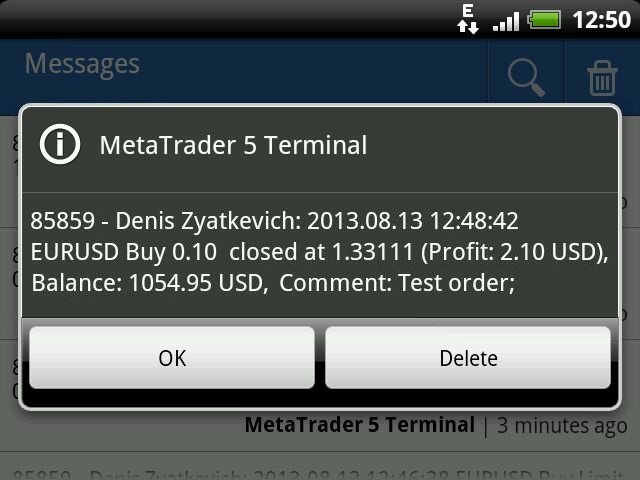
Examples of messages sent by the program:

  • Placing a pending order: 2013.08.13 12:43:29 EURUSD Buy Limit 0.10 Placed, Op: 1.33090, SL: 1.32980, TP: 1.33240, Comment: Test order;
  • Changing pending order parameters: 2013.08.13 12:44:37 EURUSD Sell Limit 0.10, Op: 1.33121 -> 1.33112, SL: 0.00000 -> 1.33000, TP: 0.00000 -> 1.33200, Comment: Test order;
  • Deleting a pending order: 2013.08.13 12:54:19 EURUSD Buy Limit 0.10 at 1.33092 deleted;
  • Opening position : 2013.08.13 12:45:32 EURUSD Buy 0.10 open at 1.33090, SL: 1.33000, TP: 1.33200;
  • Closing position: 2013.08.13 12:48:42 EURUSD Buy 0.10 closed at 1.33111, (Profit: 2.10 USD), Balance: 1054.95 USD, Comment: Test order;
  • Reversing position: 2013.08.13 01:53:36 EURUSD Buy 0.10 -> Sell 0.10, Op:1.32918, SL: 0.00000, TP: 0.00000.
  • Reaching critical equity or free margin level: 2013.08.13 13.35.08 Equity: 1047.95 USD, Free Margin: 782.00 USD.


Free Version and Version for MetaTrader 4

There is a free version of the program - NotifyMe Free for MT5. Unlike the full version, it allows only sending notifications of position opening or closing. Also, full and free versions of the application with similar features are available for MetaTrader 4 trading terminal.


Warning

The developer of NotifyMe for MT5 is not responsible for possible modification or termination of the program's operation due to changes in MQL5 language implemented by the trading terminal and language developer - MetaQuotes company. The developer of NotifyMe for MT5 is not responsible for any loss, damage or missed profits caused by the use of the program, its work or malfunction.


Contact Information

If you have any questions about the application, comments on its operation or suggestions for future improvements, please send them by email or leave your personal messages via this web site. Let me know what products (Expert Advisors, indicators, scripts) you would like to see.

Recensioni 4
Johan Julien Aubry
919
Johan Julien Aubry 2021.06.06 09:50 
 

Works correctly. Please don't write directly to me about my review, I'll not answer.

PETER LUISI
1981
PETER LUISI 2021.01.23 09:16 
 

Just what I was looking for. Works well.

Wan Ping Fei
1690
Wan Ping Fei 2019.02.09 04:25 
 

Author's professional and fast technical support, enough to give 5 stars evaluation

Prodotti consigliati
Manus Pro
Itumeleng Mohlouwa Kgotso Tladi
MANUS PRO EA The Trading Revolution You've Been Waiting For Are you TIRED of watching other traders make consistent profits while your account bleeds red?   The financial markets don't wait for anyone – and neither should you. MANUS PRO isn't just another Expert Advisor... it's your   TICKET TO FINANCIAL FREEDOM . Why MANUS PRO is Different (And Why Everyone's Talking About It) FOR BEGINNERS: Your Trading Mentor That Never Sleeps Zero Learning Curve   – Install, activate, and watch it wo
Descrizione generale Questo indicatore è una versione avanzata del classico Donchian Channel , arricchita con funzioni operative per il trading reale. Oltre alle tre linee tipiche (massimo, minimo e linea centrale), il sistema rileva i breakout e li segnala graficamente con frecce sul grafico, mostrando solo la linea opposta alla direzione del trend per semplificare la lettura. L’indicatore include: Segnali visivi : frecce colorate al breakout Notifiche automatiche : popup, push e email Filtro R
FREE
MT5 Trade Master
Ervand Oganesyan
Dashboard di trading multifunzionale per semplificare il trading manuale. Visualizzazione di ordini e transazioni, calcoli di profitti e perdite, trading con un clic, modifica degli ordini, pareggio, trailing stop, stop loss parziale, take profit parziale, chiusura per tempo, stop loss e take profit azionari: tutto questo è possibile in uno o pochi clic, utilizzando tasti di scelta rapida o con un semplice trascinamento del mouse sui livelli sul grafico. L'interfaccia intuitiva consente di testa
Questo EA è utilizzato principalmente per lo scalping su XAUUSD. Scopo   Rimuove l’emozione dalla gestione delle operazioni — protegge automaticamente le posizioni e prende profitto così non devi prendere decisioni difficili sotto pressione. Cosa fa   ️ Stop Loss automatico   Imposta SL basandosi su recenti massimi/minimi + buffer   Niente più stress per la collocazione manuale   Profitti parziali automatici   Due modalità:   Movimento fisso: chiude il 50% dopo uno spostamento di prezzo
Lock Bot
Artem Alekseev
This utility is designed to automatically maintain a "locking" position and reopen it when necessary, which is suitable for position maintenance and protection strategies. A simple utility (hereinafter referred to as the bot) that implements a locking strategy with an infinitely reloadable locking trade. How the bot works: - When launched, select a buy or sell order with a specified TP - Set the SL parameter for the locking trade - The bot monitors the distance between the opening price of the f
VM Auto SLTP Basic
Van Minh Nguyen
5 (1)
VM Auto SLTP Basic - Intelligent Trade Management for Scalpers Enhance your scalping strategy to a higher level. VM Auto SLTP Basic automatically manages Stop Loss and Take Profit for orders that are opened manually or by other Expert Advisors. This tool does not open trades on its own, allowing you to maintain full control while enjoying precise risk management. Key Features SL/TP based on ATR or fixed price Automatic SL move to Breakeven Risk management as a percentage of account balance Suppo
FREE
Crash5 EA ,I s a automatic robot that has the level of professional decision when to take a trade without any emotion. The bot will help in your scalping decision making with its own TP (take profit) and SL (stop loss) with the trail stop when in profit. This is a trend based spike catching ,looking on whats happening in real time charts no repainting of any signals. The robot helps in making decisions on the candle stick pattern opened and closed lat price with the help of RSI ,MACD and the EMA
Click Trading
Jawad Tauheed
5 (1)
One Click Trading – Auto TP SL Developer TraderLinkz Version 1.00 Category Utility What it does Adds missing TP and SL to your manual trades and pending orders Sets them once per ticket Lets you move TP and SL afterward Works on hedging and netting accounts Scans on every tick and reacts on trade events Why you want it You place faster entries You get consistent risk and exit targets You reduce fat finger errors You keep full manual control Quick start Attach the EA to any chart Keep TP and SL e
FREE
Important Lines
Terence Gronowski
4.87 (23)
This indicator displays Pivot-Lines, preday high and low, preday close and the minimum and maximum of the previous hour. You just have to put this single indicator to the chart to have all these important lines, no need to setup many single indicators. Why certain lines are important Preday high and low : These are watched by traders who trade in a daily chart. Very often, if price climbs over or falls under a preday low/high there is an acceleration in buying/selling. It is a breakout out of a
FREE
Auto Breakeven
David Muriithi
Introducing a powerful MetaTrader 5 Expert Advisor designed to enhance your trading strategy – the Auto Breakeven EA! This feature-rich EA is tailored to bring your stop-loss to breakeven, ensuring a risk-free trade once the market moves in your favor up to a specified price. Explore the full potential of the Auto Breakeven EA. Download it for free now, and find the download link at the bottom of our page. Elevate your trading experience and take control of your risk management strategy. Happy
FREE
Show Pips for MT5
Roman Podpora
4.67 (24)
Questo indicatore informativo sarà utile per coloro che vogliono essere sempre informati sulla situazione attuale del conto. -   Indicatori più utili L'indicatore mostra dati come profitto in punti, percentuale e valuta, nonché lo spread per la coppia corrente e il tempo fino alla chiusura della barra nell'intervallo di tempo corrente. Esistono diverse opzioni per posizionare la linea delle informazioni sulla carta: A destra del prezzo (corre dietro al prezzo); Come commento (nell'angolo in alt
FREE
This indicator is especially for the binary trading. Time frame is 1 minutes and exp time 5 or 3 minutes only. You must be use martingale 3 step. So you must put lots size is 10 % at most. You should use Mt2 trading platform to connect with my indicator to get more signal without human working. This indicator wining rate is over 80% but you may get 100% of profit by using martingale 3 step. You should use MT2 Trading Platform to connect meta trader platform and binary platform . You can get mt2
FREE
Order Book, known also as Market Book, market depth, Level 2, - is a dynamically updated table with current volumes of orders to buy and to sell specific financial instument at price levels near Bid and Ask. MetaTrader 5 provides the means for receiving market book from your broker, but in real time only, without access to its history. The indicator OrderBook Cumulative Indicator accumulates market book data online and visualizes them on the chart. In addition, the indicator can show the market
BoxFibo MT5
Sergei Kiriakov
It is just an alternative fibo lines. mt4 have is a very strange drawing of fibo lines, this utilites was written for mt4, but for mt5 it may not be particularly useful. A simple Box (Rectangle) graphic element with adjustable levels binding: it is possible to specify up to 17 custom levels, all rectangles on the chart with the given prefix in their name are processed. Levels are specified in % of the height of the rectangle. A convenient graphical element for analyzing charts by growth-correct
FREE
Fvg Edge
Ahmad Meftah Abdulsalam Alawwami
5 (1)
FVG Smart Zones – Edizione Gratuita Indicatore di Rilevamento dei Gap di Valore Equo per MetaTrader 5 (MT5) Cerchi uno strumento di trading reale – non solo un altro indicatore casuale? FVG Smart Zones – Edizione Gratuita fornisce una visione professionale del mercato rilevando automaticamente i Fair Value Gap (FVG) e evidenziando zone di trading ad alta probabilità direttamente sul grafico. Ideato per trader che seguono: Smart Money Concepts (SMC) ICT Trading Concepts Price Action
FREE
Core function Intelligent transaction management one-click opening and closing operation, which supports user-defined lots to set multiple closing modes: all closing, closing by direction and closing by profit and loss status. Professional risk control, real-time risk monitoring and spread control to avoid high-cost trading environment. Visual control panel has an intuitive graphical interface, and all functions can be operated with one button to display position information, profit and loss sta
FREE
The Goat Scalper
Giordan Cogotti
The Goat Scalper EA — Smart, Fast, and Built for Real Market Performance Overview The Goat Scalper EA is a next-generation trading system built to capture decisive market moves with surgical precision. Unlike typical scalpers that rely on risky methods such as martingale, grid, hedging, or arbitrage, The Goat uses a pure breakout logic based on advanced supply and demand zone detection, ensuring stable and transparent results in any condition. Core Strengths Smart Risk Management Stop Loss on
Total Trade Manager SL BE TP
Izzet Deniz Erpolat
3 (2)
Total trade manager allows you to manage your trade to maximise your profits and minimise your losses. This is an essential for traders that are looking for consistency within their trading.  The features: Partial Stop Loss: This feature allows you to close a partial percentage of your trade once it goes into negative. So if your stop loss is 20 pips, you could close 75% of your trade at 10 pips and let the remainder of the position to continue running. Auto Stop Loss: This means that once you p
High Low Open Close
Alexandre Borela
4.98 (42)
Se ti piace questo progetto, lascia una recensione a 5 stelle. Questo indicatore disegna i prezzi aperti, alti, bassi e di chiusura per i specificati periodo e può essere regolato per un determinato fuso orario. Questi sono livelli importanti guardati da molti istituzionali e professionali commercianti e può essere utile per voi per conoscere i luoghi dove potrebbero essere più attivo. I periodi disponibili sono: Giorno precedente. Settimana precedente. Mese precedente. Precedente trimestre. A
FREE
Follow The Line MT5
Oliver Gideon Amofa Appiah
4.6 (35)
This indicator obeys the popular maxim that: "THE TREND IS YOUR FRIEND" It paints a GREEN line for BUY and also paints a RED line for SELL. (you can change the colors). It gives alarms and alerts of all kinds. IT DOES NOT REPAINT and can be used for all currency pairs and timeframes. Yes, as easy and simple as that. Even a newbie can use it to make great and reliable trades. NB: For best results, get my other premium indicators for more powerful and reliable signals. Get them here: https://www.m
FREE
Eabotpro Copy Trade is a simple and robust file-based trade copier EA for MetaTrader 5. It can work in two modes inside the same file: MASTER (writes all trades to a common file) and SLAVE (reads the file and copies the trades to another account). This makes it easy to copy trades between multiple MT5 accounts on the same PC or VPS without DLLs or external servers. Main features: - Single EA with dual mode: MASTER or SLAVE (selectable by input) - Copies market orders (BUY/SELL) and pending ord
Candle Perspective Structure Indicator MT5 is a simple indicator that defines and displays the candlestick structure of the market. This indicator will suit both experienced traders and beginners who find it difficult to follow the structure visually. If you want to see more high-quality products or order the development/conversion of your own products, visit my partners' website: 4xDev Get 10% OFF on manual strategies automation services or indicator development/conversion services at 4xDev
FREE
L'indicateur SMC Venom Model BPR est un outil professionnel pour les traders travaillant dans le concept Smart Money (SMC). Il identifie automatiquement deux modèles clés sur le graphique des prix: FVG   (Fair Value Gap) est une combinaison de trois bougies, dans laquelle il y a un écart entre la première et la troisième bougie. Forme une zone entre les niveaux où il n'y a pas de support de volume, ce qui conduit souvent à une correction des prix. BPR   (Balanced Price Range) est une combinaiso
Trade2Telegram
Strifor (Mauritius) Ltd
Trade2Telegram — a plugin for automatic trade notifications from MetaTrader to Telegram. This tool is designed for traders managing capital, running signal channels, or leading educational communities. The plugin copies all trading operations from the terminal and publishes them to a selected Telegram chat, group, or channel. Messages are sent automatically when positions are opened or closed, stop-loss or take-profit levels are changed, pending orders are triggered, or trades are partially clos
FREE
Global Market Risk Sentiment Meter 1. Abstraction The   Global Market Risk Sentiment Meter   is a sophisticated analytical tool designed for the MetaTrader 5 (MQL5) platform. Unlike traditional indicators that analyze a single asset in isolation, this utility employs an   Inter-Market Analysis   approach to reconstruct the psychological state of the global financial markets. By aggregating real-time data from US Indices, Global Equities, Cryptocurrencies, and Safe Haven assets (Gold and the US
FREE
The RSI-Based Automatic Buy Strategy Expert Advisor (EA) is designed to automatically open buy positions when the RSI indicator enters the oversold zone. It smartly spaces new trades by maintaining a minimum distance between open positions to prevent excessive exposure. With adjustable take profit (TP) levels and lot sizes, this EA is specifically tailored for the XAUUSD (Gold) pair on the M5 timeframe. This Expert Advisor offers reliable and disciplined trade management for traders who want to
Free automatic Fibonacci is an indicator that automatically plots a Fibonacci retracement based on the number of bars you select on the BarsToScan setting in the indicator. The Fibonacci is automatically updated in real time as new highest and lowest values appears amongst the selected bars. You can select which level values to be displayed in the indicator settings. You can also select the color of the levels thus enabling the trader to be able to attach the indicator several times with differe
FREE
Expert TP SL v04
Mikhail Ostashov
Expert TP SL v04 - Professional Trading Assistant with AI Motivation System Advanced manual trading tool with automatic risk management, overtrading protection, and intelligent psychological support for disciplined trading. PRODUCT OVERVIEW Expert TP SL v04 is a comprehensive trading assistant designed for manual traders who want to maintain emotional discipline while automating risk calculations. This isn't just another order placement tool - it's a complete trading psychology system that pr
Rainbow MT5
Jamal El Alama
4 (1)
Description : Rainbow MT5 is a technical indicator based on Moving Average with period 34 and very easy to use. When price crosses above MA and MA changes color to green, then this is a signal to buy. When price crosses below MA and MA changes color to red, then this is a signal to sell. The Expert advisor ( Rainbow EA MT5 ) based on Rainbow MT5 indicator is now available here . MT4 version is available here .
FREE
EasyGRID MT5
Nina Yermolenko
5 (1)
The utility places a grid of pending orders . You can select the number of orders in the grid, the step between orders, multiplier for the order size, SL and TP levels, magic number etc. If you use a profit bucket , please note that it applies to all orders on the current currency pair with the current magic. If you want to use several grids with independent profit buckets at the same time, run several copies of the utility and specify different magics in the settings. MT4 version of the utility
FREE
Gli utenti di questo prodotto hanno anche acquistato
Trade Assistant MT5
Evgeniy Kravchenko
4.41 (205)
It helps to calculate the risk per trade, the easy installation of a new order, order management with partial closing functions, trailing stop of 7 types and other useful functions. Additional materials and instructions Installation instructions - Application instructions - Trial version of the application for a demo account Line function -   shows on the chart the Opening line, Stop Loss, Take Profit. With this function it is easy to set a new order and see its additional characteristics bef
Forex Trade Manager MT5
InvestSoft
4.97 (580)
Benvenuto a Trade Manager EA, lo strumento definitivo per la gestione del rischio , progettato per rendere il trading più intuitivo, preciso ed efficiente. Non è solo uno strumento per l'esecuzione degli ordini, ma una soluzione completa per la pianificazione delle operazioni, la gestione delle posizioni e il controllo del rischio. Che tu sia un principiante, un trader avanzato o uno scalper che necessita di esecuzioni rapide, Trade Manager EA si adatta alle tue esigenze, offrendo flessibilità s
Local Trade Copier EA MT5
Juvenille Emperor Limited
4.96 (116)
Sperimenta una copia di trading eccezionalmente veloce con il   Local Trade Copier EA MT5 . Con la sua facile configurazione in 1 minuto, questo copiatore di trading ti consente di copiare i trades tra diversi terminali di MetaTrader sullo stesso computer Windows o su Windows VPS con velocità di copia ultra veloci inferiori a 0.5 secondi. Che tu sia un trader principiante o professionista,   Local Trade Copier EA MT5   offre una vasta gamma di opzioni per personalizzarlo alle tue esigenze speci
TradePanel MT5
Alfiya Fazylova
4.86 (147)
Trade Panel è un assistente commerciale multifunzionale. L'applicazione contiene più di 50 funzioni di trading per il trading manuale e consente di automatizzare la maggior parte delle operazioni di trading. Attenzione, l'applicazione non funziona nel tester di strategia. Prima dell'acquisto, puoi testare la versione demo su un conto demo. Versione demo qui . Istruzioni complete qui . Commercio. Ti consente di eseguire operazioni di trading con un clic: Apri ordini e posizioni pendenti con calco
Versione Beta Telegram to MT5 Signal Trader è quasi pronto per il rilascio ufficiale in versione alpha. Alcune funzionalità sono ancora in fase di sviluppo e potresti riscontrare piccoli bug. Se riscontri problemi, ti preghiamo di segnalarli, il tuo feedback aiuta a migliorare il software per tutti. Il prezzo aumenterà dopo 20 vendite. Copie rimanenti a $90:   2/20 . Telegram to MT5 Signal Trader è uno strumento potente che copia automaticamente segnali di trading da canali o gruppi Telegram a
Ultimate Extractor
Clifton Creath
5 (7)
Ultimate Extractor - Professional Trading Analytics for MT5 Ultimate Extractor transforms your MetaTrader 5 trading history into actionable insights with comprehensive analytics, interactive charts, and real-time performance tracking. What It Does  Phase 1: Automatically analyzes your MT5 trading history across all Expert Advisors and generates detailed HTML reports with interactive visualizations. Tracks live performance metrics including open positions, floating P/L, and drawdown in real-time.
Trade Dashboard MT5
Fatemeh Ameri
4.96 (103)
Tired of complex order placement and manual calculations? Trade Dashboard is your solution. With its user-friendly interface, placing orders becomes effortless, by a single click, you can open trades, set stop loss and take profit levels, manage trade lot size, and calculate risk to reward ratios, allowing you to only focus on your strategy. Say goodbye to manual calculations and streamline your trading experience with Trade Dashboard. Download  Demo Version  right now. You can find  Details of
Smart Stop Scanner – Analisi multi-asset degli stop-loss basata sulla reale struttura di mercato Panoramica Smart Stop Scanner offre un monitoraggio professionale dei livelli di stop-loss su più mercati. Il sistema identifica automaticamente le zone di stop più rilevanti basandosi sulla reale struttura di mercato, sulle rotture significative e sulla logica del price action, presentando tutte le informazioni in un pannello chiaro, coerente e ottimizzato per schermi ad alta risoluzione (DPI-awar
Copy Cat More Trade Copier MT5 (Gatto Copiatore MT5) è un copiatore di trade locale e un framework completo di gestione del rischio ed esecuzione progettato per le sfide di trading odierne. Dalle sfide delle prop firm alla gestione di portafogli personali, si adatta a ogni situazione con una combinazione di esecuzione robusta, protezione del capitale, configurazione flessibile e gestione avanzata dei trade. Il copiatore funziona sia in modalità Master (mittente) che Slave (ricevente), con sincro
Smart Stop Manager – Esecuzione automatica dello stop-loss con precisione professionale Panoramica Smart Stop Manager è il livello di esecuzione della linea Smart Stop, progettato per i trader che richiedono una gestione dello stop-loss strutturata, affidabile e completamente automatizzata su più posizioni aperte. Monitora continuamente tutte le operazioni attive, calcola il livello di stop ottimale utilizzando la logica di struttura di mercato Smart Stop e aggiorna gli stop automaticamente se
VirtualTradePad One Click Trading Panel
Vladislav Andruschenko
4.58 (72)
Pannello di trading per il trading in 1 clic.   Lavorare con posizioni e ordini!   Trading dal grafico o dalla tastiera. Con il nostro pannello di trading, puoi eseguire operazioni con un solo clic direttamente dal grafico ed eseguire operazioni di trading 30 volte più velocemente rispetto al controllo MetaTrader standard. I calcoli automatici di parametri e funzioni rendono il trading più veloce e conveniente per i trader. Suggerimenti grafici, etichette informative e informazioni complete sugl
The News Filter MT5
Leolouiski Gan
4.74 (19)
Questo prodotto filtra tutti gli esperti consulenti e i grafici manuali durante il periodo delle notizie, così non dovrai preoccuparti di improvvisi picchi di prezzo che potrebbero distruggere le tue impostazioni di trading manuali o le negoziazioni effettuate da altri esperti consulenti. Questo prodotto viene fornito anche con un sistema completo di gestione degli ordini che può gestire le tue posizioni aperte e gli ordini in sospeso prima della pubblicazione di qualsiasi notizia. Una volta che
MT5 to Telegram Signal Provider è un'utilità facile da usare e completamente personalizzabile che consente l'invio di segnali specificati a una chat, canale o gruppo Telegram, rendendo il tuo account un fornitore di segnali. A differenza della maggior parte dei prodotti concorrenti, non utilizza importazioni DLL. [ Dimostrativo ] [ Manuale ] [ Versione MT4 ] [ Versione Discord ] [ Canale Telegram ]  New: [ Telegram To MT5 ] Configurazione Una guida utente passo-passo è disponibile. Nessuna cono
Exp COPYLOT CLIENT for MT5
Vladislav Andruschenko
3.82 (34)
Trade copyr per MT5 è un trade copyr per la piattaforma МetaТrader 5   . Copia le negoziazioni forex   tra       eventuali conti   MT5   -   MT5, MT4   -   MT5 per la versione COPYLOT MT5 (o MT4   -   MT4 MT5   -   MT4 per la versione COPYLOT MT4) Fotocopiatrice affidabile! Versione MT4 Descrizione completa   +DEMO +PDF Come comprare Come installare     Come ottenere i file di registro     Come testare e ottimizzare     Tutti i prodotti di Expforex Puoi anche copiare le operazioni nel termina
Seconds Chart MT5
Boris Sedov
4.59 (17)
Seconds Chart — uno strumento unico per creare grafici in secondi su MetaTrader 5 . Con Seconds Chart , puoi generare grafici con timeframe definiti in secondi, ottenendo una flessibilità e una precisione d'analisi ideali, non disponibili nei grafici standard in minuti o ore. Ad esempio, il timeframe S15 indica un grafico con candele di 15 secondi. Puoi utilizzare qualsiasi indicatore e Expert Advisor con supporto per simboli personalizzati. Lavorare con loro è comodo quanto operare sui grafici
EasyInsight AIO MT5
Alain Verleyen
4.91 (11)
EASY Insight AIO – La soluzione all-in-one per un trading intelligente e senza sforzo Panoramica Immagina di poter analizzare l’intero mercato — Forex, Oro, Cripto, Indici e persino Azioni — in pochi secondi, senza dover controllare manualmente i grafici, installare indicatori o affrontare configurazioni complicate. EASY Insight AIO è il tuo strumento definitivo di esportazione per il trading alimentato dall’IA, pronto all’uso. Offre una panoramica completa del mercato in un unico file CSV pul
Trade Manager DaneTrades
Levi Dane Benjamin
4.33 (27)
Trade Manager per aiutarti a entrare e uscire rapidamente dalle operazioni calcolando automaticamente il tuo rischio. Incluse funzionalità che ti aiutano a prevenire l'eccessivo trading, il vendetta trading e il trading emotivo. Le operazioni possono essere gestite automaticamente e i parametri di performance del conto possono essere visualizzati in un grafico. Queste caratteristiche rendono questo pannello ideale per tutti i trader manuali e aiuta a migliorare la piattaforma MetaTrader 5. Suppo
HINN MagicEntry Extra
ALGOFLOW OÜ
4.64 (11)
HINN MAGIC ENTRY – the ultimate tool for entry and position management! Place orders by selecting a level directly on the chart! Key features: - Market, limit, and pending orders - Automatic lot size calculation - Automatic spread and commission accounting - Unlimited partitial take-profits  - Breakeven and trailing stop-loss  functions - Intuitive, adaptive, and customizable interface - Session and strong algorithmic level visualization - Works with any assets and account types Join the   ALG
Grid Manual MT5
Alfiya Fazylova
4.9 (20)
Grid Manual è un pannello di trading per lavorare con una griglia di ordini. L'utilità è universale, ha impostazioni flessibili e un'interfaccia intuitiva. Funziona con una griglia di ordini non solo nella direzione delle perdite, ma anche nella direzione dell'aumento dei profitti. Il trader non ha bisogno di creare e mantenere una griglia di ordini, lo farà l'utilità. È sufficiente aprire un ordine e il manuale di Grid creerà automaticamente una griglia di ordini per esso e lo accompagnerà fino
Crypto Charting
Rajesh Kumar Nait
5 (5)
Crypto Charting for MT5 – Integrazione grafici criptovalute in MetaTrader 5 Panoramica Crypto Charting for MT5 offre dati OHLC in tempo reale tramite WebSocket. Supporta più exchange e aggiorna automaticamente i dati in MT5. Funzionalità Dati in tempo reale via WebSocket Aggiornamento automatico dei dati storici Sincronizzazione pianificata dopo interruzioni Compatibile con tutti i timeframe MT5 Dati OHLCV completi Supporto per il tester di strategia Riconnessione automatica Exchange supportati
The product will copy all telegram signal to MT5 ( which you are member) , also it can work as remote copier.  Easy to set up, copy order instant, can work with almost signal formats, image signal,  s upport to translate other language to English Work with all type of channel or group, even channel have "Restrict Saving Content", work with  multi channel, multi MT5 Work as remote copier: with signal have ticket number, it will copy exactly via ticket number. Support to backtest signal. How to s
X2 Copy MT5
Liubov' Shkandrii
Scopri la Copia Istantanea dei Trade con il rivoluzionario X2 Copy MT5. Con soli 10 secondi di configurazione, otterrai uno strumento potente per sincronizzare i trade tra terminali MetaTrader su un singolo computer Windows o VPS con una velocità senza precedenti - inferiore a 0,1 secondi. Sia che tu stia gestendo più account, seguendo segnali o scalando la tua strategia, X2 Copy MT5 si adatta al tuo flusso di lavoro con una precisione e un controllo senza pari. Smetti di aspettare — inizia a co
HINN Lazy Trader
ALGOFLOW OÜ
5 (2)
Lazy Trader is your personal risk management assistant that independently finds the best market entries, manages positions, and helps you extract maximum profit from every trading idea! It monitors charts from M1 to W1 , finds optimal entry points based on your parameters, and manages trades without your involvement: - Got an idea on the daily chart? No need to wait for lower timeframes to form a signal — Lazy Trader will check everything and open all necessary positions while you live your lif
Trade Assistant 38 in 1
Makarii Gubaydullin
4.91 (22)
Ultimate Trade Assistant MT5 — Assistente di Trading Multifunzionale Oltre 66 strumenti integrati per analisi, gestione del rischio e automazione del trading. L’assistente combina gestione del rischio, ordini intelligenti, analisi di mercato e controllo delle posizioni in un’unica interfaccia semplice e potente. Ideale per Forex, azioni, indici e criptovalute. Perché i trader lo scelgono Esecuzione rapida e gestione completa con un clic Calcolo automatico di lotto e rischio in base al saldo Ordi
Zentral Trading Manager
Ray Zeanrik Parreno Fredeluces
5 (4)
Zentral Trading Manager Your Command Center for Precision Trading — Now Stronger than Ever Take control of your trades like never before. Zentral Trading Manager is your all-in-one manual trading panel for MetaTrader 5 — built for scalpers, day traders, and serious strategy execution. Fully compatible with both Mac and Windows laptops. High-DPI safe. No more layout issues. Key Features (Latest 2025 Update): • One-Click Close – Instantly close Buy/Sell, winning/losing trades, or even half positi
Trade Manager DashPlus
Henry Lyubomir Wallace
5 (12)
DashPlus è uno strumento avanzato di gestione delle operazioni progettato per migliorare l'efficienza e l'efficacia del trading sulla piattaforma MetaTrader 5. Offre una suite completa di funzionalità, tra cui calcolo del rischio, gestione degli ordini, sistemi di griglia avanzati, strumenti basati su grafici e analisi delle prestazioni. Caratteristiche Principali 1. Griglia di Recupero Implementa un sistema di griglia flessibile e di media per gestire le operazioni in condizioni di mercato avve
Custom Alerts MT5
Daniel Stein
5 (8)
Custom Alerts: Monitora più mercati e non perdere mai un setup importante Panoramica Custom Alerts è una soluzione dinamica per i trader che desiderano monitorare più strumenti da un unico punto centrale. Integrando i dati dei nostri strumenti principali — come FX Power, FX Volume, FX Dynamic, FX Levels e IX Power — Custom Alerts ti avvisa automaticamente degli sviluppi cruciali del mercato, senza dover passare continuamente da un grafico all'altro o rischiare di perdere opportunità importanti
Bots Builder Pro MT5
Andrey Barinov
4.17 (6)
This is exactly what the name says. Visual strategy builder . One of a kind. Turn your trading strategies and ideas into Expert Advisors without writing single line of code. Generate mql source code files with a few clicks and get your fully functional Expert Advisors, which are ready for live execution, strategy tester and cloud optimization. There are very few options for those who have no programming skills and can not create their trading solutions in the MQL language. Now, with Bots Builde
Remote Trade copieur
Rashed Samir
5 (2)
Remote Trade Copier is an advanced tool designed for efficiently copying trades between accounts in both local and remote modes. It allows for lightning-fast order replication from a master account to a slave account. In local mode, trades are copied instantly, while in remote mode, the copying process takes less than 1 second. MT4 Version (Only Local) MT5 Version (Only Local) MT4 Full Version (Local & Remote) Local mode refers to both MetaTrader platforms being installed on the same system,
Custom Alerts AIO: Monitora tutti i mercati — senza alcuna configurazione Panoramica Custom Alerts AIO è una soluzione di monitoraggio dei mercati pronta all’uso che non richiede alcuna configurazione. Tutti gli indicatori necessari — FX Power, FX Volume, FX Dynamic, FX Levels, IX Power — sono integrati internamente. Non vengono mostrati grafici, rendendolo ideale per generare alert in tempo reale in modo discreto ed efficiente. Supporta tutte le classi di asset offerte dal tuo broker: Forex,
Altri dall’autore
Overview The Expert Advisor allows you to receive notifications to the mobile phone (or tablet PC), mailbox or play the sound alert when some events occured: opening or closing position (also closing all positions), placing or deleting pending order; changing open price, stop loss or take profit; the account balance, equity, margin level, free margin or drawdown has reached the user specified level. You can specify a notification interval, notification text template and audio file for sound aler
Advanced NotifyMe
Denis Zyatkevich
Overview The Expert Advisor allows you to receive notifications to the mobile phone (or tablet PC), mailbox or play the sound alert when some events occured: opening or closing position, placing or deleting pending order; changing open price, stop loss or take profit; the account balance, equity, margin level, free margin or drawdown has reached the user specified level. You can specify a notification interval, notification text template and audio file for sound alerts. Expert Advisor saves the
Advanced NotifyMe Large
Denis Zyatkevich
5 (1)
This is Advanced NotifyMe version with large interface. Overview The Expert Advisor allows you to receive notifications to the mobile phone (or tablet PC), mailbox or play the sound alert when some events occured: opening or closing position, placing or deleting pending order; changing open price, stop loss or take profit; the account balance, equity, margin level, free margin or drawdown has reached the user specified level. You can specify a notification interval, notification text template an
NotifyMe Free for MT5
Denis Zyatkevich
5 (5)
Overview The Expert Advisor sends notifications to a mobile phone, via e-mail or activates an audio alarm in case any changes are detected on the trading account: opening/closing positions, changing order parameters, balance or leverage. Also, the Expert Advisor can inform that Equity on the trading account has dropped below a specified value or Free Margin is small compared to Margin. The Expert does not trade, it only monitors your account and orders. Launching the Expert Advisor You should a
FREE
Account Info Free for MT5
Denis Zyatkevich
5 (1)
Overview The script displays information about the trade account: Information about the trade account: Account - account number and type (Real, Contest or Demo); Name - name of the account owner; Company - name of a company that provide the access to trading; Server - trade server name; Connection State - connection state; Trade Allowed - shows whether trading is allowed on the account at the moment; Experts Allowed - shows whether it is allowed to trade using Expert Advisors; Balance - account
FREE
NotifyMe for MT4
Denis Zyatkevich
5 (4)
Overview The Expert Advisor sends notifications to a mobile phone, via e-mail or activates an audio alarm in case any changes are detected on the trading account: opening/closing positions, changing order parameters, balance or leverage. Also, the Expert Advisor can inform that Equity on the trading account has dropped below a specified value or Free Margin is small compared to Margin. The Expert does not trade, it only monitors your account. Launching the Expert Advisor For the Expert Advisor
Overview The script displays information about the trade account: Account - account number and type (Real or Demo); Name - name of the account owner; Company - name of a company that provide the access to trading; Server - trade server name; Connection State - connection state; Trade Allowed - shows whether trading is allowed on the account at the moment; Balance - account balance; Equity - account equity; Credit - amount of credit; Profit - profit size; Free Margin - free margin on the account;
FREE
NotifyMe Free for MT4
Denis Zyatkevich
5 (4)
Overview The Expert Advisor sends notifications to a mobile phone, via e-mail or activates an audio alarm in case a position is opened or closed on the trading account. The Expert does not trade, it only monitors your account and orders. Launching the Expert Advisor For the Expert Advisor to work, place the file NotifyMe_free.ex4 in terminal_folder/experts (probably it will be placed there automatically). NotifyMe_free should appear in the Expert Advisors section of the Navigator window. If not
FREE
Overview The script displays information about the trade account and the current financial instrument. Information about the trade account: Account - account number and type (Real or Demo); Name - name of the account owner; Company - name of a company that provide the access to trading; Server - trade server name; Connection State - connection state; Trade Allowed - shows whether trading is allowed on the account at the moment; Balance - account balance; Equity - account equity; Credit - amount
Overview The Expert Advisor sends notifications to a mobile phone, via e-mail or plays a sound in case any changes are detected on the trading account: opening/closing positions, changing order parameters, balance or leverage. Also, the Expert Advisor can inform that Equity on the trading account has dropped below a specified value or Free Margin is small compared to Margin. The Expert does not trade, it only monitors your account. Launching the Expert Advisor For the Expert Advisor to work, pl
Overview The script displays information about the trade account and the current financial instrument. Information about the trade account: Account - account number and type (Real, Contest or Demo); Name - name of the account owner; Company - name of a company that provide the access to trading; Server - trade server name; Connection State - connection state; Trade Allowed - shows whether trading is allowed on the account at the moment; Experts Allowed - shows whether it is allowed to trade usin
This is Advanced NotifyMe version with large interface. Overview The Expert Advisor allows you to receive notifications to the mobile phone (or tablet PC), mailbox or play the sound alert when some events occured: opening or closing position (also closing all positions), placing or deleting pending order; changing open price, stop loss or take profit; the account balance, equity, margin level, free margin or drawdown has reached the user specified level. You can specify a notification interval,
Overview The Expert Advisor sends notifications to a mobile phone, via e-mail or plays a sound in case any changes are detected on the trading account: opening/closing positions, changing order or position parameters, balance or leverage. Also, the Expert Advisor can inform that Equity on the trading account has dropped below a specified value or Free Margin is small compared to Margin. The Expert Advisor does not trade, it only monitors your account. Launching the Expert Advisor You should all
Filtro:
Johan Julien Aubry
919
Johan Julien Aubry 2021.06.06 09:50 
 

Works correctly. Please don't write directly to me about my review, I'll not answer.

PETER LUISI
1981
PETER LUISI 2021.01.23 09:16 
 

Just what I was looking for. Works well.

Nulltinull
29
Nulltinull 2019.10.01 15:41 
 

L'utente non ha lasciato alcun commento sulla valutazione.

Wan Ping Fei
1690
Wan Ping Fei 2019.02.09 04:25 
 

Author's professional and fast technical support, enough to give 5 stars evaluation

Rispondi alla recensione































