
NotifyMe for MT5

5

Overview

The Expert Advisor sends notifications to a mobile phone, via e-mail or activates an audio alarm in case any changes are detected on the trading account: opening/closing positions, changing order and position parameters, balance or leverage. Also, the Expert Advisor can inform that Equity on the trading account has dropped below a specified value or Free Margin is small compared to Margin. The Expert Advisor does not trade, it only monitors your account and orders.


Launching the Expert Advisor

You should allow automated trading in your MetaTrader 5 terminal to let the operation of the Expert Advisor. To do this, enter Tools - Options - Expert Advisors tab and enable "Allow automated trading" parameter. To launch the Expert Advisor, right-click its name in the Navigator window and select "Attach to chart" or drag and drop it on the chart by mouse. The windows of the Expert Advisor's parameters will appear. Set the desired parameters and click OK.

The Expert Advisor can be attached to the chart of any financial instrument. Analysis of order and position parameters is performed after any trading operation, while checks for reaching critical Equity or Free Margin levels is performed after a new quote arrives. Therefore, it is recommended to launch the Expert Advisor on the symbol with frequently arriving quotes (for example, on one of the basic symbols: EURUSD, GBPUSD, USDCHF or USDJPY) in order to decrease notification delays. Chart's time frame does not matter.


Expert Advisor's Input Parameters

  • Push Notification Events - select what events you want to be notified of via your mobile terminal (No notifications - disabled, Only Open/Close position notifications - notifying only of opening/closing positions, All notifications - notifying of all events);
  • Push Notification Critical Equity Level - minimum Equity on a trading account in the deposit currency. When this value is reached, the notification is sent to the mobile terminal;
  • Push Notification Critical Margin Level - minimum Free Margin level compared to Margin in percentage values. When the level is reached, the notification is sent to the mobile terminal;
  • Critical Event Push Notify Interval - minimum time interval (in seconds) between adding information about Equity or Free Margin reaching a critical level to push messages.
  • Push Notification Interval - minimum time interval (in seconds) between messages sent to the mobile terminal;
  • Push Message Maximum Length - maximum length of a message sent to the mobile terminal;
  • Mail Notification Events - select what events you want to be notified of via e-mail (No notifications - disabled, Only Open/Close position notifications - notifying only of opening/closing positions, All notifications - notifying of all events);
  • Mail Notification Critical Equity Level - minimum Equity on a trading account in the deposit currency. When this value is reached, the notification is sent via e-mail;
  • Mail Notification Critical Margin Level - minimum Free Margin level compared to Margin in percentage values. When the level is reached the notification is sent via e-mail;
  • Critical Event Mail Notify Interval - minimum time interval (in seconds) between adding information about Equity or Free Margin reaching a critical level to an email;
  • Mail Notification Interval - minimum time interval (in seconds) between notifications sent via e-mail;
  • Sound Notification Events - select what events you want to be notified of by a sound alarm (No notifications - disabled, Only Open/Close position notifications - notifying only of opening/closing positions, All notifications - notifying of all events);
  • Sound Notification Critical Equity Level - minimum Equity on a trading account in the deposit currency. When this value is reached, a sound alarm is activated;
  • Sound Notification Critical Margin Level - minimum Free Margin level compared to Margin in percentage values. When the level is reached, a sound alarm is activated;
  • Critical Event Sound Notify Interval - minimum time interval (in seconds) between sound alarms indicating Equity or Free Margin reaching a critical level;
  • Sound Notification Interval - minimum time interval (in seconds) between sound alarms;
  • Sound File Name - sound alarm file name;
  • Use time in messages - time specified in messages sent to the mobile terminal or via e-mail (Server Time - trade server time, Local Time - time of the PC the Expert Advisor is running at);
  • Screen Information - display server and local time, as well as notification settings (Show, Hide).


Calculating Free Margin Level

As mentioned earlier, the Expert Advisor can notify of decreasing Free Margin compared to Margin. Let's examine calculation of Free Margin level in more details. In most cases (including MetaTrader 5 trading terminal), Margin value is defined considering Leverage provided by a broker. But the broker can change the leverage value at any time, and the Margin value also changes subsequently. Most often, the leverage value is not so critical for trading (unless trading is conducted in a risky manner using the maximum possible position volume). Therefore, this Expert Advisor calculates the Margin value without regard to the leverage. Free Margin level is defined as a ratio of Free Margin to Margin in percentage value.

Let's consider the following example. Suppose that 1 lot equals to 100 000 units of the base currency. Position at EURUSD is opened having the volume of 0.10 lots at the price of 1.3 USD per 1 EUR. For buying or selling 0.10 * 100 000 = 10 000 EUR, we will need 13 000 USD. This value is considered to be the Margin for the present Expert Advisor (though in most cases, a leverage is applied to that value, for example, if leverage is 1:100, then we will have 130 USD of Margin). If the deposit is equal to 1000 USD, Free Margin will be equal to 1000 - 130 = 870 USD after opening a position, while the Margin level will be calculated as 870 / 13 000 = 0.0669 or 6.69 %. If we set the Margin limit, at which notification is delivered, to 5%, the notification will be sent in case of Free Margin being equal to 0.05 * 13 000 = 650 USD or Equity comprising 650 + 130 = 780 USD.

Despite the apparent complexity of defining the Free Margin level, this method provided the most informative results in actual practice.


Sending Notifications to the Mobile Terminal

First of all, you should have mobile version of MetaTrader 4 or MetaTrader 5 terminal installed on your Android or iOS powered device to receive notifications. You can download MetaTrader 4 or MetaTrader 5 mobile terminal for Android, as well as MetaTrader 4 or MetaTrader 5 mobile terminal for iOS for free.

You should allow sending push notifications in MetaTrader 5 trading terminal, on which the Expert Advisor is to be launched. To do this, enter Tools – Options – Notifications tab and turn "Enable Push Notifications" parameter on. You should also specify your MetaQuotes_ID on this tab. It can be found on Messages tab of the mobile terminal.

"Push Notification Events" input parameter allows you to define types of events that are followed by sending notifications to your mobile terminal. When set to "All notifications", messages are sent if any of the following events occur: position opening or closing, changing open position's Stop Loss and Take Profit parameters, changing pending order parameters - Open price, Stop Loss and Take Profit, changing the account's balance or leverage. When it is set to "Only Open/Close position notifications", notifications are sent only when opening and closing positions. If "No notifications" is selected, notifications are not sent to the mobile terminal. This parameter does not affect sending notifications indicating Equity or Free Margin reaching a critical level.

"Push Notification Critical Equity Level" input parameter allows you to define a critical (minimum) equity (in deposit currency) followed by sending notifications to your mobile terminal. If set to 0, notifications of equity decrease are not sent to your mobile terminal.

"Push Notification Critical Margin Level" input parameter allows you to define a critical (minimum) free margin level (in percentage value) followed by sending notifications to your mobile terminal. If set to 0, notifications of free margin level are not sent to your mobile terminal.

Information about events on a trading account, as well as about reaching critical Equity or Free Margin levels is added to the message sent to the mobile terminal under certain conditions.

"Critical Event Push Notify Interval" parameter allows you to set the time interval (in seconds), after which information about reaching critical Equity or Free Margin level is added to the push message prepared for delivery.

"Push Notification Interval" input parameter allows you to set the minimum time interval (in seconds) between push notifications sent to the mobile terminal. The Expert Advisor will not send a new notification if less than specified time has passed since sending the previous one. It will save that notification instead. When the time specified in "Push Notification Interval" parameter passes since sending the previous notification, the Expert Advisor will send a message containing descriptions of all events accumulated by that time. There is a limitation (of push notifications service developed by MetaQuotes) on the number of sent messages per unit time: no more than two messages per second and no more than 10 messages per minute (if this limitation is violated, sending push notifications can be blocked by MetaQuotes). Therefore, it is not recommended to set very small values of "Push Notification Interval" parameter (especially in case of the events' high frequency on a trading account).

"Push Message Maximum Length" parameter allows you to set the maximum number of symbols in a message sent to the mobile terminal. If a message is longer, it is truncated down to the length specified in the parameter. The maximum permissible length of a push message is 255 characters. A message consists of two parts: account number with account owner's name (generated automatically) and a text description of an event generated by an Expert Advisor (its length is limited by "Push Message Maximum Length" parameter). In some cases, a message may become invisible in the mobile terminal if its length exceeds 255 characters. "Push Message Maximum Length" parameter value should be selected based on the length of the automatically added part of the message (account number and owner's name).


Sending Notifications Via E-Mail

To receive notifications via e-mail, you should allow sending emails in the settings of MetaTrader 5 trading terminal, at which the Expert Advisor is launched. To do this, enter Tools – Options – Email tab, turn Enable parameter on and specify your e-mail account and SMTP e-mail server parameters. E-mail account and SMTP mail server parameters should be specified on this tab.

Messages sent by the Expert Advisor via e-mail have subject "Account account_number notification". 

"Mail Notification Events" parameter allows you to define types of events followed by notifications via emails (similar to "Push Notification Events" parameter for notifications sent to the mobile terminal). This parameter does not affect sending notifications indicating Equity or Free Margin reaching a critical level.

"Mail Notification Critical Equity Level" input parameter allows you to define a critical (minimum) equity (in deposit currency) followed by sending notifications via e-mail. If set to 0, notifications of equity decrease are not sent via e-mail.

"Mail Notification Critical Margin" input parameter allows you to define a critical (minimum) free margin level (in percentage value) followed by sending notifications via e-mail. If set to 0, notifications of margin decrease are not sent via e-mail.

Information about events on a trading account, as well as about reaching critical Equity or Free Margin levels is added to the message sent via e-mail under certain conditions.

"Critical Event Mail Notify Interval" parameter allows you to set the time interval (in seconds), after which information about reaching critical Equity or Free Margin level is added to the email prepared for delivery.

"Mail Notification Interval" input parameter allows you to set the minimum time interval (in seconds) between notifications sent via e-mail. The Expert Advisor will not send a new notification if less than specified time has passed since sending the previous one. It will save that notification instead. When the time specified in "Mail Notification Interval" parameter passes since sending the previous notification, the Expert Advisor will send a message containing descriptions of all events accumulated by that time. Some e-mail servers perceive frequent emails as harmful actions. Therefore, it is not recommended to set too small values for "Mail Notification Interval" parameter.


Audio Alarm Notifications

"Sound Notification Events" parameter allows you to define types of events followed by sound alarm notifications (similar to "Push Notification Events" parameter for notification sent to the mobile terminal and "Mail Notification Events" for notifications sent via e-mail). This parameter does not affect sending notifications indicating Equity or Free Margin reaching a critical level.

"Sound Notification Critical Equity Level" input parameter allows you to define a critical (minimum) equity (in deposit currency) followed by sending sound alarm notifications. If set to 0, notifications of critical free margin level are not activated.

"Sound Notification Critical Margin Level" input parameter allows you to define a critical (minimum) equity (in percentage value) followed by sending sound alarm notifications. If set to 0, notifications of critical free margin level are not activated.

"Critical Event Sound Notify Interval" parameter allows you to set the time interval (in seconds), after which a sound alarm notifying of reaching critical Equity or Free Margin level is activated.

"Sound Notification Interval" input parameter allows you to set the minimum time interval (in seconds) between audio alarms.

"Sound File Name" input parameter allows you to set a sound alarm file name. A file in .wav format should be located in terminal_folder/sounds or its subdirectory.


Displaying the Data on Screen

If "Screen Information" input parameter is set to Show, information on server and local time, as well as conditions for each notification type are displayed in the upper left corner of the chart. If it is set to Hide, the data is not displayed. 

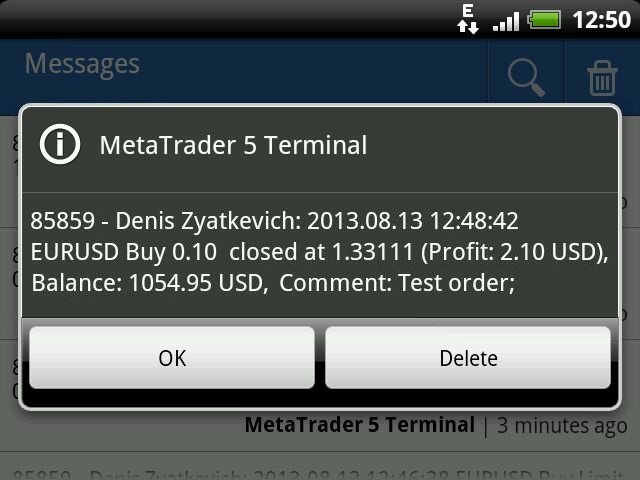
Examples of messages sent by the program:

  • Placing a pending order: 2013.08.13 12:43:29 EURUSD Buy Limit 0.10 Placed, Op: 1.33090, SL: 1.32980, TP: 1.33240, Comment: Test order;
  • Changing pending order parameters: 2013.08.13 12:44:37 EURUSD Sell Limit 0.10, Op: 1.33121 -> 1.33112, SL: 0.00000 -> 1.33000, TP: 0.00000 -> 1.33200, Comment: Test order;
  • Deleting a pending order: 2013.08.13 12:54:19 EURUSD Buy Limit 0.10 at 1.33092 deleted;
  • Opening position : 2013.08.13 12:45:32 EURUSD Buy 0.10 open at 1.33090, SL: 1.33000, TP: 1.33200;
  • Closing position: 2013.08.13 12:48:42 EURUSD Buy 0.10 closed at 1.33111, (Profit: 2.10 USD), Balance: 1054.95 USD, Comment: Test order;
  • Reversing position: 2013.08.13 01:53:36 EURUSD Buy 0.10 -> Sell 0.10, Op:1.32918, SL: 0.00000, TP: 0.00000.
  • Reaching critical equity or free margin level: 2013.08.13 13.35.08 Equity: 1047.95 USD, Free Margin: 782.00 USD.


Free Version and Version for MetaTrader 4

There is a free version of the program - NotifyMe Free for MT5. Unlike the full version, it allows only sending notifications of position opening or closing. Also, full and free versions of the application with similar features are available for MetaTrader 4 trading terminal.


Warning

The developer of NotifyMe for MT5 is not responsible for possible modification or termination of the program's operation due to changes in MQL5 language implemented by the trading terminal and language developer - MetaQuotes company. The developer of NotifyMe for MT5 is not responsible for any loss, damage or missed profits caused by the use of the program, its work or malfunction.


Contact Information

If you have any questions about the application, comments on its operation or suggestions for future improvements, please send them by email or leave your personal messages via this web site. Let me know what products (Expert Advisors, indicators, scripts) you would like to see.

Comentários 4
Johan Julien Aubry
919
Johan Julien Aubry 2021.06.06 09:50 
 

Works correctly. Please don't write directly to me about my review, I'll not answer.

PETER LUISI
1981
PETER LUISI 2021.01.23 09:16 
 

Just what I was looking for. Works well.

Wan Ping Fei
1690
Wan Ping Fei 2019.02.09 04:25 
 

Author's professional and fast technical support, enough to give 5 stars evaluation

Produtos recomendados
Core function Intelligent transaction management one-click opening and closing operation, which supports user-defined lots to set multiple closing modes: all closing, closing by direction and closing by profit and loss status. Professional risk control, real-time risk monitoring and spread control to avoid high-cost trading environment. Visual control panel has an intuitive graphical interface, and all functions can be operated with one button to display position information, profit and loss sta
FREE
Manus Pro
Itumeleng Mohlouwa Kgotso Tladi
MANUS PRO EA The Trading Revolution You've Been Waiting For Are you TIRED of watching other traders make consistent profits while your account bleeds red?   The financial markets don't wait for anyone – and neither should you. MANUS PRO isn't just another Expert Advisor... it's your   TICKET TO FINANCIAL FREEDOM . Why MANUS PRO is Different (And Why Everyone's Talking About It) FOR BEGINNERS: Your Trading Mentor That Never Sleeps Zero Learning Curve   – Install, activate, and watch it wo
Descrição geral Este indicador é uma versão aprimorada do Canal Donchian clássico, enriquecida com funções práticas para o trading real. Além das três linhas padrão (máxima, mínima e linha do meio), o sistema detecta breakouts e os mostra visualmente com setas no gráfico, exibindo apenas a linha oposta à direção da tendência atual para uma leitura mais limpa. O indicador inclui: Sinais visuais : setas coloridas nos breakouts Notificações automáticas : alerta pop-up, push e e-mail Filtro RSI : pa
FREE
Painel de negociação multifuncional para simplificar a negociação manual. Visualização de negociações e ordens, cálculos de P&L, negociação com um clique, modificação de ordens, ponto de equilíbrio, trailing stop, stop loss parcial, take profit parcial, fechamento por tempo, stop loss de capital e take profit - tudo isso é possível em um ou alguns cliques, usando teclas de atalho ou com um simples arrastar do mouse dos níveis no gráfico. A interface amigável permite que você teste os cenários ne
Este EA é usado principalmente para scalping de XAUUSD. Propósito   Remove a emoção da gestão de operações — protege automaticamente posições e realiza lucros para que você não precise tomar decisões difíceis sob pressão. O que faz   ️ Stop Loss automático   Define SL com base em máximos/mínimos recentes + buffer   Nada mais de estresse ao posicionar manualmente   Lucros parciais automáticos   Dois modos:   Movimento fixo: Fecha 50% após X de movimento de preço   R-Relação: Fecha 50% no
Trading Room Indcator
Meshari F M Alkhawaled
Trading Room Indicator is a professional market-structure tool built to give traders a clear, complete trading framework — combining CPR levels, dynamic targets, and trend direction in one clean view. Instead of guessing direction or overloading the chart with indicators, Trading Room Indicator focuses on what actually matters : levels, direction, and potential price expansion. What This Indicator Provides CPR Structure BUY level SELL level Pivot Point (PP) Designed to highlight equilibrium
Lock Bot
Artem Alekseev
This utility is designed to automatically maintain a "locking" position and reopen it when necessary, which is suitable for position maintenance and protection strategies. A simple utility (hereinafter referred to as the bot) that implements a locking strategy with an infinitely reloadable locking trade. How the bot works: - When launched, select a buy or sell order with a specified TP - Set the SL parameter for the locking trade - The bot monitors the distance between the opening price of the f

VM Auto SLTP Basic
Van Minh Nguyen
5 (1)
VM Auto SLTP Basic - Intelligent Trade Management for Scalpers Enhance your scalping strategy to a higher level. VM Auto SLTP Basic automatically manages Stop Loss and Take Profit for orders that are opened manually or by other Expert Advisors. This tool does not open trades on its own, allowing you to maintain full control while enjoying precise risk management. Key Features SL/TP based on ATR or fixed price Automatic SL move to Breakeven Risk management as a percentage of account balance Suppo
FREE
Crash5 EA ,I s a automatic robot that has the level of professional decision when to take a trade without any emotion. The bot will help in your scalping decision making with its own TP (take profit) and SL (stop loss) with the trail stop when in profit. This is a trend based spike catching ,looking on whats happening in real time charts no repainting of any signals. The robot helps in making decisions on the candle stick pattern opened and closed lat price with the help of RSI ,MACD and the EMA
Click Trading
Jawad Tauheed
5 (1)
One Click Trading – Auto TP SL Developer TraderLinkz Version 1.00 Category Utility What it does Adds missing TP and SL to your manual trades and pending orders Sets them once per ticket Lets you move TP and SL afterward Works on hedging and netting accounts Scans on every tick and reacts on trade events Why you want it You place faster entries You get consistent risk and exit targets You reduce fat finger errors You keep full manual control Quick start Attach the EA to any chart Keep TP and SL e
FREE
Important Lines
Terence Gronowski
4.87 (23)
This indicator displays Pivot-Lines, preday high and low, preday close and the minimum and maximum of the previous hour. You just have to put this single indicator to the chart to have all these important lines, no need to setup many single indicators. Why certain lines are important Preday high and low : These are watched by traders who trade in a daily chart. Very often, if price climbs over or falls under a preday low/high there is an acceleration in buying/selling. It is a breakout out of a
FREE
Introducing a powerful MetaTrader 5 Expert Advisor designed to enhance your trading strategy – the Auto Breakeven EA! This feature-rich EA is tailored to bring your stop-loss to breakeven, ensuring a risk-free trade once the market moves in your favor up to a specified price. Explore the full potential of the Auto Breakeven EA. Download it for free now, and find the download link at the bottom of our page. Elevate your trading experience and take control of your risk management strategy. Happy
FREE
Show Pips for MT5
Roman Podpora
4.65 (26)
Este indicador de informação será útil para quem quer estar sempre atento à situação atual da conta. -   Indicadores mais úteis O indicador exibe dados como lucro em pontos, porcentagem e moeda, bem como o spread do par atual e o tempo até o fechamento da barra no período atual. Existem várias opções para colocar a linha de informação no gráfico: À direita do preço (corre atrás do preço); Como comentário (no canto superior esquerdo do gráfico); No canto selecionado da tela. Também é possível se
FREE
This indicator is especially for the binary trading. Time frame is 1 minutes and exp time 5 or 3 minutes only. You must be use martingale 3 step. So you must put lots size is 10 % at most. You should use Mt2 trading platform to connect with my indicator to get more signal without human working. This indicator wining rate is over 80% but you may get 100% of profit by using martingale 3 step. You should use MT2 Trading Platform to connect meta trader platform and binary platform . You can get mt2
FREE
ZumikoFx Trading Stats
Michal Piotr Kochanski
ZumikoFX Trading Stats - Professional Account Dashboard Overview ZumikoFX Trading Stats is a comprehensive, real-time account monitoring dashboard designed for serious traders who need complete visibility of their trading performance. This indicator displays all crucial trading statistics in an elegant, easy-to-read panel positioned in the top-right corner of your chart. Key Features Complete Account Monitoring Balance & Equity - Real-time account status with current balance and equity includ
FREE
Order Book, known also as Market Book, market depth, Level 2, - is a dynamically updated table with current volumes of orders to buy and to sell specific financial instument at price levels near Bid and Ask. MetaTrader 5 provides the means for receiving market book from your broker, but in real time only, without access to its history. The indicator OrderBook Cumulative Indicator accumulates market book data online and visualizes them on the chart. In addition, the indicator can show the market
BoxFibo MT5
Sergei Kiriakov
It is just an alternative fibo lines. mt4 have is a very strange drawing of fibo lines, this utilites was written for mt4, but for mt5 it may not be particularly useful. A simple Box (Rectangle) graphic element with adjustable levels binding: it is possible to specify up to 17 custom levels, all rectangles on the chart with the given prefix in their name are processed. Levels are specified in % of the height of the rectangle. A convenient graphical element for analyzing charts by growth-correct
FREE
Fvg Edge
Ahmad Meftah Abdulsalam Alawwami
5 (1)
FVG Smart Zones – Edição Gratuita Indicador de Detecção de Gap de Valor Justo para MetaTrader 5 (MT5) Está procurando uma ferramenta de trading real – não apenas mais um indicador qualquer? FVG Smart Zones – Edição Gratuita oferece uma visão profissional do mercado detectando automaticamente Gaps de Valor Justo (FVG) e destacando zonas de trading de alta probabilidade diretamente no seu gráfico. Criado para traders que seguem: Conceitos de Smart Money (SMC) Conceitos de Trading ICT
FREE
The Goat Scalper
Giordan Cogotti
The Goat Scalper EA — Smart, Fast, and Built for Real Market Performance Overview The Goat Scalper EA is a next-generation trading system built to capture decisive market moves with surgical precision. Unlike typical scalpers that rely on risky methods such as martingale, grid, hedging, or arbitrage, The Goat uses a pure breakout logic based on advanced supply and demand zone detection, ensuring stable and transparent results in any condition. Core Strengths Smart Risk Management Stop Loss on
Stamina HUD
Michele Todesco
STAMINA HUD – Advanced Market & Trend Dashboard (MT5) STAMINA HUD   is a professional   market information panel   designed for traders who want   clarity, speed, and control   directly on the chart. It provides a   clean heads-up display (HUD)   with essential market data and   multi-timeframe trend direction , without cluttering the chart or generating trading signals. What STAMINA HUD Shows   Current Price   Spread (in real pips)   Today High–Low range (pips)   Average D
FREE
Total trade manager allows you to manage your trade to maximise your profits and minimise your losses. This is an essential for traders that are looking for consistency within their trading.  The features: Partial Stop Loss: This feature allows you to close a partial percentage of your trade once it goes into negative. So if your stop loss is 20 pips, you could close 75% of your trade at 10 pips and let the remainder of the position to continue running. Auto Stop Loss: This means that once you p
High Low Open Close
Alexandre Borela
4.98 (42)
Se você gosta deste projeto, deixe uma revisão de 5 estrelas. Este indicador desenha os preços abertos, altos, baixos e finais para o especificado período e pode ser ajustado para um fuso horário específico. Estes são níveis importantes olhados por muitos institucional e profissional comerciantes e pode ser útil para você saber os lugares onde eles podem ser mais activa. Os períodos disponíveis são: Dia anterior. Semana anterior. Mês anterior. Quarto anterior. Ano anterior. Ou: Dia atual. Seman
FREE
Follow The Line MT5
Oliver Gideon Amofa Appiah
4.6 (35)
This indicator obeys the popular maxim that: "THE TREND IS YOUR FRIEND" It paints a GREEN line for BUY and also paints a RED line for SELL. (you can change the colors). It gives alarms and alerts of all kinds. IT DOES NOT REPAINT and can be used for all currency pairs and timeframes. Yes, as easy and simple as that. Even a newbie can use it to make great and reliable trades. NB: For best results, get my other premium indicators for more powerful and reliable signals. Get them here: https://www.m
FREE
Eabotpro Copy Trade is a simple and robust file-based trade copier EA for MetaTrader 5. It can work in two modes inside the same file: MASTER (writes all trades to a common file) and SLAVE (reads the file and copies the trades to another account). This makes it easy to copy trades between multiple MT5 accounts on the same PC or VPS without DLLs or external servers. Main features: - Single EA with dual mode: MASTER or SLAVE (selectable by input) - Copies market orders (BUY/SELL) and pending ord
Candle Perspective Structure Indicator MT5 is a simple indicator that defines and displays the candlestick structure of the market. This indicator will suit both experienced traders and beginners who find it difficult to follow the structure visually. If you want to see more high-quality products or order the development/conversion of your own products, visit my partners' website: 4xDev Get 10% OFF on manual strategies automation services or indicator development/conversion services at 4xDev
FREE
O indicador SMC Venom Model BPR é uma ferramenta profissional para os traders que trabalham com o conceito Smart Money (SMC). Identifica automaticamente dois padrões principais no gráfico de preços: FVG   (Fair Value Gap) é uma combinação de três velas, em que existe um gap entre a primeira e a terceira velas. Forma uma zona entre níveis onde não há suporte de volume, o que geralmente leva a uma correção de preço. BPR   (Balanced Price Range) é uma combinação de dois padrões FVG que formam uma
Trade2Telegram
Strifor (Mauritius) Ltd
Trade2Telegram — a plugin for automatic trade notifications from MetaTrader to Telegram. This tool is designed for traders managing capital, running signal channels, or leading educational communities. The plugin copies all trading operations from the terminal and publishes them to a selected Telegram chat, group, or channel. Messages are sent automatically when positions are opened or closed, stop-loss or take-profit levels are changed, pending orders are triggered, or trades are partially clos
FREE
Global Market Risk Sentiment Meter 1. Abstraction The   Global Market Risk Sentiment Meter   is a sophisticated analytical tool designed for the MetaTrader 5 (MQL5) platform. Unlike traditional indicators that analyze a single asset in isolation, this utility employs an   Inter-Market Analysis   approach to reconstruct the psychological state of the global financial markets. By aggregating real-time data from US Indices, Global Equities, Cryptocurrencies, and Safe Haven assets (Gold and the US
FREE
Free automatic Fibonacci is an indicator that automatically plots a Fibonacci retracement based on the number of bars you select on the BarsToScan setting in the indicator. The Fibonacci is automatically updated in real time as new highest and lowest values appears amongst the selected bars. You can select which level values to be displayed in the indicator settings. You can also select the color of the levels thus enabling the trader to be able to attach the indicator several times with differe
FREE
Expert TP SL v04 - Professional Trading Assistant with AI Motivation System Advanced manual trading tool with automatic risk management, overtrading protection, and intelligent psychological support for disciplined trading. PRODUCT OVERVIEW Expert TP SL v04 is a comprehensive trading assistant designed for manual traders who want to maintain emotional discipline while automating risk calculations. This isn't just another order placement tool - it's a complete trading psychology system that pr
Os compradores deste produto também adquirem
Trade Assistant MT5
Evgeniy Kravchenko
4.41 (205)
Ajuda a calcular o risco por comércio, a fácil instalação de uma nova encomenda, gestão de encomendas com funções de fecho parcial, trailing stop de 7 tipos e outras funções úteis. Materiais e instruções adicionais Instruções de instalação   -   Instruções para a aplicação   -   Versão de teste da aplicação para uma conta de demonstração Função de linha Mostra no gráfico a linha de Abertura, Stop Loss, Take Profit. Com esta função é fácil definir uma nova ordem e ver as suas características ad
Bem-vindo ao Trade Manager EA—uma ferramenta de gestão de risco criada para tornar o trading mais intuitivo, preciso e eficiente. Não é apenas uma ferramenta para executar ordens, mas uma solução abrangente para planejamento de operações, gerenciamento de posições e controle de risco. Seja você um iniciante, trader avançado ou scalper que precisa de execução rápida, o Trade Manager EA adapta-se às suas necessidades, oferecendo flexibilidade em todos os mercados, desde forex e índices até commodi
Local Trade Copier EA MT5
Juvenille Emperor Limited
4.96 (119)
Experimente uma cópia de negociação excepcionalmente rápida com o Local Trade Copier EA MT5 . Com sua fácil configuração de 1 minuto, este copiador de negociações permite que você copie negociações entre vários terminais MetaTrader no mesmo computador Windows ou em um Windows VPS com velocidades de cópia ultra rápidas de menos de 0.5 segundos. Seja você um trader iniciante ou profissional, o   Local Trade Copier EA MT5   oferece uma ampla gama de opções para personalizá-lo de acordo com suas ne
TradePanel MT5
Alfiya Fazylova
4.86 (148)
O Trade Panel é um assistente comercial multifuncional. A aplicação contém mais de 50 funções de negociação para negociação manual e permite automatizar a maioria das operações de negociação. Atenção, a aplicação não funciona no testador de estratégia. Antes de comprar, pode testar a versão de demonstração numa conta de demonstração. Versão de demonstração aqui . Instruções completas aqui . Comércio. Permite realizar operações de negociação com um clique: Abra as ordens e posições pendentes com
Versão Beta O Telegram to MT5 Signal Trader está quase no lançamento oficial da versão alfa. Alguns recursos ainda estão em desenvolvimento e você pode encontrar pequenos erros. Se tiver problemas, por favor reporte, seu feedback ajuda a melhorar o software para todos. O preço aumentará após 20 vendas. Cópias restantes a $90: 2/20 . Telegram to MT5 Signal Trader é uma ferramenta poderosa que copia automaticamente sinais de trading de canais ou grupos do Telegram diretamente para sua conta Meta
Trade Dashboard MT5
Fatemeh Ameri
4.96 (109)
Tired of complex order placement and manual calculations? Trade Dashboard is your solution. With its user-friendly interface, placing orders becomes effortless, by a single click, you can open trades, set stop loss and take profit levels, manage trade lot size, and calculate risk to reward ratios, allowing you to only focus on your strategy. Say goodbye to manual calculations and streamline your trading experience with Trade Dashboard. Download  Demo Version  right now. You can find  Details of
Ultimate Extractor
Clifton Creath
5 (9)
Ultimate Extractor - Professional Trading Analytics for MT5 *****this is the local HTML version of Ultimate Extractor. Check out Ultimate Extractor Cloud on mql5 for the Cloud version****** Ultimate Extractor transforms your MetaTrader 5 trading history into actionable insights with comprehensive analytics, interactive charts, and real-time performance tracking. What It Does Automatically analyzes your MT5 trading history across all Expert Advisors and generates detailed HTML reports with inte
Trade copier MT5
Alfiya Fazylova
4.6 (35)
Trade Copier é um utilitário profissional projetado para copiar e sincronizar negociações entre contas de negociação. A cópia ocorre da conta / terminal do fornecedor para a conta / terminal do destinatário, instalada no mesmo computador ou vps. Antes de comprar, você pode testar a versão demo em uma conta demo. Versão de demonstração aqui . Instruções completas aqui . Principais funcionalidades e benefícios: Suporta a cópia de MT5> MT5, MT4> MT5, MT5> MT4, incluindo contas "MT5 netting". Os mod
Trade Manager DaneTrades
Levi Dane Benjamin
4.33 (27)
Trade Manager para ajudá-lo a entrar e sair rapidamente de negociações enquanto calcula automaticamente seu risco. Incluindo recursos para ajudar a evitar negociações excessivas, negociações de vingança e negociações emocionais. As negociações podem ser gerenciadas automaticamente e as métricas de desempenho da conta podem ser visualizadas em um gráfico. Esses recursos tornam este painel ideal para todos os traders manuais e ajudam a aprimorar a plataforma MetaTrader 5. Suporte multilíngue. Vers
Copy Cat More Trade Copier MT5 (Gato Copiador MT5) é um copiador de negociações local e uma estrutura completa de gestão de riscos e execução projetada para os desafios comerciais de hoje. Desde desafios de prop firms até gestão de portfólio pessoal, ele se adapta a cada situação com uma combinação de execução robusta, proteção de capital, configuração flexível e manuseio avançado de negociações. O copiador funciona tanto no modo Master (remetente) quanto Slave (receptor), com sincronização em t
Smart Stop Scanner – Sistema multiactivo de análise de stops baseado em estrutura de mercado Visão geral O Smart Stop Scanner oferece aos traders um monitoramento profissional de níveis de stop-loss em múltiplos mercados. O sistema identifica automaticamente as zonas de stop mais relevantes com base na estrutura real do mercado, rupturas significativas e lógica de price action — tudo apresentado em um painel unificado, claro e totalmente compatível com telas de alta resolução (DPI-aware). Func
Smart Stop Manager – Execução automática de stop-loss com precisão profissional Visão geral O Smart Stop Manager é a camada de execução da linha Smart Stop, desenvolvido para traders que precisam de uma gestão de stop-loss estruturada, fiável e totalmente automatizada em múltiplas posições abertas. Ele monitora continuamente todas as operações ativas, calcula o nível ideal de stop usando a lógica de estrutura de mercado do Smart Stop e atualiza os stops automaticamente com regras claras e tran
HINN MagicEntry Extra
ALGOFLOW OÜ
4.67 (12)
HINN MAGIC ENTRY – the ultimate tool for entry and position management! Place orders by selecting a level directly on the chart! full description Key features: - Market, limit, and pending orders - Automatic lot size calculation - Automatic spread and commission accounting - Unlimited partitial take-profits  - Breakeven and trailing stop-loss and take-profit  functions - Invalidation leves - Intuitive, adaptive, and customizable interface - Works with any assets and account types Really feels
Exp COPYLOT CLIENT for MT5
Vladislav Andruschenko
3.82 (34)
Copiadora de comércio para MT5 é um  comércio   copiadora para a plataforma МetaТrader 5 . Ele copia negociações forex  entre   qualquer conta   MT5  - MT5, MT4  - MT5 para a versão COPYLOT MT5 (ou MT4  - MT4 MT5  - MT4 para a versão COPYLOT MT4) Copiadora confiável! Versão MT 4 Descrição completa +DEMO +PDF Como comprar Como instalar    Como obter arquivos de log    Como testar e otimizar    Todos os produtos da Expforex Você também pode copiar negociações no terminal МТ4 ( МТ4  - МТ4, МТ5  -
The product will copy all telegram signal to MT5 ( which you are member) , also it can work as remote copier.  Easy to set up, copy order instant, can work with almost signal formats, image signal,  s upport to translate other language to English Work with all type of channel or group, even channel have "Restrict Saving Content", work with  multi channel, multi MT5 Work as remote copier: with signal have ticket number, it will copy exactly via ticket number. Support to backtest signal. How to s
YuClusters
Yury Kulikov
4.93 (43)
Atenção: A versão demo para revisão e teste está aqui . YuClusters é um sistema profissional de análise de mercado. O trader tem oportunidades únicas para analisar o fluxo de pedidos, volumes de negociação, movimentos de preços usando vários gráficos, perfis, indicadores e objetos gráficos. O YuClusters opera com base em dados de Tempos e Negócios ou informações de ticks, dependendo do que está disponível nas cotações de um instrumento financeiro. O YuClusters permite que você crie gráficos com
Telegram To MT5 Receiver
Levi Dane Benjamin
4.53 (15)
Copie os sinais de qualquer canal do qual você seja membro (incluindo privados e restritos) diretamente para o seu MT5.  Esta ferramenta foi projetada com o usuário em mente, oferecendo muitos recursos que você precisa para gerenciar e monitorar as negociações. Este produto é apresentado em uma interface gráfica fácil de usar e visualmente atraente. Personalize suas configurações e comece a usar o produto em minutos! Guia do usuário + Demo  | Versão MT4 | Versão Discord Se deseja experimentar
Grid Manual MT5
Alfiya Fazylova
4.9 (20)
"Grid Manual" é um painel comercial para trabalhar com uma grade de ordens. O utilitário é universal, possui configurações flexíveis e uma interface intuitiva. Ele trabalha com uma grade de ordens não apenas na direção da média das perdas, mas também na direção do aumento dos lucros. O trader não precisa criar e manter uma grade de ordens, tudo será feito pelo ""Grid Manual". Basta abrir um orden e o "Grid manual" criará automaticamente uma grade de ordens para ele e trabalhará com ele até que s
The News Filter MT5
Leolouiski Gan
4.74 (19)
Este produto filtra todos os consultores especializados e gráficos manuais durante o horário das notícias, para que você não precise se preocupar com picos de preços repentinos que possam destruir suas configurações de negociação manuais ou negociações realizadas por outros consultores especializados. Este produto também vem com um sistema de gerenciamento de pedidos completo que pode lidar com suas posições abertas e ordens pendentes antes do lançamento de qualquer notícia. Depois de comprar o
Auto Trade Copier é projetado para copiar comércios entre contas MT5 / terminais múltiplos com uma precisão absoluta. Com esta ferramenta , você pode agir como quer provedor ( fonte ) ou receptor (destino). Cada ações negociadas será clonado a partir de provedor para o receptor sem demora. A seguir são características de destaque :     Alternar entre Provider ou papel Receiver dentro de uma ferramenta.     Um provedor pode copiar comércios de contas da multi- receptor.     Absoluto compatível
MT5 to Telegram Signal Provider é uma utilidade fácil de usar e totalmente personalizável que permite o envio de sinais especificados para o chat, canal ou grupo do Telegram, tornando sua conta um fornecedor de sinais . Ao contrário da maioria dos produtos concorrentes, ele não usa importações de DLL. [ Demonstração ] [ Manual ] [ Versão MT4 ] [ Versão Discord ] [ Canal do Telegram ]  New: [ Telegram To MT5 ] Configuração Um guia do usuário passo a passo está disponível. Não é necessário conhec
Everything for chart Technical Analysis indicator MT5 in one tool Draw your supply demand zone with rectangle and support resistance with trendline and get alerts to mobile phone or email alert -  Risk reward indicator mt5 Video tutorials, manuals, DEMO download   here .   Find contacts on my   profile . 1.   Extended rectangles and trendlines Object will be extended to the right edge of the chart when price will draw new candles on chart. This is rectangle extender or trendline extender. 2. Pri
Cerberus Equity Watcher
Samuel Bandi Roccatello
5 (3)
Cerberus the Equity Watcher é uma ferramenta de gerenciamento de risco que monitora constantemente o patrimônio da sua conta e evita grandes perdas, causadas por EAs defeituosos ou por seu comportamento emocional. É extremamente útil para traders sistemáticos que dependem de EAs que podem conter bugs ou que podem não ter um bom desempenho em condições de mercado inesperadas. Cerberus permite que você defina um valor mínimo de patrimônio e (opcionalmente) um valor máximo, se qualquer um deles for
EasyInsight AIO MT5
Alain Verleyen
4.91 (11)
EASY Insight AIO – A solução tudo-em-um para trading inteligente e sem esforço Visão geral Imagine analisar todo o mercado — Forex, Ouro, Cripto, Índices e até Ações — em segundos, sem precisar examinar gráficos manualmente, instalar indicadores ou lidar com configurações complicadas. EASY Insight AIO é sua ferramenta definitiva de exportação para trading com IA, pronta para usar. Ela oferece um panorama completo do mercado em um único arquivo CSV limpo — pronto para análise imediata no ChatGP
Telegram to MT5 Coppy
Sergey Batudayev
5 (7)
Telegram para MT5:   A solução definitiva para cópia de sinais Simplifique suas negociações com o Telegram para MT5, a ferramenta moderna que copia sinais de negociação diretamente dos canais e chats do Telegram para a sua plataforma MetaTrader 5, sem a necessidade de DLLs. Esta solução poderosa garante execução precisa dos sinais, amplas opções de personalização, economiza tempo e aumenta sua eficiência. [ Instructions and DEMO ] Principais características Integração direta da API do Telegram A
Seconds Chart MT5
Boris Sedov
4.59 (17)
Seconds Chart — uma ferramenta exclusiva para criar gráficos de segundos no MetaTrader 5 . Com o Seconds Chart , você pode criar gráficos com períodos definidos em segundos, proporcionando flexibilidade e precisão ideais para análise, indisponíveis em gráficos padrão de minutos ou horas. Por exemplo, o período S15 indica um gráfico com velas de 15 segundos. Você pode usar qualquer indicador ou Expert Advisor com suporte a símbolos personalizados. Trabalhar com eles é tão conveniente quanto negoc
HINN Lazy Trader
ALGOFLOW OÜ
5 (2)
Lazy Trader is your personal risk management assistant that independently finds the best market entries, manages positions, and helps you extract maximum profit from every trading idea! It monitors charts from M1 to W1 , finds optimal entry points based on your parameters, and manages trades without your involvement: - Got an idea on the daily chart? No need to wait for lower timeframes to form a signal — Lazy Trader will check everything and open all necessary positions while you live your lif
Painel de negociação para negociação em 1 clique. Trabalhando com posições e pedidos! Negociar a partir do gráfico ou do teclado. Com nosso painel de negociação, você pode executar negociações com um único clique diretamente no gráfico e realizar operações de negociação 30 vezes mais rápido do que com o controle MetaTrader padrão. Cálculos automáticos de parâmetros e funções tornam a negociação mais rápida e conveniente para os traders. Dicas gráficas, rótulos informativos e informações completa
News Filter EA: Advanced Algo Trading Assistant News Filter EA is an advanced algo trading assistant designed to enhance your trading experience. By using the News Filter EA , you can integrate a Forex economic news filter into your existing expert advisor, even if you do not have access to its source code. In addition to the news filter, you can also specify trading days and hours for your expert. The News Filter EA also includes risk management  and equity protection features. MT4 Version KEY
Zentral Trading Manager
Ray Zeanrik Parreno Fredeluces
5 (4)
Zentral Trading Manager Your Command Center for Precision Trading — Now Stronger than Ever Take control of your trades like never before. Zentral Trading Manager is your all-in-one manual trading panel for MetaTrader 5 — built for scalpers, day traders, and serious strategy execution. Fully compatible with both Mac and Windows laptops. High-DPI safe. No more layout issues. Key Features (Latest 2025 Update): • One-Click Close – Instantly close Buy/Sell, winning/losing trades, or even half positi
Mais do autor
Overview The Expert Advisor allows you to receive notifications to the mobile phone (or tablet PC), mailbox or play the sound alert when some events occured: opening or closing position (also closing all positions), placing or deleting pending order; changing open price, stop loss or take profit; the account balance, equity, margin level, free margin or drawdown has reached the user specified level. You can specify a notification interval, notification text template and audio file for sound aler
NotifyMe Free for MT5
Denis Zyatkevich
5 (5)
Overview The Expert Advisor sends notifications to a mobile phone, via e-mail or activates an audio alarm in case any changes are detected on the trading account: opening/closing positions, changing order parameters, balance or leverage. Also, the Expert Advisor can inform that Equity on the trading account has dropped below a specified value or Free Margin is small compared to Margin. The Expert does not trade, it only monitors your account and orders. Launching the Expert Advisor You should a
FREE
Overview The script displays information about the trade account: Information about the trade account: Account - account number and type (Real, Contest or Demo); Name - name of the account owner; Company - name of a company that provide the access to trading; Server - trade server name; Connection State - connection state; Trade Allowed - shows whether trading is allowed on the account at the moment; Experts Allowed - shows whether it is allowed to trade using Expert Advisors; Balance - account
FREE
NotifyMe for MT4
Denis Zyatkevich
5 (4)
Overview O Expert Advisor envia notificações para um telefone celular, e-mail ou ativa um alarme sonoro se alguma alteração for detectada na conta de negociação: abrir/fechar posições, mudando parâmetros de ordem, balanço ou alavancagem. Além disso, o Expert Advisor pode informar se o Capital Líquido da conta de negociação ficou abaixo de um valor determinado ou se a Margem Livre está pequena comparado com a Margem Disponível. O Expert não negocia, somente monitora sua conta. Anexando o Expert
NotifyMe Free for MT4
Denis Zyatkevich
5 (4)
Visão global O Expert Advisor envia notificações para um telefone celular, via e-mail ou ativa um alarme sonoro no caso da posição for aberta ou fechada na conta de negociação. O Expert não o negocia, ele só monitora sua conta e as ordens. Lançando o Expert Advisor Para o Expert Advisor funcionar, coloque o arquivo NotifyMe_free.ex4 em terminal_folder/experts (provavelmente ele será colocado lá automaticamente). NotifyMe_free deve aparecer na seção Expert Advisors da janela do Navegador. Se não
FREE
Overview The script displays information about the trade account: Account - account number and type (Real or Demo); Name - name of the account owner; Company - name of a company that provide the access to trading; Server - trade server name; Connection State - connection state; Trade Allowed - shows whether trading is allowed on the account at the moment; Balance - account balance; Equity - account equity; Credit - amount of credit; Profit - profit size; Free Margin - free margin on the account;
FREE
Overview The script displays information about the trade account and the current financial instrument. Information about the trade account: Account - account number and type (Real or Demo); Name - name of the account owner; Company - name of a company that provide the access to trading; Server - trade server name; Connection State - connection state; Trade Allowed - shows whether trading is allowed on the account at the moment; Balance - account balance; Equity - account equity; Credit - amount
Overview The Expert Advisor allows you to receive notifications to the mobile phone (or tablet PC), mailbox or play the sound alert when some events occured: opening or closing position, placing or deleting pending order; changing open price, stop loss or take profit; the account balance, equity, margin level, free margin or drawdown has reached the user specified level. You can specify a notification interval, notification text template and audio file for sound alerts. Expert Advisor saves the
This is Advanced NotifyMe version with large interface. Overview The Expert Advisor allows you to receive notifications to the mobile phone (or tablet PC), mailbox or play the sound alert when some events occured: opening or closing position, placing or deleting pending order; changing open price, stop loss or take profit; the account balance, equity, margin level, free margin or drawdown has reached the user specified level. You can specify a notification interval, notification text template an
Overview The Expert Advisor sends notifications to a mobile phone, via e-mail or plays a sound in case any changes are detected on the trading account: opening/closing positions, changing order parameters, balance or leverage. Also, the Expert Advisor can inform that Equity on the trading account has dropped below a specified value or Free Margin is small compared to Margin. The Expert does not trade, it only monitors your account. Launching the Expert Advisor For the Expert Advisor to work, pl
Overview The script displays information about the trade account and the current financial instrument. Information about the trade account: Account - account number and type (Real, Contest or Demo); Name - name of the account owner; Company - name of a company that provide the access to trading; Server - trade server name; Connection State - connection state; Trade Allowed - shows whether trading is allowed on the account at the moment; Experts Allowed - shows whether it is allowed to trade usin
This is Advanced NotifyMe version with large interface. Overview The Expert Advisor allows you to receive notifications to the mobile phone (or tablet PC), mailbox or play the sound alert when some events occured: opening or closing position (also closing all positions), placing or deleting pending order; changing open price, stop loss or take profit; the account balance, equity, margin level, free margin or drawdown has reached the user specified level. You can specify a notification interval,
Overview The Expert Advisor sends notifications to a mobile phone, via e-mail or plays a sound in case any changes are detected on the trading account: opening/closing positions, changing order or position parameters, balance or leverage. Also, the Expert Advisor can inform that Equity on the trading account has dropped below a specified value or Free Margin is small compared to Margin. The Expert Advisor does not trade, it only monitors your account. Launching the Expert Advisor You should all
Filtro:
Johan Julien Aubry
919
Johan Julien Aubry 2021.06.06 09:50 
 

Works correctly. Please don't write directly to me about my review, I'll not answer.

PETER LUISI
1981
PETER LUISI 2021.01.23 09:16 
 

Just what I was looking for. Works well.

Nulltinull
29
Nulltinull 2019.10.01 15:41 
 

O usuário não deixou nenhum comentário para sua avaliação

Wan Ping Fei
1690
Wan Ping Fei 2019.02.09 04:25 
 

Author's professional and fast technical support, enough to give 5 stars evaluation

Responder ao comentário

































