
Orderflow Footprint
- Indicators
-
Panthita Aichoi
 BTC Wallet :
bc1qx685px03km775uapdvje8qz6t839g3fzt0gegv
ETH ERC20
USDT Address:
0x57cF049c965fbE4D25bD2a9aE02B27a04F5574F9 - Version: 3.3
- Updated: 3 June 2026
- Activations: 5
Asa Orderflow Footprint v3 — Product Description
Overview
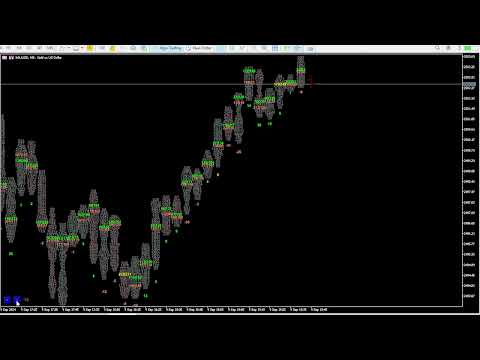
Asa Orderflow Footprint is a professional-grade footprint chart indicator for MetaTrader 5 that renders real-time Bid/Ask volume (or tick count) at every price level inside each candle. Built for serious order flow traders, it goes far beyond a basic footprint by adding POC migration analysis, a one-glance order-flow dashboard, stacked imbalance detection, absorption flags, and naked Point of Control (POC) lines — all inside the main chart window with no sub-window required.
Designed and tested on Gold (XAUUSD) feeds, the indicator uses a flag-based tick classification engine to separate buyer-initiated and seller-initiated activity on feeds that provide aggressor data, and falls back gracefully to pure volume-by-price analysis on feeds that do not (see Notes).
Key Features
📊 Footprint Chart (Bid | Ask per cell)
Displays sell-side (Bid) and buy-side (Ask) volume side-by-side at every price bucket inside each candle
Cell size is freely adjustable via on-chart < / > buttons — no need to re-open settings
Choose between Tick Count mode (legacy) or Real Volume mode ( volume_real with fallback to volume )
Fixed-grid price bucketing: cells never shift position while the forming bar is updating
Point of Control (POC) automatically highlighted per candle
🧭 POC Migration (NEW)
Tracks how each candle's POC shifts versus the previous bars — the cleanest read of where "value" is actually moving
Measured across three configurable look-back windows (e.g. 3 / 5 / 15 bars)
Instantly reveals a healthy trend (POC stepping up/down), a stall (POC flattening), or a divergence (price makes a new high/low while POC fails to follow)
Works on any feed — based on volume-by-price, not delta
📋 Smart Dashboard (NEW)
A single, glance-able panel that distils the whole order flow — see direction, conviction, and key levels in one look
Bias headline — overall direction from short-weighted POC migration (configurable weights), color-coded UP / DOWN / RANGE
Conviction meter — strong / medium / thin, driven by relative volume, so you know whether a move has real participation behind it
POC Migration meter — 3 / 5 / 15-bar windows with selectable display: net steps, up-down counts, or percent
POC trail sparkline — the last bars' POC drawn as a mini-profile to read migration shape at a glance
Naked POC readout — nearest unfilled POC above and below price, with distance and a proximity highlight when price approaches
Last-candle character — profile shape (P / b / balanced) and absorption state (buy / sell)
Built-in scale controls — the < / > cell-size buttons are folded neatly into the panel
Fully movable — place the dashboard in any chart corner with custom X / Y offset; auto-repositions on chart resize
🔴🟢 Imbalance & Absorption Detection
Absorption Candle — flags candles where the dominant side's POC is skewed, marked with a colored diamond above/below the bar (green = buy-side, salmon = sell-side)
Stacked Diagonal Imbalance — highlights consecutive price levels where Ask dominates the Bid one cell lower (or vice versa) by a configurable ratio, colored in distinct Buy/Sell imbalance colors
Imbalance stack length and ratio are fully configurable ( ImbRatio × ratio, ImbStack minimum rows)
📌 Naked POC Lines
Automatically draws a horizontal line at each bar's Point of Control (highest combined Bid+Ask cell)
Lines extend to the right and disappear automatically once a subsequent candle's range touches that price level
Fully customizable color, style, and width — act as magnets and dynamic support/resistance
🎯 In-Candle POC Marker (NEW)
Optional marker drawn at the exact POC price, centered inside each candle, so you can scan the whole migration staircase across the chart at a glance
Configurable glyph/text, color, and font size
📋 Per-Candle Summary Line
Optional one-line summary below each candle: B: [buys] S: [sells] T: [total] [delta%]
Gives instant at-a-glance context without reading individual cells
🔔 Smart Alerts
Popup and/or push notification alerts for:
POC migration alignment — fires when the 3 / 5 / 15 windows all agree on direction (a strong-trend signal) (NEW)
Imbalance / absorption candle detection
Delta sign flip on the just-closed bar (on feeds with aggressor data)
Alerts fire once per closed candle — no repeated spam on every tick
⚡ Performance Optimized
Incremental redraw: only the forming candle (shift 0) is recalculated on each tick; all historical candles are drawn once per bar open
Object reuse: chart objects are updated in-place rather than deleted and recreated, keeping CPU usage low even with 100+ candles displayed
Heavy work (naked-POC scan, migration) runs on bar close; only relative volume and proximity update intratick
Input Parameters
Main
ShowFootprint — Show/hide the footprint cell text
ShowSummary — Show per-candle B/S/Total/Delta% summary line
TPointScale — Initial cell size (in points); adjustable live with dashboard buttons
CountMode — Cell value = tick count or real volume
OFPercent — Absorption candle threshold (%)
CountCandle — Number of candles to render (up to 100)
FontSize — Cell text font size
MBidColor / MAskColor — Highlight color for max Bid / max Ask cells
sameColor — Color when max Bid and max Ask are on the same cell
NormalColor / BlankDataColor — Colors for normal and empty cells
Imbalance
ShowAbsorbCandle — Show absorption candle diamond markers
ShowImbalance — Enable stacked diagonal imbalance highlight
ImbRatio — Minimum Ask/Bid ratio to flag a diagonal imbalance cell
ImbStack — Minimum consecutive imbalance cells required to highlight
ImbBuyColor / ImbSellColor — Imbalance zone highlight colors
Alert
AlertPopup / AlertPush — Enable popup / push notification alerts
AlertOnImb / AlertOnFlip — Alert trigger: imbalance candle / delta flip
Naked POC lines
ShowPOC — Show naked POC extension lines
POCColor / POCStyle / POCWidth — POC line appearance settings
POC marker in candle
ShowPOCInCandle — Show the centered in-candle POC marker
POCInText — Marker glyph/text
POCInColor — Marker color
POCInFontSize — Marker font size
Dashboard
ShowDashboard — Show/hide the order-flow dashboard
DashCorner — Dashboard corner (any of the 4 corners)
DashX / DashY — Dashboard offset from the corner (pixels)
MigMode — Migration cell display: net steps / up-down / percent
MigW1 / MigW2 / MigW3 — POC migration look-back windows (bars), default 3 / 5 / 15
BiasWgt1 / BiasWgt2 / BiasWgt3 — Bias weighting per window (short-weighted by default, 3 / 2 / 1)
RelVolPeriod — Relative-volume averaging period (bars)
RelVolStrong / RelVolMedium — Relative-volume thresholds for strong / medium conviction
ProximityPts — Distance (points) at which a naked POC counts as "near"
AlertOnAlign — Alert when the 3 migration windows all align
How to Use
Attach the indicator to any chart and timeframe (XAUUSD M1 recommended)
Use the < > buttons in the dashboard footer to increase or decrease cell size until each bar shows a readable number of price rows
Read the Dashboard first: the Bias headline gives direction + conviction; the 3 / 5 / 15 migration meter and POC trail show whether the trend is healthy, stalling, or diverging
Trade with the migration — enter on pullbacks to a prior candle's POC or a naked POC level that holds; reversal-watch when migration stalls/diverges or an absorption diamond prints against the trend
Watch the Naked POC readout for the nearest unfilled high-volume levels above/below — natural targets and reaction zones
Watch for cyan highlighted zones (stacked buy imbalance) and magenta highlighted zones (stacked sell imbalance) as potential institutional order clusters
Enable Alerts to get notified of migration alignment, imbalance/absorption candles, or delta flips without watching the screen
Notes & Requirements
Requires a broker that provides tick history via CopyTicksRange() — most ECN/STP brokers on MT5 qualify
Delta-based features (Delta %, delta-flip alert, and CVD where applicable) require a feed that flags ticks by aggressor side (Bid/Ask). Some accounts — common on certain CFD feeds — send combined Bid+Ask ticks, which makes Delta read ≈ 0. On those feeds, the indicator still works fully via its Volume-by-Price, POC, POC Migration, Naked POC, and Relative-Volume tools, which do not depend on aggressor data.
Real Volume mode requires the broker to supply volume_real in tick data; the indicator automatically falls back to tick volume if unavailable
Recommend running on M1 to H1 timeframes for meaningful order flow granularity
Set CountCandle conservatively (30–50) on lower timeframes to keep chart objects manageable
This is an analysis tool — it does not place trades, and no indicator guarantees profit. Always use proper risk management.
Overview
Asa Orderflow Footprint is a professional-grade footprint chart indicator for MetaTrader 5 that renders real-time Bid/Ask volume (or tick count) at every price level inside each candle. Built for serious order flow traders, it goes far beyond a basic footprint by adding POC migration analysis, a one-glance order-flow dashboard, stacked imbalance detection, absorption flags, and naked Point of Control (POC) lines — all inside the main chart window with no sub-window required.
Designed and tested on Gold (XAUUSD) feeds, the indicator uses a flag-based tick classification engine to separate buyer-initiated and seller-initiated activity on feeds that provide aggressor data, and falls back gracefully to pure volume-by-price analysis on feeds that do not (see Notes).
Key Features
📊 Footprint Chart (Bid | Ask per cell)
Displays sell-side (Bid) and buy-side (Ask) volume side-by-side at every price bucket inside each candle
Cell size is freely adjustable via on-chart < / > buttons — no need to re-open settings
Choose between Tick Count mode (legacy) or Real Volume mode ( volume_real with fallback to volume )
Fixed-grid price bucketing: cells never shift position while the forming bar is updating
Point of Control (POC) automatically highlighted per candle
🧭 POC Migration (NEW)
Tracks how each candle's POC shifts versus the previous bars — the cleanest read of where "value" is actually moving
Measured across three configurable look-back windows (e.g. 3 / 5 / 15 bars)
Instantly reveals a healthy trend (POC stepping up/down), a stall (POC flattening), or a divergence (price makes a new high/low while POC fails to follow)
Works on any feed — based on volume-by-price, not delta
📋 Smart Dashboard (NEW)
A single, glance-able panel that distils the whole order flow — see direction, conviction, and key levels in one look
Bias headline — overall direction from short-weighted POC migration (configurable weights), color-coded UP / DOWN / RANGE
Conviction meter — strong / medium / thin, driven by relative volume, so you know whether a move has real participation behind it
POC Migration meter — 3 / 5 / 15-bar windows with selectable display: net steps, up-down counts, or percent
POC trail sparkline — the last bars' POC drawn as a mini-profile to read migration shape at a glance
Naked POC readout — nearest unfilled POC above and below price, with distance and a proximity highlight when price approaches
Last-candle character — profile shape (P / b / balanced) and absorption state (buy / sell)
Built-in scale controls — the < / > cell-size buttons are folded neatly into the panel
Fully movable — place the dashboard in any chart corner with custom X / Y offset; auto-repositions on chart resize
🔴🟢 Imbalance & Absorption Detection
Absorption Candle — flags candles where the dominant side's POC is skewed, marked with a colored diamond above/below the bar (green = buy-side, salmon = sell-side)
Stacked Diagonal Imbalance — highlights consecutive price levels where Ask dominates the Bid one cell lower (or vice versa) by a configurable ratio, colored in distinct Buy/Sell imbalance colors
Imbalance stack length and ratio are fully configurable ( ImbRatio × ratio, ImbStack minimum rows)
📌 Naked POC Lines
Automatically draws a horizontal line at each bar's Point of Control (highest combined Bid+Ask cell)
Lines extend to the right and disappear automatically once a subsequent candle's range touches that price level
Fully customizable color, style, and width — act as magnets and dynamic support/resistance
🎯 In-Candle POC Marker (NEW)
Optional marker drawn at the exact POC price, centered inside each candle, so you can scan the whole migration staircase across the chart at a glance
Configurable glyph/text, color, and font size
📋 Per-Candle Summary Line
Optional one-line summary below each candle: B: [buys] S: [sells] T: [total] [delta%]
Gives instant at-a-glance context without reading individual cells
🔔 Smart Alerts
Popup and/or push notification alerts for:
POC migration alignment — fires when the 3 / 5 / 15 windows all agree on direction (a strong-trend signal) (NEW)
Imbalance / absorption candle detection
Delta sign flip on the just-closed bar (on feeds with aggressor data)
Alerts fire once per closed candle — no repeated spam on every tick
⚡ Performance Optimized
Incremental redraw: only the forming candle (shift 0) is recalculated on each tick; all historical candles are drawn once per bar open
Object reuse: chart objects are updated in-place rather than deleted and recreated, keeping CPU usage low even with 100+ candles displayed
Heavy work (naked-POC scan, migration) runs on bar close; only relative volume and proximity update intratick
Input Parameters
Main
ShowFootprint — Show/hide the footprint cell text
ShowSummary — Show per-candle B/S/Total/Delta% summary line
TPointScale — Initial cell size (in points); adjustable live with dashboard buttons
CountMode — Cell value = tick count or real volume
OFPercent — Absorption candle threshold (%)
CountCandle — Number of candles to render (up to 100)
FontSize — Cell text font size
MBidColor / MAskColor — Highlight color for max Bid / max Ask cells
sameColor — Color when max Bid and max Ask are on the same cell
NormalColor / BlankDataColor — Colors for normal and empty cells
Imbalance
ShowAbsorbCandle — Show absorption candle diamond markers
ShowImbalance — Enable stacked diagonal imbalance highlight
ImbRatio — Minimum Ask/Bid ratio to flag a diagonal imbalance cell
ImbStack — Minimum consecutive imbalance cells required to highlight
ImbBuyColor / ImbSellColor — Imbalance zone highlight colors
Alert
AlertPopup / AlertPush — Enable popup / push notification alerts
AlertOnImb / AlertOnFlip — Alert trigger: imbalance candle / delta flip
Naked POC lines
ShowPOC — Show naked POC extension lines
POCColor / POCStyle / POCWidth — POC line appearance settings
POC marker in candle
ShowPOCInCandle — Show the centered in-candle POC marker
POCInText — Marker glyph/text
POCInColor — Marker color
POCInFontSize — Marker font size
Dashboard
ShowDashboard — Show/hide the order-flow dashboard
DashCorner — Dashboard corner (any of the 4 corners)
DashX / DashY — Dashboard offset from the corner (pixels)
MigMode — Migration cell display: net steps / up-down / percent
MigW1 / MigW2 / MigW3 — POC migration look-back windows (bars), default 3 / 5 / 15
BiasWgt1 / BiasWgt2 / BiasWgt3 — Bias weighting per window (short-weighted by default, 3 / 2 / 1)
RelVolPeriod — Relative-volume averaging period (bars)
RelVolStrong / RelVolMedium — Relative-volume thresholds for strong / medium conviction
ProximityPts — Distance (points) at which a naked POC counts as "near"
AlertOnAlign — Alert when the 3 migration windows all align
How to Use
Attach the indicator to any chart and timeframe (XAUUSD M1 recommended)
Use the < > buttons in the dashboard footer to increase or decrease cell size until each bar shows a readable number of price rows
Read the Dashboard first: the Bias headline gives direction + conviction; the 3 / 5 / 15 migration meter and POC trail show whether the trend is healthy, stalling, or diverging
Trade with the migration — enter on pullbacks to a prior candle's POC or a naked POC level that holds; reversal-watch when migration stalls/diverges or an absorption diamond prints against the trend
Watch the Naked POC readout for the nearest unfilled high-volume levels above/below — natural targets and reaction zones
Watch for cyan highlighted zones (stacked buy imbalance) and magenta highlighted zones (stacked sell imbalance) as potential institutional order clusters
Enable Alerts to get notified of migration alignment, imbalance/absorption candles, or delta flips without watching the screen
Notes & Requirements
Requires a broker that provides tick history via CopyTicksRange() — most ECN/STP brokers on MT5 qualify
Delta-based features (Delta %, delta-flip alert, and CVD where applicable) require a feed that flags ticks by aggressor side (Bid/Ask). Some accounts — common on certain CFD feeds — send combined Bid+Ask ticks, which makes Delta read ≈ 0. On those feeds, the indicator still works fully via its Volume-by-Price, POC, POC Migration, Naked POC, and Relative-Volume tools, which do not depend on aggressor data.
Real Volume mode requires the broker to supply volume_real in tick data; the indicator automatically falls back to tick volume if unavailable
Recommend running on M1 to H1 timeframes for meaningful order flow granularity
Set CountCandle conservatively (30–50) on lower timeframes to keep chart objects manageable
This is an analysis tool — it does not place trades, and no indicator guarantees profit. Always use proper risk management.









































Hello , i have bought your indicator but i cant use it properly because the data are not properly in line the same way as i can see it on your video datas frome previous candlestictk are mixed with data from the second candlestick even when i change the scale and this hapen no matter the TF i use , can you please share the seeting you used on your video ?? it could help a lot for your user :) plus , i see on your video , do you use your indicator on algotrading ?