Asa VWAP
- Indicators
-
Panthita Aichoi
 BTC Wallet :
bc1qx685px03km775uapdvje8qz6t839g3fzt0gegv
ETH ERC20
USDT Address:
0x57cF049c965fbE4D25bD2a9aE02B27a04F5574F9 - Version: 1.0
- Activations: 5
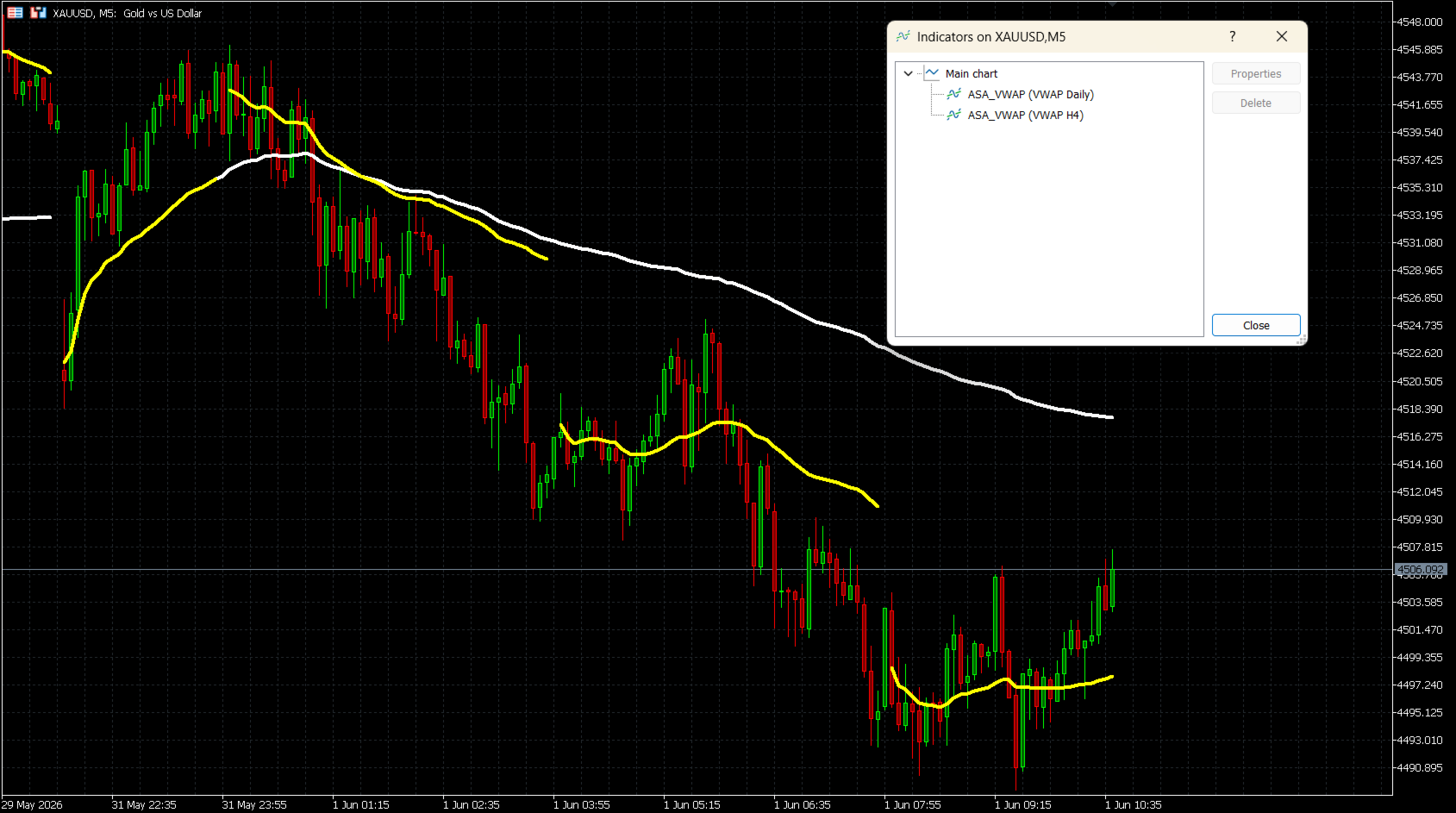
ASA VWAP is a Volume Weighted Average Price indicator for MetaTrader 5
that supports seven reset periods: M15, M30, H1, H2, H4, Daily, and
Weekly. Unlike fixed-session VWAP tools, this indicator allows traders
to choose the reset interval that best suits their trading style — from
intraday scalping to multi-day swing analysis.
The calculation uses the standard VWAP formula:
Typical Price (TP) = (High + Low + Close) / 3
VWAP = Cumulative(TP x Volume) / Cumulative(Volume)
The indicator accumulates correctly across bar updates and resets cleanly
at the start of each new period.
HOW IT WORKS
For intraday periods (M15, M30, H1, H2, H4), the reset is based on
Unix timestamp division, ensuring accurate slot detection on any
timeframe. For Daily and Weekly resets, the indicator uses a
session-adjusted time calculation to align with the true trading day
start, regardless of broker time zone.
KEY FEATURES
- Seven reset periods: M15, M30, H1, H2, H4, Daily, Weekly
- Tick Volume and Real Volume modes
- Broker GMT offset and custom Day Start Hour support for correct
daily session alignment
- Fully customizable line color, width, and style
- Optional Connect Lines to show or hide gaps at period boundaries
- Works on all symbols: Forex, Indices, Commodities, Stocks, Crypto
- Multiple instances per chart supported (e.g. Daily + Weekly together)
INPUT PARAMETERS
VWAP Reset Period
Selects the time interval for VWAP reset.
Options: M15, M30, H1, H2, H4, Daily (default), Weekly
Volume Mode
Tick Volume (default) — available on all brokers.
Real Volume — requires a broker that provides exchange volume data.
Broker GMT Offset
Your broker server's GMT offset.
GMT+0 = 0, GMT+2 = 2, GMT+3 = 3 (common for most brokers during DST)
Day Start Hour
The server time hour when a new trading day begins.
GMT+0 broker: use 22 | GMT+2 broker: use 0 | GMT+3 broker: use 1
Line Color
Color of the VWAP line on the chart. Default: White.
Line Width
Thickness of the VWAP line (1 to 5). Default: 4.
Line Style
Solid (default), Dash, Dot, DashDot, or DashDotDot.
Connect Lines
false (default): A visible gap is shown at each reset point.
true: The line draws continuously across period boundaries.
BROKER GMT OFFSET SETUP
The indicator calculates session time using this formula:
Shift = (24 - DayStartHour) % 24
Common broker settings:
GMT+0 broker, server reset at 22:00 → Offset = 0, DayStartHour = 22
GMT+2 broker, server reset at 00:00 → Offset = 2, DayStartHour = 0
GMT+3 broker, server reset at 01:00 → Offset = 3, DayStartHour = 1
To find your broker offset, compare the server time in MetaTrader 5
status bar with current UTC time.
USAGE NOTES
- Apply the indicator to any chart. The VWAP line will be drawn
immediately without waiting for the next tick.
- For best results, use the Daily reset on M15-H1 charts and the
Weekly reset on H4-D1 charts.
- Multiple instances can be added to the same chart with different
reset periods for multi-period confluence analysis.
- If Real Volume is selected but not available from your broker, the
indicator uses a fallback volume of 1 per bar. Switch to Tick Volume
in this case.
COMPATIBILITY
Platform: MetaTrader 5
Instruments: All symbols (Forex, Indices, Commodities, Stocks, Crypto)
Volume: Tick Volume (all brokers) or Real Volume (ECN/exchange feeds)
that supports seven reset periods: M15, M30, H1, H2, H4, Daily, and
Weekly. Unlike fixed-session VWAP tools, this indicator allows traders
to choose the reset interval that best suits their trading style — from
intraday scalping to multi-day swing analysis.
The calculation uses the standard VWAP formula:
Typical Price (TP) = (High + Low + Close) / 3
VWAP = Cumulative(TP x Volume) / Cumulative(Volume)
The indicator accumulates correctly across bar updates and resets cleanly
at the start of each new period.
HOW IT WORKS
For intraday periods (M15, M30, H1, H2, H4), the reset is based on
Unix timestamp division, ensuring accurate slot detection on any
timeframe. For Daily and Weekly resets, the indicator uses a
session-adjusted time calculation to align with the true trading day
start, regardless of broker time zone.
KEY FEATURES
- Seven reset periods: M15, M30, H1, H2, H4, Daily, Weekly
- Tick Volume and Real Volume modes
- Broker GMT offset and custom Day Start Hour support for correct
daily session alignment
- Fully customizable line color, width, and style
- Optional Connect Lines to show or hide gaps at period boundaries
- Works on all symbols: Forex, Indices, Commodities, Stocks, Crypto
- Multiple instances per chart supported (e.g. Daily + Weekly together)
INPUT PARAMETERS
VWAP Reset Period
Selects the time interval for VWAP reset.
Options: M15, M30, H1, H2, H4, Daily (default), Weekly
Volume Mode
Tick Volume (default) — available on all brokers.
Real Volume — requires a broker that provides exchange volume data.
Broker GMT Offset
Your broker server's GMT offset.
GMT+0 = 0, GMT+2 = 2, GMT+3 = 3 (common for most brokers during DST)
Day Start Hour
The server time hour when a new trading day begins.
GMT+0 broker: use 22 | GMT+2 broker: use 0 | GMT+3 broker: use 1
Line Color
Color of the VWAP line on the chart. Default: White.
Line Width
Thickness of the VWAP line (1 to 5). Default: 4.
Line Style
Solid (default), Dash, Dot, DashDot, or DashDotDot.
Connect Lines
false (default): A visible gap is shown at each reset point.
true: The line draws continuously across period boundaries.
BROKER GMT OFFSET SETUP
The indicator calculates session time using this formula:
Shift = (24 - DayStartHour) % 24
Common broker settings:
GMT+0 broker, server reset at 22:00 → Offset = 0, DayStartHour = 22
GMT+2 broker, server reset at 00:00 → Offset = 2, DayStartHour = 0
GMT+3 broker, server reset at 01:00 → Offset = 3, DayStartHour = 1
To find your broker offset, compare the server time in MetaTrader 5
status bar with current UTC time.
USAGE NOTES
- Apply the indicator to any chart. The VWAP line will be drawn
immediately without waiting for the next tick.
- For best results, use the Daily reset on M15-H1 charts and the
Weekly reset on H4-D1 charts.
- Multiple instances can be added to the same chart with different
reset periods for multi-period confluence analysis.
- If Real Volume is selected but not available from your broker, the
indicator uses a fallback volume of 1 per bar. Switch to Tick Volume
in this case.
COMPATIBILITY
Platform: MetaTrader 5
Instruments: All symbols (Forex, Indices, Commodities, Stocks, Crypto)
Volume: Tick Volume (all brokers) or Real Volume (ECN/exchange feeds)