Awesome Account Manager MT5

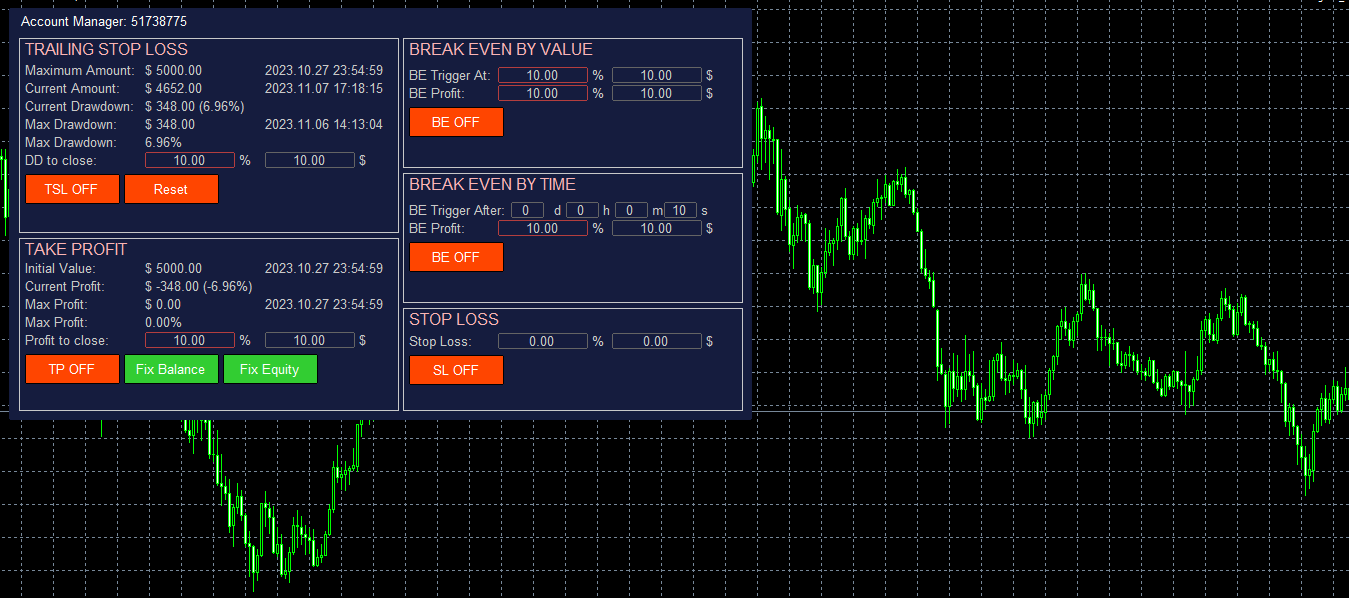
The account manager has a set of functions necessary for trading, which take into account the results of the entire account in total, and not for each individual open position:

  1. Trailing stop loss.
  2. Take profit.
  3. Break-even on the amount of profit.
  4. Breakeven by time.
  5. Stop Loss

Typically, each of these options can be applied to each individual trade. As a result, the total profit on the account may continue to increase, and individual positions will be closed. This does not allow you to get the maximum profit and closes positions that are temporarily in the red, but in the future could also bring profit. In addition, the standard Stop Loss, Take Profit and Break Even Point are set in points, and in this Account Manager they are set in the account currency (dollars) or as a percentage of the starting value, which is much more convenient and clearer.

By and large, this utility is necessary for everyone who uses any trading system on the Metatrader. It can be reset, for example, every month - at the beginning of the month, in order to set the desired limits for the trading account in terms of profit and loss. For example, set Trailing Stop Loss - 10%, Take Profit - 10%. Then, if a monthly profit of 10% is reached, the program will close all positions and this month you can no longer trade, fixing this profit. If the Trailing Stop Loss is triggered, then trading will also be stopped, with the preliminary closing of all open positions. In this case, even if the number of profitable and unprofitable months is the same, you will still remain in profit, since the loss received when the Trailing Stop Loss is triggered will always be no more than 10%, and the profit when Take Profit is triggered will always be at least 10 %.

This version of Account Manager only closes open positions, but I also have an another version of the program that uses the DLL, which also disables the Auto-Trade of the terminal, which allows you to use this Account Manager even when using automatic programs that manage the opening and closing of trades.

Account Manager is linked to the current trading account and saves all settings even when changing the Timeframe, rebooting the Terminal or turning off the computer. You can install only one Account Manager per trading account. If you place it on a VPS server, then the control over the trading account will be carried out around the clock. Account information is checked every second.

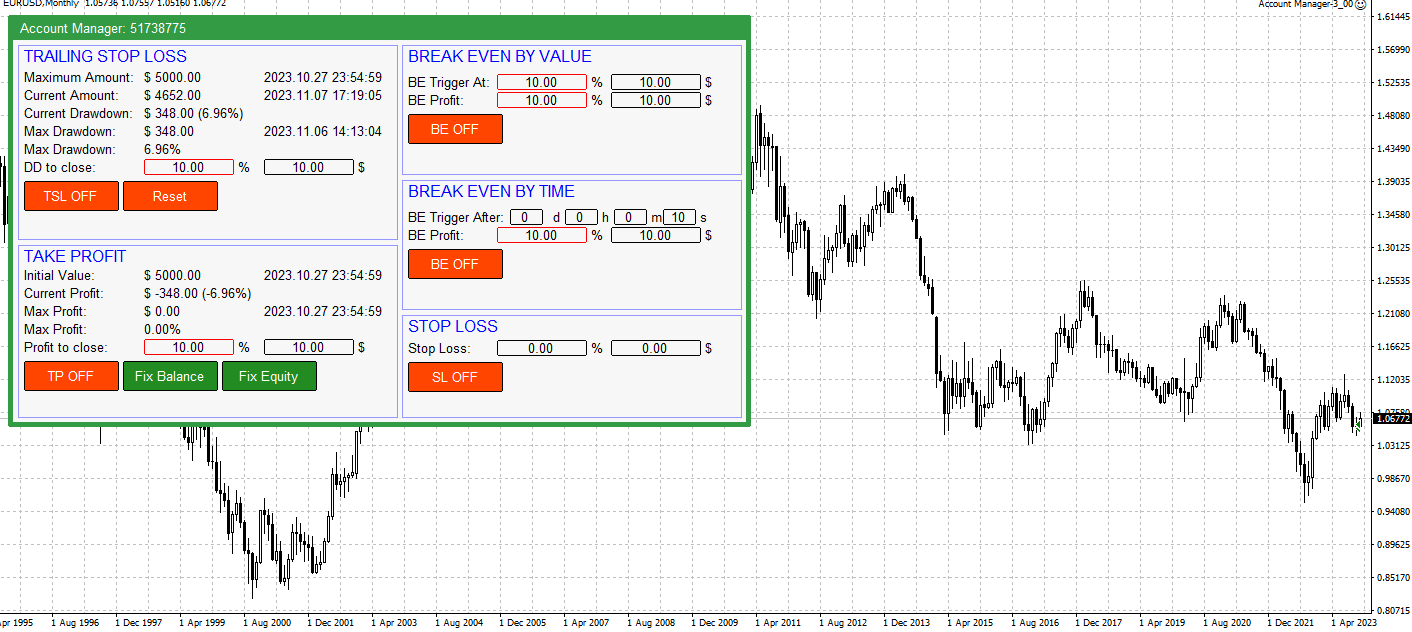
Trailing Stop Loss is set as a percentage or in the account currency (for example, in dollars). The Reset button resets the value of the maximum drawdown. In this section:

  • Maximum Amount - the maximum amount of funds on the account, fixed after pressing the Reset button and the time of getting this value. Used to calculate Trailing Stop Loss.
  • Current Amount - the current value of the funds on the account and the current time.
  • Current Drawdown - the current value of the drawdown on the account - in the account currency and as a percentage.
  • Max Drawdown - the maximum drawdown on the trading account that occurred after pressing the Reset button, in the account currency and as a percentage. And the time when this value was reached.
  • DD to close - drawdown value at which all positions are closed. It can be set both in percentage and in currency. Counted from Maximum Amount. The manager remembers in what units the value was set - percentage or currency. The selected option is highlighted with a frame.
  • TSL ON/OFF - switch on/ switch off closing by TSL
  • Reset - reset value of Maximum Amount to the current Equity

Take Profit is set as a percentage or in the account currency (for example, in dollars). Calculated from the Initial value. In this section:

  • Initial Value - the initial value from which the following are calculated: current profit, maximum profit, profit to close, Break Even values by amount and time.  And the time when this value was fixed.
  • Current Profit - current profit for the entire account.
  • Max Profit - maximum profit from the moment of setting the initializing value in the account currency and as a percentage. The time of reaching the maximum profit value.
  • Profit to close - profit value at which all open positions are closed. It can be set both in percentage and in currency. Calculated from Initial Value. The manager remembers in what units the value was set - percentage or currency. The selected option is highlighted with a frame.
  • TP ON/OFF - switch on/switch off closing by TP
  • Fix Balance - a button, when clicked, the Initial Value is set equal to the current Account Balance value.
  • Fix Equity - a button, when clicked, the Initial Value is set equal to the current account Equity value.

Break Even by Value is set as a percentage or in the account currency (for example, in dollars). Calculated from the Initial value. In this section:

  • BE Trigger At - profit value at which BE is activated. Calculated from the Initial Value of the Take Profit section. It can be set both in percentage and in currency. The manager remembers in what units the value was set - percentage or currency. The selected option is highlighted with a frame.
  • BE Profit - profit value to be received when BE is triggered. Calculated from the Initial Value of the Take Profit section. It can be set both in percentage and in currency. The manager remembers in what units the value was set - percentage or currency. The selected option is highlighted with a frame.
  • BE ON/OFF - BE by value on/off button.

Break Even by Time fixes the minimum value of profit that should be on the account after the specified value of days, hours, minutes, seconds will be passed. This means that after the specified time has passed since the activation of this option, all positions on the account will be closed if the profit is less than the specified value in the account currency or as a percentage. For example, if you set the timer for 1 hour, then in an hour the manager will control that the profit on the account does not fall below the BE Profit value. If the profit is less, then all positions will be closed.

  • BE Trigger After - after what time after the activation of the option, profit control on the account will be activated. Specified in days, hours, minutes and seconds.
  • BE Profit - profit that should be on the account after the expiration of the BE Trigger After time to save open positions. 
  • BE ON/OFF - BE by time on/off button.

Stop Loss closes opened trades when Stop Loss value is reached. Counting from the Initial Value

  • Stop Loss - value of total loss by the account, when SL will be triggered (dollars and percents)
  • SL ON/OFF - switch on/switch off the Stop Loss

Input Parameters:

  1. Panel's colors - There are two panel color schemes: Black on white and White on black.
  2. Scale (%) - Scale. Set to anything other than 100% if a scale other than 100% is selected in Windows - Display Options.

Recommended products
Professional Footprint Chart EA - Complete Order Flow Trading Suite DEMO USERS - PLEASE SELECT EVERY TICK WHEN TESTING  See What Market Makers See! The most comprehensive order flow analysis tool for MetaTrader 5. Get institutional-grade volume analysis, real-time DOM, Time & Sales, and intelligent trade signals - all in one powerful EA. 6 Professional Panels - Complete order flow analysis suite Real-Time Tick Data - Live bid/ask volume at every price level Automatic Imbalance Detection - Spot
A professional tool for real-time monitoring of the account status and the work of Expert Advisors. Information about the account status can be sent to Telegram chats automatically at a specified interval or upon request. From the screenshots of the open charts of the terminal, you receive upon request from your Telegram bot. Account information includes: 13:02 Trade monitoring by Telegram v.1.0 (headline) Account : 6802ххх RoboForex-Pro (account information) Profit start: 2661 USD (profit earne
This EA help trader to manage his pending orders, when you place many Pending Orders this utility monitor them and when of them get filed (executed) the EA cancel and delete all rest of pending orders, to avoid  opening of all of pending orders at the same time , and lose your risk management. this utility is very useful for trader when he /she is not available on the desk.
Pending Orders Grid Complete System opens any combination of Buy Stop, Sell Stop, Buy Limit and Sell Limit pending orders and closes all existing pending orders. You will be able to Drag-and-Drop the Script on the chart and it will pick up the start price for the first position in the grid from the "Drop" point. Usually it should be in the area of Support/Resistance lines. Input Parameters Before placing all pending orders, the input window is opened allowing you to modify all input parameters:
AKCAP Hotkey Tool
AK Capital Markets Limited
5 (3)
Special offer for the next 10 copies Are you tired of manually navigating through menus and inputting data every time you want to execute a trade or open an order on Meta Trader? Our hotkey tool is here to make your life easier and boost your trading efficiency. Our tool is natively coded for lightning-fast performance and comes loaded with all the features you could possibly want. From pending orders and OCO orders to trailing and multiple buckets, it has everything a scalper could need. And
RenkoChart EA
Paulo Henrique Da Silva
4.6 (5)
The RenkoChart tool presents an innovative and highly flexible approach to visualizing market data in MetaTrader 5. This expert creates a custom symbol with Renko bricks directly on the chart, displaying accurate prices at the respective opening date/time for each brick. This feature makes it possible to apply any indicator to the Renko chart. Furthermore, this tool also allows access to historical brick data through native methods in the MQL5 programming language, such as iOpen, iHigh, iLow and
FREE
MT5 for Telegram Signals
Sergey Batudayev
5 (10)
The utility is designed to send signals from MT4 to Telegram. It has several unique features, allowing not only the sending of trade signals but also the following functionalities: Send messages directly from the terminal to Telegram Send emojis along with custom text Send text and images from Telegram All of these features enable users to manage a signal channel while focusing on trading and finding quality signals. [DEMO and  Instruction for utility] Customizable Signal Messages You can fully
Trade Dashboard MT5
Fatemeh Ameri
4.96 (110)
Tired of complex order placement and manual calculations? Trade Dashboard is your solution. With its user-friendly interface, placing orders becomes effortless, by a single click, you can open trades, set stop loss and take profit levels, manage trade lot size, and calculate risk to reward ratios, allowing you to only focus on your strategy. Say goodbye to manual calculations and streamline your trading experience with Trade Dashboard. Download  Demo Version  right now. You can find  Details of
MT5toTLGRM
Fernando Morales
4.2 (5)
Do not use Windows 7 with this EA MT5toTLGRM EA only sends text messages to a Telegram group or channel of your choice. The messages are customizable to show information about any trading activity in the account. Also it shows a daily PnL report. Several instances of this EA can be used simultaneously in the same MT5 terminal for sending messages to different Telegram group/channel but ensure that each one has a different number in [B13] setting. Following are the features of MT5toTLGRM EA send
FREE
ReverseTune
Konstantin Chernov
A script for quick reversing positions and/or orders. If you need to reverse a position with the same volume, open an opposite position of a different volume or change the type of existing orders (for example, Buy Limit -> Sell Limit, Buy Stop -> Sell Limit, etc.) with the same or different take profit/stop loss, this script will make all the routine for you! Allow AutoTrading before running the script. Usage: Run the script on a chart. Input Parameters: Language of messages displayed (EN, RU, D
LIMITED TIME SALE - 30% OFF! WAS $50 - NOW JUST $35! Take control of your forex portfolio. See instantly where you stand, whats working and whats causing you pain! MT4 VERSION AVAILABLE HERE:  https://www.mql5.com/en/market/product/58375 The Trade Manager Dashboard is designed to show you at a glance where each position you have in the forex market currently is, and make risk management and exposure to currencies easier to understand.   For traders that scale into the market gradually
AUTO RISK MANAGER PRO: your partner in Forex trading! AUTO RISK MANAGER PRO_MT4 — version for MT4 Demo version + detailed description Stop losing money due to emotions! It’s time to trust risk management to a professional algorithm. Imagine this situation: the market suddenly moves against your position while you are sleeping, working, or spending time with your family. Sounds familiar? With Auto Risk Manager Pro — not anymore! Advantages: Revolutionary approach to risk management Automatic capi
One Click Trader  is a tool designed for MetaTrader 4 platform, which enables you to take your trading to the next level. It enables you to open, manage and close your trades in simple an efficient way by just one click of your mouse button. "-"   ,  "+"  change OCT window size  Up arrow minimizes the OCT panel Down arrow maximizes the OCT panel Right arrow displays the next panel with additional features Left arrow hides the panel with additional features Red  SELL  button enables you to open s
TradingX Hotkeys
Johannes Stephanus Lombard
Inputs Available Lotsizes Partial Close % You can change lotsizes as you require On an open chart click once to select chart to be able to use hotkeys on specific chart. All Pairs can be used with this expert We created this expert to be able to still trade C300 with a 0.06 Lotsize If you enter a 0.6 lot and close 0.90% you can trade with 0.06 Lot Keys to be used: B -Buy S -Sell C -Close Profitable D -Breakeven (Note if stoploss is set it won't break even) P -Partial close X -Close all
Position Limit Monitor: Efficient Control of Your Trading Operations Have you ever worried about having too many open trades simultaneously? Would you like precise control over the maximum number of positions in your account? Position Limit Monitor is the solution you need. Main Features: • Real-time monitoring: Constantly supervises the number of open positions in your account. • Customizable limit: Easily set the maximum number of positions you want to keep open. • Automatic closure: When the
Support Or Resistance Alert Broken
Jhojan Alberto Tobon Monsalve
"Support or Resistance Alert Broken" is a simple and very intuitive tool that allows you to create or eliminate horizontal and trend supports and / or resistances with a simple click. When the support or resistance line is broken by the closing price at the end of the current candle, the "Support or Resistance Alert Broken" tool will send an alert with sound, as well as a notification to the MT4 or MT5 mobile application. This tool can send alerts from multiple pairs at the same time. Utility
All Pending Orders with StopLoss opens any combination of Buy Stop, Sell Stop, Buy Limit and Sell Limit pending orders and closes all existing pending orders. If boolSL = true then this Script will calculate one common StopLoss value as the StopLoss for a first/last orders and put this value in all pending orders. Input Parameters Before placing all pending orders, the input window is opened allowing you to modify all input parameters: DeleteAllPendings : if true , then all pending orders (for
GS trade report
Aleksander Gladkov
5 (1)
3 in 1 : Report + monitoring + sending messages (Telegram, ...) to optimize trading and use of advisors. Monitoring: Panel on the chart Sending messages to Telegram Sending messages to Email Sending Notifications Sending pop-up messages Sound notifications when the established Profit/Loss levels are exceeded Monitoring is activated by pressing the Start button. Profit for the period by currency pairs, hours and Magic number for the current account. Forms four tables: by symbols, by magic number
Basket Toolkit
Tshidiso Ephraim Mpakanyane
Basket Toolkit  is a professional multi-symbol trade and risk management tool for MetaTrader 5. It allows traders to detect, organize, visualize, and control trades as unified baskets, with advanced risk management features and a clean, interactive dashboard. Key Features 1. Multi-Symbol Basket Management Detect manual trades, EA trades, or specific trades by magic number. Group trades from multiple symbols into unified baskets for centralized control. Supports both full account monitoring and
Automatic calculation of a trading lot taking into account Stop Loss (in pips) and the percentage of risk from the account balance. The Expert Advisor panel is located on the chart at the top left. On the panel of the advisor, you can select the size of the stop loss in pips and the percentage of risk from the balance. You can set the deviation from the current price in pips for pending orders. The red color indicates the amount in the deposit currency that you can lose when the stop loss is tr
Operational Management MT5
Leonardo Gabriel Caceres
Operative Management Pro – Advanced Trading Utility Operative Management Pro is a smart visual tool for traders who want to analyze and simulate their trades before placing them on the market. This panel displays in real-time the most important parameters of the current symbol: Current price and minimum lot size Required margin Spread cost in USD and pips Take Profit and Stop Loss value in USD Automatic risk and reward calculation With just a click on the chart, you can simulate BUY or SELL t
Chart Spot Binance
Ghavamipour Mohammadreza
show live chart spot All symbol binance If you want to get this product with a 99% discount, send a message to my Telegram admin and rent this product for 1 $ per month or 10 $ per year. Even if you do not like the way the chart is displayed, you can tell the admin in Telegram how to display it so that your own expert is ready. https://t.me/Bella_ciao1997 https://t.me/Binance_to_mql5
EW Close All – One Click. All Closed. EW Close All is a lightweight, multi-language Expert Advisor that lets you close all trades and cancel all pending orders instantly — with just one button click . Closes all open positions Cancels all pending orders Works on any symbol and timeframe Multi-language interface Clean, fast, and reliable Perfect for quick exits, risk control, or end-of-day cleanups. Stay in control — close everything in seconds with EW Close All .
FREE
Utility TimeLs Close Positions is a tool for managing and automating trade closing operations in MetaTrader 5. It provides flexible control over when and how open positions are closed based on time, symbol, direction, magic number, and comment filters. You can disable trading on specific days of the week You can set a specific time to close all open positions You can filter closing operations by symbol, direction (Buy/Sell), magic number, or comment You can execute up to three one-time scheduled
Nova Forex Traderr
Eduar Ulises Toro Daza
An algorithm that uses artificial intelligence (AI) to analyze the best entries in the market over the 24 hours generally works by following these steps: Real-Time Data Collection: The algorithm collects real-time information from various sources such as market prices, trading volumes, technical indicators, economic news, and fundamental analysis. Data Processing: It uses data processing techniques such as time series analysis, noise filtering, and extraction of relevant features that help pr
Hello traders! I'm your trading assistant. No need for lengthy introductions—let me tell you about my specialties: I excel in managing your positions, whether you place orders on either side, I can promptly add appropriate stop-loss lines and implement trailing stops for you. 2. I can help you avoid chasing gains and selling in losses, fundamentally eliminating the human weakness of failing to stick to principles. 3. I will send you a notification message to the MT5 client on your mobile device
Synchronizer
PATRICK PAARSCH
This Expert Advisor monitors all open positions across all symbols in MetaTrader 5. Whenever a Stop Loss (SL) or Take Profit (TP) is manually set or adjusted on any position, the EA automatically applies that value to all other open positions , regardless of symbol or order type (Buy/Sell). This ensures consistent and synchronized SL and TP levels across your account. Perfect for mobile trading via tablet or smartphone!
Virtual TP SL TS
Andrei Sviatlichny
Make your Take Profit, Stop Loss, and Trailing Stop levels invisible to the broker! Main option: STEALTH MODE Virtual Trailing Stop Virtual Take Profit Virtual Breakeven Virtual Stop Loss Virtual Orders Lifetime WARNING: The Expert Advisor does not place orders by itself. You must open orders yourself (including through the Expert panel) or use a third-party Expert on another chart of the same currency pair. Please specify the Magic number "-1" in the Expert settings for the Expert to process th
SyncTradeSQL
Maxim Kuznetsov
Script for quick updates (synchronization) up-to-date data in the SQLite database. Saves open positions and orders, current quotes. Take advantage of SQLite's capabilities for intermediate data storage, analytics, and integrations of the MetaTrader platform. Keep all your data in one place. Use the saved data in SQL analytical queries, from Python and other languages, to build dashboards Parameters useDefaults true - use default parameters. Save data to the COMMON hierarchy, to the db/ram/{s
FREE
Pending Orders Grid Complete System   opens any combination of Buy Stop, Sell Stop, Buy Limit and Sell Limit pending orders and closes all existing pending orders. Only one time of the pending order at the same time!!! You will have a possibility to put a legitimate   Open Price   for the first position in the grid. Usually it should in the area of Support/Resistance lines. You just need to drop this script on the chart of a desired currency pair. Input Parameters Before placing all pending ord
Buyers of this product also purchase
Trade Assistant MT5
Evgeniy Kravchenko
4.41 (205)
It helps to calculate the risk per trade, the easy installation of a new order, order management with partial closing functions, trailing stop of 7 types and other useful functions. Additional materials and instructions Installation instructions - Application instructions - Trial version of the application for a demo account Line function -   shows on the chart the Opening line, Stop Loss, Take Profit. With this function it is easy to set a new order and see its additional characteristics bef
TradePanel MT5
Alfiya Fazylova
4.86 (148)
Trade Panel is a multifunctional trading assistant. The application contains more than 50 trading functions for manual trading and allows you to automate most trading operations. Attention, the application does not work in the strategy tester. Before purchasing, you can test the demo version on a demo account. The demo version is here . Full instructions here . Trade. Allows you to perform trading operations in one click: Open pending orders and positions with automatic risk calculation. Open mu
Ultimate Extractor
Clifton Creath
5 (9)
Ultimate Extractor - Professional Trading Analytics for MT5 *****this is the local HTML version of Ultimate Extractor. Check out Ultimate Extractor Cloud on mql5 for the Cloud version****** Ultimate Extractor transforms your MetaTrader 5 trading history into actionable insights with comprehensive analytics, interactive charts, and real-time performance tracking. What It Does Automatically analyzes your MT5 trading history across all Expert Advisors and generates detailed HTML reports with inte
Telegram To MT5 Receiver
Levi Dane Benjamin
4.53 (15)
Copy trade signals from Telegram channels you already belong to (including private and restricted channels) directly into MetaTrader 5. Set your risk rules once, monitor execution, and manage positions with built-in protections designed to reduce mistakes and overtrading. Fast setup : configure your channels, select what to copy, and start within minutes using a clean on-chart interface. User Guide + Demo | MT4 Version | Discord Version Who this is for Traders who follow one or more signal provi
The product will copy all telegram signal to MT5 ( which you are member) , also it can work as remote copier.  Easy to set up, copy order instant, can work with almost signal formats, image signal,  s upport to translate other language to English Work with all type of channel or group, even channel have "Restrict Saving Content", work with  multi channel, multi MT5 Work as remote copier: with signal have ticket number, it will copy exactly via ticket number. Support to backtest signal. How to s
Crypto Charting
Rajesh Kumar Nait
5 (5)
Overview Crypto Charting for MT5 provides real-time OHLC data for various cryptocurrencies via WebSocket integration. It is designed for traders who require consistent and automated chart updates from multiple exchanges directly within the MetaTrader 5 platform. The product supports all standard MT5 timeframes and offers historical data synchronization features. Features Real-Time Charts via WebSocket Provides continuous, low-latency market data without relying on traditional API connections. A

ManHedger MT5
Peter Mueller
4.8 (5)
THIS EA IS A SEMI-AUTO EA, IT NEEDS USER INPUT. Manual & Test Version Please DON'T BUY this product before TESTING  and watching my video about it. The price of the ManHedger will increase to 250$ after 20 copies sold. Contact me for user support or bug reports or if you want the MT4 version! MT4 Version  I do not guarantee any profits or financial success using this EA. With this Expert Advisor, you can: Implement your own Zone Recovery strategy to capitalize on trending markets. Create Grid
YuClusters
Yury Kulikov
4.93 (43)
Attention: You can view the program operation in the free version  YuClusters DEMO .  YuClusters is a professional market analysis system. The trader has unique opportunities to analyze the flow of orders, trade volumes, price movements using various charts, profiles, indicators, and graphical objects. YuClusters operates on data based on Time&Sales or ticks information, depending on what is available in the quotes of a financial instrument. YuClusters allows you to build graphs by combining da
EasyInsight AIO MT5
Alain Verleyen
4.91 (11)
EASY Insight AIO – All-In-One Power for AI-Driven Trading Want to skip the setup and start scanning the entire market – Forex, Gold, Crypto, Indices, and even Stocks – in seconds? EASY Insight AIO is the complete plug-and-play solution for AI-powered trade analysis. It includes all core Stein Investments indicators built-in and automatically exports clean, structured CSV files – perfect for backtesting, AI prompts, and live market decision-making. No need to install or configure indicators manu
HINN Lazy Trader
ALGOFLOW OÜ
5 (2)
Lazy Trader is your personal risk management assistant that independently finds the best market entries, manages positions, and helps you extract maximum profit from every trading idea! It monitors charts from M1 to W1 , finds optimal entry points based on your parameters, and manages trades without your involvement: - Got an idea on the daily chart? No need to wait for lower timeframes to form a signal — Lazy Trader will check everything and open all necessary positions while you live your lif
Mt5 To InterativeBrokers Copier allows you to copy deals from MT5 account to Interactive Brokers. With this, you can run your EA strategy on a MT5 Demo/Real Account, then copy all the deals to Interactive Brokers account real time. Features: 1. Copy or Invert-Copy deals Realtime from MT5 to IB Account. 2. Synchronizing positions of both accounts periodicaly, in case any missing copying. 3. You can choose only Buy position or Sell position. Symbols Setup: General Format:  {MT Symbol} -> {IB S
Unlimited Trade Copier Pro MT5 is a tool to copy trade remotely to multiple MT4, MT5 and cTrader accounts at different computers/locations over internet. This is an ideal solution for you if you are a signal provider and want to copy your trades to other receivers globally on your own rules. One provider can copy trades to multiple receivers and one receiver can get trade from multiple providers as well. The provider can even set the subscription expiry for each receiver, so that receiver will n
Custom Alerts AIO: All-in-One Market Scanner – No Setup Required Overview Custom Alerts AIO is the fastest and easiest way to monitor multiple markets for real-time trading signals—without any setup or extra licenses. It comes with all required Stein Investments indicators already embedded, making it the perfect plug-and-play solution for traders who value simplicity and performance. Just load it to any chart and start receiving alerts across Forex, Metals, Crypto, and Indices. Shares can be a
Strategy Builder offers an incredible amount of functionality. It combines a trade panel with configurable automation (covert indicators into an EA), real-time statistics (profit & draw down) plus automatic optimization of SL, TP/exit, trading hours, indicator inputs. Multiple indicators can be combined into an single alert/trade signal and can include custom indicators, even if just have ex4 file or purchased from Market. The system is easily configured via a CONFIG button and associated pop-u
Crypto Ticks and Depth
Rajesh Kumar Nait
5 (1)
Crypto Ticks for MetaTrader 5 – Real-Time Crypto Tick Data and Order Book Integration Overview Crypto Ticks streams real-time tick data and order book depth from major cryptocurrency exchanges directly into MetaTrader 5. Designed for traders who require precise market data for scalping, algorithmic strategies, and strategy testing. Supported Exchanges Binance : Spot (includes active chart window order book depth) and Futures (supports multiple symbols with order book depth) KuCoin : Spot and Fu
Introducing the latest version of the Dynamic Fibonacci Grid Dashboard for MT5. Now packed with many new features, this new dashboard transforms your trading experience and allows you to see the market and the price action from a completely different perspective. Discover new possibilities with simultaneous analysis of multiple timeframes covering multiple symbols. User-friendly interface for manual trading and management of positions and an expanded ability to apply predefined automated strate
Remote Trade Copier is an advanced tool designed for efficiently copying trades between accounts in both local and remote modes. It allows for lightning-fast order replication from a master account to a slave account. In local mode, trades are copied instantly, while in remote mode, the copying process takes less than 1 second. MT4 Version (Only Local) MT5 Version (Only Local) MT4 Full Version (Local & Remote) Local mode refers to both MetaTrader platforms being installed on the same system,
Bots Builder Pro MT5
Andrey Barinov
4.17 (6)
This is exactly what the name says. Visual strategy builder . One of a kind. Turn your trading strategies and ideas into Expert Advisors without writing single line of code. Generate mql source code files with a few clicks and get your fully functional Expert Advisors, which are ready for live execution, strategy tester and cloud optimization. There are very few options for those who have no programming skills and can not create their trading solutions in the MQL language. Now, with Bots Builde
Mentfx Mmanage mt5
Anton Jere Calmes
4.25 (8)
The added video will showcase all functionality, effectiveness, and uses of the trade manager. Drag and Drop Trade Manager. Draw your entry and have the tool calculate the rest. Advanced targeting and close portions of a trade directly available in tool (manage trades while you sleep). Market order or limit order on either side with factored spread. Just draw the entry, the tool does the rest. Hotkey setup to make it simple. Draw where you want to enter, and the stop loss, the tool calculates al
FiboPlusMultiTF MT5
Sergey Malysh
5 (1)
A ready-made multitimeframe trading system based on automatic plotting and tracking of Fibonacci levels for buying and selling any symbol. Advantages Determines the trend direction based on a complex of 14 indicators ( Cx ), extremums of ZigZag ( Z ), RSI ( R ), Impulse ( I ) Displaying the values of 14 indicators comprising the trend direction ( Cx ) Plotting horizontal levels, support and resistance lines, channels View the plotting option of Fibonacci levels on any timeframe, with the abilit
The product will copy all  Discord  signal   to MT5   ( which you are member  ) , also it can work as remote copier.  Easy to set up. Work with almost signal formats, support to translate other language to English Work with multi channel, multi MT5. Work with Image signal. Copy order instant, auto detect symbol. Work as remote copier: with signal have ticket number, it will copy exactly via ticket number. How to setup and guide: Let read all details about setup and download Discord To MetaTrader
Crystal Trade Manager – Advanced MT5 Risk and Trade Control Utility Overview Crystal Trade Manager (CTM) is a professional MetaTrader 5 utility designed for risk management, trade automation, and instant execution control. It provides traders with an integrated system for protecting equity, managing daily drawdowns, controlling lot sizes, and applying automation features such as automatic SL/TP, break-even, and trailing stop. The tool is suitable for manual traders, prop-firm challenge particip
Timeless Charts
Samuel Manoel De Souza
5 (1)
Timeless Charts is an advanced charting solution designed for professional traders seeking for custom charts / custom timeframes , including seconds charts / seconds timeframe, renko charts / renko bars, cluster charts / footprint charts and advanced tools present in most of the popular platforms. Unlike traditional offline charts or simplistic custom indicators, this solution constructs fully custom bars with true timestamp accuracy , down to miliseconds, allowing for a powerful and precise tr
Easy Strategy Builder 5
Gheis Mohammadi
5 (4)
The  Easy Strategy Builder (ESB)  is a " Do It Yourself " solution that allows you to create a wide range of the automated trading strategies without any line of codes. This is the world’s easiest method to automate your strategies that can be used in STP, ECN and FIFO brokers. No drag and drop is needed. Just by set conditions of your trading strategy and change settings on desired values and let it work in your account. ESB has hundreds of modules to define unlimited possibilities of strategi
RiskGuard Management
MONTORIO MICHELE
5 (22)
ATTENTION For a free trial version, visit my website. Manual QUANTUM RiskGuard Management — Your ultimate ally for uncompromising trading. Lot Calculator — Automatic lot size calculation. Quantum — Automatic risk to maximize profits and reduce drawdowns. Automatic Journal — Included and freely downloadable from my website. Automatic Screenshot — Two screenshots: one at entry and one at exit. Partial Profit — Smartly managed partial exits. Smartphone Trading — Place orders from your mobile, mana
Gold instrument scanner is the chart pattern scanner to detect the triangle pattern, falling wedge pattern, rising wedge pattern, channel pattern and so on. Gold instrument scanner uses highly sophisticated pattern detection algorithm. However, we have designed it in the easy to use and intuitive manner. Advanced Price Pattern Scanner will show all the patterns in your chart in the most efficient format for your trading. You do not have to do tedious manual pattern detection any more. Plus you
The product is used to trade base on any Alert signal in MT5 Easy to setup, simple format with custom keyword All option to management orders as trailing stop, breakeen, partial close, time filter, news filter ... Option to auto open grid orders How to setup and guide: Let read all details about setup and download indicator for auto get   Alert Signal   here Do not buy if you even can not install demo EA to your VPS ( some VPS block download EA from mql5 market) We always bring customers high q
Ultimate Trailing Stop EA MT5
BLAKE STEVEN RODGER
4.13 (8)
This EA Utility allows you to manage (with advanced filtering) unlimited open orders (manual or EA) with 16 trailing stop methods: fixed, percent, ATR Exit, Chandelier Exit, Moving Average, Candle High Low Exit, Bollinger Bands, Parabolic, Envelope, Fractal, Ichimoku Kijun-Sen, Alligator, Exit After X Minutes or Bars, RSI and Stochastic. The trailing stop can be either real or virtual, and you can exit fully or with a partial close percent on touch or bar close.  Moreover, you can add (override
DoIt Trade Coach AI (MT5/MT4) — AI Trade Validator for Manual Traders You are the trader. The AI is your second opinion. Intro price valid until 26.12.2025. After that, price updates to 197 USD. DoIt Trade Coach AI is a MetaTrader utility that helps you validate your trade ideas before you enter: you propose direction + Entry/SL/TP, the AI analyzes the setup, explains what’s strong/weak, suggests improvements, and lets you execute directly from the panel. This is NOT an automated trading EA.
Riskless Pyramid Mt5
Snapdragon Systems Ltd
3.5 (2)
Introduction This powerful MT4 trade mangement EA offers a way potentially to aggressively multiply trade profits in a riskfree manner. Once a trade has been entered with a defined stoploss and take profit target then the EA will add three pyramid add-on trades in order to increase the overall level of profit. The user sets the total combined profit target to be gained if everything works out. This can be specified either as a multiple of the original trade profit or as a total dollar amount. Fo
More from author
The Risk and Reward calculator is designed to place market and pending orders. You only need to set the risk size you are willing to risk in one trade and the Stop Loss level. The calculator will calculate the required lot size for this. And by setting the Risk Reward size, you can set the ratio of expected profit to risk in one position. For example, you are willing to risk one dollar in one trade and, if the market moves in your favor, you want to make a profit of 2 times more. Then you need
Simple Customizable Trade Panel — Fast and Easy One-Click Trading This lightweight and powerful panel is built for traders who value speed , simplicity , and full customization . With just one click, you can: Buy or Sell instantly Close all open positions Place pending orders with custom distance Delete all pending orders Adjustable parameters: • Lot size • Stop Loss (in points) • Take Profit (in points) • Distance to price for pending orders The panel is fully responsive and adaptab
The account manager has a set of functions necessary for trading, which take into account the results of the entire account in total, and not for each individual open position: Trailing stop loss. Take profit. Break-even on the amount of profit. Breakeven by time. Stop Loss Typically, each of these options can be applied to each individual trade. As a result, the total profit on the account may continue to increase, and individual positions will be closed. This does not allow you to get the maxi
Equity charts
Mykhailo Krygin
Equity charts generator creates an offline chart that draws bars corresponding to the account Equity value. The TimeFrame of the Equity chart is the same as the TimeFrame of the chart where the indicator will be placed. Input Parameters: Offline Timeframe - You can select the timeframe in minutes of the generated chart. Use opened file for adding new bars (true/false) - If set to false, a new history file is always created and bars will start drawing from the moment the indicator is placed on t
MA and Momentum EA uses simple indicators for calculation - Moving Average and Momentum. Profit for 3 year is 757 869 %. There is no more than one trade open at a time. It is possible to enter on each buy / sell signal, closing the previous trade or wait for the open trade to be closed by SL, TP, TS or BE, so that later it will be possible to open the next trade. Input parameters: Entry Level (Points) - The level at which the buy and sell entry takes place. Magic Number - The unique number of t
Viperrr EA
Mykhailo Krygin
The profitability of this EA from the beginning of 1999 to the present day is 25,000,000%. If $10,000 had been deposited into the account on 01/01/1999, by the end of 2006 the account would have had $2.8 billion. The parameters that were used are shown in the screenshot. EA uses 2 indicators, several types of SL, TP, TSL, and a grid. Parameters: Lot type - Type of lot calculation: Fixed, Relative - lots per balance of $1000. Lot Size (fixed or relative). Stop Loss, pips (0 - OFF) - Stop loss
The panel is designed to manage trading positions: to open new trades and close already opened ones. To open new trades, you can set the position LotSize, Stop Loss in points, risk in dollars or in percent, Take Profit in points or Profit in dollars, you can set the Profit/Risk parameter. It is possible to place a panel on the active chart to visually set the parameters of a new trade, select a market order or a pending one. If you fix the RR parameter, then when the Risk changes, the Profit wil
The panel was created to manage trading positions: to open new trades and close existing ones. To open new transactions, you can set the position volume, Stop Loss in points, risk in dollars or as a percentage, Take Profit in points or Profit in dollars, you can set the Profit/Risk parameter. It is possible to place a panel on the active chart to visually set the parameters of a new transaction, select a market order or a pending one. If you fix the RR parameter, then when Risk changes, Profit w
Simple Customizable Trade Panel — Fast and Easy One-Click Trading This lightweight and powerful panel is built for traders who value   speed ,   simplicity , and   full customization . With just one click, you can: Buy or Sell instantly Close all open positions Place pending orders with custom distance Delete all pending orders Adjustable parameters: • Lot size • Stop Loss (in points) • Take Profit (in points) • Distance to price for pending orders The panel is fully responsive and ad
Expert Advisor Description This scalper is based solely on price action logic — without using hedging, martingale, grids, or other high-risk methods. Trades are opened based on candle formations and key support/resistance levels. The EA has shown stable and profitable results during long-term backtesting from the year 2000 up to the present. Full backtest statistics are available in the attached report — including a Profit Factor of 2.70 , Recovery Factor of 16.20 , over 94% winning trades, and
CrownMaster Scalper is a powerful and fully automated trading robot designed for high-precision short-term trading using price action patterns and key price levels. It does not use Martingale, Grid, or Hedging — only clear, logic-based entries and exits. The EA was backtested on the Alpari broker from 2012 to 2025 using M5 timeframe with 98% modeling quality. For best results, your broker’s spread should be as low as possible . Key Features: No Martingale, Grid, or Hedging Works on any symbol an
Filter:
No reviews
Reply to review