
KT Ichimoku Trader MT5
- Experts
-
KEENBASE SOFTWARE SOLUTIONS
 Keenbase Trading develops professional MetaTrader 4 and MetaTrader 5 indicators and Expert Advisors designed to help traders make more informed trading decisions.
 - Version: 2.2
- Updated: 2 September 2026
- Activations: 10
Five Ichimoku strategies, traded automatically
KT Ichimoku Trader is an Expert Advisor that opens and closes trades automatically with five classic Ichimoku Kinko Hyo strategies. You switch on the strategies you want, and each one trades on its own: its own entry rules, its own exit rules, and at most one open trade per strategy at a time.
Every entry is checked on a closed candle. When a new candle opens, the EA reads the candle that just closed and opens a trade only when every entry rule of the strategy is met and every filter you switched on agrees. If one rule is missing, no trade is opened, even when the chart looks close to a signal.
When each strategy opens and closes a trade
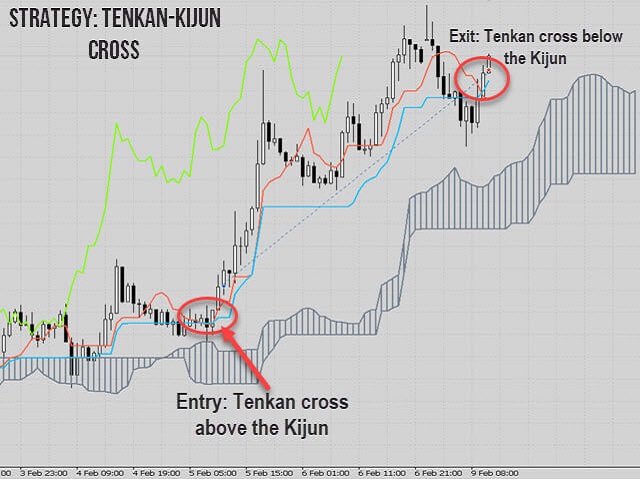
Tenkan-Kijun Cross. Buys when the Tenkan-sen crosses above the Kijun-sen and sells on the opposite cross. In Advanced mode a buy also needs the cross above the Kumo cloud, a bullish future cloud and the Chikou Span above past price; a sell needs the opposite. The trade closes when the Tenkan-sen crosses back over the Kijun-sen.
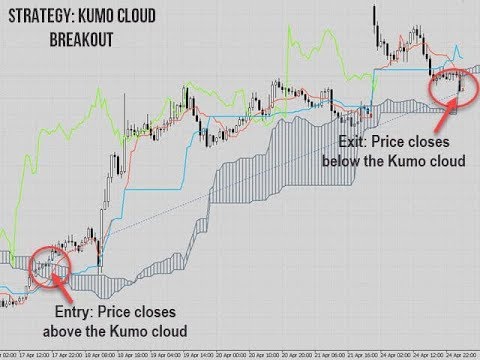
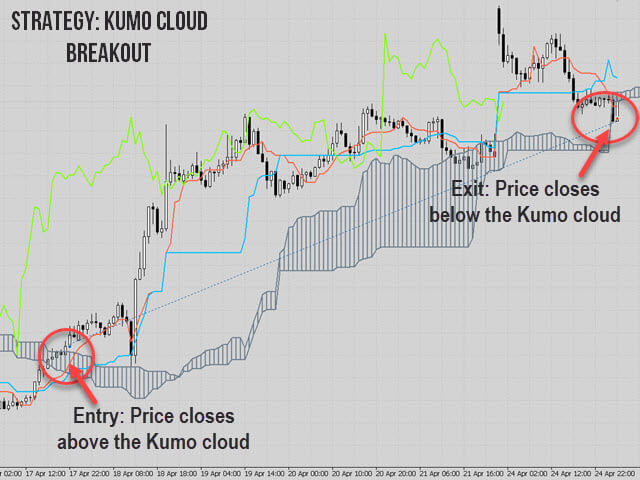
Kumo Cloud Breakout. Buys when a candle closes above the Kumo cloud after the previous candle was still below the top of the cloud, and sells on a close below the cloud. In Advanced mode the trade also needs a future cloud in the same direction, the Tenkan-sen on the right side of the Kijun-sen and the Chikou Span confirming. The trade closes when a candle closes back on the other side of the cloud.
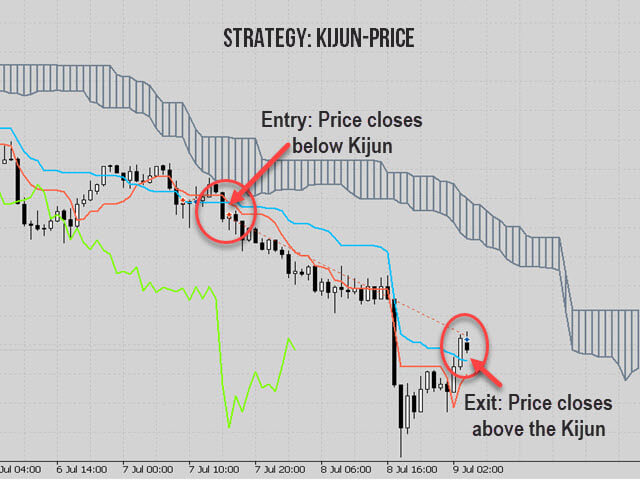
Price-Kijun Cross. Buys when a candle closes above the Kijun-sen after the previous candle was completely below it, while the Kijun-sen is above the cloud. Sells are the mirror image. The trade closes when a candle closes back across the Kijun-sen.
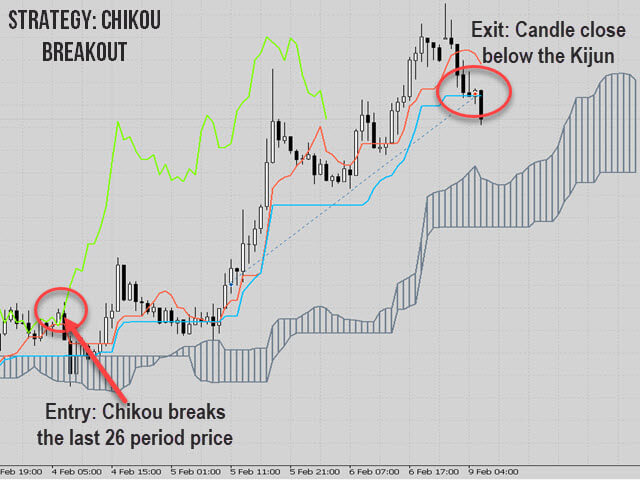
Chikou Breakout. Buys when the Chikou Span breaks above past price while the candle closes above the cloud and above the Kijun-sen. Sells are the mirror image. The trade closes when a candle closes back across the Kijun-sen.
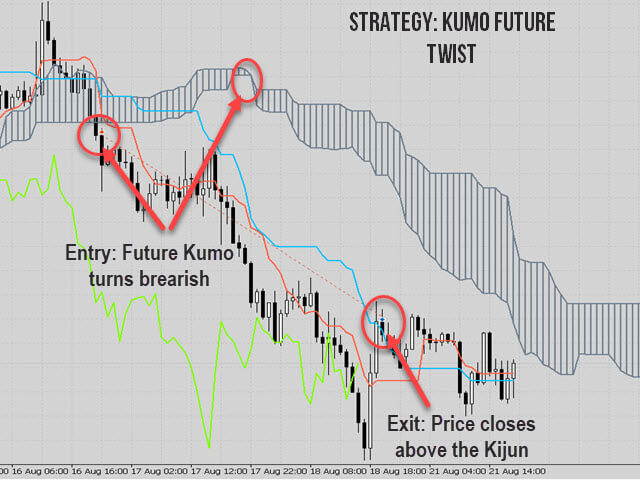
Kumo Future Twist. Buys when the future cloud turns bullish, which means Senkou Span A crosses above Senkou Span B. In Advanced mode the candle must also close above the current cloud and above the Kijun-sen. A buy closes when a candle closes below the Kijun-sen or the future cloud turns bearish again; sells work the opposite way.
Tenkan-Kijun Cross, Kumo Cloud Breakout and Kumo Future Twist can each be set to Normal, Advanced or OFF. Price-Kijun Cross and Chikou Breakout are switched on or off.
Filters that can stop an entry
Each filter is optional. When a filter is on, a strategy signal opens a trade only if the filter agrees.
- Trading Session: trade only in the Asian, London or New York session, or in two of them together.
- Trend Filter: buys only when price is above a long moving average band and sells only when price is below it.
- Volatility Filter: opens trades only when current volatility (ATR) is above its recent average.
- Vortex Filter: buys only when the positive Vortex line is above the negative line, and sells only in the opposite case.
- MMI Filter: skips entries when the Market Meanness Index shows a random market with no clear direction.
- Day Filter: choose the weekdays on which the EA may open trades.
Risk and trade management
The stop loss, the take profit and the trailing stop can each be set in pips or by volatility. With volatility, the distance follows the daily ATR multiplied by your Volatility Coefficient, so it widens in fast markets and tightens in quiet ones.
The lot size is either a fixed Lot Size or Auto Lot Sizing, which calculates the lot from your Risk Per Trade and the stop loss distance, so keep Use Stoploss on when you choose it. Max. Loss Protection stops new trades when equity falls below the loss limit you set for the Capital Dedicated to this EA. Allow Buy Trades and Allow Sell Trades let you trade in one direction only.
Getting started
Attach the EA to one chart for each symbol and give every chart its own Magic Number. Switch on one or two strategies first, test them on your symbol and timeframe in the Strategy Tester, then add filters one at a time and keep the ones that suit your market.




























































DO NOT BUY!! This EA is broken.....the volatility based trailing stops don't work, and the EA doesn't always close trades on the Ichimoku close signals like it's supposed to. Contacted the developer about it, he said he would fix it in a future update, but didn't and eventually stopped responding altogether. Horrible EA and horrible person.