TravaRisco Trade Manager MT4
- Utilities
- Version: 2.20
- Updated: 19 October 2026
- Activations: 5

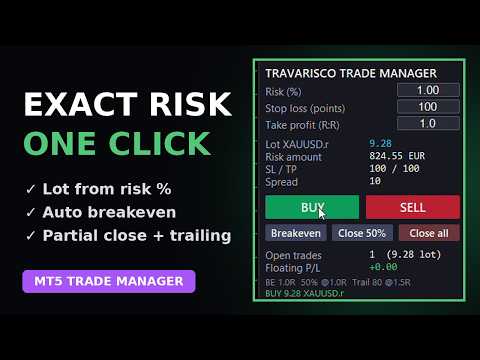
No more calculating lots by hand or forgetting to move your stop. Set your risk in %, click BUY or SELL: lot, stop loss and take profit are placed for you, then breakeven, partial close and trailing run on their own.
Free 14-day trial for demo accounts: https://www.mql5.com/en/blogs/post/778026
NEW in version 2.20
- Alerts: pop-up with sound, push notification to your phone and/or e-mail. You are alerted when a trade opens (also when a pending order is filled), at TP1 and TP2, when the stop moves to breakeven and when the trade closes (with the result).
- Colored risk/reward box on the chart: red zone from entry to stop, green zone from entry to target.
- TP1 / TP2 / TP3: two partial closes (default 50% at 1R and 50% of the rest at 2R) plus the final take profit (default 3R). TP1 and TP2 are marked inside the box.
- The target label shows the total profit including the partial closes.
- Draggable ENTRY / STOP / TARGET lines on the chart: lot and risk update while you drag, each line shows the money at risk or the profit.
- Pending orders (Buy/Sell Limit and Stop) placed at the ENTRY line in one click.
- Risk in % of balance or as a fixed money amount (%/$ button).
- 3 trailing types: fixed points, ATR multiple, low/high of the last N candles.
- Hotkeys with Shift: B buy, S sell, P pending order, L lines, E breakeven, H close 50%, X close all.
Full user guide: https://www.mql5.com/en/blogs/post/778025
Open trades with the exact risk you want, in one click, and let the panel manage them for you.
What it does
- Lot size calculated from your risk % and stop loss in points.
- BUY / SELL in one click, with stop loss and take profit (risk:reward) already placed.
- Automatic breakeven when profit reaches 1R, plus an offset to cover costs.
- Automatic partial close: closes 50% of the position at 1R.
- Trailing stop that starts after 1.5R.
- Buttons: Breakeven, Close 50%, Close all.
- Shows lot, risk amount, SL / TP, spread, open trades and floating P/L.
- Can also manage your manual trades or trades from other EAs on the same symbol (optional).
- Panel in English or Portuguese. All levels (in R and points) can be changed in the settings.
How to use
- Attach it to the chart you want to trade and enable Algo Trading.
- Type your risk %, stop loss (points) and R:R on the panel.
- Click BUY or SELL. Breakeven, partial close and trailing run automatically.
Important
- Trades are only opened when you click. It is not an automated strategy.
- Stop loss is in points: 300 points is 30 pips on EURUSD but only 3 USD on gold, so adjust it to the symbol.
- In the Strategy Tester a demo opens sample trades so you can see the management working. Those results are random and are not a performance claim.
- Pairs well with TravaRisco Daily Loss Lock, which protects the account limits.
News, guides and free trials - follow the channel: https://www.mql5.com/en/channels/travarisco