TravaRisco Trade Manager
- Utilities
- Version: 1.0
- Activations: 5

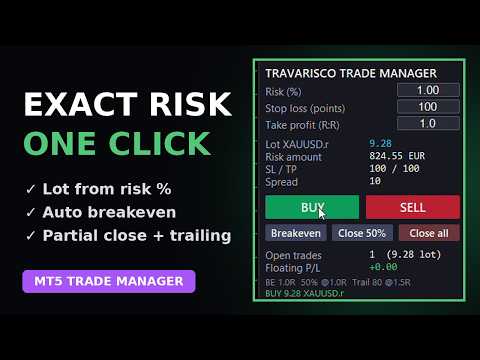
No more calculating lots by hand or forgetting to move your stop. Set your risk in %, click BUY or SELL: lot, stop loss and take profit are placed for you, then breakeven, partial close and trailing run on their own.
Open trades with the exact risk you want, in one click, and let the panel manage them for you.
What it does
- Lot size calculated from your risk % and stop loss in points.
- BUY / SELL in one click, with stop loss and take profit (risk:reward) already placed.
- Automatic breakeven when profit reaches 1R, plus an offset to cover costs.
- Automatic partial close: closes 50% of the position at 1R.
- Trailing stop that starts after 1.5R.
- Buttons: Breakeven, Close 50%, Close all.
- Shows lot, risk amount, SL / TP, spread, open trades and floating P/L.
- Can also manage your manual trades or trades from other EAs on the same symbol (optional).
- Panel in English or Portuguese. All levels (in R and points) can be changed in the settings.
How to use
- Attach it to the chart you want to trade and enable Algo Trading.
- Type your risk %, stop loss (points) and R:R on the panel.
- Click BUY or SELL. Breakeven, partial close and trailing run automatically.
Important
- Trades are only opened when you click. It is not an automated strategy.
- Stop loss is in points: 300 points is 30 pips on EURUSD but only 3 USD on gold, so adjust it to the symbol.
- In the Strategy Tester a demo opens sample trades so you can see the management working. Those results are random and are not a performance claim.
- Pairs well with TravaRisco Daily Loss Lock, which protects the account limits.