TravaRisco Real Cost Monitor MT4

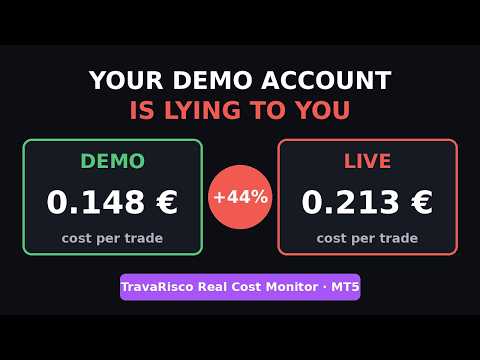
Your demo account is lying to you.

On a demo account your orders fill at the exact price you asked for. On a live account they don't. Spread widens at news time, commissions add up, and slippage quietly eats into every trade - and none of this appears clearly in the MetaTrader history.

TravaRisco Real Cost Monitor shows you, on the chart, what trading this symbol really costs you.

WHAT IT SHOWS

1. Spread

  • Spread right now, in points, in price and in money for your reference lot
  • Average spread: recent, for the current hour and overall
  • Turns red when the spread is unusually high

2. Cost per trade (round trip)

  • Average spread cost
  • Commission per trade (calculated automatically from your own history, or set manually)
  • Average slippage: requested price vs. executed price, measured on your own fills
  • TOTAL cost per trade in your account currency
  • "Price must move X points your way just to break even"

3. Your last N days

  • Number of trades and lots traded
  • Commissions, swap, fees and estimated slippage
  • Result before costs and net result
  • "Costs took X% of your gross profit"

4. Spread heat map by hour

  • 24 squares, one per server hour: green = cheap, red = expensive
  • Hover over a square to see the value
  • Data is saved and keeps improving the longer the indicator runs

5. High-spread alert

  • Warns you when the spread is above X times its average (for example during news releases)

WHO IS IT FOR

  • Traders running Expert Advisors who want to know if the strategy survives real costs
  • Scalpers, for whom costs decide everything
  • Anyone moving from demo to live who wants to compare both accounts side by side
  • Anyone choosing between account types (Standard vs Raw/ECN) or between brokers

HOW TO USE

  • Attach to any chart. Works on any symbol, any timeframe, any broker.
  • Optional: set "Magic number filter" to see the results of one EA only.
  • Run it on your demo and on your live account and compare the "cost per trade".

INPUTS

  • Language: English / Portuguese
  • History days to analyse (default 30)
  • Magic number filter (-1 = all trades)
  • Reference lot (default 0.01)
  • Manual commission per side per lot (0 = calculated from history)
  • High-spread alert multiplier and popup on/off
  • Panel position, colours and font size

NOTES

  • This is an information tool. It does not open, modify or close trades.
  • Slippage can only be measured when the broker records the requested price (always true for pending orders; market orders may show 0).
  • The hourly spread map needs some days of running to be complete.

PART OF THE TRAVARISCO FAMILY

  • TravaRisco Lot Calculator (free): the exact lot for your chosen risk, right on the chart.
  • TravaRisco Trade Manager: open trades with the exact risk in one click, with automatic breakeven, partial close and trailing stop.
  • TravaRisco Daily Loss Lock: watches your account four times per second and acts before your daily or max loss rules are broken - with prop firm presets.

Costs eating your profit? Bad days hurting your account? Protect it with TravaRisco Daily Loss Lock.

MT4 VERSION

  • MetaTrader 4 does not record the requested price of an order, so slippage cannot be measured automatically. If you know your average slippage, enter it in the inputs (Slippage per fill) and it is added to the costs.
  • MT4 does not report fees separately, so there is no Fees line.
More from author
TravaRisco Lot Calculator
Nuno Miguel Dourado Dos Santos
Stop guessing your lot size. TravaRisco Lot Calculator shows the exact lot for your chosen risk, right on the chart. How it works: Type your risk % and stop loss in points on the panel. The indicator instantly calculates: Money at risk (in account currency) Loss per 1 lot at that stop loss Exact lot, rounded to your broker's volume step Real risk after rounding Works on forex, gold, indices and crypto, using your own broker's tick values. Panel in English or Portuguese. It does not open trades:
FREE
TravaRisco Real Cost Monitor
Nuno Miguel Dourado Dos Santos
Your demo account is lying to you. On a demo account your orders fill at the exact price you asked for. On a live account they don't. Spread widens at news time, commissions add up, and slippage quietly eats into every trade - and none of this appears clearly in the MetaTrader history. TravaRisco Real Cost Monitor shows you, on the chart, what trading this symbol really costs you. WHAT IT SHOWS 1. Spread Spread right now, in points, in price and in money for your reference lot Average spread: re
FREE
TravaRisco Lot Calculator MT4
Nuno Miguel Dourado Dos Santos
Stop guessing your lot size. TravaRisco Lot Calculator shows the exact lot for your chosen risk, right on the chart. How it works: Type your risk % and stop loss in points on the panel. The indicator instantly calculates: Money at risk (in account currency) Loss per 1 lot at that stop loss Exact lot, rounded to your broker's volume step Real risk after rounding Works on forex, gold, indices and crypto, using your own broker's tick values. Panel in English or Portuguese. It does not open trades:
FREE
TravaRisco Daily Loss Lock MT4
Nuno Miguel Dourado Dos Santos
One bad day can end a prop firm challenge. TravaRisco watches your account four times per second and acts before the rules are broken. New in v2.0 Prop firm presets: FTMO 2-Step, FTMO 1-Step, The5ers High Stakes, FundedNext Stellar 2-Step, or Custom. Choose one, enter your account size and the daily and max loss rules are set for you. Challenge tracker: profit target progress, minimum trading days and the best-day consistency rule, live on the panel. When the target and the minimum days are reac
TravaRisco Trade Manager MT4
Nuno Miguel Dourado Dos Santos
Open trades with the exact risk you want, in one click, and let the panel manage them for you. What it does Lot size calculated from your risk % and stop loss in points. BUY / SELL in one click, with stop loss and take profit (risk:reward) already placed. Automatic breakeven when profit reaches 1R, plus an offset to cover costs. Automatic partial close: closes 50% of the position at 1R. Trailing stop that starts after 1.5R. Buttons: Breakeven, Close 50%, Close all. Shows lot, risk amount, SL / T
TravaRisco Daily Loss Lock
Nuno Miguel Dourado Dos Santos
One bad day can end a prop firm challenge. TravaRisco watches your account four times per second and acts before the rules are broken. New in v2.0 Prop firm presets: FTMO 2-Step, FTMO 1-Step, The5ers High Stakes, FundedNext Stellar 2-Step, or Custom. Choose one, enter your account size and the daily and max loss rules are set for you. Challenge tracker: profit target progress, minimum trading days and the best-day consistency rule, live on the panel. When the target and the minimum days are reac
TravaRisco Trade Manager
Nuno Miguel Dourado Dos Santos
Open trades with the exact risk you want, in one click, and let the panel manage them for you. What it does Lot size calculated from your risk % and stop loss in points. BUY / SELL in one click, with stop loss and take profit (risk:reward) already placed. Automatic breakeven when profit reaches 1R, plus an offset to cover costs. Automatic partial close: closes 50% of the position at 1R. Trailing stop that starts after 1.5R. Buttons: Breakeven, Close 50%, Close all. Shows lot, risk amount, SL / T
Filter:
No reviews
Reply to review