TravaRisco Trade Manager MT4

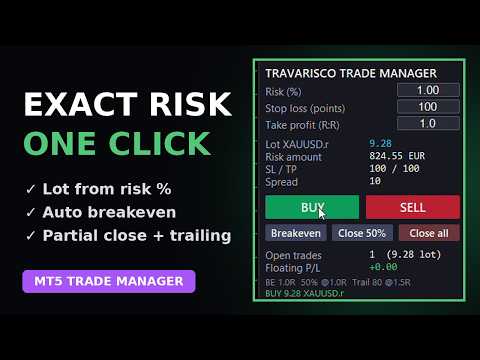
ワンクリックで狙いどおりのリスクでエントリーし、その後の管理はパネルに任せられます。

機能

  • リスク % とストップロス(ポイント)からロットを計算。
  • ワンクリックで BUY / SELL、ストップロスとテイクプロフィット(リスクリワード)も同時に設定。
  • 利益が 1R に達したら自動で建値ストップ(コスト分のオフセット付き)。
  • 自動部分決済:1R でポジションの 50% を決済。
  • 1.5R からトレーリングストップを開始。
  • ボタン:建値、50% 決済、全決済。
  • ロット、リスク額、SL / TP、スプレッド、保有ポジション、含み損益を表示。
  • 同じシンボルの手動取引や他の EA の取引も管理可能(任意)。
  • パネルは英語またはポルトガル語。すべての水準(R とポイント)は設定で変更可能。

使い方

  1. 取引するチャートに適用し、アルゴリズム取引を有効化。
  2. パネルにリスク %、ストップロス(ポイント)、R:R を入力。
  3. BUY または SELL をクリック。建値・部分決済・トレーリングは自動。

重要

  • 取引はクリックしたときだけ発注されます。自動売買戦略ではありません。
  • ストップロスはポイント単位です。300 ポイントは EURUSD では 30 pips ですが、ゴールドでは 3 USD なので、シンボルに合わせて調整してください。
  • ストラテジーテスターではデモがサンプル取引を行い管理機能を確認できます。その結果はランダムで、成績を約束するものではありません。
  • 口座の上限を守る TravaRisco Daily Loss Lock との併用がおすすめです。
おすすめのプロダクト
News Scalping Executor Pro is an utility which helps to trade high impact and huge volatility   news . This utility helps to create two opposite orders with risk management and profit protection. It moves automatically stop loss level to avoid losses as much as possible by using many different algorithms. It helps to avoid trading the news if spread suddenly becomes very huge. It can lock profit by moving stop loss or partially closing of orders. To be profitable with this type of trading you
The indicator detects and displays М. Gartley's Butterfly pattern. The pattern is plotted by the extreme values of the ZigZag indicator (included in the resources, no need to install). After detecting the pattern, the indicator notifies of that by the pop-up window, a mobile notification and an email. The pattern and wave parameters are displayed on the screenshots. The default parameters are used for demonstration purposes only in order to increase the amount of detected patterns. Parameters z
Introducing Order Blocks Breaker , a brand-new way to identify and leverage order blocks in your trading strategy. After developing multiple order block tools with unique concepts, I’m proud to present this tool that takes things to the next level. Unlike previous tools, Order Blocks Breaker not only identifies order blocks but also highlights Breaker Order Blocks —key areas where the price is likely to retest after a breakout. MT5 -  https://www.mql5.com/en/market/product/124102/ This tool inco
Safety
Sergey Ermolov
5 (2)
私は誰もが"安全"のようなお金の管理のルールを知っていると思います。 気づいていない人のために、金庫は取引の利益がストップの大きさに等しい後にポジションの半分を閉じることを前提としています。 したがって、価格が逆転してストップをキャッチしたとしても、ポジションの一部を以前に閉じたときにまったく同じ量の利益が得られたため、お金を失うことはありません。 Safety Expert Advisorには、決算ロットという設定が1つしかありません。 ポジション0のままにすると、アドバイザーはトランザクションのちょうど半分を閉じます。 Expert Advisorをインストールすると、expert Advisorによって利益の一部が固定される場所のグラフに赤い破線が表示されます。 アドバイザーがトランザクションの一部を別のレベルで閉じるようにする場合は、この行を別の場所に安全に移動できます。 同じ通貨ペアで複数の取引を開いている場合は、マウスカーソルでEAをチャートにドラッグし、安全に閉じたい注文開始レベルの近くにeaをドロップする必要があります。 Expert Advisorは注文チケッ
FREE
「Auto FIBO Pro」Crypto_Forex インジケーターは、取引の補助ツールとして最適です。 - インジケーターは、フィボナッチ レベルとローカル トレンド ライン (赤色) を自動的に計算してチャート上に配置します。 - フィボナッチ レベルは、価格が反転する可能性のある重要な領域を示します。 - 最も重要なレベルは、23.6%、38.2%、50%、61.8% です。 - リバーサル スキャルピングやゾーン グリッド取引に使用できます。 - Auto FIBO Pro インジケーターを使用して、現在のシステムを改善する機会も多数あります。 - Info Spread Swap Display があり、接続されている外国為替ペアの現在のスプレッドとスワップを表示します。 - ディスプレイには、アカウントの残高、エクイティ、マージンも表示されます。 - Info Spread Swap Display は、チャートのどのコーナーにも配置できます。 高品質のトレーディングロボットとインジケーターをご覧になるにはここをクリックしてください! これは、この MQL5 ウェブサイ
Profitstat is a free indicator that scans your history and displays it on the chart. The free version shows the number of trades and profit made on the current and previous day. The data is updated instantly as soon as a trade closes. Simply attach it to any chart and it gives the account data irrespective of the chart currency nor timeframe.
FREE
ATC Alert Managerは、チャート上で直接価格アラームを設定し、1つの小さなパネルから管理できるようにします。各アラームはチャート上の線として表示され、新しい価格にドラッグできます。 アラームは、価格があなたのレベルを横切った瞬間に一度だけ発火し、ポップアップアラート、サウンド、そして携帯電話へのオプションのプッシュ通知が伴います。すでにレベルを超えている価格はそれをトリガーしないので、毎ティックで繰り返しアラートを受け取ることはありません。 このツールは、ポジションツール、トレード管理、パフォーマンス分析とともに、 All In One Trade Management Panel MT4 の一部でもあります。 主な機能: ワンクリックでアラームを追加します。価格フィールドは現在の価格から始まり、方向を選択します:AboveまたはBelow。 任意のアラームにメモを追加します。例えば「ロンドン高値」。メモはアラートメッセージに含まれます。 各アラームは、チャートの右側に価格ラベルが付いた線として描画されます。ラベルをドラッグして価格を変更すると、アラームは新しいレベ
FREE
You can manually open a trade (one click), and this EA will take care of setting the SL and TP. SL and TP are set based on the number of pips you specify in the input screen. You can also choose monetary SL and TP. SL and TP are determined based on the weighted average price (WAP), so if you open a new trade, SL and TP will be updated according to the new WAP. The WAP is not unique but differentiated between buy and sell trades (this is useful only if you open opposite trades on the same chart)
FREE
HMA Trend
Pavel Zamoshnikov
4.56 (72)
A trend indicator based on the Hull Moving Average (HMA) with two periods. The Hull Moving Average is an improved variant of the moving average, which shows the moment of trend reversal quite accurately. It is often used as a signal filter. Combination of two types of Hull Moving Averages makes a better use of these advantages: HMA with a slow period identifies the trend, while HMA with a fast period determines the short-term movements and signals in the trend direction. Features The movement d
FREE
Basic Theme Builder
Mehran Sepah Mansoor
5 (1)
Basic Theme Builder: チャートカスタマイズを簡単に Basic Theme Builder   インジケーターで、MetaTrader 4     のチャート外観のカスタマイズをシンプルに変革しましょう。この直感的なインジケーターは、使いやすいパネルを提供し、さまざまなテーマやカラースキームを簡単に切り替えることができます。これにより、取引環境の視覚的な魅力と機能性が向上します。 Free MT5 version Basic Theme Builder   インジケーターは、MetaTrader 4 のチャートを簡単にパーソナライズしたいトレーダーに最適なツールです。シンプルなパネルインターフェースとさまざまなテーマプリセットを使用して、取引スタイルや気分に合わせてチャートの外観をすぐに調整できます。クラシックなルックからモダンな美学まで、多彩なオプションを提供する   Basic Theme Builder   で、視覚体験を最適化しましょう。 主な機能: 簡単なテーマ管理:   便利なパネルインターフェースを使用して、ワンクリックでチャートのテーマを素早く変更
FREE
This simple but useful script calculates the lot in % of the deposit. It is indispensable for risk management. There is only one customizable parameter: MaxRisk - risk in % for lot calculation. The product works as a standard script. Launch it once on an appropriate chart and start trading using the calculated lot value. Genious is simplicity! Happy trading!
FREE
価格アクショントレードパネルMT4は、指定された(デフォルトでは8)過去のろうそくの純粋な価格アクションデータに基づいて、任意のシンボル/楽器の売買力レベルのバランスを計算します。これにより、インジケーターのパネルで利用可能な32のシンボル/商品の価格アクションを監視することにより、可能な限り最も近い市場センチメントが得られます。 60%を超える売買力レベルは、特定のシンボルを売買するための非常に堅実なレベルを提供します(デフォルト設定を使用)。価格アクショントレードパネルMT4には、価格アクションへの標準、高速、または低速の近接に使用できる3つの計算モードがあり、リアルタイムの動きにシャープまたはスムーズに適応するために調整可能な数の価格アクションキャンドルも提供します。 価格アクショントレードパネルMT4は、MT4で見つけることができる最も簡単で使いやすいトレードパネルでもあります。追加のウィンドウやパネルを開く必要なしに、すべてのオプションと機能が1つのサーフェスにあります。これは、注文管理、リスク計算、部分閉鎖、アカウント保護ユーティリティのすべてを1つにまとめたもので、非
Product Name: Risk Commander: Trade Assistant & Strategy Simulator Risk Commander is more than just a trade panel—it is a complete Manual Trading Ecosystem . It serves two powerful purposes: Live Assistant: Helps you execute trades with speed, precision, and perfect risk management in real-time markets. Training Simulator: Fully compatible with the Strategy Tester (Visual Mode) , allowing you to practice manual trading on historical data without risking a cent. NEW! Built-in Simulator Mode Stop
Virtual Collider Manual   is a trading assistant with a built-in panel for manual trading. It automatically moves a position opened by a trader in profit using innovative adaptive grid algorithm of averaging and adaptive pyramiding Know-how of the grid algorithm of averaging and pyramiding of the   Virtual Collider Manual   trading robot is based on fully automatic adaptation of all characteristics of dynamically build order grid and pyramid with actual price movement with no need for adjusting
The indicator shows which trading pairs, strategies, robots and signals that you use are profitable and which are not. The statistic of trades and balance graph are displayed in the account currency and pips - to switch simply click on the graph. button "$"(top left) - minimize/expand and move the indicator panel button ">"(bottom right) - stretching and resetting to the original size Statistic of trades 1 line - account balance, current profit and lot of open trades; 2 line - the number of all
This is a multi-timeframe version of the popular Hull Moving Average (HMA). The Double HMA MTF Light indicator combines two timeframes on a single chart. The HMA of the higher timeframe defines the trend, and the HMA of the current timeframe defines short-term price movements. The indicator is freely distributed and hasn't audio signals or messages. Its main function is the visualization of price movements. If you need advanced functionality of the HMA multi-timeframe indicator (information ab
FREE
This is a forex supporting tool for all manual traders. You can close positions immediately at once on the MT4 Terminal by a single click. CLOSE SELL: You can close SHORT positions of the target currency pair (same as the chart you’re using this EA). CLOSE BUY: Same as above but LONG positions will be closed. CLOSE ALL: All opened positions will be closed (no matter of currency pairs). You can select the closing method from CLOSE ALL or CLOSE ONE BY ONE. You can choose the positions to be closed
FREE
Price Magnet — Price Density and Attraction Levels Indicator Price Magnet is a professional analytical tool designed to identify key support and resistance levels based on statistical Price Density. The indicator analyzes a specified historical period and detects price levels where the market spent the most time. These zones act as “magnets,” attracting price action or forming a structural base for potential reversals. Unlike traditional Volume Profile tools, Price Magnet focuses on price-time d
VR カラー レベルは、トレンドライン、四角形、テキストなどの要素を使用してテクニカル分析を適用する人にとって便利なツールです。グラフにテキストを直接追加したり、スクリーンショットを撮ったりすることができます。 設定、設定ファイル、デモ版、説明書、問題解決方法は、以下から入手できます。 [ブログ] レビューを読んだり書いたりすることができます。 [リンク] のバージョン [MetaTrader 5] インジケーターの操作は ワンクリック で実行できます。これを行うには、線の付いたボタンをクリックすると、カーソルの下に傾向線が表示されます。次に、カーソルを移動して 線の位置 を選択し、もう一度クリックして修正します。 インジケーター の特徴は、スタイルと色のすべての変更が自動的に保存され、その後すべての 新しく作成された グラフィック オブジェクトに適用されることです。 このインジケーターには、異なるスタイルのトレンド ラインを設定するための 2 つの独立したボタン、異なるスタイルの 2 つの独立した四角形、独自のスタイルを持つ 1 つのテキスト フィールド、およびスクリーンショット
FREE
The indicator shows the potential trend direction by cyclical-wave dependence. Thus, all the rays of the intersection will be optimal rays, in the direction of which the price is expected to move, taking into account the indicator period. Rays can be used as a direction for potential market movement. But we must not forget that the approach must be comprehensive, the indicator signals require additional information to enter the market.
Quantum Falcon Signal Free is a smart visual trading indicator for MetaTrader 4 designed for Forex and Gold traders. The indicator combines: • Trend analysis • RSI momentum confirmation • MACD momentum filtering • ATR volatility filtering • Higher timeframe confirmation • Smart exit signal detection Main Features: • Smart Buy and Sell signals • Exit Buy / Exit Sell alerts • Real-time dashboard on chart • Professional candle arrows • Multi-timeframe trend confirmation • ATR market volatility filt
FREE
The   Trendlines Oscillator   helps traders identify trends and momentum based on the normalized distances between the current price and the most recently detected bullish and bearish trend lines. The indicator features bullish and bearish momentum, a signal line with crossings, and multiple smoothing options. USAGE The   Trendlines Oscillator   works by systematically: Identifying pivot highs and lows. Connecting pivots to form bullish (support) and bearish (resistance) trendlines. Measuring
Trend PA
Mikhail Nazarenko
5 (3)
The Trend PA indicator uses   Price Action   and its own filtering algorithm to determine the trend. This approach helps to accurately determine entry points and the current trend on any timeframe. The indicator uses its own algorithm for analyzing price changes and Price Action. Which gives you the advantage of recognizing, without delay, a new nascent trend with fewer false positives. Trend filtering conditions can be selected in the settings individually for your trading style. The indicator
IceFX’s TradeInfo is an utility indicator which displays the most important information of the current account and position. Displayed information: Information about the current account (Balance, Equity, Free Margin). Current spread, current drawdown (DD), planned profit, expected losses, etc. Number of open position(s), volume (LOT), profit. Today’s and yesterday’s range. Remaining time to the next candle. Last day profit information (with integrated IceFX ProfitInfo indicator). Risk-based LOT
FREE
Account Info EA It is a tool that presents on the graph all the positions of the account, and specific information concerning the positions, but also the account. It enables the user to have an image of his account at a glance. Use like any expert advisor. You can't attach it in the same chart with other expert advisor. It does not have the ability to open or manage positions. You can attach it on any chart and any timeframe.
FREE
The indicator displays the data of the Stochastic oscillator from a higher timeframe on the chart. The main and signal lines are displayed in a separate window. The stepped response is not smoothed. The indicator is useful for practicing "manual" forex trading strategies, which use the data from several screens with different timeframes of a single symbol. The indicator uses the settings that are identical to the standard ones, and a drop-down list for selecting the timeframe. Indicator Paramet
Easy Trade Executor は、MT4 における迅速なポジションサイズ計算、注文執行、およびトレード管理のためのツールです。 エントリー価格、Stop Loss、Take Profit レベルをチャート上に直接配置し、ポジションサイズを自動計算して、リスクを管理しながら数回のクリックでトレードを開始できます。 なぜ Easy Trade Executor を選ぶのか? Easy Trade Executor は、単なるリスク計算以上の機能を求めるトレーダーのために設計されています。トレーダーはチャート上から迅速かつ効率的にトレードを管理したいと考えています。 このツールは、ポジションサイズ計算、注文執行、トレード管理を1つのワークフローに統合し、手動計算やターミナルウィンドウの切り替えではなく、トレードそのものに集中できる環境を提供します。 Easy Trade Executor の主な機能: リスクベースの自動ポジションサイズ計算; チャートから直接行う成行注文および指値・逆指値注文の発注; 自動トレード管理のための Trailing Stop; ワンクリックでのポジシ
SL InfoPanel is an information panel that displays operational trading information on the current instrument. The panel contains the following information: The first column: The fixed profit for the specified period of time and the percentage of this profit to the current deposit (the time period is configured in the "Account History"). The value is colored blue if there is a profit and red if there is a loss. Open Long orders (number of lots/number of orders). Open Short orders (number of l
This is a DEMO version of the Smarter Trade Manager Smarter Trade Manager  is an advanced trade management tool that can monitor and manage your manual and EA trades according to the settings you choose. It works as an Expert Advisor (EA), it does not open any trades but it closes trades as per the auto closing settings or when manually pressing any of the close buttons. FEATURES: Three-dimensional  interactive  view of your trades Trade Summary, P/L, Alerts, Closure by  Currency Trade Summary,
FREE
Lot by Risk
Sergey Vasilev
4.83 (23)
Lot by Risk tradingパネルは、手動取引用に設計されています。 これは、注文を送信するための代替手段です。 パネルの最初の特徴は、管理線を使用した注文の便利な配置です。 第二の特徴は、ストップロスラインの存在下で与えられたリスクのための取引量の計算です。 制御線はホットキーを使用して設定されます: 利益を取る-デフォルトではTキー; 価格-デフォルトではPキー; ストップロス-デフォルトでは、Sキー; 取引パネルの設定で自分でキーを設定できます。 操作のアルゴリズム: 1)-レベルを希望の場所に配置します(すべてのレベルを配置する必要はありません); 2)-リスクを指定します(オプション); 3)-緑の送信注文ボタンをクリックします; 4)-注文が行われるのを待っているか、エラーメッセージ付きのアラートが表示されます; 5)-マジックでExpert Advisorにリンクされている現在のシンボルのすべての注文を閉じる場合は、注文を閉じるボタンをクリックします。 注文を送信ボタンを何度も押すべきではありません。 一度で十分です。 注文後、ボタンは「
FREE
このプロダクトを購入した人は以下も購入しています
Trade Assistant MT4
Evgeniy Kravchenko
4.43 (197)
取引 ごとのリスクの 計算、新規注文 の 簡単 な 設置、部分的 な 決済機能 を 持 つ 注文管理、 7 種類 のトレーリングストップなど 、便利 な 機能 を 備 えています 。 追加の資料と説明書 インストール手順 - アプリケーションの手順 - デモアカウント用アプリケーションの試用版 ライン機能 チャート上にオープニングライン、ストップロス、テイクプロフィットを表示します。この機能により、新規注文を簡単に設定することができ、注文を出す前にその特徴を確認することができます。   リスク計算 リスク計算機能は、設定されたリスクとストップロス注文のサイズを考慮して、新規注文のボリュームを計算します。ストップロスの大きさを自由に設定できると同時に、設定したリスクを守ることができます。 Lot calc ボタン - リスク 計算 を 有効 / 無効 にします 。 Risk フィールドでは 、必要 なリスクの 値 を 0 から 100 までのパーセンテージまたは 預金通貨 で 設定 します 。 設定」 タブで 、 リスク 計算 の 種類 を 選択 します :「 $ 通貨」、「 % 残
Local Trade Copier EA MT4
Juvenille Emperor Limited
4.96 (111)
Local Trade Copier EA MT4 は、同一の Windows PC または Windows VPS 上で稼働する複数の MetaTrader 4 口座間で、取引をコピーおよび管理するための高速で柔軟なトレードコピーツールです。 ローカルでの取引同期に加え、Receiver 側でロットサイズ、リスク管理、取引フィルター、シンボルマッピング、取引管理、口座保護を個別に設定できます。 Transmitter と Receiver のターミナルは約 1分 で設定でき、同一ブローカーまたは異なるブローカーの口座間で、手動取引や EA による取引をコピーできます。適切な条件下では、ローカルの MetaTrader ターミナル間で取引情報を 0.5秒未満 で同期できます。実際の約定速度は、ブローカーのレイテンシー、ネットワーク状況、PC/VPS の性能、ターミナルの負荷によって異なります。 ご購入前に無料デモをお試しください Local Trade Copier EA MT4 の完全機能版無料デモ を、MT4 デモ口座で 1回につき4時間 テストできます。 Local Trad
Exp COPYLOT CLIENT for MT4
Vladislav Andruschenko
4.69 (65)
MetaTrader 4向け 高機能トレードコピーソフト MetaTrader 4 用の、高速・安定・高機能なトレードコピーソフトです。 COPYLOT は、 MetaTrader 4 と MetaTrader 5 間でFX取引をコピーでき、さまざまな口座タイプや運用スタイルに合わせて柔軟に同期できます。 COPYLOT MT4版の対応コピー方式: MetaTrader 4 → MetaTrader 4 MetaTrader 5 Hedge → MetaTrader 4 MetaTrader 5 Netting → MetaTrader 4   MT5版 詳細説明 + DEMO + PDF 購入方法 インストール方法 ログファイルの取得方法 テストと最適化の方法 Expforexの全製品 MetaTrader 5版 を使えば、 MetaTrader 5 → MetaTrader 5 および MetaTrader 4 → MetaTrader 5 のコピーにも対応します: COPYLOT CLIENT for MT5 COPYLOT は、2台、3台、さらには10台規模のターミナル環境でも
Trade Manager EAへようこそ。これは、取引をより直感的、正確、そして効率的にするために設計された究極の リスク管理ツール です。これは単なるオーダー実行ツールではなく、包括的な取引計画、ポジション管理、リスク管理のためのソリューションです。初心者から上級者、迅速な実行を必要とするスキャルパーまで、Trade Manager EAはあらゆるニーズに対応し、為替、指数、商品、暗号通貨などさまざまな市場で柔軟に対応します。 Trade Manager EAを使用すると、複雑な計算が過去のものになります。市場を分析し、エントリーポイント、ストップロス、テイクプロフィットのレベルをチャート上のラインでマークし、リスクを設定するだけで、Trade Managerが最適なポジションサイズを即座に計算し、SLとTPをピップ、ポイント、口座通貨でリアルタイムに表示します。すべての取引が簡単かつ効果的に管理されます。 主な機能: ポジションサイズ計算機 :定義されたリスクに基づいて取引サイズを瞬時に決定します。 簡単な取引計画 :エントリー、ストップロス、テイクプロフィットを設定するためのド
Telegram to MT4 Multi-Channel Copier   は、 Telegram と Discord チャンネルのトレードシグナルを MetaTrader 4 へ自動コピーします。ボット不要、ブラウザ拡張不要、手動コピー不要。Telegram や Discord にシグナルが届くと、EA が数秒であなたのターミナルに注文を出します。 さらに、チャンネルをコピーする前に、内蔵バックテスターでそのチャンネルがあなたの口座でどう動いたかを確認できます。 製品は 2 つのコンポーネントで構成されます:Telegram チャンネルを監視する Windows アプリと、MT4 ターミナルでシグナルを執行する本 EA です。MT5 版もあります   こちら . セットアップガイドとアプリのダウンロード:   https://www.mql5.com/en/blogs/post/768988 Telegramのシグナルチャンネルをバックテストする方法 をご覧ください。 現在の価格は今後値上げされます。 仕組み アプリはあなた自身の Telegram アカウントで接続するため、フォロ
TelegramからMT4へ: 究極のシグナルコピーソリューション Telegram to MT4 は、DLLを必要とせず、TelegramのチャンネルやチャットからMetaTrader 4プラットフォームに取引シグナルを直接コピーできる最先端のユーティリティです。この堅牢なソリューションは、比類のない精度とカスタマイズオプションにより、シグナルのシームレスな実行を保証し、時間を節約し、効率性を向上させます。 [ Instructions and DEMO ] 主な特徴 直接的なTelegram API統合 電話番号とセキュアコードで認証します。 ユーザーフレンドリーな EXE ブリッジを使用して、チャット ID を簡単に取得および管理します。 複数のチャネル/チャットを追加、削除、更新して、同時に信号をコピーします。 高度なフィルターによる信号解析 カスタム例外語 (例: 「レポート」、「概要」) を含む不要な信号をスキップします。 柔軟な SL および TP 形式 (価格、ピップ、ポイント) をサポートします。 シグナルが価格ではなくポイントを指定する場合、エントリ ポイントを自動
Trade Indicator Assistant is a powerful MT4 utility designed to turn indicators into automated trading systems. Its main feature is the ability to automatically detect an indicator’s   BUY and SELL signal buffers , without requiring you to know the buffer numbers, search through indicator settings, or modify the indicator source code. Bonus Indicator: After purchasing Trade Indicator Assistant, contact me to receive Trade Signal Pro completely free as a bonus indicator. [Download Demo Version]
TradePanel MT4
Alfiya Fazylova
4.84 (95)
Trade Panelは多機能なトレーディングアシスタントです。アプリには手動取引用の50以上のトレーディング機能が搭載されており、ほとんどの取引作業を自動化することができます。 アプリの説明書: https://www.mql5.com/en/blogs/post/756482 デモ口座用アプリの試用版: https://www.mql5.com/en/blogs/post/750865 アプリのインストール方法: https://www.mql5.com/en/blogs/post/756239 アプリをビジュアルモードでテストする方法: https://www.mql5.com/en/blogs/post/770277 VPSのMetaTraderにアプリをインストールする方法: https://www.mql5.com/en/blogs/post/770190 取引。 ワンクリックで取引操作を行うことができます: リスクを自動計算して指値注文やポジションを開く。 複数の注文やポジションをワンクリックで開く。 注文のグリッドを開く。 保留中の注文やポジションをグループごとに閉じる
Trade Dashboard simplifies how you open, manage, and control your trades, with built-in lot size calculation. It allows you to execute trades, manage risk, and control positions directly on the chart, with tools such as partial close, breakeven, and trailing stop. Designed to reduce manual work and help you stay focused on your trading decisions. A demo version is available for testing. Detailed explanations of features are provided within the MQL5 platform. Installation instructions are include
Take a Break pauses your Expert Advisors when trading is a bad idea: before news, after a daily loss, outside your trading hours, or when a rule you wrote yourself says so. When the pause is over, your EAs simply continue. Account protection for all your EAs in one tool: news filter, drawdown and equity protection, time filter and custom rules. One EA on one chart protects the whole account, the free indicator gives every chart its own rules on top. Free demo | What is new in 26.09 | Support Ass
サポートが必要ですか?設定方法は?ご質問は?こちらでお客様の言語でどうぞ、迅速に返信します: https://www.mql5.com/en/market/product/139089/comments 無料トライアル版ダウンロード Copy Cat More (コピーキャット・モア) MT4 トレードコピー (Trade Copier) は単なるローカルのトレードコピーではありません。今日のトレード課題のために設計された 完全なリスク管理・執行フレームワーク (risk management and execution framework) です。プロップファーム (prop firm) のチャレンジから個人のポートフォリオ管理まで、堅牢な執行、資金保護、柔軟な設定、高度なトレード処理の組み合わせによって、あらゆる状況に適応します。 このコピーは   マスター (Master、送信側) と スレーブ (Slave、受信側)   の両モードで動作し、成行注文・指値注文、トレードの変更、部分決済、そして両建て決済 (Close By) 操作をリアルタイムで同期します。デモ口座と実口
MT4 to Telegram Signal Provider は使いやすく、完全にカスタマイズ可能なツールで、Telegramに信号を送信し、あなたのアカウントを信号提供者に変えることができます。 メッセージのフォーマットは 完全にカスタマイズ可能です! しかし、簡単な使用のために、あらかじめ定義されたテンプレートを選択し、メッセージの特定の部分を有効または無効にすることもできます。 [ デモ ]   [ マニュアル ] [ MT5バージョン ] [ Discordバージョン ] [ Telegramチャンネル ]  New: [ Telegram To MT5 ] セットアップ ステップバイステップの ユーザーガイド が利用可能です。 Telegram APIの知識は必要ありません。開発者が必要なものをすべて提供します。 主要機能 購読者に送信される注文の詳細をカスタマイズする機能 例えばブロンズ、シルバー、ゴールドなど、階層型のサブスクリプションモデルを作成できます。ゴールドサブスクリプションでは、すべての信号が得られますなど。 ID、シンボル、またはコメントによる注文のフ
コピー機->便利で高速なインターフェースインタラクション、ユーザーはすぐに使用できます     ->>>> WindowsコンピュータまたはVPS Windowsでの使用を推奨 特徴: 多様でパーソナライズされたコピー取引設定:1. 異なるシグナルソースに異なるロットモードを設定できます。2. フォワードコピー取引とリバースコピー取引に異なるシグナルソースを設定できます。3. シグナルはコメントで設定できます。4. 契約ロットに応じてロットを調整するかどうか 多様でパーソナライズされたコピー注文設定2:1.品種ごとに異なるロットモードを設定できます2.順方向コピー注文と逆方向コピー注文に異なる品種を設定できます3.コメントでシグナルを設定できます4.契約ロットに応じてロットを調整するかどうか コメントフィルタリング、MAGICフィルタリング、シグナルロットフィルタリング、ローカル製品フィルタリング 勤務時間設定 逆同期SLAVE終了 注文バインド機能: 任意の注文を設定されたシグナルソース注文にバインドできます (テーブルをダブルクリックして編集します) アカウントリスク管理 基本
Trade Manager は、リスクを自動的に計算しながら、取引を迅速に開始および終了するのに役立ちます。 過剰取引、復讐取引、感情的な取引を防止する機能が含まれています。 取引は自動的に管理され、アカウントのパフォーマンス指標はグラフで視覚化できます。 これらの機能により、このパネルはすべてのマニュアル トレーダーにとって理想的なものとなり、MetaTrader 4 プラットフォームの強化に役立ちます。多言語サポート。 MT5バージョン  |  ユーザーガイド + デモ Trade Manager はストラテジー テスターでは機能しません。 デモについてはユーザーガイドをご覧ください。 危機管理 % または $ に基づくリスクの自動調整 固定ロットサイズを使用するか、ボリュームとピップに基づいた自動ロットサイズ計算を使用するオプション RR、Pips、または価格を使用した損益分岐点ストップロス設定 トレーリングストップロス設定 目標に達したときにすべての取引を自動的に終了するための 1 日あたりの最大損失 (%)。 過度のドローダウンからアカウントを保護し、オーバートレードを防ぎま
The product will copy all telegram signal to MT4   ( which you are member  ) , also it can work as remote copier.  Easy to set up, copy order instant, can work with almost signal formats, image signal, s upport to translate other language to English Work with all type of channel or group, even channel have "Restrict Saving Content", work with  multi channel, multi MT5 Work as remote copier: with signal have ticket number, it will copy exactly via ticket number. Support to backtest signal. How to
VirtualTradePad mt4 Extra
Vladislav Andruschenko
4.85 (61)
ワンクリックで取引できるトレーディングパネル。ポジションと注文の操作!チャートまたはキーボードから取引。 手動取引用の取引パネル。チャート(チャートウィンドウ)またはキーボードから取引できます。開閉、リバース、ロックポジションと注文を処理する МetaТrader4のメインオーダーのトレーディングコントロールパネル:売買、売却、売却、売却、売却、閉じる、削除、修正、トレーリングストップ、ストップロス、takeproft 新しいプレミアム版が利用可能です: VirtualTradePad PRO SE   で取引ワークフローを強化できます。 MetaTrader 5   と   MetaTrader 4   に対応した次世代のプロ向け取引パネルです。 MT5のバージョン 完全な説明 +DEMO +PDF 購入する方法 インストールする方法    ログファイルの取得方法    テストと最適化の方法    Expforex のすべての製品 シンボルウィンドウからの取引とキーボードからの取引! あなたはMetaTrader 4ターミナル - バーチャルコントロールパネルVirtualTr
News Filter EA: Advanced Algo Trading Assistant News Filter EA is an advanced algo trading assistant designed to enhance your trading experience. By using the   News Filter EA , you can integrate a Forex economic news filter into your existing expert advisor, even if you do not have access to its source code. In addition to the news filter, you can also specify   trading days   and   hours   for your expert. The News Filter EA also includes   risk management   and   equity protection   features
FCK CurrencyStrength Pro
Patel Hitendrakumar Mahendrabhai
Hi Friends, " FCK Currency Strength Pro " is a auto & semi auto trading expert with direction of pair. Buy-Sell separate or multi currency in one click. The strategy of  FCK Currency Strength Pro  is a combination of custom indicator, Trendlines, Support & Resistance levels ( Price Action ) and most important secretive trading algorithm mentioned above. Download News Ex4 and csv file You need the following SDSnews.ex4 in MQL4/Libraries and the daylightsavings.csv in MQL4/Files. Only 4 of 5 copi
Close If Profit or Loss with Trailing for MetaTrader 4 — 総利益または総損失で自動決済 MetaTrader 4 用の実用的な取引管理ツールです。設定した総利益または総損失に到達すると、選択されたポジションを自動的に決済できます。 Expert Advisor は保有中の取引を監視し、含み損益を計算し、Trailing Profit を使用して、手動操作より素早くポジション管理を行うことができます。 MetaTrader 4 は現在でも、裁量トレーダー、スキャルピング、グリッド取引、EA 運用で広く使用されています。しかし、MT4 には複数ポジションを「合計結果」で簡単に自動決済する標準機能がありません。このユーティリティは、その不足している管理機能を追加します。 Close If Profit or Loss with Trailing は、裁量取引、他の Expert Advisors、グリッドシステム、ナンピン、リカバリー戦略、複数シンボルの取引と組み合わせて使用できます。ルールを設定すれば、EA が結果を監視し、条件に到
Partial Closure EA MT4
Juvenille Emperor Limited
5 (3)
Partial Closure EA MT4 は、口座内のあらゆる取引を部分的に決済できます。ロットサイズの選択した割合やチケット番号で手動決済することも、TP/SLレベルの指定された割合で自動決済することも可能で、最大10のテイクプロフィットと10のストップロスレベルで初期ロットサイズの一部を決済します。特定のマジックナンバー、コメント、または銘柄を指定または除外することで、アカウント内のすべてまたは選択した取引を管理できます。。 ヒント:Partial Closure EA MT4 の無料デモバージョンをダウンロードして、デモアカウントで試してみてください: こちら ダウンロードした無料のデモ ファイルを MT4 >> ファイル >> データ フォルダを開く >> MQL4 >> Experts フォルダに貼り付けて、ターミナルを再起動します。  無料のデモ版は、デモ アカウントでのみ、一度に 4 時間完全に機能します。 試用期間をリセットするには、MT4 >> ツール >> グローバル変数 >> Control + A >> 削除に移動します。 この操作は重要ではないデモ口座
RS Trade Copier - 超高速 で動作するローカルトレードコピー機。 真の グラフィカルインターフェース搭載。口座番号の手動入力はもう終わりです。200項目を超える長大なパラメータリストとも、これでおさらばです。 複数のMT4とMT5ターミナル間で取引操作をコピーするための、信頼性が高く柔軟なツールです。経験豊富なトレーダーやシグナルサービス、個人投資家に適しています。1つまたは複数のシグナルソース(Provider)から1つまたは複数のレシーバー(Client)へ、高い精度と最小限の遅延で 取引を同期 します。シンプルな自動設定と高度な手動設定の両方をサポートしています。手動または他のEAで開かれた注文に干渉しません。すべての処理は MT4内でローカルに 行われ、サードパーティサーバーを使用しません。 RS Trade Copierと他のソリューションの比較 RS Trade Copier 他のソリューション 設定 ビジュアルステップバイステップウィザード。 設定時間は約1分。 200以上の分かりにくい入力パラメータ。 設定時間は約20分。 速度 非同期トレード操作。*
Smart Copy Local MT4
Kyra Nickaline Watson-gordon
5 (7)
Smart Copy is an Easy-to-Use EA that supports Multi Copying Metatrader4 and Metatrader5 and Local/Remote Copying. (Remote Version is coming soon) Free version is available on Smart Copy Local Free MT4 Specifications :     Real Time, Multi Terminal - Multi Account - MT4/MT5 trade copying     Copy from netting to hedge and hedge to netting is supported.     Fast and instant copy     All settings are input visually.     Easy modifying symbol names, prefix, suffix     Enable/Disable copying s
Want automatically to put the pending order, take profit and stop loss? This EA will do it on your behalf! The Fibo Heart EA strategy will place limit order after the ‘check point’ breakout. The position will be triggered when the price make a successful retest. If not, the pending order will automatically deleted after price hit certain level. You also have option to enable market order (instant execution) and custom take profit in the inputs setting. This EA must be attached with Fibo Heart In
Trade Copier Global: The name speaks for itself. This copier allows you to copy orders between MT4 terminals even if they are not installed on the same computer. Features Copying trades between MT4 terminals around the world with a short delay. Automatically recognizes symbol prefixes. Can connect many Slaves to the same Master. Supports pending and market orders. Supports partial order close (with limitations, see below) Can send messages and notifications to the Slaves from the Master Several
Unlimited Trade Copier Pro is a tool to copy trade remotely to multiple MT4, MT5 and cTrader accounts at different computers/locations over internet. This is an ideal solution for you if you are a signal provider and want to copy your trades to other receivers globally on your own rules. One provider can copy trades to multiple receivers and one receiver can get trade from multiple providers as well. The provider can even set the subscription expiry for each receiver, so that receiver will not b
King Trade Copier MT4
Mohammed Maher Al-sayed Mohammed Ahmed Saleh
5 (1)
King Trade Copier は、同じコンピューターまたは VPS 上で動作する MetaTrader ターミナル同士を接続します。ある口座で建てた取引が、ほかの口座にも現れます。このファイルは両方の役割を備えているため、同じダウンロードでも、Mode に設定した値によって送信側にも受信側にもなります。 各チャートでは、パネルがこのターミナルが送信中か受信中かを表示し、相手側の口座名を示し、応答した受信側の数を数え、最後のシグナルからの経過時間を表示します。コピーされなかった注文は、消えてしまうのではなく、その理由がパネルに残ります。 コピーされる内容 成行注文、新規と決済 指値・逆指値注文:発注、変更、削除 Stop Loss と Take Profit、最初の値とその後のすべての変更 部分決済と追加ボリューム 変更は一つずつ個別に追跡されるため、建値に移動してからトレールされるストップも、注文が建っている間は同じように受信側の口座に届きます。 速度と無人運用 送信側では、スケジュールに基づく定期的な確認は行いません。注文が変わった瞬間に更新が書き込まれ、受信側は 1 ミリ秒
This is a program in the form of an EA that attaches to a chart in MetaTrader 4. Then, by using API from Bittrex, Binance websites, it downloads the history of altcoins. By selecting a pair name, the EA automatically downloads all time frames history (Daily,H12,H4,H2,H1,M30,M15,M5,M3,M1) so there is no need to attach multiple EAs to different charts. You can select one pair from Bittrex and 4 pairs from Binance exchange with one running EA and create up to 15 timeframes for 5 different pairs. Th
Strategy Builder offers an incredible amount of functionality. It combines a trade panel with configurable automation (covert indicators into an EA), real-time statistics (profit & draw down) plus automatic optimization of SL, TP/exit, trading hours, indicator inputs. Multiple indicators can be combined into an single alert/trade signal and can include custom indicators, even if just have ex4 file or purchased from Market. The system is easily configured via a CONFIG button and associated pop-up
MetaTrader 4 用の通貨強弱インジケーター この 通貨強弱インジケーター は最大 28 の主要通貨ペアを読み取り、USD、EUR、GBP、JPY、CHF、CAD、AUD、NZD の 8 通貨それぞれについて 1 つの数値を出します。どの通貨が主導しているかを調べるためにチャートを次々と開く必要はなく、MetaTrader 4 のチャート上の 1 つのパネルを見るだけで、買われている通貨と売られている通貨が分かります。 パネルに表示される内容 8 通貨それぞれの強弱バーとパーセンテージ(強い順) マルチタイムフレーム マトリクス:通貨ごとに 3 つの時間足を横並びで表示し、M15、H1、H4 が一致しているかをエントリー前に確認できます 各行の強弱履歴。20 から 60 まで上げてきた通貨と、90 から 60 まで下げてきた通貨は同じではありません ベストペア :強弱差が最も大きい組み合わせを並べ替えて表示。クリックするとそのペアのチャートが開きます 避けるペア :2 つの通貨が同じ方向に動くと取引の余地がありません。隠さず一覧に出します ワンクリックで開く 28 ペアパネル。
Grid Manual MT4
Alfiya Fazylova
4.71 (17)
「Grid Manual」は、注文のグリッドを操作するための取引パネルです。 ユーティリティはユニバーサルで、柔軟な設定と直感的なインターフェイスを備えています。 それは、損失を平均化する方向だけでなく、利益を増やす方向でも注文のグリッドで機能します。 トレーダーは注文のグリッドを作成して維持する必要はありません。 すべてが「Grid Manual」によって行われます。 注文を開くだけで十分であり、「Grid Manual」は注文のグリッドを自動的に作成し、非常に閉じるまでそれに付随します。 完全な説明とデモバージョン ここ。 ユーティリティの主な機能と機能 ユーティリティは、モバイル端末から開かれた注文を含め、あらゆる方法で開かれた注文を処理します。 「制限」と「停止」の2種類のグリッドで機能します。 グリッド間隔の計算には、固定と動的(ATRインジケーターに基づく)の2つの方法で機能します。 オープンオーダーグリッドの設定を変更できます。 チャート上の各注文グリッドの損益分岐点を表示します。 各注文グリッドの利益率を表示します。 ワンクリックでグリッドから収益性の高い注文を閉じるこ
作者のその他のプロダクト
TravaRisco Lot Calculator
Nuno Miguel Dourado Dos Santos
ロットサイズを当て推量で決めるのはやめましょう。TravaRisco Lot Calculator は、選んだリスクに合った正確なロットをチャート上に直接表示します。 使い方: パネルにリスク(%)とストップロス(ポイント)を入力すると、インジケーターが即座に計算します: リスク金額(口座通貨) そのストップロスでの1ロットあたりの損失 ブローカーの数量ステップに丸めた正確なロット 丸め後の実際のリスク FX、ゴールド、指数、暗号資産で動作し、お使いのブローカーのティック値を使用します。パネルは英語またはポルトガル語。取引は行わず、計算のみを行います。 パラメーター: Risk per trade:1取引あたりのリスク、残高に対する%(初期値 1%) Default stop loss:初期ストップロス(ポイント、初期値 200) Language:パネルの言語(英語またはポルトガル語) X position / Y position:チャート上のパネル位置 Background color:パネルの背景色 プロップファームのチャレンジ向けに1日の損失ロックが必要ですか?TravaRi
FREE
デモ口座はあなたに嘘をついています。 デモ口座では注文は指定した価格ちょうどで約定します。リアル口座ではそうはいきません。指標発表時にはスプレッドが広がり、手数料は積み重なり、スリッページが毎回の取引を少しずつ削っていきます。しかも、これらは MetaTrader の履歴でははっきり見えません。 TravaRisco Real Cost Monitor は、このシンボルの取引に実際いくらかかっているかをチャート上に表示します。 表示内容 1. スプレッド 現在のスプレッド(ポイント、価格、基準ロットでの金額) 平均スプレッド:直近、現在の時間帯、全体 スプレッドが異常に広いときは赤色で表示 2. 1取引あたりのコスト(往復) 平均スプレッドコスト 1取引あたりの手数料(履歴から自動計算、または手動設定) 平均スリッページ:注文価格と約定価格の差を、あなた自身の注文で測定 口座通貨での1取引あたりの合計コスト 「損益ゼロにするだけで価格が有利な方向に X ポイント動く必要があります」 3. 直近 N 日間 取引回数と取引ロット数 手数料、スワップ、その他費用、推定スリッページ コスト控除
FREE
ロットサイズを当て推量で決めるのはやめましょう。TravaRisco Lot Calculator は、選んだリスクに合った正確なロットをチャート上に直接表示します。 使い方: パネルにリスク(%)とストップロス(ポイント)を入力すると、インジケーターが即座に計算します: リスク金額(口座通貨) そのストップロスでの1ロットあたりの損失 ブローカーの数量ステップに丸めた正確なロット 丸め後の実際のリスク FX、ゴールド、指数、暗号資産で動作し、お使いのブローカーのティック値を使用します。パネルは英語またはポルトガル語。取引は行わず、計算のみを行います。 パラメーター: Risk per trade:1取引あたりのリスク、残高に対する%(初期値 1%) Default stop loss:初期ストップロス(ポイント、初期値 200) Language:パネルの言語(英語またはポルトガル語) X position / Y position:チャート上のパネル位置 Background color:パネルの背景色 プロップファームのチャレンジ向けに1日の損失ロックが必要ですか?TravaRi
FREE
デモ口座はあなたに嘘をついています。 デモ口座では注文は指定した価格ちょうどで約定します。リアル口座ではそうはいきません。指標発表時にはスプレッドが広がり、手数料は積み重なり、スリッページが毎回の取引を少しずつ削っていきます。しかも、これらは MetaTrader の履歴でははっきり見えません。 TravaRisco Real Cost Monitor は、このシンボルの取引に実際いくらかかっているかをチャート上に表示します。 表示内容 1. スプレッド 現在のスプレッド(ポイント、価格、基準ロットでの金額) 平均スプレッド:直近、現在の時間帯、全体 スプレッドが異常に広いときは赤色で表示 2. 1取引あたりのコスト(往復) 平均スプレッドコスト 1取引あたりの手数料(履歴から自動計算、または手動設定) 平均スリッページ:注文価格と約定価格の差を、あなた自身の注文で測定 口座通貨での1取引あたりの合計コスト 「損益ゼロにするだけで価格が有利な方向に X ポイント動く必要があります」 3. 直近 N 日間 取引回数と取引ロット数 手数料、スワップ、その他費用、推定スリッページ コスト控除
FREE
たった一日の損失でプロップファームのチャレンジは終わってしまいます。TravaRisco は口座を毎秒4回チェックし、ルール違反になる前に対処します。 v2.0 の新機能 プロップファームのプリセット: FTMO 2-Step、FTMO 1-Step、The5ers High Stakes、FundedNext Stellar 2-Step、またはカスタム。選んで口座サイズを入力するだけで、日次・最大損失ルールが設定されます。 チャレンジトラッカー: 利益目標の進捗、最低取引日数、ベストデイの一貫性ルールをパネルにリアルタイム表示。目標と最低日数を達成すると、全決済して口座をロックできます。 保護機能 日次損失上限(% または固定額)。当日ベースまたは初期残高から計算。 上限到達時:全ポジション決済、待機注文削除、日次リセットまで新規取引をブロック。 ロック中に開かれた取引は、手動でも他の EA でも即座に決済。 最大ドローダウン:固定、残高トレーリング、有効証拠金トレーリング。 1日の最大取引数、1取引あたりの最大損失、日次利益目標(任意)。 週末持ち越しを避ける金曜日決済(任意)。
たった一日の損失でプロップファームのチャレンジは終わってしまいます。TravaRisco は口座を毎秒4回チェックし、ルール違反になる前に対処します。 v2.0 の新機能 プロップファームのプリセット: FTMO 2-Step、FTMO 1-Step、The5ers High Stakes、FundedNext Stellar 2-Step、またはカスタム。選んで口座サイズを入力するだけで、日次・最大損失ルールが設定されます。 チャレンジトラッカー: 利益目標の進捗、最低取引日数、ベストデイの一貫性ルールをパネルにリアルタイム表示。目標と最低日数を達成すると、全決済して口座をロックできます。 ニュースフィルター: MetaTrader 5 の経済指標カレンダーを使い、チャート通貨(または指定リスト)の重要指標の前後 X 分間は新規取引をブロック。保有ポジションの決済も選択できます。 保護機能 日次損失上限(% または固定額)。当日ベースまたは初期残高から計算。 上限到達時:全ポジション決済、待機注文削除、日次リセットまで新規取引をブロック。 ロック中に開かれた取引は、手動でも他の EA
TravaRisco Trade Manager
Nuno Miguel Dourado Dos Santos
ワンクリックで狙いどおりのリスクでエントリーし、その後の管理はパネルに任せられます。 機能 リスク % とストップロス(ポイント)からロットを計算。 ワンクリックで BUY / SELL、ストップロスとテイクプロフィット(リスクリワード)も同時に設定。 利益が 1R に達したら自動で建値ストップ(コスト分のオフセット付き)。 自動部分決済:1R でポジションの 50% を決済。 1.5R からトレーリングストップを開始。 ボタン:建値、50% 決済、全決済。 ロット、リスク額、SL / TP、スプレッド、保有ポジション、含み損益を表示。 同じシンボルの手動取引や他の EA の取引も管理可能(任意)。 パネルは英語またはポルトガル語。すべての水準(R とポイント)は設定で変更可能。 使い方 取引するチャートに適用し、アルゴリズム取引を有効化。 パネルにリスク %、ストップロス(ポイント)、R:R を入力。 BUY または SELL をクリック。建値・部分決済・トレーリングは自動。 重要 取引はクリックしたときだけ発注されます。自動売買戦略ではありません。 ストップロスはポイント単位です。
TravaRisco Signal Checker
Nuno Miguel Dourado Dos Santos
そのインジケーター、本当に機能していますか?それとも履歴上だけ良く見えているだけですか? TravaRisco Signal Checker は、売買矢印を表示するあらゆる MT5 インジケーターを検証する 無料で誠実なテストツール です。チャートに配置してインジケーター名を入力するだけで、そのシグナルが実際にどうなっていたかを数秒で確認できます。 表示内容 直近のバーで 取引をシミュレーション :次のバーの始値でエントリー、ストップロス(固定ポイントまたは ATR)、リスクリワードによるテイクプロフィット、逆シグナルで決済。 コスト前とコスト後 :スプレッド、手数料、スリッページ(ポイント)。多くの「勝てる」インジケーターはコストを含めると負けます。 勝率、プロフィットファクター、合計・平均 R、最大連敗、最大ドローダウン。 セッション別の結果 :アジア、ロンドン、ニューヨーク。 REPAINT CHECK(リアルタイム) :バー確定時に各シグナルを記録し、後でシグナルが消えたり遅れて現れたりしていないか確認します。該当する場合、判定は REPAINTS - 履歴の結果は本物ではあり
FREE
フィルタ:
レビューなし
レビューに返信