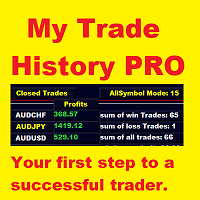
My Trade History PRO MT5
- Utilities
-
Bernhard Schweigert
 ⚜️ Elevate Your Trading Success with innovative Solutions ⚜️
Trading without the right tools is like navigating without a map. - Version: 3.0
- Activations: 5
My Trade History PRO
Review your trades - the first step to becoming a successful trader.
Successful traders don't just trade. They review. They analyze. They learn from every single position.
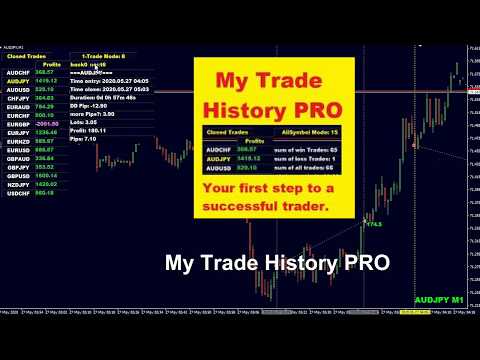
My Trade History PRO makes this review process effortless, visual, and powerful. Whether you trade manually, follow a signal, or run an EA - this indicator gives you a complete, on-chart history of your trades with professional analytics.
KEY FEATURES
1. Three Powerful View Modes
Switch between modes with a single click:
- Closed Trades - full history of all closed positions
- Open Trades - all currently running positions
- Close + Open Trades - the complete picture at a glance
2. Three Analysis Levels
All Symbol Mode - aggregated statistics across every symbol in your account
- 1-Symbol Mode - focused deep-dive into a single symbol's performance
- 1-Trade Mode - the most detailed view. Analyze one specific trade with entry/exit times, duration, drawdown, "more pips" potential, and more
- In 1-Trade Mode, use the back / next buttons to navigate through each trade. The chart automatically jumps to the trade's entry, perfectly positioned so the entire trade is visible at a glance.
3. Profits or PIPs - Your Choice
Toggle between Profit and PIPs display with one click. The on-chart markers and the analysis panel update instantly.
4. Professional Analytics in the Experts Tab
The indicator prints detailed analyses directly to the Experts tab:
- Profits by 24h (entry time) - find your best trading hours
- Profits by weekday - identify your strongest and weakest days
- Profits by comment - especially useful for EA traders who want to compare different strategies or setups
- All analyses respect the currently active mode (Open / Closed / Both).
5. Alert System
- Alert for newly opened trades - ideal for EA or signal traders
- Alert for closing trades - know immediately when a position closes, including symbol and profit/loss
- Alerts work regardless of whether the trade was opened manually, by an EA, or by a signal.
6. Target Chart Feature
When you click on a symbol's name, the trade can be displayed in a separate Target Chart instead of your main chart.
Advantage: You can load your own indicators, drawings, or templates in that chart and get a complete, undisturbed view of the trade's context.
Available inputs:
- Open charts in new window
- Keep new charts in the same window (target)
7. Hide / Show Mode
Instantly switch between the full analysis view and a clean price-action-only chart.
- Hide or show all objects with a single click
- A user-defined hotkey is available for quick switching (default: press H)
- The Hide/Show state is automatically remembered when changing timeframe or symbol
8. Smart Scrolling
When your trade list grows beyond the chart height, arrow buttons appear automatically. Scroll up and down through the symbol list without leaving the chart.
9. Hide Money and Lots
For privacy or cleaner analysis, monetary values and lot sizes can be hidden from the display.
10. 4K and Large Screen Support
Adjustable pixel size and block height for high-resolution monitors.
- Font spacing X (large screen)
- Font spacing Y
INPUT PARAMETERS
Main Settings
- get only today - a quick check for today's trades
- get back days (0=all, 7=week) - number of days to display
- comment for EA filter - filter by EA comment (use MANUAL for manual trades only)
- magic number for EA (0=all) - filter by magic number
Alert Settings
- Alert opening trades - notify on newly opened trades
- Alert closing trades - notify when trades close
Analysis Settings
- print profits by 24h in experts tab - hourly performance analysis
- print profits by comments in experts tab - comment-based performance analysis (for EAs)
Visual and Layout Settings
show symbol name and timeframe - quick note on chart
font size - adjust for different screens
label font 1 (list) - use "Arial" for smaller font
label font 2 (chart)
label font 3 (button)
main=0 or subwindow=1 - move display into a subwindow
Start at pixel X - panel start position
Start at pixel Y
Scroll number of rows list - rows per scroll step
Hide money and lots - hide monetary values
Open charts in new window - use Target Chart feature
Font spacing X (large screen)
Font spacing Y
Color Settings
Fully customizable colors for panel background, text, borders, buttons, profit values, loss values, and chart lines.
WHY TRADERS CHOOSE MY TRADE HISTORY PRO
- Visual - everything is on your chart, where it belongs
- Fast - optimized for speed, even with hundreds of trades
- Flexible - 3 view modes, 3 analysis levels, 2 result displays
- Professional - detailed trade analytics, not just a list
- EA-friendly - filter by comment or magic number
- Manual-friendly - filter to show only manual trades
- Modern - hotkeys, Hide/Show, Target Chart, 4K support
- Complete - alerts for opening and closing trades
- Smart - automatic scrolling for long trade lists
- Clear - hide money and lots for focused analysis
START REVIEWING. START IMPROVING.
Review your trades is the first step to a successful trader.
My Trade History PRO gives you the clarity you need to find your edge, eliminate your weaknesses, and trade with confidence.
I wish you many green pips in the future.
Best Regards,
Bernhard
Questions? I am always happy to help.