Multi Language Gold Silver Trading Panel

  • Utilities
  • En Hao Peng
    En Hao Peng
    • lndependent trading sofgware Developer at  Huanggang,Hubei,China
    • China
    • 385
    Trader from Hubei, China. Focus on trend‑based pyramid EA for XAUUSD gold. My strategies use floating‑profit adding‑position logic with multi‑layer risk control, no dangerous martingale. All products are tested by multi‑year backtest. Please test the demo version on demo account before live trading
  • Version: 17.0
  • Updated: 26 August 2026
  • Activations: 10

Product Name

MT5 Gold & Silver Multi-Language Trading Panel V17.00

Introduction

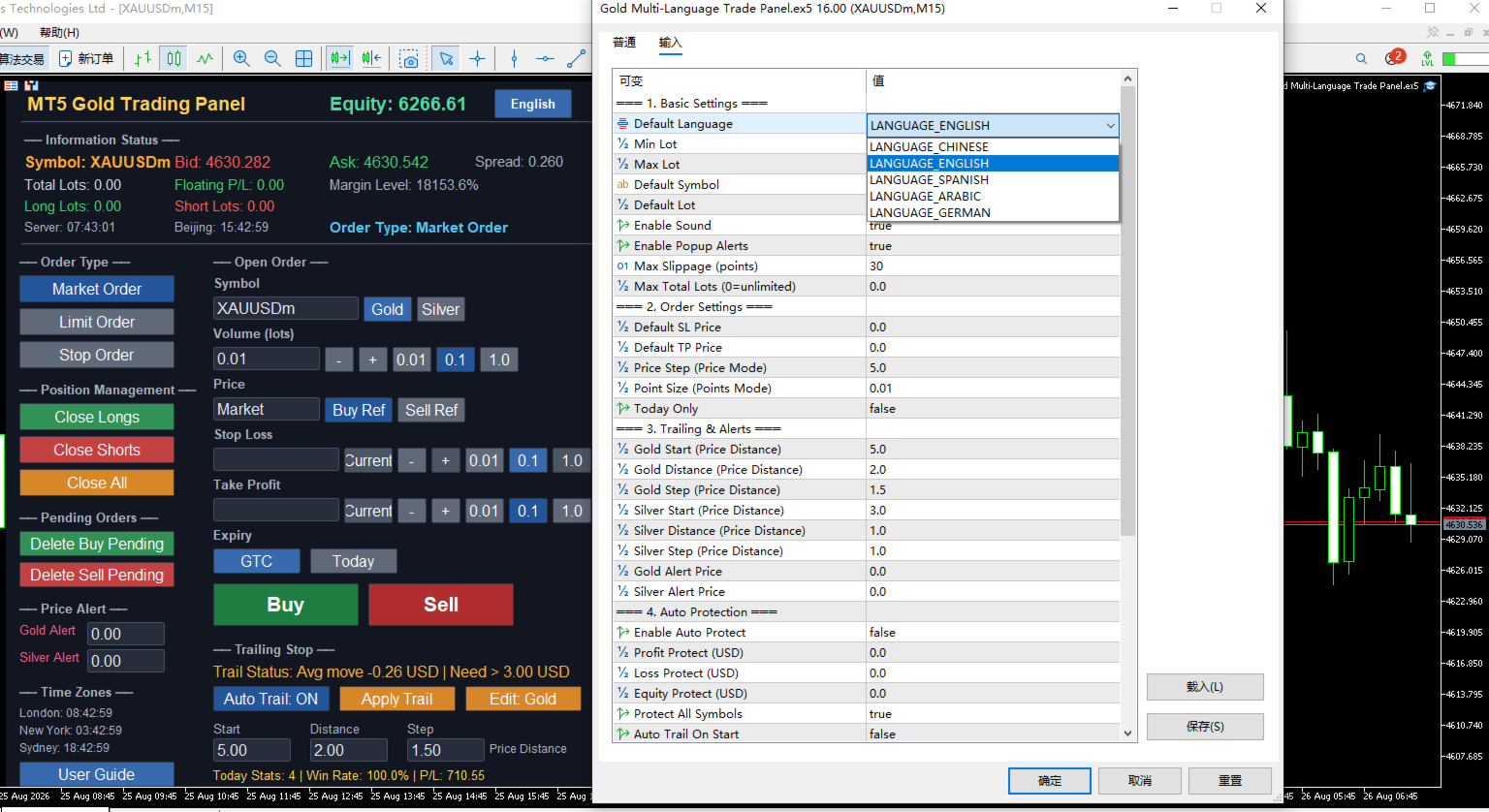
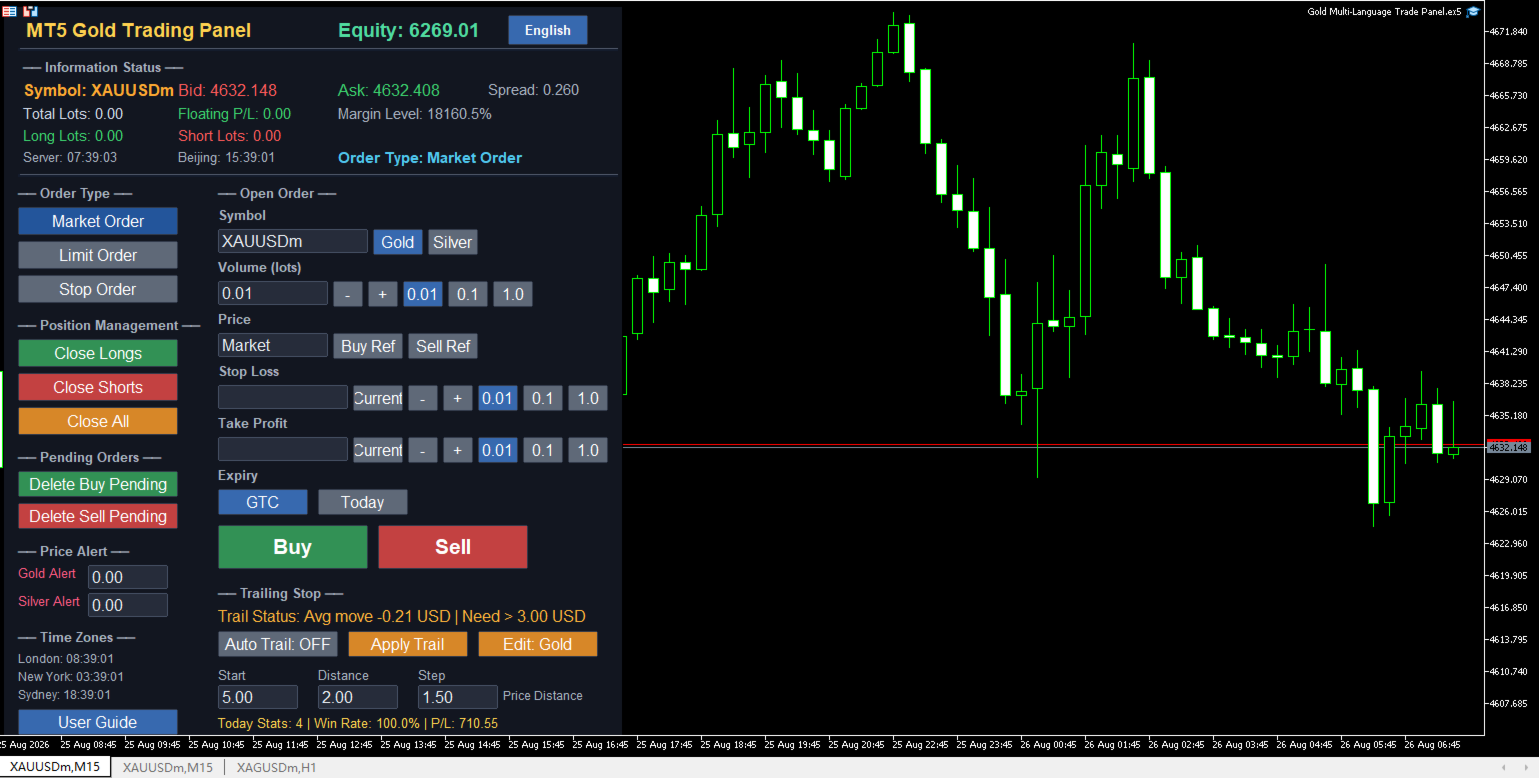
This is a professional trading panel designed specifically for manual gold and silver traders. It supports five languages: English, Chinese, Spanish, Arabic, and German. The panel automatically detects gold and silver symbols, so users do not need to enter symbol codes manually. It is compatible with most brokers worldwide, including standard accounts, zero spread accounts, and raw spread accounts. Users only need to attach the panel to a gold or silver chart, and then they can quickly place orders, manage trailing stops, use auto protection, set price alerts, and handle order management.

This product has been tested and refined over a long period, with the goal of helping traders reduce repetitive work, avoid human errors, and focus more on market analysis and trading decisions.

Key Advantages

Automatic Symbol Detection Worldwide

The panel automatically searches for and recognizes gold and silver related symbols. It supports common symbol codes as well as codes with different suffixes, such as XAUUSD, GOLD, XAGUSD, SILVER, XAUUSDm, XAUUSDz, XAGUSDm, and XAGUSDz. Users do not need to manually enter symbol codes or worry about broker-specific naming differences.

USD Price Distance Trailing Stop

The trailing stop start distance, trailing distance, and step are all measured in US dollar price distance, independent of trading volume. Whether a user trades 1 lot or 100 lots, the dollar distance remains the same. For example, setting a gold start distance of 3 USD means the price must move 3 USD in a favorable direction before trailing begins. This method is intuitive and avoids confusion caused by point conversion.

Dual Magic Number Independent Management

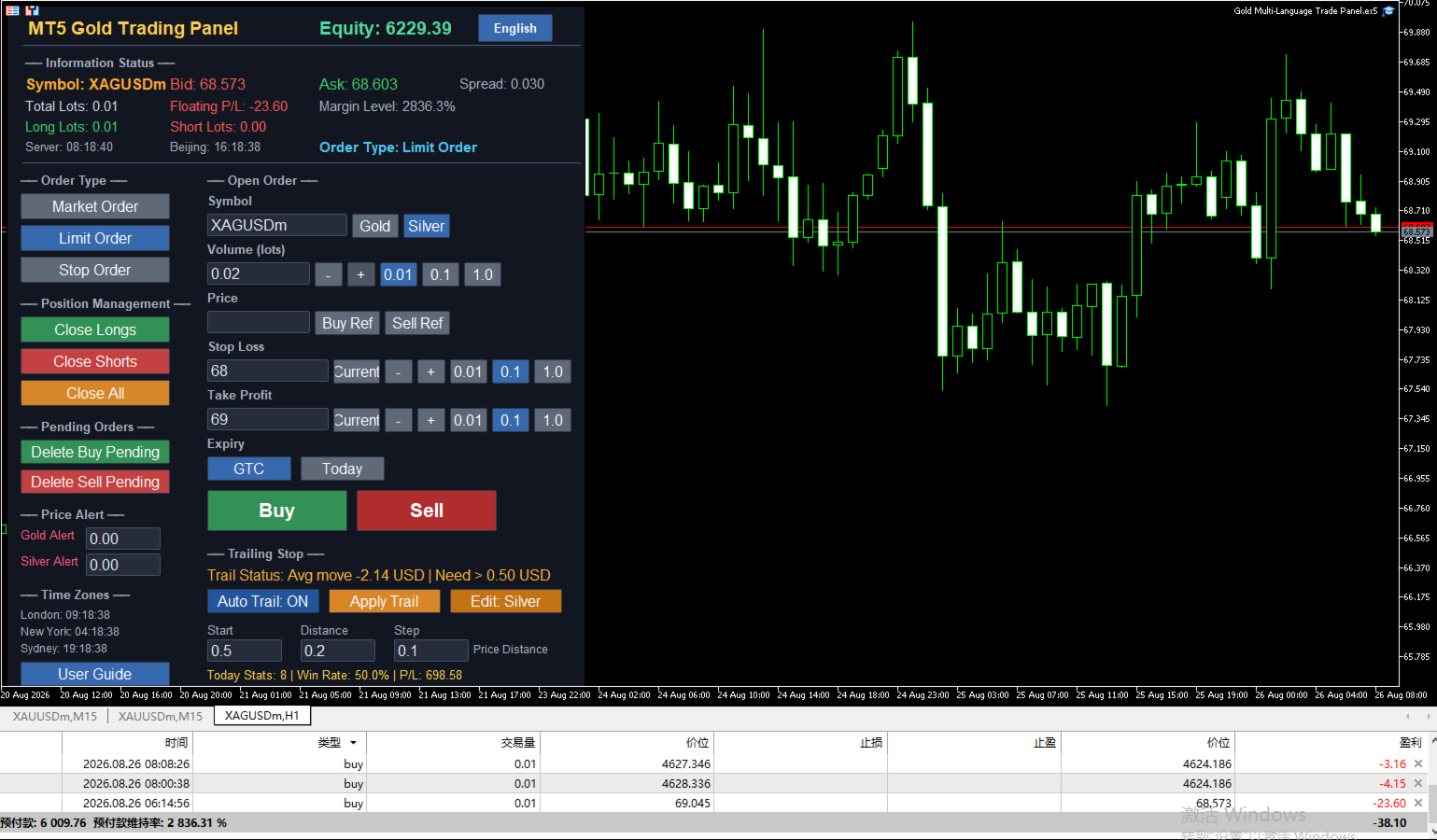
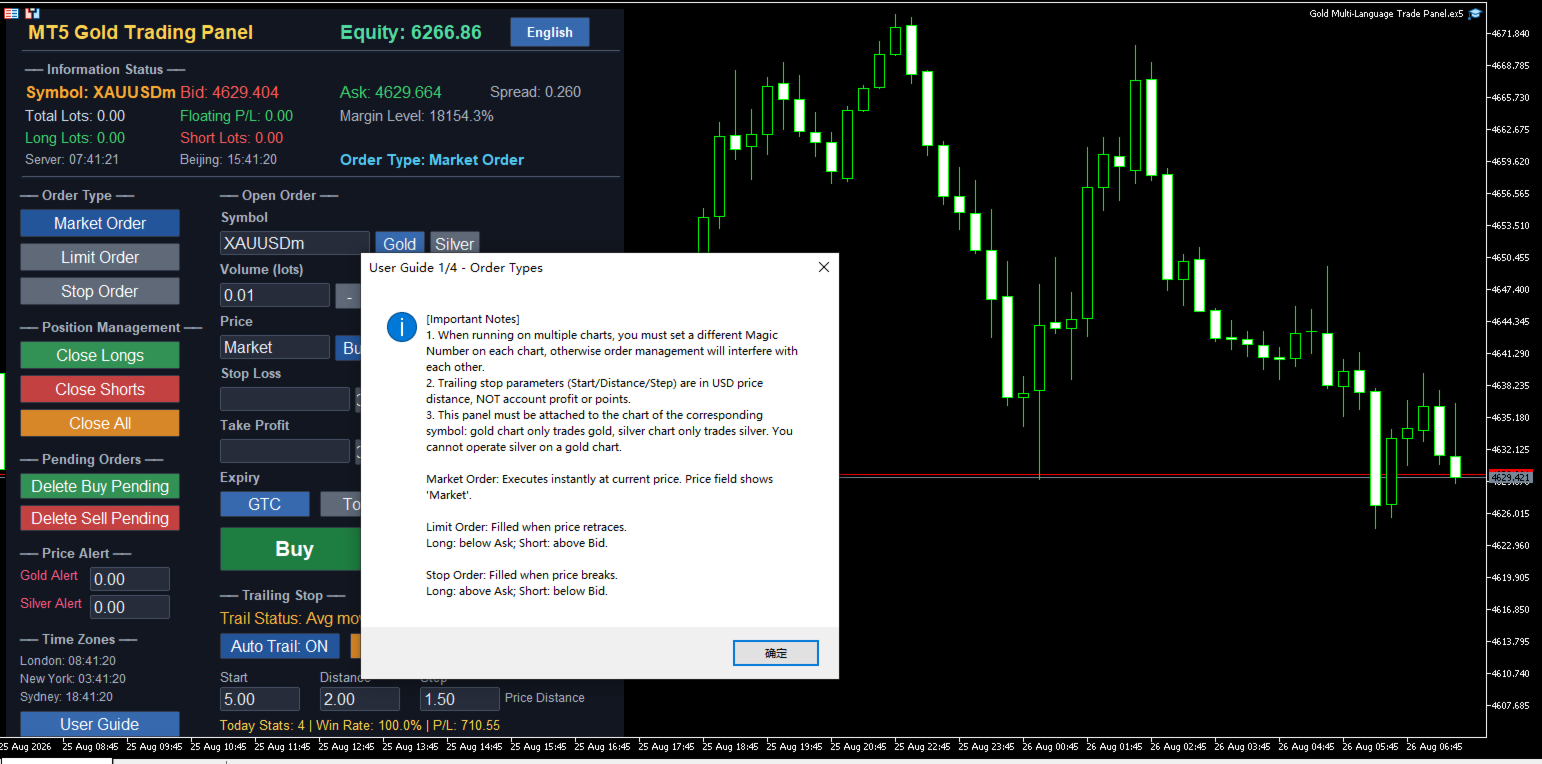
The panel includes two separate magic number settings for gold and silver. When users switch trading symbols, the panel automatically switches to the corresponding magic number, ensuring that gold orders and silver orders are completely separated in management, closing, statistics, and trailing stops. For users running multiple charts, simply set a different magic number on each chart to use them safely in parallel without interference.

Multi-Language Interface and Help System

All panel text, buttons, alerts, and help messages support automatic switching between five languages. Users can click the language button at the top right of the panel to cycle through English, Chinese, Spanish, Arabic, and German. The help system provides four detailed windows covering order types, trailing stops, auto protection and alerts, and input parameters, helping new users get started quickly and reducing the learning curve.

Clear Button Status Feedback

State buttons such as order type, step selection, symbol switching, and auto trailing remain blue when selected, allowing users to quickly see the current setting. Other momentary buttons give brief color feedback after being clicked, so users know the action has been executed, reducing repeated clicks and mistakes.

Core Functions

Three Order Types

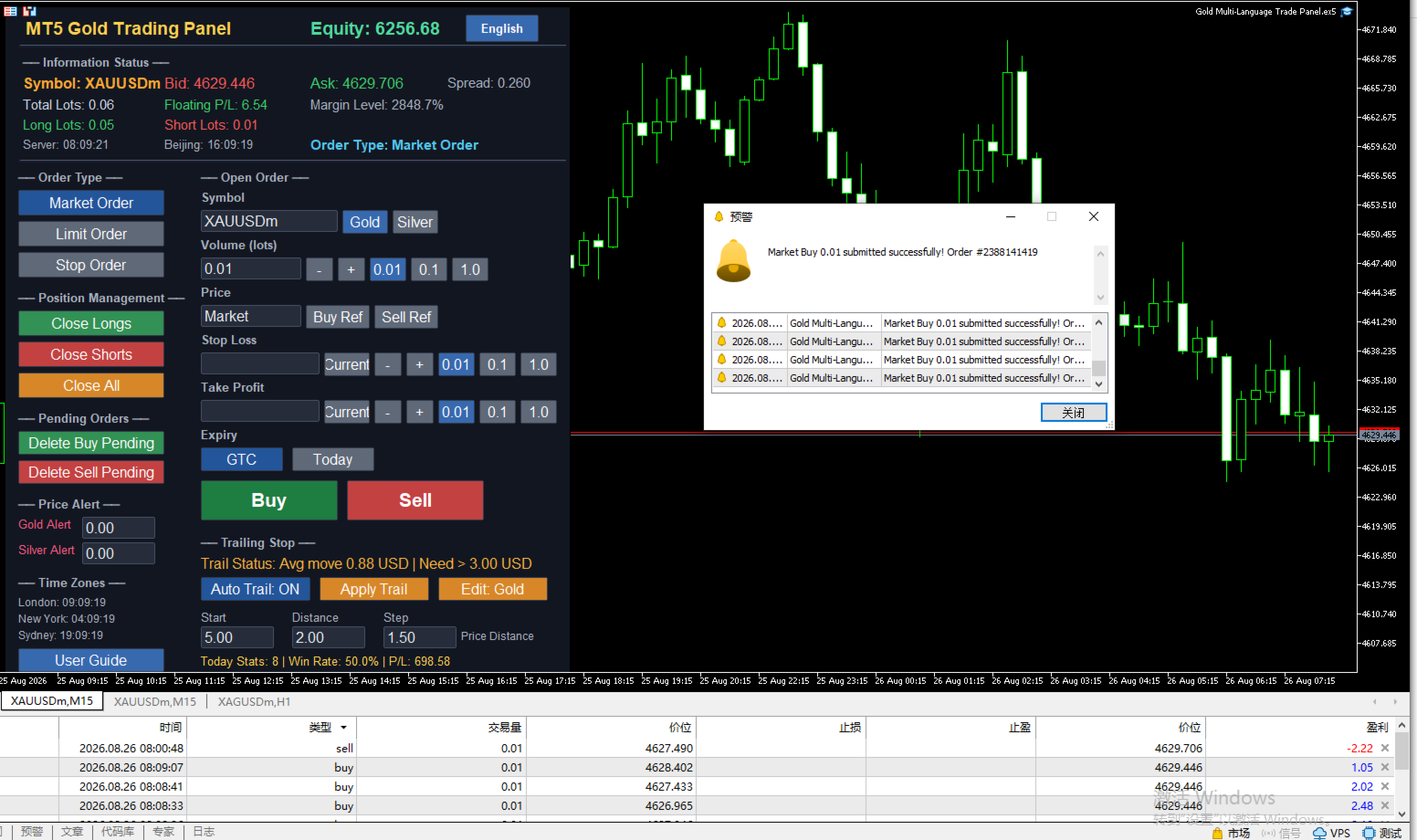
The panel supports three order methods: market execution, limit orders, and stop orders.
Market execution fills immediately at the current market price, and the price input box automatically shows the market price and locks, so no manual entry is needed.
Limit orders are filled when the price retraces to a specified level. For long orders, the limit price should be below the current ask; for short orders, it should be above the current bid.
Stop orders are filled when the price breaks through a specified level. For long orders, the stop price should be above the current ask; for short orders, it should be below the current bid.
Users can also use the buy reference and sell reference buttons to quickly fill the current real-time ask or bid price into the price box, improving order entry speed.

Trailing Stop

The trailing stop is one of the core features of this panel. Start distance, trailing distance, and step are all calculated in US dollar price distance, independent of trade volume.
The recommended minimum start distance for gold is 3 USD, and for silver it is 0.3 USD. Starting trailing below these values may cause profit to be unable to cover normal pullbacks, making trailing meaningless.
The panel supports one-click trailing and automatic trailing modes. One-click trailing immediately checks the current symbol positions once; automatic trailing checks and adjusts stops every 0.5 seconds when enabled.
The trailing status bar shows the current average price movement of the selected symbol and a fixed suggested start distance hint, helping users judge whether they are close to the start condition.

Auto Protection and Price Alerts

Auto protection includes profit protection, loss protection, and equity protection. When floating profit reaches a set amount, all positions can be closed automatically; when floating loss reaches a set amount, all positions can also be closed; when account equity falls below a set value, full closure is triggered as well. Users can freely set protection amounts and cooldown time in the input parameters.
Price alerts support both gold and silver. Users can set separate alert prices. When the market price breaks through the alert line, the panel will pop up a warning window, play a sound, and support email and mobile push notifications.

Information Status Display

The information bar at the top of the panel shows the current symbol's bid, ask, spread, total lots, floating profit and loss, margin level, long lots, and short lots in real time.
The left side of the panel shows the current time of London, New York, and Sydney markets, helping users understand trading activity in different sessions.
The today statistics area shows the number of trades, win rate, and total profit and loss for the day, based on closed orders with the current magic number, and resets at Beijing midnight.

Quick Order Management

The left function area provides quick buttons for closing long positions, closing short positions, closing all positions, deleting buy pending orders, and deleting sell pending orders. Users can quickly handle positions and pending orders without opening the trading terminal, which is especially useful in fast-moving markets.

Suitable Users

Intraday traders can quickly switch order types, place orders, and close positions with one click, improving efficiency.
Swing traders can use automatic trailing to let profits grow as the market moves, reducing the frequency of manual stop adjustments.
Users who trade both gold and silver can use the dual magic number system to completely separate the two symbols and avoid confusion.
Global users can eliminate language barriers through the language switching function, and with automatic symbol detection, they can use the panel directly without additional configuration.

Version 17.00 Update Notes

Added dual magic number system, so gold and silver orders are managed completely independently.
Trailing stop parameters have been fully adjusted to US dollar price distance, which is more intuitive for traders.
Added a fixed red hint in the trailing status bar showing the suggested minimum start distance.
Improved symbol detection logic to be compatible with more broker symbol code suffixes.
Fixed an issue where some prompts still displayed Chinese in non-Chinese language environments.
Increased the font size of the language button for clearer interface text.

Usage Notes

This panel must be attached to the corresponding symbol chart. Gold charts are only for trading gold, and silver charts are only for trading silver. You cannot operate both symbols on the same chart at the same time.
If you need to track both gold and silver simultaneously, open two separate charts, load the panel on each, and set different magic numbers for each chart.
Trailing stop parameters are in US dollar price distance and independent of trading volume. Users should choose appropriate values based on the volatility of the symbol.
Auto protection, statistics, and closing functions are all based on the current magic number to identify orders, so make sure the magic number is set correctly to avoid interfering with other strategies.

Risk Warning

Trading involves significant risk and may result in the loss of all capital. Please use this product with caution after fully understanding the risks. It is recommended to test on a demo account first and set reasonable risk control parameters according to your own capital situation. Past performance does not guarantee future results.

The road of trading is full of challenges, and good tools can make operation smoother. This panel does not predict the market, but it can help users place orders faster, manage orders more clearly, and execute risk control more stably. The rest is up to the trader's own judgment and discipline.

For technical support or feedback, please leave a message on the MQL5 product page. Thank you for your support.
Recommended products
MNtradepro Trading Panel – Scalping Manager SHORT DESCRIPTION Manual trading manager for MetaTrader 5 with fast order execution, on-chart TP/SL control, Break Even, spread protection, and risk management tools. DESCRIPTION MNtradepro Trading Panel is a manual trading manager for MetaTrader 5, designed for fast execution and active trade management from a single chart. The panel allows you to open, manage, and protect trades using buttons, hotkeys, and on-chart controls, without opening stand
Trade Assistant 38 in 1
Makarii Gubaydullin
4.91 (23)
Multifunctional tool: Lot Calculator, Grid Orders, R/R ratio, Trade Manager, Supply and Demand zones, Price Action and much more Demo version   |   User manual Trade Assistant   doesn't work in the strategy tester : you can download the   Demo Version HERE  to test the utility . Contact me   for any questions  / ideas for improvement / in case of a bug found If you need a MT4 version, it is available here Simplify, speed up and automate your trading   process . Expand the standard terminal capa
Ultimate Pro Trading Panel — All-In-One Manual & Grid Trading Dashboard Pro Trading Panel   is an all-in-one on-chart control panel that gives discretionary and semi-automated traders a complete toolkit for entries, exits, risk management, and grid trading — without leaving the chart. Every function is visual, draggable, and updates in real time. If you want to test this utility feel free to download the basic preview version of this tool here:  https://www.mql5.com/en/market/product/181435 Who
This tool will perform Trailing stop loss and Break even management for orders. Helps you limit or reduce the time spend watching orders on the screen, especially when you need to go to sleep. Just add this EA to 1 chart, you can manage all pairs. You can filter orders by comment, magic number, symbol and order ticket number. When Breakeven it can add shift/offset pips (to cover the commission...). You can try in strategy tester before purchase. The EA will add Buy and Sell alternately, so you
Overview Mirror Signals Service EA (Text only)   is a powerful monitoring Expert Advisor that automatically sends   real-time Telegram notifications   for all important trade events on your MetaTrader 5 account. It is engineered specifically for   signal providers ,   trade-copier operators ,   auditors ,   educators , and   professional trading services   that require immediate, detailed, and reliable reporting. Everything from   entries, exits, SL/TP changes, comment changes, trailing sto
EccRk Trade Manager
Prudent Mwangani Lumidi
Product Overview & Advantages The ECC RK Trade Manager operate as an interactive risk and trade management utility tool for the MetaTrader 5 (MT5) platform. The application offers several core operational advantages: Real-Time Interactive Interface:  Features a draggable, interactive dashboard that locks onto your chart and fully syncs in real-time with your MT5 broker server. Visual Control:  Allows you to control your trade parameters by dragging lines directly on the chart, which instantly u
RRtoolBox
David Ruiz Moreno
RRtoolbox - Professional Tools: Risk:Reward Trading Tool (SL/TP Horizontals + Pending orders + Diagonals), Alerts set on trend lines (for alerts on diagonal levels), SelfManagement (BE, partials...), close/cancelling by time, Statistics, Info and trading on chart. One-Click Trading with Visual Risk:Reward Management RRtoolbox is a comprehensive trading panel that combines one-click order execution,  statistics and  powerful visual Risk:Reward tools, alerts set with trendlines, on chart butt
RM Trade Manager
Mohammadreza Mahdi Mavaddat
RM Trade Manager is a trade management panel for manual traders: risk-based entries, split orders, trailing stops and a risk plan, on your live chart. You decide when to trade. RM Trade Manager does the arithmetic and the routine work: it sizes the position from your stop loss and risk, sends split orders with their own take profits, moves stops, and keeps you inside your daily loss limit and away from high-impact news. Why traders use it Exact risk on every trade : risk in % of the balance or i
The Stop Loss Manger - SL Mange With the Stop Loss Manager you can finally sleep peacefully while it effectively manages your risk in stock market trading. Simply set your individual stop loss limits and let the manager trade for you. Never worry about losses again - the Stop Loss Manager takes care of it for you! Get the ultimate support for your trading now and maximize your profits with ease. Join the community of successful traders who swear by Stop Loss Manager today. Function overview: 1.
My Trade History PRO Reviewing your trades is the first step to becoming a successful trader. Successful traders do not just trade - they review, analyse and learn from every position. My Trade History PRO makes that review easy and visual. Whether you trade manually, follow a signal or run an EA, the indicator gives you a complete on-chart history of your trades together with practical analytics - for MetaTrader 4 and MetaTrader 5 with the same feature set. MT4 version: https://www.mql5.com/en/
RSI Currency Strength Meter is a powerful and elegant multi-currency indicator that measures the real-time relative strength of the 8 major currencies using RSI logic. By calculating the smoothed performance of each currency across its major pairs and applying the RSI formula, it delivers clean and responsive strength lines that make it easy to spot which currencies are truly strong or weak at any moment. This indicator is particularly useful for visualizing currency correlations and divergence
Prop Session Risk Guard MT5 is a session-based signal indicator for MetaTrader 5, designed for manual traders who require cleaner entry and exit guidance during active market sessions with integrated risk awareness. This professional tool combines confirmed buy/sell arrows, take-profit/stop-loss projection, session timing filters, spread monitoring, and a clear on-chart dashboard to support disciplined trading decisions. Core Functionality This indicator serves as a manual trading assistant th
Automate your ICT Analysis with the Accumulation, Manipulation, and Distribution (AMD) Indicator. This advanced trading tool is designed for Smart Money Concepts (SMC) traders who want to automate the tedious process of marking up charts. It automatically identifies the Asian Range (Accumulation), detects Liquidity Sweeps (Manipulation), and signals high-probability reversals confirmed by Fair Value Gaps (Distribution). Stop staring at the charts waiting for a sweep. Let the indicator alert you
Pattern Recognition EA
Claudiu-georgian Zavera
Pattern Recognition EA - From Learn to Earn. The market repeats itself. This EA finds every past repeat of the current candle sequence - and lets history vote the direction. ONE SHAPE. EVERY REPEAT IN HISTORY VOTES. The last N candles on your signal timeframe form a shape. The EA scans the history you choose - a fixed number of bars or everything your broker provides - for the SAME shape, and checks what happened next, every single time. Only when enough repeats exist AND a clear majority of t
AlgoDevMT5 Trade Manager Pro
Harry Charles H Westwood
AlgoDevMT5 Trade Manager Pro AlgoDevMT5 Trade Manager Pro is a professional trade management and risk control utility for MetaTrader 5. Designed for discretionary traders and funded account traders, this utility helps traders plan trades visually, calculate position size instantly, and manage risk with precision. Trade Manager Pro does not generate trading signals, open trades automatically, or provide investment advice. It is a trader-assistance utility designed to improve consistency and risk
Overview BreakEvenConsole   is a MetaTrader 5 trade management panel built for fast, practical control of open positions. It gives traders an on-chart workspace for moving positions to break-even, setting exact stop-loss or take-profit prices, using trailing lock, running partial close actions, and flattening positions with one click. This tool is designed for traders who want direct position management without switching between menus or using manual order dialogs. It focuses on execution contro
Risk Guardian — Ultimate Equity & Drawdown Protection Protect your capital. Stay disciplined. Trade smarter. Risk Guardian is a powerful utility that helps traders automatically control daily risk and secure profits based on equity. Designed for MetaTrader 5, it’s lightweight, efficient, and extremely easy to use. Key Features: Daily Drawdown Limit (% based) Absolute Equity Target (e.g., stop trading after reaching 110,200 USD) Auto-close All Positions, Orders & Charts Visual Dashboard on C
Delta Profile Volume
Teresinha Moraes Correia
Technical Description of the Indicator – Delta Profile for MetaTrader 5 The Delta Profile is an indicator developed for MetaTrader 5 focused on detailed analysis of volume flow within a defined range of candles. It organizes and displays information about the imbalance of positive volumes (associated with upward movements) and negative volumes (associated with downward movements) at different price levels. The result is a clear view of the chart points where the highest concentration of trades o
Risk Management Panel for MetaTrader 5 Overview This tool is a comprehensive risk management indicator for MetaTrader 5 that provides traders with a visual interface to calculate and manage trade parameters based on their risk tolerance. It features a draggable panel with interactive price lines and real-time calculations. Key Features Risk Management Controls: Adjustable risk percentage (0.1%-100%) of account equity or balance Customizable risk/reward ratio with +/- buttons Choice between Equit
Trading Utility for Forex Currency Pairs Only not for Gold  Functions Auto Lot Calculation based on Risk Auto stoploss  Auto TakeProfit Breakeven Auto Close Half % Close in percentage with respect to the PIPs Pending Orders BuyLimit Sell Limit with distances BuyStop Sell Stop    with distances Trading Informations Risk in percentage For Multiple trades Combine Takeprofit and Combine Stoplosses
Smart Funds
Sivakumar A L Mani
Profit return — an Expert Advisor for funds trading ( SFP ). I previously used this trading idea in manual trading. The core of the strategy is a return of price to the Bollinger Bands range, but not blindly and not on every touch. For the fund market, bands alone are not enough, so the EA uses additional filters that eliminate weak and non-working market situations. Trades are opened only when the return logic is truly justified.
The Risk Control Panel provides precise trade risk management directly from the chart. Set your risk in account currency, and the tool automatically calculates the appropriate lot size based on Stop Loss distance, ensuring consistent position size calculator functionality without manual calculations. The interactive panel allows placement and adjustment of Stop Loss, Take Profit levels (TP1 and TP2, optional), Break Even, and Trailing directly on the chart. Key Features Dynamic Risk Management –
Trade Insight Pro Trade Insight Pro is an advanced trading performance analytics utility for MetaTrader 5. It transforms your MT5 trading history into clear and useful performance statistics directly on the chart. The utility is designed for traders who want to understand their historical results in greater detail, identify performance patterns, compare BUY and SELL behavior, and review their trading activity using objective data. Trade Insight Pro does not generate trading signals and does
RBR Risk Guard watches the limits of a prop-firm challenge on your account equity, the way prop firms count them, and closes everything before a limit is reached. It does not trade for you: no strategy, no signals, no automatic entries. What it guards Daily loss limit: a percentage of the account size or of the balance at the daily reset, counted from the balance or from the higher of balance and equity at the reset. Reset hour in broker server time, UTC, Central European time or New York time,
Recovery Manager Panel MT5 is a manual order management panel for traders who want to manage open positions directly from the chart in a clearer and more organized way. This tool is not a signal robot. It does not predict market direction, generate entry signals, or trade automatically based on market forecasts. Instead, it helps traders work with positions that are already open. You can calculate possible recovery lot sizes, view estimated target levels on the chart, and use available floating
SLTPSetter
Raphael Djangmah Osro Agbo
SLTPSetter - StopLoss Take Profit Setter HOW DOES IT WORK? Risk and account management is a very critical aspect of trading. Before entering a position, you must be fully aware how much you will be willing to loss both in percentage and value. This is where SLTPSetter gets you covered.  All you need to do is attach the indicator on the chart and PRESS BUY OR SELL automatically, all parameters needed for placing the trades will be provided at the top left corner of the screen. Feel free to adjust
Excellent spread indicator. Reflects the spread on each bar as it is. It should be remembered that the spread is displayed at the time of the bar opening. Therefore, the most correct information will be on the minute bars. Spread is one of the basic forex concepts that any trader should know. If explained clearly, you can describe such an example. The trader buys the EUR / USD pair at the rate of 1.1000. However, he immediately goes into negative territory, for example, by 10 points, as if he bo
Our   Basic Support and Resistance   indicator is the solution you need to boost your technical analysis. This indicator allows you to project support and resistance levels on the chart /   MT4 Version Features Integration of Fibonacci Levels:  With the option to display Fibonacci levels alongside support and resistance levels, our indicator gives you an even deeper insight into market behavior and possible reversal areas. Performance Optimization:  With the option to update extended lines onl
GTM Prop Firm Risk Manager
Gayan Indika Honnanthara Acharige
GTM Prop Guard watches a prop firm account so a rule is never broken by accident. It shows how much you can still lose today, works out the biggest safe lot before you trade, draws the price where the account would fail, and steps in when a limit gets close: warn, then close new trades, then close everything and lock. It watches the whole account - every symbol, every EA, and trades placed from your phone - from one chart.          Protection before, during and after every trade Most guards onl
DDKiller Pro
Njaratahiry Michael Randrianiaina
Stop Blowing Your Account. Once and For All. DDKiller Pro is the MT5 risk guardian that runs silently on your chart and shuts down trading the moment you hit a limit — whether you're grinding a prop firm challenge or managing your own CFD account. The problem every trader knows: You set your rules. You break them anyway. One revenge trade. One overleveraged position. One session that erases a month of gains. DDKiller Pro removes that decision from your hands entirely. What it does: The second yo
Buyers of this product also purchase
Trade Assistant MT5
Evgeniy Kravchenko
4.43 (216)
It helps to calculate the risk per trade, the easy installation of a new order, order management with partial closing functions, trailing stop of 7 types and other useful functions. Additional materials and instructions Installation instructions - Application instructions Line function -   shows on the chart the Opening line, Stop Loss, Take Profit. With this function it is easy to set a new order and see its additional characteristics before opening.   Risk management  - The risk calculation
Forex Trade Manager MT5
InvestSoft
4.98 (694)
Trade Manager MT5 is an advanced position size calculator and trade management tool for MetaTrader 5, designed to help traders plan trades faster, control risk more precisely, and manage open positions directly from the chart. It combines order placement, risk based lot calculation, Stop Loss and Take Profit management, Break Even, Trailing Stop, Partial Close, Equity Protection, and external trade management in one panel. Whether you trade forex, indices, metals, commodities, crypto, or future
FarmedHedge Pair Trading Dashboard
Tanapisit Tepawarapruek
5 (7)
Farmed Hedge Yield Farming | All Markets (Manual - Hybrid - Semi/Automated EA) VERIFIED TRADING RESULTS - Farmed Hedge Yield Axi Copy:  https://www.mql5.com/en/signals/2356376 - Farmed Hedge Yield Exn Copy:   https://www.mql5.com/en/signals/2356404 - Farmed Hedge Yield V Copy:  https://www.mql5.com/en/signals/2357156 IMPORTANT NOTICE: FarmedHedge is a MANUAL-FOCUSED TRADING UTILITY ,not a fully automated EA. Results shown on this Signal include manual trades and overall strategic management.
EA Overfitter
Stephen J Martret
5 (5)
That backtest looks great. But will it still be making money tomorrow, next week, next month? EA Overfitter re-runs your EA on 100 price histories it has never seen. One score tells you if the edge is real. A backtest tells you what an EA did on one price history — the one that happened to occur. What you cannot tell from it is how much of that result was the strategy and how much was the particular path. EA Overfitter answers that. It builds up to 100 synthetic price histories your EA has n
TradePanel MT5
Alfiya Fazylova
4.89 (176)
Trade Panel is a multi-functional trading assistant. The app contains over 50 trading functions for manual trading and allows you to automate most trading tasks. Application instructions: https://www.mql5.com/en/blogs/post/756482 Trial version of the application for a demo account: https://www.mql5.com/en/blogs/post/750865 How to install the application: https://www.mql5.com/en/blogs/post/756239 How to test the application in visual mode: https://www.mql5.com/en/blogs/post/770277 How to install
Copy Telegram signals with your own trading rules Telegram to MT5 Signal Trader automatically copies text-based trading signals from public and private Telegram channels and groups into MetaTrader 5. Manage multiple providers and MT5 accounts from one desktop app, with individual risk and trade settings for each provider . No Telegram bot or API setup needed for copying. Simply sign in with your own Telegram account by phone or QR code and select the channels or groups you have already joined. Y
AI Agents Supervisor
Ho Tuan Thang
5 (1)
AI Agent Supervisor is NOT an Expert Advisor. AI Agent Supervisor   is a   multi-agent AI risk & portfolio supervisor   that watches every EA on your account and intervenes in real time.  WANT AN AI PORTFOLIO MANAGER WATCHING YOUR FLEET 24/7?   Run your fleet on the same brokers I do:   IC MARKETS , IC TRADING   .  Unlike the centralized stock market, Forex has no single, unified price feed.  Every broker sources liquidity from different providers, creating unique data streams. The Supervisor r
================================================================================ POC BREAKOUT - V20.72. Full Professional Grade Toolkit ================================================================================ POC Breakout is a full MetaTrader 5 trading dashboard for discretionary traders who want breakout signals, Point of Control (POC) context, volume profiles, order flow, market structure, news, alerts, and advanced trade planning in one professional workspace. Attached directly to you
Unlimited Trade Copier Pro MT5 is a tool to copy trade remotely to multiple MT4, MT5 and cTrader accounts at different computers/locations over internet. This is an ideal solution for you if you are a signal provider and want to copy your trades to other receivers globally on your own rules. One provider can copy trades to multiple receivers and one receiver can get trade from multiple providers as well. The provider can even set the subscription expiry for each receiver, so that receiver will n
News Trade EA MT5
Konstantin Kulikov
4.55 (11)
Present to you the useful robot that I have been using for several years. It can be used in both semi-automatic mode and fully automatic mode. >>> Chat <<< The program contains flexible settings for trading on the news of the economic calendar. It cannot be checked in the strategy tester. Only real work. Download the latest archive of settings: https://www.mql5.com/en/blogs/post/747929 Signals monitoring: https://www.mql5.com/en/signals/author/test-standart When creating your own sets of setti
The product will copy all telegram signal to MT5 ( which you are member) , also it can work as remote copier.  Easy to set up, copy order instant, can work with almost signal formats, image signal,  s upport to translate other language to English Work with all type of channel or group, even channel have "Restrict Saving Content", work with  multi channel, multi MT5 Work as remote copier: with signal have ticket number, it will copy exactly via ticket number. Support to backtest signal. How to s
EA Auditor
Stephen J Martret
5 (7)
EA Auditor is an independent analysis tool for traders evaluating Expert Advisors and trading signals on MetaTrader 5. It audits backtest reports, reviews posted developer signals, and cross-verifies the two against each other to help traders assess strategies before committing capital. The MQL5 market offers a wide range of Expert Advisors from many developers, with varying approaches, quality, and transparency. EA Auditor provides a consistent, data-driven framework for reviewing them, answer
Power Candles Strategy Scanner - Self-Optimizing Multi-Symbol Setup Finder Self-optimizing settings work one chart at a time, and finding where they pay off right now means opening chart after chart. Power Candles Strategy Scanner runs the same self-optimizing engine as the Power Candles indicator on every symbol in your Market Watch, side by side. One panel ranks where it pays off: the winning strategy per symbol, its optimized Stop Loss and Take Profit. An alert fires the moment a fresh signal
Prop Guardian Risk Manager MT5 – Drawdown, Risk & Hedge Protection for Prop Firm and Managed Accounts Prop Guardian Risk Manager is a professional risk-control utility for MetaTrader 5, designed for prop firm traders, money managers and anyone who wants strict account-level risk protection. It does not generate trading signals, strategy entries or trading decisions. Instead, it runs in the background, monitors your account risk and can automatically block new exposure, close managed positions or
WELCOME TO ENTRY IN THE ZONE with SMC MULTI TIMEFRAME   / Complete SMC Analysis System & Trading Tools — All in One Indicator Entry In The Zone with SMC Multi Timeframe An indicator designed for market analysis based on Smart Money Concepts (SMC), displaying Market Structure, Key Zones (Order Blocks, Supply & Demand Zones, and Fair Value Gaps), Liquidity, and real-time BUY / SELL signals. It supports both Single-Timeframe and Multi-Timeframe analysis, along with the Confluence at Zone feature, w
REVDEN AI Desk: Run Your Trading From One Conversation With Your Own AI, on REVDEN's Market Context Imagine running your trading from one conversation. REVDEN AI Desk brings it into MetaTrader 5: you ask your own AI how it reads the market, and it answers from REVDEN's full context on the symbols you trade, with their state, their risk picture and the releases ahead. Its proposals arrive with entry, stop, target and risk, and you approve the ones that fit. Your rules change the same way: write w
Zentriq Trade Manager
Mark Frederick Siebert
Experience trading without friction. Zentriq Trade Manager is a modern, high-performance trade management utility engineered with a high-DPI canvas interface, anticipatory workflow design, and an integrated Macroeconomic News Filter. Designed for discretionary traders, scalpers, and prop firm traders who demand speed, precision, zero-clutter ergonomics, and automated news event protection. User Manual Get the most out of Zentriq Trade Manager with the complete user manual: Complete User Manual:
GRat Crypto
Ivan Titov
4.5 (2)
Trade on crypto exchanges in MT5 with no limits! GRat_Crypto is a tool for manual and automated trading , including ANY available EA, ANY  cryptocurrency  on most popular crypto exchanges in the familiar MT5 environment 24/7. Features 1. ALL instruments of the 9 most popular crypto exchanges are available: Binance, BingX, Bybit, Coinbase, CoinEx, Kraken,   KuCoin, MEXC and OKX . 2. The ability to place ANY type of order available in MT5, both market and pending, to modify orders and positions,
Grid Manual MT5
Alfiya Fazylova
4.74 (23)
Grid Manual is a trading panel for working with grid strategies. The utility is universal, has flexible settings and an intuitive interface. It works with a grid of orders not only in the direction of averaging losses, but also in the direction of increasing profits. The trader does not need to create and maintain a grid of orders, the utility will do it. It is enough to open an order and the "Grid manual" will automatically create a grid of orders for it and will accompany it until the close. F
RETAILBERG FOOTPRINT CHART PRO — Order-Flow Workspace for MetaTrader 5 Version 7.00  |  Professional System  |  31 tools  |  One chart A full 150-page illustrated User Manual is included. Please read the full manual to understand this feature packed footprint chart elements and ui. https://www.mql5.com/en/blogs/post/777982 DEMO / STRATEGY TESTER — PLEASE READ FIRST
Trade Indicator Assistant   is a powerful MT5 utility designed to turn indicators into automated trading systems. Its main feature is the ability to automatically detect an indicator’s   BUY and SELL signal buffers , without requiring you to know the buffer numbers, search through indicator settings, or modify the indicator source code. Bonus Indicator:   After purchasing Trade Indicator Assistant, contact me to receive   Trade Signal Pro   completely free as a bonus indicator. [Download Demo V
Strategy Builder offers an incredible amount of functionality. It combines a trade panel with configurable automation (covert indicators into an EA), real-time statistics (profit & draw down) plus automatic optimization of SL, TP/exit, trading hours, indicator inputs. Multiple indicators can be combined into an single alert/trade signal and can include custom indicators, even if just have ex4 file or purchased from Market. The system is easily configured via a CONFIG button and associated pop-u
Bots Builder Pro MT5
Andrey Barinov
4.17 (6)
This is exactly what the name says. Visual strategy builder . One of a kind. Turn your trading strategies and ideas into Expert Advisors without writing single line of code. Generate mql source code files with a few clicks and get your fully functional Expert Advisors, which are ready for live execution, strategy tester and cloud optimization. There are very few options for those who have no programming skills and can not create their trading solutions in the MQL language. Now, with Bots Builde
Effortlessly manage multiple trading accounts The Local Trade Copier EA is a solution for individual traders or account managers who need to execute trade signals from external sources or who need to manage several accounts at the same time, without the need for a MAM or a PAMM account. It copies from up to 8 master accounts to unlimited slave accounts . [ Installation Guide | Update Guide | Troubleshooting | FAQ | All Products  ] 100% self hosted Easy to install and use It can copy from MT4 t
Found a great signal, but a provider's lot is too small? You need larger position volume, but terminal settings are too poor? Signal Lot Manager will increase the provider's position volume by means of a duplicate order of the needed volume. Just set a lot size and a name of a signal for copying orders from. Signal Lot Manager is a lot multiplier utility for duplicating orders on your terminal. The source can be selected any adviser, manual trading, a separate trading signal. It has wide functio
DrawDown Limiter
Haidar Lionel Haj Ali
5 (23)
DrawDown Limiter v5.0 — Advanced Account Protection Controller DrawDown Limiter v5.0 is a client-side account protection controller designed to supervise your trading account and automatically react when configured risk, profit, news, schedule, rollover, or position limits are reached. It can monitor manual trades, automated strategies, multiple Expert Advisors, pending orders and floating positions from one dedicated chart. It can protect the complete account or be configured to supervise a spe
Kontrol01 Manager
Andrei Koval
5 (2)
EA Portfolio Control & Cloud Monitoring for MetaTrader 5 Your EAs manage trades. KONTROL_01 manages your EAs. A control system for traders running multiple Expert Advisors on the same account. Coordinate EA activity, manage trading risks and monitor your setup remotely. A detailed User Manual is available via DM after purchase. IN PRACTICE Multiple EAs. No coordination. Your EAs trade independently, unaware of each other's activity. KONTROL_01 coordinates them, limits simultaneous activity a
The Patch
Mian Rameez Ali
The Patch It never opens a trade. It walks behind the ones that did. Every open position, every pending order — checked twice a second for the one thing that's easy to forget: a stop, a target. Found bare, it doesn't ask. It writes the missing number in, measured in points from wherever the position began, and moves on to the next. No strategy, no opinion on direction. Just the quiet assumption that nothing should ever sit on the market unprotected — not because someone decided it shouldn't,
Bneu Prop Firm Pass System
Marvinson Salavia Caballero
5 (1)
BNEU PROP FIRM PASS SYSTEM v2.37 PRODUCT OVERVIEW Bneu Prop Firm Pass System is a professional risk management and account protection utility for MetaTrader 5. Attach to any chart and configure your account rules. The system monitors daily loss, maximum drawdown, profit target, trading days, open risk, margin usage, news events, pending orders, weekend restrictions, and rollover restrictions from one dashboard. It includes a 5-tab premium dashboard, prop firm presets, custom rules, Risk Sentine
Elliott Wave Helper
Siarhei Vashchylka
4.93 (14)
Elliott Wave Helper is a panel for constructing wave analysis. Manual (Be sure to read before purchasing) | Version for MT4 Advantages 1. Constructing wave analysis and wave structure in a few clicks 2. Availability of all wave analysis patterns, including triangles and combinations 3. All nine wave display styles, including a special circle font 4. Change colors and display styles of wave groups directly from the chart 5. Binding all elements to a set timeframe or timeframes 6. A template syste
More from author
Product Title:   MT5 GoldSilver Trade Panel Lite Short Description: Free manual trading panel for gold and silver. Market order execution, SL/TP setting, one-click close all, and basic daily statistics. Advanced features are available in the full paid version. Description: MT5 GoldSilver Trade Panel Lite   is a free, easy-to-use manual trading panel designed for gold and silver traders. It automatically detects your broker’s gold and silver symbols and lets you place market orders quickly with
FREE
Trend Pyramid v5.00 | Gold XAUUSD Floating‑Profit Pyramid EA   This floating‑profit pyramid gold EA only adds positions after existing orders generate floating profit, avoiding blind position‑adding under loss conditions. It adopts EMA20 plus ADX24 dual‑indicator filter to filter false oscillation signals and reduce invalid order openings. Multiple hard risk controls are built‑in to protect your account.   Core advantages   1. Add positions only on floating profit, no position‑adding at loss: a
Gold EURUSD Statistical Arbitrage EA Strategy Overview: This is a fully automatic pair statistical arbitrage EA designed for Gold (XAUUSD) and EURUSD. It uses linear regression and Z-Score to identify spread deviations and trade mean reversion. How It Works: - The EA continuously calculates correlation coefficient and Z-Score based on the latest 500 closed M1 bars. - It opens a paired trade (one buy, one sell) when:   1. Correlation coefficient ≥ 0.75   2. Absolute Z-Score ≥ 1.72   3. No exis
Product Name: MultiLanguage AutoTrail Order Panel Tagline: Multi-Symbol Manual Trading Panel with Auto Detection, Auto Trailing Stop, and Real-Time Risk Control Overview The MultiLanguage AutoTrail Order Panel is a smart trading assistant designed for manual traders. It integrates automatic symbol detection, automatic trailing stop management, real-time account monitoring, comprehensive risk control, one-click trade execution, and a multilingual interface, helping you trade across multiple inst
Filter:
No reviews
Reply to review