Fabii Essential Trend Baseline
- Indicators
-
Fabien Georges Andre Guillemaud
 I develop custom indicators and trading tools for MetaTrader 5.
- Version: 1.0
Stop entering trend flips that have no momentum behind them. One line, one chart, no second indicator. No repaint.
Any pair, any market, any timeframe. On your chart in 2 minutes. Free to test in the Strategy Tester.
Get more indicators here
Baselines, volatility filters and oscillators. No repaint.
Why you need it
You enter because the line turned green. Price drifts for ten bars, then reverses. The signal was real, but the momentum was not. Every entry on a weak flip costs you a stop loss.
What you get
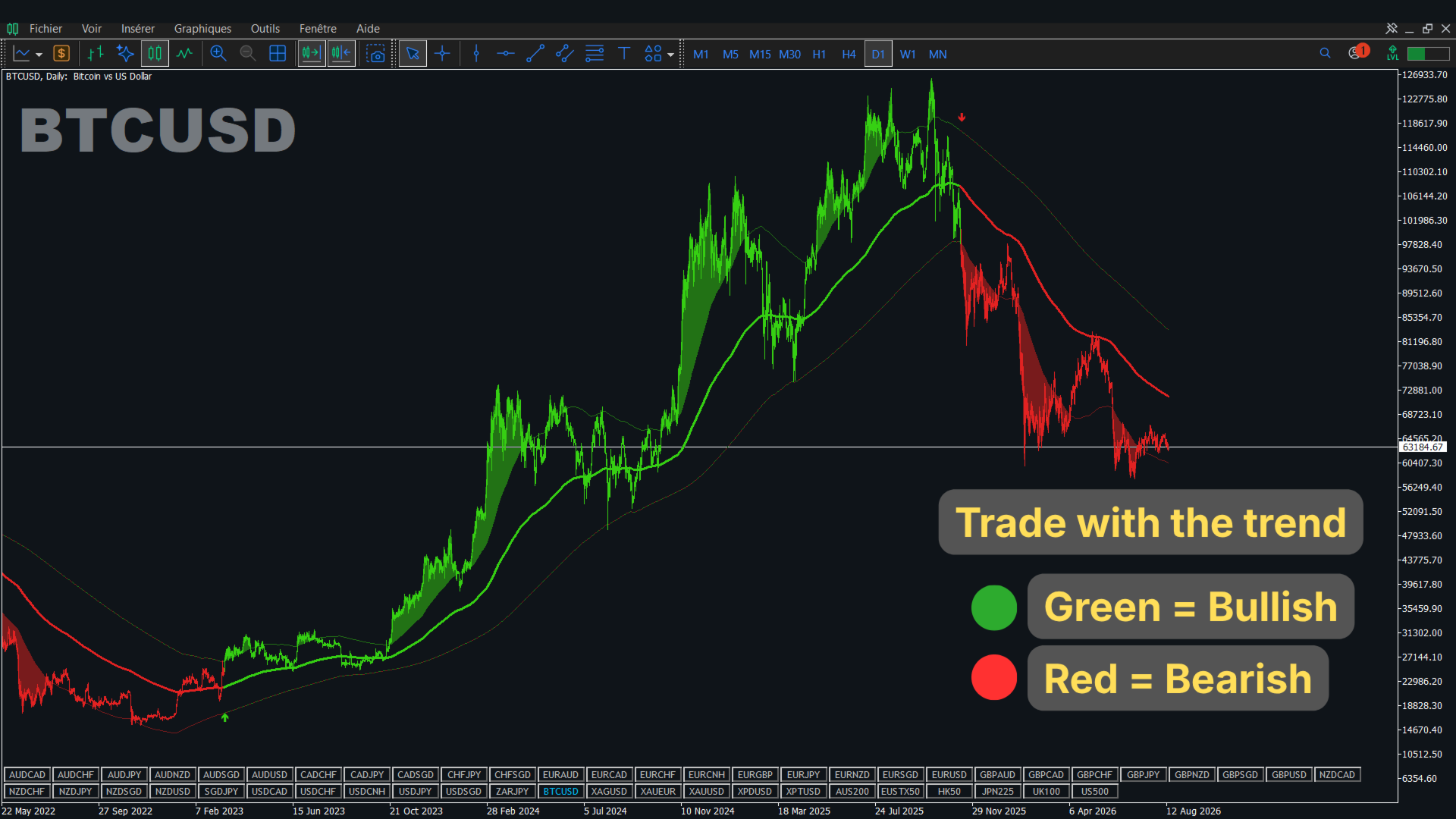
Fabii Essential Trend Baseline is a free baseline indicator that shows the trend on one line and marks only the flips that price confirms, so you stop entering on weak signals.
- A flip appears only when the close goes beyond the deviation band, not when price merely touches the line, so you filter out weak flips.
- One line you read at a glance, green for an up trend and red for a down trend, so you decide faster.
- Shaded zones show where price pushes beyond the band in the trend direction, so you see where momentum confirms the move.
- Buy and sell arrows sit outside the bands at a distance based on the Average True Range (ATR), so you spot each flip without clutter.
- Alerts by popup, sound or push notification, so you do not have to watch the chart.
How it works
The baseline is a moving average of your price source: Simple Moving Average (SMA), Exponential Moving Average (EMA) or Smoothed Moving Average (SMMA). The indicator measures the smoothed average distance between price and baseline and draws two deviation bands around it. The trend turns up when a bar closes above the upper band, and down when a bar closes below the lower band. Signals use closed bars only.
How to use it
- Attach the indicator to any chart.
- Read the line color: green is an up trend, red is a down trend.
- Enter in the trend direction by your own rules: after a flip arrow, or when price pushes into a shaded zone.
- Place your stop loss on the other side of the baseline.
- Turn on the alerts you want.
Key settings
| Setting | What it does | Default |
|---|---|---|
| Baseline type | Moving average of the baseline: SMA, EMA or SMMA. Sets the speed. | SMA |
| Baseline length | Bars in the baseline. Higher is smoother, lower is faster. | 28 |
| Deviation multiplier | Width of the bands. Wider means fewer, stronger flips. | 1.0 |
| Show speculation zones | Shows or hides the shaded zones. | true |
| Alert on trend flip (Long/Short) | Alert when the trend changes direction. | true |
| Bars to display (min 50) | Bars calculated, for speed. Used when Limit to N bars is on. | 500 |
Other settings control colors, arrow codes, alert channels and display options.
Test it before you decide
Let a bar close, then check that the value in the Data Window does not change. Test it in the Strategy Tester on your own pairs.
Updates are free and included. Every release is listed in the What's new section of this page, so you always know what changed.
Fabii Responsive Trend Baseline reacts faster with five fast averages. Fabii Adaptive Trend Baseline adjusts to market noise. Fabii Ehlers Trend Baseline gives a smoother line. Follow my profile to be notified of new releases.
Download it free and see your first signal on your own chart. If you want a faster baseline, look at Fabii Responsive Trend Baseline.
Comments and reviews
Questions? Post a comment on this page or message me and you get an answer within 24 hours.
If this saves you time, a short review that says which pair and timeframe you use helps other traders find it.
Past results do not predict future results. This indicator does not provide financial advice.