Order Type Ledger

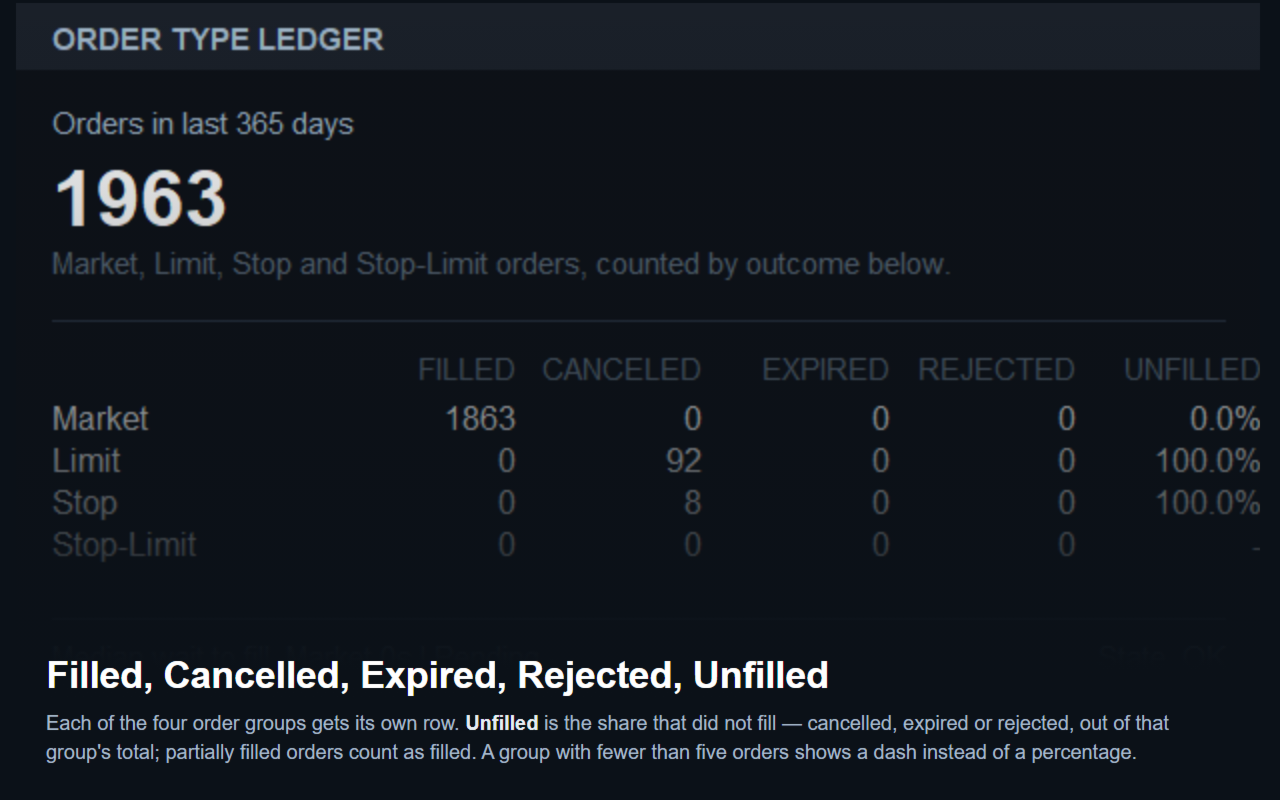
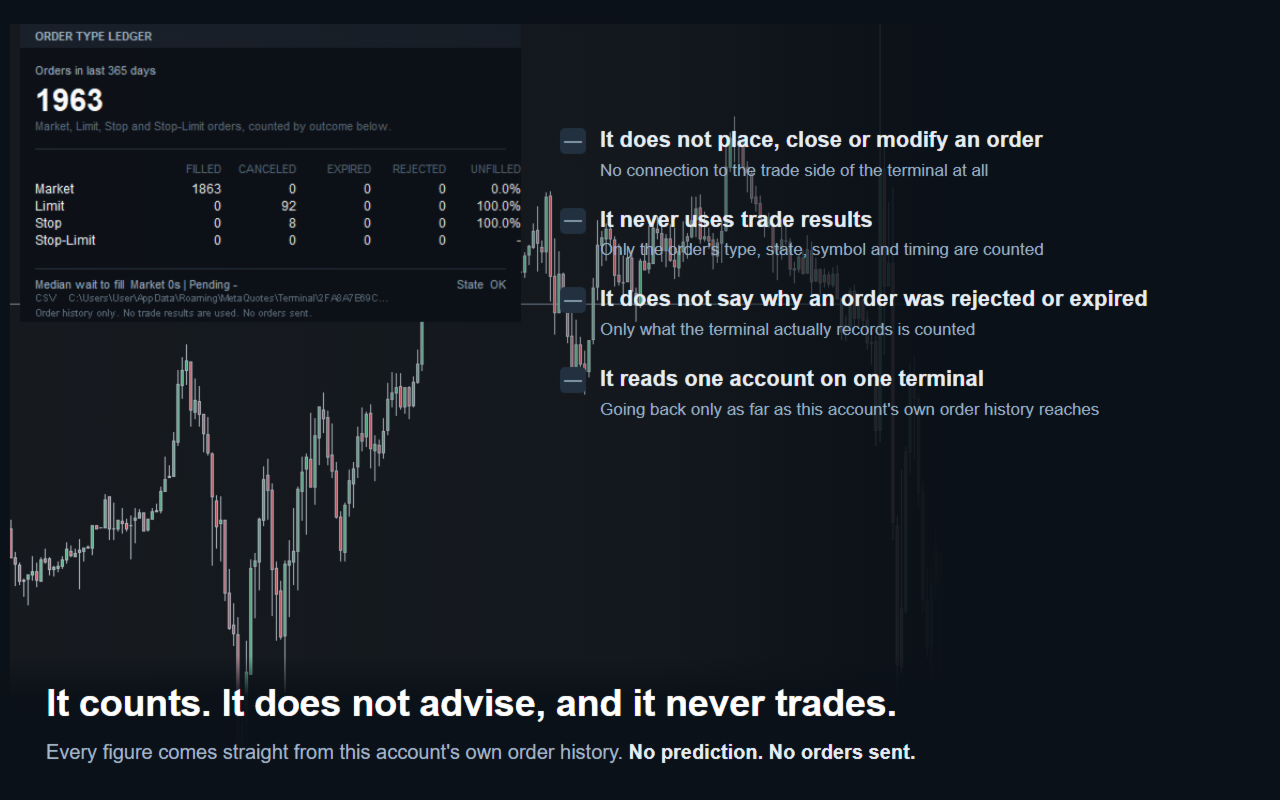
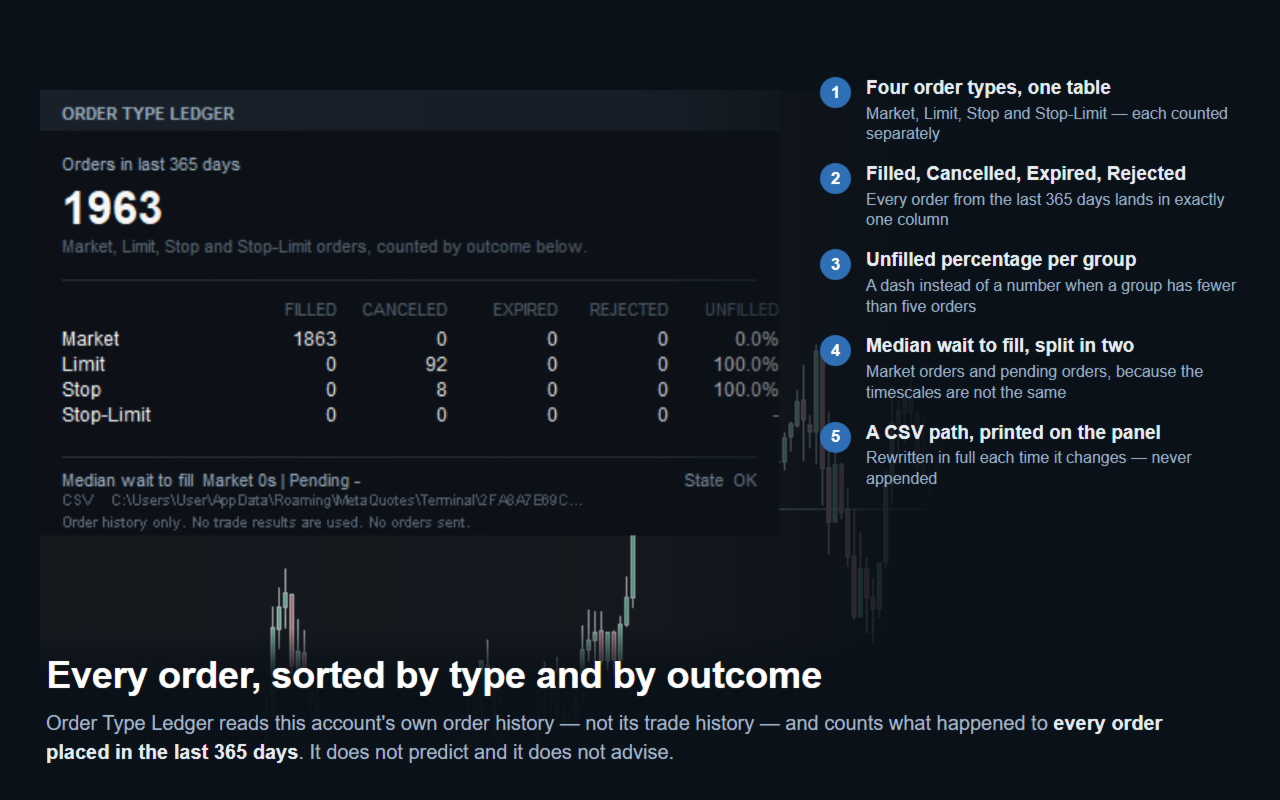
Order Type Ledger reads this account's own order history - not its trade history - and counts what happened to every order that was placed. It does not predict and it does not advise. It never looks at trade results; it only counts outcomes: filled, cancelled, expired, rejected.

WHY THIS EXISTS
Most trading tools only look back at trades that filled. A pending order that expired untouched, a stop order that got rejected, an order that sat for hours before it filled - none of that shows up in a trade-history summary, because it never became a trade. The order history tab lists these one by one, but nothing adds them up. "37 percent of the limit orders placed last month never filled" is a fact this account already has - it is just never counted.

SETUP
1. Drag the EA onto any chart. The symbol and timeframe do not matter - it reads the account's whole order history, not the chart it is running on.
2. A panel appears in the top-left corner and fills in from this account's own order history.
3. It recalculates only when the order count changes, checked every 60 seconds. Nothing needs to be started or configured.
4. Nothing else is required. There are no numeric settings to tune.

INPUTS (four, in this order)
- InpShowPanel (true) - show or hide the panel.
- InpPanelCorner (top-left) - which of the four chart corners the panel sits in.
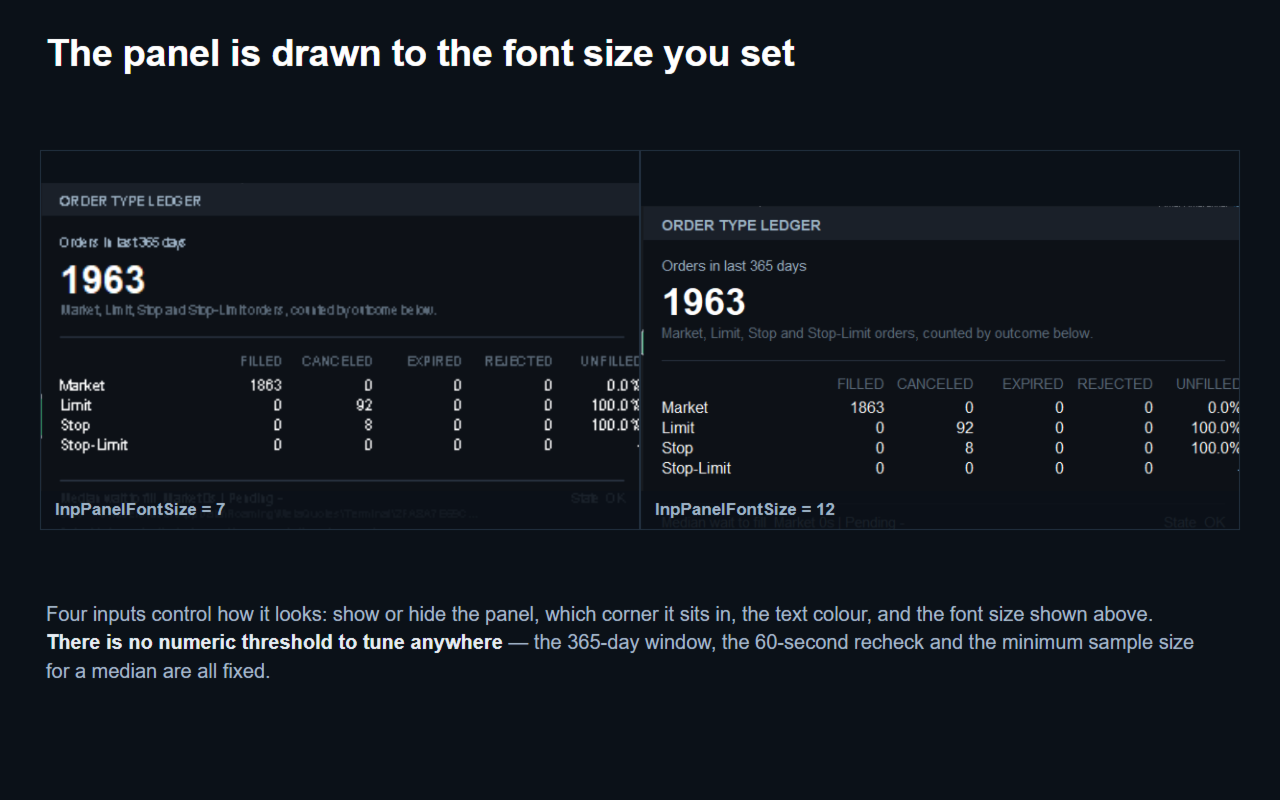
- InpPanelFontSize (9) - panel text size. Display only.
- InpColorText (white) - panel text colour.
There is no numeric threshold anywhere. The 365-day window, the 60-second recheck, and the minimum sample size for a median are all fixed and cannot be changed.

WHAT THE PANEL SHOWS
Every order from the last 365 days is placed into one of four groups by type - Market, Limit, Stop, Stop-Limit - and counted by outcome: Filled, Cancelled, Expired, Rejected. Next to each group, Unfilled shows what share of it did not fill (cancelled, expired or rejected, out of that group's total; partially filled orders count as filled). A group with fewer than five orders shows a dash instead of a percentage - too small a sample to mean anything.

Below that, Median wait to fill shows how long a filled order typically waited between being placed and being filled, worked out separately for Market orders and for Pending orders (Limit, Stop and Stop-Limit combined), because the two behave on completely different timescales. A market order usually fills in under a second; a pending order can sit for hours or days. Mixing them would make the median meaningless. Either figure shows a dash if there are fewer than five filled orders in that category.

THE REPORT FILE
A CSV file is written to MQL5\Files\OrderTypeLedger\order_report.csv, broken down by month, symbol and order group, with columns: Month, Symbol, OrderGroup, State, Count, MedianWaitSeconds. It is rewritten in full each time, not appended, so it never contains duplicates. Its full path is printed on the panel.

BEFORE YOU TEST IT
The Strategy Tester only has the order history from that one test run, so what you see there reflects the test period, not this account's real order history. It is useful for confirming the EA runs without errors, not for reading its numbers as if they were real account data.

WHAT IT DOES NOT DO
It never places, closes or modifies an order - it has no connection to the trade side of the terminal at all. It does not use trade results anywhere - only the order's type, state, symbol and timing. It does not say why an order was rejected or expired - a broker's reasoning is not always available, and only what the terminal actually records is counted. It does not compare symbols to each other or suggest changing how you place orders. It reads one account on one terminal, going back only as far as this account's own order history reaches.
Recommended products
Tick Volume Chart is a unique tool for building charts based on tick volumes in MetaTrader 5 . With Tick Volume Chart , you can create charts where each candle is formed not by time, but by a specified number of ticks. This gives you perfect precision in analyzing market activity, which is unattainable on standard time-based charts. You can use any indicators and Expert Advisors that support custom symbols. Working with the resulting charts is just as convenient as with standard ones. Unlike sta
PnL Manager Pro
Enechojo Victor Ayegba
PNL MANAGER PRO —    Automatic Exit Manager with Smart Risk Control Set your entry, walk away. PNL Manager Pro sets your stop loss and take-profits automatically, locks in profit in stages, moves you to breakeven, and trails the rest — all while keeping your risk inside the limit you set. Try Before You Buy: You can download and test the Pnl MANAGER  free demo version  on a demo acc
Trade Manger
Israr Hussain Shah
Here   our more valuable tools SMC Trend Trading   ,  Easy SMC Trading  ,  Institutional SMC Architect Volume Analysis Tools  ,  Volume flow Profile  ,  Market volume profile  , FVG with Volume  , Liquidity Heatmap Profile  ,  Volume Spread Analysis You Give an Instruction: When you run the script, a window pops up with a dropdown menu. You choose exactly what you want it to do from the list (e.g., "Close Profit Only" or "Delete Pending Orders"). It Scans Your Positions: The script then reads
TradeControl Pro – Advanced Trade Manager for MetaTrader TradeControl Pro is a trade management tool for MetaTrader that enables structured and efficient management of trading positions directly on the chart. The application combines a clearly designed user interface with automated calculations and flexible control options for different trading approaches. The integrated on-chart panel is organized in a tabular layout and divided into three main sections (tabs): Execution , Close , and Info . Th
Trading Journal pro
Israr Hussain Shah
Here   our more valuable tools SMC Trend Trading   ,  Easy SMC Trading  ,  Institutional SMC Architect Volume Analysis Tools  ,  Volume flow Profile  ,  Market volume profile  , FVG with Volume  , Liquidity Heatmap Profile  ,  Volume Spread Analysis Key Features 1.  Total Immersion UI (The "Blackout") Chart Masking:   Upon loading, the tool turns the background, grid, and candles pitch black. This hides the noise of the market ticks, allowing you to focus purely on your performance data withou
Trading Utility for Forex Currency Pairs Only not for Gold  Functions Auto Lot Calculation based on Risk Auto stoploss  Auto TakeProfit Breakeven Auto Close Half % Close in percentage with respect to the PIPs Pending Orders BuyLimit Sell Limit with distances BuyStop Sell Stop    with distances Trading Informations Risk in percentage For Multiple trades Combine Takeprofit and Combine Stoplosses
Was: $249  Now: $99   Market Profile defines a number of day types that can help the trader to determine market behaviour. A key feature is the Value Area, representing the range of price action where 70% of trading took place. Understanding the Value Area can give traders valuable insight into market direction and establish the higher odds trade. It is an excellent addition to any system you may be using. Inspired by Jim Dalton’s book “Mind Over Markets”, this indicator is designed to suit the
Pro Order Lot Size Calculator Pro Order Lot Size Calculator is a simple and practical tool designed to help you calculate the appropriate lot size based on the amount of risk you want to take . With this tool, you can easily calculate your trading risk directly from the panel according to the amount of money available in your account. Easy Risk & Lot Calculation The panel is designed to be very simple and easy to use. You can choose how you want to define your risk: Enter your desired risk amoun
Before installing the HeatMap indicator make sure you are using a broker that gives you access to the Depth of market (DOM) !! This indicator creates a heatmap on your chart allowing you to see the buy or sell limit orders easily and in real time. You have the possibility to change the setting and the colors of the HeatMap in order to adapt to all markets and all charts. Here is an example of a setting you can use with the NASDAQ100 on the AMPGlobal broker :  https://www.youtube.com/watch?v=x0Y
A professional panel for manual trading that keeps the whole trade cycle in one window on the chart, from a precise entry to protecting your account. Size every position strictly to a defined risk, build the trade with lines directly on the chart using the RR Tool, and place market and pending orders, grids and OCO. The panel takes position management off your hands: partial closing across up to five levels, six types of trailing stop, breakeven and Virtual SL/TP. Daily, weekly and monthly limit
Quick deals EA
Aleksandr Slavskii
Горячие клавиши плюс клик левой кнопки мыши на графике. Советник открывает сделки, выставляет лимитные и стоповые ордера, удаляет ордера и закрывает позиции, также  делает реверс  открытых позиций, выставляет прописанные в настройках стоп лосс и тейк профит. (реверс только на неттинговых счетах) При запуске советника можно посмотреть подсказку как действует советник при нажатии клавиши + клик на графике. Правее последнего бара, ниже цены Ctrl+ЛКМ  - OpenSell Правее последнего бара, выше цены C
Chart Pro Classic Dark v1.00 Chart Pro Classic Dark is a professional MT5 chart styling and customization tool designed to give your charts a clean, modern, and professional dark appearance. Key Features Dark Black Background — Applies a clean black background to the chart. ️ Candlestick Chart — Automatically configures the chart to use candlesticks. Bullish Candles — Green/Lime bullish candles. Bearish Candles — White bearish candles. Grid Removal — Hides the chart grid for a clean

FREE
Trading Console makes your trading experience comfortable! This application cannot be tested in the strategy tester. Please obtain the demo version from the following link and test it. Download DEMO ver. This is for a demo account. 1. Features to help you during trading: (1) Display and Notifications for Economic Indicators: Receive alerts, push notifications, and emails a few minutes before the release of economic indicators. The screen flashes during alerts, making it easy to notice. Customi
Volume Profile Utility
AL MOOSAWI ABDULLAH JAFFER BAQER
Volume Profile Discover where the market really trades. Make decisions based on volume, not guesswork. Volume Profile is a professional MetaTrader utility that analyzes trading activity across different price levels, allowing traders to identify where the highest concentration of market participation has occurred. Instead of focusing only on price movement over time, Volume Profile reveals the price levels where buyers and sellers have been most active, providing valuable insight into market str
SL Risk Manager Auto SL System SL Risk Manager Auto SL System is a practical and easy-to-use tool designed to help you manage your Stop Loss levels before and after opening a trade . With this tool, you can set your Stop Loss level before entering a position . Especially when trading Gold (XAU), you can easily define your Stop Loss based on a specific dollar amount , giving you better control over the risk of each trade. You can also use the panel to automatically open trades according to the ra
TradeGuard Capital Protection Professional Risk, Exposure & Trade Manager for MetaTrader 5 This utility acts as a professional insurance system for your trading account. TradeGuard Capital Protection is a professional-grade risk & money management utility designed to protect your trading account from excessive losses, emotional trading, and uncontrolled exposure. This tool does NOT open trades . It strictly manages risk, drawdown, exposure, and safety protections . Perfect for manual traders, EA
ScalperTraderPanel
Andres Daniel Leonel Lusin
Overview:   ScalperTradePanel is the ultimate assistant for manual traders and scalpers who need speed, precision, and automated trade management. Unlike standard one-click panels, this tool combines manual entry with an   automated Grid system , allowing you to average your entry price intelligently. It features a unique   Dual-Mode Interface : switch instantly between   Market Execution   for speed, or   Visual Pending Mode   to plan your trades directly on the chart with drag-and-drop lines t
Trade History By Magic Indicator Unlock Your Trading Insights with Trade History By Magic! Enhance your MetaTrader 5 experience with this powerful indicator designed for traders who demand precision and clarity. Trade History By Magic provides a clear, real-time display of your trading history, organized by magic numbers, directly on your chart. Perfect for both automated and manual traders, this tool helps you track performance effortlessly. Key Features: Organized Trade Tracking : Displays tra
CoPilot dashboard MT5
Frederic Jacques Collomb
CoPilot — Daily Trading Dashboard Know your numbers. Trade with clarity. MT4 version What is CoPilot? CoPilot is a professional-grade trading assistant that displays in real time all your daily performance statistics directly on the chart — with a live equity curve that updates trade by trade. Designed for active traders who need instant visibility into their session without leaving the chart, CoPilot aggregates every closed trade of the day across all symbols and presents them in a clean, color
BoxChart MT5
Evgeny Shevtsov
5 (7)
The market is unfair if only because 10% of participants manage 90% of funds. An ordinary trader has slim changes to stand against these "vultures". This problem can be solved. You just need to be among these 10%, learn to predict their intentions and move with them. Volume is the only preemptive factor that faultlessly works on any timeframe and symbol. First, the volume appears and is accumulated, and only then the price moves. The price moves from one volume to another. Areas of volume accumu
Expert TP SL v04
Mikhail Ostashov
Expert TP SL v04 - Professional Trading Assistant with AI Motivation System Advanced manual trading tool with automatic risk management, overtrading protection, and intelligent psychological support for disciplined trading. PRODUCT OVERVIEW Expert TP SL v04 is a comprehensive trading assistant designed for manual traders who want to maintain emotional discipline while automating risk calculations. This isn't just another order placement tool - it's a complete trading psychology system that pr
Risk Ruler
AL MOOSAWI ABDULLAH JAFFER BAQER
Risk Ruler Plan every trade with precision before you enter the market. Risk Ruler is a professional on-chart position sizing and risk management tool for MetaTrader that helps traders calculate the optimal trade size based on their predefined risk. By simply dragging the Entry, Stop Loss, and Take Profit lines directly on the chart, all essential trading calculations update instantly, allowing you to make informed decisions before placing a trade. Designed for both manual and professional trade
LotCalculatorPro
Reynaldo Jr Audencial Pascual
LotCalculatorPro + Smart Trading Panel LotCalculatorPro is a powerful all-in-one trading assistant designed to simplify risk management, lot size calculation, and trade execution directly from your chart. This tool helps traders control risk, calculate precise lot sizes, and manage trades automatically with smart features like break-even, partial close, and daily profit/loss protection. It is ideal for Forex traders, prop firm traders, and risk-focused traders who want a clean and efficient trad
This is visualization tool based on the Depth of Market. It works with the symbols that have the Depth of Market available. It's a visual indicator that shows the volume of each Bid/Ask price and ratio of total volume of Bids/Asks. Note: check if your broker supports DOM before purchasing. 。。。。。。。。。。。。。。。。。。。。。。。。。。。。。。。。。。。。。。。。。。。。。。。。。。。 。。。。。。。。。。。。。。。。。。。。。。。。。。。。。。。。。。。。。。。。。。。。。。。。。。。
King ElChart Manual Trade Panel
Mohammed Maher Al-sayed Mohammed Ahmed Saleh
King Chart – Manual Trading Panel for MetaTrader 5 Overview King Chart is a simple yet powerful manual trading panel built for traders who want speed, precision, and clarity. It enables quick order execution, clear lot control, and real-time account monitoring  all directly on your MT5 chart. Main Features Multi-Lot Trade Execution 3 Buy and 3 Sell buttons for instant execution Each button is tied to a custom lot size field Designed for flexible scaling in or out of trades Position Management D
TradePad
Ruslan Khasanov
5 (1)
TradePad is a tool for both manual and algorithmic trading. We present you a simple solution for fast trading operations and control of positions on several trading instruments. Attention, the application does not work in the strategy tester! Trial version of the application for a demo account and a description of all the tools The application interface is adapted for high-resolution monitors, simple and intuitive. For comfortable work, the trader is offered the following set of tools: A hot ke
BTC Trading Assistant EA (MT5) Manual trading assistant that helps place and manage trades with automated risk and stop management. Overview BTC Trading Assistant EA is a utility Expert Advisor for MetaTrader 5 intended for manual traders. It provides a chart interface to execute BUY/SELL/CLOSE actions and automates selected trade management functions such as position sizing, initial SL/TP placement, break-even, trailing stop and optional partial profit taking. This EA does not generate trade si
# Scorpion 75 - Advanced Adaptive Grid Trading Robot.  ## Product Overview Scorpion 75 is a sophisticated fully automated grid trading Expert Advisor that employs adaptive algorithms to dynamically adjust trading positions based on market conditions. Unlike traditional grid systems, Scorpion 75 features intelligent repositioning, comprehensive risk management, and multiple operational modes to optimize performance across various market environments. ## Key Features ### **Adaptive Grid
Painel Nelogica ChartTrading
Tiago Silvano Souza Felipe
Painel Profit is an operational trading panel for MetaTrader 5 created to make manual execution and visual order management easier directly on the chart. The operating principle is simple: the trader selects the symbol, timeframe, volume, entry type, and exit strategy. Based on these commands, the panel sends or organizes the trade through the interface, displaying the entry, take profit, and stop loss levels on the chart for visual monitoring. This product is not a signal robot and does not mak
The utility displays the order book, as well as increases its depth, remembering the location of applications that have gone beyond the current "window" view. With the utility user can perform quick trading actions in one click - placing/cancelling/editing of explicit and hidden orders, and also opening/editing positions. Utility features The orders book display works only on those trading symbols for which it is broadcast by the broker. To reset the information about the rows that were recorde
Buyers of this product also purchase
Trade Assistant MT5
Evgeniy Kravchenko
4.41 (216)
It helps to calculate the risk per trade, the easy installation of a new order, order management with partial closing functions, trailing stop of 7 types and other useful functions. Additional materials and instructions Installation instructions - Application instructions - Trial version of the application for a demo account Line function -   shows on the chart the Opening line, Stop Loss, Take Profit. With this function it is easy to set a new order and see its additional characteristics bef
Forex Trade Manager MT5
InvestSoft
4.98 (675)
Trade Manager MT5 is an advanced position size calculator and trade management tool for MetaTrader 5, designed to help traders plan trades faster, control risk more precisely, and manage open positions directly from the chart. It combines order placement, risk based lot calculation, Stop Loss and Take Profit management, Break Even, Trailing Stop, Partial Close, Equity Protection, and external trade management in one panel. Whether you trade forex, indices, metals, commodities, crypto, or future
================================================================================ POC BREAKOUT - V20.72. Full Professional Grade Toolkit ================================================================================ POC Breakout is a full MetaTrader 5 trading dashboard for discretionary traders who want breakout signals, Point of Control (POC) context, volume profiles, order flow, market structure, news, alerts, and advanced trade planning in one professional workspace. Attached directly to you
TradePanel MT5
Alfiya Fazylova
4.88 (167)
Trade Panel is a multi-functional trading assistant. The app contains over 50 trading functions for manual trading and allows you to automate most trading tasks. Application instructions + video instructions: https://www.mql5.com/en/blogs/post/756482 Trial version of the application for a demo account: https://www.mql5.com/en/blogs/post/750865 How to install the application: https://www.mql5.com/en/blogs/post/756239 How to test the application in visual mode: https://www.mql5.com/en/blogs/post/7
Local Trade Copier EA MT5
Juvenille Emperor Limited
4.94 (148)
Experience exceptionally fast trade copying with the   Local Trade Copier EA MT5 . With its easy 1-minute setup, this trade copier allows you to copy trades between multiple MetaTrader terminals on the same Windows computer or Windows VPS with lightning-fast copying speeds of under 0.5 seconds. Whether you're a beginner or a professional trader, the   Local Trade Copier EA MT5   offers a wide range of options to customize it to your specific needs. It's the ultimate solution for anyone looking t
Beta Release The Telegram to MT5 Signal Trader is nearly at the official alpha release. Some features are still under development and you may encounter minor bugs. If you experience issues, please report them, your feedback helps improve the software for everyone. Telegram to MT5 Signal Trader is a powerful tool that automatically copies trading signals from Telegram channels or groups directly to your MetaTrader 5 account. It supports both public and private Telegram channels, and you can conn
Telegram to MT5 MultiChannel Copier
Sergio Marquez Uroz
4.46 (13)
Telegram to MT5 Multi-Channel Copier   automatically copies trading signals from your Telegram channels straight to MetaTrader 5. No bots, no browser extensions, no manual copying. A signal arrives in Telegram and the EA opens the trade in your terminal within seconds. The product has two components: a Windows application that listens to your Telegram channels, and this Expert Advisor that executes the signals in your MT5 terminal. An MT4 version is also available   here . Setup guide and appli
FarmedHedge Pair Trading Dashboard
Tanapisit Tepawarapruek
5 (4)
Farmed Hedge Yield Farming | All Markets (Manual - Hybrid - Semi/Automated EA) VERIFIED TRADING RESULTS - Farmed Hedge Yield Axi Copy:  https://www.mql5.com/en/signals/2356376 - Farmed Hedge Yield Exn Copy:   https://www.mql5.com/en/signals/2356404 - Farmed Hedge Yield V Copy:  https://www.mql5.com/en/signals/2357156 * Before purchasing, please feel free to send me a message if you have any questions about the product or setup. ** After purchase,  Contact me via private message to receive t
Astro Trade MT5
Indra Maulana
5 (4)
25% discount on the release of the tool: only for the next 3 buyers Send a message to receive a demo version. AstroTrade Trading Assistant AstroTrade is a comprehensive multi-functional trading utility developed for the MetaTrader 5 platform. It integrates essential tools for trade execution, risk management, and technical monitoring into a single unified interface. The application is designed to assist traders in managing their daily operations through a visual and structured environment. Vi
EA Overfitter
Stephen J Martret
That backtest looks great. But will it still be making money tomorrow, next week, next month? EA Overfitter re-runs your EA on 100 price histories it has never seen. One score tells you if the edge is real. A backtest tells you what an EA did on one price history — the one that happened to occur. What you cannot tell from it is how much of that result was the strategy and how much was the particular path. EA Overfitter answers that. It builds up to 100 synthetic price histories your EA has n
Exp COPYLOT CLIENT for MT5
Vladislav Andruschenko
3.97 (35)
Professional Trade Copier for MetaTrader 5 Fast, professional, and reliable trade copier for MetaTrader . COPYLOT allows you to copy Forex trades between MT4 and MT5 terminals with support for Hedge and Netting accounts. COPYLOT MT5 version supports: - MT5 Hedge to MT5 Hedge - MT5 Hedge to MT5 Netting - MT5 Netting to MT5 Hedge - MT5 Netting to MT5 Netting - MT4 to MT5 Hedge - MT4 to MT5 Netting MT4 version Full Description +DEMO +PDF How To Buy How To Install How to get Log Files H
Telegram To MT5 Ultra
Mirel Daniel Gheonu
5 (5)
Telegram To MT5 — Signal Copier Turn the trading calls from your Telegram channels into real MT5 orders — automatically, on as many accounts as you like, with risk and rules fully under your control. Telegram To MT5 connects the VIP / signal channels you already follow on Telegram to your MetaTrader 5 terminal. A free companion desktop app reads the messages (even from channels that block bots), and this Expert Advisor executes them on your account — applying your own risk settings, symbol mappi
Premium Trade Manager - The Trade Panel With a Coach Built In Premium Trade Manager puts a trading coach inside your chart, with a full execution engine underneath it. Set the trade up the way you always do, then let Max, your AI trading coach, read that exact setup against your live account and give you a straight verdict before you commit: is the stop disciplined, is the risk sane, is a high-impact release minutes away, are you near a prop-firm limit. Below sits the engine that runs everything
Trade Dashboard MT5
Fatemeh Ameri
4.95 (132)
Trade Dashboard simplifies how you open, manage, and control your trades, with built-in lot size calculation. It allows you to execute trades, manage risk, and control positions directly on the chart, with tools such as partial close, breakeven, and trailing stop. Designed to reduce manual work and help you stay focused on your trading decisions. A demo version is available for testing. Detailed explanations of features are provided within the MQL5 platform. Installation instructions are include
HINN MagicEntry Extra
ALGOFLOW OÜ
4.74 (19)
HINN MAGIC ENTRY – the ultimate tool for entry and position management! SIMPLE. FASTEST. INTUITIVE. MAX AUTOMATED. Place orders by selecting a level directly on the chart! full description   ::  demo-version  :: 60-sec-video-description Key features: - Market, limit, and pending orders - Automatic lot size calculation - Automatic spread and commission accounting - Unlimited partitial take-profits  - Breakeven and trailing stop-loss and take-profit  functions - Invalidation leves - Intuitive, a
Anchor Trade Manager
Kalinskie Gilliam
5 (8)
Anchor: The EA Manager Your EAs cannot see each other, but Anchor can. Anchor gives you one place to coordinate your EAs, manage risk, and decide when trading is allowed. It works alongside the trading bots you already use without any changes to them. The Problem One EA opens a trade. Then another starts trading. The next thing you know, you wake up to multiple grids built across your account. Each EA may be doing exactly what it was designed to do, but together they can place far more risk on y
Signal Trading View to MT5 Pro
Mirel Daniel Gheonu
4.5 (2)
Signal TradingView to MT5 Pro  Instant professional execution between TradingView and MetaTrader 5 Automate your trading strategy with the most robust communication bridge between TradingView alerts and real execution in MT5. Designed for traders who demand speed, flexibility, and impeccable risk management, this Expert Advisor transforms any alert message into a precise market or limit order.   Install and TEST the TRIAL version HERE STRENGTHS AND ADVANTAGES Universal Parsing Engine (Propriet
X2 Copy MT5
Liubov' Shkandrii
Fast. Accurate. Innovative. Tech-Driven. Discover instant trade copying with the revolutionary X2 Copy MT5. With just a 10-second simple setup, you'll get a powerful tool for syncing trades between MetaTrader terminals on a single computer or Windows VPS with unprecedented speed. Whether you're managing multiple accounts, following signals, or scaling your strategy, X2 Copy MT5 adapts to your workflow with unparalleled precision and control. Work faster and more reliably with the most tech-drive
Trade copier MT5
Alfiya Fazylova
4.59 (54)
Trade Copier is a professional utility designed to copy and synchronize trades between trading accounts. Copying occurs from the account / terminal of the supplier to the account / terminal of the recipient, which are installed on the same computer or VPS . PROMOTION - If you have already purchased the "Trade Copier MT5," you can receive the "Trade Copier MT4" for free (for copying MT4 > MT5 and MT4 < MT5). For more detailed information about the conditions, please contact us via private message
Timeless Charts
Samuel Manoel De Souza
5 (8)
Timeless Charts is an all-in-one trading utility for professional traders. It combines custom chart types such as Seconds Charts and Renko with advanced order flow analysis using Footprints , Clusters , Volume Profiles , VWAP studies, and anchored analysis tools for deeper market insight. Trading and position management are handled directly from the chart through an integrated trade management panel , while Market Replay and Virtual Accounts provide environments for practicing trading skills and
News Filter EA
Rashed Samir
5 (2)
News Filter EA: Advanced Algo Trading Assistant News Filter EA is an advanced algo trading assistant designed to enhance your trading experience. By using the News Filter EA , you can integrate a Forex economic news filter into your existing expert advisor, even if you do not have access to its source code. In addition to the news filter, you can also specify trading days and hours for your expert. The News Filter EA also includes risk management  and equity protection features. MT4 Version Ma
FUTURES ORDERFLOW FOOTPRINT CHART Professional OrderFlow EA for MetaTrader 5 Version 1.01| Professional tool for real traders | Institutional-Grade Visualization STRATEGY TESTER USERS - PLEASE SELECT EVERY REAL TICK WHEN TESTING AND YOU HAVE DOWNLOADED HISTORICAL DATA. IF YOU SEE A WAITING SCREEN AND IT IS NOT DOWNLOADING, IT MEANS YOU HAVE LOW HISTORICAL DATA. TRY 1 MIN AND 5 MIN FIRST ON 1 DAY DATA. ONE DAY DATA SHOULD BE THE NEWEST AND MOST CURRENT DATE. PLEASE WAIT UNTIL THE MARKET HAS ROL
The product will copy all telegram signal to MT5 ( which you are member) , also it can work as remote copier.  Easy to set up, copy order instant, can work with almost signal formats, image signal,  s upport to translate other language to English Work with all type of channel or group, even channel have "Restrict Saving Content", work with  multi channel, multi MT5 Work as remote copier: with signal have ticket number, it will copy exactly via ticket number. Support to backtest signal. How to s
YuClusters
Yury Kulikov
4.93 (43)
Attention: You can view the program operation in the free version  YuClusters DEMO .  YuClusters is a professional market analysis system. The trader has unique opportunities to analyze the flow of orders, trade volumes, price movements using various charts, profiles, indicators, and graphical objects. YuClusters operates on data based on Time&Sales or ticks information, depending on what is available in the quotes of a financial instrument. YuClusters allows you to build graphs by combining da
Power Candles Strategy Scanner - Self-Optimizing Multi-Symbol Setup Finder Power Candles Strategy Scanner runs the same self-optimizing engine that powers the Power Candles indicator - on every symbol in your Market Watch, side by side. One panel tells you which symbols are statistically tradable right now, which strategy wins on each, the optimal Stop Loss / Take Profit pair, and pings you the moment a fresh signal fires. This tool is part of the Stein Investments ecosystem - 18+ tools plus Max
MT5 to Telegram Signal Provider turns your trading account into a signal provider. Every trade action, whether manual, by EA or from your phone, is instantly sent as a message to Telegram. You can fully customize the format or use a ready-made template for quick setup. [ Demo ] [ Manual ] [ MT4 Version ] [ Discord Version ]     New: [ Telegram To MT5 ] Setup A step by step user guide is available. Key Features Ability to customize order details sent to subscribers You can create a tiered subs
Ultimate Extractor
Clifton Creath
5 (8)
Ultimate Extractor - Professional Trading Analytics for MT5 *****this is the local HTML version of Ultimate Extractor. !!!!!it is not compatible with Cloud!!!! For the online version please reach out to me directly****** Ultimate EA manager also now available when you use cloud pro and above for free!! Ultimate Extractor transforms your MetaTrader 5 trading history into actionable insights with comprehensive analytics, interactive charts, and real-time performance tracking. What It Does Automa
Quant AI Agents
Ho Tuan Thang
5 (1)
Quant AI Agents are independent trading Expert Advisors. Instead of trading using a fixed strategy like other conventional EAs, Quant AI Agents   is a   multi-agent AI trading framework   that turns natural-language strategy prompts into live.  WANT THE SAME RESULTS AS MY LIVE SIGNAL?   Use the exact same brokers I do:   IC MARKETS , IC TRADING   .  Unlike the centralized stock market, Forex has no single, unified price feed.  Every broker sources liquidity from different providers, creating un
Trade Copier Ultimate
Janitha Sandaruwan Amaradasa Wickramasingha Arachchilage
5 (5)
Trade Copier Ultimate - Telegram to MT5 Signal Copier Trade Copier Ultimate automatically copies Telegram trading signals into MetaTrader 5. The EA can read signal messages, detect the symbol, order type, entry price, Stop Loss, Take Profit levels and selected update commands, then execute or manage the trade in MT5 using your lot and risk settings. It is more than a basic Telegram to MT5 copier. TCU also supports Bot API and user-account Bridge workflows, Discord signal routing, local MT5 to MT
Footprint Chart Pro — Professional OrderFlow EA for MetaTrader 5 Version 6.34 | Professional tool for real traders | Institutional-Grade Visualization DEMO USERS - PLEASE SELECT EVERY TICK / REAL TICK WHEN TESTING AND YOU HAVE DOWNLOADED HISTORICAL DATA. IF YOU SEE A WAITING SCREEN AND IT IS NOT DOWNLOADING, IT MEANS YOU HAVE LOW HISTORICAL DATA. TRY 1 MIN AND 5 MIN FIRST ON 1 DAY DATA. ONE DAY DATA SHOULD BE THE NEWEST AND MOST CURRENT DATE. PLEASE WAIT UNTIL THE MARKET HAS ROLLED OVER PERIOD.
More from author
Trade Pause Scheduler keeps your account out of the hours you'd rather sit out. You choose the windows; during one, it cancels pending orders that get placed and closes positions that get opened, and when the window ends everything goes back to normal. It doesn't open trades, choose entries, or send signals. Windows can be set three ways. By economic release: pick the importance (high only, high and medium, or all) and the countries that matter, then say how many minutes before and after a rele
Multi-Symbol Chase Mirror reads your own account's closed trade history and counts one thing: how many different symbols you opened new positions on. It does not predict, and it does not advise. Every number on the panel is something that already happened on this account. How the numbers are built: it reads up to 31 days of closed deals across every symbol and every magic number - this is an account-wide picture, not a chart-specific one. Symbols traded today counts the distinct symbols with at
FREE
Hourly Spread Profile reads your own account's closed bars and shows, hour by hour, what the spread actually cost on the symbol and timeframe you have open. It does not predict, and it does not advise. Every number on the panel already happened. How the numbers are built: for each of the 24 server-time hours it takes the median spread across up to 5,000 closed bars, whichever the terminal holds. Median, not average, so one wide spike during a news release does not relabel a whole hour. An hour
FREE
Trade Behavior Mirror reads your own account's closed trade history and counts one specific pattern: opening a new position shortly after a loss, at a lot size larger than your own recent normal. It does not predict, and it does not advise. Every number on the panel is something that already happened on this account. How the numbers are built: it reads up to 31 days of closed deals across every symbol and every magic number - this is an account-wide picture, not a chart-specific one. From the 3
FREE
Win Streak Size Creep Mirror reads your own account's closed trade history and counts one specific pattern: opening a new position during a run of wins, at a lot size larger than your own recent normal. It does not predict, and it does not advise. Every number on the panel is something that already happened on this account. How the numbers are built: it reads up to 31 days of closed deals across every symbol and every magic number - this is an account-wide picture, not a chart-specific one. Fro
FREE
Drawdown Guard watches your account against loss limits you set, and closes what needs closing when a limit is reached - that's all it does. It doesn't decide when to buy or sell, and it doesn't give advice. Set a daily loss limit, a total loss limit, or both. As the loss nears a limit, the tool warns you; once the limit is reached, it closes any position or pending order that opens from that point on, and - only if that option is turned on - the positions already open as well. It's worth sayi
You place the stop; the panel works out the size. Risk Lock Trade Panel is a manual trading panel for MetaTrader 5 that sizes every order from the risk you set, sends it with the stop already attached, and manages the position from the same window. It does not open trades on its own, does not give advice, and does not send signals. Enter your risk as a percent of balance or equity, or as a fixed amount, and set the stop distance in points - or press Show line and drag the stop line on the chart
Most risk tools work on the whole account: trip one limit and every EA on it stops, even the ones that did nothing wrong. EA Circuit Breaker works on one EA at a time - its own row, its own four limits, its own outcome. By default nothing closes or stops, and it places no order of its own on a real account. = EA Circuit Breaker Account 75584608 Hedging JPY Today -242056.00 Open 4 / 0.27 lots NAME TODAY OPEN LIMIT STATE Trend bot -19200.00 0/0.00 -22725.48 [#####-] WARN Range bot -61250.00 0/0.0
Most panels show only trades they placed, or the chart's own symbol. Trade Control Center puts every position and pending order - manual, phone, another terminal, any EA - into one table, across every symbol. Nothing closes or stops until a button is pressed or a limit and action are set. TRADES = Trade Control Center Trades Guards Guards Account OK [###---] EA 69 Window OFF Today (comm/swap incl.) -15162.00 Open 11 / 0.40 lots Pending 1 Group: None All Buys Sells Losing Winning Symbol EA    
Backtest Reality Check reads a Strategy Tester report and measures ten things in it, then measures the same ten things on the live trades the expert behind that report has since taken in your account, and sets the two side by side. Until the live side reaches 30 closed trades, the gap is not called a difference: it is still printed, and the panel says on screen that there are too few trades to judge it. It places no orders, and it modifies and closes nothing; there is no trading call anywhere in
CALCULATED VALUES, NOT RECOMMENDATIONS The prices drawn here are calculated values, not recommendations, and the panel says so at all times. When nothing is drawn, the panel says why. You set one session start time. The high and low of the minutes that follow are the opening range, drawn as a box labelled Opening range. The indicator then waits for a bar closing beyond it by a margin taken from ATR. The first such bar in each direction gets an arrow and four reference prices. No orders are pla
Runaway Guard
Wataru Tsuboya
Runaway Guard measures rate only: how many deals, how quickly, from which source. It acts when a rate you set is exceeded, and it does not rank, score or judge any expert. Each crossing writes one file holding the real deal tickets, to match against your terminal history. FOUR RATE LIMITS Rolling windows: at every check the tool looks back over the last 5 or 15 minutes and counts again from scratch. Set any limit to 0 to switch that metric off. - Deals in the fast window: 20 in 5 minutes. - R
Gold ADX ATR Dashboard marks the closed bar where a pullback inside an ADX trend has finished. Two standard indicators and nothing else: ADX(14) for direction, ATR(14) for size. There is no threshold, period or multiplier to set. Those inputs do not exist. Every number the rule needs is measured on your own account, and every one of them is printed on the chart. It draws. It does not trade. No orders are opened, modified or closed. WHAT THE PANEL SHOWS Gold ADX ATR Dashboard Account calibrat
Gold EMA RSI Alignment reads M5, M15, H1 and H4 on gold, and marks the first closed bar on which all four point the same way. Every row of its panel says which bar it read: a higher timeframe bar closed long before the bar you are watching, and a row with no time on it points at the wrong candle. When the four do not agree, the Blocking line names each timeframe still out of line, and repeats that timeframe's close, EMA50, slope and RSI. THE PANEL, WORD FOR WORD FROM A CHART Gold EMA RSI Alig
Gold Net Range Signals draws an arrow on a closed bar when its move cleared the last 20 bars after the spread on that bar was subtracted. No repainting, no thresholds to set, and no other indicator used - only the open, high, low and close of closed bars, and the spread recorded on each. It draws; it does not trade. The panel shows the subtraction it just made, and when no arrow is printed it names what is missing: body 260 - spread 40 = 220 net, needs > 1933. WHAT THE PANEL SHOWS Gold Net Ra
Trading Cost Ledger reads this account's own closed deal history and adds up exactly two things: commission and swap. It does not predict and it does not advise. Every figure it shows already happened on this account. SETUP 1. Drag the indicator onto any chart. The symbol and timeframe do not matter - it reads the whole account, not the chart. 2. A panel appears in the top-left corner and fills in from the first tick. 3. The CSV report is written automatically at startup. Its full path is print
Trading Discipline Trend Dashboard reads this account's own closed deal history and reports four measured patterns for this week against last week, plus a day-by-day row. It does not predict and it does not advise. Every figure already happened on this account. SETUP 1. Drag the indicator onto any chart. The symbol and timeframe do not matter - it reads the whole account, not the chart. 2. One panel appears in the top-left corner and fills in from the first tick. 3. All three alerts are off by
Contract Change Watch reads this account's own broker-connected symbol settings and records them the moment they change. It does not predict and it does not advise. Every entry in its log already happened - a value this account's broker actually set was different a moment ago. WHY THIS EXISTS A broker can change a symbol's swap rate, stop level, volume step, margin requirement or six other settings at any time, without a notice you will see in the terminal. The specification dialog always shows
Trade Duration Profile reads this account's own closed-trade history and shows how long positions were actually held - as a distribution, not a single average. It does not predict and it does not advise. It never looks at trade results; it only measures time. WHY THIS EXISTS Most traders have a rough idea of their own style - "I'm mostly a scalper", "I tend to hold a while" - but no real number behind it. The account's history tab lists trades one by one; it never adds up how long they were act
Weekend Hold Report reads this account's own closed-trade history and counts how often positions were carried across a weekend - as a plain count, by symbol, and by how long those weekend-crossing positions were held. It does not predict, judge or advise, and it never looks at trade results; it only counts and times. WHY THIS EXISTS Carrying a position across the weekend is rarely a deliberate plan - it is something a trader notices only after the fact. The account's history tab lists trades on
Partial Close Tracker reads this account's own closed-trade history and counts how often positions were closed in more than one step - as a plain count, a rate, and how many steps those partial closes typically took. It does not predict, judge or advise, and it never looks at trade results; it only counts. WHY THIS EXISTS Closing half a position to lock something in, then managing the rest, is a habit many traders intend to follow but rarely check against. The account's history tab lists trades
Stop Distance Ledger reads this account's own closed-trade history and shows how often a stop-loss or take-profit was actually set when a position was opened, and how far away it was placed - as a percentage of the opening price. It does not predict, judge or advise, and it never looks at trade results; it only measures what was set. WHY THIS EXISTS Deciding to always set a stop-loss before entering a trade is a rule many traders intend to follow, but rarely check against. The account's history
Margin Usage History reads this account's own closed-trade history and shows how much of the account balance was typically committed as margin at the moment each position was opened - as a percentage. It does not predict, judge or advise, and it never looks at trade results; it only measures how much of the account was put on the line each time. WHY THIS EXISTS The same lot size means something very different depending on how large the account balance is at the time. If the balance shrinks and
Tick Value Reference reads every symbol on this account's Market Watch and lines them up side by side by how much a single 1.00-lot tick is worth in this account's own currency. It does not calculate lot sizes, place trades or judge risk - it only shows what the terminal already knows about each symbol, arranged so the differences between symbols are easy to see. WHY THIS EXISTS The same 1.00 lot means something very different depending on the symbol. A tick on a FX major can be worth a few cen
Filter:
No reviews
Reply to review