TradeManager Control Suite
- Utilities
- Version: 1.0
- Activations: 5

TradeManager Control Suite
Manual trading with structured planning and controlled risk
TradeManager Control Suite is a comprehensive trading panel for MetaTrader 5. It helps you prepare trades directly on the chart, calculate position size, place orders and manage open positions according to a plan defined in advance.
You remain responsible for every entry. The application does not trade independently and does not use an automated trading strategy. It performs the calculations, sends the orders you confirm and manages them according to your settings.
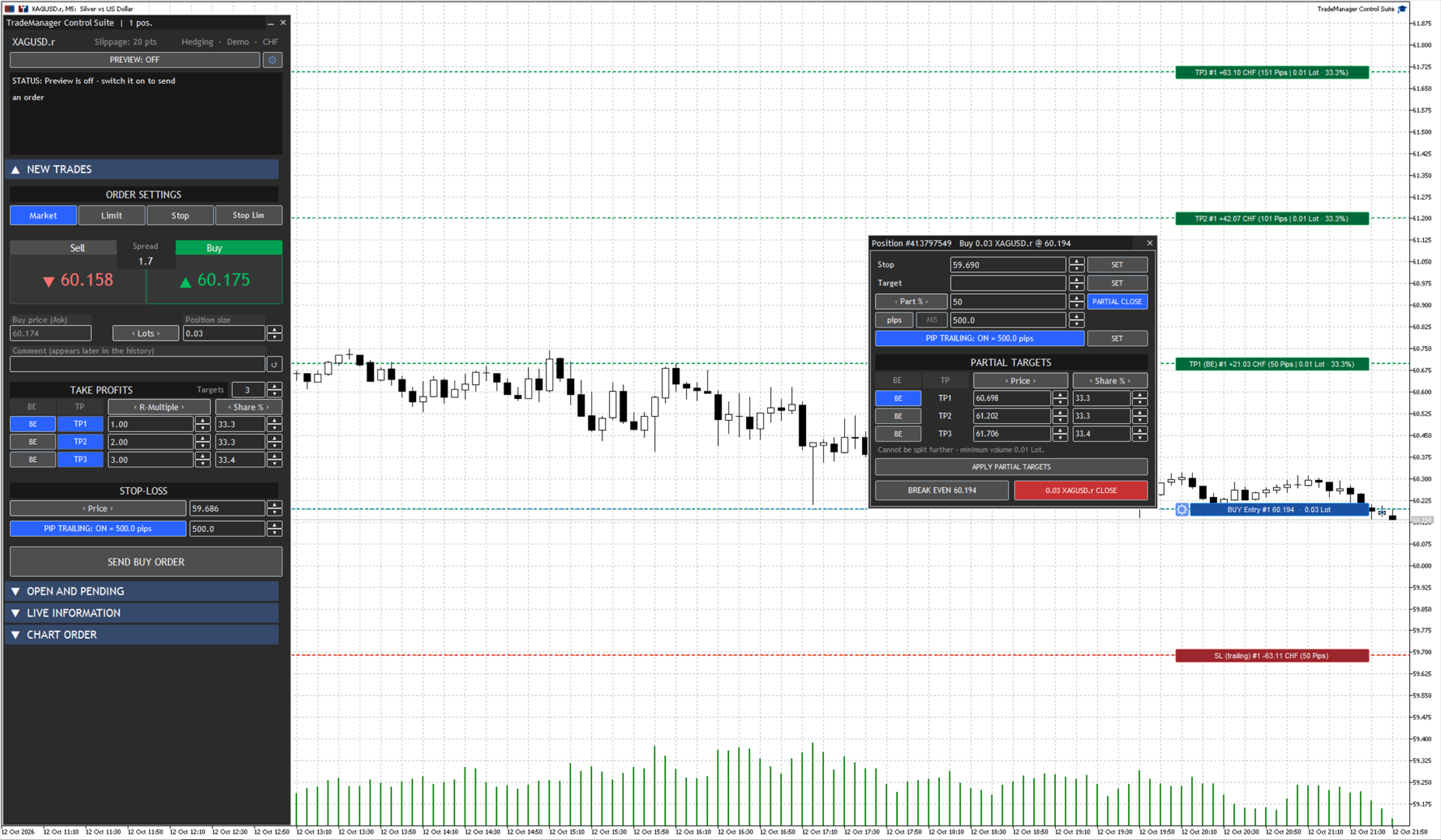
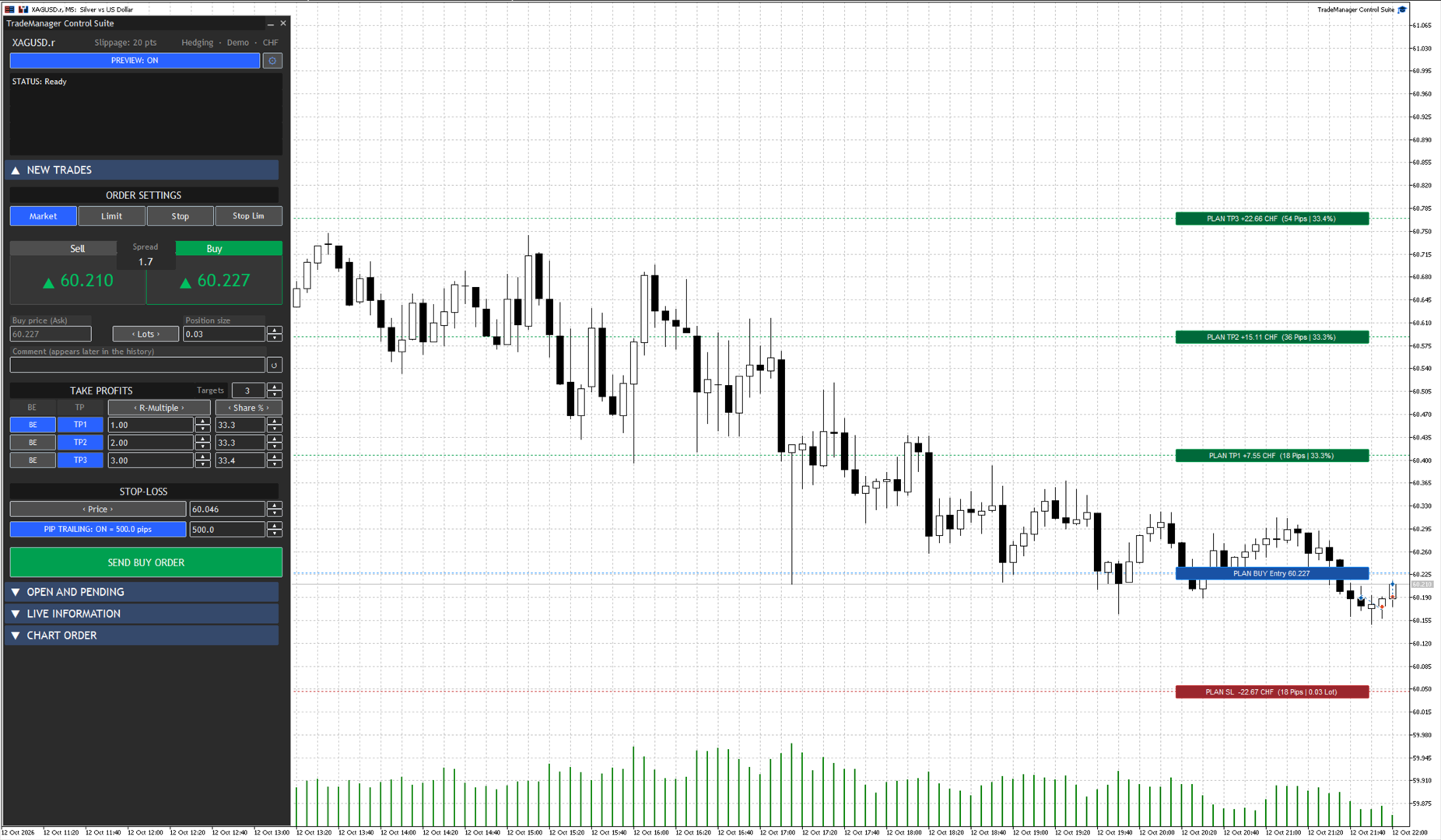
All important levels remain visible on the chart. Entry, stop loss and partial targets are displayed as lines and can be moved with the mouse. When a level changes, the panel recalculates the affected values.
Position size and risk
The following position sizing methods are available:
• Risk as a percentage of account balance
• Risk as an amount in the account currency
• Specified margin amount
• Direct lot size entry
In a risk based mode, the panel calculates the position size from the entry and stop loss. Moving a chart line updates the risk, distance and required volume.
Depending on the selected mode, the stop loss can be entered in pips, as a fixed price or as a risk amount. Broker minimum volume, volume steps and permitted price distances are considered during order preparation.
Order types
The application supports:
• Market orders
• Limit orders
• Stop orders
• Stop limit orders
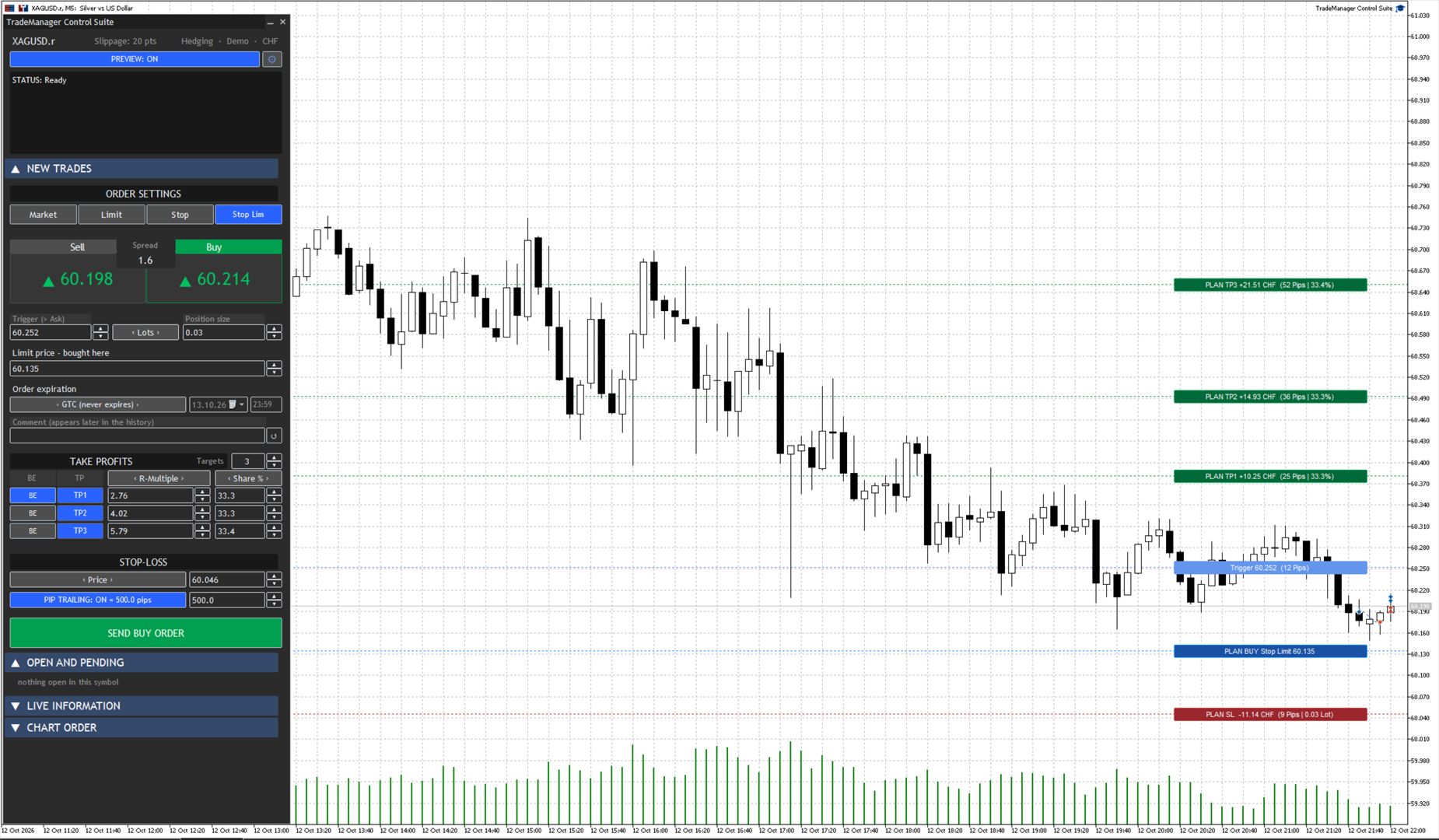
For stop limit orders, the trigger price and limit price are displayed separately. Both values can be edited independently and moved on the chart.
Partial targets
Up to ten partial targets can be prepared for one trade. Every target has its own distance and its own share of the position.
The target distance can be entered as an R multiple, in pips or as a fixed price. The share can be specified as a percentage or in lots. When a target is reached, the application closes the assigned part of the position.
Before an order is sent, the panel checks whether the planned allocation is compatible with the broker's minimum volume and volume steps. This shows in advance when a requested split cannot be executed technically.
Break even
You can select the partial target after which the stop loss should move to the entry price. This allows the trigger to match your individual trade plan.
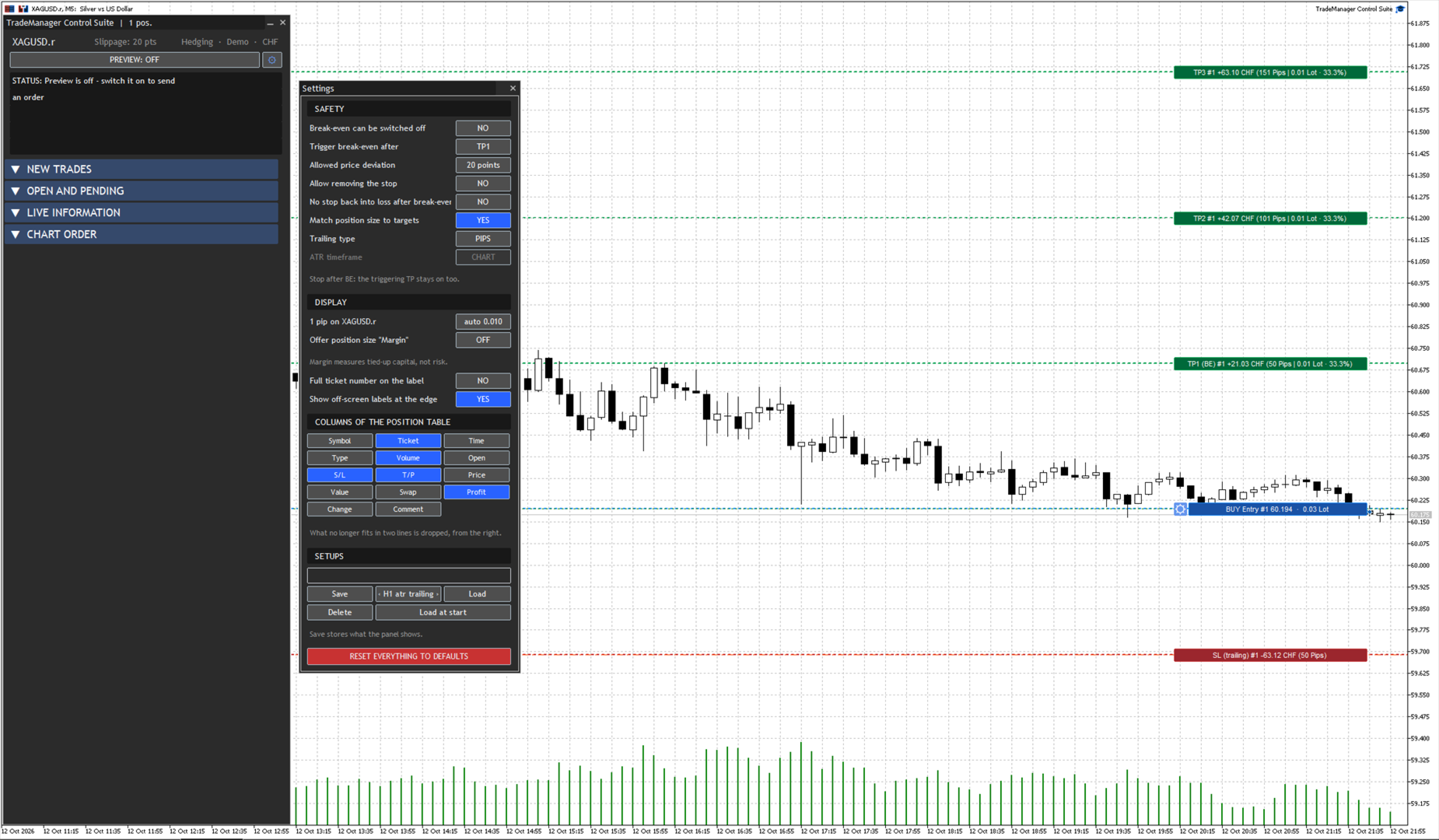
Optional safety rules can prevent an already protected stop from being moved back to the loss side. Removing an existing stop can also be disabled.
Trailing stop
Two trailing methods are available:
• Trailing with a fixed distance in pips
• Trailing based on the Average True Range
For ATR trailing, the multiplier and timeframe can be selected. The ATR timeframe can be different from the timeframe of the current chart.
Each managed position keeps the settings with which it was opened. Changing the general panel settings later therefore does not automatically rewrite trades that are already running.
Work directly on the chart
Entry, stop loss and targets are displayed as movable chart lines. You can drag either the line itself or its label.
While a line is being moved, the panel displays the updated prices, distances and risk values. In risk based sizing modes, it also recalculates the position size. The complete trade plan remains visible without repeatedly switching between the chart and the terminal order dialog.
Preview and validation
Preview mode displays the complete planned trade on the chart. An order can only be sent when all required values are valid.
Before execution, the panel checks the direction, order type, volume, entry, stop loss and target allocation. If an input is invalid or cannot be executed under the current broker conditions, the send button is disabled and the reason is shown in the status area.
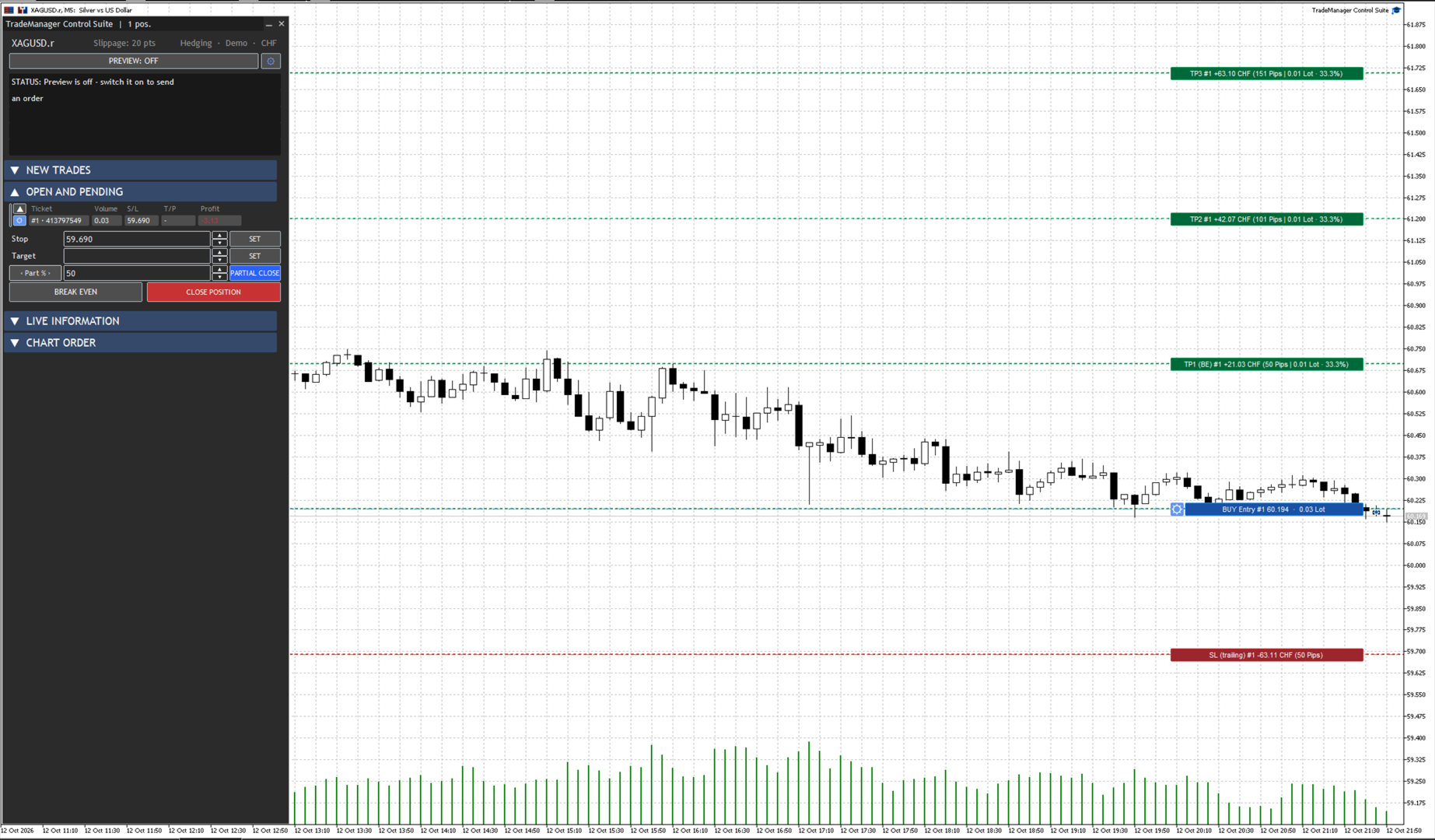
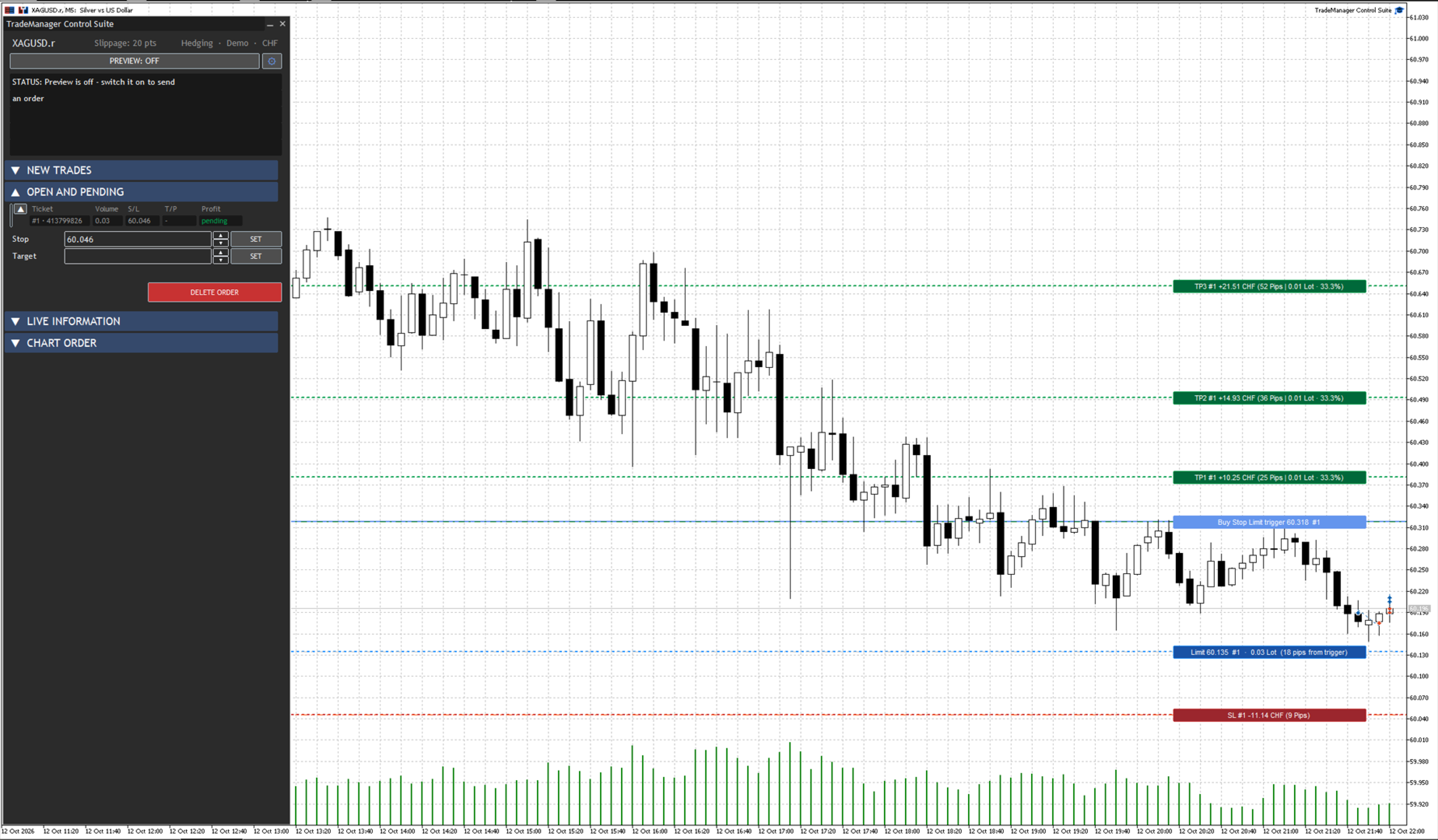
Open positions and pending orders
A dedicated section lists open positions and pending orders. The visible table columns can be selected in the settings.
Each open position has its own management window. From there you can:
• Set or modify the stop loss and target
• Close part of the position by percentage or lots
• Move the stop to break even
• Change the trailing method
• Close the complete position
For pending orders, stop loss and take profit can be changed or removed. The order can also be deleted directly from the panel.
Netting and hedging
TradeManager Control Suite supports both netting and hedging accounts. Its display and management behavior adapt to the respective account type.
Chart Order lines and alerts
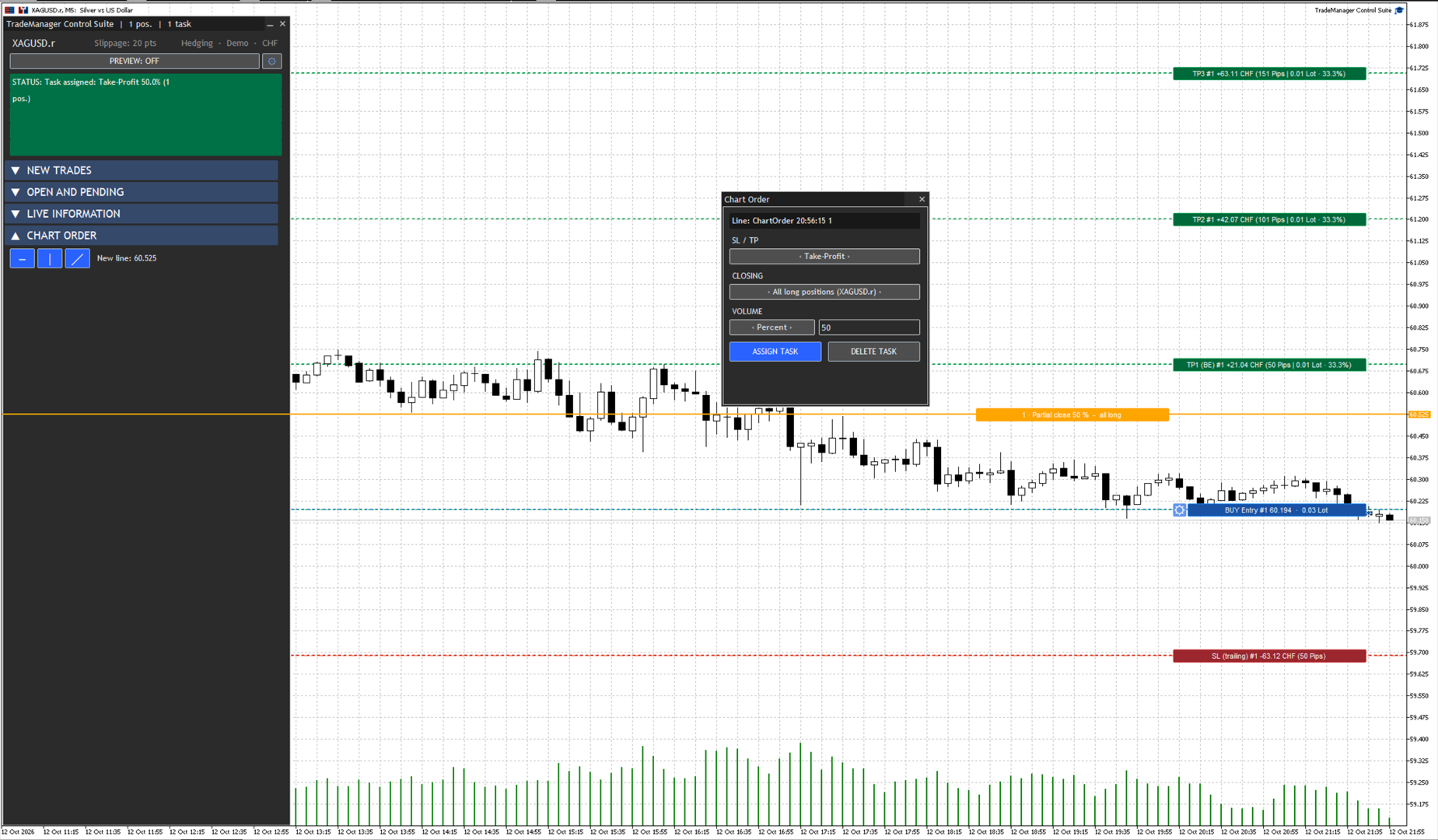
Existing horizontal, diagonal and vertical lines can be assigned tasks. Depending on the line type, actions are available for stop loss, take profit, partial close, price crossing or a specified time.
A line can also be used only as an alert. Messages appear in the panel and the terminal journal. If MetaQuotes push notifications are configured in the terminal, notifications can also be sent to a mobile device.
Live information
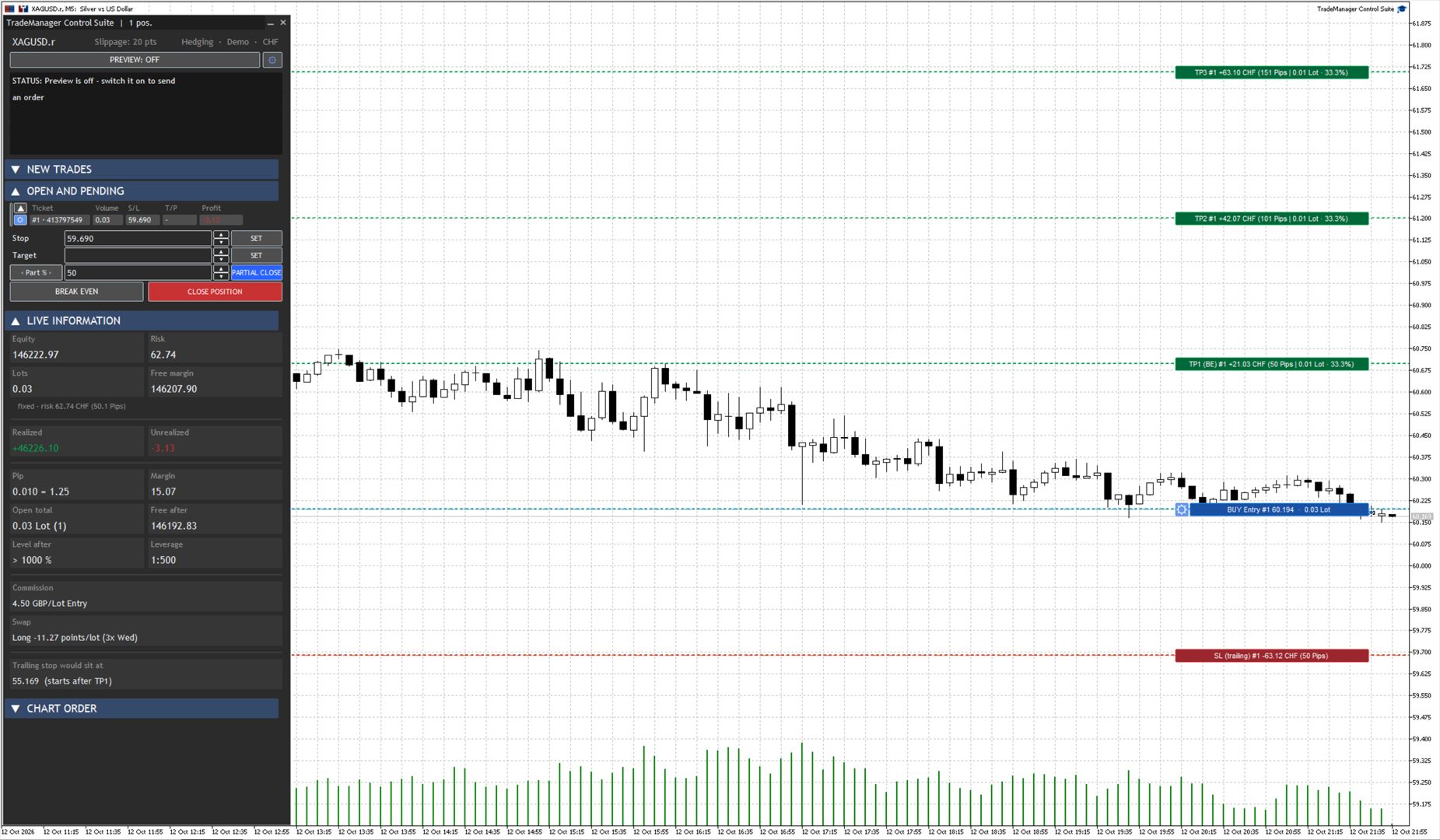
The panel displays important trading information next to the controls that affect it. This includes:
• Current spread
• Free margin and leverage
• Planned volume and risk
• Current open volume
• Expected free margin after the planned order
• Expected margin level after the planned order
Session memory and setups
The application stores its latest state and restores it when started again. Important settings and the prepared workspace therefore remain available.
Up to ten named setups can also be saved. A setup can be loaded at any time or applied automatically on startup. This is useful when working regularly with different sizing methods, target allocations or trailing settings.
Settings and appearance
The panel provides several color schemes and display options. Position table columns can be selected to match the preferred workflow. Additional safety settings control break even behavior, stop loss changes and the relationship between position size and the planned partial targets.
Languages
The user interface is available in English and German. The language can be selected automatically from the terminal language or set manually in the inputs.
Important information
TradeManager Control Suite is a tool for manually controlled trading. It does not generate trading signals and does not open positions without user confirmation.
Partial targets, break even, trailing and Chart Order actions are monitored by the running application. MetaTrader 5 and TradeManager Control Suite must remain active and receive current market data.
Actual execution depends on the broker, available liquidity, spread, possible slippage, symbol specifications and market availability. Before using the application on a real account, test it on a demo account under the conditions of your own broker.
Manual trading with structured planning and controlled risk
TradeManager Control Suite is a comprehensive trading panel for MetaTrader 5. It helps you prepare trades directly on the chart, calculate position size, place orders and manage open positions according to a plan defined in advance.
You remain responsible for every entry. The application does not trade independently and does not use an automated trading strategy. It performs the calculations, sends the orders you confirm and manages them according to your settings.
All important levels remain visible on the chart. Entry, stop loss and partial targets are displayed as lines and can be moved with the mouse. When a level changes, the panel recalculates the affected values.
Position size and risk
The following position sizing methods are available:
• Risk as a percentage of account balance
• Risk as an amount in the account currency
• Specified margin amount
• Direct lot size entry
In a risk based mode, the panel calculates the position size from the entry and stop loss. Moving a chart line updates the risk, distance and required volume.
Depending on the selected mode, the stop loss can be entered in pips, as a fixed price or as a risk amount. Broker minimum volume, volume steps and permitted price distances are considered during order preparation.
Order types
The application supports:
• Market orders
• Limit orders
• Stop orders
• Stop limit orders
For stop limit orders, the trigger price and limit price are displayed separately. Both values can be edited independently and moved on the chart.
Partial targets
Up to ten partial targets can be prepared for one trade. Every target has its own distance and its own share of the position.
The target distance can be entered as an R multiple, in pips or as a fixed price. The share can be specified as a percentage or in lots. When a target is reached, the application closes the assigned part of the position.
Before an order is sent, the panel checks whether the planned allocation is compatible with the broker's minimum volume and volume steps. This shows in advance when a requested split cannot be executed technically.
Break even
You can select the partial target after which the stop loss should move to the entry price. This allows the trigger to match your individual trade plan.
Optional safety rules can prevent an already protected stop from being moved back to the loss side. Removing an existing stop can also be disabled.
Trailing stop
Two trailing methods are available:
• Trailing with a fixed distance in pips
• Trailing based on the Average True Range
For ATR trailing, the multiplier and timeframe can be selected. The ATR timeframe can be different from the timeframe of the current chart.
Each managed position keeps the settings with which it was opened. Changing the general panel settings later therefore does not automatically rewrite trades that are already running.
Work directly on the chart
Entry, stop loss and targets are displayed as movable chart lines. You can drag either the line itself or its label.
While a line is being moved, the panel displays the updated prices, distances and risk values. In risk based sizing modes, it also recalculates the position size. The complete trade plan remains visible without repeatedly switching between the chart and the terminal order dialog.
Preview and validation
Preview mode displays the complete planned trade on the chart. An order can only be sent when all required values are valid.
Before execution, the panel checks the direction, order type, volume, entry, stop loss and target allocation. If an input is invalid or cannot be executed under the current broker conditions, the send button is disabled and the reason is shown in the status area.
Open positions and pending orders
A dedicated section lists open positions and pending orders. The visible table columns can be selected in the settings.
Each open position has its own management window. From there you can:
• Set or modify the stop loss and target
• Close part of the position by percentage or lots
• Move the stop to break even
• Change the trailing method
• Close the complete position
For pending orders, stop loss and take profit can be changed or removed. The order can also be deleted directly from the panel.
Netting and hedging
TradeManager Control Suite supports both netting and hedging accounts. Its display and management behavior adapt to the respective account type.
Chart Order lines and alerts
Existing horizontal, diagonal and vertical lines can be assigned tasks. Depending on the line type, actions are available for stop loss, take profit, partial close, price crossing or a specified time.
A line can also be used only as an alert. Messages appear in the panel and the terminal journal. If MetaQuotes push notifications are configured in the terminal, notifications can also be sent to a mobile device.
Live information
The panel displays important trading information next to the controls that affect it. This includes:
• Current spread
• Free margin and leverage
• Planned volume and risk
• Current open volume
• Expected free margin after the planned order
• Expected margin level after the planned order
Session memory and setups
The application stores its latest state and restores it when started again. Important settings and the prepared workspace therefore remain available.
Up to ten named setups can also be saved. A setup can be loaded at any time or applied automatically on startup. This is useful when working regularly with different sizing methods, target allocations or trailing settings.
Settings and appearance
The panel provides several color schemes and display options. Position table columns can be selected to match the preferred workflow. Additional safety settings control break even behavior, stop loss changes and the relationship between position size and the planned partial targets.
Languages
The user interface is available in English and German. The language can be selected automatically from the terminal language or set manually in the inputs.
Important information
TradeManager Control Suite is a tool for manually controlled trading. It does not generate trading signals and does not open positions without user confirmation.
Partial targets, break even, trailing and Chart Order actions are monitored by the running application. MetaTrader 5 and TradeManager Control Suite must remain active and receive current market data.
Actual execution depends on the broker, available liquidity, spread, possible slippage, symbol specifications and market availability. Before using the application on a real account, test it on a demo account under the conditions of your own broker.