Runaway Guard
- Utilities
- Version: 1.0
- Activations: 10

Runaway Guard measures rate only: how many deals, how quickly, from which source. It acts when a rate you set is exceeded, and it does not rank, score or judge any expert. Each crossing writes one file holding the real deal tickets, to match against your terminal history.
FOUR RATE LIMITS
Rolling windows: at every check the tool looks back over the last 5 or 15 minutes and counts again from scratch. Set any limit to 0 to switch that metric off.
- Deals in the fast window: 20 in 5 minutes.
- Round trips closed under a minute after opening: 10 in 15 minutes.
- Re-entries, same symbol and direction within 30 seconds of a close: 5 in 15 minutes.
- Turnover cost: commission, swap and realized amounts are added up over the slow window, keeping their signs, and compared with account balance. Default 0.5% in 15 minutes. The metric counts only when that sum comes out negative.
PER SOURCE
Every magic number gets its own row. Hand-placed orders get a row of their own, labeled Manual / no magic: from the deal record, your own click and an expert left with its magic unset are indistinguishable.
ACTIONS, PICKED PER SOURCE
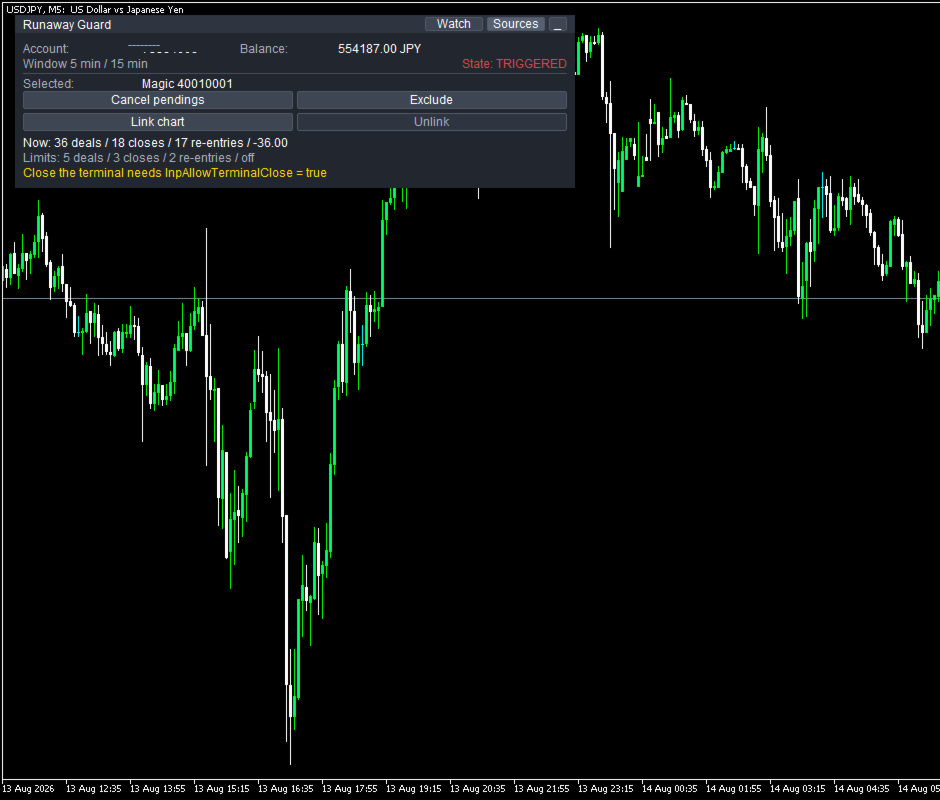
- Alert - tells you, changes nothing. The default.
- Cancel pendings - that source's pending orders only, never open positions.
- Stop the chart - closes the chart the crossing source runs on, so that source can place nothing further; the template is saved first. Runaway Guard never closes its own chart.
- Close the terminal - really does close MetaTrader 5. Off by default, behind a second switch, InpAllowTerminalClose.
THE PANEL
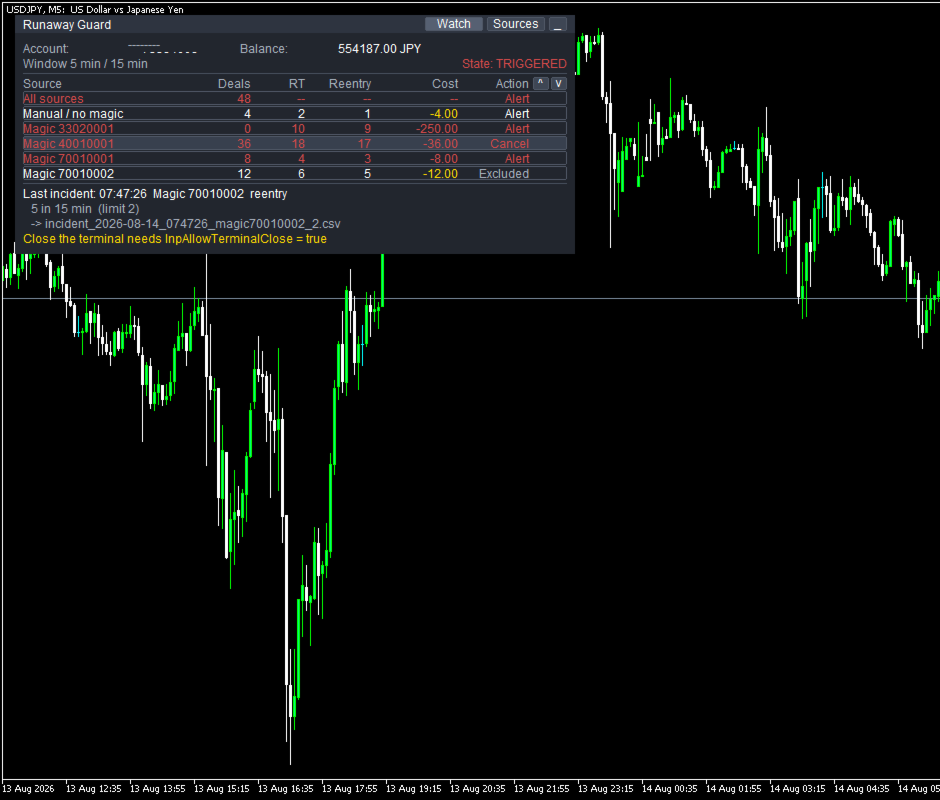
Runaway Guard Watch Sources
Window 5 min / 15 min State: TRIGGERED
Source Deals RT Reentry Cost Action
All sources 48 -- -- -- Alert
Manual / no magic 4 2 1 -4.00 Alert
Magic 33020001 0 10 9 -250.00 Alert
Magic 40010001 36 18 17 -36.00 Cancel
Magic 70010001 8 4 3 -8.00 Alert
Magic 70010002 12 6 5 -12.00 Excluded
Last incident: 07:47:26 Magic 70010002 reentry
5 in 15 min (limit 2)
-> incident_2026-08-14_074726_magic70010002_2.csv
Close the terminal needs InpAllowTerminalClose = true
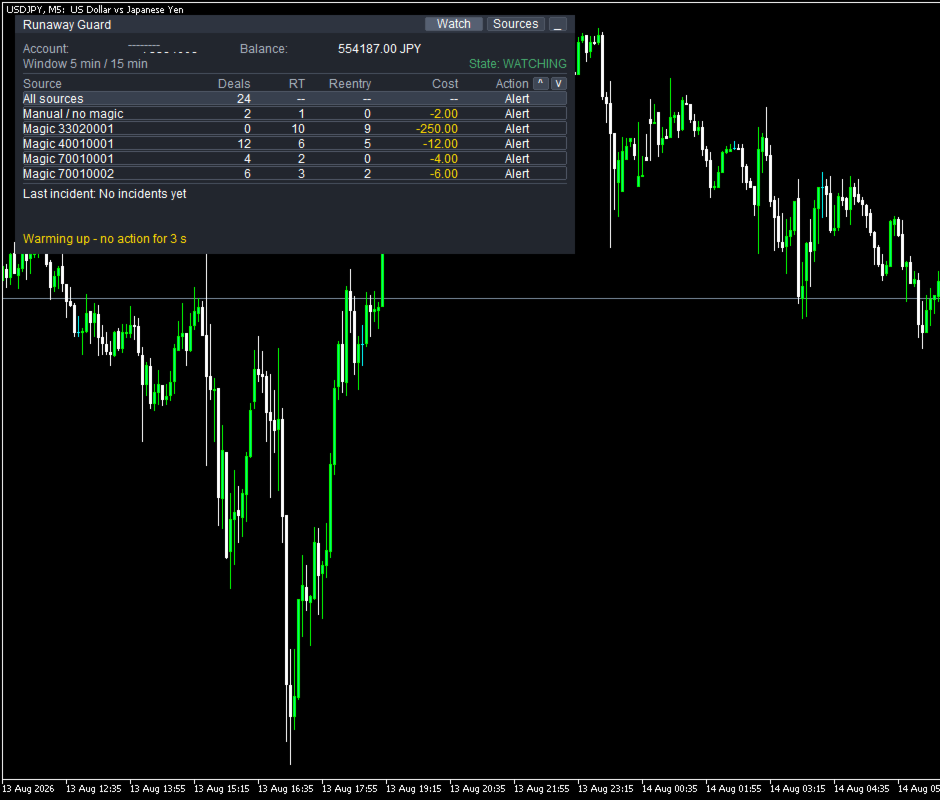
- Deals is the fast window; RT, Reentry and Cost the slow one. A source which stopped opening minutes ago can therefore show 0 in Deals and still 10 in RT: those ten positions were closed inside the slow window, and RT counts a close only when the position was held under a minute.
- All sources carries the deal rate only, hence -- in the other three columns. Check it against the screenshot: 4 + 0 + 36 + 8 + 12 = 60 deals, minus the 12 of the Excluded row, gives the 48 shown.
- The excluded row still appears under Last incident: exclusion silences, it does not erase. Last incident shows the most recent crossing, not the largest.
- The screenshot was taken with the limits turned down; at defaults, four metrics crossing at once will not fit on one screen.
The State field shows one of three: WATCHING, TRIGGERED, DISABLED. DISABLED is not "counting stopped": the chosen action cannot run right now, and the reason is printed. Counting goes on either way.
THE FILE
The file lands in MQL5/Files/RunawayGuard/:
time_broker,time_utc,time_local,trigger,measured,threshold,magic,symbol,deals,round_trips,commission,swap,realized,action,deal_tickets
Three clocks - broker, UTC, terminal - only broker time lines up with your history. The last column holds the real deal tickets, and each symbol gets its own row; every column above is either a timestamp, a counted number, an identifier or the action taken. Nothing is overwritten or removed automatically.
WHEN IT DELIBERATELY STAYS QUIET
No action is taken during the first minute after Runaway Guard starts, while the account history is still loading. For the first two minutes after a trading session opens, every limit is doubled, because experts waking up together is ordinary. Any magic number can be excluded. And once a source has crossed a metric, that pair stays quiet for 10 minutes.
WHAT IT CANNOT DO
- No trading action that opens, closes or modifies a position exists anywhere in the source, checked by machine before release. The one trade call it does make is the one that cancels a pending order, and only for the source that crossed.
- It cannot stop orders from a phone or another terminal, though it detects them, nor undo a deal that already happened.
- It sends nothing outside: no connection, no server, no external file, no DLL.
DEMO, ENVIRONMENT, PARAMETERS
The free demo runs in the Strategy Tester on a synthetic sample of deals, fed through the same entry point real deals use.
TESTER DEMO - synthetic sample, no orders are placed
That line is the tester banner: in the tester nothing is sent to the market at all.
MetaTrader 5, any broker, any chart - it watches the account, not the chart it sits on. Built and verified on a hedging account; netting is implemented but unverified.
Eight parameters set the limits: InpWindowFastMin, InpMaxDealsPerWindow, InpWindowSlowMin, InpShortHoldSec, InpMaxChurnPerWindow, InpReentrySec, InpMaxReentryPerWindow, InpMaxCostPercent. Nineteen in all, each with a working default. Panel choices are saved per account and survive a restart, and are never written back into the input parameters, so a changed limit always takes effect.
This tool counts the deals arriving in your account and writes down what it counted. About what comes next, it says nothing.