Trade Pause Scheduler
- Utilities
- Version: 1.0
- Activations: 10

Trade Pause Scheduler keeps your account out of the hours you'd rather sit out. You choose the windows; during one, it cancels pending orders that get placed and closes positions that get opened, and when the window ends everything goes back to normal. It doesn't open trades, choose entries, or send signals.
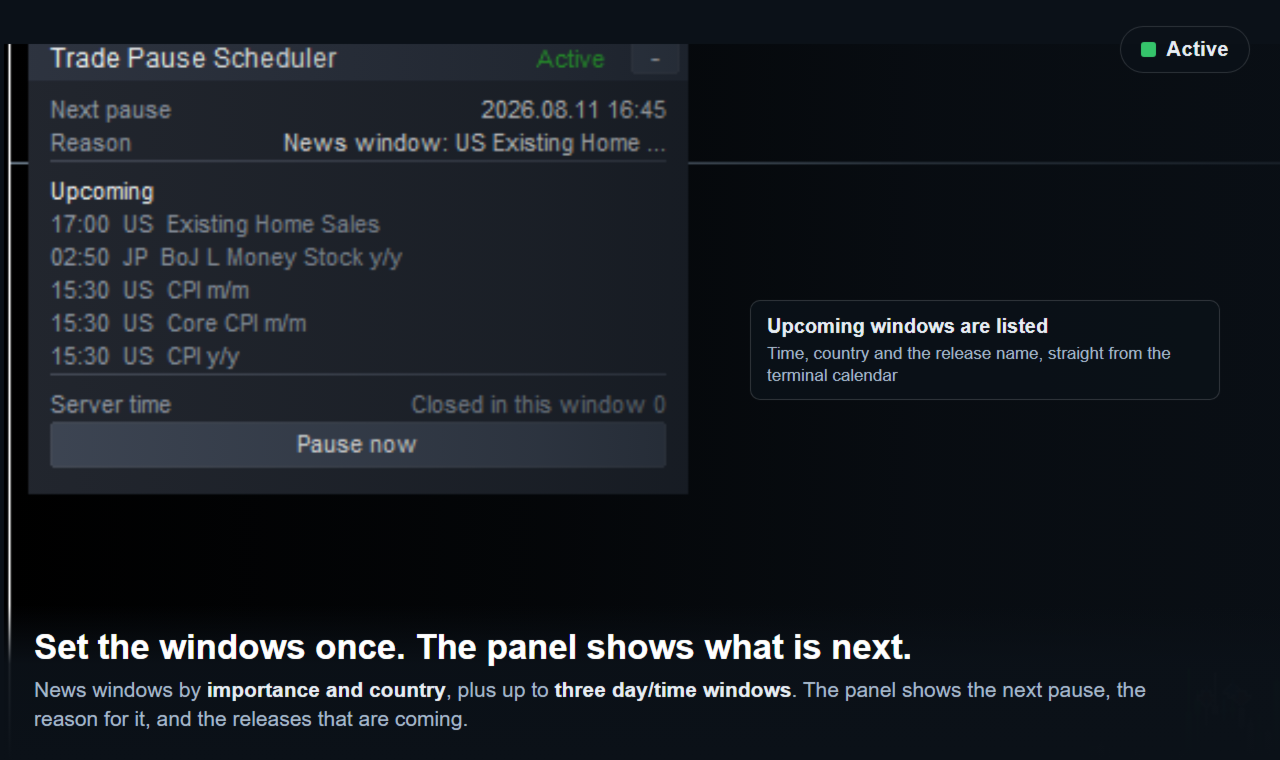
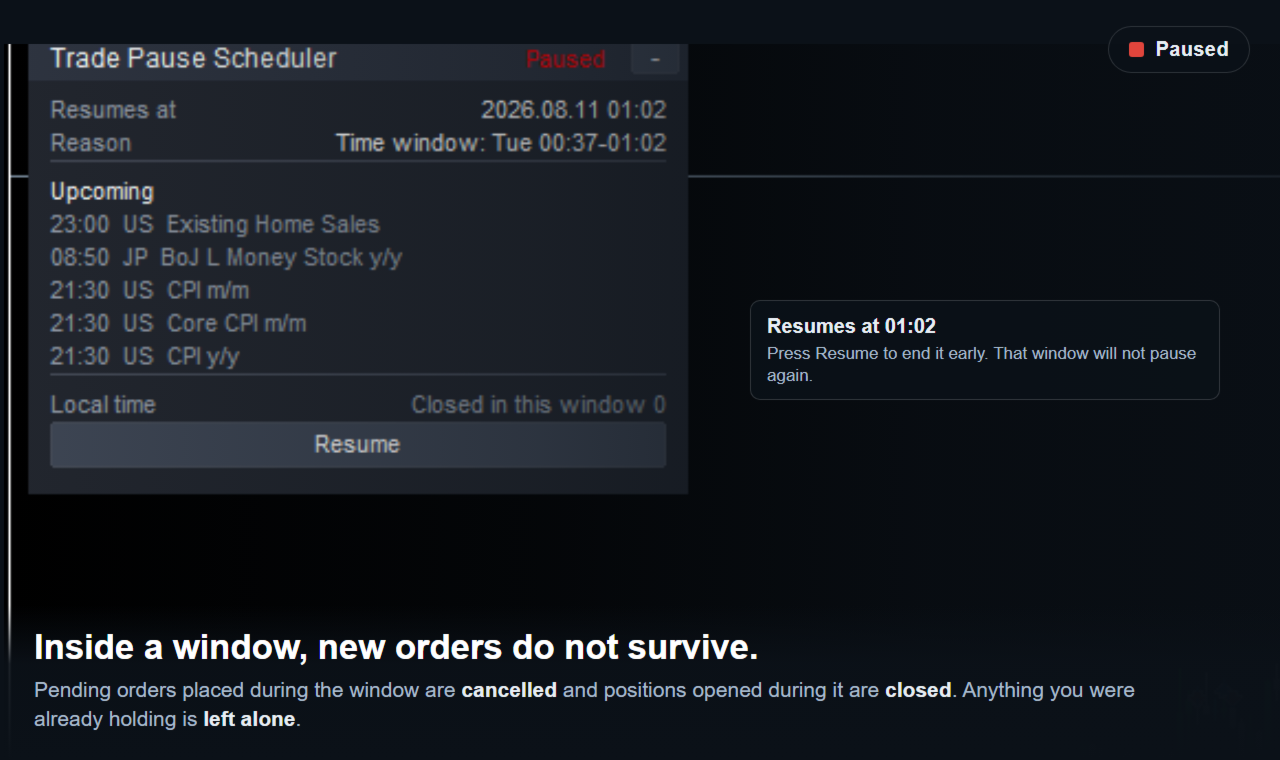
Windows can be set three ways. By economic release: pick the importance (high only, high and medium, or all) and the countries that matter, then say how many minutes before and after a release the pause should run. By day and time: up to three windows, written the way you'd say them - Mon-Fri 06:00-08:00, Mon,Wed,Fri 09:30-10:15, All 12:00-12:30, or Fri 23:00-01:00 for one that ends the next day; at start-up the log prints how each line was read, so a typo shows itself rather than sitting there silently. By hand: Pause now starts one immediately, Resume ends it - and pressing Resume inside a scheduled window keeps that window from pausing you again for its rest.
During a window, pending orders placed then are cancelled and positions opened then are closed; anything already held when the window began is left alone - this is a tool for not starting something new mid-release, not one that liquidates what's already there. Point it at one EA with the magic-number filter, or leave that at zero to act on everything on the account, including trades placed by hand.
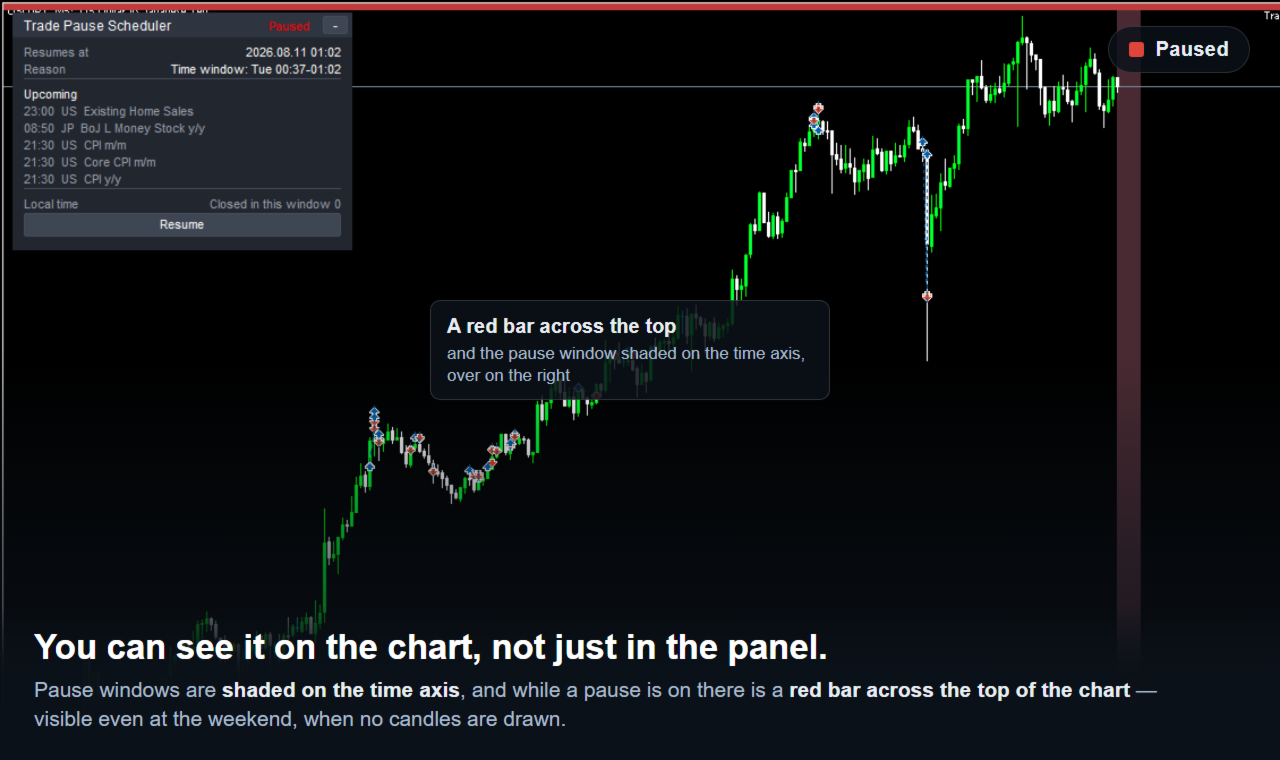
The panel shows the state, when the next window starts and why, the releases coming up, and how many trades have been closed in the current window; it can be dragged anywhere and folded to a single line, and both the position and the folded state survive a terminal restart. Pause windows are shaded on the time axis, and a red bar runs across the top of the chart while a pause is active - which matters more than it sounds, since one of the common uses is the Monday open, and no candles are drawn over a weekend, so anything tied only to the time axis would sit off the right edge where it would never be seen.
Alerts on start and end can be a popup, a mobile push notification, a sound, or none of those.
If the filter chosen would pause more than a quarter of the coming week, the panel says so and the log prints the numbers - how many windows, how many hours, what share of the period. Unknown country codes are reported rather than dropped silently, and a magic number that keeps re-entering inside a window is reported too, once, so the source of repeated closes is clear.
What it doesn't do: it can't stop an order from being opened - MetaTrader 5 has no interface for that and MQL5 Market doesn't allow DLLs, so it closes the position right after it opens, and the spread plus any price movement in between is a real cost paid on every attempt if an EA keeps re-entering; there's no cap on the number of closes, since a cap would mean going quiet partway through a window. It can't do anything while Algo Trading is off in the terminal, and says so. News windows need the terminal's economic calendar, a live-account feature unreachable in the Strategy Tester, so news pausing is inactive there while day/time windows still run. With the magic filter at zero it acts on everything, including hand-placed trades. It doesn't touch positions already open when a window began. One chart per terminal runs it - MetaTrader 5 allows one EA per chart, and a second copy refuses to start so nothing closes twice. Release names appear in whatever language the terminal itself supplies them in.
The free demo runs in the Strategy Tester, where the economic calendar isn't reachable - use a day/time window instead: turn off the news-window setting, put a window the test period will reach into the first time-window slot (for example, All 09:00-12:00), and run in visual mode. At the start time the panel switches to Paused and the red bar appears; at the end time it goes back to Active, and the log prints when the window started and ended along with how it was read. The tester runs only one EA and gives no way to place an order by hand, so there's nothing there for the tool to cancel or close - what it shows is the scheduling itself: the windows, the panel, the chart marks. Cancelling and closing run on a live or demo account.
No DLL, no external website or API, no third-party server, no extra files to install, and nothing is collected from the terminal.
Seventeen inputs, all with defaults that work as they are - nothing has to be configured before the first run.
Trading foreign exchange and CFDs carries a risk of loss. This tool pauses and resumes trading activity at the times set. It doesn't provide trading advice or signals and makes no claim about trading results. Every trading decision and its outcome remain the trader's own.