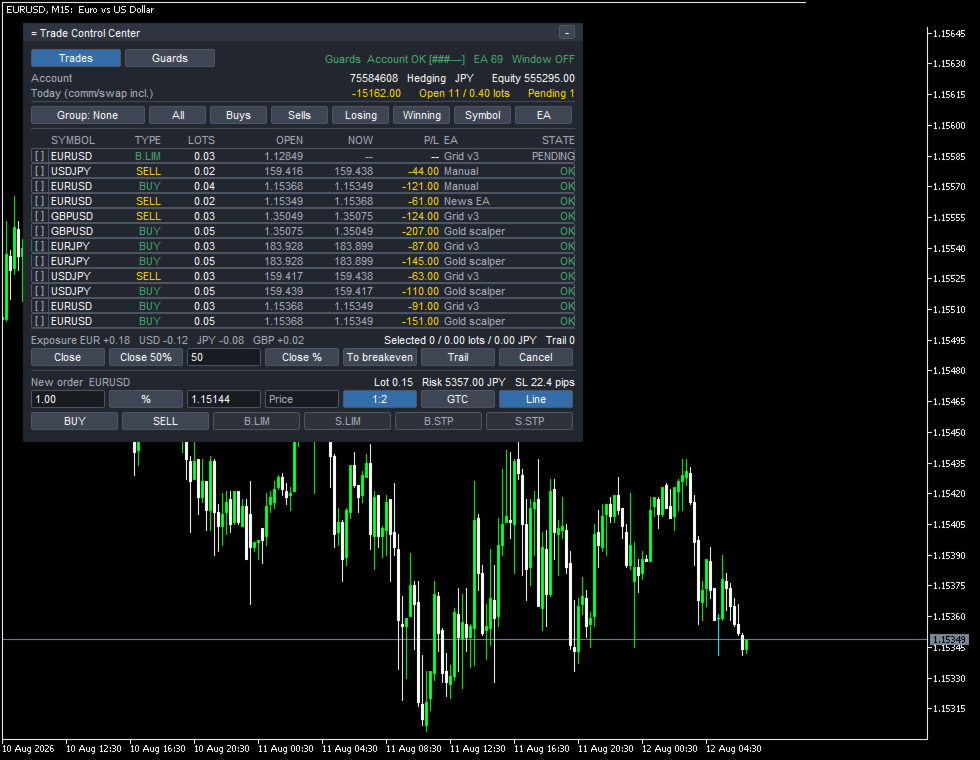
Trade Control Center
- Utilities
- Version: 1.0
- Activations: 10

Most panels show only trades they placed, or the chart's own symbol. Trade Control Center puts every position and pending order - manual, phone, another terminal, any EA - into one table, across every symbol. Nothing closes or stops until a button is pressed or a limit and action are set.
TRADES
= Trade Control Center
Trades Guards Guards Account OK [###---] EA 69 Window OFF
Today (comm/swap incl.) -15162.00 Open 11 / 0.40 lots Pending 1
Group: None All Buys Sells Losing Winning Symbol EA
SYMBOL TYPE LOTS OPEN NOW P/L EA STATE
[ ] EURUSD B.LIM 0.03 1.12849 -- -- Grid v3 PENDING
[x] USDJPY SELL 0.02 159.416 159.438 -44.00 Manual OK
[x] EURUSD BUY 0.04 1.15368 1.15349 -121.00 Manual OK
[x] EURUSD SELL 0.02 1.15349 1.15368 -61.00 News EA OK
[x] GBPUSD SELL 0.03 1.35049 1.35075 -124.00 Grid v3 OK
[x] GBPUSD BUY 0.05 1.35075 1.35049 -207.00 Gold scalper OK
[x] EURJPY BUY 0.03 183.928 183.899 -87.00 Grid v3 OK
[x] EURJPY BUY 0.05 183.928 183.899 -145.00 Gold scalper OK
[x] USDJPY SELL 0.03 159.417 159.438 -63.00 Grid v3 OK
[x] USDJPY BUY 0.05 159.439 159.417 -110.00 Gold scalper OK
[x] EURUSD BUY 0.03 1.15368 1.15349 -91.00 Grid v3 OK
[x] EURUSD BUY 0.05 1.15368 1.15349 -151.00 Gold scalper OK
Exposure EUR +0.18 USD -0.12 JPY -0.08 GBP +0.02
Selected 11 / 0.40 lots / -1204.00 JPY Trail 0
Confirm? (5s) Close 50% 50 Close % To breakeven Trail Cancel
New order EURUSD Lot 0.15 Risk 5357.00 JPY SL 22.4 pips
1.00 % 1.15144 Price 1:2 GTC Line
BUY SELL B.LIM S.LIM B.STP S.STP
Close 11 position(s), 0.40 lots, -1204.00 JPY?
Every figure here checks against another. Open 11 / 0.40 lots excludes the pending B.LIM row; the other eleven LOTS add to 0.40, and their P/L sums to the closing prompt's -1204.00. Selected 11 leaves one row unticked - Losing and Winning skip pending orders, which have no result yet. Exposure's EUR +0.18 is the signed EURUSD and EURJPY LOTS above it, pending excluded. Lot 0.15 / Risk 5357.00 JPY is the stop distance times lot size, converted at the USDJPY rate two rows up. EA 69 need not match the Guards row count, which scrolls; Grid v3, Gold scalper and News EA are order comments those EAs left themselves, not typed-in names, and Manual has no magic number. Account OK [###---] is a six-step limit gauge.
None / Symbol / EA / Direction folds the table; a header click sorts it. Exposure adds signed lots per currency without judging the number - gold and index CFDs fold into Other.
EA GROUPS
It scans 30 days of history (InpHistoryDays) to find every source. Every trade carries its magic number into the table; without one, it's a Manual row. The EA name is the comment that EA left on its own order - nothing to configure. Up to 128 sources are tracked; past that, an EA is named in a message and the log (shorten InpHistoryDays).
ACTING ON A SELECTION
Tick rows, or use a preset - All, Buys, Sells, Losing, Winning, Symbol, EA. Either way, the panel shows what's about to happen first, in numbers. The button then counts down; nothing happens unless pressed again within five seconds (Confirm? (5s)). The first automated action of a session asks once more - First action of this session - before anything runs alone.
PLACING AN ORDER
Lot size is worked back from risk and stop distance (InpRiskValue) - shown as Lot 0.15 / Risk 5357.00 JPY before sending. The stop line can be dragged, or a price typed, with lot size and risk following it. Beyond a market order: four pending types (B.LIM, S.LIM, B.STP, S.STP) with broker-accepted expiries, and take-profit as a ratio to the stop (1:1 / 1:1.5 / 1:2). New orders always use the panel's own chart symbol, even though the table lists every symbol.
GUARDS
Three layers run independently: the account, including manual trades (InpAccountDailyLimit, InpAccountTotalLimit); each EA, by loss, positions or lots; and a trading window (InpWindow). A row turns WARN past 80% (InpWarnPercent), LOCKED once it reaches the limit, with the reason spelled out:
EA Today Open Daily STATE
Gold scalper -1570.00 4/0.20 -3617.24 [###---] OK
Grid v3 -2597.00 4/0.12 -2782.49 [######] WARN
News EA -3250.00 1/0.02 -2226.00 [######] LOCKED
Outside the trading window - new orders are blocked
The Daily column is the limit in account currency beside a six-step gauge; News EA's -3250.00 past -2226.00 is locked. Grid v3's -2597.00 against -2782.49 crosses 80% for WARN; Gold scalper's -1570.00 against -3617.24 doesn't, and stays OK. These limits aren't the defaults - the account normally starts looser, and per-EA and window limits start off until set.
Windows and daily/position/lot limits release on their own; a total loss limit only clears when reviewed and Unlock is pressed twice. There's no Stop the chart for the account or window layers.
WHAT HAPPENS WHEN A LIMIT IS HIT
Three actions, chosen per limit. Alert only is the default (InpDefaultAction): nothing closes, the row turns red, the reason is spelled out. Close and lock closes what's in range, cancels its pending orders, but does not stop the EA itself; if it keeps re-opening trades, the panel keeps neutralizing them - one spread cost per round trip, count and cost shown on screen and logged. Stop the chart, per-EA only, removes that EA's chart even with Algo Trading off. The per-EA layer alone skips trades with no magic number - the account and window layers still reach manual trades.
BUILT FOR HEDGING ACCOUNTS
One EA's trades stay separate from another's only on a hedging account; on a netting account everything merges per symbol. This tool checks the account type on start and, on netting, falls back to watching only - shown on screen, EA grouping dropped.
WHAT IT DOES NOT DO
- It cannot tell another EA to stop trading - no such API exists in MQL5; it can only close what that EA opened, keep closing what it reopens, or close its chart.
- No EA separation on netting accounts.
- With Algo Trading off it can't place or close anything - the table keeps working, and Stop the chart still works.
DEMO AND SETTINGS
The Strategy Tester gives only one symbol, one chart, one EA. Inside it, the tool fills the table with its own small practice trades under a different magic number (InpTesterDemo), Tester self-test shown on screen; on a real account it never trades on its own. It can't show multiple symbols, or one EA locked while others trade.
47 inputs are organized into nine groups - Display / Order entry / Guards: account / Guards: per EA / Guards: trading window / Guards: common / Alerts / Panel / Tester - each with a working default, so it runs with no .set file. Built for MetaTrader 5, hedging accounts, one free chart, with no DLL calls, external requests or external files - checked automatically before release.
This tool lines up what's already on the account and, once a limit and action are set, runs it and writes down why - it never says what to trade next, only what happened, and it makes no claim about your results. Trading carries risk of loss; try a demo account first.