G2 Dashboard PRO

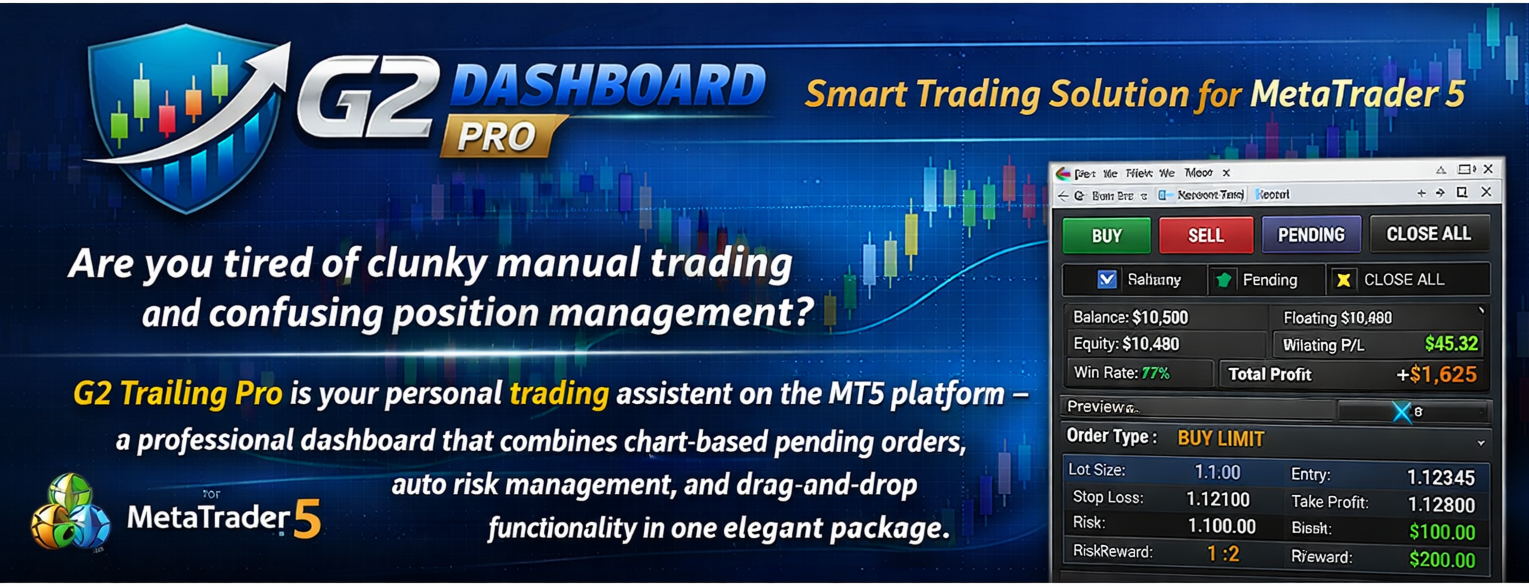
🚀 G2 DASHBOARD PRO – Smart Trading Solution for MetaTrader 5

Are you tired of clunky manual trading and confusing position management?
G2 Dashboard Pro is your personal trading assistant on the MT5 platform – a professional dashboard that combines chart-based pending orders, auto risk management, and drag-and-drop functionality in one elegant package.

🔥 Key Advantages of G2 Dashboard Pro

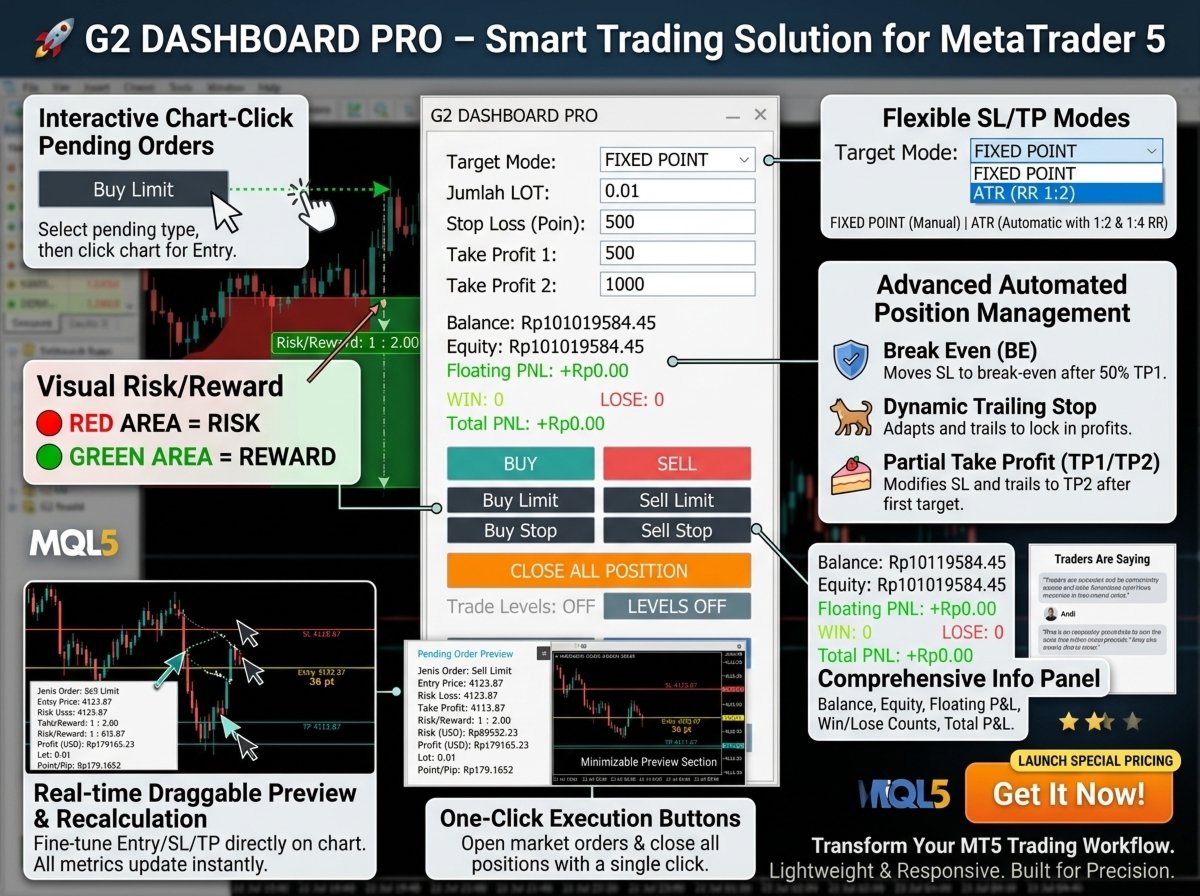
1. Interactive Pending Orders with Chart Click

No more typing entry prices manually!

  • Simply click one of the buttons (Buy Limit, Sell Limit, Buy Stop, Sell Stop)

  • Then click directly on the price level on your chart

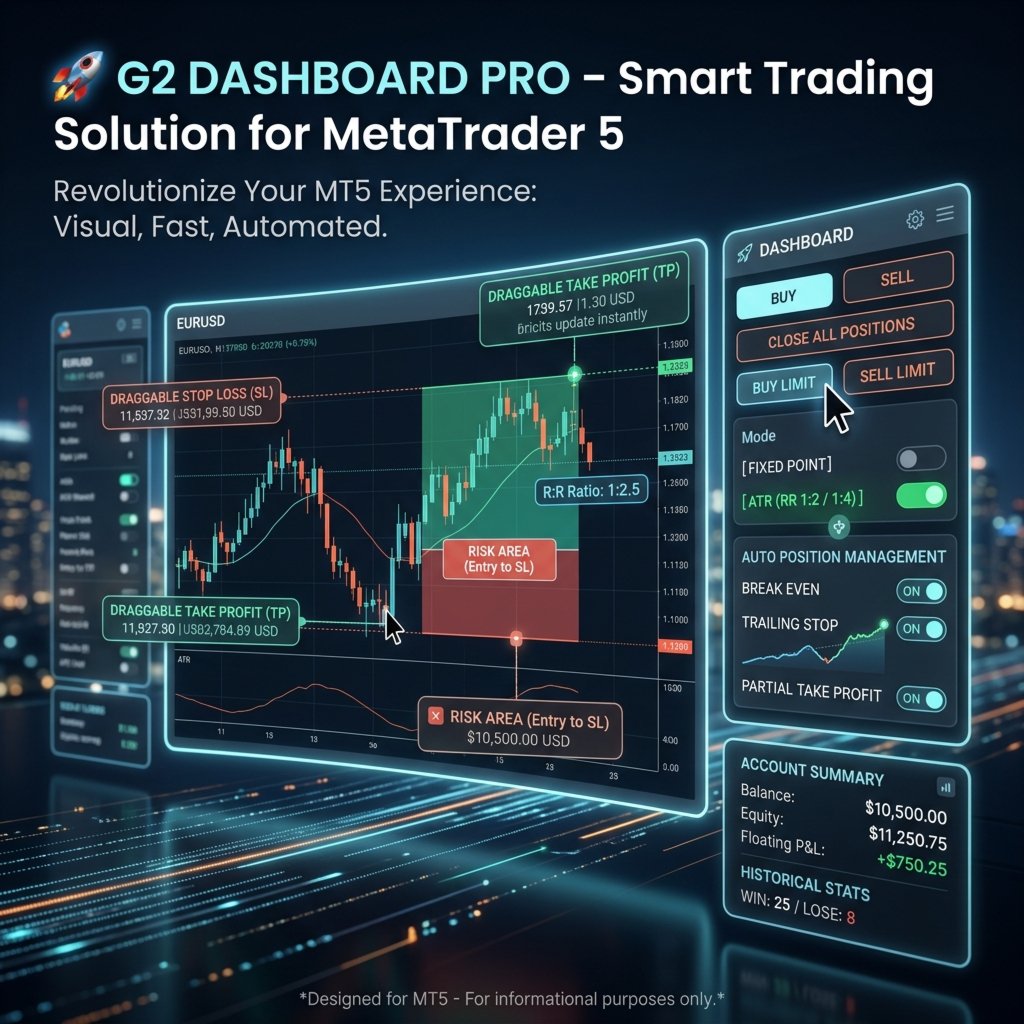
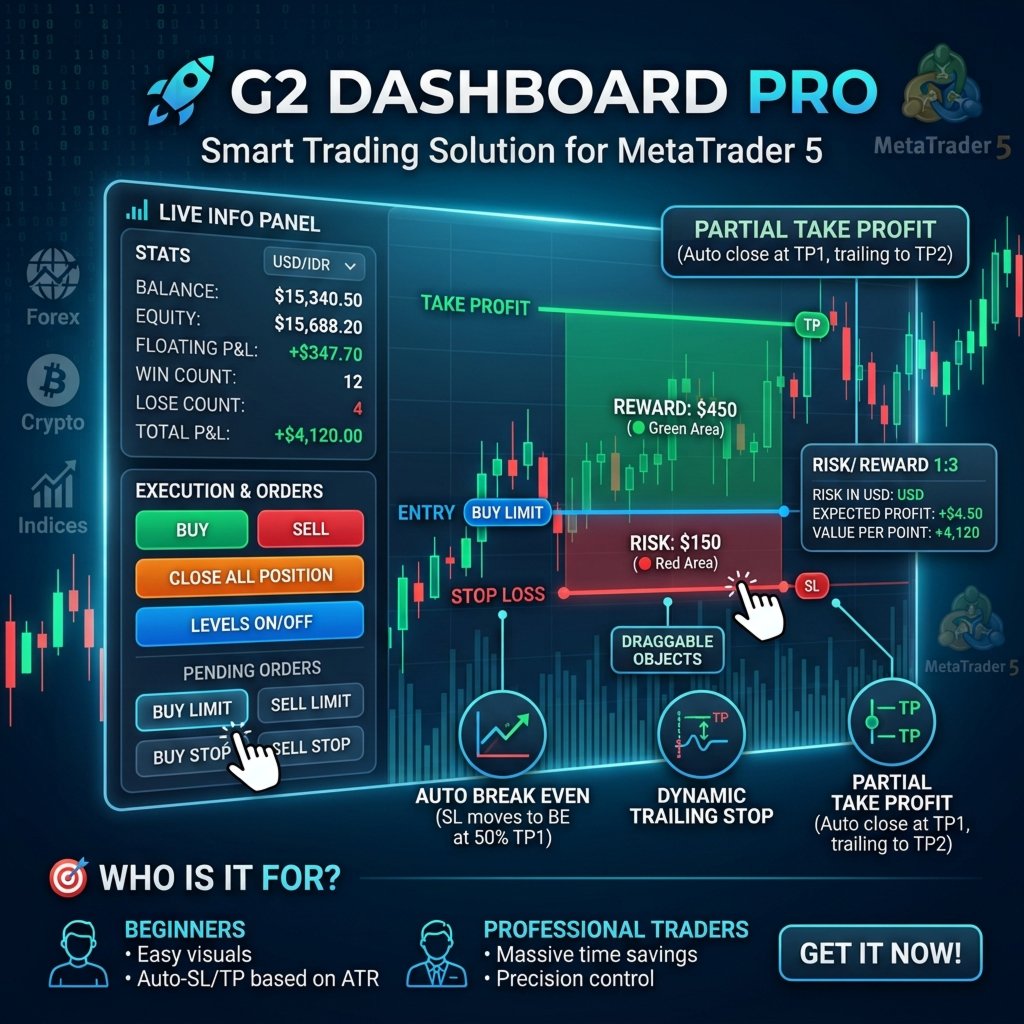
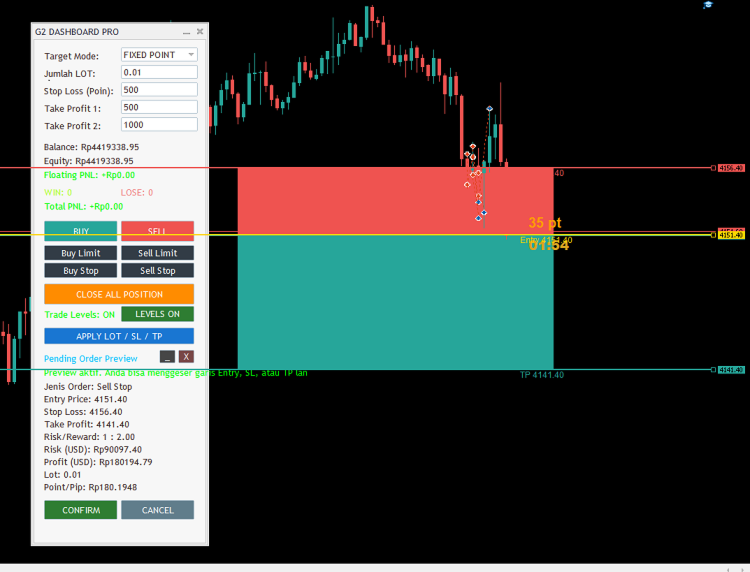
  • The dashboard instantly generates a visual preview with Entry, Stop Loss, and Take Profit lines that are fully draggable in real-time!

 Faster, more intuitive, and highly accurate – perfect for traders who rely on technical analysis with support/resistance levels.

2. Live Visual Risk/Reward Representation

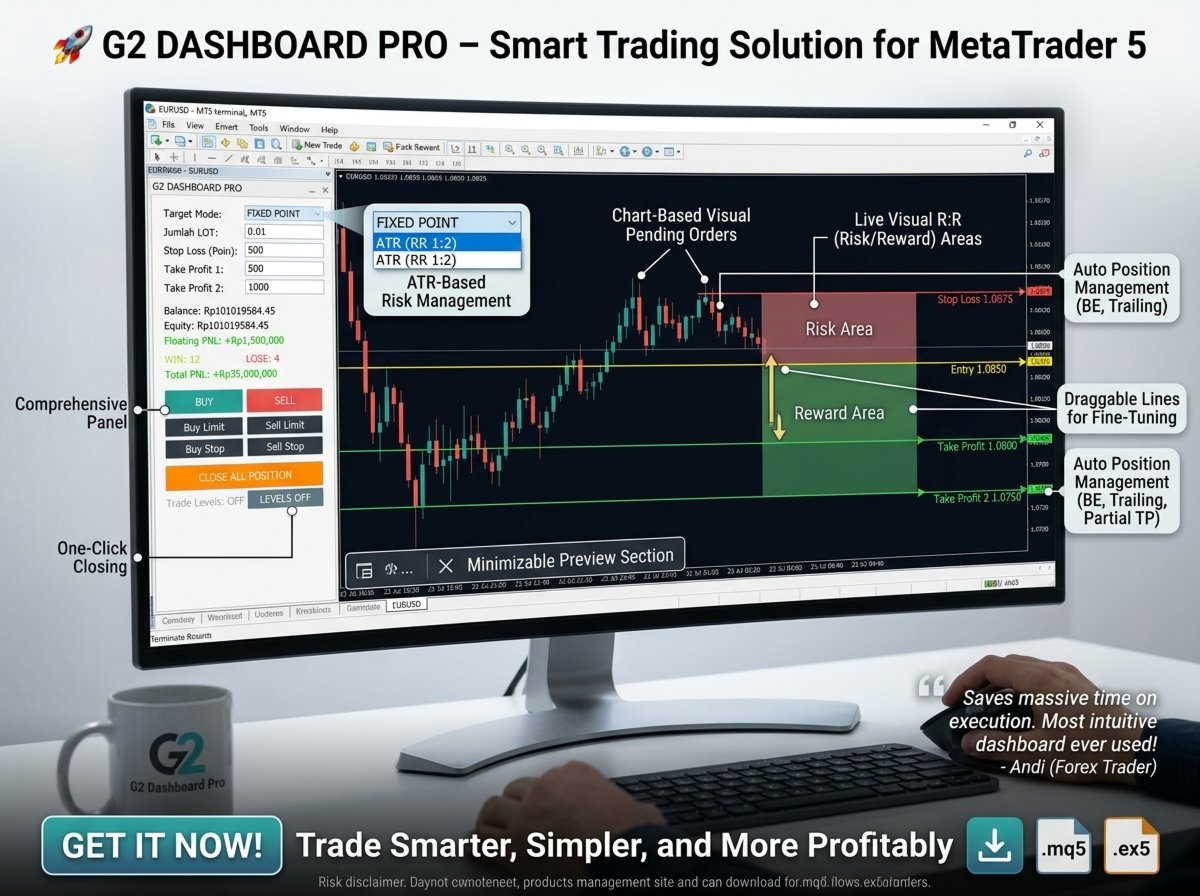
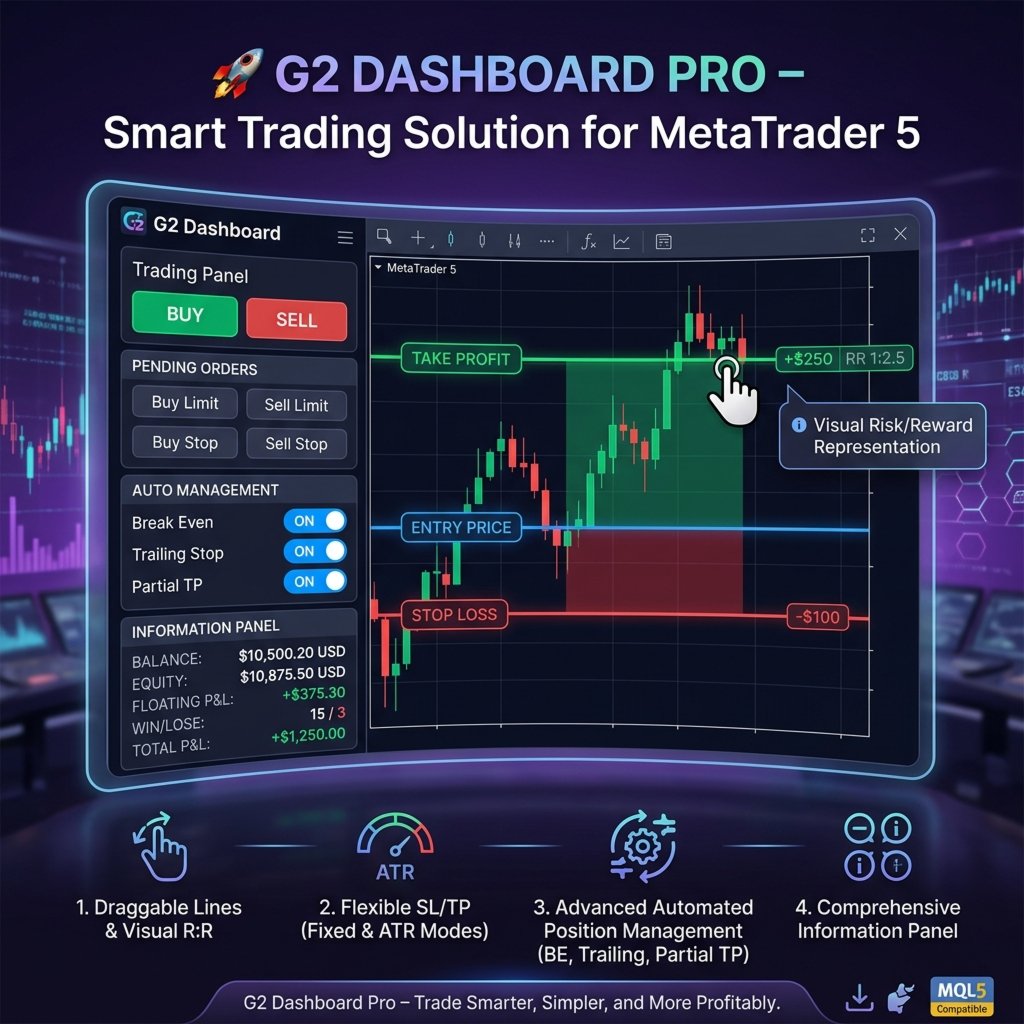
The dashboard displays colored rectangles directly on your chart:

  • 🔴 Red Area = Risk (Entry to SL)

  • 🟢 Green Area = Reward (Entry to TP)
    You can visually assess your Risk/Reward ratio at a glance – no manual calculations needed.

3. Flexible SL/TP Modes

Choose between two modes to match your trading style:

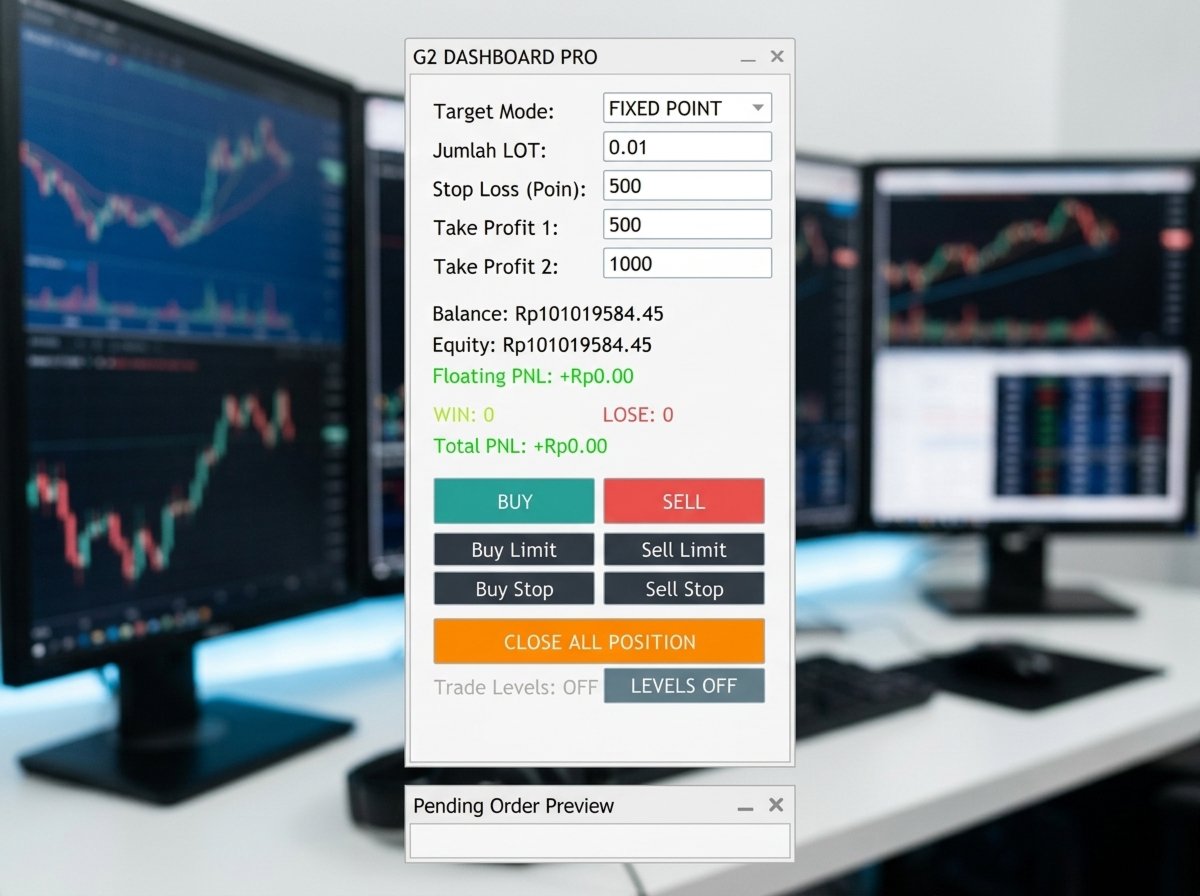
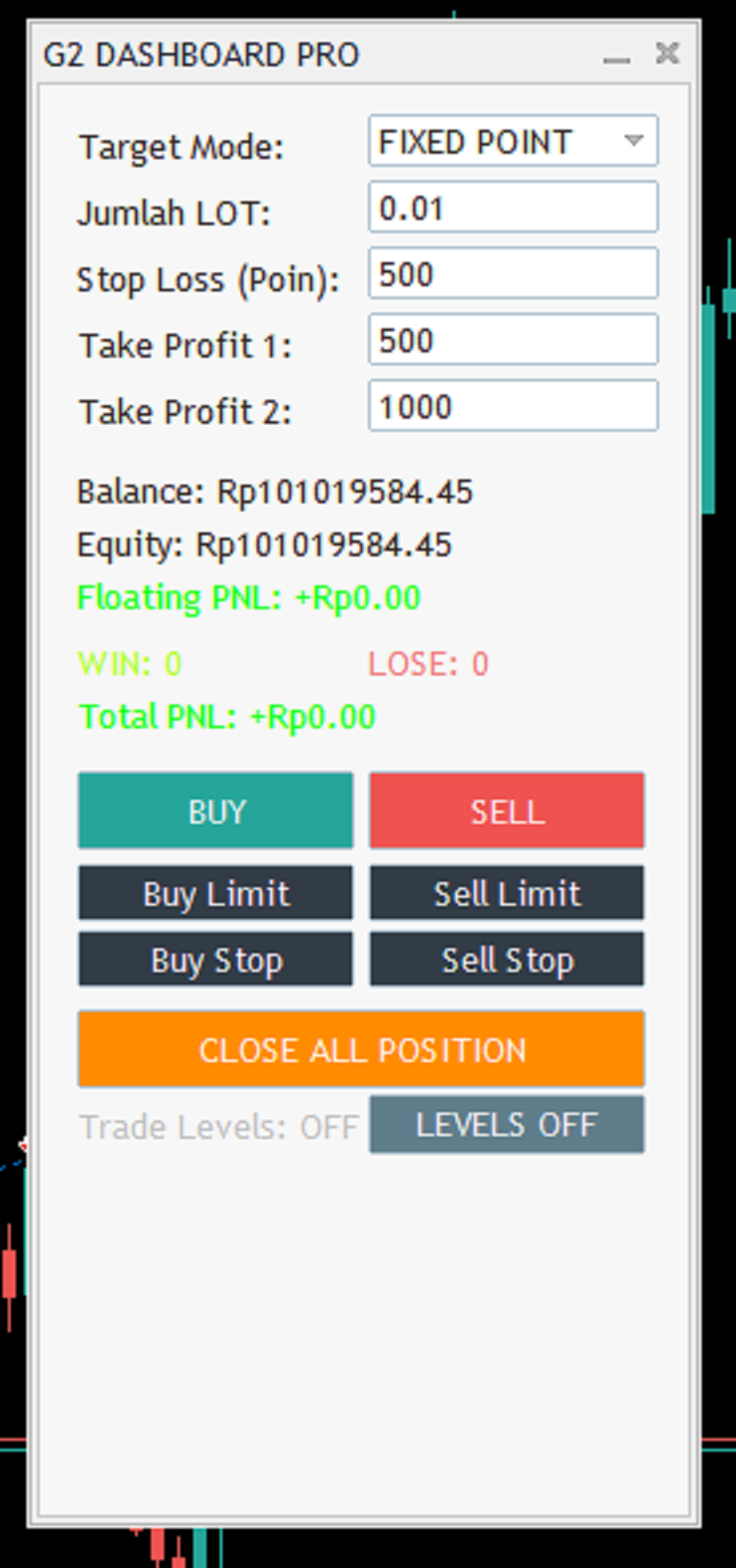
  • FIXED POINT – Manually set SL and TP in points.

  • ATR (RR 1:2) – The dashboard automatically calculates SL based on ATR (with a 1.5 multiplier) and TP with 1:2 and 1:4 ratios – ideal for swing trading and breakout strategies.

4. Advanced Automated Position Management

Once a position is open, the dashboard doesn't sit idle. It actively manages your trades with:

  • Break Even (BE) – Moves SL to breakeven when price hits 50% of TP1.

  • Dynamic Trailing Stop – Follows price movements with an adaptive distance, locking in profits.

  • Partial Take Profit – Automatically modifies SL to the TP1 level after the first target is hit, then continues trailing to TP2.

📊 Result: You can sleep soundly without worrying about your positions reversing unexpectedly.

5. Real-time Preview & Draggable Objects

After selecting your entry price, all lines (Entry, SL, TP) can be dragged with your mouse on the chart. The dashboard instantly recalculates everything:

  • Risk in USD

  • Expected Profit

  • R:R Ratio

  • Value per Point/Pip

You can fine-tune your position anytime before execution.

6. Comprehensive Information Panel

The dashboard displays all essential metrics at a glance:

  • Balance, Equity, Floating P&L

  • WIN / LOSE counts from historical trades

  • Total P&L overall
    All shown in your account currency (USD, EUR, IDR, etc.).

7. One-Click Execution Buttons

  • BUY / SELL – Open instant market positions.

  • CLOSE ALL POSITION – Close all open positions with a single click.

  • LEVELS ON/OFF – Show or hide broker order lines on the chart.

8. Minimizable Preview Section

The Pending Order Preview section can be minimized or hidden – saving valuable screen space when not needed.

🎯 Who Is G2 Dashboard Pro For?

Beginners Professional Traders
Easily understand pending orders and risk/reward through visual aids. Save massive time on execution and position management.
Auto-SL/TP based on ATR promotes consistent risk-taking. Focus purely on analysis without manual calculations.
Simple interface and drag-and-drop make learning enjoyable. Full precision control over every price level.

💎 What Makes It Stand Out from Other MQL5 Dashboards?

  • Interactive Chart Integration – Few dashboards allow real-time dragging of SL/TP lines on the chart.

  • Dual Mode (Fixed & ATR) – Offers maximum flexibility.

  • Integrated Auto-Management – BE, Trailing, and Partial TP work automatically with zero extra configuration.

  • Lightweight & Responsive – Doesn't burden your CPU; runs smoothly on all timeframes.

  • Clean & Well-Structured Code – Easy to customize further if you need additional features.

📈 How Does It Work? (Quick Steps)

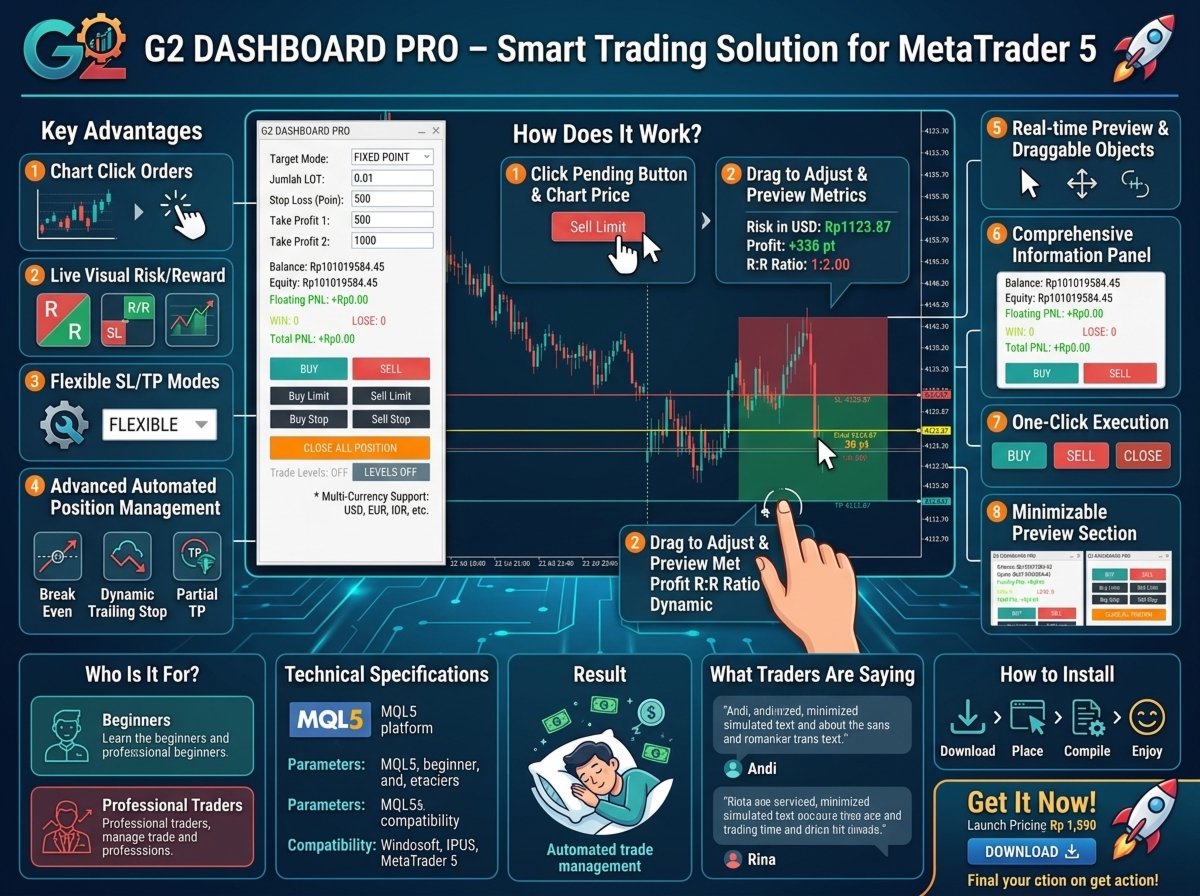
  1. Attach the Expert Advisor to your preferred pair's chart.

  2. Set your Lot size, SL, TP (or choose ATR mode).

  3. Click a pending order button (Buy Limit, Sell Limit, etc.).

  4. Click on the desired price level on the chart – a preview appears instantly.

  5. Drag the SL or TP lines if needed – all calculations update automatically.

  6. Click CONFIRM – the pending order is sent to your broker.

  7. Let the dashboard manage your position once it's filled (BE, trailing, partial TP).

🛠 Technical Specifications

  • Platform: MetaTrader 5 (MQL5)

  • Input Parameters: ATR Period, ATR Multiplier, Break Even ON/OFF, Trailing ON/OFF

  • Magic Number: 123456 (adjustable)

  • Compatibility: All Forex pairs, Indices, Crypto, Commodities

  • Account Modes: Supports both Hedging & Netting

💬 What Traders Are Saying (Simulated)

“I've tried many dashboards, but G2 Dashboard Pro is by far the most intuitive. I can place pending orders just by clicking on the chart – a game-changer for breakout trading.”
 Andi, 5-year Forex Trader

“The auto-trailing and BE features mean I don't have to stare at my screen all day. My profits have never been more consistent.”
 Rina, Swing Trader

🚀 Get It Now and Feel the Difference!

With G2 Dashboard Pro, you're not just buying a tool – you're transforming your trading workflow to be more efficient, disciplined, and profitable.

Launch special pricing – a small investment for a massive boost in trading performance.

📥 How to Install

  1. Download the  .ex5  or  .mq5  file.

  2. Place it in the  MQL5/Experts  folder inside your MetaTrader directory.

  3. Compile (if using source code) or simply attach it to your chart.

  4. Adjust the parameters to your preference.

  5. Enable AutoTrading and enjoy effortless trading!

G2 Dashboard Pro – Trade Smarter, Simpler, and More Profitably.
Download now and start your journey toward consistent profits!


Recommended products
TradeConsole
Musera Isaac
5 (1)
TradeConsole — On-Chart Trading Dashboard with Smart Alerts TradeConsole is a lightweight on-chart utility designed to help traders keep essential market context in one place. It combines session tracking, an upcoming economic news panel, a currency strength view, a quick technical bias summary, trade statistics, and one-click control tools. The purpose of the dashboard is to improve chart awareness, reduce screen clutter, and support faster decision-making during live trading. Main Features On
FREE
Seconds Chart Tester
Federico Ruben Vissio
Seconds Chart Tester es la versión de prueba gratuita de Seconds Chart, la utilidad que muestra velas de segundos (S1, S3, S5, S10, S15, S30) en una ventana flotante sobre tu gráfico de MetaTrader 5. A diferencia del demo del Probador de Estrategias, esta versión funciona en un gráfico real, para que puedas probar la herramienta en vivo antes de comprar. Qué podés probar en el demo: - Velas de segundos de S1 a S30, seleccionables con un click. - Ventana flotante: mover, redimensionar, minimiz
FREE
Symbol Switcher Pro Symbol Switcher Pro is a free utility panel for MetaTrader 5 that lets you navigate up to 40 trading symbols from a single draggable interface — with live PnL displayed per pair so you always know where you stand without leaving the chart. Overview Managing multiple symbols in MetaTrader 5 typically means jumping between chart windows, losing context, and wasting time. Symbol Switcher solves this with a compact, customizable button panel that sits on your chart. One click swi
FREE
Close Positions Current Symbol A simple and reliable script to close all positions on the current symbol. It eliminates routine work and saves valuable time. Advantages: Focus on the current asset only: The script closes trades for the selected symbol without affecting other positions. Speed and convenience: With a single run, all positions are closed in seconds. Perfect for any strategy: Suitable for those working with multiple positions or focused on a single asset. Safety: Processes each posi
FREE
️ AutoProtect R13: Your Intelligent Trade Guardian Tired of manual management and emotional exits? AutoProtect R13 is a professional-grade utility designed to automate your risk management. This tool ensures your account stays protected 24/7. WHAT’S NEW IN V1.1 Optimized Execution: Faster processing for high-volatility market conditions. New User Interface: Professional GUI Dialog panel (replacing basic chart comments). Smart Break-Even+: Move Stop Loss to entry plus a small profit buffer
FREE
Deal multiplier Mt5
Mikhail Mitin
4.5 (8)
The utility opens copies of open trades. It is very convenient if you use the   Signals   service and want to increase the volume of transactions. Settings: Symbols: all symbols only current symbol Orders: Buy Sell Magic Any Magic Input Magic Lot size Original - lot size from original order; Fix Lot - fix lot size (input); Lot X Mult - lot size X koef; Stop Loss From sender - Stop Loss from original; Without - without Stop Loss; Plus Fix - Stop Loss from original order + fix points; Fix Point -
FREE
Win Panel
Imam Nasrudin
[Win Panel] Simple Entry and Close Positions Introducing WinPanel , an order management tool designed to enhance and simplify your trading experience.  WinPanel features a clean and intuitive interface, allowing you to close orders instantly with ease. It supports flexible position management, enabling you to close losing positions, profitable positions, or all open positions with a single click. In addition, WinPanel displays the total number of open positions, current profit, and the overall p
FREE
Manual position management. Missing SL. Price moves against you. No protection. Trade Manager Lite automates Stop Loss, Take Profit, Trailing Stop, and Break-Even for your open positions. Attach to one chart. Configure your default SL/TP distance. Let it manage your positions automatically. What's Included (FREE Version) Auto SL/TP: Applies missing Stop Loss and Take Profit to positions based on your configured distance in points Trailing Stop: Adjusts SL dynamically as price moves in your favor
FREE
MT5 to Telegram bot
Maksim Plotnikov
5 (1)
MT5 to Telegram Signals This utility is simple to use and supports a wide variety of settings: Pick your desired Telegram group and enter the bot token and the chat id Get notified when orders are placed, modified, executed, closed… or any combination of states Connect your broker account with Telegram and stop missing important notifications. Would you like to receive Telegram notifications? Are you looking for a simple way to share trade signals with your followers? Do you need to start docume
FREE
Manual Trade Helper - Telegram Controlled Trading Assistant Trade From Anywhere Using Telegram Manual Trade Helper   is a powerful trading assistant that lets you control your trades directly from your Telegram app. No need to be at your computer - open, close, and manage trades from your phone, tablet, or any device with Telegram. Open, close, and manage positions from your phone. Features partial close, auto trailing, flip mode, and daily summaries. Simple commands: B=Buy, S=Sell, C=Close.
FREE
TradeGo Assistant v1.0 — Professional Manual Trading Tool for MetaTrader 5 What Is TradeGo Assistant? TradeGo Assistant is a professional trading tool for MetaTrader 5, built specifically for manual traders. It does not trade on your behalf, generate signals, or open positions automatically. It acts as your complete trading desk built directly into your MT5 chart — helping you execute orders faster, manage positions more efficiently, and stay informed about market conditions, all from a single s
FREE
You may have found after a carefully planned trade something happened.  An unexpected event... You forgot to look the web calender or use any kind of program. This fills this gap in its own way. Features: - show all events as vertical lines - low, medium or high events... with different colors. -name of the events and numbers associated with the event are also shown such actual value, forecast value and previous value. The calendar information is obtained from your broker. It is a built-in serv
FREE
MultiTradeNews
Leeank Andres Fernandez Molano
This script is designed for traders who need to quickly place trades across multiple currency pairs during critical news releases, where every second counts. With this tool, you can pre-select your desired currency pairs and assign independent volumes for each one. When a major news event hits, such as Non-Farm Payroll (NFP) or PMI data releases, the script allows you to execute all your trades instantly without the need to open each pair manually. Key Features: Customizable Pairs : Choose from
FREE
Breakeven Bot
Gabriel Paul Ange Perrin
Optimize your trading management with Breakeven Bot, the essential tool for active traders managing multiple positions at once. No more wasting time manually adjusting your stops—one click is all it takes to secure your profits! Main Feature: ️ "BREAKEVEN" Button – Instantly set all profitable positions to breakeven and protect your gains quickly. ️ Customization Options: Set breakeven in pips or currency, depending on your preference. Choose whether breakeven should be at the entr
FREE
Volume Color paints your candles by volume strength, so you can instantly see which price moves are backed by real participation —  and which are just noise. No indicator window, no clutter. Just your normal chart, with candles color-coded right where you look. HOW IT WORKS Every candle is compared to the average volume of the last N bars and colored accordingly: - BRIGHT candle = high volume — strong participation, likely  institutional activity. These moves matter. - NORMAL candle = average v
FREE
Total Closed Trades – MT5 Indicator The Total Closed Trades indicator for MetaTrader 5 provides a quick, visual overview of your trading performance by displaying a simple and intuitive 3-value breakdown : Total Trades – The total number of closed trades. Winning Trades – Number of profitable trades. Losing Trades – Number of losing trades. Instead of digging through reports, traders can instantly monitor their historical performance with a compact and elegant pie chart-style widget. Key
FREE
Precision Risk Manager and Multi-Order Controller for MT5 — Version 2 This utility provides risk-based lot size calculation, one-click order execution, and batch trade modification from a single collapsible panel. It is designed for manual traders who manage multiple entries on the same symbol. Features Lot Size Calculator: Enter a risk percentage and stop-loss price, then click Calculate Lot Size to receive the exact lot size for that risk amount. Order Execution: Click Buy or Sell to execute
FREE
Template Name
Aurthur Musendame
5 (1)
Template name allows you to write custom text that will show up on your charts. It allows you to position the text anywhere including selecting any color that you prefer. You can position the text at any of the 4 corners of your chart screen. This custom text can aid as a watermark for your screen shots. This text can act as a unique and true signature for your charts.
FREE
SG InfoBox MT5
Hleb Smoliar
3.5 (2)
The   "InfoBox"   utility is designed to display the presence of open orders, the number of lots, current profit and much more in one window. The version for the MT4 platform is here . You've probably encountered a situation where you have an advisor that works on a currency pair, but information about its operation: - orders and their number, the size of the spread for the instrument, the volume of lots on the market, drawdown and much more - are scattered in different places of the terminal an
FREE
Important Lines
Terence Gronowski
4.88 (24)
This indicator displays Pivot-Lines, preday high and low, preday close and the minimum and maximum of the previous hour. You just have to put this single indicator to the chart to have all these important lines, no need to setup many single indicators. Why certain lines are important Preday high and low : These are watched by traders who trade in a daily chart. Very often, if price climbs over or falls under a preday low/high there is an acceleration in buying/selling. It is a breakout out of a
FREE
Smart Copier Pro
Mirel Daniel Gheonu
4.8 (5)
Smart Copier Pro – Advanced Trade Synchronization for MetaTrader 5 Smart Copier Pro is a high-performance solution for copying trades between MetaTrader 5 terminals, designed specifically for traders managing multiple accounts or complex strategies across different brokers. Unlike standard copiers, Smart Copier Pro features an advanced price correlation engine, allowing precise order execution even between brokers with quote differences (different spreads, variable liquidity, or different data f
FREE
Position Manager Pro v1.0 (MT5) Dual Magic Number Independent Group Manager with Live P&L Dashboard Overview Position Manager Pro   is a powerful trade management Expert Advisor for MetaTrader 5 that operates as an   overlay manager   — it does not open positions itself, but instead manages and monitors positions opened by other EAs or manually by the trader. The core concept is   two fully independent groups , each identified by a unique   Magic Number . Each group has its own Take Profit, Stop
FREE
Aegis Gold Dashboard
Ayman Ishaq Jundi Tawadros
Aegis Gold Dashboard is a free, lightweight visual indicator created to help traders monitor key market conditions in a clean and professional way. This indicator is designed as a visual companion to automated or discretionary trading systems and does not execute any trades. Features: • Informational signal overview (non-executable) • ATR-based volatility display • Market session open / closed status • Real-time spread monitoring • Last closed trade overview • Simple market condition tips De
FREE
Volt Info
Ahmad Ali Lutfi
5 (1)
VoltTrade Info — Real-Time Account Statistics Panel for MT5 VoltTrade Info is a comprehensive account monitoring dashboard designed for MetaTrader 5. It displays all critical trading statistics in one clean, dark-themed panel — giving you full visibility of your account performance at a glance. Key Features: Account Overview Real-time Balance, Equity, Deposits, Withdrawals Leverage and account currency display Live date and time Exposure Monitor Buy and Sell lots currently open Net lot position
FREE
Reverse
Konstantin Chernov
1 (1)
A script for quick reversing positions and/or orders. If you need to reverse a position with the same volume, open an opposite position of a different volume, this script will save you from routine! Allow AutoTrading before running the script. Instructions: Run the script on the chart. This script is a limited version of the market product https://www.mql5.com/en/market/product/638 and allows reversing only positions. Input parameters are not required. Parameters such as changing the type of exi
FREE
ZigZag Profile
Nguyen Thanh Cong
Introducing the ZigZag Profile — a powerful tool designed to identify high-probability pivot zones where price action frequently reverses. This indicator analyzes historical price data to pinpoint key areas where price has pivoted multiple times, providing traders with actionable insights into potential support and resistance levels. The ZigZal Profile  indicator continuously scans for zones where price has reversed direction the most, highlighting these critical areas on your chart. By focusing
FREE
Account Summary MT5
Ziheng Zhuang
5 (1)
This is a MetaTrader 5 script. It helps to summarize all trades into every symbol. Input Select Period: This is 7-option input. It includes Last Month, This Month, Last Week, This Week, Today, All History, and Date Specified. Specify Starting Date: Enter a date if you selected Date Specified in "Select Period" input. Specify Ending Date: Enter a date if you selected Date Specified in "Select Period" input. The summary is saved into a file in MQL5\Files folder. MT4 Version:   https://www.mql5.co
FREE
The script is intended for synchronization and loading into the Terminal of the desired (or maximum possible) history of quotes of the timeframes specified by the user for the symbols in the "Market Watch" window. The first download of the full history for one "new" symbol takes approximately one and a half to two minutes. Input parameters for running the script: 1. Desired history length (bars) - here we indicate the number of bars in the quote history that we would like to receive from t
FREE
Positions Risk Analyzer
Jacobus Nicolaas Van Staden
Positions Risk Analyzer Utility The Trade Analyzer is a powerful tool designed for real-time monitoring of your trading performance directly on the chart. It provides insights into: Total Open Positions : Number of active trades. Potential Profit (TP) : Estimated profit if all Take Profits are hit. Potential Loss (SL) : Maximum potential loss if all Stop Losses are triggered. Floating Profit/Loss : Real-time net profit or loss of all open trades. This utility dynamically updates its calculation
FREE
TradeVision Pro
Ian Nganga Comba
TradeVisonPro Forex Analyzer Pro MT5 Trading Account Analytics and Monitoring Dashboard TradeVisonPro Forex Analyzer Pro is a trading analytics and account monitoring solution designed for MetaTrader 5 users. The product organizes MT5 trading data in a structured web-based dashboard, allowing traders to review account information, monitor open positions, analyze trading history, track strategies, maintain a trading journal, and review performance statistics. TradeVisonPro Forex Analyzer Pro is d
FREE
Buyers of this product also purchase
Trade Assistant MT5
Evgeniy Kravchenko
4.43 (214)
It helps to calculate the risk per trade, the easy installation of a new order, order management with partial closing functions, trailing stop of 7 types and other useful functions. Additional materials and instructions Installation instructions - Application instructions - Trial version of the application for a demo account Line function -   shows on the chart the Opening line, Stop Loss, Take Profit. With this function it is easy to set a new order and see its additional characteristics bef
Forex Trade Manager MT5
InvestSoft
4.98 (668)
Trade Manager MT5 is an advanced position size calculator and trade management tool for MetaTrader 5, designed to help traders plan trades faster, control risk more precisely, and manage open positions directly from the chart. It combines order placement, risk based lot calculation, Stop Loss and Take Profit management, Break Even, Trailing Stop, Partial Close, Equity Protection, and external trade management in one panel. Whether you trade forex, indices, metals, commodities, crypto, or future
Local Trade Copier EA MT5
Juvenille Emperor Limited
4.95 (143)
Experience exceptionally fast trade copying with the   Local Trade Copier EA MT5 . With its easy 1-minute setup, this trade copier allows you to copy trades between multiple MetaTrader terminals on the same Windows computer or Windows VPS with lightning-fast copying speeds of under 0.5 seconds. Whether you're a beginner or a professional trader, the   Local Trade Copier EA MT5   offers a wide range of options to customize it to your specific needs. It's the ultimate solution for anyone looking t
Beta Release The Telegram to MT5 Signal Trader is nearly at the official alpha release. Some features are still under development and you may encounter minor bugs. If you experience issues, please report them, your feedback helps improve the software for everyone. Telegram to MT5 Signal Trader is a powerful tool that automatically copies trading signals from Telegram channels or groups directly to your MetaTrader 5 account. It supports both public and private Telegram channels, and you can conn
TradePanel MT5
Alfiya Fazylova
4.88 (162)
Trade Panel is a multi-functional trading assistant. The app contains over 50 trading functions for manual trading and allows you to automate most trading tasks. Before making a purchase, you can test the demo version on a demo account. Download the trial version of the application for a demonstration account: https://www.mql5.com/en/blogs/post/750865 . Full instructions here . Trade. Allows you to perform trading operations in one click: Open pending orders and positions with automatic risk cal
FarmedHedge Pair Trading Dashboard
Tanapisit Tepawarapruek
5 (3)
Farmed Hedge Yield Farming | All Markets (Manual - Hybrid - Semi/Automated EA) MULTI-ASSET SUPPORT Trade any asset available on your broker - Forex: Major, Minor, Exotic pairs - Crypto: BTC, ETH, XRP, SOL, BNB - Stocks: Apple, Tesla, Amazon, Google, etc. - Commodities: Gold, Silver, Oil, Gas - Indices: US30, NAS100, SPX500, DAX40 - Any CFD your broker offers VERIFIED TRADING RESULTS - Farmed Hedge Yield Axi Copy:  https://www.mql5.com/en/signals/2356376 - Farmed Hedge Yield Exn Copy:   https:/
Telegram to MT5 Multi-Channel Copier automatically copies trading signals from your Telegram channels directly into MetaTrader 5. No bots, no browser extensions, no manual copying. You receive a signal on Telegram and the EA opens the trade on your terminal in a few seconds. The product includes two components: a Windows application that listens to your Telegram channels, and this Expert Advisor that executes the signals on your MT5 terminal. An MT4 version is also available. Setup guide and app
Power Candles Strategy Scanner - Self-Optimizing Multi-Symbol Setup Finder Power Candles Strategy Scanner runs the same self-optimizing engine that powers the Power Candles indicator - on every symbol in your Market Watch, side by side. One panel tells you which symbols are statistically tradable right now, which strategy wins on each, the optimal Stop Loss / Take Profit pair, and pings you the moment a fresh signal fires. This tool is part of the Stein Investments ecosystem - 18+ tools plus Max
================================================================================ POC BREAKOUT - V20.72. Full Professional Grade Toolkit ================================================================================ POC Breakout is a full MetaTrader 5 trading dashboard for discretionary traders who want breakout signals, Point of Control (POC) context, volume profiles, order flow, market structure, news, alerts, and advanced trade planning in one professional workspace. Attached directly to you
Exp COPYLOT CLIENT for MT5
Vladislav Andruschenko
3.94 (34)
Professional Trade Copier for MetaTrader 5 Fast, professional, and reliable trade copier for MetaTrader . COPYLOT allows you to copy Forex trades between MT4 and MT5 terminals with support for Hedge and Netting accounts. COPYLOT MT5 version supports: - MT5 Hedge to MT5 Hedge - MT5 Hedge to MT5 Netting - MT5 Netting to MT5 Hedge - MT5 Netting to MT5 Netting - MT4 to MT5 Hedge - MT4 to MT5 Netting MT4 version Full Description +DEMO +PDF How To Buy How To Install How to get Log Files H
Anchor Trade Manager
Kalinskie Gilliam
5 (5)
Anchor: The EA Manager Run your full EA portfolio without conflicts, without stacked risk, and without watching every chart yourself. Anchor coordinates up to 64 Expert Advisors on a single account, including daily loss protection built for prop firm rules. Attach Anchor to any chart. Type your EA names and magic numbers in one line. Click OK. Anchor begins coordinating immediately. Built for portfolios. Built for prop firms. Built for discipline. The Problem Running multiple EAs on the same acc
Trade copier MT5
Alfiya Fazylova
4.59 (49)
Trade Copier is a professional utility designed to copy and synchronize trades between trading accounts. Copying occurs from the account / terminal of the supplier to the account / terminal of the recipient, which are installed on the same computer or VPS . PROMOTION - If you have already purchased the "Trade Copier MT5," you can receive the "Trade Copier MT4" for free (for copying MT4 > MT5 and MT4 < MT5). For more detailed information about the conditions, please contact us via private message
Footprint Chart Pro — Professional OrderFlow EA for MetaTrader 5 Version 6.34 | Professional tool for real traders | Institutional-Grade Visualization DEMO USERS - PLEASE SELECT EVERY TICK / REAL TICK WHEN TESTING AND YOU HAVE DOWNLOADED HISTORICAL DATA. IF YOU SEE A WAITING SCREEN AND IT IS NOT DOWNLOADING, IT MEANS YOU HAVE LOW HISTORICAL DATA. TRY 1 MIN AND 5 MIN FIRST ON 1 DAY DATA. ONE DAY DATA SHOULD BE THE NEWEST AND MOST CURRENT DATE. PLEASE WAIT UNTIL THE MARKET HAS ROLLED OVER PERIOD.
VirtualTradePad One Click Trading Panel
Vladislav Andruschenko
4.59 (74)
Trading Panel for MetaTrader 5 — professional one-click trading from chart and keyboard A powerful trading panel for active manual trading, designed to open, manage, and close trades far faster and more efficiently than the standard MetaTrader interface. This panel is built for traders who want full control over positions, pending orders, profit management, and trading execution inside one professional workspace. This is not just another utility. It is a complete trading cockpit for MetaTrader
EasyInsight AIO MT5
Alain Verleyen
4.92 (12)
EASY Insight AIO – All-In-One Power for AI-Driven Trading Want to skip the setup and start scanning the entire market – Forex, Gold, Crypto, Indices, and even Stocks – in seconds? EASY Insight AIO is the complete plug-and-play solution for AI-powered trade analysis. It includes all core Stein Investments indicators built-in and automatically exports clean, structured CSV files – perfect for backtesting, AI prompts, and live market decision-making. No need to install or configure indicators manu
The product will copy all telegram signal to MT5 ( which you are member) , also it can work as remote copier.  Easy to set up, copy order instant, can work with almost signal formats, image signal,  s upport to translate other language to English Work with all type of channel or group, even channel have "Restrict Saving Content", work with  multi channel, multi MT5 Work as remote copier: with signal have ticket number, it will copy exactly via ticket number. Support to backtest signal. How to s
Premium Trade Manager - The Trade Panel With a Coach Built In Premium Trade Manager puts a trading coach inside your chart, with a full execution engine underneath it. Set the trade up the way you always do, then let Max, your AI trading coach, read that exact setup against your live account and give you a straight verdict before you commit: is the stop disciplined, is the risk sane, is a high-impact release minutes away, are you near a prop-firm limit. Below sits the engine that runs everything
Trade Manager DaneTrades
Levi Dane Benjamin
4.28 (29)
DaneTrades Trade Manager is a professional trade panel for MetaTrader 5, designed for fast, accurate execution with built‑in risk control. Place market or pending orders directly from the chart while the panel automatically calculates position size from your chosen risk, helping you stay consistent and avoid emotional decision‑making. The Trade Manager is built for manual traders who want structure: clear risk/reward planning, automation for repeatable management, and safeguards that help reduc
EA Auditor
Stephen J Martret
5 (4)
EA Auditor is an independent analysis tool for traders evaluating Expert Advisors and trading signals on MetaTrader 5. It audits backtest reports, reviews posted developer signals, and cross-verifies the two against each other to help traders assess strategies before committing capital. The MQL5 market offers a wide range of Expert Advisors from many developers, with varying approaches, quality, and transparency. EA Auditor provides a consistent, data-driven framework for reviewing them, answer
HINN MagicEntry Extra
ALGOFLOW OÜ
4.75 (16)
LIMITED SUMMER SALE -40% !   ONLY $30 insead of $50!  Maximum real discount! HINN MAGIC ENTRY – the ultimate tool for entry and position management! Place orders by selecting a level directly on the chart! full description   ::  demo-version  :: 60-sec-video-description Key features: - Market, limit, and pending orders - Automatic lot size calculation - Automatic spread and commission accounting - Unlimited partitial take-profits  - Breakeven and trailing stop-loss and take-profit  functions -
Seconds Chart MT5
Boris Sedov
4.61 (18)
Seconds Chart is a unique tool for creating second-based charts in MetaTrader 5 . With Seconds Chart , you can construct charts with timeframes set in seconds, providing unparalleled flexibility and precision in analysis that is unavailable with standard minute or hourly charts. For example, the S15 timeframe indicates a chart with candles lasting 15 seconds. You can use any indicators and Expert Advisors that support custom symbols. Working with them is just as convenient as on standard charts.
HINN Lazy Trader
ALGOFLOW OÜ
5 (1)
LIMITED SUMMER SALE -40% ! ONLY $470 insead of $790!  Maximum real discount! The core idea: using the user interface, you configure the parameters the chart must meet before entering a position (or positions), choose which entry models to use, and set the rules for when trading and planning should end. Lazy Trader  handles the rest: it  takes over all the routine chart watching and execution! full description  :: 3 key videos [1] ->  [2]   ->  [3] What can it do? - Understands Larry Williams
Welcome to ENTRY IN THE ZONE WITH SMC MULTI TIMEFRAME Entry In The Zone with  SMC Multi Timeframe  is a professional trading indicator built on Smart Money Concepts (SMC), combining market structure analysis with a No Repaint BUY / SELL signal system in a single indicator. It helps traders understand market structure more clearly, identify key price zones, and focus on higher-quality trading opportunities. By combining Multi-Timeframe Analysis, Points of Interest (POIs), and real-time signals, t
Working Demo Download Copy Cat More Trade Copier MT5 is a local trade copier and a complete risk management and execution framework designed for today’s trading challenges. From prop firm challenges to personal portfolio management, it adapts to every situation with a blend of robust execution, capital protection, flexible configuration, and advanced trade handling. The copier works in both Master (sender) and Slave (receiver) modes, with real-time synchronization of market and pending orders,
Quant AI Agents
Ho Tuan Thang
5 (1)
Quant AI Agents are independent trading Expert Advisors. Instead of trading using a fixed strategy like other conventional EAs, Quant AI Agents   is a   multi-agent AI trading framework   that turns natural-language strategy prompts into live.  WANT THE SAME RESULTS AS MY LIVE SIGNAL?   Use the exact same brokers I do:   IC MARKETS , IC TRADING   .  Unlike the centralized stock market, Forex has no single, unified price feed.  Every broker sources liquidity from different providers, creating un
EA Performance Tracker
Russell Leeon Tan
5 (2)
EA Performance Tracker (AESTracker) A clean, modern dashboard that shows exactly how your trades and EAs are performing — right on your chart. It reads your full account history automatically and breaks down the numbers by magic number / strategy. Display only — it does not place any trades. What it shows - Account header: live Balance, Equity, and Open (floating) P/L - Profit summary: gross profit, net profit, and the exact commission & swap deducted - Key stats: win rate, profit factor, exp
Trade Dashboard MT5
Fatemeh Ameri
4.95 (131)
Trade Dashboard simplifies how you open, manage, and control your trades, with built-in lot size calculation. It allows you to execute trades, manage risk, and control positions directly on the chart, with tools such as partial close, breakeven, and trailing stop. Designed to reduce manual work and help you stay focused on your trading decisions. A demo version is available for testing. Detailed explanations of features are provided within the MQL5 platform. Installation instructions are include
The News Filter MT5
Leolouiski Gan
4.78 (23)
This product filters   all expert advisors and manual charts   during news time.  It is able to remove any of your EA during news and automatically reattach them after news ends. This product also comes with a complete  order management system   that can handle your open positions and pending orders before the release of any news. Once you purchase   The News Filter , you will no longer need to rely on built-in news filters for future expert advisors, as this product can filter them all from her
Trader Evolution
Siarhei Vashchylka
5 (7)
" Trader Evolution " - A utility designed for traders who use wave and technical analysis in their work. One tab of the utility is capable of money management and opening orders, and the other can help in making Elliott wave and technical analysis. Manual (Be sure to read before purchasing) | Version for MT4 Advantages 1. Trading in a few clicks. Immediate and pending orders are available in the panel 2. Money management. The program automatically selects the appropriate lot size 3. Simplifies
YuClusters
Yury Kulikov
4.93 (43)
Attention: You can view the program operation in the free version  YuClusters DEMO .  YuClusters is a professional market analysis system. The trader has unique opportunities to analyze the flow of orders, trade volumes, price movements using various charts, profiles, indicators, and graphical objects. YuClusters operates on data based on Time&Sales or ticks information, depending on what is available in the quotes of a financial instrument. YuClusters allows you to build graphs by combining da
More from author
G2 SMC System Indicator
Ida Bagus Putu Mahardika
G2 SMC System Indicator – Professional Smart Money Concepts Dashboard G2 SMC System Indicator   is a comprehensive Smart Money Concepts (SMC) dashboard that analyzes   H4, H1, M15, M5, and M1   timeframes simultaneously to deliver high-probability entry signals based on   Market Structure, Fair Value Gaps (FVG), and Liquidity Sweeps . Core Logic – SMC + Multi-Timeframe Confluence Component Timeframe Function Trend Filter H4/H1 EMA 20/50 cross – defines macro direction SMC Structure M15 BOS /
FREE
G2 Strategy Signal Pro
Ida Bagus Putu Mahardika
G2 Strategy Signal Pro – Professional SMC Indicator G2 Strategy Signal Pro   is a professional Smart Money Concepts (SMC) indicator that combines   H4/H1 trend analysis ,   M15 SMC structure , and   multiple filters   to deliver high-probability entry signals – all displayed in a fully   draggable, section-collapsible dashboard . Core Logic – 3-Layer Confirmation Layer Timeframe Function Layer 1 H4/H1 EMA trend filter – defines macro direction Layer 2 M15 SMC Structure (BOS/ChoCH), FVG, Liqui
FREE
G2 Signal
Ida Bagus Putu Mahardika
Indicator G2 Signal – No-Repaint Multi-Timeframe Confluence Indicator Indicator G2 Signal   delivers high-probability, non-repainting trade setups by combining three powerful layers: Market Structure (M15), Volume Profile Value Area (M5), and Fair Value Gaps (M1). Every signal is backed by confluence, providing clear entry, stop-loss, and 5-tier take-profit levels. Core Logic – 3-Layer Confluence Layer Timeframe Role 1 M15 Detects swing highs/lows to define trend bias 2 M5 Calculates VAH, VAL
FREE
G2 Entry Signal
Ida Bagus Putu Mahardika
G2 Entry Signal – Multi-Timeframe Confluence Dashboard G2 Entry Signal   is a professional trading dashboard that aggregates and confirms entry signals across multiple timeframes using three proven strategies in one unified interface. Core Logic The dashboard monitors   H4, H1, M15, M5, and M1   timeframes simultaneously, combining: Strategy Timeframe Trigger S1 London Open H4/H1 + M5 EMA Confluence + M5 Breakout during London session S2 Liquidity Sweep M15 Price sweeps previous high/low and
FREE
Trade Dashboard G2
Ida Bagus Putu Mahardika
KEY FEATURES 1. Interactive On-Chart Order Planning (Drag & Drop) Select any pending order type and click on the chart to set your entry point. Visual Risk/Reward Zones:   Transparent red (risk) and green (reward) zones instantly display your trade geometry. Real-Time Adjustments:   Drag the Entry, SL, or TP lines directly on your chart. The panel recalculates all values instantly. 2. Pre-Trade Risk & Reward Calculator Know your exact   projected loss in USD   and   expected profit in USD   befo
G2 Scalping Detector
Ida Bagus Putu Mahardika
G2 Scalping Detector – Precision Sniper Pattern Indicator G2 Scalping Detector   automatically identifies the high-probability   Sniper Pattern   – a powerful 3-candle formation where the first and third candles completely engulf the middle candle. When a breakout occurs, the indicator instantly maps out   precise entry levels   with   2 Take-Profit targets , providing a complete scalping roadmap without any repainting. The Sniper Pattern Logic The pattern relies on a specific market compress
EA G2 CANDLE – 3 Layer MTF System 12 POWER WORDS FOR XAUUSD Volatility · Liquidity · Safe‑Haven · Breakout · Momentum · Precision · High‑Reward · Trend‑Follow · FVG · Value Area · Institutional Flow · Explosive Growth PRODUCT OVERVIEW EA G2 Candle   is a   multi‑timeframe Expert Advisor   that combines   institutional‑grade Smart Money Concepts (SMC) ,   Volume Profile , and   Fair Value Gaps (FVG) . It hunts for high‑probability entries where banks and institutions place their order
G2 Candle Pro
Ida Bagus Putu Mahardika
G2 CANDLE PRO - 3-Layer MTF FVG & Volume Profile EA PROVEN RESULTS: $100 $171.25 Experience institutional-grade trading with a system built for consistent, asymmetric growth. Backtested on 100% real tick data, G2 CANDLE PRO delivers exceptional risk-adjusted returns without dangerous gambling strategies. BACKTEST HIGHLIGHTS (XAUUSD M1): Net Profit: +71.25% ($71.25 on $100 deposit) Profit Factor: 2.25 (Highly profitable & stable) Max Drawdown: Only 15.62% (Ultra-safe capital
Filter:
No reviews
Reply to review