Symbol Switcher Pro
- Utilities
- Version: 2.30
- Updated: 29 May 2026

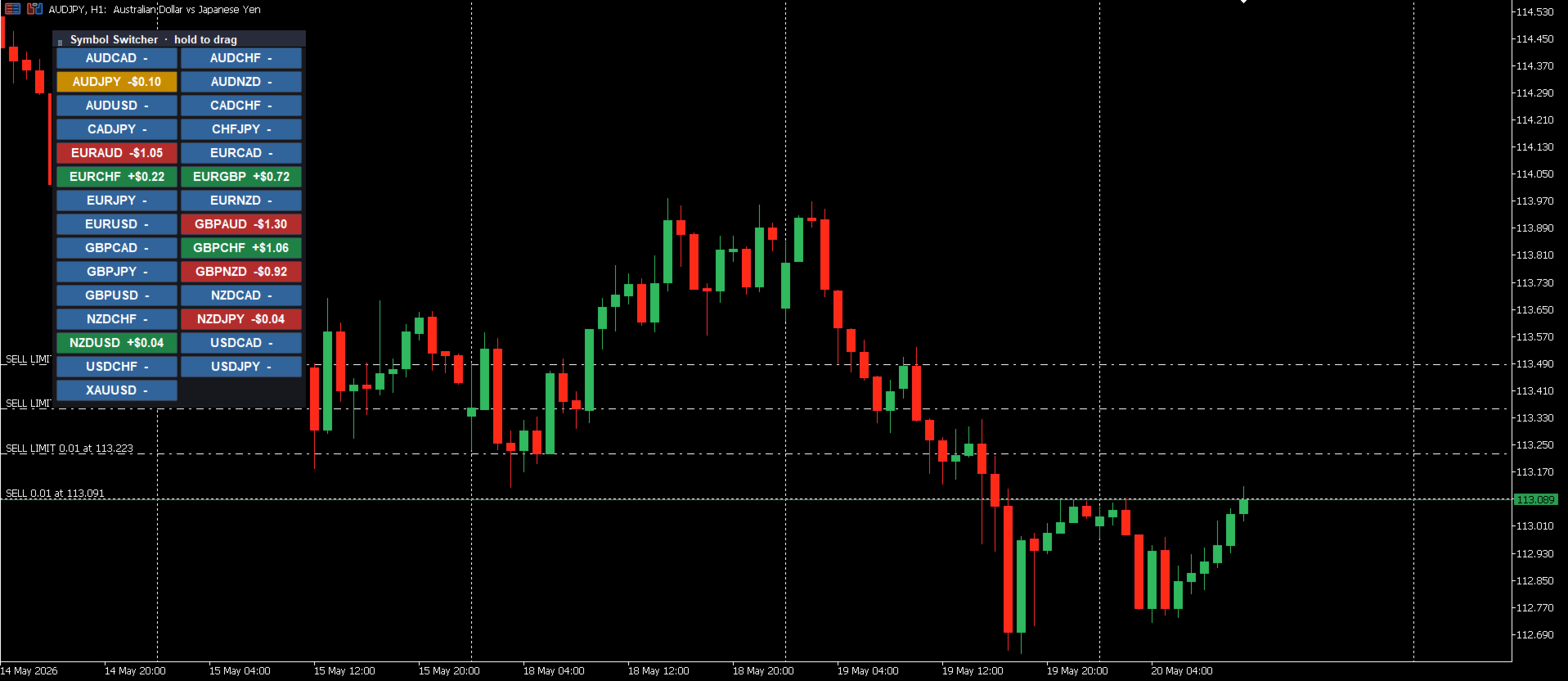
Symbol Switcher Pro is a free utility panel for MetaTrader 5 that lets you navigate up to 40 trading symbols from a single draggable interface — with live PnL displayed per pair so you always know where you stand without leaving the chart.
Overview
Managing multiple symbols in MetaTrader 5 typically means jumping between chart windows, losing context, and wasting time. Symbol Switcher solves this with a compact, customizable button panel that sits on your chart. One click switches the active symbol. Every pair shows its current profit and loss in real time. The panel goes exactly where you need it and looks exactly how you want it.
It is free. No strings attached.
Key Features
Up to 40 Symbols
Add any combination of forex pairs, metals, indices, or other instruments — up to 40 symbols in a single panel. All symbols are user-defined, so the panel works with any broker and any market.
Live PnL Per Symbol
Each symbol button displays its current profit and loss in real time. At a glance you can see which positions are running in profit, which are in drawdown, and the overall picture across all your open trades — without opening a separate window or scrolling through the terminal.
Draggable Panel
Click and drag the panel anywhere on the chart. Position it in a corner, along an edge, or wherever it is least intrusive to your analysis. The position is remembered and stays consistent as you work.
Full Visual Customization
The panel adapts to your workspace through simple settings inputs:
- Button size — adjust width and height to match your screen resolution and preference.
- Button gap — control the spacing between buttons for a compact or spaced layout.
- Default position — set the starting position on the chart (top-left, top-right, bottom-left, bottom-right).
- Colors — customize button background, text, and PnL colors to match your chart theme or make active positions immediately stand out.
How to Add Symbols
In the indicator settings, enter your symbols separated by commas:
AUDUSD, EURUSD, GBPUSD, GBPJPY, USDJPY
Any symbol available in your broker's Market Watch can be added. If your broker uses prefix or suffix naming (e.g. xAUDUSD.i ), simply enter the symbol exactly as it appears in your terminal.
Who It Is For
Symbol Switcher is useful for any trader who monitors or trades more than one pair at a time:
- Scalpers who need to jump between pairs quickly without rearranging chart windows.
- Multi-pair and basket traders who need a fast overview of open positions and PnL across many symbols simultaneously.
- Analysts who scan multiple instruments and want a cleaner, faster way to switch context on a single chart.
Configuration Summary
| Setting | Description |
|---|---|
| Symbols | Comma-separated list of symbols, up to 40 |
| Show PnL | Show live PnL for each pair |
| Button Size | Width and height of each symbol button |
| Button Gap | Spacing between buttons |
| Default Position | Starting anchor position on the chart |
| Colors | Button, text, and PnL color customization |
Notes
- The panel is fully draggable after loading — no need to adjust the default position setting every session.
- PnL is displayed only for symbols with open positions. Symbols with no open trades show the symbol name only.
- If a symbol is not visible in your Market Watch, add it there first before including it in the panel list.
- Compatible with all timeframes and chart types.
Free to Use
Symbol Switcher is completely free. If you find it useful, leaving a review helps others discover it.