Harmonic Strategy Suite Pro MT4
- Indicators
-
Mohamed Amr Mohamed Osama Abdelwahab
 Software Developer, Instructor, and Technical Team Leader with over 22 years of experience across desktop, web, and financial software development. Top Rated freelancer on Upwork with 200+ completed projects, $200K+ delivered, and a 100% job success record. Specialized in algorithmic trading systems
 - Version: 1.20
- Activations: 10
HARMONIC STRATEGY SUITE PRO MT5
Harmonic Strategy Suite Pro is a technical indicator and strategy-evaluation dashboard designed for MT5. Unlike basic pattern finders that only plot lines, this indicator features a built-in on-chart backtester that simulates professional trade execution, calculates precise target probability metrics, and dynamically adapts its layout for maximum readability.
KEY FEATURES
-
Interactive Draggable Dashboard: Tracks real-time statistical metrics (Passed Entries, T1/T2 Success Rates, Avg/Total Return %) computed from a rolling lookback of up to 100 historical setups per pattern type.
-
On-Chart ON/OFF Toggles: Clickable buttons on the panel let you show or hide pattern drawings on the fly. The dashboard's historical metrics remain completely calculated in the background.
-
Strict Limit Order Backtesting: Simulates a professional execution pipeline. It waits until pattern confirmation to place a limit entry at Point D. If price achieves TP1 or SL before pulling back to fill, the setup is automatically cancelled (invalidated), eliminating backtesting leaks.
-
Dynamic Execution Paths: Trade levels are drawn dotted at first. When entry, TP1, or SL is hit, the path instantly turns solid and terminates exactly on the bar of execution.
-
Aesthetic Polish: Features adaptive vertical labels that scale based on pattern height, success-rate opacity blending, and horizontal text collision protection to keep overlapping levels perfectly legible.
INPUT PARAMETERS EXPLAINED
-
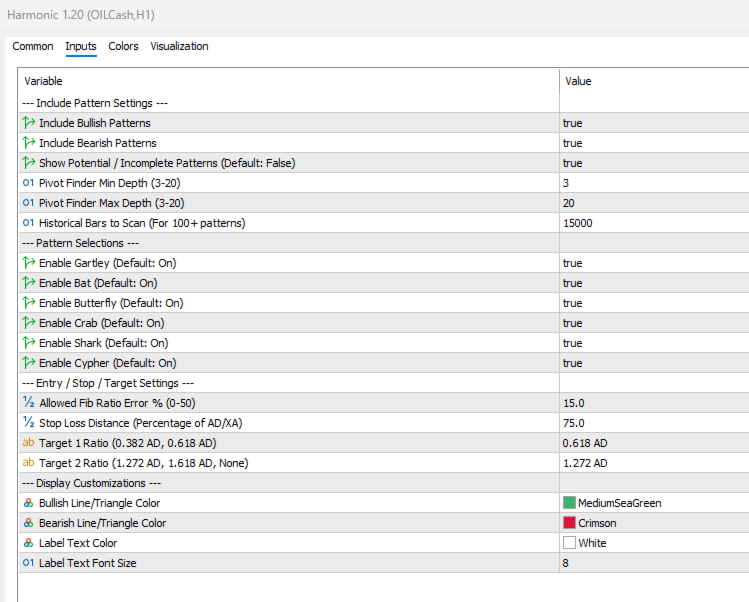
InpBullOn / InpBearOn (bool): Enable or disable bullish and bearish pattern detection.
-
InpIncOn (bool): Enable or disable incomplete potential pattern projection.
-
InpMinDepth / InpMaxDepth (int): Set the depth window for the pivot scanning algorithm (Default: 3 to 20).
-
InpHistoricalBars (int): Number of historical bars to scan to compile deep performance statistics.
-
InpGartOn, InpBatOn, InpBflyOn, InpCrabOn, InpSharkOn, InpCyphOn (bool): Selectively enable or disable individual harmonic pattern structures.
-
InpPctErr (double): Allowed Fibonacci ratio deviation percentage (Default: 15.0%).
-
InpStopPct (double): Stop Loss distance calculated as a percentage of the AD/XA swing height.
-
InpTarget1 / InpTarget2 (string): Dynamic target calculation ratios (e.g., 0.618 AD).
HOW-TO-TRADE GUIDE
-
Signal Confirmation: Wait for a completed pattern and identify the Gold Dot (plotted at the close of the confirmation bar).
-
Place the Entry: Place a Limit Buy/Sell Order at the Gold Entry Line on your chart.
-
Execution Rules: If price reaches TP1 or SL before pulling back to fill your entry, the setup is invalidated. Cancel your limit order.
-
Managing Risk & Reward: Set your Stop Loss at the Orange-Red SL Line and Take Profits at the Mint TP1 and Ice Blue TP2 lines.
-
Visual Tracking: A solid line indicates an executed level. Dotted paths indicate pending or missed levels.