Currency Exchanger MT5

5

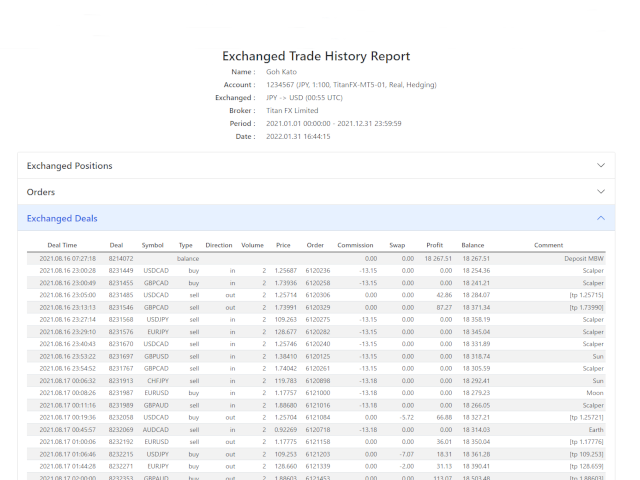
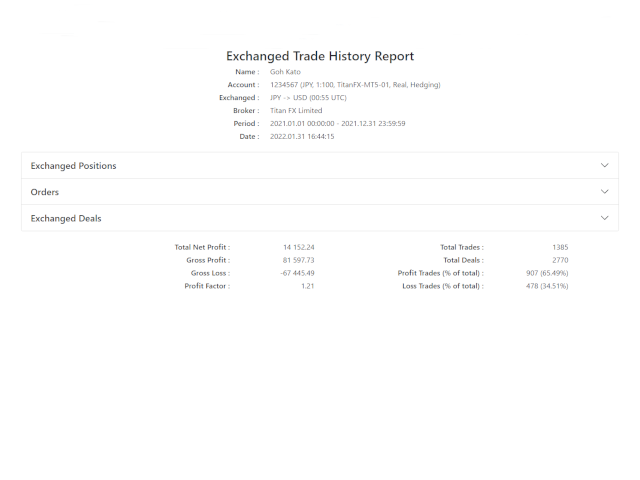
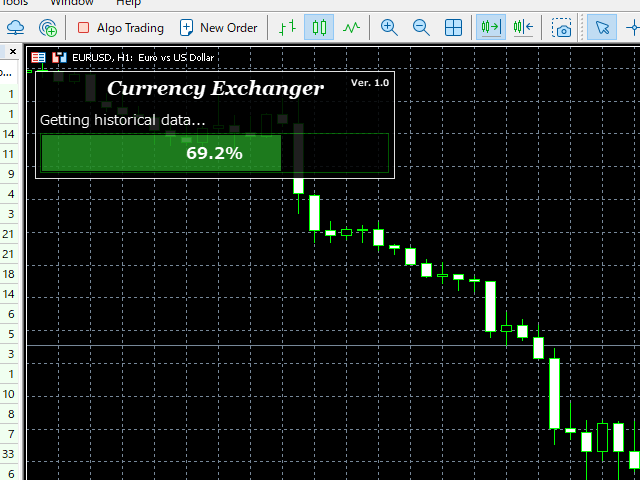
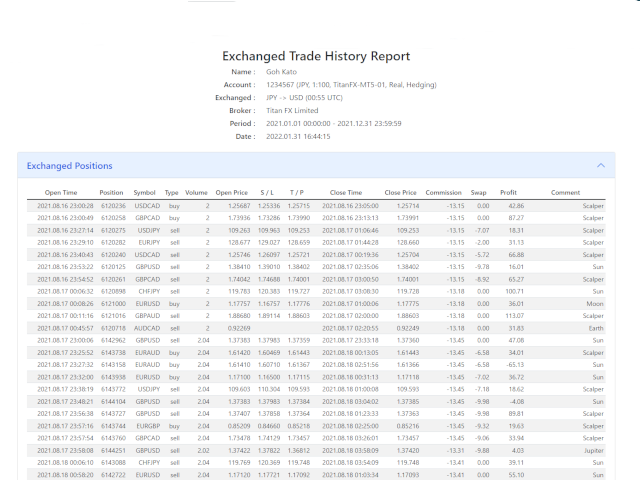
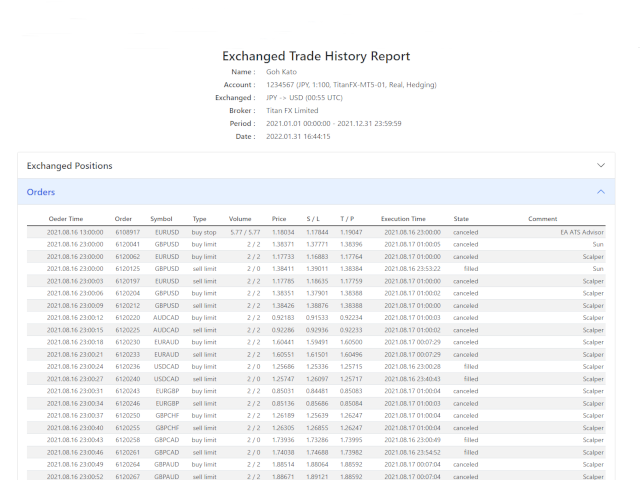
This is a multi-currency converter script that can convert the currency of the account history to another currency and output it. Since it supports multiple currencies, it is possible to exchange USD, EUR mutual conversion, JPY, GBP, AUD, or other minor currencies. Currency Exchanger can be converted to other currencies immediately by executing it once, so anyone can easily exchange currency.

Let Currency Exchanger do the tedious work!

  • The exchange result from the account history can be output as a report in html or csv format.
  • Exchange rates are obtained from MetaTrader historical data or the web.
  • The period for outputting reports and the timing of exchange can be set in detail.
  • Report output items can be changed.
  • Normal report output without currency exchange is also possible.
  • The languages ​​of the report are English and Japanese.
  • Click here for the MT4 product version : Currency Exchanger MT4

Input item description

General

  • Currency of after exchange : Specify with 3 digits. If you set the account currency, the report will be output without currency exchange.
  • Currency separator character : The default is space.
  • Report language : English or Japanese can be specified.
  • Report format : html or csv can be specified.
  • Source of exchange rate : MetaTrader or Web (2 types) can be specified.

Period(Report output period setting, specified by server time)

  • From year (0 for current year) : If it is 0, it is from the beginning of the history.
  • From month (0 for default [Jan]) : If it is 0, it will start in January.
  • From day (0 for default [1st day]) : If it is 0, it starts from 1 day.
  • From time (empty for default [0:0]) : If it is Empty, it is from 0:0:0.
  • To year (0 for current year) : If it is 0, it is up to the end of the history.
  • To month (0 for default [Dec]) : If it is 0, it will be until December.
  • To day (0 for default [last day]) : If it is 0, it is until the last day of the month.
  • To time (empty for default [23:59]) : If it is Empty, it is until 23:59:59.

Time(Valid only when 'Source of exchange rate' is set to MetaTrader)

  • Exchange time ([-]h:m UTC, empty for exit time) : Set in UTC (can be negative). If empty, the deal time.
  • Broker DST type : Set according to the broker.
  • Broker time offset [hours] (winter) : Set the winter time offset. Set according to the broker.
  • Apply DST to exchange time : This item is effective when you want to exchange money at the same time at DST throughout the year.

Show(Report show item settings)

  • Show / hide report items.

About the exchange rate acquisition source

There are three types of exchange rate acquisition sources. In the case of MetaTrader, if you have historical data, you can currency exchange most accurately. There are plenty of time settings, so you can handle various cases. Currency exchange uses the currency pair of the broker, so if you have a currency pair, you can exchange it. On the other hand, please note that it cannot be used if there is no history data. (Please note that we cannot answer how to obtain historical data.)

To use retrieval from the web, you need to set the URL in MetaTrader. Check 'Allow WebRequest for listed URL' in 'Tools -> Options -> Expert Advisors tab' and set the following URLs in the input field. There is a slight time lag before the exchange rate for the day is released on both websites, so please wait for the release before exchanging money.

About the report save location

The save location of the report is as follows. To display MetaTrader Data Folder, specify 'File-> Open Data Folder' in MetaTrader. You can change the file name when saving.

  • (MetaTrader Data Folder)\MQL5\Files\

Please note that we do not take any responsibility caused by the use of this tool (Currency Exchanger).

Also, in all matters, the reports produced by this tool should be used as reference materials only.
Reviews 1
kjr_27
177
kjr_27 2026.08.16 21:22 
 

I am very happy that this tool exists. Many thanks to the developer! Thanks to this tool, I can convert trades into any currency in seconds. This is especially helpful for correctly preparing all the data for tax purposes. The generated report is clear and well presented and the tool`s settings leave nothing to be desired. I can highly recommend it to everyone!

Recommended products
SmartZone Sentinel
Allan Njuguna Kimani
SmartZone Sentinel — Multi-Symbol Smart Money Concepts EA Trade Smart Money Concepts across multiple symbols at once — with confluence-gated entries, automatic risk management, and real-time Telegram alerts. SmartZone Sentinel scans as many symbols as you choose, in parallel, looking for institutional-style setups: break of structure, liquidity sweeps, fair value gaps, and order block mitigation. It only acts when multiple signals line up — not on a single indicator firing — and once a trade is
You set the limits. TEVSYS applies them across your account. Your risk rules are clear in your head. The hard part is executing them when the market speeds up, pressure rises, and the temptation for “one more” shows up. TEVSYS narrows the gap between what you decide and what happens in the terminal. No signals. No profit promises. Documented close precision. Account-level protection. Evidence you can cross-check in MetaTrader 5. What TEVSYS is TEVSYS is an operational governance system within Me
Chart Navigator Pro
ELITE FOREX TRADERS LLC
Introducing the   Elite Chart Navigator   — your ultimate MetaTrader 5 Expert Advisor designed to revolutionize multi-symbol trading with seamless chart navigation and superior usability. Product Overview The   Elite Chart Navigator EA   is a sophisticated trading utility enabling rapid switching between multiple trading pairs through an intuitive on-chart button interface. Built for professional traders managing numerous instruments, this EA dramatically improves workflow efficiency, ensuring
DoIt EA Monitor MT5
Diego Arribas Lopez
DoIt EA Monitor - Multi EA Performance Dashboard for MT5 Your account can be profitable while one EA quietly drags down the portfolio. MetaTrader history shows the combined result, but it does not clearly show which strategy deserves more capital and which one needs attention. DoIt EA Monitor runs on one chart and separates live and historical performance by magic number, EA and symbol. It is completely read-only. It never opens, closes or modifies a trade. KNOW WHICH EA IS EARNING ITS PLACE Aut
FREE
Axilgo PipPiper CoPilot
Theory Y Technologies Pty Ltd
5 (2)
Axilgo Pip Piper CoPilot Elevate your trading game with the Axilgo Pip Piper CoPilot, the first in our revolutionary Pip Piper Series. This all-inclusive toolset is meticulously crafted for serious traders, focusing on key areas such as Risk Management, Trade Management, Prop Firm Rule Compliance, and Advanced Account Management . With CoPilot, you’re not just investing in a tool—you’re gaining a strategic partner in the intricate world of trading. Important Notice: To ensure you receive the fu
FREE
Binance Grid Pro offers an alternative to the built in Grid systems Binance Platform offers. This utility let you define a grid parameters for interact with your Binance account using an Isolated Margin account. This is, similar to Spot Grid in Binance. This is not for handle with derivatives contracts, is for handle with Spot through Isolated Margin Account. But obviosly this utility offers a different approach than built in Binance Grid to handle the Grid, which I have found useful based on
Adaptive Multi Hybrid
Dmitriq Evgenoeviz Ko
Adaptive Multi-Hybrid (AMH) v3.0: A Next-Generation Intelligent Trading System for MetaTrader 5 Basic concept Unlike classic robots, AMH doesn't use grids, Martingale, or dangerous pending orders. Entries are made only at the market , when the global trend and local momentum are in sync. The system "breathes" with the market, widening or narrowing stop-losses depending on current volatility (ATR-Adaptation). Key Features (The Edge) Market Precision Execution: Entry at market price elim
Harness institutional strategies with Institutional VWAP Reversal EA: Capture reversals via VWAP deviation bands, volume spikes, and 200 EMA trend filter. Targets 5% monthly profit with 5% max daily DD, including profit caps, breakeven SL, and signal reversal options—ideal for prop-trading challenges. Customize TP/SL by percentages, RR, or candles; trade with trend or both sides. Optimized for forex majors and gold, with time-restricted execution for low-risk, reliable automation in volatile mar
Multi Strategy Dashboard EA MT5
Kevin Beltran Keena
5 (1)
Multi instrument and multi time frame EA, with the best indicators.  The MSD EA can be used for automated and manual trading. Click on the '?' button on the dashboard to obtain information about the various elements of the MSD EA. Uses ATR Take Profits, ATR Stop Losses and ATR Trailing Stops. Comes with an FX Currency Strength meter and a Market Sessions indicator. Has the option to place Trade Lines (Buy, Sell, Close, Alarm). When the price reaches the trendline, the EA will perform the approp
Martingale panel MT5
Mohammadbagher Ramezan Akbari
In this article, we would like to introduce the trade panel product with the Martingale panel. This panel is made in such a way that it can meet the needs of traders to a great extent. This trade panel actually consists of two trade panels at the same time, with the first one you can take positions with certain profit and loss limits, and with the second one, you can have positions with profit limits but without loss limits. When positions lose, a new position will be added based on the settings
Gold Momentum Shield EA The Smart Way to Trade XAUUSD: Trend Following with Volatility Protection Stop gambling with dangerous Martingale or Grid systems. Gold Momentum Shield is a professional algorithmic trading solution designed for Gold . This EA doesn’t try to predict the future and it follows the real institutional money flow by combining momentum confirmation with advanced volatility-based protection. Unlike basic EAs that enter trades blindly, Gold Momentum Shield uses a triple-filter
Quant Panel
Kevin Craig E Gittins
QUANT PANEL Independent per-algo analytics, protected MT5 history and professional PDF reporting Quant Panel is built for traders who run several Expert Advisors or strategies on one MT5 account and need to know how each algo is actually performing. Instead of treating the terminal as one combined portfolio, Quant Panel groups closed positions by EA comment or magic number and calculates every strategy independently. It gives you one clear dashboard for comparing algos, finding weak systems and
EA Nation
Joseph Anthony Aya-ay Yutig
The Expert Advisors' strategy came from a Facebook Group EA Nation. The group has over 40k members. It opens a hedge trade for every new candle and opens grid when the position is on the losing side of the trade.  Average Grid = N                     = the sum of 6 bars before the current bar/ N Timeframe = it opens a new hedge trade when a new bar appears Auto Lot = 1 Lot means in $10,000 Lot Size will be 0.01 NO MORE HEDGE = When one side reaches to N trades, it won't open a hedge trade un
QFT Scalp Gold is a XAUUSD scalping Robot designed for the M1 timeframe.  The trading system is designed to identify high probability market action and  capitalize on such information.  The trouble with most scalping systems is the general lack of a credible response when the market makes very large moves against a huge number of open trades, often relying on very low reward to risk ratio.  QFT Scalp Gold solves this problem with a unique recovery system that uses the unfavorable market  mov
Gold Silver Statistical Arbitrage Gold Silver Statistical Arbitrage is a fully automated multi-symbol Expert Advisor for MetaTrader 5, designed to analyze the statistical relationship between Gold (XAUUSD) and Silver (XAGUSD). Instead of attempting to predict the direction of Gold or Silver independently, the EA monitors the relative price relationship between the two metals and looks for temporary statistical deviations. The strategy uses a logarithmic price spread and Z-Score calculation t
FREE
EtherPro Scalper
Mitra Emiten Digital
EtherPro Scalper (MT5) is an Expert Advisor developed specifically for ETHUSD *. It uses a distinct technical approach with multiple entry filters to capture more selective trading opportunities. The EA also features position management that is adjusted to suit the volatility and behavior of the ETHUSD market. It offers three trading modes : [Strategy 1] , [Strategy 2] , [ Strategy 3] and [Beast Mode On] , which combines both strategies in one system. Beast Mode On is recommended for traders se
Introducing Savage Capital Max Scaling Pro – Your Go-To EA for Trading Success! Make the most of your trading with Savage Capital Max Scaling Pro, a versatile EA for  LIVE MARKETS . Key Features: Maximize Profits Automatically:   The EA places Take Profit (TP) & Stop Loss (SL) and uses a Trail Stop (TS) technique. It even collects money from running trades, even if TP isn't reached. Developed by Pros:   Crafted by an experienced software developer & day-trader with years of EA development and
[ MT4 Version ]  Single-platform versions: [ Telegram ]  [ Discord ] Publish your trades to   Telegram AND Discord simultaneously   — up to   6 channels   from one chart, each with its own audience tier, filters and delay.   The complete distribution toolkit for signal sellers. ONE EA, YOUR WHOLE AUDIENCE   6 CHANNELS AT ONCE   — 3 Telegram chats + 3 Discord webhooks ️   TIERS THAT SELL   — VIP channels get signals instantly, free channels get them delayed (you choose: 60 s
Strategy Matrix Builder
Christopher Calmerin
Strategy Matrix Builder MT5 is a highly customizable Expert Advisor created for traders who want to build, test, and automate their own trading strategies without programming. Instead of forcing traders to use one fixed strategy, this EA provides a flexible modular system where users can combine multiple indicators, timeframes, entry conditions, filters, risk-management methods, and trade-management tools. The EA includes popular indicators such as Moving Averages, RSI, MACD, ADX, Stochastic, Bo
FREE
Trend Pyramid v5.00 | Gold XAUUSD Floating‑Profit Pyramid EA   This floating‑profit pyramid gold EA only adds positions after existing orders generate floating profit, avoiding blind position‑adding under loss conditions. It adopts EMA20 plus ADX24 dual‑indicator filter to filter false oscillation signals and reduce invalid order openings. Multiple hard risk controls are built‑in to protect your account.   Core advantages   1. Add positions only on floating profit, no position‑adding at loss: a
Best Scalper XAUUSD 30min
Bruno Alexandre Azevedo Dantas
Este robô foi criado exclusivamente para operar no ouro (XAUUSD) e funciona melhor em timeframes médios (M30, H1) . Diferente de scalpers tradicionais, o Best Scalper XAUUSD 30min foca em reversões de tendência , utilizando indicadores avançados como RSI, Bandas de Bollinger e Price Action . A estratégia é baseada em detectar níveis críticos de suporte e resistência , onde o mercado tem uma grande probabilidade de inverter a tendência. Ele combina essa análise com volatilidade intradiária , gar
FREE
Relentless News Guard
Loysean Mappang Bandaay
Relentless News Guard — Free Economic Calendar and News Warning Panel for MetaTrader 5 Relentless News Guard is a free, on-chart economic calendar panel for MetaTrader 5. It shows the upcoming high-impact news events for the currencies you trade, with a live countdown and a clear on-chart status, so you know when to stay out of the market before you place a trade. It is free. If it keeps you out of one bad news spike, an honest review helps other traders find it. It reads the built-in MetaTra
FREE
Manzano Quant Engine
Patricia Manzano Gomez
Manzano Quant Engine Advanced Statistical Market Structure, Volume Analysis and Decision Support Framework for MetaTrader 5   Manzano Quant Engine is an advanced analytical indicator that combines adaptive trend modelling, statistical deviation analysis, volume-based market structure, multi-timeframe confirmation, and quantitative scoring — all within a single visual framework.   Its objective is not to predict future prices, but to help traders interpret market behaviour more effectively and ma
Ultimate Zone Recovery Quantitative
Luigi Salvatores Buigues Morillo
Ultimate Zone Recovery Quantitative is an advanced trading management tool designed for MetaTrader 5 (Hedging Accounts). It transforms losing trades into winning cycles using a sophisticated quantitative directional hedging algorithm. This Expert Advisor (EA) does not rely on technical indicators for initial entries. Instead, it acts as a mathematical shield for your existing strategies (whether manual or from other EAs) or for manual entries executed via its integrated panel. When a trade moves
Institutional Risk Manager
Santiago Nicolas Pla Casuriaga
The Institutional Risk Manager handles position sizing, order execution, scaled exits, trailing stops, portfolio exposure monitoring, daily loss limits, and event-based filters — all from a single on-chart panel in MetaTrader 5. Lot size is calculated automatically from account balance and stop distance. Scaled exits execute at configurable R-multiples with a broker-side TP at the final target so the exit holds even if the EA is offline. Risk discipline enforced mechanically, not manually. Risk
Modern Dark Chart Theme for MT5 Upgrade your MetaTrader 5 chart into a clean, dark, professional trading workspace. Your chart is your trading office. It is where you analyze the market, test Expert Advisors, review setups, record videos, share screenshots, and make trading decisions. If your MT5 chart looks old, bright, noisy, or unprofessional, your trading environment can feel distracted before you even start your analysis. Modern Dark Chart Theme for MT5 helps you create a cleaner, darker,
FREE
Vantage Breakout
Alexandre Vincent Traber
Turn volatility expansions into structured, tiered profit-taking — Vantage Breakout trades adaptive ATR/SMA breakouts and manages every position with a disciplined 3-stage exit system, validated across Forex majors and Gold. Overview Vantage Breakout is an adaptive volatility breakout EA. It enters when price closes outside a dynamic band built from a Simple Moving Average offset by a multiple of the Average True Range, capturing genuine momentum expansions while filtering out noise. Every posi
FREE
BTC Master Pro
Farzad Saadatinia
4.58 (12)
BTC Master Pro – Your trusted partner in disciplined Bitcoin trading. The new version is now enhanced with OpenAI artificial intelligence , delivering smarter execution and improved trade filtering in volatile crypto conditions. This professional Expert Advisor is built specifically for Bitcoin (BTCUSD) trading on MetaTrader 5 , focusing on structured execution, controlled exposure, and intelligent risk management. Price: $699  →  Next: $999  →  Final: $999 LIVE SIGNAL HERE OpenAI-Powered Exec
EA Follower Version any Follow Copy Account  (Acc. Number)  need a open MT Terminal, download multiple times Step1:   Open Master MT5 Terminal    =  install master- Version   (on any Symbol just one Time) Step2:   Open Follower MT5 Terminal = install follower- Version  (on any Symbol just one Time) Step3:   all Trades from any Symbol or any Robot are copy now to follow- Terminal immediately for simple copy set on Chart and   Start   no optimization. This Robot is a Trade Copier for MT5 that auto
FREE
VTB High Watermark Drawdown Lock EA for MT5 Advanced Equity Protection & Drawdown Management System VTB High Watermark Drawdown Lock is a professional risk management Expert Advisor designed to protect trading accounts, funded accounts, and proprietary trading challenges from excessive drawdown. Unlike traditional drawdown protection systems that calculate risk from the initial account balance, this EA uses a dynamic High Watermark (HWM) model that continuously protects both your original capita
Buyers of this product also purchase
Trade Assistant MT5
Evgeniy Kravchenko
4.43 (216)
It helps to calculate the risk per trade, the easy installation of a new order, order management with partial closing functions, trailing stop of 7 types and other useful functions. Additional materials and instructions Installation instructions - Application instructions - Trial version of the application for a demo account Line function -   shows on the chart the Opening line, Stop Loss, Take Profit. With this function it is easy to set a new order and see its additional characteristics bef
Forex Trade Manager MT5
InvestSoft
4.98 (680)
Trade Manager MT5 is an advanced position size calculator and trade management tool for MetaTrader 5, designed to help traders plan trades faster, control risk more precisely, and manage open positions directly from the chart. It combines order placement, risk based lot calculation, Stop Loss and Take Profit management, Break Even, Trailing Stop, Partial Close, Equity Protection, and external trade management in one panel. Whether you trade forex, indices, metals, commodities, crypto, or future
Telegram to MT5 MultiChannel Copier
Sergio Marquez Uroz
4.59 (17)
Telegram to MT5 Multi-Channel Copier   automatically copies trading signals from your Telegram channels straight to MetaTrader 5. No bots, no browser extensions, no manual copying. A signal arrives in Telegram and the EA opens the trade in your terminal within seconds. And before you copy a channel, the built-in backtester shows you what that channel would have done in your account. The product has two components: a Windows application that listens to your Telegram channels, and this Expert Advi
================================================================================ POC BREAKOUT - V20.72. Full Professional Grade Toolkit ================================================================================ POC Breakout is a full MetaTrader 5 trading dashboard for discretionary traders who want breakout signals, Point of Control (POC) context, volume profiles, order flow, market structure, news, alerts, and advanced trade planning in one professional workspace. Attached directly to you
TradePanel MT5
Alfiya Fazylova
4.88 (169)
Trade Panel is a multi-functional trading assistant. The app contains over 50 trading functions for manual trading and allows you to automate most trading tasks. Application instructions + video instructions: https://www.mql5.com/en/blogs/post/772292 Trial version of the application for a demo account: https://www.mql5.com/en/blogs/post/750865 How to install the application: https://www.mql5.com/en/blogs/post/756239 How to test the application in visual mode: https://www.mql5.com/en/blogs/post/7
Copy Telegram signals with your own trading rules Telegram to MT5 Signal Trader automatically copies text-based trading signals from public and private Telegram channels and groups into MetaTrader 5. Manage multiple providers and MT5 accounts from one desktop app, with individual risk and trade settings for each provider . No Telegram bot or API setup needed for copying. Simply sign in with your own Telegram account by phone or QR code and select the channels or groups you have already joined. Y
FarmedHedge Pair Trading Dashboard
Tanapisit Tepawarapruek
5 (5)
Farmed Hedge Yield Farming | All Markets (Manual - Hybrid - Semi/Automated EA) VERIFIED TRADING RESULTS - Farmed Hedge Yield Axi Copy:  https://www.mql5.com/en/signals/2356376 - Farmed Hedge Yield Exn Copy:   https://www.mql5.com/en/signals/2356404 - Farmed Hedge Yield V Copy:  https://www.mql5.com/en/signals/2357156 IMPORTANT NOTICE: FarmedHedge is a MANUAL-FOCUSED TRADING UTILITY ,not a fully automated EA. Results shown on this Signal include manual trades and overall strategic management.
Power Candles Strategy Scanner - Self-Optimizing Multi-Symbol Setup Finder Self-optimizing settings work one chart at a time, and finding where they pay off right now means opening chart after chart. Power Candles Strategy Scanner runs the same self-optimizing engine as the Power Candles indicator on every symbol in your Market Watch, side by side. One panel ranks where it pays off: the winning strategy per symbol, its optimized Stop Loss and Take Profit. An alert fires the moment a fresh signal
Premium Trade Manager - The Trade Panel With a Coach Built In Premium Trade Manager puts a trading coach inside your chart, with a full execution engine underneath it. Set the trade up the way you always do, then let Max, your AI trading coach, read that exact setup against your live account and give you a straight verdict before you commit: is the stop disciplined, is the risk sane, is a high-impact release minutes away, are you near a prop-firm limit. Below sits the engine that runs everything
EA Overfitter
Stephen J Martret
5 (1)
That backtest looks great. But will it still be making money tomorrow, next week, next month? EA Overfitter re-runs your EA on 100 price histories it has never seen. One score tells you if the edge is real. A backtest tells you what an EA did on one price history — the one that happened to occur. What you cannot tell from it is how much of that result was the strategy and how much was the particular path. EA Overfitter answers that. It builds up to 100 synthetic price histories your EA has n
EA Slipstream
Stephen J Martret
5 (1)
Your backtest filled every order at the price it asked for. Your account does not. EA Slipstream measures what execution costs your EA, using your own fills, slippages and spreads to show you the true performance of your EA. A backtest prices every trade at the level the EA named. In live trading a pending order fills at whatever price is available when it triggers, a stop closes wherever the market is when it is hit, and the spread at that moment is whatever the account was quoting. The differ
Dynamic Fibonacci Grid
Tsvetan Tsvetanov
5 (1)
Introducing the latest version of the Dynamic Fibonacci Grid Dashboard for MT5. Now packed with many new features, this new dashboard transforms your trading experience and allows you to see the market and the price action from a completely different perspective. Discover new possibilities with simultaneous analysis of multiple timeframes covering multiple symbols. User-friendly interface for manual trading and management of positions and an expanded ability to apply predefined automated strate
Welcome to ENTRY IN THE ZONE AND SMC MULTI TIMEFRAME Entry In The Zone and SMC Multi Timeframe is a real-time market analysis tool based on Smart Money Concepts (SMC), designed to analyze market structure, price direction, and key trading zones. It supports both Single-Timeframe Analysis and Multi-Timeframe Analysis, providing a clearer view of the overall market structure across multiple timeframes, with real-time BUY / SELL signals that do not repaint. It is designed to help filter trading opp
Grid Manual MT5
Alfiya Fazylova
4.73 (22)
Grid Manual is a trading panel for working with grid strategies. The utility is universal, has flexible settings and an intuitive interface. It works with a grid of orders not only in the direction of averaging losses, but also in the direction of increasing profits. The trader does not need to create and maintain a grid of orders, the utility will do it. It is enough to open an order and the "Grid manual" will automatically create a grid of orders for it and will accompany it until the close. F
Footprint Chart Pro — Professional OrderFlow EA for MetaTrader 5 Version 6.34 | Professional tool for real traders | Institutional-Grade Visualization DEMO USERS - PLEASE SELECT EVERY TICK / REAL TICK WHEN TESTING AND YOU HAVE DOWNLOADED HISTORICAL DATA. IF YOU SEE A WAITING SCREEN AND IT IS NOT DOWNLOADING, IT MEANS YOU HAVE LOW HISTORICAL DATA. TRY 1 MIN AND 5 MIN FIRST ON 1 DAY DATA. ONE DAY DATA SHOULD BE THE NEWEST AND MOST CURRENT DATE. PLEASE WAIT UNTIL THE MARKET HAS ROLLED OVER PERIOD.
YuClusters
Yury Kulikov
4.93 (43)
Attention: You can view the program operation in the free version  YuClusters DEMO .  YuClusters is a professional market analysis system. The trader has unique opportunities to analyze the flow of orders, trade volumes, price movements using various charts, profiles, indicators, and graphical objects. YuClusters operates on data based on Time&Sales or ticks information, depending on what is available in the quotes of a financial instrument. YuClusters allows you to build graphs by combining da
The product will copy all telegram signal to MT5 ( which you are member) , also it can work as remote copier.  Easy to set up, copy order instant, can work with almost signal formats, image signal,  s upport to translate other language to English Work with all type of channel or group, even channel have "Restrict Saving Content", work with  multi channel, multi MT5 Work as remote copier: with signal have ticket number, it will copy exactly via ticket number. Support to backtest signal. How to s
Anchor Trade Manager
Kalinskie Gilliam
5 (9)
Your EAs cannot see each other, but Anchor can. Anchor gives you one place to coordinate your EAs, manage risk, and decide when trading is allowed. It works alongside the trading bots you already use without any changes to them. The Problem One EA opens a trade. Then another starts trading. The next thing you know, you wake up to multiple grids built across your account. Each EA may be doing exactly what it was designed to do, but together they can place far more risk on your account than you in
FUTURES ORDERFLOW FOOTPRINT CHART Professional OrderFlow EA for MetaTrader 5 Version 1.01| Professional tool for real traders | Institutional-Grade Visualization STRATEGY TESTER USERS - PLEASE SELECT EVERY REAL TICK WHEN TESTING AND YOU HAVE DOWNLOADED HISTORICAL DATA. IF YOU SEE A WAITING SCREEN AND IT IS NOT DOWNLOADING, IT MEANS YOU HAVE LOW HISTORICAL DATA. TRY 1 MIN AND 5 MIN FIRST ON 1 DAY DATA. ONE DAY DATA SHOULD BE THE NEWEST AND MOST CURRENT DATE. PLEASE WAIT UNTIL THE MARKET HAS ROL
Timeless Charts
Samuel Manoel De Souza
5 (8)
Timeless Charts is an all-in-one trading utility for professional traders. It combines custom chart types such as Seconds Charts and Renko with advanced order flow analysis using Footprints , Clusters , Volume Profiles , VWAP studies, and anchored analysis tools for deeper market insight. Trading and position management are handled directly from the chart through an integrated trade management panel , while Market Replay and Virtual Accounts provide environments for practicing trading skills and
The Expert Advisor will help you forward all alert from  MetaTrader 5 to Telegram channel/ group.  All alert must save to folder <Data folder>MQL5\Files\Alerts\ , text file with format *.txt and screenshot with format *.gif or *.png. Parameters: - Telegram Bot Token: - create bot on Telegram and get token. - Telegram Chat ID:  - input your Telegram user ID,  group / channel ID - Forward Alert: - default true, to forward alert. - Send message as caption of Screenshot: - default false, set true t
The product is used to trade base on any Alert signal in MT5 Easy to setup, simple format with custom keyword All option to management orders as trailing stop, breakeen, partial close, time filter, news filter ... Option to auto open grid orders How to setup and guide: Let read all details about setup and download indicator for auto get   Alert Signal   here Do not buy if you even can not install demo EA to your VPS ( some VPS block download EA from mql5 market) We always bring customers high q
Prop Guardian Risk Manager MT5 – Drawdown, Risk & Hedge Protection for Prop Firm and Managed Accounts Prop Guardian Risk Manager is a professional risk-control utility for MetaTrader 5, designed for prop firm traders, money managers and anyone who wants strict account-level risk protection. It does not generate trading signals, strategy entries or trading decisions. Instead, it runs in the background, monitors your account risk and can automatically block new exposure, close managed positions or
Trade Manager DashPlus
Henry Lyubomir Wallace
4.85 (13)
DashPlus is an advanced trade management tool designed to enhance your trading efficiency and effectiveness on the MetaTrader 5 platform. It offers a comprehensive suite of features, including risk calculation, order management, advanced grid systems, chart-based tools, and performance analytics. Key Features 1. Recovery Grid Implements an averaging and flexible grid system to manage trades during adverse market conditions. Allows for strategic entry and exit points to optimize trade recovery
EasyInsight AIO MT5
Alain Verleyen
4.92 (12)
EASY Insight AIO – All-In-One Power for AI-Driven Trading Want to skip the setup and start scanning the entire market – Forex, Gold, Crypto, Indices, and even Stocks – in seconds? EASY Insight AIO is the complete plug-and-play solution for AI-powered trade analysis. It includes all core Stein Investments indicators built-in and automatically exports clean, structured CSV files – perfect for backtesting, AI prompts, and live market decision-making. No need to install or configure indicators manu
TAQ Magic Keys Trade Manager is for MetaTrader5 (MT5). It has an advanced trade management tool and Lot size calculator for MetaTrader 5.  It is designed to help traders to trades faster, precise and manage open positions directly with one click. Demo 3 Days Free Trial https://taqmagickeys.com/product/taq-magic-keys-v5-0-demo-3days-free-trial/ FN key is the best functions which automatically manage trades up to TP4 with auto partial closing and trailing SL. Define your trade strategy in FN keys
Trade Indicator Assistant   is a powerful MT5 utility designed to turn indicators into automated trading systems. Its main feature is the ability to automatically detect an indicator’s   BUY and SELL signal buffers , without requiring you to know the buffer numbers, search through indicator settings, or modify the indicator source code. Bonus Indicator:   After purchasing Trade Indicator Assistant, contact me to receive   Trade Signal Pro   completely free as a bonus indicator. [Download Demo V
MT5 Trading Deck
Manuel Michiels
5 (2)
One button. One trade. MT5 Trading Deck is a hotkey trading panel for MetaTrader 5 that turns the platform into a keyboard-driven execution cockpit. Stop loss, take profit and lot size are pre-calculated for every key; the moment you press, a market order is live on the broker. A complete technical user manual is attached in the product Comments section. It documents every input parameter, the full hotkey map, the recommended Stream Deck XL layout, and the advanced workflows for Pre-Limit orders
Risk Manager Pro MT5
Roman Zhitnik
5 (8)
Risk Manager Pro MT5 is an account protection Expert Advisor for traders who want strict risk control inside MetaTrader 5. The utility monitors your account equity, daily and weekly results, drawdown, open positions, trade count, consecutive losses, and trading hours. When a configured limit is reached, it can automatically close positions, cancel pending orders, stop other EAs, send notifications, or close the terminal. Instead of relying on discipline during a stressful trading session, you de
Effortlessly manage multiple trading accounts The Local Trade Copier EA is a solution for individual traders or account managers who need to execute trade signals from external sources or who need to manage several accounts at the same time, without the need for a MAM or a PAMM account. It copies from up to 8 master accounts to unlimited slave accounts . [ Installation Guide | Update Guide | Troubleshooting | FAQ | All Products  ] 100% self hosted Easy to install and use It can copy from MT4 t
More from author
This is a multi-currency converter script that can convert the currency of the account history to another currency and output it. Since it supports multiple currencies, it is possible to exchange USD, EUR mutual conversion, JPY, GBP, AUD, or other minor currencies. Currency Exchanger can be converted to other currencies immediately by executing it once, so anyone can easily exchange currency. Let Currency Exchanger do the tedious work! The exchange result from the account history can be output a
Mean reversion EA with AUD,CAD,NZD Trading Camp MT4 Trading Camp is an EA that focuses on three currencies (AUD, CAD, and NZD) with strong mean reversion tendencies and performs a contrarian strategy. Although a grid is used as the trading technique, it is designed with a security feature with straddling of the trade, making it difficult to get stopped out. Various filters are also available to carefully select entries (therefore, the entry frequency is not high). In addition, various input para
Mean reversion EA with AUD,CAD,NZD Trading Camp MT5 Trading Camp is an EA that focuses on three currencies (AUD, CAD, and NZD) with strong mean reversion tendencies and performs a contrarian strategy. Although a grid is used as the trading technique, it is designed with a security feature with straddling of the trade, making it difficult to get stopped out. Various filters are also available to carefully select entries (therefore, the entry frequency is not high). In addition, various input para
Filter:
kjr_27
177
kjr_27 2026.08.16 21:22 
 

I am very happy that this tool exists. Many thanks to the developer! Thanks to this tool, I can convert trades into any currency in seconds. This is especially helpful for correctly preparing all the data for tax purposes. The generated report is clear and well presented and the tool`s settings leave nothing to be desired. I can highly recommend it to everyone!

Reply to review