Economic Calendar for MT5

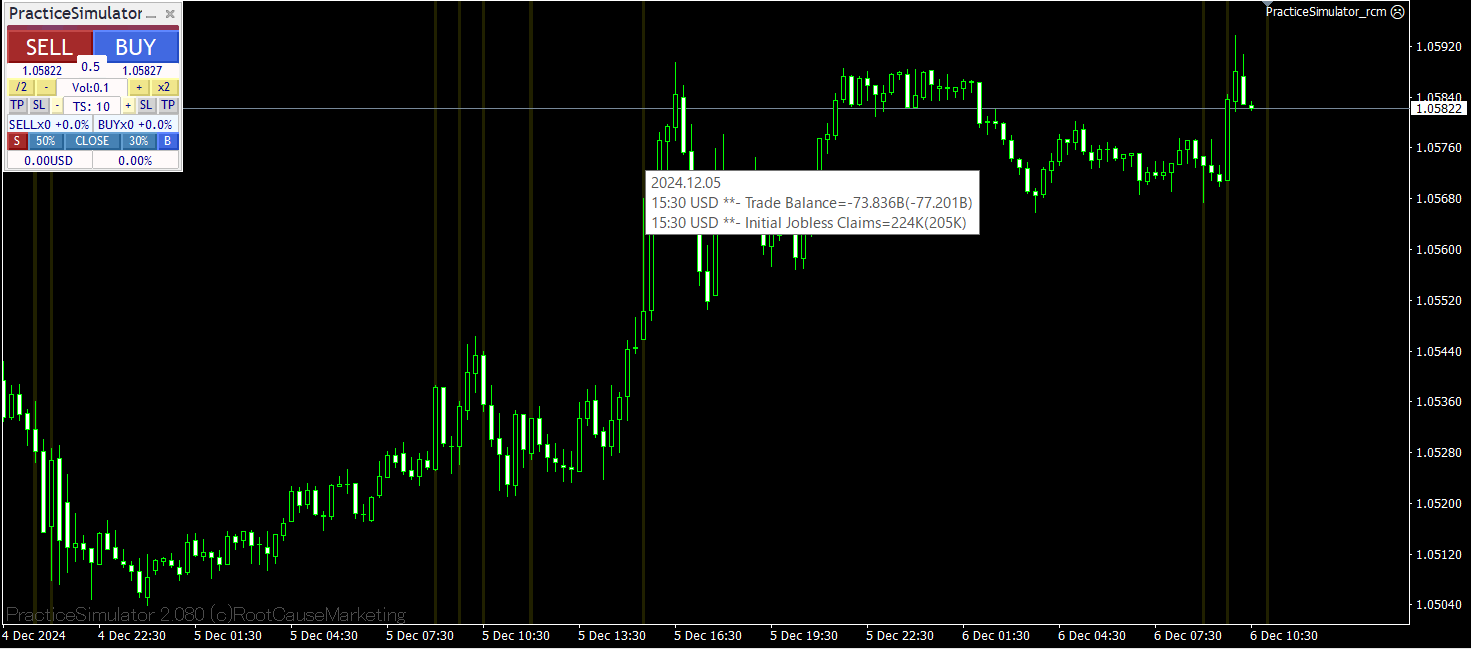
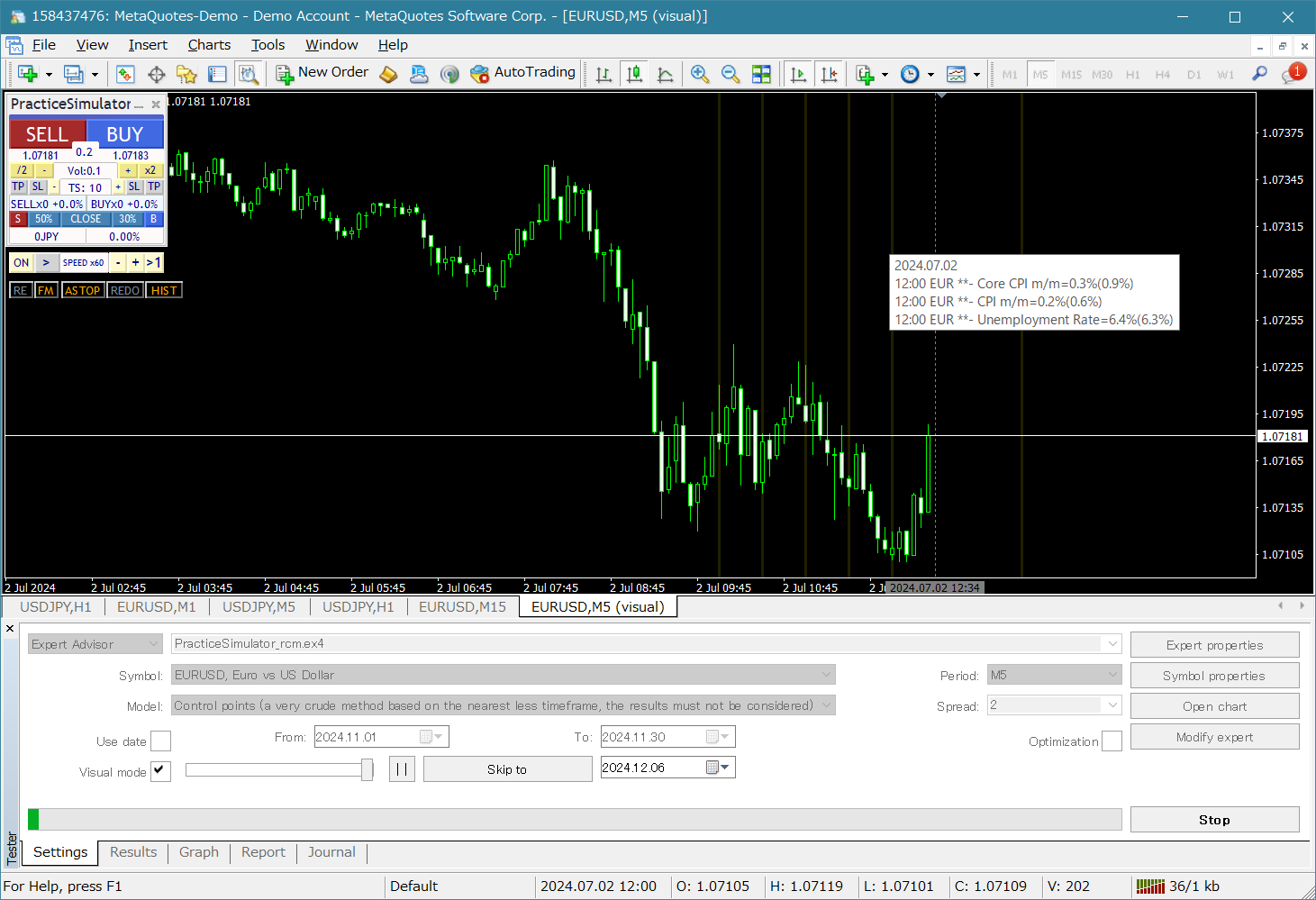
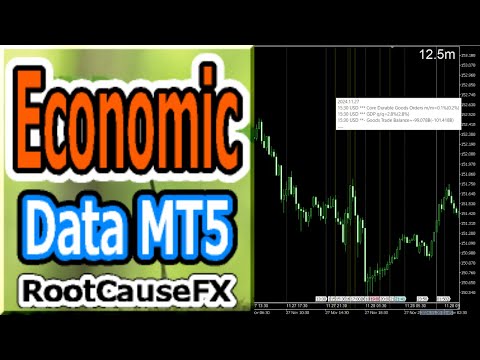
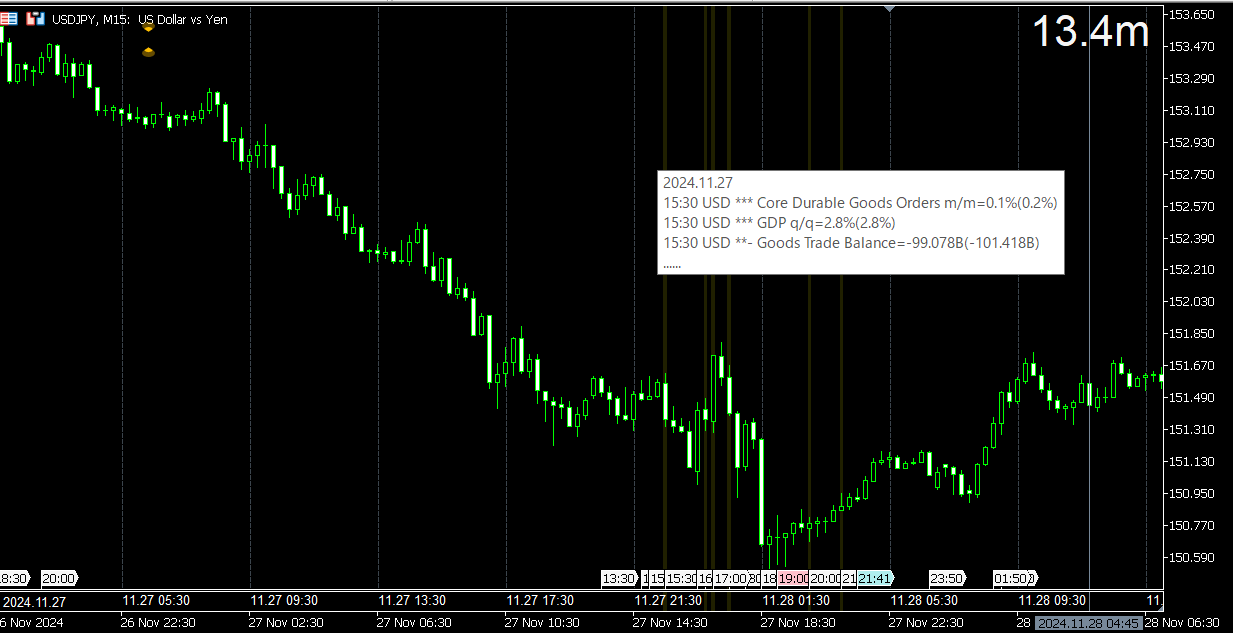
This tool offers two major benefits: it enhances the usability of MT5 economic indicators and enables seamless sharing of the data with MT4. For example, it allows you to effectively use economic indicator data from more than 10 years ago for training and backtesting. Additionally, it is compatible with MT4's PracticeSimulator, making it a valuable tool for everything from practicing trades with historical data to live trading on MT4.

For seamless sharing of economic indicators with MT4. >> MT4 version

Enhancements for MT5 Economic Indicators

  • Historical Data Access: Analyze economic indicator data, including events from more than 10 years ago, enabling detailed backtesting and historical review.
  • Customizable Display: The economic indicators are displayed unobtrusively on your charts, with options to blend the data into the background for clarity.
  • Automatic Time Adjustments: Ensures accurate display of past events by automatically adjusting for time zones and daylight saving time.

MT4 Compatibility and Benefits

  • Seamless Data Sharing: Use MT5 economic indicator data directly on MT4 charts, including for live trading and practice scenarios.
  • Integration with PracticeSimulator: Compatible with PracticeSimulator, enabling you to incorporate real-world economic events into your training and strategy testing.
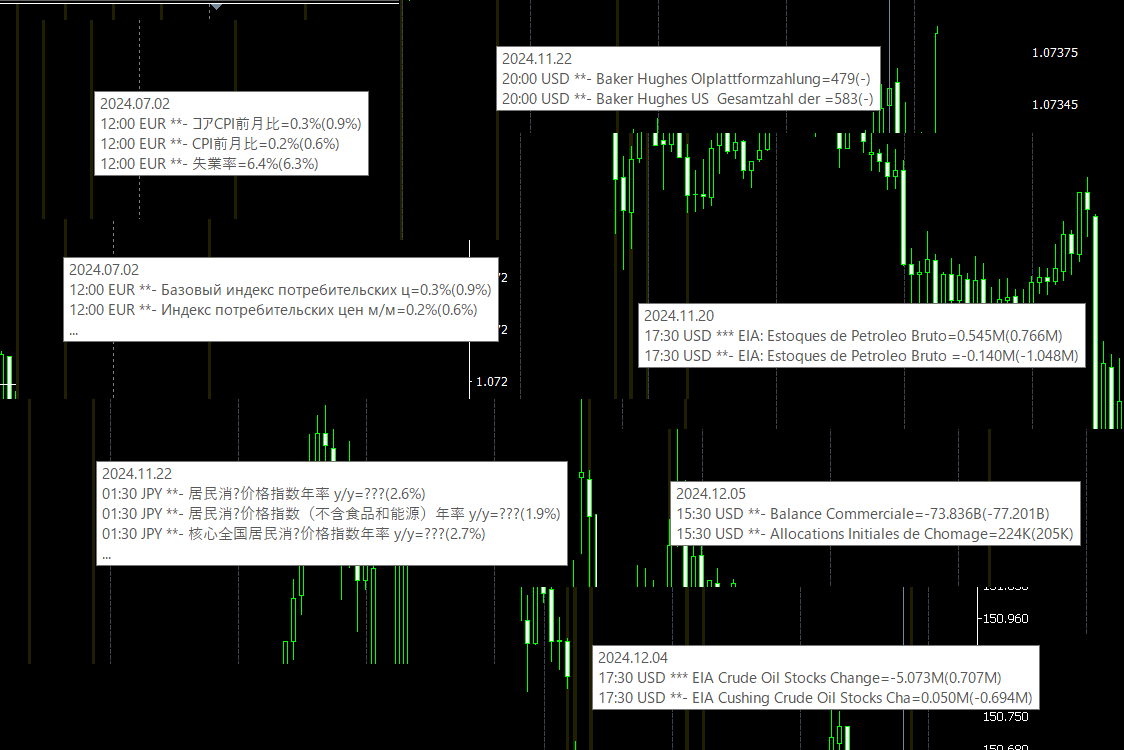
  • Multilingual Support: Economic indicators can be displayed in your local language, making the tool accessible and user-friendly.

The tool’s unique feature is its ability to link MT5 data with MT4 environments. By running the tool in MT5, data is collected and synced for use in MT4. This allows traders to use MT5’s economic indicator data for MT4 testing and live trading scenarios.

How to Use:

For MT5 Users: Simply attach the tool to your MT5 chart to display the economic indicators directly.

For MT4 Users: Follow the steps below

  1. First, run the tool on an MT5 chart to collect economic indicator data.
  2. Then attach the tool to an MT4 chart, where it will automatically link to the data collected from MT5.
  3. To keep receiving the latest economic indicators, MT5 must be running simultaneously.
  4. For backtesting or reviewing historical data, MT5 does not need to remain open once the data has been collected.

Benefits:

  • Backtesting: Review historical market conditions with economic data overlaid for deeper insights.
  • Training: Combine economic indicators with PracticeSimulator for more effective and realistic training.
  • Live Trading: Stay informed with real-time economic data integrated seamlessly into your charts.

This tool is an indispensable addition for traders looking to enhance their strategies with precise and accessible economic indicator data.

Whether for live trading, practice, or analysis, it delivers the insights you need, directly where you need them.
Recommended products
Multi-TF Trend Dashboard Product Description: Multi-TF Trend Dashboard is a technical indicator designed to provide a comprehensive view of market trends across multiple timeframes within a single interface. The utility analyzes the market structure from the 1-Minute (M1) timeframe up to the Monthly (MN1) timeframe, allowing traders to monitor momentum without switching between charts. Core Logic: The indicator determines the trend direction based on the slope of a Moving Average (MA) on each s
FREE
MiEasyOrderMT5
Carlos Miguel Iriondo
5 (1)
Mi Easy Order MT5 es un programa diseñado para facilitar y optimizar la ejecución de operaciones de compra y venta en los mercados financieros, proporcionando al trader una herramienta práctica, precisa y confiable para la gestión del riesgo. Su objetivo principal es simplificar el proceso de entrada al mercado, eliminando cálculos manuales y reduciendo errores comunes que suelen producirse al momento de definir el tamaño de la posición. El sistema permite al usuario ingresar como parámetro el n
FREE
Shadow System Candles - AI Trend Visualization Concept "Stop trading in the dark. Equip your chart with Night Vision." Shadow System Candles is the visual core of the "Shadow Operation" project. It eliminates market noise and visualizes the true direction of the trend using AI-based logic (ADX + MA integration). Note: This tool does not generate buy/sell arrows. It is designed to train your eyes to recognize "Active Trends" and "Dangerous Ranges. Key Features ・AI Logic Coloring[/b]: Automat
FREE
Nexus Breakout line
Mohammed Kaddour
5 (2)
INTRODUCTION : The breakout strength meter is a trading tool that is used to identify which currencies are the strongest to breakout, and which currencies are the weakest to breakout. The settings for the indicator are easy, and if you cannot find the settings, please leave a comment The tools are completely free to use Please, if you like the indicator, please leave a comment and rate the indicator in order to develop it
FREE
IS PRO Estructura Institucional
Medina Cortez Edison Armando
INSTITUTIONAL STRUCTURE PRO Market Structure + Swings + Fair Value Gaps with SOR Priority Institutional Structure Pro is an advanced market structure indicator based on institutional analysis. The system automatically identifies: Structural highs and lows Structure breakouts (SOR – Structure Override / priority breakout) Bullish and bearish fair value gaps (FVG) Real inefficiency zones with precise rectangles All directly on the chart, with no delay and no repainting. What Does the
FREE
Steady Runner NP EA
Theo Robert Gottwald
2.5 (2)
Introducing Steady Runner NP EA (Free Version): Precision Trading for GBPUSD M5 What is Steady Runner NP EA? Steady Runner NP EA is a   mathematically designed Expert Advisor (EA)   exclusively crafted for the   GBPUSD M5 timeframe . Built with advanced algorithms and statistical models, this EA automates your trading strategy to deliver   precision, consistency, and discipline   in every trade. Whether you're a seasoned trader or just starting out, Steady Runner NP EA is your reliable par
FREE
Gain a crystal-clear perspective on market volatility with the Candle Amplitude Oscillator. This lightweight and efficient tool moves beyond simple price analysis to show you the     true energy   within each candle, helping you make more informed trading decisions. Instead of guessing whether a market is active or quiet, this indicator gives you a precise, standardized measurement of volatility that works on any symbol and any timeframe. What is Candle Amplitude? Candle Amplitude measures the
FREE
ATR Multicurrency
Yuriy Kuzmin
5 (3)
Fully automated multi-currency trading algorithm that works only at night during a calmer market period with a unique market entry point search system. Does not use dangerous trading methods - martingale, grid and averaging. The main parameters for self-optimization are available in the EA settings. Default currency pairs USDCHF,GBPUSD,EURUSD, recommended TF: M5. Recommendations: in the Market Watch window, the currency pairs used in trading should be loaded. Attach an adviser to one chart (USDC
FREE
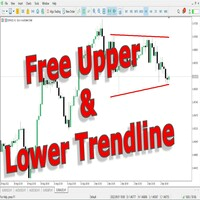
This indicator uses a different approach from the previous version to get it's trendlines. This method is derived from Orchard Forex, and the process of making the indicator is demonstrated in there video   https://www.youtube.com/watch?v=mEaiurw56wY&t=1425s . The basic idea behind this indicator is it draws a   tangent line   on the highest levels and lowest levels of the bars used for calculation, while ensuring that the lines don't intersect with the bars in review (alittle confusing? I know
FREE
BullBear Strength Meter The BullBear Strength Meter is a dynamic market sentiment and momentum indicator that quantifies the real balance of power between buyers and sellers. Instead of relying on a single formula, it fuses multiple proven analytical engines into one comprehensive strength model — giving traders an accurate visual readout of bullish and bearish dominance in real time. This tool measures, compares, and displays the intensity of market forces using advanced statistical and trend-b
FREE
Wa Candle Timer Percentage MT5
Wachinou Lionnel Pyrrhus Sovi Guidi
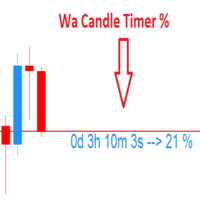
Wa Candle Timer Percentage MT5 is an indicator which shows the user how much time is remaining until the next candle will form. The percentage of the evolution of the current candle is also displayed. The user can set the percentage that the candle timer will change the color. These are the settings: 1- The percentage that the candle timer will change the color. 2- Color of Candle Timer when it's BELOW the percentage set by the user. 3- Color of Candle Timer when it's ABOVE the percentage set b

FREE
Echelon EA
Daniel Suk
5 (1)
Echelon EA – Chart Your Unique Trading Constellation Like the celestial guides that lead explorers through the vast universe, Echelon EA empowers you to create and optimize your very own trading strategies. This versatile system combines advanced grid and martingale techniques with cutting‐edge indicators, offering you an endless palette for designing a strategy that is truly your own. Craft Your Personal Strategy: Infinite Possibilities – Customize every parameter to build a trading system t
FREE
Daily HiLo
Nicanor Jr Cagape Layco
DailyHiLo Indicator Master the daily range like a pro. This indicator automatically plots the previous day’s high and low levels —a core element in the (Beat The Market Maker) trading approach—directly on your chart. These levels act as natural boundaries for intraday price action, helping traders identify potential reversal zones, breakout points, and liquidity targets. Key Features Accurate plotting of yesterday’s high and low for any symbol and timeframe. Works seamlessly with BTMM-inspired
FREE
Displays Forex Calendar events on the chart in the form of multi-colored lines, depending on the importance of the news. Displays the currency and the impact of the news (if available). [OPTIONS:] Display only news on a currency pair or All news. Display news by major currencies (optional). Setting the time interval of displayed news. Selecting the importance of displayed events. Displaying the effects of news (Impacts) and currency on the chart.
FREE
My products Product Line Trade Assistant MT5 Standard Trade Assistant MT5 PRO Risk Calculator Panel MT5 is a free panel for MetaTrader 5 designed for risk calculation, position size calculation and visual trade planning directly on the chart. The panel helps the trader calculate lot size in advance based on the selected risk, build Entry / Stop Loss / Take Profit levels, check the risk/reward ratio and see the trade structure before entering the market. This tool does not open trades, close pos
FREE
Colored Candle Timer
Saeed Hatam Mahmoudi
Candle Time (MT5) The Candle Time indicator shows the remaining time for the current candle on the active chart timeframe. It adapts automatically to the chart period and updates on every tick. This is a charting utility; it does not provide trading signals and does not guarantee any profit. Main functions Display the time remaining for the current candle on any timeframe (M1 to MN). Color-coded state: green when price is above the open (up), gray when unchanged, and red when below the open (do
FREE
ENGLISH DESCRIPTION (MQL5 Standard Optimized) Product Name: Ghostforge Bloom Requiem AI (MT5) [Subtitle: TEMA Velocity | Volatility Bloom | Cryo-Stasis Safety] Introduction Ghostforge Bloom Requiem AI is an elite trend-following system designed to capture high-velocity market moves while filtering out the noise of indecision. It operates on a sophisticated "Life Cycle" logic: It waits for the trend to be forged ( The Ghostforge ), confirms the market is expanding ( The Bloom ), and enters precis
Your swiss army knife to ancipate price reversals This indicator anticipates price reversals analyzing bullish and bearish pressure in the market. The buying pressure is the sum of all the accumulation bars over a certain number of days, multiplied by the volume. The selling pressure is the sum of all of the distribution over the same number of bars, multiplied by the volume. It gives you a measure of the buying pressure as a percentage of the total activity, which value should fluctuate from 0
FREE
Price Predictor Pro
Emma-ekong Ben Eshiet
Price Predictor Pro Turn Market Patterns into Predictable Profits! Are you tired of guessing where the market will go next? With Price Predictor Pro , you’ll trade with confidence by spotting powerful chart patterns and receiving precise price projections —directly on your MT5 chart. What Price Predictor Pro Does: ️ Detects high-probability chart patterns like Double Tops, Double Bottoms, Head & Shoulders, Flags, Pennants, and more . ️ Instantly projects the next price target using adv
FREE
PEAK MASTER LITE – PRECISION RESISTANCE NAVIGATOR Peak Master Navigator is a non-repainting technical indicator designed to accurately identify and visualize structurally confirmed resistance levels in real time. It detects valid swing highs based on market structure confirmation rules, ensuring that only meaningful and reliable resistance points are displayed on the chart. By filtering out weak or premature highs, Peak Master Navigator helps traders focus on true price reaction zones , improvi
FREE
Closer of all Trades
Andre Philipp Hollenbach
I’m sharing this EA here for free to support the trading community. I hope it’s helpful, and don’t hesitate to reach out if you have any questions or feedback! Closes all Trades with click on a button. This button will appear on the right bottom side of the chart.  When you remove the utility, the button will also dissappear. It closes all trades, no matter if Sell, Buy, the Symbol, if in profit or loss. One Click - and you solve it all. Especially made for demo and testing purposes. Use it wi
FREE
Yellow Indicator by Quant Atlas Creator:  https://www.quant-atlas.com/ Yellow Indicator is a clean reversal focused trading tool designed to highlight potential turning points using momentum behavior and RSI structure. The indicator looks for moments where momentum has moved through an important zone and begins to show signs of exhaustion. When conditions align, it plots dark yellow triangle signals directly on the chart. Both bullish and bearish signals use the same dark yellow visual identity,
FREE
This utility displays economic news directly on the chart. It shows upcoming events, the time until their release, their importance, and sends notifications. For: For traders who follow economic news For those who trade on the news For traders who want to receive timely alerts For users who need a simple and intuitive calendar right on the chart Key Features News Panel - Shows the nearest economic event on the chart Currency Filter - Displays only news for the currencies of your trading
FREE
SkyGeniX
ʿAsm Mhmd Samy Asmaʿyl Rmdan
SkyGeniX: Innovative Solutions for Intelligent Automation SkyGeniX is a cutting-edge tool designed to simplify and enhance your workflows with intelligent automation. Whether you're managing complex tasks or optimizing performance, SkyGeniX offers a seamless, user-friendly experience tailored to your needs. Key features include: Smart Optimization : Enhance efficiency and achieve your goals faster with advanced algorithms. Customizable Settings : Tailor the tool to your specific requirements for
FREE
ADR Day Range MT5 is an on-chart indicator for MetaTrader 5 that displays Average Daily Range information in a clear format. It helps traders evaluate the current daily range and the remaining distance to the calculated ADR level directly on the chart. 1. What the indicator shows The indicator shows ADR(N), which represents the average daily range based on previous completed daily candles. It also displays Today, which represents the current day range from High to Low in points. Room Up shows th
FREE
Intrade Sentinel Bos Assistant
Christian Alexander Foehl
Intrade Sentinel BOS Assistant – Smart Market Structure Execution Engine Precise market structure. Automated BOS logic. The Intrade Sentinel BOS Assistant is a powerful Expert Advisor (EA) for MetaTrader 5. It is specifically designed for the S&P 500 (US500 / SPX500) , combining smart-money logic with controlled risk management and full manual control via the chart panel. The EA can be used in both fully automated and semi-automated modes. It automatically detects Break of Structure (BOS) and re
Micro Volume
Aleksandr Goryachev
Volumes  ******************* Volumes для платформы секундных графиков Micro . ********************* Секундный график на порядок увеличит точность ваших входов и выходов. Секундный период , в привычном формате,   позволит увидеть то, что ранее было скрыто. Бесплатные индикаторы, дополнят визуальную картину, что, в совокупности выведет вашу торговлю на новый уровень. Идеально подходит как скальперам, так и трейдерам торгующим внутри дня.  Индикатор Volumes  для платформы Micro. Входные парам
FREE
Hilo Power
Dorival Cardozo
5 (2)
HiloPower – Advanced Trend and Market Strength Indicator for MetaTrader 5 HiloPower is not just another trend indicator developed from the traditional Hi-Lo. It was designed to offer a more complete and intelligent reading of the market, combining direction, strength, and intensity of movements. With it, the trader can see not only where the price is going, but also how strong and volatile that movement really is.
FREE
Dauntless FX
Michael Prescott Burney
Dauntless FX: Your Ultimate Trading Companion for AUDJPY H1 Chart Proven Profitability Since 2021! Introducing Dauntless FX, the ultimate trading system for AUDJPY on the H1 chart. Tested and shown to be consistently profitable with a near-perfect win rate since 2021, this system is designed to bring success to every trader. Key Features: 100 Tailored Strategies: Specifically designed for the AUDJPY H1 chart, providing a robust framework for trading success. Enhanced Drawdown Control: Protect yo
FREE
Good Monday MT5
Konstantin Kulikov
4 (1)
The expert trades at the opening of the market after the weekend, focusing on the price gap (GAP). Various sets of settings are ready (trading against or towards the GAP). At the same time, various options are available in the expert settings, allowing you to create your own unique sets yourself.    >>> Chat <<< Currency pairs for which the sets have been developed: GBPUSD, AUDUSD, NZDUSD, USDCAD, EURGBP, EURCHF, GBPCAD, GBPAUD, AUDCHF, AUDJPY, AUDNZD, CHFJPY, CADJPY, NZDJPY, NZDCHF, EURUSD, G
Buyers of this product also purchase
Trade Assistant MT5
Evgeniy Kravchenko
4.43 (211)
It helps to calculate the risk per trade, the easy installation of a new order, order management with partial closing functions, trailing stop of 7 types and other useful functions. Additional materials and instructions Installation instructions - Application instructions - Trial version of the application for a demo account Line function -   shows on the chart the Opening line, Stop Loss, Take Profit. With this function it is easy to set a new order and see its additional characteristics bef
Forex Trade Manager MT5
InvestSoft
4.98 (661)
Welcome to Trade Manager MT5 - the ultimate risk management tool designed to make trading more intuitive, precise, and efficient. This is not just an order placement tool; it's a comprehensive solution for seamless trade planning, position management, and enhanced control over risk. Whether you're a beginner taking your first steps, an advanced trader, or a scalper needing rapid executions, Trade Manager MT5 adapts to your needs, offering flexibility across all markets, from forex and indices t
Local Trade Copier EA MT5
Juvenille Emperor Limited
4.96 (139)
Experience exceptionally fast trade copying with the   Local Trade Copier EA MT5 . With its easy 1-minute setup, this trade copier allows you to copy trades between multiple MetaTrader terminals on the same Windows computer or Windows VPS with lightning-fast copying speeds of under 0.5 seconds. Whether you're a beginner or a professional trader, the   Local Trade Copier EA MT5   offers a wide range of options to customize it to your specific needs. It's the ultimate solution for anyone looking t
TradePanel MT5
Alfiya Fazylova
4.87 (157)
Trade Panel is a multi-functional trading assistant. The app contains over 50 trading functions for manual trading and allows you to automate most trading tasks. Before making a purchase, you can test the demo version on a demo account. Download the trial version of the application for a demonstration account: https://www.mql5.com/en/blogs/post/750865 . Full instructions here . Trade. Allows you to perform trading operations in one click: Open pending orders and positions with automatic risk cal
Beta Release The Telegram to MT5 Signal Trader is nearly at the official alpha release. Some features are still under development and you may encounter minor bugs. If you experience issues, please report them, your feedback helps improve the software for everyone. Telegram to MT5 Signal Trader is a powerful tool that automatically copies trading signals from Telegram channels or groups directly to your MetaTrader 5 account. It supports both public and private Telegram channels, and you can conn
Quant AI Agents
Ho Tuan Thang
5 (1)
Quant AI Agents are independent trading Expert Advisors. Instead of trading using a fixed strategy like other conventional EAs, Quant AI Agents   is a   multi-agent AI trading framework   that turns natural-language strategy prompts into live.  WANT THE SAME RESULTS AS MY LIVE SIGNAL?   Use the exact same brokers I do:   IC MARKETS , IC TRADING   .  Unlike the centralized stock market, Forex has no single, unified price feed.  Every broker sources liquidity from different providers, creating un
Trade Dashboard MT5
Fatemeh Ameri
4.95 (129)
Trade Dashboard simplifies how you open, manage, and control your trades, with built-in lot size calculation. It allows you to execute trades, manage risk, and control positions directly on the chart, with tools such as partial close, breakeven, and trailing stop. Designed to reduce manual work and help you stay focused on your trading decisions. A demo version is available for testing. Detailed explanations of features are provided within the MQL5 platform. Installation instructions are include
AI Agents Supervisor
Ho Tuan Thang
5 (1)
AI Agent Supervisor is NOT an Expert Advisor. AI Agent Supervisor   is a   multi-agent AI risk & portfolio supervisor   that watches every EA on your account and intervenes in real time.  WANT AN AI PORTFOLIO MANAGER WATCHING YOUR FLEET 24/7?   Run your fleet on the same brokers I do:   IC MARKETS , IC TRADING   .  Unlike the centralized stock market, Forex has no single, unified price feed.  Every broker sources liquidity from different providers, creating unique data streams. The Supervisor r
Exp COPYLOT CLIENT for MT5
Vladislav Andruschenko
3.91 (33)
Professional Trade Copier for MetaTrader 5 Fast, professional, and reliable trade copier for MetaTrader . COPYLOT allows you to copy Forex trades between MT4 and MT5 terminals with support for Hedge and Netting accounts. COPYLOT MT5 version supports: - MT5 Hedge to MT5 Hedge - MT5 Hedge to MT5 Netting - MT5 Netting to MT5 Hedge - MT5 Netting to MT5 Netting - MT4 to MT5 Hedge - MT4 to MT5 Netting MT4 version Full Description +DEMO +PDF How To Buy How To Install How to get Log Files H
Premium Trade Manager - Fast, Disciplined Trade Management for MetaTrader 5 Premium Trade Manager is for traders who want their focus on the decision while the panel runs the routine: sizing, placement, partials, trailing, news and prop-firm limits, handled the same disciplined way on every trade. It is a fast on-chart panel for MetaTrader 5 that takes the mechanical work out of every trade. You decide direction, symbol and timing; the panel sizes the position to your risk, places the order with
Power Candles Strategy Scanner - Self-Optimizing Multi-Symbol Setup Finder Power Candles Strategy Scanner runs the same self-optimizing engine that powers the Power Candles indicator - on every symbol in your Market Watch, side by side. One panel tells you which symbols are statistically tradable right now, which strategy wins on each, the optimal Stop Loss / Take Profit pair, and pings you the moment a fresh signal fires. This tool is part of the Stein Investments ecosystem - 18+ tools plus Max
FarmedHedge Pair Trading Dashboard
Tanapisit Tepawarapruek
5 (3)
Farmed Hedge Yield Farming | All Markets (Manual - Hybrid - Semi/Automated EA) MULTI-ASSET SUPPORT Trade any asset available on your broker - Forex: Major, Minor, Exotic pairs - Crypto: BTC, ETH, XRP, SOL, BNB - Stocks: Apple, Tesla, Amazon, Google, etc. - Commodities: Gold, Silver, Oil, Gas - Indices: US30, NAS100, SPX500, DAX40 - Any CFD your broker offers VERIFIED TRADING RESULTS - Farmed Hedge Yield Axi Copy:  https://www.mql5.com/en/signals/2356376 - Farmed Hedge Yield Exn Copy:   https:/
Footprint Chart Pro — Professional OrderFlow EA for MetaTrader 5 Version 6.34 | Professional tool for real traders | Institutional-Grade Visualization DEMO USERS - PLEASE SELECT EVERY TICK / REAL TICK WHEN TESTING AND YOU HAVE DOWNLOADED HISTORICAL DATA. IF YOU SEE A WAITING SCREEN AND IT IS NOT DOWNLOADING, IT MEANS YOU HAVE LOW HISTORICAL DATA. TRY 1 MIN AND 5 MIN FIRST ON 1 DAY DATA. ONE DAY DATA SHOULD BE THE NEWEST AND MOST CURRENT DATE. PLEASE WAIT UNTIL THE MARKET HAS ROLLED OVER PERIOD.
Trade copier MT5
Alfiya Fazylova
4.55 (44)
Trade Copier is a professional utility designed to copy and synchronize trades between trading accounts. Copying occurs from the account / terminal of the supplier to the account / terminal of the recipient, which are installed on the same computer or VPS . PROMOTION - If you have already purchased the "Trade Copier MT5," you can receive the "Trade Copier MT4" for free (for copying MT4 > MT5 and MT4 < MT5). For more detailed information about the conditions, please contact us via private message
Custom Alerts AIO: All-in-One Market Scanner – No Setup Required Overview Custom Alerts AIO is the fastest and easiest way to monitor multiple markets for real-time trading signals—without any setup or extra licenses. It comes with all required Stein Investments indicators already embedded, making it the perfect plug-and-play solution for traders who value simplicity and performance. Just load it to any chart and start receiving alerts across Forex, Metals, Crypto, and Indices. Shares can be a
The product will copy all telegram signal to MT5 ( which you are member) , also it can work as remote copier.  Easy to set up, copy order instant, can work with almost signal formats, image signal,  s upport to translate other language to English Work with all type of channel or group, even channel have "Restrict Saving Content", work with  multi channel, multi MT5 Work as remote copier: with signal have ticket number, it will copy exactly via ticket number. Support to backtest signal. How to s
AntiOverfit PRO MT5
Enrique Enguix
5 (6)
Before you buy an EA, check whether it really holds up or just got lucky in a backtest. Most robots are sold with a beautiful backtest. Rising equity curve. Good profit factor. Very few doubts. And yet, many of those EAs fall apart as soon as the market stops moving the way it did in that historical run. Why? Because a backtest only proves one thing: that the strategy worked on one specific price path. It does not prove it will hold up under different paths. It does not prove it is robust. And i
The News Filter MT5
Leolouiski Gan
4.78 (23)
This product filters   all expert advisors and manual charts   during news time.  It is able to remove any of your EA during news and automatically reattach them after news ends. This product also comes with a complete  order management system   that can handle your open positions and pending orders before the release of any news. Once you purchase   The News Filter , you will no longer need to rely on built-in news filters for future expert advisors, as this product can filter them all from her
Timeless Charts
Samuel Manoel De Souza
5 (6)
Timeless Charts is an all-in-one trading utility for professional traders. It combines custom chart types such as Seconds Charts and Renko with advanced order flow analysis using Footprints , Clusters , Volume Profiles , VWAP studies, and anchored analysis tools for deeper market insight. Trading and position management are handled directly from the chart through an integrated trade management panel , while Market Replay and Virtual Accounts provide environments for practicing trading skills and
YuClusters
Yury Kulikov
4.93 (42)
Attention: You can view the program operation in the free version  YuClusters DEMO .  YuClusters is a professional market analysis system. The trader has unique opportunities to analyze the flow of orders, trade volumes, price movements using various charts, profiles, indicators, and graphical objects. YuClusters operates on data based on Time&Sales or ticks information, depending on what is available in the quotes of a financial instrument. YuClusters allows you to build graphs by combining da
SMC Trade Pilot MT5
Prime Horizon
5 (1)
SMC Trade Pilot MT5 Semi-automatic trading assistant for Smart Money Concepts traders. Receive rich signals on Telegram with chart screenshot, then place the trade with a single tap. Manage your positions from your phone, even when you are away from your computer. The problem this solves Smart Money setups don't wait for you. Order Blocks and Liquidity Sweeps form during the London open, the New York open, or in the middle of the Asian session, often when you are at work, in a meeting, or simply
Seconds Chart MT5
Boris Sedov
4.59 (17)
Seconds Chart is a unique tool for creating second-based charts in MetaTrader 5 . With Seconds Chart , you can construct charts with timeframes set in seconds, providing unparalleled flexibility and precision in analysis that is unavailable with standard minute or hourly charts. For example, the S15 timeframe indicates a chart with candles lasting 15 seconds. You can use any indicators and Expert Advisors that support custom symbols. Working with them is just as convenient as on standard charts.
================================================================================ POC BREAKOUT - V20.72. Full Professional Grade Toolkit ================================================================================ POC Breakout is a full MetaTrader 5 trading dashboard for discretionary traders who want breakout signals, Point of Control (POC) context, volume profiles, order flow, market structure, news, alerts, and advanced trade planning in one professional workspace. Attached directly to you
Copy Cat More Trade Copier MT5 is a local trade copier and a complete risk management and execution framework designed for today’s trading challenges. From prop firm challenges to personal portfolio management, it adapts to every situation with a blend of robust execution, capital protection, flexible configuration, and advanced trade handling. The copier works in both Master (sender) and Slave (receiver) modes, with real-time synchronization of market and pending orders, trade modifications, pa
MT5 to Telegram Signal Provider turns your trading account into a signal provider. Every trade action, whether manual, by EA or from your phone, is instantly sent as a message to Telegram. You can fully customize the format or use a ready-made template for quick setup. [ Demo ] [ Manual ] [ MT4 Version ] [ Discord Version ]     New: [ Telegram To MT5 ] Setup A step by step user guide is available. Key Features Ability to customize order details sent to subscribers You can create a tiered subs
Advanced Dashboard Ultra
Mirel Daniel Gheonu
5 (3)
Stats Dashboard & Journal ULTRA for MT5   The Complete Trading Command Center: Analytics, Automation & News Intelligence.   Stats Dashboard ULTRA is the ultimate evolution of the analytics tool. It transforms MetaTrader 5 into a professional trading station, combining institutional-grade performance analysis with automated news   protection and advanced psychological metrics. Designed for manual traders and EA portfolio managers who demand total control.     NEW IN ULTRA VERSION    * News I
Telegram to MT5 Multi-Channel Copier automatically copies trading signals from your Telegram channels directly into MetaTrader 5. No bots, no browser extensions, no manual copying. You receive a signal on Telegram and the EA opens the trade on your terminal in a few seconds. The product includes two components: a Windows application that listens to your Telegram channels, and this Expert Advisor that executes the signals on your MT5 terminal. An MT4 version is also available. Setup guide and app
Prop Firm Os
Gayathiri Gopalakrishnan
5 (1)
PROP FIRM OS Structured Trading Assistant for MetaTrader 5 PROP FIRM OS is a structured trading assistant designed for MetaTrader 5 users who prefer rule-based market analysis and organized trading workflows. The Expert Advisor combines market analysis tools, scanner functions, dashboard monitoring, alerts, risk-control settings, and trade management features inside one system. PROP FIRM OS is designed to help traders follow selected rules, filters, and monitoring conditions during trading activ
VirtualTradePad One Click Trading Panel
Vladislav Andruschenko
4.59 (74)
Trading Panel for MetaTrader 5 — professional one-click trading from chart and keyboard A powerful trading panel for active manual trading, designed to open, manage, and close trades far faster and more efficiently than the standard MetaTrader interface. This panel is built for traders who want full control over positions, pending orders, profit management, and trading execution inside one professional workspace. This is not just another utility. It is a complete trading cockpit for MetaTrader
Trade Manager DaneTrades
Levi Dane Benjamin
4.28 (29)
DaneTrades Trade Manager is a professional trade panel for MetaTrader 5, designed for fast, accurate execution with built‑in risk control. Place market or pending orders directly from the chart while the panel automatically calculates position size from your chosen risk, helping you stay consistent and avoid emotional decision‑making. The Trade Manager is built for manual traders who want structure: clear risk/reward planning, automation for repeatable management, and safeguards that help reduc
More from author
Trade Simulator MT5
Sajiro Yoshizaki
5 (3)
Trade Simulator is not just a trade panel. It allows you to practice realistic trading using historical data, with interactive chart control. You can place trades, adjust stop levels, and monitor results as if trading live. You can also place and manage orders directly in the MT5 Strategy Tester. The same tool and interface can be used directly on live charts for actual trading. For detailed information, visit Setup & User Guide .  Also, take a look at the MT4 version and the  Advanced edition .
FREE
This tool adds an original time scale with a specified or automatically calculated time difference to the bottom of the chart. By using this handy tool, you can improve the readability of the chart and reduce mental stress by displaying it in a time format familiar to you or your country. Even if you don't need to calculate time differences, simply replacing the default time scale with Local_Time can improve the chart's readability. Local_Time supports various time formats such as "DD.MM hh:m
FREE
Trade Simulator MT4
Sajiro Yoshizaki
5 (3)
Trade Simulator is not just a trade panel. It allows you to practice realistic trading using historical data, with interactive chart control. You can place trades, adjust stop levels, and monitor results as if trading live. You can also place and manage orders directly in the MT4 Strategy Tester. The same tool and interface can be used directly on live charts for actual trading. For detailed information, visit Setup & User Guide .  Also, take a look at the MT5 version and the  Advanced edition .
FREE
SyncObjects is a tool that allows you to synchronize objects drawn on multiple charts in real-time within MetaTrader. Objects such as trend lines, horizontal lines, and text labels can be automatically reflected on other charts. It enables seamless analysis across different timeframes and currency pairs, enhancing the efficiency of your trading environment. Additionally, it works well with trade practice and testing tools like PracticeSimulator , allowing you to conduct chart analysis and testin
FREE
ClickDrag draws lines and moves objects on the chart easily. Click and then Drag to start drawing a trend line. Moving the mouse horizontally draws a price line. Moving the mouse vertically draws a date line. Existing lines and objects can be moved by Click&Drag. Displays the price and time difference between the start point to end point. After start Click&Drag, Shake left and right to change the color. Shake up and down to delete. - What is Click & Drag ? 1. press the left mouse button (pre
FREE
This tool adds an original time scale with a specified or automatically calculated time difference to the bottom of the chart. By using this handy tool, you can improve the readability of the chart and reduce mental stress by displaying it in a time format familiar to you or your country. Even if you don't need to calculate time differences, simply replacing the default time scale with Local_Time can improve the chart's readability. Local_Time supports various time formats such as "DD.MM hh:m
FREE
Practice Simulator Sync
Sajiro Yoshizaki
4.5 (2)
This module synchronizes with the Practice Simulator to display chart time and position information, not only for the same currency pair, but also display synchronized charts for various timeframes and different currency pairs. Note: This module does not work by itself. "Practice Simulator" is required. Practice Simulator https://www.mql5.com/en/market/product/98348 Two synchronisation modes are available. Simple synchronisation mode: You can easily create a synchronised chart by opening t
FREE
TradeSnap automatically captures and saves the screen when a BUY/SELL order is executed. Simply set it on the chart and it will be saved automatically without any extra work. Lines, arrows, etc. on the chart are also saved as they are in the image. The image size that can be 10000x10000 pixels, so you can save a horizontal image that shows the price movement history. Press the "s" key to save the current chart. Parameter info --Event Parameter-- Magic number (0=ALL):  Set Mugic Number if y
FREE
ArwByIdx MT4
Sajiro Yoshizaki
This product receives information from indicators/signal tools and displays arrows or notifications when specific conditions are met. For example, arrows and notifications are shown when MA25 and MA50 cross, when SAR reverses, when MACD changes its plus/minus, or when the closing price crosses the Bollinger Bands. Please refer to the sample settings image for specific configurations. For detailed manuals and configuration files: https://www.mql5.com/en/blogs/post/755082 A free version is als
FREE
ArwByIdx MT5
Sajiro Yoshizaki
This product receives information from indicators/signal tools and displays arrows or notifications when specific conditions are met. For example, arrows and notifications are shown when MA25 and MA50 cross, when SAR reverses, when MACD changes its plus/minus, or when the closing price crosses the Bollinger Bands. Please refer to the sample settings image for specific configurations. For detailed manuals and configuration files: https://www.mql5.com/en/blogs/post/755082 A free version is als
FREE
TradeSnap
Sajiro Yoshizaki
TradeSnap automatically captures and saves the screen when a BUY/SELL order is executed. Simply set it on the chart and it will be saved automatically without any extra work. Lines, arrows, etc. on the chart are also saved as they are in the image. The image size that can be 10000x10000 pixels, so you can save a horizontal image that shows the price movement history. Press the "s" key to save the current chart. Parameter info --Event Parameter-- Magic number (0=ALL):  Set Mugic Number if y
FREE
This tool offers two major benefits: it enhances the usability of MT5 economic indicators and enables seamless sharing of the data with MT4. For example, it allows you to effectively use economic indicator data from more than 10 years ago for training and backtesting. Additionally, it is compatible with MT4's PracticeSimulator , making it a valuable tool for everything from practicing trades with historical data to live trading on MT4. Important Notice This tool requires economic indicator data
FREE
ClickDrag draws lines and moves objects on the chart easily. Click and then Drag to start drawing a trend line. Moving the mouse horizontally draws a price line. Moving the mouse vertically draws a date line. Existing lines and objects can be moved by Click&Drag. Displays the price and time difference between the start point to end point. After start Click&Drag, Shake left and right to change the color. Shake up and down to delete. - What is Click & Drag ? 1. press the left mouse button (pre
FREE
Chart Buddy MT5
Sajiro Yoshizaki
Chart Buddy is an entertainment tool designed to add fun to your trading charts. A character moves along the right side of the chart, giving the impression that it's cheering on the price movement, adding a unique and enjoyable touch to your trading experience. While it doesn't affect your trades directly, the animations provide a lighthearted distraction and make it feel like you have a personal supporter. Key Features: Price Movement Supporter : The character moves in response to price directi
FREE
Msg2Slack is the tool that sends messages from MT4/MT5 text boxes to Slack. With just one click on the button located on the right side of the text box, you can easily send text and chart images to your Slack channel. Even if you draw lines, marks, comments, and more on the chart, the image will be posted. Whether you want to send messages to yourself or a group, this simple yet powerful tool makes it incredibly easy to capture chart images and send messages on the fly. The Msg2Slack tool is d
FREE
PL Graph Visualizer is a utility that displays real-time graphs of your account's profit and loss. The graph can be viewed separately by currency pair or by magic number, allowing you to see the changes in profit and loss of each position at a glance. This tool can be used in conjunction with the integrated close tool, which can be found here, to further enhance its functionality. https://www.mql5.com/en/market/product/116884 The real-time graphs show not only the total profit and loss of the
FREE
It works fine in the strategy tester. Try it out with the FREE DEMO.(build 1353 ) How to run the FREE DEMO => https://www.mql5.com/en/blogs/post/749299 Msg2Discord posts free text and captures from a text box to Discord. If you write lines, marks or comments on the graph, the image will be sent. A very useful and simple tool. - Sending Free Messages 1. enter free text in the EDIT box. 2. Press the SEND button. - Sending a free message + image capture 1. enter text in the EDIT box. 2. 2. pr
FREE
SpeedManager
Sajiro Yoshizaki
This is a playback speed management tool that enables efficient testing and analysis in the Strategy Tester. It enhances the usability of the Strategy Tester and can be used as a means to streamline the development and evaluation of trading strategies. Features of the tool: Playback speed control: Users can freely change the playback speed in the Strategy Tester, allowing them to fast forward, speed up and pause at any point. One bar, one tick forward: The 'Next Bar' button allows users to adva
FREE
Msg2Line sends free text and captures from a text box to "LINE Messenger". If you write lines, marks or comments on the graph, the image will be sent. You can address it to yourself or to a group. A very useful and simple tool. - Sending Free Messages 1. enter free text in the EDIT box. 2. Press the SEND button. - Sending a free message + image capture 1. enter text in the EDIT box. 2. 2. press the w/img button. - Sending a Captured Image 1. simply press the w/IMG button. *Requires LINE
FREE
Msg2Slack is the tool that sends messages from MT4/MT5 text boxes to Slack. With just one click on the button located on the right side of the text box, you can easily send text and chart images to your Slack channel. Even if you draw lines, marks, comments, and more on the chart, the image will be posted. Whether you want to send messages to yourself or a group, this simple yet powerful tool makes it incredibly easy to capture chart images and send messages on the fly. The Msg2Slack tool is d
FREE
Practice Simulator is an all-in-one trade simulator for backtesting, trading practice, and live trading. Whether you are a beginner needing practice or an experienced trader analyzing data, this tool supports all levels. Focus on Forex Trading, Market Analysis, or Strategy Optimization. Practice Simulator offers simulated trading anytime, even on market holidays, with a simple yet feature-rich interface for risk management and trade assistance. For detailed information, visit Setup & User Guide.
This tool does not work with the Strategy Tester. Test version: https://www.mql5.com/en/blogs/post/753244 This tool allows you to visualize account performance by showing key metrics based on your account balance. You can select the lines, drag and drop them to instantly see key metrics at different price points. If you ever want to return to the original position after moving the lines, simply double-click, and they will snap back to their original parameters. This tool can notify you when t
The "Binary Lab Simulator" is a tool designed for practicing and verifying trading strategies. This tool operates 24/7, including weekends and non-trading hours, and supports various expiration periods such as 30 seconds, 1 minute, and 3 minutes, creating an environment similar to real trading. It is compatible with external tools for analyzing entry results. Multiple templates can be saved easily, allowing for seamless testing from the online environment to the simulator. "Binary Lab Simulator"
Chart Buddy MT4
Sajiro Yoshizaki
Chart Buddy is an entertainment tool designed to add fun to your trading charts. A character moves along the right side of the chart, giving the impression that it's cheering on the price movement, adding a unique and enjoyable touch to your trading experience. While it doesn't affect your trades directly, the animations provide a lighthearted distraction and make it feel like you have a personal supporter. Key Features: Price Movement Supporter : The character moves in response to price directi
FREE
This tool does not work with the Strategy Tester. Test version: https://www.mql5.com/en/blogs/post/753244 This tool allows you to visualize account performance by showing key metrics based on your account balance. You can select the lines, drag and drop them to instantly see key metrics at different price points. If you ever want to return to the original position after moving the lines, simply double-click, and they will snap back to their original parameters. This tool can notify you when t
Filter:
No reviews
Reply to review