Trade Copier Ultimate

5

Trade Copier Ultimate - Telegram to MT5 Signal Copier

Trade Copier Ultimate automatically copies Telegram trading signals into MetaTrader 5. The EA can read signal messages, detect the symbol, order type, entry price, Stop Loss, Take Profit levels and selected update commands, then execute or manage the trade in MT5 using your lot and risk settings.

It is more than a basic Telegram to MT5 copier. TCU also supports Bot API and user-account Bridge workflows, Discord signal routing, local MT5 to MT5 trade copying, MT5 trade broadcasting to Telegram or Discord, image signal processing, multi-TP execution up to TP5, TP OPEN runner trades, Virtual Multi TP mode, entry zone handling, pending orders, broker symbol matching and prop firm risk controls.

Additional materials and instructions

Download Free Demo Version  -  Quick Setup and Manual  -  Download NTS Bridge  


TEST YOUR SIGNAL FORMAT HERE --->>>


Free demo: Test full EA and bridge on a demo before buying, Send me a message or send a messge in the demo group chat if you need support plus add your own signal format if none of the 500+ signal formats we have work for you. this demo is 100% same as live version just only works on a demo account :)

Main Features

  • Telegram to MT5 Copying: Copy supported Telegram trading signals into MetaTrader 5 using Telegram Bot API mode or the NTS Bridge workflow.
  • Private Channels and Groups: Use the Telegram user-account Bridge workflow for selected public channels, private channels, groups, chats and providers where your Telegram account has access.
  • Discord to MT5: Route supported Discord trading signals into MetaTrader 5 through NTS Bridge.
  • Local MT5 to MT5 Copier: Copy trades from one MT5 terminal to one or more receiver MT5 terminals on the same PC or Windows VPS.
  • MT5 to Telegram Trade Broadcasting: Send MT5 trade activity or account updates to Telegram or Discord destinations when configured.
  • Image Signal Processing: NTS Bridge can process supported image-based signal formats when configured. Results depend on image quality, font, layout, language and provider format.
  • Simplified Chinese Interface: Use the EA and NTS Bridge interface in Simplified Chinese, with English fallback where required.
  • Multi TP Handling: Process TP1, TP2, TP3, TP4 and TP5 multi-target signals using your selected lot distribution and execution settings.
  • TP OPEN / Runner Support: Supported signal formats can use TP OPEN as the final no-TP runner leg, so the last position can remain open for manual close, trailing stop or later management.
  • Virtual Multi TP Mode: Use signal TP levels on one main trade instead of splitting the signal into separate trades, when you prefer one-position multi-target management.
  • Delayed Virtual Multi TP: Apply a later SL and TP1-TP5 reply to one eligible existing trade when the original signal arrived without those levels.
  • Live Targets View: See actively tracked Virtual Multi TP trades, their remaining volume, completed targets and targets still pending.
  • Advanced TP Ladder: Move remaining positions to breakeven or previous TP levels after allocated TP positions close.
  • Moving TP: Extend the broker Take Profit farther away as price approaches it, using configurable approach distance, extension size, extension count and total limits.
  • Profit Lock: Protect accumulated profit by progressively moving the broker Stop Loss according to your selected activation and pullback settings.
  • Entry Zone Handling: NTS Bridge can read supported entry zones and route the signal according to the selected zone handling setup.
  • Pending Orders: Handle supported buy limit, sell limit, buy stop and sell stop signals, together with normal market orders.
  • Single-Price Pending Conversion: Optionally convert supported single-price signals into Buy Limit, Buy Stop, Sell Limit or Sell Stop orders.
  • Signal Updates: Supports selected close, breakeven, SL update, TP update and reply-based management commands where the source format allows correct matching.
  • Synchronized Bridge Control: Bridge ON/OFF controls on the EA Home and Source pages stay synchronized.
  • Broker Symbol Matching: Helps match common broker symbols and suffixes such as XAUUSD, GOLD, XAUUSDm, EURUSD.r, NAS100, US30, USOIL, BTCUSD and similar variations.
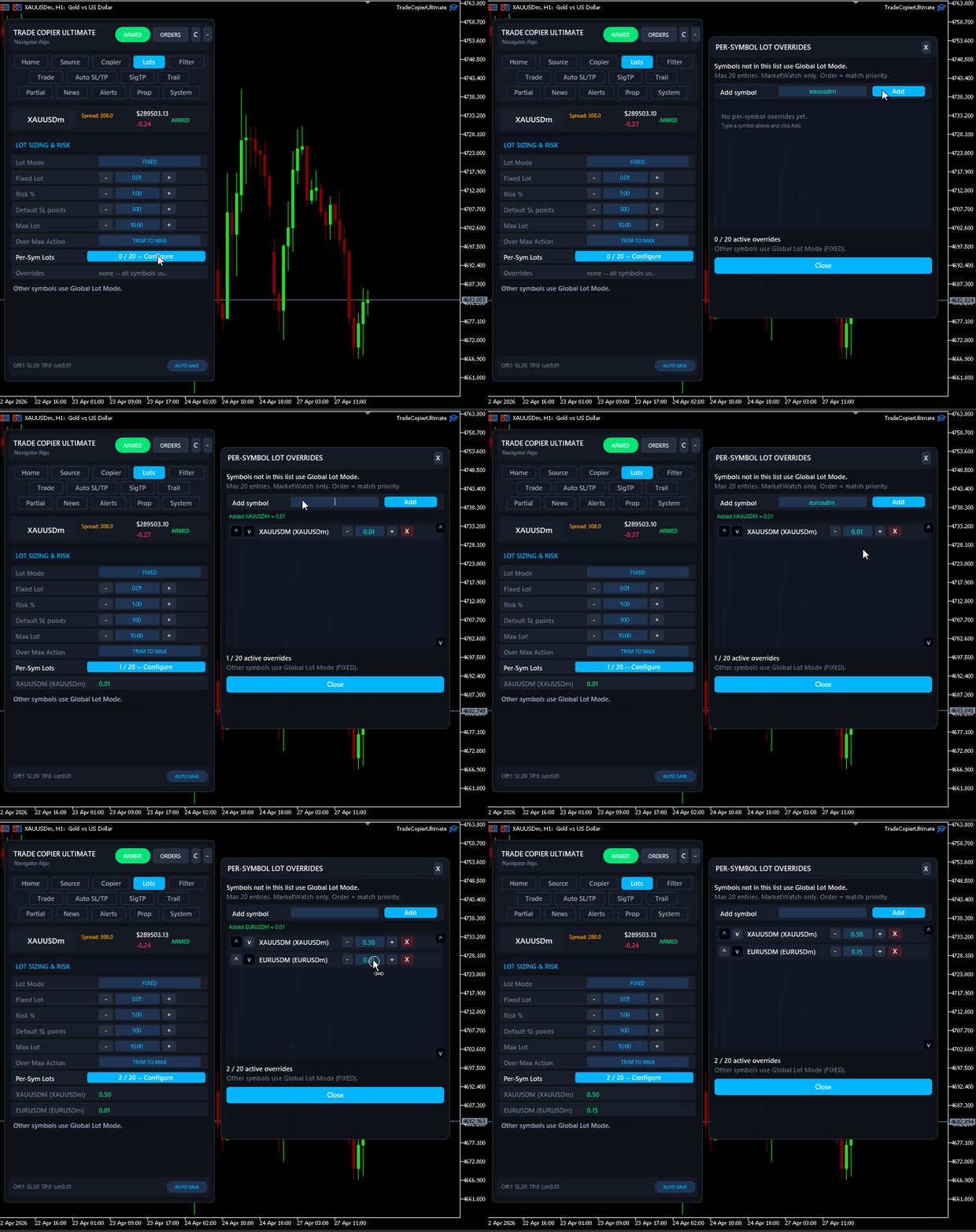
  • Lot Management: Use fixed lots, per-symbol lots, signal-based lot handling and fallback behavior according to your setup.
  • Prop Firm Risk Controls: Use daily loss limits, overall drawdown controls, maximum open trades, maximum position rules and other account protection settings.
  • Execution Filters: Control spread, slippage, entry distance, duplicate signals, allowed symbols, blocked symbols, skip keywords and provider routing.
  • News and Session Controls: Pause copying around configured news events or restrict trading to selected times.
  • Restart-Safe Memory: Persistent trade tracking helps the EA remember copied trades after MT5, VPS, Bridge or terminal restarts.

NTS Bridge

NTS Bridge is the companion Windows application used for Telegram user-account mode, Discord signals, image signal processing, group routing, local copier workflows, entry zone handling and advanced dashboards. It helps route signals from selected sources to the correct MT5 terminal and shows recent activity, parser output, delivery status and logs for troubleshooting.

Requirements

  • MetaTrader 5 terminal with AutoTrading enabled.
  • Windows computer or Windows VPS for Bridge-based workflows.
  • NTS Bridge for Telegram user-account mode, Discord, image signal processing, local copier, entry zone handling and advanced routing workflows.
  • Telegram Bot API mode can be used for suitable bot-based Telegram setups.
  • Demo testing is recommended before using the copier on any live account.

What You Get

  • The MT5 Expert Advisor installed from the MQL5 Market.
  • NTS Bridge Windows application for supported advanced workflows.
  • Free demo version for testing on demo accounts.
  • Setup guide, documentation and support through MQL5 messages or product comments.

Important Notes

  • Some workflows require WebRequest permissions in MetaTrader 5. The exact steps are shown in the Quick Setup and Manual page.
  • Bridge-based workflows require MT5, the EA and NTS Bridge to run on the same PC or Windows VPS.
  • Signal parsing depends on the format used by the provider. Please test your real signal format with the demo version.
  • TP5, TP OPEN runner, Virtual Multi TP and entry zone workflows depend on using a supported signal format and the correct EA/Bridge settings.
  • If you need help, send screenshots, logs, signal examples, broker symbol details and your selected workflow through MQL5 messages or product comments.

Disclaimer: Trade Copier Ultimate is an execution, copying, routing, filtering, trade management and risk-control tool. It does not provide trading signals, investment advice, profit guarantees, prop firm guarantees or protection from trading losses. Results depend on the signal provider, master account, broker execution, spread, slippage, liquidity, account type, VPS stability, MT5 settings, Bridge configuration, risk settings and user setup. Prop firm users should confirm that EAs, trade copiers, signal copying, local copying, broadcasting and automated execution are allowed by their firm's rules before using this tool on a funded account.

(c) 2026 Navigator Trading Systems

Reviews 5
Nikolay Zahariev
23
Nikolay Zahariev 2026.08.28 13:44 
 

I’ve been testing TCU with XAUUSD and I’m genuinely impressed with how well it works. The copier receives the signals reliably, handles Multi-TP correctly, opens the separate positions as expected, and manages the SL adjustments automatically. I’ve also tested pending BUY LIMIT and SELL LIMIT signals, and the execution and order handling have been very solid. What I especially like is the detailed logging. When something is rejected or behaves differently from expected, the logs make it much easier to understand exactly what happened. So far, TCU has been stable, reliable, and much more sophisticated than I expected. I’m continuing to test it with real signals, but based on my experience so far, I’m very happy with it and would definitely recommend it to other traders looking for a reliable trade copier.

nickxl
171
nickxl 2026.06.06 19:44 
 

High quality software. Always being updated with new features. The author responds quickly to messages and accommodates any unusual signal types. I have no problem recommending this product for anyone looking for a reliable copier.

narsi
306
narsi 2026.06.03 12:48 
 

Excellent copier and an even better author.He is very professional and extremely customer focused and works very hard.Highly recommended!

Recommended products
Smart FVG Stats
- Md Rashidul Hasan
5 (1)
The  Smart FVG Statistics Indicator  is a powerful MetaTrader 5 tool designed to automatically identify, track, and analyze Fair Value Gaps (FVGs) on your charts. Love it? Hate it? Let me know in a review! Feature requests and ideas for new tools are highly appreciated. :) Try "The AUDCAD Trader": https://www.mql5.com/en/market/product/151841 Key Features Advanced  Fair Value Gap  Detection Automatic Identification : Automatically scans for both bullish and bearish FVGs across specified histo
FREE
Martingale panel MT5
Mohammadbagher Ramezan Akbari
In this article, we would like to introduce the trade panel product with the Martingale panel. This panel is made in such a way that it can meet the needs of traders to a great extent. This trade panel actually consists of two trade panels at the same time, with the first one you can take positions with certain profit and loss limits, and with the second one, you can have positions with profit limits but without loss limits. When positions lose, a new position will be added based on the settings
Correlation Matrix Pro - Multi Currency Pairs Hedge Scanner Understand the relationships between currency pairs in real-time! A powerful analysis tool that helps you visualize statistical relationships between up to 6 currency pairs simultaneously. Perfect for portfolio management, risk diversification, and hedging strategies. KEY FEATURES - Real-time Pearson correlation using log returns - Monitor up to 6 currency pairs simultaneously - Automatic timeframe detection - Adjustable lookback
FREE
A professional panel for manual trading that keeps the whole trade cycle in one window on the chart, from a precise entry to protecting your account. Size every position strictly to a defined risk, build the trade with lines directly on the chart using the RR Tool, and place market and pending orders, grids and OCO. The panel takes position management off your hands: partial closing across up to five levels, six types of trailing stop, breakeven and Virtual SL/TP. Daily, weekly and monthly limit
Axilgo PipPiper CoPilot
Theory Y Technologies Pty Ltd
5 (2)
Axilgo Pip Piper CoPilot Elevate your trading game with the Axilgo Pip Piper CoPilot, the first in our revolutionary Pip Piper Series. This all-inclusive toolset is meticulously crafted for serious traders, focusing on key areas such as Risk Management, Trade Management, Prop Firm Rule Compliance, and Advanced Account Management . With CoPilot, you’re not just investing in a tool—you’re gaining a strategic partner in the intricate world of trading. Important Notice: To ensure you receive the fu
FREE
Bohemia Gold MT5
Vladislav Taska
4.75 (4)
Bohemia Gold MT5 is  Trend & Volatility EA trading system designed specifically for Gold (XAUUSD) . It combines higher-timeframe trend filtering , trend detection , volatility-based SL management , and advanced trade management to adapt market conditions. It uses style logic focused on trend strength, volatility, and capital protection. NOTE:   Based on backtests, I found better trading results with the following setup: D1/H4/H2 (Trend/ADX/ATR & trade). The SET file can be downloaded here … bohe
FREE
CV Guardian Service – Professional MT5 Monitoring & Maintenance System CV Guardian Service is a professional background service for MetaTrader 5 designed for continuous monitoring, diagnostics, and technical maintenance of your MT5 environment. The service runs without a chart in the background and monitors key operational conditions including terminal health, broker connectivity, system resources, execution quality, charts, Strategy Tester resources, and potential technical risks. Features Con
Fixed Volume Profile
Carlos Pascual Perez Maturano
This indicator, titled "Fixed Volume Profile.mq5", is a custom tool for MetaTrader 5 (MQL5) designed to calculate and display a Volume Profile over a user-defined fixed time range. The Volume Profile shows the distribution of trading volume at different price levels during a specific period, helping to identify areas of high activity (such as Points of Control or POCs) and volume-based support/resistance areas. Main Functionality: Interactive Range: The indicator creates two vertical lines on
FREE
Smart EMA Trend EA – Precision Trend Trading with Dynamic Risk Management Version: 1.00 Platform: MetaTrader 5 Account Type: Supports both netting and hedging accounts Timeframe: M5 (adjustable) Strategy Type: Trend-following based on dynamic EMA crossover and alignment Risk Management: Fully integrated with custom SL/TP, risk-reward settings, and lot validation Description: Smart EMA Trend EA is a powerful algorithmic trading solution designed to identify high-probability entries using
Grid Trading EA is a semi-automated one-click trading EA for both Normal Trading and Grid/Martingale Trading . Normal Trading Simply click Buy or Sell directly from the chart. The EA will automatically manage trades by: Setting Stop Loss and Take Profit Managing Trailing Stop Grid / Martingale Trading (For Hedging Account Type Only) When Grid Trading mode is enabled, the EA will automatically open additional grid orders at specified distances while increasing the lot size based on your settings.
SPECIAL LAUNCH OFFER: $30 (1-Month Rent) Limited time offer to build our community and gather feedback! AmbM GOLD Institutional Scalper A high-precision M5 algorithm for XAUUSD (Gold) , engineered to trade exclusively at Institutional Liquidity Levels ($5/$10 psychological marks). PERFORMANCE DATA (BUY ONLY) • Win Rate: 87.09%. • Safe Growth: +$4,113 profit on $10k (13.75% Max Drawdown). • Extreme Stress Test: Successfully generated +$22,997 in a 5-year stress test (2020-2026), proving
================================================================ MATRIX CONDITION MONITOR Live Trade Condition Panel for MetaTrader 5 Fully Automatic -- Works with ALL Matrix EAs ================================================================ NEVER MISS A TRADE SETUP AGAIN Matrix Condition Monitor is a free utility that attaches to any chart and automatically checks all 10 trade conditions in real time -- showing you exactly why a trade will or will not open, and alerting you the moment ever
FREE
EA Nation
Joseph Anthony Aya-ay Yutig
The Expert Advisors' strategy came from a Facebook Group EA Nation. The group has over 40k members. It opens a hedge trade for every new candle and opens grid when the position is on the losing side of the trade.  Average Grid = N                     = the sum of 6 bars before the current bar/ N Timeframe = it opens a new hedge trade when a new bar appears Auto Lot = 1 Lot means in $10,000 Lot Size will be 0.01 NO MORE HEDGE = When one side reaches to N trades, it won't open a hedge trade un
Imagine flying a real aircraft without ever stepping into a flight simulator. That's what trading is like. You have to simulate your strategy before you can take it to a live market. It is good if you can simulate things speedily before even stepping into any live market, or before coming up with an automated system.  People don't have all day to stare at a higher timeframe chart until the entry signal finally arrives. That's why I built this so that you can simulate your strategy with speed. Th
FREE
One thousand Pip  Set1:TP/SL 20kpip. Set2:TP/SL 10kpip. Set3: TP/SL 5k pip. Set4:  TP/SL 2k pip. Set5:  TP/SL 500 pip. Rate Prop FTMO Broker.  Only Pair DE40, US100, US30. Automatic added EU London Session. This Version works with fixed Lot and buy/sell. Robot Strategy: Trade open = First "Round Price-Number Entry". Write me a Message of Questions when undecided. I send ex4 Code by Request.
SwiftEdge Scalper Professional Tick Scalping EA with Full Manual Control Scalping demands split-second decisions, precise risk management, and seamless order execution. Managing breakeven calculations, trailing stops, and multiple positions while watching price action is overwhelming without the right tools. SwiftEdge Scalper is your professional trading assistant designed for active scalpers and day traders. Execute trades with one click or keyboard shortcut, while the EA handles breakeven, tra
Automatic Trade Calculation Panel   One-Klick-Trading Automatic calculation of Lot sice Atuomatic calulation of Stop-Loss and TakeProfit Up to 3 partial closings Trailingstop (Stop-Loss moves automatically)   The lot size is calculated by the previously determined risk (e.g. 1.0% of the account size) and the distance of the Stop Loss from the entry point. The distance from the Stop Loss to the entry point results from the ATR indicator multiplied by a freely selectable factor. The Stop Loss and
CopyMasterPro MT5
Kum Tong Yu
5 (1)
# CopyMaster Pro Trade Copier ## What Is This CopyMaster Pro is a local trade copying tool that syncs trades between multiple MT4/MT5 terminals. One account trades, others follow automatically. No server needed, no VPS required. Works on a single computer with multiple terminals. ## What It Does Copies trades from one account to others. You open a gold position on Account A, Account B and C will follow. You close on A, others close too. Simple as that. ## Why This One **Free** — No monthl
FREE
no Trade operation, Robot Set auto SL to every manually Trade from a Phone Automatic Phone TradeManager Need just Set on 1 Symbol Auto BE Trigger is added that immediately sets a stop-loss for every () But does NOT calculate position size based on risk, allows the fixed  SL to   adjusted dynamically drag on Chart or Menu. It protects capital around the clock, reduces emotional mistakes, and ensures consistent risk management.
FREE
SinalTradeToMT5
Angelo Marcelo Serafin
SinalTrade is a professional Telegram-to-MetaTrader 5 signal management platform. The EA works as a secure Connector between MT5 and the SinalTrade Interface. Most settings are managed directly from the Interface, making configuration easier and allowing centralized control of Telegram providers, MT5 accounts, execution rules and risk management. Main features: • Telegram signal monitoring • Automatic BUY/SELL signal detection • Market, STOP and LIMIT orders • Entry ranges and multiple entries •
MT5 Trade Manager
Anthony Dewayne Wasome
MT5 Trade Manager is a MetaTrader 5 trade management panel designed to provide order execution, position monitoring, and risk control tools within a single interface. It operates as an on-chart dashboard with multiple pages for different trading functions. The tool is designed to support manual trading by centralizing trade operations and account monitoring in one place without requiring external applications. Interface Structure The dashboard is organized into six main sections: Dashboard Provi
FREE
Manual Trade Helper
Vipul Gautam
5 (1)
This Utility Bot is for New Traders, that struggle to spot the Trend direction. It also make you conscious about different Timeframes Bar Status.  Utility have 3 Moving Averages totally configurable by input parameters. 3MA Based Trend is shown for the current Timeframe selected on the chart. (Line 1) 3MA Based Trend for Daily Timeframe. (Line 2nd) Also provide quick information about the currently Hourly Daily and Weekly Candle Status.  Utility work on 1 Min Bar control, so comment section info
FREE
DeepTrade SessionIntel
Yasir Mohammed Sachit Sachit
Most session tools try to cover everything. DeepTrade Session Intel does the opposite — it focuses on what actually moves the market: the London and New York sessions, tuned for Gold (XAUUSD) and US30. It maps the liquidity and the real activity window so you trade when the market is alive, not when it's dead.   WHAT IT SHOWS - London and New York session boxes drawn at their real server hours - Session HIGH and LOW lines — the liquidity that price hunts - Pre-session breakout range — the conso
PZ Mean Reversion MT5
PZ TRADING SLU
1 (1)
Outperform traditional strategies: effective mean reversion for savvy traders Unique indicator that implements a professional and quantitative approach to mean reversion trading. It capitalizes on the fact that the price diverts and returns to the mean in a predictable and measurable fashion, which allows for clear entry and exit rules that vastly outperform non-quantitative trading strategies. [ Installation Guide | Update Guide | Troubleshooting | FAQ | All Products ] Clear trading signals Ama
Advisor for hedging trading or pair trading. A convenient panel allows you to open positions on the necessary trading instruments and lots. Automatically determines the type of trading account - netting or hedging. Advisor can close all its positions upon reaching profit or loss (determined in the settings). A negative value is required to control losses (for example, -100, -500, etc.). If the corresponding fields are 0, the EA will not use this function.   Settings: Close profit (if 0 here
Relentless Trade Journal
Loysean Mappang Bandaay
Relentless Trade Journal — Free Trade Statistics for MetaTrader 5 Most trade journals flatter you. They add up your closing profits and skip the commission you paid on entry, so they show a rosier number than the truth. You think you are breaking even when you are actually losing to costs. Relentless Trade Journal shows you the honest picture, right on your chart. It is free. If it shows you one cost you were missing, an honest review helps other traders find it. It is a non-trading utility.
FREE
Kairos Session
Alexandre Vincent Traber
KAIROS Session EA **Overview** Most EAs try to catch every move on every bar — and bleed spread and false signals doing it. KAIROS Session EA does the opposite: it picks one clean directional trade per session, waits patiently for the market to reveal its hand, then commits. Less noise, less overtrading, more signal. Primary optimization target: **USDJPY, M30 timeframe**. The session-based logic adapts cleanly to any Forex pair — re-optimize per instrument for best results. **How It Works**
FREE
Volume Delta Grid EA The Volume Delta Grid EA is an advanced, automated trading system for MetaTrader 5 that merges institutional-style order flow concepts—specifically Relative Volume (RVOL) and Volume Delta —with dynamic grid and basket management strategies. Rather than relying on lagging price oscillators, this EA identifies high-probability breakout and trend-continuation zones by analyzing intra-bar buying and selling pressure. It then manages the trades using a highly customizable grid
FREE
Copy Trade Pro MT5
Nitu Brijesh Yadav
MasterEA MT5 Premium – Professional Copy Trade Sender One Purchase. Unlimited Possibilities. MasterEA MT5 Premium is a professional MT5 trade broadcasting solution that instantly sends your trading activity to one or multiple receiving accounts. Buy only the Master EA. SlaveEA MT5 Premium (Trade Receiver) is included FREE with your purchase. No additional payment is required for the Receiver EA. What Can Be Copied? MasterEA automatically broadcasts: Market Buy Orders Market Sell Orders
Trade Manager DaneTrades
Levi Dane Benjamin
4.23 (30)
DaneTrades Trade Manager is a professional trade panel for MetaTrader 5, designed for fast, accurate execution with built‑in risk control. Place market or pending orders directly from the chart while the panel automatically calculates position size from your chosen risk, helping you stay consistent and avoid emotional decision‑making. The Trade Manager is built for manual traders who want structure: clear risk/reward planning, automation for repeatable management, and safeguards that help reduc
Buyers of this product also purchase
Trade Assistant MT5
Evgeniy Kravchenko
4.43 (215)
It helps to calculate the risk per trade, the easy installation of a new order, order management with partial closing functions, trailing stop of 7 types and other useful functions. Additional materials and instructions Installation instructions - Application instructions - Trial version of the application for a demo account Line function -   shows on the chart the Opening line, Stop Loss, Take Profit. With this function it is easy to set a new order and see its additional characteristics bef
Forex Trade Manager MT5
InvestSoft
4.98 (676)
Trade Manager MT5 is an advanced position size calculator and trade management tool for MetaTrader 5, designed to help traders plan trades faster, control risk more precisely, and manage open positions directly from the chart. It combines order placement, risk based lot calculation, Stop Loss and Take Profit management, Break Even, Trailing Stop, Partial Close, Equity Protection, and external trade management in one panel. Whether you trade forex, indices, metals, commodities, crypto, or future
FarmedHedge Pair Trading Dashboard
Tanapisit Tepawarapruek
5 (5)
Farmed Hedge Yield Farming | All Markets (Manual - Hybrid - Semi/Automated EA) VERIFIED TRADING RESULTS - Farmed Hedge Yield Axi Copy:  https://www.mql5.com/en/signals/2356376 - Farmed Hedge Yield Exn Copy:   https://www.mql5.com/en/signals/2356404 - Farmed Hedge Yield V Copy:  https://www.mql5.com/en/signals/2357156 IMPORTANT NOTICE: FarmedHedge is a MANUAL-FOCUSED TRADING UTILITY ,not a fully automated EA. Results shown on this Signal include manual trades and overall strategic management.
Beta Release The Telegram to MT5 Signal Trader is nearly at the official alpha release. Some features are still under development and you may encounter minor bugs. If you experience issues, please report them, your feedback helps improve the software for everyone. Telegram to MT5 Signal Trader is a powerful tool that automatically copies trading signals from Telegram channels or groups directly to your MetaTrader 5 account. It supports both public and private Telegram channels, and you can conn
Telegram to MT5 MultiChannel Copier
Sergio Marquez Uroz
4.46 (13)
Telegram to MT5 Multi-Channel Copier   automatically copies trading signals from your Telegram channels straight to MetaTrader 5. No bots, no browser extensions, no manual copying. A signal arrives in Telegram and the EA opens the trade in your terminal within seconds. And before you copy a channel, the built-in backtester shows you what that channel would have done in your account. The product has two components: a Windows application that listens to your Telegram channels, and this Expert Advi
================================================================================ POC BREAKOUT - V20.72. Full Professional Grade Toolkit ================================================================================ POC Breakout is a full MetaTrader 5 trading dashboard for discretionary traders who want breakout signals, Point of Control (POC) context, volume profiles, order flow, market structure, news, alerts, and advanced trade planning in one professional workspace. Attached directly to you
TradePanel MT5
Alfiya Fazylova
4.88 (167)
Trade Panel is a multi-functional trading assistant. The app contains over 50 trading functions for manual trading and allows you to automate most trading tasks. Application instructions + video instructions: https://www.mql5.com/en/blogs/post/772292 Trial version of the application for a demo account: https://www.mql5.com/en/blogs/post/750865 How to install the application: https://www.mql5.com/en/blogs/post/756239 How to test the application in visual mode: https://www.mql5.com/en/blogs/post/7
Premium Trade Manager - The Trade Panel With a Coach Built In Series price: 89 USD until Sunday, 13 September 2026, then 111 USD again. The setup was the easy part. By the third order of the morning the lot size gets worked out in your head, the stop lands where the hand stops, and the numbers due in forty minutes sit in a tab you closed at breakfast. Premium Trade Manager takes that off you: one click sends the order at the size your risk allows, entry, stop and target as draggable lines and th
Astro Trade MT5
Indra Maulana
5 (7)
25% discount on the release of the tool: only for the next 3 buyers Send a message to receive a demo version. AstroTrade Trading Assistant AstroTrade is a comprehensive multi-functional trading utility developed for the MetaTrader 5 platform. It integrates essential tools for trade execution, risk management, and technical monitoring into a single unified interface. The application is designed to assist traders in managing their daily operations through a visual and structured environment. Vi
Exp COPYLOT CLIENT for MT5
Vladislav Andruschenko
3.97 (35)
Professional Trade Copier for MetaTrader 5 Fast, professional, and reliable trade copier for MetaTrader . COPYLOT allows you to copy Forex trades between MT4 and MT5 terminals with support for Hedge and Netting accounts. COPYLOT MT5 version supports: - MT5 Hedge to MT5 Hedge - MT5 Hedge to MT5 Netting - MT5 Netting to MT5 Hedge - MT5 Netting to MT5 Netting - MT4 to MT5 Hedge - MT4 to MT5 Netting MT4 version Full Description +DEMO +PDF How To Buy How To Install How to get Log Files H
Welcome to ENTRY IN THE ZONE WITH SMC MULTI TIMEFRAME Entry In The Zone and SMC Multi Timeframe is a real-time market analysis tool based on Smart Money Concepts (SMC), designed to analyze market structure, price direction, and key trading zones. It supports both Single-Timeframe Analysis and Multi-Timeframe Analysis, providing a clearer view of the overall market structure across multiple timeframes, with real-time BUY / SELL signals that do not repaint. It is designed to help filter trading op
EA Overfitter
Stephen J Martret
5 (1)
That backtest looks great. But will it still be making money tomorrow, next week, next month? EA Overfitter re-runs your EA on 100 price histories it has never seen. One score tells you if the edge is real. A backtest tells you what an EA did on one price history — the one that happened to occur. What you cannot tell from it is how much of that result was the strategy and how much was the particular path. EA Overfitter answers that. It builds up to 100 synthetic price histories your EA has n
Signal Trading View to MT5 Pro
Mirel Daniel Gheonu
4.5 (2)
Signal TradingView to MT5 Pro  Instant professional execution between TradingView and MetaTrader 5 Automate your trading strategy with the most robust communication bridge between TradingView alerts and real execution in MT5. Designed for traders who demand speed, flexibility, and impeccable risk management, this Expert Advisor transforms any alert message into a precise market or limit order.   Install and TEST the TRIAL version HERE STRENGTHS AND ADVANTAGES Universal Parsing Engine (Propriet
Anchor Trade Manager
Kalinskie Gilliam
5 (9)
Your EAs cannot see each other, but Anchor can. Anchor gives you one place to coordinate your EAs, manage risk, and decide when trading is allowed. It works alongside the trading bots you already use without any changes to them. The Problem One EA opens a trade. Then another starts trading. The next thing you know, you wake up to multiple grids built across your account. Each EA may be doing exactly what it was designed to do, but together they can place far more risk on your account than you in
MT5 to Telegram Signal Provider turns your trading account into a signal provider. Every trade action, whether manual, by EA or from your phone, is instantly sent as a message to Telegram. You can fully customize the format or use a ready-made template for quick setup. [ Demo ] [ Manual ] [ MT4 Version ] [ Discord Version ]     New: [ Telegram To MT5 ] Setup A step by step user guide is available. Key Features Ability to customize order details sent to subscribers You can create a tiered subs
Power Candles Strategy Scanner - Self-Optimizing Multi-Symbol Setup Finder Power Candles Strategy Scanner runs the same self-optimizing engine that powers the Power Candles indicator - on every symbol in your Market Watch, side by side. One panel tells you which symbols are statistically tradable right now, which strategy wins on each, the optimal Stop Loss / Take Profit pair, and pings you the moment a fresh signal fires. This tool is part of the Stein Investments ecosystem - 18+ tools plus Max
The product will copy all telegram signal to MT5 ( which you are member) , also it can work as remote copier.  Easy to set up, copy order instant, can work with almost signal formats, image signal,  s upport to translate other language to English Work with all type of channel or group, even channel have "Restrict Saving Content", work with  multi channel, multi MT5 Work as remote copier: with signal have ticket number, it will copy exactly via ticket number. Support to backtest signal. How to s
Footprint Chart Pro — Professional OrderFlow EA for MetaTrader 5 Version 6.34 | Professional tool for real traders | Institutional-Grade Visualization DEMO USERS - PLEASE SELECT EVERY TICK / REAL TICK WHEN TESTING AND YOU HAVE DOWNLOADED HISTORICAL DATA. IF YOU SEE A WAITING SCREEN AND IT IS NOT DOWNLOADING, IT MEANS YOU HAVE LOW HISTORICAL DATA. TRY 1 MIN AND 5 MIN FIRST ON 1 DAY DATA. ONE DAY DATA SHOULD BE THE NEWEST AND MOST CURRENT DATE. PLEASE WAIT UNTIL THE MARKET HAS ROLLED OVER PERIOD.
Timeless Charts
Samuel Manoel De Souza
5 (8)
Timeless Charts is an all-in-one trading utility for professional traders. It combines custom chart types such as Seconds Charts and Renko with advanced order flow analysis using Footprints , Clusters , Volume Profiles , VWAP studies, and anchored analysis tools for deeper market insight. Trading and position management are handled directly from the chart through an integrated trade management panel , while Market Replay and Virtual Accounts provide environments for practicing trading skills and
Trade Indicator Assistant   is a powerful MT5 utility designed to turn indicators into automated trading systems. Its main feature is the ability to automatically detect an indicator’s   BUY and SELL signal buffers , without requiring you to know the buffer numbers, search through indicator settings, or modify the indicator source code. Bonus Indicator:   After purchasing Trade Indicator Assistant, contact me to receive   Trade Signal Pro   completely free as a bonus indicator. [Download Demo V
VirtualTradePad One Click Trading Panel
Vladislav Andruschenko
4.59 (74)
Trading Panel for MetaTrader 5 — professional one-click trading from chart and keyboard A powerful trading panel for active manual trading, designed to open, manage, and close trades far faster and more efficiently than the standard MetaTrader interface. This panel is built for traders who want full control over positions, pending orders, profit management, and trading execution inside one professional workspace. This is not just another utility. It is a complete trading cockpit for MetaTrader
Telegram To MT5 Receiver
Levi Dane Benjamin
4.53 (15)
Copy trade signals from Telegram channels you already belong to (including private and restricted channels) directly into MetaTrader 5. Set your risk rules once, monitor execution, and manage positions with built-in protections designed to reduce mistakes and overtrading. Fast setup : configure your channels, select what to copy, and start within minutes using a clean on-chart interface. User Guide + Demo | MT4 Version Who this is for Traders who follow one or more signal providers and want cons
The News Filter MT5
Leolouiski Gan
4.78 (23)
This product filters   all expert advisors and manual charts   during news time.  It is able to remove any of your EA during news and automatically reattach them after news ends. This product also comes with a complete  order management system   that can handle your open positions and pending orders before the release of any news. Once you purchase   The News Filter , you will no longer need to rely on built-in news filters for future expert advisors, as this product can filter them all from her
Trade Manager DashPlus
Henry Lyubomir Wallace
4.85 (13)
DashPlus is an advanced trade management tool designed to enhance your trading efficiency and effectiveness on the MetaTrader 5 platform. It offers a comprehensive suite of features, including risk calculation, order management, advanced grid systems, chart-based tools, and performance analytics. Key Features 1. Recovery Grid Implements an averaging and flexible grid system to manage trades during adverse market conditions. Allows for strategic entry and exit points to optimize trade recovery
Grid Manual MT5
Alfiya Fazylova
4.73 (22)
Grid Manual is a trading panel for working with grid strategies. The utility is universal, has flexible settings and an intuitive interface. It works with a grid of orders not only in the direction of averaging losses, but also in the direction of increasing profits. The trader does not need to create and maintain a grid of orders, the utility will do it. It is enough to open an order and the "Grid manual" will automatically create a grid of orders for it and will accompany it until the close. F
Trade Assistant 38 in 1
Makarii Gubaydullin
4.91 (23)
Multifunctional tool: Lot Calculator, Grid Orders, R/R ratio, Trade Manager, Supply and Demand zones, Price Action and much more Demo version   |   User manual Trade Assistant   doesn't work in the strategy tester : you can download the   Demo Version HERE  to test the utility . Contact me   for any questions  / ideas for improvement / in case of a bug found If you need a MT4 version, it is available here Simplify, speed up and automate your trading   process . Expand the standard terminal capa
Trump Shock Guard
Thomas Christoph Lipka
TRUMP SHOCK – Real-Time Market Protection for MT5 TRUMP SHOCK is a MetaTrader 5 risk-management utility designed to react to sudden market-moving news and unexpected volatility. Markets such as Gold, Oil and USD-related instruments can move within seconds following major political statements or breaking news. TRUMP SHOCK monitors important Truth Social posts and general breaking news and can automatically trigger predefined protective actions in MetaTrader 5 — helping you reduce unwanted exposur
Assistant: Trade Assistant-MT4 (click to download) Trade Assistant-MT5 (click to download) Please read the operating instructions carefully. Basics: Quick opening and closing of positions, one-click opening and closing of positions, one-click placing of orders Draw-Line Trade Auto sl/tp Close By Symbols Profit Protected Move SL Protect Trailing SL Account RiskControl Order's Shadow Auto-Add Orders Auto-Close Orders Close ReOpen Symbols Infomation Chats Open Data Statistics Support language
News filter for Expert Advisors: The panel disables them during the publication of macroeconomic statistics and restores them after the market stabilizes. One panel on a single chart serves the entire terminal, automatically detecting open charts and the Expert Advisor running on each. Before an event, it saves the chart along with the Expert Advisor settings, deletes it, and executes your rules for open positions and pending orders. After publication, it restores everything, checking the name a
EchoTrade Telegram to MT5 Copier
Perpetual Chinemerem Vincent
5 (2)
EchoTrade Telegram to MT5 Copier Seamless, Instant, and Reliable Signal Copying - Direct from Telegram to MetaTrader 5! The product does not run in the strategy tester but you can get free trial version here  for testing before purchase. Tired of manually executing trades from Telegram signals? EchoTrade automates the process, instantly copying trades from any Telegram channel or group directly into your MT5 account—accurately, efficiently, and without delay. Key Features: Universal Compatibi
More from author
NTS Local Copier
Janitha Sandaruwan Amaradasa Wickramasingha Arachchilage
5 (13)
Lightning-fast local trade copying between MT5 terminals ( MT5 to MT5)  Simple Local Copier is a professional-grade utility for mirroring trades from a Master account to one or more Slave accounts on the same PC. It uses the MetaTrader common files folder, so there are no external servers, no DLLs, and no internet-based bridge required. This is a fully functional, unlimited free tool. It is not a trial. It allows you to copy unlimited trades locally. Need Telegram to mt5? get Trade Copier Ultim
FREE
Prop Firm Protector Basic
Janitha Sandaruwan Amaradasa Wickramasingha Arachchilage
5 (1)
Prop Firm Protector Lite - Essential Risk Management Tool A risk management utility designed to help traders monitor their trading activity according to predefined rules and limits. This tool runs in the background on any chart and monitors all trades regardless of their source, including manual trades, signal subscriptions, or other Expert Advisors. --- Core Features Symbol and Lot Monitoring: The symbol monitoring module allows you to define which currency pairs are permitted for trading.
FREE
Multi Pair Scanner Ultimate
Janitha Sandaruwan Amaradasa Wickramasingha Arachchilage
5 (2)
Multi-Pair Scanner Ultimate: See the Whole Market at Once Stop flipping through 28 charts. The   Multi-Pair Scanner Ultimate   is a professional-grade dashboard that monitors   28 Forex pairs + Gold   simultaneously. It gives you a "God Mode" view of the market—Trend, Momentum, Currency Strength, and Signals—all in one lightweight panel that   never freezes your terminal.     NOTE: This is a Scanner, not an Auto-Trader Why This Scanner is Different Most dashboards lag and crash MT5 because they
FREE
Trade Journal Ultimate
Janitha Sandaruwan Amaradasa Wickramasingha Arachchilage
5 (1)
Trade Journal Ultimate Transform your trading history into actionable data. Analyze, optimize, and improve. Trade Journal Ultimate is a comprehensive analytics suite that plugs directly into your MetaTrader 5 terminal. It replaces manual spreadsheets with a live, interactive dashboard that tracks your performance, psychology, and financial goals in real-time. Interactive Dashboard (8 Tabs) The panel is organized into eight powerful views to give you complete control over your data: Chart: Visual
FREE
Navigator Trade Assistant MT5
Janitha Sandaruwan Amaradasa Wickramasingha Arachchilage
Navigator Trade Assistant is the professional trading panel that replaces your calculator, your notepad, and your manual trade management routine — all in one clean, interactive dashboard. Stop calculating lot sizes in your head. Stop manually moving stop losses to breakeven. Stop closing trades one by one. Navigator Trade Assistant does all of it with a single click, directly on your chart. Built by Navigator Trading Systems for active traders who demand precision, speed, and a clean workspace.
FREE
Prop Firm Protector
Janitha Sandaruwan Amaradasa Wickramasingha Arachchilage
Prop Firm Protector - Complete Risk Management Suite (Most capable Protector in the market)  A comprehensive risk management tool designed to help traders monitor and manage their trading according to predefined rules and limits. --- Protection Features This EA provides automated monitoring and management across multiple risk categories: Symbol and Lot Management - Whitelist allowed symbols with automatic monitoring of unauthorized pairs - Maximum lot size enforcement with configurable act
FREE
NTS Investor Reader
Janitha Sandaruwan Amaradasa Wickramasingha Arachchilage
Read-only trade export tool for MT5 investor accounts NTS Investor Reader is a lightweight companion EA for NTS Local Copier . It runs on an read-only / investor login and writes your open positions to the shared file in the same format used by the NTS Local Copier Master. No trade execution. No OrderSend. No copying logic. It simply reads open positions and outputs them for the Slave EA to follow. What it does Reads all open MT5 positions safely from an investor account. Writes them to the shar
FREE
Trigger Pro Straddle and Trade Manager
Janitha Sandaruwan Amaradasa Wickramasingha Arachchilage
Trigger Pro Straddle and Trade Manager v2.0 (MT5) Trigger Pro is the last trade management panel you will ever need. Seven execution modules, six trailing stop modes, virtual SL/TP, session triggers, news straddles, pattern detection — all in one compact on-chart panel for MetaTrader 5. Built for traders who demand precision. Whether you scalp, swing, or trade news events, Trigger Pro handles execution and management so you can focus entirely on your analysis. The panel saves all settings autom
Filter:
Nikolay Zahariev
23
Nikolay Zahariev 2026.08.28 13:44 
 

I’ve been testing TCU with XAUUSD and I’m genuinely impressed with how well it works. The copier receives the signals reliably, handles Multi-TP correctly, opens the separate positions as expected, and manages the SL adjustments automatically. I’ve also tested pending BUY LIMIT and SELL LIMIT signals, and the execution and order handling have been very solid. What I especially like is the detailed logging. When something is rejected or behaves differently from expected, the logs make it much easier to understand exactly what happened. So far, TCU has been stable, reliable, and much more sophisticated than I expected. I’m continuing to test it with real signals, but based on my experience so far, I’m very happy with it and would definitely recommend it to other traders looking for a reliable trade copier.

Janitha Sandaruwan Amaradasa Wickramasingha Arachchilage
5490
Reply from developer Janitha Sandaruwan Amaradasa Wickramasingha Arachchilage 2026.08.28 13:55
thank you so much for the kind review. and im so happy that TCU is working very well for you
nickxl
171
nickxl 2026.06.06 19:44 
 

High quality software. Always being updated with new features. The author responds quickly to messages and accommodates any unusual signal types. I have no problem recommending this product for anyone looking for a reliable copier.

Janitha Sandaruwan Amaradasa Wickramasingha Arachchilage
5490
Reply from developer Janitha Sandaruwan Amaradasa Wickramasingha Arachchilage 2026.06.07 05:21
Thank you so much! Really happy to hear it’s working well for you. I’ll keep improving it and adding useful updates.
narsi
306
narsi 2026.06.03 12:48 
 

Excellent copier and an even better author.He is very professional and extremely customer focused and works very hard.Highly recommended!

Janitha Sandaruwan Amaradasa Wickramasingha Arachchilage
5490
Reply from developer Janitha Sandaruwan Amaradasa Wickramasingha Arachchilage 2026.06.07 05:21
Thank you! I really appreciate your kind words and support. Glad the copier is helping you.
Carlos Andres Perez Lezama
318
Carlos Andres Perez Lezama 2026.04.09 16:26 
 

I have 14 years of experience in trading, and I recognize the great work Janitha has done with this EA. It is spectacular for those of us who provide advisory and signal services.

Janitha Sandaruwan Amaradasa Wickramasingha Arachchilage
5490
Reply from developer Janitha Sandaruwan Amaradasa Wickramasingha Arachchilage 2026.04.11 13:39
Thank you so much, Carlos! 14 years of trading experience — that kind of endorsement means everything. Really glad the EA fits perfectly into your advisory workflow. Appreciate you taking the time
Miland4u
19
Miland4u 2026.02.20 19:24 
 

I had a very good experience buying from him,He is a good guy, very quick to respond whenever you contact him and very straightforward, He genuinely wants you to get value for your money, and he listens carefully to your needs before making recommendations, If you’re looking for someone reliable and honest to patronize, I highly recommend him. Such a great guy🙌

Janitha Sandaruwan Amaradasa Wickramasingha Arachchilage
5490
Reply from developer Janitha Sandaruwan Amaradasa Wickramasingha Arachchilage 2026.02.21 01:03
Thank you for the fantastic review! It was a pleasure helping you out, and I really appreciate you taking the time to share your experience. Your recommendation means a lot to me. Let me know if you need anything else in the future!
Reply to review