FlashPoints Breakout
- Indicators
-
Martin Alejandro Bamonte
 With 24 years of trading experience and 14 years in programming, my journey has been one of constant learning. From an early age, I was fascinated by the challenge of understanding the markets, that unpredictable universe... It was then that I discovered how technology could translate complexity
 - Version: 1.0
- Activations: 5
Each day at the start of the market, Flashpoints Breakout will review the pivot, support, and resistance levels using the previous day's data (high, low, and close) to calculate two breakout levels (bullish and bearish). This way, you’ll have the new entry levels ready first thing in the morning, along with Take Profit (TP) and Stop Loss (SL) values, allowing you to place pending Buy Stop or Sell Stop orders without additional calculations.
With Flashpoints Breakout, each day you can place 1 or 2 pending Buy Stop orders and 1 or 2 Sell Stop orders based on the expected breakout levels, ensuring you do not miss any opportunity.
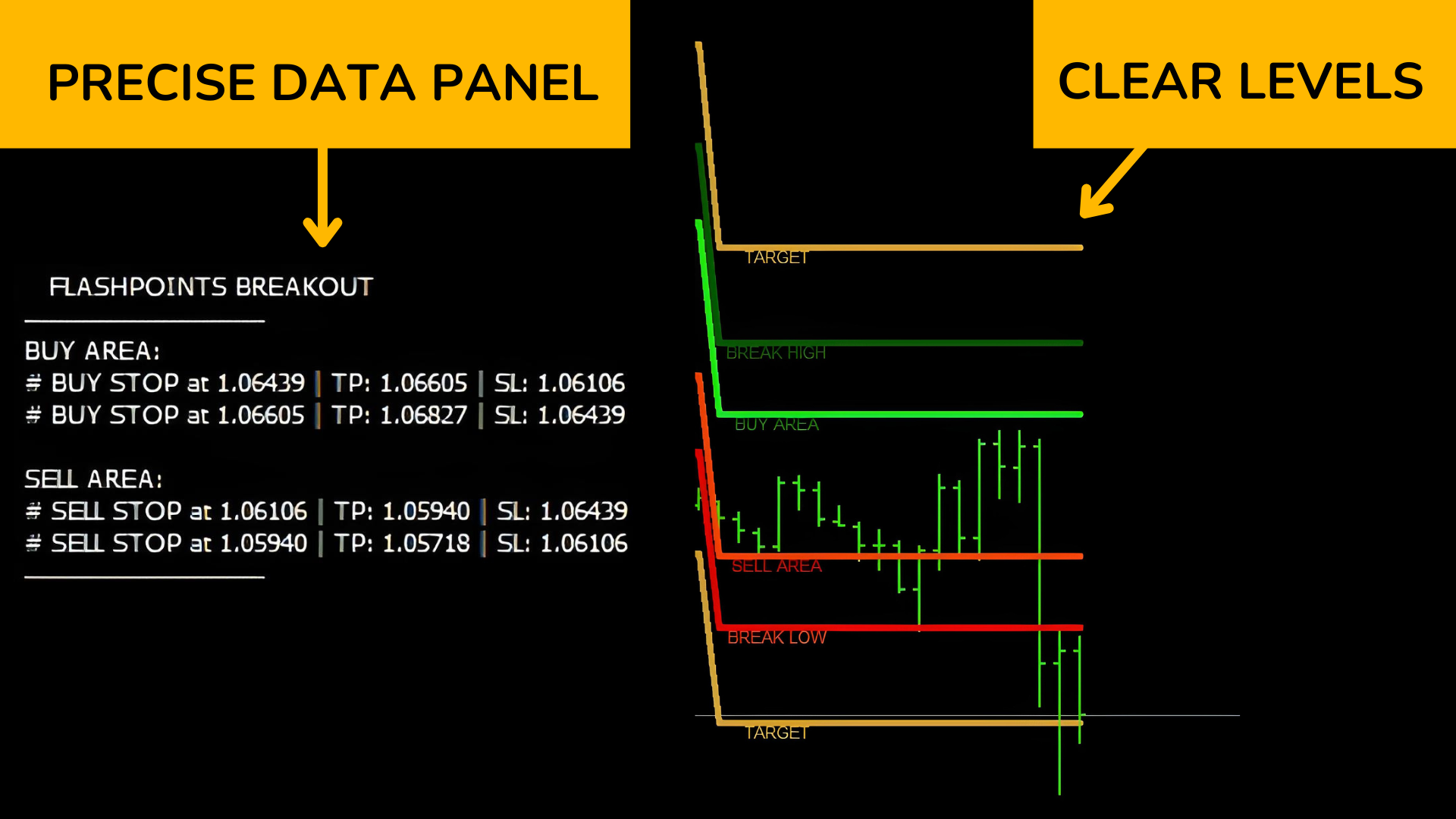
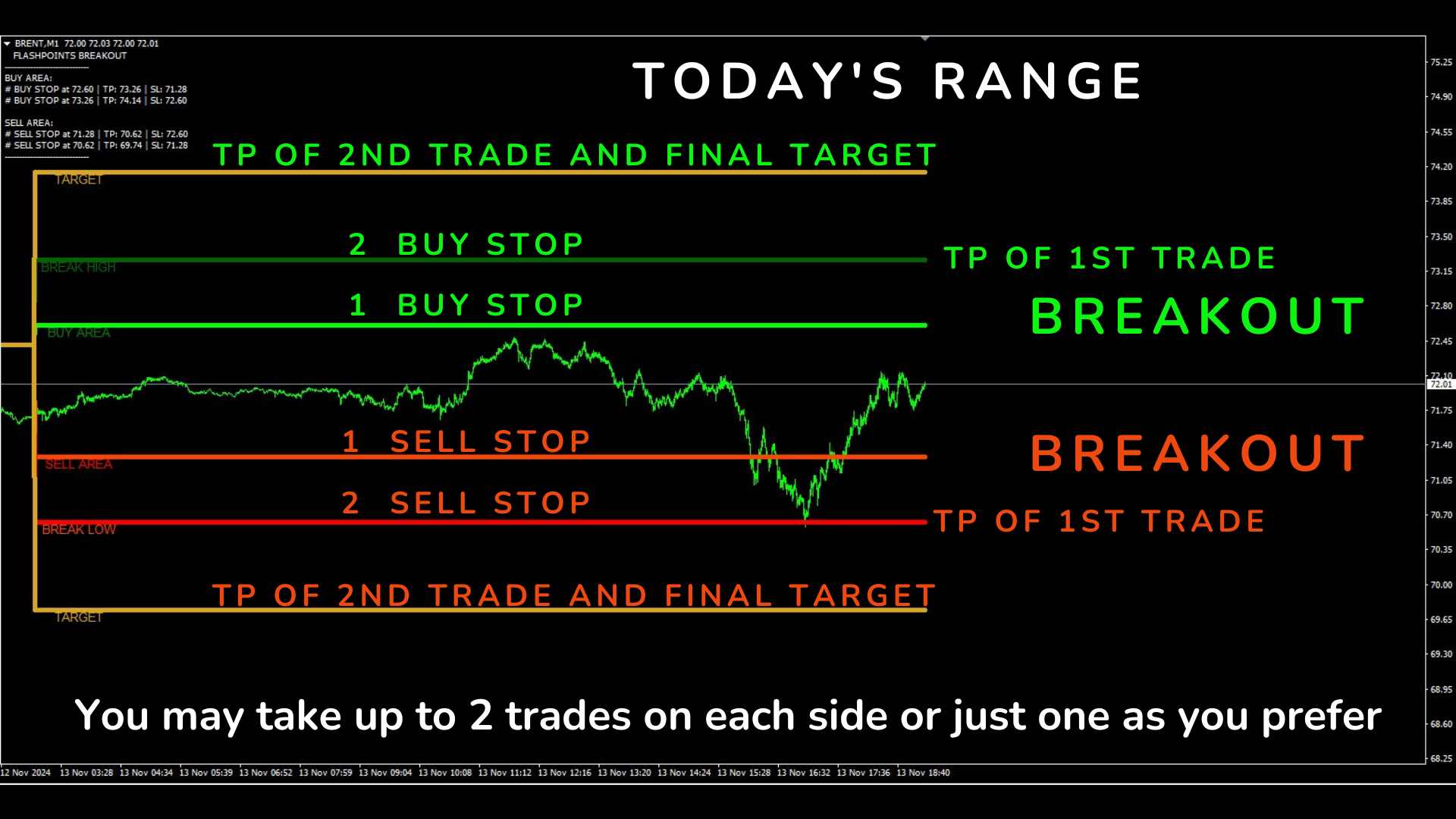
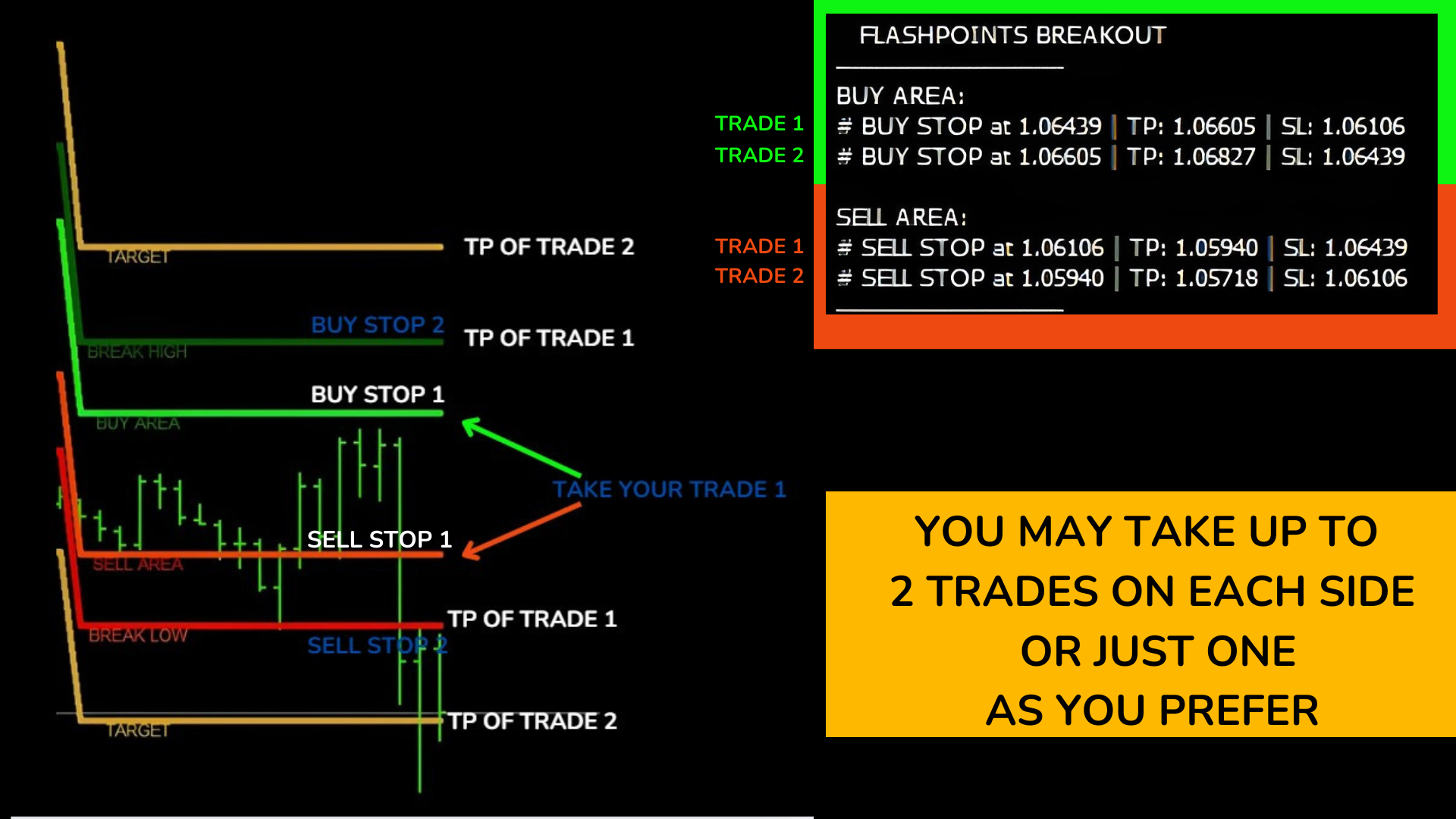
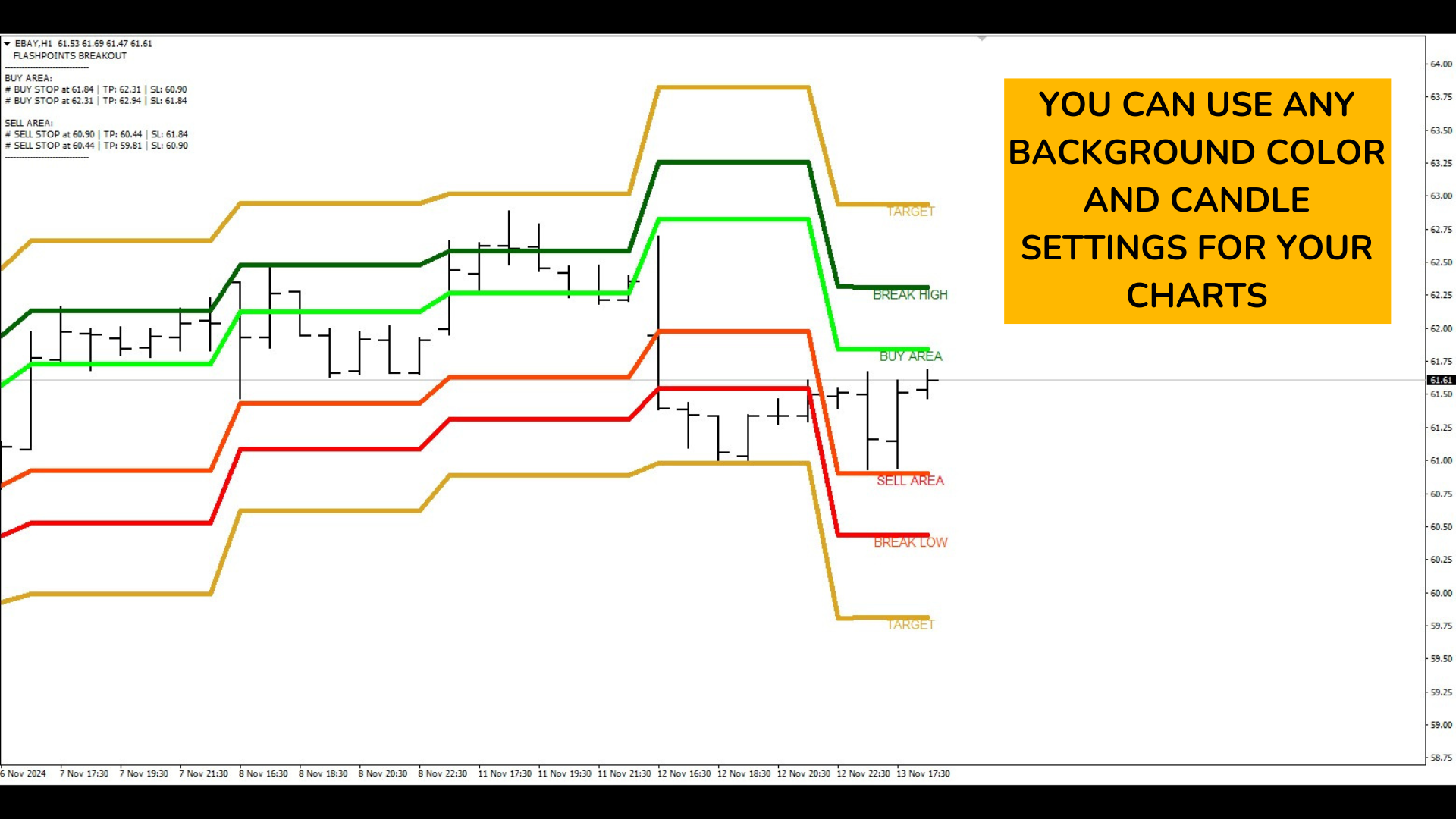
Observe the data panel at the top and place the orders — one or two for Buy and one or two for Sell. In the panel, you will find the exact entry values, SL, and TP, along with lines corresponding to these values on the chart (see images).
1. Buy Operations (BUY):
- Entry No. 1 "BUY" ==> in BUY AREA:
- Order 1: BUY STOP in BUY AREA.
- Stop Loss (SL): SELL AREA.
- Take Profit (TP): BREAK HIGH.
- Entry No. 2 "BUY" ==> in BREAK HIGH:
- Order 2: BUY STOP in BREAK HIGH.
- SL: BUY AREA.
- TP: TARGET.
2. Sell Operations (SELL):
- Entry No. 1 "SELL" ==> in SELL AREA:
- Order 1: SELL STOP in SELL AREA.
- SL: BUY AREA.
- TP: BREAK LOW.
- Entry No. 2 "SELL" ==> in BREAK LOW:
- Order: SELL STOP in BREAK LOW.
- SL: SELL AREA.
- TP: TARGET.
What happens if a pending order is not executed?
If, for example, we placed 4 orders (2 sell and 2 buy) and the price drops, the buy orders will remain pending and will not incur any cost if unexecuted. However, it is recommended to delete them at the end of the day or at the beginning of the next, as the previous day’s orders are no longer valid.
The indicator recalculates the breakout levels at the start of each day, so it is important to base new pending orders on the updated levels rather than those from the previous day.
***If you don't know how to place pending orders, just let me know and I'll help you!
Which pairs or instruments can be used?
The indicator can be used in ANY Forex pair, Metals (GOLD AND SILVER), Stocks, Indices, and cryptocurrencies (when allowed by the broker). This includes major and minor Forex pairs, commodities like gold and silver, company stocks, stock indices, and popular cryptocurrencies like Bitcoin, Ethereum, and others. You can also choose the timeframe; there is no problem!
How are SL and TP levels calculated?
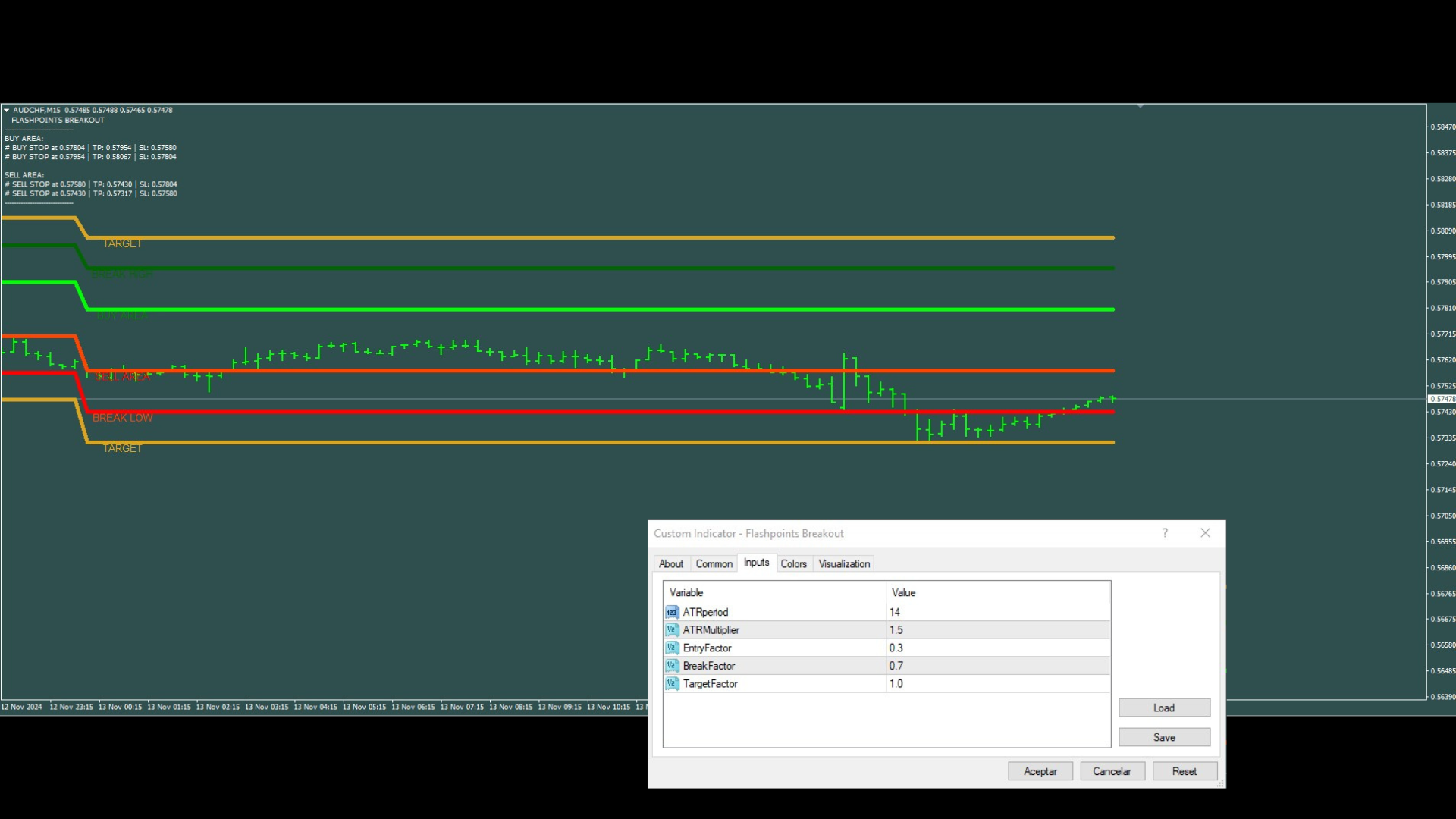
The versatility of the indicator lies in its automatic configuration of Stop Loss (SL) and Take Profit (TP) levels using the Average True Range (ATR). This feature enables it to adapt to various markets and instruments, automatically adjusting to all types of volatility without requiring manual changes. Note that the levels will vary across different pairs!Alarms?
This indicator does not include an alarm, as its purpose is to display breakout levels in advance for working with pending orders. There’s no need to worry about constant alerts; simply open multiple pairs and set pending orders with the exact values provided—this is more than sufficient.Recommendation:
Always remember to use PRO, Zero Spread, or ECN accounts. Spread has a significant impact on all strategies, as it can cause trades to open far from the intended level. For pending orders, while the spread does not affect the initial order placement, it does influence activation. When the order is activated, the difference between the Ask and Bid prices will determine the spread applied at entry. Keep in mind that during periods of high volatility, the spread may fluctuate, potentially impacting the initial results of the trade. Always check your account, and if you notice high spreads on certain pairs, simply avoid them and stick to those with lower spreads. There are plenty of pairs available, and this strategy can be applied to ALL of them!Any questions you have, do not hesitate to ask :)